1
User Manual
Color TV
32PT6441/37
26PW6341/37
30PW6341/37
Thank you for choosing Philips.
Need help fast?
Read your User Manual first for quick tips that
make using your Philips product more
enjoyable. If you have read your instructions and
still need assistance you may access our online
help at
www.p4c.philips.com
or
call 1-888-PHILIPS (744-5477)
while with your product.
Model No.:_______________
Serial No.:
3121 235 22191
Return your Product Registration Card today
to get the very most from your purchase.
Congratulations on your purchase, and welcome to the “family!”
Dear PHILIPS product owner:
Thank you for your confidence in PHILIPS.You’ve selected one of the best-built, bestbacked products available today.We’ll do everything in our power to keep you happy
with your purchase for many years to come.
As a member of the PHILIPS “family,” you’re entitled to protection by one of the most
comprehensive warranties and outstanding service networks in the industry.What’s
more, your purchase guarantees you’ll receive all the information and special offers for
which you qualify, plus easy access to accessories from our convenient home shopping
network.
Most importantly, you can count on our uncompromising commitment to your total
satisfaction.
All of this is our way of saying welcome - and thanks for investing in a PHILIPS product.
P.S. To get the most from your PHILIPS purchase, be sure to complete and
return your Product Registration Card at once.
Registering your model with PHILIPS makes you eligible for all of the valuable benefits
listed below, so don't miss out. Complete and return your Product Registration Card at
once to ensure:
*Proof of
Purchase
*Product Safety
Notification
Returning the enclosed
card guarantees that your
date of purchase will be
on file, so no additional
paperwork will be
required from you to
obtain warranty service.
By registering your product, you'll receive notification - directly from the
manufacturer - in the
rare case of a product
recall or safety defect.
Know these
*Additional
Benefits of Product
Ownership
Registering your product
guarantees that you'll
receive all of the privileges to which you're
entitled, including special
money-saving offers.
CAUTION
safetysymbols
RISK OF ELECTRIC SHOCK
DO NOT OPEN
CAUTION: TO REDUCE THE RISK OF ELECTRIC SHOCK, DO NOT
REMOVE COVER (OR BACK). NO USER-SERVICEABLE PARTS
INSIDE. REFER SERVICING TO QUALIFIED SERVICE PERSONNEL.
“bolt of lightning” indicates uninsulated material within your unit may
cause an electrical shock. For the safety of everyone in your household, please
t This
do not remove product covering.
The “exclamation point” calls attention to features for which you should read
enclosed literature closely to prevent operating and maintenance probs the
lems.
WARNING: To reduce the risk of fire or electric shock, this apparatus should not
be exposed to rain or moisture and objects filled with liquids, such as vases, should
not be placed on this apparatus.
CAUTION: To prevent electric shock, match wide blade of plug to wide slot, fully
insert.
ATTENTION: Pour éviter les choc électriques, introduire la lame la plus large de la
fiche dans la borne correspondante de la prise et pousser jusqu’au fond.
Visit our World Wide Web Site at http://www.philips.com
IMPORTANT SAFETY INSTRUCTIONS
Read before operating equipment
1.
2.
3.
4.
5.
6.
7.
8.
9.
10.
11.
12.
13.
14.
15.
16.
A.
B.
C.
D.
Read these instructions.
Keep these instructions.
Heed all warnings.
Follow all instructions.
Do not use this apparatus near water.
Clean only with a dry cloth.
Do not block any of the ventilation openings.
Install in accordance with the manufacturers
instructions.
Do not install near any heat sources such as radiators, heat registers, stoves, or other apparatus
(including amplifiers) that produce heat.
Do not defeat the safety purpose of the polarized
or grounding-type plug. A polarized plug has two
blades with one wider than the other. A grounding
type plug has two blades and third grounding
prong. The wide blade or third prong are provided
for your safety. If the provided plug does not fit
into your outlet, consult an electrician for replacement of the obsolete outlet.
Protect the power cord from being walked on or
pinched particularly at plugs, convenience receptacles, and the point where they exit from the
apparatus.
Only use attachments/accessories specified by the
manufacturer.
Use only with a cart, stand, tripod, bracket, or table specified by the manufacturer,
or sold with the apparatus. When a cart is
used, use caution when moving the cart/apparatus
combination to avoid injury from tip-over.
Unplug this apparatus during lightning storms or
when unused for long periods of time.
Refer all servicing to qualified service personnel.
Servicing is required when the apparatus has been
damaged in any way, such as power-supply cord
or plug is damaged, liquid has been spilled or
objects have fallen into apparatus, the apparatus
has been exposed to rain or moisture, does not
operate normally, or has been dropped.
This product may contain lead and mercury.
Disposal of these materials may be regulated due
to environmental considerations. For disposal or
recycling information, please contact your local
authorities or the Electronic Industries Alliance:
www.eiae.org
Damage Requiring Service - The appliance
should be serviced by qualified service personnel
when:
The power supply cord or the plug has been damaged; or
Objects have fallen, or liquid has been spilled into
the appliance; or
The appliance has been exposed to rain; or
The appliance does not appear to operate normally or exhibits a marked change in performance; or
Note to the CATV system installer: This
reminder is provided to call the CATV system
installer's attention to Article 820-40 of the NEC
that provides guidelines for proper grounding and,
in particular, specifies that the cable ground shall be
connected to the grounding system of the building,
as close to the point of cable entry as practical.
E. The appliance has been dropped, or the enclosure
damaged.
17. Tilt/Stability - All televisions must comply with
recommended international global safety standards for tilt and stability properties of its cabinet
design.
• Do not compromise these design standards by
applying excessive pull force to the front, or top,
of the cabinet which could ultimately overturn the
product.
• Also, do not endanger yourself, or children, by
placing electronic equipment/toys on the top of
the cabinet. Such items could unsuspectingly fall
from the top of the set and cause product damage
and/or personal injury.
18. Wall or Ceiling Mounting - The appliance
should be mounted to a wall or ceiling only as
recommended by the manufacturer.
19. Power Lines - An outdoor antenna should be
located away from power lines.
20. Outdoor Antenna Grounding - If an outside
antenna is connected to the receiver, be sure the
antenna system is grounded so as to provide some
protection against voltage surges and built up static charges.
Section 810 of the National Electric Code,
ANSI/NFPA No. 70-1984, provides information
with respect to proper grounding of the mast and
supporting structure, grounding of the lead-in wire
to an antenna discharge unit, size of grounding connectors, location of antenna-discharge unit, connection to grounding electrodes, and requirements for
the grounding electrode. See Figure below.
21. Object and Liquid Entry - Care should be taken
so that objects do not fall and liquids are not
spilled into the enclosure through openings.
a) Warning: To reduce the risk of fire or electric
shock, this apparatus should not be exposed to rain
or moisture and objects filled with liquids, such as
vases, should not be placed on this apparatus.
22. Battery Usage CAUTION - To prevent battery
leakage that may result in bodily injury, property
damage, or damage to the unit:
• Install all batteries correctly, with + and aligned as marked on the unit.
• Do not mix batteries (old and new or carbon and
alkaline, etc.).
• Remove batteries when the unit is not used for a
long time.
Example of Antenna Grounding as per
NEC - National Electric Code
GROUND CLAMP
ANTENNA LEAD
IN WIRE
ANTENNA
DISCHARGE
UNIT
(NEC SECTION 810-20)
GROUNDING
CONDUCTORS
(NEC SECTION 810-21)
GROUND CLAMPS
ELECTRIC SERVICE EQUIPMENT
POWER SERVICE GROUNDING
ELECTRODE SYSTEM (NEC ART 250, PART H)
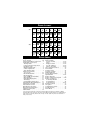
PANEL LAYOUT
Side 1
MODEL
REGISTRATION
INFORMATION
PANEL PANEL PANEL PANEL PANEL PANEL
2
3
SAFETY PANEL PANEL
INFO
4
5
8
9
14
15
PANEL PANEL PANEL PANEL
10
11
16
17
PANEL PANEL PANEL PANEL PANEL PANEL PANEL
1
COVER
Side 2
LIMITED
WARRANTY
(Panel 38)
6
7
12
13
18
19
PANEL PANEL PANEL PANEL PANEL PANEL
20
21
26
27
32
33
PANEL PANEL PANEL PANEL PANEL PANEL
22
23
28
29
34
35
PANEL PANEL PANEL PANEL PANEL PANEL
24
25
30
31
36
37
Panel
Sequence
and
Panel Index
PANEL INDEX
Subject
Panel No.
Active Control . . . . . . . . . . . . . . . . .20
Antenna/Cable Basic Connection . . .1
Audio/Video Connections
AV Input Jacks . . . . . . . . . . . . . . . .4
Component Video Input Jacks . . . .7
Headphone Jack . . . . . . . . . . . . . . .5
Monitor Output Jacks . . . . . . . . . . .8
S-Video Input Jacks . . . . . . . . . . . .6
Side AV Input Jacks . . . . . . . . . . . .5
AutoLock™ Controls
Access Code . . . . . . . . . . . . . . . . .22
Block All Channels . . . . . . . . . . . .24
Block Channels . . . . . . . . . . . . . . .23
Clear All Blocked Channels . . . . .24
Movie Ratings . . . . . . . . . . . . . . . .25
Other Blocking Options . . . . . . . .27
TV Ratings . . . . . . . . . . . . . . . . . .26
Understanding AutoLock™ . . . . .21
Automatically Programming TV . .13
AutoPicture™ Control . . . . . . . . . .30
AutoSound™ Control . . . . . . . . . . .30
Basic Remote Operation . . . . . . . . . .3
Basic Television Operation . . . . . . . .3
Cable Box Connection . . . . . . . . . . .2
Channel Edit . . . . . . . . . . . . . . . . . .14
Subject
Panel No.
Timer Controls
Activate Control . . . . . . . . . . . .18-19
Clock . . . . . . . . . . . . . . . . . . . .18-19
Display Control . . . . . . . . . . . .18-19
Specific Channel . . . . . . . . . . .18-19
Start or Stop Time . . . . . . . . . .18-19
Closed Caption Control . . . . . . . . . .29
Demo Mode . . . . . . . . . . . . . . . . . . .17
Format Control . . . . . . . . . . . . . . . .28
Language Controls . . . . . . . . . . . . .11
Limited Warranty . . . . . . . . . . . . . .38
Picture Menu Controls . . . . . . . . . .15
QuadraSurf™ . . . . . . . . . . . . . . .31-32
Remote Batteries . . . . . . . . . . . . . . . .3
Remote Button Descriptions . . . .9-10
Remote Control Use
Code Entry Method . . . . . . . . . . . .33
Search Method . . . . . . . . . . . . . . .34
Code Entry List . . . . . . . . . . . .35-37
Rotation Controls . . . . . . . . . . . . . .17
Sleeptimer . . . . . . . . . . . . . . . . . . . .29
Sound Menu Controls . . . . . . . . . . .16
Troubleshooting . . . . . . . . . . . . . . .37
Tuner Mode . . . . . . . . . . . . . . . . . . .12
Active Control, AutoPicture, AutoSound, and Incredible Surround are trademarks of Philips
Consumer Electronics Company. Copyright 2001 Philips Consumer Electronics.*Manufactured
under license from Dolby Laboratories. “Dolby” and the double-D symbol are trademarks of
Dolby Laboratories.
1
Y
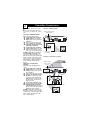
BASIC ANTENNA AND CABLE CONNECTIONS
Antenna Connection
our home’s signal input might
come from a single (75 ohm)
round cable, a Converter Box, or from
an antenna. In either case the connecCombination
tion to the TV is very easy.
VHF/UHF Antenna
(Outdoor or Indoor)
ANT 75‰
Monitor out
AV1 in
AV2 in
VIDEO
Y
1
2
L/Mono
If your Cable TV signal or
Antenna signal is a round
cable (75 ohm) then you're
ready to connect to the TV.
If your antenna has flat twinlead wire (300 ohm), you first
need to attach the antenna wires
to the screws on a 300 to 75 ohm
adapter.
If you have a Cable Converter
Box: Connect the Cable TV signal to the Cable Signal IN(put)
plug on the Converter.
AUDIO
Pb
S-VIDEO
R
Pr
COMPONENT VIDEO INPUT
300 to 75Ω
Adapter
1
Back of TV
2
75 ⍀
Twin Lead
Wire
Round Cable
75Ω
Connect the Cable TV cable or
Direct Cable Connection
Antenna cable (or 300 to 75 ohm
adapter) to the 75Ω plug on the
TV.
Cable signal
If you have a Cable Converter
coming from
Cable Company
Box: Connect the OUT(put) plug
from the Converter to the 75Ω
plug on the TV.
1
ANT 75‰
Monitor out
AV1 in
AV2 in
VIDEO
Y
L/Mono
AUDIO
Pb
S-VIDEO
R
Pr
COMPONENT VIDEO INPUT
Back of TV
75 ⍀
75Ω Round
Coaxial Cable
HELPFUL HINT
After using the AutoProgram Control,
press the CH + and – buttons to scroll
through all the channels stored in the
television’s memory.
Jack Panel
Back of TV
2
2
CABLE BOX CONNECTIONS
f your cable signal uses a cable
Isteps
box or decoder, follow the easy
below to complete the connection.
Cable Box (w/RF In/Outputs):
Cable Signal IN from the
Cable Company
Cable Box (w/RF In/Outputs):
This connection will be mono.
Connect the Cable Company
supplied cable to the signal
IN(put) plug on the back of the
Cable Box.
Jack Panel Back of Cable Box
Using a separate round coaxial
cable, connect one end to the
OUT(put) (TO TV) plug on the
75 ⍀
back of the Cable Box.
Connect the other end of the
round coaxial cable to the 75Ω
input on the back of the television. Screw it down finger tight.
Round 75Ω
Jack Panel Back of TV
NOTE: If applicable, set the OUTCoaxial Cable
PUT CHANNEL SWITCH on the
back of the cable box to CH 3 or 4.
Tune the TV to the same channel and
change channels at the cable box. In Cable Box (w/Audio/Video Outputs):
some cases, the cable box will automatically tune to either channel 3 or 4,
change channels until the picture
24
Cable Signal IN
appears.
Cable
Box
with A/V Outputs
from
the
Cable
Cable Box (w/Audio/Video
Company
Outputs):
This connection will supply Stereo
sound.
Connect the Cable Company
supplied cable to the cable signal IN(put) plug on the back of
the Cable Box.
Audio Cables
Video Cable
Using a RCA type Video Cable,
L (White) & R (Red)
(Yellow)
connect one end of the cable to
the Video (or ANT, your cable
box may be labeled differently)
Out jack on the cable box and
the other end to the AV1 Video
Input on the TV.
Connect one end of the Audio
Left and Right Cable to the left
and right Audio Out L & R
Jack Panel Back of TV
jacks on the cable box. Connect
the other end to the AV1 Audio L
& R Input jacks on the TV.
NOTE: Use the CH+ or CH- on the
TV remote control to tune to the AV1
channel for the cable box signal. Once
tuned, change channels at the cable
box, not the television.
1
2
3
1
2
CABLE
IN
TO
TV/VCR
AUDIO IN
SPDIF
R
DVD-D OUT
IR
USB
IN
VIDEO
OUT
L
S-VIDEO
Y
AUDIO OUT
Pb
Pr
OPTICAL
SPDIF
TV
PASSCARD
3
ANT 75‰
AV2 in
Pb
S-VIDEO
R
Pr
COMPONENT VIDEO INPUT
AUDIO IN
TO
TV/VCR
CABLE
IN
R
DVD-D OUT
IR
SPDIF
VIDEO
OUT
S-VIDEO
Y
AUDIO OUT
USB
IN
L
Pb
Pr
OPTICAL
SPDIF
TV
PASSCARD
6
Monitor out
AV2 in
AV1 in
5
VIDEO
Y
L/Mono
6
AV1 in
Y
AUDIO
4
4
5
Monitor out
VIDEO
L/Mono
AUDIO
Pb
S-VIDEO
R
Pr
COMPONENT VIDEO INPUT
ANT 75‰
Monitor out
AV1 in
AV2 in
VIDEO
Y
L/Mono
AUDIO
Pb
S-VIDEO
R
Pr
COMPONENT VIDEO INPUT
3
1
2
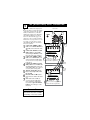
BASIC TV AND REMOTE CONTROL OPERATION
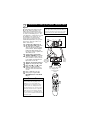
Press the POWER button to
turn the TV ON.
Note: You can also press any
button on the front of the TV to
turn the TV ON.
Press the VOLUME + button
to increase the sound level, or
the VOLUME – button to
lower the sound level.
Pressing both buttons at the
same time will display the onscreen menu. Once in the
menu, use these buttons to
make adjustments or selections.
3
4
+
VOLUME
+
–
CHANNEL
–
2 3
POWER
1
Remote Sensor - Sensor for
activating remote control commands when the remote is
used to control the TV.
Standby Light Indicator - Red light will show
when in the Standby Mode. Press the Power
button to return the TV to it’s active state.
Press the CHANNEL UP + or
DOWN – button to select TV
channels.
Point the remote control
toward the remote sensor window on the TV when operating
the TV with the remote.
4
VO
L
REMOTE CONTROL
T
o load the supplied batteries
into the remote:
1. Remove the battery compartment lid on the back of the remote.
2. Place the batteries (2-AA) in
the remote. Be sure the (+) and (-)
ends of the batteries line up correctly (inside of case is marked.)
3. Reattach the battery lid.
Back of Remote
Battery Compartment
2-AA Batteries
Battery Lid
4
AV (AUDIO/VIDEO) INPUT CONNECTION
T
he TV’s audio/video input jacks
are for direct picture and sound
connections between the TV and a
VCR (or similar device) that has
audio/video output jacks. Both the
AV1 and AV2 Input Jack connections are shown on this page, but
either one can be connected alone.
Follow the easy steps below to connect your accessory device to the
AV1 and AV2 IN Jacks located on
the back of the TV.
Connect the VIDEO (yellow)
cable to the VIDEO AV1 IN (or
AV2 IN) jack on the back of the
TV.
Connect the AUDIO (red and
white) cables to the AUDIO
(left and right) AV1 IN (or AV2
in) jacks on the rear of the TV.
Connect the VIDEO (yellow)
cable to the VIDEO OUT jack
on the back of the VCR (either
one or two) or accessory device
being used.
Connect the AUDIO (red and
white) cables to the AUDIO (left
and right) OUT jacks on the rear
of the VCR (either one or two) or
accessory device being used.
Turn the VCR (either one or
two) or accessory device and
the TV ON.
Press the CH+ or CH- buttons
set the TV to its AV1or AV2 channel.
With either of the VCRs (or
accessory devices) ON and a
prerecorded tape (CD, DVD,
etc.) inserted, press the PLAY
button to view the tape on the
television.
1
2
3
4
5
6
7
HELPFUL HINT
Audio and video cables are not supplied with the TV, but are available
from Philips or electronics retailers.
Back of TV
1
Monitor out
1
AV2 in
AV1 in
VIDEO
Y
L/Mono
Pb
AUDIO
S-VIDEO
R
Pr
COMPONENT VIDEO INPUT
AV1
Connection
ANT/CABLE
OUT
2
4
S-VIDEO
OUT
R
L
AUDIO OUT
VIDEO
OUT
2
3
Back of VCR
7
VCR One (or
5 accessory
device) (Equipped with
Audio and Video Output Jacks)
Video In
(Yellow)
AV2 Connection
ANT/CABLE
OUT
4
S-VIDEO
OUT
R
L
AUDIO OUT
Audio In
(Red and
White)
VIDEO
OUT
3
7
VCR Two (or
5 Video
accessory device) (Equipped with
and Audio Output Jacks)
5
A
SIDE AV CONNECTIONS
udio and Video Side Inputs are
available for a quick connection of a VCR, to playback video
from a camera, or attach a gaming device. Use the AV button on
the remote control to tune these
inputs.
1
2
Connect the video (yellow)
cable from the Video output
on the Camera (or accessory
device) to the Video (yellow)
Input located on the SIDE of
the TV.
For Stereo Devices: Connect
the audio cable (red and
white) from the Audio Left
and Right Outputs on the
Camera to the Audio In
(white) jack on the SIDE of
the television.
For Mono Devices: Connect
one end of the audio cable
from the Audio Out jack on
the device to the Audio In
(white) jack on the SIDE of
the television.
3
4
5
Front
3
Side Jack panel
of TV
Video
Cable
VIDEO
L
AUDIO
R
3
5
VIDEO
AUDIO
LEFT RIGHT
S-VIDEO
Audio
Cables
Press the PLAY button
on the accessory device to
view playback, or to access
the accessory device (camera,
gaming unit, etc.).
Optional
Headphones
Jack Panel of Accessory Device
Turn the TV and the accessory device ON.
Press the CH+ or CH- buttons on the remote control to
tune the TV to the side input
jacks. “Front” will appear on
the TV screen.
1
2
4
VOL
6
T
S-VIDEO (S-VHS) INPUT CONNECTIONS
he S(uper)-Video connection on
the rear of the TV can provide
you with better picture detail and
clarity for the playback of accessory
sources such as DBS (digital broadcast satellite), DVD (digital video
discs), video games, and S-VHS VCR
(video cassette recorder) tapes than
the normal antenna picture connections.
NOTE: The accessory device must
have an S-VIDEO OUT(put) jack in
order for you to complete the connection on this page.
1
Connect one end of the SVIDEO CABLE to the SVIDEO jack on the back of the
TV. Then connect one end the
AUDIO (red and white)
CABLES to the AV1 in AUDIO
L and R (left and right) jacks on
the rear of the TV.
2
Connect other end of the SVIDEO CABLE to the S-VHS
(S-Video) OUT jack on the back
of the VCR. Then connect the
other ends of the AUDIO (red
and white) CABLES to the
AUDIO (left and right) OUT
jacks on the rear of the VCR.
3
4
Turn the VCR and the TV
ON.
5
Now your ready to place a prerecorded video tape in the VCR
and press the PLAY button.
Press the CH + or CH – buttons on the remote to scroll the
channels until SVHS appears in
the upper left corner of the TV
screen.
Back of TV
1
Monitor out
1
AV2 in
AV1 in
VIDEO
Y
L/Mono
Pb
AUDIO
S-VIDEO
R
Pr
COMPONENT VIDEO INPUT
Audio Cables
(Red &
White)
S-Video
Cable
L
R
AUDIO OUT
VIDEO
OUT
S-VIDEO
OUT
ANT/CABLE
OUT
2
2
3
VCR or External
Accessory Device
(with S-Video
Output)
5
4
VOL
7
COMPONENT VIDEO (CVI) INPUT CONNECTIONS
omponent Video inputs provide
C
for the highest possible color
and picture resolution in the play-
back of digital signal source material, such as with DVD players. The
color difference signals (Pb, Pr) and
the luminance (Y) signal are connected and received separately,
which allows for improved color
bandwidth information (not possible
when using composite video or SVideo connections).
Connect the Component (Y,
Pb, Pr) Video OUT jacks from
the DVD player (or similar
device) to the (Y, Pb, Pr) in(put)
jack on the TV. When using the
Component Video Inputs, it is
best not to connect a signal to the
AV in Video Jack.
Connect the red and white
AUDIO CABLES to the Audio
(left and right) output jacks on
the rear of the accessory device
to the Audio (L and R) AV1 in
Input Jacks on the TV.
Turn the TV and the DVD (or
digital accessory device) ON.
Press the CH + or CH – buttons to scroll the available
channels until CVI appears in
the upper left corner of the TV
screen.
Insert a DVD disc into the
DVD player and press the
PLAY button on the DVD
Player.
1
The CVI connection will be dominate over the AV1
in Video Input. When a Component Video Device is
connected as described, it is best not to have a video
signal connected to the AV1 in Video Input jack.
Back of TV
Monitor out
5
2
Y
L/Mono
1
Pb
AUDIO
S-VIDEO
R
Pr
COMPONENT VIDEO INPUT
2
3
4
AV2 in
AV1 in
VIDEO
COMP VIDEO
Y
S-VIDEO
VIDEO
AUDIO
OUT
OUT
OUT
R
Pb
Component
Video Cables
(Green, Blue,
Red)
Pr
3
Accessory Device
Equipped with
Component Video
Outputs
L
5
HELPFUL HINT
The description for the component video
connectors may differ depending on the
DVD player or accessory digital source
equipment used (for example, Y, Pb, Pr; Y,
B-Y, R-Y; Y, Cr, Cb). Although abbreviations and terms may vary, the letters b and r
stand for the blue and red color component
signal connectors, and Y indicates the luminance signal. Refer to your DVD or digital
accessory owner’s manual for definitions and
connection details.
4
VOL
Audio
Cables
(Red &
White)
8
MONITOR OUT(PUT) CONNECTIONS
AUDIO SYSTEM CONNECTION:
he Audio/Video (Monitor) Output
jacks are great for recording with
a VCR or used to connect an external audio system for better sound
reproduction.
AUDIO SYSTEM
CONNECTION:
Connect one end of the
R(ight) and L(eft) AUDIO
(Monitor Out) jacks on the TV
Back of TV
to the R and L audio input jacks
Audio Cables
on your amplifier or sound sys(Red and White)
tem. Set the audio system’s volume to a normal listening level.
Turn the TV and audio system ON. To adjust the volume
on the audio system, you will
need to change the volume at
the external audio system, not
the television.
SECOND VCR CONNECTION:
NOTE: Refer to panel number 4 for SECOND VCR CONNECTION:
the proper hookup of the first VCR.
Back of TV
Follow the instructions on how to
tune to the AV1 channel to view a
pre-recorded tape.
The following steps allow you to
connect a second VCR to record
the program while your watching
it.
Connect one end of the yellow Video
Audio
Video Cable to the Monitor
Cable
Cables
Out VIDEO plug. Connect the
other end to the VIDEO IN plug
on the second VCR.
Connect one end of the red
and white Audio cable from
the Monitor Out AUDIO L and
R plugs on the TV to the
AUDIO IN plugs on the VCR.
1st VCR
Turn the Second VCR ON,
(refer to panel 4 for
insert a VHS tape and it’s
proper connection)
2nd VCR with Audio and
ready to record what’s being
Video Input Jacks
viewed on the TV screen.
T
Monitor out
AV2 in
AV1 in
VIDEO
Y
L/Mono
Pb
AUDIO
S-VIDEO
1
R
Pr
COMPONENT VIDEO INPUT
R
2
1
L
AUX/TV INPUT
PHONO INPUT
2
3
Monitor out
AV1 in
AV2 in
VIDEO
Y
L/Mono
AUDIO
Pb
S-VIDEO
R
Pr
COMPONENT VIDEO INPUT
3
ANTENNA
IN
OUT
OUT
ANTENNA
OUT
VIDEO
L AUDIO R
IN
IN
4
5
5
OUT
4
R AUDIO
IN
L
OUT
ANTENNA
IN
VIDEO
ANTENNA
OUT
IN
9
REMOTE CONTROL BUTTON DESCRIPTIONS
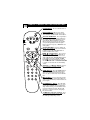
QUADRASURF Buttons (Red, Green,
Yellow, Blue) Allows you to store and
surf up to 10 channels you choose for
each colored button.
SMILEY Button - Press to add channels
to the “QuadraSurf” lists. Works with all
colored buttons.
TV/VCR/ACC Mode Switch - Slide to
position of TV to control TV functions,
VCR to control VCR, and ACC for Cable
Converter, DBS, DVD, etc., functions.
AUTO SOUND Button - Press repeatedly to choose from different factory predefined sound settings. Choose from
Personal (how you set the Sound Menu
options), Voice (for programming with
speaking only), Music (for musical type
programs such as concerts), or Theatre
(used when watching movies).
MENU Button - Press to display the onscreen menu. Also can be used to back
out of the on-screen menu until it disappears from the TV’s screen.
VOL(ume) + or - Buttons - Press the
VOL + button to increase the TV’s sound
level. Press the VOL – button to decrease
the TV’s sound level.
MUTE Button - Press the mute button to
eliminate the sound being heard from the
TV. “MUTE” will be displayed on the
TV’s screen. Press again to restore the
TV’s volume to it’s previous level. pressing this button for 3-4 seconds will activate the Demo Mode.
CLOCK (TV/VCR) Button - Press to
display the Timer menu when in TV
mode.
0 VCR Record Button - Press to start a
VCR recording of a TV program.
CC Button - Press to activate the Closed
Captioning options. Repeatedly pressing
the CC button will scroll the available
options on the TV screen.
VOL
10
REMOTE CONTROL BUTTON DESCRIPTIONS
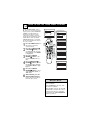
POWER Button - Press to turn the TV on
or off.
FROWNIE Button - Allows you to delete
channels from the “Quadra Surf” lists for the
colored buttons. Works with all colored buttons.
AUTO PICTURE Button - Press repeatedly to
choose from 5 different factory predefined picture settings. Choose from Personal (how you
set the Picture Menu Adjustment controls),
Movies (for movies), Sports (for any sporting
event), Weak Signal (used when the signal
being received is not great), or Multimedia (for
video games).
STATUS/EXIT Button - Press to display the
current channel number. If the on-screen menu
is displayed, press the Status/Exit button of
remove it from the TV’s screen.
VOL
2, 9,, 5,, and 6, Buttons - Press to navigate, select, and adjust controls within the onscreen menu. These buttons can also be used
with a VCR when the TV/VCR/ACC Switch is
in the VCR position. Press Play 2, Stop 9,
5, or Fast Forward 6, Also, you can
Rewind5
use the CURSOR UP 2 or CURSOR DOWN 9
to activate or deactivate the screen formatting
control.
CH(annel) + or CH(annel)- Buttons - Press to
select channels in ascending or descending
order.
SLEEP BUTTON - Press the SLEEP button to
set the the TV to automatically turn itself off
after a set period of time. Press repeatedly to
select 15, 30, 45, 60, 90, 120, 180, or 240 minutes.
; PAUSE Button - Press to pause the viewing
of a prerecorded video. The picture will freeze
on the screen until the Play or Pause buttons are
pressed again.
NUMBERED (0-9) Buttons - Press the numbered buttons to select TV channels or to enter
certain values within the on-screen menu. For
single channel entries, press the numbered button for the channel you desire. The TV will
pause for a second or two before changing to
the chosen channel.
A/CH Button (Alternate Channel) - Press
to toggle between the last viewed channel and
the channel presently being viewed.
11
F
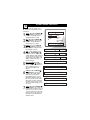
HOW TO USE THE LANGUAGE CONTROL
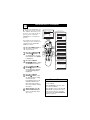
or French and Spanish speaking
TV owners an onscreen
Language option is present. With the
Language control you can set the
TV’s on-screen menu to be shown in
English, French, or Spanish.
1
2
Press the MENU button on
the remote control to show the
onscreen menu.
3
4
Press the CURSOR RIGHT
6 button to display the
Install menu features.
Press the CURSOR UP 2 or
DOWN 9 buttons to scroll
though the onscreen menu until
the word Install is highlighted.
Press the CURSOR UP 2 or
DOWN 9 buttons to scroll
through the Install features until
the word Language is highlighted.
5
Press the CURSOR RIGHT
6 button repeatedly to select
English, Francais (French), or
Español (Spanish).
6
When finished, press the
STATUS/EXIT button to
remove the menu from the
TV’s screen.
HELPFUL HINT
The Language control only
makes the TV’s on-screen Menu
items appear in English, Spanish,
or French text.
It does not change the other onscreen text features such as
Closed Caption (CC) TV shows.
Main
Picture
Sound
Features
Install
Main
Picture
Sound
Features
Install
2
4 6
1
2
4
Brightness
Color
Picture
Sharpness
Tint
More...
Language
Tuner Mode
Auto Program
Channel Edit
Install
Language
Tuner Mode
Auto Program
Channel Edit
English
OR
VOL
3
5
Instalar
Idioma
Sinton a
Auto Programa
Editar Canal
Espa ol
OR
Installation
Langue
Mode synt.
Progr. auto.
diter progr.
Fran ais
12
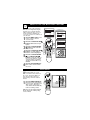
HOW TO USE THE TUNER MODE CONTROL
he TUNER MODE control
T
allows you to change the TV’s
input signal to either ANTENNA,
Main
Picture
Sound
Features
Install
CABLE, or AUTO mode. It’s
important for the TV to know
what type of signal to look for
(Cable TV or an Antenna). In the
AUTO mode, when the AUTO
PROGRAM feature is activated,
the TV will automatically choose
the correct mode.
1
2
3
4
5
6
Press the MENU button on
the remote to show the
onscreen menu.
Press the CURSOR UP 2
or DOWN 9 buttons to
scroll through the onscreen
menu until the word Install
is highlighted.
Press the CURSOR
RIGHT 6 button to display the Install menu features.
Press CURSOR UP 2 or
DOWN 9 buttons to scroll
the Install features until the
words Tuner Mode is highlighted.
Brightness
Color
Picture
Sharpness
Tint
More...
2
4
1
VOL
Main
Picture
Sound
Features
Install
6
3
5
2
4
Language
Tuner Mode
Auto Program
Channel Edit
Install
Language
Tuner Mode
Auto Program
Channel Edit
English
Antenna
OR
Install
Language
Tuner Mode
Auto Program
Channel Edit
English
Cable
OR
Install
Language
Tuner Mode
Auto Program
Channel Edit
English
Auto
Press the CURSOR
RIGHT 6 button to select
either Antenna, Cable, or
Auto mode.
When finished, press the
STATUS /EXIT button to
remove the onscreen menu
from the TV’s screen.
HELPFUL HINTS
When CABLE is selected, channels 1125 are available.
When ANTENNA is selected, channels 2-69 are available.
When AUTO is selected, the TV will
automatically set itself to the correct
mode based on the type of signal it
detects when the AUTO PROGRAM
feature is activated.
13
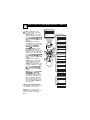
AUTOMATICALLY PROGRAM
Y
our TV can automatically set
itself for local area (or Cable
TV) channels. This makes it easy
for you to select only the TV stations in your area when the
CHANNEL (+), (–) buttons are
pressed.
Note: Make sure the antenna or
cable signal connection has been
completed before AUTO PROGRAM is activated.
1
2
3
4
5
6
Press the MENU button on
the remote to show the
onscreen menu.
Press the CURSOR UP 2
or DOWN 9 buttons to
scroll through the onscreen
menu until the word Install
is highlighted.
Press the CURSOR
RIGHT 6 button to display
the Install menu features.
Main
Picture
Sound
Features
Install
Main
Picture
Sound
Features
Install
2
4 6
1
2
4
Brightness
Color
Picture
Sharpness
Tint
More...
VOL
3
5
Language
Tuner Mode
Auto Program
Channel Edit
Install
Language
Tuner Mode
Auto Program
Channel Edit
Auto Program
Channel
12
Auto Program
Channel
13
Auto Program
Channel
14
Press CURSOR UP 2 or
DOWN 9 buttons to scroll
the Install features until the
words Auto Program are
highlighted.
Press the CURSOR
RIGHT 6 button to start
the Auto Program scanning
of channels. Auto
Programming will store all
available channels in the
TV’s memory then tune to
the lowest available channel
when done.
When finished, press the
STATUS /EXIT button to
remove the menu from the
TV’s screen.
HELPFUL HINTS
When CABLE is selected, channels 1125 are available.
When ANTENNA is selected, channels 2-69 are available.
When AUTO is selected, the TV will
automatically set itself to the correct
mode based on the type of signal it
detects when the AUTO PROGRAM
feature is activated.
14
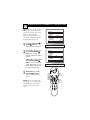
CHANNEL EDIT
hannel Edit makes it easy for you to
C
ADD or DELETE channels from the
list of channels stored in the TV’s memory.
1
2
3
4
5
6
7
8
9
Main
Picture
Sound
Features
Install
Press the MENU button on the
remote control to show the onscreen
menu.
Press the CURSOR UP 2 or
DOWN 9 buttons to scroll though
the onscreen menu until the word
Install is highlighted.
Press the CURSOR RIGHT 6
button to display the Install menu
features.
Press the CURSOR UP 2 or
DOWN 9 buttons to scroll
through the Install features until the
words Channel Edit are highlighted.
Press the CURSOR RIGHT 6
button to display the Channel Edit
options.
With the Channel Edit options displayed, and Channel highlighted;
you can use the cursor buttons to
scroll through all available channels
that you wish to add (skipped OFF)
or delete (Skipped ON) from the
TV’s memory. You can also use the
NUMBERED buttons to go directly
to a specific numbered channel that
you want to add or skip. Or, you can
also use the CH+ or CH- to quickly
scan through the channels that have
not been skipped.
1
2
4
7
6
VOL
Brightness
Color
Picture
Sharpness
Tint
More...
2
4 9
3
5
8
6
8
Main
Picture
Sound
Features
Install
Install
Language
Tuner Mode
Auto Program
Channel Edit
Language
Tuner Mode
Auto Program
Channel Edit
Channel
Skipped
Channel Edit
Channel
Skipped
12
Channel Edit
Channel
Skipped
On
Channel Edit
Channel
Skipped
Off
Using the CURSOR DOWN 9
button, scroll the menu to highlight
the word SKIPPED.
Now use the CURSOR RIGHT
6 button to toggle between On
or Off. If ON is selected the channels is skipped when scrolling channels with the CH+ or CH- buttons. If
OFF is selected the channels is not
skipped when scrolling channels
with the CH+ or CH- buttons.
When finished, press the STATUS/EXIT button to remove the
menu from the screen.
HELPFUL HINTS
An “X” appearing in front of
any channel will indicate that
channel has skip on. When the
CH + or CH - buttons are used,
those channels will be skipped.
15
PICTURE MENU CONTROLS
o adjust your TV picture controls, select a channel and use
T
the Picture Menu Controls listed
below:
1
Brightness Control - Press the
CURSOR 6 or 5 buttons
until the darkest parts of the
picture are as bright as you prefer.
2
3
4
5
6
Color Control - Press the
CURSOR 6 or 5 buttons
to add or eliminate color.
7
8
Picture Control - Press the
CURSOR 6 or 5 buttons
until lightest parts of the picture
show good detail.
Sharpness Control - Press the
CURSOR 6 or 5 buttons
to improve detail in the picture.
Tint Control - Press the
CURSOR 6 or 5 buttons
to obtain natural skin tones.
Color Temp Control - Press
the CURSOR 6 or 5 buttons to select Normal, Cool, or
Warm picture preferences.
(Normal will keep the whites,
white; Cool will make the
whites, bluish; and Warm will
make the whites, reddish.)
DNR Control - Press the
CURSOR 6 or 5 buttons
to turn DNR On or Off.
Dynamic Noise Reduction
helps to eliminate “noise” from
the picture.
Contrast + Control - Press the
CURSOR 6 or 5 buttons
to toggle the control On or
OFF. The Contrast + control
helps to “sharpen” the picture
quality. The black portions of
the picture become richer in
darkness and the whites
become brighter.
Picture
Brightness
Color
Picture
Sharpness
Tint
Color Temp.
50
Brightness
65
Color
50
Picture
50
Sharpness
50
Tint
Color Temp.
DNR
0
Normal
Warm
or
Cool
On
Off
Contrast +
On
Off
16
SOUND MENU CONTROLS
o adjust your TV sound, select
and use the Sound Menu Controls
T
listed below:
1
2
3
4
Treble: Press the CURSOR 6
or 5 buttons to adjust the control. The control will enhance
the high frequency sounds.
Bass: Press the CURSOR 6
or 5 buttons to adjust the control. The control will enhance
the low frequency sounds.
Balance: Press the CURSOR
6 or 5 buttons to adjust the
level of sound coming from the
left and right speakers.
5
6
7
AVL: (Auto Volume Leveler)
Press the CURSOR 6 or 5
buttons to turn the control On
or Off. When On, AVL will level
out the sound being heard when
sudden changes in volume occur
during commercial breaks or
channel changes.
Incr. Surround: Press the
CURSOR 6 or 5 buttons to
select between Dolby Virtual or
Stereo settings (If Stereo), or
select Spatial or Mono (If
Mono).
SAP: Press the CURSOR 6
or 5 buttons to toggle this
control to On or Off. SAP is
short for Secondary Audio
Programming and is sent as a
third audio channel, a SAP signal can be heard apart from the
current TV program sound.Note:
If SAP is not present on a selected show No SAP will appear on
the screen.
Sound: Press the CURSOR 6
or 5 buttons to select between
Stereo or Mono settings. Note: If
Stereo is not present on a selected show and the TV is placed in
the Stereo mode, the sound coming from the TV will remain in
the Mono mode.
Main
Picture
Sound
Features
Install
Treble
Bass
Balance
AVL
Incr. Surround
More...
Treble
50
Bass
50
Balance
AVL
Incr. Surround
Incr. Surround
SAP
Sound
L
R
On
or Off
Spatial
or Mono
Dolby Virtual
or Stereo
On
or Off
Mono
or Stereo
17
HOW TO USE THE ROTATION CONTROL
n rare cases the video supplied to
the TV screen might show slightly
Itilted
one way or another. The Tilt
Adjust control will allow you to correct the problem by adjusting the
screen in a clockwise or counterclockwise direction.
Press the MENU button on the
remote control to show the
onscreen menu.
Press the CURSOR DOWN 9
buttons until Features is highlighted.
Press the CURSOR RIGHT
6 button and the menu will
shift to the left.
Press the CURSOR DOWN 9
buttons repeatedly until the
Rotation control is highlighted.
Press the CURSOR RIGHT
6 or CURSOR LEFT5
5
buttons to rotate the picture on
the screen clockwise or counter
clockwise. Please note that the
amount of rotation will be very
minimal.
Press the STATUS/EXIT button to remove the menu from
the screen.
1
2
3
4
5
Main
Picture
Sound
Features
Install
Brightness
Color
Picture
Sharpness
Tint
More...
Main
Picture
Sound
Features
Install
6
1
5
2
4
VOL
Timer
Rotation
AutoLock
Active Control
Digi. Pic. Demo
Features
Timer
Rotation
AutoLock
Active Control
Digi. Pic. Demo
3
5
6
DEMO MODE
ith Demo Mode On, a split
W
screen demo will be shown on
the screen. The Demo Mode will
show the right side with show a
sharper image with more natural
motion.
1
Press the DEMO/MUTE button on the remote approximately 3-4 seconds. The split screen
demo appears. After 20 seconds, the TV will automatically
return to normal operation.
Note: You can also turn the Digital
Picture Demo On or Off by using
onscreen menu.
1
Digi. Pic. Demo
VOL
0
18
HOW TO USE THE TIMER MENU CONTROLS
our television comes with an
Y
onscreen clock. The TV can
also be set to turn on or off at a
Main
Picture
Sound
Features
Install
specific time and tune to a specific
channel when it powers itself on.
1
2
3
4
5
Press the MENU button on
the remote control to display
the onscreen menu.
6
Press the CURSOR RIGHT
6 button to display the
menu for the selected item.
Press the CURSOR DOWN
9 button until Features is
highlighted.
Press the CURSOR RIGHT
6 button to display the
Features menu.
Press the CURSOR RIGHT
6 button to display the
Timer menu.
Press the CURSOR UP 2 or
DOWN 9 buttons repeatedly
to highlight one of the Timer
controls. These controls are
Time, Start Time, Stop Time,
Channel, Activate, and
Display.
1
Main
Picture
Sound
Features
Install
5
VOL
2
5
Brightness
Color
Picture
Sharpness
Tint
More...
3
4
6
Features
Timer
Rotation
AutoLock
Active Control
Digi. Pic Demo
Timer
Time
Start Time
Stop Time
Channel
Activate
Display
Timer
Rotation
AutoLock
Active Control
Digi. Pic. Demo
Time
Start Time
Stop Time
Channel
Activate
Display
--:-- AM
Continue to Step 6 on the next
page.
HELPFUL HINTS
Remember, be sure to press “0” and
then the hour number for single digit
entries.
You can get to the Clock setting by
pressing the Clock button on the
remote control.
The TV’s clock settings may be lost
when the TV is unplugged or when AC
power to the set is interrupted.
19 H
OW TO USE THE
6
7
TIMER MENU CONTROLS (CONT’D)
Make adjustments to the
selected items by following
the steps below.
Time: Enter the current time
using the Numbered buttons.
Use the CURSOR RIGHT 6
5 butor CURSOR LEFT5
tons to toggle the AM and PM
setting.
Start Time: Use the numbered buttons to enter the time
you want the TV to turn itself
On. Use the CURSOR
RIGHT 6 or CURSOR
5 buttons to toggle
LEFT5
the AM and PM setting.
Stop Time: Use the numbered
buttons to enter the time you
want the TV to turn itself Off.
Use the CURSOR RIGHT 6
5 butor CURSOR LEFT5
tons to toggle the AM and PM
setting.
Channel: Use the NUMBERED buttons or the CH +
or CH- buttons to enter the
desired start-up channel.
Activate: Set the timer to turn
itself On or Off Once or Daily.
Press the CURSOR RIGHT
6 or CURSOR LEFT5
5
buttons to select Once, Daily,
or Off.
Display: Press the CURSOR
RIGHT 6 or CURSOR
5 buttons to toggle
LEFT5
between On or Off. If On is
selected, the time will be displayed all the time when the
TV is on. When Off is selected, the time will only appear
when the STATUS/EXIT button is pressed.
Press the STATUS/EXIT
button to remove the onscreen
menu from the TV screen.
NOTE: You can also press the
CLOCK button on the remote control to go directly to the Timer
menu.
Timer
Time
Start Time
Stop Time
Channel
Activate
Display
10:35 AM
Timer
Time
Start Time
Stop Time
Channel
Activate
Display
7
6
VOL
6
6
6
10:35 AM
Timer
Time
Start Time
Stop Time
Channel
Activate
Display
10:35 AM
Timer
Time
Start Time
Stop Time
Channel
Activate
Display
2
Timer
Time
Start Time
Stop Time
Channel
Activate
Display
Off
OR
Activate
Daily
OR
Activate
Once
Timer
Time
Start Time
Stop Time
Channel
Activate
Display
On
OR
Display
On
20
ACTIVE CONTROL OPTIONS
T
he Active Control monitors
and adjusts incoming video
signals to help provide the best
picture quality.
When you choose to turn the
Active Control On, the picture
sharpness and noise reduction are
controlled automatically. Active
Control adjusts these picture settings continuously and automatically.
1
2
3
4
Press the MENU button on
the remote to show the
onscreen menu.
Press the CURSOR UP 2
or DOWN 9 buttons to
scroll through the onscreen
menu until the word
Features is highlighted.
Press the CURSOR
RIGHT 6 button to display
the Features menu.
Press the CURSOR UP 2
or DOWN 9 buttons to
repeatedly until Active
Control is highlighted.
5
Press the CURSOR
RIGHT 6 or CURSOR
5 buttons to toggle
LEFT5
the Active Control to On,
Off, or Light Sensor (models
26PW6341/37 or
30PW6341/37 only).
6
When finished, press the
STATUS /EXIT button to
remove the onscreen menu
from the TV’s screen.
Main
Picture
Sound
Features
Install
2
4
1
5
2
4
Brightness
Color
Picture
Sharpness
Tint
More...
Main
Picture
Sound
Features
Install
6
Timer
Rotation
AutoLock
Active Control
Digi. Pic. Demo
Features
Timer
Rotation
AutoLock
Active Control
Digi. Pic. Demo
On
OR
VOL
3
5
Features
Timer
Rotation
AutoLock
Active Control
Digi. Pic. Demo
Off
OR
Features
Timer
Rotation
AutoLock
Active Control
Digi. Pic. Demo
Light Sensor
NOTE:This screen is only available in models 26PW6341/37 and
30Pw6341/37. Model 32PT6441/37
will not show this screen.
21
UNDERSTANDING AUTOLOCK CONTROLS
he AutoLock™ feature is an integrated circuit that receives and
T
processes data sent by broadcasters, or
other program providers, that contain
program content advisories. When programmed by the viewer, a TV with
AutoLock™ can respond to the content
advisories and block program content
that may be found objectionable (such as
offensive language, violence, sexual situations, etc.). This is a great feature to
censor the type of viewing children may
watch.
AutoLock™ offers various BLOCKING controls from which to choose:
Access Code - An Access Code must be
set to prevent children from unblocking
questionable or censored programming
set by their parents.
Channel Block - After an access code
has been programmed, you can block
individual channels including the A/V
inputs.
Clear All - Allows you clear all channels being blocked from your viewing
set with the Channel Block Control.
Block All - Allows you to block ALL
channels and A/V inputs at one time.
Movie Ratings - Certain blocking
options exist which will block programming based on ratings patterned by the
Motion Pictures Association of America.
TV Ratings - Just like the Movie
Ratings, programs can be blocked from
viewing using standard TV ratings set by
TV broadcasters.
MOVIE RATINGS
G: General Audience - All ages admitted. Most parents would find this program suitable for all ages.
PG: Parental Guidance Suggested This programming contains material that
parents may find unsuitable for younger
children.
PG-13: Parents Strongly Cautioned This programming contains material that
parents may find unsuitable for children
under the age of 13.
MOVIE RATINGS Continued
R: Restricted - This is programming is
specifically designed for adults. Anyone
under the age of 17 should only view
this programming with an accompanying
parent or adult guardian.
NC-17: No one under the age of 17
will be admitted. - This type of programming should be viewed by adults
only.
X: Adults Only - This type of programming contains one or more of the following: very graphic violence, very
graphic and explicit or indecent sexual
acts, very coarse and intensely suggestive language.
TV RATINGS
TV-Y -- Designed for a very young
audience, including children ages 2-6.
TV-Y7 -- It may be appropriate for children age 7 and above who have acquired
the development skills needed to distinguish between make-believe and reality.
TV-G -- Suitable for most audiences,
this type of programming contains little
or no violence, no strong language, and
little or no sexual dialogue or situations.
TV-PG -- This program contains material that parents may find unsuitable for
younger children. Could contain
Moderate violence (V), some sexual situations (S), infrequent coarse language
(L), or some suggestive dialogue (D).
TV-14 -- This program contains some
material that many parents would find
unsuitable for children under 14 years of
age. This type of programming contains
one or more of the following: intense
violence (V), intense sexual situations
(S), strong coarse language (L), or
intensely suggestive dialogue (D).
TV-MA -- This program is specifically
designed to be viewed by adults and
therefore may be unsuitable for children
under 17. This type of programming
contains one or more of the following:
graphic violence (V), explicit sexual situations (S), or crude indecent language
(L).
22
O
SETTING UP AN ACCESS CODE
ver the next few panels you’ll
learn how to block channels
and get a better understanding of
the rating terms for certain programming.
First, let’s start by learning how to
set a personal access code:
Press the MENU button on
the remote to display the
onscreen menu.
Press the CURSOR UP 2 or
DOWN 9 buttons until the
word Features is highlighted.
Press the CURSOR RIGHT
6 button to display the
Features menu options.
Press the CURSOR UP 2 or
DOWN 9 buttons until the
words Auto Lock™ are highlighted.
Press the CURSOR RIGHT
6 button. The screen will
read, “Access Code - - - - .”
Using the NUMBERED buttons, enter 0, 7, 1, 1.
“XXXX” appears on the
Access Code screen as you
press the numbered buttons.
“Incorrect Code” will appear
on the screen, and you will
need to enter 0, 7, 1, 1 again.
The screen will ask you to
enter a “New Code.” Enter a
“new” 4 digit code using the
NUMBERED buttons. The
screen will then ask you to
CONFIRM the code you just
entered. Enter your new code
again. “XXXX” will appear
when you enter your new code
and then display the
AutoLock™ menu options.
Proceed to the next panel to learn
more...
1
2
3
4
5
6
7
Main
Picture
Sound
Features
Install
Features
Timer
Rotation
AutoLock
Active Control
Digi. Pic. Demo
Timer
Rotation
AutoLock
Active Control
Digi. Pic. Demo
Access Code
----
Features
Timer
Access Code
Rotation
XXXX
AutoLock
Incorrect
Active Control
Digi. Pic. Demo
Features
Timer
Rotation
AutoLock
Active Control
Digi. Pic. Demo
Features
Timer
Rotation
AutoLock
Active Control
Digi. Pic. Demo
Features
Timer
Rotation
AutoLock
Active Control
Digi. Pic. Demo
AutoLock
Block Channel
Setup Code
Clear All
Block All
Movie Rating
TV Rating
Confirm Code
XXXX
2
4
1
2
4
Features
Timer
Rotation
AutoLock
Active Control
Digi. Pic. Demo
VOL
3
5
6
7
Timer
Start Time
Stop Time
Channel
Activate
Display
Access Code
XXXX
New Code
----
OffStop Time
Channel
Activate
Display
23
A
BLOCK CHANNELS
fter your personal access code
has been set (see previous
page), you are now ready to select
the channels or the A/V Inputs you
want to block out or censor.
Once you’ve entered your access
code and the AutoLock™ features
are displayed on the screen:
1
Press the CURSOR UP 2 or
DOWN 9 buttons until the
words Block Channel are
highlighted.
2
Press the CURSOR RIGHT
6 button to turn blocking
ON or OFF for that channel.
When ON is selected the
channel will be blocked.
3
Press the CH + or CH – button to select other channels
you wish to block. Repeat
steps 2-3 to block the new
channel.
4
When finished, press the
STATUS/EXIT button to
remove the menu from the
screen.
NOTE: If you ever forget your
code, the 0, 7, 1, 1 code is the factory default and can be used to
enter and create a new access code.
AutoLock
Block Channel
Setup Code
Clear All
Block All
Movie Rating
TV Rating
Block Channel
Channel 12
Blocked By AutoLock
Channel Blocking
Access Code
----
On
Enter your
Access Code to
view a tuned
channel that is
blocked with
Block Channel.
4
1
1
OffStop Time
Channel
Activate
Display
VOL
2
3
24
A
BLOCK/CLEAR ALL CHANNELS AT THE SAME TIME
fter blocking specific channels
there may come a time when
you want to block or clear all the
channels at the same time.
Once you’ve entered your access
code and the AutoLock™ features
are displayed on the screen:
1
Press the CURSOR UP 2 or
DOWN 9 buttons to select
either Clear All or Block All.
2
If Clear All is selected, press
the CURSOR RIGHT 6
button to clear all blocked
channels. All channels will be
viewable.
If Block All is selected, press
the CURSOR RIGHT 6
button to turn the control On
or Off. When On is selected,
ALL available channels will
be blocked from viewing.
3
When finished, press the
STATUS/EXIT button to
remove the menu from the
screen.
NOTE: If you ever forget your
code, the 0, 7, 1, 1 code is the factory default and can be used to
enter and create a new access
code.
AutoLock
Block Channel
Setup Code
Clear All
Block All
Movie Rating
TV Rating
Clear ?Stop Time
Channel
Activate
Display
Cleared
Clear All
AutoLock
Block Channel
Setup Code
Clear All
Block All
Movie Rating
TV Rating
Block All
Off
On
3
1
1
VOL
2
25
MOVIE RATINGS
T
he AutoLock™ feature can
block programming based on
the Movie Industry ratings.
Once you’ve entered your access
code and the AutoLock™ features
are displayed on the screen:
1
2
Press the CURSOR UP 2 or
DOWN 9 buttons to highlight the words Movie Rating.
3
Press the CURSOR UP 2 or
DOWN 9 buttons to highlight any of the Movie Rating
options. When highlighted,
all these options can be
turned On (which will allow
blocking) or Off (which will
allow viewing).
4
AutoLock
Block Channel
Setup Code
Clear All
Block All
Movie Rating
TV Rating
Press the CURSOR RIGHT
6 button to display the
Movie Rating options (G,
PG, PG-13, R, NC17, or X).
Movie Rating
G
PG
PG-13
R
NC-17
X
NOTE: If you ever forget your
code, the 0, 7, 1, 1 code is the factory default and can be used to
enter and create a new access
code.
Off
G
On
Use the CURSOR RIGHT
6 button on the remote to
turn the rating option On or
Off.
When a rating level is chosen to be
blocked, any higher level rating
will also be blocked from viewing.
(i.e.: If “R” is selected to be
blocked, NC-17 and X will automatically be blocked.)
G
PG
PG-13
R
NC-17
X
1
3
1
3
VOL
2
4
26
TV RATINGS
T
he AutoLock™ feature can
block programming based on the
TV Industry ratings.
Once you’ve entered your access
code and the AutoLock™ features
are displayed on the screen:
Press the CURSOR UP 2 or
DOWN 9 buttons to highlight the words TV Rating.
Press the CURSOR RIGHT
6 button to display the TV
Rating options (TV-Y, TV-
1
2
Y7, TV-G, TV-PG, TV-14,
or TV-MA).
Press the CURSOR UP 2 or
DOWN 9 buttons to highlight any of the TV Rating
options. When highlighted, all
these options can be turned On
(which will allow blocking) or
Off (which will allow viewing).
NOTE: Some TV RATING options
also have sub-ratings. The ratings of
TV-Y7, TV-PG, TV-14, TV-MA can
be customized to block V (violence), FV (fantasy violence), S
(sexual situations), L (coarse language), or D (suggestive dialogue).
Press the CURSOR RIGHT
6 button on the remote to
turn the TV-Y or TV-G rating
On or Off. Or, press the
CURSOR RIGHT 6 button to enter the sub-menus for
the TV-Y7, TV-PG, TV-14 or
TV-MA ratings.
If the TV-Y7, TV-PG, TV-14
or TV-MA sub-menu is
accessed, press the CURSOR
UP 2 or DOWN 9 buttons
to select one of the options
(Block All, V, S, L, D, or FV).
Press the CURSOR RIGHT
6 button on the remote to
turn the option ON or OFF.
3
TV Rating
TV-Y
TV-Y7
TV-G
TV-PG
TV-14
TV-MA
On
TV-Y
Block All, FV
TV-Y7
Off
TV-G
TV-PG
Block All, V, S, L, D
TV-14
Block All, V, S, L, D
TV-MA
Block All, V, S, L
4
1
3
5
5
1
3
5
6
Off
VOL
2
4
6
27
BLOCKING OPTIONS
utoLock™ offers the viewer other
blocking features as well. With
A
these Blocking Options, the censoring can be turned ON or OFF.
Once you’ve entered your access
code and the AutoLock™ features
are displayed on the screen:
1
2
Press the CURSOR UP 2 or
DOWN 9 buttons until the
words Block Options are highlighted.
Press the CURSOR RIGHT
6 button to display the
Blocking Options (Blocking,
Unrated, or No Rating) menu.
Blocking: Might be called the “master switch” for AutoLock™. When
On, ALL blocking/censoring will take
place. When Off, ALL blocking is
disabled.
Unrated: ALL unrated programs
based on the Movie Ratings or
Parental (TV) Guidelines can be
blocked if this feature is set to On
and the Blocking feature is set to
OFF.
No Rating: ALL programming with
NO content advisory data can be
blocked if set to On and the Blocking
feature is set to OFF.
3
4
Press the CURSOR UP 2 or
DOWN 9 buttons to highlight
the desired feature.
When highlighted, each feature
can be turned On or Off using
the CURSOR RIGHT 6 or
5 buttons on
CURSOR LEFT5
the remote.
AutoLock
Setup Code
Clear All
Block All
Movie Rating
TV Rating
Block Options
Blocking
On
Unrated
On
No Rating
On
1
3
4
1
3
VOL
2
4
28
HOW TO USE THE FORMAT CONTROL
Format Options for models:
26PW6341/37 and 30PW6341/37
any times while watching
movies from a DVD player the
image is shown in “letter box” format. This is the format that is
shown in movie theaters. when
shown on a TV screen, the image
will have areas of black on top and
bottom of the screen. After the
desired format has been selected
you can shift or “nudge” the picture by pressing the cursor to move
the picture up or down.
M
4:3
Zoom 16:9
2
1
DEMO
1
Zoom 14:9
2
Press the CURSOR RIGHT
6 or LEFT 5 buttons to
select one of the toggle the
screen format options.
VOL
1
CLOCK
Subtitle Zoom
2
While in the format options,
you can press the CURSOR
UP 2 or DOWN 9 buttons to
“nudge” the picture up or
down.
NOTE: “Nudge” does not work
in the Wide screen Picture
Format.
Super Zoom
Widescreen
Format options for model
32PT6441/37.
any times while watching movies
M
from a DVD player the image is
shown in “letter box” format. This is
the format that is shown in movie theaters. when shown on a TV screen, the
image will have areas of black on top
and bottom of the screen.
Press the CURSOR UP 2 or
DOWN 9 buttons to select one
of the two options 4:3 or Expand
4:3.
4:3 - Standard format for the TV.
Expand 4:3 - Enlarges the picture to fill out the entire screen
area, eliminating the “letter box”
effect.
NOTE: “Nudge” is not functional
in model 32PT6441/37.
1
1
4:3
VOL
1
Expand 4:3
29
C
CLOSED CAPTIONING
losed Captioning (CC) allows
you to read the voice content of
television programs on the TV
screen. Designed to help the hearing impaired, this feature uses
onscreen “text boxes” to show dialogue and conversations while the
TV program is in progress.
1
2
3
CC Off
CC Off
CC1
CC2
Press the CC button on the
remote to display the current
Closed Caption setting.
CC Mute
Press the CC button repeatedly to choose from the four
Closed Caption options (CC
Off, CC1, CC2, CC Mute).
When finished, press the STATUS /EXIT button to remove
the menu from the TV’s screen.
3
VOL
1
2
SLEEPTIMER
Y
our TV can be set to automatically turn itself off at a given
amount of time.
1
Press the SLEEP button on
the remote control and the
SLEEP timer display will
appear on the screen.
2
Press the SLEEP button
repeatedly to pick the amount
of time (15, 30, 45, 60, 90, 120,
180, or 240 minutes) before the
TV will turn itself off.
NOTE: An onscreen count down
will appear during the last minute
before the TV shuts itself off. If any
button is pressed during the last
minute of the countdown, the
Sleeptimer setting will be cancelled.
Sleep off
Sleep 15
Sleep 30
Sleep 45
Sleep 60
Sleep 90
1
2
Sleep 120
VOL
Sleep 180
Sleep 240
30
W
AUTO PICTURE
hether you’re watching a
movie or a sporting event,
your TV has automatic video control settings matched for your current program source or content.
1
2
Personal
Press the AUTO PICTURE
button on the remote control.
The current Auto Picture setting will be displayed on the
screen.
Press the AUTO PICTURE
button repeatedly to select
either Personal, Movies,
Sports, Weak Signal, or MULTIMEDIA picture settings.
Movies
Sports
Weak Signal
Multimedia
1
2
VOL
NOTE: The way you choose to set
the Picture Menu Controls will
become your Personal setting.
MOVIES - Preset picture
options for watching Video
Tapes, or DVDs.
SPORTS - Preset picture
options for watching sporting
events.
WEAK SIGNAL - Preset picture options for watching programs where the reception is
not at its best.
MULTIMEDIA - Preset picture options for use with video
gaming.
AUTO SOUND
T
he Auto Sound feature allows
the listener to select between
four different factory set sound
options.
1
Press the AUTO SOUND
button on the remote control.
The current Auto Sound setting will appear in the middle
of the screen.
2
Press the AUTO SOUND
button repeatedly to toggle
between the four settings.
(Personal, Theatre, Music, or
Voice)
NOTE: The way you choose to set
the Sound Menu Controls will
become your Personal setting.
Personal
Theatre
Music
Voice
1
2
THEATRE - Preset sound
options for watching movies.
Dynamic Ultra Bass is included in this option.
VOL
MUSIC - Preset sound options
for musical programming
where there is little dialogue.
Dynamic Ultra Bass is included in this option.
VOICE - Preset sound options
for programming where heavy
dialogue is present.
31
QUADRASURF
T
he QuadraSurf™ control allows
you set up four different personal channel Surf lists using the colored buttons (on the remote control), each holding up to ten channels in its quick viewing“list.”
Press the CHANNEL (+) or
(–) buttons (or the NUMBER
buttons) to select a channel to
add to one of the SURF lists.
Press the SMILEY
button
on the remote control to ADD
the channel to one of the SURF
lists.
Press the corresponding COLORED (Red, Green, Yellow or
Blue) button to add the channel
to that button’s Surf list. (Up to
ten channels per button can be
stored.)
Repeat steps 1 through 3 to add
additional channels (up to 10) to
each of the the SURF lists.
12
1
2
3
To remove a channel from one of
the SURF lists;
Press the COLORED
Quadra Surf button until the
desired channel appears. The
screen will display the channel
number with a colored
“Smiley” face to indicate the
Colored button it relates to.
While the “Smiley” face
channel indicator is displayed, press the FROWNIE
face button. The screen
will read, “Remove item? Press .”
Press the FROWNIE
face
button again to confirm your
decision to remove the channel
from the Surf list.
Repeat steps 4-6 to remove other
channels from Surf lists.
Select List!
12
12
12
Added!
Remove Item? - Press
12
4
5
6
3
4
2
5
6
VOL
1
32
QUADRASURF
T
he Quadra Surf buttons on your
remote control allow you to store
up to 10 channels per button (40
total). You can even program the
A/V Input channels for each button
making them a “source” button.
Assuming channels have now been
added to the four Quadra Surf lists
(the four colored buttons, see the
previous page), let’s review how the
feature works.
Press one of the pre-programmed COLORED buttons
on the remote (Red, Green,
Yellow or Blue). The screen
will display a smiley face with
the first programmed channel
for that surf list.
While the colored “smiley”
face still appears on the
screen, press the same COLORED button on the remote to
tune the second channel programmed for that specific surf
list.
Repeatedly pressing the same
COLORED button while the
“smiley” face appears will tune
all the programmed channels.
Pressing the COLORED button
again will return you to the first
channel in the list.
If the “smiley” face disappears from
the screen and the same COLORED
button is pressed, the surf channels
will be displayed starting with the
FIRST programmed channel again.
Repeat steps 1-3 for the other
three COLORED buttons (Surf
lists) if desired.
Any time the “smiley” face
appears with the channel number, pressing the “frownie”
face button will allow you to
remove it from the list (see the
previous page for more details).
1
99
18
22
56
28
41
39
2
1
2
3
3
4
5
12
10
35
5
VOL
5
12
Remove Item? - Press
33
REMOTE USE - CODE ENTRY FOR ACCESSORIES
your remote control will not operate
Idigitfyour
accessory devices, look up the fourcode listed by your brand on panels
35-37.
Please read through steps 1-5 before
beginning.
Place the TV/VCR/ACC Mode
Switch in the proper position.
Press the VCR • RECORD button
on the remote control and release.
Press the AUTO SOUND button
on the remote within 30 seconds,
then release.
Enter the FOUR-DIGIT
REMOTE CODE NUMBER for
your desired device. The remote is
now ready to send commands to the
unit.
Point the remote at the Device.
Press the POWER button on the
remote to turn the unit ON.
If this doesn’t work the first time, repeat the
steps using another remote code number.
VCR
1
2
3
4
5
Cable Box
DBS or other Accessory Device
5
1
3
VOL
2
4
34
REMOTE USE - SEARCH METHOD FOR ACCESSORIES
he Search Method of programming your
remote can take as long as 12 minutes to
T
perform so we recommend you use it as a last
resort.
Please read all the steps below before beginning.
Press the POWER button on the
device your are attempting to program
to turn it ON.
If programming a VCR or DVD type
product that has a STOP play command, place a VCR Tape or DVD disc
into the device. Press the PLAY
button.
Place the TV/VCR/ACC Mode
Switch in the proper position. VCR for
programming Video Cassette Recorders
or ACC for all other accessory devices.
Press the VCR • RECORD and the
AUTO SOUND buttons simultaneously and hold them down.
As you continue to hold down buttons, the remote will run through its programmed code list with a command for
the VCR or DVD to STOP play. Or, for
Cable Boxes and Satellite Receivers the
command will be to CHANGE
CHANNELS.
When the STOP command happens
release the two buttons.
Or for Cable Boxes and Satellite
Receivers, as soon as the channel
changes ONCE, IMMEDIATELY
release the two buttons.
1
2
3
4
5
1
STOP
STOP
DVD
STOP
2
STOP
5
VCR
Satellite
System
07
07
Cable Box
08
08
5
3
2
4
5
4
5
VOL
35
REMOTE CONTROL CODE ENTRY LIST
VCR CODES
Admiral . . . . . . . . . . . . . . .2027, 2052
Aiwa . .2001, 2017, 2062, 2070, 2072
Akai . .2021, 2029, 2038, 2060, 2063
Audiovox . . . . . . . . . . . . . . . . . .2017
Blaupunkt . .2003, 2005, 2010, 2014,
. .2041, 2042, 2048, 2054, 2055, 2075
Broksonic . . . . . . . . . . . . .2002, 2040,
. . . . . . . . . . . . . . . . .2046, 2052, 2078
Craig . .2017, 2026, 2034, 2057, 2058
Curtis Mathes 2015, 2021, 2032, 2042
Daewoo 2011, 2024, 2025, 2059, 2083
Denon . . . . . . . . . . . . . . . . . . . . .2022
Dumont . . . . . . . . . .2001, 2035, 2037
Dynatech . . . . . . . . . . . . . . . . . . .2001
Electrohome . . . . . . . . . . . . . . . .2017
Emerson 2001, 2002, 2017,
2023,2040, . .2046, 2051, 2052, 2059,
2078, 2083
Fisher . . . . . .2025, 2026, 2030, 2037
Funai . . . . . . . . . . . . . . . . . . . . . .2001
GE . . . . . . . . .2015, 2027, 2032, 2057
Go Video . . . . . . . . . . . . . .2077, 2081
Goldstar . . . .2017, 2018, 2053, 2079
Granada . . . . . . . . . .2025, 2035, 2037
Grundig . . . . . . . . .2003, 2005, 2007,
. . . . . . . . . . .2010, 2034, 2035, 2048,
. . . . . . .2050, 2054, 2069, 2071, 2075
Harley Davidson . . . . . . . . . . . . .2001
Harman/Kardon . . . . . . . .2018, 2035
Hitachi . . . . . . . . . . . . . . .2001, 2004,
. . . . . . . . . . . .2021, 2022, 2043, 2057
Hughes Network Systems . . . . . .2022
Jensen . . . . . . . . . . . . . . . . . . . . .2021
JVC . . . . . . . . . . . . . . . . .2008, 2021,
. . . . . . .2033, 2049, 2050, 2074, 2080
Kenwood . . . . . . . . .2018, 2021, 2033
KLH . . . . . . . . . . . . . . . . . . . . . .2034
Kodak . . . . . . . . . . . . . . . .2015, 2017
LG . . . . . . . . . . . . . . . . . . . . . . . .2079
Lloyd's . . . . . . . . . . . . . . .2001, 2051
Loewe . . . . . .2004, 2005, 2017, 2035
LXI . . . . . . . . . . . . . . . . . . . . . . .2017
Magnavox . . .2001, 2015, 2019, 2035
VCR CODES
Marantz . . . . .2003, 2005, 2015, 2035
Matsushita . . . . . . . .2015, 2042, 2055
Memorex . . .2001, 2015, 2017, 2019,
. . . . . .2025, 2026, 2027, 2037, 2052,
. . . . . . .2057, 2062, 2085, 2087, 2088
MGA . . . . . . . . . . . . . . . . .2023, 2057
Minolta . . . . . . . . . . . . . . . . . . . .2022
Mitsubishi . . . . . . . . . . . .2023, 2027,
. . . . . . . . . . . . . . . . .2033, 2035, 2045
Motorola . . . . . . . . . . . . . .2015, 2027
NEC . .2018, 2020, 2021, 2033, 2037
Nikon . . . . . . . . . . . . . . . . . . . . .2014
Nokia . . . . . .2025, 2037, 2038, 2057
Nokia .2021, 2025, 2037, 2038, 2057
Olympus . . . . . . . . . . . . . .2015, 2054
Optimus . . . .2017, 2027, 2031, 2037,
. . . . . . .2042, 2077, 2086, 2087, 2088
Orion . . . . . .2002, 2004, 2016, 2036,
. . . . . . .2046, 2052, 2070, 2072, 2078
Panasonic . . . . . . . .2015, 2042, 2053,
. . . . . . . . . . . . . . . . .2054, 2055, 2087
Philco . . . . . .2015, 2018, 2052, 2078
Philips 2015, 2035 (DEFAULT VCR),
. . . . . . . . . . . . . . . . . . . . . .2074, 2075
Pioneer . . . . . . . . . .2031, 2033, 2035
Portland . . . . . . . . . . . . . . . . . . . .2011
Proscan . . . . . . . . . . . . . . . . . . . .2032
Protec . . . . . . . . . . . . . . . . . . . . .2034
Quasar . . . . . . . . . . .2015, 2042, 2087
Radio Shack . . . . . . . . . . .2001, 2085
RCA . .2015, 2022, 2027, 2032, 2038,
. . . . . . . . . . . . . . . . . . . . . . . . . . .2057
Realistic . . . . . . . . .2001, 2015, 2017,
. . . . . . . . . . . .2025, 2026, 2027, 2037
Ricoh . . . . . . . . . . . . . . . . . . . . . .2014
Runco . . . . . . . . . . . . . . . . . . . . .2019
Samsung . . . .2024, 2057, 2076, 2077
Sansui . . . . . . . . . .2001, 2021, 2033,
. . . . . . . . . . . . . . . . .2052, 2058, 2078
Sanyo . . . . . .2025, 2026, 2037, 2057
Scott . . . . . . .2023, 2024, 2040, 2046
Sears . . . . . . . . . . .2001, 2015, 2017,
. . . . . . . . . . . .2022, 2025, 2026, 2037
Sharp . . . . . . . . . . . . . . . . .2027, 2073
Shintom ..............................2034, 2037
Sony .....2001, 2012, 2013, 2014, 2015
Sylvania .........2001, 2015, 2023, 2035
Symphonic ...................................2001
Teac ....................................2001, 2021
Technics ...................2015, 2042, 2054
Teknika ..........2001, 2015, 2007, 2017
Thomson ..................2021, 2064, 2074
Toshiba 2021, 2023, 2024, 2035, 2074
Victor .......................2008, 2021, 2033
Video Concepts ..................2020, 2024
Wards ............2001, 2015, 2022, 2026,
..............2027, 2032, 2034, 2035, 2057
White Westinghouse ..........2052, 2059
Yamaha ........................................2018
Zenith ..2001, 2014, 2019, 2052, 2078
36
REMOTE CONTROL CODE ENTRY LIST
DIGITAL VIDEO DISC CODES
Akai ..............................................5316
Harman/Kardon ...........................5314
JVC ....................................5311, 5318
Kenwood ......................................5307
Magnavox ....................................5302
Mitsubishi ....................................5303
Onkyo ......................5302, 5317, 5319
Panasonic ...........................5301, 5322
Philips .5302, 5308 (DEFAULT DVD)
Pioneer .....................5305, 5312, 5321
Proscan .........................................5304
RCA .............................................5304
Samsung .......................................5313
Sharp ............................................5320
Sony .............................................5306
Technics .......................................5301
Thomson ......................................5310
Toshiba .........................................5302
Yamaha ..............................5301, 5309
CABLE CODES
ABC .....3002, 3003, 3004, 3006, 3008
Bell & Howell ..............................3006
Cabletime .......3016, 3019, 3025, 3029
Decsat ..........................................3027
......................................................3007
General Instrument ...........3004, 3020,
............................................3031, 3046
Goldstar .............................3014, 3047
Grundig ........................................3035
Hitachi ..........................................3004
Jasco .............................................3007
Jerrold ...........3002, 3004, 3005, 3006,
........................3007, 3020, 3031, 3046
LG Alps ........................................3044
Memorex ......................................3001
Oak ...............................................3009
Pacific ..........................................3039
Panasonic ...........................3001, 3013
Paragon ........................................3001
Pioneer ...............................3014, 3036
Pulsar ...........................................3001
Quasar ..........................................3001
Radio Shack .................................3007
Rembrandt ....................................3004
Runco ...........................................3001
Samsung .............................3014, 3040
Satbox ..........................................3024
Scientific ..................3003, 3032, 3049
Scientific Atlanta .....3003, 3008, 3021
Signal ...........................................3007
Signature ......................................3004
Starcom ..............................3002, 3007
Stargate ........................................3007
Starquest ......................................3007
STS ..............................................3015
Tusa ..............................................3007
United Cable ................................3002
Videoway .....................................3017
Zenith .................................3001, 3034
SATELLITE CODES
Amstrad ..................4003, 4016, 4025,
..................................4038, 4039, 4042
Armstrong ....................................4015
AST ..............................................4027
Astro ........................4008, 4039, 4045
Avalon ..........................................4031
Axis ....................................4030, 4046
Best ..............................................4030
Blaupunkt .....................................4008
Brain Wave ..................................4022
Bush .............................................4002
Cambridge ....................................4024
Channel Master ............................4029
Comlink .......................................4019
Echostar ...................4031, 4036, 4061
Ferguson ........4002, 4009, 4010, 4023
Fidelity .........................................4016
General Instrument ......................4012
Grundig ....................4008, 4010, 4048
G-sat .............................................4009
Hirschimann ...........4008, 4032, 4039,
............................................4040, 4049
Hitachi ..........................................4037
Houston ........................................4053
Intervision ....................................4050
ITT ...............................................4005
JVC ..............................................4048
Lennox .........................................4050
Luxor .................................4005, 4049
Manhattan ................4037, 4045, 4050
Marantz ........................................4011
Maspro ...............................4004, 4023
Matsui ................................4024, 4048
Neusat ..........................................4057
Newhaus ......................................4013
Nokia ......................4005, 4032, 4037,
..................................4049, 4054, 4063
Pace ..............4002, 4009, 4014, 4023,
..................................4037, 4055, 4058
37
REMOTE CONTROL CODE ENTRY LIST
SATELLITE CODES
Philips .....................4007, 4011, 4020,
..................................4037, 4048, 4059
Pioneer ...............................4021, 4059
Planet ...........................................4061
Promax .........................................4037
Prosat ...........................................4019
Quadral ..............................4029, 4044
Sabre ............................................4037
SAT ....................................4027, 4038
Satcom ...............................4026, 4051
SEG ....................................4030, 4034
Siemens ........................................4008
Skymaster ................4019, 4044, 4051
Sony ...................................4017, 4018
Sunstar .........................................4043
Telefunken ...................................4034
Telesat ..........................................4051
Thomson ............................4037, 4059
Triad .............................................4027
Triasat ..........................................4040
Universum .........................4008, 4049
Ventana .........................................4011
Vortec ...........................................4034
Vtech ............................................4027
Xcom Multimedia ........................4065
Xsat ....................................4006, 4065
TROUBLESHOOTING
No Power
• Check the TV power cord. Unplug the TV, wait 10 seconds, then reinsert
the plug into the outlet and push the POWER button again.
• Check that the outlet is not on a wall switch.
• Be sure the fuse is not blown on the AC power strip, if one is being used.
No Picture
• Check antenna connections. Are they properly secured to the TV's ANT
75Ω plug?
• Check the TUNER MODE control for the correct tuner setting.
• Try running the Auto Program feature to find all available channels.
• Press the AV button on the remote to make sure the correct signal source is
selected (FRONT or Current Channel).
No Sound
• Check the VOLUME buttons.
• Check the MUTE button on the remote control.
• If you’re attempting to hook up auxiliary equipment, check the audio jack
connections located on the front of the TV.
Remote Does Not Work
• Check the batteries. If necessary, replace them with AA Heavy Duty (Zinc
Chloride) or Alkaline batteries.
• Clean the remote control and the remote control sensor window on the TV.
• Check the TV power cord. Unplug the TV, wait 10 seconds, then reinsert
the plug into the outlet and push the POWER button again.
• Be sure the fuse is not blown on the AC power strip, if one is being used.
• Check to be sure the TV outlet is not on a wall switch.
TV Displays Wrong Channel or No Channels Above 13
• Repeat channel selection.
• Add the desired channel numbers (using the CHANNEL EDIT control) into
the TV’s memory.
• Check to be sure the TUNER MODES are set to the CABLE option and run
the Auto Program feature to find all available channels.
PHILIPS LIMITED WARRANTY
90 Days Labor & One (1) Year
PHILIPS CONSUMER ELECTRONICS warrants this product against defect in
material or workmanship, subject to any
conditions set forth as follows:
PROOF OF PURCHASE: You must
have proof of the date of purchase to
receive warranted repair on the product.
A sales receipt or other document showing the product and the date that you purchased the product as well as the authorized retailer included, is considered such
proof.
COVERAGE:
(If the product is determined to be defective)
LABOR: For a period of ninety (90) days
from the date of purchase, Philips will
repair or replace the product, at its option,
at no charge, or pay the labor charges to
any Philips authorized repair facility. After
the period of ninety (90) days, Philips will
no longer be responsible for charges
incurred.
PARTS: For a period of one (1) year from
the date of purchase, Philips will supply at
no charge, new or rebuilt replacement
parts in exchange for defective parts.
Philips authorized service centers will provide removal and installation of the part
under the specified labor warranty.
DISPLAY: For a period of two (2) years
from the date of purchase, Philips will supply, at no charge, a new or rebuilt active
display device in exchange for the defective
display. Philips authorized service centers
will provide removal and installation of the
parts under the specified labor warranty.
EXCLUDED FROM WARRANTY
COVERAGE
Your warranty does not cover:
• Labor charges for installation or setup
of the product, adjustment of customer
controls on the product, and installation or repair of antenna systems outside of the product.
• Product repair and/or part replacement
because of improper installation, connections to improper voltage supply,
abuse, neglect, misuse, accident, unauthorized repair or other cause not
within the control of Philips.
• A product that requires modification or
Parts & Two (2) Years Display
adaptation to enable it to operate in
any country other than the country for
which it was designed, manufactured,
approved and/or authorized, or repair
of products damaged by these modifications.
• Damage occurring to product during
shipping when improperly packaged or
cost associated with packaging.
• Product lost in shipment and no signature verification of receipt can be provided.
• A product used for commercial or
institutional purposes (including but not
limited to rental purposes).
• Products sold AS IS or RENEWED.
TO OBTAIN WARRANTY
SERVICE IN THE U.S.A., PUERTO
RICO, OR U.S. VIRGIN ISLANDS…
Contact Philips Customer Care Center at:
1-888-PHILIPS (1-888-744-5477)
TO OBTAIN WARRANTY
SERVICE IN CANADA…
1-800-661-6162 (French Speaking)
1-888-PHILIPS (1-888-744-5477) (English or Spanish Speaking)
REPAIR OR REPLACEMENT AS PROVIDED UNDER THIS WARRANTY IS
THE EXCLUSIVE REMEDY FOR THE
CONSUMER. PHILIPS SHALL NOT BE
LIABLE FOR ANY INCIDENTAL OR
CONSEQUENTIAL DAMAGES FOR
BREACH OF ANY EXPRESS OR
IMPLIED WARRANTY ON THIS PRODUCT. EXCEPT TO THE EXTENT PROHIBITED BY APPLICABLE LAW, ANY
IMPLIED WARRANTY OF MERCHANTABILITY OR FITNESS FOR A
PARTICULAR PURPOSE ON THIS
PRODUCT IS LIMITED IN DURATION
TO THE DURATION OF THIS WARRANTY.
Some states do not allow the exclusions or
limitation of incidental or consequential
damages, or allow limitations on how long
an implied warranty lasts, so the above limitations or exclusions may not apply to
you. In addition, if you enter into a service
contract agreement with the PHILIPS partnership within ninety (90) days of the date
of sale, the limitation on how long an
implied warranty lasts does not apply.
This warranty gives you specific legal rights. You may have other rights which vary from state/province to
state/province.
Philips, P.O. Box 671539, Marietta, GA. 30006-0026
EL6588E002 / 07-04
Printed in U.S.A.