1
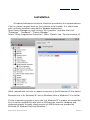
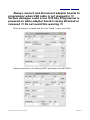
There are many applications, which are able to show information for USB
devices. Official software for such tasks provided by Microsoft Corporation is
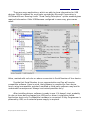
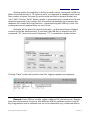
UVCView.x86.exe. Running it with “Show Config Descriptors” option enabled gives
required information. Older USBView.exe configured in same way, gives same
result.
Value, marked with red color on above screenshot is Serial Number of Your device.
Provide that Serial Number to our representative and You will receive
compatible software. Have in mind, that software is compiled for Your device,
hence using incompatible, patched, modified or third-party software may lead to
undesirable consequences. Always use trusted providers only!
After installing drivers, software is ready to use. If it doesn't start, probably
You do not have device plugged into USB port or driver's installation failed.
Application starts only if compatible hardware is connected. IR Key Programmer is
powered by USB, so no external power supply is required.
IR Key Programmer Extended User Manual
Revision 1.0