1
Paste those bytes into Your e-mail client or Skype and send to Radiolinia Ltd.
representative. Use text service via SMS if You have that option of communication
with Your dealer – it doesn't matter how this request will reach us.
What is important – do not close application - request is valid only for
current session and You should wait for “Activation code”. If software is restarted,
procedure should be repeated. “Request” button is disabled after generating
session Key - for Your own protection it is random and low repeatable. “Reset”
button is enabled only after request is generated.
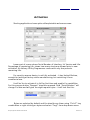
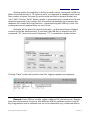
When eight bytes “Activation code” are received, paste them in same field
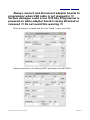
“Serial Number”, replacing request bytes. Activation bytes are unique and onetime usable. In example:
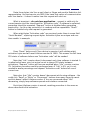
Press “Reset” button and if Your device is genuine it will validate eight
activation bytes and will reset Lifetime counter to 100%. This means You will have
255 starts of software before new “Activation code” will be needed.
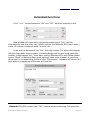
Note that “Life” counter doesn't decrement each time software is started. It
is refreshed at lower rate, but actual count is always 255 starts between
activations. “Request” button will become enabled when “Life” counter reaches
7%. Activation procedure could be performed even if “Life” is 0%, so it is not
needed to waste percentage and request “Activation code” before full use of
current one.
Note also, that “Life” counter doesn't decrement while using software – You
could click “Read” or “Write” or “Decrement” buttons how many times You want
and this doesn't affect Lifetime counter. If You are concerned about “Life”
decreasing, simply keep software opened and interface connected.
Each time Lifetime counter is zeroed, resetting procedure is the same as
above described initial activation.
IR Key Programmer Extended User Manual
Revision 1.0