1
Navpixel™ USER MANUAL
NPD1236-12” IP-65 Marine Display
NDP1555- 15” IP-65 Marine Display
NPD1744- 17” IP-65 Marine Display
NPD1954- 19” IP-65 Marine Display
NPD2115- 21.5” IP-65 Marine Display
(1st Edition 9/15/2010)
All information is subject to change without notice.
Page 1
RECORD OF REVISION
Version and Date
Sep.15 2009
Description
Preliminary Release
Page 2
Remark
TABLE OF CONTENT
RECORD OF REVISION ........................................................................................................ 2
TABLE OF CONTENT....................................................................................................... 3
1.0 INTRODUCTION............................................................................................................ 7
2.0 CONTROL AND FEATURES............................................................................................. 8
3.0 INSTALLATIONS ............................................................................................................ 9
4.0 TOUCH DRIVER INSTALLATIONS.................................................................................. 15
5.0 OSD OPERATIONS....................................................................................................... 35
6.0 TECHNICAL SPECIFICATION........................................................................................ 51
7.0 MAINTENAINCE AND TROUBLESHOOTING................................................................... 61
Page 3
IMPORTANT INFORMATION
EMC conformance
All Navpixel equipment and accessories are designed to the best industry standards for
use in the recreational marine environment. The design and manufacture of Navpixel
equipment and accessories conform to the appropriate ElectroMagnetic Compatibility
(EMC) standards, but correct installation is required to ensure that performance is not
compromised.
Waste Electrical and Electronic Equipment Directive
The Waste Electrical and Electronic Equipment (WEEE) Directive requires the recycling
of waste electrical and electronic equipment. Whilst the WEEE Directive does not apply
to some of Navpixel’s products, we support its policy and ask you to be aware of how to
dispose of this product.
The crossed out wheelie bin symbol, illustrated above, and found on our products
signifies that this product should not be disposed of in general waste or landfill. Please
contact your local dealer, national distributor or Navpixel Technical Services for
information on product disposal.
Restriction of the use of certain Hazardous Substances
This product uses components that comply with the requirements of the Restriction of
the use of certain Hazardous Substances (RoHS) Directive 2002/95/ EC.
Warranty
To register your new Navpixel product, please go to:
www.navpixel.com.
It is important that you complete the owner information to receive full warranty
benefits, including notification of software updates if they are required.
Page 4
Packing List
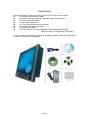
Before installation, please ensure the following items have been shipped:
z
1 x Navpixel Series Marine Display
z
4 x Mounting bracket lugs and 4 stainless steel threaded studs
z
1 x Power Cable (5000 mm)
z
1 x VGA Cable (3000 mm)
z
1 x CD for User Manual and Touch Driver
z
1 x Printed Flush Mount Template
z
1 x Printed User Manual
z
1 x AC/DC Adaptor for model NPD1236/1555-(EGAW & ETAW)-G011
NPD1744/1954/ 2115-(EGAW & ETAW)-H011
If any of these items should be missing or damaged, please contact your distributor
or sales representative immediately.
Page 5
Ordering Information
Model Number & Description
NPD1236-EGAW-G01
12” Sunlight readable LCD, Optical bonding AR glass, 9~36V DC wide range input power
NPD1236-EGAW-G011
12” Sunlight readable LCD, Optical bonding AR glass, 9~36V DC wide range input power, with power adaptor
NPD1236-ETAW-G01
12” Sunlight readable LCD, Optical bonding SR touch, 9~36V DC wide range input power
NPD1236-ETAW-G011
12” Sunlight readable LCD, Optical bonding SR touch, 9~36V DC wide range input power, with power adaptor
NPD1555-EGAW-G01
15” Sunlight readable LCD, Optical bonding AR glass, 9~36V DC wide range input power
NPD1555-EGAW-G011
15” Sunlight readable LCD, Optical bonding AR glass, 9~36V DC wide range input power, with power adaptor
NPD1555-ETAW-G01
15” Sunlight readable LCD, Optical bonding SR touch, 9~36V DC wide range input power
NPD1555-ETAW-G011
15” Sunlight readable LCD, Optical bonding SR touch, 9~36V DC wide range input power, with power adaptor
NPD1744-EGAW-H01
17” Sunlight readable LCD, Optical bonding AR glass, 9~36V DC wide range input power
NPD1744-EGAW-H011
17” Sunlight readable LCD, Optical bonding AR glass, 9~36V DC wide range input power, with power adaptor
NPD1744-ETAW-H01
17” Sunlight readable LCD, Optical bonding SR touch, 9~36V DC wide range input power
NPD1744-ETAW-H011
17” Sunlight readable LCD, Optical bonding SR touch, 9~36V DC wide range input power, with power adaptor
NPD1954-EGAW-H01
19” Sunlight readable LCD, Optical bonding AR glass, 9~36V DC wide range input power
NPD1954-EGAW-H011
19” Sunlight readable LCD, Optical bonding AR glass, 9~36V DC wide range input power, with power adaptor
NPD1954-ETAW-H01
19” Sunlight readable LCD, Optical bonding SR touch, 9~36V DC wide range input power
NPD1954-ETAW-H011
19” Sunlight readable LCD, Optical bonding SR touch, 9~36V DC wide range input power, with power adaptor
NPD2115-EGAW-H01
21.5” Sunlight readable LCD, Optical bonding AR glass, 9~36V DC wide range input power
NPD2115-EGAW-H011
21.5” Sunlight readable LCD, Optical bonding AR glass, 9~36V DC wide range input power, with power adaptor
NPD2115-ETAW-H01
21.5” Sunlight readable LCD, Optical bonding SR touch, 9~36V DC wide range input power
NPD2115-ETAW-H011
21.5” Sunlight readable LCD, Optical bonding SR touch, 9~36V DC wide range input power, with power adaptor
Optional Accessories
810130001000 VGA Cable 3000mm. D-SUB15P TO D-SUB 15P
810650005110 Power Cable, DC, 5000mm, TERMINAL TO OPEN, 14AWG*2C
Page 6
1.0 INTRODUCTION
About Navpixel™ Marine Display
Navpixel™ Series Marine Display, the high-performance, equipped with optical bonding
AR glass or sunlight readable touch monitor, is specially engineered to survive the most
demanding applications. You will soon become familiar with the quality difference in
this bright sunlight readable (0.5 to 1,000 nits) monitor.
The range of Navpixel Sunlight Viewable Marine Displays has been developed to be used
as part of an integrated marine navigation system or within an entertainment system.
The displays, available in several sizes, are designed to be waterproof and suitable for
use above or below decks.
The Navpixel™ Series Marine Display sunlight readable monitor handles a wide-range of
extreme environments making it the industry choice for mobile applications. Housed in a
milled billet aluminum case, the slim-profile Navpixel™ Series Marine Display is light
weight and watertight. Front-mounted controls and the touch screen make the industrial
rugged monitor user-friendly. We have incorporated the latest optical engineering to
achieve optimal viewability in all lighting conditions, including direct sunlight. The
Navpixel™ Series Marine Display’s power efficient, low heat design results in increased
reliability and longevity required for mission critical deployment.
This handbook contains important information on the installation, operation and
maintenance of the Navpixel Sunlight Viewable Marine Display range which is intended
for use in the recreational marine market and covers all models.
Page 7
2.0 CONTROL AND FEATURES
Your Navpixel Sunlight Viewable Marine Display has the following controls and features:
Front View
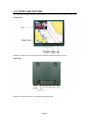
Remarks: The PIP function is only available for NPD1744, NPD1954 and NPD2115 model
Back View
Remarks: Only DVIx1 and VGAx1 for NPD1236 and NPD1555 model
Page 8
3.0 INSTALLATIONS
It is important that your new display is installed and operated in accordance with the
instructions provided in this handbook. Failure to do so could result in poor product
performance and may invalidate your warranty.
When planning the installation the following points must be considered:
• Your Navpixel display is sunlight viewable and visible in direct sunlight..
• If temperatures exceed the normal temperature operating range the display could
overheat and begin to blackout due to the limitations of TFT LCD technology.
• In order to minimize the chances of a malfunction, the following precautions should be
taken during installation:
• The display should be installed in an area where there is proper and adequate
ventilation (min. 15cm clearance) . If it is possible to cool the area behind the
display, it will significantly reduce the risk of a malfunction.
• The display should be mounted at an angle to the sun. We do not recommend
mounting the unit in a flat plane, which increases the surface area exposed to the
sun and leads to increased heat absorption.
IMPORTANT: Your Navpixel display is only waterproof from the front. To maintain
watertight integrity the display must be flush mounted ensuring that the rear casing is
enclosed in a watertight enclosure.
The Navpixel™ Series Marine Display is designed to be mounted in two configurations:
VESA75 / VESA100 MOUNT
The Navpixel™ Series Marine Display is designed compatible with VESA75 and VESA100
mount. By installing the monitor with this kit, the user can adjust the viewing angle to
improve viewability in changing environments. This mounting system has proven to be
successful in supporting an extreme amount of weight in high vibration and
difficult-mount applications.
The back of the monitor includes mounting points that you can use to mount the monitor
as your installation requires.
Page 9
Mounting holes on the Navpixel™ Series Marine Display allow the monitor to be mounted
by rear mounted using VESA75 or VESA100 mount
PANEL (Flush) MOUNT
For installation, there are four tapped mounting holes on the two sides of the unit’s
panel. The mounting hardware packet is included with the product accessories in the
shipping box. This packet includes four (4) stainless steel threaded studs, 3.2 cm and
four (4) mounting lock nuts.
Your monitor can be installed using the mounting lock nuts (supplied) in the vertical
keyways. Make sure that both brackets are in the same orientation.
Preparing the installation site
1. Select an installation site that has sufficient space behind for cable connections and
ventilation.
2. Tape the supplied flush mount template in the required position.
3. Using a jigsaw, carefully remove the shaded portion of the template.
4. Using a suitable file, smooth the edges of the aperture.
Page 10
Installing the display
1. Carefully insert the monitor into the aperture, ensuring that the gasket on the rear of
the fascia lays flat against the aperture edge.
IMPORTANT: The gasket must lay flat against the aperture edge to ensure watertight
integrity.
2. Place the mounting bracket lugs into the keyways and move them to the rear, securing
the bracket to the monitor.
Note: The mounting brackets can be used in either the horizontal or vertical keyways as
required.
3. Using a suitable screwdriver, tighten the mounting bracket screws to secure the
monitor in position.
4. Connect all cables as required - see “Rear connections” below.
Page 11
Rear connections
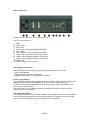
Remarks: The photo above will differ for different model
The rear connectors are:
1. FUSE
2. Power Input
3. DVI-1 Input
4. DVI-2 Input (N/A for NPD1236 & NPD1555)
5. VGA-1 Input
6. VGA-2 Input (N/A for NPD1236 & NPD1555)
7. CVBS-1 Input (Composite Video) for AV input
8. CVBS-2 Input (Composite Video) for AV input
9. CVBS-3 Input (Composite Video) for AV input
10. RS232 Input
11. USB for Touch control (option)
Planning the installation
Before you install your display, the following points should be considered:
• Power requirements.
• Display location and mounting options.
• Additional accessories, e.g. keyboard or speakers.
Power requirements
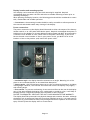
Your Sunlight Viewable display is designed to run on boat’s power systems, with AC/DC
adaptor Navpixel series are equipped with 9~36V DC wide range power input.
For power connection please make sure the power cable is tightly connected by two
screws of the terminal block.
The output pin of AC/DC adaptor should be checked and make sure the polarity of
voltage is connected properly.
Grounding the display
It is important that an effective radio frequency (RF) ground is connected to the display.
You must ground the display by connecting the drain wire (shield) of the power input
cable to the nearest ground point of the boat’s RF ground system.
Page 12
Display location and mounting options
Your display can be mounted using the flush mounting kit supplied. Navpixel
recommends that you power the unit and select a suitable mounting location prior to
installing the display.
When planning the display location, the following points should be considered to ensure
safe, comfortable and reliable operation:
• Convenience- the mounting location should be easily accessible to allow operation of
the controls and should enable easy viewing of the display.
Power connections
The power connection to the display should be made at either the output of the battery
isolator switch, or at a DC power distribution panel. Navpixel recommends that power is
fed directly to the display via its own dedicated cable system and MUST be protected by
a thermal circuit breaker or fuse, fitted close to the power connection. If you do not
have a thermal circuit breaker or fuse in your power circuit, you MUST fit an in-line
breaker or fuse to the positive (red) lead of the power cable.
• Installation angle- the display should be mounted at an angle. Mounting it in a flat
plane is not recommended due to increased heat absorption.
• Viewing angle - this LCD has been chosen to give the very best performance, including
viewing angle. However, the contrast and colors seen on all LCD displays vary slightly
with viewing angle.
• Environment - to prevent overheating, do not restrict airflow at the rear of the display
unit; If the space behind the display is air conditioned or cooled by a fan, it will help in
keeping the unit’s temperature down when mounted in direct sunlight.
FAILURE TO ADEQUATELY VENTILATE THE UNIT COULD INVALIDATE YOUR WARRANTY.
The display should be protected from physical damage and excessive vibration. Although
the display unit is waterproof from the front when installed correctly, it is good practice
to mount it in a protected area away from prolonged and direct exposure to rain and salt
spray. DO NOT place the display near to a heat source.
Page 13
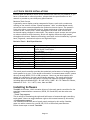
Typical Installation Diagram
Remarks: The real installation diagram above is only for reference and will differ for different kind of
customer’s applications
Page 14
4.0 TOUCH DRIVER INSTALLATIONS
Both AR glass and Resistive touch screen solutions are used for our products. If you
have a customized or tailored product, please check the specifications in this
manual or provide us your third-party specifications.
Resistive Touch Screen
It generally uses a display overlay composed of layers, each with a conductive
coating on the interior surface. Special separator “dots” are distributed evenly
across the active area and separate the conductive interior layers. The pressure
from using either a mechanical stylus or finger produces an internal electrical
contact at the “action point” which supplies the controller with vertical and
horizontal analog voltages for data input. The resistive touch screens are anti-glare
to reduce reflective shine intensity, which will slightly diffuse the light output
throughout the screen. Resistive technology activation can be initiated by; a gloved
hand, fingernail, mechanical stylus or an ungloved finger.
Resistive Touch - Brief Specifications
Subject
Input Method
Touch Activation Force
Insulation Resistance
Light Transmission
Operating Temperature
Storage Temperature
Humidity (Operating)
Surface Hardness
Durability
Details
Finger & Stylus Finger & Stylus
Touch Stylus Touch Stylus
Gloved Hand
0.10 - 0.80N (10 - 80g)
≧20MΩ/25V(DC)
> 80%
-10°C ~ +70°C
-40°C ~ +80°C
20%RH ~ 80%RH
≧3H
35,000,000 times
This touch panel controller provides the optimistic performance of analog resistive
touch panels for 4 wire, 5 wire and 8 wire models. It communicates with PC system
directly through RS232, PS/2 or USB connector. Users can see how superior the
design is in sensitivity, accuracy and friendly operation. The touch panel driver
emulates mouse left and right button function and supports operation systems
including Microsoft Windows 95 / 98 / ME /NT4 / 2000 / XP / XP Tablet PC Edition,
Windows CE 2.12 / 3.0 / .NET, Linux, iMac and DOS.
Installing Software
TouchKit is software, which contains drivers of the touch panel controllers for the
specified communication connectors, RS232, PS/2 and USB, and the other two
utilities:
· Touch Tray support
This is utility for emulating the right and left button of mouse through controlling
touch panel. Users can toggle between right or left mouse buttons by this utility.
· Configuration support
The calibration and draw test of touch panel are done by this utility. Besides,
users can add or remove for new RS-232, PS/2 or USB touch panel devices.
Follow these steps to install TouchKit.
Page 15
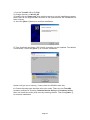
1. Put the TouchKit CD to CD-ROM.
2. Change directory to Win9X_ME
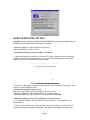
3. Double click the Setup.exe, then windows starts to run the installation program.
Notice that do not plug the USB controller on the system before the installation has
been finished.
4. Just click [Next >] button to continue installation.
5. Then check the check box if PS/2 touch controller is to be installed. The default
is unchecked. Then Press [Next >] to continue installation.
System will give you a warning, if users check the PS2AUX check box,
6. Choose the setup type that best suits your needs. There are two TouchKit
accessory utilities for choosing, Rotation Monitor Utility and Shutdown Utility.
Users can install the utility they want by checking the box. Then Press [Next >]
to continue installation.
Page 16
7. Select the appropriate folder where set-up files will be installed. Then Press
[Next >] to continue installation.
8. Then type in the name of program folder for TouchKit or press [Next >] to
continue. There will be a default name for it.
During driver installation, the setup program will scan COM port for RS232 Touchkit
controller. Once the controller was scanned, the setup program will display a dialog
as
Click Yes to add the controller on the specified COM port automatically.
9. Windows is copying files to disk and the setup is complete. It will request re-boot
computer. Press [Yes >] to re-boot immediately or [No >] to re-boot later. The
installation will not be finished until system re-boot.
Page 17
10. Setup is complete. After TouchKit installation, the USB device will be found
automatically as soon as it was plugged into the computer. Then users can see
the new device on the application program window. And, the program will remove
the USB Device automatically as soon as it was unplugged. ( USB device is not
supported for Windows95 )
Page 18
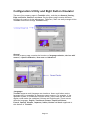
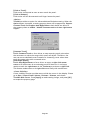
Configuration Utility and Right Button Emulator
There are five property pages in TouchKit utility, and they are General, Setting,
Edge coefficient, Monitors and About. Each property page contains different
functions for users to do the adjustments. Therefore, users can easily manage all the
TouchKit controllers through TouchKit utility.
General
General property page contains the functions of language selection, devices add/
remove, 4 points calibration, Draw test and Advanced.
<Language>
TouchKit supports multi-language user interface. Users could select native
language that is compatible to operation system support. For example, if the
operation system is a traditional Chinese version, users could see the normal
display words under the traditional Chinese and English mode. There are ten
different languages, English, Traditional Chinese, Simplified Chinese,
French, Spanish, German, Japanese, Italian, Korean and Dutch supported in
this feature of TouchKit.
Page 19
Select the compatible language first or users may not see the normal display of each
button.
<Add> / <Remove>
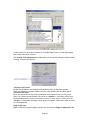
Please check the touch panel devices (including its controller) are equipped well,
then click [Add] button to add all of those RS-232 and PS/2 devices to the Panel
List dialogue box.
There is one devices found. Press [Yes] to continue.
The controller is displayed on the Panel List box. Users can get the information
of interface, type, firmware version and baud rate for each controller.
Select one device after added more than one device at the panel list window.
The one selected will activate the panel, and remember to do the calibration
before starting to use touch panel.
Page 20
But, for hot-swapping USB touch controller, it will be added automatically as soon as
it was plugged into the computer. Then users can see the new device on the
application program window. And, the program will remove the USB touch controller
automatically as soon as it was unplugged. ( USB device is not supported for
Windows95 )
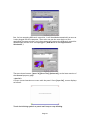
There are three buttons, [4pts Cal] [Draw Test] [Advanced], at the lower section of
the General property page.
<4pts Cal>
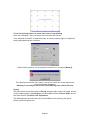
Correct 4 point locations on screen with the panel. Press [4 pts Cal], screen displays
as follows.
Touch the blinking symbol on panel until beep or stop blinking.
Page 21
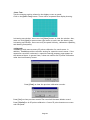
<Draw Test>
Test the drawing position related to the display screen on panel.
Click on the [Draw Test] button. There will be a squared blue display showing.
In drawing test window, users can click [Clear] button to clear the window. Also,
users can click [Quit] or press mouse right button to quit from the drawing test.
In drawing test window, users can verify the panel linearity, calibration capability,
and drawing line quality.
<Advanced>
Touchkit provide more accuracy 25 points calibration for touch sensor. In
addition, Touchkit provides controller setting for capacitive touch sensor. If the
capacitive controller is selected, a capacitive setting property page appears on
the advanced sheet. In general case, it does not need to do 25 points calibration
other then bad linearity sensor.
Press [Clear] to clear the previous calibration records.
Press [Yes] to clear previous records.The record will become default record.
Press [25ptCal] to do 25 points calibration. Correct 25 point locations on screen
with the panel.
Page 22
Touch the blinking symbol on panel until beep or stop blinking.
After the calibration, the new record will overwrite the old one.
If the selected controller is capacitive type, an extra property page for capacitive
setting adjustment shown as below:
Please select property size of capacitive screen first, and press [Restart]
The capacitive controller will restart, and do not touch the screen before the
warning message disappears
Warming: Do not adjust the sensitive and sampling time without RD help
Setting
There are three functional groups in Setting property page, and at the upper section
of the property page is sound option; at the middle section is Mouse Mode; and at
the lower section is Double Click Adjustment.
The Sound options provide users the click feedback while touching the panel.
Select preferred option first.
Page 23
<No Sound>
Users could choose to make no sound while using the touch panel.
<Touch Down>
The system will make a sound while touching the panel.
<Lift Up>
The system will not make any sound until finger leaves the touch panel.
<Frequency>
Sound frequency, drag the cursor from left to right is low to high.
<Duration>
Sound duration, drag the cursor from left to right is short to long.
The Mouse Mode provides users different operating options. They are as follows:
<Mouse Button>
Click it to show / hide Touch Tray on the right bottom corner of the desktop.
The touch panel system starts with the computer booting, and a mouse icon
shows in the taskbar.
Users can choose show or hide Touch Tray from the mouse icon in the taskbar.
Just click the mouse icon to choose show or hide.
Page 24
Change right / left button by clicking the upper small rectangular box of Touch
Tray. Blue area expresses what button has been selected.
<Shutdown utility>
There are five modes in shutdown utility for users convenience.
[Standby] to enter standby mode that saves power consumption.
[Shutdown] to turn off PC.
[Reboot] to restart PC.
[Cancel] to escape from the Shutdown utility dialog.
[Exit] to disable the Shutdown utility.
Please notice that Windows NT does not support this function.
<Mouse Mode>
There are three kinds of mouse mode users could choose,
[Normal Mode]
It provides all the mouse functions, including the dragging function.
Page 25
[Click on Touch]
Click action is executed as soon as users touch the panel.
[Click on Release]
Click action will not be executed until finger leaves the panel.
<Option>
Touchkit provides an option for advanced Mouse Emulation setting. When the
Option button is pressed, a setting property sheet will be popped up. Support
Constant Touch and Support Auto Right Button check boxes are shown in
the property sheet to enable / disable Constant touch and Auto right button
support.
[Constant Touch]
Enable Constant Touch to force driver to stop reporting touch point when
the movement is within the range which users can adjust. Therefore, the
user can see a stabilized cursor instead of a chattering cursor when users
touch the same point with unwanted noise.
[Auto Right Button]
Enable Auto Right Button to force driver to report a right click mouse
event to OS when users do a continuing touch till time out. It no longer
needs to touch the right button in the Touchtray to activate a right click.
This feature makes users to do right click more easily with touchscreen.
<Cursor Visibility>
Cursor visibility function provides users to hide the cursor in the display. Please
go to Start / Control Panel / Mouse / Pointers / Scheme, and choose
TouchKit Hide Cursor. Press [Apply] to make setting change, and press [OK]
to escape the property page.
Page 26
If users want to cancel the function of TouchKit Hide Cursor, do the steps again
and choose the other scheme.
The Double Click adjustment provides users to set up the tolerance while double
clicking. They are as follows:
<Double Click Speed>
Double Click Speed is the double click response time for Windows system.
Users can adjust the proper double click for easy double click by touch panel.
<Double Click Area>
Each one touch has its own touch tolerance once someone may not fix in one
point. So if users set the Double Click Area to <Smaller>, the panel will be very
sensitive about micro-move while users want to fix on a point. If users set it to
<Larger>, it tolerates the larger touch point movement while users want to point
at a fixed position.
Edge Coefficient
Edge Coefficient property page contains the functions of Edge Compensation for
Page 27
Top, Bottom, Left, Right, X Axis and Y Axis.
In some case, if it is difficult to touch items at the edges of the touch panel, users
can set adjustment to reach the edges of the screen image.
<Top>
If users set the Edge to <Smaller>, TouchKit will reduce the horizontal position
of the top edge. If users set the Edge to <Larger>, TouchKit will extend the
horizontal position of the top edge.
<Bottom>
If users set the Edge to <Smaller>, TouchKit will reduce the horizontal position
of the bottom edge. If users set the Edge to <Larger>, TouchKit will extend the
horizontal position of the bottom edge.
<Left>
If users set the Edge to <Smaller>, TouchKit will reduce the vertical position of
the left edge. If users set the Edge to <Larger>, TouchKit will extend the
vertical position of the left edge.
<Right>
If users set the Edge to <Smaller>, TouchKit will reduce the vertical position of
the right edge. If users set the Edge to <Larger>, TouchKit will extend the
vertical position of the right edge.
In some case, cursor will be behind the finger when users touch the panel. If users
can not see the cursor when they touch down on the panel, users can set X Axis or Y
Axis to move the cursor.
<Offset X Axis>
If users set the Offset X Axis to <Smaller>, cursor will be moved a pixel of X
Axis to left. If users set the Offset X Axis to <Larger>, cursor will be moved a
pixel of X Axis to right.
<Offset Y Axis>
If users set the Offset Y Axis to <Smaller>, cursor will be moved a pixel of Y
Axis to top. If users set the Offset Y Axis to <Larger>, cursor will be moved a
Page 28
pixel of Y Axis to bottom.
<Edge Compensation Switch>
Users can choose Edge compensation Enable / Disable from left bottom corner
of Touchkit Utility.
Using +10% and -10% button to adjust the smaller or larger of edge. If users
press +10% button, the top, bottom, left and right edges will extend 10% of
orientation to touch screen, and cursor will be moved 10 pixel of X and Y Axis to
right and top. If users press -10% button, the top, bottom, left and right edges
will contract 10% of orientation to touch screen, and cursor will be moved 10
pixel of X and Y Axis to left and bottom.
If users want the value back to the default value, choose Default button.
Monitors
There are three functions in this property page, and they are Multiple Monitors,
Split Monitor and One point Calibration. Such a trendy and yet innovated design
provides viewing pleasures, viewing flexibility and convenience to users.
<Multiple Monitors>
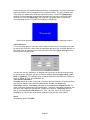
To configure the mapping relationship between the monitors and the touch
panels, select the monitor page as below.
Set the check box (Use Multiple Monitors) to enable multiple monitors mapping.
Page 29
Uncheck this box will disable multiple-monitor configuration, and all of the touch
panel controllers will be mapped to the primary monitor. The gray shadow area
is the monitor mapped the selected controller/panel. The button [Mapping] is
used to find the mapping relationships between the monitors and touch panel
controllers. Press the [Mapping], the software will guide users to touch the
corresponding monitor to obtain the mapping relationship.
After finish monitor mapping, Press [Apply] to apply the mapping relation.
<Split Monitors>
To use the Split Monitor function, users need to select which controller you want
to launch this function, then check the Multiple Monitors box and Split Monitor at
the same time as showing as the follow picture. Press the [Split Setting] button
to set up the activate area.
It shows the current resolution of display and users can set up the activate area
by inputting the value by yourself or use the default button [Upper Half], [Left
Half] or [Quarter]. The default value of panel resolution should be full screen as
Left: 0 , Right: 0, Top: 0 and Bottom: 0.
<One Point Calibration>
TouchKit utility provides a fast tool to identify the touchscreen orientation when
the monitor display was rotated by 90 degrees. Enable this One Point
Calibration feature, Touchtray will pops up this One Point Calibration tool for
users to identify and correct the touchscreen / monitor orientation whenever the
monitors was rotated by 90 degrees. Disable this feature, Touchtray does not
pop up this One Point Calibration tool. Then, the user has to do four points
calibration to correct the orientation whenever the monitor was rotated.
About
Information about TouchKit.
Page 30
MONITOR ROTATION SETTING
TouchKit driver package for Windows 98/ME/2000/XP provides two easiest ways to
rotate the touch panel while the display is rotated.
● Rotating display by way of nVidia or ATI driver
● Rotating display by way of Pivot.
4.1 Rotating display by way of nVidia or ATI driver
1. After activating the rotation of nVidia or ATI driver, there will be one blinking
symbol show as the following picture. Touch near the blinking symbol until stop
blinking, and the touch panel will rotate itself.
One touch blinking symbol adjustment
2. However, 180 degree rotation of touch panel can not be done in one step, users
need to rotate 90 degree twice.
4.2 Rotating display by way of Pivot
There are two ways to rotate the display by way of Pivot.
● Rotating display by way of Pivot hotkey or function menu
● Rotating display by way of RotTray icon provided by TouchKit.
< Rotating display by way of Pivot hotkey or function menu >
1. To rotate the display, please install Pivot pro 6.05 first. Then reboot PC to
activatePivot.
2. There will be a pivot icon in the task bar. Users can click on it, and users can
choose four angles: 0 degree, 90 degree, 180 degree, 270 degree to rotate the
Page 31
display.
3. After choosing the angle users want to rotate, there will be one blinking symbol
showing as the following picture. Touch this blinking symbol until stop blinking,
and the touch panel will rotate itself.
One touch blinking symbol adjustment
4. However 180 degree rotation of touch panel can not be done in one step, users
need to rotate 90 degree twice.
< Rotating display by way of RotTray icon provided by TouchKit>
1. To rotate the display, please install Pivot pro 6.05 first. Then reboot PC to
activate Pivot.
2. Users will see RotTray icon in the task bar.
3. Clicking on RotTray, it will call Pivot to rotate the display and touch panel 90
degree at the same time. Clicking it again, it will rotate another 90 degree to 180
degree. Every click on RotTray, display will rotate clockwise. Recalibration and
one symbol adjustment won’t be necessary anymore.
4. However this version of RotTray is design for Pivot pro 6.05. If users want to use
older version of Pivot, like Pivot 5.1, users need to amend the value of windows
registry. The next step is an example for setting Pivot 5.1 on Win98.
5. Go to Start / Run, and execute regedit.
Page 32
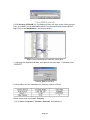
6. For Windows 95/98/ME OS, The Registry Editor will show as the follow picture.
Then go to HKEY_LOCAL_MACHINE\System\CurrentControlSet\Services\VxD\TKIT.
Right click on the MaxRotation, and choose Modify.
Right click on MaxRotation to Modify Value data
7. Choosing the Hexadecimal Base, and replace the value data “4”(default) with
“FFFFFFFF”.
Pressing [OK] to confirm.
8. Here bellow are the value data for different version of Pivot:
Follow these steps to uninstall TouchKit.
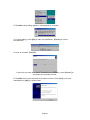
1. Go to Start / Programs / TouchKit / Uninstall, and execute it.
Page 33
2. TouchKit setup dialog appears, and prepares to uninstall.
3. Confirm dialog, press [OK] to start un-installation; [Cancel] to cancel
uninstallation.
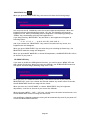
4. Start to uninstall TouchKit.
If users do not want to uninstall TouchKit at this moment, press [Cancel] to
terminate the uninstall process.
5. TouchKit will not be removed until system re-boot. Press [Yes] to re-boot
immediately or [No] to re-boot later.
Page 34
5.0 OSD OPERATIONS
(Remarks: PIP function is only available for NPD1744 and NPD1954 model)
Introduction
Your Navpixel Sunlight Viewable display can be controlled using the On Screen Display
(OSD) menu and/or the 8 buttons on the front bezel of the unit.
The OSD menu enables you to change the way in which your display is set up and is
accessed using the Menu button.
Using the buttons
Each of the 8 buttons on the front bezel of your display has an input and a control
function.
Input functions enable you to select the type of signal input to the display.
Control functions enable you to change the appearance of the display.
Power
Power ON Key
To power your monitor ON, just need to press this button and it will delay the power on
sequence around 3 seconds. This is Navpixel’s brand new design to well protect your
Navpixel Sunlight Viewable display damaged in the surge voltage from the engine.
Power OFF Key
To power your monitor OFF, just need to press this button and it will also delay the
power off sequence around 3 seconds.
Pressing the power button will display a list of what input for the main screen is
associated with each button. This is just a reminder and is not part of the input selection
process.
Page 35
BRIGHTNESS Key
When you press the BRIGHTNESS Key, the screen will show the following image
You can press the UP /DOWN Key to do the screen brightness adjustment. When the
brightness achieve 50 and keeping pressing “UP” Key, the dimming will keep the
brightness at 50. When you dimming down to brightness 1 and keeping pressing the
“DOWN” Key, the dimming will keep the brightness at 1.
If you keep pressing “BRIGHTNESS” Key and hold it, the brightness will appear as
following status:
. . . .2 Æ 1 → 2→ 3 → . . . Æ 48 Æ 49 Æ 50 Æ 49 Æ 48 Æ . . . .
And if you release the “BRIGHTNESS” Key around 5 seconds with any action, the
brightness bar will disappear.
When you press “BRIGHTNESS” Key and other Key (not including Up/Down Key), the
BRIGHTNESS status bar image will disappear.
When you press NIGHT MODE KEY or choose VR adjustment, the BRIGHTNESS KEY will be
no function if you press it.
VR BRIGHTNESS Key
If you want to enable the VR Brightness function, you need to press “MENU” KEY and
then choose VR function. When you rotate the VR knob, the VR BRIGHTNESS status bar
will appear as below image (dimming range from 1~50):
When you enter the VR BRIGHTNESS mode, it will be no function if you press the
BRIGHTNESS KEY. And if you release the VR knob without any action around 5 seconds,
the VR BRIGHTNESS Status bar image will be closed.
When you enter the “NIGHT MODE” or choose “BRIGHTNESS” Key for brightness
adjustment, it will be no function if you control the VR knob.
When you press “MENU”, “DISP”, “PIP” Key, you will enter the menu item selection. And
the VR BRIGHTNESS status bar image will be closed.
Any modified or changed parameter setting will be automatically saved if you power off
or Exit the BRIGHTNESS status bar.
Page 36
NIGHT MODE KEY
When you press the “NIGHT MODE” KEY, the dimming will be down to under 0.5 nit
directly. And if you press “BRIGHTNESS” KEY or “VR” knob at this moment, it will be no
function until you press the “NIGHT MODE” KEY again to release this restriction.
When you press “MENU”, “DISP”, “PIP” Key, you will enter the menu item selection.
Any modified or changed parameter setting will be automatically saved if you power off
or Exit the NIGHT MODE.
UP
/ DOWN
KEY
It works as menu item selection use, the “UP”KEY can be used as “RIGHT” KEY and the
“DOWN” KEY can be used as “LEFT”KEY.
INPUT KEY
When you press “INPUT” KEY, the screen will pop up the following image:
You can press the “UP”/ ”DOWN” KEY for the menu item selection above. It will remain
at “VIDEO 3” position if you keep pressing “DOWN” KEY to the end. And it will also
remain at “RGB1” position if you keep pressing “UP” KEY to the end.
When you press and hold the “INPUT” KEY, the menu screen will show as
RGB1→RGB2→..→VIDEO3→VIDEO2→..
If you release the “INPUT” KEY for 5 seconds without any action, the menu selection
screen will be closed. And it will remain at the item which you’d selected.
When you press “MENU”, “BRIGHTNESS”, “PIP” Key, you will enter the menu item
selection.
Any modified or changed parameter setting will be automatically saved if you power off
or Exit the menu setting screen.
Page 37
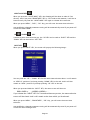
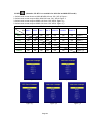
PIP KEY
1.
2.
3.
4.
5.
Default
Default
Default
Default
Default
(Remarks: PIP KEY is no available for NPD1236 and NPD1555 model)
main
main
main
main
main
screen
screen
screen
screen
screen
shows at RGB1 & RGB2Æ Press “PIP” KEYÆ Figure 1
stays at DVI1 & DVI2Æ Press “PIP” KEYÆ Figure 2
stays at VIDEO 1Æ Press “PIP” KEYÆ Figure 3_1
stays at VIDEO 2Æ Press “PIP” KEYÆ Figure 3_2
stays at VIDEO 3Æ Press “PIP” KEYÆ Figure 3_3
PIP Function Supporting Table Sub RGB 1 Main RGB 1 RGB 2 DVI 1 OK DVI 2 OK VIDEO 1 OK VIDEO 2 OK VIDEO 3 RGB 2
DVI 1
DVI 2
VIDEO 1
VIDEO 2 VIDEO 3
OK OK OK OK OK OK OK OK OK OK OK OK OK OK OK OK OK OK OK OK OK OK OK OK OK OK OK OK OK OK OK OK OK Figure 1 OK Figure 1 Figure 1 Figure 2 Figure 2 Figure 3_1 Figure 3_2 Figure 3_3 Figure 2 Figure 3_1 Figure 3_2
Page 38
Figure 3_3
When you enter the “PIP Port Change” screen, the status bar will remain at “OFF”
position if you keep pressing the “DOWN” KEY to the end. At the other hand, the
status bar will remain at top item of each menu if you keep pressing the “UP” KEY to
the end.
When you press and hold the “PIP” KEY, the menu screen will show as:
DVI→VIDEO1→VIDEO2→VIDEO3→OFF→VIDEO3→VIDEO2→VIDEO1→DVIÆVIDEO1Æ…
If you release the “INPUT” KEY for 5 seconds without any action, the menu selection
screen will be closed. And it will remain at the item which you’d selected.
When you press “MENU”, “BRIGHTNESS”, “PIP” Key, you will enter the menu item
selection.
Any modified or changed parameter setting will be automatically saved if you power off
or Exit the menu setting screen.
PIP KEY Function
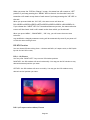
You can choose PIP size scaling from 1~10 times and PAP1 (4:3 aspect ratio) or PAP2 (side
by side for half full screen)
PIP (1~10) Picture
You can press “RIGHT/LEFT” key to move PIP window position
RIGHT KEY: the PIP window will move horizontally. You may put the PIP window to any
desired horizontal position you want.
LEFT KEY: the PIP window will move vertically. You may put the PIP window to any
desired vertical position you want.
PAP1 (4:3 aspect ratio window) Picture
Page 39
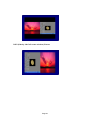
PAP2 (Side by side full screen window) Picture
Page 40
MENU KEY
When you press “MENU” KEY, the Navpixel OSD main menu screen will appear as below:
If you release the “MENU” KEY for 30 seconds without any action, the menu OSD screen
will disappear automatically. You can also choose “QUIT” and then press “MENU” KEY to
exit this OSD menu screen.
Page 41
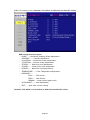
RGB1 & 2’s setting screen: (Remarks: Only RGBx1 for NPD1236 and NPD1555 model)
RGB Setting Item Description:
・ PHASE――― Horizontal Sampling Phase Adjustment。
・ CONTRAST――― Contrast Adjustment。
・ H_POSITION―― Horizontal Screen Adjustment。
・ V_POSITION―― Vertical Screen Adjustment。
・ R_LEVEL――― Red Color level Adjustment。
・ G_LEVEL――― Green Color level Adjustment。
・ B_LEVEL――― Blue Color level Adjustment。
・ TEMPERATURE――― Color Temperature Adjustment。
・ DISP MODE―――
FULL――― Full Screen。
EVEN――― Half Screen。
NORMAL―― Keep normal aspect ratio。
・ AUTO ADJUST――― Auto adjustment。
・ EXIT――― Quit from current setting。
・
(Remarks: DISP MODE is not available for NPD1236 and NPD1555 model)
Page 42
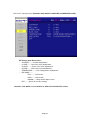
DVI 1 & 2’s setting screen: (Remarks: Only DVIx1 for NPD1236 and NPD1555 model) DVI Setting Item Description:
・ CONTRAST―――Contrast Adjustment。
・ R_LEVEL――― Red Color level Adjustment。
・ G_LEVEL――― Green Color level Adjustment。
・ B_LEVEL――― Blue Color level Adjustment。
・ TEMPERATURE――― Color Temperature Adjustment。
・ DISP MODE―――
FULL――― Full Screen。
EVEN――― Half Screen。
NORMAL―― Keep normal aspect ratio。
・ EXIT――― Quit from current setting。
(Remarks: DISP MODE is not available for NPD1236 and NPD1555 model)
Page 43
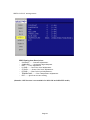
VIDEO 1 & 2 & 3’ setting screen:
VIDEO Setting Item Description:
・ CONTRAST――― Contrast Adjustment。
・ SHARPNESS――― Horizontal edge sharpness
・ HUE――― Color Adjustment
・ R_LEVEL――― Red Color level Adjustment。
・ G_LEVEL――― Green Color level Adjustment。
・ B_LEVEL――― Blue Color level Adjustment。
・ TEMPERATURE――― Color Temperature Adjustment。
・ EXIT――― Quit from current setting。
(Remarks: HUE function is not available for NPD1236 and NPD1555 model)
Page 44
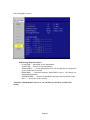
PIP Sub-menu setting screen: (Remarks: PIP function is not available for NPD1236 and
NPD1555 model)
PIP Setting Item Description:
・ PIP_SIZE――― Picture in Picture Screen Size Adjustment。
・ CONTRAST――― Contrast Adjustment。
・ R_LEVEL――― Red Color level Adjustment。
・ G_LEVEL――― Green Color level Adjustment。
・ B_LEVEL――― Blue Color level Adjustment。
・ EXIT――― Quit from current setting。
Page 45
OSD Setting Main Screen:
OSD Setting Item Description:
・ H_POSITION―― Horizontal Screen Adjustment。
・ V_POSITION―― Vertical Screen Adjustment。
・ TRANSLUCENT――― Screen background color can be adjusted as transparent
as you want (total 10 scales)。
・ BRIGHTNESS――― Selection between “BRIGHTNESS” key or “VR” Button for
brightness adjustment。
・ SYSTEM RETURN――― Restore all parameter setting to factory default value。
・ EXIT――― Quit from current setting。
(Remarks: TRANSLUCENT function is not available for NPD1236 and NPD1555
model)
Page 46
Programmable OSD Source Tag setting screen:
1. Press the “RIGHT/LEFT” key to selected channel
2. Press the “MENU” key to rename the “RGB1” to any desired source input (ex. Sonar,
Radar…etc). You may press “RIGHT/LEFT” key to select from (A~Z, 0~9, “.”, “-“)
character. If done, just press “MENU” key to jump to next character for renaming step
by step.
Page 47
3. This is the picture of renaming RGB1 channel to “RADAR”
SYSTEM RETURN setting screen:
Page 48
You may choose “SYSTEM RETURN” selection item on the OSD Screen to restore all of the
parameter setting to factory default value. When you press “UP” or “RIGHT” KEY, the
parameter will show “YES” and confirm it.
Page 49
“KEY LOCK” Mode Function setting screen:
When you press “MENU” and “BRIGHTNESS” KEY simultaneously for 3 seconds, you will
enter the “KEY LOCK” mode. At the same time, the screen will show “KEY LOCK” image
as below for 5 seconds and then disappear.
In the “KEY LOCK” mode, it will be no function to press any key. When you press the key
in the “KEY LOCK” mode, the screen will show “KEY LOCK” image as below for 5 seconds
and then disappear.
To Release/Unlock “KEY LOCK” Mode Function setting screen:
In the “KEY LOCK” mode, when you press “MENU” and “BRIGHTNESS” KEY simultaneously
for 3 seconds, you will release/unlock the “KEY LOCK” mode. At the same time, your
screen will show “KEY UNLOCK” image as below.
Page 50
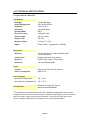
6.0 TECHNICAL SPECIFICATION
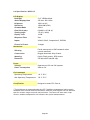
6.1 Specification- NPD1236
LCD Display
Backlight
12" LED Backlight
Active Display Area
Brightness
245.76x184.32 mm
1000 cd/m2 *
Resolution
1024x768 (XGA)
Contrast Ratio
Pixel Pitch (mm)
800:1
0.24(H)x0.24(V)
Viewing Angle
140 (H), 140(V)
Display Color
262,144
Response Time
Tr: 6ms, Tf: 17ms
Inputs
VGAx1, DVIx1, Composite x3, RS232x1
Mechanical
IP Rating
Facial waterproof to IP65 standards when
console mounted.
Construction
Rugged Aluminum Alloy Chassis
Mounting
Panel (Flush) mount, VESA mount
Dimension
297.2(w)x256(H)x56(D)
Power
Voltage
Operates on 12V and 24V systems
Power Consumption
24W at 12V
Environmental
Operating Temperature
-20°C~60°C
Non-Operating Temperature
-20°C~70°C
Certification
Designed to meet FCC Class A,
Marine standard EN60945
* The brightness is measured under the 25°C ambient temperature before touch
attached. Due to Panel material's deviation, different panel supplier will set different
specific variance range to optical characteristics. The factors of time used, Lamp
current, ambient temperature will influence the optical measurements.
Page 51
6.2 Specification- NPD1555
LCD Display
Backlight
15" LED Backlight
Active Display Area
Brightness
304.128 x 228.096 mm
Resolution
1024x768 (XGA)
Contrast Ratio
Pixel Pitch (mm)
700:1
0.297(H) x 0.297 (V)
Viewing Angle
160 (H), 160(V)
Display Color
16.2M
Response Time
Tr:8ms, Tf:17ms
Inputs
VGAx1, DVIx1, Composite x3, RS232x1
1000 cd/m2 *
Mechanical
IP Rating
Facial waterproof to IP65 standards when
console mounted.
Construction
Rugged Aluminum Alloy Chassis
Mounting
Panel (Flush) mount, VESA mount
Dimension
352.8(W)x303.3(H)x56(D)
Power
Voltage
Operates on 12V and 24V systems
Power Consumption
40.8W at 12V
Environmental
Operating Temperature
-20°C~60°C
Non-Operating Temperature
-20°C~70°C
Certification
Designed to meet FCC Class A,
Marine standard EN60945
* The brightness is measured under the 25°C ambient temperature before touch
attached. Due to Panel material's deviation, different panel supplier will set different
specific variance range to optical characteristics. The factors of time used, Lamp
current, ambient temperature will influence the optical measurements.
Page 52
6.3 Specification- NPD1744
LCD Display
Backlight
17" LED Backlight
Active Display Area
Brightness
337.92 x 270.336mm
Resolution
1280x1024 (SXGA)
Contrast Ratio
Pixel Pitch (mm)
1000:1
Viewing Angle
160 (H), 160(V)
Display Color
16.2M
Response Time
5ms
Inputs
VGAx2, DVIx2, Composite x3, RS232x1
Picture in Picture
3 stages
1000 cd/m2 *
0.264 (H) x 0.264(V)
Mechanical
IP Rating
Facial waterproof to IP65 standards when
console mounted.
Construction
Rugged Aluminum Alloy Chassis
Mounting
Panel (Flush) mount, VESA mount
Dimension
384(w)x348.1(H)x57.8(D)
Power
Voltage
Operates on 12V and 24V systems
Power Consumption
50.4W at 12V
Environmental
Operating Temperature
-10°C~50°C
Non-Operating Temperature
-20°C~70°C
Certification
Designed to meet FCC Class A,
Marine standard EN60945
* The brightness is measured under the 25°C ambient temperature before touch
attached. Due to Panel material's deviation, different panel supplier will set different
specific variance range to optical characteristics. The factors of time used, Lamp
current, ambient temperature will influence the optical measurements.
Page 53
6.4 Specification- NPD1954
LCD Display
Backlight
19" LED Backlight
Active Display Area
Brightness
376.32 x 301.06mm
Resolution
1280x1024 (SXGA)
Contrast Ratio
Pixel Pitch (mm)
900:1
0.294(H) x 0.294 (V)
Viewing Angle
160 (H), 160(V)
Display Color
16.2M
Response Time
5ms
Inputs
VGAx2, DVIx2, Composite x3, RS232x1
Picture in Picture
3 stages
1000 cd/m2 *
Mechanical
IP Rating
Facial waterproof to IP65 standards when
console mounted.
Construction
Rugged Aluminum Alloy Chassis
Mounting
Panel (Flush) mount, VESA mount
Dimension
421.9(w)x304.1(H)x56(D)
Power
Voltage
Operates on 12V and 24V systems
Power Consumption
55W at 12V
Environmental
Operating Temperature
-10°C~50°C
Non-Operating Temperature
-20°C~70°C
Certification
Designed to meet FCC Class A,
Marine standard EN60945
* The brightness is measured under the 25°C ambient temperature before touch
attached. Due to Panel material's deviation, different panel supplier will set different
specific variance range to optical characteristics. The factors of time used, Lamp
current, ambient temperature will influence the optical measurements.
Page 54
6.4 Specification- NPD2115
LCD Display
Backlight
21.5" LED Backlight
Active Display Area
Brightness
476.64 x 268.11mm
1000 cd/m2 *
Resolution
1920x1080 (FHD)
Contrast Ratio
Pixel Pitch (mm)
1000:1
0.248(H) x 0.248 (V)
Viewing Angle
170 (H), 160(V)
Display Color
16.2M
Response Time
5ms
Inputs
VGAx2, DVIx2, Composite x3, RS232x1
Picture in Picture
3 stages
Mechanical
IP Rating
Facial waterproof to IP65 standards when
console mounted.
Construction
Rugged Aluminum Alloy Chassis
Mounting
Panel (Flush) mount, VESA mount
Dimension
525.8(w)x345.2(H)x56.4(D)
Power
Voltage
Operates on 12V and 24V systems
Power Consumption
26W at 12V
Environmental
Operating Temperature
-10°C~50°C
Non-Operating Temperature
-20°C~70°C
Certification
Designed to meet FCC Class A,
* The brightness is measured under the 25°C ambient temperature before touch
attached. Due to Panel material's deviation, different panel supplier will set different
specific variance range to optical characteristics. The factors of time used, Lamp
current, ambient temperature will influence the optical measurements.
Page 55
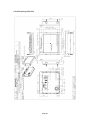
6.5 ME Drawing- NPD1236
Page 56
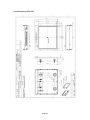
6.6 ME Drawing- NPD1555
Page 57
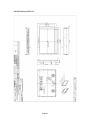
6.7 ME Drawing- NPD1744
Page 58
6.8 ME Drawing- NPD1954
Page 59
6.8 ME Drawing- NPD2115
Page 60
7.0 MAINTENAINCE AND TROUBLESHOOTING
Precautions
To maximize the life and safe use of your unit, always be sure to follow the warnings,
precautions and maintenance recommendations in this user’s guide.
In a Watercraft or Vehicle:
z
The monitor should be visible to the driver only if it is used for navigation, or
system control. Care should be taken to ensure distraction does not occur.
z
Review all applicable federal, state and local laws and regulations to make sure the
monitor is used properly and safely.
z
Avoid using the monitor for extended times while the charging system is not running,
or the monitor could drain the watercraft’s battery.
Maintenance
High Voltage
W A R N IN G !
The display unit contains high voltages.
01. To reduce the risk of electric shock, do not remove the cover or back.
There are no user-serviceable parts inside.
02. Make sure you turn off and unplug the display before installing devices.
Cleaning the display
Cleaning
DO NOT use acid, ammonia based or abrasive products.
CAUTION!
1. Use a soft cloth moistened with mild detergent, isopropyl alcohol, or window cleaners
to clean the display housing.
2. Ensure the display is disconnected from the power supply. Wipe the display with a
clean, damp cloth.
3. If necessary use iso-propyl alcohol (IPA) or a mild detergent to remove grease
marks.
4. Never use abrasive cleaners, waxes or solvents to clean the unit.
Disconnecting the power supply
To disconnect the display from the boat’s power supply either;
• Isolate the power cable from the main supply, or,
• Remove the power connector from the rear of the monitor.
The power button on the front of the monitor changes the operating mode; it does
not provide complete protection in an emergency
Page 61
Troubleshooting
All Navpixel products are, prior to packing and shipping, subjected to comprehensive
test and quality assurance programs. However, if this unit should develop a fault,
please refer to the following table to identify the most likely cause and the
corrective action required to restore normal operation. If you still have a problem
after referring to the table below, contact your local dealer, national distributor or
Navpixel Technical Services Department for further advice.
Common problems and their solutions
Problem
Solution
The display is very dim or dark
Adjust the display as described in “Image adjustment
on ” Section 5 OSD Menu.
The display shows the message ‘No Input’
Check that the video source
i.e. display, camera, DVD etc. is powered and that
the cables are correctly connected.
You have pressed the power button, but the
display does not function.
1. Make sure that the power cable is well connected
and that all connections are tight and free from
corrosion.
2. Check the system fuse.
Page 62