1
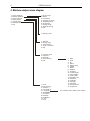
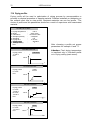
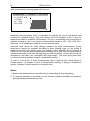
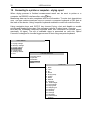
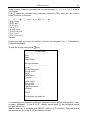
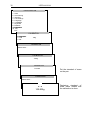
USER MANUAL 25 13.6 Initial moisture analysis To determine optimal drying parameters for unknown sample, it is recommended to perform initial measurement with activated drying chart displaying. To do this, set the following drying parameters (see Drying parameters setting): - Operation Mode: Time mode - Calculation method: m0-m/m0*100% - Drying temperature: organic substances: 80 - 120 0C inorganic substances: 140 - 160 0C - Samples quantity: do not set - Sampling interval: 1 second - Drying time: set time, after which the sample will be definitely dried More information regarding temperature and drying time in A appendix. To activate displaying of drying chart, which will be visible on the display instead of humidity indication, perform the following actions: USER MENU 1. Drying settings 2. Memory settings 3. Drying options 4. Drying raport 5. Configuration 6. Settings default 7. Exit DRYING OPTIONS 1. Average 2. Drying chart 3. Transmission 4. Exit Tare the moisture analyzer with empty single-use pan (T key). Put a sample of examinated material on single-use pan, put it into drying chamber and press START key.