1
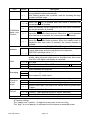
Waterproof Digital Platform Scale
HV-60KGL-WP
HV-200KGL-WP
ADM-HVG-WP
HV-60KGV-WP
HV-200KGV-WP
This is a hazard alert mark.
This mark informs you about the operation of the product.
Note
This manual is subject to change without notice at any time to improve the product.
No part of this manual may be photocopied, reproduced, or translated into another
language without the prior written consent of the A&D Company.
Product specifications are subject to change without any obligation on the part of the
manufacture.
Contents
1.
Compliance ................................................................................................ 3
1.1.1. Compliance with FCC rules ........................................................... 3
1.1.2. Classification of protection provided by enclosures........................................ 3
2.
Outline and Features ................................................................................. 4
3.
Unpacking .................................................................................................. 5
3.1.
Accessories and Options list.............................................................. 6
4.
Caution ...................................................................................................... 7
4.1.
Precautions for Installing the Scale.................................................... 7
4.2.
Precautions for Operating the Scale .................................................. 7
4.3.
Precautions for Storing the Scale ...................................................... 7
5.
Installing the Scale..................................................................................... 8
5.1.
Removing the column ........................................................................ 9
6.
Names ..................................................................................................... 10
6.1.
Display and Symbols ....................................................................... 12
6.2.
Keys................................................................................................. 14
7.
Basic Operation ....................................................................................... 16
7.1.
Turning the Scale on/off and Weighing ............................................ 16
7.1.1. Type V or Type L with AC Adapter .............................................. 16
7.1.2. Type L with Rechargeable batteries ............................................ 17
Tare (And Net Display)................................................................................. 18
7.1.3. Manual Tare ................................................................................ 18
7.1.4. Preset Tare.................................................................................. 18
7.2.
Weighing Range for the HVG-WP series ......................................... 19
7.3.
Mode Key (Changing Unit and Mode).............................................. 20
8.
Counting Mode......................................................................................... 22
8.1.
Storing a Unit Mass ......................................................................... 22
8.2.
Counting the number of articles ....................................................... 23
9.
Percentage Mode..................................................................................... 24
9.1.
Storing a 100% Mass....................................................................... 24
9.2.
Reading percentage ........................................................................ 25
10.
Accumulation Function ........................................................................ 26
10.1. Preparation (Setting Parameters) .................................................... 27
.
27
10.2. Operation and Performance (Examples).......................................... 28
11. Upper/Lower Comparator Function ................................................................. 29
11.1. Preparation (Setting Parameters) .................................................... 30
11.2. Operation and Performance (Examples).......................................... 32
12. Full/Dribble Batch Function ...................................................................... 33
12.1.
Preparation (Setting Parameters) .................................................... 35
13.
Simple Batch Function......................................................................... 37
13.1. Preparation (Setting Parameters) .................................................... 38
13.2. Operation and Performance (Examples).......................................... 39
14.
Calibration (Adjusting the Scale).......................................................... 40
14.1.1. The Gravity Acceleration Table ................................................. 41
14.2. The Complete Calibration Procedure............................................... 42
14.2.1. Gravity Acceleration Correction................................................. 42
14.2.2. Preparation................................................................................ 42
14.2.3. Calibration of the Zero Point...................................................... 43
14.2.4. Span Calibration........................................................................ 43
15.
The Function Table.............................................................................. 44
15.1. The Procedure for Setting Parameters ............................................ 44
15.2. Parameter List ................................................................................. 45
16.
RS-232C Serial Interface..................................................................... 48
16.1. Data Format..................................................................................... 49
16.2. Stream Mode ................................................................................... 51
16.2.1. Preparation and Performance (Examples) ................................ 51
16.3. Command mode .............................................................................. 52
16.3.1. Command List ........................................................................... 52
16.3.2. Example of Setting Parameters................................................. 55
17.
Options ................................................................................................ 56
17.1. Extension cable (OP-02).................................................................. 56
17.2. RS-232C/ Relay output/ Buzzer (OP-03) ......................................... 57
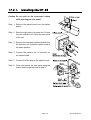
17.2.1. Installing the OP-03 ................................................................... 58
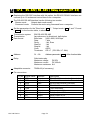
17.3. RS-422/ RS-485 / Relay output (OP-04).......................................... 59
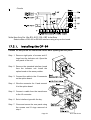
17.3.1. Installing the OP-04 ................................................................... 60
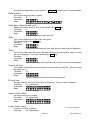
17.3.2. Communication Format ............................................................. 61
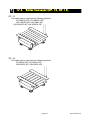
17.4. Roller Conveyor (OP-13, OP-14) ..................................................... 64
18.
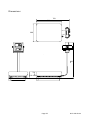
Specification ........................................................................................ 65
19.
Maintenance ........................................................................................ 67
19.1.1. Repair........................................................................................ 67
19.2.
Check points Before Calling Maintenance Service ..................................... 67
Page 2
HVG-WP Series
1. Compliance
1.1.1.
Compliance with FCC rules
Please note that this equipment generates uses and can radiate radio frequency
energy. This equipment has been tested and has been found to comply with the limits
of a Class A computing device pursuant to Subpart J of Part 15 of FCC rules. These
rules are designed to provide reasonable protection against interference when this
equipment is operated in a commercial environment. If this unit is operated in a
residential area it may cause some interference and under these circumstances the
user would be required to take, at his own expense, whatever measures are
necessary to eliminate the interference.
(FCC = Federal Communications Commission in the U.S.A.)
1.1.2.
Classification of protection provided by enclosures
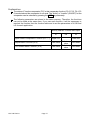
This equipment is designed to comply with the IP Code of IEC 529.
The "IP-65" code is explained as follows:
"IP"
International Protection.
"6"
Against ingress of solid foreign objects.
Dust-tight. No ingress of dust.
"5"
Against ingress of water with harmful effects.
Protected against water jets (no powerful jets). Water projected in jets
against the enclosure from any direction shall have no harmful effects.
Compliance with European Directive
This appliance features radio interference suppression and safety of electrical
equipment designed for certain voltage in compliance with valid EC Regulation
89/366/EEC and 73/23/EEC.
Note: The displayed value may be adversely affected under extreme electromagnetic
influences.
HVG-WP Series
Page 3
2. Outline and Features
These scales are designed to comply with IP-65 of IEC 529
The HVG-WP series is a platform scale with 1/3000 resolution, and has a "triple
weighing range" function to select the weighing range.
Type L scales have an LCD (Liquid Crystal Display) and use rechargeable batteries
as power source to enable use without connecting to AC power. This type can also
use an AC adaptor.
Type V scales have a fluorescent display so the display can be read in dim light. This
type uses an AC power line as a power source.
The counting mode function calculates individual unit weight from a sample of the
items to be counted. Once this unit weight is entered, bulk quantities can be counted
and shown as a pcs display.
The scales can display the unit of percentage.
The accumulation function accumulates each weighing value and can display totals
for weight and number of items.
The comparator function compares the display value with the upper limit value (HI),
lower limit value (LO) and displays the result. The result can be output if option OP-03
is installed.
The simple batch function or full/dribble batch function can be used for batching to a
target mass value. The status of a weighing value can be output if option OP-03 or
OP-04 is installed. The outputs are zero band, preliminary and Final.
Using the optional RS-422/RS-485 serial interface and a computer, up to 16 scales
can be controlled, if this option is installed in place of the RS-232C serial interface.
The following parameters are stored in the product with no power supplied.
Unit mass of the counting mode
100% mass of the percentage mode
Total counts and total mass of the accumulation function
Upper limit value and lower limit value of the upper / lower comparator function,
Final value, preliminary value and zero band of the full / dribble batch function or
Final value, preliminary value and zero band of the simple batch function
Calibration data
Parameters of the function table (f1 ~ f16)
Page 4
HVG-WP Series
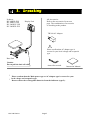
3. Unpacking
Products
Products
HV-60KGL-WP
HV-60KGV-WP
HV-60KGV-WP
HW-60KGV-WP
HV-200KGV-WP
HV-60KGL-WP
HV-200KGL-WP
HW-60KGL-WP
Display Unit
All Accessories
Refer to the accessories list at next
page. The combination of accessories
is according to the product.
TB:300 AC Adapter
!
Please confirm that AC adapter type is
correct for your local voltage and receptacle
type.
Base Unit
Caution
Do not pull the load cell cable
6mm allen wrench
?
Instruction Manual
Please conform that the Main power type or AC adapter type is correct for your
local voltage and receptacle type.
? Do not remove the rechargeable batteries from the indicator (type L).
HVG-WP Series
Page 5
3.1. Accessories and Options list
Accessories for the HVG-WP series
Products
Type V
Type L
Accessories
6mm Allen wrench
Instruction manual
Warranty card
HV-60KGV-WP
HV-200KGV-WP
TB: 300 AC adapter
6mm Allen wrench
Instruction manual
Warranty card
HV-60KGL-WP
HV-200KGL-WP
Options List
OP-02
OP-03
OP-04
OP-13
OP-14
Order code or option name
Accessories
5m extension loadcell cable
Tapping screw M4x10
RS-232C interface/ Relay output/ Buzzer Connector JA:TCP0586
Connector
TM:BLA9
RS-422/485 interface with relay output
AC adapter
Roller conveyor for HV-200KGV-WP
Roller conveyor for HV-60KGV-WP
Page 6
HVG-WP Series
4. Caution
4.1. Precautions for Installing the Scale
Ground the scale, so that the user will not be subjected to an electric shock.
Do not handle the Main power cord with wet hands.
The AC plug is not water-resistant. Install it in an area where it does not get wet.
Do not install the scale where there is flammable or corrosive gas present.
Do not install the scale under water.
Do not pull, fold or arrange cables forcibly.
Consider the following conditions to get the most from your scale.
The best operation is where the temperature and relative humidity are stable, the place
to install the scale is a solid floor, there is no draft and the power source is stable.
Do not install the scale in direct sunlight.
Do not install the scale near heaters or air conditioners.
Do not install the scale near equipment which produces magnetic fields.
Do not install the scale in a place where it is apt to be charged with static electricity, or
where the relative humidity is lower than 45%RH. Plastic and isolators are apt to be
charged with static electricity.
Do not use an unstable power source.
4.2. Precautions for Operating the Scale
Periodically ensure that the weighing value is correct.
Calibrate the scale before using and after moving it to another location.
Do not place anything on the weighing pan which is heavier than the weighing capacity
Do not drop anything upon the weighing pan.
Do not use a sharp instrument such as a pencil or ball-point pen to press the keys.
Press the keys gently using only your finger.
We recommend pressing the ZERO or TARE key before each weighing to prevent
possible error.
4.3. Precautions for Storing the Scale
Do not disassemble the scale.
Do not use solvents to clean the scale.
For best cleaning of the display unit, wipe with a dry lint free cloth or a lint free cloth
which is moistened with warm water and a mild detergent.
The base unit can be cleaned with gentle water jets while brushing the base unit.
Weigh only after the unit is dry.
Do not use a powerful water jet.
Do not remove rechargeble batteries from display unit.
HVG-WP Series
Page 7
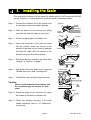
5. Installing the Scale
This procedure includes all of the steps for installing the HV-WP series and HW-WP
series. Therefore, on some products, there are some unnecessary steps.
Step 1 Connect the indicator unit to the column with
the accesory knobs and rubber washers.
Column
Cable
Indicator
Step 2 Take the base unit and column out, taking
care that the load-cell cable is not pulled.
Knob
Rubber washer
Pan
Column
Step 3 Put the weighing pan on the base unit.
Step 3
Step 4 Insert the remainder of the load cell cable
into the column. Attach the column to the
bracket of the base unit so as not to damage
the load cell cable. Affix the column to the
bracket using two 6mm Allen screws.
Step 2
Load-cell cable
Base unit
Bubble spirit level
Step 5 Select the place for installing the scale. Also
consider "4. Caution" on page 7.
Leveling foot
Step 5
Step 6 Adjust the level of the base unit by using the
"Bubble spirit level" and "Leveling foot".
OK
Power label
NG
Earth
Step 7 Ground the scale using the earth terminal.
Step6
Earth terminal
Caution
Please confirm that the local voltage and
the receptacle type are correct for your
scale.
Power terminals
Earth
Step7
Step 8 Adjust the angle of the indicator unit using
the knobs on the side of indicator unit.
Knob
Step 9 Check the weighing accuracy. If the scale
needs calibration, refer to "14. Calibration".
on page 40.
Page 8
HVG-WP Series
5.1.
Removing the column
Caution
Remove the main power plug before removing the column (type V)
Remove the AC adapter before removing the column (Type L)
When removing the loadcell cable, do not pull the loadcell cable connector
forcibly and do not pull on the wires of the cable.
Do not bend the cable forcibly.
Avoid dust, static electricity and high humidity (or drops) because the inside
of the indicator unit is very sensitive.
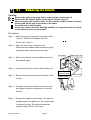
Procedure
Step 1 Remove the power plug from the power outlet.
(Type V). Remove AC adapter from the
Power Jack (Type L).
Step 2 Open the rear cover of indicator unit.
Disconnect the loadcell cable connector gently
(perpendicularly, do not pull to the side).
Connector
Screw and O ring
Step 3 Remove the ferrite core and cable clamp from
the loadcell cable.
Step 4 Loosen the knobs to remove the indicator unit.
Ferrite core
Wind up 2 times
Step 5 Remove four 6mm screws from the bottom of the
column.
Step 6 Carefully remove the cable from the pole and
pole base so that the connector is not pulled
forcibly.
Step 7 Arrange the cable so that it does not touch the
weighing pan in the base unit. The untied cable
is at least 2m long. The optional extension
loadcell cable (OP-02) is 5m long.
HVG-WP Series
Page 9
Cable clamp
Loadcell cable
knob
Pole
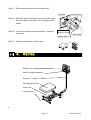
Step 8 Removing the column from the base unit,
Connector
Screw and O ring
Step 9 Wind the cable through the ferrite core two times.
Affix the cable to the rear cover using the cable
clamp.
Step 10 Connect the cable to the connnector. Close the
rear cover.
Ferrite core
Wind up 2 times
Cable clamp
Loadcell cable
Step 11 Confirm the accuracy of the scale.
6. Names
Display Unit
Knob for angle adjstment
Pole
Pan (Weighing Pan)
Base Unit
Leveling Foot
Page 10
HVG-WP Series
D is p la y
Weighing condition
Weighing data
Bubble spirit level
Units
STABLE
NET
ZERO
PT READY M+
5kg 6kg 3kg
HI
OK
LO
Indicator of
function
Leveling foot
CAP. Max 15/30/60kg d=5/10/20g
Keys
OK
NG
Rear of Indicator Unit (VFD)
Knob for angle
adjustment
Calibration sealing panel
Earth terminal
Inside of rear panel
RS-232C
DIN connector
Cable clamp for load cell cable
Cable clamp for option
Load cell cable
Main power cord
Earth terminal
Power line terminal Please Confirm that the local
voltage and receptacle type are
correct for your scale.
Rear of Indicator Unit (LCD)
Knob for angle
adjustment
Calibration sealing panel
Earth terminal
Inside of rear panel
RS-232C
DIN connector
Rechargeable batteries pack
Cable clamp for adapter
Load cell cable
Cable clamp for option
HVG-WP Series
Page 11
Please Confirm that the local
voltage and receptacle type are
correct for your scale.
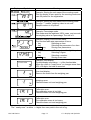
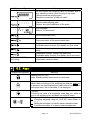
6.1. Display and Symbols
Display and Symbols
Meaning
Stability indicator.
Indicates the stability status of the weight display.
Symbol is lit when the display is stable.
Zero indicator.
Indicates true center of zero of the weight indication.
Net indicator.
Indicates a tare value has been entered and that the
weight displayed is a net value.
Preset tare indicator.
Indicates a preset tare has been entered.
Accumulation indicator.
Indicates the accumulation function is in use.
Ready indicator.
Used with the full/dribble feed batching function.
ON
Weight within zero band and ready to batch.
OFF
weight is outside the zero band.
Blinking The start or end of the full/dribble batch
process above the zero-band.
The comparator indicator.
Using the comparator function and comparing a
weighing value with the upper and lower limits, the
result is indicated.
Using the full/dribble batch function, the full flow
gate indicator is OK, the dribble flow gate indicator
is HI and the zero band indicator is LO.
60
60
30
Weighed mass value
15
The weighing range indicator for the HV-WP series.
The current range is indicated.
Example. Display of zero (zero point).
With nothing on the weighing pan and pressing
the ZERO key, this mark is displayed.
The zero point mark is displayed.
The stability mark is displayed.
Example. Display of the counting mode.
This mode uses the registered unit mass, and counts
the amount of articles on the weighing pan. The unit is
.
Page 12
HVG-WP Series
A
A
A
A
A
A
A
A
A
A
A
A
A
A
A
A
A
A
A
A
A
A
A
A
A
A
A
A
A
A
A
A
A
A
A
A
A
A
A
A
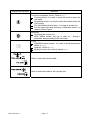
Display and Symbols
Meaning
Example. Storing the unit mass of the counting mode.
This is a display of zero point for the counting mode and
uses 20 pieces for the registration.
Example. Storing the unit mass of the counting mode.
The sign "-" means "weighing value is not zero".
Sample number is 10 pieces.
Example. Percentage mode.
This mode uses the registered 100% mass, and converts
the weighing value to a percentage. The unit is % .
Example. Display of the function table.
This function table sets parameters of items.
< key
Selecting an item.
∧ key
Selecting the parameter of an item.
ENTER key
Storing new parameters.
Example. Preset tare. Entering tare with digital input.
< key
Selecting a figure.
∧ key
Selecting a number.
ENTER key
Storing a new tare.
Fixed value
Example. Hold display
The hold display is set using f12 of the function table.
When the value is "nearly-zero" or changes more than
25% +30 digits, the hold is canceled.
Over load display.
Remove the mass from the weighing pan.
Weighing error.
Check the base unit and weighing pan.
Calibration error.
The calibration mass is too light.
Check the base unit and weighing pan.
Calibration error.
The calibration mass is too heavy.
Check the base unit and weighing pan.
The " nearly-zero " is within ±4 digits from zero point in the unit of kg.
HVG-WP Series
Page 13
6.1. Display and Symbols
A
A
A
A
A
A
A
A
A
A
A
A
A
A
A
A
A
A
A
A
A
A
A
A
A
A
A
A
A
A
A
A
A
A
A
A
A
A
A
A
A
A
Display and Symbols
Meaning
An error where the weighing value is unstable due to
drift, vibration or other, when turning on the scale.
Check around the weighing pan.
Check the connection of load cell cable.
Remove anything that may be on the weighing pan.
Check around weighing pan.
Perform zero point calibration of the scale.
Error indication.
Refer to "19 Maintenance".
Accumulated data count.
Total mass value of the accumulated data.
Comparator function, display is an upper limit.
Full/dribble batch function, the display is a final value.
Full/dribble batch function, the display is a preliminary
value.
Comparator function, display is a lower limit.
Full/dribble batch function, the display is the zero band.
CAP. MAX. 15/30/60kg
d=5/10/20g
Description of the weighing unit, weighing range and
measurable minimum mass.
A
A
A
A
A
A
A
A
A
A
A
A
A
A
A
A
A
A
A
A
A
A
A
6.2. Keys
Display and Symbols
Meaning
Display ON/ OFF key.
Note Standby status when power is connected.
Zero key.
When there is nothing on the weighing pan and the ZERO key
is pressed, the scale displays the mass value of zero and the
zero point mark. Net is canceled, if it is displayed.
Tare key.
Canceling the mass of a receptacle, case, bag, etc. which is
put on the weighing pan, and does not weigh its mass.
Range key, Sample key.
Changing weighing range for HVG-WP series.(Refer to
f2 )
Storing the unit mass, it is used to select a sample number.
In the function table, it is used to select a parameter.
Page 14
HVG-WP Series
A
A
A
A
A
A
A
A
A
A
A
A
A
A
A
Display and Symbols
Meaning
Set key.
Turns the comparator on/off. (Refer to f6 )
Counting mode, it is used to enter the mode to store the
unit mass.
Percentage mode, it is used to enter the mode to store the
100% mass.
The full/dribble batch function, it is used as a start key.
For the preset tare and selecting a calibration mass, it is
used to select a figure.
Mode key.
Changing the current unit.
While setting modes, this key is used for " storing a
parameter and proceeding to the next step".
F key.
Full/dribble batch function, it is used to finish the process.
(Refer to f10 )
Hold key. (Refer to f12 )
Setting a preset tare, selects polarity (+,-).
Used to enter the function table.
Used to enter the mode to set a preset tare.
HVG-WP Series
Page 15
A
A
A
A
A
A
A
A
A
A
A
A
A
A
A
A
A
A
A
A
A
A
A
A
A
A
A
A
A
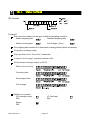
7. Basic Operation
7.1. Turning the Scale on/off and Weighing
7.1.1.
Type V or Type L with AC Adapter
Step 1 Ground the scale using the earth terminal.
Step 2 Confirm nothing is placed on the weighing pan.
Step 3 Confirm that local voltage and outlet type are correct.
Step 4 The scale turns on using the ON/OFF key.
Step 5 Check the accuracy of weighing. Allow 30 minutes warming up before calibration.
Step 6 With nothing on the pan, press the ZERO key to display zero.
Step 7 Place an article on the weighing pan gently.
Step 8 Wait for the stability mark to be displayed. Read the weight.
Step 9 Remove the article from the weighing pan.
Step 10 Turn the scale off using the ON/OFF key.
Memo
With the power cord connected, type V is in standby status after the scale is turned off
using the ON/OFF key. To shut down the power completely, disconnect the power
cord.
With the AC adapter connected, the power is off at the scale, but not from the AC
adapter, after the scale is turned off using ON/OFF key. To shut down the power
completely, disconnect the AC adapter.
Caution
The HVGL-WP scale should only be operated using the adapter supplied.
Failure to do this could result in damage to the rechargeble batteries and a
void of the product warranty.
Page 16
HVG-WP Series
15 30 60
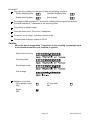
7.1.2.
5 10 15
Type L with Rechargeable batteries
Step 1 Confirm nothing is placed on the weighing pan.
Step 2 Plug AC adapter into mains power.
Step 3 Connect AC adapter to the scale and charging begins.
Step 4 Disconnect AC adapter from the scale after charging 16 hours.
Step 5 Turn on the scale using the ON/OFF key.
Step 6 Check the accuracy of weighing. Allow 30 minutes warming up before calibration.
Step 7 With nothing on the pan, press the ZERO key to display zero.
Step 8 Place an article on the weighing pan gently.
Step 9 Wait for the stability mark to be displayed. Read the weight.
Step 10 Remove the article from the weighing pan.
Step 11 Turn the scale off using the ON/OFF key.
Caution
Do not remove rechargeable batteries from the display.
HVG-WP Series
Page 17
Tare (And Net Display)
"Tare" is used to cancel the mass of a container, receptacle, case, bag, etc. which is
put on the weighing pan to contain the item to be weighed.
Caution
Using a tare value reduces the weighing range.
The current tare value is reset by pressing the ZERO key or turning the scale
off. (Reset value is zero.)
The preset tare value must be within the minimum weighing range for the
HV-WP series.
7.1.3.
Step
Step
Step
Step
1
2
3
4
Manual Tare
Put the container on the weighing pan.
Press the TARE key. The display becomes zero and the net mark is displayed.
It is now possible to put something into the container and to read its net display.
Once weighing with tare is complete, remove all items from pan and press ZERO
key to return to true zero.
7.1.4.
Preset Tare
Step 1 Press and hold the SET key and press the TARE key.
The blank or stored tare value is displayed. A blank display means that the tare
value is zero (reset value), and or
blinks.
Step 2 Set the preset tare value by using the following keys.
∧ key
Adjusts the value of the figure.
< key
Selects a figure.
F key Selects the polarity (+,-).
Step 3 Press the ENTER key to store the new preset tare value.
Then the scale displays a net value with the tare value subtracted from the gross
weighing value.
Step 4 It is then possible to put something into the container and to read its net.
Step 5 Once weighing with tare is complete, remove all items from pan and press ZERO
key to return to true zero.
Page 18
HVG-WP Series
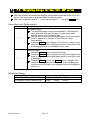
7.2. Weighing Range for the HVG-WP series
This is the function to nominate the weighing range selection process for the HVG-WP
series. The mass value is displayed within a selected range.
There is the automatic range (F2 0) and manual range (F2 1) using the RANGE key.
Operation and Performance
Function table
Meaning and purpose
F2 0
Automatic range
The weighing range changes automatically, if the weighing
value proceeds from narrow range to wide range when
placing articles on the weighing pan.
When there is nothing on the weighing pan and the zero point
mark is displayed, it changes to the minimum range
automatically.
Press the ZERO key to change to the minimum range, when
there is nothing on the weighing pan and the zero point mark
is not displayed due to net display or zero error.
F2 1
Manual range
Press the RANGE key to expand the range.
Press the RANGE key to change to the minimum range, when
there is nothing on the weighing pan and the zero point mark
is displayed.
Press the ZERO key and the RANGE key to change to the
minimum range, when there is nothing on the weighing pan
and the zero point mark is not displayed due to net display or
zero error.
Weighing Range
Products
HV-60KGV-WP HV-60KGL-WP
HV-200KGV-WP HV-200KGL-WP
HVG-WP Series
15kg,
60kg,
Page 19
Weighing Range
30kg,
60kg
150kg,
220kg
A
A
A
A
A
A
A
A
A
A
A
A
A
A
A
A
A
A
A
A
A
A
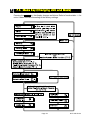
7.3. Mode Key (Changing Unit and Mode)
Pressing the MODE key, the display changes as follows. Refer to function table f3 for
units. Usable units are according to the factory settings.
Page 20
HVG-WP Series
Explanation
The status of "Inactive comparator (F6)" is that comparator function (F6 0, F6 2, F6 4, F6
6) is selected and the comparator is not used. The "active" or "Inactive" (ON/OFF) for the
comparator can be selected by pressing the SET key alternately.
The following parameters are stored in the same memory. Therefore, the functions
can not be used at the same time. If you use each function, it will be necessary to
reselect the function from the function table and to set the parameters of HI,OK and
LO for each application.
Memory address / Indicator and Output
HI
Upper/Lower Comparator Function (f6 0 ~ 7)
Upper limit
Simple Batch Function (f6 8)
Final value
Full/ Dribble Batch Function (f6 9)
Final value
HVG-WP Series
Page 21
OK
LO
Lower limit
Preliminary
value
Preliminary
value
Zero band
Zero band
8. Counting Mode
The counting mode is the function to convert the total mass value (total weight) of
articles to a count by calculating a unit weight for each individual item.
It is necessary to store this unit weight to count articles.
8.1. Storing a Unit Mass
Step 1 Press the MODE key to display the unit
.
Step 2 Press the SET key to enter the mode to store a unit
mass.
Step 3 Press the ∧ key to select the number of samples.
The greater the quantity of samples, the greater the
accuracy of the count.
5 pieces, 10 pieces, 20 pieces, 50 pieces, 100 pieces
Step 4 Put a container item on the weighing pan.
Press the TARE key.
Step 5 Put in the number of samples as selected at step 3.
Press the ENTER key to store the value after the
stability mark is displayed. Then the count is
displayed.
Caution
When the sample is too light and it is not possible
to calculate a unit mass, the scale displays lo ut
and returns to step 3. The sample quantity needs
to be increased.
Pressing the ENTER key after lo ut . is displayed.
It will display the larger sample quantities.
Select a larger sample quantity and move to step
4.
Page 22
HVG-WP Series
8.2. Counting the number of articles
Step 1 Press the MODE key to display the unit
.
Step 2 Store the articles unit mass.
Refer to "8.1 Storing a Unit Mass"
Step 3 Place the container item only on the weighing pan.
Press the TARE key.
Step 5 Put articles in the container item and read the
count.
Step 6 Remove all things from the weighing pan.
HVG-WP Series
Page 23
9. Percentage Mode
The percent mode is the function to display a mass value in the unit of "%".
Store a 100% mass value, in advance, to use this function.
9.1. Storing a 100% Mass
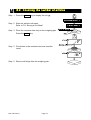
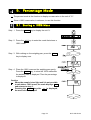
Step 1 Press the MODE key to display the unit %.
Step 2 Press the SET key to enter the mode that stores a
100% mass.
Step 3 With nothing on the weighing pan, press the ZERO
key to display zero.
Step 4 Place the 100% mass on the weighing pan gently.
Press the ENTER key, to store the 100% mass after
the stability mark is displayed. Then the percentage
is displayed.
Caution
When the sample is too light and it is not possible
to calculate a 100% mass, the scale displays lo .
and returns to step 3.
Pressing the ENTER key after lo is displayed,
the next unit is displayed.
Page 24
HVG-WP Series
9.2. Reading percentage
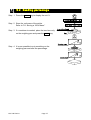
Step 1 Press the MODE key to display the unit %.
Step 2 Store the unit mass of the article.
Refer to "9.1 Storing a 100% Mass "
Step 3 If a container is needed, place the tare item only
on the weighing pan and press the TARE key.
Step 4 It is now possible to put something on the
weighing pan and read the percentage.
HVG-WP Series
Page 25
10. Accumulation Function
This function counts the number of weighed items, calculates the total mass value
and can display the number and accumulated mass value.
Set the parameters of the "accumulation function ( f8
advance, to use this function.
Operation and Keys
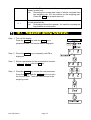
The display of the accumulation count has a blinking
)" in the function table, in
without a unit.
The display of the accumulation value has a unit and a blinking
Pressing the
displayed.
MODE
.
key, the accumulation count and accumulation value are
Pressing the ZERO key in the accumulation function (
is blinking), the current
function resets. (The count and accumulated value become zero.)
Caution
The accumulation function can be used with the first weighing unit accumulated.
This function can display a maximum of six figures.
Parameter List and Word Definition
The "near-zero" is within ±4 digits from the zero point in the unit of kg.
The "digit", a unit of display, is equivalent to the minimum measurable mass.
The "zero point" is the fundamental starting point to weigh anything.
Function table
Meaning and purpose
f8 0
Accumulation function not used.
f8 1
The scale accumulates the data, if the F key is pressed, when the
display is a positive stable value without near-zero. The next
accumulation can be performed after the display is nearly-zero or a
negative value.
f8 2
The scale accumulates the data, if the F key is pressed, when the
display is a stable value and without near-zero. The next
accumulation can be performed after the display is near-zero.
f8 3
When the display is a positive stable value, the scale accumulates
the data automatically. The next accumulation can be performed
after the display is near-zero or a negative value.
A
A
A
A
A
A
A
A
A
A
A
Function table
Meaning and purpose
A
f8 4
When the display is a stable value, the scale accumulates the data A
Page 26
HVG-WP Series
automatically. The next accumulation can be performed after the
display is near-zero.
Use
Recording the number and mass of articles removed form
the weighing pan. (Put the articles on the weighing pan.
Press the TARE key at each removal.)
f8 5
A
A
A
A
A
At each finish of the full/dribble batch function, the scale accumulates A
the data automatically.
A
Use
Packaging articles like a powder, it is used for recording the
A
bag number and total mass.
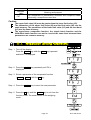
10.1. Preparation (Setting Parameters)
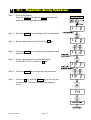
Step 1 Turn off the display.
Press the ON/OFF key while the ZERO key is
pressed and held. The function table is displayed.
Step 2 Press the ENTER key to repeately until F8 is
displayed.
Step 3 Select a parameter for the accumulation function
( f8 1 ~ f8 4 ) with the ∧ key.
Step 4 Press the ENTER key to store the new parameter.
Press the F key and the ENTER key to exit from
the function table. Then the scale returns to the
weighing mode.
.
HVG-WP Series
Page 27
10.2. Operation and Performance (Examples)
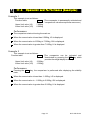
Example 1
Weighing each article, the scale makes the accumulation according to f8 3 .
Step 1 Press the MODE key to display
.
Step 2 Press the ZERO key to reset the accumulation data.
Step 3 Return to the kg mode using the MODE key.
Press the ZERO key with nothing on the weighing pan.
Step 4 Put an article on the weighing pan. Wait for the stability mark to be displayed and
the value to be blinking. Remove the article and press the ZERO key.
Step 5 Weigh additional articles using step 4.
Step 6 Press the MODE key to display the number of articles and total mass with
.
Example 2
This example accumulates the articles that were removed from the weighing pan. The
function parameter is set to f8 4 .
Step 1 Enter into the kg mode using the MODE key.
Put all articles on the weighing pan and press the TARE key.
Step 2 Press the MODE key to display
.
Step 3 Press the ZERO key to reset the accumulation data.
Retun to kg mode with the MODE key.
Step 4 Remove an article from the weighing pan. Wait for the stability mark to be
displayed and the value to be blinking. Press the TARE key.
Step 5 Weigh additional articles using step 4.
Step 6 Press the MODE key to display the number of articles and total mass with
Page 28
.
HVG-WP Series
11. Upper/Lower Comparator Function
This function compares a display value with the upper limit (HI), the lower limit (LO)
and displays the result.
Set the "comparator function ( F6 0 ~ F6 7 )" parameters, upper limit value (HI) and
lower limit value (LO) in the function table, in advance, to use this function.
Install option OP-03 or OP-04, to use the relay output of the comparator.
Install option OP-03, to use the buzzer output of the comparator.
Comparator Sign
Comparison results are displayed by indicators
.
Comparison Condition
Weighing value < lower limit value....................................LO is displayed and output.
Lower limit value ≦ weighing value ≦ upper limit value...OK is displayed and output.
Weighing value > Upper limit value......................................HI is displayed and output.
Parameter List and Word Definition
The term "near-zero" is within ±4 digits from the zero point in the unit of kg.
The term "digit", a unit of display, and is equivalent to the minimum measurable mass.
The term "zero point" is the fundamental starting point to weigh anything.
Function table
F6 0
F6 1
F6 2
F6 3
F6 4
F6 5
F6 6
HVG-WP Series
Meaning and purpose
A
Pressing the SET key activates the comparator which compares all A
values.
A
The comparator is permanently activated and compares all values. A
Pressing the SET key and activates the comparator which compares A
all values except those near zero.
A
The comparator is permanently activated and compares all values A
except those near zero.
A
The comparator can be activated and deactivated by pressing the A
SET key which provides the weight display is stable.
A
A
The comparator is permanently activated but compares stable data A
only.
A
A
The comparator can be activated and deactivated by pressing the
A
SET key for stable values except those near zero.
A
Page 29
Function
table
F67
A
A
Meaning and purpose
The comparator is permanently activated and compares stable A
values only, except those near zero.
A
Caution
The upper limit value (HI) must be greater than the lower limit value (LO).
The parameters of the upper limit value (HI) and the final value (HI) use the
same memory. The parameters of the lower limit value (LO) and the zero band
(LO) use the same memory.
The upper/lower comparator function, the simple batch function and the
full/dribble batch function can not be used at the same time because these
parameters use common memory.
11.1. Preparation (Setting Parameters)
Step 1 Turn off the display.
Press the ON/OFF key while the ZERO key is pressed
and held. F1 is displayed.
Step 2 Press the ENTER key repeatedly until F6 is
displayed.
Step 3 Select a parameter of the comparator function
( f6 0 ~ f6 7 ) with the ∧ key.
Step 4 Press the ENTER key to store the new parameter.
Step 5 Press the F key and the ENTER key to exit from the
function mode. The scale returns to the weighing
mode.
Page 30
HVG-WP Series
Step 6 If either of f6 0 , f6 2 , f6 4 , f6 6 has
been selected, press the SET key to use
the comparator.
Step 7 Press the MODE key to display the blinking HI.
Step 8 Set the upper limit value by using the following
keys.
∧ key
Adjusts the value of a figure.
< key
Selects a figure.
F key Selects polarity (+,-).
Step 9 Press the ENTER key to store the new parameter
and display the blinking LO.
Step 10 Set the lower limit value by using the following
keys.
∧ key
Adjusts the value of a figure.
< key
Selects a figure.
F key Selects polarity (+,-).
Step 11 Press the ENTER key to store the new parameters
and return to the weighing mode.
HVG-WP Series
Page 31
11.2. Operation and Performance (Examples)
Example 1
This example is set as follows:
Function table
f6 3
Upper limit value (HI)
Lower limit value (LO)
(The comparator is permanently activated and
compares all values except those near zero.)
7.000kg
6.500kg
Performance
The comparison starts at turning the scale on.
When the current value is less than 6.500kg, LO is displayed.
When the current value is 6.500kg to 7.000kg, OK is displayed.
When the current value is greater than 7.000kg, HI is displayed.
Example 2
This example is set as follows:
Function table
f6 4
Upper limit value (HI)
Lower limit value (LO)
(The comparator can be activated and
deactivated by pressing the SET key which
provides the weight display is stable.)
2.000kg
-1.000kg
Performance
Pressing the SET key, the comparison is performed after displaying the stability
mark.
When the current value is less than -1.000kg, LO is displayed.
When the current value is -1.000kg to 2.000kg, OK is displayed.
When the current value is greater than 2.000kg, HI is displayed.
Page 32
HVG-WP Series
12. Full/Dribble Batch Function
This function allows the scale to control a 2 speed batching process with full and
dribble feed conditions.
To use this funtion, the following parameters need to be set: F6 to setting 9, F10 to the
setting of your choice, HI(dribble), OK(full feed) and LO(zero band).
Install option OP-03 or OP-04, to use the relay output of the full/dribble batch function.
The functionality and performance of this function are as follows:
A
Zero band
Preliminary value
Final value
indicator/
indicator/
indicator/
A
LO relay output OK relay output HI relay output A
Gross < Zero band (Zero detection Level)
Net < Final - Preliminary
Final - Preliminary ≦ Net < Final
Final ≦ Net
HVG-WP Series
ON / Make
OFF / Break
OFF / Break
OFF / Break
Page 33
OFF / Break
ON / Make
OFF / Break
OFF / Break
OFF / Break
ON / Make
ON / Make
OFF / Break
A
A
A
A
Caution
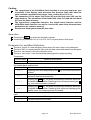
The comparison of the full/dribble batch function is a one way sequence (not
reversible). If the display value becomes less than the final value after the
value reached a predetermined target value, neither HI or LO is on.
The parameters of the upper limit value (HI) and the final value (HI) use the
same memory. The parameters of the lower limit value (LO) and the zero band
(LO) use the same memory.
The upper/lower comparator function, the simple batch function and the
full/dribble batch function can not be used at the same time because these
parameters use common memory.
Set the zero band greater than the tare value.
Operation
Pressing the SET key and start the batch process.
If selecting a parameter of 0 or 2 for F10, the F key acts as the finish input.
Parameter List and Word Definition
The term "gross" is a total weighing value where the tare value is not subtracted.
The term "net" is a measurement value with the tare value subtracted from the gross.
The term "zero band" is the zero detection level.
The term "zero point" is the fundamental starting point to weigh anything.
Comparator
Function table
Meaning and purpose
f6 9
Full/dribble batch function.
A
A
Full/dribble batch sub-function
Function table
Meaning and purpose
A
Reaching final value and pressing the F key, the current process is A
f10 0
finished.
A
f10 1
Reaching final value and displaying the stability mark, the current A
process is finished automatically.
A
f10 2
Pressing the SET key, the scale automatically tares and starts the A
full/dribble batch process. Reaching final value and pressing the F A
key, the current process is finished.
A
f10 3
Pressing the SET key, the scale automatically tares and starts the A
full/dribble batch process. Reaching final value and displaying the A
stability mark, the current process is finished.
A
Hold
Function table
Meaning and purpose
f12 0
The hold function is not used.
Page 34
A
A
HVG-WP Series
12.1. Preparation (Setting Parameters)
Step 1 Turn off the display.
Press the ON/OFF key while the ZERO key is pressed
and held. The function table is displayed.
Step 2 Press the ENTER key repeatedly until F6 is displayed.
Step 3 Select a parameter setting F9 with the ∧ key.
Step 4 Press the ENTER key to store the new parameter and
display F10.
Step 5 Select a parameter of the full/dribble batch
sub-function F10 (0~3) with the ∧ key.
Step 6 Press the ENTER key to store the new parameter
Step 7 Press the F key and the ENTER key to exit from the
function table. The scale returns to the weighing
mode.
HVG-WP Series
Page 35
Step 8 Press the MODE key to display the blinking HI (of the
final value).
Step 9 Set the final value using the following keys.
∧ key
Adjusts the value of the flashing of a
figure.
< key
Selects a different flashing figure.
Step 10 Press the ENTER key to store the new parameter and
display the blinking OK (of preliminary value).
Step 11 Set the preliminary value using the following keys.
∧ key
Adjusts the value of the flashing of a
figure.
< key
Selects a different flashing figure.
Step 12 Press the ENTER key to store the new parameter and
display the blinking LO (of zero band).
Step 13 Set a zero band which is greater than the tare value,
using the following keys.
∧ key
Adjusts the value of the flashing of a
figure.
< key
Selects a different flashing figure.
Step 14 Press the ENTER key to store the new parameter and
return to the weighing mode.
Page 36
HVG-WP Series
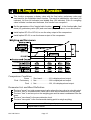
13. Simple Batch Function
This function compares a display value with the final value, preliminary value and
zero band for the full/dribble batch function. The result is indicated by zero band (LO
indicator), full flow (HI indicator) and dribble flow (OK indicator). Even if a weighing
value includes increase and decrease, this function can compare it.
Set the parameters of the "simple batch function ( f6 8 )", in the function table, final
value (HI), preliminary value (OK) and zero band (LO), in advance, to use this function.
Install option OP-03 or OP-04, to use the relay output of the comparison.
Install option OP-03, to use the buzzer output of the comparator.
Comparison Condition
Gross < Zero band ..............LO is displayed and output.
Final - Preliminary ≦ Net .........................OK is displayed and output.
Final ≦ Net .........................OK, HI is displayed and output.
Parameter List and Word Definition
The term "gross" is a total measurement value where the tare value is not subtracted.
The term "net" is a measurement value with a tare value subtracted from the gross.
The term "tare" is an item put on the weighing pan and its mass is subtracted from the
gross.
The term "zero band" is the zero detection level.
The term "zero point" is the fundamental starting point to weigh anything.
Function table
Meaning and purpose
f6 8
Simple batch function
HVG-WP Series
Page 37
A
A
Caution
The parameters of the upper limit value (HI) and a final value (HI) use the
same memory. The parameters of the lower limit value (LO) and the zero band
(LO) use the same memory.
The upper/lower comparator function, the simple batch function and the
full/dribble batch function can not be used at the same time because these
parameters use common memory.
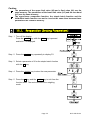
13.1. Preparation (Setting Parameters)
Step 1 Turn off the display.
Press the ON/OFF key while the ZERO key is pressed
and held. F1 is displayed.
Step 2 Press the ENTER key repeatedly to display F6.
Step 3 Select a parameter of 8 for the simple batch function
with the ∧ key.
Step 4 Press the ENTER key to store the new parameter.
Step 5 Press the F key and the ENTER key to exit from the
function table. The scale returns to the weighing
mode.
Page 38
HVG-WP Series
Step 6 Press the MODE key to display the blinking HI (of the
final value).
Step 7 Set the final value using the following keys.
∧ key
Adjusts the value of a figure.
< key
Selects a figure.
Step 8 Press the ENTER key to store the new parameter and
display the blinking OK (of preliminary value).
Step 9 Set the preliminary value using the following keys.
∧ key
Adjusts the value of a figure.
< key
Selects a figure.
Step 10 Press the ENTER key to store the new parameter and
display the blinking LO (of zero band).
Step 11 Set the zero band using the following keys.
∧ key
Adjusts the value of a figure.
< key
Selects a figure.
Step 12 Press the ENTER key to store the new parameter and
return to the weighing mode.
13.2. Operation and Performance (Examples)
Step 1 Select the parameter f6 8 of the function table.
Step 2 Set the parameters of the final value, preliminary value and zero band.
Step 3 The comparison result is always displayed.
HVG-WP Series
Page 39
14. Calibration (Adjusting the Scale)
The scale is an instrument which measures the "weight" and displays its "mass" value.
Calibration is the adjustment function so that the scale can weigh correctly.
Three steps of calibration are available
Gravity Acceleration Correction
The function to correct the scale’s local gravity
acceleration, so that the scale functions
correctly when the calibrated scale has been
moved to a distant place
Calibration of the Zero Point ......... The function to adjust the zero point, so that
the zero point mark is displayed when there is
nothing on the pan.
Comment The zero point is the fundamental starting point
to weigh anything and influences the
performance of scale.
Span Calibration.............................. The function to adjust the span with a
calibrated mass, so the scale can accurately
weigh anything within the weighing capacity.
Comment Span means the range of weighing capacity.
Use a calibration mass heavier than two thirds
of the weighing capacity.
Caution
Calibrate the HVG-WP series, a mass of the OIML class M1 or equivalent is
required.
Check the accuracy of weighing periodically. Calibrate the scale, if it has
been moved to another location or the environment has changed.
Gravity acceleration correction is not required, when the scale is calibrated
with a calibration mass at the place where the scale is used.
Page 40
HVG-WP Series
14.1.1.
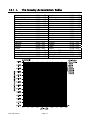
The Gravity Acceleration Table
Amsterdam
Athens
Auckland NZ
Bangkok
Birmingham
Brussels
Buenos Aires
Calcutta
Chicago
Copenhagen
Cyprus
Djakarta
Frankfurt
Glasgow
Havana
Helsinki
Kuwait
Lisbon
London (Greenwich)
Los Angeles
Madrid
HVG-WP Series
9.813
9.800
9.799
9.783
9.813
9.811
9.797
9.788
9.803
9.815
9.797
9.781
9.810
9.816
9.788
9.819
9.793
9.801
9.812
9.796
9.800
m/s2
m/s2
m/s2
m/s2
m/s2
m/s2
m/s2
m/s2
m/s2
m/s2
m/s2
m/s2
m/s2
m/s2
m/s2
m/s2
m/s2
m/s2
m/s2
m/s2
m/s2
Page 41
Manila
Melbourne
Mexico City
Milan
New York
Oslo
Ottawa
Paris
Rio de Janeiro
Rome
San Francisco
Singapore
Stockholm
Sydney
Taiwan
Taipei
Tokyo
Vancouver, BC
Washington DC
Wellington NZ
Zurich
9.784
9.800
9.779
9.806
9.802
9.819
9.806
9.809
9.788
9.803
9.800
9.781
9.818
9.797
9.788
9.790
9.798
9.809
9.801
9.803
9.807
m/s2
m/s2
m/s2
m/s2
m/s2
m/s2
m/s2
m/s2
m/s2
m/s2
m/s2
m/s2
m/s2
m/s2
m/s2
m/s2
m/s2
m/s2
m/s2
m/s2
m/s2
14.2. The Complete Calibration Procedure
14.2.1.
Gravity Acceleration Correction
Step 1 Turn on the display.
Open the rear cal cover of the display unit.
Press and hold the CAL key to enter the calibration
mode.
Then Cal 0 is displayed.
Step 2 Press the ZERO key to enter the gravity acceleration
correction mode.
Step 3 Set your local gravity acceleration using the following
keys.
∧ key
Selecting the number of a figure.
< key
Selecting a figure.
Step 4 Press the ENTER key to store the new value.
Step 5 Press the CAL key again. Then the scale returns to
the normal weighing mode.
14.2.2.
Preparation
Step 6 Confirm the environmental conditions as follows:
Maintain a constant temperature and stable power.
Install the scale on a solid floor where there is no draft, vibration, strong magetic
fields or direct sunlight.
Consider section "4. Caution".
Step 7 Display normal weighing for at least 30 minutes to warm up the scale.
Page 42
HVG-WP Series
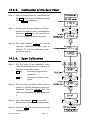
14.2.3.
Calibration of the Zero Point
Step 8 After 30-minute warm up, press and hold
the CAL key to enter the calibration mode.
Then Cal 0 is displayed
Step 9 Confirm that nothing is placed on the pan.
Wait for the stability mark to be displayed.
Press the ENTER key. The scale stores
the current condition as the zero point.
Step 10 The scale displays
5pn1
for several
seconds. Calibration of zero point is
finished. To exit the calibration mode,
proceed to step 14.
14.2.4.
Span Calibration
Step 11 Set the value of the calibration mass
using the following keys (This initial value
depends on the scale mode).
∧ key
Selecting the figure to be
< key
changeed.
Change the number of the
figure.
Step 12 Place the mass on the pan which was set
at step 11. Wait for the stability mark to be
displayed. Press the ENTER key. The
scale then calculates the span and stores
it.
Step 13 The scale displays End at the finish.
Remove the mass from the weighing pan.
Step 14 Press the CAL key to return to the normal
weighing mode.
HVG-WP Series
Page 43
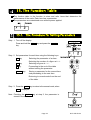
15. The Function Table
The function table is the function to store and refer items that determine the
performance of the scale. Each item has a parameter.
The parameters are maintained even without power applied.
15.1. The Procedure for Setting Parameters
Step 1 Turn off the display.
Press and hold the ZERO key and press the ON/OFF
key.
Step 2 Set parameters for each item using the following keys.
∧ key
Selecting the parameter of an item.
< key
F key
ENTER key
Selecting the number of a figure at f16.
Selecting a figure at f16..
Proceeding to the end of the table
without storing the parameter.
Storing a parameter for the current item
and proceeding to the next item.
Returning to normal mode from the end
of the table.
Step 3 Press the ENTER key to return to the normal mode, when
end is displayed.
Note Pressing the ENTER key at step 2, the parameter is
stored in the scale.
Page 44
HVG-WP Series
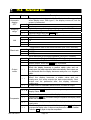
15.2. Parameter List
Item
Automatic
display
OFF
Weighing
range
Unit
Baud rate
Display
f1 0 #
f1 1
f2 0 #
f2 1
f3
f3
f3
f3
0 #
1
2
3
f4 0 #
f4 1
f4 2
f5 0 #
f5 1
f5 2
Output
mode
f5 3
f5 4
f5 5
f6 0 #
f6 1
Comparator f6 2
f6 3
f6 4
HVG-WP Series
Description
The type L scale is turned off after 5 minutes of no operation,
when display zero. With type V, the display comes off, but the
power is connected.
Not used
Used
Selects the way of changing weighing range for HV-WP series.
Automatic range
Manual range using the RANGE key.
Selection of the first unit at the time when the scale turns on.
kg
lb
oz
lb-oz
Transmission rate of the serial interface (RS-232C/ 422/485).
2400bps
4800bps
9600bps
Mode selection for the serial interface (RS-232C/ 422/485).
Stream mode. (Refer to "16.2 Stream Mode")
Command mode. (Refer to "16.3 Command Mode")
Data is output, when the PRINT key is pressed.
Auto-print +
When the display becomes a positive stable value and not
nearly-zero, the scale outputs the data automatically. Next output can
be performed after the display becomes nearly-zero or a negative
value.
Auto-print +/When the display becomes a stable value and not
nearly-zero, the scale outputs the data automatically. Next
output can be performed after the display becomes
nearly-zero.
At each finish of full/dribble batch function, the data is output.
Pressing the SET key, the scale always compares the current
display value.
The scale always compares the display value.
Pressing the SET key, the scale always compares the display value
when not nearly-zero.
The scale always compares the display value when not
nearly-zero.
When the weight value becomes stable after pressing the SET key, the scale
compares the display value. It does not compare on an unstable condition.
Press the SET key again to stop the comparison.
Page 45
A
A
A
A
A
A
A
A
A
A
A
A
A
A
A
A
A
A
A
A
A
A
A
A
A
A
A
A
A
A
A
A
A
"#" factory settings. The "nearly-zero" is within ±4 digits from zero point in the unit of kg.
Item
Comparator f6 5
f6 6
f6 7
f6 8
f6 9
Buzzer
f7
f7
f7
f7
f7
f7
f7
f7
f7
0 #
1
2
3
4
5
6
7
8
f8 0 #
f8 1
Accumulation function
Description
A
When the weight value becomes stable, the scale compares the
display value. It does not compare on an unstable condition.
When the display value becomes stable when not nearly-zero
after pressing the SET key, the scale compares the display value. It
does not compare on an unstable condition. If the SET key is
pressed again, the scale stops the comparison.
When the display value becomes stable when not nearly-zero,
the scale compares the value.
Simple batch function. (Refer to section 13.)
Full/dribble batch function. (Refer to section 12.)
The condition of the buzzer on option OP-03 by comparator
function or full/dribble batch function.
No buzzer.
The buzzer sounds at LO.
The buzzer sounds at OK.
The buzzer sounds at LO and OK.
The buzzer sounds at HI.
The buzzer sounds at LO and HI.
The buzzer sounds at OK and HI.
The buzzer sounds at LO, OK and HI.
The buzzer sounds at finishing the full/dribble batch process.
The condition of the accumulation function
Accumulation function not used.
A
A
A
A
A
Display
f8 2
f8 3
f8 4
The scale accumulates the data, if the F key is pressed, when the
display becomes a positive stable value and not nearly-zero. The
next accumulation can be performed after the display becomes
nearly-zero or a negative value.
The scale accumulates the data, if the F key is pressed, when the
display becomes a stable value and not nearly-zero. The next
accumulation can be performed after the display becomes
nearly-zero.
When the display is a positive stable value and not nearly zero, the
scale accumulates the data automatically. The next accumulation can
be performed after the display becomes nearly-zero or a negative
value.
When the display becomes a stable value and not nearly zero, the
scale accumulates the data automatically. Next accumulation can
be preformed after the display becomes nearly-zero.
Use recording number and mass of articles removed form the
weighing pan. (Place the articles on the weighing pan. Press TARE
key at each removal.)
Page 46
HVG-WP Series
A
A
A
A
A
A
A
A
A
A
A
A
A
A
A
A
A
A
A
A
A
A
A
A
A
A
A
A
A
A
A
A
Item
Display
Description
At each finish of the full/dribble batch function, the scale
accumulates the data automatically.
f8 5
Use Packing articles like a powder. used for recording the bag
number and total mass.
Select the details of the full/dribble batch function (f6 9)
When the F key is pressed after final value is reached, the
f10 0 #
current process is finished.
f10 1
Full/Dribble
batch subf10 2
function
Address
Hold
When the SET key is pressed, the scale automatically tares and
starts the full/dribble batch process. When the F key is pressed
after final value is reached, the current process is finished.
When the SET key is pressed, the scale automatically tares and
starts the full/dribble batch process. When the stability mark is
f10 3
displayed after final value is reached, the current process is
finished.
Select the address for RS-422 / RS-485 for option OP-04
f11 1 # Use addresses from 01 to 99 are available. Scales are assigned
unique addresses and are controlled by the computer.
~
f11 99 (RS-232C should be set to "00".)
f12 0 #
f12 1
f12 2
Averaging
Precision
of unit
mass
Format
When the stability mark is displayed after final value is reached,
the current process is finished.
f13 0 #
f13 1
f13 2
f14 0 #
f14 1
f14 2
f15 0 #
f15 1
f16
A
A
A
A
A
A
A
A
A
A
A
A
A
A
A
Select the method to hold the current weight value. When the A
weight value becomes nearly-zero or changes more than more A
than 25% +30 digits, hold display is canceled.
A
Not used
A
The hold function is ON or OFF alternately by the F key.
A
When the stability mark is displayed, the display is held.
A
Select readability and response
A
A
Fast response, sensitive value.
A
c
Slow response, stable value.
A
Select a storable minimum unit mass in the counting mode.
A
Stores a unit mass in the unit of a digit.
A
Stores a unit mass in the unit of one-eighth digit.
A
Stores a unit mass, if the total of the sample mass is greater than A
5 digits.
A
Refer to "16.1. Data Format".
A
Format 1. (A&D general format for scales, balances)
A
Format 2. (Older HV-A/ HW-A format)
A
Not used.
A
"#" factory settings
The "nearly-zero" is within ±4 digits from zero point in the unit of kg.
The "digit", a unit of display, is equivalent to the minimum measurable mass.
HVG-WP Series
A
Page 47
16. RS-232C Serial Interface
Note When the RS-232C serial interface is used, be sure to set the "Address ( f11 ) " to
"( 00 )".
The RS-232C interface has the following two modes.
Steam mode
Outputs data countinuouslly and can be used for printing data.
Command mode Controls the scale using commads from a computer.
Set the parameters for the "Baud rate ( f4 )", " Output mode ( f5 )" and " Format
( f15 )", in the function table, in advance.
There are option cables as follows:
AX-KO577A
RS-232C cable, D-sub 25 pin, 2m
AX-KO1786-200 RS-232C cable, D-sub 9 pin, 2m
Transmission system
Transmission
Data format
EIA RS-232C
Asynchronous, bi-directional, half-duplex
Baud rate:
2400, 4800, 9600 bps
Data:
7 bits
Parity:
1 bit, Even
Start bit
1 bit
Stop bit
1 bit
Code
ASCII
Terminator CR LF (CR: 0Dh, LF: 0Ah)
Pin connections
Pin No.
1
2
3
4
5
6
7
Signal name
RXD
TXD
SG
DSR
Direction
Description
Input
Output
Receive data
Transmit data
-
Signal ground
Output
Data set ready
Circuits
Adaptable connector
DIN 7pin, (TCP0576)
Page 48
HVG-WP Series
A
A
A
A
A
A
A
A
16.1. Data Format
Bit Format
Format 1
There are four headers for the type of data and weighing condition.
Unstable weighing data
Stable weighing data
Stable counting data
Out of range ( Over)
The weighing data consists of 9 characters including decimal point and polarity.
The polarity is always output.
There are three units. The unit is 3 characters.
In case of "out of range", numbers become all 9’s.
The terminator is always output as CR LF.
Data in the unit of kg
Counting mode
Percentage mode
Out of range
Definition of symbols
CR (carriage return)
0Dh
LF (line feed)
0Ah
Space
20h
HVG-WP Series
Page 49
Format 2
There are four headers for the type of data and weighing condition.
Stable weighing data
Unstable weighing data
Stable counting data
Out of range
The weighing data consists of 7 characters including decimal point and polarity.
The data consists of 7 characters in the counting mode.
The polarity is always output.
There are three units. The unit is 2 characters.
In case of "out of range", numbers become all 9’s.
The terminator is always output as CR LF.
Caution
When the data is longer than 7 characters in the counting, precentage mode
or accumulation function, the overflow is ignored.
Data in the unit of kg
Counting mode
Percentage mode
Out of range
Definition of symbols
CR (carriage return)
0Dh
LF (line feed)
0Ah
Space
20h
Page 50
HVG-WP Series
16.2. Stream Mode
The scale outputs the current weighing data at the time when the disply is refreshed.
The scale does not output data while in the setting mode.
Averaging of function table
f13 0 Fast response
Sensitive value
f13 1
c
f13 2 Slow response
Stable value
16.2.1.
Refresh rate
A
Approximately 7 times/s while the display is unstable, A
Approximately 4 times/s when the display is stable
Approximately 4 times/s
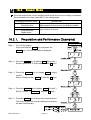
Preparation and Performance (Examples)
Step 1 Turn off the display.
Press and hold the ZERO key and press the
ON/OFF key. The function table is displayed.
Step 2 Press the ENTER key to display f4 (“Baud rate”).
Select a parameter of “Baud rate” with the ∧ keys.
Step 3 Press the ENTER key to display
f5
(“output
mode").
Select “Stream mode ( f5 0 )” with the ∧ keys.
Step 4 Press the ENTER key to display f15 (“Format").
Select “Format 1 ( f15 0 )” with the ∧ keys
Step 5 Press the ENTER key to store the new parameters.
The scale returns the normal weighing and outputs
the data coutinuouslly.
HVG-WP Series
Page 51
A
A
16.3. Command mode
The command mode is the function which can perform "output data", "controlling the
scale" and "setting parameters" by a command transmitted from a computer
Caution
16.3.1.
Allow at least 500 milliseconds between commands.
Command List
The following explanation uses "format 1 ( f15 0 )"
Data output
The current weighing data is output.
Template
Q
Command
Reply
Selection of mode and unit
Selects the mode and unit. This is the same as the
Template
U
Command
Reply
The scale changes mode and unit.
Zero
Tare
MODE
key.
The current mass value is set to the zero point.
This is the same as the ZERO key.
Template
Z
Command
Reply
The mass value becomes zero and the zero point mark is displayed.
With a tare (container) placed, the current mass value is set to zero, and the net is
displayed. This is the same as the TARE key.
Template
T
Command
Reply
The current mass value becomes zero and the net mark is displayed.
Cancel of tare
The display value becomes the gross and the net mark is turned off. (The tare value
becomes zero.)
Template
CT
Command
Reply
Gross is displayed and the net mark is turned off.
Page 52
HVG-WP Series
Preset tare
The tare value is set and the net value is displayed. The net mark is displayed.
Template
PT, [parameter]
Command
Reply
Net is displayed.
Upper limit value
An upper limit value is stored.
Template
HI, [parameter]
Command
Reply
The upper limit value is stored.
Lower limit value
A lower limit value is stored.
Template
LO, [parameter]
Command
Reply
The lower limit value is stored.
Caution
The lower limit value must be less than the upper limit value.
Accumulation data output
The accumulated data is output.
Template
A
Command
Reply
Accumulation count output
The number of accumulated data is output.
Template
N
Command
Reply
Reset of Accumulation data and number
The data and number of accumulations become zero.
Template
CA
Command
Reply
The data and number of accumulations become zero.
HVG-WP Series
Page 53
Final value
The final value is stored.
Template
S0, [parameter]
Command
Reply
The value is stored.
Preliminary value
The preliminary value is stored.
Template
S1, [parameter]
Command
Reply
The value is stored.
Zero band
The zero band is stored.
Template
S2, [parameter]
Command
Reply
The value is stored.
Page 54
HVG-WP Series
16.3.2.
Example of Setting Parameters
Step 1 Turn off the display.
Press the ON/OFF key while the ZERO key is pressed
and held. The function table is displayed.
Step 2 Select a parameter for the "baud rate ( f4 )" using
the ENTER and ∧ keys.
Step 3 Select "command mode (
f5 1
)" for the "output"
using the ENTER and ∧ keys.
Step 4 Select "format 1 ( f15 0 )" for the "format" using the
ENTER and ∧ keys.
Step 5 Press the ENTER key to store the new parameters.
Return to the normal weighing mode using the ENTER
key.
Step 6 When the computer transmits a command, the scale
replies.
HVG-WP Series
Page 55
17. Options
17.1. Extension cable (OP-02)
This cable is used for installing the indicator away from the base unit.
This loadcell cable is 5m long.
Refer to " 5.1. Removing Pole" for the way to remove the pole.
Caution
Calibrate the scale after connecting this cable.
Do not connect more than two extension cables.
Page 56
HVG-WP Series
17.2. RS-232C/ Relay output/ Buzzer (OP-03)
Note When the OP-03 is used, be sure to set the "Address ( f11
) " to "( 00 )".
This option replaces the RS-232C interface, refer to "16. RS-232C Serial Interface"
for specification of RS-232C.
The following option cables can be used, when you do not use the relay output.
Pin connections
Adaptable connector
Pin No.
1
2
3
4
5
6
7
8
Signal name
HI
RXD
TXD
LO
SG
OK
DSR
COM
Direction
Output
Input
Output
Output
Output
Output
-
Description
Relay output of HI
Receive data
Transmit data
Relay output of LO
Signal ground (RS-232C)
Relay output of OK
Data set ready
Relay common terminal
DIN 8pin, JA:TCP0586 (of accessory)
Circuits
Relay
HVG-WP Series
Solid-state-relay
Maximum voltage
Maximum current
Maximum resistance
Page 57
DC50V
DC100mA
8Ω
A
A
A
A
A
A
A
A
A
17.2.1.
Installing the OP-03
Caution Do not pull on the connected cables
while opening the rear panel.
Step 1 Remove the plastic panel from the option
board.
Step 2 Remove eight pairs of screws and O rings
from the indicator unit. Open the rear panel
of the unit.
Step 3 Remove the standard interface board from
the indicator unit. Install the option board at
the same position.
Step 4 Connect the cable to the J1 connector on
the option board.
Step 5 Connect the DIN plug to the option board.
Step 6 Close and secure the rear panel using the
screws and O rings removed at step 2.
Page 58
HVG-WP Series
17.3. RS-422/ RS-485 / Relay output (OP-04)
Replacing the RS-232C interface with this option, the RS-422/ RS-485 interface can
connect up to 16 scales and control them from a computer.
The RS-422/ RS-485 interface has the following two modes.
Stream mode
Outputs data continuously.
Command mode Controls the scale using command from a computer.
Set the parameters for the "Baud rate ( f4 )", " Output mode ( f5 )" and " Format
( f15 )", in the function table, in advance.
Transmission system
Transmission
Data format
EIA RS-422/ RS-485
Asynchronous, bi-directional, half-duplex
Baud rate:
2400, 4800, 9600 bps
Data:
7 bits
Parity:
1 bit, Even
Start bit
1 bit
Stop bit
1 bit
Code
ASCII
Terminator CR LF (CR: 0Dh, LF: 0Ah)
Address
01 ~ 99
Relay
Solid-state-relay
Maximum voltage
DC50V
Maximum current
DC100mA
Maximum resistance 8 Ω
Adaptable connector
TM:BLA9 (of accessory)
Address parameter ( f11 ) of the function table.
Pin connections
Pin No.
1
2
3
4
5
6
7
8
9
HVG-WP Series
Signal name
SDA
SDB
RDA
RDB
TRM
HI
OK
LO
COM
Direction
Output
Output
Input
Input
Output
Output
Output
-
Page 59
Description
RS-422/485 transmission A terminal
RS-422/485 transmission B terminal
RS-422/485 receive A terminal
RS-422/485 receive B terminal
120Ω terminator
Relay output of HI
Relay output of OK
Relay output of LO
Relay common terminal
A
A
A
A
A
A
A
A
A
A
Circuits
Selection key for the RS-422/ RS-485 interface
Selects either of RS-422 or RS-485 interface using a key on the board.
17.3.1.
Installing the OP-04
Caution Do not pull on the connected cables while opening the rear panel.
Step 1 Remove eight pairs of screws and O
rings from the indicator unit. Open the
rear panel of the unit.
Step 2 Remove the standard interface board
from the indicator unit. Install the
option board at the same position.
Step 3 Connect the cable to the J3 connector
on the option board.
Step 4 Wire the connector for J1 and connect
it to the option board.
Step 5 Connect a cable from the transformer
to the J2 connector.
Step 6 Set a interface type with the key.
Step 7 Close and secure the rear panel using
the screws and O rings removed at
step 1.
Page 60
HVG-WP Series
An example of connection
The polarities (A,B) of the
host
computer
signal
depends on the computer
model.
17.3.2.
Communication Format
Commands consist of an address and the same command as for the RS-232C.
Commands return the same command when there is no data transmitted.
If the address is 23, the replay is as follows:
Normal response
Response of impossible command
Undefined command response
Bit format
Command List
HVG-WP Series
Page 61
The following explanation uses "format 1 ( f15 0 )" assuming 23 as the address.
Data output
The current weighing data is output.
Template
Q
Command
Reply
Selection of mode and unit
Zero
Tare
Selects the mode and unit. This is the same as the
Template
U
Command
Reply
The scale changes mode and unit.
MODE
key.
The current mass value is set to the zero point.
This is the same as the ZERO key.
Template
Z
Command
Reply
The mass value becomes zero and the zero point mark is displayed.
The current mass value becomes zero after placing a tare (receptacle, case, etc) and
the net is displayed. This is the same as the TARE key.
Template
T
Command
Reply
The current mass value becomes zero and the net mark is displayed.
Cancel of tare
The display value becomes the gross and the net mark is turned off. (The tare value
becomes zero.)
Template
CT
Command
Reply
Gross is displayed and the net mark is turned off.
Preset tare
The tare value is set and the net value is displayed. The net mark is displayed.
Template
PT, [parameter]
Command
Reply
Net is displayed.
Upper limit value
An upper limit value is stored.
Template
HI, [parameter]
Command
Reply
The upper limit value is stored.
Lower limit value
17.3. OP-04, Options
A lower limit value is stored.
Template
LO, [parameter]
Page 62
HVG-WP Series
Command
Reply
The lower limit value is stored.
Caution
The lower limit value must be less than the upper limit value.
Accumulation data output
The accumulated data is output.
Template
A
Command
Reply
Accumulation count output
The number of accumulated data is output.
Template
N
Command
Reply
Reset of Accumulation data and number
The data and number of accumulations become zero.
Template
CA
Command
Reply
The data and number of accumulations become zero.
Final value
The final value is stored.
Template
S0, [parameter]
Command
Reply
The value is stored.
Preliminary value
The preliminary value is stored.
Template
S1, [parameter]
Command
Reply
The value is stored.
Zero band
The zero band is stored.
Template
S2, [parameter]
Command
Reply
The value is stored.
17.3. OP-04, Options
HVG-WP Series
Page 63
17.4. Roller Conveyor (OP-13, OP-14)
OP-13
This option can be used with the following products.
HV-200KGV-WP, HV-200KGL-WP,
HW-100KGV-WP, HW-100KL-WP,
HW-200KGV-WP, HW-200KGL-WP
OP-14
This option can be used with the following products.
HV-60KGV-WP, HV-60KGL-WP,
HW-60KGV-WP, HW-60KGL-WP
Page 64
HVG-WP Series
18. Specification
HVG-WP series
Product
Weighing Capacity
[kg]
Min. weighing (1 digit) [g]
Weighing Capacity
[lb] #
Min. weighing (1 digit) [lb] #
Weighing Capacity
[oz] #
Min. weighing (1 digit) [oz] #
Number of samples in counting
mode [units]
Max. count number [units]
HV-GL-WP
HV-GV-WP
Repeatability [g]
Linearity [g]
Span drift
Display
Power rating (VFD)
Power
source
HVGL-WP
HVGV-WP
Ambient temperature and
humidity
Weighing pan size [mm]
Dimension [mm]
Width x Depth x Height
Mass of
HVGL-WP
scale
HVGV-WP
[ kg ]
15
5
30
0.01
480
0.2
HV-60KGL-WP
HV-60KGV-WP
30
10
60
0.02
960
0.5
60
20
150
0.05
2400
1
220
100
500
0.2
8000
5
5 (can be changed to 10, 20, 50, 100)
12,000
11,000
7 segment liquid crystal display, Character height 25mm
7 segment fluorescent display, Character height 20mm
±5
±10
±20
±20
±50
±100
±5
±10
±20
±20
±50
±100
20ppm/°
C typ. (5°
C ~ 35°
C)
230V AC (+10%-15%) 50/60Hz 20VA, Fuse T200mA
or 120V AC (+10%-15%) 50/60Hz 20VA, Fuse T315mA
TB: 300 AC adaptor is used to run the HVGL-WP and also to re-charge
the built-in battery.
The built in rechargeable battery will provide up to 50 hours use if fully
charged (16hours).
Battery will trickle charge when scale is in use.
Please confirm that the Main power type is correct to your local voltage
and receptacle type.(50Hz/ 60Hz)
-10°
C ~ 40°
C, Less than 85%R.H. (Do not allow condensation)
340 x 420
390 x 530
340 x 630 x 960
390 x 740 x 960
12
14
12
14
# : If the law in your area allows, you can use these units.
HVG-WP Series
60
20
150
0.05
2400
1
HV-200KGL-WP
HV-200KGV-WP
150
50
300
0.1
4800
2
Page 65
Dimensions
743
530
3 90
9 60
6
70
110~150
45
30 0
45
440
Page 66
HVG-WP Series
19. Maintenance
Refer to "4. Caution" for use.
Refer to "6.1. Display and Symbols " and corresponding mode for displayed error code.
Refer to "14. Calibration (Adjusting Scale)" for precision weighing.
Periodically check the accuracy of weighing. Calibrate the scale, if it has been moved
to another location or the environment has changed.
19.1.1.
Repair
Do not disassemble/ assemble the scale without an authorized service technician. It
may cause an electric shock or damage to the scale, etc. In this case, the repair is not
covered under warranty. Contact your local A&D dealer if your scale needs service or
repair.
19.2. Check points Before Calling Maintenance Service
In this situation
No display.
Scale does not turn on.
The scale does not display
zero upon power on.
888888 is displayed and
does not proceed.
------ is displayed and
does not proceed.
Cal e is displayed
-Cal e is displayed
e
is displayed
-e
is displayed
Fixed display
err
HVG-WP Series
1 is displayed
A
A
A
Is the AC power cord properly connected?
Is the AC power the correct voltage?
A
A
A
Check around the weighing pan.
Is there anything on the weighing pan?
A
The weighing value is unstable due to drift, A
A
vibration or other.
Check around the weighing pan.
A
Check the load cell cable connection.
A
Check around the weighing pan. Remove anything A
that is on the weighing pan.
A
Perform zero point calibration of the scale.
A
A
Load cell output too high.
A
A
Load cell output too low.
A
A
Weighing error that means "Overload".
A
A
Weighing error that means "Under load".
A
A
Do you use the "hold function".
Turn off scale and turn it on.
A
1 error occurs. Contact your local A&D dealer to A
repair the product.
A
Confirm these items
Page 67
[ Blank page ]