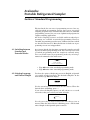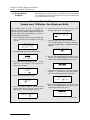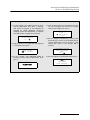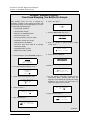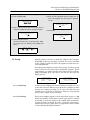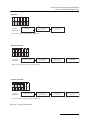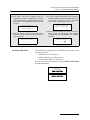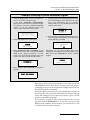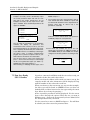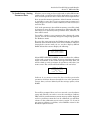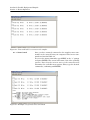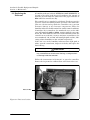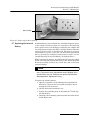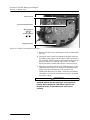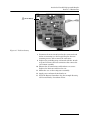
1
Avalanche® Installation and Operation Guide Part #69-2973-062 of Assembly #60-2974-024 Copyright © 2013. All rights reserved, Teledyne Isco Revision X, October 2013 Foreword This instruction manual is designed to help you gain a thorough understanding of the operation of the equipment. Teledyne Isco recommends that you read this manual completely before placing the equipment in service. Although Teledyne Isco designs reliability into all equipment, there is always the possibility of a malfunction. This manual may help in diagnosing and repairing the malfunction. If a problem persists, call or e-mail the Teledyne Isco Technical Service Department for assistance. Simple difficulties can often be diagnosed over the phone. If it is necessary to return the equipment to the factory for service, please follow the shipping instructions provided by the Customer Service Department, including the use of the Return Authorization Number specified. Be sure to include a note describing the malfunction. This will aid in the prompt repair and return of the equipment. Teledyne Isco welcomes suggestions that would improve the information presented in this manual or enhance the operation of the equipment itself. Teledyne Isco is continually improving its products and reserves the right to change product specifications, replacement parts, schematics, and instructions without notice. Contact Information Customer Service Phone: (800) 228-4373 (USA, Canada, Mexico) (402) 464-0231 (Outside North America) Fax: (402) 465-3022 Email: [email protected] Technical Support Phone: Email: Toll Free (866) 298-6174 (Samplers and Flow Meters) Toll Free (800) 775-2965 (Syringe Pumps and Liquid Chromatography) [email protected] Return equipment to: 4700 Superior Street, Lincoln, NE 68504-1398 Other Correspondence Mail to: P.O. Box 82531, Lincoln, NE 68501-2531 Email: [email protected] Revised September 2012 Avalanche Portable Refrigerated Sampler Safety Avalanche Portable Refrigerated Sampler Safety Avalanche Safety Information The Isco Avalanche Transportable Sampler is a “definite purpose” device, intended for use only with compatible Isco equipment. Do not use this product with any other manufacturers’ equipment, or for any other purpose. Use for any purpose not described in this manual could cause personal injury or property damage. Electrical Requirements The Avalanche requires 12 VDC at 6 amperes. The DC power input is through the two-pin connector on the side of the refrigerated compartment. The Isco-supplied DC connect cables provide over-current protection through the use of an in-line 8A, 32V fuse. The Avalanche may also be powered by an 87 to 264 VAC, 47 to 63 Hz, 2 ampere power source using the attached AC line cord. The AC-powered Avalanche is protected by an internal thermal cut-out. Additionally, the controller circuitry is protected by an internal 5.0 ampere PTC (Positive Temperature Coefficient) device. WARNING Electrocution hazard. Never manipulate electrical switches or power connections with wet hands or when your feet are in contact with water. WARNING AC electrical power must meet the applicable electrical code requirements for your installation and must be provided with an earth ground connection. If necessary, consult with a certified electrician to ensure that AC power is provided in accordance with the local electrical code. AC Powered Avalanches The AC power cord of this device is quipped with a three-prong grounding plug designed to mate with a grounded power outlet. Grounding minimizes the possibility of electrical shock. It is the user’s responsibility to ensure that the AC power source is properly grounded. If in doubt, have the outlet checked by a qualified electrician. If the available AC power outlet only accepts two prongs, or if it is determined that the outlet is improperly grounded, the outlet must be replaced by a qualified electrician before attempting to power this device. WARNING Never modify the AC power cord or use a three-prong to two-prong adapter. WARNING If this device’s power cord is frayed or otherwise damaged, discontinue its use immediately. The AC power cord is not user-serviceable and must be returned to the factory for repair or replacement. iii Avalanche Portable Refrigerated Sampler Safety General Warnings Before installing, operating, or maintaining this equipment, it is imperative that all hazards and preventive measures are fully understood. While specific hazards may vary according to location and application, take heed in the following general warnings: WARNING This instrument has not been certified for use in “hazardous locations” as defined by the National Electrical Code. WARNING Avoid hazardous practices! If you use this instrument in any way not specified in this manual, the protection provided by the instrument may be impaired; this will increase your risk of injury. AVERTISSEMENT Éviter les usages périlleux! Si vous utilisez cet instrument d’une manière autre que celles qui sont specifiées dans ce manuel, la protection fournie de l’instrument peut être affaiblie; cela augmentera votre risque de blessure. Additional safety information can be found in Appendix C. Hazard Severity Levels This manual applies Hazard Severity Levels to the safety alerts, These three levels are described in the sample alerts below. CAUTION Cautions identify a potential hazard, which if not avoided, may result in minor or moderate injury. This category can also warn you of unsafe practices, or conditions that may cause property damage. WARNING Warnings identify a potentially hazardous condition, which if not avoided, could result in death or serious injury. DANGER DANGER – limited to the most extreme situations to identify an imminent hazard, which if not avoided, will result in death or serious injury. iv Avalanche Portable Refrigerated Sampler Safety Hazard Symbols The equipment and this manual use symbols used to warn of hazards. The symbols are explained below. Hazard Symbols Warnings and Cautions The exclamation point within the triangle is a warning sign alerting you of important instructions in the instrument’s technical reference manual. The lightning flash and arrowhead within the triangle is a warning sign alerting you of “dangerous voltage” inside the product. Pinch point. These symbols warn you that your fingers or hands will be seriously injured if you place them between the moving parts of the mechanism near these symbols. Symboles de sécurité Ce symbole signale l’existence d’instructions importantes relatives au produit dans ce manuel. Ce symbole signale la présence d’un danger d’électocution. Risque de pincement. Ces symboles vous avertit que les mains ou les doigts seront blessés sérieusement si vous les mettez entre les éléments en mouvement du mécanisme près de ces symboles Warnungen und Vorsichtshinweise Das Ausrufezeichen in Dreieck ist ein Warnzeichen, das Sie darauf aufmerksam macht, daß wichtige Anleitungen zu diesem Handbuch gehören. Der gepfeilte Blitz im Dreieck ist ein Warnzeichen, das Sei vor “gefährlichen Spannungen” im Inneren des Produkts warnt. Vorsicht Quetschgefahr! Dieses Symbol warnt vor einer unmittelbar drohenden Verletzungsgefahr für Finger und Hände, wenn diese zwischen die beweglichen Teile des gekennzeichneten Gerätes geraten. Advertencias y Precauciones Esta señal le advierte sobre la importancia de las instrucciones del manual que acompañan a este producto. Esta señal alerta sobre la presencia de alto voltaje en el interior del producto. Punto del machacamiento. Sus dedos o manos seriusly serán dañados si usted los coloca entre las piezas móviles cerca de estos símbolos. v Avalanche Portable Refrigerated Sampler Safety vi Avalanche Portable Refrigerated Sampler Table of Contents Section 1 Introduction 1.1 1.2 1.3 1.4 About this Manual. . . . . . . . . . . . . . . . . . . . . . . . . . . . . . . . . . . . . . . . . . . . . . . . . . . About 700 Series Modules. . . . . . . . . . . . . . . . . . . . . . . . . . . . . . . . . . . . . . . . . . . . . SDI-12 Sondes . . . . . . . . . . . . . . . . . . . . . . . . . . . . . . . . . . . . . . . . . . . . . . . . . . . . . . Telephone Communication . . . . . . . . . . . . . . . . . . . . . . . . . . . . . . . . . . . . . . . . . . . . 1.4.1 4200T Landline Modem . . . . . . . . . . . . . . . . . . . . . . . . . . . . . . . . . . . . . . . . . 1.4.2 GSM Cellular Modem . . . . . . . . . . . . . . . . . . . . . . . . . . . . . . . . . . . . . . . . . . 1.4.3 CDMA Cellular Modem for CSD . . . . . . . . . . . . . . . . . . . . . . . . . . . . . . . . . . 1.4.4 6712Ci Modem . . . . . . . . . . . . . . . . . . . . . . . . . . . . . . . . . . . . . . . . . . . . . . . . 1.4.5 Software Compatibility . . . . . . . . . . . . . . . . . . . . . . . . . . . . . . . . . . . . . . . . . 1.5 Memory to Store Monitoring Data . . . . . . . . . . . . . . . . . . . . . . . . . . . . . . . . . . . . . . 1.6 Pump Requirements . . . . . . . . . . . . . . . . . . . . . . . . . . . . . . . . . . . . . . . . . . . . . . . . . 1-1 1-2 1-2 1-3 1-3 1-3 1-3 1-3 1-3 1-5 1-5 Section 2 Installation/Preparation 2.1 Receiving Inspection . . . . . . . . . . . . . . . . . . . . . . . . . . . . . . . . . . . . . . . . . . . . . . . . . 2-1 2.1.1 Case Ventilation . . . . . . . . . . . . . . . . . . . . . . . . . . . . . . . . . . . . . . . . . . . . . . 2-1 2.2 Installation . . . . . . . . . . . . . . . . . . . . . . . . . . . . . . . . . . . . . . . . . . . . . . . . . . . . . . . . 2-1 2.3 Positioning a Sampler . . . . . . . . . . . . . . . . . . . . . . . . . . . . . . . . . . . . . . . . . . . . . . . . 2-2 2.4 Inspecting the Pump Tube . . . . . . . . . . . . . . . . . . . . . . . . . . . . . . . . . . . . . . . . . . . . 2-4 2.4.1 Pump Tube Warning . . . . . . . . . . . . . . . . . . . . . . . . . . . . . . . . . . . . . . . . . . . 2-4 2.4.2 Visual Inspection . . . . . . . . . . . . . . . . . . . . . . . . . . . . . . . . . . . . . . . . . . . . . . 2-4 2.5 Installing the Bottle Kit . . . . . . . . . . . . . . . . . . . . . . . . . . . . . . . . . . . . . . . . . . . . . . 2-5 2.5.1 Installing the 14-Bottle Kit . . . . . . . . . . . . . . . . . . . . . . . . . . . . . . . . . . . . . . 2-5 2.5.2 Installing the 4-Bottle Kit . . . . . . . . . . . . . . . . . . . . . . . . . . . . . . . . . . . . . . . 2-8 2.5.3 Installing 2.5 Gallon Composite Bottle Kits . . . . . . . . . . . . . . . . . . . . . . . 2-10 2.5.4 Installing the 5 Gallon Composite Bottle Kit . . . . . . . . . . . . . . . . . . . . . . . 2-13 2.6 Installing a Power Source . . . . . . . . . . . . . . . . . . . . . . . . . . . . . . . . . . . . . . . . . . . . 2-14 2.6.1 AC Power Sources . . . . . . . . . . . . . . . . . . . . . . . . . . . . . . . . . . . . . . . . . . . . 2-14 2.6.2 12 VDC Power Sources . . . . . . . . . . . . . . . . . . . . . . . . . . . . . . . . . . . . . . . . 2-14 2.6.3 Battery Recommendations . . . . . . . . . . . . . . . . . . . . . . . . . . . . . . . . . . . . . 2-15 2.7 Attaching the Suction Line. . . . . . . . . . . . . . . . . . . . . . . . . . . . . . . . . . . . . . . . . . . 2-15 2.7.1 Attaching Suction Line to Pump Tube . . . . . . . . . . . . . . . . . . . . . . . . . . . . 2-15 2.8 Attaching a Strainer . . . . . . . . . . . . . . . . . . . . . . . . . . . . . . . . . . . . . . . . . . . . . . . . 2-16 2.8.1 Alternative to Strainers . . . . . . . . . . . . . . . . . . . . . . . . . . . . . . . . . . . . . . . . 2-16 2.8.2 Tips for Routing Suction Line and Strainer . . . . . . . . . . . . . . . . . . . . . . . . 2-17 2.8.3 Pressurized Lines . . . . . . . . . . . . . . . . . . . . . . . . . . . . . . . . . . . . . . . . . . . . . 2-17 2.9 Connecting Instruments . . . . . . . . . . . . . . . . . . . . . . . . . . . . . . . . . . . . . . . . . . . . . 2-18 2.9.1 Connecting 700 Series Modules . . . . . . . . . . . . . . . . . . . . . . . . . . . . . . . . . 2-18 2.9.2 Connecting External Instruments . . . . . . . . . . . . . . . . . . . . . . . . . . . . . . . 2-19 2.10 Programming the Avalanche . . . . . . . . . . . . . . . . . . . . . . . . . . . . . . . . . . . . . . . . 2-20 2.11 Locking the Sampler . . . . . . . . . . . . . . . . . . . . . . . . . . . . . . . . . . . . . . . . . . . . . . . 2-20 2.11.1 Program Lock . . . . . . . . . . . . . . . . . . . . . . . . . . . . . . . . . . . . . . . . . . . . . . . 2-20 2.12 Servicing the Sampler. . . . . . . . . . . . . . . . . . . . . . . . . . . . . . . . . . . . . . . . . . . . . . 2-21 2.13 Recovering the Sampler . . . . . . . . . . . . . . . . . . . . . . . . . . . . . . . . . . . . . . . . . . . . 2-22 2.14 Collecting Sample Bottles. . . . . . . . . . . . . . . . . . . . . . . . . . . . . . . . . . . . . . . . . . . 2-23 vii Avalanche Portable Refrigerated Sampler Table of Contents Section 3 Programming Introduction 3.1 Initial Operation . . . . . . . . . . . . . . . . . . . . . . . . . . . . . . . . . . . . . . . . . . . . . . . . . . . . 3-1 3.1.1 Selecting a Language . . . . . . . . . . . . . . . . . . . . . . . . . . . . . . . . . . . . . . . . . . . 3-3 3.2 Using Menus and Entering Numbers . . . . . . . . . . . . . . . . . . . . . . . . . . . . . . . . . . . 3-3 3.2.1 Selecting Menu Options . . . . . . . . . . . . . . . . . . . . . . . . . . . . . . . . . . . . . . . . 3-3 3.2.2 Entering Numbers . . . . . . . . . . . . . . . . . . . . . . . . . . . . . . . . . . . . . . . . . . . . . 3-3 3.3 Quick View Screens. . . . . . . . . . . . . . . . . . . . . . . . . . . . . . . . . . . . . . . . . . . . . . . . . . 3-4 3.3.1 Paging Through Quick View Screens . . . . . . . . . . . . . . . . . . . . . . . . . . . . . . 3-4 3.3.2 Changing Settings in a Quick View Screen . . . . . . . . . . . . . . . . . . . . . . . . . 3-5 3.4 Clock and Calendar . . . . . . . . . . . . . . . . . . . . . . . . . . . . . . . . . . . . . . . . . . . . . . . . . . 3-6 3.5 Clock Start Time Menu Screens. . . . . . . . . . . . . . . . . . . . . . . . . . . . . . . . . . . . . . . . 3-6 3.6 Site Description and Program Name Menu Screens. . . . . . . . . . . . . . . . . . . . . . . . 3-7 3.7 Messages . . . . . . . . . . . . . . . . . . . . . . . . . . . . . . . . . . . . . . . . . . . . . . . . . . . . . . . . . . 3-9 3.7.1 Information Messages . . . . . . . . . . . . . . . . . . . . . . . . . . . . . . . . . . . . . . . . . . 3-9 3.7.2 Help Notes . . . . . . . . . . . . . . . . . . . . . . . . . . . . . . . . . . . . . . . . . . . . . . . . . . . 3-9 3.7.3 Warning Messages . . . . . . . . . . . . . . . . . . . . . . . . . . . . . . . . . . . . . . . . . . . . 3-10 3.7.4 Operation Messages . . . . . . . . . . . . . . . . . . . . . . . . . . . . . . . . . . . . . . . . . . . 3-10 3.8 Menu Trees . . . . . . . . . . . . . . . . . . . . . . . . . . . . . . . . . . . . . . . . . . . . . . . . . . . . . . . 3-10 3.9 Memory . . . . . . . . . . . . . . . . . . . . . . . . . . . . . . . . . . . . . . . . . . . . . . . . . . . . . . . . . . 3-12 Section 4 Standard Programming 4.1 4.2 4.3 4.4 4.5 4.6 4.7 4.8 Switching between Standard and Extended Modes . . . . . . . . . . . . . . . . . . . . . . . . 4-1 Selecting Language and Units of Length. . . . . . . . . . . . . . . . . . . . . . . . . . . . . . . . . 4-1 Programming Examples . . . . . . . . . . . . . . . . . . . . . . . . . . . . . . . . . . . . . . . . . . . . . . 4-2 Pacing. . . . . . . . . . . . . . . . . . . . . . . . . . . . . . . . . . . . . . . . . . . . . . . . . . . . . . . . . . . . . 4-5 4.4.1 Time Pacing . . . . . . . . . . . . . . . . . . . . . . . . . . . . . . . . . . . . . . . . . . . . . . . . . . 4-5 4.4.2 Flow Pacing . . . . . . . . . . . . . . . . . . . . . . . . . . . . . . . . . . . . . . . . . . . . . . . . . . 4-5 4.4.3 Trigger Pacing . . . . . . . . . . . . . . . . . . . . . . . . . . . . . . . . . . . . . . . . . . . . . . . . 4-6 Distribution . . . . . . . . . . . . . . . . . . . . . . . . . . . . . . . . . . . . . . . . . . . . . . . . . . . . . . . . 4-6 4.5.1 Sequential . . . . . . . . . . . . . . . . . . . . . . . . . . . . . . . . . . . . . . . . . . . . . . . . . . . 4-8 4.5.2 Bottles Per Sample . . . . . . . . . . . . . . . . . . . . . . . . . . . . . . . . . . . . . . . . . . . . 4-8 4.5.3 Samples Per Bottle . . . . . . . . . . . . . . . . . . . . . . . . . . . . . . . . . . . . . . . . . . . . 4-8 4.5.4 Composite . . . . . . . . . . . . . . . . . . . . . . . . . . . . . . . . . . . . . . . . . . . . . . . . . . . . 4-8 4.5.5 Continuous Sampling . . . . . . . . . . . . . . . . . . . . . . . . . . . . . . . . . . . . . . . . . . 4-8 Start Times . . . . . . . . . . . . . . . . . . . . . . . . . . . . . . . . . . . . . . . . . . . . . . . . . . . . . . . . 4-8 4.6.1 How Do Start Times Work? . . . . . . . . . . . . . . . . . . . . . . . . . . . . . . . . . . . . . . 4-9 4.6.2 Sampler Enable/Disable . . . . . . . . . . . . . . . . . . . . . . . . . . . . . . . . . . . . . . . 4-10 Programming for 700 Series Modules . . . . . . . . . . . . . . . . . . . . . . . . . . . . . . . . . . 4-10 Other Functions . . . . . . . . . . . . . . . . . . . . . . . . . . . . . . . . . . . . . . . . . . . . . . . . . . . 4-15 Section 5 Extended Programming 5.1 Switching Between Standard and Extended Modes . . . . . . . . . . . . . . . . . . . . . . . . 5-1 5.2 One-Part and Two-Part Programs . . . . . . . . . . . . . . . . . . . . . . . . . . . . . . . . . . . . . . 5-1 5.3 Storage for Extended Programs . . . . . . . . . . . . . . . . . . . . . . . . . . . . . . . . . . . . . . . . 5-2 5.3.1 Selecting a Stored Program . . . . . . . . . . . . . . . . . . . . . . . . . . . . . . . . . . . . . . 5-2 5.4 Programming for 700 Series Modules . . . . . . . . . . . . . . . . . . . . . . . . . . . . . . . . . . . 5-4 5.5 Programming Examples . . . . . . . . . . . . . . . . . . . . . . . . . . . . . . . . . . . . . . . . . . . . . . 5-4 5.5.1 Storm Water Runoff Sampling . . . . . . . . . . . . . . . . . . . . . . . . . . . . . . . . . . . 5-5 5.6 Suction Head . . . . . . . . . . . . . . . . . . . . . . . . . . . . . . . . . . . . . . . . . . . . . . . . . . . . . . 5-11 5.7 Rinses and Retries. . . . . . . . . . . . . . . . . . . . . . . . . . . . . . . . . . . . . . . . . . . . . . . . . . 5-11 5.8 Pacing. . . . . . . . . . . . . . . . . . . . . . . . . . . . . . . . . . . . . . . . . . . . . . . . . . . . . . . . . . . . 5-12 5.8.1 Event Pacing . . . . . . . . . . . . . . . . . . . . . . . . . . . . . . . . . . . . . . . . . . . . . . . . 5-12 5.8.2 Nonuniform Time Pacing . . . . . . . . . . . . . . . . . . . . . . . . . . . . . . . . . . . . . . 5-14 5.8.3 Nonuniform Clock Time Pacing . . . . . . . . . . . . . . . . . . . . . . . . . . . . . . . . . 5-14 5.8.4 Nonuniform Interval Pacing . . . . . . . . . . . . . . . . . . . . . . . . . . . . . . . . . . . . 5-14 viii Avalanche Portable Refrigerated Sampler Table of Contents 5.8.5 Random Interval Pacing . . . . . . . . . . . . . . . . . . . . . . . . . . . . . . . . . . . . . . . 5.9 Distribution . . . . . . . . . . . . . . . . . . . . . . . . . . . . . . . . . . . . . . . . . . . . . . . . . . . . . . . 5.9.1 Sequential . . . . . . . . . . . . . . . . . . . . . . . . . . . . . . . . . . . . . . . . . . . . . . . . . . 5.9.2 Bottles Per Sample . . . . . . . . . . . . . . . . . . . . . . . . . . . . . . . . . . . . . . . . . . . 5.9.3 Samples Per Bottle . . . . . . . . . . . . . . . . . . . . . . . . . . . . . . . . . . . . . . . . . . . 5.9.4 Composite . . . . . . . . . . . . . . . . . . . . . . . . . . . . . . . . . . . . . . . . . . . . . . . . . . . 5.9.5 Multiple Bottle Compositing . . . . . . . . . . . . . . . . . . . . . . . . . . . . . . . . . . . . 5.9.6 Time Switching . . . . . . . . . . . . . . . . . . . . . . . . . . . . . . . . . . . . . . . . . . . . . . 5.9.7 Continuous Sampling . . . . . . . . . . . . . . . . . . . . . . . . . . . . . . . . . . . . . . . . . 5.10 Flow Proportional Sample Volumes . . . . . . . . . . . . . . . . . . . . . . . . . . . . . . . . . . . 5.10.1 Calculating Variable Sample Volume Settings . . . . . . . . . . . . . . . . . . . . 5.10.2 Calculations when Using an External Flow Meter . . . . . . . . . . . . . . . . . 5.10.3 Calculations when Using a 700 Series Flow Module . . . . . . . . . . . . . . . . 5.11 Sampler Enable . . . . . . . . . . . . . . . . . . . . . . . . . . . . . . . . . . . . . . . . . . . . . . . . . . . 5.11.1 Sampler Enable Responses . . . . . . . . . . . . . . . . . . . . . . . . . . . . . . . . . . . . 5.12 Pauses/Resumes . . . . . . . . . . . . . . . . . . . . . . . . . . . . . . . . . . . . . . . . . . . . . . . . . . 5.13 Running Programs . . . . . . . . . . . . . . . . . . . . . . . . . . . . . . . . . . . . . . . . . . . . . . . . 5.13.1 Run Time Screens . . . . . . . . . . . . . . . . . . . . . . . . . . . . . . . . . . . . . . . . . . . 5.13.2 Interrupting a Running Program . . . . . . . . . . . . . . . . . . . . . . . . . . . . . . . 5.14 Other Functions . . . . . . . . . . . . . . . . . . . . . . . . . . . . . . . . . . . . . . . . . . . . . . . . . . 5.15 Software Options . . . . . . . . . . . . . . . . . . . . . . . . . . . . . . . . . . . . . . . . . . . . . . . . . . 5.15.1 Liquid Detector Enable/Disable . . . . . . . . . . . . . . . . . . . . . . . . . . . . . . . . 5.15.2 Programming Style . . . . . . . . . . . . . . . . . . . . . . . . . . . . . . . . . . . . . . . . . . 5.15.3 Measurement Interval . . . . . . . . . . . . . . . . . . . . . . . . . . . . . . . . . . . . . . . . 5.15.4 Dual Sampler Mode . . . . . . . . . . . . . . . . . . . . . . . . . . . . . . . . . . . . . . . . . . 5.15.5 Bottle Full Detection . . . . . . . . . . . . . . . . . . . . . . . . . . . . . . . . . . . . . . . . . 5.15.6 Display Backlighting . . . . . . . . . . . . . . . . . . . . . . . . . . . . . . . . . . . . . . . . . 5.15.7 Event Marks . . . . . . . . . . . . . . . . . . . . . . . . . . . . . . . . . . . . . . . . . . . . . . . . 5.15.8 Pre-sample and Post-sample Purge Counts . . . . . . . . . . . . . . . . . . . . . . . 5.15.9 Serial Output . . . . . . . . . . . . . . . . . . . . . . . . . . . . . . . . . . . . . . . . . . . . . . . 5.15.10 Interrogator Connector Power . . . . . . . . . . . . . . . . . . . . . . . . . . . . . . . . 5.16 Hardware Setup . . . . . . . . . . . . . . . . . . . . . . . . . . . . . . . . . . . . . . . . . . . . . . . . . . 5.16.1 SDI-12 Sonde Setup . . . . . . . . . . . . . . . . . . . . . . . . . . . . . . . . . . . . . . . . . . 5.16.2 Rain Gauge Setup . . . . . . . . . . . . . . . . . . . . . . . . . . . . . . . . . . . . . . . . . . . 5.16.3 I/O Pin Programming . . . . . . . . . . . . . . . . . . . . . . . . . . . . . . . . . . . . . . . . 5.16.4 Dialout Alarms . . . . . . . . . . . . . . . . . . . . . . . . . . . . . . . . . . . . . . . . . . . . . . 5.16.5 Pager Numbers . . . . . . . . . . . . . . . . . . . . . . . . . . . . . . . . . . . . . . . . . . . . . 5.16.6 Digital Modem Text Messaging . . . . . . . . . . . . . . . . . . . . . . . . . . . . . . . . 5.16.7 Refrigerator Temperature . . . . . . . . . . . . . . . . . . . . . . . . . . . . . . . . . . . . . 5.16.8 Analog Output . . . . . . . . . . . . . . . . . . . . . . . . . . . . . . . . . . . . . . . . . . . . . . 5-14 5-16 5-16 5-16 5-16 5-16 5-16 5-16 5-17 5-19 5-20 5-21 5-22 5-23 5-25 5-27 5-27 5-28 5-28 5-28 5-28 5-28 5-29 5-29 5-29 5-30 5-30 5-30 5-31 5-32 5-34 5-35 5-35 5-35 5-36 5-38 5-39 5-39 5-40 5-40 Section 6 Running Programs 6.1 Starting a Program . . . . . . . . . . . . . . . . . . . . . . . . . . . . . . . . . . . . . . . . . . . . . . . . . . 6.2 Run Time Screens . . . . . . . . . . . . . . . . . . . . . . . . . . . . . . . . . . . . . . . . . . . . . . . . . . . 6.2.1 Module Readings . . . . . . . . . . . . . . . . . . . . . . . . . . . . . . . . . . . . . . . . . . . . . . 6.3 How Does the Sampler Work? . . . . . . . . . . . . . . . . . . . . . . . . . . . . . . . . . . . . . . . . . 6.3.1 A Typical Sampling Cycle . . . . . . . . . . . . . . . . . . . . . . . . . . . . . . . . . . . . . . . 6.3.2 Measuring Sample Volume . . . . . . . . . . . . . . . . . . . . . . . . . . . . . . . . . . . . . . 6.4 How Does the Refrigerator Work? . . . . . . . . . . . . . . . . . . . . . . . . . . . . . . . . . . . . . . 6.5 Interrupting a Running Program . . . . . . . . . . . . . . . . . . . . . . . . . . . . . . . . . . . . . . . 6.5.1 Stop Program . . . . . . . . . . . . . . . . . . . . . . . . . . . . . . . . . . . . . . . . . . . . . . . . . 6.5.2 Resume Program . . . . . . . . . . . . . . . . . . . . . . . . . . . . . . . . . . . . . . . . . . . . . . 6.5.3 View Data . . . . . . . . . . . . . . . . . . . . . . . . . . . . . . . . . . . . . . . . . . . . . . . . . . . . 6.5.4 Grab Sample . . . . . . . . . . . . . . . . . . . . . . . . . . . . . . . . . . . . . . . . . . . . . . . . . 6.5.5 Pump Tube Alarm . . . . . . . . . . . . . . . . . . . . . . . . . . . . . . . . . . . . . . . . . . . . . 6.5.6 Calibrate Volume . . . . . . . . . . . . . . . . . . . . . . . . . . . . . . . . . . . . . . . . . . . . . . 6.5.7 Cal/Adj Parameters . . . . . . . . . . . . . . . . . . . . . . . . . . . . . . . . . . . . . . . . . . . . 6-1 6-1 6-2 6-3 6-4 6-4 6-5 6-5 6-6 6-6 6-6 6-6 6-6 6-6 6-6 ix Avalanche Portable Refrigerated Sampler Table of Contents 6.5.8 Adjust Pacing . . . . . . . . . . . . . . . . . . . . . . . . . . . . . . . . . . . . . . . . . . . . . . . . . 6-6 6.5.9 Adjust Volume . . . . . . . . . . . . . . . . . . . . . . . . . . . . . . . . . . . . . . . . . . . . . . . . 6-7 6.5.10 Power Used . . . . . . . . . . . . . . . . . . . . . . . . . . . . . . . . . . . . . . . . . . . . . . . . . 6-7 6.6 Manual Functions . . . . . . . . . . . . . . . . . . . . . . . . . . . . . . . . . . . . . . . . . . . . . . . . . . . 6-7 6.6.1 Grab Samples . . . . . . . . . . . . . . . . . . . . . . . . . . . . . . . . . . . . . . . . . . . . . . . . . 6-8 6.6.2 Calibrate Volume . . . . . . . . . . . . . . . . . . . . . . . . . . . . . . . . . . . . . . . . . . . . . 6-10 6.6.3 Operating the Pump . . . . . . . . . . . . . . . . . . . . . . . . . . . . . . . . . . . . . . . . . . 6-12 6.6.4 Moving the Distributor Arm . . . . . . . . . . . . . . . . . . . . . . . . . . . . . . . . . . . . 6-13 6.7 Reports . . . . . . . . . . . . . . . . . . . . . . . . . . . . . . . . . . . . . . . . . . . . . . . . . . . . . . . . . . . 6-14 6.7.1 Collecting Reports . . . . . . . . . . . . . . . . . . . . . . . . . . . . . . . . . . . . . . . . . . . . 6-14 6.7.2 Viewing the Data . . . . . . . . . . . . . . . . . . . . . . . . . . . . . . . . . . . . . . . . . . . . . 6-14 6.7.3 Configuring Reports . . . . . . . . . . . . . . . . . . . . . . . . . . . . . . . . . . . . . . . . . . . 6-15 6.7.4 Sampling Results Report . . . . . . . . . . . . . . . . . . . . . . . . . . . . . . . . . . . . . . . 6-16 6.7.5 Combined Results Report . . . . . . . . . . . . . . . . . . . . . . . . . . . . . . . . . . . . . . 6-16 6.7.6 Summary Report . . . . . . . . . . . . . . . . . . . . . . . . . . . . . . . . . . . . . . . . . . . . . 6-17 6.8 System IDs. . . . . . . . . . . . . . . . . . . . . . . . . . . . . . . . . . . . . . . . . . . . . . . . . . . . . . . . 6-24 Section 7 SDI-12 Sondes 7.1 7.2 7.3 7.4 7.5 7.6 7.7 Teledyne Isco AQ700 Sonde . . . . . . . . . . . . . . . . . . . . . . . . . . . . . . . . . . . . . . . . . . . SDI-12 Data Parameters . . . . . . . . . . . . . . . . . . . . . . . . . . . . . . . . . . . . . . . . . . . . . Scanning for Sondes . . . . . . . . . . . . . . . . . . . . . . . . . . . . . . . . . . . . . . . . . . . . . . . . . Isco-Ready Sondes . . . . . . . . . . . . . . . . . . . . . . . . . . . . . . . . . . . . . . . . . . . . . . . . . . . Non-Isco-Ready SDI-12 Sondes . . . . . . . . . . . . . . . . . . . . . . . . . . . . . . . . . . . . . . . . Sonde Setup - Storing Parameter Data . . . . . . . . . . . . . . . . . . . . . . . . . . . . . . . . . . Sonde Calibration and Validation . . . . . . . . . . . . . . . . . . . . . . . . . . . . . . . . . . . . . . 7.7.1 Calibration Screens . . . . . . . . . . . . . . . . . . . . . . . . . . . . . . . . . . . . . . . . . . . . 7.7.2 Validation Screen . . . . . . . . . . . . . . . . . . . . . . . . . . . . . . . . . . . . . . . . . . . . . . 7.8 Disconnecting Sondes . . . . . . . . . . . . . . . . . . . . . . . . . . . . . . . . . . . . . . . . . . . . . . . . 7-1 7-2 7-3 7-5 7-6 7-7 7-8 7-8 7-9 7-9 Section 8 Remote Operation 8.1 Computer Operation . . . . . . . . . . . . . . . . . . . . . . . . . . . . . . . . . . . . . . . . . . . . . . . . . 8.1.1 Menu Control . . . . . . . . . . . . . . . . . . . . . . . . . . . . . . . . . . . . . . . . . . . . . . . . . 8.1.2 External Program Control . . . . . . . . . . . . . . . . . . . . . . . . . . . . . . . . . . . . . . . 8.1.3 Remote Control of Sampler Keypad . . . . . . . . . . . . . . . . . . . . . . . . . . . . . . . 8.2 Telephone Commands . . . . . . . . . . . . . . . . . . . . . . . . . . . . . . . . . . . . . . . . . . . . . . . 8-1 8-2 8-4 8-8 8-9 Section 9 Maintenance 9.1 Maintenance Checklist . . . . . . . . . . . . . . . . . . . . . . . . . . . . . . . . . . . . . . . . . . . . . . . 9-1 9.2 Cleaning Guidelines . . . . . . . . . . . . . . . . . . . . . . . . . . . . . . . . . . . . . . . . . . . . . . . . . 9-1 9.2.1 Cleaning the Avalanche Exterior . . . . . . . . . . . . . . . . . . . . . . . . . . . . . . . . . 9-1 9.2.2 Cleaning the Refrigerated Compartment . . . . . . . . . . . . . . . . . . . . . . . . . . . 9-2 9.2.3 Defrosting the Refrigerated Compartment . . . . . . . . . . . . . . . . . . . . . . . . . 9-2 9.2.4 Sample Bottles . . . . . . . . . . . . . . . . . . . . . . . . . . . . . . . . . . . . . . . . . . . . . . . . 9-2 9.2.5 Cleaning or Replacing Wetted Parts . . . . . . . . . . . . . . . . . . . . . . . . . . . . . . 9-2 9.3 Maintenance Screens . . . . . . . . . . . . . . . . . . . . . . . . . . . . . . . . . . . . . . . . . . . . . . . . 9-3 9.3.1 Set Clock . . . . . . . . . . . . . . . . . . . . . . . . . . . . . . . . . . . . . . . . . . . . . . . . . . . . . 9-3 9.3.2 Pump Tube Alarm . . . . . . . . . . . . . . . . . . . . . . . . . . . . . . . . . . . . . . . . . . . . . 9-4 9.3.3 Internal Battery . . . . . . . . . . . . . . . . . . . . . . . . . . . . . . . . . . . . . . . . . . . . . . . 9-5 9.3.4 Diagnostics . . . . . . . . . . . . . . . . . . . . . . . . . . . . . . . . . . . . . . . . . . . . . . . . . . . 9-6 9.4 Replacing the Pump Tube. . . . . . . . . . . . . . . . . . . . . . . . . . . . . . . . . . . . . . . . . . . . . 9-8 9.4.1 Pump Tube Life . . . . . . . . . . . . . . . . . . . . . . . . . . . . . . . . . . . . . . . . . . . . . . . 9-9 9.5 Opening the Controller Case . . . . . . . . . . . . . . . . . . . . . . . . . . . . . . . . . . . . . . . . . 9-11 9.6 Replacing the Desiccant . . . . . . . . . . . . . . . . . . . . . . . . . . . . . . . . . . . . . . . . . . . . . 9-12 9.7 Replacing the Internal Battery . . . . . . . . . . . . . . . . . . . . . . . . . . . . . . . . . . . . . . . 9-13 9.8 Error Messages . . . . . . . . . . . . . . . . . . . . . . . . . . . . . . . . . . . . . . . . . . . . . . . . . . . . 9-16 x Avalanche Portable Refrigerated Sampler Table of Contents 9.8.1 Fatal Error Message . . . . . . . . . . . . . . . . . . . . . . . . . . . . . . . . . . . . . . . . . . 9-16 9.8.2 Pump Warning Message . . . . . . . . . . . . . . . . . . . . . . . . . . . . . . . . . . . . . . . 9-16 Appendix A Menu Flowcharts Appendix B Material Safety Data Sheets Appendix C General Safety Procedures C.1 C.2 C.3 C.4 Hazards . . . . . . . . . . . . . . . . . . . . . . . . . . . . . . . . . . . . . . . . . . . . . . . . . . . . . . . . . . . C-1 Planning . . . . . . . . . . . . . . . . . . . . . . . . . . . . . . . . . . . . . . . . . . . . . . . . . . . . . . . . . . C-2 Adverse Atmospheres . . . . . . . . . . . . . . . . . . . . . . . . . . . . . . . . . . . . . . . . . . . . . . . . C-2 Entering Manholes . . . . . . . . . . . . . . . . . . . . . . . . . . . . . . . . . . . . . . . . . . . . . . . . . . C-2 C.4.1 Traffic Protection . . . . . . . . . . . . . . . . . . . . . . . . . . . . . . . . . . . . . . . . . . . . . . C-3 C.4.2 Removing the Covers . . . . . . . . . . . . . . . . . . . . . . . . . . . . . . . . . . . . . . . . . . C-3 C.4.3 Other Precautions . . . . . . . . . . . . . . . . . . . . . . . . . . . . . . . . . . . . . . . . . . . . . C-3 C.4.4 Emergencies . . . . . . . . . . . . . . . . . . . . . . . . . . . . . . . . . . . . . . . . . . . . . . . . . C-4 C.4.5 Field Equipment . . . . . . . . . . . . . . . . . . . . . . . . . . . . . . . . . . . . . . . . . . . . . . C-4 C.5 Lethal Atmospheres in Sewers . . . . . . . . . . . . . . . . . . . . . . . . . . . . . . . . . . . . . . . . C-4 Appendix D Replacement Parts D.1 Overview . . . . . . . . . . . . . . . . . . . . . . . . . . . . . . . . . . . . . . . . . . . . . . . . . . . . . . . . . . D-1 Appendix E Accessories E.1 Order Information . . . . . . . . . . . . . . . . . . . . . . . . . . . . . . . . . . . . . . . . . . . . . . . . . . E-1 Appendix F Battery Selection Guide F.1 Introduction. . . . . . . . . . . . . . . . . . . . . . . . . . . . . . . . . . . . . . . . . . . . . . . . . . . . . . . . F-1 F.2 Determining the Power Consumption . . . . . . . . . . . . . . . . . . . . . . . . . . . . . . . . . . . F-1 List of Figures 1-1 Software Update window . . . . . . . . . . . . . . . . . . . . . . . . . . . . . . . . . . . . . . . . . . . . . 1-5 2-1 14-Bottle kit . . . . . . . . . . . . . . . . . . . . . . . . . . . . . . . . . . . . . . . . . . . . . . . . . . . . . . . 2-6 2-2 Attaching the distributor arm and discharge tube . . . . . . . . . . . . . . . . . . . . . . . . . 2-6 2-3 14-Bottle adapter plate installed . . . . . . . . . . . . . . . . . . . . . . . . . . . . . . . . . . . . . . . 2-7 2-4 Carrier alignment . . . . . . . . . . . . . . . . . . . . . . . . . . . . . . . . . . . . . . . . . . . . . . . . . . . 2-7 2-5 14-Bottle configuration completed . . . . . . . . . . . . . . . . . . . . . . . . . . . . . . . . . . . . . . 2-7 2-6 4-Bottle kit . . . . . . . . . . . . . . . . . . . . . . . . . . . . . . . . . . . . . . . . . . . . . . . . . . . . . . . . 2-8 2-7 4-Bottle adapter plate installed . . . . . . . . . . . . . . . . . . . . . . . . . . . . . . . . . . . . . . . . 2-9 2-8 4-Bottle configuration completed . . . . . . . . . . . . . . . . . . . . . . . . . . . . . . . . . . . . . . . 2-9 2-9 Composite 2.5 gallon glass kit . . . . . . . . . . . . . . . . . . . . . . . . . . . . . . . . . . . . . . . . 2-10 2-10 Composite 2.5 gallon Nalgene (polyethylene) kit . . . . . . . . . . . . . . . . . . . . . . . 2-10 2-11 Attaching the composite tube guide and discharge tube . . . . . . . . . . . . . . . . . 2-11 2-12 Composite bottle adapter plate installed . . . . . . . . . . . . . . . . . . . . . . . . . . . . . . 2-12 2-13 Composite 2.5 gallon bottle kits completed . . . . . . . . . . . . . . . . . . . . . . . . . . . . 2-12 2-14 Composite 5 gallon bottle kit . . . . . . . . . . . . . . . . . . . . . . . . . . . . . . . . . . . . . . . 2-13 2-15 Composite 5 gallon bottle kit completed . . . . . . . . . . . . . . . . . . . . . . . . . . . . . . 2-13 2-16 Attaching the suction line to the pump tubing . . . . . . . . . . . . . . . . . . . . . . . . . . 2-16 2-17 Optional Password Protected Functions . . . . . . . . . . . . . . . . . . . . . . . . . . . . . . 2-21 3-1 Menu Tree for Standard Programming . . . . . . . . . . . . . . . . . . . . . . . . . . . . . . . . . 3-11 xi Avalanche Portable Refrigerated Sampler Table of Contents 4-1 Sample Distribution . . . . . . . . . . . . . . . . . . . . . . . . . . . . . . . . . . . . . . . . . . . . . . . . . 4-7 4-2 Start Time Diagram . . . . . . . . . . . . . . . . . . . . . . . . . . . . . . . . . . . . . . . . . . . . . . . . 4-10 5-1 Sample Distribution . . . . . . . . . . . . . . . . . . . . . . . . . . . . . . . . . . . . . . . . . . . . . . . . 5-18 5-2 Factors affecting flow-weighted variable-volume samples . . . . . . . . . . . . . . . . . 5-20 5-3 Variable-volume scenario . . . . . . . . . . . . . . . . . . . . . . . . . . . . . . . . . . . . . . . . . . . . 5-21 5-4 Start Time Diagram for Sampler Enable Settings . . . . . . . . . . . . . . . . . . . . . . . . 5-23 5-5 Event Mark Timing Diagram . . . . . . . . . . . . . . . . . . . . . . . . . . . . . . . . . . . . . . . . 5-31 6-1 Running a Program . . . . . . . . . . . . . . . . . . . . . . . . . . . . . . . . . . . . . . . . . . . . . . . . . 6-2 6-2 Identifying sampler components . . . . . . . . . . . . . . . . . . . . . . . . . . . . . . . . . . . . . . . 6-3 6-3 Taking a grab sample . . . . . . . . . . . . . . . . . . . . . . . . . . . . . . . . . . . . . . . . . . . . . . . . 6-8 6-4 Report: Program Settings . . . . . . . . . . . . . . . . . . . . . . . . . . . . . . . . . . . . . . . . . . . 6-19 6-5 Report: Sampling Results . . . . . . . . . . . . . . . . . . . . . . . . . . . . . . . . . . . . . . . . . . . 6-20 6-6 Report: Combined Results . . . . . . . . . . . . . . . . . . . . . . . . . . . . . . . . . . . . . . . . . . . 6-21 6-7 Report: Combined Results (continued) . . . . . . . . . . . . . . . . . . . . . . . . . . . . . . . . . 6-22 6-8 Report: Summary . . . . . . . . . . . . . . . . . . . . . . . . . . . . . . . . . . . . . . . . . . . . . . . . . . 6-23 7-1 Teledyne Isco AQ700 Multi-Parameter Sonde . . . . . . . . . . . . . . . . . . . . . . . . . . . . 7-1 8-1 Press and hold ?? to connect to the sampler . . . . . . . . . . . . . . . . . . . . . . . . . . . . . . 8-2 8-2 Example list of remote menu commands . . . . . . . . . . . . . . . . . . . . . . . . . . . . . . . . 8-2 9-1 Removing and replacing the pump tube . . . . . . . . . . . . . . . . . . . . . . . . . . . . . . . . 9-10 9-2 Placing the pump tube in the liquid detector . . . . . . . . . . . . . . . . . . . . . . . . . . . . 9-10 9-3 Controller mounting screw (1 of 4) . . . . . . . . . . . . . . . . . . . . . . . . . . . . . . . . . . . . 9-11 9-4 Desiccant location . . . . . . . . . . . . . . . . . . . . . . . . . . . . . . . . . . . . . . . . . . . . . . . . . . 9-12 9-5 Removing the desiccant bag . . . . . . . . . . . . . . . . . . . . . . . . . . . . . . . . . . . . . . . . . . 9-13 9-6 Main Circuit Board Connections . . . . . . . . . . . . . . . . . . . . . . . . . . . . . . . . . . . . . . 9-14 9-7 Lithium battery . . . . . . . . . . . . . . . . . . . . . . . . . . . . . . . . . . . . . . . . . . . . . . . . . . . 9-15 A-1 Menu Tree for Standard Programming . . . . . . . . . . . . . . . . . . . . . . . . . . . . . . . . . A-1 A-2 Standard Programming: Programming Screens . . . . . . . . . . . . . . . . . . . . . . . . . . A-2 A-3 Standard and Extended Programming: Start Times . . . . . . . . . . . . . . . . . . . . . . . A-3 A-4 Standard Programming: Quick View; Programming Screens . . . . . . . . . . . . . . . . A-4 A-5 Standard Programming: Quick View; Start Times . . . . . . . . . . . . . . . . . . . . . . . . A-5 A-6 View Report . . . . . . . . . . . . . . . . . . . . . . . . . . . . . . . . . . . . . . . . . . . . . . . . . . . . . . . A-6 A-7 Maintenance Screens . . . . . . . . . . . . . . . . . . . . . . . . . . . . . . . . . . . . . . . . . . . . . . . . A-7 A-8 Manual Functions Screens . . . . . . . . . . . . . . . . . . . . . . . . . . . . . . . . . . . . . . . . . . . A-8 A-9 Extended Programming: Programming Screens . . . . . . . . . . . . . . . . . . . . . . . . . . A-9 A-10 Extended Programming: Equipment Setup . . . . . . . . . . . . . . . . . . . . . . . . . . . . A-10 A-11 Extended Programming: Pacing and Distribution . . . . . . . . . . . . . . . . . . . . . . A-11 A-12 Extended Programming: Event Conditions . . . . . . . . . . . . . . . . . . . . . . . . . . . . A-12 A-13 Extended Programming: Programmed Sampler Enable . . . . . . . . . . . . . . . . . . A-13 A-14 Extended Programming: Quick View; Programming Screens . . . . . . . . . . . . . A-14 A-15 Extended Programming: Quick View; Equipment Set-Up . . . . . . . . . . . . . . . . A-15 A-16 Extended Programming: Quick View; Pacing and Distribution . . . . . . . . . . . . A-16 A-17 Extended Programming: Quick View; Programmed Sampler Enable . . . . . . . A-17 A-18 Extended Programming: Normal View; Software Options . . . . . . . . . . . . . . . . A-18 A-19 Extended Programming: Quick View; Software Options . . . . . . . . . . . . . . . . . A-19 A-20 Extended Programming: Normal View; Hardware . . . . . . . . . . . . . . . . . . . . . . A-20 A-21 Extended Programming: Quick View; Hardware . . . . . . . . . . . . . . . . . . . . . . . A-21 A-22 Analog Output and Dialout Screens . . . . . . . . . . . . . . . . . . . . . . . . . . . . . . . . . . A-22 A-23 Analog Output and Dialout Quick View Screens . . . . . . . . . . . . . . . . . . . . . . . . A-23 A-24 SDI-12 Sonde Screens . . . . . . . . . . . . . . . . . . . . . . . . . . . . . . . . . . . . . . . . . . . . . A-24 F-1 Amp-hours required to cool 6 liters of sample liquid from 20° C (Ac) . . . . . . . . . . F-3 F-2 Amp-hours per day required to maintain sample liquid at 3° C (Am) . . . . . . . . . F-3 xii Avalanche Portable Refrigerated Sampler Table of Contents List of Tables 1-1 1-2 1-3 1-4 2-1 2-2 3-1 5-1 6-1 7-1 8-1 8-2 8-3 8-4 C-1 E-1 Avalanche Sampler Features . . . . . . . . . . . . . . . . . . . . . . . . . . . . . . . . . . . . . . . . . . 1-6 Avalanche Construction Materials . . . . . . . . . . . . . . . . . . . . . . . . . . . . . . . . . . . . . 1-9 Technical Specifications for the Avalanche Sampler . . . . . . . . . . . . . . . . . . . . . . 1-10 Connector Specifications . . . . . . . . . . . . . . . . . . . . . . . . . . . . . . . . . . . . . . . . . . . . 1-15 Selecting the Right Strainer . . . . . . . . . . . . . . . . . . . . . . . . . . . . . . . . . . . . . . . . . 2-17 Connecting External Instruments to the Sampler . . . . . . . . . . . . . . . . . . . . . . . . 2-19 About the Keypad . . . . . . . . . . . . . . . . . . . . . . . . . . . . . . . . . . . . . . . . . . . . . . . . . . . 3-2 Serial Data Codes . . . . . . . . . . . . . . . . . . . . . . . . . . . . . . . . . . . . . . . . . . . . . . . . . . 5-33 Reports: Program Events, Source Codes, and Error Codes . . . . . . . . . . . . . . . . . 6-17 SDI-12 Sonde Parameters . . . . . . . . . . . . . . . . . . . . . . . . . . . . . . . . . . . . . . . . . . . . 7-3 Avalanche Remote Menu Commands . . . . . . . . . . . . . . . . . . . . . . . . . . . . . . . . . . . 8-3 Serial Data Codes . . . . . . . . . . . . . . . . . . . . . . . . . . . . . . . . . . . . . . . . . . . . . . . . . . . 8-6 Remote Control of Sampler Keypad . . . . . . . . . . . . . . . . . . . . . . . . . . . . . . . . . . . . 8-8 Avalanche Remote Phone Commands . . . . . . . . . . . . . . . . . . . . . . . . . . . . . . . . . . 8-10 Hazardous Gases . . . . . . . . . . . . . . . . . . . . . . . . . . . . . . . . . . . . . . . . . . . . . . . . . . . C-7 Accessories . . . . . . . . . . . . . . . . . . . . . . . . . . . . . . . . . . . . . . . . . . . . . . . . . . . . . . . . E-2 List of Examples Entering Numbers . . . . . . . . . . . . . . . . . . . . . . . . . . . . . . . . . . . . . . . . . . . . . . . . . . . . . . 3-4 Using Quick View Screens . . . . . . . . . . . . . . . . . . . . . . . . . . . . . . . . . . . . . . . . . . . . . . . . 3-5 Setting the Clock and Calendar. . . . . . . . . . . . . . . . . . . . . . . . . . . . . . . . . . . . . . . . . . . . 3-6 Entering a Site Description . . . . . . . . . . . . . . . . . . . . . . . . . . . . . . . . . . . . . . . . . . . . . . . 3-8 Viewing Help Notes . . . . . . . . . . . . . . . . . . . . . . . . . . . . . . . . . . . . . . . . . . . . . . . . . . . . . 3-9 Standard Program – Sample every 15 Minutes, One Sample per Bottle . . . . . . . . . . . . . . . . . . . . . . . . . 4-2 Standard Program – Flow-Paced Sampling, Two Bottles Per Sample . . . . . . . . . . . . . . . . . . . . . . . . . . . 4-4 Start Times . . . . . . . . . . . . . . . . . . . . . . . . . . . . . . . . . . . . . . . . . . . . . . . . . . . . . . . . . . . . 4-9 Programming with 730 Bubbler Flow Module Installed . . . . . . . . . . . . . . . . . . . . . . . 4-12 Programming with 750 Area Velocity Module Installed . . . . . . . . . . . . . . . . . . . . . . . 4-14 Selecting a Stored Extended Program. . . . . . . . . . . . . . . . . . . . . . . . . . . . . . . . . . . . . . . 5-3 Storm Water Runoff Sampling Program. . . . . . . . . . . . . . . . . . . . . . . . . . . . . . . . . . . . . 5-6 Event Paced Sampling . . . . . . . . . . . . . . . . . . . . . . . . . . . . . . . . . . . . . . . . . . . . . . . . . . 5-13 Nonuniform Time Pacing . . . . . . . . . . . . . . . . . . . . . . . . . . . . . . . . . . . . . . . . . . . . . . . . 5-15 Time Switching Distribution . . . . . . . . . . . . . . . . . . . . . . . . . . . . . . . . . . . . . . . . . . . . . 5-17 Sampler Enable Programming . . . . . . . . . . . . . . . . . . . . . . . . . . . . . . . . . . . . . . . . . . . 5-24 I/O Pin Programming . . . . . . . . . . . . . . . . . . . . . . . . . . . . . . . . . . . . . . . . . . . . . . . . . . . 5-37 Dialout Alarms . . . . . . . . . . . . . . . . . . . . . . . . . . . . . . . . . . . . . . . . . . . . . . . . . . . . . . . . 5-38 Taking a Grab Sample . . . . . . . . . . . . . . . . . . . . . . . . . . . . . . . . . . . . . . . . . . . . . . . . . . . 6-9 Calibrating Sample Volume. . . . . . . . . . . . . . . . . . . . . . . . . . . . . . . . . . . . . . . . . . . . . . 6-11 Operating the Pump Manually . . . . . . . . . . . . . . . . . . . . . . . . . . . . . . . . . . . . . . . . . . . 6-12 Moving the Distributor Arm . . . . . . . . . . . . . . . . . . . . . . . . . . . . . . . . . . . . . . . . . . . . . 6-13 Viewing Reports . . . . . . . . . . . . . . . . . . . . . . . . . . . . . . . . . . . . . . . . . . . . . . . . . . . . . . . 6-15 Configuring Reports . . . . . . . . . . . . . . . . . . . . . . . . . . . . . . . . . . . . . . . . . . . . . . . . . . . . 6-16 Viewing System IDs . . . . . . . . . . . . . . . . . . . . . . . . . . . . . . . . . . . . . . . . . . . . . . . . . . . . 6-24 Sonde Setup screens . . . . . . . . . . . . . . . . . . . . . . . . . . . . . . . . . . . . . . . . . . . . . . . . . . . . . 7-5 Setting the Clock . . . . . . . . . . . . . . . . . . . . . . . . . . . . . . . . . . . . . . . . . . . . . . . . . . . . . . . 9-3 Resetting the Pump Tube Alarm . . . . . . . . . . . . . . . . . . . . . . . . . . . . . . . . . . . . . . . . . . . 9-4 Resetting the Internal Battery Countdown Timer . . . . . . . . . . . . . . . . . . . . . . . . . . . . . 9-5 Self-diagnostics . . . . . . . . . . . . . . . . . . . . . . . . . . . . . . . . . . . . . . . . . . . . . . . . . . . . . . . . . 9-6 xiii Avalanche Portable Refrigerated Sampler Table of Contents xiv Avalanche Portable Refrigerated Sampler Section 1 Introduction The Avalanche® is a multi-bottle, sequential/composite water sampler featuring a transportable refrigeration system and an advanced, multifunction controller. Its unique design provides easy transport, quick setup, and on-site cooling — without reliance on ice or utility power. An optional Mobility Kit with pneumatic tires lets you wheel Avalanche even over rough terrain to remote sampling sites. Avalanche is ideal for storm water, TMDL, pretreatment compliance, and other mobile sampling applications requiring accurate sample preservation, versatile control, and flexible, reliable data handling. In the field, Avalanche delivers 48 hours or more of refrigeration from a 12 volt deep cycle battery, which mounts conveniently on the optional wheeled cart. Its power-saving system begins cooling when the first sample is drawn. Avalanche can wait patiently for days or weeks to collect event-triggered samples, dial out an alarm/notification on its optional modem, and then preserve the samples until they are retrieved. For even greater versatility, the Avalanche runs on either 12 VDC or AC line voltage. The Avalanche controller offers all of the control, expansion, and data management options available with Teledyne Isco’s 6700 Series Samplers, including: • Plug-in flow measurement modules eliminate the need for a separate flow meter. • Direct-connect rain gauge, and SDI-12 connection to multi-parameter sondes enable comprehensive runoff and non-point-source monitoring. • High-capacity data logging and Teledyne Isco’s Flowlink Software provide the tools for sophisticated analysis and reports. 1.1 About this Manual This manual contains the information you will need to install, program, operate, and maintain the Avalanche sampler. There are nine sections and six appendices: • Section 1, Introduction lists the features and specifications of the Avalanche. • Section 2, Installation/Preparation steps you through installing the sampler and preparing it for use. • Section 3, Programming Introduction describes features that are common to both standard and extended programming modes. 1-1 Avalanche Portable Refrigerated Sampler Section 1 Introduction • Section 4, Standard Programming shows how to program your sampler using standard programming mode. • Section 5, Extended Programming shows how to program your sampler using extended programming mode. • Section 6, Running Programs describes how to run, pause, and stop programs, and activities after a program has run. • Section 7, SDI-12 Sondes provides information on setting up sondes to work with the Avalanche. • Section 8, Remote Operation explains how the sampler can be controlled remotely. • Section 9, Maintenance covers the basic maintenance required to keep your sampler in top operating condition. The appendices are: • Appendix A, Menu Flowcharts • Appendix B, Material Safety Data Sheets • Appendix C, General Safety Procedures • Appendix D, Replacement Parts • Appendix E, Accessories • Appendix F, Battery Selection Guide. 1.2 About 700 Series Modules The bay on the controller’s side accepts any of Teledyne Isco’s 700 Series Modules. The 700 Series includes: • 701 pH Parameter Module for monitoring pH and temperature. • 720 Submerged Probe Module for monitoring a flow stream’s level and flow rate with a submerged probe. • 730 Bubbler Flow Module for monitoring a flow stream’s level and flow rate with a bubbler system. • 750 Area Velocity Module for monitoring a flow stream’s level, velocity, and flow rate. • 780 4-20 mA Input Module for interfacing to non-Teledyne Isco devices with 4 to 20 milliampere output signals. The modules are optional accessories. The samplers do not require them for operation. However, the modules offer a number of advantages: they are an economical way to combine flow-rate or parameter monitoring with sampling, and you can program the samplers and modules as a single unit. Additionally, the samplers store the readings in memory. 1.3 SDI-12 Sondes 1-2 The data parameters used by the sonde and sampler must match. Some sondes have “plug and play” setup. Known as “Isco Ready,” these sondes can tell the sampler what values they have, Avalanche Portable Refrigerated Sampler Section 1 Introduction their order, and units of measure. Other sondes can still be used, but require manual setup to identify proper data types for each data value reported. 1.4 Telephone Communication Several remote communication options are available for the 6712 sampler. These include both landline and cellular communication. Remote phone communication enables alarms, data retrieval, and sampler control for remote sites. Cellular modems allow the sampler to send and receive SMS text messages. 1.4.1 4200T Landline Modem The 6712 controller can be ordered with a factory-installed 2400 baud dialout modem. Data retrieval is accomplished using Flowlink software. 1.4.2 GSM Cellular Modem CSD service for GSM technology is only available in limited areas. Contact Teledyne Isco before ordering the GSM modem. Samplers using this modem must have software version 2.34 installed. Refer to Section 1.4.5 for details. 1.4.3 CDMA Cellular Modem for CSD The CDMA Anydata Cell Phone modem for Circuit-Switched Data (CSD) communication is no longer available from Teledyne Isco. Samplers still using this modem must have software version 2.34 installed. Refer to Section 1.4.5 for details. 1.4.4 6712Ci Modem The 6712Ci is a CDMA cellular modem for serial communication via the internet. This modem requires a customer-supplied static IP address service contract with Verizon. Refer to Section 1.4.5 for details. 1.4.5 Software Compatibility The 6712Ci cellular modem and 2105Ci cellular modem module work with 6700 Series/Avalanche samplers running software version 2.50 or later. The RTD (Rapid Transfer Device), GSM modem, and CDMA Anydata modem work with 6700 Series/Avalanche samplers running software version 2.34. Software versions later than 2.50 will be compatible with the 6712Ci modem, 2105Ci Module, and RTD. The following instructions detail the steps for identifying your sampler’s software version, downloading the required software, and installing it in the sampler controller. CAUTION Version 2.50 software should be installed only in samplers using the 6712Ci modem or pushing data with a 2105 modem module. This software disables the sampler’s ability to communicate with the RTD (Rapid Transfer Device), GSM modem, and Anydata (CSD) modem. 1-3 Avalanche Portable Refrigerated Sampler Section 1 Introduction Identifying Your Software Version To determine if your sampler has the correct software installed for your application: 1. Turn the sampler on. From the home screen, select VIEW REPORT. 2. Select SYSTEM IDs. The software version will appear in the list of IDs. Downloading 2.50 (or later) Software To download the correct version of software: 1. Go to Teledyne Isco’s public website at www.isco.com. 2. In the left column, under Service & Support, click Software/Firmware Updates. 3. In the center of the page, click Automatic Water Samplers, and then 6712-Avalanche software. 4. Click Updating Software Procedures. This PDF file provides step-by-step instructions for Installing software in Teledyne Isco instruments. 5. Select 6712-Avalanche 2.35+2.5 software, in your preferred language. 6. Save the .zip file to a directory of your choice and extract the contents. Installing 2.50 (or later) Software CAUTION Updating the sampler’s software will reset the program and memory partition settings to factory default settings, and may also erase stored data. Record settings and download data before proceeding. 1. Turn the sampler on and connect your computer to the interrogator port using either USB cable 60-2004-508 or serial port cable 60-2544-044. 2. Open the Update Software application, found in the program -> Flowlink 5.1 menu. 3. Follow the instructions provided in the PDF document Updating Software Procedures. The Help file in the application also contains these instructions. Note The downloaded files include software versions 2.34 and 2.50, software release notes for version 2.50, and a copy of the modem instruction sheet. For Path to Files:, use the Select... button to browse to the files you downloaded. The software filename will have a .bin extension. 1-4 Avalanche Portable Refrigerated Sampler Section 1 Introduction Software file appears in window. Figure 1-1 Software Update window 1.5 Memory to Store Monitoring Data The samplers contain enough memory to store five sampling programs, sampling data, Teledyne Isco 700 Series Module readings, and SDI-12 parameter readings. You can view the readings on your sampler’s display. You can also retrieve the readings and reports so the information can be processed on a personal computer. Readings and reports may be collected with a computer running Teledyne Isco’s Flowlink™ software. Flowlink can download the information through a direct connection, a modem connection (when the sampler is equipped with the optional dial-out modem or connected to the optional digital cellular modem), or from a 581 Rapid Transfer Device (RTD). The RTD is a quick and simple way to transfer the data from the field to your computer. Reports are easily collected with Teledyne Isco’s Samplink software. 1.6 Pump Requirements The sampler’s peristaltic pump is extremely powerful. This pump requires a high capacity power source such as deep cycle marine battery or AC power. More information on power requirements can be found in section 2.6, Installing a Power Source. The pump also requires a pump tube made specifically for the Avalanche and Teledyne Isco’s 6700 Series samplers. These pump tubes are easily recognized by their blue alignment collars. The pump tubing is the same as that for Teledyne Isco’s 6712 Samplers, but different from Teledyne Isco’s earlier model samplers, such as the 3700 Series. Other types of pump tubing will not work in the Avalanche. Refer to section 9.4, Replacing the Pump Tube. 1-5 Avalanche Portable Refrigerated Sampler Section 1 Introduction CAUTION This sampler has a high performance pump. As with all such pumps, it relies upon liquid to cool working components. If the sampler is programmed to pump in the absence of liquid in excess of 5 minutes, excessive heat buildup may damage the paddles, rollers, and housing. Ensure that the liquid inlet is completely immersed. - Table 1-1 Avalanche Sampler Features General Features Top Cover • Protects pump and controller. Controller • Control panel sloped 15 degrees for easy reading. • Keys labeled with large, vivid icons. • 80-character display (4 lines by 20 columns). • Display has selectable backlight: Always on or always off. Timed, switching off when keypad is inactive for 60 seconds. • Memory for program and data storage. • Flash memory for easy software upgrades. • NEMA 4X and 6 (IP67) ratings. • Sample compartment temperature logging. • Contains a rechargeable desiccant to prevent moisture damage to the electronics, pump, and distributor systems. Refrigerator Section • Insulated. • Accepts 1, 4, or 14 bottle configurations. • Air-circulation fan quickly cools samples. • Mounting points for optional locking cable. Distributor Arm • Directs liquid to multiple bottles. Easily removed for composite sampling. Discharge Tube • Routes sample liquid from pump tube, through distributor arm to sample bottle. Composite Tube Guide for Composite Sampling • Keeps discharge tube in place over composite bottles. Optional Mobility Cart • Pneumatic tires for rugged terrain. • Comfortable handle for easy maneuvering. • Battery holder Compatible Teledyne Isco Products • 581 Rapid Transfer Device • 1640 Liquid Level Actuator • 674 Rain Gauge • SDI-12 Sondes • 700 Series Modules • 4100 Series Flow Loggers • 2100 Series Flow Meters • 4200 Series Flow Meters • Signature Series Flow Meters • Flowlink 4, Samplink 1-6 Avalanche Portable Refrigerated Sampler Section 1 Introduction Table 1-1 Avalanche Sampler Features (Continued) Real-Time Displays As the sampler runs a sampling program, it displays the program’s status. The status display may include such information as the time of the next sample, the number of the next bottle, whether the sampler is disabled or stopped, and the refrigerated compartment temperature. If the sampler encounters an error while running the program, it displays a message alerting you to the problem. Programming for 700 Modules Program the modules from the sampler’s control panel. The module’s program settings become part of the sampling program. Setup for SDI-12 Sondes Program SDI-12 sondes from the sampler’s control panel. The program settings become part of the sampling program. See Section 7. Memory for Stored Programs and Readings 512 kilobytes of battery-backed RAM (Random Access Memory), to store: • Five sampling programs. • A sampling report from the most recently run program. It records as many as 1000 sampling events; events can be the program start time, enable time, sample event information, etc. • 700 Series module readings. The readings can be: level, flow rate, velocity, pH, temperature, or the data collected by the 4-20 mA module. • Rain gauge and refrigerator temperature readings. • SDI-12 sonde readings. Five Reports Available • The Program Settings report, listing current program settings. • The Sampling Results report, listing the events occurring during the program. • The Combined Results report, combining sampling events with readings from a rain gauge, module, or SDI-12 sonde. • The Module Summary report, summarizing flow rate or parameter readings. • The Rainfall Summary report, listing a summary of rainfall readings. Serial Data Output ASCII data output from the interrogator port. Units of Measure A variety of metric and English units of measure for length, flow rate, flow volume, and temperature. External Sampler Enable Teledyne Isco flow meters and flow loggers have a programmable sampler enable feature that lets them send an electronic signal to a Avalanche that enables (starts) or disables (stops) a running sampling program. Dual Sampler Mode Dual Sampler Mode operates two samplers, running programs sequentially. Command Driven Operation Operate sampler functions using RS-232 communications. Warning Messages Pump Tube Warning. The Avalanche displays a warning to inspect the tube. On-Line Help Notes When programming the sampler, press the [?] (Help) key for a brief help note. All help topics appear in the index. Two Programming Levels Standard programming lets you set up typical sampling programs quickly. Extended programming includes all features available in standard programming plus additional features. Sample Delivery System Features Peristaltic Pump Benefits: Liquid moves continuously under pumped flow. The pump has no metering chambers or gravity fed internal tubing to trap sediment or residual liquid. Sample liquid contacts only the strainer, suction line, tube coupling, pump tube, bulkhead fitting, and sample bottles. LD90 Liquid Detector Non-wetted Detection: Sample liquid never touches the detector. 1-7 Avalanche Portable Refrigerated Sampler Section 1 Introduction Table 1-1 Avalanche Sampler Features (Continued) Two Line Purges in Sampling Cycle The sampling cycle always includes a pre-sample purge and post-sample purge that clears the suction line of residual liquid. Easy Grab Samples Simply disconnect the pump tube from the bulkhead fitting on the refrigerated section, and place the pump tube over your sample container. Vinyl and Teflon® Suction Lines • 3/8-inch ID (Inside Diameter) vinyl line. • 3/8-inch ID Teflon® lined with polyethylene jacket. Standard Programming Features Pacing • Uniform Time Pacing: Sampling at regular time intervals. • Flow Pacing: Sampling at regular flow-volume intervals. Distribution Methods • Composite: Samples deposited in a single large bottle. • Sequential: Only one sample placed in each bottle. • Samples Per Bottle: Multiple samples placed in each bottle. • Bottles Per Sample: One sample deposited in multiple bottles. Three Flexible Start-Time Settings • Start Immediately: Starts the sampling program immediately. • Delayed Start: Starts the sampling program after a user-definable delay of 1 to 999 minutes. • Clock Time: Starts the sampling program at a user-definable time on one or more days of the week. Option for a Continuous Running Program • Continuous Sampling: When sample bottles are regularly replaced, the sample distribution can restart with the first bottle set after the last bottle set is filled, without interrupting the running program. Extended Programming Features Pacing • Uniform Time Pacing: Sampling at regular time intervals. • Nonuniform Time Pacing: Sampling at irregular time intervals. • Random Interval Pacing: Sampling at unique random time intervals generated by the controller. • Flow Pacing: Sampling at regular flow-volume intervals. • Event Pacing: Sampling each time a user-definable event occurs. Flow Proportional Sample Volumes Allows for sample sizes to be based on flow. (This option is available only with uniform time pacing.) Distribution Methods • Composite: Samples deposited in a single large bottle. • Sequential: Only one sample placed in each bottle. • Samples Per Bottle: Multiple samples placed in each bottle • Bottles Per Sample: One sample deposited in multiple bottles • Multiple Bottle Compositing: A combination of samples per bottle and bottles per sample distribution methods. • Time Switched Bottles or Bottle sets: Control the sample distribution using clock times. Programmable Sampler Enable An Avalanche sampler can be programmed to enable or disable a running sampling program when readings received from a connected rain gauge, module, or SDI-12 Sonde meet certain conditions. Pauses and Resumes Create intermittent sampling schedules. 1-8 Avalanche Portable Refrigerated Sampler Section 1 Introduction Table 1-1 Avalanche Sampler Features (Continued) Two-Part Programming Two-part programming lets you set up a sampling program that divides the bottles into two groups, filling each group according to separate pacing, distribution, sampler enable, and pause and resume settings. This is ideal for storm-water run-off sampling. Auto Suction Head or Fixed Suction Head The suction head, is the vertical distance from the flow stream to the liquid detector. Extended programming has two settings. • Auto-Suction Head: The head is automatically determined. • Fixed Suction Head: A user-definable measurement for the head. Suction Line Rinses Program setting for the number of times (0 to 3) that the Avalanche rinses the suction line before drawing a sample. Sampling Retries Program setting for the number of times (0 to 3) that the Avalanche attempts to sample if it fails to deliver the entire sample volume. Three Flexible Start Time Settings • Run Immediately: Starts the sampling program immediately. • Delayed Start: Starts the sampling program after a user-definable delay of 1 to 999 minutes. • Clock Time: Starts the sampling program at a user-definable time on one or more days of the week. Option for a Continuous Running Program Continuous Sampling: When sample bottles are regularly replaced, the sample distribution can restart with the first bottle set after the last bottle set is filled, without interrupting the running program. Table 1-2 Avalanche Construction Materials Item Material Top Cover ABS (Acrylonitrile Butadiene Styrene) plastic Bottle Rack Powder coated steel Controller Case Noryl® Distributor Arm Polypropylene and stainless steel Distributor Arm Nut Pump Rollers Delrin® Control Panel Connector Labels Polyester Distributor Shaft Pump Shaft Pump Paddles Pump Band Bulkhead Fitting Latches Handles Metal Retaining Rings Stainless steel Draw Catches: EPDM (Ethylene Propylene Diene Monomer) rubber Amphenol Connectors Cadmium-plated Aluminum 1-9 Avalanche Portable Refrigerated Sampler Section 1 Introduction Table 1-3 Technical Specifications for the Avalanche Sampler General Notes: 1. All weights may vary ±1 lb (±1/2 kg). 2. All dimensions may vary ±1/4 inch (±0.64 cm). 3. Sample delivery specifications valid for the following conditions and ranges, unless otherwise stated: 75°F (24°C) ambient, sample liquid is tap water at 50 to 80 °F (10 to 27 °C), sample volumes from 50 ml to 1000 ml, suction line lengths of 25 ft (7.6 m) or less, suction heads from 1 to 20 ft (0.3 to 6.1 m), atmospheric pressure between 29.92 and 31.89 inHg (760 and 810 mmHg), and a power source of a Teledyne Isco High Capacity Power Pack at 12.5 volts DC no load output. Controller, Pump, and Tubing: Mechanical Specifications Weight of Controller: Controller only: 13.0 lbs (5.9 kg) With pump tube: 13.2 lbs (6.0 kg) Controller Dimensions: Length: Width: Height: 10.3 in (26.0 cm) 12.5 in (31.7 cm) 10 in (25.4 cm) Temperature Ranges: Operational: Storage: 32°F to 120°F (0°C to 49°C) -20°F to 140°F (-29°C to 60°C) Maximum Altitude: 2,000 Meters Installation Category: II Pollution Degree: 2 Humidity: 95% RH Maximum Enclosure: NEMA 4X and 6 Enclosure: IP67 Pump: IP17 Typical Delivered Volume Accuracy: (The ability to deliver the programmed sample volume.) ±10 ml or ±10% of programmed value, whichever is greater. Typical Repeatability: (The ability to repeat the delivered volume for a set of samples collected under the same conditions.) ±5 ml or ±5% of the average of the maximum and minimum sample volume in a sample set, whichever is greater, at lifts up to 25 feet. Typical Pump Flow Rate and Line Transport Velocity: Suction Head 3 feet 5 feet 10 feet 15 feet 20 feet 23 feet 25 feet Flow Rate Line Transport Velocity 3.9 liters per minute 3.9 liters per minute 3.7 liters per minute 3.6 liters per minute 3.3 liters per minute 3.1 liters per minute 2.8 liters per minute 3.0 ft/s (0.91 m/s) 3.0 ft/s (0.90 m/s) 2.9 ft/s (0.87 m/s) 2.7 ft/s (0.83 m/s) 2.5 ft/s (0.77 m/s) 2.3 ft/s (0.71 m/s) 2.2 ft/s (0.66 m/s) Maximum Suction Head: 28 ft (8.5 m) at 30 inHg (762 mmHg). (The maximum suction head is the vertical height at which a sample can be taken.) Pump Tube Life: Tube life may vary depending on the abrasiveness of the sample liquid. Recommended maximum 1,000,000 pump counts. This equates to 912 standard samples. A standard sample is 200 ml at 5 ft (1.5 m) suction head using a 10 ft (3 m) vinyl suction line. 1-10 Avalanche Portable Refrigerated Sampler Section 1 Introduction Table 1-3 Technical Specifications for the Avalanche Sampler (Continued) Avalanche Controller: Electrical Specifications Controller Internal Battery: 5 years minimum (maintains internal logic, program settings & stored data) Real Time Clock Accuracy: 1 minute per month Program Memory: Nonvolatile programmable Flash. Can be field updated via interrogator connector. Sampler Power Requirements: Nominal: 12 volts DC by battery or AC power converter Operational: 11 to 13 Volts DC Maximum: 14.4 Volts DC Power Consumptiona Avalanche Controller in Standby 10 mA Average Current of Accessories Controller Display Backlight 228 mA 701 pH Moduleb 11 mA 710 Ultrasonic Moduleb 11 mA b 11 mA 720 Submerged Probe Module Moduleb 730 Bubbler — at 2 ft of liquid level — at 10 ft of liquid level 24 mA 31 mA 750 Area Velocity Moduleb 12 mA 780 4-20 mA Moduleb 10 mA YSI 600 with pH, DO, Conductivity, and Temperature b 11 mA c Programmable Analog 4-20 mA Output Option 124 mA CDMA cellular telephone modem — standby current — current while communicating 35 mA 150 mA GSM cellular telephone modem — standby current — current while communicating 62 mA 230 mA a. Current ratings when input power is 12.5 VDC and ambient temperature is 77 °F (25 °C) b. Average current when programmed to take readings at 15 minute intervals. c. Rating for three outputs. Sampler Only Operating Current: Approximately 30 mA based on 200 ml sample every hour, 10 ft (3 m) suction line, and 5 ft (1.5 m) suction head. Teledyne Isco External Battery Capacity:Number of Complete Standard Sampling Routines Nickel-Cadmium Battery Sampler Only: Sampler with pH Module: Sampler with Ultrasonic Module: Sampler with Submerged Probe Module: Sampler with Bubbler Module (1-2 ft head): Sampler with Area Velocity Module: Sampler with 4-20 mA Module: 6 6 6 6 3 4 6 Lead-Acid Battery 9 9 9 9 5 6 9 A Standard Sampling Routine is a 200 ml sample taken every hour in 24 bottle mode, with a 10 foot (3 m) vinyl suction line at 5 feet (1.5 m) of head. The module is set to take a reading every 15 minutes. 1-11 Avalanche Portable Refrigerated Sampler Section 1 Introduction Table 1-3 Technical Specifications for the Avalanche Sampler (Continued) Avalanche Controller: Software Specifications Suction Line: Programmable 3 to 99 ft (1 to 30 m) lengths of: • 3/8" (0.95 cm) I.D. Vinyl • 3/8" (0.95 cm) I.D. Teflon®-lined with polyethylene jacket Sample Frequency: • From 1 minute to 99 hours and 59 minutes in 1 minute increments between consecutive samples. • Nonuniform times in minute intervals or clock time • Random time intervals between consecutive samples • From 1 to 9,999 flow pulses in single-pulse intervals • Flow paced in volume with attachable flow module Rainfall Reading Units: Inches or millimeters Module Readings: • pH 1 byte representing pH 0.1 pH storage resolution 2 bytes representing temp. 0.1° C storage resolution • Ultrasonica 2 bytes representing level 0.0001 m storage resolution • Submerged Probe 2 bytes representing level 0.0001 m storage resolution • Bubbler 2 bytes representing level 0.0001 m storage resolution • Area Velocity 2 bytes representing level 0.0001 m storage resolution 2 bytes representing velocity 0.001 ft/s storage resolution • 4–20 mA 2 bytes representing percent 0.1% storage resolution 2 bytes representing level 4 bytes representing flow (1 byte = 8 bits) SDI-12 Sonde Readings: 1-12 Parameter Range Resolution Temperature Conductivity Specific Conductance Total Dissolved Solids Salinity Dissolved Oxygen pH ORP Level Ammonium-Nitrogen Ammonia-Nitrogen Nitrate-Nitrogen Turbidity Chloride Chlorophyll Other -40–100 °C 0–100 mS/cm 0–100 mS/cm 0–90 g/l 0–70 ppt 0–20 mg/l 0–14 -999–999 mv 0–6.5279 m 0–200 mgN/l 0–200 mgN/l 0–200mgN/l 0–5000 NTU 0v1000 mg/l 0–400 ug/l -99999.0–99999.0 0.1 °C 0.01 mS/cm 0.01 mS/cm 0.01 g/l 0.1 ppt 0.1 mg/l 0.1 0.1 mv 0.0001 m 0.1 mgN/l 0.1 mgN/l 0.1 mgN/l 0.1 NTU 0.1 mg/l 0.1 ug/l 0.0001 Storage Bytes 2 2 2 2 2 1 1 2 2 2 2 2 2 2 2 4 Avalanche Portable Refrigerated Sampler Section 1 Introduction Table 1-3 Technical Specifications for the Avalanche Sampler (Continued) Module Reading Conversions: • Level and 4–20 mA readings converted to flow rate units: gallons per second gallons per minute million gallons per day cubic feet per second cubic meters per second cubic meters per hour cubic meters per day liters per second • Velocity units: feet per second meters per second gallons cubic feet liters million gallons cubic meters • Totalized flow units: • Devices supported in flow conversion: Weirs: V-notch–22.5, 30, 45, 60, 90, and 120 degrees Rectangular–with and without end contractions Cipoletti. Flumes: Parshall– 1", 2", 3", 6", 9", 1.5', 2', 3', 4', 5', 6', 8', 10', 12' Palmer-Bowlus– 4", 6", 8", 12", 15", 18", 21", 24", 27", 30", 48" Trapezoidal– LG 60 V, 2" 45 WSC, 12" 45 SRCRC H– 0.5', 0.75', 1', 1.5', 2', 2.5', 3', 4.5' Manning Formula: Round, U-channel, Rectangular, Trapezoidal Area Velocity: Round, U-channel, Rectangular, Trapezoidal Data Points: 50 level-flow rate points, 50 level-area points Flow Equation: Q = a·Hb + c·Hd where: Q = flow H = head a, b, c, d, = entered values Refrigerated Compartment Temperature Sensor Range: -40.0 °C to 100 °C Accuracy specification: ±0.3 °C over a range of 0.0 to 10.0 °C. Reading data is 2 bytes, with a storage resolution of 0.1 °C. 1-13 Avalanche Portable Refrigerated Sampler Section 1 Introduction Table 1-3 Technical Specifications for the Avalanche Sampler (Continued) Avalanche Sampler: Physical Specifications Weight: 76.0 lbs (35 kg) Dry weight, less battery and bottle configurations Dimensions: Length: Width: Height: Cooling: CFC-free refrigeration system maintains sample temperature at 37.4°F ±1.8 (3°C ±1) at ambient temperatures ranging from 32 to 104°F (0 to 40°C). Power Requirements: DC mode: 12 VDC, 6 amperes (from external battery) AC mode: 87–264 Volt, 47–63 Hz, 2 amperes 24 in (60 cm) 14 in (36 cm) 30.5 in (78 cm) The mains line cord is the disconnect device. Operational Temperature: 32 to 122°F (0 to 50°C) Bottle Configurations: • 14 wedge polypropylene bottles, 950 ml (1 quart) • 4 polypropylene bottles, 5.0 liter (1.3 gallon) • 1 round polyethylene bottle, 9.4 liters (2.5 gallon) • 1 round glass bottle, 9.4 liters (2.5 gallon) • 1 square polypropylene bottle 19 liters (5 gallon) a. 1-14 The 710 Ultrasonic Module and sensor have been discontinued as of August 17, 2012. Avalanche Portable Refrigerated Sampler Section 1 Introduction Table 1-4 Connector Specifications Connector Icon Pin-Location Diagram Pin Function A +12 volts DC Rain Gauge 9-Pin Female, Sealed B Ground C 5V Programmable I/O1 pin D Rain gauge input E A E 12V switched D F I B H F SDI-12 Data recv C G SDI-12 Transmit G H 5V Programmable I/O2 pin I 5V Programmable I/O3 pin Interrogator 6-Pin Female, Sealed A Switched +12 volts DC B Ground B C C Connection Sense A D E Receive F NC F E Flow Meter D Transmit A +12 volts DC 6-Pin Male, Sealed C C Flow Pulses In D Bottle Number Out A D B B Ground Dual Sampler Out F E E Event Mark Out F Inhibit In 1 NC 8-Pin Male, Sealed 2 +12 volts DC 3 Ground 8 Module (in module bay) 4 Module Sense 2 7 5 Receive 1 3 4 6 5 6 Transmit 7 Clock 8 Control 1-15 Avalanche Portable Refrigerated Sampler Section 1 Introduction 1-16 Avalanche Portable Refrigerated Sampler Section 2 Installation/Preparation 2.1 Receiving Inspection Carefully unpack the shipment and inspect the contents. If there is any damage to the shipping carton or any components, contact the shipping agent and Teledyne Isco (or its authorized representative) immediately. If there is any evidence that the system has been damaged in shipping, do not plug it into the power line. Contact Teledyne Isco or its authorized representative for advice. Compare the contents of the boxes with the enclosed packing slip. If there are any shortages, contact Teledyne Isco immediately. 2.1.1 Case Ventilation If your Avalanche was shipped via air transportation, the controller case ventilation through the Flow Meter connector will be open. Before placing the Avalanche into service, tighten the protective cap on this Flow Meter connector, or attach a mating cable to it. This connector must be sealed to prevent moisture from entering the case. The controller case ventilation prevents differences between internal case and atmospheric pressures. Extreme differences in pressures will affect the keypad label. If bubbles form under the keypad label, momentarily open this vent by removing the cap or cable and allow the case pressure to equalize. If needed, push down on the bubbles to force the air out. 2.2 Installation The following sections describe the steps necessary to place the Avalanche sampler into operation. In most applications, the steps are: 1. Positioning a Sampler. (Section 2.3) 2. Inspecting the Pump Tube. (2.4) 3. Installing the Bottle Kit. (2.5) 4. Installing a Power Source. (2.6) 5. Attaching the Suction Line. (2.7) 6. Attaching a Strainer. (2.8) 7. Connecting Instruments. (2.9) 8. Programming the Avalanche. (2.10) 9. Locking the Sampler. (2.11) An overview of post sampling activities (2.12) follow the installation instructions. 2-1 Avalanche Portable Refrigerated Sampler Section 2 Installation/Preparation 2.3 Positioning a Sampler There are a few considerations when selecting a site for the Avalanche. The foremost concern should be personal safety. WARNING The installation and use of this product may subject you to hazardous working conditions that can cause you serious or fatal injuries. Take any necessary precautions before entering the worksite. Install and operate this product in accordance with all applicable safety and health regulations, and local ordinances. WARNING If this product is used in a manner not specified in this manual, the protection provided by the equipment may be impaired. WARNING The Avalanche has not been approved for use in hazardous locations as defined by the National Electrical Code. WARNING If you must enter a manhole or other dangerous location to install the sampler or suction line, observe standard safety precautions. Refer to Appendix C for a discussion of safety considerations. The following points should also be considered: • Power–The only means to totally remove power from the Avalanche is by disconnecting the mains line cord from the power outlet, or the cable to the battery. Position the battery or connect to the mains outlet in a location where power may be disconnected easily in an emergency. WARNING AC Powered Avalanche samplers– Never defeat or modify the mains plug earth ground connection. • Level surface–The Avalanche should be placed on a level surface to prevent tipping or spills. CAUTION D o n o t t i p t h e Ava l a n c h e o n i t s s i d e o r c o m p l e t e l y upside-down. Positions other than the Avalanche’s normal upright position may cause oil to run into the compressor inlet, which can permanently damage the cooling system. If the Avalanche is tipped or turned over, the Avalanche’s refrigeration system must not be operated for at least one hour after returning the Avalanche to its upright position. 2-2 Avalanche Portable Refrigerated Sampler Section 2 Installation/Preparation • Support–The surface must be able to support the Avalanche at full capacity. This weight would include the Avalanche, the full sample bottles, and the battery (if used). • Ventilation–The Avalanche requires at least 1 foot (0.3 m) of air space around the refrigeration components. The Avalanche’s refrigeration system does not have an condenser fan. Instead, it relies on air circulation to dissipate the heat removed from the refrigerated compartment. Inadequate ventilation will reduce the cooling capacity and significantly increase power consumption. • Environmental–The Avalanche is designed for outdoor use. However, you should avoid installing the Avalanche in locations where its components are subject to chemical attack. Also, prolonged exposure to direct sunlight will eventually damage the exterior. If the Avalanche is subject to chemical attack or prolonged UV exposure, consider using a protective enclosure. Keep in mind that positioning the Avalanche in direct sunlight will also increase power consumption, a factor worth considering when using battery power. CAUTION Do not install the Avalanche in corrosive atmospheres. Exposure to hydrogen sulfide gas, marine atmospheres, or salt spray will damage the refrigeration system. • Avoid submersion–Although the controller will resist damage (rated NEMA 4x, 6), the refrigerator system and bottle compartment cannot prevent the liquid from entering. Liquid entering the refrigerated system will damage the cooling system; liquid entering the bottle compartment will contaminate the collected samples. • Accessibility–The Avalanche must be installed in a location where it can be recovered easily without tipping or difficult maneuvering. • Security–The location may need to provide some degree of security to prevent tampering or vandalism. You can read more about securing the sampler in section 2.11. Place the sampler on a flat, horizontal surface. Placing the sampler on an incline may cause the sample to miss the bottle mouth. When installing the sampler, be sure the vertical distance between the level of the liquid and the pump is as small as possible. Note When using the Avalanche with a 750 or 710 module, transmitters such as cell phones or walkie talkies must not be operated within 3 meters of the sampler. If water level readings are fluctuating due to TV/radio station transmitter towers in the area, the sampler must be relocated. 2-3 Avalanche Portable Refrigerated Sampler Section 2 Installation/Preparation 2.4 Inspecting the Pump Tube The Avalanche is shipped from the factory with a new pump tube installed. An inspection for first-time use is not necessary. However, the pump tube should be inspected or replaced before running all subsequent sample-collection programs. If your sampling protocol mandates that you replace the pump tube for each sampling program, refer to the replacement instructions in section 9.4. Otherwise, the pump tube can remain until one of the two following conditions are present: • The sampler controller displays a pump tube warning, or— • A pre-sampling program visual inspection identifies a worn or damaged tube. The pump tube must be replaced when the first of either condition exists. Note The importance of regular tubing inspection and replacement cannot be overstated. The key is to replace the tube before failure, not after. When a pump tube ruptures, grit and other abrasive debris can be driven into the pump shaft seal. Over time, this abrasive material will degrade the pump seal, jeopardizing the NEMA 4x 6 rating of the controller. Failure to maintain the pump tube may result in permanent damage to the sampler. Check the condition of the pump tube regularly and if the tube shows signs of fatigue or wear, replace it immediately. A properly maintained sampler will provide years of reliable service that is expected of a teledyne Isco Sampler. Section 9.4 of this manual describes the pump tube removal and replacement steps. Afterwards, be sure to reset the pump counter (section 9.3.2). 2.4.1 Pump Tube Warning The Avalanche displays a pump tube warning at the recommended replacement interval. The warning display will alternate with the run screens, and is part of the VIEW LOG screens. Regardless of the visual condition of the pump tube, it should be replaced as soon as possible after the warning. The warning appears after the controller reaches the factory set value of 1,000,000 pump counts. This value will deliver approximately 500 samples of 200 ml each, using a 3/8-inch by 10-foot suction line at a 5-foot suction head. The pump tube replacement interval of 1,000,000 pump counts should be sufficient for most applications. If you are sampling abrasive liquids or liquids with a high content of suspended solids, you may find that the pump tube requires replacement more frequently. 2.4.2 Visual Inspection The pump tube must be inspected before running each program. Pump tube failures can prevent the Avalanche from collecting the samples—or worse—may even damage the controller. To inspect the pump tube: 2-4 Avalanche Portable Refrigerated Sampler Section 2 Installation/Preparation CAUTION Moving par ts can cause injuries. Remove power before inspecting pump tube. 1. Disconnect power from the Avalanche. 2. Unlatch the pump band and swing it away to expose the pump tube. (The band is the rounded metal cover that holds the tube in the pump.) 3. Visually inspect the pump tube for cracks where it is compressed by the rollers. If the tube is cracked, it must be replaced. Section 9.4 provides detailed instructions on replacing the pump tube and resetting the pump tube counter. 4. Visually inspect the inside of the pump housing. The housing, drain holes, and rollers should be free from debris. Clean if necessary. 5. Latch the pump band. 2.5 Installing the Bottle Kit The sampler is shipped from the factory with sample bottles in place. When using the sampler for the first time, you will only need to remove the bottle lids. When installing cleaned bottles or a new kit, keep these guidelines in mind: • Install all bottles to ensure that they remain in place. • Align the bottles correctly. If the bottles are misaligned, the sampler may miss the bottle mouth, or the sampler will deposit samples in the “wrong” bottle. • Each time you change bottle configurations, check the program settings for the number of bottles and bottle volume. 2.5.1 Installing the 14-Bottle Kit To install the 14-Bottle Kit (68-2970-001): 1. Attach the distributor arm to the distributor shaft underneath the Avalanche controller. Note that the metal shaft and arm are keyed to ensure correct alignment. Secure the distributor arm with the knurled nut. 2. Refer to Figure 2-2. Attach the 13 inch (33 cm) discharge tube (Teledyne Isco Part Number 60-2973-054) to the bulkhead fitting. Route the tube over the stainless-steel tube holder. 3. Route the other end of the tube through the spring on the distributor arm. Then, place the end of the discharge tube through the opening in the end of the distributor arm. The end of the tube should protrude below the arm 1/16 to 1/8 inch (see Figure 2-2). If too much tube protrudes from the arm, it can catch on bottles and jam the distributor arm. 2-5 Avalanche Portable Refrigerated Sampler Section 2 Installation/Preparation 1 Bottle, 950 ml (14) 2 Bottle Carrier 3 Bottle Lid (14) 4 Adapter Plate 5 Discharge tube (2) 1 2 3 4 5 Figure 2-1 14-Bottle kit 1 Bulkhead Fitting 2 Discharge Tube 1 3 Tube Holder 2 4 Distributor Arm 5 Nut 3 4 5 Figure 2-2 Attaching the distributor arm and discharge tube 4. Install the 14-bottle adapter plate in the refrigerated compartment. The bottom of the compartment has two posts that ensure the adapter plate is oriented correctly. See Figure 2-3. 5. Load the bottles into the carrier. Note that the bottles fit between the handles of the carrier. The handles keep the bottles positioned correctly in the carrier. 6. Place the carrier into the refrigerated compartment. The carrier must be aligned with the alignment post on the plate. See Figure 2-4. Once it is aligned, it should seat fully against the adapter plate. 7. Close and latch the refrigerated compartment. 2-6 Avalanche Portable Refrigerated Sampler Section 2 Installation/Preparation 1 Alignment Posts 1 1 Figure 2-3 14-Bottle adapter plate installed 1 Carrier Alignment Hole 2 Carrier Alignment Post 1 2 Figure 2-4 Carrier alignment Figure 2-5 14-Bottle configuration completed 2-7 Avalanche Portable Refrigerated Sampler Section 2 Installation/Preparation 2.5.2 Installing the 4-Bottle Kit To install the 4-Bottle Kit (68-2970-002): 1. Attach the distributor arm to the distributor shaft underneath the Avalanche controller. Note that the metal shaft and arm are keyed to ensure correct alignment. Secure the distributor arm with the knurled nut. See Figure 2-2. 2. Refer to Figure 2-2. Attach the 13 inch (33 cm) discharge tube (Teledyne Isco Part Number 60-2973-054) to the bulkhead fitting. Route the tube over the stainless-steel tube holder. 3. Route the other end of the tube through the spring on the distributor arm. Then, place the end of the discharge tube through the opening in the end of the distributor arm. The end of the tube should protrude below the arm 1/16 to 1/8 inch (see Figure 2-2). If too much tube protrudes from the arm, it can catch on bottles and jam the distributor arm. 4. Install the 4-bottle adapter plate in the refrigerated compartment. The bottom of the compartment has two posts that ensure the plate is oriented correctly. See Figure 2-7. 5. Place the bottles into the refrigerated compartment. The bottles should seat fully against the adapter plate. 6. Close and latch the refrigerated compartment. 1 Bottle, 5 Liter (4) 2 Bottle Lid (4) 3 Adapter Plate 4 Discharge Tube (2) 1 2 3 4 Figure 2-6 4-Bottle kit 2-8 Avalanche Portable Refrigerated Sampler Section 2 Installation/Preparation 1 Alignment Posts 1 1 Figure 2-7 4-Bottle adapter plate installed Figure 2-8 4-Bottle configuration completed 2-9 Avalanche Portable Refrigerated Sampler Section 2 Installation/Preparation 2.5.3 Installing 2.5 Gallon Composite Bottle Kits There are two 2.5 gallon composite bottle kits for the Avalanche, glass (68-2970-006), and Nalgene (68-2970-009). Refer to Figures 2-9 and 2-10. Both 2.5 gallon composite bottle kits use the same adapter plate. 1 Glass Bottle 2 Composite Tube Guide 3 Adapter Plate 1 4 Discharge Tube (2) 5 Bottle Lid (not shown) 2 3 4 Figure 2-9 Composite 2.5 gallon glass kit 1 Nalgene Bottle 2 Composite Tube Guide 3 Adapter Plate 1 4 Discharge Tube (2) 5 Bottle Lid (not shown) 2 3 4 Figure 2-10 Composite 2.5 gallon Nalgene (polyethylene) kit 2-10 Avalanche Portable Refrigerated Sampler Section 2 Installation/Preparation 1 Bulkhead Fitting 1 2 Discharge Tube 3 Tube Holder 2 4 Composite Tube Guide 3 4 Figure 2-11 Attaching the composite tube guide and discharge tube 1. Attach the composite tube guide to the underside of the controller. The tube guide will snap in place. 2. Attach the 111/4 inch (28.5 cm) discharge tube (Teledyne Isco Part Number 60-2963-033) to the bulkhead fitting. Route the tube over the stainless-steel tube holder (Figure 2-11). 3. Place the other end of the tube into the side opening of the composite tube guide. The end of the tube should be positioned just below the bottom opening of the composite tube guide. 4. Install the composite bottle adapter plate in the refrigerated compartment. The bottom of the compartment has two posts to ensure that the adapter plate is oriented correctly. See Figure 2-12. 5. Place the bottle into the refrigerated compartment. The bottle should seat fully against the adapter plate. 6. Close the refrigerated compartment. Figure 2-13 shows the completed configurations. 7. Latch the refrigerated compartment. 2-11 Avalanche Portable Refrigerated Sampler Section 2 Installation/Preparation 1 Alignment Posts 1 1 Figure 2-12 Composite bottle adapter plate installed Figure 2-13 Composite 2.5 gallon bottle kits completed 2-12 Avalanche Portable Refrigerated Sampler Section 2 Installation/Preparation 2.5.4 Installing the 5 Gallon Composite Bottle Kit 1. Attach the 111/4 inch (28.5 cm) discharge tube (Teledyne Isco Part Number 60-2963-033) to the bulkhead fitting. Route the tube over the stainless-steel tube holder. 2. Install the 5 gallon composite bottle in the refrigerated compartment. The bottle opening should be oriented toward the front of the compartment. Note The 5-gallon configuration does not use an adapter plate or composite tube guide. 3. While closing the refrigerated compartment, place the end of the discharge tube into the bottle opening. 4. Close and latch the refrigerated compartment. 1 Bottle, 5 gallon 2 Discharge Tube (2) 3 Bottle Lid (not shown) 1 2 Figure 2-14 Composite 5 gallon bottle kit Figure 2-15 Composite 5 gallon bottle kit completed 2-13 Avalanche Portable Refrigerated Sampler Section 2 Installation/Preparation 2.6 Installing a Power Source The Avalanche allows you to power the refrigerated sampler using either AC (87–264 Volt, 47–63 Hz), DC (12 Volt), or both. If both power sources are connected, the sampler will use AC power unless it is interrupted, at which time it will switch to DC power. Note The refrigerator housing has a High/Low power switch mounted near the DC input power connector. This High/Low switch is unused. 2.6.1 AC Power Sources WARNING AC Powered Avalanche samplers– Never defeat or modify the mains plug earth ground connection. To connect the Avalanche to AC power, use the attached AC power cord. The Avalanche may be ordered with a power cord for North American outlets, or with a power cord for most European outlets. Users in other regions may need to purchase an appropriate plug adapter for use with the available power outlets. Because the Avalanche includes an internal universal AC power converter, only outlet adapters are required to configure the sampler for the power source. No other hardware or wiring changes are necessary. 2.6.2 12 VDC Power Sources To connect the Avalanche to a DC power source, use one of the supplied 12 VDC connect cables. Two types are shipped with the Avalanche. Connect cable 60-2964-021 is used to connect the Avalanche to an automotive or deep-cycle marine battery with heavy-duty clips. Connect cable 480-0199-00 is used to connect the Avalanche to a cigarette lighter outlet that provides 12 VDC power. Both cables provide over-current protection through the use of an in-line fuse: • 60-2964-021 15A Sol-Blo • 480-0199-00 8Z 32V fuse The 12 VDC connect cable attaches to the DC Input Power Connector at the lower edge of the refrigerator compartment. CAUTION Only use Teledyne Isco batter y cables 60-2964-021 or 480-0199-00 to connect the Avalanche to a DC power source. The cable length and fusing protect you and the equipment from over-current conditions and the risk of fire. CAUTION Never use a DC extension cable without first consulting with a teledyne Isco Service Technician. They will advise you of the proper wire gauge for the length you require. 2-14 Avalanche Portable Refrigerated Sampler Section 2 Installation/Preparation CAUTION Be sure to attach the positive and negative clips to the correct battery terminals. If polarity is reversed, the Avalanche may be permanently damaged. The refrigerator compressor is equipped with a battery monitor that will cut out to protect the compressor and the battery when the voltage drops to 10.4–10.8 VDC. CAUTION Never charge the battery while it is connected to the Avalanche. Over-voltages could damage internal electronic components. 2.6.3 Battery Recommendations Before each sampling program, the battery should be exchanged with a fully-charged battery. Power consumption is mostly determined by the ambient temperature. Higher ambient temperatures will in turn create a higher demand for power. A battery selection guide is provided in Appendix F to help you determine the required battery capacity. 2.7 Attaching the Suction Line The suction line is the tubing from the sampling point to the pump intake. The Avalanche uses a 3/8-inch ID suction line of lengths 3 to 99 feet. Teledyne Isco offers vinyl or PTFE suction lines. The PTFE tubing has a polyethylene jacket to protect it from kinks and abrasions. Guidelines for Measuring and Cutting the Suction Line: • Cut the line to the desired length but use the shortest length feasible for the installation. • Cut the line in 1 foot increments. For instance, 4 feet, not 31/2. If using metric units of measure, cut the line in increments of 0.1 meter. Do not include the length of the strainer in the measurement. The vinyl line contains a very low parts-per-million level of phenols. If phenol content affects your sample analysis, use the PTFE suction line. When installing the sampler, be sure the vertical distance between the liquid level and the pump is as small as possible. 2.7.1 Attaching Suction Line to Pump Tube Attach the vinyl suction line to the pump tube with the 3/8-inch tubing coupler. First, screw the threaded end into the suction line u n t i l t h e f l a t s u r f a ce i s f l u s h a g a i n s t t h e s u c t i o n l i n e (Figure 2-16). Then, push the other end of the coupler into the end of the pump tube until the other flat surface is flush against the tubing. 2-15 Avalanche Portable Refrigerated Sampler Section 2 Installation/Preparation 1. 2. Figure 2-16 Attaching the suction line to the pump tubing 2.8 Attaching a Strainer Teledyne Isco offers three styles of strainer that help prevent solids from clogging the suction line: • 3/8-inch standard weighted polypropylene strainer for routine and priority-pollutant sampling • 3/8-inch stainless steel low flow strainer • 3/8-inch weighted CPVC-coated strainer for acidic liquid sources To select the right strainer for your application, see Table 2-1. To install the strainer, carefully screw the strainer’s threaded connector into the suction line. If attaching the strainer to a PTFE suction line, heat the end of the PTFE suction line before threading the strainer into the line. Warming the line will make the line more pliable to avoid damage. 2.8.1 Alternative to Strainers 2-16 When sampling from high velocity streams with heavy suspended solids, some field investigations suggest that more representative samples are obtained without the strainer. Consider attaching a short piece of thin walled aluminum tubing to the end of the suction line; anchor the tubing so that the inlet opens upstream. The aluminum tubing’s thin wall will not disturb the flow stream, and most sample analyses disregard aluminum ions. Under most conditions, the pre-sample purge removes any debris over the tubing entrance. Avalanche Portable Refrigerated Sampler Section 2 Installation/Preparation Table 2-1 Selecting the Right Strainer Strainer Dimensions Application Maximum Depth 10.5 3/8 Stainless Steel Ends, Polypropylene Center 1 .400 Diameter Routine applications. Vinyl Line: 22 feet (6.7m). Low flow applications Vinyl Line: 22 feet (6.7m). Highly acidic liquids. Vinyl Line: 4 feet (1.2m). 1-1/4 Diameter PTFE Line: 15 feet (4.5m). 7 1 3/8 Stainless Steel Low Flow .400 diameter .562 diameter PTFE Line: 15 feet (4.5m). 11.5 1 3/8 CPVC .400 diameter 1- 5/16 Diameter Note • The suction lines will float when filled with air during the purge cycles and when depths exceed the listed ratings. Secure the suction lines when sampling at depths exceeding the maximum ratings. • All strainer dimensions are in inches. • PTFE suction line is compatible only with the 3/8 stainless steel strainer. 2.8.2 Tips for Routing Suction Line and Strainer Route the line so that it runs continuously downhill from the sampler to the liquid source. This helps drain the line during pre-sample and post-sample purges. When the sampler is used in below freezing temperatures, there is a risk of the suction line being frozen. A suitably warm sampling source can usually prevent this, provided there are no loops in the suction line. Some situations may require more protective measures, such as insulation of the suction line, or heat tape. Thoroughly draining the suction line minimizes the possibility of frozen liquid clogging the line. For representative samples, place the strainer in the main current of the flow stream, not in an eddy or at the edge of flow. Placing an intake at the bottom may produce samples with excess heavy solids and no floating materials, while placement at the top may produce the opposite conditions. 2.8.3 Pressurized Lines The sampler can obtain samples from pressurized lines, as long as the line pressure remains below 15 PSI (pounds per square inch). Pressures greater than 15 PSI may prevent the sampler from purging the suction line; moreover, extreme pressures can force liquid past the pump, even when the pump is not running. For more consistent sample volumes from lines under constant pressure, calibrate the samples. 2-17 Avalanche Portable Refrigerated Sampler Section 2 Installation/Preparation Note Teledyne Isco does not recommend sampling from pressurized lines. 2.9 Connecting Instruments 2.9.1 Connecting 700 Series Modules The Avalanche can be used in conjunction with the 700 Series Modules and several types of external instruments. The bay on the controller’s side accepts any of Teledyne Isco’s 700 Series Modules. These modules are optional accessories that are not required for operation of the Avalanche. However, the modules offer an economical way to combine flow-rate or parameter monitoring with sampling. The 720 Submerged Probe, 730 Bubbler, and 750 Area-Velocity Flow Modules have a side-mounted desiccant cartridge. Before installing one of these modules, remove the desiccant cartridge and the two retaining clips. This is necessary for the module to fit under the controller cover. After installing the module, insert the desiccant cartridge into the Avalanche’s two retaining clips located behind the controller. Refer to the Module’s manual for detailed installation instructions. Generally, to install a module: 1. If desired, retrieve stored data. (See section 6.7.) 2. Turn the sampler off. 3. Remove the connector cap in the module bay and move it aside. 4. Slide the module into the bay. Push against the module to be sure the connector is firmly seated. 5. Complete the module installation by attaching wire or sensor connectors, or tubing to the module as required. 6. Turn on the sampler controller. The controller updates its configuration to add the features of the module and adds a memory partition (section 3.9) for the parameter data. 2-18 Avalanche Portable Refrigerated Sampler Section 2 Installation/Preparation 2.9.2 Connecting External Instruments The Avalanche is compatible with other Teledyne Isco parameter and flow measurement instruments, as well as SDI-12 sondes from various manufacturers. Table 2-2 Connecting External Instruments to the Sampler CONNECTOR ICON CONNECT THESE INSTRUMENTS: • 674 Rain Gauge Rain Gauge • Programmable I/O Pins (pins C, H, and I) • SDI-12 Sondes • 581 RTD (Rapid Transfer Device) Interrogator • IBM PC or compatible computer running FLOWLINK or SAMPLINK • External Modem • External Data Logger/Controller • 1640 Liquid Level Actuator • 3000 Series Flow Meters • 4100 Series Flow Loggers Flow Meter • 4200 Series Flow Meters • Dual Mode Sampler • Pulse Duration Input Interface • 4-20 mA Input Interface • Closed-pipe Flow Meters via 4-20 mA Interface Rain Gauge Connector – Attach the rain gauge, SDI-12 Sonde, or Refrigerator Temperature Sensor cable connector to the nine-pin Rain Gauge port. When connecting a rain gauge and an SDI-12 Sonde, or rain gauge and a Refrigerator Temperature Sensor, use the appropriate ‘Y’ cable. For part numbers and ordering information, see the Accessories appendix at the end of this manual. To operate with an SDI-12 sonde, the sampler must be placed in Extended Programming mode, and SDI-12 Sonde Setup must be selected from the Hardware Setup menu (refer to Section 5.16). For complete SDI-12 sonde setup instructions, refer to Section 7. Interrogator Connector – This connector is the primary port for data collection and external sampler control. Note Connecting any device to this connector disables the secondary communication port—the factory-installed dialout modem. If you intend to use the optional dialout modem for data collection or instrument control, ensure that the interrogator port is not used. 2-19 Avalanche Portable Refrigerated Sampler Section 2 Installation/Preparation Flow Meter Connector – Connect the sampler to a teledyne Isco 4200 Series Flow Meter, 4100 Series Flow Logger, 2100 Series Flow Module, 1640 Liquid Level Actuator, or input interface by attaching their connect cable to the Flow Meter Connector. When using the sampler with an external instrument, remember these guidelines: • Both the sampler and the flow instrument must be on and running a program. • If using a flow meter, logger, or module for flow pacing, the sampler and the flow instrument must both run programs with flow pacing settings. • If using a flow meter or flow logger for trigger pacing, the sampler must run a program with flow pacing settings, and the flow instrument must run a program with trigger pacing settings. • When the sampler runs an event-paced program, it disregards pacing pulses from a flow meter or flow logger. However, the sampler continues to monitor for enable signals. WARNING Most Teledyne Isco flow meters are not certified for use in hazardous locations as defined by the National Electrical Code. Contact your Teledyne Isco representative for your equipment’s status. Never operate equipment in hazardous locations that has not been certified as safe for such use. Refer to Appendix C in the back of this manual for more safety information. 2.10 Programming the Avalanche Due to the many features supported by the Avalanche, programming instructions are not addressed in this section. Refer to the following sections for programming instructions: • Section 3 introduces the keypad and display and provides general programming instructions. • Section 4 provides instructions for the Avalanche’s Standard programming features. • Section 5 provides instructions for the Avalanche’s Extended programming features. 2.11 Locking the Sampler 2.11.1 Program Lock 2-20 The Avalanche Locking Kit (part #68-2970-014) prevents tampering and vandalism to the Avalanche sampler. The kit uses two cables, joined by a two-part hasp and padlock to prevent unwanted access to both the sampler controller and refrigerated compartment. Installation instructions are provided with the kit. A program lock software option can be purchased from Teledyne Isco. This option secures access to the sampler’s program settings. The program lock is ordered separately as Teledyne Isco Part Number 60-9003-532. Avalanche Portable Refrigerated Sampler Section 2 Installation/Preparation Once activated, the option is always available, even if the controller software is upgraded at a later time. The option must be installed at the factory. Consult the factory for further details. To see if this software option has been activated, select VIEW REPORT>SYSTEM IDs. A software options screen will list a code for each active option. If active, the Program Lock will be listed as option code 1108. If the program lock is enabled, a user-selected password (up to five digits) must be entered before any program changes or run time modifications can be made. Run time modifications include accessing the Manual Pause menu options and shutting off the sampler. You will still be able to run the current program, view reports, and interrogate the sampler without the knowledge of the password. If three consecutive attempts to enter the password fail, a five minute “time-out” will follow in which most keys are deactivated. From Standby RUN PROGRAM VIEW REPORT OTHER FUNCTIONS ENTER PASSWORD: ____ Programming Screens VIEW DATA SYSTEM IDs CONFIGURE REPORTS ENTER PASSWORD: ____ ENTER PASSWORD: ____ MAINTENANCE MANUAL FUNCTIONS PROGRAMMING STYLE ENTER PASSWORD: ____ STOP PROGRAM RESUME PROGRAM VIEW DATA GRAB SAMPLE SAMPLINK REPORT FLOWLINK REPORT CUSTOM REPORT ALL REPORTS While Running a Program SAMPLE 3 IN 00:03:26 Stop Key ENTER PASSWORD: ____ On/Off Key Figure 2-17 Optional Password Protected Functions The user-selected password defaults to “6712” and may be changed in the Software Options that are available in the Extended Program mode. While the password may only be changed in the Extended Program mode, the program lock works for both Standard and Extended programs. Should you forget your password, a key code can be obtained from Teledyne Isco’s Customer Support department for a nominal fee. 2.12 Servicing the Sampler Servicing the sampler includes: • Recovering the sampler from the monitoring site 2-21 Avalanche Portable Refrigerated Sampler Section 2 Installation/Preparation • Collecting the filled sample bottles and replacing them with clean bottles • Replacing a battery, if required • Collecting the data recorded by the sampler during the program. Samplers are usually serviced after they complete a sampling program. When working up a service schedule, you will need to estimate the program completion time. You should also be familiar with the program’s settings for the start time or if the sampler is programmed for continuous sampling. Continuous sampling is controlled by the distribution setting entered at the “RUN CONTINUOUSLY?” screen. A “YES” response directs the sampler to reset the distribution sequence and continue the countdown to the next sample event. Appropriate service intervals will prevent overfilled bottles. 2.13 Recovering the Sampler When recovering the sampler, keep it level to prevent spilling the collected samples. If the battery’s charge is questionable, replace it with a fully-charged battery. The Avalanche has a “fuel gauge” that gives an indication of power usage. The controller keeps track of how much power has been consumed since the last time it lost power. The current power consumption, as well as the previous power consumption, can be accessed by pressing the STOP key while in the main menu. Keep in mind that the sampler has no idea as to how much charge was originally stored in the battery (or even if a battery is being used), and therefore has no idea as to the remaining capacity of its power source. 2-22 Avalanche Portable Refrigerated Sampler Section 2 Installation/Preparation 2.14 Collecting Sample Bottles If you return the entire sampler back to the office, place caps on the bottles and drain any water from the carrier or tub. If you leave the sampler at the site and only need to collect the bottles, follow these guidelines for bottle collection. To collect the bottles: 1. Release the latches and open the refrigerated compartment. 2. Place caps on the bottles. 3. Remove the bottles. If configured for 14-bottle sampling, you can lift the bottle carrier from the compartment. 4. Attach a label to the bottle(s) detailing the location, date, etc. 5. Clean the inside of the refrigerated compartment if necessary. 2-23 Avalanche Portable Refrigerated Sampler Section 2 Installation/Preparation 2-24 Avalanche Portable Refrigerated Sampler Section 3 Programming Introduction Before programming the Avalanche, you should become familiar with its keys and how to use the screens. The Avalanche has two sets of programming modes. The first mode, Standard Programming, lets you set up typical sampling programs easily and efficiently. The second mode, Extended Programming, lets you create sophisticated programs for complex sampling applications. All of the sampling features available in standard programming mode are available in extended programming mode. However, extended programming provides many additional features not found in standard programming. Standard and extended programming features are explained separately in sections 4 and 5 respectively. This section focuses on some basic features that are common to both programming modes, such as using the menus and setting the clock. CAUTION This sampler has a high performance pump. As with all such pumps, it relies upon liquid to cool working components. If the sampler is programmed to pump in the absence of liquid in excess of 5 minutes, excessive heat buildup may damage the paddles, rollers, and housing. Ensure that the liquid inlet is completely immersed. 3.1 Initial Operation Turn the sampler on by pressing the Standby button ( ). The start-up screen appears first. AVALANCHE STANDARD PROGRAMMING For HELP at any screen press ? key. It remains on the display for about eight seconds or until you press a key. It tells you the type of programming screens the sampler is currently using — standard or extended — and gives you a tip about the on-line help. The main menu screen, shown below, appears next. RUN PROGRAM VIEW REPORT OTHER FUNCTIONS (If a 700 Series module is attached, a different screen may appear first. See the module manual for more information.) 3-1 Avalanche Portable Refrigerated Sampler Section 3 Programming Introduction Table 3-1 About the Keypad KEY NAME FUNCTION Standby Turns sampler on or off. Stop Stops the pump or distributor. Pauses a running sampling program. In programming screens, returns to a previous screen. Enter Accepts a menu choice or number entry and goes to next screen. Help In programming screens, displays a brief help message. Down-Right Arrow Selects the menu option right or below the current choice. Up-Left Arrow Selects the menu option left or above the current choice. Numbers Types a number. Decimal Point Types a decimal point. Pump Reverse Press when at the main menu to run the pump in reverse. Pump Forward Press when at the main menu to run the pump forward. The sampler is programmed at the factory so that the standard programming screens appear when you first turn the sampler on. You can switch between programming modes by typing in a numerical command at the main menu: • At the main menu type 6712.2 to show the extended programming screens. • At the main menu type 6712.1 to show the standard programming screens. 3-2 Avalanche Portable Refrigerated Sampler Section 3 Programming Introduction The sampler will continue to use the program mode you selected, even if the sampler is turned off and on again, until you manually switch to the other programming mode. With the display backlight activated, the screen will glow for several seconds following your last keystroke. If you press a key and the screen text does not change, it is probably because the keystroke turned the backlight on, instead of performing its function. Simply press the same key again. 3.1.1 Selecting a Language You have the option of having screens display in English or another language. The default is English. At the main menu, type 6712.8: ENGLISH SPANISH Use the arrow keys to move between the choices (languages other than those shown above could appear on your unit). When the language choice you want is blinking, press (Enter). The key always accepts the blinking option. 3.2 Using Menus and Entering Numbers A menu is a list of options. The main menu has four options: RUN PROGRAM VIEW REPORT OTHER FUNCTIONS The options identify the operations that can be performed from the menu. For example, to run the sampling program, select RUN; to modify the program, select PROGRAM. 3.2.1 Selecting Menu Options In menu screens, one menu option always blinks. • Press when the blinking option is the one you want; it will accept your choice and go to the next screen. • Select a different option by pressing an arrow key until the option you want blinks. Then press . Note This instruction manual identifies the active blinking option by using a bold typeface. 3.2.2 Entering Numbers Number-entry screens prompt you to enter a value. Enter numbers using the keypad buttons, then press to accept the value. See the example Entering Numbers for more details. 3-3 Avalanche Portable Refrigerated Sampler Section 3 Programming Introduction Example: Entering Numbers To enter a number: Press the number keys to type the number. Then, press . As soon as you press , the sampler saves your number and moves to the next screen. In some screens, you can use the . (Decimal Point) key in a number. Also note that some screens, such as the Suction Line Length screen, display the range of acceptable numbers between parentheses. If an entry is too low or high, the controller beeps and erases the entry. Type a new number and continue. SUCTION LINE LENGTH IS ___ ft (3-99) 3.3 Quick View Screens Quick view screens are a special type of menu screen. They show the current program settings and let you move quickly through the program. To see the Quick View screens, change the programming style to QUICK VIEW/CHANGE, as shown below: 1. From the Main Menu, select OTHER FUNCTIONS. RUN PROGRAM VIEW REPORT OTHER FUNCTIONS 2. Select PROGRAMMING STYLE. MAINTENANCE MANUAL FUNCTIONS PROGRAMMING STYLE 3. Select QUICK VIEW/CHANGE. PROGRAMMING STYLE NORMAL QUICK VIEW/CHANGE 3.3.1 Paging Through Quick View Screens The arrows in the corners of each quick view screen are menu options that let you move from one quick view screen to another. • Select the up arrow ( ) to go to the previous screen. • Select the down arrow ( ) to go to the next screen. • Press Stop to return to the main menu. Because the forward arrow is always blinking when the screen appears, you can simply press to go to the next quick view screen, making it easy to page through the screens. 3-4 Avalanche Portable Refrigerated Sampler Section 3 Programming Introduction Example: Using Quick View Screens This example shows you how to change the sample volume. displays the normal view screen so you can view and modify the setting. 1. Begin by paging through the quick view screens until you see the screen containing the sample volume setting: RUN PROGRAM VIEW REPORT OTHER FUNCTIONS SITE DESCRIPTION: “FACTORY“ 4. After modifying the setting, press the key. The sampler stores the new settings and returns to the updated quick view screen. 2. The down arrow will be blinking. Continue paging through the screens by pressing the key. The Sample Volume screen will appear after several pages. SAMPLE VOLUME: 400 ml (10-1000) 200 ml SAMPLES 400 ml SAMPLES You can repeat this process until all settings shown in the quick view screens have been changed. When you are done, select the screen’s forward arrow to move to the next quick view screen, or press Stop to return to the main menu. Note that you can step forward or backwards through the Quick View screens by selecting either the Up or the Down arrow. 3. Press either Arrow key until the 200 ml SAMPLES line blinks and press the key. The Avalanche 3.3.2 Changing Settings in a Quick View Screen Although the quick view screens offer you a quick way to see the program settings, they also provide you with a way to change settings. Using quick view screens to change settings is sometimes a faster way to change a program because you can go quickly to the setting or settings that needs updating. To change the program settings in a quick view screen, press an arrow key until the setting blinks. Then press . The Avalanche displays the screen used to change the setting. 3-5 Avalanche Portable Refrigerated Sampler Section 3 Programming Introduction Example: Setting the Clock and Calendar This example shows you how to set the clock and calendar. 1. From the Main Menu, select OTHER FUNCTIONS. RUN PROGRAM VIEW REPORT OTHER FUNCTIONS 2. Select MAINTENANCE. MAINTENANCE MANUAL FUNCTIONS PROGRAMMING STYLE 3. Select SET CLOCK. SET CLOCK PUMP TUBE ALARM INTERNAL BATTERY DIAGNOSTICS 4. Use the number keys to type the current time and date. ENTER TIME AND DATE: HH:MM DD-MON-YY 14:__ __-___-__ Time is entered using a 24-hour format. Note that you can skip fields by pressing the arrow keys. When you are done, press the Stop key to return to the main menu. 3.4 Clock and Calendar You may have to set the internal clock or calendar. The samplers are shipped with their clocks set to U.S. Central Standard time. If your sampler operates in a different time zone, you will have to reset the clock. The example Setting the Clock and Calendar shows you how to find the time and date screen. When setting the clock and calendar, use a 24-hour clock for times and the day-month-year format for dates. The example shows blanks for each position that accepts an entry. The positions are called fields. When this screen appears on your sampler, the fields will contain the sampler’s current settings for the time and date. • To move from one field to another without changing the setting, press the arrow keys. Use this technique when you want to change only one or two settings. • Change the setting by typing a new number. Press to accept the new setting. For example, to enter 2:00 p.m. (2:00 p.m is 14:00 on a 24-hour clock), type 14. Press . Next, type 0 (zero) for the minutes, and press . To enter a date, such as January 22, 2004, type: 22 01 04 . 3.5 Clock Start Time Menu Screens 3-6 There are three start time settings you can use in a sampling program. This section discusses one of these settings, the clock start time. A clock start time lets you set up a sampling program that starts at the same time on one or more days of the week. For example, you may want to begin sampling at 6:00 AM on Monday through Friday. Avalanche Portable Refrigerated Sampler Section 3 Programming Introduction To use a Clock Start Time: 1. Step through the programming screens until you see the program delay screen. NO DELAY TO START DELAYED START CLOCK TIME 2. Select CLOCK TIME. You will see the FIRST SAMPLE AT screen. FIRST SAMPLE AT: 06:00 3. Use the number keys to enter the Start time using the 24 hour clock format. Then, press . The screen advances to the select the days of the week. SELECT DAYS: SU MO TU WE TH FR SA DONE 4. To select a day or days from the menu: a. Press an arrow key until the cursor is on the correct day. Then, press . b. Repeat these steps until each day you want is blinking. Note To remove days from the list, press an arrow key until the cursor is on the day you want to remove. Press to deselect it. 5. When finished, select DONE and press 3.6 Site Description and Program Name Menu Screens The sampler has two text-entry menus, one for site description and another for an extended-program name. They work in the same way. A site description is commonly a number, address, or other short note that helps identify the monitoring site. Extended programming has a similar screen that lets you enter program names for stored programs. The example Entering a Site Description shows how to change the site description from FACTORY01 to SITE 29. On the text entry screen line 1 contains text between two quotation marks. Lines 2 and 3 contain the menu options—numbers, letters, and punctuation marks—used to spell out the description. In line 3, the space between the ampersand (&) and the double quotes (") is a space character. Line 4 contains two additional options: • BACK-UP, an option that moves the cursor on the text line to the left one character. • DONE, an option that tells the sampler to save the text. 3-7 Avalanche Portable Refrigerated Sampler Section 3 Programming Introduction Example: Entering a Site Description The steps below show how to change the site description from FACTORY01 to SITE 29. These steps are similar to changing an Extended Program Name. 4. Use the arrow keys to select “I” and press the key. SITE: SICTORY01 ABCDEFGHIJKLMNOPQRST UVWXYZ-& “0123456789 BACK-UP DONE 1. From the Main Menu, select PROGRAM. RUN PROGRAM VIEW REPORT OTHER FUNCTIONS 5. Continue by entering T, E, and a space. Enter a 2 and a 9. 2. Select YES to change the Site Description. SITE: SITE 2901 ABCDEFGHIJKLMNOPQRST UVWXYZ-& “0123456789 BACK-UP DONE SITE DESCRIPTION: “FACTORY01” CHANGE? YES NO 3. The far-left character is blinking. Use the arrow keys to move the cursor to the desired letter. For this example select “S.” Press the key and the display advances one character. 6. Enter two more spaces to replace the “01.” Move the cursor to “DONE” and press the key. SITE: SITE 29 ABCDEFGHIJKLMNOPQRST UVWXYZ-& “0123456789 DONE BACK-UP SITE: FACTORY01 ABCDEFGHIJKLMNOPQRST UVWXYZ-& “0123456789 BACK-UP DONE The cursor is the blinking rectangle that identifies the current field. When the screen first appears, the cursor blinks on the first character of the text in line 1. The matching character in line 2 or 3 also blinks. Some additional tips for using the text-entry menus: • Hold an arrow key down for faster cursor movement. • If your description uses all ten spaces in the text line, the sampler automatically moves to the next screen as soon as you add the tenth character. • You can enter numbers by pressing the number keys. • Erase characters by replacing them with a space character. • Select the BACK-UP option to move the cursor to the left. • To leave the menu before completing the entry, press Stop. The sampler will display this menu: SAVE CHANGES? YES NO Select YES to save any changes made, NO to leave the original description or program name unchanged. 3-8 Avalanche Portable Refrigerated Sampler Section 3 Programming Introduction 3.7 Messages The sampler has four sets of messages that supplement the programming screens. Information messages tell you about programming status. Help Notes are brief comments associated with programming screens describing the setting or offering assistance. Warning messages tell you something is different tha teledyne Isco’s standard. Operation messages report the sampler’s status as it runs a program. 3.7.1 Information Messages These are brief messages about the programming status, such as “ ‘ROM’ PASSED TEST” or the status message that displays when you first start up the sampler. Information messages are displayed for four seconds, unless they are terminated by pressing any key on the keypad. 3.7.2 Help Notes To see a Help note: 1. Press the ? (Help) key. 2. When the note requires several screens, the word “more” appears in the lower-right corner. Press for the next note. 3. Move back and forth between screens by pressing the arrow keys. 4. Press Stop at any time to return to the programming screen. Most help notes refer to a related section in this manual. Screens that require extensive explanation have notes that contain only a reference to the manual. Sections mentioned in the notes appear in the index and the table of contents. Example: Viewing Help Notes This example shows how to view the Help note for the Suction Line Length screen. These steps apply to many programming screens. 1. From a programming screen, press the ? (Help) key. 3. Press or the Down-Right arrow key to see additional screens. See “Installing Suction Line” in your manual. <more> SUCTION LINE LENGTH IS 7 ft (3-99) 2. The Avalanche displays the Help Note for current programming screen. Press or the Down-Right arrow key to see the next screen. Enter the length of suction line only, excluding strainer <more> and pump tube. 4. While viewing Help Notes, the or the Down-Right arrow key displays the next screen. The Up-Left arrow will display the previous screen. And as the final screen indicates, pressing the Stop key will return you to the programming screen. Press the red STOP key to exit HELP. 3-9 Avalanche Portable Refrigerated Sampler Section 3 Programming Introduction 3.7.3 Warning Messages Warning messages appear when the sampler determines something is out of the ordinary. For example, the following warning appears when you type a number that is larger than the standard bottle volume: BOTTLE VOLUME IS 35000 ml (300-30000) WARNING! STANDARD BOTTLE VOLUME EXCEEDED! The Avalanche does accept nonstandard volumes because you might use a nonstandard container occasionally. For a list of recommended volumes for Teledyne Isco bottles press the ? (Help) key at the “Bottle Volume Is” screen, or refer to the Technical Specifications. The Avalanche uses the bottle and sample-volume settings to determine the maximum number of samples that can be deposited without overfilling the bottles. Entering a volume that exceeds the standard volume may cause the sampler to overfill the bottle. 3.7.4 Operation Messages An operation message reports the sampler’s status as it runs a program. An example is shown below. PROGRAM WILL START AT 06:00 TU 20-FEB 05:56:22 3.8 Menu Trees TU 20-FEB Selecting a menu option will take you to a number-entry screen or another menu screen. The screens are organized in a branching structure that resembles a tree. Refer to Figure 3-1 for a simple chart of the menu tree for standard programming. The standard programming structure is different—much simpler— than the extended programming structure. Charts that show you most of the sampler’s screens appear in Appendix A, Menu Flowcharts. The entire structure changes a little when a module is attached because the sampler adds a set of screens for a module as soon as it detects the module’s presence. The manuals for each module contain menu trees for its programming screens. 3-10 Avalanche Portable Refrigerated Sampler Section 3 Programming Introduction See Section 6, Running Programs. RUN PROGRAM VIEW REPORT OTHER FUNCTIONS See the screen charts in Appendix A. VIEW DATA PRINT DATA SYSTEM IDs CONFIGURE REPORTS See Section 6.7, Reports. SET CLOCK SET PUMP TUBE ALARM INTERNAL BATTERY DIAGNOSTICS MAINTENANCE MANUAL FUNCTIONS PROGRAMMING STYLE See Figure A-8, Manual Functions Screens. PROGRAMMING STYLE: NORMAL QUICK VIEW/CHANGE Figure 3-1 Menu Tree for Standard Programming 3-11 Avalanche Portable Refrigerated Sampler Section 3 Programming Introduction 3.9 Memory T h e Av a l a n c h e c o n t r o l l e r c o n t a i n s 5 1 2 k i l o b y t e s o f battery-backed RAM (Random Access Memory) that stores: • Five sampling programs • The sampling results from the most recent program • The rainfall data collected from rain gauges • The data from a refrigerator temperature sensor • The data collected from a 700 Series module • Parameter data collected from an SDI-12 Sonde • Calculated flow information from the current flow module The sampling results memory stores up to approximately 1004 events (the actual number is dependent on the number of SDI-12 parameters). The program run and start time information is logged as four events. These four entries are held for the duration of the program. The remaining 1000 are for logging sample events, program events, and errors from the currently running program. If the running program exceeds 1000 events, the data will “roll over.” That is, the sampler will replace the oldest stored event with the newest event. When using an SDI-12 sonde, the sampler logs additional entries at each sample event. Module, sonde, refrigerator temperature, and rain gauge readings are stored in memory partitions. The storage capacity depends on the reading types, the number of bytes per reading, and the data storage interval. The sampler clears the sampling results memory when the site description changes. It is important to collect the sampling results before changing the site description—the data can not be retrieved afterwards. Keep in mind that the description may change when selecting an extended program. The partition data is cleared when the sampler automatically creates and sizes the memory partitions. This occurs when you: • Select a new program with a different storage interval • Change the Data Storage Interval in the current program • Change the programming mode • Install a new 700 Series Module • Change 700 Series Module mode of operation • Add or remove a rain gauge with the Hardware Setup • Add or remove a SDI-12 sonde parameter with the Hardware Setup • Reinitialize the sampler 3-12 Avalanche Portable Refrigerated Sampler Section 3 Programming Introduction The stored data is lost as the sampler reformats its memory. As a precaution, before clearing the memory, the sampler display will show the following message: INTERVAL CHANGED -DOWNLOAD DATA NOW OR LOSE ALL DATA! DONE If you want to keep the stored data, download it before proceeding. When DONE is selected, the sampler clears the stored data and reformats the memory partitions. The sampler then displays the new capacity of the partition memory. PARTITION MEMORY WILL LAST 13 DAYS If the duration is too short, try changing the data storage interval or eliminating unnecessary reading types in the Hardware or Module Setup. For example, a sampler configured with a 730 Bubbler Module and a rain gauge storing data at a one-minute interval, creates level and rainfall partitions that hold 100 days of readings. Changing the storage interval to two minutes extends the storage capacity to 201 days. The sampler does not have to be running a program to store readings. When the sampler is on, it stores readings at the selected data storage interval. Once the partition is filled, the readings roll over. When the sampler is running a program, the partitions become “triggered” by the programmed start time or the first enable time, whichever is later. A triggered partition continues to log readings at the selected interval, but will not replace any readings taken after the trigger event. The sampler fills the partition and then stops recording to preserve the data. The first reading preserved in a full partition is one hour before the trigger event. A full partition can be reset by starting another program or changing storage parameters. If you need continuous readings for analysis, be sure to collect the readings before the partition fills or rolls over to avoid gaps in the data 3-13 Avalanche Portable Refrigerated Sampler Section 3 Programming Introduction 3-14 Avalanche Portable Refrigerated Sampler Section 4 Standard Programming The Avalanche has two sets of programming screens. One set, called standard programming screens, lets you set up typical sampling programs easily and efficiently. The other set, extended programming screens, lets you create sophisticated programs for complex sampling applications. All of the sampling features available within standard programming are available in extended programming. However, extended programming provides many additional features which are discussed in Section 5. Menu flowcharts for both sets of programming screens are in Appendix A. 4.1 Switching between Standard and Extended Modes As a factory default, the first time you turn the sampler on it will begin in standard programming mode. The start-up screen tells you which programming mode the sampler is currently using. You can switch between programming modes by entering a numerical command at the main menu: RUN PROGRAM VIEW REPORT OTHER FUNCTIONS • Type 6712.1 to enter standard programming mode. • Type 6712.2 to enter extended programming mode. 4.2 Selecting Language and Units of Length You have the option of displaying screens in English or Spanish (or possibly another language). The default is English. At the main menu, type 6712.8 to display: ENGLISH SPANISH Use the arrow key to move between the two choices. When the desired choice is blinking, press . If you select the English option, you will advance to a second screen that asks you to select your units of length: SELECT UNITS FOR LENGTH: ft m Use the arrow key to move between the two choices, feet or meters. When the desired choice is blinking, press . The default unit of length for the Spanish option is meters. 4-1 Avalanche Portable Refrigerated Sampler Section 4 Standard Programming 4.3 Programming Examples The following examples show you simple time-paced and flow paced sampling programs. Details about many of the menu items are provided in later sections. Example: Standard Program – Sample every 15 Minutes, One Sample per Bottle This example shows you how to program the Avalanche controller to take a time-paced sample at 15 minute intervals. The 1000 ml samples will be placed in separate bottles. The example displays are shown in the Normal programming style. 1. Turn the sampler on by pressing the On/Off key. Press . The start-up screen disappears after eight seconds. AVALANCHE STANDARD PROGRAMMING For HELP at any screen press ? key. 2. The PROGRAM option will be blinking. Press . RUN PROGRAM VIEW REPORT OTHER FUNCTIONS 3. The option NO will be blinking. Press . For the purposes of this example, it isn’t necessary to change the description. SITE DESCRIPTION: “FACTORY051“ CHANGE? NO YES 4. Select the desired temperature units. SELECT UNITS FOR TEMPERATURE °F °C 5. Select the number of bottles in your bottle kit by pressing either arrow key until the correct number blinks. Press . For this example, select 14. NUMBER OF BOTTLES: 14 1 4 6. Type the volume for the bottles in your kit. For this example, 950 is correct, so simply press . BOTTLE VOLUME IS 950 ml (300-30000) 7. Type the length of the suction line, then press . If you change the length, the sampler will display a message, “PLEASE WAIT!…GENERATING PUMP TABLES.” SUCTION LINE LENGTH IS 10 ft (3-99) 8. Because this example requires samples every 15 minutes, select TIME PACED by pressing an arrow until the option TIME PACED blinks. Then, press . TIME PACED FLOW PACED 9. Type 0 for hours and press . Type 15 for minutes and press . Tip: Move back and forth between hours and minutes by pressing an arrow key. TIME BETWEEN SAMPLE EVENTS 0 HOURS, 15 MINUTES 10. Because this program requires one sample in each bottle, select SEQUENTIAL by pressing an arrow until the option blinks. Then, press . SEQUENTIAL BOTTLES/SAMPLE SAMPLES/BOTTLE Continued… 4-2 Avalanche Portable Refrigerated Sampler Section 4 Standard Programming Standard Program – Sample every 15 Minutes, One Sample per Bottle Continued 11. For this example, select NO by pressing an arrow until the option blinks. Then, press . Selecting YES allows the program to run indefinitely by repeating the sample distribution. Continuous sampling assumes that filled bottles are replaced with empty bottles at regular service intervals. RUN CONTINUOUSLY? NO YES 12. Type the volume of the sample you want deposited in each bottle. Then, press . SAMPLE VOLUME: 200 ml (10-1000) 13. For this example, select DELAYED START by pressing an arrow until the option blinks. Then, press . NO DELAY TO START DELAYED START CLOCK TIME 14. Type the delay period you want between the time you run the program and the time the sampler takes the first sample. Then, press . FIRST SAMPLE AFTER A 5 MINUTE DELAY (1-999) 15. Run the program immediately by selecting YES. Select NO if you want to run the program later by selecting RUN from the main menu. Press after making your choice. In this example, NO is selected. PROGRAMMING COMPLETE RUN THIS PROGRAM NOW? NO YES 16. Run the program by selecting RUN and pressing . RUN PROGRAM VIEW REPORT OTHER FUNCTIONS 4-3 Avalanche Portable Refrigerated Sampler Section 4 Standard Programming Example: Standard Program – Flow-Paced Sampling, Two Bottles Per Sample This example shows you how to program the Avalanche controller to take flow-paced samples with the following settings: The example displays are shown in the Normal programming style. 6. Type 7, then press . SUCTION LINE LENGTH IS 7 ft (3-99) • Program type: Standard • Site description: Default • Bottle kit: 14, 950 milliliter bottles 7. Select FLOW PACED, then, press . • Suction line length: 7 feet TIME PACED FLOW PACED • Pacing: Flow pacing, every two pulses • Distribution: 2 bottles per sample • Sample Volume: 250 milliliters • Start time: Clock Time, 6:00 AM on Monday, Wednesday, Friday 8. Enter the number of pulses between sample events. Press . FLOW BETWEEN SAMPLE EVENTS: 2 PULSES (1-9999) • Sampling duration: 24 hours • Module: No module installed 1. At the Main Menu, select PROGRAM and press . 9. Select BOTTLES/SAMPLE. SEQUENTIAL BOTTLES/SAMPLE SAMPLES/BOTTLE RUN PROGRAM VIEW REPORT OTHER FUNCTIONS 2. The option NO will be blinking. Press . SITE DESCRIPTION: “FACTORY01“ CHANGE? NO YES 3. Select the desired temperature units. SELECT UNITS FOR TEMPERATURE °F °C 4. Select 14. Press . NUMBER OF BOTTLES: 14 1 4 5. Type 950 and press . 10. Enter 2. 2 BOTTLES PER SAMPLE EVENT (1-14) 11. For this example, select NO to disable the Run Continuously option. Selecting YES allows the program to run indefinitely by repeating the sample distribution and assumes that filled bottles are replaced at regular service intervals. RUN CONTINUOUSLY? NO YES 12. Type 250. Then, press . SAMPLE VOLUME: 250 ml (10-1000) BOTTLE VOLUME IS 950 ml (300-30000) Continued… 4-4 Avalanche Portable Refrigerated Sampler Section 4 Standard Programming Standard Program – Flow-Paced Sampling, Two Bottles Per Sample Continued 13. Select CLOCK TIME. 16. Enter 48. This setting will stop the sampler after 48 hours. The program may stop sooner if all bottles are full. NO DELAY TO START DELAYED START CLOCK TIME MAXIMUM RUN TIME: 48 HOURS 14. Enter 6, then enter 0. This is the clock time at which the sampler will start the pacing countdown. 17. Select NO. START FLOW COUNT AT: 06:00 PROGRAMMING COMPLETE RUN THIS PROGRAM NOW? YES NO 15. Select MO, WE, and FR. Use the arrow keys and to select the days. When the correct days are blinking, select DONE and press . SELECT DAYS: SU MO TU WE TH FR SA DONE 4.4 Pacing Sample pacing is the rate at which the sampler takes samples. Depending on the type of pacing you select, the rate is controlled by the sampler’s internal clock or by inputs received from connected instruments. Standard programming provides time pacing and flow pacing (refer to Step 7 in the previous programming example). When programming, you will be asked to select time or flow paced sampling. Depending upon your choice, you will see one of the following screens: TIME BETWEEN SAMPLE EVENTS: __ HOURS, __ MINUTES OR FLOW BETWEEN SAMPLE EVENTS: ____ PULSES (1-9999) 4.4.1 Time Pacing In time-paced sampling, the interval between samples is a constant time interval. When you program the sampler for time pacing, the sampler prompts you to enter the time between sample events in hours and minutes. Time paced programs always take a sample at the start time. 4.4.2 Flow Pacing Flow paced sampling requires a flow meter, flow logger, or a 700 Series flow module. A flow meter or flow logger paces a sampler by sending an electronic signal to the sampler after measuring a specified volume of liquid. Because each pulse represents a volume interval, flow pacing rates are proportional to the volume of water flowing through the channel. 4-5 Avalanche Portable Refrigerated Sampler Section 4 Standard Programming When you program the sampler for flow pacing and are using a flow meter or flow logger, the sampler prompts you to enter the interval between sample events in pulses. The sampler initiates a sample event when the set number of pulses is received. Programs that are flow paced do not take a sample at the start time. After setting the program start time for a flow paced program, you will be prompted to enter a Maximum Run Time. Setting a maximum run time allows you to stop the program after a duration of 1 to 999 hours. To run a flow paced program indefinitely, enter 0 (zero) hours. The flow pacing screens change when you attach a flow module. FLOW BETWEEN SAMPLE EVENTS: ____ Mgal (0.001 -99999) Because the sampler is more closely integrated with the 700 Series flow modules, the standard flow pacing screen prompts you for the flow volume between sample events instead of pulses between events. The flow volume units displayed are what you had previously programmed. 4.4.3 Trigger Pacing Teledyne Isco 2100 and 4200 Series Flow Meters and 4100 Series Flow Loggers send pulses for trigger pacing. The flow meter or flow logger sends pulses at two different time intervals when trigger pacing a sampler. Trigger pacing, for example, lets you sample less frequently when the trigger condition— a condition based on level, flow, or rainfall—remains below a set point. The intervals are determined by the flow instrument’s program settings for trigger pacing. When conditions change and readings pass the set point, triggering the new rate, you can sample more frequently. Or, when the trigger condition is a clock setting, the instrument changes the pacing interval according to the time of day. Using a clock trigger condition, for instance, the flow meter or flow logger can pace the sampler slowly at night and more frequently during the day. (For more information about trigger pacing, see your flow meter or Flowlink Help.) The flow meter or flow logger sends the same pulse for both flow and trigger pacing, and the sampler cannot distinguish between them. Therefore, to program a sampler for trigger pacing, simply program it for flow pacing. 4.5 Distribution 4-6 Distribution describes how the sampler is to deposit samples. A sample is the volume of liquid deposited in a bottle. A sample event includes the full sampling cycle and may deposit a sample into more than one bottle. Avalanche Portable Refrigerated Sampler Section 4 Standard Programming Sequential 1 2 3 4 5 6 DISTRIBUTION: SEQUENTIAL STANDARD PROGRAMMING SEQUENTIAL BOTTLES/SAMPLE SAMPLES/BOT TLE RUN CONTINUOUSLY? YES NO Each bottle receives one sample from one sample event. Bottles-per-Sample 1 1 2 2 3 3 DISTRIBUTION: 2 BOTTLES/SAMPLE STANDARD PROGRAMMING SEQUENTIAL BOTTLES/SAMPLE SAMPLES/BOT TLE 2 BOTTLES PER SAMPLES EVENT (1-14) RUN CONTINUOUSLY? YES NO 2 SAMPLES PER BOTTLE (1-50) RUN CONTINUOUSLY? YES NO Multiple bottles receive a sample from one sample event. Samples-per-Bottle 2 4 6 8 1 3 5 7 STANDARD PROGRAMMING DISTRIBUTION: 2 SAMPLES/BOT TLE SEQUENTIAL BOTTLES/SAMPLE SAMPLES/BOT TLE Each bottle receives a sample from multiple sample events. Figure 4-1 Sample Distribution 4-7 Avalanche Portable Refrigerated Sampler Section 4 Standard Programming In standard programming, you can program the sampler for these different distribution methods: • Sequential • Bottles Per Sample • Samples Per Bottle • Composite Figure 4-1 illustrates the programming screens for sequential, bottles per sample, and samples per bottle distribution. 4.5.1 Sequential In sequential distribution, the sampler deposits one sample in each bottle. A sequential sample represents a “snapshot” of the flow stream at a point in time. 4.5.2 Bottles Per Sample In bottles per sample distribution, the sampler deposits a sample in each of a set of bottles. A bottle set includes at least two bottles but may include all bottles. Use bottles per sample when the volume to be collected is larger than the amount one bottle can hold or when you need identical samples. 4.5.3 Samples Per Bottle In samples per bottle distribution, the sampler deposits samples from several sample events in a single bottle before moving to the next bottle. Use samples per bottle distribution to collect a series of small composite samples. 4.5.4 Composite For single bottle configurations, samples per bottle distribution is known as composite sampling. A composite sample represents an average of the flow stream’s characteristics during the sampling period. 4.5.5 Continuous Sampling Sample programs can be run indefinitely by selecting “YES” at the “RUN CONTINUOUSLY?” screen. Continuous sampling resets the distribution when the distribution sequence is complete. That is, when the last bottle/set is reached, the next bottle/set is the first bottle/set. All pacing modes except RANDOM are supported. When running a program continuously, the bottles must be serviced at regular intervals to prevent overfilling the bottles. The sampler assumes that the next bottle/set is empty and ready to receive samples. 4.6 Start Times It is important to understand the difference between the time at which you run a program and the program’s start time. Running a program simply means selecting RUN from the sampler’s main menu. The start time is the time at which the sampler begins the program’s first sample interval countdown. The start time is controlled by your selections from the start time screens. Each program contains start-time settings that tell the sampler when to begin the program. When programming the sampler, you can select one of three start time options: NO DELAY TO START, DELAYED START, or CLOCK TIME. 4-8 Avalanche Portable Refrigerated Sampler Section 4 Standard Programming Example: Start Times Delayed Starts count down before running a sampling program. To enable a Delayed Start: Clock Times delay a sampling program until a specified time and day of week. To enable this feature: 1. Select DELAYED START. 1. Select CLOCK TIME. NO DELAY TO START DELAYED START CLOCK TIME NO DELAY TO START DELAYED START CLOCK TIME 2. If the program is time-paced, enter the number of minutes to delay the first sample. 2. Enter the time of day using the 24-hour clock format. FIRST SAMPLE AFTER A ___ MINUTE DELAY (1-999) FIRST SAMPLE AT 06:00 If the program is flow-paced, enter the number of minutes to delay the flow pulse counting. START FLOW COUNT AFTER A ___ MINUTE DELAY (1-999) 3. Select the day or days of the week that the program can begin on. SELECT DAYS: SU MO TU WE TH FR SA DONE Press an arrow key until the cursor is on the correct day. Press . Repeat until each day you want is blinking. Then, press an arrow until DONE blinks. Press . • Select NO DELAY TO START when you want the sampler to start as soon as you select RUN. • Select DELAYED START when you want the sampler to delay from 1 to 999 minutes before starting the program. • Select CLOCK TIME when you want the sampler to begin the program at a specific time on at least one day of the week. 4.6.1 How Do Start Times Work? As soon as you select RUN from the main menu, the sampler checks the program’s start time settings. With a “DELAYED START” setting, the sampler starts a countdown to the start time. The period between the time you select RUN and the start time you’ve specified in the program is called the “delay to start time.” When you run a program with “CLOCK TIME” settings, the sampler also starts a countdown to start time until the day of week and clock times are met. The sampler may not collect a sample at the start time. The sampler must be enabled, and the pacing selected must call for a sample at start. In any event, the sampler checks the pacing settings and begins the pacing-interval countdown. 4-9 Avalanche Portable Refrigerated Sampler Section 4 Standard Programming 4.6.2 Sampler Enable/Disable Teledyne Isco flow meters and flow loggers have a programmable sampler-enable feature that lets them enable (start) or disable (stop) a program according to certain monitored conditions. For example these conditions can be level, flow rate, pH, temperature, percent, rainfall, I/O; or a combination of two conditions. The Model 1640 Liquid Level Actuator can also be used, as well as any other instrument that can ground the input to pin F. Grounding the input disables the sampler. The sampler disregards disable signals during the delay to start time. However, when the sampler detects a disable signal at the start time, it suspends the program until it is enabled. The diagram in Figure 4-2 shows the sampler’s responses. RUN PROGRAM VIEW REPORT OTHER FUNCTIONS A sample event at the start time occurs for time-paced programs. A sample is not taken until the sampler is enabled. No samples are taken while disabled. Enabled Sampler Enabled at Start Time Delay to Start Time Disabled Sampler Disabled at Start Time Enabled Delay to Start Time Time "Run" Selected Clock Start Time or Delay Figure 4-2 Start Time Diagram 4.7 Programming for 700 Series Modules The bay on the controller’s side accepts any of Teledyne Isco’s 700 Series Modules. These modules are optional accessories that are not required for operation of the Avalanche. However, the modules offer an economical way to combine flow-rate or parameter monitoring with sampling. The programming of these modules is integrated with the programming of the sampler, so attachment of a module will cause different screens to be displayed, depending on the type of module and the selections you make while programming. 4-10 Avalanche Portable Refrigerated Sampler Section 4 Standard Programming Two modules that are commonly used are the 730 Bubbler Module, which monitors a flow stream’s level and flow rate, and the 750 Area Velocity Module for monitoring a flow stream’s level, velocity, and flow rate. The following examples step through screens you might see while programming the sampler and module. Refer to the example Standard Program – Flow-Paced Sampling, Two Bottles Per Sample (which does not have a module attached) at the beginning of this section to compare the sequence of screen displays. CAUTION Most Teledyne Isco accessories and interfacing equipment are not certified for hazardous locations as defined by the National Electrical Code. Check applicable guidelines, codes, and regulations of federal, state, city, and county agencies. Refer to Appendix C in the back of this manual for more safety information. 4-11 Avalanche Portable Refrigerated Sampler Section 4 Standard Programming Example: Programming with 730 Bubbler Flow Module Installed 1. With the sampler off, insert the module in the bay on the controller. 7. Select the desired units for the flow rate. For this example, choose cfs. Press . 2. Turn the sampler on by pressing the On/Off key. Press . Download stored data, if you want to keep it. Pressing DONE erases it and advances to the next screen. SELECT UNITS FOR FLOW RATE: cfs gps gpm Mgd lps m3s m3h m3d MODULE INSERTED--DOWNLOAD DATA NOW OR LOSE ALL DATA! DONE 3. The startup screen appears for 8 seconds. AVALANCHE STANDARD PROGRAMMING For HELP at any screen press ? key. 8. Select the desired units for the flow volume. For this example, choose Mgal. Press . SELECT UNITS FOR FLOW VOLUME: cf gal Mgal m3 lit 9. Select YES to program the module. PROGRAM MODULE? YES NO 4. The option PROGRAM will be blinking. Press . RUN PROGRAM VIEW REPORT OTHER FUNCTIONS 5. The option NO will be blinking. Press . SITE DESCRIPTION: “FACTORY051“ CHANGE? NO YES 6. Select the desired temperature units. SELECT UNITS FOR TEMPERATURE °F °C 10. If you choose FLOWMETER, proceed to step #11. If you choose LEVEL ONLY, proceed to step #14. MODE OF OPERATION: FLOWMETER LEVEL ONLY 11. When you select Flowmeter, you will have several options for performing the flow conversion. For this example choose Weir. Press . FLOW CONVERSION: WEIR FLUME DATA POINTS MANNING FLOW-INSERT …Continued 4-12 Avalanche Portable Refrigerated Sampler Section 4 Standard Programming Programming with 730 Bubbler Flow Module Installed, Continued… 12. For this example, choose V-Notch. Press . V-NOTCH RECTANGULAR CIPOLLETTI only, enter the number of pulses between sample events. Flow pulses must be provided by an external flow meter. FLOW BETWEEN SAMPLE EVENTS: 0.075 Mgal (0.001 - 99999 13. For this example, choose a Weir angle of 90°. V-NOTCH WEIR ANGLE: 120° 90° 60° 45° 30° 22.5° 14. The current level will be displayed. Enter an adjustment if needed. If the adjustment is different by more than 0.50 ft, you will be prompted “Are you sure? Yes No” Choose no to re-enter; select yes if correct. CURRENT LEVEL IS __.__ ft ADJUST LEVEL TO __.__ ft 15. Select the number of bottles in your bottle kit by pressing either arrow key until the correct number blinks. Press . (For this example, select 14.) FLOW BETWEEN SAMPLE EVENTS: 2 PULSES (1-9999) 20. Select BOTTLES/SAMPLE. SEQUENTIAL BOTTLES/SAMPLE SAMPLES/BOTTLE 21. Enter 2. 2 BOTTLES PER SAMPLE EVENT (1-14) 22. Select NO. NUMBER OF BOTTLES: 1 4 14 16. Type the volume for the bottles in your kit. For this example, 950 is correct, so simply press . RUN CONTINUOUSLY? NO YES 23. Enter 250. SAMPLE VOLUME: 250 ml (10-1000) BOTTLE VOLUME IS 950 ml (300-30000) 17. Type the length of the suction line, then press . 24. Select NO DELAY TO START. NO DELAY TO START DELAYED START CLOCK TIME SUCTION LINE LENGTH IS 10 ft (3-99) If you change the length, the sampler will briefly display a message, “PLEASE WAIT!… GENERATING PUMP TABLES.” 25. Enter 0. This setting will cause the sampler to run indefinitely until stopped by user intervention or event such as a full-bottle condition. 18. Select FLOW PACED. If the module is being used as a flowmeter, you will see screen #19a. If the module is being used for level only, you will see screen #19b. TIME PACED FLOW PACED 19. If the module is being used as a flowmeter, choose the amount of flow between sample events. If level MAXIMUM RUN TIME: 0 HOURS 26. Select NO. PROGRAMMING COMPLETE RUN THIS PROGRAM NOW? NO YES 4-13 Avalanche Portable Refrigerated Sampler Section 4 Standard Programming Example: Programming with 750 Area Velocity Module Installed 1. With the sampler off, insert the module in the bay on the controller. 9. Select the desired units for the flow rate. For this example, choose fps. Press . 2. Turn the sampler on by pressing the On/Off key. Press . Download stored data, if you want to keep it. Pressing DONE erases it and advances to the next screen. SELECT UNITS FOR VELOCITY: fps mps MODULE INSERTED--DOWNLOAD DATA NOW OR LOSE ALL DATA! DONE 3. The startup screen appears for 8 seconds. AVALANCHE STANDARD PROGRAMMING For HELP at any screen press ? key. 4. The option PROGRAM will be blinking. Press . RUN PROGRAM VIEW REPORT OTHER FUNCTIONS 5. The option NO will be blinking. Press . SITE DESCRIPTION: “FACTORY051“ CHANGE? NO YES 6. Select the desired temperature units. SELECT UNITS FOR TEMPERATURE °F °C 10. Select YES to program the module. PROGRAM MODULE? YES NO 11. The 750 has two modes of operation: FLOWMETER or LEVEL AND VELOCITY. For this example, choose FLOWMETER. MODE OF OPERATION: FLOWMETER LEVEL AND VELOCITY 12. When you select Flowmeter, you will have two options for performing the flow conversion: AREA * VELOCITY or LEVEL TO FLOW RATE. For this example, choose AREA * VELOCITY. FLOW CALCULATION: AREA*VELOCITY LEVEL TO FLOW RATE 13. For this example, choose Channel Shape. LEVEL TO AREA: CHANNEL SHAPE DATA POINTS 14. For the channel shape, select Round Pipe. 7. Select the desired units for the flow rate. For this example, choose cfs. Press . SELECT UNITS FOR FLOW RATE: cfs gps gpm Mgd lps m3s m3h m3d 8. Select the desired units for the flow volume. For this example, choose Mgal. Press . ROUND PIPE U-CHANNEL RECTANGULAR CHANNEL TRAPEZOIDAL CHANNEL 15. Enter the diameter of the round pipe. This example shows a two-foot diameter pipe. ROUND PIPE DIAMETER = 2.00 ft SELECT UNITS FOR FLOW VOLUME: cf gal Mgal m3 lit Continued… 4-14 Avalanche Portable Refrigerated Sampler Section 4 Standard Programming Programming with 750 Area Velocity Module Installed, continued… 16. The current level will be displayed. Enter an adjustment if needed. If the adjustment is different by more than 0.50 ft, you will be prompted “Are you sure? Yes No”. Choose NO to re-enter; select YES if correct. 18. If you are using a standard-size sensor, select the maximum depth for the velocity measurement. This screen does not appear if using a low-profile sensor which is automatically set to 1 inch. CURRENT LEVEL IS __.__ ft ADJUST LEVEL TO __.__ ft MAXIMUM DEPTH FOR VELOCITY MEASUREMENT 2” 3” 4” 17. Enter the amount of zero level offset. Refer to the 750 Area Velocity manual for more information on zero level offsets. 19. From this point forward, the screens will be the same as steps 15 through 26 in the example “Programming with 730 Bubbler Flow Module Installed.” ZERO LEVEL OFFSET: _.___ ft NUMBER OF BOTTLES: 14 1 4 4.8 Other Functions In Standard Programming, the “Other Functions” menu screen includes options for: • Maintenance (see Section 9). • Manual Functions (see Section 6.6). • Programming Style (see Section 3.3). You can access these options by selecting OTHER FUNCTIONS from the Main Menu. RUN PROGRAM VIEW REPORT OTHER FUNCTIONS MAINTENANCE MANUAL FUNCTIONS PROGRAMMING STYLE 4-15 Avalanche Portable Refrigerated Sampler Section 4 Standard Programming 4-16 Avalanche Portable Refrigerated Sampler Section 5 Extended Programming The Avalanche has two sets of programming screens. The first set, called standard programming screens, lets you set up typical sampling programs easily and efficiently. The second set, extended programming screens, lets you create sophisticated programs for complex sampling applications. All of the sampling features available with standard programming screens, discussed in Section 4, are available with extended programming screens. However, the extended screens provide several additional features and some screen display differences which are discussed in this section. The menu flowcharts for both sets of programming screens are in Appendix A, Menu Flowcharts. Note This section assumes that you have read, and are familiar with, the instructions in Sections 3 and 4. 5.1 Switching Between Standard and Extended Modes As a factory default, the first time you turn the sampler on it will begin in standard programming mode. The start-up screen tells you which programming mode the sampler is currently using. You can switch between programming modes by entering a numerical command at the main menu: RUN PROGRAM VIEW REPORT OTHER FUNCTIONS • Type 6712.1 to enter standard programming mode. • Type 6712.2 to enter extended programming mode. 5.2 One-Part and Two-Part Programs Extended programming lets you set up a “one-part” program or a “two-part” program. One-part programs let you fill all bottles of the tub with one set of pacing, distribution, and enable settings. Two-part programs add an additional set of extended pacing, distribution, and enable screens to the sampling program. Each set of screens is called a program part. The program parts are simply called part ‘A’ and part ‘B’. Both parts share the program settings for suction-line length, suction head, and rinses and retries. They also share one start-time setting. 5-1 Avalanche Portable Refrigerated Sampler Section 5 Extended Programming Each part has its own group of bottles. Because settings for each part are independent of each other, the sampler, when running a two-part program, fills each bottle group as if they were being filled by two different programs. Two-part programs finish when both parts are done. Two-part programming is ideal for sampling storm events. Many storm-water run-off monitoring permits require a first-flush grab sample within the first 30 minutes of the storm event and flow-paced samples during the remainder of the event. With a two-part program, you can set up part ‘A’ for the first-flush sample and part ‘B’ for the remainder. The example “Storm Water Runoff Sampling Program” shows such a program. 5.3 Storage for Extended Programs The sampler stores five sampling programs: one standard and four extended. Program storage eliminates the need to reprogram the sampler with frequently used settings. This feature is especially useful for complex extended programs such as two-part programs or programs with many nonuniform-time settings. Teledyne Isco ships the sampler to you with factory programs that you can modify to suit your own needs. All four extended programs are identical to each other. The stored programs will also save your 700 Series Module program settings and any sampler enable conditions using rain gauge data or SDI-12 sonde parameters. These program settings remain as long as you do not change the type of module, or change the rain gauge or SDI-12 Hardware Setup. 5.3.1 Selecting a Stored Program When the sampler is in extended programming mode, it always has one current and three noncurrent programs, each occupying a permanent location in memory. The first time you access the extended mode, the current program is “EXTENDED 1,” one of the factory extended programs. The name of the current extended program appears in quotations on the first line of the main menu. The factory programs are named “EXTENDED 1,” “EXTENDED 2,” “EXTENDED 3,” and “EXTENDED 4.” You can rename them with more descriptive names, making them easier to identify. The program name is one of the extended program’s settings. After selecting a stored program, review the settings with the quick view screens. Each sampling program stores all the settings required by the sampler to run a program. These settings include the bottle-kit information (number of bottles and the bottle volume), the suction-line length, the site description, start times, and so on. If you use the same program at two sites — each requiring different bottle configurations, suction line lengths, or other details—always check these settings before running a program. You may need to make minor changes to the program to make sure the settings match your equipment. 5-2 Avalanche Portable Refrigerated Sampler Section 5 Extended Programming Example: Selecting a Stored Extended Program 1. Press the On/Off button to turn the sampler on. Press to clear the start-up message. If the words “STANDARD PROGRAMMING” appear on the second line of the start-up message, the sampler is using the standard programming screens. To see the extended screens, type “6712.2” at the main menu shown in step 2. Avalanche EXTENDED PROGRAMMING For HELP at any screen, press ? key. 2. Select PROGRAM from the main menu. 5. Select the name of the extended program you want to use. Each program’s name appears on the same line. If you inadvertently give two programs identical names, you can still identify them by their location on the screen. “EXTENDED “EXTENDED “EXTENDED “EXTENDED 1” 2” 3” 4” 6. Step through the remaining programming screens. To run the program immediately, select YES. To run the program later, select NO. RUN “EXTENDED 1” PROGRAM VIEW REPORT OTHER FUNCTIONS PROGRAMMING COMPLETE RUN THIS PROGRAM NOW? YES NO 3. Select PROGRAM NAME: “EXTENDED 1” from the quick view menu. You can go through QUICK VIEW screens quickly by pressing at each screen. You can also change settings in quick view screens; see section 3.3, Quick View Screens. Alternatively, you can press the Stop button after selecting the new program. The display returns to the Main screen with “EXTENDED 2” as the selected program. PROGRAM NAME: "EXTENDED 1" SITE DESCRIPTION: "______" RUN “EXTENDED 2” PROGRAM VIEW REPORT OTHER FUNCTIONS 4. Select SELECT NEW PROGRAM to change the program. SELECT NEW PROGRAM CHANGE PROGRAM NAME The current program is the program you see when you select PROGRAM from the main menu and page through the programming screens. It is the program the sampler uses when you select RUN from the main menu. You cannot delete programs, but you can modify them as often as necessary. To run a program with different settings without losing the settings in your current program, select a stored program and modify its settings. For example, assume you have been running the current program, named “EXTENDED 1,” at site A for several weeks. This program contains all the settings you need for site A, and you don’t want to lose those settings. 5-3 Avalanche Portable Refrigerated Sampler Section 5 Extended Programming Nevertheless, you need another program because you want to move the sampler to site B, so you select “EXTENDED 2” and modify it for site B. The settings in “EXTENDED 1” are preserved automatically. When you return the sampler to site A, you won’t need to reprogram the sampler. Merely select “EXTENDED 1” again, double-check the program settings, and run the program. To select an extended program, follow the steps in the example “Selecting a Stored Extended Program.” 5.4 Programming for 700 Series Modules The bay on the controller’s side accepts any of Teledyne Isco’s 700 Series Modules. These optional accessories are not required to operate the Avalanche. However, the modules offer an economical way to combine flow-rate or parameter monitoring with sampling. The programming of these modules is integrated with the programming of the sampler, so attachment of a module will cause different screens to be displayed, depending on the type of module and the selections you make while programming. Two modules that are commonly used are the 730 Bubbler Module, which monitors a flow stream’s level and flow rate, and the 750 Area Velocity Module for monitoring a flow stream’s level, velocity, and flow rate. Section 4 contains two examples of programming for modules. Module programming is the same in Extended as it was in Standard programming. 5.5 Programming Examples In addition to the features available with standard programming which are discussed in Section 4, extended programming offers: • Nonuniform time pacing • Random interval pacing • Event pacing • Multiple bottle compositing • Time switched bottles or bottle sets • Flow proportional sample volumes • Programmable sampler enable • Pauses and resumes • Two-part programming • Automatic or user-defined suction head • Suction line rinses • Sampling retries This manual provides several programming examples. Some, demonstrating simple tasks, appear in the margins. Others, demonstrating more complex tasks, appear as examples. The example “Storm Water Runoff Sampling Program” steps you through a storm water runoff sampling using extended programming. 5-4 Avalanche Portable Refrigerated Sampler Section 5 Extended Programming 5.5.1 Storm Water Runoff Sampling Storm water runoff sampling is an ideal application for two-part programming. Typical monitoring permits require that a series of timed samples be taken during the initial portion of the storm event, followed by flow paced samples during the remainder of the event. This example assumes that a Rain Gauge and a Bubbler Flow Module are connected to the sampler. Note To enable the Bubbler Module programming screens, insert the module before turning on the sampler. The example uses a 14-bottle kit and divides the bottles into two groups. Six bottles assigned to part ‘A’ and 8 to part ‘B.’ The sampler will begin taking samples after being enabled according to programmable enable controls; that is, when the rain gauge detects 0.15 inches of rainfall in 30 minutes, and the module detects a flow stream level of more than 0.25 feet. Because both program parts use the same enable settings, the sampler will enable both parts at the same time. A list of settings for the program follow: • Program type: Extended • Program name: STORM • Site description: SITE 54 • Units: · Length: ft · Flow Rate: gpm · Flow Volume: gal • Mode of Operation: Flowmeter, Flow-Insert, Round, 12" • Bottle kit: 14, 950-milliliter bottles • Suction-line length: 5 feet • Suction head: Auto suction head • Line rinses: None • Sampling retries: None • Part ‘A’ and ‘B’ bottle assignments: · Part ‘A’: Bottles 1–6 · Part ‘B’: Bottles 7–14 • Part ‘A’ · Pacing: Time pacing, sampling every 5 minutes · Distribution: Sequential, 1 sample per bottle · Sample volume: 800 milliliters · Enable: At least 0.15 inches of rainfall in 30 minutes and a flow stream level of more than 0.25 feet; once enabled, stay enabled, sample taken when the sampler is enabled. 5-5 Avalanche Portable Refrigerated Sampler Section 5 Extended Programming · Pause and resumes: None • Part ‘B’ · Pacing: Flow pacing, sampling every 2,500 gallons · Distribution: Sequential, 1 sample per bottle · Sample volume: 500 milliliters · Enable: At least 0.15 inches of rainfall in 30 minutes and a flow stream level of more than 0.25 feet; once enabled, stay enabled, no sample taken when the sampler is enabled; first sample taken 20 minutes after the sampler is enabled. · Pause and resumes: None • Start time: Delayed start of 1 minute. The example “Storm Water Runoff Sampling Program” presents several screens that are not available in standard programming. Descriptions of features available in extended programming follow the example. Example: Storm Water Runoff Sampling Program 1. This screen will appear briefly. Note that controller is in the EXTENDED PROGRAMMING mode. AVALANCHE EXTENDED PROGRAMMING For HELP at any screen, press ? key. 2. Select PROGRAM from the main menu. RUN “EXTENDED 1” PROGRAM VIEW REPORT OTHER FUNCTIONS 3. Select YES. Note: If the quick view screen shows up, press STOP then select OTHER FUNCTIONS> SOFTWARE OPTIONS>QUICKVIEW/CHANGE> NORMAL. Then press STOP and go back to step 2. PROGRAM NAME: “EXTENDED 1 “ CHANGE? YES NO 4. Select CHANGE PROGRAM NAME. SELECT NEW PROGRAM CHANGE PROGRAM NAME 5. Enter the word “STORM” for the program name. For instructions on entering text you can refer to the example Entering a Site Description in Section 3. NAME: “STORM ” ABCDEFGHIJKLMNOPQRST UVWXYZ-& 0123456789 BACK-UP DONE 6. Select YES. SITE: DESCRIPTION “FACTORY051“ CHANGE? YES NO Continued… 5-6 Avalanche Portable Refrigerated Sampler Section 5 Extended Programming Selecting a Stored Extended Program, continued… 7. Enter “SITE 54” for the site description. 15. Select ROUND. SITE: “SITE 54 ” ABCDEFGHIJKLMNOPQRST UVWXYZ-& 0123456789 BACK-UP DONE WEIR/ORIFICE TYPE V-NOTCH ROUND 16. Select 12. 8. Select ft. FLOW INSERT SIZE: 6" 8" 10" 12" SELECT UNITS FOR LENGTH: ft m 17. Select DONE. Note: Partition memory status message will be displayed briefly. 9. Select °F. SELECT UNITS FOR LENGTH: °F °C NEW MODULE SETUP-DOWNLOAD DATA NOW OR LOSE ALL DATA! DONE 10. Select gpm. 18. Press Enter. SELECT UNITS FOR FLOW RATE: gpm Mgd cfs gps lps m3s m3h m3d CURRENT LEVEL IS ___.___ ft. ADJUST LEVEL TO ___.___ ft. 11. Select gal. SELECT UNITS FOR FLOW VOLUME: gal Mgal cf m3 lit 19. Select 5. Note: If the data storage interval is different from the current program, you will be informed that the storage interval has changed, and that the stored data will be lost. Download stored data, if desired and select DONE. 12. Select YES. DATA INTERVAL 1 10 PROGRAM MODULE? YES NO STORAGE IN MINUTES 5 2 15 30 20. Select 14. 13. Select FLOWMETER. NUMBER OF BOTTLES: 14 1 4 MODE OF OPERATION FLOWMETER LEVEL ONLY 21. Enter 950. 14. Select FLOW-INSERT. FLOW CONVERSION WEIR FLUME DATA POINTS FLOW-INSERT MANNING BOTTLE VOLUME IS 950 ml (300-30000) Continued… 5-7 Avalanche Portable Refrigerated Sampler Section 5 Extended Programming Selecting a Stored Extended Program, continued… 22. Enter 5. The Avalanche calculates new pump tables. 30. Enter 1. 1 BOTTLES PER SAMPLE EVENT (1- 6) SUCTION LINE LENGTH IS 5 ft (3-99) 31. Select NUMBER OF SAMPLES. 23. Select AUTO SUCTION HEAD. SWITCH BOTTLES ON: NUMBER OF SAMPLES TIME AUTO SUCTION HEAD ENTER HEAD 32. Enter 1. 24. Enter 0. SWITCH BOTTLES EVERY 1 SAMPLES (1-47) 0 RINSE CYCLES (0-3) 33. Select NO. 25. Enter 0. RUN CONTINUOUSLY? NO YES RETRY UP TO 0 TIMES WHEN SAMPLING (0-3) 34. Select NO. 26. Select TWO-PART PROGRAM. DO YOU WANT SAMPLE VOLUMES DEPENDENT ON FLOW? NO YES ONE-PART PROGRAM TWO-PART PROGRAM 35. Enter 800. 27. Enter 6. The screen will say “Beginning Part A” before proceeding with step 28. 14 BOTTLES AVAILABLE ASSIGN BOTTLES 1 THRU 6 TO PART ‘A’ (1-13) SAMPLE VOLUME 800 ml (10-950) 36. Select RAIN. Note: All valid enable options will appear here, so your screen may differ. 28. Select UNIFORM TIME PACED. ENABLE: RAIN LEVEL FLOW FR-TEMP NONE UNIFORM TIME PACED FLOW PACED EVENT PACED NONUNIFORM TIME 37. Select AND. 29. Enter 0 for hours, 5 for minutes. ENABLE: RAIN TIME BETWEEN SAMPLE EVENTS: 0 HOURS, 5 MINUTES AND OR DONE Continued… 5-8 Avalanche Portable Refrigerated Sampler Section 5 Extended Programming Selecting a Stored Extended Program, continued… 46. Select YES. 38. Select LEVEL. ENABLE: RAIN AND LEVEL FLOW FR-TEMP DONE 39. Enter 0.15 for inches, then enter 30 minutes. SAMPLE AT ENABLE? YES NO 47. Select DONE. “RAIN” SET POINT: 0.15 INCHES PER __HOURS, __MINUTES 40. Select ABOVE SET POINT. ENABLED WHEN: ABOVE SET POINT BELOW SET POINT PAUSE 1. HH:MM DD 2. HH:MM DD CLEAR RESUME HH:MM DD HH:MM DD DONE The screen will display “End of Part A” then “Beginning Part B.” 48. Select FLOW PACED. UNIFORM TIME PACED FLOW PACED EVENT PACED NONUNIFORM TIME 41. Select YES. RESET RAIN HISTORY? YES NO 49. Select FLOW MODULE VOLUME. PACED BY: FLOW PULSES FLOW MODULE VOLUME 42. Select SET POINT. “LEVEL” CONDITION: SET POINT RANGE RATE OF CHANGE 50. Enter 2500. FLOW BETWEEN SAMPLE EVENTS: 2500 gal (0.001-99999) 43. Enter 0.25. “LEVEL” SET POINT 0.25 ft (0.001-30.000) 51. Select YES. This will cause the first sample to be taken 20 minutes (the delay to start of sampling specified in Step 68) after the enable for Part B. 44. Select ABOVE SET POINT. SAMPLE AT START? YES NO ENABLED WHEN: ABOVE SET POINT BELOW SET POINT 52. Enter 1. 45. Select YES. ONCE ENABLED, STAY ENABLED? YES NO 1 BOTTLES PER SAMPLE EVENT (1 - 8) Continued… 5-9 Avalanche Portable Refrigerated Sampler Section 5 Extended Programming Selecting a Stored Extended Program, continued… 53. Select NUMBER OF SAMPLES. 61. Select ABOVE SET POINT. SWITCH BOTTLES ON: NUMBER OF SAMPLES TIME ENABLED WHEN: ABOVE SET POINT BELOW SET POINT 62. Select YES. 54. Enter 1. SWITCH BOTTLES EVERY 1 SAMPLES (1- 47) RESET RAIN HISTORY? YES NO 63. Select SET POINT. 55. Select NO. “LEVEL” CONDITION: SET POINT RANGE RATE OF CHANGE RUN CONTINUOUSLY? NO YES 56. Enter 500. 64. Enter 0.25. SAMPLE VOLUME: 500 ml (10-950) “LEVEL” SET POINT 0.25 ft (0.100-30.000) 57. Select RAIN. ENABLE: RAIN LEVEL FLOW FR-TEMP ‘A’ DONE NONE 65. Select ABOVE SET POINT. ENABLED WHEN: ABOVE SET POINT BELOW SET POINT 58. Select AND. ENABLE: RAIN AND OR 66. Select YES. ONCE ENABLED, STAY ENABLED? YES NO DONE 59. Select LEVEL. ENABLE: RAIN AND LEVEL FLOW ‘A’ DONE DONE 67. Select NO. SAMPLE AT ENABLE? YES NO 60. Enter 0.15 for inches, then enter 30 minutes. “RAIN” SET POINT: 0.15 INCHES PER __HOURS, __MINUTES 68. Enter 20. START OF SAMPLING AFTER A 20 MINUTE DELAY (1-999) Continued… 5-10 Avalanche Portable Refrigerated Sampler Section 5 Extended Programming Selecting a Stored Extended Program, continued… 72. Enter 1. 69. Select DONE. PAUSE 1. HH:MM DD 2. HH:MM DD CLEAR RESUME HH:MM DD HH:MM DD DONE The screen will display “End of Part B.” START “STORM ” AFTER A 1 MINUTE DELAY (1-999) 73. Enter 0. 70. Select DELAYED START. MAXIMUM RUN TIME: 0 HOURS NO DELAY TO START DELAYED START CLOCK TIME 74. Select NO. 71. Select NO. (Option for samplers using a 0.01 inch tip rain gauge. See section 5.11.1, Sampler Enable Responses, “Dry Period” Option). PROGRAMMING COMPLETE RUN THIS PROGRAM NOW? NO YES START “STORM” AFTER A 72 HOUR “DRY” PERIOD? NO YES 5.6 Suction Head Suction head is the vertical distance between the surface of the liquid source and the sampler’s pump. At each sample event, the sampler determines the suction head automatically. In extended programming, you can manually enter the suction head if you want. Select ENTER HEAD only when the head remains stable and you can measure it accurately. You will then be prompted to enter the suction head height. AUTO SUCTION HEAD ENTER HEAD SUCTION HEAD OF ___ ft (min - max) 5.7 Rinses and Retries Rinses and retries are extended programming features. You can program the sampler to rinse the suction line automatically. During a line rinse cycle, the sampler draws liquid through the line to the liquid detector. As soon as it detects liquid, the sampler reverses the pump to purge the line. You can program the controller to perform as many as three rinse cycles before each sampling cycle. 5-11 Avalanche Portable Refrigerated Sampler Section 5 Extended Programming The sampling retries feature lets you set the number of times, from 0 to 3, that the sampler tries to detect liquid in the line before skipping the sample. __ RINSE CYCLES (0-3) RETRY UP TO __ TIMES WHEN SAMPLING (0-3) 5.8 Pacing Sample pacing is the rate at which the sampler takes samples. Depending on the type of pacing you select, the rate is controlled by the sampler’s internal clock or by inputs received from connected instruments. Standard programming provides time pacing and flow pacing, which are described in Section 4. Extended programming provides additional pacing types, so its pacing screen has four items listed instead of two. “Uniform time” pacing is identical to “time” pacing in standard programming with one exception. Uniform time pacing adds the ability to collect flow-proportional sample volumes. “Flow paced” is the same for both types of programming. Event paced and nonuniform time pacing are described below. 5.8.1 Event Pacing Up to fourteen event conditions can be defined (for two-part programs, up to fourteen event conditions can be defined for each part). An event occurs when any of the programmed event conditions becomes true. By default, event paced sampling uses a sequential distribution scheme, meaning that each time an event occurs the sampler takes one sample and places it in one bottle. However, any distribution setting can be selected with event paced sampling. UNIFORM TIME PACE FLOW PACED EVENT PACED NONUNIFORM TIME To program the sampler for event pacing, select event paced. Refer to the example “Event Paced Sampling” for a program that uses three event conditions. This example uses a sampler with an attached 730 Bubbler Flow Module, Rain Gauge, and an SDI-12 sonde at address 5 with four parameters. If you have programmed multiple conditions, and more than one condition comes true at the same time (within your measurement interval), one sample will be taken and all conditions that caused the event will be noted on reports. The “Event Paced Sampling” example uses rate of change for an event condition (see step 7). This feature enables the event condition under specific circumstances. 5-12 Avalanche Portable Refrigerated Sampler Section 5 Extended Programming Example: Event Paced Sampling 1. Select EVENT PACED. UNIFORM TIME PACED FLOW PACED EVENT PACED NONUNIFORM TIME Selecting RISES will enable the event condition if a rise of the amount and duration specified in step 9 occurs. 9. Enter 1 ft and press . Then enter 2 hours. “LEVEL” RISES 1.000 ft __HOURS, __MINUTES 2. Use the arrow keys to select the parameters that will trigger the event. To define the first event for this example, select LEVEL. EVENT01: RAIN LEVEL FLOW FR-TEMP pH5 SP_CO DO5 10. Select pH. EVENT03: RAIN LEVEL FLOW FR-TEMP pH5 SP_CO DO5 DONE 3. Choose SET POINT. “LEVEL” CONDITION: SET POINT RANGE RATE OF CHANGE 11. Select RANGE. “pH5” CONDITION: SET POINT RANGE RATE OF CHANGE 4. Enter a set point of 1 foot. “LEVEL” SET POINT: 1.000 ft 12. Enter 4 for the lower range and 10 for the upper range. ( 0.001 - 30.00) “pH5” RANGE: LOWER: 4.00 10.00 UPPER: ( 0.00 - 14.00) 5. Select ABOVE SET POINT. ENABLED WHEN: ABOVE SET POINT BELOW SET POINT 13. Choose INSIDE RANGE. ENABLED WHEN: INSIDE RANGE OUTSIDE RANGE 6. Select LEVEL again. EVENT02: RAIN LEVEL FLOW FR-TEMP pH5 SP_CO DO5 DONE 14. To stop entering events select DONE. EVENT04: RAIN LEVEL FLOW FR-TEMP pH5 SP_CO DO5 DONE 7. Choose RATE OF CHANGE. “LEVEL” CONDITION: SET POINT RANGE RATE OF CHANGE 8. Choose RISES. Proceed with the rest of the programming steps. PACING: EVENT PACED 3 EVENT CONDITIONS CONDITION IS TRUE WHEN “LEVEL” RISES FALLS 5-13 Avalanche Portable Refrigerated Sampler Section 5 Extended Programming In the Event Paced Sampling example, a rate of change is set so that if the level rises more than one foot in a two hour time period, the event condition would be enabled and a sample taken. In determining if the rise occurs in this example, the sampler looks back at the previous two hour time period to see if there is a rise of more than one foot between any valley (low point) or peak (high point) within that time period. Once the condition becomes true (a rise of more than one foot is noted), the event condition is enabled. It will not be enabled again unless the condition becomes false, and then true again, within the two hour time window. In event pacing, up to three different rate of change event conditions can be programmed (for two-part programs, a total of six rate of change event conditions can be defined, three for each part). 5.8.2 Nonuniform Time Pacing The extended time pacing options are uniform time and nonuniform time. “Uniform time” pacing is identical to “time” pacing in standard programming. Nonuniform time pacing uses an irregular interval between sample events; each interval is individually programmable. There are three types of nonuniform time pacing: • Nonuniform clock time pacing. • Nonuniform interval pacing. • Random interval pacing. 5.8.3 Nonuniform Clock Time Pacing For clock time pacing, enter specific times for each sample event (see screen 2 in the example). You can enter as many as 99 clock times, but the interval between times cannot be greater than 24 hours. (Remember to use a 24-hour clock when entering times.) The sampler takes a sample at the start time. 5.8.4 Nonuniform Interval Pacing For nonuniform interval pacing, enter the number of sample events spaced at intervals of minutes: 12 samples at 5 minute intervals, 6 samples at 10 minute intervals, and so on. The sampler accepts as many as 99 nonuniform interval entries. The sampler takes a sample at start time. 5.8.5 Random Interval Pacing To program the sampler for random interval pacing, enter the length of time you want to sample. The run time is the only random programming setting you’ll need to enter because the sampler derives the number of sample events required for the program from the distribution settings. (You can combine random pacing with any distribution.) Each time you run the program, the sampler generates a new set of random intervals. This makes each sample event unpredictable from run to run. In both nonuniform clock time pacing and nonuniform interval pacing, the sampler takes a sample at the start time. For random pacing, however, it takes the first sample at the end of the first interval, not at the start time. 5-14 Avalanche Portable Refrigerated Sampler Section 5 Extended Programming Example: Nonuniform Time Pacing Nonuniform Clock Time Pacing allows you specify the exact time at which each sample will be taken. Nonuniform Time Interval Pacing allows you specify the time interval between each sample. 1. Select CLOCK TIMES. 1. Select INTERVALS IN MINUTES. NONUNIFORM TIME: CLOCK TIMES INTERVALS IN MINUTES RANDOM INTERVALS 2. Enter as many as 99 clock times using a 24-hour format. Note: Intervals between samples cannot exceed 24 hours. TAKE SAMPLES AT: 1. START TIME 2. HH:MM 3. HH:MM Random Time Pacing collects samples at random time intervals. 1. Select RANDOM INTERVALS. NONUNIFORM TIME: CLOCK TIMES INTERVALS IN MINUTES RANDOM INTERVALS NONUNIFORM TIME: CLOCK TIMES INTERVALS IN MINUTES RANDOM INTERVALS 2. The controller briefly displays… FIRST SAMPLE AT START TIME, THEN . . . …then displays the screen to enter as many as 99 nonuniform time intervals. Enter the number of samples to be taken at each interval, then specify the interval in minutes. QUANTITY AT INTERVAL 1. __ AT ___ MIN 2. __ AT ___ MIN 3. __ AT ___ MIN 2. Enter the program run time. The controller derives the number of sample events required for the program from the distribution settings. PROGRAM RUN TIME: __ HOURS, __ MINUTES 5-15 Avalanche Portable Refrigerated Sampler Section 5 Extended Programming 5.9 Distribution Distribution describes how the sampler is to deposit samples. A sample is the volume of liquid deposited in a bottle. A sample event includes the full sampling cycle and may deposit a sample into more than one bottle. You can program the sampler for several distribution methods: • Sequential • Bottles per sample • Samples per bottle • Composite • Multiple Bottle Compositing • Time Switching 5-16 5.9.1 Sequential In sequential distribution, the sampler deposits one sample in each bottle. A sequential sample represents a “snapshot” of the flow stream at a point in time. 5.9.2 Bottles Per Sample In bottles per sample distribution, the sampler deposits a sample in each of a set of bottles. A bottle set includes at least two bottles but may include all bottles. Use bottles per sample when the volume to be collected is larger than the amount one bottle can hold or when you need identical samples. 5.9.3 Samples Per Bottle In samples per bottle distribution, the sampler deposits samples from several sample events in a single bottle before moving to the next bottle. Use samples per bottle distribution to collect a series of small composite samples. 5.9.4 Composite For single bottle configurations, samples per bottle distribution is known as composite sampling. A composite sample represents an average of the flow stream’s characteristics during the sampling period. 5.9.5 Multiple Bottle Compositing Multiple bottle compositing is a combination of bottles-per-sample and samples-per-bottle. At each sample event, the sampler deposits a sample into a set of bottles. It moves to a new bottle set only after each bottle of the first set contains the programmed number of samples. Use multiple-bottle compositing to collect identical sets of composite samples or a composite sample that is larger than the capacity of a single bottle. Multiple bottle compositing is available only in extended programming. 5.9.6 Time Switching In extended programming, the sampler offers an additional distribution feature, time switching. This feature determines when the sampler fills the next bottle or bottle set, and may be used with time-paced or flow-paced sample programs. Time switching distribution occurs at regular intervals (see the Time Switching Distribution example, step 3). The switch times are relative to the programmed “FIRST SWITCH TIME” (step 4). Avalanche Portable Refrigerated Sampler Section 5 Extended Programming Example: Time Switching Distribution 1. Enter the number of bottles that should receive samples at each sample event. 3. Enter the time between bottle switches. SWITCH BOTTLES EVERY __ HOURS, __ MINUTES 2 BOTTLES PER SAMPLE EVENT (1-max) 4. Enter the first bottle switch time. 2. Select TIME. FIRST SWITCH TIME AT: __:__ SWITCH BOTTLES ON: NUMBER OF SAMPLES TIME Switch times occur regardless of the state of the sampler. Be aware that the sampler may leave empty bottles if it becomes disabled. Pause and resumes are an exception; the sampler will not switch bottles during a pause if the current bottle is empty. If the program settings instruct the sampler to take a sample at the start time, the sampler also draws a sample at the switch time. When this occurs, the pacing will also be reset at the switch time. Time switching is normally used with flow-paced programs that do not take a sample at start. These programs will place a sample in the current bottle if it is empty at the switch time, and then move to the next bottle/set. Pacing intervals are reset at every switch time. When you use the time switching feature, the volume in each bottle or bottle set may vary. Sample volumes that would exceed the bottle capacity are not taken and a “PROBABLE OVERFILL” message is logged. 5.9.7 Continuous Sampling Sample programs can be run indefinitely by selecting “YES” at the “RUN CONTINUOUSLY?” screen. Continuous sampling resets the distribution when the distribution sequence is complete. That is, when the last bottle of the set is reached, the next bottle is the first bottle of the set. All pacing modes except RANDOM are supported. When running a program continuously, the bottles must be serviced at regular intervals to prevent overfilling the bottles. The sampler assumes that the next bottle/set is empty and ready to receive samples. If you are using this feature with two-part programming, keep in mind that the parts will most likely reset at different intervals. Note Sampling and Combined Results reports are cleared when the distribution sequence resets. If reports are needed, they must be collected before sampler advances to the next bottle set. 5-17 Avalanche Portable Refrigerated Sampler Section 5 Extended Programming Sequential EXTENDED PROGRAMMING 1 2 3 4 5 6 Each bottle receives one sample from one sample event. DISTRIBUTION: SEQUENTIAL 1 BOTTLES PER SAMPLE EVENT (1-14) S W I T C H B O T T L E S ON: NUMBER OF SAMPLES TIME SWITCH BOTTLES EVERY 1 SAMPLES (1-50) RUN CONTINUOUSLY? YES NO Bottles-per-Sample EXTENDED PROGRAMMING 1 1 2 2 3 3 Multiple bottles receive a sample from one sample event. DISTRIBUTION: 2 BOTTLES/SAMPLE 2 BOTTLES PER SAMPLES EVENT (1-14) S W I T C H B O T T L E S ON: NUMBER OF SAMPLES TIME SWITCH SETS EVERY 1 SAMPLES (1-50) RUN CONTINUOUSLY? YES NO Samples-per-Bottle 2 4 6 8 1 3 5 7 EXTENDED PROGRAMMING Each bottle receives a sample from multiple sample events. DISTRIBUTION: 2 SAMPLES/BOT TLE 1 BOTTLES PER SAMPLE EVENT (1-14) S W I T C H B O T T L E S ON: NUMBER OF SAMPLES TIME SWITCH BOTTLES EVERY ___ SAMPLES (1-50) RUN CONTINUOUSLY? YES NO Multiple Bottle Compositing 3 3 6 6 2 2 5 5 8 8 1 1 4 4 7 7 DISTRIBUTION: 2 BOTTLES/SAMPLE 3 SAMPLES/BOT TLE EXTENDED PROGRAMMING ONLY 2 BOTTLES PER SAMPLE EVENT (1-14) S W I T C H B O T T L E S ON: NUMBER OF SAMPLES TIME SWITCH BOTTLES EVERY 3 SAMPLES (1-50) RUN CONTINUOUSLY? YES NO Time Switched (Flow-paced, No sample at start) Time Override Start Time 2 1 TO 6 5 4 EXTENDED PROGRAMMING ONLY 8 DISTRIBUTION: 1 BOTTLES/SAMPLE S W I T C H AT 1 3 : 0 0 THEN EVERY 1:00 1 BOTTLES PER SAMPLE EVENT (1-14) S W I T C H B O T T L E S ON: NUMBER OF SAMPLES TIME SWITCH BOTTLES EVERY 1 HOURS, 0 MINUTES 7 FIRST SWITCH TIME AT : 1 3 : 0 0 Figure 5-1 Sample Distribution 5-18 Avalanche Portable Refrigerated Sampler Section 5 Extended Programming 5.10 Flow Proportional Sample Volumes The Avalanche can collect flow proportional sample volumes. For some sampling protocols, these flow-weighted, variable-volume samples can be more representative of the stream. This is because stream characteristics often change as the flow fluctuates. Variable-volume sampling is possible when the sampler is programmed for Uniform Time pacing. To enable this feature, select Y E S a t t h e d i s p l a y a s k i n g “ D O YO U WA N T S A M P L E VOLUMES DEPENDENT ON FLOW?” DO YOU WANT SAMPLE VOLUMES DEPENDENT ON FLOW? YES NO After answering YES, the sampler displays screens to program the flow proportional volumes. If the sampler has a 700 Series Flow Module inserted, you will be asked which flow measurement should be used to determine the volumes. FLOW PULSES FLOW MODULE VOLUME To base the volumes on an external flow measurement device attached to the Flow Meter connector, select FLOW PULSES. To base the volumes on the 700 Series Flow Module readings, select FLOW MODULE VOLUME. Next, the sampler asks for the SAMPLE VOLUME to collect at each time interval. This volume is expressed as 10 ml for every X number of pulses, or if using a flow module, for every volume unit. SAMPLE VOLUME: 10 ml FOR EVERY ___ PULSES Refer to section 5.10.1, Calculating Variable Sample Volume Settings, for a more detailed discussion on this setting. The final screen used to program variable-volume sampling is the MINIMUM SAMPLE VOLUME. If the number of flow pulses or flow module volume is not sufficient enough to collect this minimum volume, the sample is skipped and the flow count carries over to the next sample time. This setting ranges from 10 ml to a maximum determined by the bottle volume. MINIMUM SAMPLE VOLUME ___ ml (10 - maximum) 5-19 Avalanche Portable Refrigerated Sampler Section 5 Extended Programming 5.10.1 Calculating Variable Sample Volume Settings The entry for the SAMPLE VOLUME display can be calculated based on expected flow rates and collection volume requirements. The number of pulses or flow module volume that you enter should ensure that the minimum volume of liquid required for analysis is collected without exceeding the bottle volume capacity of the sampler. You may find it helpful to determine a range of values by calculating both possibilities. The number you enter would be selected from this range. This range is illustrated in Figure 5-2. Minimum Required Sample Volume low dF e t ec xp low dF tE s cte te e p a x e Gr st E L ea Flow Volume Total Bottle Capacity Time Figure 5-2 Factors affecting flow-weighted variable-volume samples In other words, at the greatest expected flow, this SAMPLE VOLUME value should be set to prevent filling the bottle before the end of the program. An early full-bottle condition would result in a composite sample that is not representative of the flow stream. At the lowest expected flow, the SAMPLE VOLUME value should be set to ensure that enough sample is collected. If too little sample liquid is collected, there may not be enough for analysis although it is a representative composite sample. For example, consider an NPDES sampling program used to collect a flow-proportional composite sample for BOD, TSS, and NH3-N analysis. The laboratory requires at least 1,000 ml for BOD, 100 ml for TSS, and 400 ml for NH3-N tests. The minimum composite volume needed for analysis is then 1,500 ml, but to allow for duplicates and spillage, this volume is doubled to 3,000 ml. The samples are to be collected over an eight hour period at 15 minute intervals into a 9,400 ml composite bottle. Flow rates at the site range from 1.5 to 2.0 mgd, the equivalent volume of 500,000 and 666,667 gallons respectively over the eight hour period. This flow is measured by an external flow meter that sends a flow pulse every 100 gallons. Figure 5-3 depicts this scenario. 5-20 Avalanche Portable Refrigerated Sampler Section 5 Extended Programming 9400 ml 666,667 gal 500,000 gal 3000 ml Gr 0 1 2 e s at e 3 x tE L ea c pe st E te low dF d cte xp e 4 Hours 5 w Flo 6 7 8 Figure 5-3 Variable-volume scenario 5.10.2 Calculations when Using an External Flow Meter SAMPLE VOLUME: 10 ml FOR EVERY ___ PULSES The highest possible SAMPLE VOLUME value is determined by the minimum volume required for analysis and the least expected flow rate over the sampling duration. To calculate the number of pulses at this high end of the range, you should know: • the least expected flow volume that will pass the flow measurement point • the flow volume interval between each flow pulse from the external flow meter • the minimum composite sample volume required for analysis. Allow for duplicates and spillage. These factors would be applied to the following equation. (Least Total Flow Vol) / (Flow Pulse Vol) 10 ml for every __ pulses = (Minimum Required Vol) / (10 ml per unit) From the scenario we can apply the factors for the equation. (500,000 gallons) / (100 gallons per pulse) 10 ml for every 16.7 pulses = (3,000 ml / 10 ml) Because the SAMPLE VOLUME entry must be in whole numbers, 16.7 is rounded down to 16. It is important to note that this number is inversely proportional to the amount of volume collected. Rounding up would result in less volume collected. The lowest possible SAMPLE VOLUME value is dependent upon the highest expected flow and the available bottle volume. To calculate the number of pulses or volume at this low end, you should know: • the greatest expected flow volume that will pass the flow measurement point • the flow volume interval between each flow pulse from an external flow meter • the available bottle volume for sample collection. 5-21 Avalanche Portable Refrigerated Sampler Section 5 Extended Programming These factors would be applied to the following equation. (Greatest Total Flow Vol) / (Flow Pulse Vol) 10 ml for every __ pulses = (Total Bottle Vol) / (10 ml per unit) From the scenario we can apply the factors to the equation. (666,667 gallons / 100 gallons) 10 ml for every 7.0 pulses = (9,400 ml / 10 ml) At high flow rates, a number below 7 would overfill the bottle. At low flow rates, a number greater than 16 would collect too little sample. Therefore, a value should be selected between 7 and 16 pulses. 5.10.3 Calculations when Using a 700 Series Flow Module The same principles discussed in Calculations when Using an External Flow Meter apply. However, the equations differ slightly because the flow module directly measures the stream’s flow volumes. The equation for the high end of the range is: (Least Total Flow Vol) 10 ml for every __ units = (Minimum Required Vol) / (10 ml per unit) Using the same scenario the calculations would be: SAMPLE VOLUME: 10 ml FOR EVERY ___ Gallons 500,000 gallons 10 ml for every 1667 gallons = (3,000 ml) / (10 ml per gallon) The equation for the low end of the range is: (Greatest Total Flow Vol) 10 ml for every __ units = (Total Bottle Vol) / (10 ml per unit) The scenario would be applied as: 666,667 gallons 10 ml for every 709 gallons = (9400 ml) / (10 ml per unit) Therefore, a value should be selected between 709 and 1667 gallons for the given scenario. 5-22 Avalanche Portable Refrigerated Sampler Section 5 Extended Programming 5.11 Sampler Enable Certain external instruments can enable (start) or disable (stop) a sampler by sending a signal to pin F of the sampler’s flow meter connector. Teledyne Isco flow meters, flow loggers, and the Model 1640 Liquid Level Actuator have a programmable sampler-enable feature that lets them enable or disable the sampler. You can define the condition (such as level, flow rate, pH, temperature, percent, rainfall, and I/O) or combination of conditions that need to be true in order to enable the sampler. The programming example “Sampler Enable Programming” show a sample enable condition that uses a combination of conditions. In this example the sampler has an attached 730 Bubbler Flow Module, Rain Gauge and an SDI-12 sonde at address 5 with four parameters. Refer to Figure A-12 in Appendix A for details on programming sampler enables. When the sampler detects that it is disabled at start time, it suspends the program until it is enabled. Once enabled, the sampler collects a sample only when programmed to take a sample at the enable time. The diagram in Figure 5-4 shows the sampler’s response when enabled or disabled at the start time. RUN PROGRAM VIEW REPORT OTHER FUNCTIONS A sample event at the start time occurs for time-paced programs (except random). For flow-paced programs, a sample event occurs only if the program requires a sample at start time. A sample event at enable time occurs only when the program requires a sample at enable. Enabled Sampler Enabled at Start Time Delay to Start Disabled Sampler Disabled at Start Time Enabled Delay to Start Time "Run" Selected Clock Start Time or Delay Figure 5-4 Start Time Diagram for Sampler Enable Settings 5-23 Avalanche Portable Refrigerated Sampler Section 5 Extended Programming Example: Sampler Enable Programming In this example, you will be enabling the sampler if it rains 0.5” in 2 hours and the level goes above 1 foot. 7. Select YES. 1. Select NONE PROGRAMMED to begin defining the sampler enable. RESET RAIN HISTORY? YES NO ENABLE: NONE PROGRAMMED 8. Select SET POINT. “LEVEL” CONDITION SET POINT RANGE RATE OF CHANGE 2. Select RAIN. ENABLE: RAIN LEVEL FLOW FR_TEMP pH5 SP_CO5 DO5 NONE 9. Enter 1 foot. “LEVEL” SET POINT: 1 ft 3. Select AND. ( 0.001 - 30.00) ENABLE: RAIN 10. Select ABOVE SET POINT. AND OR DONE ENABLED WHEN: ABOVE SET POINT BELOW SET POINT 4. Select LEVEL. ENABLE: RAIN AND LEVEL FLOW FR-TEMP pH5 SP_CO5 DO5 DONE 5. Enter 0.5 inches of rain and press . Then enter 2 hours. “RAIN” SET POINT: .5 INCHES PER __HOURS, __MINUTES 6. Select ABOVE SET POINT. ENABLED WHEN: ABOVE SET POINT BELOW SET POINT 5-24 11. Your enable conditions will be summarized on the display. If correct, press to continue. If necessary, make changes to the enable conditions. ENABLE: >0.50” / 2:00 AND LEVEL >1.000 ft RAIN Avalanche Portable Refrigerated Sampler Section 5 Extended Programming 5.11.1 Sampler Enable Responses In addition to programming enable conditions, extended programming lets you control the sampler’s response to its enable state. You can: • Stay enabled after the first enable. • Set up a repeatable enable. • Take a sample at enable or disable. • Delay the start of sampling after the enable. • Reset the sampling interval countdown each time the sampler is enabled. • Control the sampling interval countdown while disabled. • Enable Part B of a two-part program when Part A is done. Once Enabled Stay Enabled – For certain monitoring programs, you may want the sampler to continue to sample, even though the conditions that enabled the sampler no longer exist. When you use the ONCE ENABLED, STAY ENABLED feature, after becoming enabled the sampler takes samples until it reaches the end of its program. ONCE ENABLED, STAY ENABLED? YES NO Note The STAY ENABLED feature works only when the sampler becomes enabled following program start. If you need this feature with enable prior to program start, contact Teledyne Isco for details. Repeatable Enable – After enabling the sampler, the enabling instrument (or instruments) continues to monitor the conditions and disables the sampler when the conditions are no longer satisfied. If re-enabled, the sampler resumes the sampling program. Note Repeatable enable is called “sampler latching” in flow meters, flow loggers, and FLOWLINK. Latching a sampler produces the same results as selecting YES; the difference is that the external instrument controls the latching. Sample at Enable or Disable – Yo u h a v e t h e o p t i o n o f directing the sampler to take a sample as soon as it receives the enable and/or disable signal. If you program the sampler to stay enabled and choose to take a sample at enable, the sample 5-25 Avalanche Portable Refrigerated Sampler Section 5 Extended Programming interval will be reset at the enable time. Samples at disable do not affect the sample intervals. Standard programs do not take a sample at the enable time. SAMPLE AT ENABLE? YES NO Delay To Start Of Sampling – If you have selected ONCE ENABLED STAY ENABLED and have chosen to not sample at the enable, you have the opportunity to suspend the start of sampling. This choice is useful for storm programs that require a flow-paced sample taken after the initial grab sample. START SAMPLING AFTER A ___ MINUTE DELAY (1-999) “Dry Period” Option – For samplers used with a 0.01 inch tip rain gauge, you can cause the sampler to wait for a “dry” period of under 0.10 inches of rain over a 72-hour period before running the program. At RUN time, the sampler asks if you want to restart the 72-hour period. Select this choice if you want the sampler to disregard any “dry” period that took place prior to the program start. The sampler will wait for up to one year for the “dry” period to occur. START “EXTENDED 1” AFTER A 72 HOUR “DRY” PERIOD? YES NO Resetting the Sample Interval at Enable – Yo u m a y wa n t the pacing countdown to start over each time the sampler becomes enabled. To accomplish this, select “YES” when asked if you want to reset the sample interval at enable. The next sample event will occur at the end of a full interval. Furthermore, if the sampler is enabled several times during the program, it resets the countdown each time. Use the reset-interval feature carefully. For example, avoid resetting the interval when you sample with uniform-time pacing and want to take samples at specific times. The effects of resetting the interval can be seen in this example: A sampler has been programmed to sample every 15 minutes and to reset the interval when enabled. It receives an enable signal at 10:03 and takes a sample. After resetting the interval, the sampler takes subsequent samples at 10:18 (not 10:15), 10:33 (not 10:30), and so on. RESET SAMPLE INTERVAL AT ENABLE? NO YES 5-26 Avalanche Portable Refrigerated Sampler Section 5 Extended Programming CONTINUE COUNTDOWN WHILE DISABLED? NO YES If you select “NO” when asked if you want to reset the sample interval at enable, you will be asked if you want to continue the countdown while disabled. You can have the sampler continue the countdown, repeating it as often as necessary while the sampler is disabled, or you may suspend the countdown while disabled, resuming the countdown as the sampler is enabled. The standard program allows the countdown to continue while disabled. 5.12 Pauses/Resumes Pause and resume settings, available in extended programming, create an intermittent sampling schedule. A program with pauses and resumes begins sampling at its programmed start time, continuing until the first pause time and day of the week. It then suspends sampling until the first resume time, when it begins sampling again. If the start time falls within a pause period, the sampler will not begin sampling until the next resume time. Pause and resumes repeat weekly. You can enter up to nine pairs of pause and resume times. The pause and resume times shown as examples below suspend the program between 5:00 PM Monday and 8:00 AM on Tuesday and between 5:00 PM Tuesday and 8:00 AM on Wednesday. If the start time is Monday at 8:00 AM, the sampler takes samples between 8:00 AM and 5:00 PM Monday; between 8:00 AM and 5:00 PM Tuesday; and, continues after 8:00 AM Wednesday. To remove pause and resume settings from a program, select CLEAR. PAUSE RESUME 1. 17:00 MO 08:00 TU 2. 17:00 TU 08:00 WE CLEAR DONE SAMPLE AT RESUME? YES NO A sampler running a pause/resume program resets the pacing interval at each resume time. You can program the sampler to take a sample at resume times. 5.13 Running Programs To run an extended program, select run from the main menu. You may also select YES at the RUN THIS PROGRAM NOW? screen at the end of the programming screens. Extended programs scheduled to start at a clock time will not start until the programmed clock time on or after the first valid date. 5-27 Avalanche Portable Refrigerated Sampler Section 5 Extended Programming Note that if you have recently calibrated a parameter probe, the sampler may delay the start and display “PLEASE WAIT” until valid readings are expected from the probe. The delay accounts for the time typically required to install the probe, and lasts for five minutes after you complete the calibration. 5.13.1 Run Time Screens Run time screens, which report the program’s status while running a program, are explained in Section 6. 5.13.2 Interrupting a Running Program Interrupting a running program is also explained in Section 6. The scrolling menu that appears during the manual paused state can have two extra options when using extended programming: Adjust Enable – This option is available for extended sampling programs that have programmed enable conditions. Selecting this option allows you to change the set-points or ranges for the enable conditions. The sampler displays all of the programming screens that define the thresholds of the programmed enables. You cannot change the type of enables used or the way they are combined. If rain is an enabling condition, you also have the option of resetting the rain history. Adjust Suction Head – If you have chosen to manually enter the suction head, and are in the manual paused state, the scrolling menu will have an option to adjust the suction head. If you make changes to the suction head value, the sampler logs a changed suction head event. 5.14 Other Functions In extended programming, the “Other Functions” menu screen includes options for: • Maintenance (see Section 9) • Manual Functions (see Section 6) • Software Options (see Section 5.15) • Hardware (see Section 5.16) 5.15 Software Options The software option screens allow you to set up a number of different software options: • • • • • 5.15.1 Liquid Detector Enable/Disable 5-28 Liquid Detector Enable Full Bottle Detection Measurement Interval Dual Sampler Mode Normal/Quick View Screens • • • • • Display Backlighting Event Marks Pump Purge Counts Serial Output Interrogator Connect Power Under some conditions (pressurized lines, sampling foam), a more repeatable sample volume may be delivered by disabling the liquid detector. Selecting NO will turn the Liquid Detector off. Avalanche Portable Refrigerated Sampler Section 5 Extended Programming If the Liquid Detector is off: USE LIQUID DETECTOR? YES NO • You must enter the SUCTION HEAD. • No RINSES or RETRIES will be available. • The COUNT TO LIQUID column of the RESULTS report will read “0.” • A complete purge will occur between samples when using multiple bottles-per-sample distribution. 5.15.2 Programming Style The sampler has two different styles of programming screens: normal and quick view. These are both explained in Section 3. When you are in extended programming, the default style is Quick View, which allows you to move more quickly through the screens. If you prefer a step-by-step display for the screens, switch to the Normal setting. 5.15.3 Measurement Interval MEASUREMENT INTERVAL 5 15 30 SECONDS 1 2 5 MINUTES STORAGE INTERVAL If using a 700 Series module or SDI-12 Sonde parameter for enabling, the sampler will request a Measurement Interval. The Measurement Interval allows the sampler to compare the parameter to the enabling conditions at a rate faster than the Data Storage interval. If the Measurement Interval is equal to or greater than the Data Storage interval, the parameter will be checked at the rate of Data Storage interval. Normally, there are two considerations when selecting the Measurement Interval: power consumption and duration of the enabling event. This setting for battery powered samplers will require some degree of balance between the need to conserve power yet detect the enabling event before it has passed. 5.15.4 Dual Sampler Mode Dual Sampler Mode lets you operate two samplers as a pair. The primary sampler disables the secondary one until the primary sampler completes its sampling program. The samplers then reverse roles with the second sampler becoming the primary one. Setting Up Dual Samplers – 1. Turn on the dual sampler mode in both samplers. DUAL SAMPLER MODE? YES NO 2. Install the samplers. 3. Connect the samplers with the Dual Sampler Mode Interconnect Cable by attaching the cable to the sampler’s flow-meter connectors. If your installation includes a flow meter or flow logger, use the Dual Sampler Mode to Flow Meter Cable instead. 4. Decide which sampler is to be the primary sampler; the primary sampler should be the sampler with the program you want to run first. 5. Turn the primary sampler on and run its sampling program by selecting RUN. After at least 5 seconds, turn the secondary sampler on and select RUN from its main menu. 5-29 Avalanche Portable Refrigerated Sampler Section 5 Extended Programming How Does It Work? – The primary sampler sends a disable signal out its flow meter connector. The secondary sampler receiving the signal is held disabled until the primary sampler completes its program. When using a flow meter or flow logger a Dual Sampler Mode to Flow Meter cable must be used. This cable is constructed so that the pacing instrument receives only the event marks. Therefore, a connected flow meter will not receive a bottle number signal, nor will it be able to control the sampler inhibit. 5.15.5 Bottle Full Detection BOTTLE FULL DETECT? YES NO The sampler can detect a full bottle condition when collecting samples in a single bottle (composite sampling). When the sampler detects a full bottle, it stops the sampling routine. A BOTTLE FULL condition will also stop a sampling routine that is set to RUN CONTINUOUSLY. The Bottle Full Detect screen allows you to enable or disable this feature. Selecting “YES” enables the sampler to detect a full bottle and stop the sampling routine. Selecting “NO” disables this feature. The Bottle Full Detect setting is part of the sampling program. Because it is a program setting, full bottle detection can be enabled or disabled for each of the four extended programs. If the Bottle Full Detect setting is critical to your sampling program, always check this Software setting after you select a different Extended Program. This feature relies on a post-purge after each sample. When using the Bottle Full Detect, make sure that post-sample purges greater than 100 are used. Bottle Full Detect is always disabled in the Standard Programming mode. 5.15.6 Display Backlighting BACKLIGHT ALWAYS OFF TIMED BACKLIGHT CONTINUOUS BACKLIGHT The display has a backlight that is adjustable so that the backlight is always off, timed or always on. In the timed backlight mode the sampler turns the backlight off after detecting no key strokes within 60 seconds. Any keystroke (except ON-OFF) turns the backlighting on again. In this mode the backlight must be on before the sampler accepts a menu choice or number entry. If you press a key and a screen does not respond, it is because the keystroke turned the backlight on. It is recommended that you use either BACKLIGHT ALWAYS OFF or TIMED BACKLIGHT when using a battery. 5.15.7 Event Marks EVENT MARK SENT FOR: EVERY SAMPLE COMPLETE SAMPLES 5-30 The sampler generates an event mark at each sample event, sending it through the flow meter connector to a connected instrument. The event mark may also control an external device; a connected solenoid relay, for example. When using the event mark for a data logger or to control external devices, you may need to adjust the mark by changing the factory settings. The event mark is adjustable through the software setup screens. You can set up the sampler to generate an event mark for EVERY SAMPLE or for COMPLETE SAMPLES. Avalanche Portable Refrigerated Sampler Section 5 Extended Programming If you select COMPLETE SAMPLES, the sampler sends a three-second pulse only after it successfully collects a sample. The sampler will not send an event mark if an error occurs, such as “No Liquid Detected.” Presample Purge Rinse Cycle Pump Volume 1 Pump Volume 2 Pump Volume 3 Postsample Purge Pulse at Beginning of Presample Purge Event Mark Bottle Number Pulse at Beginning of Forward Pumping Event Mark Bottle Number Event Mark Variable Duration Pulse During Entire Pump Bottle Number Variable Duration Pulse During Forward Pumping Event Mark Bottle Number This diagram shows the pulses sent for a bottles-per-sample distribution scheme Figure 5-5 Event Mark Timing Diagram If you select EVERY SAMPLE, the sampler will send an event mark every time a sample is initiated. The event mark signal can be a: • 3-second pulse at the beginning of the pre-sample purge. • 3-second pulse at the beginning of forward pumping only, marking the time the sampler deposited the sample. • Variable duration pulse generated during the pump cycle, from the beginning of the pre-sample purge to the end of the postsample purge. • Variable duration pulse generated only during forward pumping. Figure 5-5 shows event mark timing diagrams. Bottle Number – Concurrent with the event mark, the sampler also sends a bottle number signal. The bottle number signal is a series of pulses. The number of pulses sent represents the bottle currently accepting a sample (see Figure 5-5). 5.15.8 Pre-sample and Post-sample Purge Counts The pre-sample purge is when the pump runs in reverse clearing the strainer of any debris before taking a sample. The pre-sample purge is set at 200 pump counts. After the sample is taken a post-sample purge occurs to clear the liquid from the suction line. 5-31 Avalanche Portable Refrigerated Sampler Section 5 Extended Programming The duration of the post-sample purge is determined by the length of the suction line to maximize the battery life. The preand post-sample purge can also be manually set. PRE-SAMPLE PURGE: ____COUNTS (10-9999) POST-SAMPLE PURGE: DEPENDENT ON HEAD FIXED COUNT POST-SAMPLE PURGE: ____COUNTS (10-9999) 5.15.9 Serial Output Serial ASCII data can be output through the controller’s interrogator port. The output frequency is user-selectable: every 15 seconds, every minute, every 5 minutes, every 15 minutes, or by command. To receive serial data as a periodic output: PERIODIC SERIAL OUTPUT? YES NO PORT SETTINGS: 9600N81 4800N81 2400N81 1200N81 SERIAL OUTPUT EVERY: 15 SEC 1 MIN 5 MIN 15 MIN 1. Select YES at screen asking if you want periodic serial output. 2. Select the appropriate baud rate. Note that at all baud rates the data is sent with no parity, eight data bits, and one stop bit. If you have difficulty with the connection, try a slower baud rate. 3. Select the desired output interval in screen. 4. Connect to the Avalanche controller’s interrogator connector using a standard interrogator cable. To receive serial data by command: PERIODIC SERIAL OUTPUT? NO YES 1. Select NO at the screen asking for periodic serial output. 2. Connect your computer to the Avalanche controller’s interrogator connector with a standard interrogator cable, P/N 60-2544-040 (25 pin) or 60-2544-044 (9 pin). 3. Configure your communications software for a baud rate no higher than 19,200, no parity, 8 data bits, and 1 stop bit. 4. From the computer’s keyboard, type “?” repeatedly until the Avalanche controller determines the baud rate. Once the baud rate is known, the Avalanche returns an identification banner. This banner indicates that the connection is working properly. 5. Type DATA<CR> each time the data string is desired. The serial data is in comma-separated-value format. Only the values that the sampler is set up to measure will be output in the data string. The string is terminated with a <CR><LF>. To read 5-32 Avalanche Portable Refrigerated Sampler Section 5 Extended Programming the data in the string, refer to Table 5-1. This serial data can also be accessed from a remote location using the optional dial-out modem (see Section 8, Remote Operation). Note Connecting either the serial output or the standard interrogator cable to the Avalanche disables the optional internal dial-out modem, if installed. The interrogator cable must be disconnected before you can use the modem. Table 5-1 Serial Data Codes Identifier Parameter Units B?1 Bottle number and time days since 1-Jan-1900 CR Current day’s rain tips2 CS3 Checksum unsigned long DE Description Avalanche Sampler FL Flow cubic meters per second ID Unit specific identifier 10 digit unsigned long LE Level meters MO Model Avalanche PE Percent percent of full scale PH pH none PR Previous day’s rain tips2 RA Rain tips2 RTE Refrigerator Temperature degrees celsius SS Sampler enable state logical TE Temperature degrees celsius TI Current time days since 1-Jan-1900 VE Velocity meters per second VO Volume cubic meters VSI Velocity signal strength percent VSP Velocity spectrum strength percent CO_ 4 Conductivity milliseimens per centimeter DO_ 4 Dissolved oxygen milligrams per liter PH_ 4 pH none SA_ 4 Salinity parts per thousand SP_ 4 Specific Conductance milliseimens per centimeter TD_ 4 Total Dissolved Solids grams per liter TE_ 4 Temperature degrees Celsius Oxidation reduction potential millivolts OR_ 4 5-33 Avalanche Portable Refrigerated Sampler Section 5 Extended Programming Table 5-1 Serial Data Codes (Continued) Identifier Parameter 4 LE_ 4 MM_ MA_ 4 4 meters Ammonium-nitrogen milligrams nitrogen per liter Ammonia-nitrogen milligrams nitrogen per liter Nitrate-Nitrogen milligrams nitrogen per liter TB_ Turbidity nephelometric turbidity units CL_ 4 Chloride milligrams per liter Chlorophyll micrograms per liter Flow rate cubic meters per second Flow volume cubic meters CP_ 4 FL_ 4 VO_ 4 xxD_ POWER ALWAYS ON POWER ON/OFF TIMES ALARM DIALOUTS ONLY Level 4 NI_ 5.15.10 Interrogator Connector Power Units 4, 5 Other data not listed above 1 The three most recent samples will have entries as B?. The “?” will be the first bottle number in the set. If the sample is a grab sample, it will be shown as B0. 2 Rainfall tips roll over every 256 counts. 3 The checksum does not include the checksum, carriage return, and linefeed. The string is terminated with <CR><LF>. 4 A “_” in the identifier indicates an SDI-12 address. 5 “XX” matches the data label for the SDI-12 parameter. Through the software options, the Avalanche can switch the 12 VDC power at pin A of the interrogator connector. This power-saving feature will power this port only when communications with the Avalanche are likely. This feature also may be used to provide timed control of a connected device. Power Always On – Select this option to always provide power at the interrogator connector. Power On/Off Times – Select this option to switch on power only during user-specified times of the day. These times would coincide with your data collection schedules. Up to four pairs of Power On/Off times may be entered. Power ON/Off times are useful when powering a user-supplied external modem or cellular phone for data collection. If the controller is equipped with the optional internal dialout modem, pin A also will be powered if a programmed dialout condition is true. Because this pin can be switched under program control, it is possible to use this output to open or close relay contacts which operate an external pump or other device. Alarm Dialouts Only – Select this option to power this port only when a programmed dialout condition is true. This option is intended for applications that use the optional internal dialout modem with a cellular phone. To control the operation of other external devices based on alarm conditions, use I/O Pin Programming instead. 5-34 Avalanche Portable Refrigerated Sampler Section 5 Extended Programming 5.16 Hardware Setup The hardware setup screens make adjustments to the sampler’s hardware-based features: RUN “PROGRAM NAME” PROGRAM VIEW REPORT OTHER FUNCTIONS • Select Other Functions MAINTENANCE MANUAL FUNCTIONS PROGRAMMING STYLE HARDWARE • Select Hardware • SDI-12 Sonde Setup • Rain Gauge Setup • I/O Pin Programming •Dialout Alarms • Pager Numbers •Text Messaging •Refrigerator Temperature •Analog Outputs 5.16.1 SDI-12 Sonde Setup The 6712 supports SDI-12 sondes. For more information on setting up sondes, refer to Section 7. 5.16.2 Rain Gauge Setup With standard programming, the sampler does not record rain gauge readings. However, with extended programming, recording the rain gauge readings and the rain enable option can be turned on or off. Enter the hardware setup and follow the screens to the left in the margin. DO YOU HAVE A RAIN GAUGE CONNECTED? YES NO • Select YES. RAIN GAUGE: 0.01 inch TIP 0.1 mm TIP When asked if you have a rain gauge connected, select YES to record the rain gauge readings and add RAIN as a sampler enable option. Select the appropriate tip for the rain gauge. The sampler will then create a rain memory partition and update the available sampler enable conditions. Select NO to disable the readings and the sampler enable option. When you select NO, the sampler removes the rain memory partition, leaving the memory space available for other reading types. • The rain gauges are set up to tip on either .01 inch or .1 mm. Select the desired tip. 5-35 Avalanche Portable Refrigerated Sampler Section 5 Extended Programming 5.16.3 I/O Pin Programming Pins C, H, and I on the Rain Gauge Connector are user-configured as I/O1, I/O2, and I/O3 (Input/Output pins) respectively. Each pin can be either an input for sampler enabling, or an output for alarms. Note The state of the I/O lines is not defined when the sampler is OFF. Sampler enable The enable input requires a pulse signal of 5 to 15 volts. Teledyne Isco offers optional interface modules for converting from a 4-20 mA analog or pulse duration signal. Alarms The alarm output can be set for any RUNNING PROGRAM or RUN ERROR state. In addition, the CONDITIONS output can report alarm conditions using the parameters the 6712 is configured to measure. You can set thresholds for one or two conditions and the CONDITIONS output can then trigger alarms when the measured parameters exceed the threshold. Alarm function requires an alarm interface module, factory-installed talking modem, or external digital cellular modem (see Section 5.16.4 Dialout Alarms). Teledyne Isco offers a module designed to provide one, two, or three contact closures. The alarm module can interface the sampler with many types of non-Isco devices. For more information about the alarm module, contact your Teledyne Isco sales representative. 5-36 Avalanche Portable Refrigerated Sampler Section 5 Extended Programming Example: I/O Pin Programming Although the screens displayed may vary depending on your site setup, the programming sequence will be the same or similar to the following example. Note: All choices listed are alarm output settings, except for I/O ENABLE. This is the input function to enable the sampler via an external device. 1. Select OTHER FUNCTIONS to enable the dialout alarm. 4. If you select CONDITIONS, the sampler will display: RUN “EXTENDED 1” PROGRAM VIEW REPORT OTHER FUNCTIONS 2. Select hardware and use the down arrow to scroll to the I/O screen. MAINTENANCE MANUAL FUNCTIONS SOFTWARE OPTIONS HARDWARE I/O1 = NONE I/O2 = NONE I/O3 = NONE I/O1: RAIN NONE Depending on what equipment is connected to your sampler, you may see other parameters in addition to RAIN, such as LEVEL, FLOW, VELOCITY, etc. Under CONDITIONS, you can program limits for a condition to trigger the alarm when the measured parameter exceeds its limit. You can use one or two conditions to trigger one alarm, using AND or OR operators. 5. When you select a parameter with the arrow keys and Enter, you can then program the limits for alarm triggering. For example, if you select rain, the sampler will display: 3. Select the first pin to program. "RAIN" SET POINT: 1.00 INCHES PER 1 HOURS, 0 MINUTES SET I/O1: From this screen, your choices are viewed by scrolling with the arrow buttons: PGM RUNNING PGM ENABLED ‘A’ ENABLED ‘B’ ENABLED PROGRAM DONE ‘A’ DONE ‘B’ DONE I/O IS HIGH WHEN: ABOVE SET POINT BELOW SET POINT “I/O IS HIGH” means “Alarm is triggered.” Select ABOVE or BELOW, then select whether or not to reset rainfall history when the alarm is triggered: RESET RAIN HISTORY? YES NO RUN ERROR FLOW-THRU CONDITIONS NONE I/O ENABLE Continue with programming I/O2 and I/O3 in the same manner, or if additional alarms are not needed, select NONE. 5-37 Avalanche Portable Refrigerated Sampler Section 5 Extended Programming 5.16.4 Dialout Alarms Dialout alarms require the sampler to be equipped with the factory-installed 2400 baud talking modem, or the external digital cellular CDMA or GSM modem. The dialout alarm allows the sampler to notify a contact list when an “alarm” condition exists (is true). At the transition to the true state, any programmed I/O output can cause the sampler to warn of the alarm condition. As many as three telephone numbers can be entered. The sampler tries each telephone number in succession until the alarm is acknowledged. For each alarm condition, the sampler will attempt each telephone number entered a maximum of five times, at user specified intervals. Alarms are set up through the I/O programming menu, shown in Section 5.16.3. “I/O1”, “I/O2”, and “I/O3” represent the three alarms. Example: Dialout Alarms If the controller is equipped with a dialout modem, it can be programmed to notify a telephone or pager contact list when an alarm condition is true. Before proceeding the I/O conditions must be defined. Refer to section 5.16.4. These steps program a dialout alarm when the condition defined for I/O1 is true. If the phone number requires extended characters, or if you need to designate a number as a pager, press the decimal key. The controller displays: , SELECT CODE PAGER # * 1. Select YES to enable the dialout alarm. DIALOUT WHEN IO1 BECOMES TRUE? YES NO The controller asks the same question for IO2 and IO3. Select NO. DIALOUT WHEN IO2 BECOMES TRUE? NO YES Use an arrow key to select a code and press Enter to insert it in the number on the DIALOUT NUMBERS screen. 3. Enter the delay time between each attempt. A delay will allow time between attempts so you can return a call to the controller to acknowledge the alarm condition. __ MINUTE DELAY BETWEEN CALLS (0-99) DIALOUT WHEN IO3 BECOMES TRUE? YES NO 2. Using the number entry keys, enter as many as 3 telephone numbers to the contact list. DIALOUT NUMBERS: 1. 9,55555550001 2. 9,55555550002 3. P5550003 5-38 Note: Numbers may be removed from the list by advancing the cursor to the very end of the number with the right arrow key, then pressing the left arrow key to erase the number. Avalanche Portable Refrigerated Sampler Section 5 Extended Programming When the call is answered, the sampler’s modem announces the alarm condition (analog talking modem) or sends a digital text message (external cellular modem), and the sampler’s three-digit ID number. To acknowledge the call, press the (star) key, and the three-digit ID number on your phone. The sampler will reply with an acknowledgment when the keyed entry is correct. * A record of alarms and acknowledgements is available in the Sampling Report. When the sampler detects the alarm condition, it records the type of alarm and the time it occurred. Acknowledgements are a separate Sampling Report entry, recording the time and telephone number that responded to the call. As mentioned previously, as many as three telephone numbers may be entered. The modem can dial up to 25 digits. Enter numbers using the numeric keys on the sampler keypad. When entering telephone numbers longer than 17 digits, the display will scroll. Extended characters, the Comma (,), Pound (#), and Star (*), also may be included in the 25 digits. To enter an extended character, press the Decimal Point key on the sampler keypad. The sampler displays a screen used to select and enter the extended characters. Each comma entered will cause the modem to pause for two seconds before proceeding with the remaining digits. Phone numbers that are no longer needed can be removed. Advance the cursor to the end of the telephone number and then press the Left Arrow key to erase the preceding character. If the cursor is not at the end of the telephone number, the Left Arrow key will only shift the cursor without erasing any characters. Dialout telephone and pager numbers are included in the Program Settings Report. Note Connecting either the serial output or the standard interrogator cable to the sampler disables the internal dial-out modem. The interrogator or serial output cable must be disconnected before you can use the modem. 5.16.5 Pager Numbers The extended character screen contains a pager option that designates the phone number as a pager. When programmed as a pager number, an identification string will be sent seven times after the pager number is dialed, with a three second delay between strings. An example identification string would be “828-1”, meaning “Alarm condition #1 exists at sampler 828”. If more than one alarm condition exists, the string would read similar to “828-1-3. 5.16.6 Digital Modem Text Messaging The sampler can send alarms in the form of text messages containing the same information as that found in voice messages. To use this option, you must have: • a cellular phone with text messaging capabilities 5-39 Avalanche Portable Refrigerated Sampler Section 5 Extended Programming • an external digital modem recommended: Teledyne Isco’s CDMA cellular modem part # 68-6710-148 or GSM cellular modem part #60-5314-563 Note If an internal voice modem is installed, the sampler will use that modem, and text messaging will be disabled. When you enter each of the (up to three) phone numbers for the sampler to call, if text messaging is active, a request for the TAP (Telocator Alphanumeric Protocol) server number and communications parameters will be made. As with voice messaging, the sampler will dial each telephone number up to five times per alarm condition, until the message is acknowledged. 5.16.7 Refrigerator Temperature The Avalanche monitors the refrigerated compartment temperature with a sensor. The sensor transmits its temperature readings to the controller. Temperature readings are updated approximately every 2.5 seconds. The readings are stored as FR-TEMP readings at the data storage interval. You can retrieve a history of temperature readings through the Avalanche’s reports. The temperature data can also be used as a sampler enable condition. On the Avalanche, this hardware feature is always enabled to operate the refrigeration system. 5.16.8 Analog Output Teledyne Isco offers three analog outputs as a factory installed option. The option is installed inside the controller and includes a six-pin connector to interface with external devices. The analog outputs can be programmed for either 0-to-20 mA or 4-to-20 mA operation. With the exception of rain, any parameter that the 6712 sampler is currently measuring can be used to control any (or all) of the analog output channels. Programming the outputs requires parameter levels at each end of the analog range and then assumes a linear relationship between those points. MANUAL CONTROL of each output is also available. Note The internal analog output can not be installed in a controller that has the internal voice modem also installed. Contact the factory for information regarding external cellular modem options. Flowcharts for analog output screens appear in Appendix A. 5-40 Avalanche Portable Refrigerated Sampler Section 6 Running Programs This section provides information on: • Starting a program • Reading display screens while a program is running • Pausing a program • Performing manual operations • Viewing and retrieving sampler data from a running program. 6.1 Starting a Program To start a program, select RUN from the main menu. You may also select YES at the RUN THIS PROGRAM NOW? screen at the end of the programming screens. 6.2 Run Time Screens While running a sampling program the sampler displays a variety of messages that report the program’s status. For example, if the sampler has not yet reached the programmed start time, it displays the scheduled start time as well as the current time. Once the program reaches the start time, you can determine the time of the next sample, the next bottle to receive a sample, sample distribution, and other information. Other messages appear while the sampler runs through a sampling cycle and takes a sample. When the sampler needs to report multiple messages, it alternates them, displaying each for one to three seconds. 6-1 Avalanche Portable Refrigerated Sampler Section 6 Running Programs PROGRAMMING COMPLETE RUN THIS PROGRAM NOW? YES NO If RUN had been previously Stopped and no programming changes were made. Multiple Bottles ENTER START BOTTLE: __ (1–MAX) OR For the first run using a 24-bottle base. RUN PROGRAM VIEW REPORT OTHER FUNCTIONS PLEASE WAIT! ...TESTING DISTRIBUTOR SYSTEM If applicable FATAL ERROR NO DISTRIBUTOR ARM! If applicable PROGRAM WILL START AT 06:00 MO 17–OCT Single Bottle OPERATION ERROR DISTRIBUTOR JAMMED 05:52:22 MO 17–OCT PURGING SUCTION LINE PUMPING 250 ml RUN DISPLAYS RINSING SUCTION LINE SAMPLE 2 IN 00:14:29 Figure 6-1 Running a Program 6.2.1 Module Readings Samplers with an attached module display the module’s readings: pH and temperature for the pH module; level, percentage, or flow rate for the 4 – 20 mA module; level, flow rate, and flow volume readings for the flow modules; level, velocity, flow rate, and positive flow volume readings for the area velocity module. Some module screens will alternate with the sampler screens. BOTTLE 2 IN 00:14:39 150 gpm 0.82 ft 00001438200 gal The module readings are updated every second when displaying the reading during programming. Otherwise, readings are updated every minute. An * (asterisk) appears next to the reading if the module was unable to take a reading. If an asterisk appears, the reading displayed is the last available reading. Flow rates will be reported as zero flow if the error persists for more than five minutes (for a level or velocity reading that flow is calculated from). 6-2 Avalanche Portable Refrigerated Sampler Section 6 Running Programs If an entire reading is filled with asterisks, the value exceeds the number of characters that can be displayed. The sampler stores the actual reading in memory, so it may be collected later. BOTTLE 2 IN 00:12:00 ***** gpm 5.73 ft 00001457600 gal For those programs that have delayed or scheduled start times, the readings will be displayed while waiting for the start time. Keep in mind that any totalizer values will be reset at the start time. Module and sonde readings are also displayed after a program is complete, until a key is pressed. It is not necessary to run a program to view module or sonde readings. Real time data can be viewed on the display by selecting “VIEW REPORT” from the main menu. 6.3 How Does the Sampler Work? When the sampler takes a sample, it draws liquid through the strainer and suction line to the pump tube (refer to Figure 6-2). The liquid flows through the pump tube and past the liquid detector, which senses the liquid. From the detector, the liquid follows the pump tube through the pump to the bulkhead fitting and then through the discharge tube to the sample bottle. 3 4 1 Strainer 5 2 Suction Line 6 3 Stainless Steel Coupling 4 Pump Tube. Routes liquid through liquid detector’s intake port, pump, out the detector’s discharge port, and over the side of the controller to a bulkhead fitting. 2 7 5 Liquid Detector 6 Peristaltic Pump 8 7 Bulkhead Fitting 1 9 8 Discharge Tube 9 Distributor Arm Figure 6-2 Identifying sampler components 6-3 Avalanche Portable Refrigerated Sampler Section 6 Running Programs 6.3.1 A Typical Sampling Cycle 1. The sampler moves the distributor arm over the bottle that is to receive the sample. 2. The pump reverses for the pre-sample purge. 3. The pump direction changes, filling the suction line. 4. When the detector senses liquid, the sampler begins measuring the sample. 5. After depositing the sample, the pump again reverses for the post-sample purge. CAUTION Prolonged exposure to noise while the pump is operating could result in hearing loss. Tests indicate that the pump produces sound levels in excess of 85db at one meter. If you are manually operating the pump for long durations, always wear hearing protection. Sampling cycles vary somewhat according to program settings for distribution. The sampler can move the distributor arm clockwise and counterclockwise, making a number of distribution methods possible. (In this manual, the words “sample event” refer to a full sampling cycle for any distribution.) Other variations include extended-program settings for suction-line rinses and sampling retries. A sampler running a program with line rinses completes the pre-sample purge and then rinses the line. The suction line is purged after each rinse. When programmed for sampling retries, the sampler will attempt to pump a sample again if it fails on previous attempts. 6.3.2 Measuring Sample Volume 6-4 “Sample volume” refers to the amount of liquid delivered into a bottle. The volume is determined by the programmed value. The volume is dependent on the volume per revolution of the pump, which is dependent on the suction head. The Avalanche delivers the sample by counting the pump revolutions and automatically compensating for the suction head. Avalanche Portable Refrigerated Sampler Section 6 Running Programs 6.4 How Does the Refrigerator Work? The operation of the refrigeration system is under control of the Avalanche sampler controller. As long as the controller is powered, the refrigeration system is active. This is true for all states (including OFF), except for the time between entering RUN and the completion of the first sample, and when the pump is running. To conserve power, the Avalanche assumes that during this time there is no sample liquid to cool. The refrigeration system has two modes of operation. Both modes are under control of the Avalanche, which senses the air temperature inside the refrigerated compartment. After the first sample until completion of the running program, the Avalanche cools the refrigerated compartment to 1°C, ±1. This low temperature and narrow range allows the refrigeration system to quickly cool liquid as it is deposited in the bottles. One hour after the last sample of a program is taken, the Avalanche adjusts its control of the refrigerator compressor to maintain the samples at 3°C, ±1. At this time, the samples have been cooled and no more liquid at ambient temperature will be added. The 3°C target temperature maintains the samples within recognized standards while conserving power. The measured temperature is reported as FR_TEMP on the run state displays and in the stored data. 6.5 Interrupting a Running Program You can interrupt a sampling program by pressing the Stop key while the sampler is waiting for the next sample event. Pressing Stop places the sampler into Manual Paused operation and records a manual pause in the sample event log. In this state, the sampler allows you to access several functions. You can modify the program, reset alarms, take a grab sample, etc., without adversely affecting the running program. Modifying the program is limited to adjusting the pacing intervals, enable conditions and sample volume. The basic program structure, such as the type of pacing, can not be changed. While in the manual paused state, the sampling program continues to operate as normal, with the exception of taking samples. If a sample was to be taken, it is skipped. The sampler records “sample skipped” in the sample event log and continues to operate as normal. The manual paused state displays a scrolling menu with several options (see example below). Use the Arrow keys to scroll through the manual paused options and the key to make a selection. Return to the running program by selecting resume program or pressing the Stop key. If you do not make a selection, the sampler automatically resumes the original sampling program five minutes after the last key was pressed. STOP PROGRAM RESUME PROGRAM VIEW DATA GRAB SAMPLE 6-5 Avalanche Portable Refrigerated Sampler Section 6 Running Programs 6.5.1 Stop Program This option terminates the running program and records program stopped in the sample event log. The program cannot be resumed. 6.5.2 Resume Program Selecting this option will cause the sampler to exit the manual paused state and return to normal program operation. A manual resume event will be logged. 6.5.3 View Data This option allows you to view the data recorded by the sampler. See Section 6.6.1 for more information. 6.5.4 Grab Sample When selected, you will be asked to enter the volume to be pumped. A sample will then be taken as if it is to be placed into a container outside the sampler base. Do this by removing the pump tubing from the bulkhead fitting. See Section 6.6.1. A grab sample event will be logged. 6.5.5 Pump Tube Alarm If the pump tube is changed, this option should be selected to reset the pump counts on the counter. This will remove the “WARNING: REPLACE PUMP TUBING” message that may appear while the program is running. A pump tube replaced message is logged. See Section 9, Maintenance. 6.5.6 Calibrate Volume When selected, you will be asked to enter the volume to be pumped. A sample will then be taken as if it is to be placed into a container outside the sampler base. Do this by removing the pump tubing from the bulkhead fitting. After the sample has been pumped, you will then be asked to enter the amount actually delivered. Once you have entered the delivered volume and accepted the calibration, a volume delivered event will be logged. See Section 6.6.2 for more information. 6.5.7 Cal/Adj Parameters When the sampler is configured for operation with a module, this option becomes available. Selecting this option will display the appropriate level adjustment screens and/or the calibration screens. If the level is adjusted, an adjusted level event is logged. If a parameter is calibrated, an appropriate event is logged. Calibrating a parameter probe will temporarily “turn off ” the partition data storage and the sample enable/disable functions. These functions are disabled during the calibration and for five minutes after the program is resumed. During this time, parameter data normally collected at the data storage interval will be logged as a “252” error message. 6.5.8 Adjust Pacing This option is available when the running program is paced by Time, Flow Pulses or Flow Volume. If you select this option, you are asked to enter a new pacing interval. The sampler logs an interval changed event. The original pacing interval continues to count down until you return the sampler to the running program (select resume program). If the new pacing interval is less than the original count remaining, the new interval is used. 6-6 Avalanche Portable Refrigerated Sampler Section 6 Running Programs If the original count remaining is less than the new pacing interval, the original count will continue to count down to the next sample event. Subsequent samples are then paced by the new interval. 6.5.9 Adjust Volume 6.5.10 Power Used Select this option to change the sample volume within the limits of the currently programmed sample distribution. If you change a sample volume, a volume changed event is logged. The Avalanche has a “fuel gauge” that gives an indication of power usage. The controller keeps track of how much power has been consumed since the last time it lost power. If the controller is powered by an external battery, this fuel gauge can help you estimate the condition of the battery. Keep in mind that the sampler has no idea as to how much charge was originally stored in the battery (or even if a battery is being used), and therefore has no idea as to the remaining capacity of its power source. 6.6 Manual Functions The MANUAL FUNCTIONS programming screens let you: • Take grab samples. • Calibrate sample volumes. • Operate the pump manually. • Move the distributor arm. To access these Manual Functions, select OTHER FUNCTIONS from the Main Menu. Then, select OTHER FUNCTIONS. RUN PROGRAM VIEW REPORT OTHER FUNCTIONS MAINTENANCE MANUAL FUNCTIONS PROGRAMMING STYLE GRAB SAMPLE CALIBRATE VOLUME OPERATE PUMP MOVE DISTRIBUTOR 6-7 Avalanche Portable Refrigerated Sampler Section 6 Running Programs 6.6.1 Grab Samples Grab samples let you take a single sample on demand, collecting the sample in an external container (Figure 6-3). Keep in mind: • When the sampler delivers a grab sample, it runs through a complete sampling cycle, using the current settings for volume and for line rinses or retries. If it is a two-part program, the sampler uses the settings for part A. • To take a grab sample while the sampler is running a program, you must interrupt the program by pressing the Stop key. Restart the program by running it again. To take a grab sample: 1. Disconnect the pump tube from the bulkhead fitting. 2. Place the end of the tube over a collection container. 3. Initiate the grab sample. Refer to the Taking a Grab Sample example. 4. Reconnect the pump tube to the bulkhead fitting. Figure 6-3 Taking a grab sample 6-8 Avalanche Portable Refrigerated Sampler Section 6 Running Programs Example: Taking a Grab Sample 1. After preparing to collect the grab sample in an external container, select GRAB SAMPLE from the MANUAL FUNCTIONS or the PAUSED screen. GRAB SAMPLE CALIBRATE VOLUME OPERATE PUMP MOVE DISTRIBUTOR PURGING SUCTION LINE PUMPING 200 ml 2. Enter the sample volume. SAMPLE VOLUME: ___ ml (10-9990) 3. Place the end of the pump tube over the container and press . PURGING SUCTION LINE 5. The collection cycle is complete when the display returns the MANUAL FUNCTIONS screen. Press the Stop key to return to the main or paused menu. GRAB SAMPLE PRESS WHEN READY! GRAB SAMPLE CALIBRATE VOLUME OPERATE PUMP MOVE DISTRIBUTOR 4. The controller will complete a sample collection cycle. 6-9 Avalanche Portable Refrigerated Sampler Section 6 Running Programs 6.6.2 Calibrate Volume The sampler delivers accurate sample volumes without calibration. If you find that sample volumes vary significantly from the programmed values, first check the suction line for proper installation. Be sure it slopes continuously downhill to the liquid source and drains completely after each sampling cycle. Then, compare the actual length of the suction line to the suction line length settings in the program to see that they match. Also check the pump tube for excessive wear and replace it if necessary. You may want to calibrate when: • A new pump tube is installed. Run the pump for five minutes before calibrating. • The sample source is above the sampler. • Sampling from pressurized lines (15 psi maximum). • The controller has been reinitialized. Reinitializing the controller clears the calibration data. Volumes cannot be calibrated while a program is running. The program must be paused or stopped first. For best results: • Calibrate after the sampler has be installed on site. • Use a graduated cylinder for volume measurement. Note When the sampler delivers the sample volume, it runs through a complete sampling cycle, using the current settings for volume line rinses and retries. If it is a two part program, the sampler uses the volume setting for part A. To calibrate sample volumes: 1. Disconnect the pump tube from the bulkhead fitting. 2. Place the end of the tube over a collection container. 3. Follow the steps in the Calibrating Sample Volume example. 4. Reconnect the pump tube to the bulkhead fitting. 6-10 Avalanche Portable Refrigerated Sampler Section 6 Running Programs Example: Calibrating Sample Volume 1. After preparing to collect the sample volume in a graduated cylinder or similar container, select CALIBRATE VOLUME from the MANUAL FUNCTIONS or the PAUSED screen. GRAB SAMPLE CALIBRATE VOLUME OPERATE PUMP MOVE DISTRIBUTOR PURGING SUCTION LINE 5. The collection cycle is complete when the controller displays the programmed volume. Measure the actual volume delivered to the collection container and enter the amount here. 2. Enter the sample volume. VOLUME DELIVERED: ___ ml SAMPLE VOLUME: ___ ml (10-9990) 3. Place the end of the pump tube over the container and press . CALIBRATE VOLUME PRESS WHEN READY! 4. The controller will complete a sample collection cycle to deliver the programmed volume using its generated pump tables. PURGING SUCTION LINE PUMPING 200 ml 6. If you enter a volume more than twice or less than half the programmed volume, the message below is displayed. 200 ml ARE YOU SURE? YES NO Select YES when the volume delivered matches the volume displayed on this screen. Select NO to re-enter the volume delivered. 7. The collection cycle is complete when the display returns the MANUAL FUNCTIONS screen. Press the Stop key to return to the main or paused menu. GRAB SAMPLE CALIBRATE VOLUME OPERATE PUMP MOVE DISTRIBUTOR 6-11 Avalanche Portable Refrigerated Sampler Section 6 Running Programs Example: Operating the Pump Manually 1. Select OPERATE PUMP from the MANUAL FUNCTIONS screen. 3. While pumping, the screen reports PURGING or PUMPING. GRAB SAMPLE CALIBRATE VOLUME OPERATE PUMP MOVE DISTRIBUTOR PURGING. . . PRESS THE RED ‘STOP’ KEY WHEN DONE 2. Select the pump direction and press . For this example, reverse is selected. 4. After pressing the Stop key, the display reports the number of pump counts. SELECT DIRECTION PUMP FORWARD PUMP REVERSE PURGED _____COUNTS 6.6.3 Operating the Pump You can manually operate the sampler’s pump in the forward or reverse direction. You can do this to test the pump, draw a large sample, or purge the suction line. When you run the pump manually, the sampler reports the number of pump counts during the pump’s operation. Use this feature to obtain an estimate of the pump counts required to purge a nonstandard suction line. You can also manually run the pump from the Main Menu. Press the “1” key and then to run the pump in reverse. Press the “3” key and then to run the pump forward. CAUTION Prolonged exposure to noise while the pump is operating could result in hearing loss. Tests indicate that the pump produces sound levels in excess of 85db at one meter. If you are manually operating the pump for long durations, always wear hearing protection. 6-12 Avalanche Portable Refrigerated Sampler Section 6 Running Programs Example: Moving the Distributor Arm 1. Select MOVE DISTRIBUTOR from the MANUAL FUNCTIONS screen. 3. The distributor arm moves to the selected bottle position then displays: GRAB SAMPLE CALIBRATE VOLUME OPERATE PUMP MOVE DISTRIBUTOR NOW AT BOTTLE ____ 2. Enter the bottle number and press . Press the Stop key to return to the Manual Functions screen. GO TO BOTTLE ____ (1-MAX) 6.6.4 Moving the Distributor Arm The sampler lets you reposition the distributor arm. Use this feature to verify a bottle location when installing a bottle kit. You cannot move the distributor arm while the sampler is running a program. Always use the steps shown in the Moving the Distributor Arm example. CAUTION Distributor drive gears may be permanently damaged if you attempt to rotate the distributor arm by hand or with any tool. Only move the distributor arm through the Manual Functions. 6-13 Avalanche Portable Refrigerated Sampler Section 6 Running Programs 6.7 Reports The Avalanche records a variety of data while running a sampling program. It uses the data to produce four reports: • The Program Settings report, listing the program settings. • The Sampling Results report, listing the program settings, time of samples and other program events. • The Combined Results report, combining the sample event times with rainfall or module data. Interrogator 6.7.1 Collecting Reports • The Summary report, listing daily summaries of data collected. The Summary report may be rainfall and/or module data. The sampler stores the data for each report in memory where they remain until you select RUN. Selecting RUN clears the memory so that it can store the data from the next program. There are a number of ways to collect the reports: • View reports (program settings, sampling results, and abbreviated summary reports) on the sampler’s display. • Collect the reports (except for summary reports) with a teledyne Isco 581 RTD and use a computer running Flowlink or Samplink to transfer the reports from the RTD to a file on the computer. Note 581 RTD The RTD is not compatible with samplers running software version 2.50. Refer to Section 1.4.5 for complete information. • Collect the reports (except for summary reports) with an IBM PC or compatible computer running Flowlink. • Collect the reports with and IBM PC or compatible computer running Samplink. 6.7.2 Viewing the Data Because the display area is small, the data on the reports will be displayed a little differently from the data that is transferred to and viewed on your computer. • For the Sampling Report, the sampler displays each program event, one at a time. • For the Module and Rainfall Data reports, it displays daily summaries, instead of the full reports available with the RTD, Flowlink, or Samplink. If you select sampling report or rainfall (step 3 in the Viewing Reports example), the sampler begins displaying the report data. The sampler advances automatically through the report items, displaying each item briefly. While the sampler advances automatically through the displays: • Stop the automatic displays by pressing Stop once. Then, use the arrow keys to move manually through the report. • Return to the main menu by pressing Stop twice. 6-14 Avalanche Portable Refrigerated Sampler Section 6 Running Programs Example: Viewing Reports 1. Select View Report from the Main Menu or View Data while in the Paused state. RUN PROGRAM VIEW REPORT OTHER FUCTIONS 2. Select VIEW DATA and press . VIEW DATA SYSTEM IDs CONFIGURE REPORTS 3. Select a report or data type. SELECT DATA TO VIEW: SAMPLING REPORT FR-TEMP RAINFALL DATA 4. Select DAILY SUMMARY to view the stored data, or CURRENT READINGS to view real-time data. VIEW: DAILY SUMMARY CURRENT READINGS Press the Stop key twice to exit the reports. At the end of the report, the sampler leaves the last item displayed until you press: • the arrow keys to move forward or backward manually through the report. • Stop to return to the main menu. • to start the automatic displays again. If you select Module Data in step 3, the sampler displays the screen shown in step 4. Select the Daily Summary option and the sampler displays the stored data just as the Sampling Report was described above. Selecting the Current Readings option causes the sampler to display real-time readings. When there are multiple screens, they will be displayed alternately. You can quickly advance through the screens by pressing an arrow key or . Pressing Stop exits the Current Readings mode. 6.7.3 Configuring Reports The Configure Reports option lets you specify which of the Sampling Reports will be included in any output request. Each sampler is shipped with the option Flowlink Report selected. The Samplink Report and Flowlink Report options allow you to tailor the output to the Teledyne Isco software used to collect the reports. The Samplink Report option provides the Sampling Reports, but disables the output of the detailed partition data. Flowlink report provides the Sampling Reports and the detailed partition data. Selecting the Flowlink report option enables the output of the detailed partition data so Flowlink can add the data to the site’s database file. When you are familiar with the available Sampling Reports, you may want to specify an output containing only the specific data you require. The custom report option will allow selection of each report and of detailed data. Data collection time, text file length, and storage space may be optimized using this option. 6-15 Avalanche Portable Refrigerated Sampler Section 6 Running Programs Example: Configuring Reports 1. Select View Report from the Main Menu or View Data while in the Paused state. RUN PROGRAM VIEW REPORT OTHER FUCTIONS 3. Select the option that matches your data collection software, or tailor the output according to the reports needed. SAMPLINK REPORT FLOWLINK REPORT CUSTOM REPORT ALL REPORTS 2. Select VIEW DATA and press . VIEW DATA SYSTEM IDs CONFIGURE REPORTS 6.7.4 Sampling Results Report As the sampler runs a program, it records the program’s events. Program events include such items as sample events, program enables and disables, power losses, and so on. Table 6-1 lists each event with a short description. You can view the report by following the steps in Section 6.7.2 as the Sampling Results report. In the text file version of the report, sample-event entries include the time of the event as well as the sample and bottle numbers. The Sample column contains the sample number deposited into the bottle. This information reflects the distribution selected for the program. The letters in the Source columns are codes for the cause of the event. The letters in the Error column are codes for the causes of missed samples. The source and error codes appear with explanations at the end of the report. A list of codes appears in Table 6-1. The last column in the Sampling Results report records the pump counts for the sample event. Large variations in pump counts from event to event indicate fluctuating heads, a relocated suction line, or a temporarily clogged strainer. 6.7.5 Combined Results Report At the time of each sample event, the sampler records the readings from each connected module, rain gauge, or SDI-12 sonde. The Combined Results Report presents the event time, sample and bottle number, and the respective readings from the device. For flow modules, the readings are level and flow rate. For the pH module, the readings are temperature and pH. For the rain gauge and SDI-12 Sonde, the readings vary according to the selections enabled during the hardware setup in extended programming. When recording four or more sonde parameters, the Combined Results report will exceed the standard 40 character width. To read the additional columns, the data must be collected with Flowlink 4 for Windows software. 6-16 Avalanche Portable Refrigerated Sampler Section 6 Running Programs 6.7.6 Summary Report This report summarizes the rain gauge or module data. The types of readings are the same as those available to the Combined reports. The sampler compiles the data to present a daily total, the day’s average, maximum, and minimum reading, and a listing of hourly averages. The sampler then graphs the day’s readings. Figures 6-4, through 6-8 show examples of reports configured to show program settings, sampling results, combined results, and a summary report. Table 6-1 Reports: Program Events, Source Codes, and Error Codes * Indicates events and codes that occur in Standard Programming Program Events (listed in the order that they most likely would occur) * Program Run The sampler ran the sampling program. * Program Started The sampler started the sampling program. * Program Enabled (Disabled) The sampler was enabled or disabled according to program settings or an external instrument. ‘A’/’B’ Enabled (Disabled) Program part ‘A’ or ‘B’ was enabled or disabled according to the program’s settings. Sample A sample was taken as programmed. (See Source Codes in this table.) * Sample Switch Time A sample was taken at programmed switch time. * Program Done The sampler finished the sampling program. ‘A’/’B’ Done The sampler finished program part ‘A’ or ‘B’. * Manual Pause Stop was pressed during the program to enter the Manual Paused state. * Program Stopped You selected Stop from the manual paused options, terminating the program. * Grab Sample A grab sample was taken while in the Manual Paused state. Pump Tube Replaced The pump tube alarm was reset while in the Manual Paused state. Calibrate Volume The volume was calibrated. Calibrate SDI Parameter An SDI-12 sonde or module parameter was calibrated. * Adjusted Pacing The pacing interval was changed while in the Manual Paused state. * Volume Changed Sample volume was changed while in the Manual Paused state. Adjust Enable Sampler enable thresholds were changed while in the Manual Paused state. Reset Rain History The rain history was reset. Adjust Suction Head The suction head was changed while in the Manual Paused state. * Manual Resume The resume program option was selected from the Manual Paused state. Program Paused (Resumed) The program reached a programmed pause or resume time. ‘A’/’B’ Paused (Resumed) Program part ‘A’ or ‘B’ reached a programmed pause or resume time. * Power Failed The power source was disconnected. * Power Restored The power source was reconnected. Alarm Occurred An alarm occurred. Alarm Acknowledged An alarm was acknowledged. * Missed Password The password was missed. 6-17 Avalanche Portable Refrigerated Sampler Section 6 Running Programs Table 6-1 Reports: Program Events, Source Codes, and Error Codes (Continued) * Indicates events and codes that occur in Standard Programming Source Codes – The Source Codes listed below refer to why a sample was taken. *C Calibrate sample Sample volume delivered during calibration. *D Disable Sample event at disable time. *E Enable Sample event at enable time. Event Event-paced sample event. *F Flow Flow-paced sample event. *G Grab sample Sample volume delivered as a grab sample. Command driven sample A command driven sample. Ev M PH Phone command Phone command sample. R Resume Sample event at resume time. Start Sample event at start time. *S Sw Switch time *T Time TO Time Override Sample event at switch time. Time-paced sample event. Sample event at bottle-switch time. Error Codes – The Error Codes listed below refer to what happened while a sample was being taken. * DJ Distributor Jammed The distributor jammed. * IP Sample in progress Sample in progress when report was printing. *L Pump latch open Unable to take sample because the pump band was opened. LF Not enough flow Not enough flow for the minimum sample volume entered for samples with volumes proportional to flow. M Bottle Full The composite bottle is full. * ND No distributor arm There is no distributor arm or the stop is damaged. * NL No Liquid Detected The sampler was unable to detect liquid. * NM No More Liquid After the sampler detected liquid and while the sample was being taken, the liquid detector stopped detecting liquid. *O The sampler was turned off with the On-Off key during the sample event. Sampler Shut Off Ov Probable Overflow *P Power Failed The sampler was directed to take a sample that would not fit into the bottle. Occurs for flow paced, time override programs only. The power supply failed during the sample event. Note: Power failures during five consecutive sample events results in a LOW BATTERY shut-down. * PJ Pump Jammed The pump jammed. * Sk Sample Skipped Sample not taken. * US User Stopped You pressed the Stop key during the sample event. 6-18 Avalanche Portable Refrigerated Sampler Section 6 Running Programs SAMPLER ID# 3687447734 08:32 19-SEP-03 Hardware: A1 Software: 2.10 *********** PROGRAM SETTINGS *********** ---------SITE DESCRIPTION: "FACTORY051" ---------UNITS SELECTED: TEMPERATURE: F FLOW RATE: cfs FLOW VOLUME: Mgal ---------BUBBLER MODULE: WEIR 90 V-NOTCH ---------14, 950 ml BTLS 10 ft SUCTION LINE ---------PACING: TIME, EVERY 2 HOURS, 0 MINUTES ---------DISTRIBUTION: SEQUENTIAL ---------200 ml SAMPLES ---------FIRST SAMPLE: 08:00 MO TU WE TH FR ---------------------------------------- Figure 6-4 Report: Program Settings 6-19 Avalanche Portable Refrigerated Sampler Section 6 Running Programs SAMPLER ID# 3687447734 08:32 19-SEP-03 Hardware: A1 Software: 2.10 *********** SAMPLING RESULTS *********** SITE: FACTORY051 Program Started at 07:53 TH 18-SEP-03 Nominal Sample Volume = 200 ml COUNT TO SAMPLE BOTTLE TIME SOURCE ERROR LIQUID ------- ------ ----- ------08:00 PGM ENABLED 1,1 1 08:00 S 250 1,1 2 10:00 T 247 1,1 3 12:00 T 247 1,1 4 14:00 T 249 1,1 5 16:00 T 247 1,1 6 18:00 T 247 1,1 7 20:00 T 247 1,1 8 22:00 T 248 ---------------------FR 19-SEP-03------1,1 9 00:00 T 237 1,1 10 02:00 T 236 1,1 11 04:00 T 237 1,1 12 06:00 T 241 1,1 13 08:00 T 241 08:06 PGM STOPPED 19-SEP SOURCE S ==> START SOURCE T ==> TIME ---------------------------------------- Figure 6-5 Report: Sampling Results 6-20 Avalanche Portable Refrigerated Sampler Section 6 Running Programs SAMPLER ID# 3687447734 08:32 19-SEP-03 Hardware: A1 Software: 2.10 BUBBLER MODULE: 2215419583 Hardware: A00000 Software: 1.07 *********** COMBINED RESULTS *********** SITE: FACTORY051 Program Started at 07:53 TH 18-SEP-03 Nominal Sample Volume = 200 ml FLOW TOTAL LEVEL RATE FLOW SAMPLE BOTTLE TIME ft cfs Mgal ------- ------ ---- ----- ----- ------------1,1 1 08:00 0.009 2.495 000000.000 1,1 2 10:00 0.012 2.576 000000.102 1,1 3 12:00 0.012 2.666 000000.262 1,1 4 14:00 0.012 3.162 000000.396 1,1 5 16:00 0.012 3.341 000000.556 1,1 6 18:00 0.012 3.713 000000.764 1,1 7 20:00 0.012 5.428 000000.928 1,1 8 22:00 0.012 6.864 000001.128 ----------------------------FR 19-SEP-03------1,1 9 00:00 0.012 3.339 000001.306 1,1 10 02:00 0.012 2.773 000001.444 1,1 11 04:00 0.009 2.165 000001.560 1,1 12 06:00 0.012 2.066 000001.668 1,1 13 08:00 0.012 2.731 000001.799 ----------------------------------------------- Figure 6-6 Report: Combined Results 6-21 Avalanche Portable Refrigerated Sampler Section 6 Running Programs SAMPLER ID# 3687447734 08:32 19-SEP-03 Hardware: A1 Software: 2.10 *********** COMBINED RESULTS *********** SITE: FACTORY051 Program Started at 07:53 TH 18-SEP-03 Nominal Sample Volume = 200 ml FR-TEMP SAMPLE BOTTLE TIME F ------- ------ ------1,1 1 08:00 41.4 1,1 2 10:00 34.2 1,1 3 12:00 34.4 1,1 4 14:00 34.5 1,1 5 16:00 34.5 1,1 6 18:00 34.3 1,1 7 20:00 34.3 1,1 8 22:00 34.1 ---------------------FR 19-SEP-03------1,1 9 00:00 34.1 1,1 10 02:00 34.2 1,1 11 04:00 34.3 1,1 12 06:00 34.4 1,1 13 08:00 34.2 ---------------------------------------SAMPLER ID# 3687447734 08:32 19-SEP-03 Hardware: A1 Software: 2.10 *********** COMBINED RESULTS *********** SITE: FACTORY051 Program Started at 07:53 TH 18-SEP-03 Nominal Sample Volume = 200 ml SAMPLE BOTTLE TIME ------- ------ ----------- ------ ---NO RAIN GAUGE ---------------------------------------- Figure 6-7 Report: Combined Results (continued) 6-22 Avalanche Portable Refrigerated Sampler Section 6 Running Programs SAMPLER ID# 3687447734 08:32 19-SEP-03 Hardware: A1 Software: 2.10 BUBBLER MODULE: 2215419583 Hardware: A00000 Software: 1.07 SITE: FACTORY051 Summary Report for 18-SEP-03 (TH) Day's Flow: 000001.487 Mgal Average Flow Rate: 2.3061 cfs 09:20 Minimum Flow Rate: 2.4237 cfs 21:45 Maximum Flow Rate: 7.0207 cfs Hourly Average Flow Rate: 00:00-01:00: NO DATA 01:00-02:00: NO DATA 02:00-03:00: NO DATA 03:00-04:00: NO DATA 04:00-05:00: NO DATA 05:00-06:00: NO DATA 06:00-07:00: NO DATA 07:00-08:00: NO DATA 08:00-09:00: 2.519 cfs 09:00-10:00: 2.447 cfs 10:00-11:00: 2.591 cfs 11:00-12:00: 2.552 cfs 12:00-13:00: 2.721 cfs 13:00-14:00: 2.978 cfs 14:00-15:00: 3.096 cfs 15:00-16:00: 3.223 cfs 16:00-17:00: 3.402 cfs 17:00-18:00: 3.668 cfs 18:00-19:00: 3.811 cfs 19:00-20:00: 3.828 cfs 20:00-21:00: 5.577 cfs 21:00-22:00: 6.264 cfs 22:00-23:00: 3.652 cfs 23:00-24:00: 3.023 cfs *---+---+---+---+---+---+* 8.00 + + I I I I I I I # I 6.00 + # + I # I I ## I I ## I I ### I 4.00 + #### + I ###### I I ########### I I #############I I #################I 2.00 + #################+ I #################I I #################I I #################I I #################I 0.00 + #################+ *---+---+---+---+---+---+* Hour Ending: 08: 16: 24: Units are 'cfs' Figure 6-8 Report: Summary 6-23 Avalanche Portable Refrigerated Sampler Section 6 Running Programs Example: Viewing System IDs 1. Select View Report from the Main Menu or View Data while in the Paused state. RUN PROGRAM VIEW REPORT OTHER FUCTIONS SAMPLER 6712 ID __________ HARDWARE: __ SOFTWARE: __ [MODULE TYPE] [MODEL #] ID: __________ HARDWARE: __ SOFTWARE: __ 2. Select SYSTEM IDs and press . VIEW DATA PRINT DATA SYSTEM IDs CONFIGURE REPORTS SOFTWARE OPTIONS 3. The controller will briefly display the controller ID and if installed, the Module ID, followed by any installed options. Press the Stop key to return to the Main Menu at any time. 6.8 System IDs [Options List] In addition to viewing report data and configuring reports, the View Report option on the main menu lets you view system identification information. The sampler reports the sampler model number, ID (identification number), and software version number as system identification notes. The sampler also reports the same information for an attached module. The model and ID numbers remain unchanged through the life of the sampler. The ID numbers appear on the sampler’s reports and in files created by flowlink and samplink when they interrogate the sampler. The software packages use the ID number to make sure that data from different samplers is not combined in the same file. The software version number changes when your sampler’s software is updated. The system will also list any software options that you have activated on your unit. These specialized software options are available for purchase from Teledyne Isco’s Special Product Applications Department. 6-24 Avalanche Portable Refrigerated Sampler Section 7 SDI-12 Sondes In order to provide you with the flexibility to use the water parameter sensors that best meet your needs, Teledyne Isco has implemented support for SDI-12 protocol. Support of this standard allows you to use SDI-12 compatible devices in conjunction with your Avalanche in Extended Programming mode. 7.1 Teledyne Isco AQ700 Sonde The AQ700 Multi-Parameter Sonde can be used in any natural water up to 50 degrees C and 49 feet (15 meters) depth. Its ease-of-use design includes direct USB connection to your computer, real-time data viewing, and LED indicators for operating status. Using SDI-12 protocol, the AQ700 can connect to the following Teledyne Isco instruments: • 6712 or Avalanche® Wastewater Sampler • Signature® Flow Meter • 2105 Interface Module There are two versions of the AQ700 to choose from, depending on your monitoring requirements: AQ702 • pH • ORP (Oxidation Reduction Potential) • Specific Conductance • Optical DO • Temperature • Depth AQ703 • Everything the AQ702 has, plus: • Turbidity (w/ wiper) Figure 7-1 Teledyne Isco AQ700 Multi-Parameter Sonde 7-1 Avalanche Portable Refrigerated Sampler Section 7 SDI-12 Sondes 7.2 SDI-12 Data Parameters The Avalanche Sampler can accept up to 16 parameters from up to ten sensors with SDI-12 addresses from 0 - 9 (refer to Table 7-1). This data can be used in different ways. Data can be logged at user selectable time intervals for later download and processing by Teledyne Isco’s Flowlink® program. You can set up sampling programs that will be enabled to run only if conditions based on parameters monitored by the connected SDI-12 devices are met. The sampler can also be programmed to take samples each time certain parameter limits are exceeded. The data parameters used by the sonde and sampler must match. Otherwise, the equipment could record the data values for one parameter as another’s, such as reporting a pH value as being temperature. Some sondes, such as the AQ700, have “plug and play” setup. Known as “Isco Ready,” these sondes can tell the sampler what values they have, their order, and units of measure. Other SDI-12 compatible sondes can still be used, but require manual setup to identify proper data types for each data value reported. This section shows you how to set up both Isco Ready and other SDI-12 sondes for use with the Avalanche. WARNING SDI-12 Sondes have not been approved for use in hazardous locations as defined by the National Electrical Code. CAUTION Before you install any sonde, you must take the proper safety precautions. Refer to Appendix C in the back of this manual. Additional safety considerations may be required. Check applicable guidelines, codes, and regulations of federal, state, city, and county agencies. 7-2 Avalanche Portable Refrigerated Sampler Section 7 SDI-12 Sondes Table 7-1 SDI-12 Sonde Parameters Parameter Units Range Resolution Temperature °C -40–100 0.1 mS/cm 0–100 Bytes Conductivity Specific Conductance Total Dissolved Solids g/L 0–90 Salinity ppt 0–70 mg/L 0–20 pH — 0–14 ORP mV -999–999 Level m 0–6.5279 mgN/L 0–200 Dissolved Oxygen 0.01 2 0.1 1 0.0001 Ammonium-Nitrogen Ammonia-Nitrogen 2 Nitrate-Nitrogen 0.1 Turbidity NTU 0–5000 Chloride mg/L 0–1000 Chlorophyll ug/L 0–400 Other —-99999.0–99999.0 7.3 Scanning for Sondes 0.0001 4 The sampler controller is shipped with the automatic sonde scan disabled (OFF). To use a sonde with the a sampling program, the controller must be configured to scan for sondes. To scan for a sonde, connect the sonde to the sampler’s Rain Gauge connector and: 1. From the EXTENDED PROGRAMMING mode’s Main Menu, select OTHER FUNCTIONS, then HARDWARE. 2. Step through the HARDWARE screens until you see the following: NO SDI-12 SONDE AUTO SDI-12 SCAN OFF This screen indicates that the sampler has not detected an SDI-12 device and the automatic scan at startup is turned off. These settings are the factory defaults. If you have made changes to the settings or have previously configured a sonde, it may appear different than above. 3. Use the arrow keys to select NO SDI-12 SONDE and press Enter. The next display indicates that it is scanning for sondes. 7-3 Avalanche Portable Refrigerated Sampler Section 7 SDI-12 Sondes PLEASE WAIT! LOOKING FOR SDI-12 SONDES 4. If a sonde is found during the scan, the controller will briefly report the number of sondes, then advance to a screen to set up the sondes. (refer to the Sonde Setup screens example.) Also, if a sonde is found during the scan, the controller changes AUTO SDI-12 SCAN to ON. This enables the controller to scan all SDI-12 devices each time the sampler is turned on to ensure that the data will be available for the program. If a sonde is not found, it reports 0 SONDE(S) FOUND. The screen reverts to the HARDWARE screens without changing the AUTO SDI-12 SCAN setting. Verify that the connections are correct and that the SDI-12 device is powered and configured for use. After the sonde has been found and configured, the parameter data is available for use in the sampling programs. Section 5 describes the Extended Programming features. Note that after a sonde has been found and configured, the SDI-12 HARDWARE screen will no longer appear as it did in step 2. Instead, it will report the available SDI-12 data, similar to the screen below. SDI-12 DATA: TEMP0 pH0 SD_CO0 SAL0 05DATA0 DO0 ORP0 LEVEL0 09DATA0 Selecting SDI-12 DATA will give you the following options: NO SDI-12 SONDE SETUP KNOWN SONDES SCAN SDI-12 SONDES • NO SDI-12 SONDE – select this option to “remove” the sonde from the sampler’s configuration. The sampler will rebuild memory partitions without the sonde parameters. (See section 7.8.) • SETUP KNOWN SONDES – select this option to: · configure a sonde (see Sonde Setup screens example). · select which parameter data to store in memory (see section 7.6). · calibrate parameters (section 7.7.1). · validate parameter data (7.7.2). • SCAN SDI-12 SONDES – select this to rescan the SDI-12 data bus to detect any new or removed sondes. 7-4 Avalanche Portable Refrigerated Sampler Section 7 SDI-12 Sondes Example: Sonde Setup screens 1. Turn off the sampler controller and connect the SDI-12 sonde to the rain gauge connector. 2. Turn on the sampler controller. 3. From the EXTENDED PROGRAMMING mode’s Main Menu, select OTHER FUNCTIONS, then HARDWARE. Select NO SDI-12 SONDE. NO SDI-12 SONDE AUTO SDI-12 SCAN OFF select the sonde and press . SELECT ADDRESS OF SONDE TO SETUP: 7 DONE 7. The controller will briefly display the screen below. Wait a few seconds for it to advance, or press . Company Model Optional Information SONDE AT ADDRESS 7 HAS 5 DATA VALUES 4. The controller searches sondes. 8. The next screen displays all available parameter data types. If there are more than three parameter data types, the display scrolls. Use the arrow keys to scroll. The example screens below show five parameters from a teledyne Isco-ready sonde. PLEASE WAIT! LOOKING FOR SDI-12 SONDES 5. When it finds a sonde, it will briefly report the number of sondes found. You can wait for the screen to advance or press . DATA FROM SONDE 7 1=TEMPERATURE (°C) 2=COND. (mS/cm) 3=SALINITY (ppt) DATA FROM SONDE 7 4=D.O. (mg/L) 5=pH DONE 1 SONDE(S) FOUND 6. Select the address of the sonde you want to set up. If more than one sonde is connected, multiple addresses will be displayed. Use the arrow keys to Continued… Note As many as ten SDI-12 devices may be connected to the sampler controller. Each device must have a unique address, numbered 0 through 9. Conflicting SDI-12 device addresses must be reassigned. Refer to the manufacturer’s instructions. 7.4 Isco-Ready Sondes If the Avalanche scans for sondes and finds one that is Isco-ready, it will automatically recognize the sonde’s data types and units. You can then use Hardware options to setup the definitions for data storage and calibrate the sonde. Even with an Isco-ready sonde, the Avalanche may find a parameter that is not on its list of supported parameters (Table 7-1). It can still work with such a parameter. Such a parameter will be identified as something like 05DATA1 and you will have to mentally associate the appropriate data type with that label. However, once such data is brought into Flowlink, data sets can be manually changed so that reports show the appropriate labels. 7-5 Avalanche Portable Refrigerated Sampler Section 7 SDI-12 Sondes Sonde Setup screens, continued… Teledyne Isco-ready sondes automatically report the correct parameter labels and units for each data type in the sonde. Sondes that are not Teledyne Isco-ready will only report that a data type is available. These undefined parameters will appear as “OTHER.” DATA FROM SONDE 7 1=OTHER 2=OTHER 3=OTHER DATA FROM SONDE 7 4=OTHER 5=OTHER DONE 9. The controller then asks which parameter data to store. Stored data will be available for reports and for retrieval with Flowlink. To store all parameters in memory select YES. To choose only a few parameters, select NO. SONDE 7, STORE ALL PARAMETER DATA? YES NO If NO, the screens will ask about each parameter individually. Repeat for each parameter. You can label the parameters so the Avalanche controller will display the parameters and measurement units correctly. To do so, you must know what parameters are reported by the sonde. This is typically documented by the manufacturer of your SDI-12 device, or available by connecting to the device using a terminal communications program from a personal computer. Refer to your SDI-12 device’s manual for more information. Use the arrow keys to select each channel and press . Then use the arrow keys to scroll through the list of recognized data types (see Table 7-1). Highlight the correct type and press . After reviewing or modifying the data types, select 7.5 Non-Isco-Ready SDI-12 Sondes DONE and press . SONDE 7, STORE TEMPERATURE DATA? YES NO LABEL IS TEMP7 10. The sonde and controller are set up. You can repeat steps 7 through 8 for additional sondes, or select DONE. When you select DONE, the sampler configures the memory partitions according to step 8. SELECT ADDRESS OF SONDE TO SETUP: 7 DONE If you have connected an SDI-12 sonde that is not Isco-ready, you will need to define the sonde’s data values. When you select the address of the sonde you want to set up, the company model and other information will be displayed along with the number of data values the sonde has. When you advance to the next screen (see step 8 in the example), the data types will be listed as OTHER because you have not defined them yet. Move between the data types using the arrow keys. Select one to change by pressing . A list of possible parameters will be displayed. Use the arrow keys to move through the options. When the one you want is blinking, press . Repeat the process until you have defined all of the data parameters for your sonde. Use the arrow key to move to DONE and press . You will then be asked if you want to store the parameter data. 7-6 Avalanche Portable Refrigerated Sampler Section 7 SDI-12 Sondes 7.6 Sonde Setup - Storing Parameter Data Whether you are using an Isco-ready sonde or other SDI-12 compatible sonde, you will need to tell the Avalanche if you want to store all of the parameter data or data from selected parameters. Data is stored in memory partitions. A fixed amount of memory is available to store data. If you are using some parameters to simply trigger an event or enable condition, it is not necessary to store the data. If all of the parameters’ data will fit in memory, you will be asked if you want to store all of the parameter data. Answering NO will still allow you to selectively store parameter data; otherwise, all data will be stored. You will be asked to store parameter data during the setup process. You can also manually change the setup using options in the Hardware menu. To access the setup option in the Hardware menu, select Other Function from the main menu, then choose Hardware. Advance through the screens until you see one that displays SDI-12 DATA. Select this screen to display the following: NO SDI-12 SONDE SETUP KNOWN SONDES SCAN SDI-12 SONDES Select SETUP KNOWN SONDES and then indicate the address of the sonde you want to setup. A screen containing the sonde model and number of data values will appear briefly. Then you will be asked to verify, parameter by parameter, what data you want to store. The screens will look similar to the one below: SONDE 7, STORE TEMPERATURE DATA? YES NO LABEL IS: TEMP7 Indicate if you want to store the data for that particular parameter and then advance through the rest of the parameter screens. Once you have defined your data storage options, select DONE. You will be prompted that you have entered a new hardware setup and asked if you want to erase the stored data. Indicate YES or NO. A partition memory status message will be displayed and (if a parameter exists that can be calibrated) you will then advance to the calibration screen (refer to section 7.7). If you do not want to calibrate or validate, select DONE to return to the Hardware Options screens. 7-7 Avalanche Portable Refrigerated Sampler Section 7 SDI-12 Sondes 7.7 Sonde Calibration and Validation You should calibrate your sonde in the lab, according to manufacturer’s recommendations. Note The AQ700 sonde’s PC software program provides calibration for its sensors. Refer to the AQ700 user manual for complete instructions for calibration of each parameter. The Avalanche allows for field calibration of level, pH, Dissolved Oxygen (DO), and Oxidation Reduction Potential (ORP); however, field calibrations are stored in the sampler, not in the sonde. They are used to modify readings from the sonde until a new sonde is connected. When a sonde is moved to another sampler, it will retain internal calibration constants set in the lab, but will not retain any that were set in the field. Although field calibration is limited to four parameters, you can validate any of the available parameters. Validation allows you to immerse the sonde in a known solution and verify the sonde’s readings. The validation process does not modify any readings like calibration does; it merely alerts you to inaccurate ones. No data will be stored, nor will enable conditions be updated, while calibration or validation is being performed. 7.7.1 Calibration Screens To access the calibration screens from the main menu, select Other Functions > Hardware. Advance to SDI-12 DATA: NO SDI-12 SONDE SETUP KNOWN SONDES SCAN SDI-12 SONDES Select SETUP KNOWN SONDES and DONE. The screen will list the parameters you can calibrate, similar to the example below. The sonde’s address will appear after the parameter (such as pH0 and pH5). SELECT PARAMETER TO CALIBRATE: pH5 DO5 ORP5 DONE The parameter selected will determine the content of the calibration screens: • Level - Enter the current measured level. The sampler will use this value to offset the level reading of the sonde. • pH - You will be given the choice of three different pH solutions: 4.00, 7.00, and 10.00. After making your selection, rinse the probe and place in the pH buffer. If the reading is off by more than 0.5 pH units, you will be asked to verify if the reading is correct. • DO - For dissolved oxygen, you can choose between two methods: DO Standard and Saturation. The saturation 7-8 Avalanche Portable Refrigerated Sampler Section 7 SDI-12 Sondes method requires a temperature reading between 0.0° and 47.0° C. You will also need to enter your altitude and barometric pressure. • ORP - You will asked to enter the value of your calibration standard. When calibration is complete, select DONE to proceed to the validation screen. If you do not want to validate any parameters, select DONE again to return to the Hardware option screens. 7.7.2 Validation Screen The validation screen appears after you select DONE on the calibration screen. It will be similar to the screen shown below. SELECT PARAMETER TO VALIDATE: SAL5 05DATA5 DO5 ORP5 LEVEL5 DONE Select the desired parameter to validate. At the prompt, place the probe in the standard. When the reading is stable, press . The reading will appear at the bottom of the screen. Select DONE to return to the Hardware option screens. 7.8 Disconnecting Sondes When you have disconnected all sondes, and have interrogated the sampler for all its data, you can indicate that there is no SDI-12 sonde. From the main menu, select Other Functions, Hardware. Advance through the screens until you see one that displays SDI-12 DATA. Select this screen to display the following: NO SDI-12 SONDE SETUP KNOWN SONDES SCAN SDI-12 SONDES Select NO SDI-12 SONDE. You will advised that you have a new hardware setup: NEW HARDWARE SETUP-DOWNLOAD DATA NOW OR LOSE ALL DATA! DONE If you have collected all the data, select DONE. A partition memory message will be displayed briefly, and you will be returned to the Hardware options screens. If you do not have a sonde attached, you may want to turn off automatic scanning for sondes. This will eliminate the time taken to scan for sondes whenever the sampler is turned on. 7-9 Avalanche Portable Refrigerated Sampler Section 7 SDI-12 Sondes 7-10 Avalanche Portable Refrigerated Sampler Section 8 Remote Operation The Avalanche controller can be operated remotely from external devices. External controlling devices may be a computer via RS-232 serial communications or a telephone via touch-tone comm a n d s. R e m o t e t e l e p h o n e o p e r a t i o n r e q u i r e s t h e factory-installed 2400 baud talking modem. Note The internal modem cannot be installed in a controller with the analog output option also installed. 8.1 Computer Operation The Avalanche controller can be operated from a remote location using a computer. There are two different levels of computer control: Menu control is used to start and stop the current sampler program (or programs if in Extended programming mode) and to access other menu commands. This level of remote operation relies on the sampler program for much of its capabilities. External program control ignores the sampler’s program and current state. Using external control, you can turn on the sampler, take a sample, and request sampler status data. The pump, distributor, and serial data output simply respond to the external commands. To operate the sampler remotely on either level, you must first establish RS-232 serial communication between the computer and the Avalanche controller. To do so: 1. Connect your computer to the Avalanche controller’s interrogator port with a standard interrogator cable, P/N 60-2544-044 (for 9-pin serial ports). 2. On your computer, open a terminal emulator program such as HyperTerminal, and configure it for: · baud rate of 19,200 or less · no parity · 8 data bits · 1 stop bit · VT100 terminal emulation 3. Using your communications software, connect to the sampler. Press and hold the question mark (?) on the computer keyboard until the sampler returns its banner string. A caret (>) prompt will appear on the screen when the sampler is ready to accept commands. 8-1 Avalanche Portable Refrigerated Sampler Section 8 Remote Operation Figure 8-1 Press and hold ?? to connect to the sampler 8.1.1 Menu Control Once you have remotely connected to the sampler, menu commands can be entered from your computer. These menu commands are listed in Table 8-1. To access the menu commands, type MENU at the “>” prompt and press ENTER. The screen will return a list of the available options. Note that the current state of the controller will determine the available menu options. Then, type the desired command(s), confirming with ENTER. Figure 8-2 Example list of remote menu commands 8-2 Avalanche Portable Refrigerated Sampler Section 8 Remote Operation Table 8-1 Avalanche Remote Menu Commands Menu Command Description 0 or START This command will immediately start any program set to WAIT FOR PHONE CALL and currently waiting for the remote start command (see Section 4.6). 1 or RUN1 This command will load Program 1 as the sampler’s current Extended program, reset partition if the storage interval has been changed, and run the program. RUN1 is valid when the sampler is in standby, or when it is waiting for a start command. RUN1 will also run the current program while in Standard programming. 2 or RUN2 These commands will load the selected program number as the sampler’s current Extended program, reset partition data if the storage interval has changed, and run the program. They are valid when the sampler is in standby, or when it is waiting for a start command. The commands are available for Extended programming only. 3 or RUN3 4 or RUN4 5 or DISABLE This command is similar in functionality to a pin F low signal (a signal typically used to enable or disable the sampler from a flow meter). At run time, the sampler starts with the sampler in the enabled state. DISABLE is valid while a program is running. If successful, a display of REMOTE ENABLE IS FALSE will be returned. A Remote Disable is the highest priority disable. If the sampler is disabled with this command, no condition other than menu command 6, ENABLE, will allow the program to become enabled again. 6 or ENABLE This command is used to re-enable a disabled sampler. ENABLE is valid while a program is running. If successful, a display of REMOTE ENABLE IS TRUE will be returned. 7 or TAKE_SAMPLE This command causes the sampler currently running a program to take a sample. The sample will count as one of the program’s samples and is placed in the current bottle (Part A’s current bottle when using two-part programming). TAKE_SAMPLE is valid while the program is running, after the start time, but not while in the MANUAL PAUSE screens. If successful, a response similar to PUMPING XXML SAMPLE INTO BOTTLE ## will be returned. If not, a response similar to NO SAMPLE, PROGRAM WAITING START will be returned. ST or STATUS This command causes the sampler to return its status information and current parameter data. SD or SCREEN_DUMP This command causes the sampler to return the information currently displayed on the sampler’s screen. The remote screen follows the sampler’s display as the information is updated. This mode can be used to observe from a remote location while the sampler is programmed on-site. P or PAUSE This command causes a sampler currently running a program to enter the MANUAL PAUSE menu. While you are connected in this mode, the sampler keypad becomes disabled, and your computer’s keypad will be redirected to simulate the sampler keypad. The following keys will be activated: <Enter>, decimal point, and number keys. <Esc>, S, or s = STOP. <Backspace>, L or l, and U or u = Left/Up arrows. R or r, and D or d = Right/Down arrows. Sampling reports You can retrieve the sampling reports at any time using the same serial connection. Type “Q” to exit the menu. Then at the > prompt, type “REPORT” and press Enter. The sampler controller will send reports as configured. 8-3 Avalanche Portable Refrigerated Sampler Section 8 Remote Operation 8.1.2 External Program Control Under external program control, the sampler operates according to received commands. An external program can be as simple as manually entered commands to collect a sample when needed, or as complex as a user-developed process control program (for SCADA or other systems) that directs sample collection according a system’s needs. The Avalanche controller will respond to four commands: • Turn on the sampler • Take a sample • Send status • Send data Note that commands and responses are comma-separated pairs. The first set of alpha-characters is an identifier; the second set of numeric characters indicates the value. The Avalanche controller will not receive and process the command unless it is followed by a carriage return. Turn on the sampler – If the sampler is OFF, the sampler responds by placing itself in the ON state and returning a status string to report the new status. (See Send Status for a description of this string.) The command to turn the sampler ON and return status is: STS,2<CR> Take a Sample – This directs the sampler to take a sample. The command specifies how much volume to take, and which bottle to place the sample in. The sampler responds by taking a sample and returning a status string that reports the new status. An example of a command to take a sample is shown below: BTL,2,SVO,100<CR> This example instructs the sampler to place the distributor arm over bottle 2 (BTL,2) and take a 100 ml sample (SVO,100). While most settings of the sampler program (start times, enables, distribution schemes, etc.) are ignored when responding to external commands, the sampler does rely on two program settings that “configure” the sampler. These settings are: • Number of Bottles–is used to determine the distributor arm position and the acceptable range for the BTL values. • Suction Line Length–Used with liquid detection to deliver correct sample volumes according to the SVO value. 8-4 Avalanche Portable Refrigerated Sampler Section 8 Remote Operation Send Status – This command causes the sampler to return a data string that identifies the controller and lists its current status. The command to send current status is: STS,1<CR> The status is received as pairs of comma-separated identifiers and values. A complete description of each pair is listed below. MO,Avalanche, is the model number of the sampler. ID,2424741493, is the sampler’s unique ID number. TI,35523.50000, is the sampler’s current time, shown in a date-time format based on the number of days since 00:00:00 1-Jan-1900, and the time shown as a fraction. The possible states returned by the STS,1 command are: 1 = WAITING TO SAMPLE. 4 = POWER FAILED (for short time after power is restored). 5 = PUMP JAMMED (must be resolved before continuing). 6 = DISTRIBUTOR JAMMED (must be resolved before continuing). 9 = SAMPLER OFF. 12 = SAMPLE IN PROGRESS. 20 = INVALID COMMAND. Possible causes may be: · identifier code is not supported. · bottle requested is not in current configuration · sample volume requested is outside its range (10 - 9990 ml) · day (Set_Time) must be 5 digits and more recent than 1977 21 = CHECKSUM MISMATCH. (see “Optional checksum” on page 78-8) 22 = INVALID BOTTLE. (bottle requested is not in the current configuration) 23 = VOLUME OUT OF RANGE. (the sample volume requested is outside its range (10-9990 ml) STI,35523.41875, is the most recent sample time. BTL,2, is the bottle that received the most recent sample. SVO,100, is the most recent sample’s volume. SOR,0, is the results of attempting the most recent sample. The possible results are: 0 = SAMPLE OK 1 = NO LIQUID FOUND 2 = LIQUID LOST (not enough liquid) 3 = USER STOPPED (using the Stop Key) 4 = POWER FAILED 5 = PUMP JAMMED 8-5 Avalanche Portable Refrigerated Sampler Section 8 Remote Operation 6 = DISTRIBUTOR JAMMED 8 = PUMP LATCH OPEN 9 = SAMPLER SHUT OFF (while sampling) 11 = NO DISTRIBUTOR 12 = SAMPLE IN PROGRESS CS,xxxx is the byte-by-byte sum of the entire string “MO,...,CS,” (see “Optional checksum” on page 8-8) Note For commands that are not understood (INVALID COMMAND or CHECKSUM MISMATCH) or when no samples have been taken, the most recent bottle information is left off the response string. Send Data – This command causes the sampler to return the Send Status appended with data from any module, rain gauge, or SDI-12 device. Refer to Table 8-2 to interpret the returned string. Note This returns the same data as the programmable software option Serial Output, as described in Section 5.17.6 of this manual. The command to send data is: DATA<CR> Table 8-2 Serial Data Codes 8-6 Identifier Parameter Units B?1 Bottle number and time days since 1-Jan-1900 CR Current day’s rain tips2 CS3 Checksum unsigned long DE Description Avalanche Sampler FL Flow cubic meters per second ID Unit specific identifier 10 digit unsigned long LE Level meters MO Model Avalanche PE Percent percent of full scale PH pH none PR Previous day’s rain tips2 RA Rain tips2 RTE Refrigerator Temperature degrees celsius SS Sampler enable state logical TE Temperature degrees celsius Avalanche Portable Refrigerated Sampler Section 8 Remote Operation Table 8-2 Serial Data Codes (Continued) Identifier Parameter Units TI Current time days since 1-Jan-1900 VE Velocity meters per second VO Volume cubic meters VSI Velocity signal strength percent Velocity spectrum strength percent Conductivity milliseimens per centimeter VSP 4 CO_ DO_ 4 Dissolved oxygen milligrams per liter PH_ 4 pH none SA_ 4 Salinity parts per thousand SP_ 4 Specific Conductance milliseimens per centimeter TD_ 4 Total Dissolved Solids grams per liter TE_ 4 Temperature degrees Celsius OR_ 4 Oxidation reduction potential millivolts Level meters Ammonium-nitrogen milligrams nitrogen per liter Ammonia-nitrogen milligrams nitrogen per liter 4 LE_ MM_ 4 4 MA_ 4 Nitrate-Nitrogen milligrams nitrogen per liter 4 Turbidity nephelometric turbidity units CL_ 4 NI_ TB_ Chloride milligrams per liter CP_ 4 Chlorophyll micrograms per liter FL_ 4 Flow rate cubic meters per second VO_ 4 Flow volume cubic meters xxD_ 4, 5 Other data not listed above 1 The three most recent samples will have entries as B?. The “?” will be the first bottle number in the set. If the sample is a grab sample, it will be shown as B0. 2 Rainfall tips roll over every 256 counts. 3 The checksum does not include the checksum, carriage return, and linefeed. The string is terminated with <CR><LF>. 4 A “_” in the identifier indicates an SDI-12 address. 5 “XX” matches the data label for the SDI-12 parameter. 8-7 Avalanche Portable Refrigerated Sampler Section 8 Remote Operation Optional checksum Optionally, commands to the sampler can be validated using a checksum. Checksum validation can avoid problems caused by faulty program control or communication lines. When using the checksum, add the CS identifier and a comma at the end of the command, and the checksum value of the string up to the last comma. For example, the command with checksum validation to turn the sampler on would appear as: STS,2,CS,582<CR> The numeric value of each character is its ASCII equivalent expressed in decimal format. The checksum of “582” was calculated as shown below. 83 84 83 44 50 44 67 83 44 582 STS,2,CS,582 8.1.3 Remote Control of Sampler Keypad To control the sampler keypad remotely, type CONTROL at the “>” prompt and press ENTER. The sampler display appears on your computer monitor as you step through the programming screens. While in this mode, the computer keys will be redirected to simulate the sampler’s keypad, and the sampler keypad itself will be disabled to avoid any conflict. The active keys and their corresponding functions are given in Table 8-3. Table 8-3 Remote Control of Sampler Keypad Computer Sampler <Esc>, S, s STOP L,l,U,u, <Backspace> Left / Up R, r, D, d Right / Down O, o ON <Enter>, arrows, decimal, numbers Same as sampler NOTE: You will not be able to turn the sampler off remotely. 8-8 Avalanche Portable Refrigerated Sampler Section 8 Remote Operation 8.2 Telephone Commands Avalanche controllers equipped with an internal voice modem can be operated using telephone commands. This factory-installed option includes a 12 ft (3.6 m) modem cable. After connecting to the sampler from a touch-tone telephone, command numbers may be entered from the telephone’s keypad, followed by the # (pound) button. The commands are listed in Table 8-4. To use telephone commands: 1. Dial the sampler’s telephone number. When the sampler connects, it answers with “Teledyne Isco Sampler Site [number].” If the sampler does not receive a touch-tone command in five seconds, it assumes that a computer modem has called and initiates the modem connect sequence. If this occurs you must hang up and try again. 2. Enter the command. For example, to run program 1, press 1 # . 3. If the command is valid for its current state of operation, the sampler responds with “[command number], please acknowledge.” If the command is not valid the sampler responds with the command number followed by three quick beeps. Enter a valid command. 4. Acknowledge the valid command by pressing the number. For the example, press 1 . 5. If the number is incorrect, the sampler responds with your entry followed by three quick beeps. You must re-enter the command (step 2). 6. After the command is confirmed, the sampler replies with “[command number] acknowledge” and executes the command. To enter additional commands, repeat steps 2 through 5. The sampler will hang up after ten seconds of quiet time. 8-9 Avalanche Portable Refrigerated Sampler Section 8 Remote Operation Table 8-4 Avalanche Remote Phone Commands Phone Command 0 # 1 # Name Description Start This command will immediately start any program set to WAIT FOR PHONE CALL and currently waiting for the remote start command (see Section 4.6). Load and Run Program 1 This command will load Program 1 as the sampler’s current Extended program, reset partition if the storage interval has been changed, and run the program. RUN1 is valid when the sampler is in standby, or when it is waiting for a start command. RUN1 will also run the current program while in Standard programming. 2 3 4 # # # Load and Run These commands will load the selected program number as the sampler’s curProgram 2, 3, or 4 rent Extended program, reset partition data if the storage interval has changed, and run the program. They are valid when the sampler is in standby, or when it is waiting for a start command. The commands are available for Extended programming only. 5 # Disable This command is similar in functionality to a pin F low signal (a signal typically used to enable or disable the sampler from a flow meter). At run time, the sampler starts with the phone enable in the enabled state. PHONE DISABLE is valid while a program is running. If successful, a reply of REMOTE ENABLE IS FALSE will be returned. A Remote Disable is the highest priority disable. If the sample is disabled with this command, no condition other than command 6#, ENABLE, will allow the program to become enabled again. 6 # Enable This command is used to re-enable a phone-disabled sampler. PHONE ENABLE is valid while a program is running. If successful, a reply of REMOTE ENABLE IS TRUE will be returned. 7 # Grab Sample This command causes the sampler currently running a program to take a sample. The sample will count as one of the program’s samples and is placed in the current bottle (Part A’s current bottle when using two-part programming). TAKE_SAMPLE is valid while the program is running, after the start time, but not while in the MANUAL PAUSE screens. If successful, a response similar to PUMPING XXML SAMPLE INTO BOTTLE ## will be returned. If not, a response similar to NO SAMPLE, PROGRAM WAITING START will be returned. 8-10 Avalanche Portable Refrigerated Sampler Section 9 Maintenance This section describes how to maintain and troubleshoot your Avalanche. If you think your unit requires repair, or if you have questions concerning its operation or maintenance, contact Teledyne Isco’s Technical Service Department: Phone: (866) 298-6174 (402) 464-0231 FAX: (402) 465-3001 E-mail:[email protected] 9.1 Maintenance Checklist Before each use: • Inspect the pump tube for wear. Replace it if necessary. • Clean the pump tubing housing. • Change the suction line if necessary. • Clean the bottles, suction line, strainer and pump tube. • Check the humidity indicator. • Defrost the refrigerator compartment if necessary. Every five years: • Replace the controller’s internal battery. 9.2 Cleaning Guidelines Keeping the Avalanche clean and protected from harsh elements may extend the usable life of the sampler. The following cleaning instructions can be performed as needed. 9.2.1 Cleaning the Avalanche Exterior The Avalanche controller and refrigerator exterior may be cleaned with warm soapy water and a rag. Never use acids or solvents to clean the Avalanche. If there is excessive dirt and debris, the Avalanche may be hosed off with water. Do not use a pressure washer; this may force water past the protective seals. CAUTION D o n o t t i p t h e Ava l a n c h e o n i t s s i d e o r c o m p l e t e l y upside-down. Positions other than the Avalanche’s normal upright position may cause oil to run into the compressor inlet, which can permanently damage the cooling system. If the Avalanche is tipped or turned over, the Avalanche’s refrigeration system must not be operated for at least one hour after returning the Avalanche to its upright position. 9-1 Avalanche Portable Refrigerated Sampler Section 9 Maintenance When cleaning the controller and top cover, cap the connectors at the back of the controller tightly. Make sure the pump drain hole (located on the bottom right-hand side of the pump, beneath the pump band) is open and free of debris or buildup. 9.2.2 Cleaning the Refrigerated Compartment The refrigerator interior may be cleaned with warm soapy water and a rag. Never use acids or solvents to clean the Avalanche. Water that has collected in the refrigerated compartment can be drained by removing the plug at the bottom of the compartment. To clean the bottom of the compartment, the bottom plate can be removed from the refrigerator. Do this by lifting the front edge and pulling up. The tabs on the back of this plate will slide out from the refrigerator assembly, allowing the plate to be removed. 9.2.3 Defrosting the Refrigerated Compartment Defrosting the refrigerator compartment may be necessary, depending on the humidity of its operating environment. If ice forms on the walls of the interior compartment, never use sharp objects to remove it. Instead, simply remove power and allow the ice to melt. Drain the ice melt, or mop it up with a towel. CAUTION D o n o t t i p t h e Ava l a n c h e o n i t s s i d e o r c o m p l e t e l y upside-down. Positions other than the Avalanche’s normal upright position may cause oil to run into the compressor inlet, which can permanently damage the cooling system. If the Avalanche is tipped or turned over, the Avalanche’s refrigeration system must not be operated for at least one hour after returning the Avalanche to its upright position. 9.2.4 Sample Bottles The sample bottles have a wide mouth to facilitate cleaning. Wash them with a brush and soapy water, or use a dishwasher. You can autoclave the glass bottles. 9.2.5 Cleaning or Replacing Wetted Parts For general cleaning, you can wash the strainer and sample bottles with a brush and soapy water, then rinse with clean water. You can clean the liquid path through the wetted parts by placing the strainer in a cleaning solution and pumping it through the delivery system. Then place the strainer in clean water and pump it through the delivery system to rinse it. If these items are severely contaminated, replace them. For application-specific requirements, consult with your laboratory to establish cleaning or replacement protocols. Note For critical sampling applications, consider replacing the suction line, pump tube, and discharge tube. Replacement eliminates the possibility of any cross contamination from previous sampling sites. 9-2 Avalanche Portable Refrigerated Sampler Section 9 Maintenance 9.3 Maintenance Screens When you select OTHER FUNCTIONS from the main menu, and then select MAINTENANCE, the following screen will be displayed: SET CLOCK PUMP TUBE ALARM INTERNAL BATTERY DIAGNOSTICS Using these options, you can set the sampler’s time and date, set the number of pump counts for the pump tube warning, reset the internal battery count-down timer, and run a set of diagnostic tests for troubleshooting purposes. 9.3.1 Set Clock Teledyne Isco ships samplers from the factory with the clocks set to Central Standard Time. Reset the clock when installing the sampler in a different time zone, for daylight savings time, or when needed. When setting the clock and calendar, use a 24-hour clock for times and the day-month-year format for dates. Note that the example “Setting the Clock” displays some positions with blanks. The blank positions are called fields. When viewing the actual screen on your sampler, the fields will contain the sampler’s current settings for the time and date. Example: Setting the Clock 1. From the Main Menu select OTHER FUNCTIONS. RUN PROGRAM VIEW REPORT OTHER FUNCTIONS 4. Enter the time and date using the arrow and number keys. ENTER TIME AND DATE: HH:MM DD-MON-YY __:__ __-___-__ 2. Select MAINTENANCE. MAINTENANCE MANUAL FUNCTIONS PROGRAMMING STYLE 3. Select SET CLOCK. SET CLOCK PUMP TUBE ALARM INTERNAL BATTERY DIAGNOSTICS To move from one field to another without changing the setting, press the arrow keys. Use this technique when you want to change only one or two settings. Change the setting by typing a new number. Press to accept the new setting. For example, to enter 2:00 pm (2:00 pm is 14:00 on a 24-hour clock), type 14. Press . Next, type 0 (zero) for the minutes, and press . To enter a date, such as January 22, 2003, type: 22 01 03 . 5. Press Stop to return to the Main Menu. 9-3 Avalanche Portable Refrigerated Sampler Section 9 Maintenance Example: Resetting the Pump Tube Alarm 1. From the Main Menu select OTHER FUNCTIONS. RUN PROGRAM VIEW REPORT OTHER FUNCTIONS 1024000 PUMP COUNTS, RESET PUMP COUNTER? YES NO 2. Select MAINTENANCE. MAINTENANCE MANUAL FUNCTIONS PROGRAMMING STYLE 6. You can modify the pump tube alarm setting to tailor it to your needs. The factory default setting is 1,000,000 pump counts. However you may experience tube wear more or less frequently. Change the pump-count alarm setting by typing the first two digits of the new setting. The sampler accepts entries between 1 and 99. For example, to increase the count to 1,500,000, enter 15. 3. Select PUMP TUBE ALARM. SET CLOCK PUMP TUBE ALARM INTERNAL BATTERY DIAGNOSTICS 4. The controller briefly displays the current pump count information. Line one lists the pump counts since the last reset. Line two lists the current alarm setting. The screen will advance automatically. 1024000 PUMP COUNTS, WARNING AT 1000000 9.3.2 Pump Tube Alarm 5. To reset the counter to zero, select YES. Always reset the counter after replacing a pump tube. Select NO when merely checking the current count. WARNING AT 1000000 PUMP COUNTS (1 - 99)00000) A pump tube alarm should be set to notify you when the pump tube should be replaced. A pump tube should be replaced when it is beginning to show signs of wear, which is long before the tube wall fails. For more information, refer to section 9.4. The sampler tracks the pump counts in both the forward and reverse cycles with a resettable counter. When the counter reaches the default count of 1,000,000 or the count you have e ntere d, the sa mp le r d is p lay s a m ess ag e, “WA RN IN G ! REPLACE PUMP TUBE.” The message appears each time you turn the sampler on or run a program until you reset the counter. After replacing the pump tube (see section 9.4), reset the count to zero so the sampler can begin tallying the pump counts for the new tube. Replacing the pump tube does not reset the counter. Experience may suggest a significantly different pump tube life. You can change the alarm count to represent the pump tube life for your application. The example “Resetting the Pump Tube Alarm” shows how to set the alarm count and reset the pump counts. 9-4 Avalanche Portable Refrigerated Sampler Section 9 Maintenance Example: Resetting the Internal Battery Countdown Timer 1. From the Main Menu select OTHER FUNCTIONS. REPLACE INTERNAL BATTERY BEFORE 17-OCT-05 RUN PROGRAM VIEW REPORT OTHER FUNCTIONS 5. The controller asks if you replaced the battery. 2. Select MAINTENANCE. DID YOU REPLACE THE INTERNAL BATTERY? YES NO MAINTENANCE MANUAL FUNCTIONS PROGRAMMING STYLE If you are just checking the expiration date, select NO. If in fact you changed the internal battery (see section 9.7), select YES to reset the countdown. 3. Select INTERNAL BATTERY. SET CLOCK PUMP TUBE ALARM INTERNAL BATTERY DIAGNOSTICS Resetting the countdown timer directs the sampler to calculate a new expiration date, five years in the future. 4. The controller briefly displays the battery expiration date. The screen will advance automatically. If you reset the countdown without replacing the battery, the sampler will not be able to monitor the battery’s impending expiration. 9.3.3 Internal Battery A lithium battery housed inside the controller maintains power to the sampler’s memory when the controller is disconnected from a power source. If it discharges completely, the sampler will lose all program settings and all data stored in memory when the external power source is disconnected. The battery requires replacement every five years. The sampler keeps track of this five-year replacement date, which is calculated from the date the battery was installed. The example Resetting the Internal Battery Countdown Timer shows how to view the expiration date and how to set a new date after replacing the internal battery. Refer to section 9.7 for battery replacement instructions. 9-5 Avalanche Portable Refrigerated Sampler Section 9 Maintenance Example: Self-diagnostics 1. From the Main Menu select OTHER FUNCTIONS. RUN PROGRAM VIEW REPORT OTHER FUNCTIONS 5. The controller continues by testing the ROM (Read-only Memory). PLEASE WAIT! . . . ‘ROM’ PASSED TEST 2. Select MAINTENANCE. 6. The controller then fills the display, first with all pixels “on,” then with characters. MAINTENANCE MANUAL FUNCTIONS PROGRAMMING STYLE ABCDEFGHIJKLMNOPQRST ABCDEFGHIJKLMNOPQRST ABCDEFGHIJKLMNOPQRST ABCDEFGHIJKLMNOPQRST 3. Select DIAGNOSTICS SET CLOCK PUMP TUBE ALARM INTERNAL BATTERY DIAGNOSTICS 4. The controller starts the diagnostics routine by first testing the RAM (Random Access Memory). If the controller passes a memory test, it will advance to the next test. Otherwise it will report a failure and advise you to contact Teledyne Isco. If the display is faulty (for example some pixels always on or always off), the display or its driver circuitry may need repair. Call Teledyne Isco. The diagnostic routine automatically advances to the next test. 7. Select YES to test the pump or NO to skip this test. TEST PUMP? YES NO PLEASE WAIT! . . . ‘RAM’ PASSED TEST Continued… 9.3.4 Diagnostics The sampler has several self-diagnostic tests that check the memory (both the RAM and ROM), pump, and the distributor arm position. It also contains screens that let you reset the sampler’s program settings and memory to factory settings. You do not need to run the diagnostic tests on a routine basis. The diagnostic tests are a troubleshooting tool; Teledyne Isco’s Technical Service department staff may ask you to run these tests when they work with you in diagnosing problems with your sampler. Access the diagnostic screens by selecting Other Functions from the main menu, then Maintenance, and Diagnostics. The unit will automatically test the memory and display; you can choose whether it tests the pump and distributor, and whether it reinitializes the unit to its original factory settings. Memory Tests – Test the unit’s memory. If either screen shows you a message saying that the memory failed the test, contact Teledyne Isco’s Technical Service. 9-6 Avalanche Portable Refrigerated Sampler Section 9 Maintenance Self-diagnostics, continued… If you select YES, the controller tests the forward and reverse pumping operation. PUMPING . . . If you select YES, the controller tests the distributor operation. Note: the controller must be mounted on the sampler assembly with a distributor arm attached. FINDING ARM FLEXURE PUMPING . . . ON/OFF RATIO = 1.06 After finding the arm flexure, the arm is positioned over 24 bottle positions. PURGING . . . NOW AT BOTTLE __ PURGING . . . ON/OFF RATIO = 1.08 The ratio should fall within the 0.80 to 1.25 range. Values outside this range indicate a pump problem; contact Teledyne Isco Technical Service. 8. Select YES to test the distributor, NO to skip this test. 9. The final screen of the diagnostics routine asks if you want to reinitialize the sampler controller. Select YES only if you want to restore all programs to the default settings and to clear all memory partitions. Select NO to retain the programs and data and to exit the diagnostics. RE-INITIALIZE? NO YES TEST DISTRIBUTOR? YES NO Display Test – Displays a test pattern on the screen. If the pattern does appear correctly, the display or its circuitry require repair. Some indications of a faulty display during this test would be pixels always on or off, or unreadable characters. Pump Test – Runs a test of the pumping system. If selected, the controller first runs the pump forward for a short period. Next, it displays an ON/OFF ratio number. After displaying the forward pumping ratio, the sampler reverses the pump to obtain a purge ratio. The acceptable range is between 0.80 and 1.25. If either ratio is outside the acceptable range, the pump requires repair. You do not need to pump liquid while running the test, and you can run the test with or without a tube in the pump. CAUTION Prolonged exposure to noise while the pump is operating could result in hearing loss. Tests indicate that the pump produces sound levels in excess of 85db at one meter. If you are operating the pump for long durations, always wear hearing protection. 9-7 Avalanche Portable Refrigerated Sampler Section 9 Maintenance Distributor Test – The distributor test is provided for factory personnel to verify the distributor’s position as it rotates through the 24 positions. The distributor arm flexes slightly when it contacts the stop, and the sampler measures this flexure. The sampler uses this measurement to position the arm accurately over each bottle. Reinitialize Controller – The sampler allows you to reset all the program settings to the settings shipped with the sampler. Reinitializing also clears the memory that stores the sampler’s event log and module data. Use this option cautiously. 9.4 Replacing the Pump Tube Replace the pump tube only with Teledyne Isco’s Avalanche/6712 pump tubing. Other pump tubes will not work. The Avalanche/6712 pump tubing is easily recognized by the blue alignment collars. Improper pump tubes include those made for Teledyne Isco’s o t h e r s a m p l e r s ( 3 7 0 0 , G l a c i e r, e t c. ) a n d t u b i n g f r o m non-Teledyne Isco vendors. Also note that the discharge tube is not the same as the pump tube. You could experience several problems if you install the wrong pump tubing: • The sampler will not pump the liquid. • Pump jams • Inaccurate sample volumes • Faulty liquid detection Inspect the pump tube periodically. Replace the tube when it cracks or appears worn. Inspect the tube frequently when the sample liquid contains a high percentage of suspended or abrasive solids. Note The importance of regular tubing replacement cannot be overstated. The key is to replace the tube before failure, not after. When a pump tube ruptures, grit and other abrasive debris can be driven into the pump shaft seal. Over time, this abrasive material will degrade the pump seal, jeopardizing the NEMA 4x 6 rating of the controller. Failure to maintain the pump tube may result in permanent damage to the sampler. Check the condition of the pump tube regularly and if the tube shows signs of fatigue or wear, replace it immediately. A properly maintained sampler will provide years of the reliable service that is expected of a Teledyne Isco Sampler. Checklist For Replacing Pump Tube: 1. Disconnect power from the sampler. 2. Loosen the liquid detector’s cover by unscrewing the black knob on top of the detector. Unlatch the pump band. (The band is the rounded metal cover that holds the tube in the pump.) 9-8 Avalanche Portable Refrigerated Sampler Section 9 Maintenance 3. Pull the tube away from the bulkhead fitting. Pull it from the pump and detector. 4. Clean the pump rollers, the inside of the pump band, and the two drain holes at the bottom-right side of the pump housing. 5. Thread the new tubing through the pump so that the tube follows its natural curve around the pump rollers. You may need to move the pump rollers to make the installation easier. 6. The blue collars on the tube help align the tube in the detector and pump. Align the tube by placing the collars in the grooves inside the liquid detector. 7. Close the detector’s cover and tighten the black knob. Close the pump strap and latch it. 8. Reset the pump-tube counter. (See the “Resetting the Pump Tube Alarm” example.) 9. Take a “dry” grab sample to test the tube installation. WARNING The pump’s safety lock prevents the sampler from running the pump when the pump band is open. DO NOT tamper with the safety mechanism. The pump is extremely powerful. The pump rollers can injure you severely if the sampler activates the pump while you are working on it or inside it. Disconnect power from the sampler before replacing the pump tube. 9.4.1 Pump Tube Life Several factors shorten the pump tube life. Among them are: • Improper installation. • Abrasive materials suspended in sample liquid. • Frequent line rinses. • Long purge cycles, such as those used with long suction lines. To extend the life of the pump tubes: • Always use Teledyne Isco pump tubes. • Install the tube properly, aligning the blue collars correctly in the liquid detector’s grooves. • Follow the natural curve of the tube when wrapping the tube around the pump rollers. • Minimize the line rinses and sampling retries in the sampling programs • Use the shortest possible suction line. 9-9 Avalanche Portable Refrigerated Sampler Section 9 Maintenance Figure 9-1 Removing and replacing the pump tube Figure 9-2 Placing the pump tube in the liquid detector 9-10 Avalanche Portable Refrigerated Sampler Section 9 Maintenance 9.5 Opening the Controller Case You will need to open the controller case to gain access to: • The desiccant bag that dries the controller’s interior • The battery that provides backup power to the controller. CAUTION The circuit boards can be damaged from a discharge of static electricity. To protect the circuit boards, only open the controller at an antistatic workstation. To open the case: 1. Pull the discharge tube and pump tube away from the bulkhead fitting. 2. If configured for multiple bottles, remove the distributor arm by unscrewing the nut that attaches the arm to the distributor shaft. If configured for 2.5 gallon composite bottles, remove the composite tube guide. CAUTION Distributor drive gears may be permanently damaged if you attempt to rotate the distributor arm by hand or with any tool. Only move the distributor arm through the Manual Functions. 3. Remove the controller from refrigerator assembly by removing four screws. See Figure 9-3. Mounting Screw Figure 9-3 Controller mounting screw (1 of 4) 4. Open the case by removing the 11 screws that attach the case bottom to the case top. Note The case top and bottom fit together with a sealed tongue-and-groove joint. Any damage—nicks or cuts—to the tongue, groove, or sealing gasket prevent the case from sealing completely when you close it. Use extreme care when opening the case to avoid damaging the joining surfaces. 9-11 Avalanche Portable Refrigerated Sampler Section 9 Maintenance 9.6 Replacing the Desiccant A humidity indicator, labeled “INTERNAL CASE HUMIDITY,” is located to the right of the keypad. It indicates the amount of moisture present inside the control box. The paper indicator is blue when the control box is dry. The control box is a completely sealed unit. You do not need to open the control box during normal operation. The 6712 Samplers use a desiccant bag inside the controller case to prevent moisture damage to its electronic components. Thus, the humidity indicator should remain blue under normal conditions. If moisture does accumulate, the numbered areas on the indicator will turn light pink or white, starting with the area numbered “20.” This indicates that the relative humidity inside the control box exceeds 20%. As more moisture accumulates, the areas numbered “30” and “40” will turn light pink or white, indicating relative humidities of 30% and 40% respectively. If the 30% area of the humidity indicator turns light pink or white, open the control unit, inspect it for leaks, and replace the desiccant bag. CAUTION Do not attempt to reactivate the used desiccant. Reactivation may cause desiccant to leak out of the bag, causing mechanical damage inside the controller. Follow the instructions in Section 9.5 to open the controller. Remove the bag from the cardboard box at the front of the case. Desiccant Box Figure 9-4 Desiccant location 9-12 Avalanche Portable Refrigerated Sampler Section 9 Maintenance Desiccant Bag Figure 9-5 Removing the desiccant bag 9.7 Replacing the Internal Battery A lithium battery housed inside the controller maintains power to the sampler’s memory when the controller is disconnected from a power source. If it discharges completely, the sampler will lose all program settings and all data stored in memory when the external power source is disconnected. The battery requires replacement every five years. You can check this replacement date by viewing the sampler’s maintenance screens (see the example Resetting the Internal Battery Countdown Timer). While replacing the battery, it is likely that the stored readings will be lost and your program will revert to the default program. Before proceeding, retrieve the stored data and record your program settings. Note Teledyne Isco recommends you replace the battery every five years. To ensure that the replacement meets Teledyne Isco’s specifications, use only Teledyne Isco replacement batteries. (See Appendix D, Replacement Parts.) To replace the internal battery: 1. Open the controller case by following the instructions in Section 9.5. Separate the case bottom and top by disconnecting the four connectors. 2. Lift the desiccant box from the case. 3. Remove the grounding strap by loosening the 1/4-inch stop nut (Figure 9-6). 4. Disconnect the remaining connectors from the main circuit board (Figure 9-6). 9-13 Avalanche Portable Refrigerated Sampler Section 9 Maintenance 1/4 inch stop nut 1 6 B Connector Board Connector 3 2 C 4 Wire Connectors 1 …7 5 Mounting Screws A… D 7 D A Keypad Connector Figure 9-6 Main Circuit Board Connections 5. Remove the four screws attaching the main circuit board to the case. 6. Detach the main circuit board from the keypad connector by pulling gently upward on the edges of the board next to the connector. Pull the main board up until the keypad connector is almost even with the edge of the case. Next, detach the main circuit board from the connector board. 7. Turn the board over and locate the lithium battery on the component side (Figure 9-7). Remove the lithium battery, using care to prevent damage to the circuit board. Gently push the battery up with a small, flat screwdriver and remove it. Press the new battery into place; it should seat with a “snap.” WARNING Danger of explosion if lithium battery is incorrectly replaced. Replace with the same type, ensuring correct polarity. Do not dispose of used lithium battery in fire. Dispose of battery in accordance with local laws or authority. 9-14 Avalanche Portable Refrigerated Sampler Section 9 Maintenance Lithium Battery Figure 9-7 Lithium battery 8. Reconnect the main circuit board to the connector board before reconnecting it to the keypad. Replace the four mounting screws, and reconnect the connectors. 9. Replace the grounding strap and attach with the 1/4 inch stop nut. Reconnect the four connectors that connect the case bottom assembly. 10. Ensure that all connections and hardware are secure. Replace the desiccant and close the case. 11. Mount the case on the refrigerator assembly. 12. Apply power and turn the Avalanche on. 13. Reset the Battery Countdown. See the example Resetting the Internal Battery Countdown Timer. 9-15 Avalanche Portable Refrigerated Sampler Section 9 Maintenance 9.8 Error Messages If the sampler detects an error that prevents it from taking a sample or continuing the program, it displays an error message. There are messages for the following conditions: • Pump Jammed • No Liquid Detected • Distributor Jammed • No More Liquid • Probable Overflow • Pump Latch Open • Power Failed • Sampler Shut Off • Low Battery • Bottle Full • User Stopped • Sample In Progress • No Distributor Arm Since the sampler may encounter more than one error during a program, it does not display the messages continuously. Instead, it records each error and the time it occurred in the Sampling Results and Combined Results report. It alerts you to the recorded errors by displaying the message, “ERRORS HAVE OCCURRED DURING PROGRAM.” ERRORS HAVE OCCURED DURING PROGRAM If the sampler detects a low battery condition, it stops the running program and displays the “LOW BATTERY” error message. A low battery condition exists when five consecutive sample events have resulted in a POWER FAILED error message. 9.8.1 Fatal Error Message The Fatal Error message will only show up if you are using a multiple bottle configuration and the distributor system fails. Failing the test can indicate any of the following conditions: • The distributor arm is not attached to the sampler. • The distributor drive mechanism inside the controller is malfunctioning. • The controller is not securely mounted to the refrigeration compartment. 9.8.2 Pump Warning Message Occasionally, the sampler displays a pump warning message. WARNING: REPLACE PUMP TUBE This warning reminds you to check the condition of the pump tube and to replace it if necessary. Refer to section 9.4 for replacement instructions. 9-16 Avalanche Portable Refrigerated Sampler Appendix A Menu Flowcharts See Section 6, Running Programs. RUN PROGRAM VIEW REPORT OTHER FUNCTIONS Stop Key POWER USED: CURRENT: _._ amp-hr PREVIOUS: _._ amp-hr Note A See Flowcharts in Figures A-2 through A-21. Note A See Figure A-6, View Report. See Figure A-7, Maintenance Screens. MAINTENANCE MANUAL FUNCTIONS PROGRAMMING STYLE See Figure A-8, Manual Functions Screens. PROGRAMMING STYLE: NORMAL QUICK VIEW/CHANGE Note A: Menu access can be controlled with the optional Program Lock. See Section 5. Figure A-1 Menu Tree for Standard Programming A-1 Avalanche Portable Refrigerated Sampler Appendix A Menu Flowcharts RUN PROGRAM VIEW REPORT OTHER FUNCTIONS SITE DESCRIPTION: " FAC TO RY " CHANGE? YES NO Programming screens shown are for a 730 Bubbler Flow Module. Screens for other modules may vary. YES SITE: __________ ABCDEFGHIJKLMNOPQRST UVWXYZ -&"0123456789 BACK-UP DONE If STOP key pressed. SAVE CHANGES? YES NO NO DONE If applicable SELECT UNITS FOR F L O W R AT E : cfs gps gpm Mgd lps m3s m3h m3d SELECT UNITS FOR FLOW VOLUME: cf gal Mgal m3 lit PROGRAM MODULE? YES NO YES Refer to module’s manual for programming screens. (if 1 or 4 bottles) BOTTLE VOLUME IS _____ lit (0.3-100.0) NUMBER OF BOTTLES: 1 4 14 SUCTION LINE LENGTH IS __ ft (3-99) BOTTLE VOLUME IS _____ ml (300-30000) NEW MODULE SETUP-DOWNLOAD DATA NOW OR LOSE ALL DATA! DONE If applicable (if 14 bottles) T I M E PA C E D F L O W PA C E D TIME BETWEEN SAMPLE EVENTS __ HOURS, __ MINUTES FLOW BETWEEN SAMPLE EVENTS 0.075 Mgal (0.001-99999) SEQUENTIAL BOTTLES/SAMPLE SAMPLES/BOTTLE ___ BOTTLES PER SAMPLE EVENT (1-max) Multi-bottle ___ SAMPLES PER BOTTLE (1-max) 1 bottle DO YOU WANT TO RUN CONTINUOUSLY? YES NO No TA K E _ _ _ S A M P L E S (1-999) Yes SAMPLE VOLUME: ____ ml (10-max) See Figure A-3, Standard and Extended Programming: Start Times. Figure A-2 A-2 Standard Programming: Programming Screens R U N C O N T I N U O U S LY ? YES NO Avalanche Portable Refrigerated Sampler Appendix A Menu Flowcharts Continued from Figure A-2, Standard Programming: Programming Screens. See Notes B & C. N O D E L AY T O S TA R T D E L AY E D S TA R T CLOCK TIME WAIT FOR PHONE CALL FIRST SAMPLE AFTER A _ _ _ M I N U T E D E L AY (1-999) See Note D. F I R S T S A M P L E AT : HH:MM S E L E C T DAY S : SU MO TU WE TH FR SA AT L E A S T O N E D AY MUST BE SELECTED! DONE DONE F I R S T VA L I D DAY IS __-___ PROGRAMMING COMPLETE RUN THIS PROGRAM NOW? YES NO (Extended Programming Only) YES NO See Run Time Screens on page 4-10. RUN PROGRAM VIEW REPORT OTHER FUNCTIONS See Note E. Notes B. Appears for standard flow-paced programs. S TA R T F L O W C O U N T AFTER A _ _ _ M I N U T E D E L AY (1-999) C. Appears for extended programs. S TA R T " E X T E N D E D 1 " AFTER A _ _ _ M I N U T E D E L AY (1-999) D. Appears for standard flow-paced programs. E. Main menu for extended programming. Figure A-3 S TA R T F L O W C O U N T AT HH:MM RUN "EXTENDED 1" PROGRAM VIEW REPORT OTHER FUNCTIONS Standard and Extended Programming: Start Times A-3 Avalanche Portable Refrigerated Sampler Appendix A Menu Flowcharts Units selected screens are for a 730 Bubbler Flow Module. Screens for other modules may vary. SITE: __________ ABCDEFGHIJKLMNOPQRST UVWXYZ -&"0123456789 BACK-UP DONE SITE DESCRIPTION: " FAC TO RY " If applicable UNITS SELECTED F L O W R AT E : c f s FLOW VOLUME: Mgal If STOP key pressed. SAVE CHANGES? YES NO SELECT UNITS FOR F L O W R AT E : cfs gps gpm Mgd lps m3s m3h m3d SELECT UNITS FOR FLOW VOLUME: cf gal Mgal m3 lit If applicable Refer to Module’s manual for programming screens. BUBBLER MODULE WEIR 90 V- N OT C H __, _____ml BOTTLES NUMBER OF BOTTLES: 1 4 14 If applicable NEW MODULE SETUP-DOWNLOAD DATA NOW OR LOSE ALL DATA! DONE BOTTLE VOLUME IS _____ ml (300-30000) __ ft SUCTION LINE SUCTION LINE LENGTH IS __ ft (3-99) TIME BETWEEN SAMPLE EVENTS __ HOURS, __ MINUTES PA C I N G : TIME, EVERY __ HOURS, __ MINUTES T I M E PA C E D F L O W PA C E D FLOW BETWEEN SAMPLE EVENTS 0.075 Mgal (0.001 - 99999) Multi-Bottle SEQUENTIAL BOTTLES/SAMPLE SAMPLES/BOTTLE R U N C O N T I N U O U S LY ? YES NO __ BOTTLES PER SAMPLE EVENT (1-max) DISTRIBUTION: BOTTLES/SAMPLE R U N C O N T I N U O U S LY __ SAMPLES PER BOTTLE (1-max) 1 Bottle DO YOU WANT TO RUN CONTINUOUSLY? YES NO No TA K E _ _ _ S A M P L E S (1-max) MUST BE SELECTED! 200 ml SAMPLES SAMPLE VOLUME: ___ ml (10-max) Continued on Figure A-5: Standard Programming: Quick View; Start Times. Figure A-4 A-4 Standard Programming: Quick View; Programming Screens Avalanche Portable Refrigerated Sampler Appendix A Menu Flowcharts Continued from Figure A-4: Standard Programming: Quick View; Programming Screens. FIRST SAMPLE AFTER A _ _ _ M I N U T E D E L AY (1-999) N O D E L AY T O S TA R T D E L AY E D S TA R T CLOCK TIME WAIT FOR PHONE CALL N O D E L AY T O S TA R T F I R S T S A M P L E AT : HH:MM If applicable PROGRAMMING COMPLETE RUN THIS PROGRAM NOW? YES NO S E L E C T DAY ( S ) : SU MO TU WE TH FR SA AT LEAST ONE DAY MUST BE SELECTED! DONE DONE FIRST SAMPLE: HH:MM MO TH YES NO RUN PROGRAM VIEW REPORT OTHER FUNCTIONS Figure A-5 See Section 6, Running Programs. Standard Programming: Quick View; Start Times A-5 Avalanche Portable Refrigerated Sampler Appendix A Menu Flowcharts RUN PROGRAM VIEW REPORT OTHER FUNCTIONS No valid options N O D ATA TO D I S P L AY SELECT DATA TO VIEW: SAMPLING REPORT MODULE FR-TEMP RAIN SDI-12 VIEW: D A I LY S U M M A R Y CURRENT READINGS pH MODULE VIEW: p H D ATA T E M P E R AT U R E D ATA Valid Options Will Be Shown; Screens Will Vary Depending on Devices Attached V I E W D ATA SYSTEM IDs CONFIGURE REPORT SAMPLER 6712 ID:1234567890 HARDWARE: B0 SOFTWARE: 1.00 Note B SOFTWARE OPTIONS: NONE When applicable ULTRASONIC MODULE: 0710 ID:1234567890 HARDWARE: A1 SOFTWARE: 1.00 Note A SAMPLINK REPORT FLOWLINK REPORT CUSTOM REPORT ALL REPORTS REPORTS FOR SAMPLER: PROGRAM SETTINGS S A M P L I N G R E S U LT S BOTH NONE When applicable REPORTS FOR MODULE: D A I LY S U M M A R Y C O M B I N E D R E S U LT S BOTH NONE When applicable REPORTS FOR FR-TEMP: D A I LY S U M M A R Y C O M B I N E D R E S U LT S BOTH NONE Note A: Menu access can be controlled with the optional Program Lock. See Note 8. Note B: 1108 - Program Lock When applicable REPORTS FOR RAIN: D A I LY S U M M A R Y C O M B I N E D R E S U LT S BOTH NONE When applicable D O YO U WA N T C O M B I N E D R E S U LT S FOR SDI-12 DATA? YES NO I N C L U D E D E TA I L D ATA FOR FLOWLINK AND TEXTLINK PROGRAMS? YES NO Figure A-6 A-6 View Report When applicable SDI-12 SONDE SOFTWARE: Avalanche Portable Refrigerated Sampler Appendix A Menu Flowcharts RUN PROGRAM VIEW REPORT OTHER FUNCTIONS E N T E R T I M E A N D D AT E : HH:MM DD-MON-YY __:__ __-__-__ MAINTENANCE MANUAL FUNCTIONS PROGRAMMING STYLE ________ PUMP COUNTS, W A R N I N G AT _ _ _ _ _ _ _ . See Note A. SET CLOCK PUMP TUBE ALARM I N T E R N A L B AT T E R Y DIAGNOSTICS ______ PUMP COUNTS, RESET PUMP COUNTER? YES NO REPLACE INTERNAL B AT T E R Y B E F O R E __-__-__ W A R N I N G AT _ _ 0 0 0 0 0 PUMP COUNTS (1-99)00000 D I D YO U R E P L AC E T H E I N T E R N A L B AT T E R Y ? YES NO PLEASE WAIT! . . . TESTING 'RAM' ' R A M ' PA S S E D T E S T TEST PUMP? YES NO NO YES PLEASE WAIT! . . .TESTING 'ROM' TEST DISTRIBUTOR? YES NO PUMPING . . . ' R O M ' PA S S E D T E S T NO YES FINDING ARM FLEXURE PUMPING . . . O N / O F F R AT I O = _ . _ _ ABCDEFGHIJKLMNOPQRST ABCDEFGHIJKLMNOPQRST ABCDEFGHIJKLMNOPQRST ABCDEFGHIJKLMNOPQRST N O W AT B O T T L E _ _ PURGING . . . DISTRIBUTOR SYSTEM ARM FLEXURE=__ PURGING . . . O N / O F F R AT I O = _ . _ _ RE-INITIALIZE? YES NO Note A. The standard programming maintenance screen is shown. Extended programming has SOFTWARE and HARDWARE options. Figure A-7 YES D E FA U LT S E T T I N G S ? . . . A R E YO U S U R E ? YES NO Maintenance Screens A-7 Avalanche Portable Refrigerated Sampler Appendix A Menu Flowcharts RUN PROGRAM VIEW REPORT OTHER FUNCTIONS MAINTENANCE MANUAL FUNCTIONS PROGRAMMING STYLE GRAB SAMPLE SAMPLE VOLUME: ____ml (10-9990) P R E S S ↵ W H E N R E A DY ! if not known GRAB SAMPLE C A L I B R AT E V O L U M E O P E R AT E P U M P MOVE DISTRIBUTOR COMPACT PORTABLE STANDARD PORTABLE REFRIGERATOR SAMPLE VOLUME: ____ml (100-9990) C A L I B R AT E V O L U M E P R E S S ↵ W H E N R E A DY ! GO TO BOTTLE __ (1-max) VOLUME DELIVERED: _____ ml N O W AT B O T T L E _ _ _____ ml! A R E YO U S U R E ? YES NO SELECT DIRECTION: PUMP FORWARD PUMP REVERSE PUMPING... PRESS THE RED 'STOP' KEY WHEN DONE! PUMPED _____ COUNTS PURGING... PRESS THE RED 'STOP' KEY WHEN DONE! PURGED _____ COUNTS Figure A-8 A-8 Manual Functions Screens Avalanche Portable Refrigerated Sampler Appendix A Menu Flowcharts Selected screens are for a 730 Bubbler Flow Module. Screens for other modules may vary. "EXTENDED "EXTENDED "EXTENDED "EXTENDED RUN "EXTENDED 1" PROGRAM VIEW REPORT OTHER FUNCTIONS 1" 2" 3" 4" If STOP key pressed. PROGRAM NAME: "ISCO 6712 " CHANGE? YES NO YES NAME: __________ ABCDEFGHIJKLMNOPQRST UVWXYZ -&"0123456789 BACK-UP DONE SELECT NEW PROGRAM CHANGE PROGRAM NAME SAVE CHANGES? YES NO NO SITE DESCRIPTION: " FAC TO RY " CHANGE? YES NO YES SITE: __________ ABCDEFGHIJKLMNOPQRST UVWXYZ -&"0123456789 BACK-UP DONE If SAVE CHANGES? YES NO STOP key pressed. NO SELECT UNITS FOR LENGTH: ft m SELECT UNITS FOR FLOW RATE: cfs gps gpm Mgd lps m3s m3h m3d SELECT UNITS FOR FLOW VOLUME: cf gal Mgal m3 lit If applicable PROGRAM MODULE? YES NO YES Programming screens for a 700 Series Module. Refer to the module’s manual. NEW MODULE SETUP-DOWNLOAD DATA NOW OR LOSE ALL DATA! DONE See Figure A-10, Extended Programming: Equipment Setup. See Figure A-11, Extended Programming: Pacing and Distribution. See Figure A-13, Extended Programming: Programmed Sampler Enable. See Figure A-3, Standard and Extended Programming: Start Times. Figure A-9 Extended Programming: Programming Screens A-9 Avalanche Portable Refrigerated Sampler Appendix A Menu Flowcharts Continued from Figure A-9, Extended Programming: Programming Screens. NUMBER OF BOTTLES: 1 4 14 BOTTLE VOLUME IS _____ ml (300-30000) SUCTION LINE LENGTH IS __ ft (3-99) AUTO SUCTION HEAD ENTER HEAD SUCTION HEAD OF __ ft (min-max) _ RINSE CYCLES (0-3) RETRY UP TO _ TIMES WHEN SAMPLING (0-3) O N E - PA R T P R O G R A M T W O - PA R T P R O G R A M _ _ B OT T L E S AVA I L A B L E ASSIGN BOTTLES 1 THRU __ TO PA R T ' A ' ( 1 - m a x ) See Figure A-11, Extended Programming: Pacing and Distribution. Figure A-10 Extended Programming: Equipment Setup A-10 Avalanche Portable Refrigerated Sampler Appendix A Menu Flowcharts Continued from Figure A-10, Extended Programming: Equipment Setup. TIME BETWEEN SAMPLE EVENTS: __ HOURS, __ MINUTES U N I F O R M T I M E PA C E D F L O W PA C E D E V E N T PA C E D NONUNIFORM TIME PA C E D B Y : FLOW PULSES FLOW MODULE VOLUME FLOW BETWEEN SAMPLE EVENTS: ____ PULSES (1-9999) NONUNIFORM TIME: CLOCK TIMES I N T E RVA L S I N M I N U T E S R A N D O M I N T E RVA L S See Figure A-12: Event Conditions TA K E S A M P L E S AT : 1 . S TA R T T I M E 2. HH:MM 3. HH:MM S A M P L E AT S TA R T ? YES NO PROGRAM RUN TIME: __ HOURS, __ MINUTES F I R S T S A M P L E AT S TA R T T I M E , THEN ... D O YO U WA N T TO R U N C O N T I N U O U S LY ? YES NO Q U A N T I T Y AT I N T E R VA L 1 . _ _ AT _ _ _ M I N 2 . _ _ AT _ _ _ M I N 3 . _ _ AT _ _ _ M I N SWITCH BOTTLES ON: NUMBER OF SAMPLES TIME __ BOTTLES PER SAMPLE EVENT (1-max) SWITCH BOTTLES EVERY ___ SAMPLES (1-max) Multi-bottle SWITCH BOTTLES EVERY __ HOURS, __ MINUTES FIRST SWITCH TIME AT _ _ : _ _ 1 bottle R U N C O N T I N U O U S LY ? YES NO No TA K E _ _ _ S A M P L E S (1-999) R U N C O N T I N U O U S LY ? YES NO Yes Uniform Time Paced Only D O YO U WA N T SAMPLE VOLUMES DEPENDENT ON FLOW? YES NO Yes FLOW PULSES FLOW MODULE VOLUME SAMPLE VOLUME: 10 ML FOR EVERY ___ PULSES No All other pacing SAMPLE VOLUME: ___ ml (10-max) See Figure A-13, Extended Programming: Programmed Sampler Enable. Figure A-11 Extended Programming: Pacing and Distribution A-11 Avalanche Portable Refrigerated Sampler Appendix A Menu Flowcharts Continued from Figure A-11, Extended Programming: Pacing and Distribution. All valid event options will be shown. EVENT: RAIN LEVEL FLOW pHx TEMPx CONDx TDSx DOx NONE I/O RAIN "RAIN" SET POINT: __.__ INCHES PER __HOURS, __MINUTES ENABLED WHEN: ABOVE SET POINT BELOW SET POINT Repeat until conditions are set or until DONE NO EVENT PARAMETERS CURRENTLY AVAILABLE OTHER OPTIONS ENABLED WHEN: ABOVE SET POINT BELOW SET POINT "LEVEL" RANGE: LOWER:_.__ft UPPER:_.__ft (0.001-30.000) "LEVEL" RISES _._ ft. __HOURS, __MINUTES "LEVEL" FALLS _._ ft. __HOURS, __MINUTES Figure A-12 Extended Programming: Event Conditions A-12 (0.001-30.000) CONDITION IS TRUE WHEN "LEVEL" RISES FALLS RESET RAIN HISTORY? YES NO ENABLED WHEN: I/O ENABLE IS HIGH I/O ENABLE IS LOW "LEVEL" SET POINT: _.__ft "LEVEL" CONDITION: SET POINT RANGE RATE OF CHANGE ENABLED WHEN: INSIDE RANGE OUTSIDE RANGE Avalanche Portable Refrigerated Sampler Appendix A Menu Flowcharts Continued from Figure A-11, Extended Programming: Pacing and Distribution. Continued from Figure A-20, Extended Programming: Normal View; Hardware. 'A' Done and I/O are not options for I/O Conditions See Note A. See Note A. NONE ENABLE: I/O RAIN LEVEL FLOW TEMPx CONDx TDSx DOx NONE ENABLE: RAIN All except NONE AND OR AND or OR DONE ENABLE: RAIN AND I/O LEVEL FLOW TEMPx CONDx TDSx DOx DONE DONE 'A' DONE I/O RAIN "RAIN" SET POINT: __.__ INCHES PER __HOURS, __MINUTES All except I/O, Rain, and 'A' Done ENABLED WHEN: I/O ENABLE IS HIGH I/O ENABLE IS LOW ENABLED WHEN: ABOVE SET POINT BELOW SET POINT "LEVEL" RANGE: LOWER:_.__ft UPPER:_.__ft (0.001-30.000) ENABLED WHEN: INSIDE RANGE OUTSIDE RANGE RESET RAIN HISTORY? YES NO If applicable Repeat "LEVEL" CONDITION: SET POINT RANGE RATE OF CHANGE R E P E AT FOR SECOND TYPE "LEVEL" SET POINT: _.__ft CONDITION IS TRUE WHEN "LEVEL" RISES FALLS (0.001-30.000) ENABLED WHEN: ABOVE SET POINT BELOW SET POINT "LEVEL" RISES _.__ft __HOURS, __MINUTES If applicable CHECK ENABLE EVERY 0.5 1 2 5 10 15 30 MINUTES No S A M P L E AT D I S A B L E ? YES NO S A M P L E AT E N A B L E ? YES NO Ye s S A M P L E AT E N A B L E ? YES NO RESET SAMPLE I N T E R VA L AT E N A B L E ? YES NO ONCE ENABLED, S TAY E N A B L E D ? YES NO See Note B Ye s No Ye s No S TA R T O F S A M P L I N G AFTER A _ _ _ M I N U T E D E L AY (0-999) CONTINUE COUNTDOWN WHILE DISABLED? YES NO If applicable PA U S E RESUME 1.HH:MM DD HH:MM DD 2.HH:MM DD HH:MM DD CLEAR DONE PA U S E & R E S U M E S MUST BE ENTERED I N PA I R S ! S A M P L E AT R E S U M E ? YES NO A. All valid enable options will be shown. Enable options may include: See Figure A-5, Standard Programming: Quick View; Start Times. Notes LEVEL, FLOW, pH, TEMP, PERCENT, VEL, RAIN, I/O, 'A'DONE FR-TEMP, TEMPx, CONDx, SP_COx, TDSx, SALx, DOx, pHx, ORPx, LEVELx, NH4x, NH3x, NO3x, TURBx, Clx, FLOWx B. YES = Latched or Stay Enabled NO = Repeatable Enable Figure A-13 Extended Programming: Programmed Sampler Enable A-13 Avalanche Portable Refrigerated Sampler Appendix A Menu Flowcharts RUN "EXTENDED 1" PROGRAM VIEW REPORT OTHER FUNCTIONS "EXTENDED "EXTENDED "EXTENDED "EXTENDED SELECT NEW PROGRAM CHANGE PROGRAM NAME NAME: __________ ABCDEFGHIJKLMNOPQRST UVWXYZ -&"0123456789 BACK-UP DONE NAME: __________ ABCDEFGHIJKLMNOPQRST UVWXYZ -&"0123456789 BACK-UP DONE SAVE CHANGES? YES NO PROGRAM NAME: "EXTENDED 1" SITE DESCRIPTIONS: " FAC TO RY " UNITS SELECTED: LENGTH: ft 1" 2" 3" 4" SAVE CHANGES? YES NO SELECT UNITS FOR FLOW RATE: cfs gps gpm Mgd lps m3s m3h m3d UNITS SELECTED: FLOWRATE: cfs FLOW VOLUME: Mgal If applicable BUBBLER MODULE: WEIR 90o V-NOTCH SELECT UNITS FOR FLOW VOLUME: cf gal Mgal m3 lit If applicable Programming screens for a 700 Series Modules. Refer to the module’s manual. Screens will vary according to inserted module. If applicable __ MINUTE D ATA I N T E R VA L DATA STORAGE INTERVAL IN MINUTES: 1 2 5 10 15 30 INTERVAL CHANGED-DOWNLOAD DATA NOW OR LOSE ALL DATA! DONE See Figure A-15, Extended Programming: Quick View; Equipment Set-Up. See Figure A-16, Extended Programming: Quick View; Pacing and Distribution. See Figure A-17, Extended Programming: Quick View; Programmed Sampler Enable. See Figure A-5, Standard Programming: Quick View; Start Times. Figure A-14 Extended Programming: Quick View; Programming Screens A-14 NEW MODULE SETUP-DOWNLOAD DATA NOW OR LOSE ALL DATA! DONE Avalanche Portable Refrigerated Sampler Appendix A Menu Flowcharts Continued from Figure A-14, Extended Programming: Quick View; Programming Screens. NUMBER OF BOTTLES: 1 4 14 SUCTION LINE LENGTH IS __ ft (3-99) __,____ ml BOTTLES __ ft SUCTION LINE AUTO SUCTION HEAD _ RINSES, _RETRIES BOTTLE VOLUME IS _____ ml (300-30000) When Liquid Detector is on _ RINSE CYCLES (0-3) AUTO SUCTION HEAD ENTER HEAD SUCTION HEAD OF IS __ ft (min-max) RETRY UP TO _ TIMES WHEN SAMPLING (0-3) O N E PA R T P R O G R A M O N E - PA R T P R O G R A M T W O - PA R T P R O G R A M _ _ B OT T L E S AVA I L A B L E ASSIGN BOTTLES 1 THRU __ TO PA R T ' A ' ( 1 - m a x ) See Figure A-16, Extended Programming: Quick View; Pacing and Distribution. Figure A-15 Extended Programming: Quick View; Equipment Set-Up A-15 Avalanche Portable Refrigerated Sampler Appendix A Menu Flowcharts TIME BETWEEN SAMPLE EVENTS: __ HOURS, __ MINUTES Continued from Figure A-15, Extended Programming: Quick View; Equipment Set-Up. PA C I N G : TIME, EVERY __ HOURS, __ MINUTES U N I F O R M T I M E PA C E D F L O W PA C E D E V E N T PA C E D NONUNIFORM TIME PA C E D B Y : FLOW PULSES FLOW MODULE VOLUME FLOW BETWEEN SAMPLE EVENTS: ____ PULSES (1-9999) NONUNIFORM TIME: CLOCK TIMES I N T E RVA L S I N M I N U T E S R A N D O M I N T E RVA L S TA K E S A M P L E S AT : 1 . S TA R T T I M E 2. HH:MM 3. HH:MM S A M P L E AT S TA R T ? YES NO PROGRAM RUN TIME: __ HOURS, __ MINUTES F I R S T S A M P L E AT S TA R T T I M E , THEN ... Q U A N T I T Y AT I N T E R VA L 1 . _ _ AT _ _ _ M I N 2 . _ _ AT _ _ _ M I N 3 . _ _ AT _ _ _ M I N SWITCH BOTTLES ON: NUMBER OF SAMPLES TIME __ BOTTLES PER SAMPLE EVENT (1-max) SWITCH BOTTLES EVERY ___ SAMPLES (1-max) Multi-bottle DISTRIBUTION: __ BOTTLES/SAMPLE ___ SAMPLES/BOTTLE R U N C O N T I N U O U S LY SWITCH BOTTLES EVERY __ HOURS, __ MINUTES FIRST SWITCH TIME AT _ _ : _ _ 1 bottle DO YOU WANT TO RUN CONTINUOUSLY? YES NO No TA K E _ _ _ S A M P L E S (1-999) DO YOU WANT TO RUN CONTINUOUSLY? YES NO Yes SAMPLE VOLUME: 10 ML FOR EVERY ___ PULSES (1-9999) MINIMUM SAMPLE VOLUME: ___ ml (10 - max) Uniform Time Paced Only VOLUME ____ ml SAMPLES D O YO U WA N T SAMPLE VOLUMES DEPENDENT ON FLOW? YES NO No SAMPLE VOLUME: ___ ml (10-max) See Figure A-17, Extended Programming: Quick View; Programmed Sampler Enable. Figure A-16 Extended Programming: Quick View; Pacing and Distribution A-16 Avalanche Portable Refrigerated Sampler Appendix A Menu Flowcharts Continued from Figure A-16, Extended Programming: Quick View; Pacing and Distribution. Continued from Figure A-21, Extended Programming: Quick View; Hardware. 'A' Done and I/O are not options for I/O Conditions See Note A. 'A' ENABLE: RAIN>0.11"/1:00 AND 0.500<LEVEL<1.500 ENABLE: I/O RAIN LEVEL FLOW pH TEMP COND D.O. NONE See Note A. All except NONE AND or OR ENABLE: RAIN AND OR ENABLE: RAIN AND I/O LEVEL FLOW pH TEMP COND D. O . NONE DONE DONE I/O 'A' DONE All except I/O, Rain, and 'A' Done RAIN "RAIN" SET POINT: __.__ INCHES PER __HOURS, __MINUTES ENABLED WHEN: I/O ENABLE IS HIGH I/O ENABLE IS LOW ENABLED WHEN: ABOVE SET POINT BELOW SET POINT RESET RAIN HISTORY? YES NO ONCE ENABLED, S TAY E N A B L E D ? YES NO 'A' ENABLE: R E P E ATA B L E E N A B L E S A M P L E AT D I S A B L E N O S A M P L E AT E N A B L E "LEVEL" CONDITION: SET POINT RANGE RATE OF CHANGE "LEVEL" RANGE: LOWER:_.__ft UPPER:_.__ft (0.001-30.000) CONDITION IS TRUE WHEN "LEVEL" RISES FALLS ENABLED WHEN: INSIDE RANGE OUTSIDE RANGE "LEVEL" RISES: _.__ft __HOURS, __MINUTES See Note B. Repeatable Enable 'A' ENABLE: _ PA U S E & R E S U M E S N O S A M P L E AT R E S U M E CHECK ENABLE EVERY 0.5 1 2 5 10 15 30 MINUTES 'A' ENABLE: _ _ M I N U T E D E L AY T O S TA R T O F S A M P L I N G S TA R T O F S A M P L I N G AFTER A _ _ _ M I N U T E D E L AY (0-999) 'A' ENABLE: COUNTDOWN CONTINUES WHILE DISABLED RESET SAMPLE I N T E R VA L AT E N A B L E ? YES NO PA U S E RESUME 1.HH:MM DD HH:MM DD 2.HH:MM DD HH:MM DD CLEAR DONE ENABLED WHEN: ABOVE SET POINT BELOW SET POINT If applicable S A M P L E AT E N A B L E ? YES NO Repeatable Enable (0.001-30.000) If applicable R E P E AT FOR SECOND TYPE S A M P L E AT D I S A B L E ? YES NO Latched Enable + No Sample at Enable "LEVEL" SET POINT: _.__ft NO CONTINUE COUNTDOWN WHILE DISABLED? YES NO S A M P L E AT R E S U M E ? YES NO A. All valid enable options will be shown. Enable options may include: See Figure A-5, Standard Programming: Quick View; Start Times. Notes LEVEL, FLOW, pH, TEMP, PERCENT, VEL, RAIN, I/O, 'A'DONE FR-TEMP, TEMPx, CONDx, SP_COx, TDSx, SALx, DOx, pHx, ORPx, LEVELx, NH4x, NH3x, NO3x, TURBx, Clx, FLOWx B. YES = Latched or Stay Enabled NO = Repeatable Enable Figure A-17 Extended Programming: Quick View; Programmed Sampler Enable A-17 Avalanche Portable Refrigerated Sampler Appendix A Menu Flowcharts RUN "ISCO 6712 " PROGRAM VIEW REPORT OTHER FUNCTIONS M E A S U R E M E N T I N T E RVA L 5 15 30 SECONDS 1 2 5 MINUTES S TO R AG E I N T E RVA L MAINTENANCE MANUAL FUNCTIONS S O F T WA R E O P T I O N S HARDWARE DUAL SAMPLER MODE? YES NO USE LIQUID DETECTOR? YES NO BOTTLE FULL DETECT? YES NO PROGRAMMING STYLE: NORMAL QUICK VIEW/CHANGE B A C K L I G H T A LWAY S O F F TIMED BACKLIGHT CONTINUOUS BACKLIGHT AT T H E B E G I N N I N G O F : INITIAL PURGE FORWARD PUMPING E V E N T M A R K D U R AT I O N : 3 SECONDS WHILE PUMPING EVENT MARK SENT FOR: EVERY SAMPLE COMPLETE SAMPLES DURING: ENTIRE PUMP CYCLE FORWARD PUMPING PRE-SAMPLE PURGE: __ COUNTS (10-9999) P O S T- S A M P L E P U R G E : ___ COUNTS P O S T- S A M P L E P U R G E : DEPENDENT ON HEAD FIXED COUNT (10-9999) PERIODIC SERIAL OUTPUT? YES NO YES PORT SETTINGS: 9600n81 4800n81 2400n81 1200n81 SERIAL OUTPUT EVERY: 15 SEC 1 MIN 5 MIN 5 MIN If applicable P O W E R A LWAY S O N POWER ON/OFF TIMES A L A R M D I A L O U T S O N LY POWER ON OFF 1. _:_ _:_ 2. _:_ _:_ CLEAR DONE Figure A-18 Extended Programming: Normal View; Software Options A-18 POWER ON/OFF TIMES C A N N O T S PA N M O R E T H A N O N E DAY ! POWER ON/OFF TIMES MUST BE ENTERED I N PA I R S ! Avalanche Portable Refrigerated Sampler Appendix A Menu Flowcharts RUN "ISCO 6712 " PROGRAM VIEW REPORT OTHER FUNCTIONS MAINTENANCE MANUAL FUNCTIONS S O F T WA R E O P T I O N S HARDWARE USE LIQUID DETECTOR? YES NO LIQUID DETECT ON QUICK VIEW/CHANGE PROGRAMMING STYLE: NORMAL QUICK VIEW/CHANGE TA K E M E A S U R E M E N T S EVERY __ MINUTES M E A S U R E M E N T I N T E RVA L 5 15 30 SECONDS 1 2 5 MINUTES S TO R AG E I N T E RVA L DUAL SAMPLER MODE? YES NO DUAL SAMPLER ON BTL FULL DECTECT OFF TIMED BACKLIGHT BOTTLE FULL DETECT? YES NO B A C K L I G H T A LWAY S O F F TIMED BACKLIGHT CONTINUOUS BACKLIGHT EVENT MARK SENT WHILE PUMPING FORWARD E V E N T M A R K D U R AT I O N : 3 SECONDS WHILE PUMPING AT T H E B E G I N N I N G O F : INITIAL PURGE FORWARD PUMPING E V E N T M A R K D U R AT I O N : 3 SECONDS WHILE PUMPING DURING: ENTIRE PUMP CYCLE FORWARD PUMPING PUMP COUNTS FOR EACH PURGE CYCLE: __ PRE-SAMPLE _ _ P O S T- S A M P L E SERIAL OUTPUT EVERY __ MINUTES PRE-SAMPLE PURGE: __ COUNTS (10-9999) P O S T- S A M P L E P U R G E : ___ COUNTS P O S T- S A M P L E P U R G E : DEPENDENT ON HEAD FIXED COUNT (10-9999) PERIODIC SERIAL OUTPUT? YES NO YES PORT SETTINGS: 9600n81 4800n81 2400n81 1200n81 SERIAL OUTPUT EVERY: 15 SEC 1 MIN 5 MIN 5 MIN If applicable I N T E R R O G AT O R CONNECTOR P O W E R A LWAY S O N P O W E R A LWAY S O N POWER ON/OFF TIMES A L A R M D I A L O U T S O N LY POWER ON OFF 1. _:_ _:_ 2. _:_ _:_ CLEAR DONE POWER ON/OFF TIMES C A N N O T S PA N M O R E T H A N O N E DAY ! POWER ON/OFF TIMES MUST BE ENTERED I N PA I R S ! Figure A-19 Extended Programming: Quick View; Software Options A-19 Avalanche Portable Refrigerated Sampler Appendix A Menu Flowcharts MAINTENANCE MANUAL FUNCTIONS SOFTWARE OPTIONS HARDWARE RUN "EXTENDED 1" PROGRAM VIEW REPORT OTHER FUNCTIONS D O YO U H AV E A RAIN GAUGE ATTACHED? YES NO NO YES RAIN GAUGE 0.01 inch TIP 0.1mm TIP If applicable NEW HARDWARE SETUP-DOWNLOAD DATA NOW OR LOSE ALL DATA! DONE SCAN SDI-12 SONDES AT TURN-ON TIME? YES NO PLEASE WAIT! DONE YES PA R T I T I O N M E M O R Y W I L L L A S T _ _ DAY S If scan finds sonde, see Figure A-24, SDI-12 Sonde Screens. See Note A. <<-> -> -> -> -> -> -> -> -> -> SET I/Ox: NONE I/O ENABLE FR-TEMP PGM RUNNING PGM ENABLED 'A' ENABLED 'B' ENABLED PROGRAM DONE 'A' DONE 'B' DONE RUN ERROR FLOW THRU CONDITIONS NEW HARDWARE SETUP-DOWNLOAD DATA NOW OR LOSE ALL DATA! DONE RUN FLOW THRU PUMP ___SECONDS BEFORE TAKING READINGS (0-120) See Figure A-13, Extended Programming: Programmed Sampler Enable. See Figure A-22, Analog Output and Dialout Screens. Figure A-20 Extended Programming: Normal View; Hardware A-20 Notes A. <- denotes input signal. -> denotes output signal. Avalanche Portable Refrigerated Sampler Appendix A Menu Flowcharts RUN "ISCO 6712 " PROGRAM VIEW REPORT OTHER FUNCTIONS MAINTENANCE MANUAL FUNCTIONS SOFTWARE OPTIONS HARDWARE 0.01 inch TIP RAIN GAUGE D O YO U H AV E A R A I N G A U G E AT TA C H E D ? YES NO YES RAIN GAUGE 0.01 inch TIP 0.1mm TIP NO If applicable NEW HARDWARE SETUP-D O W N L O A D D ATA N O W O R L O S E A L L D ATA ! DONE See Figure A-24, SDI-12 Sonde Screens. NO SDI-12 SONDE AUTO SDI-12 SCAN ON SCAN SDI-12 SONDES AT T U R N - O N T I M E ? YES NO I/O1=I/O ENABLE I/O2=PGM RUNNING I/O3=PROGRAM DONE See Note A. <<-> -> -> -> -> -> -> -> -> -> SET I/Ox: NONE I/O ENABLE FR-TEMP PGM RUNNING PGM ENABLED 'A' ENABLED 'B' ENABLED PROGRAM DONE 'A' DONE 'B' DONE RUN ERROR FLOW THRU CONDITIONS See Figure A-23, Analog Output and Dialout Quick View Screens. Notes NEW HARDWARE SETUP-DOWNLOAD DATA NOW OR LOSE ALL DATA! DONE RUN FLOW THRU PUMP ___SECONDS BEFORE TAKING READINGS (0-120) See Figure A-17, Extended Programming: Quick View; Programmed Sampler Enable. A. <- denotes input signal. -> denotes output signal. Figure A-21 Extended Programming: Quick View; Hardware A-21 Avalanche Portable Refrigerated Sampler Appendix A Menu Flowcharts Continued from Figure A-20, Extended Programming: Normal View; Hardware. Notes A. Factory installed option. Requires B1 hardware or newer. B. Requires factory-installed Dialout Modem and B2 hardware or newer. If applicable See Note A ANALOG OUTPUT HARDWARE HAS NOT B E E N I N S TA L L E D ! ANALOG OUTPUT _: LEVEL VELOCITY FLOW NONE SETUP MANUAL CONTROL SET ANALOG OUTPUT _ TO __.__ mA ANALOG OUTPUT _: 0-TO-20 mA 4-TO-20 mA DONE ANALOG OUTPUT _: 0 m A AT _ . _ _ f p s 2 0 m A AT _ . _ _ f p s (-99999 - 99999) Repeat for each channel If applicable See Note B I/Ox=1,2 DIALOUT WHEN I/Ox BECOMES TRUE? YES NO When DECIMAL POINT key is pressed DIALOUT NUMBERS: 1. 2. I/Ox=3 3. , __ MINUTE DELAY BETWEEN CALLS (0-99) Figure A-22 Analog Output and Dialout Screens A-22 SELECT CODE: # PAGER * Avalanche Portable Refrigerated Sampler Appendix A Menu Flowcharts Continued from Figure A-21, Extended Programming: Quick View; Hardware. Note A. Factory installed option. Requires B1 hardware or newer. If applicable See Note ANALOG OUTPUT HARDWARE HAS NOT B E E N I N S TA L L E D ! ANALOG OUTPUT _: LEVEL VELOCITY FLOW NONE SETUP MANUAL CONTROL SET ANALOG OUTPUT _ TO __.__ mA _ ANALOG OUTPUTS ANALOG OUTPUT _: 0-TO-20 mA 4-TO-20 mA DONE ANALOG OUTPUT _: 0 m A AT _ . _ _ f p s 2 0 m A AT _ . _ _ f p s (-99999 - 99999) Repeat for each channel When DECIMAL POINT key is pressed DIALOUT EACH TIME I/Ox BECOMES TRUE DIALOUT WHEN I/Ox BECOMES TRUE? YES NO I/Ox=1,2 I/Ox DIALOUT NUMBERS: =3 1. 2. 3. SELECT CODE: , # PAGER * __ MINUTE DELAY BETWEEN CALLS (0-99) Figure A-23 Analog Output and Dialout Quick View Screens A-23 Avalanche Portable Refrigerated Sampler Appendix A Menu Flowcharts NEW HARDWARE SETUP D O W N L O A D D ATA N O W O R L O S E A L L D ATA ! DONE NO SDI-12 SONDE SETUP KNOWN SONDES SCAN SDI-12 SONDES PLEASE WAIT! LOOKING FOR SDI-12 SONDES NO SDI-12 SONDE AUTO SDI-12 SCAN ON _ _ P R E V I O U S LY CONFIGURED SONDES FOUND __ SONDE(S) FOUND If Sondes Found If No Sondes Found NEW HARDWARE SETUP D O W N L O A D D ATA N O W O R L O S E A L L D ATA ! DONE SCAN SDI-12 SONDES AT T U R N O N T I M E ? YES NO PA R T I T I O N M E M O R Y W I L L L A S T _ _ DAY S Done SELECT ADDRESS OF SONDE TO SETUP: __ __ DONE Company Model Optional Information S O N D E AT A D D R E S S _ H A S _ D ATA VA L U E S Non-Isco Ready Sondes S O N D E _ , D ATA x x pH DO LEVEL D ATA F R O M S O N D E _ 1 = OTHER 2 = OTHER 3 = OTHER Repeat Until Done D ATA F R O M S O N D E _ 4 = OTHER 5 = OTHER DONE Enough partitions to store this sonde's data. SONDE _, STORE A L L PA R A M E T E R D ATA ? YES NO NEW HARDWARE SETUP D O W N L O A D D ATA N O W O R L O S E A L L D ATA ! DONE PA R T I T I O N M E M O R Y W I L L L A S T _ _ DAY S Proceed to calibration and validation screens and remaining Hardware screens. Figure A-24 SDI-12 Sonde Screens A-24 Not enough partitions to store this sonde's data. SONDE _, STORE T E M P E R AT U R E D ATA ? YES NO LABEL IS: TEMP_ Repeat for all data types. Avalanche Portable Refrigerated Sampler Appendix B Material Safety Data Sheets This appendix provides Material Safety Data Sheets for the desiccant used by the Avalanche Sampler. Teledyne Isco cannot guarantee the accuracy of the data. Specific questions regarding the use and handling of the products should be directed to the manufacturer listed on the MSDS. B-1 Avalanche Portable Refrigerated Sampler Appendix B Material Safety Data Sheets Indicating Silica Gel Material Safety Data Sheet Identity (Trade Name as Used on Label) Manufacturer : MSDS Number* : MULTISORB TECHNOLOGIES, INC. M75 (formerly Multiform Desiccants, Inc.) Address: CAS Number* : 325 Harlem Road Buffalo, NY 14224 Phone Number (For Information): 716/824-8900 Emergency Phone 716/824-8900 Date Prepared: July 6, 2000 G.E. McKedy Prepared By* : Number: Section 1 - Material Identification and Information Components - Chemical Name & Common Names (Hazardous Components 1% or greater; Carcinogens 0.1% or greater) %* OSHA PEL ACGIH TLV Silica Gel SiO2 98.0 Cobalt Chloride >2.0 6mg/m (total dust) 3 0.05mg/m (TWA cobalt metal dust & fume) 3 OTHER LIMITS RECOMMENDE D 3 10mg/m (total dust) 3 .05mg/m (Cobalt, TWA) Non-Hazardous Ingredients TOTAL 100 Section 2 - Physical/Chemical Characteristics Boiling N/A Point Vapor Pressure N/A (mm Hg and Temperature Vapor N/A Density (Air =1) Solubility Insoluble, but will adsorb moisture. in Water Appearance Purple crystals, no odor. and Odor Specific Gravity (H20 = 1) Melting Point Evaporation Rate (__________=1) Water Reactive 2.1 N/A N/A Not reactive, but will adsorb moisture. Section 3 - Fire and Explosion Hazard Data Flash Point and Auto-Ignition Flammability Limits in LEL UEL N/A N/A N/A Methods Used Temperature Air % by Volume Extinguisher Dry chemical, carbon dioxide and foam can be used. Media Special Fire Water will generate heat due to the silica gel which will adsorb water and liberate heat. Fighting Procedures Unusual Fire and When exposed to water, the silica gel can get hot enough to reach the boiling point of water. Flooding with Explosion Hazards water will reduce the temperature to safe limits. Section 4 - Reactivity Hazard Data Conditions STABILITY Moisture and high humidity environments. To Avoid Stable Unstable Incompatibility Water. (Materials to Avoid) Hazardous Carbon dioxide, carbon monoxide, water Decomposition Products Conditions HAZARDOUS POLYMERIZATION None. To Avoid May Occur *Optional B-2 Indicating Silica Gel Avalanche Portable Refrigerated Sampler Appendix B Material Safety Data Sheets Will Not Occur Page 2 Section 5 - Health Hazard Data PRIMARY ROUTES OF ENTRY HEALTH HAZARDS Inhalation Ingestion NTP CARCINOGEN LISTED IN Skin Absorption Not Hazardous IARC Monograph Acute May cause eye, skin and mucous membrane irritation. Chronic Prolonged inhalation may cause lung damage. OSHA Not Listed Signs and Symptoms Drying and irritation. of Exposure Medical Conditions Asthma. Generally Aggravated by Exposure EMERGENCY FIRST AID PROCEDURES - Seek medical assistance for further treatment, observation and support if necessary. Eye Contact Flush with water for at least 15 minutes. Skin Wash affected area with soap and water. Contact Inhalation Remove affected person to fresh air. Ingestion Drink at least 2 glasses of water. Section 6 - Control and Protective Measures Respiratory Protection Use NIOSH approved dust mask or respirator. (Specify Type) Protective Eye Protection Light cotton gloves. Safety glasses. Gloves VENTILATION Local Exhaust Mechanical (General) TO BE USED Special Other (Specify) Other Protective None. Clothing and Equipment Hygienic Work Avoid raising dust. Avoid contact with skin, eyes and clothing. Practices Section 7 - Precautions for Safe Handling and Use/Leak Procedures Steps to be Taken if Material Sweep or vacuum up and place the spilled material in a waste disposal container. Avoid raising dust. Is Spilled Or Released Waste Disposal Dispose in an approved landfill according to federal, state and local regulations. Methods Precautions to be Cover promptly to avoid blowing dust. Wash after handling. Taken In Handling and Storage Other Precautions and/or Special Keep in sealed containers away from moisture. The silica gel will readily adsorb moisture. Hazards *Optional Indicating Silica Gel B-3 Avalanche Portable Refrigerated Sampler Appendix B Material Safety Data Sheets 101 Christine Drive Belen, New Mexico 87002 Phone: (505) 864-6691 Fax: (505) 861-2355 ISO 9002 MATERIAL SAFETY DATA SHEET -- September 28, 1998 SORB-IT® Packaged Desiccant SECTION I -- PRODUCT IDENTIFICATION Trade Name and Synonyms: Chemical Family: Formula: Silica Gel, Synthetic Amorphous Silica, Silicon, Dioxide Synthetic Amorphous Silica SiO2.x H2O SECTION II -- HAZARDOUS INGREDIENTS COMPONENT Amorphous Silica Components in the Solid Mixture CAS No % ACGIH/TLV (PPM) OSHA-(PEL) 63231-67-4 >99 PEL - 20 (RESPIRABLE), LIMIT – NONE, TLV – 5 HAZARD IRRITANT ˝ Synthetic amorphous silica is not to be confused with crystalline silica such as quartz, cristobalite or tridymite or with diatomaceous earth or other naturally occurring forms of amorphous silica that frequently contain crystalline forms. This product is in granular form and packed in bags for use as a desiccant. Therefore, no exposure to the product is anticipated under normal use of this product. Avoid inhaling desiccant dust. SECTION III -- PHYSICAL DATA Appearance and Odor: Melting Point: Solubility in Water: Bulk Density: Percent Volatile by Weight @ 1750 Deg F: B-4 White granules; odorless. >1600 Deg C; >2900 Deg F Insoluble. >40 lbs./cu. ft. <10%. Avalanche Portable Refrigerated Sampler Appendix B Material Safety Data Sheets 101 Christine Drive Belen, New Mexico 87002 Phone: (505) 864-6691 Fax: (505) 861-2355 ISO 9002 MATERIAL SAFETY DATA SHEET -- September 28, 1998 SORB-IT® Packaged Desiccant SECTION IV -- FIRE EXPLOSION DATA Fire and Explosion Hazard - Negligible fire and explosion hazard when exposed to heat or flame by reaction with incompatible substances. Flash Point - Nonflammable. Firefighting Media - Dry chemical, water spray, or foam. For larger fires, use water spray fog or foam. Firefighting - Nonflammable solids, liquids, or gases: Cool containers that are exposed to flames with water from the side until well after fire is out. For massive fire in enclosed area, use unmanned hose holder or monitor nozzles; if this is impossible, withdraw from area and let fire burn. Withdraw immediately in case of rising sound from venting safety device or any discoloration of the tank due to fire. SECTION V -- HEALTH HAZARD DATA Health hazards may arise from inhalation, ingestion, and/or contact with the skin and/or eyes. Ingestion may result in damage to throat and esophagus and/or gastrointestinal disorders. Inhalation may cause burning to the upper respiratory tract and/or temporary or permanent lung damage. Prolonged or repeated contact with the skin, in absence of proper hygiene, may cause dryness, irritation, and/or dermatitis. Contact with eye tissue may result in irritation, burns, or conjunctivitis. First Aid (Inhalation) - Remove to fresh air immediately. If breathing has stopped, give artificial respiration. Keep affected person warm and at rest. Get medical attention immediately. First Aid (Ingestion) - If large amounts have been ingested, give emetics to cause vomiting. Stomach siphon may be applied as well. Milk and fatty acids should be avoided. Get medical attention immediately. First Aid (Eyes) - Wash eyes immediately and carefully for 30 minutes with running water. B-5 Avalanche Portable Refrigerated Sampler Appendix B Material Safety Data Sheets 101 Christine Drive Belen, New Mexico 87002 Phone: (505) 864-6691 Fax: (505) 861-2355 ISO 9002 MATERIAL SAFETY DATA SHEET -- September 28, 1998 SORB-IT® Packaged Desiccant NOTE TO PHYSICIAN: This product is a desiccant and generates heat as it adsorbs water. The used product can contain material of hazardous nature. Identify that material and treat accordingly. SECTION VI -- REACTIVITY DATA Reactivity - Silica gel is stable under normal temperatures and pressures in sealed containers. Moisture can cause a rise in temperature which may result in a burn. SECTION VII --SPILL OR LEAK PROCEDURES Notify safety personnel of spills or leaks. Clean-up personnel need protection against inhalation of dusts or fumes. Eye protection is required. Vacuuming and/or wet methods of cleanup are preferred. Place in appropriate containers for disposal, keeping airborne particulates at a minimum. SECTION VIII -- SPECIAL PROTECTION INFORMATION Respiratory Protection - Provide a NIOSH/MSHA jointly approved respirator in the absence of proper environmental control. Contact your safety equipment supplier for proper mask type. Ventilation - Provide general and/or local exhaust ventilation to keep exposures below the TLV. Ventilation used must be designed to prevent spots of dust accumulation or recycling of dusts. Protective Clothing - Wear protective clothing, including long sleeves and gloves, to prevent repeated or prolonged skin contact. Eye Protection - Chemical splash goggles designed in compliance with OSHA regulations are recommended. Consult your safety equipment supplier. B-6 Avalanche Portable Refrigerated Sampler Appendix B Material Safety Data Sheets 101 Christine Drive Belen, New Mexico 87002 Phone: (505) 864-6691 Fax: (505) 861-2355 ISO 9002 MATERIAL SAFETY DATA SHEET -- September 28, 1998 SORB-IT® Packaged Desiccant SECTION IX -- SPECIAL PRECAUTIONS Avoid breathing dust and prolonged contact with skin. Silica gel dust causes eye irritation and breathing dust may be harmful. * No Information Available HMIS (Hazardous Materials Identification System) for this product is as follows: Health Hazard Flammability Reactivity Personal Protection 0 0 0 HMIS assigns choice of personal protective equipment to the customer, as the raw material supplier is unfamiliar with the condition of use. The information contained herein is based upon data considered true and accurate. However, United Desiccants makes no warranties expressed or implied, as to the accuracy or adequacy of the information contained herein or the results to be obtained from the use thereof. This information is offered solely for the user's consideration, investigation and verification. Since the use and conditions of use of this information and the material described herein are not within the control of United Desiccants, United Desiccants assumes no responsibility for injury to the user or third persons. The material described herein is sold only pursuant to United Desiccants' Terms and Conditions of Sale, including those limiting warranties and remedies contained therein. It is the responsibility of the user to determine whether any use of the data and information is in accordance with applicable federal, state or local laws and regulations. B-7 Avalanche Portable Refrigerated Sampler Appendix B Material Safety Data Sheets B-8 Avalanche Portable Refrigerated Sampler Appendix C General Safety Procedures The safety of the personnel who use the Avalanche is a critical consideration. The following procedures, applicable to working in and around manholes and sewers, are those used by Black & Veatch, a respected consulting firm, and are published here by their permission. Field personnel must keep safety uppermost in their minds at all times. When working above ground, rules of common sense and safety prevail. However, when entering manholes, strict safety procedures must be observed. Failure to do so could jeopardize not only your own life, but also the lives of other crew members. WARNING The Avalanche has not been approved for use in hazardous locations as defined by the National Electrical Code. CAUTION Before you install any sampler, you must take the proper safety precautions. The following discussion of safety procedures offers only general guidelines. Each situation in which you install a sampler varies. You must take into account the individual circumstances of each installation. Additional safety considerations, other than those discussed here, may be required. Check applicable guidelines, codes, and regulations of federal, state, city, and county agencies. C.1 Hazards There are many hazards connected with entering manholes. Some of the most common hazards are: • Adverse Atmosphere–The manhole may contain flammable or poisonous gases or the atmosphere may be deficient in oxygen. Forced ventilation may be necessary. • Deteriorated Rungs–Manhole steps may be corroded and not strong enough to support a man. It may be difficult to inspect the rungs because of poor lighting. • Traffic–Whenever manholes are located in the traveled way, barricades and warning devices are essential to direct traffic away from an open manhole. • Falling Objects–Items placed near the manhole opening may fall and injure a worker in the manhole. All loose items should be kept away from the manhole opening. C-1 Avalanche Portable Refrigerated Sampler Appendix C General Safety Procedures This applies to hand tools as well as stones, gravel and other objects. • Sharp Edges–Sharp edges of items in or near a manhole may cause cuts or bruises. • Lifting Injuries–Unless proper tools are used to remove manhole covers, back injuries or injuries to hands or feet may result. C.2 Planning Advance planning should include arrangements for test equipment, tools, ventilating equipment, protective clothing, traffic warning devices, ladders, safety harness, and adequate number of personnel. Hasty actions may result in serious injuries. Time spent in the manhole should be kept to a minimum. C.3 Adverse Atmospheres [Refer to the table of Hazardous Gases at the end of this appendix.] Before workers enter a manhole, tests should be made for explosive atmosphere, presence of hydrogen sulfide, and oxygen deficiency. Combustible or toxic vapors may be heavier than air, so the tests on the atmosphere must be run at least 3/4 of the way down the manhole. Whenever adverse atmosphere is encountered, forced ventilation must be used to create safe conditions. After the ventilating equipment has been operated for a few minutes, the atmosphere in the manhole should be retested before anyone enters the manhole. When explosive conditions are encountered, the ventilating blower should be placed upwind to prevent igniting any gas that is emerging from the opening. When a gasoline engine blower is used, it must be located so that exhaust fumes cannot enter the manhole. If testing equipment is not available, the manhole should be assumed to contain an unsafe atmosphere and forced ventilation must be provided. It should never be assumed that a manhole is safe just because there is no odor or the manhole has been entered previously. C.4 Entering Manholes C-2 Since the top of the manhole is usually flush with the surrounding surface, there may not be anything for the person who is entering the manhole to grab on to steady himself. Persons who are entering manholes should not be permitted to carry anything in their hands as they enter the manhole, to ensure that their hands will be free to hold on or grab if they slip. A good method for entering a manhole is to sit on the surface facing the manhole steps or ladder, with the feet in the hole and the arms straddling the opening for support. As the body slides forward and downward, the feet can engage a rung, and the back can rest against the opposite side of the opening. If there is any doubt about the soundness of the manhole steps, a portable ladder should be used. Avalanche Portable Refrigerated Sampler Appendix C General Safety Procedures A person should never enter a manhole unless he is wearing personal safety equipment, including a safety harness and a hard hat. Two persons should be stationed at the surface continuously while anyone is working inside a manhole, to lift him out if he is overcome or injured. One man cannot lift an unconscious man out of a manhole. The persons stationed at the surface should also function as guards to keep people and vehicles away from the manhole opening. To avoid a serious injury, a person should not be lifted out of manhole by his arm unless it is a dire emergency. When more than one person must enter a manhole, the first person should reach the bottom and step off the ladder before the next one starts down. When two men climb at the same time, the upper one can cause the lower one to fall by slipping or stepping on his fingers. C.4.1 Traffic Protection In addition to traffic cones, markers, warning signs, and barricades, a vehicle or a heavy piece of equipment should be placed between the working area and oncoming traffic. Flashing warning signals should be used to alert drivers and pedestrians. Orange safety vests should be worn by personnel stationed at the surface when the manhole is located in a vehicular traffic area. C.4.2 Removing the Covers Manhole covers should be removed with a properly designed hook. Use of a pick ax, screwdriver, or small pry bar may result in injury. A suitable tool can be made from 3/4-inch round or hex stock. Two inches of one end should be bent at a right angle and the other end should be formed into a D-handle wide enough to accommodate both hands. Even with this tool, care must be exercised to prevent the cover from being dropped on the toes. The 2-inch projection should be inserted into one of the holes in the cover, the handle grasped with both hands, and the cover lifted by straightening the legs which have been slightly bent at the knees. C.4.3 Other Precautions Other precautions which should be taken when entering a manhole are: • Wear a hard hat. • Wear coveralls or removable outer garment that can be readily removed when the work is completed. • Wear boots or nonsparking safety shoes. • Wear rubberized or waterproof gloves. • Wear a safety harness with a stout rope attached. • Do not smoke. • Avoid touching yourself above the collar until you have cleaned your hands. C-3 Avalanche Portable Refrigerated Sampler Appendix C General Safety Procedures C.4.4 Emergencies Every member of the crew should be instructed on procedures to be followed in cases of an emergency. It is the duty of each crew chief to have a list of emergency phone numbers, including the nearest hospital and ambulance service, police precinct, fire station, and rescue or general emergency number. C.4.5 Field Equipment The following equipment should be available for use: Blowers Gloves Breathing apparatus Hard Hats Coverall Harnesses First aid kits Manhole irons Emergency flashers Pick axes Flashlight Rain slickers Mirror Ropes Gas detectors Safety vests Gas masks Traffic cones Waders C.5 Lethal Atmospheres in Sewers The following is an article written by Dr. Richard D. Pomeroy, and published in the October 1980 issue of “Deeds & Data” of the WPCF. Dr. Pomeroy is particularly well known for his studies, over a period of nearly 50 years, in the field of the control of hydrogen sulfide and other odors in sewers and treatment plants. He has personally worked in a great many functioning sewers. In the earlier years he did so, he admits, with little knowledge of the grave hazards to which he exposed himself. “It is gratifying that the subject of hazards to people working in sewers is receiving much more attention than in past years, and good safety procedures are prescribed in various publications on this subject. It is essential that people know and use correct procedures. “It is less important to know just what the hazardous components of sewer atmospheres are, as safety precautions should in general be broadly applicable, but there should be a reasonable understanding of this subject. It is disturbing to see statements in print that do not reflect true conditions. “One of the most common errors is the assumption that people have died from a lack of oxygen. The human body is able to function very well with substantially reduced oxygen concentrations. No one worries about going to Santa Fe, New Mexico, (elev. 2,100 meters), where the partial pressure of oxygen is equal to 16.2% (a normal atmosphere is about 21%) oxygen. “When first going there, a person may experience a little ‘shortness of breath’ following exercise. “People in good health are not afraid to drive over the high passes in the Rocky Mountains. At Loveland Pass, oxygen pressure is 13.2% of a normal atmosphere. At the top of Mt. C-4 Avalanche Portable Refrigerated Sampler Appendix C General Safety Procedures Whitney, oxygen is equal to 12.2%t. Many hikers go there, and to higher peaks as well. After adequate acclimation, they may climb to the top of Mt. Everest, where oxygen is equal to only 6.7%. “The lowest oxygen concentrations that I have observed in a sewer atmosphere was 13 percent. It was in a sealed chamber, near sea level, upstream from an inverted siphon on a metropolitan trunk. A man would be foolish to enter the chamber. Without ventilation, he might die, but not from lack of oxygen. “It seems unlikely that anyone has ever died in a sewer from suffocation, that is, a lack of oxygen. Deaths have often been attributed to ‘asphyxiation.’ This is a word which, according to the dictionary, is used to mean death from an atmosphere that does not support life. The word has sometimes been misinterpreted as meaning suffocation, which is only one kind of asphyxiation. “In nearly all cases of death in sewers, the real killer is hydrogen sulfide. It is important that this fact be recognized. Many cities diligently test for explosive gases, which is very important, and they may measure the oxygen concentration which usually is unimportant, but they rarely measure H2S. Death has occurred where it is unlikely that there was any measurable reduction in the oxygen concentration. Waste water containing 2 mg per liter of dissolved sulfide, and at a pH of 7.0, can produce, in a chamber with high turbulence, a concentration of 300 PPM H2S, in the air. This is considered to be a lethal concentration. Many people have died from H2S, not only in sewers and industries, but also from swamps and from hot springs. In one resort area, at least five persons died from H2S poisoning before the people were ready to admit that H2 S is not a therapeutic agent. Hardly a year passes in the US. without a sewer fatality from H2S as well as deaths elsewhere in the world. “The presence of H 2 S in a sewer atmosphere is easily determined. A bellows-and-ampoule type of tester is very satisfactory for the purpose, even though it is only crudely quantitative. When using a tester of this type, do not bring the air to the ampoule by way of a tube, as this may change the H2S concentration. Hang the ampoule in the air to be tested, with a suction tube to the bulb or bellows. “Lead acetate paper is very useful as a qualitative indicator. It cannot be used to estimate the amount of sulfide, but it will quickly turn black in an atmosphere containing only a tenth of a lethal concentration. “Electrodes or other similar electrical indicating devices for H2S in air have been marketed. Some of them are known to be unreliable, and we know of none that have proved dependable. Do not use one unless you check it at frequent intervals against air containing known H 2 S concentra- C-5 Avalanche Portable Refrigerated Sampler Appendix C General Safety Procedures tions. A supposed safety device that is unreliable is worse than none at all. “Remember that the nose fails, too, when it comes to sensing dangerous concentrations of H2S. “Various other toxic gases have been mentioned in some publications. It is unlikely that any person has been asphyxiated in a sewer by any of those other gases, except possibly chlorine. The vapor of gasoline and other hydrocarbons is sometimes present in amounts that could cause discomfort and illness, but under that condition, the explosion hazard would be far more serious. The explosimeter tests, as well as the sense of smell, would warn of the danger. Pipelines in chemical plants might contain any number of harmful vapors. They, too, are sensed by smell and explosimeter tests if they get into the public sewer. Such occurrences are rare. “The attempt to instill a sense of urgency about real hazards is diluted if a man is told to give attention to a long list of things that in fact are irrelevant. “Be very careful to avoid high H2S concentrations, flammable atmospheres, and hazards of physical injuries. Remember that much H2S may be released by the stirring up of sludge in the bottom of a structure. Obey your senses in respect to irritating gases, such as chlorine (unconsciousness comes suddenly from breathing too much). Be cautious about strange odors. Do not determine percent oxygen in the air. There is a danger that the result will influence a man's thinking about the seriousness of the real hazards. Most important, use ample ventilation, and do not enter a potentially hazardous structure except in a good safety harness with two men at the top who can lift you out.” C-6 Avalanche Portable Refrigerated Sampler Appendix C General Safety Procedures Table C-1 Hazardous Gases Gas Chemical Formula Common Properties Specific Gravity or Vapor Density Air = 1 Max Safe 60 Min. Exposure ppm Max. Safe 8 Hour Exposure ppm Ammonia NH3 Irritant and poisonous. Colorless with characteristic odor. 0.60 Causes throat and eye irritation at 0.05%, coughing at 0.17%. Short exposure at 0.5% to 1% fatal. 300 to 500 85 16 25 Near top. Concentrates in closed upper spaces Sewers, chemical feed rooms Detectable odor at low concentrations Benzene C6H6 Irritant, colorless anesthetic 2.77 Slight symptoms after several hours exposure at 0.16% to 0.32%. 2% rapidly fatal. 3,000 to 5,000 25 1.3 7.1 At bottom Industrial wastes, varnish, solvents Combustible gas indicator Carbon Bisulfide CS2 Nearly odorless when pure, colorless, anesthetic. Poisonous. 2.64 Very poisonous, irritating, vomiting, convulsions, psychic disturbance. — 15 1.3 44.0 At bottom An insecticide Combustible gas indicator Carbon Dioxide CO2 Asphyxiant, Colorless, odorless. When breathed in large quantities, may cause acid taste. Non-flammable. Not generally present in dangerous amounts unless an oxygen deficiency exists. 1.53 Cannot be endured at 10% more than a few minutes, even if subject is at rest and oxygen content is normal. Acts on respiratory nerves. 40,000 to 60,000 5,000 — — At bottom; when heated may stratify at points above bottom. Products of combustion, sewer gas, sludge. Also issues from carbonaceous strata. Oxygen deficiency indicator Carbon Monoxide CO Chemical asphyxiant. Colorless, odorless, tasteless. Flammable. Poisonous. 0.97 Combines with hemoglobin of blood. Unconsciousness in 30 min. at 0.2% to 0.25%. Fatal in 4 hours at 0.1%. Headache in few hours at 0.02%. 400 50 12.5 74.0 Near top, especially if present with illuminating gas. Manufactured gas, flue gas, products of combustion, motor exhausts. Fires of almost any kind. CO ampoules Carbon TetraChloride CCl4 Heavy, ethereal odor. 5.3 Intestinal upset, loss of consciousness, possible renal damage, respiratory failure. 1,000 to 1,500 100 — — At bottom. Industrial wastes, solvent, cleaning Detectable odor at low concentrations Chlorine Cl2 Irritant. Yellow-green color. Choking odor detectable in very low concentrations. Non-flammable. 2.49 Irritates respiratory tract. Kills most animals in a very short time at 0.1%. 4 1 — — At bottom. Chlorine cylinder and feed line leaks Detectable odor at low concentrations Formaldehyde CH2O Colorless, pungent suffocating odor. 1.07 Irritating to the nose. — 10 7.0 73.0 Near bottom Incomplete combustion of organics. Common air pollutant, fungicide. Detectable odor Gasoline C5H12 to C9H20 Volatile solvent. Colorless. Odor noticeable at 0.03%. Flammable. 3.0 to 4.0 Anesthetic effects when inhaled. Rapidly fatal at 2.4%. Dangerous for short exposure at 1.1 to 2.2%. 4,000 to 7,000 1,000 1.3 6.0 At bottom Service stations, garages, storage tanks, houses. 1. Combustible gas indicator. Hydrogen H2 Hydrogen Cyanide HCN Physiological Effect* Explosive Likely Range Location (% by vol. of in air.) Highest Limits Concentration lower/upper Most Common Sources Simplest and Cheapest Safe Method of Testing 2. Oxygen deficiency indicator.** Simple asphyxiant. Colorless, odorless, tasteless. Flammable 0.07 Acts mechanically to deprive tissues of oxygen. Does not support life. — — 4.0 74.0 At top Manufactured gas, sludge digestion tank gas, electrolysis of water. Rarely from rock strata. Combustible gas indicator Faint odor of bitter almonds. Colorless gas 0.93 Slight symptoms appear upon exposure to 0.002% to 0.004%. 0.3% rapidly fatal. — 10 6.0 40.0 Near top Insecticide and rodenticide Detector tube C-7 Avalanche Portable Refrigerated Sampler Appendix C General Safety Procedures Table C-1 Hazardous Gases (Continued) Gas Chemical Formula Common Properties Specific Gravity or Vapor Density Air = 1 Physiological Effect* Max Safe 60 Min. Exposure ppm Max. Safe 8 Hour Exposure ppm Hydrogen Sulfide H2S Irritant and poisonous volatile compound. Rotten egg odor in small concentrations. Exposure for 2 to 15 min. at 0.01% impairs sense of smell. Odor not evident at high concentrations. Colorless. Flammable. 1.19 Impairs sense of smell, rapidly as concentration increases. Death in few minutes at 0.2%. Exposure to 0.07 to 0.1% rapidly causes acute poisoning. Paralyzes respiratory center. 200 to 300 20 Simple asphyxiant. Colorless, odorless, tasteless, flammable. 0.55 Acts mechanically to deprive tissues of oxygen. Does not support life. Probably no limit, provided oxygen percent-age is sufficient for life. — Methane CH4 Explosive Likely Range Location (% by vol. of in air.) Highest Limits Concentration lower/upper 4.3 45.0 5.0 15.0 Most Common Sources Near bottom, but may be above bottom if air is heated and highly humid. Coal gas, petroleum, sewer gas. Fumes from blasting under some conditions. Sludge gas. At top, increasing to certain depth. Natural gas, sludge gas, manufactured gas, sewer gas. Strata of sedimentary origin. In swamps or marshes. Simplest and Cheapest Safe Method of Testing 1. H2S Ampoule. 2. 5% by weight lead acetate solution. 1. Combustible gas indicator 2. Oxygen deficiency indicator. Nitrogen N2 Simple asphyxiant. Colorless, tasteless. Non-flammable. Principal constituent of air. (about 79%). 0.97 Physiologically inert. — — — — Near top, but may be found near bottom. Sewer gas. sludge gas. Also issues from some rock strata. Oxygen deficiency indicator Nitrogen Oxides NO Colorless 1.04 60 to 150 ppm cause irritation and coughing. 50 10 — — Near bottom NO2 detector tube N2O Colorless, sweet odor. Industrial wastes. Common air pollutant. 1.53 Asphyxiant. NO2 Reddish-brown. Irritating odor. Deadly poison 1.58 100 ppm dangerous. 200 ppm fatal. Oxygen O2 Colorless, odorless, tasteless. Supports combustion. 1.11 Normal air contains 20.8% of O2. Man can tolerate down to 12%. Minimum safe 8 hour exposure, 14 to 16%. Below 10%, dangerous to life. Below 5 to 7% probably fatal. — — — — Variable at different levels. Oxygen depletion from poor ventilation and absorption, or chemical consumption of oxygen. Oxygen deficiency indicator Ozone O3 Irritant and poisonous. Strong electrical odor. Strong oxidizer. Colorless. At 1 ppm, strong sulfur-like odor. 1.66 Max. naturally occurring level is 0.04 ppm. 0.05 ppm causes irritation of eyes and nose. 1 to 10 ppm causes headache, nausea; can cause coma. Symptoms similar to radiation damage. 0.08 0.04 — — Near bottom Where ozone is used for disinfection Detectable odor at 0.015 ppm Sludge Gas —*** Mostly a simple asphyxiant. May be practically odorless, tasteless. 5.3 19.3 Near top of structure From digestion of sludge See components Sulfur Dioxide SO2 Colorless, pungent odor. Suffocating, corrosive, poisonous, non-flammable. 2.26 Inflammation of the eyes. 400 to 500 ppm immediately fatal. 50 to 100 10 — — At bottom, can combine with water to form sulfurous acid. Industrial waste, combustion, common air pollutant. Detectable taste and odor at low concentration Toluene C5H12 to C9H20 Colorless, benzene-like odor. 3.14 At 200-500 ppm, headache, nausea, bad taste, lassitude. 200 100 1.27 7.0 At bottom Solvent Combustible gas indicator Turpentine C10H16 Colorless, Characteristic odor. 4.84 Eye irritation. Headache, dizziness, nausea, irritation of the kidneys. — 100 At bottom. Solvent, used in paint 1. Detectable odor at low concentrations. 2.Combustible gas indicator. Xylene C8H10 Colorless, flammable 3.66 Narcotic in high concentrations. less toxic than benzene. — 100 At bottom Solvent Combustible gas indicator Variable Will not support life. No data. Would vary widely with composition. 1.1 7.0 * Percentages shown represent volume of gas in air. ** For concentration over 0.3%. ***Mostly methane and carbon dioxide with small amounts of hydrogen, nitrogen, hydrogen sulfide, and oxygen; occasionally traces of carbon monoxide. C-8 Avalanche Portable Refrigerated Sampler Appendix D Replacement Parts D.1 Overview Replacement parts are called out in the following illustrations. Refer to the tables to determine the part number for the item. Replacement parts can be purchased by contacting Teledyne Isco’s Customer Service Department. Teledyne Isco Customer Service Department P.O. Box 82531 Lincoln, NE 68501 USA Phone: (800) 228-4373 (402) 464-0231 FAX: (402) 465-3022 E-mail:[email protected] D-1 Avalanche Portable Refrigerated Sampler Appendix D Replacement Parts H D-2 Avalanche Portable Refrigerated Sampler Appendix D Replacement Parts D-3 Avalanche Portable Refrigerated Sampler Appendix D Replacement Parts H D-4 Avalanche Portable Refrigerated Sampler Appendix D Replacement Parts D-5 Avalanche Portable Refrigerated Sampler Appendix D Replacement Parts H D-6 Avalanche Portable Refrigerated Sampler Appendix D Replacement Parts D-7 Avalanche Portable Refrigerated Sampler Appendix D Replacement Parts H D-8 Avalanche Portable Refrigerated Sampler Appendix D Replacement Parts D-9 Avalanche Portable Refrigerated Sampler Appendix D Replacement Parts H D-10 Avalanche Portable Refrigerated Sampler Appendix D Replacement Parts D-11 Avalanche Portable Refrigerated Sampler Appendix D Replacement Parts H D-12 Avalanche Portable Refrigerated Sampler Appendix D Replacement Parts D-13 Avalanche Portable Refrigerated Sampler Appendix D Replacement Parts H D-14 Avalanche Portable Refrigerated Sampler Appendix D Replacement Parts D-15 Avalanche Portable Refrigerated Sampler Appendix D Replacement Parts Screw, 10-32 x 3/4 (4) Lockwasher, #6 (4) H D-16 Avalanche Portable Refrigerated Sampler Appendix D Replacement Parts D-17 Avalanche Portable Refrigerated Sampler Appendix D Replacement Parts H D-18 Avalanche Portable Refrigerated Sampler Appendix D Replacement Parts D-19 Avalanche Portable Refrigerated Sampler Appendix D Replacement Parts Locknut, 10-32 Screw, 10-32 x 3/4 H D-20 Avalanche Portable Refrigerated Sampler Appendix D Replacement Parts D-21 Avalanche Portable Refrigerated Sampler Appendix D Replacement Parts D-22 Avalanche Portable Refrigerated Sampler Appendix E Accessories E.1 Order Information Prices available on request. Additional items appear in Appendix D, Replacement Parts. Many other items are available. To order any item, contact your sales representative or the factory. Teledyne Isco P.O. Box 82531 Lincoln, NE 68501 USA Phone: (800) 228-4373 (402) 464-0231 FAX: (402) 465-3022 E-mail:[email protected] Note The part name listed on your order acknowledgment and invoice may be different than the item name listed here. When examining these documents, use the part number for reference. E-1 Avalanche Portable Refrigerated Sampler Appendix E Accessories Table E-1 Accessories Item Part Number Avalanche Controller Options Internal three channel 4-20 mA programmable output for Avalanche and 6700 Series sampler. Includes multi-analog output cable, 10 ft. Factory-installed. 60-9004-266 Voice Modem for Avalanche and 6700 Series Sampler. Includes Remote Phone Command software for control of the sampler's operation and a 12 ft. modem cable. Factory-installed. 68-6700-139 Program lock software for Avalanche and 6700 Series Sampler. Factory-installed. 60-9003-532 CDMA External Digital Cellular Modem 68-6710-148 GSM External Digital Cellular Modem (Requires sampler software 2.34 and the purchase of a SIM card from your preferred provider.) 60-5314-563 Avalanche Bottle Configurations Avalanche 14-bottle configuration. Includes 14 polypropylene 950-ml bottles with caps, two discharge 68-2970-001 tubes, bottle carrier and adapter. Avalanche 4 -bottle configuration. Includes 4 polypropylene 5-liter bottles with caps, two discharge tubes and adapter. 68-2970-002 Avalanche 2.5 gal (10 liter) glass bottle with PTFE-lined caps. Includes two discharge tubes and adapter. 68-2970-006 Avalanche 2.5 gal (10 liter) Nalgene bottle configuration. Includes two discharge tubes and adapter. 68-2970-009 Avalanche 5 gal (19 liter) lightweight polyethylene bottle with two caps. Includes two discharge tubes. 68-2970-008 Avalanche Bottles and Accessories Glacier/Avalanche Mobility Kit. Includes frame with lifting handles, pneumatic wheels, and pull handle. 68-2960-004 2.5-gallon (10-liter) polyethylene round bottle with two caps - quantity 1 68-2740-009 2.5-gallon (10-liter) glass round bottle with two PTFE-lined caps - quantity 1 68-2930-006 5 gallon lightweight polyethylene bottle with two caps - quantity 1. 68-2960-014 Avalanche controller, includes pump tube. 60-2974-005 Avalanche controller top cover. 60-2974-012 Avalanche locking assembly. 68-2970-014 Connect cable for external 12V DC source for powering Avalanche or Glacier Transportable Sampler 60-2964-021 only from an external 12V DC source, such as an automotive or deep-cycle marine battery. Terminates in heavy-duty battery clips. Power cable for powering Avalanche or Glacier Transportable Sampler through a vehicle cigarette lighter. Comes with 6 feet of cable. 480-0199-00 Avalanche Refrigerator only, portable dual power (AC 120/240 Volt, DC 12 Volt). 60-2974-003 Avalanche Refrigerator only, portable dual power (AC 120/240 Volt, DC 12 Volt) with European power 68-2970-004 plug. Pump Tubes and Discharge Tubes Discharge tube for 14 bottle and 4 bottle configurations (13 inches). 60-2973-054 Discharge tube for 2.5 gallon glass, Nalgene, and ProPak bottle (111/4 inches). 60-2963-033 Silicone rubber pump tubing, for Avalanche Sampler. Quantity 1. 60-9004-157 E-2 Avalanche Portable Refrigerated Sampler Appendix E Accessories Table E-1 Accessories (Continued) Item Part Number Suction Line and Strainers 3 /8 inch ID vinyl suction line with standard weighted polypropylene strainer, 10 foot length. Includes tubing coupler. 60-9004-378 3 /8 inch ID vinyl suction line with standard weighted polypropylene strainer, 25 foot length. Includes tubing coupler. 60-9004-379 3 /8 inch ID PTFE suction line with protective jacket, 10 foot length 60-1683-146 3/8 inch ID PTFE suction line with protective jacket, 25 foot length 60-2703-114 3 60-9004-367 3 60-3704-066 3/8 inch stainless steel low flow strainer 69-2903-138 3 68-1680-058 3 68-1680-059 Coupler for 3/8 inch vinyl suction line. Can be used with any Teledyne Isco Sampler. 69-4703-106 /8 inch standard weighted polypropylene strainer /8 inch ID CPVC strainer /8 inch vinyl suction line - 100 feet. Includes tubing coupler. /8 inch vinyl suction line - 500 feet. Includes two tubing couplers. 700 Series Modules 700 Series Modules plug into an Avalanche or 6700 Series Sampler to expand monitoring capabilities. These environmentally-sealed modules can be interchanged in the field, and can be added to the sampler at any time. 701 pH/Temperature Module 701 Module with Stainless Steel double junction combination pH probe. Includes combination pH probe with built-in exposed temperature probe and 25 ft. cable. Also includes instruction manual. Probe mounting hardware sold separately. 68-6700-052 701 pH/Temperature Accessories Stainless Steel double-junction combination pH probe with built-in temperature probe. With 25 ft. cable. 60-9004-126 720 Submerged Probe Flow Module 720 Module and submerged probe with 25 ft. cable, measures 10 ft. level range. Includes instruction manual, and coupon for free Teledyne Isco Open Channel Flow Measurement Handbook. Probe mounting hardware sold separately. 68-6700-068 720 Submerged Probe Accessories Submerged probe level sensor only, measures 10 ft. level range. With 25 ft. connect cable. 60-3224-002 Submerged Probe sensor extension cable, 25 ft. For additional vented separation distance between 60-3224-004 the sensor and the flow meter. More than one extension cable may be used provided that the total distance, including sensor cable length, does not exceed 75 ft. Submerged Probe sensor extension cable, 50 ft. For additional vented separation distance between the sensor and the flow meter. Total distance including sensor cable length cannot exceed 75 ft. 60-3224-005 Submerged probe quick disconnect box. Provides an external connection point for connecting the flow 60-3224-003 meter to a submerged probe level sensor through conduit. Includes desiccator for probe vent. Requires 4 conductor (shielded, 20 ga. minimum, Belden 8424 or equivalent) cable with a 975 ft. maximum length. Also requires connector (part number 140-0011-00) and cable clamp (part number 149-0002-00). Contact the factory for more information on cables (60-5304-568). For non-conduit wiring, a watertight cord grip fitting is required (209-0076-06). Flume probe cap. For use in flumes built to accommodate a teledyne Isco probe. 60-2503-105 E-3 Avalanche Portable Refrigerated Sampler Appendix E Accessories Table E-1 Accessories (Continued) Part Number Item Standard nose section for submerged probe. 60-2503-086 Sensor carrier for attaching submerged probe level sensor to Teledyne Isco Standard Mounting Rings. 60-3204-005 Reference Port Tubing, 1/4 inch ID x 10 ft. Provides extension to the reference port. 1 Reference Port Tubing, /4 inch ID x 25 ft. Provides extension to the reference port. 60-2703-111 60-2703-112 730 Bubbler Flow Module 730 Module with 1/8 inch x 25 ft. vinyl bubble line. Includes instruction manual and coupon for free Teledyne Isco Open Channel Flow Measurement Handbook. Bubble tube mounting hardware sold separately. 68-6700-050 730 Bubbler Accessories 1 /8 inch x 25 ft. vinyl tubing. For use as a flow meter bubble line. 1/8 inch x 100 ft. vinyl tubing. For use as a flow meter bubble line or VOC discharge tubing. 1 60-9003-281 68-1700-003 Stainless Steel Bubble Tube - 4 ft. length. For use with /8 inch ID vinyl bubble line. 60-1873-043 Sensor carrier for attaching bubble line to Teledyne Isco Standard Mounting Rings. 60-3204-007 Supplemental desiccant cartridge. Provides extended desiccant life. Requires 1/4 inch tubing, P/N 60-3244-059 60-2703-111 or 60-2703-112. Reference Port Tubing, 1/4 inch ID x 10 ft. Provides extension to the reference port. 1 Reference Port Tubing, /4 inch ID x 25 ft. Provides extension to the reference port. 60-2703-111 60-2703-112 750 Area Velocity Flow Module 750 Module and Low Profile Area Velocity Sensor with 25 ft. cable, measures 10 ft. level range. Includes instruction manual and coupon for free Teledyne Isco Open Channel Flow Measurement Handbook. Probe mounting hardware sold separately. 68-6700-106 750 Module and Standard Area Velocity Sensor and 25 ft. cable, measures 10 ft. level range. Includes 68-6700-075 instruction manual and coupon for free Teledyne Isco Open Channel Flow Measurement Handbook. Probe mounting hardware sold separately. 750 Module and Standard Area Velocity Sensor with 50 ft. cable, measures 30 ft. level range. Includes 68-6700-076 instruction manual and coupon for free Teledyne Isco Open Channel Flow Measurement Handbook. Probe mounting hardware sold separately. 750 Area Velocity Accessories Low Profile Area Velocity Sensor with 25 ft. cable, measures 10 ft. level range. 60-3254-021 Standard Area Velocity Sensor with 25 ft. cable, measures 10 ft level range. 60-3254-001 Standard Area Velocity Sensor with 50 ft. cable, measures 30 ft. level range. 60-3254-003 Area velocity sensor extension cable. 25 ft., for additional separation between sensor and flow meter. One or two extensions can be used with 10 ft. level measurement range sensor. Only one extension can be used with 30 ft. level measurement range. Beyond these distances, use the quick disconnect box 60-3254-004. 60-3254-005 Area velocity sensor quick disconnect box. Allows external connection of flow meter to sensor through 60-3254-004 conduit. Includes desiccator for sensor vent. Maximum distance between box and flow meter is 975 ft. Contact factory for information on cable between box and flow meter or non-conduit wiring, a watertight cord grip fitting (P/N 209-0076-03) is required. (Refer to SPA 60-5304-843.) Sensor carrier for attaching Low Profile Area Velocity Sensor to Teledyne Isco Standard Mounting Rings. E-4 60-3204-029 Avalanche Portable Refrigerated Sampler Appendix E Accessories Table E-1 Accessories (Continued) Item Part Number Reference Port Tubing, 1/4 inch ID x 10 ft. Provides extension to the reference port. 60-2703-111 Reference Port Tubing, 1/4 inch ID x 25 ft. Provides extension to the reference port. 60-2703-112 780 Analog Input Module 780 analog input module. Includes 10 ft. cable and instruction manual. 60-9004-040 Other Parameter Measurement Equipment 674 Rain Gauge. Tips every 0.01 inch of rainfall. Tipping bucket rain gauge with 50 ft. cable and connector for use with a 4100 Series Flow Logger, 4200 Series Flow Meter, or 6700 Series Sampler. Includes instruction manual. 60-3284-001 674 Rain Gauge. Tips every 0.1 mm of rainfall. Tipping bucket rain gauge with 50 ft. cable and connec- 68-3280-001 tor for use with a 4100 Series Flow Logger, 4200 Series Flow Meter, or 6700 Series Sampler. Includes instruction manual. Model 1640 Sampler Actuator. Includes instruction manual. 60-1644-000 4-20 mA input interface for 6700 Series, Avalanche, or GLS Sampler. Converts an analog 4-20 mA flow proportional signal to a compatible flow proportional input signal. 60-3704-075 AQ702 Kit 60-0603-302 Temperature, Conductivity, Reference Electrode, pH/ORP, Depth, Optical DO (Hamilton), Maintenance kit, Calibration cup, Weighted sensor guard, Computer cable, USB Converter, AQ700 software AQ703 Kit Same as AQ702, plus Turbidity w/ wiper 60-0603-303 E-5 Avalanche Portable Refrigerated Sampler Appendix E Accessories Table E-1 Accessories (Continued) Item Part Number Field Cables Field Cable, Connects YSI Sondes with bulkhead connector to Teledyne Isco Avalanche and 6712 Series Sampler, through a SDI-12 connect cable (60-9004-337 or 60-9004-338). Contact Teledyne Isco for longer field cables. Field Cable, 8 ft. Length. Connects YSI 600 with bulkhead to Teledyne Isco 4200, 6700, 6712, or Ava- 60-0603-201 lanche. Field Cable, 25 ft. Length. Connects YSI 600 with bulkhead to Teledyne Isco 4200, 6700, 6712, or Avalanche. 60-0603-202 Field Cable, 50 ft. Length. Connects YSI 600 with bulkhead to Teledyne Isco 4200, 6700, 6712, or Avalanche. 60-0603-203 Field Cable, 100 ft. Length. Connects YSI 600 with bulkhead to Teledyne Isco 4200, 6700, 6712, or Avalanche. 60-0603-204 Configuration Cables Configuration Cable, Connects YSI Sondes to a computer. The cable includes a wall transformer to power the YSI Sonde. YSI Sonde to computer connect cable, 110 Volts 68-0600-401 YSI Sonde to computer connect cable, 220 Volts 68-0600-402 SDI-12 Connect Cables for the Avalanche SDI-12 connection cable for YSI Sonde and Teledyne Isco Avalanche or 6712 Sampler 60-9004-337 Y Connect Cable; for YSI Sonde, Rain gauge and Teledyne Isco Avalanche or 6712 Sampler 60-9004-338 SDI-12 connection cable for Hydrolab Quanta Sonde and Teledyne Isco Avalanche or 6712 Sampler 60-9004-339 Y Connect Cable; for Hydrolab Quanta Sonde, Rain gauge and Teledyne Isco Avalanche or 6712 Sampler 60-9004-340 SDI-12 connection cable for Teledyne Isco Avalanche or 6712 Sampler and generic SDI-12 sensor 60-9004-341 Y Connect Cable; for Generic SDI-12 sensor, Rain gauge and Teledyne Isco Avalanche or 6712 Sam- 60-9004-342 pler E-6 Avalanche Portable Refrigerated Sampler Appendix F Battery Selection Guide F.1 Introduction This section provides information to assist with selecting a power source for a 12 VDC battery-powered Avalanche. Teledyne Isco recommends deep-cycle marine batteries, although any 12 VDC power source will work provided that it can meet the current demands of the refrigeration system. F.2 Determining the Power Consumption The Avalanche requires continuous 12 VDC power for several purposes: • an idle current while the sampler is inhibited, waiting for the next sample, or after it has finished its sampling program • logging temperature readings at one-minute intervals • operating the pump • cooling the samples. The first three are negligible when compared to the energy required to cool the liquid as it is collected and to maintain the samples at 3° C. The amount of energy required to cool the samples correlates to ambient air temperature. The higher the air temperature, the more the Avalanche must operate the refrigeration system. The equation below may be used as a guide for selecting a battery that will meet the requirements of your sampling program. ( )( Vc x Ac 6 Where: ) + Dm x Am = Expected power consumption, Amp-hours Vc = Total sample volume to cool, in liters Ac = Amp-hours to cool sample liquid from 20° C (Fig F-1) Dm= Number of days sample volume must be maintained Am= Amp-hour per day factor for maintenance (Fig F-2) Before using the equation you must know: • the total sample volume that will be collected • the number of days that the Avalanche must keep the sample cooled to 3° C • and the average ambient temperature. The first group in the equation calculates the amp-hours required to cool the sample liquid as it is collected. The total sample volume, Vc , can be determined by the programmed number of samples multiplied by the sample volume. If the Avalanche is programmed for continuous sampling, Vc would be the F-1 Avalanche Portable Refrigerated Sampler Appendix F Battery Selection Guide programmed bottle volume, provided that bottle-full detection is being used. Use Figure F-1 to find A c by determining the amp-hours for the average ambient temperature at your sampling site. Once the sample liquid has been cooled, more energy is required to keep it cool. The second group in the equation may be used to calculate the amp-hours required each day to keep the sample at 3° C. The number of days, Dm, is the days from the first collected sample to when the Avalanche is no longer expected to keep the sample cool. Use Figure F-2 to find Am. The following scenario illustrates how to use the equation. Consider an Avalanche that is inhibited while waiting for an external device to indicate that a measured condition, such as a rain event. The average ambient temperature is 30° C (86° F). When the external device clears the inhibit, the Avalanche will collect sample volumes of 250 ml, once an hour, for 24 hours. After running the program, it will take another day to retrieve the Avalanche and bring the composite sample to the lab. From this example, we know that Vc is 6 liters, Dm is two days (one to collect the samples, another to retrieve it), and the ambient temperature is 30° C. At this ambient temperature, Figure F-1 tells us Ac is 21, and Figure F-2 tells us Am is 41. The equation would be: ( ( )( )( Vc x Ac 6 6 x 21 6 ) ) + Dm x Am = Expected power consumption, Amp-hours + 2 x 41 = 103 Amp-hours Using the equation we find operating the sampler under these conditions would need a fully-charged battery with a capacity of at least 103 amp-hours. As previously mentioned, standby current is negligible. In the example above, the Avalanche could be waiting several days for the rain event. Because the refrigeration system is not activated until the first sample is taken, the number of days the Avalanche is inhibited is generally of no concern. Figure F-1 assumes that the liquid temperature at the sampling point is at room temperature (68 to 77° F or 20 to 25° C). Increase or decrease the expected battery capacity accordingly if the actual liquid temperature falls outside of this temperature range. Other factors, such as high suction head heights (over 3 m or 10 feet) or the amount of direct sunlight will also affect the rated current demand on the battery. Note The depth of discharge often affects the battery life—or more specifically—the number of charge/discharge cycles. A deep cycle battery that is discharged to 50% of its total capacity can be expected to deliver nearly twice the number of cycles than a battery discharged to a depth of 80%. F-2 Avalanche Portable Refrigerated Sampler Appendix F Battery Selection Guide Ambient (˚C) 0 10 20 30 40 50 Amp-hours 40 30 Sample Cooling Demand 20 10 0 32 47 62 77 92 107 122 Ambient (˚F) Figure F-1 Amp-hours required to cool 6 liters of sample liquid from 20° C (Ac) Ambient (˚C) 0 10 20 30 40 50 60 Sample Maintenance Demand Amp-hours per Day 50 40 30 20 10 0 32 47 62 77 92 107 122 Ambient (˚F) Figure F-2 Amp-hours per day required to maintain sample liquid at 3° C (Am) F-3 Avalanche Portable Refrigerated Sampler Appendix F Battery Selection Guide F-4 Avalanche Portable Refrigerated Sampler Index A D AC power, 2-14 acknowledge dialout alarm, 5-39 alarm acknowledgement, 5-39 alarms, 5-38 Analog output, 5-40 analog output, 5-40 DC power sources, 2-14 Desiccant opening controller case, 9-11 Diagnostics, 9-6 Dialout alarms, 5-38 dialout alarms, 5-38 Display backlighting, 5-30 Distribution, 4-6, 5-16 bottles-per-sample distribution, 4-8, 5-16 continuous sampling, 4-8, 5-17 count-switched distribution, 5-16 event pacing, 5-12 multiple-bottle compositing, 5-16 random-interval pacing, 5-14 samples per bottle, 4-8, 5-16 sequential distribution, 4-8, 5-16 time-switched distribution, 5-16 Dual sampler mode, 5-29 Dual Sampler-to-Flow-Meter Cable, 5-30 B Backlighting, 5-30 Back-panel connectors, 1-15, 2-19 Battery internal, see lithium battery recommendations, 2-15 Bottle full detection, 5-30 Bottle kits collecting filled bottles, 2-23 installing, 2-5 Bottle number signal, 5-31 Bottles-per-sample distribution, 4-8, 5-16 Buttons, front panel, 3-2 C Cables Dual Sampler-to-Flow-Meter Cable, 5-30 Calendar, 3-6 setting clock and calendar, 9-3 Calibration during a manual pause, 6-6 sample volumes, 6-7 Clock setting clock and calendar, 9-3 start-time menu, 3-6 Combined results report see Sampling reports Compatible Isco products, 1-6 Computer control, 8-1 checksum validation, 8-8 external program control, 8-4 menu control, 8-2 remote keypad, 8-8 sampling reports, 8-3 Configuring reports, 6-15 Connectors, 1-15, 2-19 Construction, 1-9 Continuous sampling, 2-22, 4-8, 5-17 Control panel, 3-2 E Enable see Sampler enable Error messages, 9-16 Event marks, 5-30 3-second pulse, 5-31 dual sampler mode, 5-30 timing diagram, 5-31 variable-duration pulse, 5-31 Event pacing, 5-12 Extended programming examples, 5-4 extended programming features, 1-8–1-9 one-part and two-part programs, 5-1 selecting, 5-1 External instruments, 2-18 F Flow pacing, 4-5 Flow proportional sample volumes, 5-19 Foreign language, 3-3 Front panel buttons, 3-2 Full bottle detection, 5-30 G Grab samples manual functions, 6-8 Index-1 Avalanche Portable Refrigerated Sampler Index menu examples, 6-9 paused state, 6-6 H hardware analog output, 5-40 cellular modems, 5-39 dialout alarms, 5-38 I/O pin programming, 5-36 pager numbers, 5-39 rain gauge, 5-35 refrigerator temperature, 5-40 hardware setup, 5-35 I I/O pin programming, 5-36 IDs - system, 6-14 Inspection pump tube, 2-4 receiving, 2-1 Installing bottle kits, 2-5 checklist, 2-1 external instruments, 2-18 power source, 2-14 site selection, 2-2 suction line, 2-17 Instruments, connecting, 2-19 Interference, radio, 2-3 Internal battery see lithium battery Interrogator connector power, 5-34 Interrupting a running program, 6-5 K Keypad, 3-2 L Language selection, 3-3 Line rinses, 5-11 Liquid detector enable/disable, 5-28 retries, 5-12 Lithium battery opening controller case, 9-11 replacing, 9-13 M Main screen, 3-1 Maintenance, 9-3 checklist, 9-1 diagnostic screens, 9-6 lithium battery, 9-13 maintenance programming screens, 9-3 opening controller case, 9-11 periodic, 9-1 pump tube, 9-8 Index-2 reinitializing, 9-8 Manual functions, 6-7 calibrate volume, 6-7 grab samples, 6-7 moving distributor, 6-4, 6-12, 9-7 running pump manually, 6-12 Manual paused operation, 6-5–6-7 Master/slave sampling see dual sampler mode Materials - sampler construction, 1-9 Measurement interval, 5-29 Memory capacity, 1-5, 3-13 creating partitions, 3-12 data-storage interval, 3-12 partition sizes, 3-12 roll-over, 3-13 sampling results, 3-12 sonde parameter data, 7-7 stored programs, 1-7 triggered, 3-13 Menu screens, 3-3 Modem, 8-9 modems, 1-3 CDMA serial-over-IP, 1-3 CSD, 1-3 GSM, 1-3 landline, 1-3 software compatibility, 1-3 Module summary report see Sampling reports Modules 700 Series Modules, 1-2 displayed readings, 6-2 installing, 2-18 programming, 4-10 modules displayed readings, 6-2 Multiple-bottle compositing, 5-16 N Nonuniform time pacing, 5-14 O One-part programs, 5-1 Operating manual pump control, 6-12 refrigerator, 6-5 running sampling programs, 5-27 sampling cycle, 6-4 Other Functions see Hardware setup, 4-15, 5-28 see Maintenance, 4-15, 5-28 see Manual functions, 4-15, 5-28 see Programming Style, 4-15, 5-28 P Pacing Avalanche Portable Refrigerated Sampler Index event pacing, 5-12 flow pacing, 4-5 nonuniform clock-time pacing, 5-14 nonuniform time pacing, 5-14 random-interval pacing, 5-14 time pacing, 4-5, 5-12 trigger pacing, 4-6 Partitions creating, 3-12 Password protected functions, 2-21 Pause and resume, 5-27 Periodic maintenance, 9-1 Periodic serial output, 5-38 Power sources, 2-14 Presample purge event marks, 5-31 Program name menu, 3-7 Program settings report see Sampling reports Program storage see Stored programs Programming clock and calendar, 3-6 extended programming features, 1-8–1-9 locking, 2-20 menu screens, 3-3 program name menu, 3-7 running programs, 5-27 site description menu, 3-7 style, 5-29 text entry, 3-7 Pump requirements, 1-5 running pump manually, 6-12 pump wetted parts, 9-2 Pump counts pump tube warning, 9-8 purging a nonstandard suction line, 5-31 Pump tube replacing, 9-8 visual inspection, 2-4 warning, 9-4 Purge counts, 5-31 Q Quick View Screens, 3-4 see Program Style R Radio interference, 2-3 rain gauge setup, 5-35 Random-interval pacing, 5-14 Receiving inspection, 2-1 Recovering the sampler, 2-22 Refrigerator corrosive atmospheres, 2-3 damage possible, 2-2 operation, 6-5 ventilation required, 2-3 refrigerator temperature, 5-40 Refrigerator temperature sensor, 5-40 Reinitialize controller effects on stored programs, 9-8 Remote access computer commands, 8-1 telephone commands, 8-9 Replacing internal alkaline battery, 9-13 Reports see sampling reports Resume, 5-27 Rinses and Retries, 5-11 RS-232 communications, 8-1 Running programs, 5-27 S Sample volume calibrating, 6-7 flow proportional, 5-19 measuring, 6-4 variable volume sampling, 5-19 Sampler enable, 4-10, 5-23 dry period option, 5-26 dual sampler mode, 5-30 repeatable enable, 5-25 sample at enable or disable, 5-25 start delay, 5-26 start times, 4-8 stay enabled, 5-25 Samples per bottle, 4-8, 5-16 Sampling programs running programs, 5-27 Sampling reports collecting reports, 6-14 configuring, 6-15 sampling results report, 6-16 viewing, 6-14 Sampling retries, 5-11 SDI-12 parameters, 7-2 SDI-12 sondes, 1-2 Sequential distribution, 4-8, 5-16 Serial output, 5-38, 8-6 Servicing, 2-21 collecting filled bottles, 2-23 recovering the sampler, 2-22 sampler maintenance, 9-1 service schedule, 2-22 Site description menu how to use, 3-7 Site selection, 2-2 software compatibility, 1-3 Software options, 5-29 bottle full detection, 5-30 display backlight, 5-30 dual sampler mode, 5-29 event marks, 5-30 Index-3 Avalanche Portable Refrigerated Sampler Index interrogator connector power, 5-34 language, 3-3 liquid detector enable, 5-28 measurement interval, 5-29 purge counts, 5-31 serial output, 5-32 Sondes AQ700, 7-1 calibration, 7-8 parameters, 7-2 scanning connected devices, 7-3 setup example, 7-5 storing parameter data, 7-7 Standard programming examples, 4-2 selecting, 4-1 Start times clock start-time menu, 3-6 event pacing, 5-12 first valid day, 4-9, 5-27 sampler enable, 4-8 Stored programs, 5-2 effects of reinitializing controller to factory settings, 9-8 selecting a program, 5-2 Stormwater monitoring Two-part programs, 5-2 Strainer alternatives, 2-16 placement in stream, 2-17 selecting, 2-16 Suction head auto suction head, 5-11 automatic determination, 5-11 manual settings, 5-11 variations in pump counts for fluctuating heads, 6-16 Suction line attaching to pump tube, 2-15 installing and routing, 2-17 measuring and cutting, 2-15 purge counts, 5-31 System IDs, 6-14 T Telephone commands, 8-9 telephone communication, 1-3 Text entry numbers, 3-3 program names, 3-7 site descriptions, 3-7 text messaging, 5-39 Time pacing, 4-5, 5-12 Times and dates entering times and dates, 3-6 Time-switched distribution, 5-16 pause and resume, 5-27 Trigger pacing, 4-6 Index-4 Tube coupling attaching suction line, 2-15 Two-part programs, 5-1 storm-water monitoring, 5-2 V Variable volume sampling, 5-19 Variable-duration pulse, 5-31 event marks, 5-31 Voice modem, 8-9 W Warning messages, 9-16 wetted parts, 9-2 Compliance Statements ℶ❐₼㦘㹡㦘⹂䓸德㒥⏒侯䤓⚜䱿♙⚺摞 Name and amount of Hazardous Substances or Elements in the product ᳝↦᳝ᆇ⠽䋼ܗ㋴ Hazardous Substances or Elements 捷ↅ⚜䱿 䪙 ∲ 䬝 ݁Ӌ䫀 ⒈㘨㣃 Component Name (Pb) (Hg) (Cd) (Cr(VI)) (PBB) ⒈Ѡ㘨㣃 (PBDE) 兎恾㨎 Circuit Boards X O O O O O 㣍䯉 Display X O O O O O 㘴兎 Wiring O O O O X O ␔捷䟄冕 Internal Cables O O O O X O ☚冸㧉 Compressor O O O O X O 公冧᧨公䍼 Insulation O O O O X O 䟄䄟兎 Line Cord O O O O X O 䟄䄟 Power Supply X O O O X O 䦃㿐䟄㧉 DC Motor X O O O X O ⺞枽䥧 Keypad O O O O X O ℶ❐₼㦘㹡㦘⹂䓸德㒥⏒侯䤓⚜䱿♙⚺摞᧶Name and amount of Hazardous Substances or Elements in the product O: 嫷䯉年㦘㹡㦘⹂䓸德⦷年捷ↅ㓏㦘⧖德㧟㠨₼䤓⚺摞⧖⦷ST/ 㪖屓⸩䤓棟摞尐㻑ⅴₚᇭ O: Represent the concentration of the hazardous substance in this component’s any homogeneous pieces is lower than the ST/ standard limitation. X᧶嫷䯉年㦘㹡㦘⹂䓸德咂⺠⦷年捷ↅ䤓㩟⧖德㧟㠨₼䤓⚺摞怔⒉ST/ 㪖屓⸩䤓棟摞尐㻑ᇭ (←₩♾⦷㷳⮓᧨㫈㗽⸭棔㍔⑄⺈ₙ嫷₼㓢“X” 䤓㔏㦾☮⥯扪嫛扪㷴広㢝ᇭ) X: Represent the concentration of the hazardous substance in this component’s at least one homogeneous piece is higher than the ST/ standard limitation. (Manufacturer may give technical reasons to the “X”marks) 䘾≬∎䞷㦮䟀兞洛䫽⸩ᇭ The Environmentally Friendly Use Period (EFUP) was determined through experience. 䞮ℶ㡴㦮嬺冥䪐⦷侊⒦⚆䪐₼ᇭⓜₘ⇜㟿ⷦ䞮ℶ(207 ⅲ嫷 2007 ) ᇭ椞⚝䤓₹ⷦ㹜ⅲ嫷㦗᧶ A 㦗᧨B ℛ㦗᧨䷘䷘ᇭ The date of Manufacture is in code within the serial number. The first three numbers are the year of manufacture (207 is year 2007) followed by a letter for the month. "A" is January, "B" is February and so on. Hazmat Table Avalanche/Glacier 60-2973-065 Rev. DECLARATION OF CONFORMITY Application of Council Directive: Manufacturer's Name: Manufacturer's Address: Standard of C on fo rm ity Equipment Type/Environment: Trade Name/Model No: Year of Issue: Standards to which Conformity is Declared: 2004/108/EC – The EMC Directive 2012/19/EC– The WEEE Directive 2006/95/EC – The Low Voltage Directive Teledyne Isco 4700 Superior, Lincoln, Nebraska 68504 USA Mailing Address: P.O. Box 82531, Lincoln, NE 68501 Laboratory Equipment for Light Industrial/Commercial Environments Avalanche 2012 EN 61326-1:2006 EMC Requirements for Electrical Equipment for Measurement, Control, and Laboratory Use EN 61010-1:2010 Safety Requirements for Electrical Equipment for Measurement, Control, and Laboratory Use EN 60529 : 1992 & NEMA: Degrees of Protection Provided by Enclosure Controller: NEMA 4X; Refrigerator: IP-53 Description Severity Applied Electrostatic Discharge Level 2 - 4kV contact discharge Level 3 - 8kV air discharge EN 61000-4-3:2006 /A1:200 /A2:2010 Radiated RF Immunity EN 61000-4-4:2004 /A1:2010 Electrical Fast Transient (EFT) on Mains and I/O EN61000-4-5:2005 D ec la ra t io n EN 61000-4-2:2009 Performance Criteria A A Level 2 – 1kV on AC lines A Surge on AC Lines Level 2 1kV common mode, Level 2 0.5KV differential mode A EN 61000-4-6:2008 Conducted RF on Mains and I/O lines 150 kHz to 80 MHz, Level 1 - 1V rms, 80% modulated A EN 61000-4-11:2004 Voltage Dips 0% during half cycle & full cycle 70% at 25 cycles, 0% 0% 5sec, without battery A C E 80 MHz to 2.7GHz 80% AM at 1kHz Level 2– 3V/m Voltage Interrupts C CISPR11/ EN 55011:2009 RF Emissions Radiated, below 1 Ghz and Conducted, AC Mains Group 1, Class A Industrial, Scientific, and Medical Equipment PASS EN61000-3-2: 2006 /A1:2009/A2:2009 AC Harmonics, Flicker Class A, quasi-stationary equipment PASS EN 61000-3-3:2008 We, the undersigned, hereby declare that the design of the equipment specified above conforms to the above Directive(s) and Standards as of December 20, 2012. USA Representative Vikas V. Padhye Ph,D Vice President and General Manager Teledyne Isco 4700 Superior Street Lincoln, Nebraska 68504 Phone: (402) 464-0231 Fax: (402) 464-0318 60-2972-011 Rev B DECLARATION OF CONFORMITY Application of Council Directive: Manufacturer's Name: Manufacturer's Address: Description Severity Applied of C on fo r Standard m ity Equipment Type/Environment: Trade Name/Model No: Year of Issue: Standards to which Conformity is Declared: 89/336/EEC The EMC Directive 73/23/EEC The Low Voltage Directive Teledyne Isco, Inc. 4700 Superior, Lincoln, Nebraska 68504 USA Mailing Address: P.O. Box 82531, Lincoln, NE 68501 Laboratory Equipment for Light Industrial/Commercial Environments 4200T Modem 2001 EN 55024-1998 EMC Requirements for Information Technology Equipment EN 60950 Safety Requirements for Information Technology Equipment FCC Part 68 Performance Criteria Electrostatic Discharge Level 2 - 4kV contact discharge Level 3 - 8kV air discharge B B EN61000-4-3 Radiated RF Immunity 80 MHz to 1000MHz 80% AM at 1kHz Level 1 10V/m A EN61000-4-4 Electrical Fast Transient EN61000-4-5 Surge on AC Lines EN61000-4-6 Conducted RF on AC lines EN61000-4-11 D ec la ra ti o n EN61000-4-2 B 2kV common mode, 1kV differential mode B 150 kHz to 80 MHz, 3V rms, 80% modulated B Voltage Dips/Short Interruptions 0.5 cycle, each polarity/100% B EN 55022 RF Emissions Group 1, Class A, Information Technology Equipment EN61000-3-2, 3-3 Harmonic, Flicker C E Level 2 - 2kV on ac lines We, the undersigned, hereby declare that the design of the equipment specified above conforms to the above Directive(s) and Standards as of July 5, 2001. William Foster USA Representative William Foster Director of Engineering Teledyne Isco, Inc. 4700 Superior Street Lincoln, Nebraska 68504 Phone: (402) 464-0231 Fax: (402) 464-4543 60-3212-049 Rev. A Warranty Teledyne Isco One Year Limited Factory Service Warranty* This warranty exclusively covers Teledyne Isco instruments, providing a one-year limited warranty covering parts and labor. Any instrument that fails during the warranty period due to faulty parts or workmanship will be repaired at the factory at no charge to the customer. Teledyne Iscos exclusive liability is limited to repair or replacement of defective instruments. Teledyne Isco is not liable for consequential damages. Teledyne Isco will pay surface transportation charges both ways within the 48 contiguous United States if the instrument proves to be defective within 30 days of shipment. Throughout the remainder of the warranty period, the customer will pay to return the instrument to Teledyne Isco, and Teledyne Isco will pay surface transportation to return the repaired instrument to the customer. Teledyne Isco will not pay air freight or customers packing and crating charges. This warranty does not cover loss, damage, or defects resulting from transportation between the customers facility and the repair facility. The warranty for any instrument is the one in effect on date of shipment. The warranty period begins on the shipping date, unless Teledyne Isco agrees in writing to a different date. Excluded from this warranty are normal wear; expendable items such as pH sensors, charts, ribbon, lamps, tubing, and glassware; fittings and wetted parts of valves; and damage due to corrosion, misuse, accident, or lack of proper maintenance. This warranty does not cover products not sold under the Teledyne Isco trademark or for which any other warranty is specifically stated. No item may be returned for warranty service without a return authorization number issued by Teledyne Isco. This warranty is expressly in lieu of all other warranties and obligations and Teledyne Isco specifically disclaims any warranty of merchantability or fitness for a particular purpose. The warrantor is Teledyne Isco, 4700 Superior, Lincoln, NE 68504, U.S.A. * This warranty applies to the USA and countries where Teledyne Isco does not have an authorized dealer. Customers in countries outside the USA, where Teledyne Isco has an authorized dealer, should contact their Teledyne Isco dealer for warranty service. Before returning any instrument for repair, please call, fax, or e-mail the Teledyne Isco Service Department for instructions. Many problems can often be diagnosed and corrected over the phone, or by e-mail, without returning the instrument to the factory. Instruments needing factory repair should be packed carefully, and shipped to the attention of the service department. Small, non-fragile items can be sent by insured parcel post. PLEASE BE SURE TO ENCLOSE A NOTE EXPLAINING THE PROBLEM. Shipping Address: Mailing Address: Phone: Fax: Email: Teledyne Isco - Attention Repair Service 4700 Superior Street Lincoln, NE 68504 USA Teledyne Isco PO Box 82531 Lincoln, NE 68501 USA Repair service: (800) 775-2965 (lab instruments) (866) 298-6174 (samplers & flow meters) Sales & General Information: (800) 228-4373 (USA & Canada) (402) 465-3001 [email protected] October 11, 2013 P/N 60-1002-040 Rev H