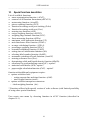
1
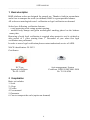
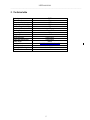
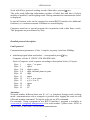
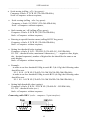
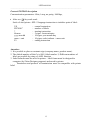
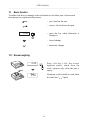
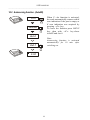
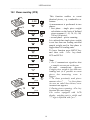
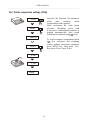
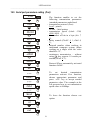
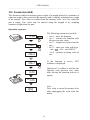
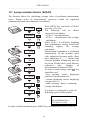
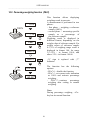
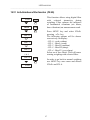
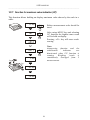
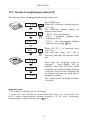
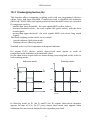
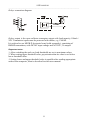
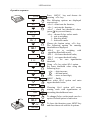
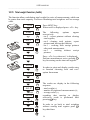
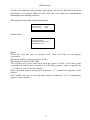
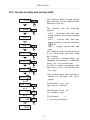
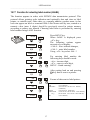
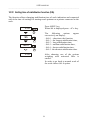
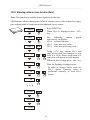
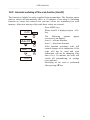
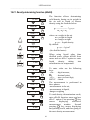
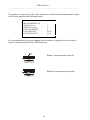
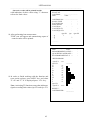
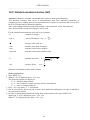
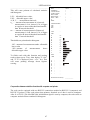
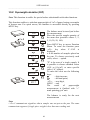
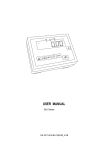
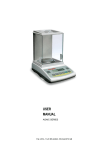
USER MANUAL B60P File: 2010-10-BP-131 B-50_0 GB USER MANUAL _____________________________________________________________________________________________________________________ Table of contents: 1. Basic description ........................................................................................................4 2. Completation ...............................................................................................................4 3. Technical data .............................................................................................................5 4. Keys and indicators ....................................................................................................6 5. Security principles ......................................................................................................7 6. Environment protection..............................................................................................7 7. Preparation to work.....................................................................................................8 8. Start-up ........................................................................................................................8 9. General rules ...............................................................................................................9 10. Balance checking .................................................................................................. 10 11. Scale adjustment ................................................................................................... 10 12. Connecting to a computer or a printer (optional) ............................................... 10 13. Basic function........................................................................................................ 14 13.1 Normal weighing.................................................................................................... 14 13.2 Weighing with tare................................................................................................. 15 13.3 Increased readability............................................................................................. 15 14. Special functions describtion............................................................................... 16 14.1 Menu customization function (ACtIV and dEFAUL)............................................ 17 14.2 Autozeroing function (AutoZE)............................................................................ 18 14.3 Pieces counting (PCS) ......................................................................................... 19 14.4 Printer cooperation settings (PrInt)..................................................................... 20 14.5 Serial port parameters setting (Port)................................................................... 21 14.6 Constant tare (tArE)............................................................................................... 22 14.7 Average calculation function (AVErAG) ............................................................. 24 14.8 Recipe weighing function (RECIPE).................................................................... 25 14.9 Percentage weighing function (PErC)................................................................. 26 14.10 Anti-disturbance filter function (FILtEr) .......................................................... 27 14.11 Function for maximum value indication (UP) .................................................. 28 14.12 Force measuring function (nEWto) ................................................................. 29 14.13 Function for weighing large animals (LOC) ..................................................... 30 14.14 Checkweighing function (thr) ........................................................................... 31 14.15 Total weight function (totAL) ............................................................................ 34 2 USER MANUAL _____________________________________________________________________________________________________________________ 14.16 Function for setting date and time (dAtE) ....................................................... 36 14.17 Function for selecting label number (LAbEL) ................................................. 37 14.18 Setting time of stabilization function (Stb) ...................................................... 38 14.19 Entering reference zero function (Zero)........................................................... 39 14.20 Automatic switching off the scale function (AutoOF) .................................... 40 14.21 Density determining function (dEnSIt)............................................................. 41 14.22 Calculator for good packaging control (tP) ..................................................... 43 14.23 Statistical calculations function (StAt) ............................................................ 46 14.24 Paperweight calculation (PAP)......................................................................... 48 15. Maintenance and small repairs ................................................................................ 49 Declaration of Conformity ............................................................................................... 50 3 USER MANUAL _____________________________________________________________________________________________________________________ 1. Basic description B60P platform scales are designed for general use. Thanks to built-in accumulator and a case to transport the scale (on demand) B60P is a great portable balance. All scales are metrological tested - calibration or legal verification on demand. Scales have following verification features: - a seal protecting scale casing against opening, - notified body stamps and green metrological marking placed on the balance name plate. Renewing of scale legal verification is required when protective seal is violated or after period of 3 years starting from 1st December of year when first legal verification was performed. In order to renew legal verification please contact authorized service of AXIS. NACE classification: 29.24.23. Certificates: EC Type Approval certificate No. PL 04 022 Axis management System Certificate DIN EN ISO 9001:2000 No. 78 100 6386 2. Completation Basic set includes: 1. Scale 2. 4 legs 3. Feeder 4. User manual 5. Guarantee 6. Case to transport the scale (option on demand) 4 USER MANUAL _____________________________________________________________________________________________________________________ 3. Technical data Scale type Maximal load Minima load Readout graduation (d) Verification graduation (e) Accuracy class Working temperature Tare range Weighing time Pan dimensions Scale base dimensions Scale height Supply Internal supply Accumulator working time EC verification B60P 60kg 400g 20g 20g III -10 ÷ +40°C -60kg <3s 400x500mm 400x600mm 80mm AC: 220V, 50Hz DC: 12V, 1,5A Lead-acid battery 6V/12Ah about. 10 hours. 5 USER MANUAL _____________________________________________________________________________________________________________________ 4. Keys and indicators OFF MODE AUT SUM 100 50 0 Max key key key key key key key Min I/ →T← B/G →0← MENU HR indicator →0← indicator NET indicator indicator MODE bar indicator indicator OFF indicator B/G indicator pcs Max, Min, d, e, III e d - switch-on / switch-off (standby), tare (subtract package weight from weighed mass) gross weigh indication switch, zero, special functions menu, print-out, increased indication resolution, - zero indicator result stabilisation indicator net weight indicator (indication with subtracted tare) special function setting, total load indicator (graduated 0-100%) standby, gross mass (key B/G), pieces counting metrological parameters and accuracy class. Attention: →0←, B/G, HR keys and →0←, B/G, NET indicators don’t work in scales without legalization with graduation d≠e. 6 USER MANUAL _____________________________________________________________________________________________________________________ 5. Security principles To avoid electrical shock or damage of the scale or connected peripheral devices, it is necessary to follow the security rules below. • All repairs and necessary regulations can be made by authorised personnel only. • To avoid fire risk use a feeder of an appropriate type (supplied with the scale). Pay attention that supply voltage is compatible with specified technical data. • Do not use the scale when its cover is opened. • Do not use the scale in explosive conditions. • Do not use the scale in high humidity. • If the scale seems not to operate properly, unplug it from the mains and do not use until checked by authorised service. 6. Environment protection According to legal regulations it if forbidden to dispose wasted electronic equipment in waste containers. • Please return wasted scale to the point of purchase or other company specialised in recycling of wasted electronic components. 7 USER MANUAL _____________________________________________________________________________________________________________________ 7. Preparation to work 1. Take the scale out of the package removing protective foils. 2. Remove the lock nuts and unscrew lock screws (replace them with scale legs). 3. Place the scale on a stable ground not affected by mechanical vibrations and airflows. 4. Level the scale with the rotating rear legs so that the air bubble in the water-level at the back of the scale is in the middle. 5. Put on the pan. Correct Wrong 6. Plug the feeder connector to the power socket at the back of the scale and plug the feeder to the mains. After self-tests and result stabilisation, the scale displays zero indication. 7. In scales with external feeder connect the feeder joint to supply socket situated on display column (sometimes situated on the cable). Connect the feeder to 230V. 8. Start-up Leave the pan empty, plug the feeder to the mains (~230V/50Hz) and plug the feeder connector to the 12V power socket at the back of the scale. The scale proceeds with following start-up actions: Display test. Basic electronic components tests: C1, C-2, ... C-6. Program version. The scale is now ready to work. 8 USER MANUAL _____________________________________________________________________________________________________________________ 9. General rules 1. Before each measurement make sure that zero indicator is displayed. If zero indicator does not displayed or “----“ communicate appears, press →0← key and wait until zero indication and zero indicator appears. 2. The scale is equipped with a tare equal to its range. To tare the scale press →T← key (left or right). Storing a tare value does not extend measuring range, but only subtracts it from a load placed on a pan. To make weight control easier and to avoid range overdrawing, the scale is equipped with a load indicator (graduated in percentages). 3. Weighing result should be read when the indicator " " lights, which signalises stabilisation of a result. 4. When the scale is not used but it is necessary to be ready to work immediately, it can be switched off by pressing I/ key. The scale reading system is then switched off to "standby" mode (signalled by the indicator "OFF" in version with the LCD display). To switch the scale on press I/ key. The scale is immediately ready to operate maximum accuracy (after self tests). 5. Weighed sample should be placed in the centre of the pan. Place the scale on a platform to avoid dropping weighed objects on the pan. Do not overload the scale more then 20% of maximum load (Max). 6. Protect the scale against dust, aggressive dusts and liquids. To clean the scale wash it with water with soap and dry it afterwards. 9 USER MANUAL _____________________________________________________________________________________________________________________ 10. Balance checking It is advised to check scale indication accuracy before and after series of measurement using any load with known weight. To check the scale with legal verification use a calibration weight with valid calibration certificate. In case permissible error is exceeded it is advised to contact the nearest service to calibrate the scale. 11. Scale adjustment To adjust a balance it is necessary to break protective marks, therefore to calibrate the scale please contact the nearest service. 12. Connecting to a computer or a printer (optional) 1 6 2 RxD (receiver) TxD (transmitter) The scale is equipped with RS232C or RS485 (optional), which can be used to connect external devices such as a computer or a printer. Detailed way of communication data is defined by one of protocol: - LonG – protocol to printer and computer - ELtron – protocol to label printer 7 3 8 4 9 5 GND When cooperating with a printer data is send automatically after result stabilisation, but next transmission is possible after removing previously weighted sample. Case RS485 (option) 1 2 6 7 3 8 4 5 9 A B A B When protocol Long is chose scale sends result of weighting on an initialize signal from computer, or after pressed a key. When automatic transmission mode is chose (function LPt), a printer data is send automatically after result stabilisation, but next transmission is possible after removing previously weighted sample. The scale sends following information: successive number of weighing, date and time (if clock module is installed )and weighing result. During transmission communicate Print is displayed } } Input Output Case . 10 USER MANUAL _____________________________________________________________________________________________________________________ Scale with Eltron protocol sending record of data after pressed key. The scale sends following information: number of label, date and time (if clock module is installed ) and weighing result. During transmission communicate Label is displayed. In special features scale can be equipped in second RS232 interface for additional functions, ex. continues transmit of indicate to second display. Computer must have a special program for cooperation with a data from a scale. This programs are procurement by Axis. Detailed protocol description LonG protocol Communication parameters: 8 bits, 1 stop bit, no parity, baud rate 4800bps, key initialising signal (data send order) – correspond to press Computer→Scale: S I CR LF (53h 49h 0Dh 0Ah), Scale→Computer: scale response according to description below (16 bytes): Byte Byte Byte Byte Byte Byte Byte Byte Byte Byte Byte 1 2 3÷4 5÷9 10 11 12 13 14 15 16 - sign „-” or space space digit or space digit, decimal piont or space digit space k, l, c, p or space g, b, t, c or % space CR LF Attention: Network number different than zero (F..-rS / nr function) changes scale working mode: communication with a computer is possible after logging the scale in with 02h scale number command. To log the scale out use 03h command. For example: Using a program to test RS232 interface ( program is available in www.axis.pl / programy komputerowe ) for scale number 1 please write: $0201 to log in, then SI, and write: $03 to close communication. 11 USER MANUAL _____________________________________________________________________________________________________________________ Scale tarring (calling →T← key press) : Computer→Scale: S T CR LF (53h 54h 0Dh 0Ah), Scale→Computer: without response, Scale zeroing (calling →0← key press): Computer→ Scale: S Z CR LF (53h 5Ah 0Dh 0Ah), Scale →Computer: without response, Scale turning on / off (calling I/ key press): Computer→ Scale: S S CR LF (53h 53h 0Dh 0Ah), Scale →Computer: without response, Entering to special function menu (calling MENU key press): Computer→ Scale: S F CR LF (53h 46h 0Dh 0Ah), Scale →Computer: without response, Setting low threshold value (option): Computer→ Scale: S L D1...DN CR LF (53h 4Ch D1...DN 0Dh 0Ah) D1...DN – threshold value, maximum 8 characters („-” – negative value, digits, dot – decimal separator), number of digits after dot should be the same as on scale display, Scale →Computer: without response, Example: ⋅ in order to set low threshold 1000g in scale B1.5 (d=0.5g) the following order should be sent: S L 1 0 0 0 . 0 CR LF (53h 4Ch 31h 30h 30h 30h 2Eh 30h 0Dh 0Ah), ⋅ in order to set low threshold 100kg in scale B150 (d=50g) the following order should be sent: S L 1 0 0 . 0 0 CR LF (53h 4Ch 31h 30h 30h 2Eh 30h 30h 0Dh 0Ah),), Setting high threshold value (option): Computer→ Scale: S H D1...DN CR LF (53h 48h D1...DN 0Dh 0Ah), D1...DN – threshold value (see ) Scale →Computer: without response. Connecting cable WK-1 (scale – computer / 9-pin interface): 12 USER MANUAL _____________________________________________________________________________________________________________________ Protocol ELTRON description Communication parameters: 8bits, 1stop, no parity, 9600bps, After use key scale send: Scale→Label printer : EPL-2 language instruction to initialize print of label: US FR"0001" ? hh:mm yyyy.mm.dd mass + unit P1 - control instruction number of labels starting instruction 5 signs: hours:minutes 10 signs: year.month.day 10 signs: scale indicate + mass unit ending instruction Attention: 1. It is possible to place a constants sign (company name, product name). 2. The default number of label’s is 0001 (label number 1).Different numbers of label are possible by using a LAbEL function. 3. Label formula must be saved in printer – label forma must be designed in computer (by Zebra Designer program) and saved in printer. Parameters and protocol of transmission must be compatible with printer label 13 USER MANUAL _____________________________________________________________________________________________________________________ 13. Basic function To make clear how to manage with each function, in further part of instruction descriptions are replaced with pictures. - put a load on the pan - remove the load from the pan 2.30 - T press the key when indication is displayed - forced change - automatic change 13.1 Normal weighing 0.00 Press →0← key (→T← key in nonlegalized scales), which zeros the scale, operates only when the pan is empty . 0 Weighing result should be read when the indicator " " lights. 2.30 14 USER MANUAL _____________________________________________________________________________________________________________________ 13.2 Weighing with tare 2.30 The scale is equipped with tare equal to its range. T NET Joint value tare and mass net can not cross a maximum of scale. 0.00 To display gross weight press B/G key. NET 40.01 Note: Press B/G key to return to net weight indication. B/G 42.31 13.3 Increased readability Press HR key to display the weighing result (for 5s.) with the highest readability possible. This function is especially helpful in scales with legal verification with d=e. 2.30 2.29 The weighing result with increased readability can be used for informational purposes only and cannot be printed or sent to a computer with key. 2.30 15 USER MANUAL _____________________________________________________________________________________________________________________ 14. Special functions describtion List of available functions: menu customization function (ACtIV), removal of all function from menu (dEFAUL). autozeroing function (AutoZE), pieces counting function (PCS), function for setting serial port working (PrInt) function for setting serial port (Port) entering tare function (tArE) recipe weighing function (rECIPE), weighing large animals function (LOC) force measuring function (nEWto) maximum value indication function (UP) anti-disturbance filter function (FILtEr) average calculating function (AVErA) percentage weighing function (PErC), extended calibration function (CALIb) setting time of stabilisation function (Stb) selecting label number function (LabEL) automatic switching off scale function (AutoOF) entering reference zero (Zero) determining solids and liquids density function (dEnSIt) calculator for good packaging control (tP) - option* statistical calculations (StAt)- option* paperweight calculation function (PAP) - option* function with additional equipment require: options with the clock: - setting current date and time function (dAtE) - total weight function (totAL) options with the transoptors connectors: - checkweighing function (thr) * Functions offered with special version of scale software (with limited possibility of using other special functions). User create own menu by choosing function in ACtIV function (described in chapter 14.1). 16 USER MANUAL _____________________________________________________________________________________________________________________ 14.1 Menu customization function (ACtIV and dEFAUL) Among available user functions it is possible to select these, which should be displayed after pressing MENU key. It allows avoiding displaying whole list of available functions, which makes operation time longer. 0.00 ACtIV . PCS Port T Operation sequence shown in the pictures on the left causes adding function for setting serial interface RS232C parameters (Port) to function menu. . . After switching on ACTIV function a dot is displayed on the right side (to distinguish from regular menu). Chosen functions are displayed with a dot on the left side. T Port -0 Port -1 In every moment, it is possible to restore primary (manufacture) settings choosing dEFAULt special function. T In order to remove function from menu in the last operation in place of selecting Port -1 choose Port -0. 17 USER MANUAL _____________________________________________________________________________________________________________________ 14.2 Autozeroing function (AutoZE) When F..-Aut function is activated, the scale automatically ensures stable zero indication if the pan is empty or if zero indication was acquired by pressing →T← key. To leave the function press MENU key, then with →T← key chose AutoZE and Aut-0. 0.01 AutoZE T Aut-0 Aut-1 Note: Autozeroing function is activated automatically for 10 min. after switching-on. T 0.00 18 USER MANUAL _____________________________________________________________________________________________________________________ 14.3 Pieces counting (PCS) 0.00 This function enables to count identical pieces, e.g. turnbuckles or buttons. A measurement is performed in two phases: - first phase - single piece weight calculation on the basis of defined pieces amount (5, 10, 20, 50, 100, 200 or 500 pieces), - second phase – pieces counting. It is advised that single piece weight is not less than one reading unit and sample weight used in first phase is bigger than 100 reading units. To leave function press MENU key and then with →Τ← key chose PCS and PCS-0. T 5 23.40 PCS T PCS -0 PCS-1 T Note: 1. Err-3 communicate signalises that a sample was not put on the pan. The same communicate appears if single piece weight is less than one reading unit (it is possible to count pieces but measuring error is bigger). 2. To chose previously used pieces amount select " _ _ " in first phase (in case no value was chosen, error communicate appears 3. During pieces counting →T← key function does not change. 4.In scales equipped with LCD display, weighing unit is visible and " " sign is replaced with "pcs ". PC . . 5 T pc s 0 12 pc s 12 19 USER MANUAL _____________________________________________________________________________________________________________________ 14.4 Printer cooperation settings (PrInt) Activate the function for automatic serial port working mode (cooperation with a printer. After activation the scale prints a header. Weighing result with a successive measurement number is printed automatically after result stabilisation (without using key). 0.00 PrInt T PrIn-0 PrIn-1 To select computer cooperation mode key activated and weighing ( results without successive numbers) press MENU key, then with →T← key chose PrIn-0 and PrIn-1. T 0.00 1.05 PrInt 20 USER MANUAL _____________________________________________________________________________________________________________________ 14.5 Serial port parameters setting (Port) 0.00 Port - T - Port-0 - Port-1 baud T - T -4800 -9600 bIt - T The function enables to set the following transmission parameters (standard parameters underlined: transmission protocol (Prot): LonG - printer, ELtron – label printer, transmission speed (bAud: 1200, 4800, 9600, ...), the number of bits in a byte (bit: 7, 8), parity control (PArItY: 0, 1; Odd: 0, 1), network number when working in multistand computer system (when working as a single scale the value should be “0”, continuous transmission – without key, approx. 10 results per using second (SEnd: 0, 1). Protocol Eltron automaticly activated function LAbEL. T PArItY T Odd T Send T nr T out T To set desired transmission parameters activate Port function, choose appropriate parameter and press →T← key to accept needed parameter value. The example at the left presents how to set transmission speed value to 9600bps. To leave the function choose out option. 21 USER MANUAL _____________________________________________________________________________________________________________________ 14.6 Constant tare (tArE) This function enables to measure gross weight of a sample placed in a container of a known weigh value (stored in the memory) and to display calculated net weight of the sample. Tare value is recalled from the memory with →0← key when the pan is empty. Tare value may be entered using the keypad or by sampling container weight from the pan. Operation sequence: PrIn-0 The following options are possible: - tAr-0 – leave the function, - tAr-1 – activate the function with the previous tare value, - tAr-2 – sample tare value from the pan, - tAr-3 – enter tare value with keys: →0←, , →T← and MENU - tAr-4 – printout a setting value of tare PrIn-1 If the function is active, NET indicator is displayed. 0.00 PrInt T T Options tAr-1 enables to activate the function with previous tare value after leaving the function with tAr-0 option. 0.00 1.05 Note: Tare value is stored in memory also after unplugging the scale from the mains. PrInt 22 USER MANUAL _____________________________________________________________________________________________________________________ Weighing with constant tare: -1.70 When tAr function is activated, press →0← key to zero the indication and to recall tare value from the memory. Tare value is displayed with ”-” sign. 0 NET 10.00 B/G B/G key enables for instant switching between net and gross weight. B/G Note: When the pan is empty →T← key does not operate – to tare the scale use →0← key. 11.70 23 USER MANUAL _____________________________________________________________________________________________________________________ 14.7 Average calculation function (AVErAG) The function allows for calculating average value of performed measurement series. During series of measurements successive results are registered automatically when scale indication is stabilised. 0.00 Press MENU key and select AUErAG pressing →T← key. The following will be shown successively on display: - AUEr-0 – leaving function, - AUEr-1 – measurement with average calculation.. Select AUEr-1. It will allow weighing with simultaneous storing results into summing register for average calculation Measurement registration is performed automatically in the moment when scale indication becomes stable. Short time displaying of „ - - ” denotes that load can be taken off and new one can be put on. Results above scale Min are registered only. Number of measurements is limited to 9999. key In order to read average value should be used. - first pressing causes displaying number of measurements (n). - second displaying causes displaying average value (=). - third pressing allows continuing average calculation. MENU AUErAG T AUEr- 1 T 1.00 0.00 2.00 0.00 n 2 _ _ 1.50 If a printer is connected to scale the following report will be printed : Date: ... 0.00 Time. ... MEASUREMENS No AVERAGE VALUE = ... = ... In order to finish calculation press MENU key, and then select AUEr i AUEr-0. 24 USER MANUAL _____________________________________________________________________________________________________________________ 14.8 Recipe weighing function (RECIPE) 0.00 rECIPE MENU T rECI- 0 A rECI- 1 _ _ _ B 0.11 T _ _ _ 0.00 _ _ _ 0.13 A+ B+ C T _ _ _ 0.00 _ _ _ 0.12 C T MENU rECIPE T rECI- 0 T This function allows for separate weighing of several ingredients in one container with a possibility of control total weight of all weighed components. The function has the following options: - rECI-0 – leave the function with possibility of reading to read total weight, - rECI -1 – start recipe weighing - rECI -2 – continue previous recipe. When preparing a recipe successive ingredients (A, B, C, etc.) are weighed each time starting from zero indication. In order to allow this after weighing of each ingredient tare the scale. After weighing of several ingredients reading total weight is possible (despite scale taring). In order to do that press MENU key, select rECIPE function once more and use rECI -0 option. _ Sign „ _” signals total weight indication. Recipe is finished when →T← key _ is pressed. When „ _” sign is displayed recipe continuing is possible. rECI -2 option is used for that. Note: Sign „≡” on the left side of display informs about rECIPE function activity. _ _ 0.36 25 USER MANUAL _____________________________________________________________________________________________________________________ 14.9 Percentage weighing function (PErC) This function allows displaying weighing result in percents. A measurement is performed in two phases: - first phase – weighing a reference sample (100%), - second phase – measuring specific sample as a percentage of the reference sample. Weighing result is displayed in different format, depending on the weight value of reference sample. For weight values of reference sample 0÷3,5% of weighing range result is displayed in format 100, for range 3,5÷35% - in format 100.0, and above 35% - in format 100.00. 0.00 100% 1.70 PErC T PErC-0 PErC-1 _ „%” sign is replaced with „ _” T indicator. The function has the following options: - PErC-0 – disable the function, - PErC-1– set current scale indication as 100% and activate percentage weighing, - PErC-2 – continue percentage weighing after exiting to normal weighing. 100.00 % 5% 95.00 % Note: During percentage weighing →T← key has its normal function. 26 USER MANUAL _____________________________________________________________________________________________________________________ 14.10 Anti-disturbance filter function (FILtEr) This function allows using digital filter with selected intensivity during weighing. Filter reduces the influence of mechanical vibrations (air blasts, base vibrations) on measurement result. 0.00 FILtEr T Press MENU key and select FILtEr pressing →T← key. The following options will be shown successively on display: - FIL-0 – work without - FIL-1 - filter I (weak) - FIL-2 - filter II (medium) - FIL-3 - filter III (sharp) - FIL-4 - filter IV (very sharp) Select on of four filters. This will cause starting weighing with selected filter. FIL- 0 FIL- 1 FIL- 2 FIL- 4 T In order to go back to normal weighing use MENU key once more and choose FILtEr and FIL-0. 0.00 27 USER MANUAL _____________________________________________________________________________________________________________________ 14.11 Function for maximum value indication (UP) This function allows holding on display maximum value shown by the scale in a while. 0.00 UP Before measurement scale should be tared. After using MENU key and selecting UP function the highest mass result will be hold on display. Pressing →T← key will cause result zeroing. T UP- 0 UP- 1 Note: Autozeroing function and the stabilisation indicator are deactivated when UP function is running. Weighing result is continuously averaged from 5 measurements. T 1.00 1g 1g 10.00 10.00 28 USER MANUAL _____________________________________________________________________________________________________________________ 14.12 Force measuring function (nEWto) Function activation causes displaying result in force units (N). 0.0 Press MENU key. nEWto T Using →T← key choose function, and then NEW-1. Note: 1N≈0,1019kg nEW -0 nEW -1 T 0.000 29 NEWto USER MANUAL _____________________________________________________________________________________________________________________ 14.13 Function for weighing large animals (LOC) The function allows weighing animal moving on the scale. 0.00 LOC LOC -0 LOC -1 Press MENU key. MENU When LOC function is displayed press →T← key. The following options appear on display successively: T - LOC-0 – leave the function, - LOC-1 – automatic weighing after loading the scale, - LOC-2 – the measurement initiated key. manually by pressing When LOC-1F..-1 is displayed press →T← key. Tare the scale using →T← key if necessary and place the animal on the pan. T 0.25 Wait until the weighing result is averaged – scale display will be blinking. Then scale will show stable averaged result and will send it through serial port. Final result is displayed on the display and send via serial port to computer or printer. The result remains on display for about 30 second. PrInt 0.25 Important notes: 1. The loads less than Min are not averaged. 2. In the case when placing the animal takes more than 5s, it is advised to use LOC-2 option (measurement initiated manually). It will allow performing measurement in right moment pressing key. 30 USER MANUAL _____________________________________________________________________________________________________________________ 14.14 Checkweighing function (thr) This function allows comparing weighing result with two programmed reference values: lower and upper threshold. Comparison result is signalled with indicators (MIN, OK, MAX) and sound signal generated when threshold values are exceeded. If comparison result is: - smaller than lower threshold – the scale signals MIN (yellow colour), - between threshold values - the scale signals OK (green colour, with the short sound signal), - greater than upper threshold - the scale signals MAX (red colour, long sound signal). The checkweighing results can be use to control: - optical indicator (Indication mode), - batching devices (Batching mode). - Standard scale is set for cooperation with optical indicator. On outputs P1-P3 (Relays socket) short-circuit states appear as result of comparison scale indication with threshold values. On the chart below output states are shown during increasing load on the scale for both working modes: Indication mode: Batching mode: P1 P1 zero treshold thr I thr I P2 P2 thr I thr II thr II P3 P3 zero treshold thr II In Batching mode on P1 (thr I) and P2 (thr II) outputs short-circuit impulses appears for time of 0,5s. On P3 (zero) output short-circuit state appears when indication does not exceed threshold value signalling zero load. 31 USER MANUAL _____________________________________________________________________________________________________________________ Relays connection diagram: Relays output is the open collector transoptor output with load capacity 100mA / 24V. Transmitter inputs must be protected with diodes, e.g. 1N4148. It is advised to use MS3K/P electronic board (sold separately), consisting of RM96P transmitters, with DC24V input voltage and AC250V, 3A output. Important notes: 1. After switching the scale on, both thresholds are set to maximum values. 2. When setting upper threshold value, pay attention that its value is not below lower threshold value. 3. Setting lower and upper threshold value is possible after sending appropriate orders from computer, what is described in scale user manual. 32 USER MANUAL _____________________________________________________________________________________________________________________ Operation sequence: 0.00 thr thr -0 thr -1 SEt-1 5 550 SEt-2 100 SEt-0 Press MENU key and choose thr pressing →T← key. The following options are displayed successively: - thr-0 – deactivate the function, T - thr-1 – activate the function, - thr-P – check last threshold values key several times), (press - thr-t – choose Relays socket mode: 0 – exit to weighing 1 – Batching mode T 2 – Indication mode. Choose thr-1option using →T← key. The following options for entering thresholds are displayed: T - SEt-0 - go to weighing with signalling threshold excess, - SEt-1 - set lower threshold value, 0 - SEt-2 - set upper threshold value, - SEt-3 - set zero signalisation threshold. Using →T← key select SEt-1 option. T Set lower threshold value using the following keys: →0← - digit increase, 0 - decimal point, →T← - move to next digit, MENU MENU - finish. Then select SEt-2 option and enter upper threshold value. T MENU Choosing Set-0 option will cause starting work with signalisation of exceeding thresholds and zero. To change Relays socket mode use thr-t option. Default option is Indication. T To leave the function, press MENU key and then choose thr and thr-0 options. OK 62.00 33 USER MANUAL _____________________________________________________________________________________________________________________ 14.15 Total weight function (totAL) The function allows calculating total weight for series of measurements, which can be grater than scale capacity. It allows calculating total weight as well as average value. 0.00 MENU totAL T tot- 1 T 10.00 The following options appear successively: - tot-P - report printout without clearing total register, - tot-0 - clearing total register, report printout and leaving the function, - tot-1 - working with receipt printout after each measurement, - tot-2 - working without receipt printout. Press →T← key when tot-1 is displayed. Perform measurement series pressing key for storing results into total register. 0.00 20.00 In order to print and display results enter to function choosing total and tot-P option from menu 0.00 totAL Press MENU key. When totAL is displayed press →T← key. T n The results are display in the following sequence: - total weight (≡) - number of registered measurements (n), - average value (=), regarding that moving to display successive result is performed after pressing key. 15.00 In order to go back to total weighing without zeroing total register press key third time. tot- P Total 30.00 2 T 34 USER MANUAL _____________________________________________________________________________________________________________________ To leave the function with clearing total register, select total function from menu and choose tot-0 option. When It will cause the scale prints the communicate informing about clearing registers. The form of receipt after each measurement: Date: ... Time. ... measurement no weight measurement no weight Report form: Date: ... Time. ... TOTAL WEIGHT = NUMBER OF SAMPLES = AVERAGE VALUE = Note: When the scale has not an internal clock, Date and Time do not appear on printout. Maximum number of measurements 99 999. Maximum total load 99 999 000d. The weighing unit of the total value from the register (Total) is the same as the weighing unit stated on the keypad or is 1000 times greater, what is signalled by “o” indicator at the left of the display. If the registered value is too big to be displayed, “E” communicate appears on the display. If the number of series is too high and cannot be displayed, “Err1”communicate appears on the display. 35 USER MANUAL _____________________________________________________________________________________________________________________ 14.16 Function for setting date and time (dAtE) The function allows setting current date and time of scale internal clock and mode of its use. 0.00 dAtE The function has the following options: - dAt-0 – deactivate date and time during printout of current weighing result, - dAt-1 – activate date and time during printout of current indication ( key), - dAt-2 - change current date and time. The example at the left presents how to set current date and time using dAt-2 option. On successive positions digits are changing automatically or manually using →0← key several times. In order to choose appropriate digit and move to the next position use →T← key. T dAt- 0 dAt- 2 T h13 - 18 T h13 - 18 0 h13 - 19 T h13 - 19 After setting proper date and time it should be activated with dAt-1 option. d04 - 05 T Time format: h gg – mm (gg - hour, m - minute). T Date format: d mm – dd (m - month, d - day). T Year format: r - rr (r - two last year digits). r - 06 r - - 09 0.00 36 USER MANUAL _____________________________________________________________________________________________________________________ 14.17 Function for selecting label number (LAbEL) The function appears in scales with ELTRON data transmission protocol. This protocol allows printing scale indication and optionally date and time on label printer, as variable texts. Other data, e.g. company address, product name, its bar code can appear on label as constant fields. Label forms used by user, named as a numeric value (max. 4 digits) should be previously stored in printer memory according to printer user manual. Choosing label form is performed by entering label number using LAbEL function. Press MENU key. When LAbEL is displayed press →T← key. The following options appear successively on display: - LAb-0 – leave without changes, - LAb-1 – enter label number, Using →T← key select LAb- 1. 5.00 LAbEL T LAb -1 T - 2 20 For entering label number the following keys should be used: →0← - increase digit, →T← - move to next digit, MENU – finish entering. ... After putting load on and pressing key data is sent to a printer. T ... Format of data sent to label printer: US FR"0001" ? 00:00 2000.00.00 10 g P1 27 5.00 37 (55 53 0D 0A) (46 52 22 30 30 30 31 22 0D 0A) (3F 0D 0A) (30 30 3A 30 30 0D 0A) (32 30 30 30 2E 30 30 2E 30 30 0D 0A) (20 20 20 20 20 31 30 20 20 67 0D 0A) (50 31 0D 0A) USER MANUAL _____________________________________________________________________________________________________________________ 14.18 Setting time of stabilization function (Stb) The function allows changing stabilisation time of scale indication and connected with it the time of waiting for starting result printout on a printer connected to the scale. Press MENU key. When Stb is displayed press →T← key. 0.00 Stb T Stb-5 T The following options appear successively on display: - Stb-0 – deactivate the function, - Stb-1 – the longest stabilisation time, - Stb-2 – long stabilisation time, - Stb-3 – medium stabilisation time, - Stb-4 – shorter stabilisation time, - Stb-5– the shortest stabilisation time. 0.00 After choosing one of the options weighing with activated filter is started.. In order to go back to normal work of the scale choose Stb–0 option. 38 USER MANUAL _____________________________________________________________________________________________________________________ 14.19 Entering reference zero function (Zero) Note: This function is enabled in non legalized scales only. ZER function allows entering new value of reference zero (value referred to empty pan) without need of contacting with authorised service centre. Press MENU key. When Zero is displayed press →T← key. Err-b ZEro T ZEr-1 T - 1 Using →T← key, choose ZEr-1 and enter access code for function (in new scale it is 1234). Direct result from A/C converter will appear on scale display. When the pan is empty press →0← key. ... T 12 12 The following options appear successively on display: ZEr-0 – activate function, ZEr-1 – enter new zero value, ZEr-2 – enter new protecting code. Wait for finishing zeroing process. In order to change access code use ZEr-2 option. Entering value is performed similarly as with ZEr-1 option. ... T 1234 5007 0.00 39 USER MANUAL _____________________________________________________________________________________________________________________ 14.20 Automatic switching off the scale function (AutoOF) The function is helpful in scales supplied from accumulator. The function causes scale to switch off automatically after c.a. 10 minutes of not using it. Switching function on causes last entered zero and tare values are remembered in scale memory. After next start-up of the scale these values are restored. Press MENU key. When AutoOF is displayed press →T← key. 0.00 AutoOF Auto -1 The following options successively on display: Auto-0 – activate function, Auto-1 – deactivate function. T appear After function activation scale will control changes of its indications. If the scale will not be used and scale indications will not be changing, after time of c.a. 10 minutes the scale will switch off remembering its settings (zero and tare). Switching on the scale is performed after pressing I/ key. T 10 min. 0.00 40 USER MANUAL _____________________________________________________________________________________________________________________ 14.21 Density determining function (dEnSIt) The function allows determining solid density basing on its weight in the air and in liquid of known density using the formula below: m1 g= * g liquid m1- m2+ m3 0.00 dEnSIt T dEn -1 T where: m1-weight in the air m2- weight in liquid m3- hanger weight g liquid – liquid density By default: 0.00 g liquid = 1g/cm3 100.00 (for distilled water). When using liquid other distilled water, choose dEnSIt menu and use dEn-2 option to liquid density taking consideration its temperature. 51.00 1.00 To enter value use the following keys: →0← - digit increase, - decimal point, →T← - move to next digit, MENU - finish. The measurement is performed in three phases: -measurement in the air, -measurement in liquid, -hanger weighing 0.00 dEnSIt T dEn -P T n than from enter into 1 To read density determination result, enter dEnSIt function menu and use dEn-P option. First pressing key causes displaying successive measurement number. Second key causes displaying pressing and printing result, and then going to the next density measurement. -- 2.0000 0.00 41 USER MANUAL _____________________________________________________________________________________________________________________ If a printer is connected to the scale, printout of solid density measurement results will be performed in the following form: Date: ... MEASUREMENT No. WEIGHT in air WEIGHT in liquid HANGER WEIGHT LOAD DENSITY LIQUID DENSITY Time. ... = = = = = = g g g g/cm3 g/cm3 It is recommended to use pan hanging below balance, weighing in the air and in liquid is performed then in the following way. Phase I: measurement in the air. Phase II: measurement in liquid. 42 USER MANUAL _____________________________________________________________________________________________________________________ 14.22 Calculator for good packaging control (tP) Note: This function is enable for special orders substitutable with other functions. The function allows performing not destroying control of 60, 100 or 160 samples of packed goods. Calculation formula complies with the description of reference method described in act of law from 26.07.2001 (with later changes). Scale operator enters nominal net mass (Qn) and sample quantity taken for control (quantity refers to total quantity of samples 1 and 2 in description of reference method. Accepting successive measured packages (storing in register) is performed automatically after load is put on and scale indication is stable. Each time after load is put on printout is performed: measurement number, result, date and hour. Accepting next measurement is possible after taking last load off. For obtained measurement series scale calculates: - x -average mass as (sum x)/n - Min -minimal mass in n samples - Max -maximal mass in n samples - R = Max-Min -the difference between max and min -S -standard deviation S= 1 ( xn − x ) 2 ∑ ( n − 1) n - defective samples count -count of samples with mass Qn-2T1<x< Qn-T1 -disqualifying samples count -count of samples with mass <Qn-2T1 Results of statistical calculations and histogram are printed on a printer. Operation sequence: 1. Press MENU key. 2. When "F..-tP" is displayed press →T← key. The following options appear successively on display: - "F..-0"- leave function, - "F..-1"- measurements, - "F..-2"- enter product data: product code and batch size, - "F..-3"- enter control parameters: nominal mass Qn and measurement number, - “F..-4”- select mode for data transmission (automatic or manual). 43 USER MANUAL _____________________________________________________________________________________________________________________ [Entering product data] 3. Press →T← key when "F..-2" is displayed. The following options appear successively on display: - "Cod"- product code [6 digits], - "n" - batch size, - "out" - exit, 4. Press →T← key when "Cod" is displayed. Previously entered product code will be displayed one by one with "out" option. In order to enter new product key press →T← key when previous code is displayed, and after "-" appears use keys: →0← - change digit, →T← - move to next digit, MENU - finish. If previous code is valid, choose "out" pressing →T← key. 5. Press →T← key when "n" is displayed. Previously entered batch size will be displayed one by one with "out" option. In order to enter new batch size press →T← key when previous value is displayed using keys: →0←, T and MENU as above. 6. Press →T← key when "out" is displayed. [Entering control parameters] 7. Press →T← key when "F..-3" is displayed. The following options appear successively on display: - "O_n"- nominal mass (Qn), - "-20", "-60", "-100", "-160", "n" – select available measurement quantity (total quantity of samples), - "out" - exit, 8. Press →T← key when "O_n" is displayed. Previously entered nominal mass will be displayed one by one with "out" option. In order to enter new nominal mass press →T← key when previous value is displayed using keys: →0←, T and MENU as above. 9. Select measurement quantity pressing →T← key. Selected quantity should comply with requirements of good packaging act of law (it depends on control kind and batch size). Letter n denotes full control. 10.Press →T← key when "out" is displayed. [Selecting mode for data transmission] 11.Press →T← key when "F..-4" is displayed. The following options appear successively on display: - „Auto” – automatic data transmission after scale indication is stable, - „Recz” – manual data transmission by operator using key, - „out” – exit. 12.Choose appropriate option pressing →T← key. 13.Press →T← key when "out" is displayed. [Measurements] 14.Press MENU key. 15.When "F..-tP" is displayed press →T← key. Select "F..-1". 16.Printout is performed. 17.Put successive good packages 44 USER MANUAL _____________________________________________________________________________________________________________________ Successive results will be printed in table with indication of their values using "*" character referred to limit values. PLACE OF CONTROL: Date: ... ................................. Time: ... CONTROL NO.: ................................ SCALE TYPE : ... FACTORY NO. : ... BATCH SIZE : ... VALUE Qn : ... VALUE Qn-T1 : ... VALUE Qn-2T1 : ... 18.After performing last measurement "END" text will appear and summarising report of control results will be printed: Qn-2T1 ... g ... g Qn Qn+2T1 * * ............... Date: ... Time: MEASUREMENT COUNT = QUALIFYING AVERAGE = STANDARD DEVIAT. S = 19.In order to finish working with the function and reset results register, press MENU key, and when "F..-tP" and "F..-0" is displayed press →T← key. Note: Activating TP function causes that indicators signal exceeding limit values Qn-2T1 and Qn+2T1. *HISTOGRAM* <Qn-2T1 -n2T1 Qn-2T1 A nA B nB C nC D nD E nE F nF G nG H nH I nI J nJ Qn-2T1 >Qn-2T1 +n2T1 RESULT : CONTROLLER : 45 ---------- ---------- ... _________ ... ... ... ... USER MANUAL _____________________________________________________________________________________________________________________ 14.23 Statistical calculations function (StAt) Attention: Function is available on demand and it replaces other special functions. This function evaluates from series of measurements (max 500) statistical parameters of weighting process. Adding successively measurements to register is automatic and it occur after the scale is loaded and its indications stabilize. After each loading printout is made with: number of measurements, result, date and time. Next measurement is made after taking off earlier load. For the obtained measurements series the scale evaluates: -n - number of samples - sum x - sum of all samples sum _ x = ∑ x n - x -average value (sum x)/n - min -minimal value from n samples - max -maximal value from n samples - max-min -maximal value minus minima value -S -standard deviation - srel -variance factor 1 ( xn − x ) 2 ∑ ( n − 1) n S= srel = S x Statistical calculations results can be printed. 1. 2. 3. 4. 5. Order of operations: Press MENU key. When F..-StA is displayed press →T← key. The following options are displayed: - F..-P – statistical data printout, - F..-0 - out of function, register zeroing, statistic data printout, - F..-1 - enter or continue function, Press →T← key when F..-1 is displayed. Put on successively objects on pan, (remove after indication stabilization) in order to add them to measurement register. In order to obtain printed statistical results from measurements series press MENU key. When sign F..-StA is displayed, press →T← key. When F..-P is displayed press again →T← key. 46 USER MANUAL _____________________________________________________________________________________________________________________ This will cause printout of calculated statistics and histogram : LSL - allowable lower value, USL - allowable upper value, A, B, C, .. – measurement intervals, nA ... – amount of measurements in A interval; measurement is in A interval if it is bigger or equal to A interval threshold and smaller than B interval threshold. nB ... - amount of measurements in B interval; measurement is in B interval if it is bigger or equal to B interval threshold and smaller than C interval threshold. Thresholds are printed under histogram. -NG - amount of measurements under allowable lower value +NG - amount of measurements above allowable upper value To finish work with this function and zeroing result register press F key, then during "F..-StA" and "F..-0" is displayed, press →T← key. This will cause printing message about register zeroing. Data: ... SAMPLES TOTAL MASS AVER MASS MIN MASS MAX MASS = MAX – MIN S SREL Hour. ... = ... = ... = ... = ... ... = ... = ... = ... *HISTOGRAM* LSL ... USL ... DIV ... -NG LSL A B C D E F G H I J USL +NG A B C D E F G H I J ... nA nB nC nD nE nF nG nH nI nJ ... ~ ~ ~ ~ ~ ~ ~ ~ ~ ~ ... ... ... ... ... ... ... ... ... ... ... Measurement made by : ____________ Cooperation between statistics function with computer and printer. The scale can be equipped with two RS232C connections marked as RS232C-I (computer) and RS232C-II (printer). After each printer data printout, identical set of data is send to computer. After S A CR LF (53h 49h 0Dh 0Ah) initialization signal is sent by computer, the scale sends to computer statistical data contained in histogram. 47 USER MANUAL _____________________________________________________________________________________________________________________ 14.24 Paperweight calculation (PAP) Note: This function is enable for special orders substitutable with other functions. This function enables to calculate paperweight of 1m2 of paper basing on samples of known area. For quick access, the function is accessible directly by pressing MENU key. 0.0 5 8.1 T MENU F..-PAP T F..- 1 T n- 5 T P-0.02 T 81.1 The balance must be tared just before the measurement. Place the specific sample quantity of the same area (possible values: 1, 2, 5, 10, 20, 50, 100). Press MENU key to access Function Menu. To enter the function press →T← key when F..-PAP is displayed. n is the number of samples placed on the pan. To choose previously used value, select … option. "P" is the area of a single sample. It is possible to choose standard values (0,02 or 0,1g/m2) or enter specific value (“A” option). To enter the value use the following keys: - digit increase, - decimal point, →T← - next digit, MENU - end. The result of paperweight measurement is finished with “=” mark pointing g/m2 unit. The balance is ready for the next measurements Note: 1. Err-3 communicate signalises that a sample was not put on the pan. The same communicate appears if single piece weight is less than one reading unit 48 USER MANUAL _____________________________________________________________________________________________________________________ 15. Maintenance and small repairs 1. Keep the balance clean. 2. Take care, for during the operation some impurities may enter under balance base and into sensors vicinity. In case of impurities finding remove them. 3. In case of improper operation due to short power failure, switch off the balance by unplugging the power cable from the socket, and plug it again after a few seconds. 4. The message “Err-b”, displayed after switching on the unloaded balance, indicates the balance sensor mechanical damage. 5. All repairs must be performed by the authorized personnel. 6. To perform the repair contact the nearest service point. Emergency messages: Message C-1 ... 6 (over Reason Recommendation autotest negative result contact the service balance loaded during turning on remove load from the balance contact the service contact the service remove load from the balance contact the service place the balance in location, assuring the indications stability contact the service contact the service zero the balance or pres B/G again set the tare 1min.) l H balance sensor mechanical failure balance mechanical failure balance overload balance mechanical failure indicator does balance unstable, not work base vibrations, air blows balance damage -----tare setting not finished tare setting unsuccessful (too low load or B/G pressed) zeroing with too high load 49 USER MANUAL _____________________________________________________________________________________________________________________ Declaration of Conformity We: AXIS Spółka z o.o. 80-125 Gdańsk, ul.Kartuska 375B declare with full responsibility, that the balances: B60P marked with CE mark are consistent with: 1. Standard PN-EN 61010-1:2004 Safety requirements for electrical equipment for measurement, control and laboratory use. General requirements harmonized with the directive 73/23/EEC (Low Voltage Directive), 2. Standard PN-EN 55022:2000 Electromagnetic compatibility (EMC) – Information technology equipment – Radio disturbance characteristics – Limits and methods of measurement, and PN-IEC 61000-4-3 Electromagnetic compatibility (EMC) – Part 4-3: Testing and measurement techniques - Radio-frequency electromagnetic field immunity test, harmonized with 89/336/EEC directive (electromagnetic compatibility). Moreover, balances with the following information on rating plates: - sticker with two digits of year of conformity assessment and with number of notified unit, performing the assessment, - green metrological marking M, - protective mark from notified unit xx are made according to certificate of approval EC no. PL 04 020 and have EC verification, confirming conformity with: 3. Standard PN-EN 45501 Specification for metrological aspects of non-automatic weighing instruments, issued in December 1999, harmonized with the 90/384/EEC council directive, changed by 93/68/EEC council directive). Additional information - Conformity evaluation for the Council Directive 73/23/EWG and 89/336/EWG were carried out by Laboratorium Badawcze Oddziału Instytutu Elektrotechniki w Gdańsku, accredited to PCA. - Approval certificate no. PL 04 020, issued by Central Office Of Measures in Warsaw (Notified Unit No. 1440). Gdańsk, 9th of January, 2008 Authorized by the Director AXIS Sp. z o.o.: Production manager mgr inŜ. Jan Kończak _________________ Signature 50 USER MANUAL _____________________________________________________________________________________________________________________ NOTES 51