1
LB-OZ Program
LB-OZ option may not be
available when combined with
other software. Check with
factory representative for
further information.
LB/OZ units are not legal for
trade in the USA.
This software program provides another unit of measure, LB-OZ. When this
software is installed, access this unit of measure by pressing the UNITS key
until the unit annunciator is blank. The display will now show weight in pound
and ounce units.
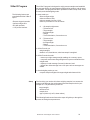
The table below shows the LB-OZ capacities and resolutions that correspond to the capacities in the calibration menu.
LB-OZ Capacities
and Resolutions
6 lb x .02 oz
10 lb x .05 oz
30 lb x .1 oz
60 lb x .5 oz
100 lb x 1 oz
200 lb x 1 oz
500 lb x 2 oz
Capacity listed in
Calibration Menu
6 lb
10 lb
30 lb
60 lb
100 lb
200 lb
500 lb
In the 10 lb capacity, if weight exceeds 9 lb 15.95 oz the display will roll over
to 0 lb 0.00 oz.
If the 3275 is in deviation display mode and weight is going in the negative
direction, the minus sign (-) will disappear when there is no more room on
the display. Even though the display may not show the minus sign, the
printout will show all correct weights and minus signs.
Model 3275 Checkweigher User’s Manual
29