1
CHAPTER 2: INSTALLATION
11
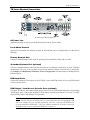
Telephone Line Port (optional)
IP-Reach TR Series models feature an integrated modem for remote access when the LAN/WAN is
unavailable. Use the included telephone cable to connect the port labeled “Tel Line” to an analog
telephone jack.
Serial Input Port (optional)
Serially-controlled devices (VT100 terminal emulation) may be accessed remotely via IP-Reach by
attaching them to the Serial IN port found on the back of IP-Reach.
The serial port on IP-Reach is of type DTE; when connecting another DTE serial device to
IP-Reach, use a null modem serial cable. When connecting a DCE serial device to IP-Reach, use a
straight-through serial cable.
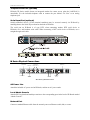
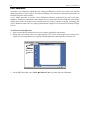
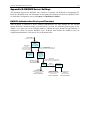
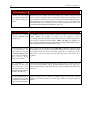
M Series Physical Connections
Power Switch
AC Power Line
Serial Input
Dedicated
Modem
Network Port
Local Access
Console Ports 1-2
KVM Input
Ports 1-2
Local Admin
Console
Back Panel of IP-Reach M Series
AC Power Line
Attach the included AC power cord to IP-Reach, and into an AC power outlet.
Local Admin Console
Attach a PS/2 keyboard and multisync monitor to the corresponding ports in the back of IP-Reach marked
“Admin Console.”
Network Port
Connect a standard Ethernet cable from the network port to an Ethernet switch, hub, or router.