1
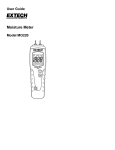
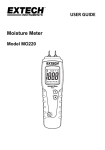
User Guide
Moisture Meter
Model MO220
Introduction
Congratulations on your purchase of the Extech MO220 Moisture Meter. This instrument is
a conductivity moisture meter specifically designed for the wood industry.
The instrument has eight calibration scales, enabling the user to take accurate moisture
measurements in 150 wood species. Moisture measurements can be taken using the
integral pin electrodes, or using the heavy duty moisture probe.
When used with the temperature probe, the moisture measurements are automatically
corrected with respect to temperature. This meter is shipped fully tested and calibrated
and, with proper use, will provide years of reliable service.
2
Model MO220 V1.1 10/07
Specifications
Display
Measurement principle
Range
Electrode length
Electrode pins
Auto Power OFF
Power supply
Meter housing
Operating Temperature
Operating Humidity
Dimensions
Weight
Dual measurement scale LCD with bargraph metering
Electrical resistance
Wood: 6 to 44%, Building materials: 0.2 to 2.0%
0.3” (8mm)
Integrated, replaceable
After approx. 15 minutes
Two (2) ‘AAA’ 1’5V batteries
Impact-proof plastic
o
o
32 to 104 F (0 to 40 C)
85% Relative Humidity maximum
5.1 x 1.6 x 1.0” (130 x 40 x 25mm)
3.5 oz. (100g)
Description
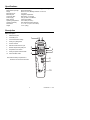
Meter Description
1.
Measurement pins
2.
Low battery icon
3.
LCD measurement reading
4.
Wood group designators
5.
Units of measure
6.
External moisture sensor input
7.
Remote temperature probe jack
8.
Temperature units button
9.
Wood group letter selector button
1
2
3
5
4
10. Power ON-OFF button
6
7
8
Note that the battery compartment is
located on the rear of the instrument.
9
10
3
Model MO220 V1.1 10/07
Operation
CAUTION: The electrode measurement pins are extremely sharp. Use
care when handling this instrument. Cover the pins with the protective cap
when the instrument is not in use.
Basic Measurement Instructions
1. Remove the cap to expose the needle electrodes OR connect the heavy duty moisture
probe socket on the right hand side of this instrument
2. Switch the meter ON by pressing the
button.
3. Select the appropriate wood calibration scale A, B, C, E, F, G, H or J (see the Wood
Calibration Tables later in this guide) using the button.
4. Push the needle pins or the heavy duty moisture probe pins into the wood and observe
the reading.
5. Press and hold the power button to shut the meter off.
Manual Temperature Correction (for use without the Temperature Probe)
The instrument is calibrated for wood at 68°F (20°C). In general, wood that is warmer than
68°F (20°C) will give higher readings and wood colder than 68°F (20°C) will give lower
readings. An approximate manual correction of 0.5% moisture content per 9°F (5°C) may
be subtracted from wood that is above 68°F (20°C). For wood that is below 68°F (20°C), a
manual correction of 0.5% moisture content per 9°F (5°C) may be added to the measured
value.
Automatic Temperature Correction ATC (for use with the Temperature Probe)
1. Switch the instrument on and select the appropriate wood calibration scale as detailed
earlier.
2. Using a hammer and nail of a nominal 3 mm diameter, make a hole in the wood to be
tested.
3. Remove the nail and push the Temperature Probe into the hole until the tip is at the
required depth.
4. Connect the Temperature Probe into the instrument via the Temp socket.
5. Measure the wood as described earlier to obtain the automatically temperature
corrected (ATC) moisture value.
6. To read the current temperature of the wood press the T button, the LCD will display
the temperature.
7. Press the T button again to change the C/F unit of measure.
8. Press the button to display moisture value again.
Auto Power OFF
The meter can automatically turn itself off after several minutes. This is to conserve on
battery energy. The user can select the period of time the meter must remain idle before
turning itself off (1 through 9 minutes). The user can also elect to disable the automatic
power off feature (select 00).
1.
With the meter ON, simultaneously press the power and the right arrow
buttons. The current time period will appear.
2.
While continuing to hold the power button, use the right arrow button to select
the desired time period. Select ‘00’ to disable this feature.
3.
Release both buttons when the desired value is on the LCD.
4
Model MO220 V1.1 10/07
Manual Accuracy Check
There are two (2) sets of calibration poles located inside the meter’s protective cover.
One set is for the 18% calibration and the other is for the 26% calibration, as marked
inside the cover.
When checking the calibration, the A scale should be selected and the temperature
probe must be disconnected.
Touch the two measurement pins to the 18% calibration nodes and view the
measurement on the meter display. Do the same for the 26% calibration.
When correctly calibrated, the instrument will register %H2O values in the range of
17.7 to 18.3 (18% calibration) and in the range of 25.5 to 26.5 (26% calibration).
If the tolerance exceeds ±1 the instrument must be recalibrated.
Care and Maintenance
When the instrument is not in use, keep it in its pouch together with its accessories. Store
the kit in a stable, dust-free environment out of direct sunlight. Remove the batteries from
the instrument if it is to be stored for periods of more than one month, or when the low
battery power symbol appears on the display. Check the condition of accessories used
with the instrument on a regular basis and replace them if they become worn or damaged.
Battery replacement
When the low battery icon appears on the display, replace the battery as soon as practical.
1. Remove the rear battery compartment screw.
2. Remove the battery compartment door
3. Replace the two (2) ‘AAA’ 1’5V batteries
4. Replace the compartment door and secure the screw before using the meter.
5
Model MO220 V1.1 10/07
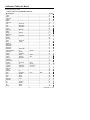
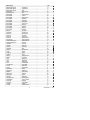
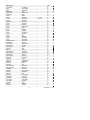
Calibration Tables for Wood
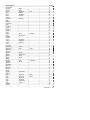
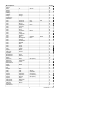
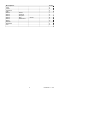
Wood Species Group Tables
Common names of wood (BS-888 & 589:1973)
Wood Species
Abura
Afara
Aformosa
Afzelia
Agba
Amboyna
Ash,
Ash,
Ash,
Ayan
Baguacu,
Balsa
Banga
Basswood
Beech,
Berlina
Binvang
Birch,
Birch,
Bisselon
Bitterwood
Blackbutt
Bosquiea
Boxwood,
Camphorwood,
Canarium,
Cedar,
Cedar,
Cedar,
Cherry,
Chestnut
Coachwood
Cordia,
Cypress,
Cypress,
Cypress,
Dahoma
Danta
Douglas
Elm,
Elm,
Elm,
Elm,
Empress,
Erimado
Fir,
Fir,
Fir,
Gegu,
American
European
Japanese
Brazilian
Wanga
European
European
Yellow
Maracaibo
E
African
Japanese
West
Western
European
American
E
Japanese
Japanese
Fir
Japanese
English
Rock
White
Tree
African
Indian
Red
Light
African
(8-18%mc)
(18-28%mc)
Grey
Douglas
Grand
Noble
Nohor
6
Bark
Group
E
A
G
E
J
G
B
A
A
C
F
A
A
G
C
B
E
J
A
E
F
C
A
A
C
B
B
J
C
J
C
G
F
A
J
C
A
C
B
B
E
E
E
J
F
B
A
J
H
Model MO220 V1.1 10/07
Wood Species
Greenheart
Guarea,
Guarea,
Gum,
Gum,
Gum,
Gum,
Gurjun
Hemlock,
Hiba
Hickory
Hyedunani
Iroko
Ironbank
Jarrah
Jelutong
Karpur
Karri
Kauri,
Kauri,
Keruing
Kuroka
Larch,
Larch,
Larch,
Lime
Loliondo
Mahogany,
Mahogany,
Makore
Mansoia
Maple,
Maple,
Maple,
Maple,
Matai
Meranti,
Meranti,
Merbau
Missanda
Muhuhi
Muninga
Musine
Musizi
Myrtle,
Naingon
Oak,
Oak,
Oak,
Oak,
Oak,
Oak,
Obeche
Odoko
Black
White
American
Saligna
Southern
Spotted
Red
Western
New
Queensland
Zealand
European
Japanese
Western
African
West
Indian
Pacific
Queensland
Rock
Sugar
Red
White
(dark/light)
Tasmanian
American
American
European
Japanese
Tasmanian
Turkey
Red
White
7
Group
C
J
H
A
B
B
A
A
C
J
F
B
F
B
C
C
A
A
E
J
F
A
C
C
F
E
C
J
B
B
B
A
B
A
A
E
B
B
B
C
J
G
J
J
A
C
A
A
A
A
C
E
G
E
Model MO220 V1.1 10/07
Wood Species
Okwen
Olive,
Olivillo
Opepe
Padang
Padauk,
Panga
Persimmon
Pillarwood
Pine,
Pine,
Pine,
Pine,
Pine,
Pine,
Pine,
Pine,
Pine,
Pine,
Pine,
Pine,
Pine,
Pine,
Pine,
Pine,
Pine,
Pine,
Pine,
Pine,
Poplar,
Pterygota,
Pyinkado
Queensland
Queensland
Ramin
Redwood,
Redwood,
Rosewood,
Rubberwood
Santa
Sapele
Sen
Seraya,
Silky
Silky
Spruce,
Spruce,
Spruce,
Spruce,
Stringybark,
Stringybark,
Sterculia,
Sycamore
Tallowwood
E
African
African
Panga
American
American
Bunya
Caribbean
Corsican
Hoop
Huon
Japanese
Kauri
Lodgepole
Maritime
New
Nicaraguan
Parana
Ponderosa
Radiata
Red
Scots
Sugar
Yellow
Black
African
long
pitch
Pitch
Black
Zealand
Pitch
Kauri
Walnut
Baltic
Californian
Indian
(European)
Maria
Red
Oak,
Oak,
Japanese
Japanese
Norway
Sitka
Messmate
Yellow
Brown
leaf
African
Australian
(8-18%mc)
(18-28%mc)
(European)
8
White
Group
B
B
G
H
A
F
A
G
F
C
C
B
C
C
C
B
B
E
A
B
B
C
B
C
C
B
A
C
A
A
A
E
J
C
G
A
B
A
H
H
C
A
C
C
C
J
C
C
C
C
C
A
F
A
Model MO220 V1.1 10/07
Wood Species
Teak
Totara
Turpentine
Utile
Walnut,
Walnut,
Walnut,
Walnut,
Walnut,
Wawa
Wandoo
Whitewood
Yew
African
American
European
New
Queensland
Guinea
9
Group
F
E
C
J
J
A
C
B
C
G
J
C
C
Model MO220 V1.1 10/07
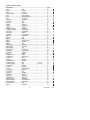
Botanical Names of Wood
Wood Type
Abies
Abies
Abies
Acanthopanex
Acer
Acer
Acer
Aetoxicon
Aformosia
Afaelia
Agathis
Agathis
Agathis
Amblygonocarpus
Amblygonocarpus
Araucaria
Araucaria
Araucaria
Berlinia
Berlinia
Betula
Betula
Betula
Betula
Bosquiera
Brachylaena
Brachylaena
Calophyllum
Canarium
Cardwellia
Carya
Cassipourea
Cassipourea
Castanea
Cedrea
Ceratopetalum
Chamaecyparis
Chamaecyparis
Chlorophora
Cordial
Corton
Cryptomelia
Cupressus
Dacryium
Dalbergia
Diospyros
Dipterocarpus
Dipterocarpus
Distemonanthus
Dracontomelium
Dryobanalops
Dyera
Grp
alba
grandis
procera
ricinifolius
macrophyllum
pseudoplatanus
saccharum
punctatum
elata
spp
australis
palmerstoni
robusta
andgensis
obtusungulis
angustifolia
bidwilli
cunninghamii
grandiflora
spp
alba
alleghaniensis
pendula
spp
phoberos
hutchinsii
spp
brasiliense
schweinfurthii
sublimes
glabra
elliotii
melanosana
sutiva
odorata
apetala
spp
spp
excelsa
alliodora
megalocarpus
japonica
spp
franklinii
latifolia
virginiana
(Keruing)
zeylanicus
benthamianus
mangiferum
spp
costulata
10
B
A
J
A
A
F
A
G
G
E
E
J
J
A
A
B
B
(8-18%mc)
(18-28%mc)
B
B
J
J
J
J
A
J
B
H
B
C
F
F
F
C
J
G
G
C
F
F
J
B
A
B
A
G
F
A
C
B
A
C
Model MO220 V1.1 10/07
Wood Type
Entandrophragma
Entandrophragma
Entandrophragma
Endiandra
Erythrophleum
Eucalyptus
Eucalyptus
Eucalyptus
Eucalyptus
Eucalyptus
Eucalyptus
Eucalyptus
Eucalyptus
Eucalyptus
Eucalyptus
Eucalyptus
Fagus
Flindersia
Fraxinus
Fraxinus
Fraxinus
Fraxinus
Gonystylus
Gossweilodendron
Gossypiospermum
Grevillea
Guarea
Guarea
Guibortia
Hevea
Intsia
Juglans
Juglans
Khaya
Khaya
Larix
Larix
Larix
Larix
Liquidamper
Lovoa
Lovoa
Maesopsis
Mansonia
Millettia
Mimusops
Mitragyna
Nauclea
Nesogordonia
Nothofagus
Ochroma
Ochroma
Ocotea
Ocotea
Grp
angolense
cylindricum
utile
palmerstoni
spp
acmenicides
crebra
diversicolor
globules
maculate
marginata
microcorys
obliqua
pilularis
saligna
wandoo
sylvatica
brayleyana
Americana
excelsior
japonicus
mardshurica
macrophyllum
balsamiferum
proerox
robusta
cedrata
thomsonii
ehie
barsilensis
bijuga
nigra
regia
senegalensis
ivorensis
deciduas
kaempferi
leptolepis
occidentalis
styraciflua
klaineana
trichiloides
eminii
altissima
stuhimannii
heckelii
ciliate
diderrichii
papaverifera
cunninghamii
lagopus
pyramidalis
rodiaei
usambarensis
11
H
C
J
C
C
C
B
A
B
A
C
A
C
C
B
J
C
B
B
A
A
A
G
J
A
C
H
J
B
H
B
A
C
E
J
C
C
C
F
A
J
J
J
B
A
B
E
H
C
A
A
A
C
C
Model MO220 V1.1 10/07
Wood Type
Octomeles
Olea
Olea
Palaquium
Paulownia
Pericopsis
Picea
Picea
Picea
Picea
Picaenia
Pinus
Pinus
Pinus
Pinus
Pinus
Pinus
Pinus
Pinus
Pinus
Pinus
Pinus
Pinus
Pipadeniastrum
Piptadenia
Podocarpus
Podocarpus
Podocarpus
Populus
Pruns
Pseudotsuga
Pterocarpus
Pterocarpus
Pterocarpus
Pterygota
Quercus
Quercus
Quercus
Quercus
Quercus
Ricinodendron
Sarcocepalus
Scottellia
Sequoia
Shorea
Shorea
Sterculia
Swietenia
Swietenia
Syncarpia
Syncarpia
Tarrietia
Taxus
Tectona
Grp
sumatrana
hochstetteri
welwitschii
spp
tomentosa
elata
abies
jezoensis
jezoensis
sitchensis
excelsa
caribaea
contorta
lampertiana
nigra
palustris
pinaster
ponderosa
radiate
spp
strobus
sylvestris
thunbergii
africanum
africana
dacrydiodes
spicatus
totara
spp
avium
menzesii
angolensis
indicus
soyauxii
bequaertii
cerris
delegatensis
gigantean
robur
spp
heudelotti
diderrichii
coriacea
sempervirens
smithiana
spp
rhinopetala
candollei
mahogani
glomulifera
laurifolia
utillis
baccata
grandis
12
(8-18%mc)
(18-28%mc)
E
B
C
A
J
G
C
J
C
C
C
C
A
C
C
C
B
C
C
B
A
A
B
A
A
B
C
E
A
J
B
G
G
F
A
E
C
C
A
A
F
H
E
B
G
B
A
A
B
C
C
C
C
F
Model MO220 V1.1 10/07
Wood Type
Terminalia
Thuja
Tujopsis
Tieghamella
Tilia
Tilia
Triploehiton
Tsuga
Ulmus
Ulmus
Ulmus
Xylia
Zelkova
Grp
superba
plicata
dolabrat
heckelii
anericana
vulgaris
scleroxylon
heterophylia
amercana
procea
thomasii
dolabriformis
serrata
A
C
J
B
G
E
G
C
E
E
E
E
B
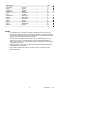
NOTES:
The calibration data in this table are based on standard tests by oven-drying of
commercial samples of the various wood species, between 7% and fibre saturation.
Above the fibre saturation point (25%-30%) readings are approximate and generally
apply to wood that has been dried and re-wetted.
The instrument is calibrated for wood at 68°F (20°C). If the temperature of wood
varies by more than 5°C, the meter reading can be corrected approximately by
adding 1/2% for every 9F (5°C) below 68°F (20°C) or subtracting 1/2% for every 9F
(5°C) above 68°F (20°C).
Readings higher by 1%-2% may be obtained where wood has been impregnated
with a water-borne preservative.
High readings obtained with some ply-woods of peculiar composition must be
treated with caution.
13
Model MO220 V1.1 10/07
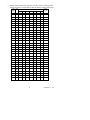
Building material measurements: Select the ‘A’ scale to measure building materials.
Refer to the following conversion table to obtain the building material moisture value.
Std Bldg
ChipMat’l
Species Group
Scale
board
B
C
E
F
G
H
J
A
%H2O
6
3
7
4.8
9.2
9.4
8.6
6.8
6.7
11.0
10.1
8
7.0
10.0
10.3
9.3
7.4
7.4
11.5
11.0
9
8.7
10.8
10.9
9.7
7.9
8.1
12.1
11.6
8.5
10
10.5 11.7
11.5
10.4
8.6
8.8
12.7
12.2
9.4
11
12.2 12.7
12.6
11.3
9.5
9.7
13.4
13.4
10.5
12
13.3 13.6
13.7
12.1
10.5
10.5
14.0
14.3
11.5
13
14.8 14.5
14.5
12.7
11.2
11.2
14.5
15.1
12.5
14
16.2 15.3
15.5
13.4
11.8
11.8
15.0
16.0
13.5
15
16.6 16.3
16.7
14.1
12.5
12.6
15.6
17.0
14.4
16
17.2 16.9
17.5
14.8
13.0
13.2
16.0
17.7
14.9
17
18.8 17.7
18.8
15.7
14.3
13.9
16.6
18.5
15.3
18
19.6 18.2
19.7
16.3
15.0
14.5
17.0
19.1
16.1
19
20.2 19.0
21.0
16.9
15.9
15.2
17.6
20.0
16.7
20
20.6 20.0
22.6
17.8
16.9
16.1
18.4
21.3
17.2
21
20.9 20.8
23.5
18.5
17.6
16.8
19.1
22.3
18.3
22
21.5 21.5
24.5
29.3
18.3
17.4
19.7
23.2
19.1
23
22.1 22.9
26.4
20.2
19.8
18.6
21.2
24.5
19.9
24
22.7 23.5
27.4
20.8
20.4
19.0
22.0
25.8
20.5
25
23.2 24.2
27.8
21.2
21.0
19.4
22.7
26.3
23
26
23.6 25.3
29.0
22.4
22.3
20.1
23.9
27.3
27
24.0 26.6
30.0
23.3
23.5
20.8
24.9
28.2
28
24.2 27.9
31.2
24.2
24.6
21.6
25.7
29.2
29
24.4 29.3
32.5
25.6
26.0
22.9
26.9
30.2
30
24.6 30.8
33.7
26.8
27.5
24.1
28.2
31.1
32
25.0
37
25.8
39
26.1
40
27.2
46.5
33.0
14
Model MO220 V1.1 10/07
Warranty
EXTECH INSTRUMENTS CORPORATION warrants this instrument to be free of defects in parts and
workmanship for one year from date of shipment (a six month limited warranty applies to sensors and
cables). If it should become necessary to return the instrument for service during or beyond the
warranty period, contact the Customer Service Department at (781) 890-7440 ext. 210 for authorization
or visit our website www.extech.com for contact information. A Return Authorization (RA) number must
be issued before any product is returned to Extech. The sender is responsible for shipping charges,
freight, insurance and proper packaging to prevent damage in transit. This warranty does not apply to
defects resulting from action of the user such as misuse, improper wiring, operation outside of
specification, improper maintenance or repair, or unauthorized modification. Extech specifically
disclaims any implied warranties or merchantability or fitness for a specific purpose and will not be liable
for any direct, indirect, incidental or consequential damages. Extech's total liability is limited to repair or
replacement of the product. The warranty set forth above is inclusive and no other warranty, whether
written or oral, is expressed or implied.
Support line (781) 890-7440
Technical support: Extension 200; E-mail: [email protected]
Repair & Returns: Extension 210; E-mail: [email protected]
Product specifications subject to change without notice
For the latest version of this User’s Guide, Software updates, and other up-to-theminute product information, visit our website: www.extech.com
Extech Instruments Corporation, 285 Bear Hill Rd., Waltham, MA 02451
Copyright © 2007 Extech Instruments Corporation
All rights reserved including the right of reproduction in whole or in part in any form.
15
Model MO220 V1.1 10/07