1
8.C. Creating an Analysis Method Using GeneMapper® Software, Versions 4.0 and 4.1 (continued)
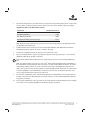
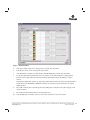
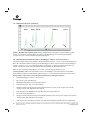
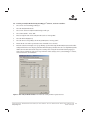
Select the Peak Detector tab. We recommend the settings shown in Figure 9. Peak amplitude thresholds should
be determined by the individual laboratory based on desired sample peak intensity range, dynamic range of the
instrument, and noise or background signal that is observed in analyzed data. Peak amplitude thresholds
between 50RFU and 200RFU are commonly used.
11.
Select “OK” to save your settings.
6976TA
10.
Figure 9. The recommended settings for the Peak Detector tab.
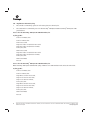
8.D. Creating a Size Standard
1.
Select “Tools”, then “GeneMapper Manager”.
2.
Select the Size Standard tab.
3.
Select “New”.
4.
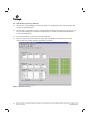
Select “Basic or Advanced” (Figure 9). The type of analysis method selected must match the peak detection
algorithm selected on the Peak Detector tab for the analysis method. Select “OK”.
5.
Enter a detailed name, such as “ILS 600”, in the Size Standard Editor. Make sure that red is selected as the color
for the size standard dye.
6.
Enter the sizes of the internal lane standard fragments into the table (60, 80, 100, 120, 140, 160, 180, 200, 225,
250, 275, 300, 325, 350, 375, 400, 425, 450, 475, 500, 550 and 600 bases).
7.
Select “OK”.
22
Promega CorporaƟon · 2800 Woods Hollow Road · Madison, WI 53711-5399 USA · Toll Free in USA 800-356-9526 · 608-274-4330 · Fax 608-277-2516
TM255 · Revised 8/14
www.promega.com