1
CSC 406 – Computer Graphics, Programming Assignment 01
2011-09-26
2
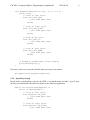
void mySpecialKeyFunc(int key, int x, int y) {
switch (key) {
// case of left arrow
case GLUT_KEY_LEFT:
...your code goes here
break;
// case of right arrow
case GLUT_KEY_RIGHT:
...your code goes here
break;
// case of up arrow
case GLUT_KEY_UP:
...your code goes here
break;
// case of down arrow
case GLUT_KEY_DOWN:
...your code goes here
break;
}
// probably needed here: force display
glutPostRedisplay();
}
Of course, you need to set up the call back when you create your window:
glutSpecialFunc(mySpecialKeyFunc);
1.3.2
Special keys in jogl
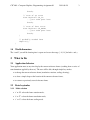
In jogl all the event handling is done by the JVM, so you handle arrow and other “special” keys
the way you would handle any other key strokes in any other Java application.
public void keyPressed(KeyEvent e) {
switch (e.getKeyCode()) {
// case of left arrow
case KeyEvent.VK_LEFT:
...your code goes here
break;
// case of right arrow
case KeyEvent.VK_RIGHT:
...your code goes here