1
UP-2007 series Super Speed Universal Programmer user manual
6
UP-2007 series Super Speed Universal Programmer user manual
Functions Introduction
Functions Introduction
6
The 81H-84H is the unique device identifier code (read only). The 85H-88H is the
user programmable (OTP) code, you can program once this section.
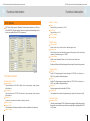
6.12 Test RAM
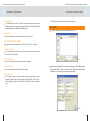
Select the RAM you will test. press "test" button, after you confirmed the RAM
number, as pic19;
If the RAM is in good condition, it will inform you Test OK; or, it will alarm with
>>Test failure.
Pic 20
Pic 21
Pic 19
As the RAM on FLASH, the application will test it automatically. If you want to test
it separately, please click in "device"---"test RAM" of main menu.
6.14 Project
Save Project:
6.13 Protect
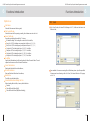
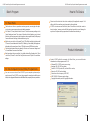
Read and write the Protection Register of FLASH device. After confirmation for the device
with Protection Register, the application will inform that the device is with Protection
Register, for example: Intel 28F320C3B device. Click "Prot." button will popup as Pic
20. If the device is without Protection Register, the button is invalid. To press related
button, you can run related functions as display, read / write Protection Register. As Pic
21.
When the application read and save the device data, the Protection Register data will
be auto read and saved at the same time, and its address is in the last 17 bytes.
23
Save the current work environment to specified project, Click "project" / "Save Project"
to run this function, and input the filename and folder then save it. The file includes current
device selected, buffer data, operation options setup and device options settings. The
project file acts as a macro, eliminating the need to go through each procedure during
future programming sessions.
Open Project:
Click "project" ---"Open Project" to run the function. According to the file, change device
buffer data and operation option etc.
24