1
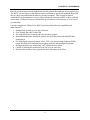
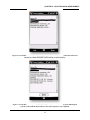
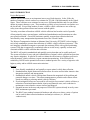
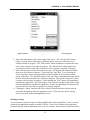
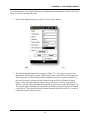
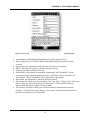
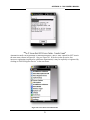
APPENDIX A – ROCS USER’S MANUAL Figure 36. Screen Shot. ROCS Main Application Screen during an active session. 5. An explanation of the data fields follows: GPS Com: This indicates if the PDA is currently communicating with the GPS unit. “Open” indicates that the PDA has established communications with the GPS unit and should appear during an active session. A GPS fix may or may not be obtained. “Closed” indicates that the PDA has not established communications with the GPS unit. This should appear when there is currently no session in progress. Last Message: the time of the last GPS fix. If no fix is obtained or there is currently no active session, this field is blank. Latitude: the decimal latitude of the GPS fix. If no fix is obtained or there is currently no active session, this field is blank. Longitude: the decimal longitude of the GPS fix. If no fix is obtained or there is currently no active session, this field is blank. Elevation: the elevation, in feet, of the GPS fix. If no fix is obtained or there is currently no active session, this field is blank. Speed: the speed, in miles per hour, as measured by the GPS fix. If no fix is obtained or there is currently no active session, this field is blank. Heading: the direction of travel, in degrees from 0 to 360, as measured by the GPS fix. If no fix is obtained or there is currently no active session, this field is blank. Fix Quality: the quality of the GPS fix. A 2D fix indicates that three satellites are being used for the fix, offering accurate latitude and longitude coordinates. A 3D fix indicates that four or more satellites are being used for the fix, offering accurate latitude, longitude, and elevation data. If no fix is obtained or there is currently no active session, this field is blank. 57