1
Fun-Link
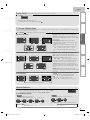
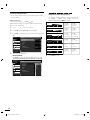
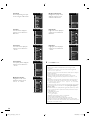
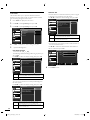
Auto TV On
This unit will turn on detected when the power on signal
is sent from your connected Fun-Link device.
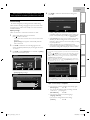
Use ▲/▼ to select the desired setting, then press OK.
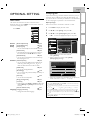
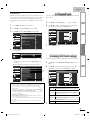
This function allows you to operate the linked functions
between our brand devices with a Fun-Link feature and this
unit connecting through an HDMI cable.
1
2
3
Auto TV On
Press MENU to display the main menu.
Picture
Use ▲/▼ to select [Features], then press OK.
Sound
Use ▲/▼ to select [Fun-Link], then press OK.
Setup
Sound
Fun-Link Control
On
Auto Device Off
On
Auto TV On
On
Language
Device List
Setup
Off
Features
Fun-Link
Picture
On
When set to "On", TV and
connected device are turned on
automatically.
On
Features
Off
Language
This unit turns on automatically when you turn on
your connected Fun-Link device.
This unit stays off even if you turn on your
connected Fun-Link device.
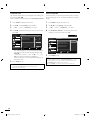
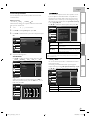
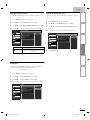
Device List
4
5
Use ▲/▼ to select the desired setting, then press OK.
This function lets you see the product model number or
name of connected devices.
Adjust the following items.
Use ▲/▼ to select the desired HDMI device listed on
the TV screen, then press OK.
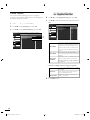
Fun-Link Control
Device List
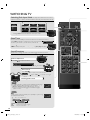
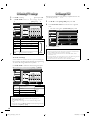
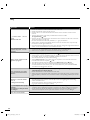
Set the Fun-Link [On] or [Off].
The following additional settings will be in gray when you
set to [Off].
Use ▲/▼ to select the desired setting, then press OK.
Picture
Sound
When set to "On", Fun-Link
functions are enabled.
MBP1100 / F7
Features
On
Sound
NB530MGX
Setup
Fun-Link Control
Picture
HDMI1
HDMI2
Language
Off
Select
Setup
6
Features
Input Change
Back
Press MENU to exit.
Language
On
Off
Selects if you have connected an external device
that is compatible with the Fun-Link function.
Disables all Fun-Link.
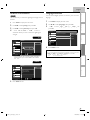
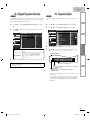
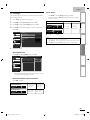
Auto Device Off
You can set your device to turn off by interlocking from
this unit’s power.
Use ▲/▼ to select the desired setting, then press OK.
Auto Device Off
Picture
On
When set to "On" and TV is
turned off, connected devices
are turned off automatically.
Sound
Setup
Off
Features
Language
On
Off
Your connected Fun-Link device turns off
automatically when you turn off the unit.
Your connected Fun-Link device stays on even if
you turn off the unit.
30
EN
A0173_N3UH_EN_v1.indd 30
2010/02/03 17:57:09