1
EZL-50 User's Manual
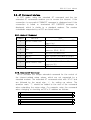
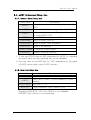
3.4.3. Serial Port Interface related Item
Setup Item
Description
TIME OUT
Connection Time Out
MUX TYPE
T2S (0), ATC (1), COD (2)
TCP Port Number for Connection Standby in
LOCAL PORT
WATER MARK
PEER IP
PEER PORT
T2S Mode
If the amount of data specified in watermark is
received from the serial port in COD mode, the
computer that is assigned IP address
previously will be connected.
IP address, to which ezTCP will attempt TCP
access, when using COD mode
TCP port, to which ezTCP will attempt
connecting, when using COD mode.
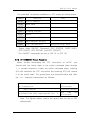
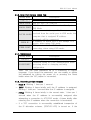
3.4.4. Miscellaneous
Setup Item
TELNET
PASSWORD*
Description
Connecting to ezTCP through telnet (Y/N)
Password String for User Authentication when
accessing telnet or changing ezConfig
configuration
※ Note: You can enter password up to 8 characters in English
language. If you forgot the password, you can modify or delete
the password by turning the power on or pressing the Reset
button when the ISP jumper is connected.
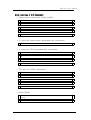
3.4.5. STATUS LED State Variation
☞ Fixed IP: Blinking 1 time per 1 second
☞ DHCP: Blinking 4 times briefly until the IP address is assigned.
Blinking 1 time per 1 second after the IP address is assigned.
☞ PPPoE: Blinking 4 times briefly in the normal state, 1 time per 1
second when the IP address is successfully assigned after
attempting a connection in ATC/COD mode, 4 times briefly after
returning the IP address when the connection is terminated.
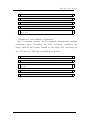
☞ If a TCP connection is successfully established irrespective of
the IP allocation scheme, [STATUS LED] is turned on. If the
20