1
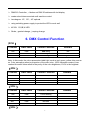
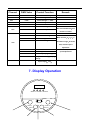
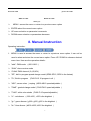
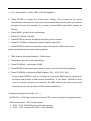
”UL”: white dimmer(U000- U255, U255 the brightest) 2. Press ENTER to access the further menu setting. This process can be saved automatically; that means you will enter the process saved previously when you activate the light next time. For example, if you want to choose DMX mode A001, operate as follows: Press MENU, go back to the initial setting Press UP / DOWN until Addr Press ENTER to choose, the display will glinting at this moment Press UP / DOWN to change the address code to select A001 Press ENTER to select and store the current menu options. DMX mode will be stored automatically and the screen will stop glinting. DMX channel choosing Operation:CHNd mode Press Menu, go back to the initial setting Press UP/DOWN,until shows “CHNd” Press ENTER to access the menu items to select, the screen will now be glinting Press UP/DOWN to change the DMX Channel: 3CH、4CH, 5CH、8CH At last, press ENTER to confirm, if it delay for 3 seconds, DMX channel choosing will be saved, and go back to DMX receive mode(A001); If your press ENTER for short time or not press, delaying for 8 seconds, the DMX channel will select to be saved automatically, and then go back to DMX receive mode(A001) 3. Details of program built inside(Pr- -) NOTE:Pr14--- Pr30 Can change the content Of SP,correct the speed of jumping change , SP00 is the fastest,SP15 is the slowest Pr00--- Pr13 :R,G,B,Wsigle or multi-colors mixing. Pr14--- Pr27: corespond to Pr00--- Pr13,add strob. 8