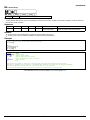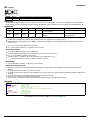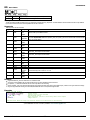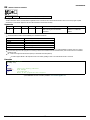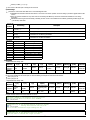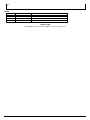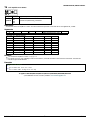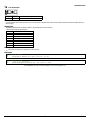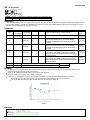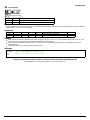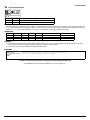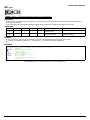
1
DMC-30010 Firmware Command Reference 08/07/15 ©2015 Galil Motion Control Table of Content Table of Content ' Comment - Subtraction Operator # Label Designator #AMPERR Amplifier error automatic subroutine #AUTO Subroutine to run automatically upon power up #AUTOERR Bootup Error Automatic Subroutine #CMDERR Command error automatic subroutine #COMINT Communication interrupt automatic subroutine #ININT Input interrupt automatic subroutine #LIMSWI Limit switch automatic subroutine #MCTIME MC command timeout automatic subroutine #POSERR Position error automatic subroutine #SERERR Serial Encoder Error Automatic Subroutine #TCPERR Ethernet communication error automatic subroutine $ Hexadecimal % Modulo Operator & JS subroutine pass variable by reference & Bitwise AND Operator ( , ) Parentheses (order of operations) * Multiplication Operator / Division Operator ; Semicolon (Command Delimiter) @ABS Absolute value @ACOS Inverse cosine @AN Analog Input Query @AO Analog Output Query @ASIN Inverse sine @ATAN Inverse tangent @COM Bitwise complement @COS Cosine @FLOT Convert Galil 4.2 to Floating Point @FRAC Fractional part @IN Read digital input @INT Integer part @OUT Read digital output @REAL Convert Floating Point to Galil 4.2 @RND Round @SIN Sine @SQR Square Root @TAN Tangent [,] Square Brackets (Array Index Operator) ^ JS subroutine stack variable ^L^K Lock program ^R^S Master Reset ^R^V Revision Information _GP Gearing Phase Differential Operand _LF Forward Limit Switch Operand Galil Motion Control Table of Content 2 8 9 10 11 12 13 14 15 16 17 18 19 20 21 22 23 24 25 26 27 28 29 30 31 32 33 34 35 36 37 38 39 40 41 42 43 44 45 46 47 48 49 50 51 52 53 54 2/316 _LRm Reverse Limit Switch Operand ` Line Continuation Character | Bitwise OR Operator ~ Variable Axis Designator + Addition Operator < Less than comparator <= Less than or Equal to comparator <> Not Equal to comparator = Assignment Operator = Equal to comparator > Greater than comparator >= Greater than or Equal to comparator AB Abort AC Acceleration AD After Distance AF Analog Feedback Select AG Amplifier Gain AI After Input AL Arm Latch AM After Move AO Analog Output AP After Absolute Position AQ Analog Input Configuration AR After Relative Distance AS At Speed AT At Time AU Set amplifier current loop AV After Vector Distance BA Brushless Axis BB Brushless Phase Begins BC Brushless Calibration BD Brushless Degrees BG Begin BI Brushless Inputs BK Breakpoint BL Reverse Software Limit BM Brushless Modulo BN Burn BO Brushless Offset BP Burn Program BQ Brushless Offset dual DAC BR Brush Axis BT Begin PVT Motion BV Burn Variables and Array BW Brake Wait BX Sine Amp Initialization BZ Brushless Zero CB Clear Bit CD Contour Data CE Configure Encoder CF Configure Unsolicited Messages Handle Galil Motion Control 55 56 57 58 59 60 62 63 64 65 66 68 69 70 71 72 73 74 75 76 77 78 79 80 81 82 83 84 85 86 87 88 89 90 91 92 93 94 95 96 97 98 99 100 101 102 104 106 107 108 109 Table of Content 3/316 CI Configure Communication Interrupt CM Contour Mode CN Configure CR Circle CS Clear Sequence CW Copyright information and Data Adjustment bit on/off DA Deallocate Variables and Arrays DC Deceleration DE Dual (Auxiliary) Encoder Position DF Dual Feedback (DV feedback swap) DH DHCP Client Enable DL Download DM Dimension Array DP Define Position DR Configures I O Data Record Update Rate DT Delta Time DV Dual Velocity (Dual Loop) EA Choose ECAM master EB Enable ECAM EC ECAM Counter ED Edit EG ECAM go (engage) EI Event Interrupts ELSE Else function for use with IF conditional statement EM Ecam modulus EN End ENDIF End of IF conditional statement EO Echo EP Cam table master interval and phase shift EQ ECAM quit (disengage) ER Error Limit ES Ellipse Scale ET Electronic cam table EW ECAM Widen Segment EY ECAM Cycle Count FA Acceleration Feedforward FE Find Edge FI Find Index FL Forward Software Limit FV Velocity Feedforward GA Master Axis for Gearing GD Gear Distance GM Gantry mode GR Gear Ratio HM Home HS Handle Assignment Switch HV Homing Velocity HX Halt Execution IA IP Address ID Identify IF IF conditional statement Galil Motion Control Table of Content 110 111 112 114 116 117 118 119 120 121 122 123 124 125 126 127 128 129 130 131 132 133 134 136 137 138 139 140 141 142 143 144 145 146 147 148 149 150 151 152 153 154 155 156 157 158 159 160 161 162 163 4/316 IH Open IP Handle II Input Interrupt IK Block Ethernet ports IL Integrator Limit IP Increment Position IT Independent Time Constant - Smoothing Function JG Jog JP Jump to Program Location JS Jump to Subroutine KD Derivative Constant KI Integrator KP Proportional Constant KS Step Motor Smoothing LA List Arrays LC Low Current Stepper Mode LD Limit Disable LE Linear Interpolation End LI Linear Interpolation Distance LL List Labels LM Linear Interpolation Mode LS List LV List Variables LZ Omit leading zeros MB Modbus MC Motion Complete ME Modbus array write enable MF Forward Motion to Position MG Message MM Master Modulus MO Motor Off MR Reverse Motion to Position MT Motor Type MU Multicast Address MV Modbus Reversal MW Modbus Wait NB Notch Bandwidth NF Notch Frequency NO No Operation NZ Notch Zero OA Off on encoder failure OB Output Bit OC Output Compare OE Off-on-Error OF Offset OP Output Port OT Off on encoder failure time OV Off on encoder failure voltage P1CD Serial port 1 code P1CH Serial port 1 character P1NM Serial port 1 number P1ST Serial port 1 string Galil Motion Control Table of Content 164 166 167 168 169 170 171 172 174 177 178 179 180 181 182 183 184 185 187 188 189 190 191 192 195 196 198 199 201 202 203 204 206 207 208 210 211 212 213 214 215 216 218 219 220 221 222 223 224 225 226 5/316 PA Position Absolute PF Position Format PL Pole PR Position Relative PT Position Tracking PV PVT Data PW Password QD Download Array QH Query Hall State QP Query Parameters QR I O Data Record QS Error Magnitude QU Upload Array QZ Return Data Record information RA Record Array RC Record RD Record Data RE Return from Error Routine REM Remark RI Return from Interrupt Routine RL Report Latched Position RO Realtime Offset RP Reference Position RS Reset RT Real Time RY Real Year Calendar Function SA Send Command SB Set Bit SC Stop Code SD Switch Deceleration SH Servo Here SI Configure the special Galil SSI feature SL Single Step SM Subnet Mask SP Speed SS Configure the special Galil BiSS feature SS Configure the special Galil BiSS feature SS Configure the special Galil BiSS feature ST Stop SY Serial encoder BiSS active level TA Tell amplifier error status TB Tell Status Byte TC Tell Error Code TD Tell Dual Encoder TE Tell Error TH Tell Ethernet Handle TI Tell Inputs TIME Time Operand TK Peak Torque Limit TL Torque Limit TM Update Time Galil Motion Control 227 228 229 230 231 232 233 234 235 236 237 238 239 240 241 242 243 244 245 246 247 248 249 250 251 252 254 256 257 258 259 260 262 263 264 265 268 271 274 275 276 277 278 281 282 283 284 285 286 287 288 Table of Content 6/316 TP Tell Position TR Trace TS Tell Switches TT Tell Torque TV Tell Velocity TW Timeout for MC trippoint UI User Interrupt UL Upload VA Vector Acceleration VD Vector Deceleration VE Vector Sequence End VF Variable Format VM Vector Mode VP Vector Position VR Vector Speed Ratio VS Vector Speed VV Vector Speed Variable WH Which Handle WT Wait XQ Execute Program YA Step Drive Resolution YB Step Motor Resolution YC Encoder Resolution YR Error Correction YS Stepper Position Maintenance Mode Enable, Status ZA User Data Record Variables ZS Zero Subroutine Stack Galil Motion Control Table of Content 289 290 291 292 293 294 295 296 297 298 299 300 301 302 304 305 306 307 308 309 310 311 312 313 314 315 316 7/316 PROGRAMMING ' Comment ' str Description The ' allows for a user to insert in a comment on a blank line after a command following a semicolon ";". See examples for valid uses of '. Arguments Argument str Value String Description Comments added into program Notes Comment strings are restricted to the maximum row size for a program. This will vary per controller. Remarks Comments will be downloaded to controller, thus taking up program space. See REM for comments that will not download to controller Examples 'Galil DMC Code Example 'Include an example like this one in the program. SH AB ;'Comments following a command MUST be proceeded by a semi-colon. KP 10'This is NOT valid use of the ' ©2015 Galil Motion Control. Corrections, Feedback: [email protected] Galil Motion Control ' 8/316 PROGRAMMING, MATH FUNCTIONS - Subtraction Operator n0 - n1 Usage variable = (value1 - value2) Performs an operation between two values or evaluated statements Description Subtraction operator. Takes as arguments any two values and returns a value equal to the difference of the arguments. Arguments Argument Min Max Default n0 -2,147,483,648 2,147,483,647 N/A n1 -2,147,483,648 2,147,483,647 N/A Resolution Description 1/65,536 Value to subtract from 1/65,536 Value to subtract Notes Remarks An operator is not a command and is not valid individually. Evaluation occurs left to right. Use parenthesis for operator precedence. n0 and n1 may also be variables, array elements, operands, or @ functions (e.g. @SIN[]). Examples 'Galil DMC Code Example :var1 = 10-4 :var2 = var1 - 3 :MG var2 - 1 2.0000 : 'Galil DMC Code Example 'It is recommended that parenthesis be used when more than one mathmatical operation is combined in one command. 'Example: var = ( ( 10*30) +( 60/30) ) ;' evaluates as 302 var = 10*30+60/30;' evalutes as 12 ©2015 Galil Motion Control. Corrections, Feedback: [email protected] Galil Motion Control - 9/316 PROGRAMMING, SUBROUTINE # Label Designator #str Description Denotes the name of a program label. For example, #move. Labels are often used to implement subroutines or loops. Labels are either user-defined or are reserved names, called "automatic subroutines," that are run automatically by the firmware when a particular event occurs. There is a maximum of 126 labels available. Arguments Argument Min str 1 char Max 7 chars Default N/A Resolution Description String Name of label Notes Remarks Labels can include the characters A-Z, a-z, 1-9. Numbers can not be the first character. All other characters are invalid. A label can only be defined at the beginning of a new line. The number of labels available can be queried with MG _DL. LL returns the current label table in the controller. Galil recommends that at least the first character be lowercase for user labels to differentiate from automatic subroutines. Automatic subroutines are listed in the command reference starting with a # character. Examples 'Galil DMC Code Example 'A simple example of iteration. The loop will run 10 times i= 0;' Create a counter #loop;' Label i= i+1;' Increment counter JP #loop, i<10;' Spin in #Loop until i >= 10 EN;' End the subroutine or thread ©2015 Galil Motion Control. Corrections, Feedback: [email protected] Galil Motion Control # 10/316 PROGRAMMING, ERROR CONTROL, SUBROUTINE #AMPERR Amplifier error automatic subroutine #AMPERR Description Automatic subroutine used to run code when a fault occurs on a Galil amplifier. See the TA command and individual amplifier information in the controller user manual. Thread 0 does not need to be running for #AMPERR to be executed. This was a requirement on earlier products. Arguments Label must be the first element on a line of code. Remarks Use RE to return from the AMPERR subroutine See the TA command for more information Examples 'Galil DMC Code Example 'this code will run in the event of an amplifer error, 'setting a digital output and notifying the operator. #AMPERR 'Set a digital bit to signal an amplifier error to peripheral hardware SB 4 'Send a message to the user MG "An amplifier error has occured" 'Return from the AMPERR subroutine, restoring trippoints that were running RE 1 #AMPERR applies to DMC40x0,DMC42x0,DMC41x3,DMC21x3,DMC30010,DMC500x0,DMC52xx0 ©2015 Galil Motion Control. Corrections, Feedback: [email protected] Galil Motion Control #AMPERR 11/316 PROGRAMMING, SUBROUTINE #AUTO Subroutine to run automatically upon power up #AUTO Description Defines the automatic entry point of embedded DMC code. When power is applied to the controller, or after the controller is reset, the program will automatically begin executing at this label. When no host software is used with the controller, #AUTO is required to run an application program on the controller stand-alone. Arguments Label must be the first element on a line of code. Remarks Use EN to end the routine Thread 0 is used to execute #AUTO on startup Examples 'Galil DMC Code Example 'On startup, this code will create a 50% duty cycle square wave on output 1 with a period of 1 second. #AUTO ;' Start on powerup SB 1;' Set bit 1 WT 500;' Wait 500msec CB 1;' Clear bit 1 WT 500;' Wait 500msec JP #AUTO ;' Jump back to #AUTO ©2015 Galil Motion Control. Corrections, Feedback: [email protected] Galil Motion Control #AUTO 12/316 PROGRAMMING, ERROR CONTROL, SUBROUTINE #AUTOERR Bootup Error Automatic Subroutine #AUTOERR Description Automatic subroutine that runs code upon power up if the firmware detects errors. If the EEPROM is corrupted, #AUTOERR will run. The EEPROM is considered corrupt if the checksum calculated on the bytes in the EEPROM do not match the checksum written to the EEPROM. For SSI and BiSS operation, #AUTOERR will also run if the time to acquire serial position data exceeds 90% of the hardware sample loop. This type of error is very rare and should never occur in normal operation. Arguments Label must be the first element on a line of code. Remarks Use EN to end the routine The type of checksum error can be queried with MG_RS For SSI and BiSS operation In the event of a serial position acquisition timeout, the following will occur: The controller will reset The controller servo loop will not run, TM will be set to zero TC1 will return "143 TM timed out" The automatic subroutine #AUTOERR will run, if present The Error output will be set When using serial encoders (SSI or BiSS), the #AUTOERR should follow these guidlines IF _TC=143 do not employ any trippoints in following code because the timer interrupt is suspended Serial encoders can be disabled with the commands SIn=0 or SSn=0 where n is the axis indicator ABCDEFG or H In order to re-enable the timer interrupt issue "TM n" where n is the servo update period in us (usually n=1000). See TM for more details Examples 'Galil DMC Code Example 'Code detects a checksum error and notifies the user #AUTOERR MG "EEPROM ERROR ",_RS EN 'Galil DMC Code Example 'Use for BiSS and SSI only (-SER firmware) 'Distinguishing between a serial timeout ' condition and an EEProm condition #AUTOERR IF _TC=143 REM BiSS or SSI timeout REM No trippoints in this clause REM Print message to DMC-4020 LCD LU 0 MG "BiSS"{L1} MG "Timeout"{L2} SSA = 0 SSB = 0 ELSE REM Checksum error REM trippoints ok here REM Print message to DMC-4020 LCD LU 0 MG "EEProm:"{L1} MG {Z10.0}_RS{L2} ENDIF EN ©2015 Galil Motion Control. Corrections, Feedback: [email protected] Galil Motion Control #AUTOERR 13/316 PROGRAMMING, ERROR CONTROL, SUBROUTINE #CMDERR Command error automatic subroutine #CMDERR Description Automatic subroutine that runs code when a DMC code error occurs. Without #CMDERR defined, if an error (see TC command) occurs in an application program running on the Galil controller, the program (and all threads) will stop. Arguments Label must be the first element on a line of code. Remarks Use EN to end the routine #CMDERR will only run from errors generated within embedded DMC code, not from the terminal or host In a single threaded application (Thread 0 only), the EN command in the #CMDERR routine will restart thread 0 where it left off. In a multi-threaded application, the thread that has an error will be halted when a command error occurs. Thread 0 will be interrupted to run the #CMDERR routine but other threads will continue to run. In order to restart the thread that encountered the error, see the example in Chapter 7 of the User Manual and the _ED operand. Thread 0 does not need to be running in order for the #CMDERR routine to execute. Examples 'Galil DMC Code Example 'This code will put the motion controller in Position Tracking mode. 'Variable "target" is updated from the terminal or from a host program 'to specify a new target. #CMDERR is used to detect a bad target value. #start DPA = 0;' Define current position as zero PTA = 1;' Turn on position tracking target= 0;' Initialize target variable #track;' Start tracking PAA = target;' Track to current value of target WT 500;' Wait 500 ms JP #track;' Continue to track ' ' #CMDERR ;' runs if an error occurs JP #done,_TC<>6 ;'check that an out of range occured (See TC) MG "Value ",target," is out of range for Position Tracking" target= _PAA ;' reset target #done EN 1 ;'return to tracking logic ©2015 Galil Motion Control. Corrections, Feedback: [email protected] Galil Motion Control #CMDERR 14/316 PROGRAMMING, SUBROUTINE #COMINT Communication interrupt automatic subroutine #COMINT Description Automatic subroutine to provide interrupt driven communications from the serial port. #COMINT can be configured by the CI command to run either when any character is received, or when a carriage return is received over the com port. The auxiliary port is used if equipped. Arguments Label must be the first element on a line of code. Remarks Use EN to end the routine #COMINT runs in thread 0, and an application must be running in thread 0 in order for #COMINT to be enabled. Code running in thread zero will be interrupted by the #COMINT subroutine. It is important to handle the interrupt condition and return without delay. The controller will continue to receive data and update the data operands (P1CH,P2CH, etc) while in #COMINT. This can lead to missed characters, numbers, and strings if #COMINT is unnecessarily delayed. Examples 'Galil DMC Code Example CI 2,1;' interrupt on any character on main port (no aux) CF S ;' send messages to serial port CW 2;' configure text for non-Galil devices (E.G. Hyperterm) EO 0;' turn off serial echo #loop MG "Loop ",TIME ;' print a message every second WT 1000 JP #loop #COMINT MG "COMINT=",P1CH{S1};' print character received EN 1,1 #COMINT applies to DMC40x0,DMC42x0,DMC41x3,DMC21x3,RIO,DMC30010,DMC500x0,DMC52xx0 ©2015 Galil Motion Control. Corrections, Feedback: [email protected] Galil Motion Control #COMINT 15/316 PROGRAMMING, IO, SUBROUTINE #ININT Input interrupt automatic subroutine #ININT Description Automatic subroutine that runs upon a state transition of digital inputs. #ININT is configured with II. #ININT runs in thread 0. Arguments Label must be the first element on a line of code. Remarks Use the II command to enable the routine. Use RI to exit the routine. To make an unconditional jump from #ININT, there are two methods for re-enabling the interrupt capability Issue a ZS and then re-issue the command II before the JP or, use a "null" routine. The "null" routine allows for the execution of the RI command before the unconditional jump. For more information see Application Note #2418, http://www.galilmc.com/support/appnotes/optima/note2418.pdf Examples 'Galil DMC Code Example II 1; 'arm digital input 1 EN; 'End thread zero ' #ININT ; 'Automatic sub. Runs on input event MG "Inputs:",_TI0; 'Display status of inputs 1-8 WT 100; 'Debounce input RI; 'Return from interrupt #ININT applies to DMC40x0,DMC42x0,DMC41x3,DMC21x3,DMC18x6,DMC18x2,DMC30010,DMC500x0,DMC52xx0 ©2015 Galil Motion Control. Corrections, Feedback: [email protected] Galil Motion Control #ININT 16/316 PROGRAMMING, ERROR CONTROL, SUBROUTINE #LIMSWI Limit switch automatic subroutine #LIMSWI Description Automatic sub for running user-defined code on a limit switch event. A limit switch event requires the following conditions. 1. Motion profiling in the direction of the given limit. I.E. RPm increasing for forward switch, RPm decreasing for reverse switch. 2. Limit switch toggles active. See CN for inverting the active sense of the limit swithes. Without #LIMSWI defined, the controller will issue ST on the axis when its limit switch is tripped during motion in the direction of the switch. With #LIMSWI defined, code is executed in addition to the stop. In lieu of a controlled stop, the motor can turn off and coast stop in the event of a limit switch event. See OE for this feature. Arguments Label must be the first element on a line of code. Remarks Use RE to terminate the subroutine See _LF and _LR for switch state operands #LIMSWI runs on thread 0. Code does not need to be running in thread 0 for #LIMSWI to be enabled. LD can be used to disable the limit operation SD can be used to set the deceleration speed on the limit. Examples 'Galil DMC Code Example #main ;'start a jog, then end JG 1000 BG A EN ' #LIMSWI ;'runs when a limit switch is tripped MG "Limit switch:"{N} IF ( _LFA = 0) MG "Forward motion stopped" ENDIF IF ( _LRA = 0) MG "Reverse motion stopped" ENDIF RE 1;' RE used to exit the #LIMSWI sub #LIMSWI applies to DMC40x0,DMC42x0,DMC41x3,DMC21x3,DMC18x6,DMC18x2,DMC30010,DMC500x0,DMC52xx0 ©2015 Galil Motion Control. Corrections, Feedback: [email protected] Galil Motion Control #LIMSWI 17/316 PROGRAMMING, SUBROUTINE #MCTIME MC command timeout automatic subroutine #MCTIME Description Automatic sub used to run user-code if a Motion Complete (MC) trippoint times out. If the motor position does not reach or pass the target within the specified timeout (TW), #MCTIME wil run if present. MC uses position from TP for servos, or TD for steppers. Arguments Label must be the first element on a line of code. Remarks Use EN to terminate the subroutine Examples 'Galil DMC Code Example #begin;' TWA = 1000;' PRA = 10000;' BG A ;' MC A ;' EN;' ' #MCTIME ;' MG "A fell short";' EN 1;' Begin main program Set the time out to 1000 ms Position relative Begin motion Motion Complete trip point End main program Motion Complete Subroutine Send out a message End subroutine #MCTIME applies to DMC40x0,DMC42x0,DMC41x3,DMC21x3,DMC18x6,DMC18x2,DMC30010,DMC500x0,DMC52xx0 ©2015 Galil Motion Control. Corrections, Feedback: [email protected] Galil Motion Control #MCTIME 18/316 SUBROUTINE #POSERR Position error automatic subroutine #POSERR Description Automatic subroutine that runs user code when a position error event occurs. The factory default behavior of the Galil controller upon a position error (_TEn > _ERn) is to drive the error signal low only, turning on the red error LED. If OE is set to 1, the motor whose position error (TE) equals or exceeds its threshold (ER) will be turned off (MO). #POSERR is used to run code upon a position error, for example to notify a host computer. Arguments Label must be the first element on a line of code. Remarks Use RE to end the routine. #POSERR runs on thread 0. Code does not need to be running in thread 0 for #POSERR to be enabled. #POSERR will also run when OE1 is set for an axes and that axis is also setup for encoder failure detection (see OA, OT, OV commands). Examples 'Galil DMC Code Example #main;' main program ' JP #main REM simple example of #POSERR #POSERR MG "#POSERR" RE 'Galil DMC Code Example REM example of #POSERR that checks for position error on each axis #POSERR ~a = 0;' axis designator IF ( ( _TE~a >_ER~a ) &( _OE~a ) ) MG "Position Error occured on ",~a {F1.0}," axis" ENDIF ~a = ~a +1 JP #POSERR ,~a <_BV;' loop until axes have been checked AI 1;' wait until input 1 goes high (ex. safety switch) SH RE 1;' retrurn to main program 'Galil DMC Code Example REM #POSERR example for checking to see if encoder failure occured REM The stop code will only update of the profilier is running at the time REM the encoder failure is detected. #POSERR ~a = 0 #loop IF _MO~a =1 IF ( ( _TE~a <_ER~a ) &( _OE~a ) &( _OA~a ) ) MG "possible encoder failure on ",~a {Z1.0}," axis" ENDIF ENDIF ~a = ~a +1 JP #loop,~a <_BV AI 1;' wait for input 1 to go high SH ;' enable all axes RE #POSERR applies to DMC40x0,DMC42x0,DMC41x3,DMC21x3,DMC18x6,DMC18x2,DMC30010,DMC500x0,DMC52xx0 ©2015 Galil Motion Control. Corrections, Feedback: [email protected] Galil Motion Control #POSERR 19/316 SUBROUTINE #SERERR Serial Encoder Error Automatic Subroutine #SERERR Description Automatic subroutine that allows user code to run when there is a serial encoder fault. This subroutine is only used with controllers equipped with hardware featuring the -BiSS encoder upgrade. Arguments Label must be the first element on a line of code. Remarks Use the RE command to end this routine. #SERERR runs on thread 0 The following are the fault conditions which will cause #SERERR to interrupt. Serial Encoder Faults BiSS Encoder timeout (bit 0 of _SS) CRC error (bit 1 of _SS) Error bit* (bit 2 of _SS) Warning bit* (bit 3 of _SS) The active level of the Error and Warning bits for BiSS must be configured with SY. For the encoder timeout condition, TC1 will also return "140 Serial encoder missing." Note: The encoder manufacturer may name the Error and Warning bits differently. Consult the encoder documentation for the naming convention. See the SY command to define the polarity of these bits. Galil defines the Warning bit as the bit directly preceeding the CRC. The Error bit is defined as the bit directly preceeding the Warning bit. Examples 'Galil DMC Code Example #SERERR ;' display error, shutdown axis MG "SERERR" MG _SSA REM disable axis A OEA = 1;ERA = 0 REM disable axis serial encoder SSA = 0 RE #SERERR applies to SER ©2015 Galil Motion Control. Corrections, Feedback: [email protected] Galil Motion Control #SERERR 20/316 SUBROUTINE #TCPERR Ethernet communication error automatic subroutine #TCPERR Description Automatic subroutine which allows execution of user code when an TCP error event occurs. #TCPERR allows the application programmer to run code (for example to reestablish the connection) when error code 123 occurs. Arguments Label must be the first element on a line of code. Remarks Use RE to exit this subroutine. Error code 123 (TCP lost sync or timeout) occurs when a message is sent out a handle, and no acknowledgement is received. When this occurs, the handle the message was sent out is closed. #TCPERR can be used to reestablish the handle Code does not need to be running in thread 0 for #TCPERR to run. Examples 'Galil DMC Code Example #loop MG {EA} "L" WT 1000 JP #loop #TCPERR MG {P1} "TCPERR. RE Dropped handle", _IA4 'Galil DMC Code Example 'example of reestablishing connection after TCPERR ' #main IHE = 192,168,1,30;' connect to 192,168,1,30 WT 100;' wait for handle to be established ipe= _IHE 0;' save IP for reconnection use n= 0;' connection counter #loop;' endless message loop MG "hello" WT 1000 JP #loop EN #TCPERR IHE = >-3;' make sure handle E is clear JP #TCPERR ,_IHE 2<>0;' wait for clear handle IHE = ihe;' set handle with saved IP var WT 100 n= n+1;' increment counter JP #end,n>5;' try at least 5 times JP #TCPERR ,_IHE 2<>-2;'repeat if handle failed #end IF ( n>5) MG "failed connection" HX 0;' stop code if connection lost ELSE MG "Reconnected" n = 0;' reset connection counter ENDIF RE #TCPERR applies to DMC40x0,DMC42x0,DMC41x3,DMC21x3,RIO,DMC30010,DMC500x0,DMC52xx0 ©2015 Galil Motion Control. Corrections, Feedback: [email protected] Galil Motion Control #TCPERR 21/316 $ Hexadecimal $n Description The $ operator denotes that the following string is in hexadecimal notation. Arguments Argument n Min Max Default $80000000.0000 $7FFFFFFF.FFFF N/A Resolution $0.0001 Description Value of hexadecimal number Notes 32 bits of integer and 16 bits of fraction in total Remarks None Examples 'Galil DMC Code Example x = $7fffffff.0000 ;'store 2147483647 in x y = x & $0000ffff.0000 ;'store lower 16 bits of x in y z = x & $ffff0000.0000 / $10000 ;'store upper 16 bits of x in z ©2015 Galil Motion Control. Corrections, Feedback: [email protected] Galil Motion Control $ 22/316 MATH FUNCTIONS % Modulo Operator n % n Usage variable = (value1 % value2) Performs an operation between two values or evaluated statements Description The % symbol is the modulo operator. It takes as arguments any two values, variables, array elements, operands, or At functions (@SIN[]) and returns a value equal to the modulo of the arguments. Mathmatical operations are calculated left to right rather than multiplication and division calculations performed prior to addition and subraction. Example: 1+2*3 = 9, not 7 It is recommended that parenthesis be used when more than one mathmatical operation is combined in one command. Example: var = ((10*30)+(60/30));' evaluates as 302 var = 10*30+60/30;' evalutes as 12 Arguments Argument Min Max Default n -2,147,483,648 -2,147,483,647.9999 N/A Resolution Description 1/65,536 Value to use in modulo operation Notes Remarks This is a binary operator (takes two arguments and returns one value). The result of this operation is a value, which is not valid on its own. It must be coupled with a command. See examples below. Mathmatical operations are calculated left to right rather than multiplication and division calculations performed prior to addition and subraction. Example: 1+2*3 = 9, not 7 It is recommended that parenthesis be used when more than one mathmatical operation is combined in one command. Example: var = ((10*30)+(60/30));' evaluates as 302 var = 10*30+60/30;' evalutes as 12 Examples 'Galil DMC Code Example 'Determine the day of week in n days DM name[ 7] ;'Strings for day of week name[ 0] = "SUN" name[ 1] = "MON" name[ 2] = "TUE" name[ 3] = "WED" name[ 4] = "THU" name[ 5] = "FRI" name[ 6] = "SAT" today= 2;'Tuesday days= 123;'Days from now dow= ( ( days + today) %7) ;'calculate future day of week MG "The day of week in ",days{Z10.0}," days will be ", name[ dow] {S3.0} EN REM Code Returns: The day of week in 123 days will be SAT % applies to DMC40x0,DMC42x0,DMC41x3,RIO,DMC18x6,DMC30010,DMC500x0,DMC52xx0 ©2015 Galil Motion Control. Corrections, Feedback: [email protected] Galil Motion Control % 23/316 SUBROUTINE & JS subroutine pass variable by reference JS#str0(&str1,&str1) Description The & symbol is used to pass a variable by reference on the subroutine stack. When passed by reference, a change to the local-scope variable changes the global value. Arguments Argument Min str0 1 char str1 1 char Max 7 chars 8 chars Default N/A N/A Resolution Description String Name of label to use for subroutine call String Name of variable to pass by reference to the subroutine Notes Remarks Variables sent to a subroutine must be global variables that are already dimensioned. Do not dimension any variables in a subroutine when passing variables by reference. This can break the variable pointer. If the global variable should not get changed, omit the & symbol to send a local copy of the variable to the stack. Examples 'Galil DMC Code Example REM Pass By Reference Example: #main value= 5;' a value to be passed by reference global= 8;' a global variable JS #sum( &value,1,2,3,4,5,6,7) ;' note first arg passed by reference MG value;' message out value after subroutine. MG _JS;' message out returned value EN ' #sum;' (* ^a,^b,^c,^d,^e,^f,^g) ^a= ^b+^c+^d+^e+^f+^g+^h+global EN ,,^a 'notes'do not use spaces when working with ^ 'If using global variables, they MUST be created before the subroutine is run 'From Terminal : Executed program from program2.dmc 36.0000 36.0000 & applies to DMC40x0,DMC42x0,DMC41x3,DMC18x6,DMC30010,DMC500x0,DMC52xx0 ©2015 Galil Motion Control. Corrections, Feedback: [email protected] Galil Motion Control & 24/316 & Bitwise AND Operator n & n Usage variable = (value1 & value2) Performs an operation between two values or evaluated statements Description The & symbol is the bitwise AND operator used with IF, JP, and JS decisions, and also to perform bitwise ANDING of values. Arguments Argument Min Max Default n -2,147,483,648 2,147,483,647 N/A Resolution Description 1/65,536 Value to use with AND operator Notes Remarks The result of this operation is a value, which is not valid on its own. It must be coupled with a command. See examples below. For IF, JP, and JS, the values used for n are typically the results of logical expressions such as (x > 2) & (y=8) Examples 'Galil DMC Code Example 'Bitwise use :var1= $F;'00001111 :var2= $F0;'1111000 :MG ( var1 & var2) 0.0000 :MG var1 15.0000 :MG var2 240.0000 : 'Galil DMC Code Example 'Conditional Use var1= $F;'00001111 var2= $F0;'1111000 IF ( var1 = $F) & ( var2 = $F1) MG "True" ELSE MG "False" ENDIF EN REM Returned: False ©2015 Galil Motion Control. Corrections, Feedback: [email protected] Galil Motion Control & 25/316 MATH FUNCTIONS (,) Parentheses (order of operations) (n) Description The parentheses denote the order of math and logical operations. Arguments Argument Min Max Default n -2,147,483,648 2,147,483,647.9999 N/A Resolution Description 1/65,536 Math or logical expression for evaluation Notes Remarks Note that the controller evaluates expressions from left to right, and does not follow academic algebraic standards (e.g. multiplication and division first, followed by addition or subtraction) It is required to use parentheticals to ensure intended mathematical precedence Examples 'Galil DMC Code Example :MG 1+2*3 9.0000 :MG 1+( 2*3) 7.0000 'Galil DMC Code Example :var1= $1F :var2= $F :MG var1&var2/$10 0.9375 ($0.F000) :MG var1&( var2/$10) 0.0000 ($0.0000) ©2015 Galil Motion Control. Corrections, Feedback: [email protected] Galil Motion Control (,) 26/316 MATH FUNCTIONS * Multiplication Operator n * n Usage variable = (value1 * value2) Performs an operation between two values or evaluated statements Description The * symbol is the multiplication operator. It takes as arguments any two values, variables, array elements, operands, or At functions (@SIN[]) and returns a value equal to the product of the arguments. Arguments Argument Min Max Default n -2,147,483,648 -2,147,483,647 N/A Resolution Description 1/65,536 Value to use in multiplication operation Notes Remarks This is a binary operator (takes two arguments and returns one value). The result of this operation is a value, which is not valid on its own. It must be coupled with a command. See examples below. Mathmatical operations are calculated left to right rather than multiplication and division calculations performed prior to addition and subraction. Example: 1+2*3 = 9;' not 7 It is recommended that parenthesis be used when more than one mathmatical operation is combined in one command. Example: var = ((10*30)+(60/30));' evaluates as 302 var = 10*30+60/30;' evalutes as 12 Examples 'Galil DMC Code Example :var1 = ( 2 + 3) * 2 :var2 = var1 * 10 :MG var2 * 0.5 50.0000 : ©2015 Galil Motion Control. Corrections, Feedback: [email protected] Galil Motion Control * 27/316 MATH FUNCTIONS / Division Operator n0 / n1 Usage variable = (value1 / value2) Performs an operation between two values or evaluated statements Description The / symbol is the division operator. It takes as arguments any two values, variables, array elements, operands, or At functions (@SIN[]) and returns a value equal to the quotient of the arguments. Arguments Argument Min Max Default n0 -2,147,483,648 2,147,483,647 N/A n1 -2,147,483,648 2,147,483,647 N/A Resolution Description 1/65,536 Numerator of divide operation 1/65,536 Denominator of divide operation Notes Remarks This is a binary operator (takes two arguments and returns one value). The result of this operation is a value, which is not valid on its own. It must be coupled with a command. See examples below. Mathmatical operations are calculated left to right rather than multiplication and division calculations performed prior to addition and subraction. Example: 1+2*3 = 9;' not 7 It is recommended that parenthesis be used when more than one mathmatical operation is combined in one command. Example: var = ((10*30)+(60/30));' evaluates as 302 var = 10*30+60/30;' evalutes as 12 Examples 'Galil DMC Code Example :var1 = 100/10 :var2 = var1/2 :MG var2 + 1 6.0000 : ©2015 Galil Motion Control. Corrections, Feedback: [email protected] Galil Motion Control / 28/316 PROGRAMMING ; Semicolon (Command Delimiter) arg;arg;arg;arg Description The semicolon operator allows multiple Galil commands to exist on a single line. Arguments arg represents any valid Galil command Remarks The semicolon operator is used for the following reasons: 1. To put comments on the same line as the command (STX ;'stop) 2. To compress DMC programs to fit within the program line limit (Note: use a compression utility to do this. Do not program this way because it is hard to read.) 3. To give higher priority to a thread. All commands on a line are executed before the thread scheduler switches to the next thread. Examples 'Galil DMC Code Example SB 1;WT 500;CB 1;' multiple commands separated by semicolons with a comment 'Galil DMC Code Example #high;' #High priority thread executes twice as fast as a = a + 1; b = b + 1 JP #high #low;' c = c + 1 d = d + 1 JP #low #Low when run in parallel ©2015 Galil Motion Control. Corrections, Feedback: [email protected] Galil Motion Control ; 29/316 MATH FUNCTIONS @ABS Absolute value @ABS[n] Usage variable = @ABS[value] Performs a function on a value or evaluated statement and returns a value Description The @ABS[] operation takes the absolute value of the given number. Returns the value if positive, and returns -1 times the value if negative. Arguments Argument Min Max Default n -2,147,483,648 2,147,483,647 N/A Resolution Description 1/65,535 Number to display as absolute value Notes Remarks @ABS[] is an operand, not a command. It can only be used as an argument to other commands and operators Examples 'Galil DMC Code Example :MG @ABS[ -2147483647] 2147483647.0000 ©2015 Galil Motion Control. Corrections, Feedback: [email protected] Galil Motion Control @ABS 30/316 MATH FUNCTIONS @ACOS Inverse cosine @ACOS[n] Usage variable = @ACOS[value] Performs a function on a value or evaluated statement and returns a value Description The @ACOS operator returns in degrees the arc cosine of the given number. Arguments Argument Min n -1 Max 1 Default N/A Resolution Description 1/65,536 Value used for arc cosine operation Notes Remarks @ACOS[] is an operand, not a command. It can only be used as an argument to other commands and operators @ACOS[] is also referred to as the inverse cosine function Examples 'Galil DMC Code Example :MG @ACOS[ -1] 180.0000 :MG @ACOS[ 0] 90.0000 :MG @ACOS[ 1] 0.0001 ©2015 Galil Motion Control. Corrections, Feedback: [email protected] Galil Motion Control @ACOS 31/316 IO @AN Analog Input Query @AN[n] Usage variable = @AN[value] Performs a function on a value or evaluated statement and returns a value Description The @AN[] operator returns the value of the given analog input in volts. Arguments Argument n 1 Min Max 2 Default N/A Resolution Description 1 Analog input to query Notes Remarks @AN[] is an operand, not a command. It can only be used as an argument to other commands and operators Examples 'Galil DMC Code Example :MG @AN[ 1] ;'print analog input 1 1.7883 :x = @AN[ 1] ;'assign analog input 1 to a variable @AN applies to DMC40x0,DMC42x0,DMC41x3,DMC21x3,RIO,DMC18x6,DMC30010,DMC500x0,DMC52xx0 ©2015 Galil Motion Control. Corrections, Feedback: [email protected] Galil Motion Control @AN 32/316 IO @AO Analog Output Query @AO[n] Usage variable = @AO[value] Performs a function on a value or evaluated statement and returns a value Description The @AO[n] operator is used to query the value of an Analog Output. The DMC30000 has two analog outputs. Arguments Argument n 1 Min Max 2 Default N/A Resolution Description Notes 1 Analog output to query See Remarks Remarks @AO[] is an operand, not a command. It can only be used as an argument to other commands and operators The DMC30000 has two analog outputs. AO2 is always available, while AO1 is conditionally available. See the user manual for more details. Examples 'Galil DMC Code Example MG @AO[ 1] ;' Displays status of Analog output 1 temp= @AO[ 1] ;' Sets variable Temp to the value of Analog output 1 @AO applies to RIO,DMC30010 ©2015 Galil Motion Control. Corrections, Feedback: [email protected] Galil Motion Control @AO 33/316 MATH FUNCTIONS @ASIN Inverse sine @ASIN[n] Usage variable = @ASIN[value] Performs a function on a value or evaluated statement and returns a value Description The @ASIN operator returns in degrees the arc sine of the given number. Arguments Argument Min n -1 Max 1 Default N/A Resolution Description 1/65,536 Value used for arc sine operation Notes Remarks @ASIN[] is an operand, not a command. It can only be used as an argument to other commands and operators @ASIN[] is also referred to as the inverse sine function Examples 'Galil DMC Code Example :MG @ASIN[ -1] -90.0000 :MG @ASIN[ 0] 0.0000 :MG @ASIN[ 1] 90.0000 ©2015 Galil Motion Control. Corrections, Feedback: [email protected] Galil Motion Control @ASIN 34/316 MATH FUNCTIONS @ATAN Inverse tangent @ATAN[n] Usage variable = @ATAN[value] Performs a function on a value or evaluated statement and returns a value Description The @ATAN operator returns in degrees the arc tangent of the given number. Arguments Argument Min Max Default n -2,147,483,638 2,147,483,647 N/A Resolution Description 1/65,536 Value used for arc tangent operation Notes Remarks @ATAN[] is an operand, not a command. It can only be used as an argument to other commands and operators @ATAN[] is also referred to as the inverse tangent function Examples 'Galil DMC Code Example :MG @ATAN[ -10] -84.2894 :MG @ATAN[ 0] 0.0000 :MG @ATAN[ 10] 84.2894 ©2015 Galil Motion Control. Corrections, Feedback: [email protected] Galil Motion Control @ATAN 35/316 MATH FUNCTIONS @COM Bitwise complement @COM[n] Usage variable = @COM[value] Performs a function on a value or evaluated statement and returns a value Description The @COM[] operation performs the bitwise complement (NOT) operation to the given number. Arguments Argument n Min Max Default 2,147,483,647 N/A 2,147,483,648 Resolution 1 Description Value to perform bitwise complement operation. Notes Integer interpreted as a 32-bit field Remarks @COM[] is an operand, not a command. It can only be used as an argument to other commands and operators Examples 'Galil DMC Code Example :MG {$8.0} @COM[ 0] $FFFFFFFF :MG {$8.0} @COM[ $FFFFFFFF] $00000000 'Galil DMC Code Example 'toggle output 1 OB 1,@COM[ @OUT[ 1] ] & 1;' read current state of output 1, take the bitwise complement, mask out bits. ©2015 Galil Motion Control. Corrections, Feedback: [email protected] Galil Motion Control @COM 36/316 MATH FUNCTIONS @COS Cosine @COS[n] Usage variable = @COS[value] Performs a function on a value or evaluated statement and returns a value Description The @COS[] operation returns the cosine of the given angle in degrees Arguments Argument Min n -32,768 Max 32,767 Default N/A Resolution Description 1/65,536 Value in degrees to use for cosine operation Notes Remarks @COS[] is an operand, not a command. It can only be used as an argument to other commands and operators Examples 'Galil DMC Code Example :MG @COS[ 0] 1.0000 :MG @COS[ 90] 0.0000 :MG @COS[ 180] -1.0000 :MG @COS[ 270] 0.0000 :MG @COS[ 360] 1.0000 ©2015 Galil Motion Control. Corrections, Feedback: [email protected] Galil Motion Control @COS 37/316 @FLOT Convert Galil 4.2 to Floating Point @FLOT[n] Usage variable = @FLOT[value] Performs a function on a value or evaluated statement and returns a value Description The @FLOT operation returns the 32bit floating representation of a number Arguments Argument Min Max Default n -2,147,483,648 2,147,483,647 N/A Resolution Description 1/65,536 Value to use for floating point conversion Notes Remarks @FLOT[] is an operand, not a command. It can only be used as an argument to other commands and operators A useful utility for determining the 32 bit floating point value for a given fractional number can be found here: http://babbage.cs.qc.cuny.edu/IEEE754/index.xhtml Examples 'Galil DMC Code Example :MG @FLOT[ 2.5] {$8.0} $40200000 :MG @REAL[ $40200000] 2.5000 : ©2015 Galil Motion Control. Corrections, Feedback: [email protected] Galil Motion Control @FLOT 38/316 MATH FUNCTIONS @FRAC Fractional part @FRAC[n] Usage variable = @FRAC[value] Performs a function on a value or evaluated statement and returns a value Description The @FRAC operation returns the fractional part of the given number Arguments Argument Min Max Default n -2,147,483,648 2,147,483,647 N/A Resolution Description 1/65,536 Value to use in fractional operation Notes Remarks The sign of the number input to the operation will be maintained in the fractional output. @FRAC[] is an operand, not a command. It can only be used as an argument to other commands and operators Examples 'Galil DMC Code Example :MG @FRAC[ 1.2] 0.2000 :MG @FRAC[ -2.4] -0.4000 ©2015 Galil Motion Control. Corrections, Feedback: [email protected] Galil Motion Control @FRAC 39/316 INTERROGATION, IO @IN Read digital input @IN[n] Usage variable = @IN[value] Performs a function on a value or evaluated statement and returns a value Description The @IN operand returns the value of the given digital input (either 0 or 1) Arguments Argument n 1 n Min 8 Max Default N/A 81 82 N/A 1,000 5,999 N/A Resolution Description 1 General input to query Aux encoder input to 1 query 1 Read Modbus slave bit Notes Used when repurposing aux encoder inputs as digital inputs See Remarks Remarks @IN[] is an operand, not a command. It can only be used as an argument to other commands and operators n = (SlaveAddress*10000) + (HandleNum*1000) + ((Module-1)*4) + (Bitnum-1) Slave Address is used when the ModBus device has slave devices connected to it and specified as Addresses 0 to 255. Please note that the use of slave devices for modbus are very rare and this number will usually be 0. HandleNum is the handle specifier where A is 1, B is 2 and so on. Module is the position of the module in the rack from 1 to 16. BitNum is the I/O point in the module from 1 to 4 Examples 'Galil DMC Code Example :MG @IN[ 1] 1.0000 :x = @IN[ 1] :x = ? ;' print digital input 1 1.000 ©2015 Galil Motion Control. Corrections, Feedback: [email protected] Galil Motion Control @IN 40/316 MATH FUNCTIONS @INT Integer part @INT[n] Usage variable = @INT[value] Performs a function on a value or evaluated statement and returns a value Description The @INT operation returns the integer part of the given number. Note that the modulus operator can be implemented with @INT (see example below). Arguments Argument Min Max Default n -2,147,483,648 2,147,483,647 N/A Resolution Description 1/65,536 Value to use in integer operation Notes Remarks @INT[] is an operand, not a command. It can only be used as an argument to other commands and operators Examples 'Galil DMC Code Example :MG @INT[ 1.2] 1.0000 :MG @INT[ -2.4] -2.0000 'Galil DMC Code Example #AUTO ;' modulus example x = 10;' prepare arguments y = 3 JS #mod;' call modulus MG z;' print return value EN 'subroutine: integer remainder of x/y (10 mod 3 = 1) 'arguments are x and y. Return is in z #mod z = x - ( y * @INT[ x/y] ) EN ©2015 Galil Motion Control. Corrections, Feedback: [email protected] Galil Motion Control @INT 41/316 IO @OUT Read digital output @OUT[n] Usage variable = @OUT[value] Performs a function on a value or evaluated statement and returns a value Description Returns the value of the given digital output (either 0 or 1) Arguments Argument Min n 1 n 1,000 Max 4 5,999 Default N/A N/A Resolution Description Notes 1 General output to query 1 Read Modbus slave bit See Remarks Remarks @OUT[] is an operand, not a command. It can only be used as an argument to other commands and operators n = (SlaveAddress*10000) + (HandleNum*1000) + ((Module-1)*4) + (Bitnum-1) Slave Address is used when the ModBus device has slave devices connected to it and specified as Addresses 0 to 255. Please note that the use of slave devices for modbus are very rare and this number will usually be 0. HandleNum is the handle specifier where A is 1, B is 2 and so on. Module is the position of the module in the rack from 1 to 16. BitNum is the I/O point in the module from 1 to 4 Examples 'Galil DMC Code Example :MG @OUT[ 1] ;' print state of digital output 1 1.0000 :x = @OUT[ 1] ;' assign state of digital output 1 to a variable ©2015 Galil Motion Control. Corrections, Feedback: [email protected] Galil Motion Control @OUT 42/316 @REAL Convert Floating Point to Galil 4.2 @REAL[n] Usage variable = @REAL[value] Performs a function on a value or evaluated statement and returns a value Description The @REAL operation returns the Galil 4.2 equivalent of a 32 bit floating point number Arguments Argument Min Max Default n -2,147,483,648 2,147,483,647 N/A Resolution Description 1 32 bit floating point number to convert to Galil 4.2 integer Notes Remarks @REAL[] is an operand, not a command. It can only be used as an argument to other commands and operators A useful utility for determining the 32 bit floating point value for a given fractional number can be found here: http://babbage.cs.qc.cuny.edu/IEEE754/index.xhtml Examples 'Galil DMC Code Example :MG @FLOT[ 2.5] {$8.0} $40200000 :MG @REAL[ $40200000] 2.5000 : ©2015 Galil Motion Control. Corrections, Feedback: [email protected] Galil Motion Control @REAL 43/316 MATH FUNCTIONS @RND Round @RND[n] Usage variable = @RND[value] Performs a function on a value or evaluated statement and returns a value Description The @RND operation rounds the given number to the nearest integer. Arguments Argument Min Max Default n -2,147,483,648 2,147,483,647 N/A Resolution Description 1/65,536 Value to use in rounding operation Notes Remarks @FRAC[] is an operand, not a command. It can only be used as an argument to other commands and operators The sign of the number input to the operation will be maintained in the rounded output. Examples 'Galil DMC Code Example :MG @RND[ 1.2] 1.0000 :MG @RND[ 1.6] 2.0000 :MG @RND[ -1.2] -1.0000 :MG @RND[ 5.7] 6.0000 :MG @RND[ -5.7] -6.0000 :MG @RND[ 5.5] 6.0000 :MG @RND[ -5.5] -5.0000 ©2015 Galil Motion Control. Corrections, Feedback: [email protected] Galil Motion Control @RND 44/316 MATH FUNCTIONS @SIN Sine @SIN[n] Usage variable = @SIN[value] Performs a function on a value or evaluated statement and returns a value Description The @SIN[] operation returns the sine of the given angle in degrees Arguments Argument Min n -32,768 Max 32,767 Default N/A Resolution Description 1/65,536 Value in degrees to use for sine operation Notes Remarks @SIN[] is an operand, not a command. It can only be used as an argument to other commands and operators Examples 'Galil DMC Code Example :MG @SIN[ 0] 0.0000 :MG @SIN[ 90] 1.0000 :MG @SIN[ 180] 0.0000 :MG @SIN[ 270] -1.0000 :MG @SIN[ 360] 0.0000 ©2015 Galil Motion Control. Corrections, Feedback: [email protected] Galil Motion Control @SIN 45/316 MATH FUNCTIONS @SQR Square Root @SQR[n] Usage variable = @SQR[value] Performs a function on a value or evaluated statement and returns a value Description The @SQR operation takes the square root of the given number. Arguments Argument n Min Max Default 2,147,483,647 N/A 2,147,483,648 Resolution 1/65,536 Description Value to use in square root operation Notes If n < 0, the absolute value is taken first. Remarks @SQR[] is an operand, not a command. It can only be used as an argument to other commands and operators Examples 'Galil DMC Code Example :MG @SQR[ 2] 1.4142 :MG @SQR[ -2] 1.4142 ©2015 Galil Motion Control. Corrections, Feedback: [email protected] Galil Motion Control @SQR 46/316 MATH FUNCTIONS @TAN Tangent @TAN[n] Usage variable = @TAN[value] Performs a function on a value or evaluated statement and returns a value Description The @TAN[] operation returns the tangent of the given angle in degrees. Arguments Argument Min n -32,768 Max 32,767 Default N/A Resolution Description 1/65,536 Value in degrees to use for tangent operation Notes Remarks @TAN[] is an operand, not a command. It can only be used as an argument to other commands and operators Examples 'Galil DMC Code Example :MG @TAN[ 23] 0.4245 : ©2015 Galil Motion Control. Corrections, Feedback: [email protected] Galil Motion Control @TAN 47/316 [,] Square Brackets (Array Index Operator) str[n] Description The square brackets are used to denote the array index for an array, or to denote an array name. They are also used to designate the argument to a function, such as @ABS[n]. Arguments Argument Min str 1 char n -1 Max 8 chars 2,999 Default N/A N/A Resolution Description Notes String Name of array to access Must be a valid dimensioned array name. 1 Element of array to query n = -1 returns the array length Argument Min str 1 char n 0 0 Max 8 chars 399 999 Default N/A N/A N/A Resolution Description Notes String Name of array to access Must be a valid dimensioned array name. 1 Element of array to query For RIO-47xx0 1 Element of array to query For RIO-47xx2 and RIO-473xx Remarks If the array will be passed by reference on the subroutine stack (JS), the array name MUST be 6 characters or less. Examples 'Galil DMC Code Example DM a[ 50] ;'define a 50 element array a[ 0] = 3 ;'set first element to 3 MG a[ 0] ;'print element 0 'Galil DMC Code Example #array DM a[ 5] ;' a[ 0] = 3;' MG "A[0]=",a[ 0] ;' len= a[ -1] ;' QU a[ ] ,0,len-1,1;MG "";' MG "A[] length=",len;' EN define a 5 element array set first element to 3 print element 0 len now contains the length of A[] print entire array display Variable len 'Example Output from terminal :XQ #array : A[0]= 3 3, 4320, 216666, 217522, 607950 A[] length= 5 : ©2015 Galil Motion Control. Corrections, Feedback: [email protected] Galil Motion Control [,] 48/316 PROGRAMMING ^ JS subroutine stack variable ^s Description The ^ character provides local subroutine access for variables passed on the subroutine stack. Passing values on the stack is advanced DMC programming, and is recommended for experienced DMC programmers familiar with the concept of passing arguments by value and by reference. Arguments Argument s a Min Max b Default N/A Resolution Description Notes N/A Stack variable name a,b supported Remarks See the JS command for a full explanation of passing stack variables. Passing parameters has no type checking, so it is important to exercise good programming style when passing parameters. See examples below for recommended syntax. Do not use spaces in expressions containing ^. Global variables MUST be assigned prior to any use in subroutines where variables are passed by reference. Arrays passed on the stack must have names no longer than 6 chars. Stack zero has no local-scope variables. Accessing these variables from stack zero writes to stack 1's variable table. Examples 'Galil DMC Code Example #add JS #sum( 1,2) ;' call subroutine, pass values MG _JS ;' print return value EN ' #sum ;NO(^a,^b,) Sums the values ^a to ^b and returns the result EN ,,( ^a+^b) ;' return sum 'Output from the previous program :XQ #add 3.0000 ^ applies to DMC40x0,DMC42x0,DMC41x3,DMC18x6,DMC30010,DMC500x0,DMC52xx0 ©2015 Galil Motion Control. Corrections, Feedback: [email protected] Galil Motion Control ^ 49/316 SYSTEM CONFIG ^L^K Lock program ^L^K str,n Usage ^L^K n ... Arguments specified with an implicit, comma-separated order Description Locks user access to the application program. When locked, the ED, UL, LS, and TR commands will give privilege error #106. The application program will still run when locked. Once the program is unlocked, it will remain accessible until a lock command or a reset (with the locked condition burned in) occurs. Arguments Argument Min Max Default Resolution str 0 char 8 chars "" String n 0 1 0 1 Description Notes Controller password Password assigned with the PW command. string Set lock/unlock state for n = 1 locks the application program. n = 0 unlocks the controller application program. Remarks The PW command can only be set while the application program is unlocked. ^L^K ? will return a 0 if the controller is not locked, and a 1 if it is locked. ASCII Values Char Dec ^L 12 ^K 11 Hex 0C 0B Examples 'Galil DMC Code Example :PW test,test;' :^L^K test,1;' :LS;' ? :TC 1 106 Privilege violation : Set password to "test" Lock the program Attempt to list the program ^L^K applies to DMC40x0,DMC42x0,DMC41x3,RIO,DMC18x6,DMC30010,DMC500x0,DMC52xx0 ©2015 Galil Motion Control. Corrections, Feedback: [email protected] Galil Motion Control ^L^K 50/316 SYSTEM CONFIG ^R^S Master Reset ^R^S Usage ^R^S Command takes no arguments Description The Master Reset command resets the controller to factory default settings and erases EEPROM. A master reset can also be performed by installing a jumper at the location labeled MRST and resetting the board (power cycle or pressing the reset button). Remove the jumper after this procedure. Arguments ^R^S has no parameters Remarks Sending a ^R^S over an Ethernet connection will cause the IP address to be cleared from the controller and will result in a timeout. ASCII Values Char Dec ^R 18 ^S 19 Hex 12 13 Examples 'Galil DMC Code Example REM Example burns-in a non-default value for KP, does a standard reset with REM the RS command, then performs a master reset with ^R^S. :KP ? 6.00 :KP 10 :BN :RS :KP ? 10.00 :^R^S :KP ? 6.00 : ©2015 Galil Motion Control. Corrections, Feedback: [email protected] Galil Motion Control ^R^S 51/316 INTERROGATION ^R^V Revision Information ^R^V Usage ^R^V Command takes no arguments Description The Revision Information command causes the controller to return the firmware revision information. Arguments ^R^V has no arguments Remarks Do not use ^ symbols to send ^R^V command. ^ symbols denote using the control (Ctrl) key when pressing the characters. ASCII Values Char Dec ^R 18 ^V 22 Hex 12 16 Examples 'Galil DMC Code Example :^R^V DMC30010 Rev 1.0 : ©2015 Galil Motion Control. Corrections, Feedback: [email protected] Galil Motion Control ^R^V 52/316 ECAM/GEARING, OPERAND ONLY _GP Gearing Phase Differential Operand _GPm Usage variable= _GP Holds a value Operands _GPm Operand has special meaning, see Remarks Description The _GP operand contains the value of the "phase differential" accumulated on the most current change in the gearing ratio between the master and the slave axes. The value does not update if the distance over which the slave will engage is set to 0 with the GD command. Arguments Argument Min m A Max A Default N/A Resolution Description Axis Axis of interest Notes Remarks An operand is not valid individually. Instead, _GP would be used in an expression. See example below. Phase Differential is a term that is used to describe the lead or lag between the master axis and the slave axis due to gradual gear shift Pd= GR * Cm - Cs where Pd is the phase differential GR is the gear ratio Cm is the number of encoder counts the master axis moved Cs is the number of encoder counts the slave moved. Examples 'Galil DMC Code Example GA DA ;' Sets the A axis auxs encoder as the gearing master for the A axis. GD 1000;' Set the distance that the master will travel to 1000 ' counts before the gearing is fully engaged for the A ' axis slave. AI -1;' Wait for input 1 to go low. In this example, this ' input is representing a sensor that senses an object ' on a conveyor. This will trigger the controller to ' begin gearing and synchronize the master and slave ' axes together. GR 1;' Engage gearing between the master and slave p1= _TDA ;' Sets the current A axis position to variable P1. This ' variable is used in the next command #wait ' Wait for the aux encoder to move forward 1000 ' encoder counts so the gearing engagement period is ' complete. Then the phase difference can be adjusted ' for. Note this example assumes forward motion. JP #wait, ( _TDA < ( p1+1000) ) IP _GPA ;' Increment the difference to bring the master/slave in ' position sync from the point that the GR1 command was ' issued. EN;' End Program _GP applies to DMC40x0,DMC42x0,DMC41x3,DMC21x3,DMC18x6,DMC18x2,DMC30010,DMC500x0,DMC52xx0 ©2015 Galil Motion Control. Corrections, Feedback: [email protected] Galil Motion Control _GP 53/316 IO, OPERAND ONLY _LF Forward Limit Switch Operand _LFm Usage variable= _LF Holds a value Operands _LFm Operand has special meaning, see Remarks Description The _LF operand contains the state of the forward limit. Arguments Argument Min m A Max A Default N/A Resolution Description Axis Axis of forward limit switch Notes Remarks _LF is an operand only with the following output: _LFm = 1 when the limit switch state will allow motion in the positive direction. _LFm = 0 when the limit switch state will not allow motion in the positive direction. This operand is not a direct readout of the digital input and is affected by the command CN. See Connecting Hardware in User Manual for active/inactive state Values of _LF Digital Input activation _LF value for CN-1 _LF value for CN1 On. Grounded for TTL, or sufficient activation current flowing for optos. 0 (forward motion prohibited) 1 (forward motion allowed) Off. Pullup for TTL, or insufficient activation current flowing for optos. 1 (forward motion allowed) 0 (forward motion prohibited) Examples 'Galil DMC Code Example MG _LFA ;' Display the status of the A axis forward limit switch _LF applies to DMC40x0,DMC42x0,DMC41x3,DMC21x3,DMC18x6,DMC18x2,DMC30010,DMC500x0,DMC52xx0 ©2015 Galil Motion Control. Corrections, Feedback: [email protected] Galil Motion Control _LF 54/316 IO, OPERAND ONLY _LRm Reverse Limit Switch Operand _LRm Usage variable= _LRm Holds a value Operands _LRm Operand has special meaning, see Remarks Description The _LR operand contains the state of the reverse limit. Arguments Argument Min m A N/A Max A Default N/A Resolution Description Axis Axis of reverse limit switch Notes Remarks _LR is an operand with the following output _LRm= 1 when the limit switch state will allow motion in the reverse direction. _LRm= 0 when the limit switch state will not allow motion in the reverse direction. This operand is not a direct readout of the digital input and is affected by the command CN. See Connecting Hardware in User Manual for active/inactive state Values of _LR Digital input activation _LR value for CN-1 _LR value for CN1 On. Grounded for TTL, or sufficient activation current flowing for optos. 0 (reverse motion prohibited) 1 (reverse motion allowed) Off. Pullup for TTL, or insufficient activation current flowing for optos. 1 (reverse motion allowed) 0 (reverse motion prohibited) Examples 'Galil DMC Code Example MG _LRA display the status of the a axis reverse limit switch _LR applies to DMC40x0,DMC42x0,DMC41x3,DMC21x3,DMC18x6,DMC18x2,DMC30010,DMC500x0,DMC52xx0 ©2015 Galil Motion Control. Corrections, Feedback: [email protected] Galil Motion Control _LR 55/316 ` Line Continuation Character ` Description The ` (ASCII 96) character allows a command in an application program to extend beyond the maximum line length of 40 characters. This is especially useful for code compression, long MG statements, or multiple conditions in an IF,JP or JS statement. A continued line can be a maximum of 80 characters total. Arguments See Examples for usage. Remarks When multiple lines are joined using the line continuation character the first line number is the line number used for any errors. For example, if lines 5,6,7 are joined and a syntax error occurs on your 7th line the controller will actually report a problem on line 5. The lines following the Line Continuation Character (`) will not be displayed in the trace output (TR1). DMC-30010 revision 1.2a and newer support 1000 lines by 80 chars natively Examples 'Galil DMC Code Example #a a= 123` 456;'not displayed with TR1 output EN 'Galil DMC Code Example IF ( ( var100=1000) &( var101=50) ) ;MG "GO";EL` SE;MG "STOP";ENDIF ` applies to RIO,DMC30010 ©2015 Galil Motion Control. Corrections, Feedback: [email protected] Galil Motion Control ` 56/316 | Bitwise OR Operator n | n Usage variable = (value1 | value2) Performs an operation between two values or evaluated statements Description The | symbol is the bitwise OR operator used with IF, JP, and JS decisions, and also to perform bitwise ORING of values. Arguments Argument Min Max Default n -2,147,483,648 2,147,483,647 N/A Resolution Description 1/65,536 Value to use with OR operator Notes Remarks For IF, JP, and JS, the values used for m are typically the results of logical expressions such as (x > 2) | (y=8) The result of this operation is a value, which is not valid on its own. It must be coupled with a command. See examples below. Examples 'Galil DMC Code Example 'Bitwise use var1= $F;'00001111 var2= $F0;'1111000 MG ( var1 | var2) EN REM Returned: 255.0000 (same as 11111111) 'Galil DMC Code Example 'Conditional Use var1= $F;'00001111 var2= $F0;'1111000 IF ( var1 = $F) | ( var2 = $F1) MG "True" ELSE MG "False" ENDIF EN REM Returned: True ©2015 Galil Motion Control. Corrections, Feedback: [email protected] Galil Motion Control | 57/316 ~ Variable Axis Designator ~s= "str" ~s= n Description Variable axis designator. Each variable can be assigned an indivudal axis, a vector plane, or a virtual axis. Motion commands on the variable will then apply to the assigned axis. Commands supporting variable axes are denoted in this command reference with the following icon. Variable axis supported icon Arguments Argument Min s a str "A" "N" "S" n 0 8 10 Max h "A" "N" "S" 0 8 10 Default N/A N/A N/A N/A N/A N/A N/A Resolution N/A String String String 1 1 1 Description Variable axis name Name of axis Virtual axis N S Coordinate System Index of the axis S Coordinate System Virtual Axis N Notes a,b,c,d,e,f,g,h supported "A" supported "N" supported "S" supported A= 0 S=8 N=10 Remarks ~s contains the axis number as defined by n and can be used in expressions (see example) Examples 'Galil DMC Code Example ~a = 0;' Sets ~a axis A MG "~a=",~a ;' Print axis number PR~a = 1000;' Relative position move 1000 counts on ~a variable (set as Z axis) BG ~a ;' Begin motion on ~a and ~b variables (Z and G) ~ applies to DMC40x0,DMC42x0,DMC41x3,DMC21x3,DMC18x6,DMC18x2,DMC30010,DMC500x0,DMC52xx0 ©2015 Galil Motion Control. Corrections, Feedback: [email protected] Galil Motion Control ~ 58/316 MATH FUNCTIONS + Addition Operator n + n Usage variable = (value1 + value2) Performs an operation between two values or evaluated statements Description The + symbol is the addition operator. It takes as arguments any two values, variables, array elements, operands, or At functions (@SIN[]) and returns a value equal to the sum of the arguments. Arguments Argument Min Max Default n -2,147,483,648 2,147,483,647 N/A Resolution Description 1/65,536 Value to use in addition operation Notes Remarks This is a binary operator (takes two arguments and returns one value). The result of this operation is a value, which is not valid on its own. It must be coupled with a command. See examples below. Mathmatical operations are calculated left to right rather than multiplication and division calculations performed prior to addition and subraction. Example: 1+2*3 = 9;' not 7 It is recommended that parenthesis be used when more than one mathmatical operation is combined in one command. Example: var = ((10*30)+(60/30));' evaluates as 302 var = 10*30+60/30;' evalutes as 12 Examples 'Galil DMC Code Example :var1 = 1+2 :var2 = var1 + 1 :MG var2 + 2 6.0000 : ©2015 Galil Motion Control. Corrections, Feedback: [email protected] Galil Motion Control + 59/316 PROGRAMMING, MATH FUNCTIONS < Less than comparator n0 < n1 Usage variable = (value1 < value2) Performs an operation between two values or evaluated statements Description "Less than" comparator for testing if one value is less than another. Comparators are used in mathematical expressions, IFs, and in conditional jumps. The result is a boolean. Comparators in DMC Code Symbol Comparator < Less than > Greater than = Equal to <= Less than or equal to >= Greater than or equal to <> Not equal to Arguments Argument Min Max Default n0 -2,147,483,648 2,147,483,647 N/A n1 -2,147,483,648 2,147,483,647 N/A Resolution Description 1/65,536 Value to test 1/65,536 Value to test Notes Remarks A comparator is not a command and is not valid individually. Instead, the above expression would be used as part of a jump (JP,JS), IF expression, or assignment. See examples below. If n0 < n1, the expression will evaluate to 1.0000. If the comparision is false, it will evaluate to 0.0000. Evaluation occurs left to right. Use parenthesis for operator precedence. Examples 'Galil DMC Code Example :bool= ( 1<2) :MG bool 1.0000 :bool= ( 1<0) :MG bool 0.0000 : 'Galil DMC Code Example REM Example to find the largest REM value in an array REM REM *************************** REM Create an array and fill it len= 5 DM array[ len] array[ 0] = 5 array[ 1] = 100.0001 array[ 2] = 42 array[ 3] = 3.14 array[ 4] = 100 JS #max;' call max subroutine MG "Max value is ", max EN REM REM **************************** REM Find max element in array #max i= 0 max = -2147483648;' start at min #max_h IF ( array[ i] > max) max = array[ i] ENDIF i= i+1 JP #max_h, ( i < len) EN REM REM **************************** REM Program output REM :XQ REM : REM Max value is 100.0001 Galil Motion Control < 60/316 ©2015 Galil Motion Control. Corrections, Feedback: [email protected] Galil Motion Control < 61/316 PROGRAMMING, MATH FUNCTIONS <= Less than or Equal to comparator n0 <= n1 Usage variable = (value1 <= value2) Performs an operation between two values or evaluated statements Description "Less than or Equal to" comparator for testing if one value is less than or equal to another. Comparators are used in mathematical expressions, IFs, and in conditional jumps. The result is a boolean. Comparators in DMC Code Symbol Comparator < Less than > Greater than = Equal to <= Less than or equal to >= Greater than or equal to <> Not equal to Arguments Argument Min Max Default n0 -2,147,483,648 2,147,483,647 N/A n1 -2,147,483,648 2,147,483,647 N/A Resolution Description 1/65,536 Value to test 1/65,536 Value to test Notes Remarks A comparator is not a command and is not valid individually. Instead, the above expression would be used as part of a jump (JP,JS), IF expression, or assignment. See examples below. If n0 <= n1, the expression will evaluate to 1.0000. If the comparision is false, it will evaluate to 0.0000. Evaluation occurs left to right. Use parenthesis for operator precedence. Examples 'Galil DMC Code Example :bool= ( 1 <= 2) :MG bool 1.0000 :bool= ( 2 <= 2) :MG bool 1.0000 :bool= ( 3 <= 2) :MG bool 0.0000 : 'Galil DMC Code Example max= 2.05 min= 1.47 value = 0.025 JS #check value = 1.471 JS #check EN REM REM ******************************* REM Determine if in range #check inrange= 0 IF ( ( value >= min) & ( value <= max) ) inrange= 1 ENDIF IF ( inrange) MG "Value ",value," in range" ELSE MG "Value ",value," NOT in range" ENDIF EN REM REM ******************************* REM Program output REM :XQ REM : REM Value 0.0250 NOT in range REM Value 1.4710 in range ©2015 Galil Motion Control. Corrections, Feedback: [email protected] Galil Motion Control <= 62/316 PROGRAMMING, MATH FUNCTIONS <> Not Equal to comparator n0 <> n1 Usage variable = (value1 <> value2) Performs an operation between two values or evaluated statements Description "Not Equal to" comparator for testing if one value is not equal to another. Comparators are used in mathematical expressions, IFs, and in conditional jumps. The result is a boolean. Comparators in DMC Code Symbol Comparator < Less than > Greater than = Equal to <= Less than or equal to >= Greater than or equal to <> Not equal to Arguments Argument Min Max Default n0 -2,147,483,648 2,147,483,647 N/A n1 -2,147,483,648 2,147,483,647 N/A Resolution Description 1/65,536 Value to test 1/65,536 Value to test Notes Remarks A comparator is not a command and is not valid individually. Instead, the above expression would be used as part of a jump (JP,JS), IF expression, or assignment. See examples below. If n0 <> n1, the expression will evaluate to 1.0000. If the comparision is false, it will evaluate to 0.0000. Evaluation occurs left to right. Use parenthesis for operator precedence. Examples 'Galil DMC Code Example :bool= ( 1 <> 2) :MG bool 1.0000 :bool= ( 2 <> 2) :MG bool 0.0000 'Galil DMC Code Example REM Lock out code until REM a particular digital REM input pattern is detected #AUTO JS #lock;'block until pattern REM REM REM Rest of code here REM REM EN REM REM ************************* #lock JP #lock, ( _TI0 <> 170) EN ©2015 Galil Motion Control. Corrections, Feedback: [email protected] Galil Motion Control <> 63/316 = Assignment Operator str = n Description The = operator is the assignment operator for the controller. The assignment operator is used for three reasons: (1) to define and initialize a variable (x = 0) before it is used (2) to assign a new value to a variable (x = 5) (3) to print a variable or array element (x= which is equivalent to MG x). MG is the preferred method of printing. Arguments Argument Min Max Default str 1 char 8 chars N/A n 2,147,483,647 see Notes 2,147,483,648 Resolution Description String Variable name to access Value to assign to 1/65,536 specified variable Notes Default n, or n = null results in a query of the value of variable Remarks None Examples 'Galil DMC Code Example :x= 5 :x= ? 5.0000 :MG x 5.0000 'define and initialize x to 5 'print x two different ways ©2015 Galil Motion Control. Corrections, Feedback: [email protected] Galil Motion Control = 64/316 PROGRAMMING, MATH FUNCTIONS = Equal to comparator n0 = n1 Usage variable = (value1 = value2) Performs an operation between two values or evaluated statements Description "Equal to" comparator for testing if one value is equal to another. Comparators are used in mathematical expressions, IFs, and in conditional jumps. The result is a boolean. Comparators in DMC Code Symbol Comparator < Less than > Greater than = Equal to <= Less than or equal to >= Greater than or equal to <> Not equal to Arguments Argument Min Max Default n0 -2,147,483,648 2,147,483,647 N/A n1 -2,147,483,648 2,147,483,647 N/A Resolution Description 1/65,536 Value to test 1/65,536 Value to test Notes Remarks A comparator is not a command and is not valid individually. Instead, the above expression would be used as part of a jump (JP,JS), IF expression, or assignment. See examples below. If n0 = n1, the expression will evaluate to 1.0000. If the comparision is false, it will evaluate to 0.0000. Evaluation occurs left to right. Use parenthesis for operator precedence. Examples 'Galil DMC Code Example :bool= ( 1=0) :MG bool 0.0000 :bool= ( 3.14=3.14) :MG bool 1.0000 : 'Galil DMC Code Example REM Checks for a digital REM input pattern and REM sets a bit if matched #loop IF ( _TI0 = 170) SB 1 ELSE CB 1 ENDIF JP #loop ©2015 Galil Motion Control. Corrections, Feedback: [email protected] Galil Motion Control = 65/316 PROGRAMMING, MATH FUNCTIONS > Greater than comparator n0 > n1 Usage variable = (value1 > value2) Performs an operation between two values or evaluated statements Description "Greater than" comparator for testing if one value is greater than another. Comparators are used in mathematical expressions, IFs, and in conditional jumps. The result is a boolean. Comparators in DMC Code Symbol Comparator < Less than > Greater than = Equal to <= Less than or equal to >= Greater than or equal to <> Not equal to Arguments Argument Min Max Default n0 -2,147,483,648 2,147,483,647 N/A n1 -2,147,483,648 2,147,483,647 N/A Resolution Description 1/65,536 Value to test 1/65,536 Value to test Notes Remarks A comparator is not a command and is not valid individually. Instead, the above expression would be used as part of a jump (JP,JS), IF expression, or assignment. See examples below. If n0 > n1, the expression will evaluate to 1.0000. If the comparision is false, it will evaluate to 0.0000. Evaluation occurs left to right. Use parenthesis for operator precedence. Examples 'Galil DMC Code Example :bool= ( 1>2) :MG bool 0.0000 :bool= ( 1>0) :MG bool 1.0000 : 'Galil DMC Code Example REM Example to find the largest REM value in an array REM REM *************************** REM Create an array and fill it len= 5 DM array[ len] array[ 0] = 5 array[ 1] = 100.0001 array[ 2] = 42 array[ 3] = 3.14 array[ 4] = 100 JS #max;' call max subroutine MG "Max value is ", max EN REM REM **************************** REM Find max element in array #max i= 0 max = -2147483648;' start at min #max_h IF ( array[ i] > max) max = array[ i] ENDIF i= i+1 JP #max_h, ( i < len) EN REM REM **************************** REM Program output REM :XQ REM : REM Max value is 100.0001 Galil Motion Control > 66/316 ©2015 Galil Motion Control. Corrections, Feedback: [email protected] Galil Motion Control > 67/316 PROGRAMMING, MATH FUNCTIONS >= Greater than or Equal to comparator n0 >= n1 Usage variable = (value1 >= value2) Performs an operation between two values or evaluated statements Description "Greater than or Equal to" comparator for testing if one value is greater than or equal to another. Comparators are used in mathematical expressions, IFs, and in conditional jumps. The result is a boolean. Comparators in DMC Code Symbol Comparator < Less than > Greater than = Equal to <= Less than or equal to >= Greater than or equal to <> Not equal to Arguments Argument Min Max Default n0 -2,147,483,648 2,147,483,647 N/A n1 -2,147,483,648 2,147,483,647 N/A Resolution Description 1/65,536 Value to test 1/65,536 Value to test Notes Remarks A comparator is not a command and is not valid individually. Instead, the above expression would be used as part of a jump (JP,JS), IF expression, or assignment. See examples below. If n0 >= n1, the expression will evaluate to 1.0000. If the comparision is false, it will evaluate to 0.0000. Evaluation occurs left to right. Use parenthesis for operator precedence. Examples 'Galil DMC Code Example :bool= ( 1 >= 2) :MG bool 0.0000 :bool= ( 2 >= 2) :MG bool 1.0000 :bool= ( 3 >= 2) :MG bool 1.0000 : 'Galil DMC Code Example max= 2.05 min= 1.47 value = 0.025 JS #check value = 1.471 JS #check EN REM REM ******************************* REM Determine if in range #check inrange= 0 IF ( ( value >= min) & ( value <= max) ) inrange= 1 ENDIF IF ( inrange) MG "Value ",value," in range" ELSE MG "Value ",value," NOT in range" ENDIF EN REM REM ******************************* REM Program output REM :XQ REM : REM Value 0.0250 NOT in range REM Value 1.4710 in range ©2015 Galil Motion Control. Corrections, Feedback: [email protected] Galil Motion Control >= 68/316 PROGRAMMING AB Abort AB AB n Usage AB n ... Operands _AB Arguments specified with an implicit, comma-separated order Operand has special meaning, see Remarks Description The AB command is a command to issue an abort to controller operation. AB (Abort) stops motion instantly without a controlled deceleration. If there is a program operating, AB can also be specified to abort the program and all running threads. The command, AB, will shut off the motors for any axis in which the off on error function is enabled (see command "OE"). Arguments Argument Value n 0 1 Description Notes Abort motion and the program operation Default if omitted Abort motion only Remarks _AB gives state of Abort Input, 1 inactive and 0 active. Examples 'Galil DMC Code Example :AB;' Stops motion :OE* = 1;' Enable off on error on axes :AB;' Shuts off motor command and stops motion 'Galil DMC Code Example #a;' Label - Start of program JG 20000;' Specify jog speed on A-axis BG A ;' Begin jog on A-axis WT 5000;' Wait 5000 msec AB 1;' Stop motion without aborting program WT 5000;' Wait 5000 milliseconds SH ;' Servo Here JP #a;' Jump to Label A EN;' End of the routine 'Remember to use the parameter 1 following AB if you only want the motion to be aborted 'Otherwise, your application program will also be aborted. ©2015 Galil Motion Control. Corrections, Feedback: [email protected] Galil Motion Control AB 69/316 INDEPENDENT MOTION AC Acceleration ACm= n AC n,n,n,n,n,n,n,n Usage ACm= n AC n ... Operands _ACm Arguments specified with a single axis mask and an assignment (=) Arguments specified with an implicit, comma-separated order Operand holds the value last set by the command Description The Acceleration command (AC) sets the linear acceleration rate of the motors for independent moves, such as PR, PA and JG moves. The parameters will be rounded down to the nearest factor of 1024 and have units of counts per second squared. Arguments Argument Min m A n A Max Default N/A N N N/A 1,024 1,073,740,800 256,000 Resolution Description Axis Axis to assign value Virtual axis to assign Axis value 1,024 Acceleration rate Notes At TM 1000. Resolution and Min depend on TM, see remarks Remarks The DC command is used to designate deceleration Specify realistic acceleration rates based on your physical system such as: motor torque rating loads amplifier current rating Specifying an excessive acceleration will cause a large following error during acceleration and the motor will not follow the commanded profile The acceleration feedforward command (FA) will help minimize the error for aggressive accelerations Resolution The Min and Resolution depend on the sampling period of the control loop (TM). The equation to calculate these values is: Resolution = Min = 1024*(1000/TM)^2 example: With TM 500 the minimum AC setting and resolution is 4096 counts/second^2 resolution = 1024*(1000/500)^2 = 4096 Examples 'Galil DMC Code Example REM Set A-axis acceleration to 150000 AC 150000 a= _ACA ;' Assigns the A acceleration to the variable a AC applies to DMC40x0,DMC42x0,DMC41x3,DMC21x3,DMC18x6,DMC18x2,DMC30010,DMC500x0,DMC52xx0 ©2015 Galil Motion Control. Corrections, Feedback: [email protected] Galil Motion Control AC 70/316 TRIPPOINT AD After Distance ADm= n AD n,n,n,n,n,n,n,n Usage ADm= n AD n ... Arguments specified with a single axis mask and an assignment (=) Arguments specified with an implicit, comma-separated order Description Trippoint to block command execution until a given distance is traversed. This is a profiled trippoint which means it depends on the motion profiler and not the actual motor encoder. AD can only be used when there is commanded motion on the axis. Arguments Argument Min m A n 0 Max Default A N/A 2,147,483,647 N/A Resolution Description Notes Axis Axis to assign value 1 Distance of motion Cannot specify more than 1 argument at a time Remarks AD will hold up the execution of the following command until one of the following conditions have been met The commanded motor position crosses the specified relative distance from the start of the move The motion profiling on the axis is complete If in jog (JG) mode, the commanded motion is in the direction which moves away from the specified position Not valid for a slave during ECAM or Gearing, use MF and MR If the direction of motion is reversed when in PT mode, the starting position for AD is reinitialized to the position at which the motor is reversed The AD command is accurate to the number of counts that occur in 2*TM msec AD command will be affected when the motion smoothing time constant, IT, is not 1. See IT command for further information AD measures incremental distance from start of move on one axis Examples 'Galil DMC Code Example #a DP 0;' PR 10000;' BG ;' AD 5000;' MG "Halfway to A";TP A ;' EN;' Zero position Specify position relative moves Begin motion After A reaches 5000 Send message End Program AD applies to DMC40x0,DMC42x0,DMC41x3,DMC21x3,DMC18x6,DMC18x2,DMC30010,DMC500x0,DMC52xx0 ©2015 Galil Motion Control. Corrections, Feedback: [email protected] Galil Motion Control AD 71/316 FILTER/CONTROL AF Analog Feedback Select AFm= n AF n,n,n,n,n,n,n,n Usage AFm= n AF n ... Operands _AFm Arguments specified with a single axis mask and an assignment (=) Arguments specified with an implicit, comma-separated order Operand holds the value last set by the command Description The AF command configures analog feedback mode for the PID filter. The controller ADC can be used as position feedback for the axis control law. The analog input used for feedback is fixed and uses the input that corresponds with the axis letter. For example, Analog input 1 is used for the A axis. Sinusoidal feedback encoders are also configured by the AF command. Arguments Argument Min m A n A Max Default N/A Resolution Description Axis Axis to assign value Use the controller ADC as servo 1 feedback Notes 0 1 0 -1 -1 0 0 Analog hardware sampled in the servo interrupt This provides evenly sampled analog data for both the data record and the RA/RD/RC function. 5 12 0 1 Sinusoidal encoder input used with 2^n interpolation counts per encoder cycle DMC-31xxx required to use sine feedback 1= analog, 0= digital feedback Remarks Below is the feedback in counts decoded by the controller hardware when reading in analog feedback for certain analog input ranges. 12 Bit ADC 16 Bit ADC +/-5 V, +/-10 V -2048 to 2047 counts -32768 to 32767 counts 0-5 V, 0-10 V 0 to 4095 counts 0 to 65535 counts Voltage/count range with AQ command DMC-30xxx has 0-5v, 12 bit ADC. AQ supported for differential setting only. DMC-31xxx has a 16 bit ADC. See AQ for analog voltage range settings. Axis must be in MO state prior to issuing the AF command. Differential encoder inputs must be used when using digital encoders with the DMC-31xxx. Consult the factory for single-ended use. When using Sin/Cos encoders (AF5-12) The encoder must be connected to the controller prior to issuing the AF command. TP will provide position resolution of 2(_AFm) counts per cycle. One cycle is four quadrature counts. For example, if an encoder shows a change in TP of 8000 counts with AF0. The same distance at AF 5 would be give by 8000/4 * 25 = 64000 Examples 'Galil DMC Code Example AF 1;' Analog feedback on A axis v1= _AFA ;' Assign feedback type to variable KP 1;' Assigns PID's for motor using analog feedback on A-axis KD 10;' KI 0.5;' 'Galil DMC Code Example AF 12;' Sets sine/consine feedback to 2^12= 4096 counts/period AF 8;' Sets sine/cosine feedback to 2^8= 256 counts/period ©2015 Galil Motion Control. Corrections, Feedback: [email protected] Galil Motion Control AF 72/316 FILTER/CONTROL AG Amplifier Gain AG n,n,n,n,n,n,n,n AGm=n Usage AGm= n AG n ... Operands _AGm Arguments specified with a single axis mask and an assignment (=) Arguments specified with an implicit, comma-separated order Operand holds the value last set by the command Description The AG command sets the amplifier current/voltage gain for the internal amplifier. Note: some Galil internal amplifiers have fixed gains. Please reference the manual or data-sheet for more details. Arguments Argument Min m A n 0 0.5 Max A 3 1.4 Default N/A 1 0.5 Resolution Description Notes Axis Axis to assign value 1 Gain setting See table in Remarks for gain settings 0.0074 Amps per phase DMC-30016 Gain Range Remarks Gain settings by Amplifier (Amps/Volt) Gain Setting, n= 0 1 2 3 Notes DMC-3xx12 0.4 0.8 1.6 N/A DMC-3xx17 0.4 0.8 1.6 N/A MT must be set 1 or -1 Gain settings by Amplifier (Amps per phase) Gain Setting, n= 0 1 2 3 Notes DMC-3xx17 0.75 1.5 3 6 MT must be set -2 or -2.5 DMC-3xx16 N/A 1.0 N/A N/A The 3xx16 AG is a range setting. See table above. The axis must be in the motor off state (MO) before setting AG The MT command must be issued prior to the AG command to set the proper range Examples 'Galil DMC Code Example ST ;' Stop any motion AM ;' Wait for motion to decel and stop MO ;' Turn motor off MT 1;' Set the A axis as a servo AG 2;' Sets the highest amplifier gain for A axis on servo amplifier BN;' Save AG setting to EEPROM AG applies to DMC40x0,DMC41x3,DMC21x3,DMC30010,DMC500x0,DMC52xx0 ©2015 Galil Motion Control. Corrections, Feedback: [email protected] Galil Motion Control AG 73/316 TRIPPOINT AI After Input AI n Usage AI n ... Arguments specified with an implicit, comma-separated order Description The AI command is a trippoint used in motion programs to wait until after a specified input has changed state. This command can be configured such that the controller will wait until the input goes high or the input goes low. Arguments Argument Min n 1 81 Max 8 82 Default N/A N/A Resolution Description Notes 1 General input to use for trippoint +n = High trigger. -n = low trigger. 1 Aux encoder input to use for trippoint Remarks The AI command actually halts execution until specified input is at desired logic level. Use the conditional Jump command (JP) or input interrupt (II) if you do not want the program sequence to halt. AI functions only on local input points. See Example below for network based digital inputs. Examples 'Galil DMC Code Example #a;' Begin Program AI 8;' Wait until input 8 is high SP 10000;' Speed is 10000 counts/sec AC 20000;' Acceleration is 20000 counts/sec2 PR 400;' Specify position BG A ;' Begin motion EN;' End Program 'Galil DMC Code Example REM When using a remote I/O device (e.g. the RIO), the following provides REM a similar function as AI. Assume that the remote device is already REM configured on handle C (see IH) 'code before JS #remote;' this call blocks and waits for the remote logic to return 'code after EN '***** The example subroutine ***** #remote WT 10;' wait a reasonable interval so we don't flood the network JP #remote,( @IN[ 3001] = 1) ;'loop while input 1 on the remote device is high EN;' return to calling code. ©2015 Galil Motion Control. Corrections, Feedback: [email protected] Galil Motion Control AI 74/316 IO AL Arm Latch AL mm Usage AL mm Operands _ALm Argument is an axis mask Operand has special meaning, see Remarks Description The AL command enables the latch function (high speed main or auxiliary position capture) of the controller. When the position latch is armed, the main or auxiliary encoder position will be captured upon a low going signal from the specified digital input. Arguments Argument Min Max Default mm A A N/A mm SA SA N/A mm TA TA N/A Resolution Multi-Axis Mask Multi-Axis Mask Multi-Axis Mask Description Notes Encoder to latch Latch main encoder Encoder to latch Latch aux encoder Index input to trigger Main encoder is latched from the index pulse instead of a latch digital input Remarks Input 1 is used to latch the A axis The command RL returns the latched position _ALm contains the state of the specified latch. 0 = not armed, 1 = armed The CN command can be used to change the polarity of the latch function The latch function is available on incremental quadrature encoder inputs only. For other position capture methods contact Galil. Examples 'Galil DMC Code Example #start AL A ;' Arm A-axis latch JG 50000;' Set up jog at 50000 counts/sec BG A ;' Begin the move #loop;' Loop until latch has occurred JP #loop,( _ALA =1) RL A ;' Transmit the latched position EN;' End of program 'Galil DMC Code Example REM Homing routine using the AL command to detect the Motor's index position #start AL TA ;' Arm A-axis latch. Latch will trigger off the index pulse JG 50000;' Set up jog at 50000 counts/sec BG A ;' Begin the move #loop;' Loop until latch has occurred JP #loop,( _ALA =1) ST A ;' Stop the jog AM A PAA = _RLA ;' Set up a move to return to the latched position BG A AM A WT 100;' Allow for settling. REM Checking that KI has eliminated error (TE) would be more thorough DP 0;' Zero position MG "A Homed";' Report status EN;' End of program AL applies to DMC40x0,DMC42x0,DMC41x3,DMC21x3,DMC18x6,DMC18x2,DMC30010,DMC500x0,DMC52xx0 ©2015 Galil Motion Control. Corrections, Feedback: [email protected] Galil Motion Control AL 75/316 TRIPPOINT AM After Move AM mm Usage AM mm Argument is an axis mask Description The AM command is a trippoint used to control the timing of events. This command will hold up execution of the following commands until the current move on the specified axis or axes is completed. Any combination of axes or a motion sequence may be specified with the AM command. Arguments Argument Min mm A S Max A S Default A N/A Resolution Description Multi-Axis Mask Axes to wait for motion to complete Multi-Axis Mask Vector plane to wait for profiled motion to complete Notes Remarks AM is a very important command for controlling the timing between multiple move sequences. For example, if the A-axis is in the middle of a position relative move (PR) you cannot make a position absolute move (PAA, BGA) until the first move is complete. Use AMA to halt the program sequence until the first profiled motion is complete. AM tests for profile completion only. The actual motor may still be moving. To halt the program sequence until the actual physical motion has completed, use the MC command. To test motion complete without halting the program sequence, use the operand _BGn, which will be zero when profiled motion is complete (see BG command). Examples 'Galil DMC Code Example #move;' Program move PR 5000;' Position relative moves BG A ;' Start the A-axis AM A ;' After the move is complete on A, EN;' End of Program AM applies to DMC40x0,DMC42x0,DMC41x3,DMC21x3,DMC18x6,DMC18x2,DMC30010,DMC500x0,DMC52xx0 ©2015 Galil Motion Control. Corrections, Feedback: [email protected] Galil Motion Control AM 76/316 ETHERNET, IO AO Analog Output AO n0,n1 Usage AO n ... Arguments specified with an implicit, comma-separated order Description The AO command sets the analog outputs on the Galil or for a Modbus Slave. Arguments Argument n0 1 Min 2 Max Default N/A n0 1,000 6,999 N/A n1 -9.9998 9.9998 N/A Resolution Description 1 Set Local Analog Output Set Analog Output on Modbus 1 Slave 20/65,536 Analog Output Voltage Notes See "AO1 functions" in Remarks See "Using AO with a Modbus Slave" in Remarks Remarks AO1 Functions n0 = 1 for analog output 1. This is available only when a sine drive is being used. n0 = 2 for analog output 2. This is always available regardless of the hardware configuration. Analog Output 1 can be used as a general purpose Analog Output, or as the Motor Command output to an external Drive. The table below indicates the settings required for the 2 modes. Controller Configuration Brushless Motor with Internal Drive (DMC-30012 and DMC-30017) Brushed Motor with Internal Drive (DMC-30012 and DMC-30017) MT Setting BR Setting Analog Output 1 Mode 1 or -1 0 General Purpose Analog Output (AO 1,n1 is Valid) 1 or -1 1 General Purpose Analog Output (AO 1,n1 is Valid) External Servo Amplifier 1, -1 -1 (DMC-30012 and DMC-30017) +/-10V Motor Command Output Stepper Motor on Internal Drive (DMC-30017) -2 or -2.5 0 External Stepper Driver 2, -2, 2.5 or -1 -2.5 Not available as General Purpose Analog Output or Motor Command Output Not available as General Purpose Analog Output or Motor Command Output Using AO with a Modbus Slave RIO as Modbus Slave 3rd Party Modbus Slave Device n0 is the I/O number calculated using the following equations: n0 = (HandleNum*1000) + ((Module-1)*4) + (Bitnum-1) HandleNum is the handle specifier from A to H. Handle must be assigned to port 502 for Modbus comms (See IH) Module is the position of the module in the rack from 1 to 16. BitNum is the I/O point in the module from 1 to 4 Examples 'Galil DMC Code Example AO 3005,3.2;' Outputs 3.2 Volts on Channel 5 of the Device connected to Handle C 'Galil DMC Code Example AO 2,1.324;' Outputs 1.324 Volts on Channel 2 AO applies to DMC40x0,DMC42x0,DMC41x3,DMC21x3,RIO,DMC30010,DMC500x0,DMC52xx0 ©2015 Galil Motion Control. Corrections, Feedback: [email protected] Galil Motion Control AO 77/316 TRIPPOINT AP After Absolute Position APm= n AP n,n,n,n,n,n,n,n Usage APm= n AP n ... Arguments specified with a single axis mask and an assignment (=) Arguments specified with an implicit, comma-separated order Description The AP command will hold up the execution of the following command until the actual motor position crosses the specified position. This trippoint does not rely on the profiler, but on actual encoder position. Arguments Argument Min Max Default m A A N/A n -2,147,483,648 2,147,483,647 N/A Resolution Description Axis Axis to assign value 1 Position trippoint value Notes Remarks For AP command to clear, one of the following conditions have been met: The actual motor position crosses the specified absolute position. The motion profiling on the axis is complete. The commanded motion is in the direction which moves away from the specified position. The units of the command are quadrature counts. When using a stepper motor, the AP trippoint condition is satisfied when the stepper position (TD) has crossed the specified position. For further information see Chapter 6 of the User Manual "Stepper Motor Operation". Not valid for a slave during ECAM or Gearing - use MF and MR. The motion profiler must be active before the AP command is used. AP is accurate to the number of counts that occur in 2*TM msec AP tests for absolute position. Use the AD command to measure incremental distances. Examples 'Galil DMC Code Example #test;' Program B DP 0;' Define zero JG 1000;' Jog mode (speed of 1000 counts/sec) BG A ;' Begin move AP 2000;' After passing the position 2000 v1= _TPA ;' Assign V1 A position MG "Position is", v1=;' Print Message ST ;' Stop EN;' End of Program AP applies to DMC40x0,DMC42x0,DMC41x3,DMC21x3,DMC18x6,DMC18x2,DMC30010,DMC500x0,DMC52xx0 ©2015 Galil Motion Control. Corrections, Feedback: [email protected] Galil Motion Control AP 78/316 IO AQ Analog Input Configuration AQ n0,n1 Usage AQ n ... Operands _AQ0 _AQ1 Arguments specified with an implicit, comma-separated order Operand has special meaning, see Remarks Description The AQ command is used to set the behavior of the analog inputs. This command will set the analog range and operation for the specified input. Arguments Argument n0 1 n1 Min 2 Max Default N/A 0 1 0 1 4 2 -4 -1 N/A Resolution Description 1 Analog input channel Single Ended or 1 Differential Input 1 Set Analog range Specify analog input 1 is differential Notes n0=2 is not valid for DMC-30xxx DMC-30xxx 0-5v only, 0=Single ended, 1=differential (AI2 is the complement for AI1) DMC-31xxx, See Table Below DMC-31xxx, valid only for n0=1 (AI2 is complement for AI1) Remarks DMC-31x1x Argument Value Description Notes n1 1 +/- 5v 2 +/- 10v Default 3 0-5v 4 0-10v Default resolution for analog inputs is 12bits. 16 bit is optional (31xxx). Operands _AQ1 and _AQ2 return the setting for the specified input. Position Range when in Analog Feedback by AQ Argument Value Analog Range Position Range (12 bit) n1 1 +/-5 V -2048 to 2047 2 +/-10 V -2048 to 2047 3 0-5 V 0 to 4095 4 0-10 V 0 to 4095 Position Range (16 bit) -32,768 to 32767 -32,768 to 32767 0 to 65535 0 to 65535 Examples 'Galil DMC Code Example :AQ 1,1;' Sets Analog input 1 and 2 to be a differential input for the DMC-30xxx :AQ 1,4;' Sets Analog input 1 to 0-10v range for the DMC-31xxx AQ applies to DMC40x0,DMC42x0,DMC41x3,DMC21x3,RIO,DMC30010,DMC500x0,DMC52xx0 ©2015 Galil Motion Control. Corrections, Feedback: [email protected] Galil Motion Control AQ 79/316 TRIPPOINT AR After Relative Distance ARm= n AR n,n,n,n,n,n,n,n Usage ARm= n AR n ... Arguments specified with a single axis mask and an assignment (=) Arguments specified with an implicit, comma-separated order Description The After Relative (AR) command is a trippoint used to control the timing of events. This command will hold up the execution of the following command until one of the following conditions have been met: 1. The commanded motor position crosses the specified relative distance from either the start of the move or the last AR or AD command. 2. The motion profiling on the axis is complete. 3. If in jog (JG) mode, the commanded motion is in the direction which moves away from the specified position. Arguments Argument Min Max Default m A A N/A n -2,147,483,648 2,147,483,647 N/A Resolution Description Axis Axis to assign value 1 Relative position for trippoint Notes Remarks The units of the command are quadrature counts. When using a stepper motor, this condition is satisfied when the stepper position (as determined by the output buffer) has crossed the specified Relative Position. For further information see Chapter 6 of the User Manual "Stepper Motor Operation". If the direction of the motion is reversed when in position trackig mode (see PT command), the starting point for the trippoint is reinitialized to the point at which the motion reversed. The motion profiler must be active before the AR command is issued. Not valid for a slave during ECAM or Gearing - use MF and MR. Note: AR will be affected when the motion smoothing time constant, IT, is not 1. See IT command for further information. AP is accurate to the number of counts that occur in 2*TM msec AR is used to specify incremental distance from last AR or AD command. Use AR if multiple position trippoints are needed in a single motion sequence. Examples 'Galil DMC Code Example #a;' Begin Program DP 0 JG 50000;' Specify speed BG A ;' Begin motion #b;' Label AR 25000;' After passing 25000 counts of relative distance on A-axis MG "Passed";TP A ;' Send message on A-axis JP #b;' Jump to Label #B EN;' End Program AR applies to DMC40x0,DMC42x0,DMC41x3,DMC21x3,DMC18x6,DMC18x2,DMC30010,DMC500x0,DMC52xx0 ©2015 Galil Motion Control. Corrections, Feedback: [email protected] Galil Motion Control AR 80/316 TRIPPOINT AS At Speed AS mm Usage AS mm Argument is an axis mask Description The AS command is a trippoint that occurs when the generated motion profile has reached the specified speed. This command will hold up execution of the following command until the commanded speed has been reached. The AS command will operate after either accelerating or decelerating. Arguments Argument Min mm A Max AS Default A Resolution Description Multi-Axis Mask Axes to use for AS trippoint Notes Remarks If the speed is not reached, the trippoint will be triggered after the speed begins diverging from the AS value. 'The AS command applies to a trapezoidal velocity profile only with linear acceleration. AS used with Smoothing profiling will be inaccurate. Examples 'Galil DMC Code #speed;' PR 100000;' SP 10000;' BG A ;' AS A ;' MG "At Speed";' EN;' Example Program Specify position Specify speed Begin A After speed is reached Print Message End programm AS applies to DMC40x0,DMC42x0,DMC41x3,DMC21x3,DMC18x6,DMC18x2,DMC30010,DMC500x0,DMC52xx0 ©2015 Galil Motion Control. Corrections, Feedback: [email protected] Galil Motion Control AS 81/316 TRIPPOINT AT At Time AT n0,n1 Usage AT n ... Arguments specified with an implicit, comma-separated order Description The AT command is a trippoint which is used to hold up execution of the next command until after the specified time has elapsed. The time is measured with respect to a defined reference time. AT 0 establishes the initial reference. AT n specifies n msec from the reference. AT -n specifies n msec from the reference and establishes a new reference after the elapsed time period. AT n,1 specifies n samples from the reference. This is useful when TM is lowered and faster application loop times are required. Arguments Argument Min Max Default n0 -2,147,483,648 2,147,483,647 0 n1 0 1 0 Resolution Description Notes 2 Specify a wait time for AT trippoint See Remarks 1 Specify time in samples or msecs n1=0 for msecs. n1=1 for samples Remarks n0 = 0 sets the reference time for AT to the current time. n0 > 0 specifies the wait time as the absolute value of n0 from the reference time n0 < 0 specified the wait time as the absolute value of n0 from the reference time, and resets the reference time when the trippoint is complete to the current time. AT -n0 is equivalent to AT n0; AT (old reference +n0) Examples 'Galil DMC Code Example 'The following commands are sent sequentially AT 0;' Establishes reference time 0 as current time AT 50;' Waits 50 msec from reference 0 AT 100;' Waits 100 msec from reference 0 AT -150;' Waits 150 msec from reference 0 and sets new reference at 150 AT 80;' Waits 80 msec from new reference (total elapsed time is 230 msec) 'Galil DMC Code Example ' jog propotional to analog input example with AT in ms 'AT -n #main0 AT 0;' set time reference for AT command JG 0;BG A ;' start Jog mode gain= 1 #atloop jgspd= gain*@AN[ 1] JG jgspd AT -100;' wait 100 ms from last time reference (last AT-n or AT0) REM same functionality would be: REM AT -100,0 REM -orREM AT 100,0;AT0 JP #atloop 'Galil DMC Code Example ' jog propotional to analog input example with AT in samples ' AT n,1 #main1 AT 0;' set time reference for AT command JG 0;BG A ;' start Jog mode gain= 1 #atloop jgspd= gain*@AN[ 1] JG jgspd AT -100,1;' wait 100 samples from last time reference (AT0) JP #atloop ©2015 Galil Motion Control. Corrections, Feedback: [email protected] Galil Motion Control AT 82/316 FILTER/CONTROL AU Set amplifier current loop AUm= n AU n,n,n,n,n,n,n,n Usage AUm= n AU n ... Operands _AUm Arguments specified with a single axis mask and an assignment (=) Arguments specified with an implicit, comma-separated order Operand holds the value last set by the command Description The AU command sets the amplifier current loop gain for internal amplifiers. For Galil Sine amplifiers, the optimal current loop gain setting is determined by the bus voltage supplied to the amplifier and the phase to phase inductance of the motor. The table in the Arguments section provides ideal AU settings for common bus voltages and phase to phase inductance. Arguments Argument Min m A n 0 DMC-30012 Argument Value n 0 1 2 3 4 Max A 4 Default N/A 0 Resolution Description Notes Axis Axis to assign value 1 Set amplifier current loop gain setting See table below for settings (24VDC Bus) Current loop setting Minimum Current Loop Gain For inductance < 1mH For inductance > 1mH and < 2.3mH For inductance > 2.3mH and < 4.2mH For inductance > 4.2mH (48VDC Bus) Current loop setting Minimum Current Loop Gain For inductance < 2.4mH For inductance > 2.4mH and < 4.2mH For inductance > 4.2mH and < 7mH For inductance > 7mH Remarks The AU settings for Galil sine drives are only recommended values for the given bus voltages. For other bus voltages and their recommended settings, contact Galil. Examples 'Galil DMC Code Example 'setting for sine amps 'BLM inductance = 2.6mH :AU 3;' Sets A-axis for standard Galil BLM motor at 24V :MG _AUA ;' Query A axis current loop gain 3 :AU 2;' Sets A axis for standard Galil BLM motor at 48V AU applies to DMC40x0,DMC41x3,DMC21x3,DMC30010,DMC500x0,DMC52xx0 ©2015 Galil Motion Control. Corrections, Feedback: [email protected] Galil Motion Control AU 83/316 VECTOR/LINEAR, TRIPPOINT AV After Vector Distance AV n Usage AV n ... Operands _AVS Arguments specified with an implicit, comma-separated order Operand has special meaning, see Remarks Description The AV command is used to hold up execution of the next command during coordinated moves such as VP,CR or LI. This trippoint occurs when the path distance of a sequence reaches the specified value. The distance is measured from the start of a coordinated move sequence or from the last AV command. Arguments Argument n 0 Min Max Default 2,147,483,647 0 Resolution Description 1 Vector distance to be executed in the S coordinate system Notes Remarks The units of the command are quadrature counts. _AVS contains the vector distance from the start of the sequence in the S coordinate system Examples 'Galil DMC Code Example #move;' Label DP 0 LM AN ;' Linear move for A,N LI 1000,2000;' Specify distance LI 2000,3000;' Specify distance LE BG S ;' Begin motion in the T coordinate system AV 500;' After path distance = 500, MG "Path>500" TP A ;' Print position of A and B axes EN;' End Program 'Vector Distance is calculated as the square root of the sum of the 'squared distance for each axis in the linear or vector mode. AV applies to DMC40x0,DMC42x0,DMC41x3,DMC21x3,DMC18x6,DMC18x2,DMC30010,DMC500x0,DMC52xx0 ©2015 Galil Motion Control. Corrections, Feedback: [email protected] Galil Motion Control AV 84/316 SINE COMMUTATION BA Brushless Axis BA mm Usage BA mm Operands _BAm Argument is an axis mask Operand has special meaning, see Remarks Description BA is used to configure the controller for sinusoidal operation. The BA command must be issued to initialize the DMC-3x012, DMC-3x014, DMC-3x017, or DMC-3x012-2PB sine amplifier. Arguments Argument Min mm A N Max A N Default N/A N/A Resolution Description Multi-Axis Mask Initialize axis for internal sine amp Multi-Axis Mask Disable sine amp initialization for axs. Notes Remarks The DMC-30017 must be set to MT1 or -1 for sine drive operation. _BAm will contain a 1 if the BA command has been issued for the speciifed axis, or a 0 if it has not. _BAm indicates the axis number of the auxiliary DAC used for the second phase of the selected sinusoidal axis. The axis numbers start with zero for the A axis DAC. If the motor is configured as standard servo or stepper motor, _BAn contains 0. Examples 'Galil DMC Code Example REM setup DMC-3x017-2PB for drive 2-phased brushless servo motor MO A ;' Motor must be off to set MT MT 1;' Set MT 1 for servo BA A ;' Designate sinusoidal commutation BM 200;' Length of electrical cycle in counts--required setting for commutation BZ 3<1000;' Commutate motor using 3 V and timeout after 1000 msec SH A ;' Enable motor, ready for commands EN 'Galil DMC Code Example BA A ;' Configure axis A for sine amp BM 200;' Length of electrical cycle in counts--required setting for commutation BZ 3<1000;' Commutate motor with BZ method using 3V and timeout after 1000 msec SH A ;' Enable motor, ready for commands EN BA applies to DMC40x0,DMC41x3,DMC21x3,DMC18x6,DMC18x2,DMC30010,DMC500x0,DMC52xx0 ©2015 Galil Motion Control. Corrections, Feedback: [email protected] Galil Motion Control BA 85/316 SINE COMMUTATION BB Brushless Phase Begins BBm= n BB n,n,n,n,n,n,n,n Usage BBm= n BB n ... Operands _BBm Arguments specified with a single axis mask and an assignment (=) Arguments specified with an implicit, comma-separated order Operand holds the value last set by the command Description The BB function describes the position offset between the Hall transition point and theta = 0, for a sinusoidally commutated motor. This is used when doing hall initialization of a sine commutated drive. Arguments Argument Min m A n -359.98 Max A 359.98 Default N/A 0 Resolution Description Axis Axis to assign value 1/32 Phase offset of hall sensors Notes Remarks This command must be saved in non-volatile memory to be effective upon reset. Examples 'Galil DMC Code Example BB ,30,,60;' The offsets for the Y and W axes are 30 and 60 respectively 'Galil DMC Code Example BB 30;' set offset of 30 degrees for A axis BB applies to DMC40x0,DMC21x3,DMC18x6,DMC18x2,DMC30010,DMC500x0,DMC52xx0 ©2015 Galil Motion Control. Corrections, Feedback: [email protected] Galil Motion Control BB 86/316 SINE COMMUTATION BC Brushless Calibration BC mm Usage BC mm Operands _BCm Argument is an axis mask Operand has special meaning, see Remarks Description The BC command is used to initialize a motor for sine commutation using hall sensors. The function BC monitors the status of the Hall sensors of a sinusoidally commutated motor, and resets the commutation phase upon detecting the first hall sensor. This procedure replaces the estimated commutation phase value with a more precise value determined by the hall sensors. Arguments Argument Min Max Default Resolution Description mm A A A Multi-Axis Mask Axes to initialize with hall commutation BC initialization is valid with the following internal amplifiers: DMC-3x012 DMC-3x014 DMC-3x017 (with MT 1 for servo operation) BC is not valid with the 2PB option. See BZ. Notes Remarks The BC command is one of several ways to initialize a Galil sine drive. The table below lists the various methods: Commutation of a Galil Sine Drive Command Description BC/BI Uses hall sensors to commutate until a hall transition is encountered. Drive then commutates sinusoidally. BX Uses an algorithm to determine phase angle with minimal motion. BZ Drives the motor to a known magnetic phase. Drive then commutates sinusoidally. Steps for BC sine initialization 1. Specify the axis/axes for initialization with the BA command 2. Specify the number of encoder counts per magnetic phase of the motor with the BM command (see command for examples) 3. Issue BI to select the inputs to use as hall inputs. 4. Servo the motor and verify it holds position 1. If the motor will not servo, verify encoder is functional. If it is, then re-verify hall wiring 5. Issue the BC command, then issue a small jog until a hall transition occurs. 6. The motor is now fully commutated based off of the hall sensor feedback. 7. (Optional) Use the BB command to correct for hall offsets from true magnetic 0 of the motor. Operand Usage _BCm contains the state of the Hall sensor inputs. This value should be between 1 and 6. 0 and 7 are invalid hall states. Examples 'Galil DMC Code Example BA A ;' Enable sine drive BMA = 2000;' Set brushless modulus to 2000 cnts BIA = 4;' Hall inputs on IN4,5,and 6 MG _BCA ;' Read hall state EN 'Galil DMC Code Example REM Example for use with internal sine amp #ex BA A BMA = 2000 BIA = -1;' use hall sensor inputs on the Galil BC A ;' enable brushless calibration bc= _BCA ;' store hall state SH A ;' enable amplifier JGA = 500 BG A ;' begin jog #hall;JP #hall,_BCA =bc;'wait for a hall transition ST A MG "Commutation Complete" EN BC applies to DMC40x0,DMC41x3,DMC21x3,DMC18x6,DMC18x2,DMC30010,DMC500x0,DMC52xx0 ©2015 Galil Motion Control. Corrections, Feedback: [email protected] Galil Motion Control BC 87/316 SINE COMMUTATION BD Brushless Degrees BDm= n BD n,n,n,n,n,n,n,n Usage BDm= n BD n ... Operands _BDm Arguments specified with a single axis mask and an assignment (=) Arguments specified with an implicit, comma-separated order Operand has special meaning, see Remarks Description The BD command sets the commutation phase of a sinusoidally commutated motor manually. When using hall effect sensors, a more accurate value for this parameter can be set by using the command, BC. This command should not be used except when the user is creating a specialized phase initialization procedure. Arguments Argument Min m A n 0 Max A 360 Default N/A 6 Resolution Description Axis Axis to assign value 1/32 Brushless motor angle in degrees Notes Remarks Using BD to set a brushless degree overrides the current brushless degrees set by the BZ/BX/BI initialization routines. Once initialized, BD is updated by the firmware to the current brushless degree value. n = ? queries the current brushless degrees _BDm contains the commutation phase of the specified axis. Examples 'Galil DMC Code Example BDA = 100;' Set Brushless degrees for A axis to 100 MG _BDA ;' Report the brushless degrees for A axis BD applies to DMC40x0,DMC41x3,DMC21x3,DMC18x6,DMC18x2,DMC30010,DMC500x0,DMC52xx0 ©2015 Galil Motion Control. Corrections, Feedback: [email protected] Galil Motion Control BD 88/316 INDEPENDENT MOTION BG Begin BG mm Usage BG mm Operands _BGm Argument is an axis mask Operand has special meaning, see Remarks Description The BG command starts a motion on the specified axis or sequence. Arguments Argument Min mm A S N Max A S N Default A N/A N/A Resolution Description Notes Multi-Axis Mask Axes to begin motion DMC-30000 is a single axis controller, mm=A Multi-Axis Mask Vector plane to begin motion Multi-Axis Mask Virtual axis to begin motion Remarks Any combination of Axes, Vector Planes, and Virtual Axes may be mixed to begin motion A BG command cannot be executed for any axis in which motion has not completed Slaving to a master in gearing mode is an exception. Gearing does not require the axis to profile a motion and therefore Independent moves may be superimposed on top of gearing. Use the AM trippoint to wait for motion complete between moves from embedded code. From host code, use one of the following methods to determine motion is complete Poll MG_BGm Use the data record (DR/QR) Use interrupts (EI), if available Operands _BGm contains a '0' if motion complete on the specified axis or coordinate system, otherwise contains a '1' _BGm can be used from host programs to determine if motion is complete by polling the axes of interest Examples 'Galil DMC Code Example PR 2000,3000,,5000;' Set up for a relative move BG ;' Start the A,B and D motors moving 'Galil DMC Code Example HM ;' Set up for the homing BG A ;' Start only the A-axis moving 'Galil DMC Code Example JG 1000,4000;' Set up for jog BG B ;' Start only the B-axis moving 'Galil DMC Code Example bstate= _BGB ;' Assign a 1 to bstate if the B-axis is performing a move 'Galil DMC Code VM AB ;' VP 1000,2000;' VS 20000;' BG S ;' VP 4000,-1000;' VE;' Example Vector Mode Specify vector position Specify vector velocity Begin coordinated sequence Specify vector position Vector End BG applies to DMC40x0,DMC41x3,DMC30010,DMC21x3,DMC18x6,DMC18x2,DMC42x0,DMC500x0,DMC52xx0 ©2015 Galil Motion Control. Corrections, Feedback: [email protected] Galil Motion Control BG 89/316 SINE COMMUTATION BI Brushless Inputs BIm= n BI n,n,n,n,n,n,n,n Usage BIm= n BI n ... Operands _BIm Arguments specified with a single axis mask and an assignment (=) Arguments specified with an implicit, comma-separated order Operand holds the value last set by the command Description The BI command is used to define the inputs which are used when Hall sensors have been wired for sinusoidally commutated motors. See the BC command for more information about initialization of sine amplifiers via hall inputs Arguments Argument Min m A n -1 A Max Default N/A 0 0 Resolution Description Axis Axis to assign value Select starting General input for 1 hall sensor use Notes n = -1 uses dedicated hall inputs. n = 0 clears configuration. Remarks The Hall A, Hall B and Hall C inputs on the Encoder connector may be specified by setting the BI command to -1. Examples 'Galil DMC Code Example REM Example for use with internal amp #ex BA A BMA = 2000 BIA = -1;' use hall sensor inputs on the Galil BC A ;' enable brushless calibration bc= _BCA ;' store hall state JGA = 500 SH A ;' enable servo BG A ;' begin jog #hall;JP #hall,_BCA =bc;'wait for a hall transition ST A MG "Commutation Complete" EN BI applies to DMC40x0,DMC41x3,DMC21x3,DMC18x6,DMC18x2,DMC30010,DMC500x0,DMC52xx0 ©2015 Galil Motion Control. Corrections, Feedback: [email protected] Galil Motion Control BI 90/316 PROGRAMMING BK Breakpoint BK n0,n1 Usage BK n ... Operands _BK Arguments specified with an implicit, comma-separated order Operand has special meaning, see Remarks Description The BK command causes the controller to pause execution of the given thread at the given program line number. When that line is reached, program execution halts before the line is executed, while all other threads continue running. After a breakpoint is encountered, a new breakpoint can be armed (to continue execution to the new breakpoint) or BK will resume program execution. The SL command can be used to single step from the breakpoint. Arguments Argument n0 0 n1 0 Min Max 999 3 Default N/A 0 Resolution Description Notes 1 Line number to set breakpoint n = null resumes execution 1 Thread number to set breakpoint If n omitted, default value used. Remarks Only one breakpoint may be armed at any time. BK can be armed before or during thread execution. Operand Usage _BK will tell whether a breakpoint has been armed, whether it has been encountered, and the program line number of the breakpoint: = -LineNumber: breakpoint armed = LineNumber: breakpoint encountered = -2147483648: breakpoint not armed Examples 'Galil DMC :BK 3;' :BK 5;' :SL;' :SL 3;' :BK;' Code Example Pause at line 3 (the 4th line) in thread 0 Continue to line 5 Execute the next line Execute the next 3 lines Resume normal execution ©2015 Galil Motion Control. Corrections, Feedback: [email protected] Galil Motion Control BK 91/316 ERROR CONTROL BL Reverse Software Limit BLm= n BL n,n,n,n,n,n,n,n Usage BLm= n BL n ... Operands _BLm Arguments specified with a single axis mask and an assignment (=) Arguments specified with an implicit, comma-separated order Operand holds the value last set by the command Description The BL command sets the reverse software limit. If this limit is exceeded during motion, motion on that axis will decelerate to a stop. Reverse motion beyond this limit is not permitted. Arguments Argument Min Max Default Resolution Description m A A N/A Axis Axis to assign value n -2,147,483,648 2,147,483,647 -2,147,483,648 1 Position for reverse soft limit Notes Remarks The reverse limit is activated at the position n-1. n = -2147483648 effectively disables the reverse soft limit The software limit is specified in counts for a servo system or in microsteps for a stepper system. When the reverse software limit is activated, the automatic subroutine #LIMSWI will be executed if it is included in the program. If motion is commanded when the axis is already passed the BL value, the axis will profile a small move before the software limit is again detected. This is typically encountered when commanding motion in loops, such as a jog loop. In these scenarios it is recommended to use the #LIMSWI routine to stop the loop when the BL limit has been exceeded. Examples 'Galil DMC Code Example #test;' Test Program AC 1000000;' Acceleration Rate DC 1000000;' Deceleration Rate BL -15000;' Set Reverse Limit JG -5000;' Jog Reverse BG A ;' Begin Motion AM A ;' After Motion (limit occurred) TP A ;' Tell Position EN;' End Program ' 'Galil Controllers also provide hardware limits. BL applies to DMC40x0,DMC42x0,DMC41x3,DMC21x3,DMC18x6,DMC18x2,DMC30010,DMC500x0,DMC52xx0 ©2015 Galil Motion Control. Corrections, Feedback: [email protected] Galil Motion Control BL 92/316 SINE COMMUTATION BM Brushless Modulo BMm= n BM n,n,n,n,n,n,n,n Usage BMm= n BM n ... Operands _BMm Arguments specified with a single axis mask and an assignment (=) Arguments specified with an implicit, comma-separated order Operand holds the value last set by the command Description The BM command defines the length of the magnetic cycle in encoder counts. Arguments Argument Min m A n 1 Max Default A N/A 10,000,000 2,000 Resolution Description Axis Axis to assign value 1/65,536 Encoder counts per magnetic cycle Notes Remarks For rotary motors, the magnectic cycle (BM value) is calculated by: BM = encoder counts per revolution / # of pole pairs The issuance of BM is required for commutation using one of the following methods: BX BZ BI/BC Examples 'Galil DMC Code Example REM setup DMC-3x017-2PB for drive 2-phased brushless servo motor MO A ;' Motor must be off to set MT MT 1;' Set MT 1 for servo BA A ;' Designate sinusoidal commutation BM 200;' Length of electrical cycle in counts--required setting for commutation BZ 3<1000;' Commutate motor using 3 V and timeout after 1000 msec SH A ;' Enable motor, ready for commands EN 'Galil DMC Code Example REM Using Galil's BLM motor specifications as an example cts= 4000;' 4000 encoder counts per revolution pole= 2;' 2 pole pairs (4 poles total) BA A BMA = cts/pole;' Calculation of BM BZA = 3.5;' Commutate using BZ method and 3.5V SH A MG "Commutation complete." EN 'Galil DMC Code Example BM ,60000;' Set brushless modulo for B axis to be 60000 BMC = 100000/3;' Set brushless modulo for C axis to be 100000/3 (33333.333) BM ,,,? ;' Interrogate the Brushless Module for the D axis 'example calculating brushless modulus using calculated integers cts= 4096;' Counts per rev pp= 3;' Pole pairs BMA = cts/pp 'Changing the BM parameter causes an instant change in the commutation phase. BM applies to DMC40x0,DMC41x3,DMC21x3,DMC18x6,DMC18x2,DMC30010,DMC500x0,DMC52xx0 ©2015 Galil Motion Control. Corrections, Feedback: [email protected] Galil Motion Control BM 93/316 SYSTEM CONFIG BN Burn BN Usage BN Operands _BN Command takes no arguments Operand has special meaning, see Remarks Description The BN command saves certain board parameters in non-volatile EEPROM memory. This command typically takes 1 second to execute and must not be interrupted. The controller returns a colon (:) when the Burn is complete. This command reference will denote comands that can and cannot be burned with BN with the following usage icons. Burnable with BN icon Not burnable with BN icon Arguments The BN command has no arguments Remarks The following table shows the commands that have their parameters saved with the BN command: Parameters saved during burn AC BO EO IK MO OT TM AF BR ER IL MT OV TR AG BW FA IT MU PF VA AQ CB FL KD NB PL VD AU CE FV KI NF PW VF BA CN GA KP NZ SB VS BB CW GM KS OA SM YA BI DC GR LC OE SP YB BL DH HV LD OF TK YC BM DV IA LZ OP TL Board rev C and firmware 1.1B added support for high-performance parameter and variable burning. For serial numbers under BZ-579, and for all firmware earlier than 1.1B, the following limitations apply during a BN the servo will disable for a brief period, roughly 40ms. This can be prevented by first issuing an MO. This is not applicable to stepper motors. BN is not valid while running and will cause a TC code of "7 Command not valid while running". Operand Usage _BN contains the serial number of the processor board. Examples 'Galil DMC Code Example SB 1;' Set bit 1 CB 2;' Clear bit 2 CW 1;' Set data adjustment bit BN;' Burn all parameter states ©2015 Galil Motion Control. Corrections, Feedback: [email protected] Galil Motion Control BN 94/316 SINE COMMUTATION BO Brushless Offset BOm= n BO n,n,n,n,n,n,n,n Usage BOm= n BO n ... Operands _BOm Arguments specified with a single axis mask and an assignment (=) Arguments specified with an implicit, comma-separated order Operand holds the value last set by the command Description The BO command sets a fixed offset on the command signal for sinusoidally commutated motors. This may be used to offset any bias in the amplifier, or can be used for phase initialization. Arguments Argument Min m A n -5 Max A 5 Default N/A 0 Resolution Description Axis Axis to assign value 20/65,536 Offset applied to DAC output in volts Notes Remarks When using an internal Galil sine drive, each axis has two DACs (Digital to Analog Converter). BO sets the first DAC offset. BQ sets the second. Examples 'Galil DMC Code Example 'Assume internal Sine drive BO 1 ;'set A axis first DAC to 1v offset BQ 2 ;'set the A axis second DAC to 2v offset BO applies to DMC40x0,DMC41x3,DMC21x3,DMC18x6,DMC18x2,DMC30010,DMC500x0,DMC52xx0 ©2015 Galil Motion Control. Corrections, Feedback: [email protected] Galil Motion Control BO 95/316 SYSTEM CONFIG BP Burn Program BP Usage BP Command takes no arguments Description The BP command saves the application program in non-volatile EEPROM memory. This command may take several seconds to execute and must not be interrupted. The controller returns a : when the Burn is complete. Arguments The BP command has no arguments Remarks No BP is necessary to burn the program. The DMC30000 loads and runs its program directly from flash. The BP command will simply return a colon to remain compatible with earlier customer source. Examples 'Galil DMC Code Example :BP;' Burn in program to controller :' Get colon response when done ©2015 Galil Motion Control. Corrections, Feedback: [email protected] Galil Motion Control BP 96/316 SINE COMMUTATION BQ Brushless Offset dual DAC BQm= n BQ n,n,n,n,n,n,n,n Usage BQm= n BQ n ... Operands _BQm Arguments specified with a single axis mask and an assignment (=) Arguments specified with an implicit, comma-separated order Operand holds the value last set by the command Description The BQ command sets a fixed offset on the command signal for sinusoidally commutated motors when using an internal Galil sine drive. This may be used to offset any bias in the amplifier, or can be used for phase initialization. Arguments Argument Min m A n -5 Max A 5 Default N/A 0 Resolution Description Axis Axis to assign value 20/65,536 Offset applied to DAC output in volts. Notes Remarks When using an internal Galil sine drive, each axis has two DACs (Digital to Analog Converter). BO sets the first DAC offset. BQ sets the second. Examples 'Galil DMC Code Example 'Assume internal Sine drive BO 1;' set A axis first DAC to 1v offset BQ 2;' set the A axis second DAC to 2v offset BQ applies to DMC40x0,DMC41x3,DMC30010,DMC500x0,DMC52xx0 ©2015 Galil Motion Control. Corrections, Feedback: [email protected] Galil Motion Control BQ 97/316 SYSTEM CONFIG BR Brush Axis BRm= n BR n,n,n,n,n,n,n,n,n Usage BRm= n BR n ... Operands _BRm Arguments specified with a single axis mask and an assignment (=) Arguments specified with an implicit, comma-separated order Operand holds the value last set by the command Description The BR command configures the motor configuration and type for an axis. The BR command is used with internal Galil amplifiers to enable which axes will be set as brush-type servos or to configure the firmware to use external drives instead of the internal channel. Arguments Argument Min m A A Max Default N/A Resolution Description Axis Axis to assign value Notes Argument Value n -1 0 1 Description Notes Configured for external drive Default for DMC-30010 and DMC-30010 Configured for Brushless servo Default for DMC-30000 with internal amplifiers (ie DMC-30012) Configured for Brush-type servo Remarks If an axis has Off-On-Error(OE) set to 1, an amplifier error will occur on an axis if there are no halls and BR is set to 0. Set BR to 1 to avoid an amplifier error state. The hall error bits cannot cause #AMPERR events if an axis is configured as brush-type. With BR1, the hall inputs are available for general use via the QH command. Set BR-1 to configure a DMC-30000 controller that has an internal amplifier (ie DMC-30012) to interface with an external amplifier. Note: If the controller has been previously configured with the BA command for sinusoidal commutation with a Galil internal amplifier, the command "BA N" must be issued prior to setting the axis to brushed mode. Examples 'Galil DMC Code Example BR 1;' Set to brush type, ignore hall errors BR -1;' Set to external amp BR applies to DMC40x0,DMC41x3,DMC21x3,DMC30010,DMC500x0,DMC52xx0 ©2015 Galil Motion Control. Corrections, Feedback: [email protected] Galil Motion Control BR 98/316 PVT MODE BT Begin PVT Motion BT mm Usage BT mm Operands _BTm Argument is an axis mask Operand has special meaning, see Remarks Description The BT command begins PVT motion on the specified axes. All axes specified will begin at the same time. For more details on PVT mode see the user manual. Arguments Min A Max A Default A Resolution Description Multi-Axis Mask Axis to begin PVT motion Notes Remarks For more details on PVT mode see the user manual. _BTm contains the number of PV segments that have executed. Examples 'Galil DMC Code Example :MG _BTA ;' Query number of PVT segments executed 0.0000 :PVA = 100,200,100;' Command X axis to move 100 counts reaching an ending speed of 200c/s in 100 samples :PVA = 100,0,100;' Command X axis to move another 100 counts reaching an ending speed of 0c/s in 100 samples :PVA = ,,0;' Command X axis to exit PVT mode :BT A ;' Begin PVT mode :MG _BTA ;' Query number of PVT segments executed 3.0000 : BT applies to DMC40x0,DMC42x0,DMC41x3,DMC30010,DMC500x0,DMC52xx0 ©2015 Galil Motion Control. Corrections, Feedback: [email protected] Galil Motion Control BT 99/316 SYSTEM CONFIG BV Burn Variables and Array BV Usage BV Operands _BV Command takes no arguments Operand has special meaning, see Remarks Description The BV command saves the controller variables and arrays in non-volatile EEPROM memory. This command typically takes up to 2 seconds to execute and must not be interrupted. The controller returns a : when the Burn is complete. Arguments The BV command has no arguments Remarks _BV returns the number of controller axes. This command will store the ECAM table values in non-volatile EEPROM memory. Board rev C and firmware 1.1B added support for high-performance parameter and variable burning. For serial numbers under BZ-579, and for all firmware earlier than 1.1B, the following limitations apply during a BV the servo will disable for a brief period, roughly 540ms. This can be prevented by first issuing an MO. This is not applicable to stepper motors. BV is not valid while running and will cause a TC code of "7 Command not valid while running". This command may cause the Galil software to timeout. This warning is normal and is designed to warn the user when the controller does not respond to a command within the timeout period. This occurs because this command takes more time than the default timeout period. The timeout can be changed in the Galil software. This warning does not affect the operation of the board or software. Examples 'Galil DMC Code Example :BV;' burn in variables :' colon response returned ©2015 Galil Motion Control. Corrections, Feedback: [email protected] Galil Motion Control BV 100/316 SYSTEM CONFIG BW Brake Wait BWm= n BW n,n,n,n,n,n,n,n Usage BWm= n BW n ... Operands _BWm Arguments specified with a single axis mask and an assignment (=) Arguments specified with an implicit, comma-separated order Operand holds the value last set by the command Description The BW command sets the delay between when the brake is turned on and when the amp is turned off. When the controller goes into a motor-off (MO) state, this is the time (in samples) between when the brake digital output changes state and when the amp enable digital output changes state. The brake is actuated immediately upon MO and the delay is to account for the time it takes for the brake to engage mechanically once it is energized electrically. The brake is released immediately upon SH. Brake Wait Timing Brake Wait Timing Diagram Arguments Argument Min m A n 0 Max A 4,096 Default N/A 0 Resolution Description Notes Axis Axis to assign value 1 Specify brake wait time, in samples. 0 = Turn brake function off Remarks The Brake Wait does not apply when the motor is shut off due to OE1 (Off on Error). In this case (position error exceeded or Abort triggered) the motor off and brake output will be applied simultaneously. SB,CB and OP have no effect on outputs mapped to BW. In order to toggle brake outputs without engaging the servo (e.g. for maintenance), set BWm=0 and then use SB and CB as necessary. Output 1 is the brake output. When using the brake outputs, it is recommended to order the controller with 500mA sourcing output option (HSRC). Examples 'Galil DMC Code Example BW 100;' Set brake delay to 100 ms (TM1000) for the A axis BW applies to DMC40x0,DMC42x0,DMC41x3,DMC30010,DMC500x0,DMC52xx0 ©2015 Galil Motion Control. Corrections, Feedback: [email protected] Galil Motion Control BW 101/316 SINE COMMUTATION BX Sine Amp Initialization BXm= n BX n,n,n,n,n,n,n,n BX< o Usage BXm= n BX n ... Operands _BXm Arguments specified with a single axis mask and an assignment (=) Arguments specified with an implicit, comma-separated order Operand has special meaning, see Remarks Description The BX command uses a method to initialize an axis with limited movement of the hardware. The BX uses a limited motion algorithm to determine the proper location of the motor within the magnetic cycle. It is expected to move no greater than 10 degrees of the magnetic cycle. The last stage of the BX command will lock the motor into the nearest 15 degree increment. Arguments Argument Min m A A Max Default N/A n -4.998 4.998 0 o 100 5,000 1,000 Resolution Description Axis Axis to assign value 20/65,536 Voltage to be applied during amp initialization Number of samples for BZ to hold final 1 torque pulse. Notes -n = end BX with SH. +n = end BX with MO o should be set before BXm= n command. Remarks _BXm contains 0 if axis m is not a Galil sine amp axis, contains 1 if axis m is an uninitialized sine amp axis, and contains 3 if axis m is an initialized sine amp axis An axis with a Galil sine amp powers up in MO state and SH will generate an error for that axis until it is initialized. While the BX command is executing, communication to and from the controller will be halted. This may result in a timeout if the BX command is sent from the host*. Embedded code execution will also pause during BX operation. The long timeout (-l) for GalilTools 1.5.0 has been increased to prevent a timeout while using the BX command. If the BX command failes to initialize an axis, it will return an error code of 160. TC1 will return "160 BX Command Failure". BX initialization is valid with the following internal amplifiers: DMC-30012 DMC-3x014 DMC-30017 (with MT 1 for servo operation) BC is not valid with the 2PB option. See BZ. There are several methods to initialize a motor with the Galil sine amplifier. They are listed below: Commutation of a Galil Sine Drive Command Description BC/BI Uses hall sensors to commutate until a hall transition is encountered. Drive then commutates sinusoidally. BX Uses an algorithm to determine phase angle with minimal motion. BZ Drives the motor to a known magnetic phase. Drive then commutates sinusoidally. BX Initialization Steps 1. Set axes enabled for sine amp with the BA command 2. Set motor modulo with the BM command. 3. Set OE1 for motor runaway. 4. Issue BX1 to test at smaller voltage 1. If error code 160 occurs, try a larger voltage. If motion is occuring, then check that the encoder is working. Ensure that the timeout time is long enough for BX (BX<o). If increasing 'o' doesn't help, invert the encoder direction with CE. 5. If BX is successful, issue SH. Ensure the motor holds position. 6. Attempt a jog. If the motor jogs, then the initialization is complete. 1. If the motor shuts off due to position error, retry BX. Invert the encoder direction with CE if that hasn't been attempted. Examples 'Galil DMC Code Example REM Simple Example BA A BMA = 2000 BXA = -3 #bxa;JP #bxa,_BXA <>3 ENDIF 'Galil DMC Code Example REM Detailed Example #com ~a = 0;'0 = A axis, 1 = B axis Galil Motion Control . . .. BX 102/316 BA ~a ;'enable brushless mode BM~a = 2000;'must be set per inidividual motor specifications BX <1000;'set pulse duration to 1000 samples bx_i= 0;'number of tries for the BX command #com_h tc= 0;'response from TC command if an error occurs MO ~a ;'start in motor off state #tv;JP #tv,_TV~a >500;'make sure axis is not moving BX~a = -3;'command the BX command REM loop until BX passes or error occurs #loop;JP #loop,( ( _BX~a <>3) &( tc=0) ) REM try again if an error occured and the number of tries < 5 JP #com_h,( ( tc<>0) &( bx_i<5) ) REM if the number of tries is < 5 then BX passed REM else, try BZ command IF ( bx_i<5) MG "Commutation complete" ELSE MG "BX failed to complete" MG "attempting BZ command" tc= 0;BZ~a = -3 IF tc=0 MG "BZ command complete" ELSE MG "BZ command failed" MG "check motor and encoder wiring" MG "try setting CE 2 or swapping 2 motor leads" ENDIF ENDIF EN #CMDERR tc= _TC TC 1 REM if 160 error, increase BX IF tc=160 MG "Retry BX" bx_i= bx_i+1 BX <( bx_i*1000) ;'increase pulse time on failure ENDIF RE BX applies to DMC40x0,DMC41x3,DMC30010,DMC500x0,DMC52xx0 ©2015 Galil Motion Control. Corrections, Feedback: [email protected] Galil Motion Control BX 103/316 SINE COMMUTATION BZ Brushless Zero BZm= n BZ n,n,n,n,n,n,n,n BZ <o Usage BZm= n BZ n ... Operands _BZm Arguments specified with a single axis mask and an assignment (=) Arguments specified with an implicit, comma-separated order Operand has special meaning, see Remarks Description The BZ command is used for axes which are configured for sinusoidal commutation to initialize the motor at zero magnetic phase. To do this, the command drives the motor to zero magnetic phase and then sets the commutation phase to zero. Arguments Argument Min m A A Max Default N/A n -4.998 4.998 0 o 100 32,767 1,000 Resolution Description Axis Axis to assign value 20/65,536 Voltage to be applied during amp initialization Number of samples for BZ to hold 1 torque. Notes -n = end BZ with SH. +n = end BZ with MO o should be set before BZm= n command. Remarks _BZm contains the distance in encoder counts from the motor's current position and the position of commutation zero for the specified axis. This can useful to command a motor to move to the commutation zero position for phase initialization. This command may be given when the motor is off. The BZ command causes instantaneous movement of the motor. It is recommended to start with small voltages and increase as needed. The BZ command voltage must be large enough to move the motor. Always use the Off On Error function (OE command) to avoid motor runaway whenever testing sinusoidal commutation. The -2PB option is required on the DMC-3x017 to drive a 2-phase brushless servo motor (also known as closed-loop stepper). BZ is the only valid commutation method with this option. BZ Initialization is valid with the following internal amplifiers: DMC-3x012 DMC-3x014 DMC-3x017 DMC-3x017-2PB There are several methods to initialize a motor with the Galil sine amplifier. They are listed below: Commutation options with a Galil sine drive Command Description BC/BI Uses hall sensors to commutate until a hall transition is encountered. Drive then commutates sinusoidally. BX Uses an algorithm to determine phase angle with minimal motion. BZ Drives the motor to a known magnetic phase. Drive then commutates sinusoidally. BZ Initialization Steps 1. Set axes enabled for sine amp with the BA command 2. Set motor modulo with the BM command. 3. Set OE1 for motor runaway. ER must be greater than BM brushless modulus. 4. Issue BZ1 to test at smaller voltage 1. If error code 113 occurs, try a larger voltage. If motion is occuring, then check that the encoder is working. 2. If error code 114 occurs, ensure that the timeout time is long enough for BZ (BZ<o). If increasing 'o' doesn't help, invert the encoder direction with CE 5. If BZ is successful, issue SH. Ensure the motor holds position. 6. Attempt a jog. If the motor jogs, then the initialization is complete. 1. If the motor shuts off due to position error, retry BZ. Invert the encoder direction with CE if that hasn't been attempted. Examples 'Galil DMC Code Example REM setup DMC-3x017-2PB for drive 2-phased brushless servo motor MO A ;' Motor must be off to set MT MT 1;' Set MT 1 for servo BA A ;' Designate sinusoidal commutation BM 200;' Length of electrical cycle in counts--required setting for commutation BZ 3<1000;' Commutate motor using 3 V and timeout after 1000 msec SH A ;' Enable motor, ready for commands EN 'Galil DMC Code Example Galil Motion Control BZ 104/316 :BZ 2;' Drive A axis to zero phase with 3V torque, and end with Motor off BZ applies to DMC40x0,DMC41x3,DMC21x3,DMC18x6,DMC18x2,DMC30010,DMC500x0,DMC52xx0 ©2015 Galil Motion Control. Corrections, Feedback: [email protected] Galil Motion Control BZ 105/316 IO CB Clear Bit CB n Usage CB n ... Arguments specified with an implicit, comma-separated order Description The CB command clears a particular digital output. The SB and CB (Clear Bit) instructions can be used to control the state of output lines. Arguments Argument Min n 1 n 1,000 Max 4 6,999 Default N/A N/A Resolution Description Notes 1 General output bit to be set 1 Set Modbus slave bit See "CB via Modbus Slave" in Remarks Remarks The state of the output can be read with the @OUT command CB via Modbus Slave n = (SlaveAddress*10000) + (HandleNum*1000) + ((Module-1)*4) + (Bitnum-1) Slave Address is used when the ModBus device has slave devices connected to it and specified as Addresses 0 to 255. Please note that the use of slave devices for modbus are very rare and this number will usually be 0. HandleNum is the handle specifier where A is 1, B is 2 and so on. Module is the position of the module in the rack from 1 to 16. BitNum is the I/O point in the module from 1 to 4 Examples 'Galil DMC Code Example #main SB 5;' Set digital output 5 SB 1;' Set digital output 1 CB 5;' Clear digital output 5 CB 1;' Clear digital output 1 EN 'Galil DMC Code Example #modbus REM connect to modubs slave at IP address 192.168.1.50 IHH = 192,168,1,50<502>2 WT 100 SB 8001;'set bit 1 on modbus slave WT 10 CB 8003;'set bit 3 on modbus slave EN For detailed information on connecting to a Modbus slave, see: http://www.galilmc.com/techtalk/io-control/setting-up-and-rio-as-extended-io-for-a-controller/ ©2015 Galil Motion Control. Corrections, Feedback: [email protected] Galil Motion Control CB 106/316 CONTOUR MODE CD Contour Data CDm=n CD n=t Usage CDm= n CD n ... Arguments specified with a single axis mask and an assignment (=) Arguments specified with an implicit, comma-separated order Description The CD command specifies the incremental position on contour axes. This command is used only in the Contour Mode (CM). The incremental position will be executed over the time period specified by the command DT (ranging from 2 to 256 servo updates) Arguments Argument Min Max Default Resolution m A A N/A Axis n -32,768 32,767 0 1 t 1 8 0 1 0 0 0 0 -1 -1 0 0 Description Axis to assign value Contour position segment Time override option Time override option Time override option Notes Incremental position move t = 1-8 specifies 2^n samples for the given interval. t=0 with n=0 disables Contour mode. See Remarks Pauses contour buffer at the segment with t=-1. Reissue DT to re-engage contour mode. Remarks The units of the command are in encoder counts. The = operator can be used to override the global DT time by transmitting the time in a CD with the position data. n=t=0 terminates Contour mode similar to VE or LE for vector mode and linear interpolation mode. Example. CMA is terminated with CD 0=0. The user must have a space after CD in order to terminate the Contour Mode correctly. The command CD0=0 (no space) will assign a variable CD0 the value of 0 rather than terminate Contour mode. Examples 'Galil DMC Code Example #contour;' Program Label CM A ;' Enter Contour Mode DT 4;' Set time interval CD 1000;' Specify data CD 2000;' Next data CD 0=0;' End of Contour Buffer #wait;' Wait for all segments to process (buffer to empty) WT 16,1;' wait for 1 DT time segment (2^4) JP #wait,( _CM<>31) EN;' End Program CD applies to DMC40x0,DMC42x0,DMC41x3,DMC21x3,DMC18x6,DMC18x2,DMC30010,DMC500x0,DMC52xx0 ©2015 Galil Motion Control. Corrections, Feedback: [email protected] Galil Motion Control CD 107/316 SYSTEM CONFIG CE Configure Encoder CEm= n CE n,n,n,n,n,n,n,n Usage CEm= n CE n ... Operands _CEm Arguments specified with a single axis mask and an assignment (=) Arguments specified with an implicit, comma-separated order Operand holds the value last set by the command Description The CE command configures the encoder to quadrature type or pulse and direction type. It also allows inverting the polarity of the encoders which reverses the direction of the feedback. The configuration applies independently to the main axes encoders and the auxiliary encoders. Arguments Argument Min Max Default Resolution Description Notes Axis to assign m A A N/A Axis value Encoder n is the sum of 2 integers M and N which configure main and n 0 15 0 1 configuration auxiliary encoders. See table below for configuration description. setting Configure Encoder Types. Add value from Column 1 and Column 2 to make n Column 1 Main Encoder Type Column 2 Auxiliary Encoder Type 0 Normal quadrature 0 Normal quadrature 1 Normal pulse and direction 4 Normal pulse and direction 2 Reversed quadrature 8 Reversed quadrature 3 Reversed pulse and direction 12 Reversed pulse and direction For example: n = 10 implies 2 + 8, thus both encoders are reversed quadrature. Remarks When using a servo motor, changing the CE type can cause the motor to run away. When the MT command is configured for a stepper motor, the auxiliary encoder (used to count stepper pulses) will be forced to pulse and direction. When using pulse and direction encoders, the pulse signal is connected to CHA and the direction signal is connected to CHB. Axis must be in MO state prior to issuing the CE command. Examples 'Galil DMC Code Example :CE 2;' Configure main encoder for reverse quad :CE ? ;' Interrogate configuration 2 :v= _CEA ;' Assign configuration to a variable :v= ? 2 : CE applies to DMC40x0,DMC42x0,DMC41x3,DMC21x3,DMC18x6,DMC18x2,DMC30010,DMC500x0,DMC52xx0 ©2015 Galil Motion Control. Corrections, Feedback: [email protected] Galil Motion Control CE 108/316 SYSTEM CONFIG CF Configure Unsolicited Messages Handle CF m Usage CF mm Operands _CF Argument is an axis mask Operand has special meaning, see Remarks Description The CF command sets the port for unsolicited messages. The CF command directs the controller to send unsolicited responses to the Main or Aux Serial Port (If equipped), or to an Ethernet handle. An unsolicited message is data generated by the controller which is not in response to a command sent by the host. Arguments Argument Min m A Max Default F S I I S S S S Resolution Description Handle Ethernet Handle to assign as unsolicited message port Set the port that sent the command as the unsolicited Handle message port Handle Set main serial port as unsolicited message port Notes See Remarks Not valid in program Remarks m= ? reports the ASCII letter of the unsolicited message port Examples of application code commands that will generate unsolicited messages follow. 'Galil DMC Code Example MG "Hello";' A message (MG) TC 1;' A command that returns a response TP ;' " RP A ;' " var= ? ;' A variable interogation var= ;' " thisIsAnError;' A dmc error will generate an error message Ethernet Handle as Unsolicited Message Port When communicating over Ethernet, two Ethernet handles should be used: 1.) The first handle should be used for command-and-response traffic. This is the primary handle that the host uses to communicate to the controller. 2.) The second handle should be used for unsolicited traffic. This is the primary handle that the controller uses to asynchronously communicate to the host. Use CF to point unsolicited traffic to this handle. It is NOT recommended to use one Ethernet handle for both command-and-response, and unsolicited messages. GalilTools will by default establish a two handle connection when using Ethernet, and set CF to the second handle. Operand Usage _CF contains the decimal value of the ASCII letter where unsolicited messages are currently routed. Examples 'Galil DMC Code Example :CF I ;' send unsolicited traffic to the terminal that sent the command 'Galil DMC Code Example 'Demonstrates from GalilTools terminal that the 'main handle is seperate from the unsolicited handle 'Note the connection indicators IHA and IHB in the following: '192.168.1.3, RIO47102 Rev 1.0c, 1480, IHA IHB :TH CONTROLLER IP ADDRESS 192,168,1,3 ETHERNET ADDRESS 00-50-4C-28-05-C8 IHA TCP PORT 23 TO IP ADDRESS 192,168,1,100 PORT 2420 IHB UDP PORT 60007 TO IP ADDRESS 192,168,1,100 PORT 2421 IHC AVAILABLE IHD AVAILABLE IHE AVAILABLE :WH IHA :'Main handle is A :MG _CF 66.0000 :'Unsolicited handle. 66 is ASCII for "B" : CF applies to DMC40x0,DMC42x0,DMC41x3,DMC21x3,RIO,DMC30010,DMC500x0,DMC52xx0 ©2015 Galil Motion Control. Corrections, Feedback: [email protected] Galil Motion Control CF 109/316 SYSTEM CONFIG CI Configure Communication Interrupt CI n0, n1 Usage CI n ... Arguments specified with an implicit, comma-separated order Description The CI command configures program interrupts based on input of characters over the communication port. The command configures a program interrupt based on characters received on communications port 1, the MAIN serial port. An interrupt causes program flow to jump to the #COMINT subroutine. If multiple program threads are used, the #COMINT subroutine runs in thread 0 and the remaining threads continue to run without interruption. The characters received can be accessed via the operands P1CH, P1ST, P1NM, P1CD. Arguments Argument Value n0 -1 0 1 2 n1 0 1 Description Clear interrupt data buffer Do not interrupt Interrupt on carriage return Interrupt on any character Main serial port configured as standard port for input of Galil commands. Notes Default Default. CI execution disabled. Data received will not be interpreted as a command. Main serial port configured for CI execution Remarks For more, see Operator Data Entry Mode in the user manual. Examples 'Galil DMC Code Example :CI 2, 1;' Interrupt on a single character received from serial port :CI ,0;' Reenable port for standard Galil commands CI applies to DMC40x0,DMC42x0,DMC41x3,DMC21x3,RIO,DMC30010,DMC500x0,DMC52xx0 ©2015 Galil Motion Control. Corrections, Feedback: [email protected] Galil Motion Control CI 110/316 CONTOUR MODE CM Contour Mode CM mm Usage CM mm Operands _CM Argument is an axis mask Operand has special meaning, see Remarks Description Contour Mode is initiated by the instruction CM. This mode allows the generation of an arbitrary motion trajectory with any of the axes. The CD command specifies the position interval between subsequent contour segments. The DT command specifies the time interval between subsequent contour segments. Arguments Argument Min mm A Max A Default N/A Resolution Description Notes Multi-Axis Mask Axis to initialize to Contour mode Disabled by default Remarks mm = ? Returns a 0 if the contour buffer is full and 511 if the contour buffer is empty. _CM contains a '0' if the contour buffer is full; otherwise it contains the number of available contour segments. Issuing the CM command will clear the contour buffer when contour mode is not running. CM When using contour mode on any axis, the ECAM mode is disabled for all axes. Examples 'Galil DMC Code Example #cont;' Define label #cont CM A ;' Specify Contour Mode DT 8;' Specify time increment CD 100;' New position data CD 100;' New position data CD 0=-1;' Pause contour buffer CD 100;' New position data CD 100;' New position data CD 0=0;' terminate Contour mode #wait;JP #wait,_CM<>511;' Spin on #wait2 label until buffer is empty 'End of Contour Buffer/Sequence EN 'must re-issue DT command to pass the CD0=-1 segment CM applies to DMC40x0,DMC42x0,DMC41x3,DMC21x3,DMC18x6,DMC18x2,DMC30010,DMC500x0,DMC52xx0 ©2015 Galil Motion Control. Corrections, Feedback: [email protected] Galil Motion Control CM 111/316 SYSTEM CONFIG, IO CN Configure CN n0,n1,n2,n3,n4,n5 Usage CN n ... _CN0 _CN1 Operands _CN2 _CN3 _CN4 _CN5 Arguments specified with an implicit, comma-separated order Operand holds the value last set by the command Description The CN command configures the polarity of the limit switches, home switches, latch inputs, the selective abort function, and the program termination behavior of the abort input. CN can also be used to map the amplifier enable signal to digital output 4. Arguments Argument Value n0 1 -1 n1 1 -1 n2 n3 n4 n5 1 -1 1 0 1 0 0 1 Description Limit switches active high Limit switches active low HM will drive motor forward when Home input is high. See HM and FE commands. HM will drive motor backward when Home input is high. See HM and FE commands Latch input is active high Latch input is active low Configures inputs 5,6,7,8,13,14,15,16 as selective abort inputs for axes A,B,C,D,E,F,G,and H respectively. Inputs 5,6,7,8,13,14,15,16 are configured as general use inputs Abort input will not terminate program execution Abort input will terminate program execution Digital output 4 is a general purpose output Digital output 4 will operate as the amplifier enable signal Notes Default Default Default Will also trigger #POSERR automatic subroutine if program is running. Default Default Default Remarks n0 is useful for testing the operation of the #LIMSWI automatic subroutine. See example below. When using n5 For safety, ensure that the amplifier disables whenever the controller's reset button is pressed. If the amplifier enables during a reset, then a different output configuration is required. Changes must be performed at the factory. See Chapter 3 in the user manual for available output configurations. The amplifier enable signal will behave the same regardless of the n5 setting. n5=1 will cause output 4 to also switch with the MO/SH state When using n5=1, output calls (SB,CB,OP,OB) for output 4 are ignored n5 requires that the hardware be programmed with MCB Rev 3 or higher. Rev 3 started shipping in July, 2013. See ID for the revision. 'Galil DMC Code Example :ID FW, DMC31010 Rev 1.2a HW, DMC31016 MCB, rev 3, SPI Flash IOB, rev 0, LSNK, SER, SINE, 16bit ADC AMP, rev 0 :'This controller is capable of using the n5 feature Examples 'Galil DMC Code Example CN 1,1;' Sets limit and home switches to active high CN ,, -1;' Sets input latch active low 'Galil DMC Code Example REM n0 is useful for testing the operation of the #LIMSWI automatic subroutine #test CN -1;' Switches are active low JGA = 100 BG A ;' Start a slow jog move WT 1000 CN 1;' Cause a limit fault by inverting the limit polarity EN ' Galil Motion Control CN 112/316 #LIMSWI ;' Automatic sub will automatically launch on limit detection MG "Limit Switch Routine" WT 100 CN -1;' Return to correct polarity RE CN applies to DMC40x0,DMC42x0,DMC41x3,DMC21x3,DMC18x6,DMC18x2,DMC30010,DMC500x0,DMC52xx0 ©2015 Galil Motion Control. Corrections, Feedback: [email protected] Galil Motion Control CN 113/316 VECTOR/LINEAR CR Circle CR n0, n1, n2 < o > p Usage CR n ... Arguments specified with an implicit, comma-separated order Description When using the vector mode (VM), the CR command specifies a 2-dimensional arc segment. The VE command must be used to denote the end of the motion sequence after all CR and VP segments are specified. The BG (Begin Sequence) command is used to start the motion sequence. Parameters for radius, starting angle and traverse angle must all be entered for each CR command. Arguments Argument Min n0 10 n1 -32,000 n2 -32,000 o p Max 6,000,000 32,000 32,000 Default N/A N/A N/A 2 15,000,000 N/A 2 3,000,000 2 15,000,000 N/A 2 3,000,000 Argument Value o -1 N/A N/A Resolution Description 1 Radius of circle segment 1/65,536 Starting angle of circle segment 1/65,536 Degrees to traverse for circle segment Specifies the vector speed to be commanded at the beginning of 2 the linear segment. The controller will start accelerating or decelerating at the start of the sequence to this speed. Specifies the vector speed to be commanded at the beginning of 2 the linear segment. The controller will start accelerating or decelerating at the start of the sequence to this speed. Specifies the vector speed to be achieved at the end of the linear segment. The controller will decelerate or accelerate during the 2 segment and will reach the specified speed at the end of the segment. Specifies the vector speed to be achieved at the end of the linear segment. The controller will decelerate or accelerate during the 2 segment and will reach the specified speed at the end of the segment. Notes For MT 1,1,1.5,-1.5 For MT 2,2,2.5,-2.5 For MT 1,1,1.5,-1.5 For MT 2,2,2.5,-2.5 Description Notes Specifies vector speed to be set by Vector Speed Variable (VV command) See VV command Remarks The product of n0 * n2 must be less than 450,000,000 A positive n2 denotes counterclockwise traverse, -n2 denotes clockwise. n0 units are in quadrature counts. n1 and n2 have units of degrees. Examples 'Galil DMC Code Example 'Generate a sine wave output on the A axis VM AN ;' Specify vector motion in the A and N plane VS 1000;' Specify vector speed CR 1000,0,360;' Generate sine wave with amplitude of 1000 counts ' start at 0 degrees and complete one cycle CR 1000,0,360<40000;' Generate same sine wave with same amplitude ' but run at faster speed (higher frequency) ' VE;' End Sequence BG S ;' Start motion Galil Motion Control CR 114/316 CR applies to DMC40x0,DMC42x0,DMC41x3,DMC21x3,DMC18x6,DMC18x2,DMC30010,DMC500x0,DMC52xx0 ©2015 Galil Motion Control. Corrections, Feedback: [email protected] Galil Motion Control CR 115/316 VECTOR/LINEAR CS Clear Sequence CS mm Usage CS mm Operands _CSm Argument is an axis mask Operand has special meaning, see Remarks Description The CS command will remove VP, CR or LI commands stored in a motion sequence for a coordinated axis. After a sequence has been executed, the CS command is not necessary to put in a new sequence. This command is useful when you have incorrectly specified VP, CR or LI commands. Arguments Argument m S Min Max S Default N/A Resolution Description Axis Coordinate plane specified to clear buffer Notes Remarks _CSS contains the segment number in the sequence specified by S. This operand is valid in the Linear mode, LM, and Vector mode, VM. Examples 'Galil DMC Code Example CS S ;' Clear segments specified in S coordinate system CS applies to DMC40x0,DMC42x0,DMC41x3,DMC21x3,DMC18x6,DMC18x2,DMC30010,DMC500x0,DMC52xx0 ©2015 Galil Motion Control. Corrections, Feedback: [email protected] Galil Motion Control CS 116/316 SYSTEM CONFIG CW Copyright information and Data Adjustment bit on/off CW n0,n1 Usage CW n ... Arguments specified with an implicit, comma-separated order Description The CW command will return the copyright information when the argument, n, is 0 or is omitted. Otherwise, the CW command is used as a communications enhancement for use by the Galil terminal software programs. When turned on, the most significant bit of unsolicited ASCII characters is set to 1. Unsolicited ASCII characters are characters that are returned from a program running on the controller (usually from the MG command). This command does not affect solicited characters, which are characters that are returned as a response to a command sent from a host PC (e.g. TP). Arguments Argument n0 Value 0 1 2 n1 0 1 Description Notes Causes controller to return a Equivalent to n = ? 0 copyright information string Controller will set the MSB of unsolicited message characters Controller will not set the MSB of unsolicited message Default. Must be set when viewing unsolicited messages from non-Galil software characters Pause for unreceived data on If the host doesn't receive via hardware handshake within ~500ms, TC will be set to "131 Serial port hardware handshake timeout," data will be discarded, and the program will RS232 port continue Throw away unreceived data Default. Bytes sent to the serial port that are not serviced by the host are overwritten on RS232 port Remarks Galiltools automatically sends CW 1 during connection to a controller. If also reading unsolicited data through a non-Galil software (eg. Hyperterminal), issue CW 2 Operand Usage _CW contains the value set for n0 _CW4 contains the value set for n1 Examples 'Galil DMC Code Example CW 1;' Set CW to Galil Driver mode (MSB set on unsolicited characters) ' ' CW 2;' The CW command can cause garbled (non-ASCII) characters to be returned by the controller when using third-party software. Use CW2. Set CW to third-party device mode (normal ASCII on unsoliticed characters) ©2015 Galil Motion Control. Corrections, Feedback: [email protected] Galil Motion Control CW 117/316 PROGRAMMING DA Deallocate Variables and Arrays DA str[],str Usage DA n ... Operands _DAm Arguments specified with an implicit, comma-separated order Operand has special meaning, see Remarks Description The DA command frees the array and/or variable memory space. In this command, more than one array or variable can be specified for memory deallocation. Different arrays and variables are separated by comma when specified in one command. Arguments Argument Min Max Default str 1 char 8 chars N/A 1 char 8 chars N/A where c[] - Defined array name d - Defined variable name d = * deallocates all the variables c = *[] - Deallocates all the arrays DA? Returns the number of arrays available. Resolution Description Notes String Array name to deallocate If str = *, deallocate all arrays String Variable name to deallocate If str = *, deallocate all variables Remarks _DA contains the total number of arrays available. Since this command deallocates the spaces and compacts the array spaces in the memory it is possible that execution of this command may take longer time than a standard command. Variables and arrays that are deallocated are not set to zero. A routine that writes zeros to the array and/or variables should be created if this is desired. Examples 'Galil DMC Code Example 'Cars' and 'Salesmen' are arrays, DM cars[ 40] ,salesmen[ 50] ;' total= 70;' DA cars[ 0] ,salesmen[ 0] ,total;' DA *[ 0] ;' DA *,*[ 0] ;' and 'Total' is a variable. Dimension 2 arrays Assign 70 to the variable Total Deallocate the 2 arrays & variable Deallocate all arrays Deallocate all variables and all arrays ©2015 Galil Motion Control. Corrections, Feedback: [email protected] Galil Motion Control DA 118/316 INDEPENDENT MOTION DC Deceleration DCm= n DC n,n,n,n,n,n,n,n Usage DCm= n DC n ... Operands _DCm Arguments specified with a single axis mask and an assignment (=) Arguments specified with an implicit, comma-separated order Operand holds the value last set by the command Description The Deceleration command (DC) sets the linear deceleration rate of the motors for independent moves such as PR, PA, and JG moves. The parameters will be rounded down to the nearest factor of 1024 and have units of counts per second squared. Arguments Argument Min m A M n 1,024 Max Default A N/A N N/A 1,073,740,800 256,000 Resolution Description Notes Axis Axis to assign value Axis Virtual axis to assign value 1,024 Deceleration rate At TM 1000. See Remarks for resolution details. Remarks The AC command is used to designate acceleration Specify realistic deceleration rates based on your physical system such as: motor torque rating loads amplifier current rating Specifying an excessive deceleration will cause a large following error during deceleration and the motor will not follow the commanded profile DC may be changed during a move in Jog mode, but not in a PA or PR move However, directly following an axis stop (ST m or a limit switch, #LIMSWI), the DC value of a PA or PR move may be changed while the axis is still decelerating Resolution The resolution of the DC command is dependent on the sampling period of the control loop (TM). With the default rate of TM 1000 the resolution is 1024 counts/second^2. The equation to calculate the resolution of the DC command is: resolution = min = 1024*(1000/TM)^2 Example: With TM 500 the minimum DC setting and resolution is 4096 counts/second^2. resolution = 1024*(1000/500)^2 = 4096 Examples 'Galil DMC Code Example PR 10000;' Specify position AC 2000000;' Specify acceleration rate DC 1000000;' Specify deceleration rate SP 5000;' Specify slew speed BG ;' Begin motion DC applies to DMC40x0,DMC42x0,DMC41x3,DMC21x3,DMC18x6,DMC18x2,DMC30010,DMC500x0,DMC52xx0 ©2015 Galil Motion Control. Corrections, Feedback: [email protected] Galil Motion Control DC 119/316 SYSTEM CONFIG DE Dual (Auxiliary) Encoder Position DEm= n DE n,n,n,n,n,n,n,n Usage DEm= n DE n ... Operands _DEm Arguments specified with a single axis mask and an assignment (=) Arguments specified with an implicit, comma-separated order Operand has special meaning, see Remarks Description The DE command defines the position of the auxiliary (dual) encoders. Dual encoders are useful when you need an encoder on the motor and on the load. The encoder on the load is typically the auxiliary encoder and is used to verify the true load position. Any error in load position is used to correct the motor position. Arguments Argument Min Max Default m A A N/A n -2,147,483,648 2,147,483,647 0 -2,147,483,648 2,147,483,647 0 Resolution Description Notes Axis Axis to assign value 1 Position set for auxiliary encoders For MT 1,-1,1.5,-1.5 1 Position set for main encoders For MT 2,-2,2.5,-2.5 Remarks When using stepper motors, the DE command defines the main encoder position. The auxiliary encoders are not available for the stepper axis or for any axis where output compare is active. The operand _DEm, as well as _TDm, holds the current aux encoder position. n=? will return the encoder position, as returned by TD. Examples 'Galil DMC Code Example DE 0;' Set the current auxiliary encoder position to 0 on A axis DE ? ;' Return auxiliary encoder positions duala= _DEA ;' Assign auxiliary encoder position of A-axis to the variable duala DE applies to DMC40x0,DMC42x0,DMC41x3,DMC21x3,DMC18x6,DMC18x2,DMC30010,DMC500x0,DMC52xx0 ©2015 Galil Motion Control. Corrections, Feedback: [email protected] Galil Motion Control DE 120/316 SYSTEM CONFIG DF Dual Feedback (DV feedback swap) DF n,n,n,n,n,n,n,n Usage DF n ... Operands _DFm Arguments specified with an implicit, comma-separated order Operand holds the value last set by the command Description The DF command allows configuration of BiSS or SSI feedback in Dual Loop mode as the load encoder. For users wishing to operate with SSI or BiSS in Dual Loop mode (DV), the DF command can be used to configure a load-side serial encoder and a motor-side incremental encoder with DV1. Arguments Argument Value n 0 1 Description Notes Disable feedback swap Default Enable feedback swap Remarks Wire the motor's incremental encoder per normal to the DMC-4xxx main encoder inputs. The load SSI encoder should be wired to the axis aux encoder lines: SSI Signals for DMC-4xxx Nominal Signal Name Signal Reassignment with SSI Signal Reassignment with BiSS AA+ Clock+ MA+ AAClockMAAB+ Data+ SLO+ ABDataSLOOnce wired, configure the serial encoder as an auxiliary encoder. See SI or SS for configuration information. Once configured for Dual Loop (DV1), DF1 will swap the serial encoder to become the load (Main) encoder. The incremental encoder wired to the main encoder inputs becomes the motor (Auxiliary) encoder. TP will now report the serial encoder position, and TD will report the incremental encoder position. Examples 'Galil DMC Code Example MO A ;' Disable motor on X SIA = 2,25,15,0<13>2;' Setup SSI encoder to fill the Aux encoder register DF 1;' Enable Dual Feedback Swap DV 1;' Enable Dual Loop mode SH A ;' Enable servo with new configuration DF applies to DMC500x0,SER,DMC52xx0 ©2015 Galil Motion Control. Corrections, Feedback: [email protected] Galil Motion Control DF 121/316 ETHERNET DH DHCP Client Enable DH n Usage DH n ... Arguments specified with an implicit, comma-separated order Description The DH command configures the DHCP or BOOT-P functionality on the controller for Server IP addressing. Arguments Argument Value n 0 1 Description Notes Enable BOOT-P and disable DHCP Allows IP assignment through IA command. Disable BOOT-P and enable DHCP Default. Allows IP assignment through DHCP server. Remarks DH 0 must be set to manually assign and burn in an IP address. With DH 1 set, the IA command will return an error if used to set the IP address. Examples 'Galil DMC Code Example DH 1;' Sets the DHCP function on. IA assignment will no longer work. DH 0;' Sets the DHCP function off, and the Boot-P function on. DH applies to DMC40x0,DMC42x0,DMC41x3,RIO,DMC30010,DMC500x0,DMC52xx0 ©2015 Galil Motion Control. Corrections, Feedback: [email protected] Galil Motion Control DH 122/316 PROGRAMMING DL Download DL Usage DL Command takes no arguments Description The DL command transfers a data file from the host computer to the controller. Instructions in the file will be accepted as a data stream without line numbers. The file is terminated using <control> Z, <control> Q, <control> D, or \. Arguments The 30010 loads the program directly to flash and does not accept line numbers or label indicators as arguments. Downloading to flash overwrites the entire program currently in flash. Remarks Do not insert spaces before label declarations. _DL gives the number of available labels. On the DMC-30010 DL is not valid while running and will cause a TC code of "7 Command not valid while running". During a program download the servo will disable for a brief period, roughly 300ms. This can be prevented by first issuing an MO.This is not applicable to stepper motors. Maximum program dimensions are 1000 lines by 80 characters for firmware revisions 1.2a and greater 1000 lines by 40 characters for firmware revisions 1.0 to 1.1c Examples 'Galil DMC Code Example :DL;' Begin Download #A;PR 4000;BGA AMA;MG DONE EN \ :'End download ©2015 Galil Motion Control. Corrections, Feedback: [email protected] Galil Motion Control DL 123/316 PROGRAMMING DM Dimension Array DM str[n] Usage DM n ... Arguments specified with an implicit, comma-separated order Description The DM command defines a single-dimensional array with a name and n total elements. The first element of the defined array starts with element number 0 and the last element is at n-1. Arguments Argument Min Max Default Resolution Description str 1 char 8 chars N/A String Name of array to dimension n 1 3,000 N/A 1 Number of array elements to assign to dimensioned array where c is a array name of up to eight alphanumeric characters, starting with an alphabetic character. i is the number of array elements. n = ? returns the number of array elements available. Notes Remarks Typing in array name with [-1] element marked reports the number of elements for that array. The first character of str must be alphabetic. The rest can be any alphanumeric characters. When assigning array elements, the number specified must be less than the current available array space _DM contains the available array space. Examples 'Galil DMC Code Example DM pets[ 5] ,dogs[ 2] ,cats[ 3] ;' Define dimension of arrays, Pets with 5 elements, Dogs with 2 elements, Cats with 3 elements DM tests[ 1600] ;' Define dimension of array Tests with 1600 elements 'Galil DMC Code Example :DM ? 16000 :DM myarray[ 1000] :DM ? 15000 :'DMC-4xxx and 30010 provide length of array with array[-1] :MG "MyArray contains",myarray[ -1] ," elements" MyArray contains 1000.0000 elements : ©2015 Galil Motion Control. Corrections, Feedback: [email protected] Galil Motion Control DM 124/316 SYSTEM CONFIG DP Define Position DPm= n DP n,n,n,n,n,n,n,n Usage DPm= n DP n ... Operands _DPm Arguments specified with a single axis mask and an assignment (=) Arguments specified with an implicit, comma-separated order Operand has special meaning, see Remarks Description The DP command sets the current motor position and current command positions to a user specified value. The units are in quadrature counts. This command will set both the TP and RP values. Arguments Argument Min m A N n 2,147,483,648 2,147,483,648 Max A N Default N/A N/A 2,147,483,647 0 2,147,483,647 0 Resolution Description Axis Axis to assign value Axis Virtual axis to assign value Value assigned to motor/commanded position (RP and 1 TD registers) Value assigned to step/commanded position (RP and TD 1 registers) Notes For MT 1,1,1.5,-1.5 For MT 2,2,2.5,-2.5 Remarks The DP command sets the commanded reference position for axes configured as steppers. The units are in steps. Example: "DP 0" This will set the registers for TD and RP to zero, but will not effect the TP register value. When equipped with an encoder, use the DE command to set the encoder position for stepper mode. The DP command is useful to redefine the absolute position. For example, you can manually position the motor by hand using the Motor Off command, MO. Turn the servo motors back on with SH and then use DP0 to redefine the new position as your absolute zero. The operand _DPm, as well as _TPm, holds the current main encoder position. n=? will return the encoder position, as returned by TP. Examples 'Galil DMC Code Example :DP 0;' Sets the current position of the A-axis to 0 :DP -50000;' Sets the current position of A-axis to -50000. :DP ? ;' Interrogate the position of A -50000 DP applies to DMC40x0,DMC42x0,DMC41x3,DMC21x3,DMC18x6,DMC18x2,DMC30010,DMC500x0,DMC52xx0 ©2015 Galil Motion Control. Corrections, Feedback: [email protected] Galil Motion Control DP 125/316 SYSTEM CONFIG DR Configures I O Data Record Update Rate DR n0, n1 Usage DR n ... Operands _DR0 _DR1 Arguments specified with an implicit, comma-separated order Operand has special meaning, see Remarks Description DR specifies and enables the rate for the controller to output its data record. For ethernet-based controllers, the controller creates a QR record and sends it to the unsolicited UDP Ethernet Handle at the specified rate. See the User Manual for the data record map. Arguments Argument Min Max Default Resolution n0 4 30,000 0 2 n1 0 0 0 5 0 see Notes 0 1 Description Data update rate specified in samples between packets. Turn off data record output Ethernet handle to output data record packet Notes 0=A,1=B,2=C,3=D,4=E,5=F. Remarks If a small sample period and a small update rate is used, the controller may become noticeably slower as a result of maintaining a high update rate. If n1 is omitted, then the CF unsolicited message port is used by default. The DR port specified with n1 must be a UDP handle. _DR0 contains the data record update rate (n0). _DR1 contains the specified handle (n1). Will return an integer 0-7 for handles A-H. Examples 'Galil DMC Code Example :WH IHA :DR 1000,0 Gx~P _`@~P _H`~P _0~P :DR 0 'Note: The data record is in a binary, non-printable format '(the output above is normal when printing to the terminal) DR applies to DMC40x0,DMC42x0,DMC41x3,DMC21x3,RIO,DMC18x6,DMC30010,DMC500x0,DMC52xx0 ©2015 Galil Motion Control. Corrections, Feedback: [email protected] Galil Motion Control DR 126/316 CONTOUR MODE DT Delta Time DT n Usage DT n ... Arguments specified with an implicit, comma-separated order Description The DT command sets the time interval for Contour Mode. The time interval is 2N samples. With TM 1000, there are 1024 samples per second. Sending the DT command once will set the time interval for all contour data until a new DT command (or CDm=n) is sent. Arguments Argument Min n 1 -1 Max 8 -1 Default 1 N/A Resolution Description Notes 1 Set time interval for contour mode in 2^n samples. 0 n=-1 to pause the contour mode See Remarks. Remarks By default the sample period is 1 msec (set by the TM command); with n=1, the time interval would be 2 msec n = -1 allows a pre-load of the contour buffer or to asynchronously pause the contour buffer. DT-1 during contour mode will pause the contour buffer (and commanded movement). A positive DT will resume contour mode from paused position of buffer. DT can be overridden with the =t parameter within a CD segment. Examples 'Galil DMC Code Example :DT 4;' Specifies time interval to be 16 msec (TM1000) :DT 7;' Specifies time interval to be 128 msec : 'Galil DMC Code Example REM basic contour example #cont0;' Define label #Cont0 CM ABCD ;' Specify Contour Mode DT 4;' Specify time increment for contour CD 200,350,-150,500;' Specify incremental positions on A,B,C and C axes ' A-axis moves 200 counts B-axis moves 350 counts C' axis moves -150 counts C-axis moves 500 counts CD 100,200,300,400 ;' New position data CD 0,0,0,0=0;' End of Contour Buffer/Sequence #wait;' Wait for all segments to process (buffer to empty) WT 16,1;' wait for 1 DT time segment (2^4) JP #wait,( _CM<>511) EN;' End program 'Galil DMC Code Example REM contour example for #cont1;' CM A ;' DT -1;' CD 100;' CD 400;' CD 200;' CD 300;' AI -1;' DT 8;' CD 0=0;' #wait;' WT 16,1;' JP #wait,( _CM<>31) EN;' pre-loading of contour buffer Define label #Cont1 Specify Contour Mode Pause Contour Mode to allow pre-load of buffer Countour Data pre-loaded in buffer Countour Data pre-loaded in buffer Countour Data pre-loaded in buffer Countour Data pre-loaded in buffer Wait for Analog input 1 to go low Set positive DT to start contour mode End of Contour Buffer/Sequence Wait for all segments to process (buffer to empty) wait for 1 DT time segment (2^4) End program DT applies to DMC40x0,DMC42x0,DMC41x3,DMC21x3,DMC18x6,DMC18x2,DMC30010,DMC500x0,DMC52xx0 ©2015 Galil Motion Control. Corrections, Feedback: [email protected] Galil Motion Control DT 127/316 FILTER/CONTROL DV Dual Velocity (Dual Loop) DVm= n DV n,n,n,n,n,n,n,n Usage DVm= n DV n ... Operands _DVm Arguments specified with a single axis mask and an assignment (=) Arguments specified with an implicit, comma-separated order Operand holds the value last set by the command Description The DV function changes the operation of the PID filter to work off of dual encoders. DV enabled causes the KD (derivative) term to operate on the dual encoder instead of the main encoder. This results in improved stability in the cases where there is a backlash between the motor and the main encoder, and where the dual encoder is mounted on the motor. Arguments Argument Min m A n 0 Max A 1 Default N/A 0 Resolution Description Notes Axis Axis to assign value 1 State of dual loop mode n = 0 disables Dual loop. n = 1 enables Dual loop Remarks The DV command is useful in backlash and resonance compensation. Using DV with Large motor/load encoder ratio When using Dual Loop mode with a large motor:load ratio and/or running at high velocities where low position error at speed is required, FV should be used to compensate for the derivative contribution from the higher resolution motor encoder. The estimated FV setting required to compensate for the derivative contribution can be calculated by the equation: FV = (KD/4)*(motor/load) motor/load = effective motor to load ratio For example: KD = 200, motor encoder changes 5000 counts per 1000 counts of load encoder (motor/load = 5/1) FV = (200/4)*(5/1) = 250 Ensure the motor encoder and load encoder count in the same direction to avoid dual loop positive feedback. With motor off (MO) check the motor encoder with TD and load encoder with TP. Manually move the motor/load and reissue the TD and TP commands to confirm both encoders count in the same direction. If the encoders count in opposing directions, change the polarity of one encoder using the CE command or by changing the wiring. Consult user manual. Now the system has encoders with similar direction but a positive feedback situation may still exist. Off on error (OE) and error limits (ER) can be used to prevent a motor runaway condition. Positive feedback can be corrected by switching motor polarity or by reversing the direction of both encoders. DV must be set properly for commutation to be successful with internal sine drives. When DVm=0, the firmware will use the main encoder for sine drive commutation. When DVm=1, the firmware will use the aux encoder for sine drive commutation. Examples 'Galil DMC Code Example DV 0;' Disables DV on A axis DV 1;' Enables dual loop on A axis. MG _DVA ;' Returns state of dual velocity mode for A axis DV applies to DMC40x0,DMC42x0,DMC41x3,DMC21x3,DMC18x6,DMC30010,DMC500x0,DMC52xx0 ©2015 Galil Motion Control. Corrections, Feedback: [email protected] Galil Motion Control DV 128/316 ECAM/GEARING EA Choose ECAM master EA m Usage EA mm Argument is an axis mask Description The EA command selects the master axis for the electronic cam mode. Any axis may be chosen. Arguments Argument Min m DA N Max DA N Default N/A N/A Resolution Description Notes Axis Define Aux encoder for Axis as ECAM master Axis Virtual axis to assign as ECAM master N is default Remarks The ECAM mode runs off of the master's main encoder (TP) even when the axis is running in stepper mode. When using the M or N imaginary axes, the commanded position is used. m=? will return the currently set ECAM master. Firmware revisions 1.1a and newer allow the user to define the aux encoder as the master for ECAM (EA DA). The MM command now defines the modulus of the master for 1.1a When using ECAM on any axis, contour mode is disabled for all axes. Examples 'Galil DMC Code Example REM example using Aux encoder as master and Main feedback as the slave #cam REM define aux encoder as master for ECAM EA DA REM define slave modulus as 0 (returns to original position) EM 0 REM define master increment as 1000 counts/table entry EP 1000 REM define master modulus as 4000 MM 4000 ET[ 0] = 0 ET[ 1] = 500 ET[ 2] = 1000 ET[ 3] = 500 ET[ 4] = 0 REM enable ECAM mode EB 1 REM engage when master is at 0 position EG 0 EN 'Galil DMC Code Example REM example using Virtual axis as the Master and Main encoder on the A axis as the slave #cam REM define Virtual axis as master for ECAM EA N REM define slave modulus as 0 (returns to original position) EM 0 REM define master increment as 1000 counts/table entry EP 1000 REM define master modulus as 4000 MMN = 4000 ET[ 0] = 0 ET[ 1] = 500 ET[ 2] = 1000 ET[ 3] = 500 ET[ 4] = 0 REM enable ECAM mode EB 1 REM engage when master is at 0 position EG 0 REM begin jog on N axis JGN = 1000;BG N EN EA applies to DMC40x0,DMC42x0,DMC41x3,DMC21x3,DMC18x6,DMC18x2,DMC30010,DMC500x0,DMC52xx0 ©2015 Galil Motion Control. Corrections, Feedback: [email protected] Galil Motion Control EA 129/316 ECAM/GEARING EB Enable ECAM EB n Usage EB n ... Operands _EB Arguments specified with an implicit, comma-separated order Operand has special meaning, see Remarks Description The EB function enables or disables the cam mode. In this mode, the starting position of the master axis is specified within the cycle. Arguments Argument Value n 0 1 Description Notes Stop ECAM mode Default Start ECAM mode Remarks When the EB command is given, the master axis position is modularized. _EB holds the enabled state, 1 or 0 Examples 'Galil DMC Code Example EB 1;' Starts ECAM mode EB 0;' Stops ECAM mode var = _EB;' Return status of cam mode EB applies to DMC40x0,DMC42x0,DMC41x3,DMC21x3,DMC18x6,DMC18x2,DMC30010,DMC500x0,DMC52xx0 ©2015 Galil Motion Control. Corrections, Feedback: [email protected] Galil Motion Control EB 130/316 ECAM/GEARING EC ECAM Counter EC n Usage EC n ... Operands _EC Arguments specified with an implicit, comma-separated order Operand has special meaning, see Remarks Description The EC function sets the index into the ECAM table. This command is only useful when entering ECAM table values without index values and is most useful when sending commands in binary. See the command, ET. Arguments Argument n 0 Min Max 256 Default 0 Resolution Description 1 Set the ECAM table index Notes Remarks _EC contains the current value of the index into the ECAM table. Examples 'Galil DMC Code Example EC 0;' Set ECAM index to 0 ET 200,400;' Set first ECAM table entries to 200,400 ET 400,800;' Set second ECAM table entries to 400,800 var= _EC;' Set the ECAM index value to a variable EC applies to DMC40x0,DMC42x0,DMC41x3,DMC21x3,DMC18x6,DMC18x2,DMC30010,DMC500x0,DMC52xx0 ©2015 Galil Motion Control. Corrections, Feedback: [email protected] Galil Motion Control EC 131/316 PROGRAMMING ED Edit ED n Usage ED n ... _ED Operands _ED1 _ED4 Arguments specified with an implicit, comma-separated order Operand has special meaning, see Remarks Description The ED command puts the controller into the Edit subsystem. The ED command is used when using Telnet style interface (not Galil Software). In the Edit subsystem, programs can be created, changed, or destroyed. Arguments The ED command is not supported on the DMC-30000 controller. The DMC30000 loads and runs its program directly from flash. Remarks Operand Usage _ED0 contains the line number of the last line to have an error. _ED1 contains the number of the thread where the error occurred (for multitasking). _ED0 returns 0 if no error has occurred. _ED1 returns -1 if no error has occurred. _ED4 when evaluated in an embedded code thread, this operand will contain the thread id of the calling thread. This is useful for DMC code to determine which thread it is running in. See example below. Examples 'Galil DMC Code Example 'Using _ED4 XQ #id,1 XQ #id,2 XQ #id,3 XQ #id,4 XQ #id,5 XQ #id,6 XQ #id,7 #id MG {Z10.0}"This message is from thread",_ED4 EN ' ' ' ' ' ' ' ' ' ' Returns... :XQ This message This message This message This message This message This message This message This message is is is is is is is is from from from from from from from from thread thread thread thread thread thread thread thread 1 2 3 4 5 6 7 0 ©2015 Galil Motion Control. Corrections, Feedback: [email protected] Galil Motion Control ED 132/316 ECAM/GEARING EG ECAM go (engage) EGm= n EG n,n,n,n,n,n,n,n Usage EGm= n EG n ... Operands _EGm Arguments specified with a single axis mask and an assignment (=) Arguments specified with an implicit, comma-separated order Operand has special meaning, see Remarks Description The EG command engages an ECAM slave axis at a specified position of the master. Once a slave motor is engaged, its position is redefined to fit within the cycle. Arguments Argument Min Max Default m A A N/A n 2,147,483,647 0 2,147,483,648 Resolution Description Axis Axis to assign value Master position to 1 engage ECAM slave Notes n = outside of master axis position range causes slave to engage immediately. Remarks _EGm contains ECAM status for specified slave axis. 0 = axis is not engaged, 1 = axis is engaged. n = ? Returns 1 if specified axis is engaged and 0 if disengaged. This command is not a trippoint. This command will not hold the execution of the program flow. If the execution needs to be held until master position is reached, use MF or MR command. Examples 'Galil DMC Code Example EG 700,1300;' Engages the A and B axes at the master position 700 and 1300 respectively. b = _EGB ;' Return the status of B axis, 1 if engaged EG applies to DMC40x0,DMC42x0,DMC41x3,DMC21x3,DMC18x6,DMC18x2,DMC30010,DMC500x0,DMC52xx0 ©2015 Galil Motion Control. Corrections, Feedback: [email protected] Galil Motion Control EG 133/316 SYSTEM CONFIG EI Event Interrupts EI n1,n2,n3 Usage EI n ... Operands _EI Arguments specified with an implicit, comma-separated order Operand has special meaning, see Remarks Description The EI command is used to enable interrupts on events. EI enables interrupts for the predefined event conditions in the table below. When a condition (e.g. Axis A profiled motion complete) occurs after EI is armed, a particular status byte value (e.g. $D0 or 208) is delivered to the host PC along with the interrupt. Interrupts are issued as automatically dispatched UDP packets. GalilTools version 1.2.1.0 or newer required for software support. Arguments Argument n1 0 Min Max 65,535 0 Default Resolution Description 1 16-bit interrupt mask Notes 0 turns off interrupts. See Remarks for bit mask Used to select the specific digital input trigger. Bit 15 of n1 must be set for the n2 mask to be used. n2 0 255 0 1 8-bit input mask n3 -1 0 -1 1 Preconfigured UDP handle -1 disabled, 0-5 indicate Handles A-F, respectively for interrupt transmission Remarks _EI contains the interrupt mask n1 n1 = 0 means "don't interrupt" and clears the queue when issued The interrupts marked with * in the table below must be re-enabled with EI after each occurrence Bit 15 of n1 must be set for the n2 input mask to be used If the handle specified by n3 is not UDP or is not initialized, an error will occur GalilTools software will auto configure n3, allowing the user to ignore its use in most cases n1 Bit Mask Interrupt Bits 0 1 2 3 4 5 6 7 8 9 n1=2^bit Hex (decimal) $0001 (1) $0002 (2) $0004 (4) $0008 (8) $0010 (16) $0020 (32) $0040 (64) $0080 (128) $0100 (256) $0200 (512) Status Byte Hex (decimal) $D0 (208) $D1 (209) $D2 (210) $D3 (211) $D4 (212) $D5 (213) $D6 (214) $D7 (215) $D8 (216) $C8 (200) 10 $0400 (1024) $C0 (192) 11 12 13 14 15 $0800 (2048) $1000 (4096) $2000 (8192) $4000 (16384) $8000 (32768) UI, user interrupt command $D9 (217) bit $DB (219) $DA (218) $E1-$E8 (225-232) Axis A profiled motion complete _BGA = 0 Reserved Reserved Reserved Reserved Reserved Reserved Reserved All axes profiled motion complete * Excess position error _TEm >= _ERm * Limit switch _LFm=0 /_LRm=0 Must be profiling motion in direction of activated limit switch for interrupt to occur. Reserved Reserved Application program stopped _XQn = -1 Reserved * Digital input(s) 1-8 low (use n2 for mask) $F0-$FF (240-255) User Interrupt, See UI command n2 Bit Mask Input Interrupts n2 = 2^bit hex (decimal) bit 0 $01 (1) 1 $02 (2) 2 $04 (4) 3 $08 (8) 4 $10 (16) 5 $20 (32) 6 $40 (64) Galil Motion Control Condition Status Byte hex (decimal) $E1 (225) $E2 (226) $E3 (227) $E4 (228) $E5 (229) $E6 (230) $E7 (231) Condition * Digital input 1 is low @IN[1] = 0 * Digital input 2 is low @IN[2] = 0 * Digital input 3 is low @IN[3] = 0 * Digital input 4 is low @IN[4] = 0 * Digital input 5 is low @IN[5] = 0 * Digital input 6 is low @IN[6] = 0 * Digital input 7 is low @IN[7] = 0 EI 134/316 7 $80 (128) $E8 (232) * Digital input 8 is low @IN[8] = 0 UDP Interrupts Framing The UDP packet can contain up to 16 individual status bytes and is framed as follows Format Header (Fixed Status Byte (1-16 bytes) Byte) Example 0x01 0xD0F1DBE1 Interrupt Example Axis A Profiled Motion Complete; User Interrupt 1; Application Packet Decoded Program Stopped; Digital Input 1 is low Indicator Payload Byte Count (0x03 - 0x12) [Includes header and footer in count] 0x06 6 bytes in payload Examples 'Galil DMC Code Example 'Interrupt when motion is complete on all axes OR if a limit switch is hit: 'From the table, enable bits 8 and 10. n1 = 256 + 1024 = 1280 EI 1280 ' 'Interrupt when digital input 3 is low. 'Enable bit 15 of n1 and bit 2 of n2. EI 32768,4 EI applies to DMC40x0,DMC42x0,DMC41x3,DMC18x6,DMC18x2,DMC30010,DMC500x0,DMC52xx0 ©2015 Galil Motion Control. Corrections, Feedback: [email protected] Galil Motion Control EI 135/316 PROGRAMMING ELSE Else function for use with IF conditional statement ELSE Usage ELSE n ... Arguments specified with an implicit, comma-separated order Description The ELSE command is an optional part of an IF conditional statement. The ELSE command must occur after an IF command and it has no arguments. It allows for the execution of a command only when the argument of the IF command evaluates False. If the argument of the IF command evaluates false, the controller will skip commands until the ELSE command. If the argument for the IF command evaluates true, the controller will execute the commands between the IF and ELSE command. Arguments ELSE is a command with no parameters Remarks None Examples 'Galil DMC Code Example IF ( @IN[ 1] =0) ;' IF conditional statement based on input 1 IF ( @IN[ 2] =0) ;' 2nd IF conditional statement executed if 1st IF conditional true MG "IN1 AND IN2 ARE ACTIVE";' Message to be executed if 2nd IF conditional is true ELSE;' ELSE command for 2nd IF conditional statement MG "ONLY IN1 IS ACTIVE";' Message to be executed if 2nd IF conditional is false ENDIF ;' End of 2nd conditional statement ELSE;' ELSE command for 1st IF conditional statement IF ( @IN[ 2] =0) ;' 3rd IF conditional statement executed if 1st IF conditional false MG "ONLY IN2 IS ACTIVE";' Message to be executed if 3rd IF conditional statement is true ELSE;' ELSE command for 3rd conditional statement MG "IN1 AND IN2 INACTIVE";'Message to be executed if 3rd IF conditional statement is false ENDIF ;' End of 3rd conditional statement ENDIF ;' End of 1st conditional statement ©2015 Galil Motion Control. Corrections, Feedback: [email protected] Galil Motion Control ELSE 136/316 ECAM/GEARING EM Ecam modulus EMm= n EM n,n,n,n,n,n,n,n Usage EMm= n EM n ... Operands _EMm Arguments specified with a single axis mask and an assignment (=) Arguments specified with an implicit, comma-separated order Operand holds the value last set by the command Description The EM command defines the change in position over one complete cycle of the master. The EM command sets the modulus for the slave axes, the MM command sets the modulus for the master axis. Arguments Argument Min m A n 0 Max Default A N/A 2,147,483,647 N/A Resolution Description Notes Axis Axis to assign value 1 Position change over one full ECAM cycle For defining slave axis Remarks If a slave will return to its original position at the end of the cycle, then n=0. If the change is negative, specify the absolute value for n. Firmware revisions 1.1a and newer allow the user to define the aux encoder as the master for ECAM. The MM command now defines the modulus of the master for 1.1a Examples 'Galil DMC Code Example REM example using Aux encoder as master and Main feedback as the slave #cam REM define aux encoder as master for ECAM EA DA REM define slave modulus as 0 (returns to original position) EM 0 REM define master increment as 1000 counts/table entry EP 1000 REM define master modulus as 4000 MM 4000 ET[ 0] = 0 ET[ 1] = 500 ET[ 2] = 1000 ET[ 3] = 500 ET[ 4] = 0 REM enable ECAM mode EB 1 REM engage when master is at 0 position EG 0 EN 'Galil DMC Code Example REM example using Virtual axis as the Master and Main encoder on the A axis as the slave #cam REM define Virtual axis as master for ECAM EA N REM define slave modulus as 0 (returns to original position) EM 0 REM define master increment as 1000 counts/table entry EP 1000 REM define master modulus as 4000 MMN = 4000 ET[ 0] = 0 ET[ 1] = 500 ET[ 2] = 1000 ET[ 3] = 500 ET[ 4] = 0 REM enable ECAM mode EB 1 REM engage when master is at 0 position EG 0 REM begin jog on N axis JGN = 1000;BG N EN EM applies to DMC40x0,DMC42x0,DMC41x3,DMC21x3,DMC18x6,DMC18x2,DMC30010,DMC500x0,DMC52xx0 ©2015 Galil Motion Control. Corrections, Feedback: [email protected] Galil Motion Control EM 137/316 PROGRAMMING EN End EN n0,n1,n2 Usage EN n ... Arguments specified with an implicit, comma-separated order Description The EN command is used to designate the end of a program or subroutine. If a subroutine was called by the JS command, the EN command ends the subroutine and returns program flow to the point just after the JS command. A return parameter can be specified to EN from a subroutine to return a value from the subroutine to the calling stack. Arguments Argument Min Max Default Resolution n0 0 1 0 1 n1 0 1 0 1 n2 2,147,483,647 0 2,147,483,648 1 Description Specify trippoint status when returning from subroutine Set status of CI interrupt when returning from #COMINT Return a value from a subroutine. Notes n0=1 restores trippoints. n0=0 does not restore trippoints n1=1 restores CI interrupt. n1=0 does not restore CI interrupt Accesible from the calling program with _JS. See JS for more information Remarks The EN command is used to end the automatic subroutines #MCTIME #COMINT and #CMDERR. Use the RE command to end the #POSERR and #LIMSWI subroutines. Use the RI command to end the #ININT subroutine Examples 'Galil DMC Code Example #a;' Program A PR 500;' Move A axis forward 500 counts BG A ;' Begin motion AM A ;' Pause the program until the A axis completes the motion EN;' End of Program 'Galil DMC Code Example #example 'test program showing restoring trippoints with EN XQ #err,1;' Execute thread to generate error AI 1;' Wait for input 1 to trigger MG "hello";' After input, message out EN #err 'dummy thread that runs to cause an error XX123;' Invalid command 'causes CMDERR to be called, interrupting thread 0 EN #CMDERR 'error subroutine running on thread 0 tc= _TC;' Save error code EN 1;' End routine, restore AI trippoint. ©2015 Galil Motion Control. Corrections, Feedback: [email protected] Galil Motion Control EN 138/316 PROGRAMMING ENDIF End of IF conditional statement ENDIF Usage ENDIF n ... Arguments specified with an implicit, comma-separated order Description The ENDIF command is used to designate the end of an IF conditional statement. An IF conditional statement is formed by the combination of an IF and ENDIF command. An ENDIF command must always be executed for every IF command that has been executed. It is recommended that the user not include jump commands inside IF conditional statements since this causes re-direction of command execution. In this case, the command interpreter may not execute an ENDIF command. Arguments ENDIF is a command with no parameters Remarks None Examples 'Galil DMC Code Example IF ( @IN[ 1] =0) ;' IF conditional statement based on input 1 IF ( @IN[ 2] =0) ;' 2nd IF conditional statement executed if 1st IF conditional true MG "IN1 AND IN2 ARE ACTIVE";' Message to be executed if 2nd IF conditional is true ELSE;' ELSE command for 2nd IF conditional statement MG "ONLY IN1 IS ACTIVE";' Message to be executed if 2nd IF conditional is false ENDIF ;' End of 2nd conditional statement ELSE;' ELSE command for 1st IF conditional statement IF ( @IN[ 2] =0) ;' 3rd IF conditional statement executed if 1st IF conditional false MG "ONLY IN2 IS ACTIVE";' Message to be executed if 3rd IF conditional statement is true ELSE;' ELSE command for 3rd conditional statement MG "IN1 AND IN2 INACTIVE";'Message to be executed if 3rd IF conditional statement is false ENDIF ;' End of 3rd conditional statement ENDIF ;' End of 1st conditional statement ©2015 Galil Motion Control. Corrections, Feedback: [email protected] Galil Motion Control ENDIF 139/316 SYSTEM CONFIG EO Echo EO n Usage EO n ... Operands _EO Arguments specified with an implicit, comma-separated order Operand holds the value last set by the command Description The EO command turns the echo on or off. If the echo is off, characters input over the bus will not be echoed back. Arguments Argument Value n 0 1 Description Notes Echo Off Echo On Default Remarks This command is defaulted to EO1. Galil software upon connection will set EO0 The EO command is accepted over the serial port only. The ethernet port will not echo commands Examples 'Galil DMC Code Example EO 0;' Turns echo off EO 1;' Turns echo on ©2015 Galil Motion Control. Corrections, Feedback: [email protected] Galil Motion Control EO 140/316 ECAM/GEARING EP Cam table master interval and phase shift EP n0,n1 Usage EP n ... Operands _EP Arguments specified with an implicit, comma-separated order Operand holds the value last set by the command Description The EP command defines the ECAM table intervals and offset. The offset is the master position of the first ECAM table entry. The interval is the difference of the master position between 2 consecutive table entries. This command effectively defines the size of the ECAM table. Up to 257 points may be specified. Arguments Argument Min Max Default n0 1 32,767 256 n1 -2,147,483,648 2,147,483,647 0 Resolution Description Notes 1 Master position interval Cannot be changed while ECAM is running 1 ECAM table phase shift Can be modified during ECAM Remarks _EP contains the value of the interval n0. The offset parameter 'n1' can also be used to instantaneously phase shift the graph of the slave position verses the master position. This can be used to make on-the-fly corrections to the slaves. See application note #2502 for more details. http://www.galilmc.com/support/application-notes.php Examples 'Galil DMC Code Example EP 20;' Sets the cam master points to 0,20,40 . . . d = _EP;' Set the variable d equal to the ECAM internal master interval EP ,100;' Phase shift all slaves by 100 master counts EP applies to DMC40x0,DMC42x0,DMC41x3,DMC21x3,DMC18x6,DMC18x2,DMC30010,DMC500x0,DMC52xx0 ©2015 Galil Motion Control. Corrections, Feedback: [email protected] Galil Motion Control EP 141/316 ECAM/GEARING EQ ECAM quit (disengage) EQm= n EQ n,n,n,n,n,n,n,n Usage EQm= n EQ n ... Operands _EQm Arguments specified with a single axis mask and an assignment (=) Arguments specified with an implicit, comma-separated order Operand has special meaning, see Remarks Description The EQ command disengages an electronic cam slave axis at the specified master position. Separate points can be specified for each axis. If a value is specified outside of the master's range, the slave will disengage immediately. Arguments Argument Min Max Default m A A N/A n 2,147,483,647 N/A 2,147,483,648 Resolution Description Axis Axis to assign value Master position to disengage 1 the slave axis specified. Notes If n = outside of master position range, disengage slave axis immediately. Remarks _EQn contains 1 if engage command issued and axis is waiting to engage, 2 if disengage command issued and axis is waiting to disengage, and 0 if ECAM engaged or disengaged. n = ? Returns 1 if engage command issued and axis is waiting to engage, 2 if disengage command issued and axis is waiting to disengage, and 0 if ECAM engaged or disengaged. This command is not a trippoint. This command will not hold the execution of the program flow. If the execution needs to be held until master position is reached, use MF or MR command. Examples 'Galil DMC Code Example EQ 300;' Disengages the A motor at master position 300. EQ applies to DMC40x0,DMC42x0,DMC41x3,DMC21x3,DMC18x6,DMC18x2,DMC30010,DMC500x0,DMC52xx0 ©2015 Galil Motion Control. Corrections, Feedback: [email protected] Galil Motion Control EQ 142/316 ERROR CONTROL ER Error Limit ERm= n ER n,n,n,n,n,n,n,n Usage ERm= n ER n ... Operands _ERm Arguments specified with a single axis mask and an assignment (=) Arguments specified with an implicit, comma-separated order Operand holds the value last set by the command Description The ER command sets the magnitude of the position errors for each axis that will trigger an error condition. When the limit is exceeded, the Error output will go low (true) and the controller's red light will be turned on. If the Off On Error (OE1) command is active, the motors will be disabled. Arguments Argument Min m A n -1 Max A Default N/A 2,147,483,647 16,384 Resolution Description Axis Axis to assign value Set the position error limit in 1 counts Notes n=0 enables Error output. n=-1 disables Error output. Remarks The error limit specified by ER should be high enough as not to be reached during normal operation. Examples of exceeding the error limit would be a mechanical jam, or a fault in a system component such as encoder or amplifier For debugging purposes, ER0 and ER-1 can be used to turn the red LED on and off. Examples 'Galil DMC Code Example :ER 200;' Set the A-axis error limit to 200 :ER ? ;' Return A value 200 :v1= _ERA ;' Assigns V1 value of ERA :v1= ;' Returns V1 200 ER applies to DMC40x0,DMC42x0,DMC41x3,DMC21x3,DMC18x6,DMC18x2,DMC30010,DMC500x0,DMC52xx0 ©2015 Galil Motion Control. Corrections, Feedback: [email protected] Galil Motion Control ER 143/316 VECTOR/LINEAR ES Ellipse Scale ES n0,n1 Usage ES n ... Arguments specified with an implicit, comma-separated order Description The ES command divides the resolution of one of the axes in a vector mode (VM). This function allows for the generation of circular motion when encoder resolutions differ. It also allows for the generation of an ellipse instead of a circle. The resolution change applies for the purpose of generating the VP and CR commands, effectively changing the axis with the higher resolution to match the coarser resolution. Arguments Argument n0 1 n1 1 Min Max 65,535 65,535 Default 1 1 Resolution Description Notes 1 First value used for resolution scaling See Remarks for usage 1 Second value used for resolution scaling See Remarks for usage Remarks For VM xy When n0 > n1, the resolution of x will be multiplied by n0/n1 When n0 < n1, the resolution of y will be multiplied by n1/n0 Examples 'Galil DMC Code Example VM AN ;ES 3,2;' Divide A Resolution by 3/2 'Note: ES must be issued after VM. ES applies to DMC40x0,DMC42x0,DMC41x3,DMC21x3,DMC18x6,DMC18x2,DMC30010,DMC500x0,DMC52xx0 ©2015 Galil Motion Control. Corrections, Feedback: [email protected] Galil Motion Control ES 144/316 ECAM/GEARING ET Electronic cam table ET n,n,n,n,n,n,n,n ET[n0] = n,n,n,n,n,n,n,n Usage ET n ... Arguments specified with an implicit, comma-separated order Description The ET command sets the ECAM table entries for the slave axes.. The values of the master axes are not required. The slave entry (n) is the position of the slave axes when the master is at the point (m i) + o, where i is the interval and o is the offset as determined by the EP command. Arguments Argument Min Max Default n0 0 256 N/A n -2,147,483,648 2,147,483,647 0 Resolution Description 1 Index of the ECAM table entry 1 Position of the slave axis at the specified table point. Notes Remarks [n0] can be omitted only if EC has initialized the index count. In this case, each ET command will increment the index counter by 1. n=? Returns the slave position for the specified point. Examples 'Galil DMC Code Example ET[ 0] = 0,,0;' Specifies the position of the ET[ 1] = 1200,,400;' Specifies the position of the EC 0;' Set the table index value to ET 0,,0;' Specifies the position of the ET 1200,,400;' Specifies the position of the slave axes A slave axes A 0, the first slave axes A slave axes A and C to be synchronized and C to be synchronized element in the table and C to be synchronized and C to be synchronized with the starting point of the master. with the second point of the master with the starting point of the master. with the second point of the master ET applies to DMC40x0,DMC42x0,DMC41x3,DMC21x3,DMC18x6,DMC18x2,DMC30010,DMC500x0,DMC52xx0 ©2015 Galil Motion Control. Corrections, Feedback: [email protected] Galil Motion Control ET 145/316 ECAM/GEARING EW ECAM Widen Segment EW n0=n1,n2=n3 Usage EW n ... _EW0 Operands _EW1 _EW2 _EW3 Arguments specified with an implicit, comma-separated order Operand has special meaning, see Remarks Description The EW command allows widening the length of one or two ECAM segments beyond the width specified by EP. For ECAM tables with one or two long linear sections, this allows placing more points in the curved sections of the table. There are only two widened segments, and if used they are common for all ECAM axes. Arguments Argument n0 1 Min Max 255 Default -1 n1 1 2,147,483,647 0 n2 3 255 n3 1 2,147,483,647 0 -1 Resolution Description 1 Index of first widened segment Length of first widened 1 segment Index of second widened 1 segment Length of second widened 1 segment Notes If n0 = -1, no segment is widened In master counts If n2 = -1, no segment is widened. n2 must be > n0 In master counts Remarks Remember that the widened segment lengths must be taken into account when determining the modulus (EM) for the master. The second widened segment cannot be used unless the first widened segment is also being used. The segments chosen should not be the first or last segments, or consecutive segments. Operand Usage _EW0 contains n0, the index of the first widened segment. _EW1 contains n1, the length of the first widened segment. _EW2 contains n2, the index of the second widened segment _EW3 contains n3, the length of the second widened segment. Examples 'Galil DMC Code Example EW 41=688;' Widen segment 41 to 688 master counts EW 41=688, 124=688;' Widen segments 41 and 124 to 688 master counts EW applies to DMC40x0,DMC42x0,DMC41x3,DMC21x3,DMC18x6,DMC18x2,DMC30010,DMC500x0,DMC52xx0 ©2015 Galil Motion Control. Corrections, Feedback: [email protected] Galil Motion Control EW 146/316 ECAM/GEARING EY ECAM Cycle Count EY n Usage EY n ... Operands _EY Arguments specified with an implicit, comma-separated order Operand holds the value last set by the command Description The EY command sets or gets the ECAM cycle count. This is the number of times that the ECAM axes have exceeded their modulus as defined by the EM command. EY will increment by one each time the master exceeds its modulus in the positive direction, and EY will decrement by one each time the master exceeds its modulus in the negative direction. Arguments Argument Min Max Default n -2,147,483,648 2,147,483,647 0 Resolution Description 1 Current ECAM cycle count Notes Remarks _EY returns the current cycle count EY can be used to calculate the absolute position of an axis with the following equation: Absolute position = EY * EM + TP Examples 'Galil DMC Code Example MG _EY * _EMN + _TPN ;' print absolute position of master (N) EY applies to DMC40x0,DMC42x0,DMC41x3,DMC18x6,DMC30010,DMC500x0,DMC52xx0 ©2015 Galil Motion Control. Corrections, Feedback: [email protected] Galil Motion Control EY 147/316 FILTER/CONTROL FA Acceleration Feedforward FAm= n FA n,n,n,n,n,n,n,n Usage FAm= n FA n ... Operands _FAm Arguments specified with a single axis mask and an assignment (=) Arguments specified with an implicit, comma-separated order Operand holds the value last set by the command Description The FA command sets the acceleration feedforward coefficient. This coefficient is scaled by the set acceleration and adds a torque bias voltage during the acceleration phase and subtracts the bias during the deceleration phase of a motion. Arguments Argument Min m A n 0 Max A 8,191 Default N/A 0 Resolution Description Axis Axis to assign value 1/4 Value of proportional term Notes Remarks The Feedforward Bias product is limited to 10 Volts. If the feedforward coefficient is changed during a move, then the change will not take effect until the next move. FA operates on PA, PR, IP, JG and PVT mode. FA does not operate in: Contour Mode (CM) Axis is Gearing or ECAM slave Coordinated motion (LM, VM) Acceleration Feedforward Bias = FA * AC * (1.5 10-7) * ((TM/1000)^2) Deceleration Feedforward Bias = FA * DC * (1.5 10-7) * ((TM/1000)^2) FA is enabled during the PVT mode of motion. Examples 'Galil DMC Code Example 'Set feedforward coefficient to 10 the 'effective bias will be 0.75V :AC 500000 :FA 10 :MG _FAA 10 FA applies to DMC40x0,DMC42x0,DMC41x3,DMC21x3,DMC18x6,DMC18x2,DMC30010,DMC500x0,DMC52xx0 ©2015 Galil Motion Control. Corrections, Feedback: [email protected] Galil Motion Control FA 148/316 INDEPENDENT MOTION FE Find Edge FE mm Usage FE mm Argument is an axis mask Description The FE command moves a motor until a transition is seen on the homing input for that axis. The direction of motion depends on the initial state of the homing input (use the CN command to configure the polarity of the home input). Once the transition is detected, the motor decelerates to a stop. This command is useful for creating your own homing sequences. Arguments Argument Min mm A Max A Default N/A Resolution Description Multi-Axis Mask Axis to Find Edge Notes Remarks Find Edge only searches for a change in state on the Home Input. Use FI (Find Index) to search for the encoder index. Use HM (Home) to search for both the Home input and the Index. Remember to specify BG after each of these commands Speed of Find Edge is set with the SP command and should be low enough to allow for a minimum of a 2 sample period pulse width on the home signal. With TM 1000, the pulse width must be at least 2ms. Examples 'Galil DMC Code Example :FE ;' Set find edge mode :BG ;' Begin find edge :FE A ;' Only find edge on A :BG A FE applies to DMC40x0,DMC42x0,DMC41x3,DMC21x3,DMC18x6,DMC18x2,DMC30010,DMC500x0,DMC52xx0 ©2015 Galil Motion Control. Corrections, Feedback: [email protected] Galil Motion Control FE 149/316 INDEPENDENT MOTION FI Find Index FI mm Usage FI mm Argument is an axis mask Description The FI and BG commands move the motor until an encoder index pulse is detected. Arguments Argument Min mm A Max A Default N/A Resolution Description Multi-Axis Mask Axis to Find Index Notes Remarks The controller looks for a transition from low to high. There are 2 stages to the FI command. The first stage jogs the motor at the speed and direction of the JG command until a transition is detected on the index line. When the transition is detected, the position is latched and the motor will decelerate to a stop. In the second stage, the motor will reverse direction and move to the latched position of the index pulse at the speed set by the HV command. At the conclusion of FI, the position is defined as zero. Find Index only searches for a change in state on the Index. Use FE to search for the Home. Use HM (Home) to search for both the Home input and the Index. Remember to specify BG after each of these commands. Examples 'Galil DMC Code Example #home;' Home Routine JG 500;' Set speed and forward direction FI A ;' Find index BG A ;' Begin motion AM A ;' After motion MG "FOUND INDEX";' Print message EN FI applies to DMC40x0,DMC42x0,DMC41x3,DMC21x3,DMC18x6,DMC18x2,DMC30010,DMC500x0,DMC52xx0 ©2015 Galil Motion Control. Corrections, Feedback: [email protected] Galil Motion Control FI 150/316 ERROR CONTROL FL Forward Software Limit FLm= n FL n,n,n,n,n,n,n,n Usage FLm= n FL n ... Operands _FLm Arguments specified with a single axis mask and an assignment (=) Arguments specified with an implicit, comma-separated order Operand has special meaning, see Remarks Description The FL command sets the forward software position limit. If this limit is exceeded during motion, motion on that axis will decelerate to a stop. Forward motion beyond this limit is not permitted. Arguments Argument Min Max Default Resolution Description Notes m A A N/A Axis Axis to assign value n -2,147,483,648 2,147,483,647 2,147,483,647 1 Value of software forward limit 2147483647 turns off forward limit Remarks The forward limit is activated at n+1. n = 2147483647 effectively disables the forward soft limit. The software limit is specified in counts for a servo system or in microsteps for a stepper system. When the forward software limit is activated, the automatic subroutine #LIMSWI will be executed if it is included in the program. If motion is commanded when the axis is already passed the FL value, the axis will profile a small move before the software limit is again detected. This is typically encountered when commanding motion in loops, such as a jog loop. In these scenarios it is recommended to use the #LIMSWI routine to stop the loop when the FL limit has been exceeded. Examples 'Galil DMC Code Example #test;' Test Program AC 1000000;' Acceleration Rate DC 1000000;' Deceleration Rate FL 15000;' Forward Limit JG 5000;' Jog Forward BG A ;' Begin AM A ;' After Limit RP A ;' Tell Position EN;' End 'Hint: Galil controllers also provide hardware limits. FL applies to DMC40x0,DMC42x0,DMC41x3,DMC21x3,DMC18x6,DMC18x2,DMC30010,DMC500x0,DMC52xx0 ©2015 Galil Motion Control. Corrections, Feedback: [email protected] Galil Motion Control FL 151/316 FILTER/CONTROL FV Velocity Feedforward FVm= n FV n,n,n,n,n,n,n,n Usage FVm= n FV n ... Operands _FVm Arguments specified with a single axis mask and an assignment (=) Arguments specified with an implicit, comma-separated order Operand holds the value last set by the command Description The FV command sets the velocity feedforward coefficient. This coefficient generates an output bias signal in proportions to the sample to sample change in reference position (RP). Arguments Argument Min m A n 0 Max A 8,191 Default N/A 0 Resolution Description Axis Axis to assign value 1 Value of proportional term Notes Remarks FV also applies to Contour Mode (CM) and in gearing when an axis is a slave Velocity feedforward bias = FV * (Velocity [cts/s]) * (1.22 10-6) * (TM/1000) With FVA=10, TM 1000 and the velocity is 200,000 count/s, the velocity feedforward bias equals 2.44 volts Examples 'Galil DMC Code Example 'Set feedforward coefficient to 10 'This effective bias will be 0.366 volts :FV 10 :JG 30000 :MG _FVA 10 FV applies to DMC40x0,DMC42x0,DMC41x3,DMC21x3,DMC18x6,DMC18x2,DMC30010,DMC500x0,DMC52xx0 ©2015 Galil Motion Control. Corrections, Feedback: [email protected] Galil Motion Control FV 152/316 ECAM/GEARING GA Master Axis for Gearing GAm0= m GA m,m,m,m,m,m,m,m Usage GAm0= m GA m ... Arguments are single axis masks and are specified with a single axis mask and an assignment (=) Arguments are single axis masks specified with an implicit, comma-separated order Description The GA command specifies the master axes for electronic gearing. Multiple masters for gearing may be specified. A slave axis may have only one master. The masters may be the main encoder input, auxiliary encoder input, or the commanded position of any axis. The master may also be the commanded vector move in a coordinated motion of LM or VM type. When the master is a simple axis, it may move in any direction and the slave follows. When the master is a commanded vector move, the vector move is considered positive and the slave will move forward if the gear ratio is positive, and backward if the gear ratio is negative. The slave axes and ratios are specified with the GR command and gearing is turned off by the command GR0. Arguments Argument Min Max Default Resolution m0 A A N/A Axis m DA DA N/A Axis S S N/A Axis N N N/A Axis Description Slave axis to assign master Master axis aux encoder as the slave's master Vector plane as slave master Virtual axis as slave master Notes m0<>m DMC-30000 is a single axis controller. Gearing to Aux encoder or virtual axes are supported. Remarks m=? returns the GA setting When the geared motors must be coupled "strongly" to the master, use the gantry mode GM. When gearing is used in a gantry application, gearing off of the commanded position is recommended. Examples 'Galil DMC Code Example REM imaginary axis example #imag GAA = N ;' set the imaginary N axis as the master of the A axis GRA = 2.5;' set the gear ratio for the A axis as 2.5 PRN = 1000;BG N ;' Move N axis 1000 counts ' (C axis will be commanded to move 2500 counts positive) EN;' End Program GA applies to DMC40x0,DMC42x0,DMC41x3,DMC21x3,DMC18x6,DMC18x2,DMC30010,DMC500x0,DMC52xx0 ©2015 Galil Motion Control. Corrections, Feedback: [email protected] Galil Motion Control GA 153/316 ECAM/GEARING GD Gear Distance GD n,n,n,n,n,n,n,n GDm= n Usage GD n ... Operands _GDm Arguments specified with an implicit, comma-separated order Operand holds the value last set by the command Description The GD command sets the distance of the master axis over which the specified slave will be engaged, disengaged or changed to a new gear setting. Arguments Argument Min m A n 0 Max A 32,767 Default N/A 0 Resolution Description Notes Axis Axis to assign value 1 Absolute Value of Gearing Distance 0 engages gearing instantly Remarks The distance is entered as an absolute value, the motion of the master may be in either direction. If the distance is set to 0, then the gearing will engage instantly. Examples 'Galil DMC Code Example #a GA DA ;' Set the aux encoder input as the gearing master GD 5000;' Set distance over which gearing is engaged to 5000 counts of the master axis. GR 1;' Set a gear ratio of 1:1, the distance to fully 'engage gearing will be 5000 counts of the master axis WT 1000;' Wait 1 second GR 3;' Set the gear ratio to three. The ratio will be changed 'over the distance set by the GD command WT 1000;' Wait 1 second GR 0;' Disengage the gearing between the axis aux encoder 'The gearing will be disengaged over the number of 'counts of the master specified with the GD command above EN;' End program GD applies to DMC40x0,DMC42x0,DMC41x3,DMC21x3,DMC18x6,DMC18x2,DMC30010,DMC500x0,DMC52xx0 ©2015 Galil Motion Control. Corrections, Feedback: [email protected] Galil Motion Control GD 154/316 ECAM/GEARING GM Gantry mode GMm= n GM n,n,n,n,n,n,n,n Usage GMm= n GM n ... Operands _GMm Arguments specified with a single axis mask and an assignment (=) Arguments specified with an implicit, comma-separated order Operand holds the value last set by the command Description The GM command specifies the axes in which the gearing function is performed in the Gantry mode. In this mode, the geared slaves will not be stopped by the ST command or by limit switches. Arguments Argument Min m A n 0 Max A 1 Default N/A 0 Resolution Description Notes Axis Axis to assign value 1 Value of GM command 1 Enables Gantry Mode, 0 disables Gantry Mode Remarks The GM command is useful for driving heavy loads on both sides with two motors (Gantry Style) Only setting Gantry Mode of the slave to 0 (GMm= 0) will disable Gantry Mode Examples 'Galil DMC Code Example GA DA ;' Set master for A axis to the A axis Aux encoder input GM 1;' Enable Gantry Mode on A axis GR 1;' Set Gear Ratio to 1 WT 1000 ST ;' Axis will still be in gearing Mode WT 1000 GM 0;' Disable Gantry Mode (Axis still gearing) WT 1000 ST ;' Will clear gearing mode EN GM applies to DMC40x0,DMC42x0,DMC41x3,DMC21x3,DMC18x6,DMC18x2,DMC30010,DMC500x0,DMC52xx0 ©2015 Galil Motion Control. Corrections, Feedback: [email protected] Galil Motion Control GM 155/316 ECAM/GEARING GR Gear Ratio GRm= n GR n,n,n,n,n,n,n,n Usage GRm= n GR n ... Operands _GRm Arguments specified with a single axis mask and an assignment (=) Arguments specified with an implicit, comma-separated order Operand holds the value last set by the command Description GR specifies the Gear Ratios for the geared axes in the electronic gearing mode. The master axis is defined by the GA command. Arguments Argument Min m A n -127 Max A 127 Default N/A 0 Resolution Description Notes Axis Slave axis to assign gear ratio 1/65,536 Value of Gear Ratio of Slave n = 0 disables gearing Remarks The gear ratio may be different for each geared axis. The master can go in both directions. When the geared motors must be coupled "strongly" to the master, use the gantry mode GM. Unless the GM command is set to 1, gearing is disabled in the following conditions: The gear ratio is set to 0 A limit switch is reached The axis is commanded to stop with the ST command Examples 'Galil DMC Code Example REM setup gearing where B axis is master for A and C axes. #gear GA N ;' Specify master axis as N (imaginary Axis) GR -2;' Specify gear ratio or -2 PRN = 1000;BG N ;' Move N axis 1000 counts WT 1000 MG _RPA ,_RPN ;' will indicate -2000 on A and 1000 on N EN;' End program :'execution of gearing example :XQ : -2000.0000 1000.0000 : GR applies to DMC40x0,DMC42x0,DMC41x3,DMC21x3,DMC18x6,DMC18x2,DMC30010,DMC500x0,DMC52xx0 ©2015 Galil Motion Control. Corrections, Feedback: [email protected] Galil Motion Control GR 156/316 INDEPENDENT MOTION HM Home HM mm Usage HM mm Operands _HMm Argument is an axis mask Operand has special meaning, see Remarks Description The HM command performs a three stage homing sequence for servo systems and a two stage sequence for stepper motors. Arguments Argument Min mm A Max A Default A Resolution Description Multi-Axis Mask Axis to performing Homing Routine Notes Remarks The FE command is derived of FE and FI commands and therefore you can create your own custom homing sequence by using the FE (Find Edge) and FI (Find Index) commands. The sequence of FE and FI commands varies depending upon if the axis is configured for a stepper or servo Step One. Servos and Steppers During the first stage of the homing sequence, the motor moves at the user-programmed speed until detecting a transition on the homing input for that axis. The speed for step one is set with the SP command. The direction for this first stage is determined by the initial state of the homing input. The state of the homing input can be configured using the second field of the CN command. Once the homing input changes state, the motor decelerates to a stop. Step Two. Servos and Steppers At the second stage, the motor changes directions and approaches the transition again at the speed set with the HV command. When the transition is detected, the motor is stopped instantaneously. Step Three. Servos only At the third stage, the motor moves forward at the speed set with the HV command until it detects an index pulse via latch from the encoder. It returns to the latched position and defines it as position 0. Operand _HMm state as a function of CN,n and Home digital input _CN1 value Home input digital state _HMn state -1 1 (pull-up or non-active opto) 1 -1 0 (grounded or active opto) 0 1 1 (pull-up or non-active opto) 0 1 0 (grounded or active opto) 1 Direction of travel if HM begun in this state Backward Forward Forward Backward Examples 'Galil DMC Code Example :HM ;' Set Homing Mode for all axes :BG ;' Home all axes :HM A ;' Set Homing Mode for axis A :BG A ;' Home only the A-axis HM applies to DMC40x0,DMC42x0,DMC41x3,DMC21x3,DMC18x6,DMC18x2,DMC30010,DMC500x0,DMC52xx0 ©2015 Galil Motion Control. Corrections, Feedback: [email protected] Galil Motion Control HM 157/316 ETHERNET HS Handle Assignment Switch HSm0= m Usage HSm0= m HS m ... Arguments are single axis masks and are specified with a single axis mask and an assignment (=) Arguments are single axis masks specified with an implicit, comma-separated order Description The HS command is used to switch the ethernet handle assignments between two handles. Handles are opened when a connection is established by an external client (TCP or UDP), or when a handle is assigned explicitly with the IH command. Should those assignments need modifications, the HS command allows the handles to be reassigned. Arguments Argument Min m0 A m F Max Default N/A Resolution Description Handle First handle to switch S S N/A Handle First handle to switch A F N/A Handle S S N/A Handle Second handle to switch Second handle to switch Notes S = current handle sending command. Not valid in program S = current handle sending command. Not valid in program Remarks A handle encapsulates the following 4 pieces of information: 1. Local IP address (same for all handles) 2. Remote IP address 3. Local Port 4. Remote Port Handles are used as a pointer to the network socket in commands such as SAh, MBh, {Eh}, and IHh where h is the handle letter Examples 'Galil DMC Code Example :HSC = D ;' Connection for handle C is assigned to handle D. Connection for handle D is assigned to handle C. :HSS = E ;' Executing handle connection is assigned to handle E. Connection for handle E is assigned to executing handle. HS applies to DMC40x0,DMC42x0,DMC41x3,DMC21x3,RIO,DMC30010,DMC500x0,DMC52xx0 ©2015 Galil Motion Control. Corrections, Feedback: [email protected] Galil Motion Control HS 158/316 INDEPENDENT MOTION HV Homing Velocity HVm= n HV n,n,n,n,n,n,n,n Usage HVm= n HV n ... Operands _HVm Arguments specified with a single axis mask and an assignment (=) Arguments specified with an implicit, comma-separated order Operand holds the value last set by the command Description Sets the slew speed for the FI final move to the index and all but the first stage of HM. Arguments Argument Min m A n Max A Default N/A 0 15,000,000 256 0 3,000,000 256 Resolution Description Axis Axis to assign value Value of Homing Velocity in 2 cnts/second Value of Homing Velocity in 2 cnts/second Notes For MT settings of 1,-1,1.5 and -1.5 (Servos) For MT settings of 2,-2,2.5 and -2.5 (Steppers) Remarks None Examples 'Galil DMC Code Example HVA = 1000;' set homing speed HM A ;' home to home switch then index BG A ;' begin motion AM A ;' wait for motion complete EN;' end program HV applies to DMC40x0,DMC42x0,DMC41x3,DMC18x6,DMC30010,DMC500x0,DMC52xx0 ©2015 Galil Motion Control. Corrections, Feedback: [email protected] Galil Motion Control HV 159/316 PROGRAMMING HX Halt Execution HX n Usage HX n ... _HX0 _HX1 Operands _HX2 _HX3 _HX4 _HX5 Arguments specified with an implicit, comma-separated order Operand has special meaning, see Remarks Description The HX command halts the execution of any program that is running.The parameter n specifies the thread to be halted. Arguments Argument n Min 0 Max 5 Default N/A Resolution 1 Description Thread number to halt Notes If n omitted, all threads are halted. Prior to firmware revision 1.2a, n max = 3 Remarks When used as an operand, _HXn contains the running status of thread n with: 0 Thread not running 1 Thread is running 2 Thread has stopped at trippoint Examples 'Galil DMC Code Example XQ #a;' Execute program #A, thread zero XQ #b,3;' Execute program #B, thread three HX 0;' Halt thread zero HX 3;' Halt thread three ©2015 Galil Motion Control. Corrections, Feedback: [email protected] Galil Motion Control HX 160/316 ETHERNET IA IP Address IA n0, n1, n2, n3 IA n4 IA < o Usage IA n ... _IA0 _IA1 Operands _IA2 _IA3 _IA4 _IA5 Arguments specified with an implicit, comma-separated order Operand has special meaning, see Remarks Description The IA command assigns the controller IP address and the TCP time out. The IP address can also be assigned via Galil software or from an external server. The controller defaults to DHCP and will receive an IP address from a DHCP server if present. To manually set an IP address over the serial connection, send DH0 to disable DHCP prior to setting the new IP address with IA. GalilTools and GalilSuite software packages feature a DHCP/BOOTP capability to assign the IP address to the controller. Please refer to the user manuals for those products for more information. Arguments Argument n0 n1 n2 n3 n4 Min 0 0 0 0 2,147,483,648 o 1 Max 255 255 255 255 Default 0 0 0 0 Resolution 1 1 1 1 2,147,483,647 0 1 2,147,483,647 250 1 Description Byte 3 of the IP address Byte 2 of the IP address Byte 1 of the IP address Byte 0 of the IP address The full IP address specified as a signed 32 bit two's complement integer The time in update samples between TCP retries Notes Up to 5 retries occur Remarks When specifying the IP address with IA, remember to use commas as delimeters instead of periods n4 = ? will return the IP address of the controller in comma seperated format Setting the IP address over Ethernet to a new value will cause an immediate disconnect/timeout. Reconnect to the controller on the new IP address and issue a BN to save the new value to flash To change the IP address manually over Ethernet on a controller which was initially assigned via DHCP, send "DH 0;IA n0,n1,n2,n3" as one command line. Reconect on the new IP and issue BN to save Operands _IA0 contains the IP address representing a 32 bit signed number (Two's complement). See the example below. _IA1 contains the value for o (retry time) _IA2 contains the number of available handles _IA3 contains the number of the handle using this operand where the number is 0 to 7. 0 represents handle A, 1 handle B, etc. This is used by a remote device to detect its outgoing handle (see WH). _IA4 contains the number of the handle that lost communication last, contains a -1 on reset to indicate no handles lost _IA5 returns autonegotiation Ethernet speed. Returns 10 for 10-Base T and returns 100 for 100-Base T, it will return -1 if there is no physical link Examples 'Galil DMC Code Example IA 151,12,53,89;' Assigns the controller with the address 151.12.53.89 IA 2534159705;' Assigns the controller with the address 151.12.53.89 IA < 500;' Sets the timeout value to 500 msec 'Galil DMC Code Example REM The individual IP address bytes can be derived within embedded code using _IA0 a= @INT[ ( _IA0&( $FF000000) ) /$1000000] &$FF b= @INT[ ( _IA0&( $00FF0000) ) /$10000] c= @INT[ ( _IA0&( $0000FF00) ) /$100] d= @INT[ ( _IA0&( $000000FF) ) ] REM IP address = a.b.c.d IA applies to DMC40x0,DMC42x0,DMC41x3,DMC21x3,RIO,DMC30010,DMC500x0,DMC52xx0 ©2015 Galil Motion Control. Corrections, Feedback: [email protected] Galil Motion Control IA 161/316 INTERROGATION ID Identify ID Usage ID Command takes no arguments Description The ID command is used to query the controller for the hardware configuration and facotry programming. Arguments ID is a command with no arguments Remarks Refer to the Examples section for actual controller responses The following are descriptions of the ID response CPU rev [number] [cpu_options] ICM rev [number] [icm_options] AMP rev [number] [amp_model] where [number] = Revision number for the given hardware type [cpu_options] = Listed options for the CPU. Valid strings include: ' SPI Flash' : Shown if CPU board is revision C or newer, and firmware revision is 1.1B or newer 'Real Time Clock' : Shown if -RTU option ordered [icm_options] = Listed options for the ICM. Valid strings include: 'Low Power Sinking Outputs' : Shown if -LSNK option ordered 'High Power Sourcing Outputs' : Shown if -HSRC option ordered [amp_model] = Listed order for the AMP. Valid strings include: 'SINE' : Shown if DMC-30012 ordered 'STEPPER' : Shown if DMC-30017 ordered Examples 'Galil DMC Code Example :ID FW, DMC31010 Rev 1.2e HW, DMC31012 MCB, rev 3, SPI Flash IOB, rev 0, LSNK, SER, SINE, 16bit ADC AMP, rev 1 : ID applies to DMC40x0,DMC42x0,DMC41x3,RIO,DMC30010,DMC500x0,DMC52xx0 ©2015 Galil Motion Control. Corrections, Feedback: [email protected] Galil Motion Control ID 162/316 PROGRAMMING IF IF conditional statement IF (ex) Usage IF n ... Arguments specified with an implicit, comma-separated order Description The IF command is used in conjunction with an ENDIF command to form an IF conditional statement. The arguments consist of one or more conditional statements and each condition must be enclosed with parenthesis (). If the conditional statement(s) evaluates true, the command interpreter will continue executing commands which follow the IF command. If the conditional statement evaluates false, the controller will ignore commands until the associated ENDIF command or an ELSE command occurs in the program. Arguments Argument Min ex N/A Max N/A Default N/A Resolution Description Notes Expression Conditional statement for IF statement See Remarks Remarks Conditions are tested with the following logical operators: < less than or equal to > greater than = equal to <= less than or equal to >= greater than or equal to <> not equal Bit wise operators | and & can be used to evaluate multiple conditions. A true condition = 1 and an false condition = 0. Each condition must be placed in parenthesis for proper evaluation by the controller. 'Galil DMC Code Example IF ( ( var0=1) &( var1=2) ) ;' valid IF statement IF var0=1&var1=2;' invalid IF statement IF ( var0=1&var1=2) ;' invalid IF statement Examples 'Galil DMC Code Example #a IF ( _TEA <1000) ;' IF conditional statement based on a motor position MG "Motor is within 1000 counts of zero";' Message to be executed for true ENDIF ;' End of IF conditional statement EN;' End Program 'Galil DMC Code Example #input IF ( @IN[ 1] =0) ;' MG "Input 1 is Low";' ENDIF ;' EN IF conditional statement based on input 1 Message to be executed if "IF" statement is true End of IF conditional statement 'Galil DMC Code Example #var v1= @AN[ 1] *5;' some calculation for variable v1 IF ( ( v1>25) &( @IN[ 4] =1) ) ;' Conditions based on V1 variable and input 4 status MG "Conditions met";' Message to be executed if "IF" statement is true ENDIF ;' End of IF statement EN 'Galil DMC Code Example REM The conditions of an if statement can be simplied with the fact that REM a true condition = 1 and a false condition = 0. #true v1= 1 IF ( v1) MG "True v1=",v1 ENDIF #false v1= 0 IF ( v1) 'if statement evaluates false ELSE MG "False v1=",0 ENDIF EN ©2015 Galil Motion Control. Corrections, Feedback: [email protected] Galil Motion Control IF 163/316 ETHERNET IH Open IP Handle IHm= n0,n1,n2,n3 <o >p IHm= n <o >p IHm= >p Usage IHm= n _IHm0 _IHm1 Operands _IHm2 _IHm3 _IHm4 Arguments specified with a single axis mask and an assignment (=) Operand has special meaning, see Remarks Description The IH command is used when the controller is operated as a master (client) to open a handle and connect to a slave (server). The IH command is also used to set the realtime clock from a TIME protocol server. Arguments Argument m A F Default N/A S S N/A N N N/A 0 0 0 0 2,147,483,648 255 255 255 255 0 0 0 0 2,147,483,647 0 1 Slave IP address in its 32 bit value o 0 65,535 see Notes 1 p 1 2 2 1 -3 -1 N/A 1 Specify the slave port to connect over Specify the connection type to open Specify the connection type to close when closing a handle n0 n1 n2 n3 n Min Max Resolution Description Handle Handle to assign connection Special handle designator used Handle when closing handles Special handle designator used Handle when closing handles 1 Byte 3 of the slave IP address 1 Byte 2 of the slave IP address 1 Byte 1 of the slave IP address 1 Byte 0 of the slave IP address Notes For RIO-47xx0 See Remarks See Remarks If o is omitted, the controller selects the port starting at 1000 n = 2 is TCP. n = 1 is UDP. See Remarks Remarks All 4 bytes must be assigned for an IP address to be valid. IHm=? returns the IP address as 4, 1-byte numbers. Use the following equation to change the 4 byte IP (n0,n1,n2,n3) to a single 32 bit number, n. n = (n0*2^24) + (n1*2^16) + (n2*2^8) + n3. When using Modbus, port 502, note that Galil Modbus supports one master per slave. Opening a Handle To open a handle, the user must specify: The IP address of the slave. (optional) The port number of the slave. If not specified, the firmware will choose a port. Modbus connections must always be specified as port 502. (optional)The connection type as TCP/IP or UDP/IP. If not specified, the controller will make a TCP connection. Issue the IH command on an available handle with the correct settings for IP (n0-n3), port (o) and connection type (p). See TH to list handle status. Closing a Handle Closing a handle is done with the S and N handle identifiers, along with connection type p selector. IHS => p closes the handle that sent the command with connection type matching > p IHN => p closes all handles except for the one sending the command with connection type matching > p For closing handles, use > p where p = -1 closes UDP handles, p = -2 closes TCP handles, and p = -3 closes both handle types Time server Connecting to the time server requires using port 37 with a TCP connection. Port 37 is used by the TIME protocol server. Only TCP is supported. The server transmits a 32 bit unsigned integer in network byte order representing the number of seconds since midnight, January 1, 1900 GMT. The Command RO is used to set the timezone offset from GMT and to see the raw value returned by the time server Operand Usage Operand Reported Value Galil Motion Control Description of Value IH Notes 164/316 _IHm0 _IHm1 _IHm2 _IHm3 _IHm4 -2147483648 to 2147483648 0 to 65535 0 1 2 -1 -2 -5 -6 0 1 1 2 3 4 IP address of handle m as a 32 bit number (n) Slave port number for handle m Handle is free Handle 'Available' in TH Handle connected as UDP slave Handle connected as TCP slave Handle connected as UDP master Handle connected as TCP master Attempting to establish UDP handle Attempting to establish TCP handle ARP was successful ARP failed or still in progress Waiting for ACK from slave controller after issuing a command Received ":" as response to a command Received "?" as response to a command Connection timed-out waiting for a response to a command Examples 'Galil DMC Code Example IHA = 251,29,51,1;' Open handle A at IP address 251.29.51.1 'TCP is used as default IHA = -2095238399;' Open handle A at IP address 251.29.51.1 'When the IH command is given, 'the controller initializes an ARP 'on the slave device before opening a handle. 'This operation can cause a small time delay 'before the controller responds 'Galil DMC Code Example 'setting up a modbus handle MW 1;' IHE = 192,168,100,200<502>2;' #wt;' WT 2;' JP #wt,_IHE 2<>-2;' SB 5003;' WT 1000;' MBE = ,5,3,0;' EN setup modbus wait setup a modbus handle to slave wait for handle to be connected before issuing a command Set output 3 on slave 1 second wait Clear output 3 using MB command 'Galil DMC Code Example 'Setting and printing the time with a TIME protocol server #set RO -7;' set the timezone offset for Pacific Daylight Time IHE = >-3;' close handle E in case it's open IHE = 10,0,62,23<37>2;' querry the TIME server WT 10;' Wait briefly for the transaction to occur MG _RO1{$8.0};' display the raw data returned from the server JS #print;' call the time print subroutine EN #print MG _RT2{F2.0},":"{N};' MG _RT1{F2.0},":"{N};' MG _RT0{F2.0};' EN print the current hours print the current minutes print the current seconds 'Example output: '$CF93127A ' 16: 17: 14 IH applies to DMC40x0,DMC42x0,DMC41x3,DMC21x3,RIO,DMC30010,DMC500x0,DMC52xx0 ©2015 Galil Motion Control. Corrections, Feedback: [email protected] Galil Motion Control IH 165/316 IO II Input Interrupt II n0,n1,n2,n3 Usage II n ... Arguments specified with an implicit, comma-separated order Description The II command enables the input interrupt function for the specified inputs. If any of the specified inputs are activated during program execution, the program will jump to the subroutine with label #ININT. Any trippoints set by the program will be cleared but can be re-enabled by the proper termination of the interrupt subroutine using RI. Arguments Argument n0 0 n1 1 Min 8 8 Max Default 0 N/A n2 1 255 N/A n3 0 255 0 Resolution Description 1 Lowest input to use for interrupt trigger 1 Highest input to use for interrupt trigger Use bitmask as alternative selection of 1 input interrupt triggers Bitmask specifying required input state for 1 interrupt trigger Notes n0=0 disables input interrupt n1 must be >= n0, If omitted n1=n0 If n0 and n1 used, n2 is ignored, see Remarks Default=interrupt triggers on low inputs, see Remarks Remarks The argument n2 is an integer value and represents a binary number showing the inputs selected for the input interrupt function. For example, if n2 = 15, the binary equivalent is 00001111 where the bottom 4 bits are 1 (bit 0 through bit 3) and the top 4 bits are 0 (bit 4 through bit 7). Each bit represents an interrupt to be enabled - bit0 for interrupt 1, bit 1 for interrupt 2, etc. If o=15, the inputs 1,2,3 and 4 would be enabled. This argument n3 is an integer value and represents a binary number showing which inputs will trigger on a logic '1' and which on a logic '0'. This binary number is used to logically "AND" with the inputs which have been specified by the parameters n1 and n2 or the parameter n3. For example, if n1=1 and n2=4, the inputs 1,2,3 and 4 have been activated. If the value for n3 is 2 (the binary equivalent of 2 is 00000010), input 2 will be activated by a logic '1' and inputs 1,3, and 4 will be activated with a logic "0". The RI command is used to return from the #ININT routine. Note: An application program must be running on the controller for the interrupt function to work. Examples 'Galil DMC Code Example #a;' II 1;' JG 5000;BG A ;' #loop;JP #loop;' EN;' #ININT ;' ST A ;MG "INTERRUPT";AM A ;' AI 1;' ' BG A ;' RI 0;' Program A Specify interrupt on input 1 Specify jog and begin motion on A axis Loop to keep thread zero active, only necesary on Econo (21x3/18x2) End Program Interrupt subroutine Stop A, print message, wait for motion to complete Wait for input to switch states before continuing Otherwise we'll jump back in to #ININT Begin motion Return to main program, don't re-enable trippoints ©2015 Galil Motion Control. Corrections, Feedback: [email protected] Galil Motion Control II 166/316 ETHERNET IK Block Ethernet ports IK n Usage IK n ... Arguments specified with an implicit, comma-separated order Description The IK command blocks client connections to the controller on most ports below port number 1000. Specific port numbers and ports above 1000 are unaffected. Arguments Argument Value n 0 1 Description Notes Allow controller to receive Ethernet packets on any port Blocks Ethernet packets on ports lower than 1000. Default. Ports 0, 23, 25, 37, 68, 80 and 502 are unaffected. Remarks A Galil Ethernet controller simultaneusly operates as a server (listening for Ethernet connections from a client) and a client (able to create connections to a server). Ports 0, 23, 68 and 502 are used for standard client connections to the controller. Port 37 is used for TIME protocol synchronization. This mechanism has the controller connect as a client to the TIME server. Examples 'Galil DMC Code Example :IK 1;' Blocks undesirable port communication :IK 0;' Allows all Ethernet ports to be used : IK applies to DMC40x0,DMC42x0,DMC41x3,DMC21x3,RIO,DMC30010,DMC500x0,DMC52xx0 ©2015 Galil Motion Control. Corrections, Feedback: [email protected] Galil Motion Control IK 167/316 FILTER/CONTROL IL Integrator Limit ILm= n IL n,n,n,n,n,n,n,n Usage ILm= n IL n ... Operands _ILm Arguments specified with a single axis mask and an assignment (=) Arguments specified with an implicit, comma-separated order Operand holds the value last set by the command Description The IL command limits the effect of the integrator gain in the filter to a certain voltage. Arguments Argument Min m A n -9.998 A Max Default N/A 9.998 9.998 Resolution Description Notes Axis Axis to assign value 20/65,536 Value of Integrator limit n< 0 (negative value) freezes the effect of the in volts integrator during the move Remarks IL is the absolute value of the integrator limit. For example: ILA= 2 limits the output of the integrator of the A-axis to the +/-2 Volt range. KD and KP terms remain active in any case. The output from the KD and KP terms is not affected. A negative parameter will freeze the effect of the integrator during the move. For Example: ILA= -3 limits the integrator output of the A axis to +/-3V but freezes the contribution of the Integrator loop during motion. If, at the start of the motion, the integrator output is 1.6 Volts, that level will be maintained through the move and the integrator will not accumulate during the move. Once the profiled move has completed (RP has reached final commanded position), the integrator loop will be enabled. Examples 'Galil DMC Code Example KI 2;' Integrator constant IL 3;' Integrator limit ©2015 Galil Motion Control. Corrections, Feedback: [email protected] Galil Motion Control IL 168/316 INDEPENDENT MOTION IP Increment Position IPm= n IP n,n,n,n,n,n,n,n Usage IPm= n IP n ... Arguments specified with a single axis mask and an assignment (=) Arguments specified with an implicit, comma-separated order Description The IP command allows for a change in the command position while the motor is moving. This command does not require a BG. Arguments Argument Min Max Default m A A N/A N N N/A n -2,147,483,648 2,147,483,647 N/A Resolution Description Axis Axis to assign value Axis Imaginary axis to assign value 1 Value of incremental move Notes Remarks _IPm contains the current position of the motor The IP command has four effects depending on the mode of motion being executed. IP operation based upon modes of motion Case Equivalent Commands Motor is IPm=n Equivalent to standing still PRm=n;BGm Motor is PRm=n0; BGm;IPm=n1 moving Equivalent to PRm= toward (n0+n1); BGm position n JGm=n0;BGm;IPm=n1 Motor is in Equivalent to Continuing jog Jog Mode from (current position + n1) GAm= m0; GRm=n0; Motor is a IPm=n1 Equivalent to GAm= slave in gearing m0; GRm=n0; PRm=n1; mode BGm Description Motor will move to specified position with the predefined AC,DC,SP values. Motor will move a relative move of (n0+n1). The motor will instantly try to servo to a position which is the current instantaneous position plus the specified IP position. SP and AC parameters have no effect. This command is useful when synchronizing 2 axes in which one of the axis' speed is indeterminate due to a variable diameter pulley. The motor will move with the predefined AC,DC,SP values superimposed on top of the existing gearing motion. Examples 'Galil DMC Code Example IP 50;' 50 counts with set acceleration and speed #correct;' Label AC 100000;' Set acceleration JG 10000;BG A ;' Jog at 10000 counts/sec rate WT 1000;' Wait 1000 msec IP 10;' Move the motor 10 counts instantaneously ST A ;' Stop Motion EN IP applies to DMC40x0,DMC42x0,DMC41x3,DMC21x3,DMC18x6,DMC18x2,DMC30010,DMC500x0,DMC52xx0 ©2015 Galil Motion Control. Corrections, Feedback: [email protected] Galil Motion Control IP 169/316 INDEPENDENT MOTION, SYSTEM CONFIG IT Independent Time Constant - Smoothing Function ITm= n IT n,n,n,n,n,n,n,n Usage ITm= n IT n ... Operands _ITm Arguments specified with a single axis mask and an assignment (=) Arguments specified with an implicit, comma-separated order Operand holds the value last set by the command Description The IT command filters the acceleration and deceleration functions of independent moves such as JG, PR, PA to produce a smooth velocity profile. The resulting profile, known as smoothing, has continuous acceleration and results in reduced mechanical vibrations. IT sets the bandwidth of the filter where 1 means no filtering and 0.004 means maximum filtering. The IT command also filters the individual axes during Vector Mode (VM) and Linear Interpolation Mode (LM). Arguments Argument Min m A n 0.004 A Max Default N/A 1 1 Resolution Description Axis Axis to assign value Value of independent smoothing 1/256 function Notes 1 = no filtering, 0.004 = maximum filtering Remarks The IT filtering results in longer motion time. The use of IT will not effect the trippoints AR and AD. The trippoints AR & AD monitor the profile prior to the IT filter and therefore can be satisfied before the actual distance has been reached if IT is NOT 1. Details on the IT filtering can be found in Application Note #3412 [http://www.galilmc.com/support/appnotes/optima/note3412.pdf] Examples 'Galil DMC Code Example :IT 0.8, 0.6, 0.9, 0.1;' Set independent time constants for a,b,c,d axes :IT ? ;' Return independent time constant for A-axis 0.8000 'Galil DMC Code Example REM example showing increased time due to IT filtering #move IT 1 t= TIME;'store time reference PR 1000 BG A ;AM A MG TIME-t;'display move time IT 0.01 t= TIME;'store time reference PR 1000 BG A ;AM A MG TIME-t;'display move time EN :'program execution output :XQ : 508.0000 1112.0000 : IT applies to DMC40x0,DMC42x0,DMC41x3,DMC21x3,DMC18x6,DMC18x2,DMC30010,DMC500x0,DMC52xx0 ©2015 Galil Motion Control. Corrections, Feedback: [email protected] Galil Motion Control IT 170/316 INDEPENDENT MOTION JG Jog JGm= n JG n,n,n,n,n,n,n,n Usage JGm= n JG n ... Operands _JGm Arguments specified with a single axis mask and an assignment (=) Arguments specified with an implicit, comma-separated order Operand has special meaning, see Remarks Description The JG command sets the jog mode and the jog slew speed of the axes. Arguments Argument Min Max Default m A A N/A N N N/A n 15,000,000 25,000 15,000,000 -3,000,000 3,000,000 25,000 50,000,000 25,000 50,000,000 Resolution Description Axis Axis to assign value Axis Virtual axis to assign value Value of jog speed in 2 cnts/second Value of jog speed in 2 cnts/second Value of jog speed in 2 cnts/second Notes For MT settings of 1,-1,1.5 and -1.5 (Servos) For MT settings of 2,-2,2.5 and -2.5 (Steppers) DMC-31000 set to AF>=5 Remarks When jogging, the motion controller profiles a continuous move at the commanded speed. To stop the motion, use the ST command. JG 2 is the minimum non-zero speed _JGm contains the absolute value of the jog speed for the specified axis. The JG command will set the SP register with the absolute value of the 'n' value. Resolution The resolution of the JG command is dependent upon the update rate setting (TM). With the default rate of TM 1000 the resolution is 2 cnts/second. The equation to calculate the resolution of the JG command is: resolution = 2*(1000/TM) example: With TM 250 the resolution of the JG command is 8 cnts/second resolution = 2*(1000/250) = 8 Examples 'Galil DMC Code Example #jg REM Sets for jog mode with a slew speed of 100 counts/sec JG 100 BG ;' Begin Motion WT 1000;' Wait one second JG -2000;' Change to slew in the negative direction at -2000 counts/sec EN JG applies to DMC40x0,DMC42x0,DMC41x3,DMC21x3,DMC18x6,DMC18x2,DMC30010,DMC500x0,DMC52xx0 ©2015 Galil Motion Control. Corrections, Feedback: [email protected] Galil Motion Control JG 171/316 PROGRAMMING JP Jump to Program Location JP #str,(ex) JP n,(ex) Usage JP n ... Arguments specified with an implicit, comma-separated order Description The JP command causes a jump to a program location on a specified condition. The program location may be any program line number or label. A jump is taken if the specified condition is true. Multiple conditions can be used in a single jump statement. JP can be used for relative jumps and for jump tables, see Examples. Arguments Argument Min Max Default Resolution Description str 1 char 7 chars N/A String Label name for jump destination n 0 see Notes N/A 1 Line number for jump destination ex N/A N/A N/A Expression Conditional statement/s that must evaluate true for jump to occur Notes Must be a valid label in application code Maximum is number of lines of controller program memory - 1 If omitted, JP automatically evaluates as true Remarks The logical operators that can be used in the conditional statement are: < less than > greater than = equal to <= less than or equal to >= greater than or equal to <> not equal to The conditional statements are combined in pairs using the operands "&" and "|". The "&" operand between any two conditions requires that both statements must be true for the combined statement to be true. The "|" operand between any two conditions requires that only one statement be true for the combined statement to be true. Each condition must be placed in parentheses for proper evaluation by the controller. 'Galil DMC Code Example REM Use of parentheses JP #a,( ( var0=1) &( var1=2) ) ;' valid conditional jump JP #a,var0=1&var1=2;' invalid conditional jump Examples 'Galil DMC Code Example JP #pos1,( v1<5) ;' Jump to label #POS1 if variable V1 is less than 5 JP #a,( ( v7*v8) =0) ;' Jump to #A if V7 times V8 equals 0 JP #b,( @IN[ 1] =1) ;' Jump to #B if input 1 = 1 JP #c;' Jump to #C unconditionally Jump Table 'Galil DMC Code Example REM Example of jumping to a label plus an offset REM #error is a subroutine that prints an error REM message based on the value of an error REM variable, ecode #a REM Set error code and then JS to sub ecode = 1 JS #error ecode = 3 JS #error ecode = 56;' bad error code JS #error EN ' '*************** 'Example of a Jump table #error REM First check that ecode is valid IF ( ecode < 0) ecode = 4 ENDIF IF ( ecode > 4) ecode = 4 ENDIF REM Call the helper label with an offset JP #error_h + ecode Galil Motion Control JP 172/316 'CRITICAL! Do not change line ' spacing in following text #error_h;MG "No error, zero";EN MG "Error code 1, foo";EN MG "Error code 2, bar";EN MG "Error code 3, baz";EN MG "Invalid error code";EN REM ecode indexes the line to execute REM above, relative to #error_h REM REM Returned messages: REM Error code 1, foo REM Error code 3, baz REM Invalid error code Relative Jump 'Galil DMC Code Example REM A loop for delaying 1000 samples (~ 1 sec) REM sample time MG "Relative jump" t= TIME REM print sampled time MG t REM loop until TIME increments 1000 samples REM _XQ0-1 points back to the beginning of the line JP _XQ0-1,( TIME < ( t+1000) ) REM print current time MG TIME REM This is NOT thread safe as REM _XQ0 refers to thread 0 only REM For easier readability and stability, use labels REM wherever possible MG "Label-based jump" t= TIME MG t #wait JP #wait, ( TIME < ( t+1000) ) MG TIME REM Also, where possible use trippoints MG "Trippoint" t= TIME MG t WT 1000;' see WT for units MG TIME EN REM Relative jump REM 3459.0000 REM 4459.0000 REM Label-based jump REM 4461.0000 REM 5461.0000 REM Trippoint REM 5463.0000 REM 6464.0000 ©2015 Galil Motion Control. Corrections, Feedback: [email protected] Galil Motion Control JP 173/316 PROGRAMMING JS Jump to Subroutine JS #str(arg,arg), (ex) JS n(arg,arg), (ex) Usage JS n ... Operands _JS Arguments specified with an implicit, comma-separated order Operand has special meaning, see Remarks Description Allows the program to jump to a subroutine and return back after completion. This command is often used to call reusable code. Arguments Argument Min Max Default Resolution str 1 char 7 chars N/A String n 0 999 N/A 1 ex N/A N/A N/A N/A arg N/A N/A N/A N/A Description Label Name for jump destination Line number for jump destination Conditional statement/s that must evaluate true for jump to occur A value, variable, or array to pass to the subroutine being called Notes Must be a valid label in application code May be a value or a variable, but not an evaluated statement with parenthesis If omitted, the jump is taken referenced from within the subroutine as ^a or ^b, repectively. See Remarks for a table of valid args Remarks JS can be nested, called up to 16 deep When used after JS is called, the _JS operand contains the returned value of the subroutine called by JS Basic Usage The JS command will change the sequential order of execution of commands in a program If the jump is taken, program execution will continue at the line specified by the destination parameter, which can be either a line number or label. A variable holding a line number or an expression resulting in the calculation of a line number can also be used The line number of the calling JS command is saved and after an EN command is encountered (End of subroutine), program execution will continue with the instruction following the calling JS command. A jump is taken if the specified condition is true. Each condition must be placed in parenthesis for proper evaluation by the controller. Code flexibility/reuse. A single subroutine can be written and called many times and from various locations in code. The stack "remembers" where to return when completed. This is opposite from a "blind jump" (JP). Conditional Syntax Condition Validity JS#A,(var1=0)&(var2=1) This conditional statement is valid JS#A,var1=0&var2=1 This conditional statement is not valid Passing Values on the Stack Parameters can be passed on the subroutine stack Passing parameters in a subroutine has many advantages including the following Variable Scope/ Local variables. A subroutine can run with a protected variable space. Local variables exist only in the extent of the subroutine, and no external thread or stack level can access local variables. Local variables can be used for counters, indices, and other helper variables Each thread has its own stack, therefore subroutines are reentrant. In other words, multiple threads can be running the same subroutine simultaneously at various stack depths. Support for recursion. Although the subroutine stack is only 16 deep, recursion is possible. A stack depth of 16 is sufficient for many recursive tasks. E.G. recursing axes, handles, and thread status. Parameter passing. A calling command can explicitly specify the inputs to a subroutine. The subroutine can pass one value back to the calling command. More returns are possible with pass by reference and array passing. Constants, Variables, and Arrays may be passed up a subroutine stack. Variables may be passed by value or by reference. If passed by value, a copy is made in the subroutine stack, leaving the original variable immutable. If passed by reference, the original variable's value will be changed when the subroutine writes to its local variable. This is similar, but not exactly analogous to a C pointer. A variable passed by reference is automatically dereferenced; the variable pointer is not exposed to the user. Following the C syntax, a by-reference pass is accomplished with the ampersand (&) in the invoking call. IMPORTANT NOTE: When passing a variable by reference, do not allocate any new variables in the called subroutine. Arrays can be passed in the stack, though only by reference. No "&" is used when passing arrays, by-reference is assumed. To pass an array, use its name in quotations. IMPORTANT NOTE: Arrays to be passed must have names that are 6 characters or less. The number of elements in an array is returned by reading index -1, e.g. array[-1]. To return a value on the stack, write the value in the EN command upon ending the subroutine. The parent stack can access this value via _JS. Examples of valid args (see examples for demo of each concept) What to pass arg Example Galil Motion Control JS 174/316 Value Variable's value Variable by reference Array by reference the value variable name ampersand + variable name array name in quotes JS #square(7) JS #sub(var) JS #sub(&var) JS#sub("array") Examples 'Galil DMC Code Example REM Example of pulsing an output pulse= 0 JS #pulse,( pulse > 0) ;'JS not taken WT 2000 pulse= 3 JS #pulse,( pulse > 0) ;'JS taken WT 2000 pulse= 5 JS #pulse;'unconditionally take jump EN ' ' REM Subroutine called after REM setting pulse variable #pulse SB 1;' set bit 1 WT 500;' delay 500 ms CB 1;' clear bit 1 WT 500;' delay 500 ms pulse= pulse-1;' decrement pulse JP #pulse,pulse>0;' continue till zero EN;' return to calling JS Advanced Usage Examples 'Galil DMC Code Example REM Run all examples #all JS #val JS #var JS #varref JS #array EN REM Example for each way to pass to a subroutine REM ******************************************** REM Pass a Value #val JS #square( 3) MG _JS EN #square REM Return the passed value squared EN ,,( ^a*^a) REM ******************************************** REM Pass a variable's value #var val= 7 REM call the same sub above JS #square( val) MG _JS EN REM ******************************************** REM Pass a variable by reference #varref val= 9 JS #square2( &val) MG val EN #square2 REM change the value of the variable ^a= ^a*^a REM don't return anything EN REM ******************************************** REM Pass an array by reference #array DM array[ 100] array[ 42] = 11 JS #square3( "array") MG array[ 42] EN #square3 REM change the array element ^a [ 42] = ^a [ 42] *^a [ 42] REM don't return anything EN REM ******************************************** REM Controller Response REM :XQ#all REM : REM 9.0000 Galil Motion Control JS 175/316 REM 49.0000 REM 81.0000 REM 121.0000 'Galil DMC Code Example 'Dimension two arrays DM array1[ 10] DM array2[ 100] 'Zero the contents of each array JS #zeroary( "array1", 0) JS #zeroary( "array2", 0) EN 'Zero the contents of an array #zeroary;'(^a array,^b starting index) ^a [ ^b] = 0 ^b= ( ^b+1) JP #zeroary,( ^b < ^a [ -1] ) EN 'Galil DMC Code Example REM Using dynamic destinations in a jump table i= 1;' Counter #loop offset= #spell+i;' Calculate offset JS offset;' Jump to offset i= i+1;' Increment Counter JP #loop,i<=3;' Loop through 3 states EN ' #spell;' Subroutine containing various words MG "One";EN;' Prints "One" if this line is called (i=1) MG "Two";EN;' Prints "Two" if this line is called (i=2) MG "Three";EN;' Prints "Three" if this line is called (i=3) REM REM REM REM Controller responds with: One Two Three ©2015 Galil Motion Control. Corrections, Feedback: [email protected] Galil Motion Control JS 176/316 FILTER/CONTROL KD Derivative Constant KDm= n KD n,n,n,n,n,n,n,n Usage KDm= n KD n ... Operands _KDm Arguments specified with a single axis mask and an assignment (=) Arguments specified with an implicit, comma-separated order Operand holds the value last set by the command Description KD designates the derivative constant in the control filter. The derivative gain outputs a voltage based on the rate of change of the error. The filter transfer function follows: Arguments Argument Min m A n 0 Max A 4,095.875 Default N/A 64 Resolution Description Axis Axis to assign value 1/8 Value of derivative term Notes Remarks n=? will return the currently set value of KD m=* will set the KD value for all axes/channels For further details see the section "Theory of Operation" in the controller user manual. Examples 'Galil DMC Code Example :KDA = 8;' Explicit notation to set A :KD 8;' Implicit notation to set A :KD ? ; ' Returns A value 8 :KDA = ? ;' Return A value 8 :MG _KDA ;' Message the operand for the A axis 8 : 'Galil DMC Code Example REM Zeroing the PID filter allows the REM motor command signal to be REM used as a programmable DAC KI* = 0;' Zero KI KP* = 0;' Zero KP KD* = 0;' Zero KD ER -1;' Turn off position error limit OF 1;' Set one volt on A-axis EN ©2015 Galil Motion Control. Corrections, Feedback: [email protected] Galil Motion Control KD 177/316 FILTER/CONTROL KI Integrator KIm= n KI n,n,n,n,n,n,n,n Usage KIm= n KI n ... Operands _KIm Arguments specified with a single axis mask and an assignment (=) Arguments specified with an implicit, comma-separated order Operand holds the value last set by the command Description The KI command sets the integral gain of the control loop. The integrator term will reduce the position error at rest to zero. It fits in the control equation as follows: Arguments Argument Min m A n 0 Max A 255.999 Default N/A 0 Resolution Description Axis Axis to assign value 1/1,024 Value of integral term Notes Remarks n=? will return the currently set value of KD m=* will set the KD value for all axes/channels Examples 'Galil DMC Code Example :KIA = 8;' Explicit notation to set A :KI 8;' Implicit notation to set A :KI ? ; ' Returns A value 8 :KIA = ? ;' Return A value 8 :MG _KIA ;' Message the operand for the A axis 8 : 'Galil DMC Code Example REM Zeroing the PID filter allows the REM motor command signal to be REM used as a programmable DAC KI* = 0;' Zero KI KP* = 0;' Zero KP KD* = 0;' Zero KD OF 1;' Set one volt on A-axis EN ©2015 Galil Motion Control. Corrections, Feedback: [email protected] Galil Motion Control KI 178/316 FILTER/CONTROL KP Proportional Constant KPm= n KP n,n,n,n,n,n,n,n Usage KPm= n KP n ... Operands _KPm Arguments specified with a single axis mask and an assignment (=) Arguments specified with an implicit, comma-separated order Operand holds the value last set by the command Description KP designates the proportional constant in the controller filter. The proportional gain outputs a control signal proportional to the amount of error. The filter transfer function follows. Arguments Argument Min m A n 0 Max A 1,023.875 Default N/A 6 Resolution Description Axis Axis to assign value 1/8 Value of proportional term Notes Remarks n=? will return the currently set value of KP KP now has four times more resolution as prior controllers, and thus the same value as that of an Optima controller is four times less effective For further details see the section "Theory of Operation" in the controller user manual. Examples 'Galil DMC Code Example :KP 12;' Implicit notation :KPA = 8;' Explicit notation :KP ? ; ' Return value 8 :MG _KPA ;' Message the operand for the A axis 8 : 'Galil DMC Code Example REM Zeroing the PID filter allows the REM motor command signal to be REM used as a programmable DAC KI* = 0;' Zero KI KP* = 0;' Zero KP KD* = 0;' Zero KD OF 1,2;' Set one volt on A and two volts on B EN ©2015 Galil Motion Control. Corrections, Feedback: [email protected] Galil Motion Control KP 179/316 STEPPER MOTOR KS Step Motor Smoothing KSm= n KS n,n,n,n,n,n,n,n Usage KSm= n KS n ... Operands _KSm Arguments specified with a single axis mask and an assignment (=) Arguments specified with an implicit, comma-separated order Operand holds the value last set by the command Description The KS parameter sets the amount of smoothing of stepper motor pulses. Larger values of KS provide greater smoothness. KS adds a single pole low pass filter onto the output of the motion profiler. Arguments Argument Min m A n 0.5 Max A 128 Default N/A 2 Resolution Description Axis Axis to assign value 1/32 Value of smoothing constant Notes Remarks This is most useful when operating in full or half step mode. KS effect on timing: This parameter will increase the time to complete a motion time by 3KS sampling periods. KS will cause an overall delay in the generation of output steps. Examples 'Galil DMC Code Example :KSA = 8;' Explicit notation to set A :KS 8;' Implicit notation to set A :KS ? ; ' Returns A values 8 :KSA = ? ;' Return A value 8 :MG _KSA ;' Message the operand for the A axis 8 : KS applies to DMC40x0,DMC42x0,DMC41x3,DMC21x3,DMC18x6,DMC18x2,DMC30010,DMC500x0,DMC52xx0 ©2015 Galil Motion Control. Corrections, Feedback: [email protected] Galil Motion Control KS 180/316 PROGRAMMING, INTERROGATION LA List Arrays LA Usage LA Command takes no arguments Description The LA command returns a list of all arrays in memory. The size of each array will be included next to each array name in square brackets. Arguments LA is an interrogation command with no parameters Remarks The listing will be in alphabetical order. Examples 'Galil DMC Code Example :DM gold[ 100] ,silver[ 50] ,plat[ 200] ;' :LA;' gold[100] plat[200] silver[50] :DA *[ ] ;' :LA;' : Dimensions arrays with given name and the number of array elements in square brakets Commands the controller to list arrays in alphabetical order Dialocates all arrays List arrays now returns with no arrays ©2015 Galil Motion Control. Corrections, Feedback: [email protected] Galil Motion Control LA 181/316 STEPPER MOTOR LC Low Current Stepper Mode LCm= n LC n,n,n,n,n,n,n,n Usage LCm= n LC n ... Operands _LCm Arguments specified with a single axis mask and an assignment (=) Arguments specified with an implicit, comma-separated order Operand holds the value last set by the command Description The LC command enables low current mode for stepper motors. Low current mode reduces the holding torque of the stepper motors while at rest. Arguments Argument Min m A n A Max Default N/A 0 1 0 2 32,767 0 Resolution Description Axis Axis to assign value n=0, Stepper drive provides 100% torque at rest; n >= 1, 25% 1 holding torque when motor at rest. Specifies "n" samples after move before going to 25% holding 1 current Notes Remarks Using LC with an internal Galil Stepper drive (SDM) Using LC will reduce current consumption, but there will be a reduction of holding torque at rest Consult the user manual for more details regarding your specific amplifier Using LC with external amplifiers When using external amplifiers low current mode will simply disable the motors by toggling the amplifier enable line during rest Using LC will reduce current consumption, but there will be no holding torque at rest Examples 'Galil DMC Code Example #ex MTA = -2;'specify stepper mode for A axis LCA = 15;'specify motor to go to low current ' 15 samples after motion has completed EN LC applies to DMC40x0,DMC41x3,DMC21x3,DMC18x6,DMC18x2,DMC30010,DMC500x0,DMC52xx0 ©2015 Galil Motion Control. Corrections, Feedback: [email protected] Galil Motion Control LC 182/316 ERROR CONTROL LD Limit Disable LDm= n LD n,n,n,n,n,n,n,n Usage LDm= n LD n ... Operands _LDm Arguments specified with a single axis mask and an assignment (=) Arguments specified with an implicit, comma-separated order Operand holds the value last set by the command Description Allows user to disables forward and/or reverse limit switches. Arguments Argument Min m A n 0 A 4 Max Default N/A 0 Resolution Description Notes Axis Axis to assign value 1 Sets limit disable state See table below for details Argument Value n 0 1 2 3 Description Notes Both limit switches are enabled Default Forward limit switch disabled Reverse limit switch disabled Both limit switches disabled Remarks n = ? will return the current setting of LD When this feature should be used: To gain additional digital inputs if limit switches are not being utilized. To prevent noise from causing the limit switchs conditions even though no limit switches are connected. LD does not disable software limits set by BL and FL. Examples 'Galil DMC Code Example REM use forward limit switch as an extra I/O point #io LDA = 1;'disable forward limit switch io= _LFA ;'set state of limit switch to variable "io" 'Use "io" in an IF statement IF io=1 MG "Input On" ELSE MG "Input Off" ENDIF EN LD applies to DMC40x0,DMC42x0,DMC41x3,DMC18x6,DMC30010,DMC500x0,DMC52xx0 ©2015 Galil Motion Control. Corrections, Feedback: [email protected] Galil Motion Control LD 183/316 VECTOR/LINEAR LE Linear Interpolation End LE n Usage LE Operands _LEm Command takes no arguments Operand has special meaning, see Remarks Description The LE command indicates to the controller that the end of the sequence is coming up. This allows the controller to slow down through multiple segments, if required. LE is required to exit the linear interpolation mode gracefully (stop code, SC, 101). Arguments The LE command has no arguments. See the ? Remark below. Remarks _LEn will return the total move length in encoder counts for the coordinate system, where n is S. LE ? Returns the total vector move length in encoder counts for the current coordinate system The VE command is interchangeable with the LE command. Examples 'Galil DMC Code Example LM AN ; 'Specifies linear interpolation mode for A axis with imaginary N-axis LI 100,200; 'Specifies linear distance LE; 'End linear interpolation sequence BG S ; 'Begin motion LE applies to DMC40x0,DMC42x0,DMC41x3,DMC21x3,DMC18x6,DMC18x2,DMC30010,DMC500x0,DMC52xx0 ©2015 Galil Motion Control. Corrections, Feedback: [email protected] Galil Motion Control LE 184/316 VECTOR/LINEAR LI Linear Interpolation Distance LIm= n <o >p LI n,n,n,n,n,n,n,n <o >p Usage LIm= n LI n ... Arguments specified with a single axis mask and an assignment (=) Arguments specified with an implicit, comma-separated order Description The LI command specifies the incremental distance of travel for each axis in the Linear Interpolation (LM) mode. LI parameters are relative distances given with respect to the current axis positions. Arguments Argument Min m A n -8,388,607 o p Max A 8,388,607 Default N/A 0 2 15,000,000 N/A 2 3,000,000 2 15,000,000 N/A 2 3,000,000 Argument Value o -1 N/A N/A Resolution Description Axis Axis to assign value 1 Assigns linear interpolation point for that axis Specifies the vector speed to be commanded at the beginning of 2 the linear segment. The controller will start accelerating or decelerating at the start of the sequence to this speed. Specifies the vector speed to be commanded at the beginning of 2 the linear segment. The controller will start accelerating or decelerating at the start of the sequence to this speed. Specifies the vector speed to be achieved at the end of the linear segment. The controller will decelerate or accelerate during the 2 segment and will reach the specified speed at the end of the segment. Specifies the vector speed to be achieved at the end of the linear segment. The controller will decelerate or accelerate during the 2 segment and will reach the specified speed at the end of the segment. Notes For MT 1,1,1.5, and 1.5. For MT 2,2,2.5, and 2.5. For MT 1,1,1.5, and 1.5. For MT 2,2,2.5, and 2.5. Description Notes Specifies vector speed to be set by Vector Speed Variable (VV command) See VV command Remarks The controller always uses the axis specifications from LM, not LI, to compute the speed. For example: if LM specfies that A-, B-, and C-axis are to be used in linear interpolation mode, but LI only specifies positions for B- and C-, the Aaxis will still be used in calculating the overall vector speed. The maximum independent speed of any axis configured as a stepper must not exceed the maximum value allowable via the SP setting. The slew speed, set by VS, 'o' or 'p' for linear interpolation mode, is the vector speed based on the axes specified in the LM mode. For example, if LM ABC designates linear interpolation for the A,B and C axes the speed of these axes (Va, Vb, and Vc respectively) will be computed from: The Linear End (LE) command must be given after the last LI segment in a sequence. LE tells the controller to decelerate to a stop at the last LI command. The BG S command should be issued before the total LI distance reaches 1,073,741,824 (2^30) encoder counts. Linear Interpolation Mode Buffer 1. Up to 32 LI segments may be given ahead of the begin sequence (BG S) command. 2. Additional LI commands may be sent during motion when the controller sequence buffer frees additional space for new vector segments. 3. It is the responsibility of the user to keep enough LI segments in the controller's sequence buffer to ensure continuous motion. 4. _LMS contains the available spaces for LI segments that can be sent to the buffer. 1. 32 returned means the buffer is empty and 32 LI segments can be sent. 2. A 0 returned means the buffer is full and no additional segments can be sent. 3. See the LM command for full details. Galil Motion Control LI 185/316 Examples 'Galil DMC Code Example LM AN ;' Specifies linear interpolation mode between A-axis and N-imaginary axis. LI 500,600;' Set points for A and N-axis LI 1000,600;' LI 400,1500;' LE BG S ;' Begin sequence LI applies to DMC40x0,DMC42x0,DMC41x3,DMC21x3,DMC18x6,DMC18x2,DMC30010,DMC500x0,DMC52xx0 ©2015 Galil Motion Control. Corrections, Feedback: [email protected] Galil Motion Control LI 186/316 INTERROGATION LL List Labels LL Usage LL Command takes no arguments Description The LL command returns a listing of all of the program labels in memory. Arguments LL is an interrogation command with no arguments Remarks The LL command label listing will be in alphabetical order. The LL command returns all of the program labels in memory and their associated line numbers Examples 'Galil DMC Code Example :LL #FIVE=5 #FOUR=4 #ONE=1 #THREE=3 #TWO=2 ©2015 Galil Motion Control. Corrections, Feedback: [email protected] Galil Motion Control LL 187/316 VECTOR/LINEAR LM Linear Interpolation Mode LM mm Usage LM mm Operands _LMm Argument is an axis mask Operand has special meaning, see Remarks Description The LM command specifies the linear interpolation mode and specifies the axes for linear interpolation. Arguments Argument Min mm A Max A Default N/A Resolution Description Multi-Axis Mask Axis to use for linear interpolation mode Notes Remarks Any set of axis may be used for linear interpolation. LI commands are used to specify the travel distances between various linear interpolation moves. Several LI commands may be given as long as the controller sequence buffer has room for additional segments See the LI command for more information regarding the Linear Inerpolation Buffer The LE command specifies the end of the linear interpolation sequence. Once the LM command has been given, it does not need to be given again unless the VM command has been used Operand/Queries _LMS contains the number of spaces available in the sequence buffer for the S coordinate system. Examples 'Galil DMC Code Example LM A ; 'Specify linear interpolation mode VS 10000;' 'Specify vector speed VA 100000;' 'Specify vector acceleration VD 1000000;' 'Specify vector deceleration LI 100; 'Specify linear distance LI 200; 'Specify linear distance LE; BG S ; 'Last vector, then begin motion EN LM applies to DMC40x0,DMC42x0,DMC41x3,DMC21x3,DMC18x6,DMC18x2,DMC30010,DMC500x0,DMC52xx0 ©2015 Galil Motion Control. Corrections, Feedback: [email protected] Galil Motion Control LM 188/316 INTERROGATION LS List LS n0,n1 Usage LS n ... Arguments specified with an implicit, comma-separated order Description The LS command returns a listing of the programs in memory. Arguments Argument n0 0 n1 1 Min Max 998 999 Default 0 999 Resolution Description 1 Specifies the line in the program for which the listing will start 1 Specifies the line at which the listing will end Notes Remarks n0 < n1 must always be true If n0 or n1 is omitted, default values are used n0 and n1 can also specify a label, for example: "LS #label,20" would print out program lines from #label to line 20. Examples 'Galil DMC Code Example :LS #a,6; ' List program starting at #A through line 6 2 #a 3 PR 500 4 BG A 5 AM 6 WT 200 'Hint: Remember to quit the Edit Mode Q prior to giving the LS command. (DOS) ©2015 Galil Motion Control. Corrections, Feedback: [email protected] Galil Motion Control LS 189/316 INTERROGATION LV List Variables LV Usage LV Command takes no arguments Description The LV command returns a listing of all of the program variables in memory. The listing will be in alphabetical order. Arguments LV is an interrogation command with no parameters Remarks Use the _UL operand for total number of variables available for your controller. See the UL command for more details. Examples 'Galil DMC Code Example :LV APPLE = 60.0000 BOY = 25.0000 ZEBRA = 37.0000 : ©2015 Galil Motion Control. Corrections, Feedback: [email protected] Galil Motion Control LV 190/316 SYSTEM CONFIG LZ Omit leading zeros LZ n Usage LZ n ... Operands _LZ Arguments specified with an implicit, comma-separated order Operand has special meaning, see Remarks Description The LZ command is used for formatting the values returned from interrogation commands, variables, and arrays. By enabling the LZ function, all leading zeros of returned values will be removed. Arguments Argument Value n 0 1 Description Notes Does not remove leading zeros from interrogated values Removes leading zeros from interrogated values Default Remarks _LZ contains the state of the LZ function. '0' is disabled and '1' is enabled. Examples 'Galil DMC Code Example :LZ 0; 'Disable the LZ function :var1= 10; 'Sets variable var1 to the value of 10. :TP A ; 'Interrogate the controller for current position of A-axis 0000021645.0000 :var1= ? ; 'Request value of variable var1 0000000010.0000 :LZ 1; 'Enable LZ function :TP A ; 'Interrogate the controller for current position of A-axis 21645.0000 :var1= ? ; 'Request value of variable var1 10.0000 'Galil DMC Code Example :LZ 0; 'Disable the LZ function :TB; 'Tell status bits 001 :LZ 1; 'Inhibit leading zeros :TB; 'Tell status 1 ©2015 Galil Motion Control. Corrections, Feedback: [email protected] Galil Motion Control LZ 191/316 ETHERNET MB Modbus MBm= n0, n1, n2, n3, str[] Usage MBm= n Arguments specified with a single axis mask and an assignment (=) Description The MB command is used to communicate with I/O devices using the Modbus TCP/IP protocol. The MB command supports the first two levels of Modbus commands. The function code -1 designates that the first level of Modbus is used (creates raw packets and receives raw data). The other codes are the 10 major function codes of the second level. The format of the command varies depending on each function code. Galil Modbus supports one master per slave. Arguments Level 2 Modbus Function Codes Function Code, n1 Modbus Definition 01 Read Coil Status (Read Bits) 02 Read Input Status (Read Bits) 03 Read Holding Registers (Read Words) 04 Read Input Registers (Read Words) 05 Force Single Coil (Write One Bit) 06 Preset Single Register (Write One Word) 07 Read Exception Status (Read Error Code) 15 Force Multiple Coils (Write Multiple Bits) 16 Preset Multiple Registers (Write Words) 17 Report Slave ID 01: MBm= n0, 1, n2, n3, str[] Read Coil Status (Read Bits) Argument Min Max m A F n0 0 255 n2 0 9,999 n3 0 99 str 1 char 8 chars Default N/A 1 N/A N/A N/A Slaved Galil Description (RIO only) Read Digital Outputs (RIO only) Read Digital Inputs (RIO only) Read Analog Inputs (RIO only) Read Analog Outputs (RIO only) Write Digital Output (RIO only) Write Digital Outputs (RIO only) Read Digital Outputs (RIO only) Write Digital Outputs (RIO only) Write Analog Outputs (RIO only) Resolution Handle see Notes 1 1 String Description Notes Handle to send Modbus command Unit ID Default to Handle number (A=1, B=2, etc.) Address of first coil Quantity of coils Or, number of IO points to read Name of array to store values str[0] holds the first value. 'Galil DMC Code Example MBC = ,1,2,8,example[ ] ;' Read inputs 2-9 from handle C, save to example[] 'equivalent to reading Digital Outputs or registers mapped to 100xxx 02: MBm= n0, 2, n2, n3, str[] Read Input Status (Read Bits) Argument Min Max m A F n0 0 255 n2 0 9,999 n3 0 99 str 1 char 8 chars Default N/A 1 N/A N/A N/A Resolution Handle see Notes 1 1 String Description Notes Handle to send Modbus command Unit ID Default to Handle number (A=1, B=2, etc.) Address of first coil Quantity of inputs to read Or, number of IO points to read Name of array to store values str[0] holds the first value. 'Galil DMC Code Example MBC = ,2,4,3,example[ ] ;' Read inputs 4,5 and 6 from handle C, save to example[] 'equivalent to reading Digital Inputs or registers mapped to 000xxx 03: MBm= n0, 3, n2, n3, str[] Read Holding Registers (Read Words) Argument Min Max Default Resolution m A F N/A Handle n0 0 255 see Notes 1 n2 0 9,999 N/A 1 n3 0 99 N/A 1 str 1 char 8 chars N/A String Galil Motion Control Description Handle to send Modbus command Unit ID Address of first register Quantity of registers to read Name of array to store values MB Notes Default to Handle number (A=1, B=2, etc.) str[0] holds the first value. 2 bytes per element. Array must be as large as the value for n3 192/316 'Galil DMC Code Example MBB = ,3,1,4,example[ ] ;' Read registers 1 through 4 from handle B, save to example[] 'equivalent to reading Analog Outputs, or registers mapped to 400xxx 04: MBm= n0, 4, n2, n3, str[] Read Input Registers (Read Words) Argument Min Max Default Resolution m A F N/A Handle n0 0 255 see Notes 1 n2 0 9,999 N/A 1 n3 1 99 N/A 1 str 1 char 8 chars N/A String Description Handle to send Modbus command Unit ID Address of first register Quantity of registers to read Name of array to store values Notes Default to Handle number (A=1, B=2, etc.) str[0] holds the first value. 2 bytes per element. Array must be as large as the value for n3 'Galil DMC Code Example MBB = ,4,1,2,example[ ] ;' Read registers 1 through 2 from handle B, save to example[] 'equivalent to reading Analog Inputs, or registers mapped to 300xxx 05: MBm= n0, 5, n2, n3 Force Single Coil (Write One Bit) Argument Min Max m A F n0 0 255 n2 0 9,999 n3 0 1 Default N/A see Notes N/A 0 Resolution Handle 1 1 1 Description Notes Handle to send Modbus command Unit ID Default to Handle number (A=1, B=2, etc.) Address of coil Set coil status 0 = turn off coil. 1 = turn on coil 'Galil DMC Code Example MBB = ,5,11,1;' Set coil 11 high 'equivalent to setting a Digital Output (SB/CB) 06: MBm= n0, 6, n2, n3 Preset Single Register (Write One Word) Argument Min Max m A F n0 0 255 n2 0 9,999 n3 0 65,535 Default N/A see Notes N/A 0 Resolution Handle 1 1 1 Description Notes Handle to send Modbus command Unit ID Default to Handle number (A=1, B=2, etc.) Address of holding register Set register value 'Galil DMC Code Example MBC = ,6,10,128;' Write 128 to holding register 10 on handle C 'equivalent to setting digital outputs on the RIO, or setting registers addressed 400xxx 07: MBm= n0, 7, str[] Read Exception Status (Read Error Code) Argument Min Max Default Resolution m A F N/A Handle n0 0 255 see Notes 1 Description Handle to send Modbus command Unit ID Notes Default to Handle number (A=1, B=2, etc.) str[0] holds the received value, one byte str 1 char 8 chars N/A String Name of array to store value only. When using function code 7 with a Galil slave, array element zero will be set to the byte value of the combined first 8 digital outputs. Only one byte in the array will be populated, element zero of array str[]. 'Galil DMC Code Example MBE = ,7,example[ ] ;' Read register and store in example[0] 15: MBm= n0, 15, n2, n3, str[] Force Multiple Coils (Write Multiple Bits) Argument Min Max m A F N/A Handle n0 n2 n3 0 0 1 255 9,999 16 see Notes N/A N/A 1 1 1 Description Handle to send Modbus command Unit ID Address of first coil Quantity of coils str 1 char 8 chars N/A String Array to set values for coils Galil Motion Control Default Resolution MB Notes Default to Handle number (A=1, B=2, etc.) str[0] holds the first value. 16 bits per element 193/316 'Galil DMC Code Example example[ 0] = 255;' MBC = ,15,0,16,example[ ] ;' Set 1st byte of coils high and 2nd byte of coils low 'equivalent to setting digital outputs on RIO, or setting coils addressed 000xxx 16: MBm= n0, 16, n2, n3, str[] Preset Multiple Registers (Write Words) Argument Min Max Default Resolution m A F N/A Handle n0 n2 n3 0 0 0 255 9,999 99 see Notes N/A N/A 1 1 1 str 1 char 8 chars N/A String Description Notes Handle to send Modbus command Unit ID Default to Handle number (A=1, B=2, etc.) Address of first register Quantity of registers Array containing modbus str[0] holds the first value. 2 bytes per element. Array size must be > n3 data 'Galil DMC Code Example example[ 0] = $AEAE MBD = ,16,2,1,example[ ] ;' Set $AEAE to holding register 2 on handle D 'equivalent to setting analog outputs, or writing to holding registers addressed 400xxx 17: MBm= n0,17,str[] Report Slave ID Argument Min m A n0 0 str 1 char Max F 255 8 chars Default N/A see Notes N/A Resolution Description Notes Handle Handle to send Modbus command 1 Unit ID Default to Handle number (A=1, B=2, etc.) String Name of array to receive data str[0] holds the value. 'Galil DMC Code Example MBB = ,17,example[ ] ;' store slave ID of device on handle B to example[] Raw Modbus Packet Send MBm= n0,-1,n2,str[] Raw Modbus Send Argument Min m A F Max Default N/A Resolution Description Handle Handle to send Modbus command n0 0 255 1 see Notes Unit ID n2 0 999 N/A 1 str 1 char 8 chars N/A String Number of array bytes to send Name of array containing outgoing data Notes Default to Handle number (A=1, B=2, etc.) Array size >= n2. See Remarks Raw Modbus Packet Send/Receive MBm= n0,-1,n2,str0[],n3,n4,str1[] MB applies to DMC40x0,DMC42x0,DMC41x3,DMC21x3,RIO,DMC30010,DMC500x0,DMC52xx0 ©2015 Galil Motion Control. Corrections, Feedback: [email protected] Galil Motion Control MB 194/316 TRIPPOINT MC Motion Complete MC mm Usage MC mm Argument is an axis mask Description The MC command is a trippoint command that holds up execution until motion is complete on any one of a specified group of axes. The MC command, unlike the AM (after motion command) requires that both the motion profiler has completed motion AND that the motor encoder has reached the specified position before continuing execution. Arguments Argument mm Min A Max A Default A Resolution Description Notes Multi-Axis Axis to assign Any combination of the axis is valid. If no axis is specified, Mask value command applies to all axis. Remarks Although many axes can be spcified, the MC command will continue execution if one of the specified axis motion is completed. Using MC with Stepper Motors In the case of stepper motors, MC will monitor the number of step pulses are generated to complete the move. The MC command is recommended when operating with stepper motors in leiu of AM since the generation of step pulses can be delayed due to the stepper motor smoothing function, KS. In this case, the MC command would only be satisfied after all steps are generated. Using MC as part of the #MCTIME error routine 1. The command TW can be used to set an acceptable amount of time between when the motion profiler has completed and the encoder is in position; if this condition is not satisfied, a timeout error occurs. 1. When a timeout occurs, the trippoint will clear and the stop code will be set to 99. 2. Thread 0 of the DMC program will also jump to the special label #MCTIME, if present. 1. See the #MCTIME automatic subroutine, TW and SC commands for more information Examples 'Galil DMC Code Example #move; 'Label #move TW 1000; 'Set motion complete timeout to 1000 milliseconds PR 2000; 'Position relative Move on A-axis BG A ; 'Start the motion on A-axis MC A ; 'After the move is complete on A axis MG "DONE"; 'Print message EN; 'End of Program ' ' #MCTIME ; 'Motion Complete timeout Subroutine MG "Motion Timeout"; 'Print failure message SC ; 'Print stop codes EN; 'End subroutine MC applies to DMC40x0,DMC42x0,DMC41x3,DMC21x3,DMC18x6,DMC18x2,DMC30010,DMC500x0,DMC52xx0 ©2015 Galil Motion Control. Corrections, Feedback: [email protected] Galil Motion Control MC 195/316 ETHERNET ME Modbus array write enable ME n Usage ME n ... Arguments specified with an implicit, comma-separated order Description The ME command enables the ability for Modbus masters to write to array locations in the hardware's array table. When enabled, array locations can be written to as 16 bit integers or as 32 bit floating point by a modbus master by specifying different address ranges. ME is not required to read array locations, reads are always supported. Arguments Argument Value n 0 1 Description Notes Disables the ability for Modbus masters to write to the array table Default Enables ability for Modbus masters to write to the array table Remarks The function code used to read arrays can be modified by MV. Galil recommends MV-1 when using array read/write functionality. This makes function code 3 the default read command. Array writes when enabled by ME are done using function code 16 Galil Modbus supports one master per slave. A useful utility for determining the 32 bit floating point value for a given fractional number can be found here: http://babbage.cs.qc.cuny.edu/IEEE754/index.xhtml Modbus Register Map Each element is accessible as a 16 bit unsigned integer (Modbus registers 1xxx) -OR- as a 32 bit floating point number (Modbus registers 2xxx). The table below shows the mapping for a Modbus master writing to the controller with ME 1 set. 1000 (0-999) elements are available for read/write on the DMC-30010. Elements 1000-2999 are not exposed to Modbus. Modbus Register Map to Galil Array A[] Modbus Registers: 1000-1999 Available Modbus function codes 3 (read) and 16 (write) Number Type 16 bit unsigned integer References in A[] array A[0]-A[999] Number written to A[] Integer only, fraction not changed Number read from A[] Integer only, fraction not read Example Modbus Master Write MBH=0,16,1000,1,write[] Example Modbus Master Read MBH=0,3,1000,1,read[] 2000-2999 3 (read) and 16 (write) 32 bit floating point A[0]-A[999] Galil 4.2 format (internal from float conversion) 32 bit float (internal to float conversion) MBH=0,16,2001,2,write[] MBH=0,3,2001,2,read[] Embedded Array Mapping Once enabled, the entire array table can be written remotely. These writes can span across dimensioned user arrays. It is the user's responsibility to partition the array table and to read/write remotely to the correct location. When using multiple array names, the array table is partitioned alphabetically. For example, a partioned array of Grape[600] and Orange[200] would place the first 600 registers in Grape[], and the next 200 registers in Orange[]. The last 200 elements would be inaccesible from embedded code. If the user then dimensioned the array Apple[200], the register mapping would change. The first 200 registers would read/write from Apple[], the next 600 from Grape[], and finally the last 200 from Orange[]. For simplicity, Galil recommends that a single, contiguous array be dimensioned with the array name "A". Examples 'Galil DMC Code Example :DA *[ ] ;' Deallocates all arrays :DM a[ 400] ;' Allocates array for Modbus Read/Write :ME 0;' Disables write access :ME 1;' Enables write access :ME ? ;' Interrogate current value 1 : 'Galil DMC Code Example 'This example is written for a Galil modbus master to an RIO-471x2 or DMC-30010 'Master is E.G. DMC-21x3, RIO, DMC-40x0 'This code runs on the master. 'Assumes a Modbus handle is available at H, ' and that ME1 has been set on the remote device MW 1;' DM write[ 2] ;' write[ 0] = 1234;' MBH = 0,16,1000,1,write[ ] ;' Galil Motion Control Turn on modbus wait Dimension an array for holding data to transmit Assign an integer to element 0 Send the integer to register 1000 on the remote ME 196/316 write[ 0] = $42F6;' Set the 32 bit float in two steps, the value is 123.456 write[ 1] = $E978 MBH = 0,16,2001,2,write[ ] ;' Send the float to register 2001 on the remote 'note that register 2000 would have stepped on the integer memory written at 1000 DM read[ 2] ;' Dimension an array for holding read data MBH = 0,3,1000,1,read[ ] ;' MG "Integer=",read[ 0] ;' Read the integer at register 1000 Print the read integer MBH = 0,3,2001,2,read[ ] ;' float= ( read[ 0] *$10000) + read[ 1] ;' MG "Float=", float{$8.0};' Read the float at register 1000 Construct the float. Shifting necesary for high bytes Print the float in hex ME applies to DMC30010,RIO ©2015 Galil Motion Control. Corrections, Feedback: [email protected] Galil Motion Control ME 197/316 TRIPPOINT MF Forward Motion to Position MFm= n MF n,n,n,n,n,n,n,n Usage MFm= n MF n ... Arguments specified with a single axis mask and an assignment (=) Arguments specified with an implicit, comma-separated order Description This command will hold up the execution of the following command until the specified motor moves forward and crosses the position specified. Arguments Argument Min Max Default m A A N/A n 2,147,483,647 N/A 2,147,483,648 Resolution Description Axis Axis to assign value Position required to be crossed before subsequent 1 commands will be executed. Notes Remarks Although multiple positions can be specified, only one of the MF conditions must be satisfied for subsequent code execution. MF command references absolute position. The MF command only requires an encoder and does not require that the axis be under servo control. The accuracy of the MF command is the number of counts that occur in 2*TM sec. Multiply the speed by 2*TM sec to obtain the maximum error. Example with speed of 20,000 counts/second and TM of 1000 (1000 us). Maximum error = 2 * 1000 E-6 seconds * 20,000 counts/second = 40 counts When using a stepper motor: This condition is satisfied when the stepper position (as determined by the output buffer - TD) has crossed the specified Forward Motion Position. Examples 'Galil DMC Code Example #test; DP 0; JG 1000; BG A ; MF 2000; v1= _TPA ; MG "Position is",v1; ST A ; EN; 'Program Test 'Define zero 'Jog mode (speed of 1000 counts/sec) 'Begin move 'After passing the position 2000 'Assign V1 A position 'Print Message 'Stop 'End of Program MF applies to DMC40x0,DMC42x0,DMC41x3,DMC21x3,DMC18x6,DMC18x2,DMC30010,DMC500x0,DMC52xx0 ©2015 Galil Motion Control. Corrections, Feedback: [email protected] Galil Motion Control MF 198/316 INTERROGATION MG Message MG "str", {^n0}, n1 Usage MG n ... Arguments specified with an implicit, comma-separated order Description The MG command is used to send strings, operands, variables, and array values to a specified destination. Arguments Argument Value str String n0 ASCII character in decimal n1 Numeric value Variable name Operand Array element Mathematical expression Description Notes A string including alphanumeric characters to be displayed Limited to 76 characters Allows users to print ASCII characters Range of 0-255 See Examples for valid uses of n1. Prints the numeric value specified Prints the numeric value stored by the variable Prints the numeric value stored by the operand Prints the numeric value stored by the array element Prints the numeric value of the solved equation Remarks Multiple strings, variables, and ASCII characters may be used; each must be separated by a comma. Solicited Messages From a host terminal, application code, or device, sending the MG command will return with the requested information. This is known as a solicited command, because the host sends the command and expects a response. Unsolicited Messages From embedded DMC code, the MG command will send an unsolicited, asynchronous message from the controller to the host. This can be used to alert an operator, send instructions, or return a variable value. This is known as an unsolicited command because the host is not explicitly requesting it. The CW command controls the ASCII format of all unsolicited messages. Unsolicited messages can go to any of the Ethernet handles or serial ports. The CF command sets the default communication port for routing unsolicited messages. Formatting Formatters can be placed after each argument in to modify how it is printed. {Fm.n} Display variable in decimal format with m digits to left of decimal and n to the right. {Zm.n} Same as {Fm.n} but suppresses leading zeros. {$m.n} Display variable in hexadecimal format with m digits to left of decimal and n to the right. {Sn} Display variable as a string of length n, where n is 1 through 6. If n is greater than the length of the string stored in the variable, null chars (0x00) will be inserted at the end of the string. {N} Suppress carriage return at the end of the message. Message Routing MG can override the default CF setting by using the following modifiers at the beginning of the message, right after MG. {Pn} Sends the message out the Serial port n, where n is 1 or 2 denoting Main or Auxilary (where equipped). {Ex} Sends the message out the Ethernet handle x, where x is A,B,C,D,E, or F Examples Valid uses of n1 argument 'Galil DMC Code Example :'Values :MG 1234.5678 1234.5678 :' :'Variables :var= 12345678.9101 :MG var 12345678.9101 :' :'Operands :MG @AN[ 1] 0.0121 :' :'Array Elements :DM arr[ 3] :arr[ 0] = 0 :arr[ 1] = 1 :arr[ 2] = 2 :MG arr[ 0] ,arr[ 1] ,arr[ 2] 0.0000 1.0000 2.0000 :' :'Mathematical Expressions :MG 1+2 3.0000 :MG arr[ 2] +var 12345680.9101 : General Use 'Galil DMC Code Example :MG "Good Morning"; Good Morning :total= 1234.5322; :MG "The answer is...",total{F4.2}; The answer is... 1234.53 :MG {^13}, {^10}, {^48}, {^055}; 07 :MG TIME; 261928200.0000 :variable= 10; :MG variable+5; 15.0000 :MG _TI0; Galil Motion Control 'Message command displays ASCII string 'Assigns variable total with the value 1234.5322 'Will print the message and the value of variable total formatted with 4 integer digits and 2 fractional digits 'Specifies carriage return, line feed, and the characters 0 and 7 in ASCII decimal values 'Messages the operand TIME 'Sets the variable equal to 10 'Messages out variable + 5 'Messages the value stored in the operand _TI0 MG 199/316 255.0000 'Galil DMC Code Example CF A ; 'Messages configured to go out Ethernet handle A MG {EB}var; 'Override CF and send the value of variable var to B handle ©2015 Galil Motion Control. Corrections, Feedback: [email protected] Galil Motion Control MG 200/316 ECAM/GEARING MM Master Modulus MMm= n MM n,n,n,n,n,n,n,n Usage MMm= n MM n ... Operands _MMm Arguments specified with a single axis mask and an assignment (=) Arguments specified with an implicit, comma-separated order Operand holds the value last set by the command Description The MM command is part of the ECAM mode that defines the change in position of the master over one complete cycle. Arguments Argument Min m A N n 1 Max A N 8,388,607 Default N/A N/A 4,096 Resolution Description Notes Axis ECAM Master axis to define modulus Axis ECAM Master virtual axis to define modulus 1 Master position change over one full ECAM cycle For defining slave axis Remarks The master axis is defined using the EA command. When the aux encoder is chosen as the master axis (EA DA), set the MM command for the same axis of control. For example. If EA DA is chosen, then set the master modulus for the aux encoder by setting the A axis in the MM command (MMA = n). If the change is negative, specify the absolute value for n. This command is only supported on firmware revisions 1.1a and newer. Examples 'Galil DMC Code Example REM example using Aux encoder as master and Main feedback as the slave #cam REM define aux encoder as master for ECAM EA DA REM define slave modulus as 0 (returns to original position) EM 0 REM define master increment as 1000 counts/table entry EP 1000 REM define master modulus as 4000 MM 4000 ET[ 0] = 0 ET[ 1] = 500 ET[ 2] = 1000 ET[ 3] = 500 ET[ 4] = 0 REM enable ECAM mode EB 1 REM engage when master is at 0 position EG 0 EN 'Galil DMC Code Example REM example using Virtual axis as the Master and Main encoder on the A axis as the slave #cam REM define Virtual axis as master for ECAM EA N REM define slave modulus as 0 (returns to original position) EM 0 REM define master increment as 1000 counts/table entry EP 1000 REM define master modulus as 4000 MMN = 4000 ET[ 0] = 0 ET[ 1] = 500 ET[ 2] = 1000 ET[ 3] = 500 ET[ 4] = 0 REM enable ECAM mode EB 1 REM engage when master is at 0 position EG 0 REM begin jog on N axis JGN = 1000;BG N EN MM applies to DMC30010 ©2015 Galil Motion Control. Corrections, Feedback: [email protected] Galil Motion Control MM 201/316 SYSTEM CONFIG MO Motor Off MO mm Usage MO mm Operands _MOm Argument is an axis mask Operand has special meaning, see Remarks Description The MO command turns off the motor command line and toggles the amplifier enable signal. Arguments Argument Min mm A Max A Default A Resolution Description Multi-Axis Mask Specifies axis to turn off Notes Remarks The controller will continue to monitor the motor position See the TP command for more details To turn the motor back on use the SH (Servo Here) command. The MO command is useful for positioning the motors by hand. _MOm contains 1.000 if the axis is in the motor off state or 0.000 if the axes is in the servo here state. Examples 'Galil DMC Code Example MO ; 'Turns off motor MO A ; 'Turns on motor SH A ; 'Turns motor on axis= _MOA ; 'Sets variable axis equal to the motor servo status MO applies to DMC40x0,DMC42x0,DMC41x3,DMC21x3,DMC18x6,DMC18x2,DMC30010,DMC500x0,DMC52xx0 ©2015 Galil Motion Control. Corrections, Feedback: [email protected] Galil Motion Control MO 202/316 TRIPPOINT MR Reverse Motion to Position MRm= n MR n,n,n,n,n,n,n,n Usage MRm= n MR n ... Arguments specified with a single axis mask and an assignment (=) Arguments specified with an implicit, comma-separated order Description This command will hold up the execution of subsequent code specified motor moves backward and crosses the position specified. Arguments Argument Min Max Default m A A N/A n 2,147,483,647 N/A 2,147,483,648 Resolution Description Axis Axis to assign value Value of position that must be crossed in the reverse 1 direction Notes Remarks MR command references absolute position. Although multiple positions can be specified, only one of the MR conditions must be satisfied for subsequent code execution. The MR command only requires an encoder and does not require that the axis be under servo control. The accuracy of the MR command is the number of counts that occur in 2*TM usec. Multiply the speed by 2*TM usec to obtain the maximum error. Example with speed of 20,000 counts/second and TM of 1000 (1000 us). Maximum error = 2 * 1000 E-6 seconds * 20,000 counts/second = 40 counts When using a stepper motor, this condition is satisfied when the stepper position (as determined by the output buffer - TD) has crossed the specified reverse motion position. Examples 'Galil DMC Code Example #test;' DP 0;' JG -1000;' BG A ;' MR -3000;' v1= _TPA ;' MG "Position is", v1;' ST ;' EN;' Program Test Define zero Jog mode (speed of 1000 counts/sec) Begin move After passing the position -3000 Assign V1 A position Print Message Stop End of Program MR applies to DMC40x0,DMC42x0,DMC41x3,DMC21x3,DMC18x6,DMC18x2,DMC30010,DMC500x0,DMC52xx0 ©2015 Galil Motion Control. Corrections, Feedback: [email protected] Galil Motion Control MR 203/316 SYSTEM CONFIG MT Motor Type MTm= n MT n,n,n,n,n,n,n,n Usage MTm= n MT n ... Operands _MTm Arguments specified with a single axis mask and an assignment (=) Arguments specified with an implicit, comma-separated order Operand holds the value last set by the command Description The MT command selects the type of the motor and the polarity of the drive signal. Motor types include standard servomotors, which require a voltage in the range of +/- 10 Volts, and step motors, which require pulse and direction signals. The polarity reversal inverts the analog signals for servomotors, or inverts logic level of the pulse train for step motors. Arguments Argument Min m A Argument n Max A Default N/A Value Resolution Description Axis Axis to assign value Description 1 Servo motor -1 1.5 -1.5 2 -2 Servo motor with reversed polarity PWM/Sign servo drive PWM/Sign servo drive with reversed polarity Step motor with active low step pulses Step motor with active high step pulses Step motor with reversed direction and active low step pulses Step motor with reversed direction and active high step pulses 2.5 -2.5 Notes Notes Default for DMC-3x010/11/12 models. Special use for 2PB option, see Remarks. Setting invalid for Galil sine drives Default setting for DMC-3x017/16 Valid setting for DMC-3x017/16 Remarks n = ? will return the value of the motor type for the specified axis. For step and direction modes (n=2,-2,2.5,-2.5), the auxiliary encoder input for the axis is no longer available. Axis must be in MO state prior to issuing the MT command. For interfacing to external drives, BR -1 must be set on the DMC-30000 controller. This is the default setting for any DMC-30000 that does NOT contain internal Galil amplifiers (ex DMC-30010, DMC-30011, DMC-31010 ...). MT 1 must be set on the DMC-3x017-2PB in order to drive a 2-phased brushless servo motor (also known as a closed-loop stepper) using the internal amplifier. Examples 'Galil DMC Code Example REM setup DMC-30000 for external stepper control. REM step and direction located on Multi-Function (MF) Pins, see User Manual #a BR -1 MT -2 EN REM setup DMC-30000 with for external servo control REM motor command output located on Analog Output 1, see User Manual #b BR -1 MT 1 EN REM setup DMC-3x017-2PB for drive 2-phased brushless servo motor MO A ;' Motor must be off to set MT MT 1;' Set MT 1 for servo BA A ;' Designate sinusoidal commutation BM 200;' Length of electrical cycle in counts--required setting for commutation BZ 3<1000;' Commutate motor using 3 V and timeout after 1000 msec SH A ;' Enable motor, ready for commands EN Error Number Description 6 Number out of range 135 Motor must be in MO Galil Motion Control Cause Argument value is not valid Axis must be in motor off before changing MT MT 204/316 183 Not valid when EtherCAT network is up MT cannot be set when EtherCAT is running (EU1) MT applies to DMC500x0,DMC40x0,DMC42x0,DMC41x3,DMC30010,DMC21x3,DMC18x6,DMC18x2,DMC52xx0 ©2015 Galil Motion Control. Corrections, Feedback: [email protected] Galil Motion Control MT 205/316 ETHERNET MU Multicast Address MU n0,n1,n2,n3 Usage MU n ... Operands _MU Arguments specified with an implicit, comma-separated order Operand has special meaning, see Remarks Description MU sets the controller's multicast address. This address is used by Galil software to detect an available Ethernet controller on the network. Arguments Argument n0 n1 n2 n3 Min 0 0 0 0 Max 255 255 255 255 Default 239 255 19 56 Resolution 1 1 1 1 Description First field of the multicast address Second field of the multicast address Third field of the multicast address Last field of the multicast address Notes Remarks MU ? returns the current multicast address setting in 4 byte format _MU contains the 32-bit multicast address number in two's complement. Examples 'Galil DMC Code Example :MU 239,255,19,57 :MU ? 239, 255, 019, 057 :MG _MU -268496071.0000 :MG _MU{$8.0} $EFFF1339 : MU applies to DMC40x0,DMC42x0,DMC41x3,DMC30010,DMC500x0,DMC52xx0 ©2015 Galil Motion Control. Corrections, Feedback: [email protected] Galil Motion Control MU 206/316 ETHERNET MV Modbus Reversal MV n Usage MV n ... Arguments specified with an implicit, comma-separated order Description Enabling the MV command causes the firmware to change the way it responds to function codes 3 and 4. Some modbus software packages may require function codes 3 and 4 to be switched. Arguments n 0 1 -1 Array Read Access (See ME) Notes Function Code 3 Function Code 4 Function Code 3 Default Remarks Use of the Galil commands @AN[], @AO[] require MV to be set to 0. Examples 'Galil DMC Code Example MV 1; 'Swap function code 3 and 4 from defaults, e.g. for Array Reads MV applies to DMC30010,RIO ©2015 Galil Motion Control. Corrections, Feedback: [email protected] Galil Motion Control MV 207/316 ETHERNET MW Modbus Wait MW n Usage MW n ... Operands _MW0 _MW1 Arguments specified with an implicit, comma-separated order Operand has special meaning, see Remarks Description Enabling the MW command causes the controller to hold up execution of the program after sending a Modbus command until a response from the Modbus device has been received. The MW command ensures that the command that was sent to the Modbus device was successfully received before continuing program execution. Arguments Argument Value n 0 1 Description Notes Disables Modbus wait Enables Modbus wait Default Remarks n = ? returns the state of the Modbus wait, either 1 or 0 If a Modbus response is never received, then thread 0 would jump to the #TCPERR subroutine if it exists and an error code of 123 will occur on _TC. MW prevents the controller from sending multiple commands to the same Modbus device before it has a chance to execute them. Operands _MW0 returns last function code received _MW1 returns Modbus error code _MWn operands 'Galil DMC Code Example :MG _MW0{$8.0};' $ is the hex formatter $00000001 :'above is an expected response to function code 1 :MG _MW1{$8.0} $00000000 :'no error _MW0 Responses Function Code Sent Normal _MW0 Response _MW0 Exception Response 1 $01 $81 2 $02 $82 3 $03 $83 4 $04 $84 5 $05 $85 6 $06 $86 7 $07 $87 15 $0F $8F 16 $10 $90 _MW1 Responses _MW1 returns Exception description $00 Normal response $01 The request referenced an illegal function code $02 The request referenced an illegal data address Examples 'Galil DMC MW 1; SB 1001; CB 1001; Code Example 'Enables Modbus Wait 'Set Bit 1 on Modbus Handle A 'Clear Bit 1 on Modbus Handle A 'Galil DMC Code Example REM Example on Modbus master, DMC-40x0 REM Using _MW operands :IHH = 192,168,42,43<502>2;' connect to RIO :MW 1 :SB 8001;' set bit one on RIO ::MBH = ,5,1,0;' clear it with MB ::'CB 8001 would also work :MG _MW0 5.0000 :'funct code 5 confirmed :MG _MW1 Galil Motion Control MW 208/316 0.0000 :'no errors :MBH = ,5,100,1;' invalid output point ::TC 1 0 :MG _MW0{$8.0} $00000085 :'Exception on funct code 5 :MG _MW1{$8.0} $00000002 :'illegal data address MW applies to DMC40x0,DMC42x0,DMC41x3,DMC21x3,RIO,DMC30010,DMC500x0,DMC52xx0 ©2015 Galil Motion Control. Corrections, Feedback: [email protected] Galil Motion Control MW 209/316 FILTER/CONTROL NB Notch Bandwidth NBm= n NB n,n,n,n,n,n,n,n Usage NBm= n NB n ... Operands _NBm Arguments specified with a single axis mask and an assignment (=) Arguments specified with an implicit, comma-separated order Operand holds the value last set by the command Description The NB command sets real part of the notch poles. In other words, the NB controls the range of frequencies that will be attenuated. Arguments Argument Min m A n 0 A Max Default N/A 62.5 0.5 Resolution Description Axis Axis to assign value Value of the notch bandwidth 1/2 in Hz Notes Max value dependent upon TM setting, see Remarks Remarks _NBm contains the value of the notch bandwidth for the specified axis. NB also determines the ratio of NB/NZ which controls the attenuation, or depth, of the notch. See NZ for more details. See the NF command for recommendations on choosing NZ, NB, and NF values. See Application note #2431 for additional information on setting the NF, NB and NZ commands http://www.galilmc.com/support/appnotes/optima/note2431.pdf Maximum Range The maximum n argument is specified in Hz and is calculated by the equation below: where TM is specified in microseconds. The default TM is 1000, therefore default maximum NB value = 1/(16x1000E-6) = 62.5 Hz Examples 'Galil DMC Code Example NBA = 10; 'Sets the real part of the notch pole to 10/2 Hz notch = _NBA ; 'Sets the variable "notch" equal to the notch bandwidth value for the A axis NB applies to DMC40x0,DMC42x0,DMC41x3,DMC21x3,DMC18x6,DMC18x2,DMC30010,DMC500x0,DMC52xx0 ©2015 Galil Motion Control. Corrections, Feedback: [email protected] Galil Motion Control NB 210/316 FILTER/CONTROL NF Notch Frequency NFm= n NF n,n,n,n,n,n,n,n Usage NFm= n NF n ... Operands _NFm Arguments specified with a single axis mask and an assignment (=) Arguments specified with an implicit, comma-separated order Operand holds the value last set by the command Description The NF command sets the frequency of the notch filter, which is placed in series with the PID compensation. Arguments Argument Min m A n 0 A Max Default N/A 250 0 Resolution Description Notes Axis Axis to assign value Sets the frequency of the notch Max value dependent upon TM setting, see 1 filter Remarks Remarks _NFm contains the value of notch filter for the specified axis. n = ? Returns the value of the Notch filter for the specified axis. n = 0 disables the notch. See Application note #2431 for additonal information on setting the NF, NB and NZ commands http://www.galilmc.com/support/appnotes/optima/note2431.pdf Chosing NF, NB, and NZ 1. A simple way for attaining NF, NB, and NZ parameters is to follow these simple rules: 1. Estimate the resonance frequency (GalilTools Scope with cursors or Galil's FAS software) 2. Set NF equal to the resonance frequency 3. Set NB = 1/2NF 4. Set NZ between 0 and 5 2. The ratio of NB/NF is extremly important. See the NB command for more details. Maximum Range The maximum n argument is specified in Hz and is calculated by the equation below: Where TM is in microseconds. Default TM is 1000, therefore default maximum value = 1E6/(4*1000) = 250 Hz Examples 'Galil DMC Code Example NF , 20;' Sets the notch frequency of B axis to 20 Hz NF applies to DMC40x0,DMC42x0,DMC41x3,DMC21x3,DMC18x6,DMC18x2,DMC30010,DMC500x0,DMC52xx0 ©2015 Galil Motion Control. Corrections, Feedback: [email protected] Galil Motion Control NF 211/316 PROGRAMMING NO No Operation NO str Operands _NO Operand has special meaning, see Remarks Description The NO command performs no action in a sequence and can be used as a comment in a program. Arguments Argument str Value String Description A no action sequence used to document a program Notes Comments are limited to the maximum row size in a program. This will vary by controller. Remarks _NO returns a bit mask indicating which threads are running. For example: 0 means no threads are running 1 means only thread 0 is running 3 means threads 0 and 1 are running Examples 'Galil DMC Code Example #a; 'Program A NO; 'No Operation NO This Program; 'No Operation NO This Program ; 'No Operation NO Does Absolutely; 'No Operation NO Nothing; 'No Operation EN; 'End of Program ©2015 Galil Motion Control. Corrections, Feedback: [email protected] Galil Motion Control NO 212/316 FILTER/CONTROL NZ Notch Zero NZm= n NZ n,n,n,n,n,n,n,n Usage NZm= n NZ n ... Operands _NZm Arguments specified with a single axis mask and an assignment (=) Arguments specified with an implicit, comma-separated order Operand holds the value last set by the command Description The NZ command sets the real part of the notch zero. In other words, the NB/NZ ratio controls the amount of attenuation, or depth, of the notch filter. Arguments Argument Min m A n 0.5 A Max Default N/A 62.5 0 Resolution Description Axis Axis to assign value Value of Notch Frequency in 0.5 Hz Notes Max value dependent upon TM setting, see Remarks Remarks See the NF command for recommendations on chosing NZ, NB, and NF values. The maximum n argument is determiend by the following equation Where TM is in microseconds, the default TM is 1000. See Application note #2431 for additonal information on setting the NF, NB and NZ commands http://www.galilmc.com/support/appnotes/optima/note2431.pdf The NB/NZ Ratio The ratio, NB/NZ controls the amount of attenuation, or depth of the notch. The larger the ratio of NB/NZ, the larger the attenuation, and vice versa. If NB/NZ > 1 the signal will amplifiy the output signal causing a resonance. NB = NZ essentially eliminates the notch Examples 'Galil DMC Code Example NZA = 10;' Sets the real part of the notch pole to 10/2 Hz NZ applies to DMC40x0,DMC42x0,DMC41x3,DMC21x3,DMC18x6,DMC18x2,DMC30010,DMC500x0,DMC52xx0 ©2015 Galil Motion Control. Corrections, Feedback: [email protected] Galil Motion Control NZ 213/316 ERROR CONTROL OA Off on encoder failure OAm= n OA n,n,n,n,n,n,n,n Usage OAm= n OA n ... Operands _OAm Arguments specified with a single axis mask and an assignment (=) Arguments specified with an implicit, comma-separated order Operand holds the value last set by the command Description The OA command turns on or off encoder failure detection. The controller can detect a failure on either or both channels of the encoder. This is accomplished by checking on whether motion of less than 4 counts is detected whenever the torque exceeds a preset level (OV) for a specified time (OT). Arguments Argument Min m A n 0 Max A 1 Default N/A 0 Resolution Description Notes Axis Axis to assign value 1 Status of encoder failure detection 1 = enabled, 0 = disabled Remarks The OA command works like the OE command: if OA is set to 1 and an encoder failure occurs, the axis goes into the motor off (MO) state and the stop code (SC) is set to 12 if detected during motion. The encoder failure detection will shut the motor off regardless of profiling status, but the stop code is not updated unless the axis is executing a profiled move at the time of the detection of the encoder failure. If included in the application program and OA is set to 1, #POSERR will run when an encoder failure is detected for the axis. Note that for this function to work properly it is recommended to have a non-zero value for KI. Examples 'Galil DMC Code Example OAA = 1;' enable A axis encoder error detection MG _OAA ;'query OA value for A axis 'Galil DMC #setup 'setup the OTA = 10;' OVA = 5;' OAA = 1;' EN Code Example encoder error detection Set time to 10 milliseconds Set voltage to 5 Enable encoder detection feature 'Galil DMC Code Example REM #POSERR example for checking to see if encoder failure occured REM This procedure is needed because the stop code will only update if REM the profilier is running at the time the encoder failure is detected. #POSERR ~a = 0 #loop IF _MO~a =1 IF ( ( _TE~a <_ER~a ) &( _OE~a ) &( _OA~a ) ) MG "possible encoder failure on ",~a {Z1.0}," axis" ENDIF ENDIF ~a = ~a +1 JP #loop,~a <_BV AI 1;' wait for input 1 to go high SH ;' enable all axes RE OA applies to DMC40x0,DMC42x0,DMC41x3,DMC18x6,DMC30010,DMC500x0,DMC52xx0 ©2015 Galil Motion Control. Corrections, Feedback: [email protected] Galil Motion Control OA 214/316 IO OB Output Bit OB n,ex Usage OB n ... Arguments specified with an implicit, comma-separated order Description The OB command allows variable control of an output bit based on logical expressions. The OB n, logical expression command defines output bit i as either 0 or 1 depending on the result from the logical expression. Arguments Argument Min n 1 n 1,000 ex N/A Max 4 6,999 Default 0 N/A N/A N/A Resolution Description Notes 1 Output bit specified 1 Modbus output bit specified See Remarks If ex is true/non-zero, set output to 1. If ex is Expression Expression that defines status of output false/zero, set output to 0 Remarks An expression is any valid logical expression, variable or array element. Any non-zero value of the expression results in a one set to the output bit. n0 = (SlaveAddress*10000) + (HandleNum*1000) + ((Module-1)*4) + (Bitnum-1) Slave Address is used when the ModBus device has slave devices connected to it and specified as Addresses 0 to 255. Please note that the use of slave devices for modbus are very rare and this number will usually be 0. HandleNum is the handle specifier where A is 1, B is 2 and so on. Module is the position of the module in the rack from 1 to 16. BitNum is the I/O point in the module from 1 to 4 Examples 'Galil DMC Code Example OB 1, pos;' If pos<>0, Bit 1 is high. ' If pos=0, Bit 1 is low OB 2, @IN[ 1] &@IN[ 2] ;' If Input 1 and Input 2 are both high, then ' Output 2 is set high OB 3, count[ 1] ;' If the element 1 in the array is zero, clear bit 3 OB n, count[ 1] ;' If element 1 in the array is zero, clear bit n 'Galil DMC Code Example 'Toggle digital output 1 OB 1,@COM[ @OUT[ 1] ] & 1;' read current state of output 1, take the bitwise complement, mask out bits. ©2015 Galil Motion Control. Corrections, Feedback: [email protected] Galil Motion Control OB 215/316 IO OC Output Compare OCm = n0, n1 Usage OCm= n Operands _OC Arguments specified with a single axis mask and an assignment (=) Operand has special meaning, see Remarks Description The OC command sets up the Output Compare feature, also known as Pulse on Position. The controller has a special digital output which can be configured to pulse on a specified absolute encoder position, and optionally on a delta encoder change after that. These operations are known as oneshot and circular compare, respectively. Arguments Argument Min Max A Default m A n0 2,147,483,647 N/A 2,147,483,648 1 n1 -65,536 1 65,535 N/A Resolution N/A Axis Description Axis to enable output compare Absolute encoder position of first pulse Incremental encoder distance between pulses Notes Axes A-D share one output compare, axes E-H share a second output compare output n0 must be within 65535 counts of current position 0 indicates single-shot pulse in positive direction, 65536 indicates single shot when moving in the negative direction Remarks For controllers with 5-8 axes, two output compares are available. One for the A-D axes, the other for the E-H axes One shot Compare Mode: The output compare signal will go low, and stay low at a specified absolute encoder position. This is done by specifying n1 as 0 for positive motion, and -65536 for negative motion Circular Compare Mode: After the absolute position of the first pulse (n0), the circular compare can be configured to pulse low at a relative distance thereafter (n1). This is done by specifying n1 to a non-zero delta position (range of -65535 to 65535) OCA = 0 will disable the Circular Compare function The circular compare output is a low-going pulse with a duration of approximately 510 nanoseconds. Limitations The Output Compare function is only valid with incremental encoders. The Output Compare function is not valid with SIN/COS (AF settings of 5-12), standard analog (AF setting of 1), BiSS or SSI feedback (SS or SI commands). The OC function cannot work when configured as a stepper. The auxilliary encoder input is non-functional during this mode. Dual loop mode (which uses the aux encoder input) will not operate when the OC command is enabled. The OC function requires that the main encoder and auxiliary encoders be configured exactly the same (see the command, CE). For example: CE 0, CE 5, CE 10, CE 15. OC only requires an encoder, and is independent of axis tuning, and motion profiling. Operand Usage _OC contains the state of the OC function. _OC = 0 : OC function has been enabled but not generated any pulses. _OC = 1: OC function not enabled or has generated the first output pulse. Examples 'Galil DMC Code Example OCA = 300,100;' Select A encoder as position sensor. REM First pulse at 300. Following pulses at 400, 500, 600 ... 'Galil DMC Code Example REM Output compare can be used to create raster scans. REM By using circular compare on one axis, followed by an index move on a perpindicular axis REM raster patterns are easily made. REM The following image shows a rastered "dot matrix" type image easily created REM with output compare and a laser on a two dimensional stage. Galil Motion Control OC 216/316 OC applies to DMC40x0,DMC42x0,DMC41x3,DMC21x3,DMC18x6,DMC18x2,DMC30010,DMC500x0,DMC52xx0 ©2015 Galil Motion Control. Corrections, Feedback: [email protected] Galil Motion Control OC 217/316 ERROR CONTROL OE Off-on-Error OEm= n OE n,n,n,n,n,n,n,n Usage OEm= n OE n ... Operands _OEm Arguments specified with a single axis mask and an assignment (=) Arguments specified with an implicit, comma-separated order Operand holds the value last set by the command Description The OE command sets the Off On Error function for the controller. The OE command causes the controller to shut off the motor command if a position error exceeds the limit specified by the ER command, an abort occurs from either the abort input or on AB command, or an amplifier error occurs based on the description of the TA command. Arguments Argument Min m A n 0 1 2 3 A 0 1 2 Max Default N/A 0 0 0 Resolution Axis 0 0 0 3 0 0 Description Axis to assign value Disables the Off On Error Function Motor shut off by position error, amplifier error or abort input Motor shut off by hardware limit switch Motor shut off by position error, amplifier error, abort input or by hardware limit switch Notes Default Remarks For any value of OE <> 0, the axis will be shut off due to amplifier faults on any amplifier axis. See the TA command for conditions of an amplifier fault. BR1 must be enabled when internal brushless servo amplifiers are installed but the axis is driven with an external amplifier. BR1 disables hall error checking when OE <> 0 Examples 'Galil DMC Code Example :OE 1;' Enable error checks for abort, pos err :OE 3;' Enable error checks for limit switches also :MG _OEA ;' Query A axis OE setting 3.0000 'Galil DMC Code Example #main 'code to enable the OE command for all error conditions 'and setup the corresponding automatic subroutines 'to display relevent data 'no loop for abort input, as that stops code operation OE 3 SH ABCD JGA = 1000;' jog at 1000 BG A #loop 'endless loop WT 1000 JP #loop EN #AMPERR MG "amplifier fault" MG _TA0,_TA1,_TA2,_TA3 EN #POSERR MG "position error fault" MG _TEA EN #LIMSWI MG "limit switch fault" MG _TSA EN OE applies to DMC40x0,DMC42x0,DMC41x3,DMC21x3,DMC18x6,DMC18x2,DMC30010,DMC500x0,DMC52xx0 ©2015 Galil Motion Control. Corrections, Feedback: [email protected] Galil Motion Control OE 218/316 FILTER/CONTROL OF Offset OFm= n OF n,n,n,n,n,n,n,n Usage OFm= n OF n ... Operands _OFm Arguments specified with a single axis mask and an assignment (=) Arguments specified with an implicit, comma-separated order Operand holds the value last set by the command Description The OF command sets a bias voltage in the command output or returns a previously set value. Arguments Argument Min m A n -9.9982 Max A 9.9982 Default N/A 0 Resolution Description Axis Axis to assign value 20/65,536 Offset voltage applied to MCMD Notes Remarks This can be used to counteract gravity or an offset in an amplifier. Examples 'Galil DMC Code Example :OFA = 1;' Set A-axis offset to 1 :OF -3;' Set A-axis offset to -3 :OF ? ;' Return A offset -3.0000 ©2015 Galil Motion Control. Corrections, Feedback: [email protected] Galil Motion Control OF 219/316 IO OP Output Port OP n Usage OP n ... Operands _OP0 Arguments specified with an implicit, comma-separated order Operand holds the value last set by the command Description The OP command sets the output ports of the controller in a bank using bitmasks. Arguments to the OP command are bit patterns (decimal or hex) to set entire banks (bytes) of digital outputs. Use SB, CB or OB to set bits individually. Arguments Argument n 0 Min Max 15 Default 0 Resolution Description 1 Decimal representation: General Outputs 1-4 Notes Remarks Bit patterns for extended I/O banks (where available) configured as inputs have no affect on the IO status. Output Mapping Examples Examples Command issued (Hex version) Bits Set Set bank high OP15 (OP$0F) 1-4 Set bank low OP0 (OP$00) - Bits Cleared 1-4 Examples 'Galil DMC Code Example OP 0;' Clear Output Port -- all bits OP $05;' Set outputs 1,3 and clear the others MG _OP0;' Returns the parameter "n0" ©2015 Galil Motion Control. Corrections, Feedback: [email protected] Galil Motion Control OP 220/316 ERROR CONTROL OT Off on encoder failure time OTm= n OT n,n,n,n,n,n,n,n Usage OTm= n OT n ... Operands _OTm Arguments specified with a single axis mask and an assignment (=) Arguments specified with an implicit, comma-separated order Operand holds the value last set by the command Description The OT command sets the timeout time for the encoder failure routine. The command sets the time in samples that the encoder failure will wait for motion after the OV threshold has been exceeded. The controller can detect a failure on either or both channels of the encoder. Arguments Argument Min m A n 1 Max A 32,000 Default N/A 30 Resolution Description Axis Axis to assign value 1 Number of samples for error detection Notes Remarks Encoder error detection is based on whether motion of at least 4 counts is detected whenever the torque exceeds a preset level (OV) for a specified time (OT). Note that for this function to work properly it is necessary to have a non-zero value for KI. See the OA command for more details on this error detection mode Examples 'Galil DMC #setup OTA = 10;' OVA = 5;' OAA = 1;' EN Code Example Set time to 10 milliseconds Set voltage to 5 Enable encoder detection feature 'Galil DMC Code Example REM #POSERR example for checking to see if encoder failure occured REM This procedure is needed because the stop code will only update if REM the profilier is running at the time the encoder failure is detected. #POSERR ~a = 0 #loop IF _MO~a =1 IF ( ( _TE~a <_ER~a ) &( _OE~a ) &( _OA~a ) ) MG "possible encoder failure on ",~a {Z1.0}," axis" ENDIF ENDIF ~a = ~a +1 JP #loop,~a <_BV AI 1;' wait for input 1 to go high SH ;' enable all axes RE OT applies to DMC40x0,DMC42x0,DMC41x3,DMC18x6,DMC30010,DMC500x0,DMC52xx0 ©2015 Galil Motion Control. Corrections, Feedback: [email protected] Galil Motion Control OT 221/316 ERROR CONTROL OV Off on encoder failure voltage OVm= n OV n,n,n,n,n,n,n,n Usage OVm= n OV n ... Operands _OVm Arguments specified with a single axis mask and an assignment (=) Arguments specified with an implicit, comma-separated order Operand holds the value last set by the command Description The OV command sets the threshold voltage for detecting an encoder failure. The controller can detect a failure on either or both channels of the encoder. Arguments Argument Min m A n 0 Max A 9.9982 Default N/A 0.9438 Resolution Description Axis Axis to assign value 20/65,536 Torque voltage to trigger encoder error detection Notes Remarks Encoder error detection is accomplished by checking on whether motion of at least 4 counts is detected whenever the torque exceeds a preset level (OV) for a specified time (OT). Note that for this function to work properly it is recommended to have a non-zero value for KI. The value of OV should be high enough to guarantee that the motor would overcome any static friction in the system. If it is too low, there will be false triggering of the error condition. The OV value may not be higher than the TL value. See the OA command for more details on this error detection mode Examples 'Galil DMC Code Example OV 0.54;' Set A axis encoder detection torque value to 0.54V 'Galil DMC #setup 'setup the OTA = 10;' OVA = 5;' OAA = 1;' EN Code Example encoder error detection Set time to 10 milliseconds Set voltage to 5 Enable encoder detection feature 'Galil DMC Code Example REM #POSERR example for checking to see if encoder failure occured REM This procedure is needed because the stop code will only update if REM the profilier is running at the time the encoder failure is detected. #POSERR ~a = 0 #loop IF _MO~a =1 IF ( ( _TE~a <_ER~a ) &( _OE~a ) &( _OA~a ) ) MG "possible encoder failure on ",~a {Z1.0}," axis" ENDIF ENDIF ~a = ~a +1 JP #loop,~a <_BV AI 1;' wait for input 1 to go high SH ;' enable all axes RE OV applies to DMC40x0,DMC42x0,DMC41x3,DMC18x6,DMC30010,DMC500x0,DMC52xx0 ©2015 Galil Motion Control. Corrections, Feedback: [email protected] Galil Motion Control OV 222/316 OPERAND ONLY P1CD Serial port 1 code P1CD Usage variable= P1CD Holds a value Operands P1CD Operand has special meaning, see Remarks Description P1CD returns the status of the serial port when in the operator data entry mode (CI,1). The value of P1CD returns zero after the corresponding string or number is read. Arguments P1CD is an operand that holds a value cooresponding to status. See Examples for use in code. Remarks PICD contains the following status codes P1CD Status Codes Status Code Meaning -1 Mode disabled 0 Nothing received 1 Received character, but not carriage return 2 received a string, not a number 3 received a number Examples 'Galil DMC Code Example CI 1,1;' Interrupt on main serial port #wait WT 100000 JP #wait;' dummy loop ' ' ' #COMINT ;' Interrupt runs on carriage return IF ( P1CD = 2) ;' If string received MG P1ST{S6}{EA};' Message the string out the Ethernet port ENDIF IF ( P1CD = 3) ;' If number received OP P1NM;' Set outputs based on received number ENDIF EN P1CD applies to DMC21x3,RIO,DMC30010 ©2015 Galil Motion Control. Corrections, Feedback: [email protected] Galil Motion Control P1CD 223/316 OPERAND ONLY P1CH Serial port 1 character P1CH Usage variable= P1CH Holds a value Operands P1CH Operand has special meaning, see Remarks Description P1CH returns the last character sent to the serial port when in the operator data entry mode (CI,1). Arguments P1CD is an operand that holds a value cooresponding to ASCII characters sent over the serial port. See Examples for use in code. Remarks None Examples 'Galil DMC Code Example :^R^S :CI ,1 :MG "TEST" {P1} ;'send a message to the hand terminal :MG P1CH {S1} ;'the 6 button was pushed on the hand terminal 6 : P1CH applies to DMC21x3,RIO,DMC30010 ©2015 Galil Motion Control. Corrections, Feedback: [email protected] Galil Motion Control P1CH 224/316 OPERAND ONLY P1NM Serial port 1 number P1NM Usage variable= P1NM Holds a value Operands P1NM Operand has special meaning, see Remarks Description P1NM returns the last number (followed by carriage return) sent to the serial port when in the operator data entry mode (CI,1). Arguments P1NM is an operand that holds a numerical value sent over the serial port. See Examples for use in code. Remarks Converts from ASCII (e.g. "1234") to binary so that a number can be stored into a variable and math can be performed on it. Numbers from -2147483648 to 2147483647 can be processed. Examples Simple example with Ethernet and Serial port on PC 1. Connect to the controller via Ethernet in Galil software 2. Download and run the following code 3. Now connect via Hyperterm or other terminal software to the RS232 port. "X" will print every second. This string can be changed to whatever command string is required for the third party device. Now type a number and enter. 4. The "Number Received" message will print on the Ethernet connection 'Galil DMC Code Example CI 1,1;' Interrupt on CR CW 2;' don't set MSB #loop 'Send a character to the port MG {P1} "X" WT 1000 JP #loop #COMINT MG "Number Received:",P1NM EN ,1 P1NM applies to DMC21x3,RIO,DMC30010 ©2015 Galil Motion Control. Corrections, Feedback: [email protected] Galil Motion Control P1NM 225/316 OPERAND ONLY P1ST Serial port 1 string P1ST Usage variable= P1ST Holds a value Operands P1ST Operand has special meaning, see Remarks Description P1ST returns the last string (followed by carriage return) sent to the serial port when in the operator data entry mode (CI,1). Arguments P1ST is an operand that contains a string. See Examples for usage. Remarks No more than 6 characters can be accessed. Strings must be messages out using the {Sx} operator in the MG command. Otherwise the string will be reported as its ASCII numerical value. Examples 'Galil DMC Code Example :CI ,1 :MG "TEST" {P1} ;'send a message to the hand terminal :MG P1ST {S3} ;'the characters ABC were entered ABC P1ST applies to DMC21x3,RIO,DMC30010 ©2015 Galil Motion Control. Corrections, Feedback: [email protected] Galil Motion Control P1ST 226/316 INDEPENDENT MOTION PA Position Absolute PAm= n PA n,n,n,n,n,n,n,n Usage PAm= n PA n ... Operands _PAm Arguments specified with a single axis mask and an assignment (=) Arguments specified with an implicit, comma-separated order Operand has special meaning, see Remarks Description The PA command sets the end target of the Position Absolute Mode of Motion. Arguments Argument Min Max Default m A A N/A N N N/A n 2,147,483,647 0 2,147,483,648 Resolution Description Axis Axis to assign value Axis Virtual axis to assign value Absolute position target for 1 independant move Notes n=? returns the commanded position at which motion last stopped Remarks The position is referenced to the absolute zero position, defined as position 0. By default a new PA command may not be issued before the previous PA command has finished executing. This operation may be changed by running in Position Tracking Mode - See the PT command for more information. Operand Usage _PAm contains the last commanded position at which motion stopped. Examples 'Galil DMC Code Example DP 10000;' set current position to 10000 PA 3000;' move to absolute position 3000, which is a -7000 count move BG A ;' begin -7000 count move EN PA applies to DMC40x0,DMC42x0,DMC41x3,DMC21x3,DMC18x6,DMC18x2,DMC30010,DMC500x0,DMC52xx0 ©2015 Galil Motion Control. Corrections, Feedback: [email protected] Galil Motion Control PA 227/316 SYSTEM CONFIG PF Position Format PF n0.n1 Usage PF n ... Operands _PF Arguments specified with an implicit, comma-separated order Operand holds the value last set by the command Description The PF command allows the user to format the position numbers such as those returned by TP. The number of digits of integers and the number of digits of decimal can be selected with this command. An extra digit for sign and a digit for decimal point will be added to the total number of digits. Arguments Argument Min Max Default Resolution n0 -8 10 10 1 n1 0 4 0 1 Description Notes Number of places displayed Negative numbers force data to display in preceding the decimal point hexadecimal format Number of places displayed after the decimal point Remarks If PF is minus, the format will be hexadecimal and a dollar sign will precede the characters. Hex numbers are displayed as 2's complement with the first bit used to signify the sign. If a number exceeds the format, the number will be displayed as the maximum possible positive or negative number (i.e. 999.99, -999, $8000 or $7FF). The PF command formats the values returned from the following commands: BL? DE ? DP ? EM ? FL ? GP IP ? LE ? PA ? PR ? RL RP TD TE TN TP VE Examples 'Galil DMC Code Example :DP 2l;' Set position of A axis for example :TP A ;' Tell position of A in default format 21 :PF 5.2;' Change format to 5 digits of integers and 2 of decimal :TP A 21.00 :PF -5.2;' Change format to hexadecimal :TP A $00015.00 PF applies to DMC40x0,DMC42x0,DMC41x3,DMC21x3,DMC18x6,DMC18x2,DMC30010,DMC500x0,DMC52xx0 ©2015 Galil Motion Control. Corrections, Feedback: [email protected] Galil Motion Control PF 228/316 FILTER/CONTROL PL Pole PLm= n PL n,n,n,n,n,n,n,n Usage PLm= n PL n ... Operands _PLm Arguments specified with a single axis mask and an assignment (=) Arguments specified with an implicit, comma-separated order Operand holds the value last set by the command Description The PL command adds a low-pass filter in series with the PID compensation. The crossover frequency is entered directly as an argument to PL. To maintain compatibility with earlier versions, a value less than 1 may also be specified. Arguments Argument Min m A n A Max Default N/A 0 250 0 0 0.9999 0 Resolution Description Axis Axis to assign value Crossover frequency created by 1 the PL command Value used to generate pole filter 2/65,536 crossover frequency Notes 'Max' is a function of TM. See Remarks See Remarks for the equation used. n = 0 disables the Pole filter Remarks At lower TM settings, the maximum pole frequency is increased. The maximum value of the PL command is determined by the value of TM according to the following equation Max = (1/4 * 10^6) * (1/TM) The digital transfer function of the filter is (1 - n) / (Z - n) and the equivalent continuous filter is A/(S+A) where A is the filter cutoff frequency: A=(1/T) ln (1 / n) rad/sec and T is the sample time. Calculated Pole To convert from the desired crossover (-3 dB) frequency in Hertz to the value given to PL, use the following formula where n is the argument given to PL (less than 1) T is the controller's servo loop sample time in seconds (TM divided by 1,000,000) Fc is the crossover frequency in Hertz Example: Fc=36Hz TM=1000 n=e^(-0.001*36*2*pi) =0.8 The following shows several example crossover frequencies achieved with various values of PL n 0 0.2 0.4 0.6 0.8 0.999 Fc (Hz) Infinite (off) 256 145 81 36 0 Examples 'Galil DMC Code Example 'Set A-axis Pole to 0.95 :PL .95 Query Pole value :PL ? 0.9527 PL applies to DMC40x0,DMC42x0,DMC41x3,DMC21x3,DMC18x6,DMC18x2,DMC30010,DMC500x0,DMC52xx0 ©2015 Galil Motion Control. Corrections, Feedback: [email protected] Galil Motion Control PL 229/316 INDEPENDENT MOTION PR Position Relative PRm= n PR n,n,n,n,n,n,n,n Usage PRm= n PR n ... Operands _PRm Arguments specified with a single axis mask and an assignment (=) Arguments specified with an implicit, comma-separated order Operand holds the value last set by the command Description The PR command sets the incremental distance and direction of the next move. The move is referenced with respect to the current position. . Arguments Argument Min Max Default m A A N/A N N N/A n 2,147,483,647 N/A 2,147,483,648 Resolution Description Axis Axis to assign value Axis Virtual axis to assign value Incremental distance for 1 independent move Notes n = ? returns the current incremental distance specified Remarks _PRm contains the current incremental distance for the specified axis. Examples 'Galil DMC Code Example 'using PA/PR, you can query PR for the incremental distance :DP 10000 :PA 8000 :PR ? -2000 PR applies to DMC40x0,DMC42x0,DMC41x3,DMC21x3,DMC18x6,DMC18x2,DMC30010,DMC500x0,DMC52xx0 ©2015 Galil Motion Control. Corrections, Feedback: [email protected] Galil Motion Control PR 230/316 INDEPENDENT MOTION PT Position Tracking PTm= n PT n,n,n,n,n,n,n,n Usage PTm= n PT n ... Operands _PTm Arguments specified with a single axis mask and an assignment (=) Arguments specified with an implicit, comma-separated order Operand holds the value last set by the command Description The PT command will place the controller in the position tracking mode. In this mode, the controller will allow the user to issue absolute position commands that begin motion immediately without requiring a BG command. The absolute position may be specified such that the axis will begin motion, continue in the same direction, reverse directions, or decelerate to a stop Arguments Argument Min m A n 0 A Max Default N/A 1 0 Resolution Description Axis Axis to assign value Setting for position tracking mode of 1 motion Notes n = 1 enables PT mode, n = 0 disables PT mode Remarks The PA command is used to give the controller an absolute position target. Motion commands other than PA are not supported in this mode. The motion profile is trapezoidal with the parameters controlled by acceleration, deceleration, and speed (AD, DC, SP). When in the PT mode the ST command will exit the mode. The AM and MC trip points are not valid in this mode. MF and MR are recommended with this mode as they allow the user to specify both the absolute position, and the direction. The AP trip point may also be used. Position Tracking is not valid on virtual axes Examples 'Galil DMC DPA = 0;' PTA = 1;' PA 1000;' MF 500;' PA -1000;' EN Code Example Start position at absolute zero Start PT mode on A axis Move to position 1000, motion starts right away Wait till position 500 reached Reverse direction to move to position -1000 'Galil DMC Code Example #a PT 1;' Enable the position tracking mode ' NOTE: The BG command is not used to start the PT mode. #loop;' Create label #LOOP in a program. This small program will ' update the absolute position at 100 Hz. Note that the ' user must update the variable v1 from the ' host PC, or another thread operating on the controller. ' PA v1;' motion begins when the command is processed. BG is not used ' to begin motion in this mode. In this example, it is ' assumed that the user is updating the variables at a ' specified rate. The controller will update the new ' target position every 10 milliseconds (WT10). WT 10;' Wait 10 milliseconds JP #loop;' Repeat by jumping back to label LOOP PT applies to DMC40x0,DMC42x0,DMC41x3,DMC21x3,DMC18x6,DMC18x2,DMC30010,DMC500x0,DMC52xx0 ©2015 Galil Motion Control. Corrections, Feedback: [email protected] Galil Motion Control PT 231/316 PVT MODE PV PVT Data PVm= n0,n1,n2 Usage PVm= n Operands _PVm Arguments specified with a single axis mask and an assignment (=) Operand has special meaning, see Remarks Description The PV command is used to enter PVT data into the PVT buffer. Data is entered by specifying the target delta position, target velocity, and delta time for the segment duration. Arguments Argument Min Max Default m A A N/A n0 30,000,000 0 30,000,000 n1 15,000,000 0 15,000,000 n2 0 2,048 0 Resolution Description Notes Axis Axis to assign value Position target for PVT 1 segment Velocity target for PVT 2 segment Number of samples for PVT n2 = -1 clears the PVT buffer, n2 = 0 exits PVT 2 segment mode. See Remarks Remarks n2 is in samples and sample time is defined by TM With TM 1000 set, n2 = 1024 is equal to 1 second If t is omitted from the PVT command, the previous n2 value is used For more details on PVT mode of motion see the user manual. Operand Usage _PVm contains the number of spaces available in the PV buffer for the specified axis. Controller has a 128 segment PVT buffer Examples 'Galil DMC Code Example PVA = 100,2000,256;' Move 100 counts over 256 samples, end at 2000 cnts per sec PVA = 500,1000,128;' Move 500 counts over 128 samples, end at 1000 cnts per sec PVA = 1000,2500;' Move 1000 counts over 128 samples, end at 2500 cnts per sec PVA = 0,0,0;' End PVT mode PV applies to DMC40x0,DMC42x0,DMC41x3,DMC30010,DMC500x0,DMC52xx0 ©2015 Galil Motion Control. Corrections, Feedback: [email protected] Galil Motion Control PV 232/316 SYSTEM CONFIG PW Password PW str,str Usage PW n ... Arguments specified with an implicit, comma-separated order Description The PW command sets the password used to lock the controller. Locking the controller prevents interrogation of the controller program space. Arguments Argument str Min 0 chars Max 8 chars Default "" Resolution String Description String to be used for password Notes Both parameters must match for the PW command to succeed. Remarks The password can only be changed when the controller is in the unlocked state. See the ^L^K for more details. The password is burnable but cannot be interrogated. If you forget the password and the controller is locked you must master reset the controller to gain access. Quotes are not used to frame the password string. If quotes are used, they are part of the password. Examples 'Galil DMC Code Example :PW apple,orange ? :TC 1 138 Passwords not identical :PW apple,apple :^L^K apple,1 'Galil DMC Code Example :PW test,test;' :^L^K test,1;' :ED;' ? :TC 1 106 Privilege violation Set password to "test" Lock the program Attempt to edit program PW applies to DMC40x0,DMC42x0,DMC41x3,RIO,DMC18x6,DMC30010,DMC500x0,DMC52xx0 ©2015 Galil Motion Control. Corrections, Feedback: [email protected] Galil Motion Control PW 233/316 SYSTEM CONFIG QD Download Array QD str[],n0,n1 Usage QD n ... Arguments specified with an implicit, comma-separated order Description The QD command transfers array data from the host computer to the controller. QD array[], start, end requires that the array name be specified along with the index of the first element of the array and the index of the last element of the array. Arguments Argument Min Max Default Resolution str 1 char 7 chars N/A String n0 0 see Notes 0 1 n1 1 see Notes see Notes 1 Description Notes Name of array to receive data via download. Index of the first array element. Value cannot exceed size of array - 2 Index of the last array element. Value cannot exceed size of array - 1. Defaults to size of array - 1. Remarks Array name must be a valid, dimensioned array name followed by empty [] brackets. The array elements may be separated by a comma ( , ), a carriage return (\r), or a carriage return and line feed (\r\n). Do not use spaces. The downloaded array is terminated by a \ character. QD is not supported in the Galiltools terminal It is recommended to use the array download functions available through the GalilTools software and drivers rather than directly using the QD command. Examples 'Galil DMC Code Example :'From a character-buffered terminal such as Telnet or Hyperterm :DM array[ 3] :QD array[ ] 1,2,3\:LA array[3] :array[ 0] = ? 1.0000 :array[ 1] = ? 2.0000 :array[ 2] = ? 3.0000 : ©2015 Galil Motion Control. Corrections, Feedback: [email protected] Galil Motion Control QD 234/316 INTERROGATION QH Query Hall State QH mm Usage QH mm Operands _QHm Argument is an axis mask Operand has special meaning, see Remarks Description The QH command transmits the state of the Hall sensor inputs. The value is decimal and represented by a 3 bit value (see Remarks). Arguments Argument Min mm A Max A Default A Resolution Description Multi-Axis Mask Axis to return Hall status Notes Remarks The 3 bit value returned by QH is defined in the table below: Bit 07 06 05 04 03 02 01 00 Status Undefined (set to 0) Undefined (set to 0) Undefined (set to 0) Undefined (set to 0) Undefined (set to 0) Hall C State Hall B State Hall A State QH should return a value from 1 through 6 as valid Hall combinations. A value of 0 or 7 is invalid when using Hall sensors and will generate a Hall error with OE set. The valid sequence for Hall inputs is a greycode output (only one bit changes at a time): 1,3,2,6,4,5 (or 5,4,6,2,3,1) To disable Hall error checking, set the axis to brushed with a BR 1 command. When using an internal sine amplifier, the BA command must be issued before QH will report the Hall state status. Operand Usage _QHm Contains the state of the Hall sensor inputs for the specified axis Examples 'Galil DMC Code :QH A ;' Query 7 :TA 1;' Check 1 :'A 1 indicates Example A axis Hall status for Hall errors in the amp Hall error on axis A QH applies to DMC40x0,DMC42x0,DMC41x3,DMC21x3,DMC30010,DMC500x0,DMC52xx0 ©2015 Galil Motion Control. Corrections, Feedback: [email protected] Galil Motion Control QH 235/316 SYSTEM CONFIG, INTERROGATION QP Query Parameters QP Usage QP Command takes no arguments Description Returns memory information for the controller. Arguments QP takes no arguments. Remarks Each row of the QP response describes a parameter characteristic of the controller. The data is provided in a comma separated list starting with a fixed ID string. QP response row descriptions Row ID Field 1 Field 2 characters per number of "PR" line lines Field 3 flash=1, ram=0 Field 4 Description of the row Determines the dimensions of the program and the runtime location of the program. N/A Examples 'Galil DMC Code Example :QP PR, 80, 1000, 1 QP applies to DMC500x0,DMC40x0,DMC42x0,DMC41x3,DMC30010,RIO,DMC18x6,DMC52xx0 ©2015 Galil Motion Control. Corrections, Feedback: [email protected] Galil Motion Control QP 236/316 INTERROGATION QR I O Data Record QR mm QR Usage QR mm Argument is an axis mask Description The QR command causes the controller to return a record of information regarding controller status. This status information includes 4 bytes of header information and specific blocks of information as specified by the command arguments. The details of the status information is described in Chapter 4 of the user's manual. Arguments Argument mm Min A Argument Value mm A S I Max ASI Default ASI Resolution Description Multi-Axis Axes/Coordinated/IO data specified to display in Mask the data record Description Output axis A data block Output coordinated axis S data block Output General IO data block Notes If no argument entered, mm = "ASI" Notes Remarks The data returned by the QR command is in binary format and is unreadable in programs such as Galiltools. The Galiltools API has specialized commands to parse the data record packet. See the Galiltools User Manual for more details. Examples 'Galil DMC Code Example QR A ;' Return the data record with A axis block QR I ;' Return the data record with IO block QR S ;' Return the data record with S coordinated axis block QR ;' Return the data record for all blocks QR applies to DMC40x0,DMC42x0,DMC41x3,DMC21x3,RIO,DMC18x6,DMC18x2,DMC30010,DMC500x0,DMC52xx0 ©2015 Galil Motion Control. Corrections, Feedback: [email protected] Galil Motion Control QR 237/316 INTERROGATION, STEPPER MOTOR QS Error Magnitude QS mm Usage QS mm Operands _QSm Argument is an axis mask Operand has special meaning, see Remarks Description The QS command reports the magnitude of error, in drive step counts, for axes in Stepper Position Maintenance mode. A step count is directly proportional to the micro-stepping resolution of the stepper drive. Arguments Argument Min Max Default mm A A A m A A A Resolution Description Multi-Axis Axes to query for step motor error Mask magnitude Axis Single Axis to query for error magnitude Notes Default value used if mm is undefined. Remarks The result of QS is modularized so that result is never greater than 1/2 the revolution of the stepper motor. Largest possible QS result = 0.5*YA*YB If present in embedded code, command execution will jump to #POSERR when QS is equal to 3 full motor steps (_YAm * 3) QSm=? will return the current error for axis m Operand Usage _QSm contains the error magnitude in drive step counts for the specified axis. Examples 'Galil DMC Code Example 'For a microstepping drive, query the error of A axis: :QS A 1023 :' This shows 1023 step counts of error. :YAA = ? 256 :' This shows the microstepping of 256 counts/step :' Query the error value: :QS 1023 QS applies to DMC40x0,DMC42x0,DMC41x3,DMC21x3,DMC18x6,DMC18x2,DMC30010,DMC500x0,DMC52xx0 ©2015 Galil Motion Control. Corrections, Feedback: [email protected] Galil Motion Control QS 238/316 INTERROGATION QU Upload Array QU str[],n0,n1,n2 Usage QU n ... Arguments specified with an implicit, comma-separated order Description The QU command transfers array data from the controller to a host computer. The QU requires that the array name be specified along with the first element of the array and last element of the array. Arguments Argument Min str 1 char n0 0 Max 7 chars see Notes Default N/A 0 Resolution Description String Name of array to be uploaded 1 Index of first array element n1 1 see Notes see Notes 1 Index of last array element n2 0 1 0 1 Selects character delimiter between array elements Notes Value cannot exceed size of array - 2 Defaults to last element of array. Value cannot exceed size of array - 1 n2 = 0 selects CR delimiting. n2 = 1 select comma delimiting. Remarks Array name must be a valid, dimensioned array name followed by empty [] brackets. The uploaded array will be followed by a <control>Z as an end of text marker. The GalilTools array upload functions can be used to upload array data in .csv format. Examples 'Galil DMC Code Example DM test[ 10] ;' Dimension a 10 element sized array QU test[ ] ,0,1,1;' Upload first 2 elements QU test[ ] ,8,9,1;' Upload last 2 elements (size-2 and size-1 used for n1,n2) EN 'Galil DMC Code Example :DM array[ 5] ;' :QU array[ ] ,0,4,1;' 0.0000, 0.0000, 0.0000, 0.0000, 0.0000 :array[ 0] = 9;' :array[ 1] = 1 :QU array[ ] ,0,4,1 9.0000, 1.0000, 0.0000, 0.0000, 0.0000 :array[ 0] = ? ;' 9.0000 Dimension Array Upload Array Set value Alternative method to return just one array value ©2015 Galil Motion Control. Corrections, Feedback: [email protected] Galil Motion Control QU 239/316 INTERROGATION QZ Return Data Record information QZ Usage QZ _QZ0 Operands _QZ1 _QZ2 _QZ3 Command takes no arguments Operand has special meaning, see Remarks Description The QZ command is an interrogation command that returns information regarding the data record. The controller's response to this command will be the return of 4 integers separated by commas. Arguments QZ is an interrogation command with no parameters. Remarks The four fields returned by QZ represent the following: 1. First field returns the number of axes. 2. Second field returns the number of bytes to be transferred for general status 3. Third field returns the number of bytes to be transferred for coordinated move status 4. Fourth field returns the number of bytes to be transferred for axis specific information _QZ operands Operand Description _QZ0 Holds the number of axes _QZ1 Holds the number of bytes to be transferred for general status _QZ2 Holds the number of bytes to be transferred for coordinated move status _QZ3 Hold the number of bytes to be transferred for axis specific information Examples 'Galil DMC Code Example :QZ;' standard DMC-4143 example response 4, 52, 26, 36 'Galil DMC Code Example :^R^V DMC30010 Rev 1.2a :QZ 1, 18, 16, 36 :MG _QZ0,_QZ1,_QZ2,_QZ3 1.0000 18.0000 16.0000 36.0000 : ©2015 Galil Motion Control. Corrections, Feedback: [email protected] Galil Motion Control QZ 240/316 PROGRAMMING RA Record Array RA str[ ],str[ ],str[ ],str[ ] Usage RA n ... Arguments specified with an implicit, comma-separated order Description The RA command selects the user arrays to be populated by the Record Array function. The data to be captured is specified by the RD command and time interval by the RC command. Arguments Argument str Min 1 char Max 7 chars Default N/A Resolution String Description Valid array name to use in record array function Notes The arrays listed correspond to the source list defined by the RD command. See Remarks Remarks The array name str must be followed by the [] brackets. Those brackets must be empty. The array name str must be a valid array defined by the DM command and reported by LA. Examples 'Galil DMC Code Example ' try to start record array without defining array[] :RA array[ ] ? :TC 1 82 Undefined array :DM array[ 100] :RA array[ ] 'Galil DMC Code Example #record;' Label DM pos[ 100] ;' Define array RA pos[ ] ;' Specify Record Mode RD _TPA ;' Specify data type for record RC 1;' Begin recording at 2 msec intervals PR 1000;BG ;' Start motion EN;' End 'The record array mode is useful for recording the real-time motor position during motion. 'The data is automatically captured in the background and does not interrupt the program sequencer. 'The record mode can also be used for a teach or learn of a motion path. 'The GalilTools Realtime scope can often be used as an alternative to record array. ©2015 Galil Motion Control. Corrections, Feedback: [email protected] Galil Motion Control RA 241/316 PROGRAMMING RC Record RC n0,n1 Usage RC n ... Operands _RC Arguments specified with an implicit, comma-separated order Operand has special meaning, see Remarks Description The RC command begins recording for the Automatic Record Array Mode. RC 0 stops recording. The record array mode loads source data specified by the RD command into the arrays defined by the RA command. The address for the array element for the next recording can be interrogated with _RD. Arguments Argument Min Max Default Resolution n0 0 254 0 1 n1 see Notes see Notes 0 1 Description Specify the record array time interval as n servo samples. Specify the number of records to perform Notes n0 = 0 stops recording. n1 has special rules for the maximum setting. See Remarks Remarks Firmware Note: Do not allocate or deallocate arrays (DM,DA) while the Automatic Record Array Mode is running. GalilTools Note: Do not download arrays from GalilTools, or call the arrayDownload() or arrayDownloadFile() functions while automatic record array mode is running. n0 = non zero number automatically starts record mode. n0 = ? returns status of recording. '1' if recording, '0' if not recording. Second Parameter Rules n1 specifies the last array element to use for record mode. If arrays specified by RA have different sizes, the smallest array size is the maximum value for n1 If n1 = 0 or not specified, the maximum value is used. A negative value for n1 specifies circular (continuous) record over array addresses 0 to (n1-1). The absolute value of the minimum n1 allowed = maximum n1 allowed Operand Usage _RC contains status of recording. '1' if recording, '0' if not recording. Setting up the record array mode 1. Dimension an array/arrays for storing data. Make sure you dimension the array with the number of elements required to capture data for your application. 2. Set the RA command with the arrays to be used for recording 3. Set the RD command with the data sources to be applied to the arrays. The order of your arrays entered into RA will match the order of data sources set by RD 4. Set the RC command to get the desired time between records and enable the recording. 5. Monitor the _RC operand for a 0 to indicate recording is done. 6. View the data in your embedded code, or extract the data using Galiltools software and the Upload array function. Examples 'Galil DMC Code Example #record;' Record label DM anaout[ 1000] ;' Define Array RA anaout[ ] ;' Specify Array to record data RD _AO1;' Specify Data Type RC 2;' Begin recording and set 2 msec between records JG 1000;BG ;' Begin motion #a;JP #a,_RC=1;' Loop until done MG "DONE RECORDING";' Print message EN;' End program ©2015 Galil Motion Control. Corrections, Feedback: [email protected] Galil Motion Control RC 242/316 PROGRAMMING RD Record Data RD arg, arg, arg, arg Usage RD n ... Operands _RD Arguments specified with an implicit, comma-separated order Operand has special meaning, see Remarks Description The RD command specifies the data type to be captured for the Record Array (RA) mode. The data defined in this command is stored in arrays defined by the RA command at the time interval specified with the RC command. Arguments Valid arguments for RD command Argument Value Description Notes Time in arg TIME servo Value as read by the TIME command samples Analog input Data range is -32768 to 32767. The analog inputs are limited to those which correspond to an axis on the _AFm digital value controller. Syntax Note: Unlike the operand _AFm, the symbol _AFm in the context of RD records the ADC value, not the AF setting. 2nd encoder _DEm position Encoder _TPm position Position _TEm error Commanded _RPm and _SHm capture the same data _RPm position Commanded _RPm and _SHm capture the same data _SHm position Latched _RLm position _TI Input status Output _OP status _TSm Switches Only bits 0-4 valid _SCm Stop code Torque The values recorded for torque are in the range of +/- 32767 where 0 is 0 torque, -32767 is -10 volt _TTm command command output, and +32767 is +10 volt. Filtered _TVm This value will be 64 times greater than TV command velocity Stepper _TDm position Remarks Arguments listed as _XXm are valid when m is a valid axis mask The order of args specified in RD corresponds with the array order specified in the RA command. the operand _RD contains the address for the next array element for recording. When recording _AFm, the returned value is signed. This means that when AQ is used to set unipolar inputs, values on the upper half of the voltage range are sign extended. Anding the value with $0000FFFF will return the expected unsigned value. Examples 'Galil DMC Code Example DM errora[ 50] ,errorb[ 50] ;' RA errora[ ] ,errorb[ ] ;' RD _TEA ,_TEB ;' RC 1;' JG 1000;BG ;' Define arrays Specify arrays to be recorded Specify data source Begin recording, period is once every other servo sample Begin motion 'The GalilTools Realtime scope can often be used as an alternative to record array. ©2015 Galil Motion Control. Corrections, Feedback: [email protected] Galil Motion Control RD 243/316 PROGRAMMING RE Return from Error Routine RE n Usage RE n ... Arguments specified with an implicit, comma-separated order Description The RE command is used to end subroutines in application code. An RE at the end of these routines causes a return to the main program. Specific automatic error subroutines require the use of the RE command to end the code correctly. Arguments Argument n Min 0 Max 1 Default 0 Resolution 1 Description Determines state of interrupted trippoint when returning from an automatic subroutine. Notes n = 1 restores the interrupted trippoint. n = 0 clears the trippoint Remarks The RE command is used to end the following error automatic subroutines. Automatic Subroutines Used Notes #AMPERR Only when using internal amps #LIMSWI #POSERR #SERERR Only when equipped with serial encoder firmware support #TCPERR Care should be taken to ensure the error conditions are cleared when finishing the subroutine to avoid immediate re-entering of the error routine. To avoid returning to the main program on an interrupt, use the ZS command to zero the subroutine stack, then use JP to return to the desired location in code. RE 1 restores the trippoint that was interrupted by an automatic subroutine (like WT) A motion trippoint like MF or MR requires the axis to be actively profiling in order to be restored with the RE 1 command. Examples 'Galil DMC Code Example REM dummy loop #a JP #a EN #POSERR ;' MG "ERROR";' SB 1;' RE;' Begin Error Handling Subroutine Print message Set output bit 1 Return to main program and clear trippoint ©2015 Galil Motion Control. Corrections, Feedback: [email protected] Galil Motion Control RE 244/316 PROGRAMMING REM Remark REM str Description REM is used for comment lines. The REM statement is NOT a controller command. Rather, it is recognized by Galil PC software, which strips away the REM lines before downloading the DMC file to the controller. NO (or ') should be used instead of REM for commenting in application code unless speed or program space is an issue. Arguments Argument str Value String Description Notes Comment to be removed from code prior to This comment is not limited by the character limit of the controller, as it is download never downloaded Remarks REM differs from NO (or ') in the following ways: 1. NO (or ') comments are downloaded to the controller and REM comments aren't 2. NO (or ') comments take up execution time and REM comments don't; therefore, REM should be used for code that needs to run fast. 3. REM comments cannot be recovered when uploading a program but NO (or ') comments are recovered. Thus the uploaded program is less readable with REM. 4. NO (or ') comments take up program line space and REM lines don't. 5. REM comments must be the first and only thing on a line, whereas NO (or ') can be used to place comments to the right of code (after a semicolon) on the same line Special Strings REM DISABLE COMPRESSION Inserting this line into the beginning of your application code disables Galiltools download compression utility. This is not a controller function. Examples 'Galil DMC Code Example REM This comment will be stripped when downloaded to the controller 'This comment will be downloaded and takes some execution time PRA = 1000 ;'this comment is to the right of the code ©2015 Galil Motion Control. Corrections, Feedback: [email protected] Galil Motion Control REM 245/316 PROGRAMMING RI Return from Interrupt Routine RI n Usage RI n ... Arguments specified with an implicit, comma-separated order Description The RI command is used to end the input interrupt subroutine. The input interrupt subroutine begins with the label #ININT. An RI at the end of this routine causes a return to the main program. Arguments Argument n Min 0 Max 1 Default 0 Resolution 1 Description Determines state of interrupted trippoint when returning from an automatic subroutine. Notes n = 0 clears the trippoint. n = 1 restores the interrupted trippoint. Remarks To avoid returning to the main program on an interrupt, use the command ZS to zero the subroutine stack. This turns the jump subroutine into a jump only. http://www.galilmc.com/support/appnotes/optima/note2418.pdf If the program sequencer was interrupted while waiting for a trippoint, such as WT, RI 1 restores the trippoint on the return to the program. RI 0 clears the trippoint. A motion trippoint like MF or MR requires the axis to be actively profiling in order to be restored with the RI1 command. The RI command re-enables input interrupts. Examples 'Galil DMC Code Example #a;II 1;JP #a;EN;' Program label #ININT ;' Begin interrupt subroutine MG "INPUT INTERRUPT";' Print Message SB 1;' Set output line 1 RI 1;' Return to the main program and restore trippoint ©2015 Galil Motion Control. Corrections, Feedback: [email protected] Galil Motion Control RI 246/316 INTERROGATION RL Report Latched Position RL mm Usage RL mm Operands _RLm Argument is an axis mask Operand has special meaning, see Remarks Description The RL command will return the last position captured by the latch. The latch must first be armed by the AL command and then the appropriate input must be activated. Each axis uses a specific general input for the latch input; see the AL command for information on latch inputs. Arguments Argument Min mm A Max A Default A Resolution Description Multi-Axis Mask Axis to query for latched position Notes Remarks The armed state of the latch can be configured using the CN command. The Latch Function works with the main or auxiliary encoder. Capturing Stepper Position using the Latch When working with a stepper motor without an encoder, the latch can be used to capture the stepper position. Follow the steps below to achieve this. 1. 2. 3. 4. Place a wire from the controller Step (PWM) output into the main encoder input, channel A+. Connect the Direction (sign) output into the channel B+ input. Configure the main encoder for Step/Direction using the CE command. The latch will now capture the stepper position based on the pulses generated by the controller. Operand Usage _RLm contains the latched position of the specified axis. Examples 'Galil DMC :JG 5000;' :BG A ;' :AL A ;' :RL A ;' 10000 Code Example Set up to jog the A-axis Begin jog Arm the latch, assume that after about 2 seconds, input goes low Report the latch RL applies to DMC40x0,DMC42x0,DMC41x3,DMC21x3,DMC18x6,DMC18x2,DMC30010,DMC500x0,DMC52xx0 ©2015 Galil Motion Control. Corrections, Feedback: [email protected] Galil Motion Control RL 247/316 ETHERNET RO Realtime Offset RO n Usage RO n ... Operands _RO0 _RO1 Arguments specified with an implicit, comma-separated order Operand has special meaning, see Remarks Description The RO command sets the hour offset from GMT time for the realtime clock feature. RO is used when synching the realtime clock with a TIME server. The TIME protocol provides GMT time, and RO allows for localization of time. Arguments Argument Min n -12 Max 12 Default 0 Resolution Description Notes 1 Hourly time zone offset Offsets based on GMT time. Remarks The RO command requires hardware ordered with the -RTC feature Operand Usage _RO0 contains the current GMT offset _RO1 contains the value last received from a network TIME protocol server (See IH and RT) Examples 'Galil DMC Code Example 'Some Time Zone Examples: RO -10;' Hawaii, USA RO -9;' Alaska, USA RO -8;' Pacific Time, US and Canada RO -7;' Mountain Time, US and Canada RO -6;' Central Time, US and Canada RO -5;' Eastern Time, US and Canada RO -3;' Buenos Aires, Argentina RO 0;' London, England RO 1;' Paris, France RO 2;' Cairo, Egypt RO 3;' Plovdiv, Bulgaria RO 8;' Beijing, China RO 9;' Tokyo, Japan RO 10;' Melbourne, Australia 'Galil DMC Code Example REM Changing RO for Daylight Savings RO -7;'Pacific Daylight Time REM Hit TIME server IHE = 10,0,62,23<37>2 WT 10 JS #print RO -8;'Pacific Standard Time IHE = 10,0,62,23<37>2 WT 10 JS #print EN #print;'Print Time MG _RT2{F2.0},":"{N};'Hour MG _RT1{F2.0},":"{N};'Minute MG _RT0{F2.0};'Second EN 'SAMPLE OUTPUT: ' 11: 23: 16 ' 10: 23: 16 RO applies to RIO,DMC30010 ©2015 Galil Motion Control. Corrections, Feedback: [email protected] Galil Motion Control RO 248/316 INTERROGATION RP Reference Position RP mm Usage RP mm Operands _RPm Argument is an axis mask Operand has special meaning, see Remarks Description The RP command returns the commanded reference position of the motor(s). RP command is useful when operating step motors since it provides the commanded position in steps when operating in stepper mode. Arguments Argument Min mm A N Max A N Default A N/A Resolution Description Multi-Axis Mask Axis to report commanded position Multi-Axis Mask Virtual axis to report commanded position Notes Remarks The relationship between RP, TP and TE: TEA equals the difference between the reference position, RPA, and the actual position, TPA. TE = RP - TP _RPm contains the commanded reference position for the specified axis. Examples 'Galil DMC Code Example 'Assume that A axis is commanded to be at the position 200 'The returned units are in quadrature counts. :PF 7;' Position format of 7 :RP 200 :RP A 200 Return the A motor reference position :PF -6.0;' Change to hex format :RP $0000C8 :position = _RPA ;' Assign the variable, position, the value of RPA 'Galil DMC Code Example :GA N ;' make A axis slave to N imaginary axis :GR -1;' 1:-1 gearing :SPN = 10000 :PRN = 10000 :BG N ;' Begin motion :RP N ;' Get master position 10000 :RP A ;' Get slave commanded position -10000 RP applies to DMC40x0,DMC42x0,DMC41x3,DMC21x3,DMC18x6,DMC18x2,DMC30010,DMC500x0,DMC52xx0 ©2015 Galil Motion Control. Corrections, Feedback: [email protected] Galil Motion Control RP 249/316 SYSTEM CONFIG RS Reset RS n Usage RS n ... Operands _RS Arguments specified with an implicit, comma-separated order Operand has special meaning, see Remarks Description The RS command resets the state of the processor to its power-on condition. The previously saved state of the hardware, along with parameter values and saved program, are restored. Arguments Argument n Min -1 Max 0 Default 0 Resolution 1 Description Set behavior of RS command Notes n = 0 peforms normal reset. n = -1 performs soft master reset. See Remarks. Remarks A soft master reset performed by issuing RS -1 restores factory default settings without erasing the EEPROM. To restore saved EEPROM settings use RS with no arguments, or RS 0. Operand Usage _RS returns the state of the processor on its last power-up condition. The value returned is the decimal equivalent of the 4 bit binary value shown below. Bit 3 For master reset error Bit 2 For program checksum error Bit 1 For parameter checksum error Bit 0 For variable checksum error At startup the controller operating system verifies the firmware sector. If there is a checksum error shown by _RS in firmware, it is not loaded and the controller will boot to monitor mode. The #AUTOERR automatic subroutine will run if this error occurs and the subroutine is located in the program space. Examples 'Galil DMC Code Example :RS;' Reset the hardware :RS -1;' Perform a soft master reset : ©2015 Galil Motion Control. Corrections, Feedback: [email protected] Galil Motion Control RS 250/316 ETHERNET RT Real Time RT n0,n1,n2 Usage RT n ... _RT0 Operands _RT1 _RT2 _RT3 Arguments specified with an implicit, comma-separated order Operand has special meaning, see Remarks Description The RT command provides the ability to set and query the current time on the realtime clock. RT can be set manually, or automatically with the TIME protocol (See IH). Arguments Argument n0 0 n1 0 n2 0 Min Max 59 59 23 Default 0 0 0 Resolution Description Notes 1 Current seconds value 1 Current minutes value 1 Current hour value 24 hour clock used (no AM/PM) Remarks Operand Usage _RT0 contains the seconds field of the current time. _RT1 contains the minutes field of the current time. _RT2 contains the hours field of the current time. _RT3 (without precision RTC circuitry) contains the days since the time was last set with the RT command or with the TIME protocol. If neither event occured, _RT3 contains the number of days since last power cycle. With the precision RTC upgrade, use _RY0 for the day of week counter. Examples 'Galil DMC Code Example :RT 30,25,22;' Set time to 10:25:30 PM : 'Galil DMC Code Example RO -7;' set timezone IHE = 10,0,62,23<37>2;' hit TIME server WT 10 MG _RO1{$8.0};' print data from server MG _RT2{F2.0},":"{N};' print hour MG _RT1{F2.0},":"{N};' print minutes MG _RT0{F2.0};' print seconds EN 'Sample Output: '$CF943C7B ' 13: 28: 43 RT applies to RIO,DMC30010 ©2015 Galil Motion Control. Corrections, Feedback: [email protected] Galil Motion Control RT 251/316 ETHERNET RY Real Year Calendar Function RY n0,n1,n2,n3 Usage RY n ... _RY0 Operands _RY1 _RY2 _RY3 Arguments specified with an implicit, comma-separated order Operand has special meaning, see Remarks Description RY provides a calender feature for the realtime chip. Available information is day of week, day of month, month of year, and year. RY can be set manually, or automatically with the TIME protocol (See IH). The state of the calender will persist through power cycle and Master Reset. Arguments Argument Min Max Default Resolution n0 0 7 0 1 n1 0 31 0 1 n2 0 12 0 1 n3 0 99 0 1 Description Day of the week to assign to calender Sets the current day of the month Sets the current month of the year Sets the current year Notes n0 = 0 disables calender feature. 1=Sunday, 2=Monday, 3=Tuesday, 4=Wednesday, 5=Thursday, 6=Friday, 7=Saturday n2 = 0 disables calender feature. 1=January, 2=February, 3=March, ...... , 10=October, 11=November, 12=December 0 - 99 corresponds to year 2000 through 2099 Remarks The calender function is leap-year compliant. Operand Usage _RY0 contains the current day of the week field _RY1 contains the current day of the month field _RY2 contains the current month of the year field _RY3 contains the current year field Examples 'Galil DMC Code Example :RY 6,19,2,10;' Set to Fri, February 19th, 2010 : 'Galil DMC Code Example REM DISABLE COMPRESSION <- This String Disables GalilTools Compression #print;'call sub when time is needed JS #printd+_RY0;'helper subs w/ offsets JS #printm+_RY2 MG _RY1{Z2.0},","{N};'print info MG 2000+_RY3{Z4.0} MG _RT2{F2.0},":"{N} MG _RT1{F2.0},":"{N} MG _RT0{F2.0} EN ' REM The following Subs depend upon line spacing REM Do not add or remove lines #printd MG "SUN "{N};EN MG "MON "{N};EN MG "TUE "{N};EN MG "WED "{N};EN MG "THR "{N};EN MG "FRI "{N};EN MG "SAT "{N};EN ' #printm MG "JAN "{N};EN MG "FEB "{N};EN MG "MAR "{N};EN MG "APR "{N};EN MG "MAY "{N};EN MG "JUN "{N};EN MG "JUL "{N};EN MG "AUG "{N};EN MG "SEP "{N};EN MG "OCT "{N};EN MG "NOV "{N};EN Galil Motion Control RY 252/316 MG "DEC "{N};EN ' 'Example Output 'TUE MAY 11, 2010 ' 14: 07: 48 RY applies to RIO,DMC30010 ©2015 Galil Motion Control. Corrections, Feedback: [email protected] Galil Motion Control RY 253/316 ETHERNET SA Send Command SAm= str SAm= str,n,n,n,n,n,n,n,n Usage SAm= n _SAm0 _SAm1 _SAm2 Operands _SAm3 _SAm4 _SAm5 _SAm6 _SAm7 Arguments specified with a single axis mask and an assignment (=) Operand has special meaning, see Remarks Description SA sends a command, and optionally receives a response, from one controller to another via Ethernet. Arguments Argument Min Max Default m A F N/A str 1 char 6 chars "" n -2,147,483,648 2,147,483,647 0 Resolution Description Handle Handle to specify for message output String String to send over handle 1 Value to send for the specified parameter Notes Remarks Strings are encapsulated by quotations. This will typically begin an SA command. n is a number, controller operand, variable, mathematical function, or string. The range for numeric values is 4 bytes of integer followed by two bytes of fraction. Typical usage would have the first argument as a string such as "KI" and the subsequent arguments as the arguments to the command: Example SAF="KI", 1, 2 would send the command: KI1,2 SA automatically adds commas between two number values being sent. There is a 38 character maximum payload length for the SA command. Operational Notes 1. SA is non-blocking. A wait (e.g. WT10) must occur between successive calls to SA. 2. SA is not valid over a handle configured for Modbus (port 502). 3. When writing multi-threaded DMC code, send all traffic from only one thread. 4. The Galil that establishes the connection and issues the SA command is called the master. The Galil that receives the connection and answers the SA is the slave. 1. For both controllers in a connection to be both masters and slaves, open two Ethernet handles. Each of the controllers is a master over one of the handles, and a slave on the other. Operand Usage _SAmn gives the value of the response to the command sent with an SA command. The m value represents the handle A thru H and the n value represents the specific field returned from the controller (0-7). If the specific field is not used, the operand will be -2^31. Examples 'Galil DMC Code Example #a IHA = 10,0,0,12;' Configures handle A to be connected to a controller with IP 10.0.0.12 #b;JP #b,_IHA 2<>-2;' Wait for connection SAA = "KI", 1, 2;' Sends the command to handle A (slave controller): KI 1,2 WT 10 SAA = "TE";' Sends the command to handle A (slave controller): TE WT 10 MG _SAA 0;' Display the content of the operand_SAA (first response to ;'TE command) MG _SAA 1;' Display the content of the operand_SAA (2nd response to TE ;'command) SAA = "TEMP=",16;' Sets variable temp equal to 16 on handle A controller EN;' End Program Galil Motion Control SA 254/316 SA applies to DMC40x0,DMC42x0,DMC41x3,DMC21x3,RIO,DMC30010,DMC500x0,DMC52xx0 ©2015 Galil Motion Control. Corrections, Feedback: [email protected] Galil Motion Control SA 255/316 IO SB Set Bit SB n Usage SB n ... Arguments specified with an implicit, comma-separated order Description The SB command sets a particular digital output. The SB and CB (Clear Bit) instructions can be used to control the state of output lines. Arguments Argument Min n 1 n 1,000 Max 4 6,999 Default N/A N/A Resolution Description Notes 1 General output bit to be set 1 Set Modbus slave bit See "SB via Modbus Slave" in Remarks Remarks The state of the output can be read with the @OUT command SB via Modbus Slave n0 = (SlaveAddress*10000) + (HandleNum*1000) + ((Module-1)*4) + (Bitnum-1) Slave Address is used when the ModBus device has slave devices connected to it and specified as Addresses 0 to 255. Please note that the use of slave devices for modbus are very rare and this number will usually be 0. HandleNum is the handle specifier where A is 1, B is 2 and so on. Module is the position of the module in the rack from 1 to 16. BitNum is the I/O point in the module from 1 to 4 Examples 'Galil DMC Code Example #main SB 5;' Set digital output 5 SB 1;' Set digital output 1 CB 5;' Clear digital output 5 CB 1;' Clear digital output 1 EN 'Galil DMC Code Example #modbus REM connect to modubs slave at IP address 192.168.1.50 IHH = 192,168,1,50<502>2 WT 100 SB 8001;'set bit 1 on modbus slave WT 10 CB 8003;'set bit 3 on modbus slave EN For detailed information on connecting to a Modbus slave, see: http://www.galilmc.com/techtalk/io-control/setting-up-and-rio-as-extended-io-for-a-controller/ ©2015 Galil Motion Control. Corrections, Feedback: [email protected] Galil Motion Control SB 256/316 INTERROGATION SC Stop Code SC mm Usage SC mm Operands _SCm Argument is an axis mask Operand has special meaning, see Remarks Description The Stop Code command returns a number indicating why a motor has stopped. Arguments Argument Min mm A Max A Default N/A Resolution Description Notes Multi-Axis Mask Axis to query stop code Omitting argument shows stop code for A axis Remarks When SC is issued, the controller reponds with a number for the axis queried. The number is interpreted as follows: Stop Code Table Stop Code Number Meaning 0 Motors are running, independent mode 1 Motors decelerating or stopped at commanded independent position 2 Decelerating or stopped by FWD limit switch or soft limit FL 3 Decelerating or stopped by REV limit switch or soft limit BL 4 Decelerating or stopped by Stop Command (ST) 6 Stopped by Abort input 7 Stopped by Abort command (AB) 8 Decelerating or stopped by Off on Error (OE1) 9 Stopped after finding edge (FE) 10 Stopped after homing (HM) or Find Index (FI) 11 Stopped by selective abort input 12 Decelerating or stopped by encoder failure (OA1) (For controllers supporting OA/OV/OT) 15 Amplifier Fault (For controllers with internal drives) 16 Stepper position maintenance error 30 Running in PVT mode 31 PVT mode completed normally 32 PVT mode exited because buffer is empty 50 Contour Running 51 Contour Stopped 60 ECAM Running 61 ECAM Stopped 70 Stopped due to EtherCAT communication failure 71 Stopped due to EtherCAT drive fault 99 MC timeout 100 Vector Sequence running 101 Vector Sequence stopped _SCm contains the value of the stop code for the specified axis. Examples 'Galil DMC Code Example tom = _SCA ;' Assign the Stop Code of A axis to variable tom 'Galil DMC Code Example :JG 10000 :BG A :SC A 0 //Axis is running in independent mode :ST A :SC A 4 //Axis is stopped by ST command : SC applies to DMC40x0,DMC42x0,DMC41x3,DMC21x3,DMC18x6,DMC18x2,DMC30010,DMC500x0,DMC52xx0 ©2015 Galil Motion Control. Corrections, Feedback: [email protected] Galil Motion Control SC 257/316 INDEPENDENT MOTION SD Switch Deceleration SDm= n SD n,n,n,n,n,n,n,n Usage SDm= n SD n ... Operands _SDm Arguments specified with a single axis mask and an assignment (=) Arguments specified with an implicit, comma-separated order Operand holds the value last set by the command Description The Limit Switch Deceleration command (SD) sets the linear deceleration rate of the motors when a limit switch has been reached. Arguments Argument Min m A n 1,024 Max Default A N/A 1,073,740,800 256,000 Resolution Description Notes Axis Axis to assign value 1,024 Value of switch deceleration Resolution changes with TM, see Remarks Remarks The resolution of the SD command is dependent upon the update rate setting (TM). With the default rate of TM 1000 the resolution is 1024 cnts/second^2. The equation to calculate the resolution of the AC command is: Resolution = 1024*(1000/TM)^2 Example: With TM 500 the minimum AC setting and resolution is 4096 cnts/second^2 resolution = 1024*(1000/500)^2 = 4096 The SD command may be changed during the move in JG move, but not in PR or PA move. Examples 'Galil DMC Code Example #main PR 10000;' Specify position AC 2000000;' Specify acceleration rate DC 1000000;' Specify deceleration rate SD 5000000;' Specify Limit Switch Deceleration Rate SP 5000;' Specify slew speed EN SD applies to DMC40x0,DMC42x0,DMC41x3,DMC18x6,DMC30010,DMC500x0,DMC52xx0 ©2015 Galil Motion Control. Corrections, Feedback: [email protected] Galil Motion Control SD 258/316 FILTER/CONTROL SH Servo Here SH mm Usage SH mm Argument is an axis mask Description The SH commands tells the controller to use the current motor position as the command position and to enable servo control at the current position. Arguments Argument Min mm A Max A Default A Resolution Description Multi-Axis Mask Axis to enable Notes Remarks The SH command changes the coordinate system. Therefore, all position commands given prior to SH, must be repeated. Otherwise, the controller produces incorrect motion. This command can be useful when the position of a motor has been manually adjusted following a motor off (MO) command. Examples 'Galil DMC Code Example SH A ;' servo on the A axis 'Galil DMC Code Example 'show how issuing SH clears position error 'by resetting the coordinate system :MO A ;' disable the A axis :TE A ;' check error on A axis -12435 large error due to manual motion :TP A ;' Check position 12435 :SH A ;' enable A axis, doing so clears the error :TE A ;' check error again 0 :TP A ;' confirm position hasn't changed 12435 SH applies to DMC500x0,DMC40x0,DMC42x0,DMC41x3,DMC30010,DMC21x3,DMC18x6,DMC18x2,DMC52xx0 ©2015 Galil Motion Control. Corrections, Feedback: [email protected] Galil Motion Control SH 259/316 SYSTEM CONFIG SI Configure the special Galil SSI feature SIm = n0, n1, n2, n3 <o >p Usage SIm= n Operands _SIm Arguments specified with a single axis mask and an assignment (=) Operand has special meaning, see Remarks Description The SI command enables and configures the controller to read SSI encoder data. Synchronous Serial Interface (SSI) allows for serial transmission of absolute position data (either binary or Gray code) from the encoder based on a timed clock pulse train from the controller. Connection between the controller and encoder is based on two signal lines, clock and data, which are usually differential for increased noise immunity. For each sequential clock pulse of the controller, the encoder transmits one data bit from shift registers on the encoder. Arguments Argument m Value A N Argument n0 0 Description This input replaces main (TP) encoder data when enabled This input replaces aux (TD) encoder data when enabled Min Max Default Notes SSI encoder tied to multi-function pins 1 and 2, see table in remarks SSI encoder tied to multi-function pins 3 and 4, see table in remarks n1 -31 31 N/A n2 0 31 N/A Resolution Description 1 Enable SSI Total number of bits of SSI 1 (including status bits) 1 Number of single turn bits n3 0 8 N/A 1 Number of status bits N/A N/A 1 1 Clock frequency Data Encoding 1 0 o 4 26 p 1 2 Clock Frequency (o) Value Frequency (MHz) 4 2 5 1.7 6 1.4 7 1.3 8 1.1 9 1.0 10 0.91 11 0.83 12 0.77 13 0.71 14 0.67 15 0.63 16 0.59 17 0.56 18 0.53 19 0.50 20 0.48 21 0.45 22 0.43 23 0.42 24 0.40 25 0.38 26 0.37 Notes Location of decoded data depends on m Negative=Rollover, Positive=No Rollover (see Remarks) n2 <= n1 Negative=Prepended status bits, Positive=Appended status bits (see Remarks) See table below 1 = Binary encoding; 2 = Gray Code Remarks SIm = ? Returns the configuration parameters n1: A positive number designates No Rollover. A negative number will cause the controller to act as an incremental encoder, allowing the encoder to count past the max value of the encoder. This prevents a discontinuity in servo error at the ends of the absolute data. When the controller is powered down, the rollover values are lost. n3: A negative number designates status bits as leading the SSI data. A positive number designates status bits as trailing the SSI data, The number of Multi-turn bits of the encoder is internally calculated by the following equation: Multi-turn Bits = (Total Bits) - (Single-Turn) - (StatusBits) See Application Note 2438 for more information Galil Motion Control SI 260/316 There are two items required when connecting an SSI encoder to the controller, special SSI firmware and a controller ordered with -SSI or -SER option. Clocking in SSI data has a timing overhead which may be non-negligible. In the event that clocking in data may have a negative effect on servo performance (e.g. using multiple encoders with a lowered TM sample rate) the controller will respond with an error mode. See #AUTOERR for more information. This error mode is very rare, and is expected to occur only in development. Axis must be in MO state prior to issuing the SI command. SSI Pinout Label MF1+ MF1MF2+ MF2MF3+ MF3MF4+ MF4- Pin #, I/O 44 Pin 35 5 6 21 22 36 37 7 SSI Signal Main Axis Data + (D0+) Main Axis Data - (D0-) Main Axis Clock + (C0+) Main Axis Clock - (C0-) Aux Axis Data + (D0+) Aux Axis Data - (D0-) Aux Axis Clock + (C0+) Aux Axis Clock - (C0-) Operands _SIm returns the value of the SSI encoder's status bits, as defined in n3. The returned decimal number represents an 8 bit binary value. The meaning of the status bits is defined by the encoder manufacturer. Examples 'Galil DMC Code Example SIA = 1,25,25,0<10>1;' Encoder on axis A replaces main encoder (TP), 25 bits total, all single turn, no status 'Galil DMC Code Example SIN = 1,25,25,0<10>1;' Encoder on axis A replaces aux encoder (TD) SIA = 0;' Disable encoder on axis A main encoder input 'Galil DMC Code Example SIA = 0;' Disable SSI on axis A SI applies to SER ©2015 Galil Motion Control. Corrections, Feedback: [email protected] Galil Motion Control SI 261/316 PROGRAMMING SL Single Step SL n Usage SL n ... Arguments specified with an implicit, comma-separated order Description The SL command is used to single-step through a program for debugging purposes. SL can be used after execution has paused at a breakpoint (BK). The argument n allows user to specify the number of lines to execute before pausing again. Arguments Argument n 1 Min Max 255 Default 1 Resolution Description Notes 1 Number of lines to execute before pausing If n is omitted, default value used. Remarks The BK command resumes normal program execution. Examples 'Galil DMC Code Example :BK 3;' Pause at line 3 (the 4th line) in thread 0 :BK 5;' Continue to line 5 :SL;' Execute the next line :SL 3;' Execute the next 3 lines :BK;' Resume normal execution ©2015 Galil Motion Control. Corrections, Feedback: [email protected] Galil Motion Control SL 262/316 ETHERNET SM Subnet Mask SM n0,n1,n2,n3 SM n Usage SM n ... Operands _SM0 Arguments specified with an implicit, comma-separated order Operand has special meaning, see Remarks Description The SM command assigns a subnet mask to the controller. All packets sent to the controller whose source IP address is not on the subnet will be ignored by the controller. For example, for SM 255,255,0,0 and IA 10,0,51,1, only packets from IP addresses of the form 10.0.xxx.xxx will be accepted. Arguments Argument n0 n1 n2 n3 n Min 0 0 0 0 2,147,483,648 Max 255 255 255 255 Default 0 0 0 0 2,147,483,647 0 Resolution 1 1 1 1 1 Description Byte 3 of the Subnet mask Byte 2 of the Subnet mask Byte 1 of the Subnet mask Byte 0 of the Subnet mask The full subnet mask specified as a signed 32 bit two's complement integer Notes Remarks n = ? will return the subnet mask of the controller as n0,n1,n2,n3 _SM0 contains the subnet mask representing a 32 bit signed number (Two's complement) Use the following equation to change the 4 byte subnet (n0,n1,n2,n3) to a single 32 bit number, n n = (n0*2^24) + (n1*2^16) + (n2*2^8) + n3 For more information, see http://www.galilmc.com/techtalk/software/blocking-unwanted-ethernet-devices-from-connecting/ Examples 'Galil DMC Code Example SM 255,255,255,255;' Ignore all incoming Ethernet packets SM 0,0,0,0;' Process all incoming Ethernet packets SM applies to DMC40x0,DMC42x0,DMC41x3,RIO,DMC30010,DMC500x0,DMC52xx0 ©2015 Galil Motion Control. Corrections, Feedback: [email protected] Galil Motion Control SM 263/316 INDEPENDENT MOTION SP Speed SPm= n SP n,n,n,n,n,n,n,n Usage SPm= n SP n ... Operands _SPm Arguments specified with a single axis mask and an assignment (=) Arguments specified with an implicit, comma-separated order Operand holds the value last set by the command Description The SP command sets the slew speed of any or all axes for independent moves. Arguments Argument Min m A n A Max Default N/A N N N/A 0 15,000,000 25,000 0 3,000,000 0 50,000,000 25,000 25,000 Resolution Description Axis Axis to assign value Virtual axis to assign Axis value Value of jog speed in 2 cnts/second Value of jog speed in 2 cnts/second Value of jog speed in 2 cnts/second Notes For MT settings of 1,-1,1.5 and -1.5 (Servos) - See Remarks for Resolution details For MT settings of 2,-2,2.5 and -2.5 (Steppers) - See Remarks for Resolution details DMC-31000 set to AF>=5 - See Remarks for Resolution details Remarks Negative values will be interpreted as the absolute value Resolution The resolution of the SP command is dependent upon the update rate setting (TM). With the default rate of TM 1000 the resolution is 2 cnts/second. The equation to calculate the resolution of the SP command is: resolution = 2*(1000/TM) example: With TM 250 the resolution of the SP command is 8 cnts/second resolution = 2*(1000/250) = 8 Examples 'Galil DMC Code Example PR 2000,3000,4000,5000;' Specify a,b,c,d parameter SP 5000,6000,7000,8000;' Specify a,b,c,d speeds BG ;' Begin motion of all axes AM C ;' After C motion is complete ' ' 'For vector moves, use the vector speed command (VS) to change the speed. 'SP is not a "mode" of motion like JOG (JG). 'Note: 2 is the minimum non-zero speed. SP applies to DMC40x0,DMC42x0,DMC41x3,DMC21x3,DMC18x6,DMC18x2,DMC30010,DMC500x0,DMC52xx0 ©2015 Galil Motion Control. Corrections, Feedback: [email protected] Galil Motion Control SP 264/316 SYSTEM CONFIG SS Configure the special Galil BiSS feature SSm = n0,n1,n2,n3 < o Usage SSm= n Operands _SSm Arguments specified with a single axis mask and an assignment (=) Operand has special meaning, see Remarks Description The SS command enables and configures the controller to read BiSS interface data. BiSS is an open-standard, digital interface for sensors, controllers and actuators. BiSS is hardware compatible to the industrial standard SSI (Serial Synchronous Interface). It allows serial transmission of absolute position data from BiSS encoders based on a master clock signal from the controller. Arguments Argument m Min Max Default Resolution A A N/A Axis N N N/A Axis n0 0 1 0 1 n1 -36 36 N/A 1 n2 0 36 N/A 1 N/A N/A 1 1 n3 0 7 o 4 26 Clock Frequency (o) Value Frequency (MHz) 4 2 5 1.7 6 1.4 7 1.3 8 1.1 9 1.0 10 0.91 11 0.83 12 0.77 13 0.71 14 0.67 15 0.63 16 0.59 17 0.56 18 0.53 19 0.50 20 0.48 21 0.45 22 0.43 23 0.42 24 0.40 25 0.38 26 0.37 Description Specify BiSS to replace Main encoder register Specify BiSS to replace Aux encoder register Enable BiSS Number of bits to read, include single turn, multi-turn, and "zero" bits Number of total bits between start bit and error bits. Should match n1. Number of zero padding bits Clock divider Notes BiSS encoder tied to multi-function pins 1 and 2, see table in Remarks BiSS encoder tied to multi-function pins 3 and 4, see table in Remarks 0=disable, 1=enable n1 < 0 enables Continuous mode. See Remarks. See "Examples". Used for Hengstler devices See Clock Frequency Table Remarks There are two items required when connecting a BiSS encoder: special BiSS firmware and a hardware upgrade on the controller's internal ICM board. Requires -BiSS or -SER option at time of order. SIm = ? Returns the configuration parameters n1: A positive number designates Absolute Position mode. The BiSS data is returned as an unsigned integer of bit size indicated in n1. If encoder is used, and position in integer counts exceeds 2 n1 -1 the value in counts will overflow to zero. Likewise, movement in the negative direction past zero will result in the highest integer value returned. n1: A negative number designates Continuous mode. This will cause a BiSS encoder to act as an incremental encoder, allowing the controller to count past the max or min integer value of the encoder. Note, when the controller is powered down, the absolute value of the encoder is returned and any overflow counts are lost . BiSS clock (MA) frequency is set with the o argument and has the following form: Galil Motion Control SS 265/316 MA freq= 20 MHz / (2 * (o+1)) Axis must be in MO state prior to issuing the SS command. Operand Usage _SSm Returns 4 bits of axis status data where n is the axis designator used. #SERERR is an automatic subroutine which will run in the event of an encoder problem. See SY for setting up the active high/low status of bits 2 and 3. Note: The encoder manufacturer may name the Error and Warning bits differently. Consult the encoder documentation for the naming convention. Galil defines the Warning bit as the bit directly preceeding the CRC. The Error bit is defined as the bit directly preceeding the Warning bit. See "_SSm Bit Map" table below. _SSm Bit Map Bit Position 0 1 2 3 BiSS Pinout Label MF1+ MF1MF2+ MF2MF3+ MF3MF4+ MF4GND Bit Meaning Description No timeout = 0, timeout occurred = 1 CRC valid = 0, invalid = 1 Error bit* (active state set with SY) Warning bit* (active state set with SY) Pin #, I/O 44 Pin 35 5 6 21 22 36 37 7 16, 20, 33 The BiSS decoding hardware will timeout if the encoder doesn't set the start bit within 30uS BiSS employs a Cyclic Redundancy Check to verify data after transmission When SY is set correctly, this bit should be low when there is no active warning. Consult the encoder documentation for the Warning bit definition When SY is set correctly, this bit should be low when there is no active alarm/error. Consult the encoder documentation for the Alarm bit definition BiSS Signal Main Axis Data + (D0+ or SLO+) Main Axis Data - (D0- or SLO-) Main Axis Clock + (C0+ or MA+) Main Axis Clock - (C0- or MA-) Aux Axis Data + (D0+ or SLO+) Aux Axis Data - (D0- or SLO-) Aux Axis Clock + (C0+ or MA+) Aux Axis Clock - (C0- or MA-) Ground Examples Renishaw BiSS Data Timing Table Bit T(-2) T(-1) T(0) T(1) T(Data) T(Error) T(Warning) T(CRC) T(Timeout) Sequence: Data Begin Encoder Acknowledge Position Data (26 Error Bit Required Start Bit Zero Bit Warning Bit 6 Bit CRC Description: Read Wait Bits or 32 Bits) Timeout Bits Data/SLO 1 0...0 1 0 1010...1010 0 0 000000 0...0 Line: Renishaw C-mode (unidirectional) RESOLUTE encoders can be either 26 or 32 bits of position data. The first bit after the start bit is always zero so the total bit count is the resolution of the encoder plus one. Use the following as examples for 26 bit and 32 bit encoders. SSA=1,27,27,0<14 SSA=1,33,33,0<14 Hengstler BiSS Data Timing Table Bit T(-2) T(-1) T(0) T(Data) T(Padding) T(Error) Sequence: Begin Position Data (Total Data Acknowledge Encoder Start Bit Bits including multi- Fill in Zeros Error Bit Description: Wait Bits Read turn) Data/SLO 1 0...0 1 1010...1010 0...0 0 Line: Hengstler encoders should use the same value for n1 and n2. T(Warning) T(CRC) T(Timeout) Warning Bit 6 Bit CRC Required Timeout Bits 0 000000 0...0 'Galil DMC Code Example 'BiSS setup command for the Hengstler 12 bit MT 10 bit ST 'Data will be available in TP and for servo feedback SSA = 1,26,26,4<13 'Galil DMC Code Example 'Configuration for 26 bit Renishaw Resolute single-turn encoder SYA = 0;' Warning and Alarm bits are active low SSA = 1,27,27,0<14 'The 27 includes the Resolute single leading zero bit 'Galil DMC Code Example 'Configuration for 36 bit Hengstler multi-turn encoder 'Multi-turn data is combined with single turn data Galil Motion Control SS 266/316 SYA = 3;' Warning and Alarm bits are active high SSA = 1,36,36,5<14 '19 bits single turn, 12 bits multi turn, 5 zero padding bits SS applies to SER ©2015 Galil Motion Control. Corrections, Feedback: [email protected] Galil Motion Control SS 267/316 SYSTEM CONFIG SS Configure the special Galil BiSS feature SSm = n0,n1,n2,n3 < o Usage SSm= n Operands _SSm Arguments specified with a single axis mask and an assignment (=) Operand has special meaning, see Remarks Description The SS command enables and configures the controller to read BiSS interface data. BiSS is an open-standard, digital interface for sensors, controllers and actuators. BiSS is hardware compatible to the industrial standard SSI (Serial Synchronous Interface). It allows serial transmission of absolute position data from BiSS encoders based on a master clock signal from the controller. Arguments Argument m Min Max Default Resolution A A N/A Axis N N N/A Axis n0 0 1 0 1 n1 -36 36 N/A 1 n2 0 36 N/A 1 N/A N/A 1 1 n3 0 7 o 4 26 Clock Frequency (o) Value Frequency (MHz) 4 2 5 1.7 6 1.4 7 1.3 8 1.1 9 1.0 10 0.91 11 0.83 12 0.77 13 0.71 14 0.67 15 0.63 16 0.59 17 0.56 18 0.53 19 0.50 20 0.48 21 0.45 22 0.43 23 0.42 24 0.40 25 0.38 26 0.37 Description Specify BiSS to replace Main encoder register Specify BiSS to replace Aux encoder register Enable BiSS Number of bits to read, include single turn, multi-turn, and "zero" bits Number of total bits between start bit and error bits. Should match n1. Number of zero padding bits Clock divider Notes BiSS encoder tied to multi-function pins 1 and 2, see table in Remarks BiSS encoder tied to multi-function pins 3 and 4, see table in Remarks 0=disable, 1=enable n1 < 0 enables Continuous mode. See Remarks. See "Examples". Used for Hengstler devices See Clock Frequency Table Remarks There are two items required when connecting a BiSS encoder: special BiSS firmware and a hardware upgrade on the controller's internal ICM board. Requires -BiSS or -SER option at time of order. SIm = ? Returns the configuration parameters n1: A positive number designates Absolute Position mode. The BiSS data is returned as an unsigned integer of bit size indicated in n1. If encoder is used, and position in integer counts exceeds 2 n1 -1 the value in counts will overflow to zero. Likewise, movement in the negative direction past zero will result in the highest integer value returned. n1: A negative number designates Continuous mode. This will cause a BiSS encoder to act as an incremental encoder, allowing the controller to count past the max or min integer value of the encoder. Note, when the controller is powered down, the absolute value of the encoder is returned and any overflow counts are lost . BiSS clock (MA) frequency is set with the o argument and has the following form: Galil Motion Control SS 268/316 MA freq= 20 MHz / (2 * (o+1)) Axis must be in MO state prior to issuing the SS command. Operand Usage _SSm Returns 4 bits of axis status data where n is the axis designator used. #SERERR is an automatic subroutine which will run in the event of an encoder problem. See SY for setting up the active high/low status of bits 2 and 3. Note: The encoder manufacturer may name the Error and Warning bits differently. Consult the encoder documentation for the naming convention. Galil defines the Warning bit as the bit directly preceeding the CRC. The Error bit is defined as the bit directly preceeding the Warning bit. See "_SSm Bit Map" table below. _SSm Bit Map Bit Position 0 1 2 3 BiSS Pinout Label MF1+ MF1MF2+ MF2MF3+ MF3MF4+ MF4GND Bit Meaning Description No timeout = 0, timeout occurred = 1 CRC valid = 0, invalid = 1 Error bit* (active state set with SY) Warning bit* (active state set with SY) Pin #, I/O 44 Pin 35 5 6 21 22 36 37 7 16, 20, 33 The BiSS decoding hardware will timeout if the encoder doesn't set the start bit within 30uS BiSS employs a Cyclic Redundancy Check to verify data after transmission When SY is set correctly, this bit should be low when there is no active warning. Consult the encoder documentation for the Warning bit definition When SY is set correctly, this bit should be low when there is no active alarm/error. Consult the encoder documentation for the Alarm bit definition BiSS Signal Main Axis Data + (D0+ or SLO+) Main Axis Data - (D0- or SLO-) Main Axis Clock + (C0+ or MA+) Main Axis Clock - (C0- or MA-) Aux Axis Data + (D0+ or SLO+) Aux Axis Data - (D0- or SLO-) Aux Axis Clock + (C0+ or MA+) Aux Axis Clock - (C0- or MA-) Ground Examples Renishaw BiSS Data Timing Table Bit T(-2) T(-1) T(0) T(1) T(Data) T(Error) T(Warning) T(CRC) T(Timeout) Sequence: Data Begin Encoder Acknowledge Position Data (26 Error Bit Required Start Bit Zero Bit Warning Bit 6 Bit CRC Description: Read Wait Bits or 32 Bits) Timeout Bits Data/SLO 1 0...0 1 0 1010...1010 0 0 000000 0...0 Line: Renishaw C-mode (unidirectional) RESOLUTE encoders can be either 26 or 32 bits of position data. The first bit after the start bit is always zero so the total bit count is the resolution of the encoder plus one. Use the following as examples for 26 bit and 32 bit encoders. SSA=1,27,27,0<14 SSA=1,33,33,0<14 Hengstler BiSS Data Timing Table Bit T(-2) T(-1) T(0) T(Data) T(Padding) T(Error) Sequence: Begin Position Data (Total Data Acknowledge Encoder Start Bit Bits including multi- Fill in Zeros Error Bit Description: Wait Bits Read turn) Data/SLO 1 0...0 1 1010...1010 0...0 0 Line: Hengstler encoders should use the same value for n1 and n2. T(Warning) T(CRC) T(Timeout) Warning Bit 6 Bit CRC Required Timeout Bits 0 000000 0...0 'Galil DMC Code Example 'BiSS setup command for the Hengstler 12 bit MT 10 bit ST 'Data will be available in TP and for servo feedback SSA = 1,26,26,4<13 'Galil DMC Code Example 'Configuration for 26 bit Renishaw Resolute single-turn encoder SYA = 0;' Warning and Alarm bits are active low SSA = 1,27,27,0<14 'The 27 includes the Resolute single leading zero bit 'Galil DMC Code Example 'Configuration for 36 bit Hengstler multi-turn encoder 'Multi-turn data is combined with single turn data Galil Motion Control SS 269/316 SYA = 3;' Warning and Alarm bits are active high SSA = 1,36,36,5<14 '19 bits single turn, 12 bits multi turn, 5 zero padding bits SS applies to SER ©2015 Galil Motion Control. Corrections, Feedback: [email protected] Galil Motion Control SS 270/316 SYSTEM CONFIG SS Configure the special Galil BiSS feature SSm = n0,n1,n2,n3 < o Usage SSm= n Operands _SSm Arguments specified with a single axis mask and an assignment (=) Operand has special meaning, see Remarks Description The SS command enables and configures the controller to read BiSS encoder data. BiSS is an open-source, digital interface for encoders. BiSS is hardware compatible to the industrial standard SSI (Serial Synchronous Interface) but offers additional features and options. BiSS Timing During Galil's servo interrupt, a clock (MA) will be transmitted for encoders configured for BiSS. The BiSS encoder responds by transmitting a serial data stream synchronized to the Galil's clock. The data stream has five important features as described below. 1. Data. Shown in the above timing diagram as the bit stream between a and b, Data contains the absolute position of the BiSS encoder. The length of the Data, in bits, is used for both the n1 and n2 arguments of the SS command. 2. Zero Padding. Some encoder manufacturers, namely Hengstler, pad the encoder data with trailing zero bits in the Data stream. This bit segment is shown between c and d above. The number of zero padding bits is the n3 argument of the SS command. 3. Error Bit. Shown above as E, BiSS defines an Error bit that is transmitted by the encoder. It can be active high or low, depending on the manufacturer. Galil provides access to the Error bit via the _SSm operand. 4. Warning Bit. Shown above as W , BiSS also defines a Warning bit that is transmitted by the encoder. It is also active high or low based on the encoder. Galil provides access to the Warning bit via the _SSm operand. 5. CRC. The Data, E and W bits are all checked for validity via a 6-bit cyclic redundancy check, shown above as CRC . Galil provides access to the CRC validity via the _SSm operand. Arguments Argument A A N/A Axis N N N/A Axis n0 0 1 0 1 Description Specify BiSS to replace Main encoder register Specify BiSS to replace Aux encoder register Enable BiSS n1 -38 38 N/A 1 Number of Data bits m Min Max Default Resolution Notes Wire to multi-function lines 1 and 2 (1) Wire to multi-function lines 3 and 4 (1) 0=disable, 1=enable The sign of n1 sets position mode. (2) n2 0 38 N/A 1 Number of Data bits n3 0 7 N/A 1 Number of zero padding bits o 4 26 N/A 1 Clock divider, defines MA frequency (3) (1) See chapter 3, section Feedback Inputs and Multi-Function (MF) Pins in the DMC-30000 user manual. http://www.galil.com/downloads/manuals-and-data-sheets (2) The firmware will use the position data in one of two modes: Absolute Mode, n1 = n2. The controller will use the absolute position as transmitted by the encoder. If the position rolls over either from zero to the highest position, or from the highest position to zero, the controller will calculate an incorrect discontinuity in position error. Absolute Mode is typically used with linear encoder applications where the motor will not cross past zero or the highest position value. Continuous Mode. n1 = -n2. If the absolute position rolls over either from zero to the highest position, or from the highest position to zero, the firmware will artificially count past the absolute boundaries. This maintains continuity in the number line. Continuous Mode is typically used with rotary encoders that can move past their absolute range. When turning on the BiSS function with SS, the data first loaded in Continuous Mode is the same as Absolute Mode. (3) Galil recommends using o=9 for most encoders. To calculate o for a desired frequency (f) in MHz, use the equation o=(10/f) - 1. Round to the closest integer in range. Remarks SIm=? Returns the configuration parameters. Axis must be in MO state prior to issuing the SS command. Galil Motion Control SS 271/316 Required Hardware and Firmware SS requires the SER part number adder at time of hardware order. Contact Applications to upgrade hardware already shipped. Operand Usage _SSm Returns 4 bits of axis status data where m is the axis. _SSm Bit Map Bit Position Bit Meaning Bit value = 0 Bit value = 1 Description 0 Timeout Status No timeout Timeout occurred Timeout will be set if the encoder doesn't set the start bit within 30uS 1 CRC Status CRC valid CRC invalid Indicates data validity 2 Error bit (1) No Error Error 3 Warning bit (1) No Warning Warning (1) The SY command must be set for the Error and Warning bits to report correctly. Consult the encoder documentation for definitions and active level of the Error and Warning bits. Error Handling #SERERR is an automatic sub which will run in the event of the following encoder problems: Encoder Timeout CRC failure Error bit set Warning bit set Error bit active state set with SY command. Warning bit active state set with SY command. SS Command by Manufacturer Axis A main encoder setup Manufacturer Part Number Hengstler ACURO AC58 1214 x x.xx BI x Hengstler ACURO AD36 1219 x x.xx BI x-xx Hengstler ACURO AC110 0017 x x.x xxx BI x-xx Renishaw RESOLUTE (1) RA 18B xx xxxx xx x Renishaw RESOLUTE (1) RL 26B xx xxxx xx x Renishaw RESOLUTE (1) RL 36B xx xxxx xx x SSA SSA SSA SSA SSA SSA SS Command = 1,26,26,0<13 = 1,36,36,5<13 = 1,17,17,0<10 = 1,-19,19,0<10 = 1,27,27,0<14 = 1,37,37,0<10 (1) Renishaw encoders transmit a leading zero in the Data field. A 26 bit encoder would use 27 for both n1 and n2. Examples 'Galil DMC Code Example 'Setup Renishaw RESOLUTE 26-bit linear encoder 'Renishaw encoders have active low error and warning bits 'If the error bit is active or CRC fails 'the encoder data should not be considered valid 'Turn off output 1 and 3 if position data is not valid #start SYA = 0;' Set Error bit = Active Low - Set Warning bit = Active Low SSA = 1,27,27,0<9;' 26-bit linear encoder, add 1 bit for leading zero on Renishaw TP ;'Get absolute position '... continue setup EN #SERERR ;' display error, shutdown axis if data is invalid MG "SERERR ", _SSA {$4};'Display hex value of SS bit mask MG "TC: ", _TC;'Display any TC error codes bisscode = _SSA ;'Query SS bit mask IF ( bisscode & $1) ;'First bit in the mask is the Timout bit MG "BiSS Timeout"; 'Add timeout code here SSA = 0;'Turn off BiSS encoder ENDIF IF ( bisscode & $2) ;'Second bit in the mask is the CRC validity bit MG "Invalid CRC" 'Add CRC failure code here, make the system safe SSA = 0;'Turn off BiSS CB 1;'Turn off output 1 CB 3;'Turn off output 3 AB;'Abort motion and program operation ENDIF IF ( bisscode & $4) ;'Third bit in the mask is the error bit MG "Error Bit Set"; 'Add Error code here, make the system safe SSA = 0;'Turn off BiSS CB 1;'Turn off output 1 CB 3;'Turn off output 3 AB;'Abort motion and program operation ENDIF IF ( bisscode & $8) ;'Fourth bit in the mask is the warning bit MG "Warning Bit Set"; 'Add Warning code here, Notify and log but don't stop motion XQ #logwarn,3;'Run routine to Log the warning and notify user Galil Motion Control SS 272/316 ENDIF RE Errors Error Number 6 140 143 168 Description Number out of range Serial Encoder Missing TM Timed Out Interrupt time period too long Cause Argument out of bounds Encoder did not respond Encoder start bit timed out Controller calculates not enough time to complete data transmission SS applies to SER ©2015 Galil Motion Control. Corrections, Feedback: [email protected] Galil Motion Control SS 273/316 INDEPENDENT MOTION, VECTOR/LINEAR ST Stop ST mm Usage ST mm Argument is an axis mask Description The ST command stops motion on the specified axis. Motors will come to a decelerated stop. Arguments Argument Min mm A Max ANS Default A Resolution Description Multi-Axis Mask Axes to command to stop motion Notes Remarks If ST is sent from the host without an axis specification, program execution will stop in addition to motion. Examples 'Galil DMC Code Example :ST A ;' Stop motion on the A axis :SC A ;' Query A axis status 4 Indicates stopped by ST command :MG _NO;' Check if code is running 1 Thread 0 running :ST ;' General stop :MG _NO;' check code again 0 Thread 0 stopped ST applies to DMC40x0,DMC42x0,DMC41x3,DMC21x3,DMC18x6,DMC18x2,DMC30010,DMC500x0,DMC52xx0 ©2015 Galil Motion Control. Corrections, Feedback: [email protected] Galil Motion Control ST 274/316 SYSTEM CONFIG SY Serial encoder BiSS active level SYm= n SY n,n,n,n,n,n,n,n Usage SYm= n SY n ... Operands _SYm Arguments specified with a single axis mask and an assignment (=) Arguments specified with an implicit, comma-separated order Operand holds the value last set by the command Description This command is used to designate the active level of the Error and Warning bits when using the Galil BiSS upgrade. The BiSS protocol defines two bits which can be used by the encoder to signal various events. Arguments Argument Value m A N Description Assign setting to Main encoder input Assign setting to Aux encoder input Notes Argument Value n 0 1 2 3 Description Notes Warning bit = Active Low; Error bit = Active Low Warning bit = Active Low; Error bit = Active High Warning bit = Active High; Error bit = Active Low Warning bit = Active High; Error bit = Active High Default Remarks The SY mask should be set appropriately to ensure that the #SERERR automatic subroutine will run when the bits are active, and that the _SSn operand reports the fault state of the encoder correctly. Example of Warning and Alarm/Error bit use, Quoted from Renishaw Data Sheet L-9709-9005-03-A Error (1 bit) "The error bit is active low: "1" indicates that the transmitted position information has been verified by the readhead's internal safety checking algorithm and is correct; "0" indicates that the internal check has failed and the position information should not be trusted. The error bit is also set to "0" if the temperature exceeds the maximum specification for the product." Warning (1 bit) "The warning bit is active low: "0" indicates that the encoder scale (and/or reading window) should be cleaned. Note that the warning bit is not an indication of the trustworthiness of the position data. Only the error bit should be used for this purpose." Examples 'Galil DMC Code Example 'configure SY for Renishaw Resolute encoder SYA = 0 SY applies to SER ©2015 Galil Motion Control. Corrections, Feedback: [email protected] Galil Motion Control SY 275/316 INTERROGATION, ERROR CONTROL TA Tell amplifier error status TA n Usage TA n ... _TA0 Operands _TA1 _TA2 _TA3 Arguments specified with an implicit, comma-separated order Operand has special meaning, see Remarks Description The command returns the amplifier error status. The value is decimal and represents an 8 bit value. Bit 7 is most significant bit, 0 is least. Arguments Argument Min Max Default Resolution Description n 0 3 N/A 1 Selects amp status byte to return Tell Amplifier Error Status Bit Definition TA0 TA1 TA2 TA3 BIT #: STATUS: STATUS: STATUS: STATUS: BIT # 7 0 0 0 0 7 6 0 0 0 0 6 5 0 0 0 0 5 4 0 0 0 0 4 3 Under Voltage 0 0 0 3 2 Over Temperature 0 0 0 2 1 Over Voltage 0 0 0 1 0 Over Current Hall Error A Axis Peak Current A Axis ELO Active 0 Notes Remarks _TAn Contains the amplifier error status. n = 0,1,2, or 3 If a brushed-type servo motor is disabling and TA1 shows a Hall error, use the BR command to set the axis as a brushed axis. This causes the controller to ignore invalid Hall states. Examples 'Galil DMC Code Example :TA 1 1 'bit 0 means Hall error for A axis :TA 0 8 'bit 3 means under voltage error for amp TA applies to DMC40x0,DMC42x0,DMC41x3,DMC21x3,DMC30010,DMC500x0,DMC52xx0 ©2015 Galil Motion Control. Corrections, Feedback: [email protected] Galil Motion Control TA 276/316 INTERROGATION TB Tell Status Byte TB Usage TB Operands _TB Command takes no arguments Operand has special meaning, see Remarks Description The TB command returns status information from the controller as a decimal number. Each bit of the status byte denotes an active condition when the bit is set (high): Arguments The following table describes the specific conditions reported with each bit of the TB report. Tell Status Byte Response Bit Description Bit # Status Bit 7 Executing application program Bit 6 N/A Bit 5 Contouring Bit 4 Executing error or limit switch routine Bit 3 Input Interrupt enabled Bit 2 Executing input interrupt routine Bit 1 N/A Bit 0 Echo on Remarks _TB Contains the status byte reported by the TB command Examples 'Galil DMC Code Example :TB 33' Contouring on and Echo is on (2^5 + 2^0 = 32 + 1 = 33) 'Galil DMC Code Example :TB;' Tell status information 129' Executing program and echo on (2^7 + 2^0 = 128 + 1 = 129) ©2015 Galil Motion Control. Corrections, Feedback: [email protected] Galil Motion Control TB 277/316 INTERROGATION, ERROR CONTROL TC Tell Error Code TC n Usage TC n ... Operands _TC Arguments specified with an implicit, comma-separated order Operand has special meaning, see Remarks Description The TC command reports programming or command errors detected by the controller. The TC command returns a number between 1 and 255. This number is a code that reflects why a command was not accepted by the controller. This command is useful when the controller halts execution of a program or when the response to a command is a question mark. Arguments Argument Value Description Notes n 0 Return the numerical code only Default 1 Return the numerical code and human-readable message TC Error Code List Tell Code Number Description 1 Unrecognized command 2 Command only valid from program 3 Command not valid in program 4 Operand error 5 Input buffer full 6 Number out of range 7 Command not valid while running 8 Command not valid while not running 9 Variable error 10 Empty program line or undefined label 11 Invalid label or line number 12 Subroutine more than 16 deep 13 JG only valid when running in jog mode 14 EEPROM check sum error 15 EEPROM write error 16 IP incorrect sign during position move or IP given during forced deceleration 17 ED, BN and DL not valid while program running 18 Command not valid when contouring 19 Application strand already executing 20 Begin not valid with motor off 21 Begin not valid while running 22 Begin not possible due to Limit Switch 24 Begin not valid because no sequence defined 25 Variable not given in IN command 28 S operand not valid 29 Not valid during coordinated move 30 Sequence Segment Too Short 31 Total move distance in a sequence > 2 billion 32 Segment buffer full 33 VP or CR commands cannot be mixed with LI commands 39 No time specified 41 Contouring record range error 42 Contour data being sent too slowly 46 Gear axis both master and follower 50 Not enough fields 51 Question mark not valid 52 Missing " or string too long 53 Error in {} 54 Question mark part of string 55 Missing [ or [] 56 Array index invalid or out of range 57 Bad function or array 58 Bad command response i.e._GNX 59 Mismatched parentheses Galil Motion Control TC Notes 278/316 60 61 62 63 65 66 67 71 80 81 82 83 84 90 97 98 99 100 101 102 103 104 105 106 110 111 112 113 114 118 119 120 121 123 124 125 126 127 128 130 131 132 133 134 135 136 137 138 140 141 143 144 160 161 163 164 166 180 181 182 183 184 185 186 Galil Motion Control Download error - line too long or too many lines Duplicate or bad label Too many labels IF statement without ENDIF IN command must have a comma Array space full Too many arrays or variables IN only valid in thread #0 Record mode already running No array or source specified Undefined Array Not a valid number Too many elements Only A B C D valid operand Bad Binary Command Format Binary Commands not valid in application program Bad binary command number Not valid when running ECAM Improper index into ET No master axis defined for ECAM Master axis modulus greater than 256 EP value Not valid when axis performing ECAM EB1 command must be given first Privilege Violation No hall effect sensors detected Must be made brushless by BA command BZ command timeout No movement in BZ command BZ command runaway Controller has GL1600 not GL1800 Not valid for axis configured as stepper Bad Ethernet transmit Bad Ethernet packet received TCP lost sync Ethernet handle already in use No ARP response from IP address Closed Ethernet handle Illegal Modbus function code IP address not valid Remote IO command error Serial Port Timeout Analog inputs not present Command not valid when locked / Handle must be UDP All motors must be in MO for this command Motor must be in MO Invalid Password Invalid lock setting Passwords not identical Serial encoder missing Feature not supported TM timed out Incompatible with encoder type BX failure Sine amp axis not initialized IA command not valid when DHCP mode enabled Exceeded maximum sequence length, BGS or BGT is required Unable to set analog output Duplicate EtherCAT station ID or cable position EtherCAT initialization Timeout EtherCAT drive not present Not valid when EtherCAT network is up EtherCAT lost sync Drive not currently in fault state Not available on EtherCAT TC not valid for PCI not valid for PCI not valid for PCI not valid for PCI not valid for PCI not valid for PCI not valid for PCI not valid for PCI not valid for PCI not valid for PCI, See Remarks not valid for PCI Valid for BiSS support Valid on SER firmware (SSI and BiSS) Valid on RIO with encoder inputs 30000 Hardware, see AO DMC500x0 firmware only DMC500x0 firmware only DMC500x0 firmware only DMC500x0 firmware only DMC500x0 firmware only DMC500x0 firmware only DMC500x0 firmware only 279/316 187 188 189 Invalid EtherCAT configuration Not valid when EtherCAT network is down Not valid with this motor type DMC500x0 firmware only DMC500x0 firmware only DMC500x0 firmware only Remarks TC command accepts ? as a query. This is equivalent to TC or TC 0 After TC has been read, the error code is set to zero. _TC contains the value of the error code. Use of the operand does not clear the error code. Note: Error code 131 means that an RS232/USB timeout is being generated while trying to transmit data to the serial port. This is usually caused by MG. Numerous timeouts on serial communication can cause a slowdown in DMC code execution and should be avoided. Examples 'Galil DMC Code Example :GF32;' Bad command ? :TC 1;' Tell error code 1 Unrecognized command : TC applies to DMC500x0,DMC40x0,DMC42x0,DMC41x3,DMC30010,DMC21x3,RIO,DMC18x6,DMC18x2,DMC52xx0 ©2015 Galil Motion Control. Corrections, Feedback: [email protected] Galil Motion Control TC 280/316 INTERROGATION TD Tell Dual Encoder TD mm Usage TD mm Operands _TDm Argument is an axis mask Operand has special meaning, see Remarks Description The TD command returns the current position of the dual (auxiliary) encoder input. When operating with stepper motors, the TD command returns the number of counts that have been output by the controller. Arguments Argument Min mm A Max A Default A Resolution Description Multi-Axis Mask Axis to report dual (auxiliary) encoder position. Notes Remarks Auxiliary encoders are not available for a stepper axis or for the axis where output compare is used. Operand Usage _TDm reports the dual encoder position for the specified axis. Examples 'Galil DMC Code Example :TD A ;' Return the A motor Dual encoder 200 :dual= _TDA ;' Assign the variable, DUAL, the value of TDA TD applies to DMC40x0,DMC42x0,DMC41x3,DMC21x3,DMC18x6,DMC18x2,DMC30010,DMC500x0,DMC52xx0 ©2015 Galil Motion Control. Corrections, Feedback: [email protected] Galil Motion Control TD 281/316 INTERROGATION TE Tell Error TE mm Usage TE mm Operands _TEm Argument is an axis mask Operand has special meaning, see Remarks Description The TE command returns the current error in the control loop. The command returns the position error of the motor(s), which is the difference between commanded (RP) and actual (TP) position. Arguments Argument Min mm A Max A Default A Resolution Description Multi-Axis Mask Axis to report position error Notes Remarks Under normal operating conditions with servo control, the position error should be small. The position error is typically largest during acceleration and deceleration. The Tell Error command is not valid for step motors since they operate open-loop. Operand Usage _TEm contains the current position error value for the specified axis. Examples 'Galil DMC Code Example :TE ;' Return all position errors 5, -2, 0, 6 :TE A ;' Return the A motor position error 5 :TE B ;' Return the B motor position error -2 :error = _TEA ;' Sets the variable, Error, with the A-axis position error 'Galil DMC Code Example :TE A ;' Return the A motor position error 5 ©2015 Galil Motion Control. Corrections, Feedback: [email protected] Galil Motion Control TE 282/316 INTERROGATION TH Tell Ethernet Handle TH Usage TH Command takes no arguments Description The TH command returns a list of data pertaining to the Galil's Ethernet connection. This list begins with the IP address and Ethernet address (physical address), followed by the status of each handle indicating connection type and IP address. Arguments TH is an interrogation command with no parameters Remarks If no handles are shown as AVAILABLE, the controller will be unable to create or accept more Ethernet connections with TCP or UDP. Ping will still function when all handles are taken. Examples 'Galil DMC Code Example :TH CONTROLLER IP ADDRESS 10,51,0,87 ETHERNET ADDRESS 00-50-4C-40-00-F7 IHA TCP PORT 1050 TO IP ADDRESS 10,51,0,89 PORT 1000 IHB TCP PORT 1061 TO IP ADDRESS 10,51,0,89 PORT 1001 IHC TCP PORT 1012 TO IP ADDRESS 10,51,0,93 PORT 1002 IHD TCP PORT 1023 TO IP ADDRESS 10,51,0,93 PORT 1003 IHE AVAILABLE IHF AVAILABLE TH applies to DMC40x0,DMC42x0,DMC41x3,DMC21x3,RIO,DMC30010,DMC500x0,DMC52xx0 ©2015 Galil Motion Control. Corrections, Feedback: [email protected] Galil Motion Control TH 283/316 INTERROGATION, IO TI Tell Inputs TI n Usage TI n ... Operands _TI0 _TI10 Arguments specified with an implicit, comma-separated order Operand has special meaning, see Remarks Description The TI command returns the state of the inputs in banks of 8 bits, or 1 byte. The value returned by this command is decimal and represents an 8 bit value (decimal value ranges from 0 to 255). Each bit represents one input where the LSB is the lowest input number and the MSB is the highest input bit. Arguments Argument Value n 0 10 Description Notes Report status of Inputs 1-8 Default Report status of Inputs 81-82 Auxiliary encoder inputs. See Remarks Remarks For n = 10, the auxiliary encoder channels A and B can be used as additional IO. Only 2 inputs are available, resulting in a value of 255-252 reported by TI10. See the User manual for more details. Operand Usage _TIn contains the status byte of the input block specified by 'n'. Note that the operand can be masked to return only specified bit information - see section on Bit-wise operations. Examples 'Galil DMC Code Example :TI 0 tell input state on bank 0 8 Bit 3 is high, others low :input= _TI0;' Sets the variable, input, with the TI0 value :input= ? 8.0000 ©2015 Galil Motion Control. Corrections, Feedback: [email protected] Galil Motion Control TI 284/316 OPERAND ONLY TIME Time Operand TIME Usage variable= TIME Holds a value Operands TIME Operand has special meaning, see Remarks Description The TIME operand returns the value of the internal free running, real time clock. The returned value represents the number of servo loop updates and is based on the TM command. The default value for the TM command is 1000. With this update rate, the operand TIME will increase by 1 count every update of approximately 1000usec. The clock is reset to 0 with a standard reset or a master reset. Arguments TIME is an operand and has no parameters Remarks The keyword, TIME, does not require an underscore (_) as with the other operands. TIME will increment up to +2,147,483,647 before rolling over to -2,147,483,648 and continuing to count up. TIME rollover occurs after ~24-25 days of on-time at TM 1000 with no reset. TM 1000 will actually set an update rate of 976 microseconds. Thus the value returned by the TIME operand will be off by 2.4% of the actual time. Examples 'Galil DMC Code Example MG TIME;' Display the value of the internal clock t1= TIME;' Sets the variable t1 to the TIME value ©2015 Galil Motion Control. Corrections, Feedback: [email protected] Galil Motion Control TIME 285/316 FILTER/CONTROL TK Peak Torque Limit TKm= n TK n,n,n,n,n,n,n,n Usage TKm= n TK n ... Operands _TKm Arguments specified with a single axis mask and an assignment (=) Arguments specified with an implicit, comma-separated order Operand holds the value last set by the command Description The TK command sets the peak torque limit on the motor command output. This command works with the TL command which sets the continuous torque limit. When the average torque is below TL, the motor command signal can go up to the TK (Peak Torque) limit for a short amount of time. Arguments Argument Min m A n 0 Max A 9.9982 Default N/A 0 Resolution Description Notes Axis Axis to assign value 20/65,536 Value of peak torque limit n = 0 disables the peak torque limit Remarks TK provides the absolute value of the peak torque limit for -/+ torque outputs Peak torque can be achieved for approximately 1000 samples upon initial command from 0V torque. If TK is set lower than TL, then TL is the maximum command output under all circumstances. Examples 'Galil DMC Code Example TLA = 7;' Limit A-axis to a 7 volt average torque output TKA = 9.99;' Limit A-axis to a 9.99 volt peak torque output TK applies to DMC40x0,DMC42x0,DMC41x3,DMC21x3,DMC18x6,DMC18x2,DMC30010,DMC500x0,DMC52xx0 ©2015 Galil Motion Control. Corrections, Feedback: [email protected] Galil Motion Control TK 286/316 FILTER/CONTROL TL Torque Limit TLm= n TL n,n,n,n,n,n,n,n Usage TLm= n TL n ... Operands _TLm Arguments specified with a single axis mask and an assignment (=) Arguments specified with an implicit, comma-separated order Operand holds the value last set by the command Description The TL command sets the limit on the motor command output. This limit is designed to prevent over current to motors with lower current rating than the drive. TL works along with the TK (Peak torque) command to control output current to the motor. Arguments Argument Min m A n 0 Max A 9.9982 Default N/A 9.9982 Resolution Description Axis Axis to assign value 20/65,536 Value of torque limit Notes Remarks TL sets the absolute torque maximum for negative and positive torque For example, TL of 5 limits the motor command output to 5 volts maximum and -5 volts minimum The maximum torque limit is different for certain amplifier configurations at a specific AG setting. These cases are listed below. Amplifier DMC-3x012 DMC-3x014 DMC-3x017 (MT 1,or-1) AG setting (current rating) TL limit 2 (1.6 A/V) 6.2500 N/A (0.2 A/V) 5.0000 2 (1.6 A/V) 6.2500 Examples 'Galil DMC Code Example :TL 1;' Limit A-axis to 1 volt :TL ? ;' Return limit for A axis 1.0000 TL applies to DMC40x0,DMC42x0,DMC41x3,DMC21x3,DMC18x6,DMC18x2,DMC30010,DMC500x0,DMC52xx0 ©2015 Galil Motion Control. Corrections, Feedback: [email protected] Galil Motion Control TL 287/316 FILTER/CONTROL TM Update Time TM n Usage TM n ... Operands _TM Arguments specified with an implicit, comma-separated order Operand holds the value last set by the command Description The TM command sets the sampling period of the control loop. The units of this command are microseconds. A negative number turns off the servo loop. Arguments Argument n Min 125 Max 5,000 Default 1,000 Resolution 31.25 Description Set the sample time in usecs Notes The minimum value varies based on firmware usage. See Remarks Remarks TM 1000 will actually set an update rate of 976 microseconds. Thus the value returned by the TIME operand will be off by 2.4% of the actual time. If a higher sampling frequency is required, please contact Galil. The minimum allowed TM setting for the controller is listed in the tables below. The following commands are automatically scaled to adjust for changes in sample time. AC AS AT DC FA FV HV JG KP NB NF NZ PL SD SP VA VD VS WT The following commands are NOT automatically scaled to adjust for changes in sample time BW DR DT IT KD KI TIME TK TV TW For more infomation see: [http://www.galilmc.com/techtalk/motion-controllers/time-based-commands-on-accelera-controllers/] Minimum TM 125 Examples 'Galil DMC Code Example TM -1000;' Turn off internal clock TM 2000;' Set sample rate to 2000 msec TM 1000;' Return to default sample rate TM applies to DMC40x0,DMC42x0,DMC41x3,DMC21x3,DMC18x6,DMC18x2,DMC30010,DMC500x0,DMC52xx0 ©2015 Galil Motion Control. Corrections, Feedback: [email protected] Galil Motion Control TM 288/316 INTERROGATION TP Tell Position TP mm Usage TP mm Operands _TPm Argument is an axis mask Operand has special meaning, see Remarks Description The TP command returns the current position of the motor. Arguments Argument Min mm A Max A Default A Resolution Description Multi-Axis Mask Axis to report motor position Notes Remarks _TPm contains the current position value for the specified axis. Omitting mm returns the position of all axes Examples 'Galil DMC Code Example 'Assume the A-axis is at the position 200 (decimal) 'The returned parameter units are in quadrature counts. :PF 7;' Position format of 7 :TP ;' Return A position 200 :PF -6.0;' Change to hex format :TP A ;' Return A in hex $0000C8 :position = _TPA ;' Assign the variable, position, the value of TPA TP applies to DMC40x0,DMC42x0,DMC41x3,DMC21x3,DMC18x6,DMC18x2,DMC30010,DMC500x0,DMC52xx0 ©2015 Galil Motion Control. Corrections, Feedback: [email protected] Galil Motion Control TP 289/316 INTERROGATION TR Trace TR n0, n1 Usage TR n ... Arguments specified with an implicit, comma-separated order Description The TR command causes each instruction in a program to be sent out the communications port prior to execution. The trace command is useful in debugging programs. Arguments Argument Min Max Default Resolution Description n0 0 1 0 1 Set status of trace function n1 0 63 63 1 Set threads to trace by bitmask 0 15 15 1 Notes n0 = 0 or null disables Trace. n0 = 1 enables trace. Firmware rev 1.2a or newer. See Remarks Firmware rev 1.1c or earlier Remarks n1 sets a 1-byte bitmask which determines which threads will run. Bit n set corresponds to thread n traced. For example, setting bit 2 and 3 sets TR to trace threads 2 and 3. (2^2 + 2^3 = 4 + 8 = 12. TR 1,12 is issued) Omitting n1 sets it to the default maximum value to enable trace on all threads. Note: The lines following the Line Continuation Character (`) will not be displayed in the trace output. 'Galil DMC Code Example #a a= 123` 456;'not displayed with TR1 output EN Examples 'Galil DMC Code Example :'Turn on trace during a program execution :LS 0 MGTIME 1 WT1000 2 JP0 3 :XQ : 18003461.0000 18004461.0000 18005461.0000 :TR 1 : 2 JP0 0 MGTIME 18006461.0000 1 WT1000 2 JP0 0 MGTIME 18007461.0000 1 WT1000 :TR 0 : 18008461.0000 18009461.0000 :ST : ©2015 Galil Motion Control. Corrections, Feedback: [email protected] Galil Motion Control TR 290/316 INTERROGATION TS Tell Switches TS mm Usage TS mm Operands _TSm Argument is an axis mask Operand has special meaning, see Remarks Description The TS command returns information including axis-specific IO status, error conditions, motor condition and state. The value returned by this command is decimal and represents an 8 bit value (decimal value ranges from 0 to 255). Arguments Argument Min mm A Max A Default A Resolution Description Multi-Axis Mask Axes to report axis switches Notes Remarks Each bit of the TS response represents the following status information when the bit is set (1). Bit # Status Bit 7 Axis in motion Bit 6 Position error exceeds error limit Bit 5 Motor off Bit 4 Reserved (0) Bit 3 Forward Limit switch inactive Bit 2 Reverse Limit switch inactive Bit 1 Home switch status Bit 0 Position Latch has occurred For active high or active low configuration (CN command), the limit switch bits are '1' when the switch is inactive and '0' when active. Operand Usage _TSm contains the current status of the switches for the specified axis. Examples 'Galil DMC Code Example :v1= _TSA ;' Assigns value of TSA to the variable v1 :v1= ? ;' Interrogate value of variable v1 15 (returned value) Decimal value corresponding to bit pattern 00001111 A axis not in motion (bit 7 - has a value of 0) A axis error limit not exceeded (bit 6 has a value of 0) A axis motor is on (bit 5 has a value of 0) A axis forward limit is inactive (bit 3 has a value of 1) A axis reverse limit is inactive (bit 2 has a value of 1) A axis home switch is high (bit 1 has a value of 1) A axis latch is not armed (bit 0 has a value of 1) TS applies to DMC40x0,DMC42x0,DMC41x3,DMC21x3,DMC18x6,DMC18x2,DMC30010,DMC500x0,DMC52xx0 ©2015 Galil Motion Control. Corrections, Feedback: [email protected] Galil Motion Control TS 291/316 INTERROGATION TT Tell Torque TT mm Usage TT mm Operands _TTm Argument is an axis mask Operand has special meaning, see Remarks Description The TT command reports the value of the analog output signal, which is a number between -9.998 and 9.998 volts. Arguments Argument Min mm A Max A Default A Resolution Description Multi-Axis Mask Axis to report output torque command Notes Remarks Torque output is limited by the value set for the TL command. _TTm contains the value of the torque for the specified axis. Examples 'Galil DMC Code Example :v1= _TTA ;' Assigns value of TTA to variable, v1 :TT A ;' Report torque on A -0.2843 TT applies to DMC40x0,DMC42x0,DMC41x3,DMC21x3,DMC18x6,DMC18x2,DMC30010,DMC500x0,DMC52xx0 ©2015 Galil Motion Control. Corrections, Feedback: [email protected] Galil Motion Control TT 292/316 INTERROGATION TV Tell Velocity TV mm Usage TV mm Operands _TVm Argument is an axis mask Operand has special meaning, see Remarks Description The TV command returns the actual velocity of the axes in units of encoder count/s. The value returned includes the sign bit for direction. Arguments Argument Min mm A Max A Default A Resolution Description Multi-Axis Mask Axis to report velocity Notes Remarks The TV command is computed using a special averaging filter (over approximately 0.25 sec for TM1000). Therefore, TV will return average velocity, not instantaneous velocity. _TVm contains the value of the velocity for the specified axis. Examples 'Galil DMC Code Example :vela= _TVA ;' Assigns value of A-axis velocity to the variable VELA :TV A ;' Returns the A-axis velocity 3420 TV applies to DMC40x0,DMC42x0,DMC41x3,DMC21x3,DMC18x6,DMC18x2,DMC30010,DMC500x0,DMC52xx0 ©2015 Galil Motion Control. Corrections, Feedback: [email protected] Galil Motion Control TV 293/316 ERROR CONTROL TW Timeout for MC trippoint TWm= n TW n,n,n,n,n,n,n,n Usage TWm= n TW n ... Operands _TWm Arguments specified with a single axis mask and an assignment (=) Arguments specified with an implicit, comma-separated order Operand holds the value last set by the command Description The TW command sets the timeout time for the MC trippoint. The TW command sets the timeout in msec to declare an error if the MC command is active and the motor is not at or beyond the actual position within n msec after the completion of the motion profile. If a timeout occurs, then the MC trippoint will clear and the stopcode will be set to 99. A running program will jump to the special label #MCTIME, if located in the application code. Arguments Argument Min m A n -1 Max A 32,767 Default N/A 32,766 Resolution Description Notes Axis Axis to assign value 1 Set the timeout in msec for the MC command n = -1 disables the timeout Remarks The EN command should be used to return from the #MCTIME subroutine. Examples 'Galil DMC Code Example TWA = 1000;' set timeout time for MC to 1000 for A axis var= _TWA ;' set value of TW for A axis to variable, var 'Galil DMC Code Example TWA = 5000;' set MC timeout to 5 seconds PRA = 10000;' set move length BG A MC A MG "Move done";' message when move completes EN ' #MCTIME 'code when motor doesn't reach final pos in time MG "Move didn't finish" MG "Longer than ",_TWA ," msecs" ST A AM A MO A ;' shut off axis EN TW applies to DMC40x0,DMC42x0,DMC41x3,DMC21x3,DMC18x6,DMC18x2,DMC30010,DMC500x0,DMC52xx0 ©2015 Galil Motion Control. Corrections, Feedback: [email protected] Galil Motion Control TW 294/316 SYSTEM CONFIG UI User Interrupt UI n Usage UI n ... Arguments specified with an implicit, comma-separated order Description The UI command allows user-defined interrupts to be created. UI can generate 16 different status bytes, $F0 to $FF (240-255), corresponding to UI0 to UI15. UI pushes a user-defined status byte into the EI queue. When the UI command (e.g. UI5) is executed, the status byte value (e.g. $F5 or 245) is queued up for transmission to the host, along with any other interrupts. Arguments Argument n 0 Min Max 15 Status Byte (dec) $F0 (240) $F1 (241) $F2 (242) $F3 (243) $F4 (244) $F5 (245) $F6 (246) $F7 (247) Condition UI0 was executed UI1 was executed UI2 was executed UI3 was executed UI4 was executed UI5 was executed UI6 was executed UI7 was executed Default 0 Resolution Description 1 Set the status byte for the interrupt Status Byte (dec) $F8 (248) $F9 (249) $FA (250) $FB (251) $FC (252) $FD (253) $FE (254) $FF (255) Notes Condition UI8 was executed UI9 was executed UI10 was executed UI11 was executed UI12 was executed UI13 was executed UI14 was executed UI15 was executed Remarks The UDP interrupt packet dispatch may be delayed depending on the number of interrupts in the queue If immediate packet dispatch is required, use the message command (MG) to send a unique message to the host software. EI,,h must be set to a valid UDP port (set by the host, not the DMC code, is recommended) before any interrupt packet will be dispatched. Examples 'Galil DMC Code Example JG 5000;' Jog at 5000 counts/s BG A ;' Begin motion AS A ;' Wait for at speed UI 1;' Cause an interrupt with status byte $F1 (241) 'The program above interrupts the host PC with status byte $F1 (241) 'when the motor has reach its target speed of 5000 counts/s UI applies to DMC40x0,DMC42x0,DMC41x3,DMC18x6,DMC18x2,DMC30010,DMC500x0,DMC52xx0 ©2015 Galil Motion Control. Corrections, Feedback: [email protected] Galil Motion Control UI 295/316 PROGRAMMING UL Upload UL Usage UL Operands _UL Command takes no arguments Operand has special meaning, see Remarks Description The UL command transfers data from the controller to a host computer. Programs are sent without line numbers. The Uploaded program will be followed by a <control>Z or a '\' as an end of text marker. Arguments UL is a command with no parameters Remarks In the Galil software, the UL command is not necessary because the UL command is handled by the graphical interface (Upload Program). In a terminal utility such as HyperTerminal or Telnet, the UL command will bring the uploaded program to screen. From there, the user can copy it and save it to a file. Operand Usage When used as an operand, _UL gives the number of available variables. Examples 'Galil DMC Code Example :UL;' Begin upload #A Line 0 NO This is an Example Line 1 NO Program Line 2 EN Line 3 {cntrl}Z Terminator : ©2015 Galil Motion Control. Corrections, Feedback: [email protected] Galil Motion Control UL 296/316 VECTOR/LINEAR VA Vector Acceleration VAm= n VA n Usage VAm= n VA n ... Operands _VAm Arguments specified with a single axis mask and an assignment (=) Arguments specified with an implicit, comma-separated order Operand holds the value last set by the command Description The VA command sets the acceleration rate of the vector in a coordinated motion sequence. Arguments Argument Min m S n 1,024 Max Default S S 1,073,740,800 256,000 Resolution Description Axis Coordinate plane to be specified 1,024 Vector acceleration for the coordinate system Notes Remarks _VAm contains the value of the vector acceleration for the specified coordinate system Examples 'Galil DMC Code Example :VA 1024;' Set vector acceleration to 1024 counts/sec2 :VA ? ;' Return vector acceleration 1024 :VA 20000;' Set vector acceleration :VA ? ;' Return vector acceleration 19456 :accel= _VAS ;' Assign variable, accel, the value of VA VA applies to DMC40x0,DMC42x0,DMC41x3,DMC21x3,DMC18x6,DMC18x2,DMC30010,DMC500x0,DMC52xx0 ©2015 Galil Motion Control. Corrections, Feedback: [email protected] Galil Motion Control VA 297/316 VECTOR/LINEAR VD Vector Deceleration VDm= n VD n Usage VDm= n VD n ... Operands _VDm Arguments specified with a single axis mask and an assignment (=) Arguments specified with an implicit, comma-separated order Operand has special meaning, see Remarks Description The VD command sets the deceleration rate of the vector in a coordinated motion sequence. Arguments Argument Min m S n 1,024 Max Default S S 1,073,740,800 256,000 Resolution Description Axis Coordinate plane to be specified 1,024 Vector deceleration for the coordinate system Notes Remarks _VDm contains the value of the vector deceleration for the specified coordinate system. Examples 'Galil DMC Code Example #vector;' Vector Program Label VM AN ;' Specify plane of motion VA 1000000;' Vector Acceleration VD 5000000;' Vector Deceleration VS 2000;' Vector Speed VP 1000,2000;' Vector Position VE;' End Vector BG S ;' Begin Sequence AM S ;' Wait for Vector sequence to complete EN;' End Program VD applies to DMC40x0,DMC42x0,DMC41x3,DMC21x3,DMC18x6,DMC18x2,DMC30010,DMC500x0,DMC52xx0 ©2015 Galil Motion Control. Corrections, Feedback: [email protected] Galil Motion Control VD 298/316 VECTOR/LINEAR VE Vector Sequence End VE n Usage VE n ... Operands _VEm Arguments specified with an implicit, comma-separated order Operand has special meaning, see Remarks Description The VE command indicates to the controller that the end of the vector is coming up. This allows the controller to slow down through multiple segments, if required. VE is required to exit the vector mode gracefully (stop code, SC, 101). Arguments Argument Value n 0 ? Description Notes Specify the end of a vector segment Also occurs when n = 'null' Returns the length of the vector in counts Remarks _VEm contains the length of the vector in counts for the specified coordinate system, S Examples 'Galil DMC Code Example #vector;' Vector Program Label VM AN ;' Specify plane of motion VA 1000000;' Vector Acceleration VD 5000000;' Vector Deceleration VS 2000;' Vector Speed VP 1000,2000;' Vector Position VE;' End Vector BG S ;' Begin Sequence AM S ;' Wait for Vector sequence to complete EN;' End Program VE applies to DMC40x0,DMC42x0,DMC41x3,DMC21x3,DMC18x6,DMC18x2,DMC30010,DMC500x0,DMC52xx0 ©2015 Galil Motion Control. Corrections, Feedback: [email protected] Galil Motion Control VE 299/316 SYSTEM CONFIG VF Variable Format VF n0.n1 Usage VF n ... Operands _VF Arguments specified with an implicit, comma-separated order Operand has special meaning, see Remarks Description The VF command formats the number of digits to be displayed when interrogating the controller. If a number exceeds the format, the number will be displayed as the maximum possible positive or negative number (i.e. 999.99, -999, $8000 or $7FF). Arguments Argument Min Max Default Resolution n0 -8 10 10 1 n1 0 4 4 1 Description Specify the number of digits displayed before the decimal point Specify the number of digits displayed after the decimal point Notes A negative value specifies hexadecimal format, see Remarks Remarks A negative n0 specifies hexadecimal format. When in hexadecimal, the string will be preceded by a $ and Hex numbers are displayed as 2's complement with the first bit used to signify the sign. A positive n0 specifies standard decimal format. A ? is only valid for querying n0. When queried, the value reported will be the value of the format for variables and arrrays specified by n0 and n1 eg. VF 10,4 would respond to VF ? with 10.4 _VF contains the value of the format for variables and arrays If the number of digits set by n0 is insufficient for representing the integer portion of a variable, the returned value will be the greatest number representable by n0.n1. For example, if var=123, and VF is 2.4, var=? will return 99.9999. Examples 'Galil DMC Code Example VF 5.3;' Sets 5 digits of integers and 3 digits after the decimal point VF 8.0;' Sets 8 digits of integers and no fractions VF -4.0;' Specify hexadecimal format with 4 bytes to the left of the decimal 'Galil DMC :VF 8,4;' :VF ? ;' 8.4 :MG _VF;' 8.4 Code Example set vf to 8 digits of integers and 4 digits of fraction query the value of VF query again ©2015 Galil Motion Control. Corrections, Feedback: [email protected] Galil Motion Control VF 300/316 VECTOR/LINEAR VM Vector Mode VM m0m1 Usage VM mm Operands _VMm Argument is an axis mask Operand has special meaning, see Remarks Description The VM command enables the coordinated motion mode and specifies the plane of motion. This mode may be specified for motion on any set of two axes, including a combination of real and virtual axes for single-axis operation. The motion is specified by the instructions VP and CR, which specify linear and circular segments. Up to 31 segments may be given before the Begin Sequence (BGS) command. The number of available segments is queriable via the _LMm operand. Arguments Argument Min m0 A m1 N Max A N Default A N Resolution Description Axis First axis specified for vector motion Axis Virtual axis specified for vector mode Notes Remarks Specifying one axis for vector mode is useful for obtaining sinusoidal motion on 1 axis using the CR command. The Vector End (VE) command must be given after the last segment. This allows the controller to properly decelerate. Additional segments may be given during the motion when the buffer frees additional spaces for new segments. It is the responsibility of the user to keep enough motion segments in the buffer to ensure continuous motion. The first vector in a coordinated motion sequence defines the origin for that sequence. All other vectors in the sequence are defined by their endpoints with respect to the start of the move sequence. _VMm contains instantaneous commanded vector velocity for the specified coordinate system, S. Enabling Vector Mode 1. Specify the desired coordinate system to use with the CA command. S is default. 2. Specify the vector plane to be used with the VMm0m1 command. If using tangent axis include that as the m2 parameter 1. EG. for a AB vector plane with the D axis used as a tangent axis, issue VM ABD 2. If only the vector plane is desired for the above example, then issue VM AB 3. Specify vector speed with VS, vector acceleration with VA, and vector deceleration with VD 4. Specify vector segments with the VP command, or circular segments with the CR command 5. When finished with the sequence of moves, issue VE 6. Issue BGS to begin motion for the S coordinate system 7. You can now wait for motion to complete, issue additional segments as buffer space is cleared, or start a new move on the T coordinate plane by specifying CAT and starting from step 2. Examples 'Galil DMC Code #a;' VM AN ;' VP 1000,2000;' VP 2000,4000;' CR 1000,0,360;' VE;' BG S ;' AM S ;' EN;' Example Program Label Specify motion plane Specify vector position 1000,2000 Specify vector position 2000,4000 Specify arc Vector end Begin motion sequence Wait for vector motion to complete End Program VM applies to DMC40x0,DMC42x0,DMC41x3,DMC21x3,DMC18x6,DMC18x2,DMC30010,DMC500x0,DMC52xx0 ©2015 Galil Motion Control. Corrections, Feedback: [email protected] Galil Motion Control VM 301/316 VECTOR/LINEAR VP Vector Position VP n0,n1 < o > p Usage VP n ... Operands _VPm Arguments specified with an implicit, comma-separated order Operand has special meaning, see Remarks Description The VP command defines a vector move segment for the VM mode of motion. The VP command defines the target coordinates of a straight line segment in a 2 axis motion sequence. The units are in quadrature counts, and are a function of the elliptical scale factor set using the command ES. For three or more axes in linear interpolation mode, use the LI command. Arguments Argument n0 n1 o p Min Max Default 2,147,483,647 0 2,147,483,648 2,147,483,647 0 2,147,483,648 Resolution 1 Specify the target position for the first vector axis 1 Specify the target postion for the second vector axis 2 15,000,000 N/A 2 2 3,000,000 N/A 2 2 15,000,000 N/A 2 2 3,000,000 N/A 2 Argument Value o -1 Description Specifies the vector speed to be commanded at the beginning of the linear segment. The controller will start accelerating or decelerating at the start of the sequence to this speed. Specifies the vector speed to be commanded at the beginning of the linear segment. The controller will start accelerating or decelerating at the start of the sequence to this speed. Specifies the vector speed to be achieved at the end of the linear segment. The controller will decelerate or accelerate during the segment and will reach the specified speed at the end of the segment. Specifies the vector speed to be achieved at the end of the linear segment. The controller will decelerate or accelerate during the segment and will reach the specified speed at the end of the segment. Notes See Remarks See Remarks For MT 1,1,1.5, and 1.5. For MT 2,2,2.5, and 2.5. For MT 1,1,1.5, and 1.5. For MT 2,2,2.5, and 2.5. Description Notes Specifies vector speed to be set by Vector Speed Variable (VV command) See VV command Remarks The first vector in a coordinated motion sequence defines the origin for that sequence. All other vectors in the sequence are defined by their endpoints with respect to the start of the move sequence. Vector moves are defined as absolute positions from the origin of the sequence. The length of each vector segment must be limited to 8,388,607. _VPm where m = axis designator A and contains the absolute coordinate of the axes at the last intersection along the sequence. For example, during the first motion segment, this instruction returns the coordinate at the start of the sequence. The use of _VPm as an operand is valid in the linear mode, LM, and in the Vector mode, VM. Examples 'Galil DMC Code Example #a;' Program Label VM AN ;' Specify motion plane VP 1000,2000;' Specify vector position 1000,2000 VP 2000,4000;' Specify vector position 2000,4000 Galil Motion Control VP 302/316 CR 1000,0,360;'Specify arc VE;' Vector end BG S ;' Begin motion sequence AM S ;' Wait for vector motion to complete EN;' End Program 'Galil DMC Code Example REM VP n,m p REM 'o' and 'p' are in counts/sample REM This means that when TM <> 1000, REM values for 'o' and 'p' REM To get counts/second for 'o' and REM REM #vs and #vsop result in the same #vs TM 250 VM AN VS 100000 VA 2560000 VD 2560000 VP 20000,20000 VE BG S AM S EN ' #vsop TM 250 VM AN n= 1000/_TM 'VS 100000 VA 2560000 VD 2560000 VP 20000,20000<( 100000/n) VE BG S AM S EN rather than counts/second as the VS command. commanded speed for VS will be different than 'p', divide them by a ratio of 1000/_TM profile VP applies to DMC40x0,DMC42x0,DMC41x3,DMC21x3,DMC18x6,DMC18x2,DMC30010,DMC500x0,DMC52xx0 ©2015 Galil Motion Control. Corrections, Feedback: [email protected] Galil Motion Control VP 303/316 VECTOR/LINEAR VR Vector Speed Ratio VR n Usage VR n ... Operands _VRm Arguments specified with an implicit, comma-separated order Operand holds the value last set by the command Description The VR sets a ratio to be used as a multiplier of the current vector speed. The vector speed can be set by the command VS or the operators < and > used with CR, VP and LI commands. VR takes effect immediately and will ratio all the previous vector speed commands. Arguments Argument n 0 Min Max 10 Default 1 Resolution Description 1/65,536 Vector ratio specified for the S coordinate plane Notes Remarks VR doesn't ratio acceleration or deceleration, but the change in speed is accomplished by accelerating or decelerating at the rate specified by VA and VD. VR is useful for feedrate override, particularly when specifying the speed of individual segments using the operator '<' and '>'. _VRS contains the vector speed ratio of the specified coordinate system Examples 'Galil DMC Code Example #a;' Vector Program VM AN ;' Vector Mode VP 1000,2000;' Vector Position CR 1000,0,360;' Specify Arc VE;' End Sequence VS 2000;' Vector Speed BG S ;' Begin Sequence AM S ;' After Motion JP #a;' Repeat Move #speed;' Speed Override VR ( @AN[ 1] *.1) ;' Read analog input compute ratio vr= _VRS ;' Store vector ratio in variable 'vr' JP #speed;' Loop XQ #a,0 XQ #speed,1;' Execute task 0 and 1 simultaneously VR applies to DMC40x0,DMC42x0,DMC41x3,DMC21x3,DMC18x6,DMC18x2,DMC30010,DMC500x0,DMC52xx0 ©2015 Galil Motion Control. Corrections, Feedback: [email protected] Galil Motion Control VR 304/316 VECTOR/LINEAR VS Vector Speed VSm= n VS n Usage VSm= n VS n ... Operands _VSm Arguments specified with a single axis mask and an assignment (=) Arguments specified with an implicit, comma-separated order Operand has special meaning, see Remarks Description The VS command specifies the speed of the vector in a coordinated motion sequence in either the LM or VM modes. This speed is in place when individual segment speeds for VP, LI and CR are not specified. Arguments Argument m S n 2 Min Max Default S S 15,000,000 25,000 Resolution Description Axis Coordinate plane to be specified 2 Vector speed applied to the coordinate system Notes Remarks Vector speed can be attached to individual vector segments using the operators '<' and '>'. For more information, see description of VP, CR, and LI commands. The VV command allows for variables to be specified during vector segments. Vector Speed can be calculated by taking the square root of the sum of the squared values of speed for each axis specified for vector or linear interpolated motion. _VSm contains the vector speed of the specified coordinate system Examples 'Galil DMC Code Example :VS 2000;' Define vector speed of S coordinate system :VS ? ;' Return vector speed of S coordinate system 2000 : VS applies to DMC40x0,DMC42x0,DMC41x3,DMC21x3,DMC18x6,DMC18x2,DMC30010,DMC500x0,DMC52xx0 ©2015 Galil Motion Control. Corrections, Feedback: [email protected] Galil Motion Control VS 305/316 VECTOR/LINEAR VV Vector Speed Variable VVm= n VV n Usage VVm= n VV n ... Operands _VVm Arguments specified with a single axis mask and an assignment (=) Arguments specified with an implicit, comma-separated order Operand has special meaning, see Remarks Description The VV command sets the speed of the vector variable in a coordinated motion sequence in either the LM or VM modes. The VV command is used to set the "o" vector speed argument for segments that exist in the vector buffer for LI, CR and VP commands. By defining a vector segment begin speed as a negative 1 (i.e. "<-1"), the controller will utilize the current vector variable speed as the segment is profiled from the buffer. Arguments Argument m S n 0 0 Min Max Default S S 22,000,000 0 3,000,000 0 Resolution Description Notes Axis Coordinate plane to assign value 2 Variable vector speed For MT 1,-1,1.5 and -1.5 2 Variable vector speed For MT 2,-2,2.5 and -2.5 Remarks VV command is useful when vector segments exist in the buffer that use the "<" and ">" speed indicators for specific segment and corner speed control and the host needs to be able to dynamically change the nominal return operating speed. _VVm contains the vector speed variable of the specified coordinate system Examples 'Galil DMC Code Example :VVS = 20000;' Define vector speed variable to 20000 for the S coordinate system :VP 1000,2000<-1>100;' Define vector speed variable for specific segment. :VVS = ? 20000 : VV applies to DMC40x0,DMC42x0,DMC41x3,DMC18x6,DMC30010,DMC500x0,DMC52xx0 ©2015 Galil Motion Control. Corrections, Feedback: [email protected] Galil Motion Control VV 306/316 INTERROGATION WH Which Handle WH Usage WH Operands _WH Command takes no arguments Operand has special meaning, see Remarks Description The WH command is used to identify the handle from which the command was received. This is useful for determining what interface or handle you are connected to. Arguments WH is an interrogation command with no parameters Remarks _WH contains the numeric representation of the handle from which the command was received. The following table lists the possible string returned by WH, and the numerical value returned by _WH Communication Channel Main Serial Port Ethernet Handle A Ethernet Handle B Ethernet Handle C Ethernet Handle D Ethernet Handle E Ethernet Handle F WH RS232 IHA IHB IHC IHD IHE IHF _WH -1 0 1 2 3 4 5 Examples 'Galil DMC Code Example :WH;' Request incoming handle identification IHC :MG _WH 2 WH applies to DMC40x0,DMC42x0,DMC41x3,DMC21x3,RIO,DMC30010,DMC500x0,DMC52xx0 ©2015 Galil Motion Control. Corrections, Feedback: [email protected] Galil Motion Control WH 307/316 PROGRAMMING, TRIPPOINT WT Wait WT n0,n1 Usage WT n ... Arguments specified with an implicit, comma-separated order Description The WT command is a trippoint used to time events.When this command is executed, the controller will wait for the amout of time specified before executing the next command. The amount of time in the WT command is specified to be either samples or milliseconds, depending on the second argument of WT Arguments Argument Min Max Default Resolution n0 2 2,147,483,646 N/A 2 n1 0 1 1 0 Description Specify amount of time to hold execution of code Specify the type of WT Notes n = 0 or null specifies WT in msecs. n = 1 specifies WT in samples Remarks If n1=1 for WTn0,n1 then the controller will wait for the number of samples specified before executing the next command. By default, WT is specified in milliseconds. If n1 is omitted, then n1 = 0 is used and WT is timed in milliseconds Examples 'Galil DMC Code Example '10 seconds after a move is complete, turn on a relay for 2 seconds #a;' Program A PR 50000;' Position relative move BG A ;' Begin the move AM A ;' After the move is over WT 10000;' Wait 10 seconds SB 1;' Turn on relay (set output 1) WT 2000;' Wait 2 seconds CB 1;' Turn off relay (clear output 1) EN;' End Program ©2015 Galil Motion Control. Corrections, Feedback: [email protected] Galil Motion Control WT 308/316 PROGRAMMING XQ Execute Program XQ #str,n1 XQ n0,n1 Usage XQ n ... _XQ0 _XQ1 Operands _XQ2 _XQ3 _XQ4 _XQ5 Arguments specified with an implicit, comma-separated order Operand has special meaning, see Remarks Description The XQ command begins execution of a program residing in the program memory of the controller. Execution will start at the label or line number specified. Up to 6 programs may be executed simultaneously to perform multitasking. Firmware prior to revision 1.2a has only 4 threads. Arguments Argument Min str 1 char Max 7 chars Default See Notes n0 0 999 0 n1 0 5 0 Resolution Description String Label to begin code execution Line number to begin code 1 execution Thread number to execute 1 code Notes If omitted, start from line 0 (n0=0) Firmware prior to 1.2a has only 4 threads n1 max = 3 Remarks _XQn contains the current line number of execution for thread n, and -1 if thread t is not running. If using ED to add code, you must exit ED mode before executing code. Examples 'Galil DMC Code Example XQ #apple,0;' Start execution at label apple, thread zero XQ #data,2;' Start execution at label data, thread two XQ ;' Start execution at line 0 ©2015 Galil Motion Control. Corrections, Feedback: [email protected] Galil Motion Control XQ 309/316 STEPPER MOTOR YA Step Drive Resolution YAm= n YA n,n,n,n,n,n,n,n Usage YAm= n YA n ... Operands _YAm Arguments specified with a single axis mask and an assignment (=) Arguments specified with an implicit, comma-separated order Operand holds the value last set by the command Description Specifies the microstepping resolution of the step drive for Stepper Position Maintenance (SPM) mode in microsteps per full motor step. Consult your drive documentation to determine its microstepping setting. See the table below for internal Galil stepper drives. Arguments Argument Min Max Default m A A N/A n 0 9,999 16 1 16 16 256 256 16 Resolution Description Notes Axis to assign Axis value Drive resolution in step YA has special functionality for certain hardware configurations. 1 counts/motor See the rest of the notes in this table. step for SPM mode Valid settings 1,2,4 and 16 set the step resolution of the DMC-30016 to full, half, 1/4th and 1/16th microstepping respectively. When full see Notes for DMCstepping (n=1) on the 30016, the max gain will be 70% of value 30016 set with AG. Max current is available for any microstepping mode. Valid setting The DMC-30017 is always configured for 256th microstepping, 0 for DMCYA must be set to 256 for SPM mode 30017 Remarks YA Settings for Galil Stepper Drives Stepper Drive Hardware YA Setting DMC-30016 1 DMC-30016 2 DMC-30016 4 DMC-30016 16 DMC-30017 256 Notes Drive set to single step (70% current max) Drive set to half step Drive set to quarter step Drive set to 1/16 step Drive fixed at 1/256 step Examples 'Galil DMC Code Example 'Set the step drive resolution for a 1/256 Microstepping Drive: :YA 256 :'Query the A axis value :MG _YAA ;' Response shows A axis step drive resolution 256.0000 :: YA applies to DMC40x0,DMC42x0,DMC41x3,DMC21x3,DMC18x6,DMC18x2,DMC30010,DMC500x0,DMC52xx0 ©2015 Galil Motion Control. Corrections, Feedback: [email protected] Galil Motion Control YA 310/316 STEPPER MOTOR YB Step Motor Resolution YBm= n YB n,n,n,n,n,n,n,n Usage YBm= n YB n ... Operands _YBm Arguments specified with a single axis mask and an assignment (=) Arguments specified with an implicit, comma-separated order Operand holds the value last set by the command Description The YB command specifies the resolution of the step motor, in full steps per full revolution, for Stepper Position Maintenance (SPM) mode. Arguments Argument Min m A n 0 Max A 9,999 Default N/A 200 Resolution Description Axis Axis to assign value 1 Motor resolution in full steps/revolution Notes Remarks This command is only required if using SPM mode with stepper motors with an attached encoder. A 1.8 degree step motor is 200 steps/revolution. Examples 'Galil DMC Code Example 'Set the step motor resolution of the A axis for a 1.8 degree step motor: :YBA = 200 :'Query the A axis value :YBA = ? 200 Response shows A axis step motor resolution YB applies to DMC40x0,DMC42x0,DMC41x3,DMC21x3,DMC18x6,DMC18x2,DMC30010,DMC500x0,DMC52xx0 ©2015 Galil Motion Control. Corrections, Feedback: [email protected] Galil Motion Control YB 311/316 STEPPER MOTOR YC Encoder Resolution YCm= n YC n,n,n,n,n,n,n,n Usage YCm= n YC n ... Operands _YCm Arguments specified with a single axis mask and an assignment (=) Arguments specified with an implicit, comma-separated order Operand holds the value last set by the command Description The YC command specifies the resolution of the encoder, in counts per revolution, for Stepper Position Maintenance (SPM) mode. Arguments Argument Min m A n 0 Max A 32,766 Default N/A 2,000 Resolution Description Axis Axis to assign value 1 Encoder resolution in counts/revolution Notes Remarks This command is only required if using SPM mode with stepper motors with an attached encoder. Examples 'Galil DMC Code Example 'Set the encoder resolution of the A axis :YCA = 2000 :'Query the A axis value :YCA = ? 2000 :'Response shows A axis encoder resolution YC applies to DMC40x0,DMC42x0,DMC41x3,DMC21x3,DMC18x6,DMC18x2,DMC30010,DMC500x0,DMC52xx0 ©2015 Galil Motion Control. Corrections, Feedback: [email protected] Galil Motion Control YC 312/316 STEPPER MOTOR YR Error Correction YRm= n YR n,n,n,n,n,n,n,n Usage YRm= n YR n ... Arguments specified with a single axis mask and an assignment (=) Arguments specified with an implicit, comma-separated order Description The YR command allows the user to correct for position error in Stepper Position Maintenance mode. This correction acts like an IP command, moving the axis or axes the specified quantity of step counts. YR will typically be used in conjunction with QS. Arguments Argument Min Max Default m A A N/A n -2,147,483,648 2,147,483,647 0 Resolution Description Axis Axis to assign value 1 Number of step pulses to increment position by Notes Remarks Users will typically use the value of QS to increment motor by the number of step pulses of error. EG. YRm = _QSm increments the specified axis by the error magnitude. The sign of YR depends on the polarity of the position encoder If the encoder increments when the stepper moves forward (increasing TD), the correction is YRm=_QSm. This is typical. If the encoder decrements when the stepper moves forward, the correction is YRm= -_QSm. See CE to invert the polarity of the position encoder, if desired. Examples 'Galil DMC Code Example 'Query the error of the A axis: :QS A 253 :' This shows 253 step counts of error :'Correct for the error: :YRA = _QSA ;' The motor moves _QS step counts to correct for the error 'and YS is set back to 1 YR applies to DMC40x0,DMC42x0,DMC41x3,DMC21x3,DMC18x6,DMC18x2,DMC30010,DMC500x0,DMC52xx0 ©2015 Galil Motion Control. Corrections, Feedback: [email protected] Galil Motion Control YR 313/316 STEPPER MOTOR YS Stepper Position Maintenance Mode Enable, Status YSm= n YS n,n,n,n,n,n,n,n Usage YSm= n YS n ... Operands _YSm Arguments specified with a single axis mask and an assignment (=) Arguments specified with an implicit, comma-separated order Operand has special meaning, see Remarks Description The YS command enables and disables the Stepper Position Maintenance Mode function. YS also reacts to excessive position error condition as defined by the QS command. Arguments Argument Min m A n 0 A Max Default N/A 1 0 Resolution Description Axis Axis to assign value Setting of the SPM 1 mode Notes n = 0 disables SPM mode, n = 1 Enables SPM mode. See Remarks Remarks Both YSm = ? and _YSm contain the value of n. n is 1 when SPM mode is enabled and no error has occurred. If a position error has occured, n becomes 2. If n = 2, this indicates a position error condition defined as more than 3 full motor steps of position error. Issuing an n = 1 will clear the error Position Error Limit Microstep Setting (YA) 1 2 16 64 256 Error (QS) Limit 3 6 48 192 768 Examples 'Galil DMC Code Example 'Enable the mode: :YSA = 1 :'Query the value: :YSA = ? 1 Response shows A axis is enabled YS applies to DMC40x0,DMC42x0,DMC41x3,DMC21x3,DMC18x6,DMC18x2,DMC30010,DMC500x0,DMC52xx0 ©2015 Galil Motion Control. Corrections, Feedback: [email protected] Galil Motion Control YS 314/316 PROGRAMMING ZA User Data Record Variables ZAm= n ZA n,n,n,n,n,n,n,n Usage ZAm= n ZA n ... Operands _ZAm Arguments specified with a single axis mask and an assignment (=) Arguments specified with an implicit, comma-separated order Operand holds the value last set by the command Description ZA sets the user variables in the data record. The user variables (one per axis) are automatically sent as part of the status record from the controller to the host computer. These variables provide a method for specific controller information to be passed to the host automatically. Arguments Argument Min Max Default m A A N/A n -2,147,483,648 2,147,483,647 0 Resolution Description Axis Axis to assign value 1 Value of user variable for data record Notes Remarks n is an integer and can be a number, controller operand, variable, mathematical function, or string. Only 4 bytes are available for n. Fractional values are not stored or sent via the data record Examples 'Galil DMC Code Example #thread ZAA = myvar;' constantly update ZA with variable myVar WT 10 JP #thread;' run in an infinite loop ZA applies to DMC40x0,DMC42x0,DMC41x3,DMC18x6,DMC30010,DMC500x0,DMC52xx0 ©2015 Galil Motion Control. Corrections, Feedback: [email protected] Galil Motion Control ZA 315/316 PROGRAMMING ZS Zero Subroutine Stack ZS n Usage ZS n ... _ZS0 _ZS1 Operands _ZS2 _ZS3 _ZS4 _ZS5 Arguments specified with an implicit, comma-separated order Operand has special meaning, see Remarks Description The ZS command is used to clear the stack when finishing or leaving a subroutine. This command is used to avoid returning from an interrupt (either input or error). This turns the jump to subroutine into a jump. The status of the stack can be interrogated with the operand _ZS, see Remarks. Arguments Argument n Min 0 Max 1 Default 0 Resolution 1 Description Sets zero stack operation Notes n = 0 clears the entire stack. n = 1 clears one level of the stack. Remarks Do not use RI (Return from Interrupt) when using ZS. To re-enable interrupts, you must use II command again. Operand Usage _ZSn contains the stack level for the specified thread where n = 0 to 5. The response, an integer between zero and sixteen, indicates zero for beginning condition and sixteen for the deepest value. Firmware revisions prior to 1.2a have only 4 threads (0 to 3) Examples 'Galil DMC Code Example #a;' Main Program II 1;' Input Interrupt on 1 #b;JP #b;EN ;' Loop #ININT ;' Input Interrupt MG "INTERRUPT";'Print message s= _ZS0;' Interrogate stack s= ? ;' Print stack ZS;' Zero stack s= _ZS0;' Interrogate stack s= ? ;' Print stack EN;' End ©2015 Galil Motion Control. Corrections, Feedback: [email protected] Galil Motion Control ZS 316/316