1
First Choice For Security Professionals
7. Playback
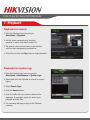
Playback from Search:
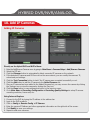
1. Enter the Playback menu by going to
Main Menu > Playback.
2. Set the search parameters by selecting
cameras to search and date to search on.
3. The search results will be shown on the timeline
with blue bars designating recorded files.
4. Select file and click the Play button to begin playback.
Playback from System Log:
1. Enter the System Logs menu by going to
Main Menu > Maintenance > System Logs.
2. Select date from the Calendar to search for system
logs in.
3. Select Search Type.
4. Click the Search button.
5. A list of results with your search criteria will be
displayed. If applicable, select the video log to
playback and click Play.
6. The recording will begin to play in the Playback
interface.