1
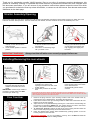
Installing/Removing and using the front wheel forks
Your Runabout stroller utilizes our unique
and revolutionary new TRI-MODE™ front
swivel system:
To remove the front fork:
1.
2.
2.
3.
To install the front fork, rotate the TRIMODE selection dial to the centre
(450) position.
Tilt the stroller frame upward on the
rear wheels.
Insert the fork shaft into the TRIMODE housing till it “clicks” into place.
1.
3.
Rotate the TRI-MODE selection
0
dial to the centre (45 ) position.
Tilt the stroller frame upward on
the rear wheels.
Press the centre release button.
The fork will then be released.
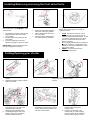
The unique TRI-MODE™ swivel system is as
flexible as it is functional over a variety of
terrains and uses.
1.
2.
IMPORTANT: Always test that the fork is
securely engaged in the housing.
3.
LOCK: This position is best for use on
extremely rough or soft terrain such as
sand etc which inhibit wheel swivel. To lock
your wheel, rotate the dial to the “LOCK”
position. Swivel the wheel around till it
locks into position.
O: The central position locks the wheel into
a tight 450 swivel arc. This provides more
stability for use with a toddlerseat or when
going down inclines.
SWIVEL: This position allows full,
unfettered swivel action.
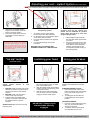
Folding/Opening your stroller
1.
2.
4.
5.
3.
Fold the hood back up against the
handle.
Release the locking clamps at either
side of the stroller.
Holding the frame at the rear,
press down with your foot on the
rear basket tube. This will
disengage the side hinge locks.
Continue pushing the rear of the
basket, moving the rear wheels
forward beneath the frame.
6.
Simultaneously lift the secondary
safety catch and swing the handle
forward.
You can lock the frame closed by
stretching the locking strap over the
frame, placing the metal catch over
the rivet on the chassis
1.
2.
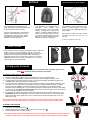
To open, unhook the frame
locking strap reversing the
previous step.
Holding on to the side of the
footrest, with your foot stopping
the rear wheels, lift the handle so
that the frame begins to unfold.