1
The Influence of Multi-Touch Interaction on Procedural
Training
Sarah Buchanan
University of Central Florida
Orlando, FL
[email protected]
Jared Bott
University of Central Florida
Orlando, FL
[email protected]
Joseph J. LaViola Jr.
University of Central Florida
Orlando, FL
[email protected]
ABSTRACT
This paper explores the use of multi-touch interaction in a
3D training environment as a way to enhance learning of
sensorimotor skills as well as procedural knowledge. We
present a between subjects experiment with 36 participants
distributed into 3 groups that use multi-touch interaction, interaction with the physical apparatus, and a control group using basic mouse-based interaction. A post-training test carried out 3 days later evaluated performance in conducting the
real world task from memory. Results show that the multitouch interaction and the real world groups had significantly
better performance scores than the mouse interaction group,
with no significant difference between multi-touch and real
world groups. Our results demonstrate that multi-touch interaction trained participants on the task as well as training on
the actual equipment, indicating multi-touch interaction is a
potential replacement for the physical apparatus when doing
procedural training.
ACM Classification Keywords
H.5.2. Information Interfaces and Presentation (HCI): Miscellaneous
Author Keywords
Multi-touch; surface; procedural training; transfer learning;
user study
INTRODUCTION
Multi-touch Tabletops and Surfaces have been used for a
multitude of applications such as visualizing information
[17] , inquiry-based learning [14], collaboration [6], neurorehabilitation [1], and strategic simulation training [2]. However, not much exploration has been done in leveraging multitouch interaction for procedural training such as an industrial
assembly tasks, mechanical repairs, or medical procedures.
Industrial assembly or repairs are usually taught through
video documentation, 2D mechanical drawings, or the explanation from an expert. Traditional medical education relies
Permission to make digital or hard copies of all or part of this work for personal or
classroom use is granted without fee provided that copies are not made or distributed
for profit or commercial advantage and that copies bear this notice and the full citation on the first page. Copyrights for components of this work owned by others than
ACM must be honored. Abstracting with credit is permitted. To copy otherwise, or republish, to post on servers or to redistribute to lists, requires prior specific permission
and/or a fee. Request permissions from [email protected].
ITS ’15, November 15 - 18, 2015, Funchal, Portugal
Copyright is held by the owner/author(s). Publication rights licensed to ACM.
ACM 978-1-4503-3899-8/15/11.̇.$15.00.
DOI: http://dx.doi.org/10.1145/2817721.2817740
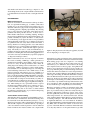
Figure 1: The motorized bicycle model in the virtual environment with the tools and parts on the table or in the tool bar for
easy access.
heavily on lectures for factual knowledge, observing professionals and treating patients under supervision. However, enactive learning and interfaces have been shown to be more
effective than passive learning methods [10]. Enactive interfaces have been shown to be especially effective when optimizing affordances, or possible actions available to someone
using the interface [16]. We aim to leverage the combined affordances of a multi-touch surface and a virtual environment
to provide an effective replacement for their physical counterparts as a way to reduce cost and save time.
Our goal is to evaluate the training benefits of a multi-touch
training system that provides realistic affordances, by way of
physical multi-touch gestures in a virtual environment. This
paper focuses on the use of a multi-touch surface for learning
a procedural task, specifically learning a repair and assembly task, and the transfer of knowledge to the real world task.
Mechanical repair tasks, as well as medical procedures, are
complex tasks which involve the knowledge of specific procedures, the location of parts, the interactions between parts,
and the use of tools. We demonstrate realistic physical gestures and interaction techniques that aid in learning by creating realistic constraints that would be applicable to a variety
of procedural tasks.
Specifically, we address the following research question:
How does multi-touch interaction affect the learning of a procedural assembly task? To address this question, this paper
presents a study evaluating the knowledge transfer acquired
with multi-touch interaction technology compared to standard training methods. We compared multi-touch interaction
to standard 2D mouse interaction and to actual physical training.
RELATED WORK
Multi-touch Interaction
There has been much work in interactive tabletops in education; for experiential learning [5], to enhance collaborative
learning [13] or encourage inquiry-based learning [14], [15].
The Flow of Electrons [5] provides an augmented workspace
for learning physical computing experientially. By allowing
users to place electronics components on the surface and experiment with wiring and the outcomes, it allows users to
make mistakes without fear of breaking anything. It bridges
the gap between digital information and actual hardware components. Similarly, in [13] the affordances of study materials on the tabletop versus paper allowed for more playfulness
and experimentation since the notes or drawings created were
not permanent and were easily edited. In G-nome Surfer, a
tabletop interface for learning genomics, users demonstrated
a higher degree of cooperative behavior and higher test scores
on tabletops compared to traditional GUI setups in genomics
study. The ability for users to easily and immediately experiment and practice without the fear of making permanent
mistakes is something that can benefit training applications as
well, since users may be intimidated by expensive equipment
or dangerous medical procedures.
Multi-touch interfaces have not been explored as much in
the context of training. OrMiS [2], a tabletop interface for
simulation-based training, where military officers use a mapbased tool to carry out strategic maneuvers and combat, enabling large-scale training exercises without the cost of field
deployment. OrMiS is designed to replace traditional PCbased simulation tools while improving ease of learning and
better facilitating collaborative work. OrMis focuses on 2D
map-based strategic tasks whereas we focus on training on a
physical apparatus in a 3D environment using realistic gestures. For medical training SimMed implements a 3D simulation in an augmented tabletop environment to teach medical
procedural skills for diagnosis and treatment [19]. They observed high levels of immersion and positive social aspects,
as well as observations that suggest a significant learning effect. Their training was very open-ended in order to explore
the diagnostic techniques trainees chose, whereas we are focused on training a specific step-by-step procedure. There
are no other studies, that we are aware of, which evaluate
the efficiency and effectiveness of procedural training using
multi-touch interactive surfaces.
VR and AR Procedural Learning
Although there hasn’t been much work with multi-touch systems in the areas of maintenance and medical training, there
has been much work with VR and AR systems[8, 9, 11, 12].
There have been many studies evaluating the effectiveness of
VR and AR compared to traditional methods, reporting in
some cases that these methods perform as well as traditional
hands-on methods. For instance, Ganier et al. compared tank
(a)
(b)
Figure 2: The physical motorized bicycle apparatus (2a) with
the accompanying tools and parts (2b).
maintenance procedure performance after conventional training with a real tank and those trained in a virtual environment.
Both training groups were also compared to a no-training
control group who carried out the procedure using only job
instructions [7]. No differences were found for the testing
task completion times for the test groups, but significant differences were found between both test groups and the control group. Indicating that procedural knowledge learned in a
virtual environment is transferred to real-world performance.
Another study evaluated different Virtual Reality interaction
technologies in learning an industrial maintenance task [18].
The four different interaction technologies were basic mouse,
2D mocap, 3D mocap, and a haptic device. They found negligible impact on the learning of assembly task when the focus
is on transfer of procedural knowledge rather than the transfer of sensorimotor skills. In addition, users that trained with
mouse and 2D mocap took significantly less time training.
Henderson and Feiner evaluate an augmented reality (AR)
user interface designed to assist users in the psychomotor
phase of procedural tasks [9]. Their user study showed participants completed the psychomotor aspects of the assembly task significantly faster and with greater accuracy than
when using assistance on a stationary LCD screen. Another
study examined VR and AR techniques compared with classic training techniques. The VR and AR methods showed
no significant differences over control methods. In addition,
they found AR training for industrial maintenance and assembly (IMA) tasks can reduce the number of unsolved errors
[7]. One of the main differences with these AR and VR studies is they they make use of 3D spatial interfaces [3] while
(a) Assemble Clutch
(b) Test and adjust clutch
(c) Install spark plug
(d) Configure wiring
Figure 3: The four different sub-tasks (3a - 3d) shown on the physical bicycle apparatus (top), and in the virtual environment
(bottom).
we focus on 2D multi-touch gestures. We aim to expand
upon these results in virtual procedural training by exploring whether multi-touch interaction, which leverages realistic
gestures, can perform as well as training on the real equipment.
TRAINING SYSTEMS AND TASK
The selected experimental task consisted of assembling and
testing part of a 2-stroke bicycle-mounted engine (shown in
Figure 2). The apparatus and task were selected based upon a
number of constraints: (1) the task should use tools, parts and
gestures that would be applicable to industrial, defense, or
medical tasks, (2) the apparatus should be able to fit into our
lab, (3) the task should be safe for all participants to perform,
(4) the task should be significantly complex and non-obvious
that a layman could not complete it without prior training.
These constraints led us to repairing a 2-stroke bicycle engine
where participants could assemble, test and adjust the clutch
and other parts.
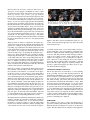
The overall task consisted of 22 steps grouped into 4
sub-tasks (shown in Figure 3): (1) clutch assembly, (2)
clutch functionality testing and adjustments, (3) spark plug
installation, and (4) wire configuration. Some examples of
the operations participants had to perform are: tightening
the clutch wheel nut to adjust the clutch plate, tightening
screws with a screwdriver, installing the spark plug with a
socket wrench, and plugging in wires. The task also required
verifying the correct clutch plate tightness, where the engine
needed to be disengaged with the clutch in and engaged with
the clutch out. If either of these conditions are not true the
clutch plate should be looser or tighter respectively. In total,
participants had to manipulate roughly 25 parts, and use
three different types of tools (shown in Figure 2b).
Motorized Bicycle
The physical apparatus was a motorized bicycle mounted on
a small stand to allow pedaling the bike freely in place for
testing purposes. The participants that trained on the physical bicycle had the advantage of experiencing the affordances
provided by each of the tools and parts involved in the task.
For instance, understanding the correct tightness of the clutch
plate is an important step in the process. This can be experienced by tightening the nut about 80% of the way and making
sure the clutch plate still has about 1/8” of movement. As described above, correct clutch plate tightness can be verified
by pedaling the bike with both the clutch in and the clutch
out. The user can verify the engine is disengaged visually
by looking at the gears and observing the relative easiness
of pedaling the bike. With the engine engaged, the user can
feel that the bike is more difficult to pedal and hear the engine making a chugging sound. The ability to examine the
parts and bike apparatus from any viewpoint or zoom level is
also an advantage the physical model provides. As described
above, the physical bicycle provides feedback in the form of
opposing forces and aural and visual cues.
Virtual Model and Multi-touch Interaction
The virtual environment contained a detailed, working model
of the bicycle, engine, components and tools involved (shown
in Figure 1). A tool bar was also provided so that if a user was
zoomed into a certain area of the bike they wouldn’t have to
zoom out to select a part from the table. Users could select
the tool or part needed from the tool bar and it would hover
next to the button. Each corresponding step in the task was
replicated in the virtual model and required interaction. We
ensured both the multi-touch and mouse interaction required
the same number of steps to complete the task.
Previous work on user-defined multi-touch gestures for 3D
objects influenced our multi-touch interaction model [4].
Based on this work, all objects, except for small screws, required two or more fingers to manipulate in order to make
the interaction more realistic. The gestures incorporated were
double tap, translate, rotate, pressure, grasp, grip and hold.
Double tap zoomed in and out of the 5 main viewpoints of the
bike. Translate was used to move parts and tools around. Rotate was used on the clutch plate to align it, and on the screwdrivers. Pressure was used to apply pressure when installing
the spring and to attach the socket wrench to the spark plug.
Pressure information was interpreted based off touch point
size provided by the display device. Grasp was used on the
clutch lever; multiple fingers had to push down on the lever
while the thumb stayed on the handle grip. Grip was used on
the socket wrench handle to grip it and rotate it around. Hold
was used in 2-handed gestures where gravity or other forces
would take over. For instance, if the user let go of the clutch
plate before securing the clutch wheel nut with the other hand
the plate would detach due to the force of the spring and fall
to the table.
Where possible we aimed to replicate the affordances provided by the real model in the virtual model and multi-touch
gestures. For example, the steps in the real task and the corresponding steps replicated in the virtual model follows and
are shown in Figure 4. In the real model installing the clutch
plate requires: (1) pressing and rotating the spring over the
center bolt until it stays, (2) attaching the clutch plate by rotating it so it aligns with the three pegs, and then (3) holding
and pressing the clutch plate over the spring while screwing
on the clutch wheel nut. The corresponding multi-touch interaction required was identical, where the gestures required
were: (1) translate and pressure rotate the spring, (2) translate, rotate and hold the clutch plate, (3) 2-handed interaction
where one hand holds the clutch plate while the other hand
translates and rotates the clutch wheel nut.
In the above example, even though the main gesture motions
were identical, some affordances were not replicated due to
the constraints of the interface. For instance, in the physical model you have to rotate and press on the spring until it
clicks onto the center bolt, but sometimes this is tricky and
can be hard understand how it feels when the spring attaches.
Whereas in the multi-touch model, the user only needs to
press and rotate 180 degrees and it will automatically connect. On the other hand, rotating and aligning the plate was
more difficult in the multi-touch model since the user is required to exactly match up the plate with the three pegs and
then press. In the physical model the same precision is not required. For step (3), the physical model’s spring pushed back
against the clutch plate reminding users to apply pressure to
keep it in place. In the multi-touch environment, users had
no such feedback and may forget that pressure is required to
prevent the plate from detaching until the nut is secure.
We emphasized the model fidelity and interaction details even
further to articulate any sensorimotor skills that wouldn’t be
found in the user manual alone. As for interaction details,
the number of rotations required to rotate the clutch wheel
nut, the screws with the screwdrivers, and the spark plug with
socket wrench were the same for the actual bicycle appara-
(a) Pressing and rotating the spring over
the center bolt until it
clicks
(b) Pressing and aligning the clutch plate
over the spring and
three pegs
(c) Tightening the
clutch wheel nut over
the clutch plate to the
appropriate tightness
Figure 4: The three steps in assembling the clutch (4a - 4c)
shown on the actual bicycle apparatus (top), and in the virtual
environment (bottom).
tus and the virtual model. As for model fidelity, in order to
get the clutch plate to the correct tightness, participants were
directed to tighten the clutch wheel nut approximately 80%
of the way and then perform the clutch testing procedure to
verify it was working correctly. In the virtual model, 80%
tightness also mapped to 1/8” of clutch plate movement so
users could press on the clutch plate and see how much it
depressed. We also indicated that it was harder to pedal the
bicycle with the engine engaged by requiring 2 fingers and
pressure to pedal when engaged and 1 finger versus no pressure threshold when disengaged.
Virtual Model and Mouse Interaction
The mouse interaction was intended as a control training
group, providing only basic click and drag interaction. We
implemented a simplified mouse condition over an optimized
mouse condition to demonstrate that it’s not only the number of steps the user completes, but the level of interaction
that affects learning. We ensured both the multi-touch and
mouse interaction required the same number of steps. With
the mouse the user would drag the part or tool to the desired
position and then when close enough it would snap to place.
To perform rotations the user would click again and the part
or tool would animate as it rotated into place. If a mistake was
made, the user could click to uninstall and then move the part
away. Since rotations only required one click to animate they
could be completed much quicker than in the multi-touch interface where a user would have to perform multiple rotation
gestures to install the part completely.
USER STUDY
We conducted a user study to explore the effectiveness of
gesture-based multi-touch training. The study examined three
different methods of training how to repair a 2-stroke bicycle
engine. The three methods were using the actual equipment,
using a virtual model with gesture based interaction, and using a virtual model with a mouse. All groups trained with the
same paper manual and returned three days later for a posttraining test. During the post-test participants were asked to
perform the task on the actual equipment as quickly as possible from memory and were graded on correct steps and timed.
Our hypotheses were:
H1 The participants trained using the gesture interface will
score as well on the post-test as the participants trained
with the actual equipment.
H2 The participants trained using the gesture interface will
score better on the post-test than the participants trained
using the mouse interface.
H3 Due to discrepancies between manipulating the actual
components and the virtual model, the participants trained
using the gesture interface will perform the post-test slower
than the participants trained with the actual equipment.
H4 Since the gesture participants may have maintained some
muscle memory of the task, participants trained using the
gesture interface will perform the post-test faster than the
participants trained using the mouse interface.
H5 The training time for the mouse participants will be faster
than the bicycle and multi-touch groups since they don’t
have to go through the longer physical gestures.
Participants and Apparatus
There were 36 participants (13 female, 23 male) aged 18 to
37 ( x̄ = 23.6,σ = 4.58) randomly distributed into the three
groups. The participants were recruited from a University setting from a wide variety of majors including Speech Pathology, Biology, Marketing, Business, Information Technology,
and more. Participants rated their mechanical experience on
a Likert scale from 1 to 7, ( x̄ = 3.06, σ = 2.04), and none of
the participants had worked on a similar engine previously.
Training was either conducted on the computer via a 55-inch
Microsoft Perceptive Pixel multi-touch screen, or on the actual bicycle and engine. Post-tests were performed on the
physical bicycle.
Study Design
The experiment follows a between-subjects design with 36
participants randomly divided into 3 experimental groups
(each participant was assigned to a group in alternating order). Two groups trained in a virtual environment, one using
multi-touch gestures or the other using mouse input. The third
group was trained on the actual bicycle.
Participants were timed during training and testing and scored
on the test. Participants were also asked to rate the following
statements on a Likert scale from 1 (strongly disagree) to 7
(strongly agree), both post-training and post-testing:
Post-Training questions:
Q1 I feel prepared to complete the repair task after completing
the training
Q2 I thoroughly understand the concepts that I learned during
the training
Figure 5: Average user Likert ratings on the preparedness and
understanding questions asked after training and after testing.
Post-Testing questions:
Q1 I was sufficiently prepared to complete the repair task upon
arrival today
Q2 I thoroughly understood the concepts that I learned during
the training
Procedure
Testing occurred exactly 3 days after training to avoid shortterm memory effects. For training, all groups followed the
same protocol. First, participants were presented with the
training apparatus (whether it be the computer or bicycle)
and the paper manual. Second, they were familiarized either
with the tools or the interaction model. Second, participants
were asked to follow along with the paper manual as they
conducted the task. They were told they could complete the
training as many times as they wanted, so long as they could
learn the task and describe the process back to the proctor
correctly.
Three days later, participants returned to perform the task on
the real bicycle engine. They were asked to perform the task
correctly from memory without the user manual. They were
scored on the steps shown in Table 1. One point was given for
each step completed correctly and performed in the correct
order, for a total of 22 points. If they skipped a step then later
remembered and backtracked to complete it, they received a
1/2 point.
RESULTS
Training
Training Time
The participants could go through the training as many times
as they wanted to learn the task and describe the process back
to the proctor, the average total training time by group is
Figure 7: Average testing scores by training group.
Figure 6: Average training times by training group. Participants could go through the training multiple times, however
the participants in the physical bike group all opted to only
perform the training once.
groups training times were not significantly different (t22 =
0.623, p = 0.540). This result demonstrates that multi-touch
participants had to perform detailed, realistic interactions and
may have also spent extra time adjusting to new gestures.
Questionnaire
shown in Figure 6. We found that all of the participants in the
Bike group only went through the process once, whereas all
of the participants in the Multi-touch and Mouse groups went
through the training twice. The bike trainees would have to
wait on the proctor to dismantle the training model which may
have discouraged them from going through it twice. Once
the virtual users had learned the interface, they were able
to quickly go through the training a second time. The virtual medium affords quickly repeating the training scenario
as compared to the physical training apparatus.
1
2
3
4
5
6
7
8
9
10
Steps
Clutch lever
Clutch button
Spring
Clutch plate
Clutch wheel nut
Begin testing
Testing - pedal bicycle
Testing - clutch down,
engine disengaged
Testing - clutch up,
engine engaged
Testing - diagnose
correct adjustment
11
12
13
14
15
16
17
18
19
20
21
22
Steps
Testing - clutch
down to adjust
Flathead screw
Flathead screwdriver
Gasket
Gear case cover
5 screws
Phillips Screwdriver
Spark plug
Socket wrench
CDI cap
Connected wiring
Wiring correct
Table 1: Steps in the procedure that participants were scored
on during the post-test.
An independent samples t-test did indicate the multi-touch
group spent significantly more time than the bike group (t22 =
−2.42, p<0.025) and the mouse group (t22 = −2.96, p<0.007)
on the first training session. However, the bike and mouse
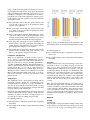
We performed a Kruskal-Wallis test (results are shown in Figure 5) which showed that there were no significant differences
between the different groups for their responses to each of the
4 Likert questions (presented in the Participants and Apparatus section). These results indicate that participants from all
groups felt that they were prepared after the training, and still
felt that they were prepared after performing the actual posttest.
Testing
Testing Scores
When the participants returned for testing, they were asked to
perform the task on the real bicycle and engine from memory. They were scored on number of steps completed correctly and timed. The average scores by group are shown in
Figure 7. The scores were normally distributed for the Bike,
Gesture, and Mouse groups as assessed by Shapiro-Wilk’s
test (p >.05). A one-way between-subjects analysis of variance (ANOVA) was run to compare the effect of the training method on the testing score. The main effect that training method had on the dependent variable, testing score, was
found to be significant (F(2,33) = 5.36, p <0.010). Independent samples t-tests indicated the gesture group scored significantly better than the mouse group (t22 = 2.50, p<0.025)
and the bike group also scored significantly better than the
mouse group (t22 = 2.58, p<0.020). However, the bike
and gesture groups scores were not significantly different
(t22 = 0.240, p = 0.812). This result demonstrates that participants that trained with Multi-touch performed as well as
those trained on the actual apparatus and better than those
trained on the Mouse.
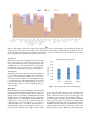
Figure 8: The number of users that completed each testing step correctly for each training group; the bike group in blue, the
gesture group in red, and the mouse group in yellow. This graph also demonstrates on which steps users made the most errors
by showing where the deficits are. For example, for the flat screw step only 4 of the mouse users performed the step correctly,
whereas 9 gesture users and 10 bike users performed it correctly.
Testing Errors
Figure 8 shows each step of the testing process and how many
users got the step correct, separated by testing groups. The
errors occurred when a user forgot or skipped a step. If a user
remembered to do a step, there was never a case where the
user didn’t know how to operate the tool or part in that step,
but instead users completely forgot the process altogether.
Testing Scores
The testing times were also measured (shown in 9) and found
to be normally distributed for the Bike, Gesture, and Mouse
groups, as assessed by Shapiro-Wilk’s test (p >.05). A oneway between-subjects analysis of variance (ANOVA) was run
to compare the effect of the training method on the testing
score. The main effect that training method had on the dependent variable, testing score, was not significant (F(2,33) =
1.64, p = 0.209).
Figure 9: The average testing times by training group.
Discussion
The performance results (shown in Figure 7) demonstrate that
participants trained with multi-touch interface scored as well
as those trained on the actual apparatus and better than those
trained on the mouse interface, confirming Hypotheses H1
and H2. However, the post-test times were not statistically
significant and do not confirm Hypotheses H3 and H4. This
could be due to a few reasons. It’s possible incorrect steps
could still lead to the same testing time as a test that was
completed without errors. In addition, the inexperience of
some participants using tools, causing them to be more cautious than others, may have lead to higher variance within
groups. We believe that a few factors led to the multi-touch
group scoring as well as the bike group. First, the affordances of the multi-touch model were closely mapped to the
affordances of the real model, allowing multi-touch users to
perform nearly the same physical gestures in the simulation
as they would in real life. Secondly, strict constraints used
in the multi-touch training (discussed in the Virtual Model
and Multi-touch Interaction section) demanded more concentration allowing better memory of the steps as well as the
physical motions required. Thirdly, users felt that repeating
the training would be quick and easy since they could simply restart the environment to start again with the dismantled
model versus undoing each step performed on the physical
model.
Hypothesis H5 was partially confirmed, the Mouse group
trained faster than the Multi-touch group but not the Bike
group. We believe the gesture group had longer training times
since there was a gesture learning curve and mistakes were
made more often during training due some strict constraints.
It could be argued that the multi-touch group performed better than the mouse group since they spent more time training. However, the majority of this time was spent learning,
adjusting and executing gestures, not in additional training
repetitions. Since the number of steps were identical and the
virtual model was the same between the mouse and multitouch groups, we believe the better multi-touch performance
was due to the similarities of the multi-touch model affordances and physical gestures with the actual bicycle model
and physical movements. Although the multi-touch training
was not as efficient, time-wise, as the mouse training it was
more effective.
The multi-touch interface provides the ability for users to manipulate tools and parts and perform realistic physical gestures as they would in a real-world procedure. Although our
gesture set was somewhat small (7 gestures), it is still possible
to achieve realistic actions; the gestures become more realistic when tied to physics forces and constraints. It is important
for the physical motions and constraints within the procedural
steps to be replicated where possible. For instance, consider
a task in real life where one hand is required to hold a part
in place while the other attaches it. The corresponding multitouch interaction should also require a 2-handed gesture instead of objects snapping into to place or ignoring gravity. In
some instances the stricter constraints in the multi-touch interaction may have led to more mistakes by users in training,
but may have forced them to learn the steps better since they
had to use more precise gestures.
For instance, a more complex 2-handed gesture was used for
steps 4 and 5 (from Table 1) which required holding the clutch
plate while tightening with the clutch wheel nut. As shown
in Figure 8, more multi-touch users remembered the wheel
nut step versus mouse users, potentially due to this increased
amount of interaction. On the other hand it is interesting that
approximately the same number of mouse and multi-touch
users missed the clutch plate step. Some virtual users said
this was because the shininess and/or shape of the plate in
real life was not reflected in the virtual model and was hard
to recognize.
In order to maintain the feeling of holding and manipulating
the parts directly, or direct manipulation, we chose the viewpoints in the virtual environment carefully. A perceptual disconnect can occur when an object moves away from a user’s
touch and the object is no longer underneath the user’s hand.
This is particularly apparent when translating objects along
multiple axes.
On a multi-touch interface, the user gets force feedback from
the surface, however they don’t get full 3DOF positional
force nor any rotational force feedback. We chose to simulate applying force with pressure and use of more fingers.
Pressure and the number of fingers required are good indicators of force but don’t translate exactly to force in real life.
For instance, attaching the spring to the bolt in the physical
model requires pressing hard while rotating. In the multitouch model users need to rotate 180 degrees and meet a pressure threshold. During the post-test, the multi-touch users expressed confusion as to why the spring wasn’t attaching as
easily as in the training.
For force feedback, the user could also be required to apply an
opposing force in the form of more fingers and more pressure.
For instance, the physical model’s spring pushed back against
the clutch plate reminding users to apply pressure to keep it
in place. In the multi-touch environment, users had no such
feedback and may forget that pressure is required to prevent
the plate from detaching until the nut is secure. By requiring
the user, in this instance, to apply pressure as an opposing
force, they may learn the existence of force feedback in that
action. Pressure could be improved upon by training users
on how pressure is measured on a touch screen, calibrating
pressure on a per user basis, or by providing visual and aural
cues. Since forces cannot be felt by the user, visual and aural
cues must compensate for that lost sense of force.
The realistic multi-touch gestures were tightly linked with
physics in the virtual environment, procedural constraints,
simulating forces, and carefully chosen viewpoints in order to
create a convincing simulation of the physical actions within
the maintenance procedure. Keeping in mind these considerations, multi-touch can provide a realistic and effective training environment for procedural tasks.
FUTURE WORK
In the future we would like to simulate more of the affordances provided by the physical model. For instance, we
could add more pressure requirements to try to increase realism in the multi-touch condition. We could also provide
aural cues to replace haptics or add tactile buzzing on the interaction surface to support better tactile feedback. In future
experiments, examining how increasing the training time with
each method affects learning would be interesting. Since we
had the participants use a paper training manual we would
like to incorporate training instructions and guidance into the
virtual environment. We would also like to do a similar study
comparing multi-touch gestures to Virtual Reality, full body
gestures, and training on physical systems using Augmented
Reality potentially on a more complex procedural task.
CONCLUSION
In this paper we presented the use of realistic multi-touch interaction in a 3D training environment as a way to enhance
learning of sensorimotor skills a well as procedural knowledge. We conducted a between subjects experiment with 36
participants distributed into 3 groups in order to evaluate the
effectiveness of multi-touch training. One group used multitouch interaction in the 3D training environment, the sec-
ond used basic mouse-based interaction, and the third trained
on the real equipment. A post-training test carried out 3
days later evaluated performance in conducting the real task
from memory. Results show that the multi-touch interaction
and the real task groups had significantly better performance
scores than the mouse interaction group, with no significant
difference between multi-touch and real task groups. We
demonstrated that multi-touch interaction trains participants
on the task as well as training on the actual equipment, suggesting multi-touch interaction is a worthwhile training tool
for procedural knowledge that requires sensorimotor skills.
ACKNOWLEDGMENTS
This work is supported in part by NSF CAREER award IIS0845921 and NSF award CCF-1012056. Also, we would like
to thank the members of ISUE lab for their support and the
anonymous reviewers for their useful comments and feedback.
REFERENCES
1. Mirjam Augstein, Thomas Neumayr, and Irene
Schacherl-Hofer. 2014. The Usability of a Tabletop
Application for Neuro-Rehabilitation from Therapists’
Point of View. In Proceedings of the Ninth ACM
International Conference on Interactive Tabletops and
Surfaces (ITS ’14). ACM, New York, NY, USA,
239–248.
2. Christophe Bortolaso, Matthew Oskamp, T.C. Nicholas
Graham, and Doug Brown. 2013. OrMiS: A Tabletop
Interface for Simulation-based Training. In Proceedings
of the 2013 ACM International Conference on
Interactive Tabletops and Surfaces (ITS ’13). ACM,
New York, NY, USA, 145–154.
3. Doug A Bowman, Ernst Kruijff, Joseph J LaViola Jr,
and Ivan Poupyrev. 2004. 3D user interfaces: theory
and practice. Addison-Wesley.
4. Sarah Buchanan, Bourke Floyd, Will Holderness, and
Joseph J LaViola. 2013. Towards user-defined
multi-touch gestures for 3D objects. In Proceedings of
the 2013 ACM international conference on Interactive
tabletops and surfaces. ACM, 231–240.
5. Bettina Conradi, Verena Lerch, Martin Hommer, Robert
Kowalski, Ioanna Vletsou, and Heinrich Hussmann.
2011. Flow of electrons: an augmented workspace for
learning physical computing experientially. In
Proceedings of the ACM International Conference on
Interactive Tabletops and Surfaces. ACM, 182–191.
6. Veronika Domova, Elina Vartiainen, and Marcus
Englund. 2014. Designing a Remote Video
Collaboration System for Industrial Settings. In
Proceedings of the Ninth ACM International Conference
on Interactive Tabletops and Surfaces (ITS ’14). ACM,
New York, NY, USA, 229–238.
7. Franck Ganier, Charlotte Hoareau, and Jacques Tisseau.
2014. Evaluation of procedural learning transfer from a
virtual environment to a real situation: a case study on
tank maintenance training. Ergonomics 57, 6 (2014),
828–843.
8. Florian Gosselin, Sylvain Bouchigny, Christine Mgard,
Farid Taha, Pascal Delcampe, and Cdric dHauthuille.
2013. Haptic systems for training sensorimotor skills: A
use case in surgery. Robotics and Autonomous Systems
61, 4 (2013), 380 – 389. Models and Technologies for
Multi-modal Skill Training.
9. S.J. Henderson and Steven K. Feiner. 2011. Augmented
reality in the psychomotor phase of a procedural task. In
Mixed and Augmented Reality (ISMAR), 2011 10th
IEEE International Symposium on. 191–200.
10. DL Holton. 2010. Constructivism+ embodied
cognition= enactivism: theoretical and practical
implications for conceptual change. Recuperado a partir
de http://bit. ly/gVAOOu (2010).
11. Sung Gu Kang, Byung Ju Ryu, Kyung Sook Yang,
Young Hwii Ko, Seok Cho, Seok Ho Kang, Vipul R.
Patel, and Jun Cheon. 2015. An Effective Repetitive
Training Schedule to Achieve Skill Proficiency Using a
Novel Robotic Virtual Reality Simulator. Journal of
Surgical Education 72, 3 (2015), 369 – 376.
12. M. Kolesnikov, M. Zefran, A.D. Steinberg, and P.G.
Bashook. 2009. PerioSim: Haptic virtual reality
simulator for sensorimotor skill acquisition in dentistry.
In Robotics and Automation, 2009. ICRA ’09. IEEE
International Conference on. 689–694.
13. Anne Marie Piper and James D Hollan. 2009. Tabletop
displays for small group study: affordances of paper and
digital materials. In Proceedings of the SIGCHI
Conference on Human Factors in Computing Systems.
ACM, 1227–1236.
14. Bertrand Schneider. 2012. Designing Tabletop Activities
for Inquiry-based Learning: Lessons from
Phylogenetics, Neuroscience and Logistics. In
Proceedings of the 2012 ACM International Conference
on Interactive Tabletops and Surfaces (ITS ’12). ACM,
New York, NY, USA, 289–294.
15. Orit Shaer, Megan Strait, Consuelo Valdes, Taili Feng,
Michael Lintz, and Heidi Wang. 2011. Enhancing
genomic learning through tabletop interaction. In
Proceedings of the SIGCHI Conference on Human
Factors in Computing Systems. ACM, 2817–2826.
16. ThomasA. Stoffregen, BenotG. Bardy, and Bruno
Mantel. 2006. Affordances in the design of enactive
systems. Virtual Reality 10, 1 (2006), 4–10.
17. Nicole Sultanum, Sowmya Somanath, Ehud Sharlin, and
Mario Costa Sousa. 2011. ”Point It, Split It, Peel It,
View It”: Techniques for Interactive Reservoir
Visualization on Tabletops. In Proceedings of the ACM
International Conference on Interactive Tabletops and
Surfaces (ITS ’11). ACM, New York, NY, USA,
192–201.
18. Yaiza Vélaz, Jorge Rodrı́guez Arce, Teresa Gutiérrez,
Alberto Lozano-Rodero, and Angel Suescun. 2014. The
Influence of Interaction Technology on the Learning of
Assembly Tasks Using Virtual Reality. Journal of
Computing and Information Science in Engineering 14,
4 (2014), 041007.
19. Ulrich von Zadow, Sandra Buron, Tina Harms, Florian
Behringer, Kai Sostmann, and Raimund Dachselt. 2013.
Simmed: combining simulation and interactive tabletops
for medical education. In Proceedings of the SIGCHI
Conference on Human Factors in Computing Systems.
ACM, 1469–1478.