1
American DJ
User Instructions
®
Connect the DMX out (the socket) on the first unit (master) to the second unit (slave) using a balanced XLR lead. Repeat
this connection for all units.
Note: If the Strobetec™ is being connected in a master/slave with StarTec™ H150 or StarTec™ Arcbeams, make the
H150 orArcbeam the first (master) in the daisychain.
2-channel stand alone operation
To add further interest to the light show, the user can set each unit to either follow the first unit (master) or to do
something in contrast to the first unit. For example, set up four units, two on the he left and two on the right. Set the two
on the outside to do one thing, and the two in the middle to do a variation or something different from the first.
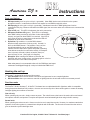
Set dip switch 10 ‘off’ to make all units work the same, or set dip switch 10 ‘on’ to make units work differently
ie: head 1 (master) dip switch 10 ‘on’, head 2 slave) dip switch 10 ‘off’, head 3 (slave) dip switch 10 ‘on’,
head 4 (slave) dip switch 10 ‘off’ etc. (See diagram below ). If only two units are linked together, a better light show
will be obtained by setting the dip switch 10 is ‘on’ on the second unit.
Note: Dip switch 10 has no effect on the first unit (master) in the DMX line (the one generating the light show).
Stand Alone Operation diagram - Female XLR
Output for Stand Alone.
Male XLR
Input.
For optimum light show effect in Stand Alone Mode, follow this diagram for Dip Switch settings :
Head 1 - Master
ON
Head 3 - Slave
ON
1 2 3 4 5 6 7 8 9 10
1 2 3 4 5 6 7 8 9 10
ETC.
Head 4 - Slave
Head 2 - Slave
ON
ON
1 2 3 4 5 6 7 8 9 10
1 2 3 4 5 6 7 8 9 10
Special options in stand alone mode
In stand alone mode, you can also set three options which affect the way the unit produces its light show, by setting the
other 9 dip switches (1-9):
• All dip switches ‘on’: Display mode - unit ignores audio and runs slowly through various patterns.
•
Dip switch1 ‘off’, 2-9 ‘on’: Slow mode - unit responds to audio but always moves slowly and gently.
No strobing is used.
•
1 ‘on’, 2 ‘off’, 3-9 ‘on’: Strobe disable mode - unit behaves in normal stand-alone mode but will not use strobbing.
These options only need to be set on the first unit in the DMX line if several units are connected together.
Set switches before unit is turned on.
When connecting a DMX source while these special options are set, the unit will have a start channel of 1.
© American DJ® Los Angeles, CA 90058 - Startec™ Arcbeam 150 User Manual page 3