1
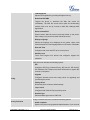
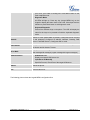
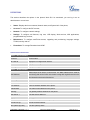
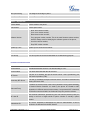
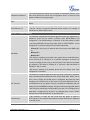
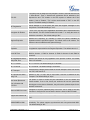
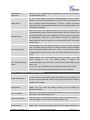
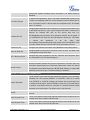
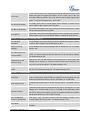
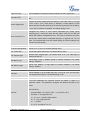
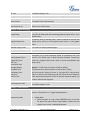
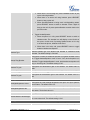
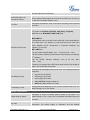
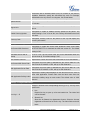
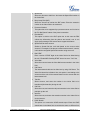
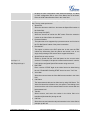
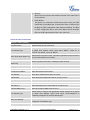
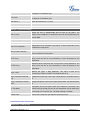
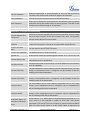
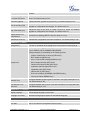
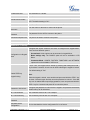
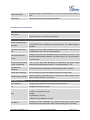
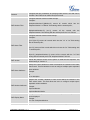
priorities. Allow DHCP Option 120 Enables DHCP Option 120 from local server to override the SIP Server on the to override SIP Server phone. The default setting is "No". Automatic Upgrade Enables automatic upgrade and provisioning. The default setting is "No". Hour of the Day (0-23) Day of the Week (0-6) Disable SIP NOTIFY Authentication Authenticate Conf File Defines the hour of the day to check the HTTP/TFTP server for firmware upgrades or configuration files changes. The default value is 1. Defines the day of the week to check HTTP/TFTP server for firmware upgrades or configuration files changes. The default value is 1. Device will not challenge NOTIFY with 401 when set o Yes. Authenticates configuration file before acceptance. The default setting is "No". Maintenance -> Syslog Syslog Server The URL or IP address of the syslog server for the phone to send syslog to. Selects the level of logging for syslog. The default setting is "None". There are 4 levels: DEBUG, INFO, WARNING AND ERROR. Syslog messages are sent based on the following events: Syslog Level Send SIP Log product model/version on boot up (INFO level); NAT related info (INFO level); sent or received SIP message (DEBUG level); SIP message summary (INFO level); inbound and outbound calls (INFO level); registration status change (INFO level); negotiated codec (INFO level); ethernet link up (INFO level); SLIC chip exception (WARNING and ERROR levels); memory exception (ERROR level). Configures whether the SIP log will be included in the syslog messages or not. The default setting is "No". Auto Recover From Configures whether auto recover or not when the phone is running abnormal. Abnormal The default setting is "Yes". Maintenance -> Language Display Language Selects display language on the phone. Language File Postfix Specifies the language file postfix for downloaded language. Maintenance -> TR-069 Enable TR-069 Enables TR-069. The default setting is "No". ACS URL URL for TR-069 Auto Configuration Servers (ACS). FIRMWARE VERSION 1.0.7.4 GXP2124 USER MANUAL Page 60 of 77