1
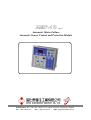
AMF-10
Automatic Mains Failure Module
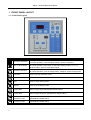
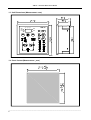
1. FRONT PANEL LAYOUT
1.1 Front Panel Layout
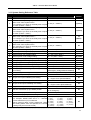
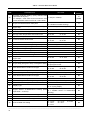
ICON
DESCRIPTION
Decrease / Selection
SET / Failure Reset
Increase / Selection
ATTENTION
IN Program mode, press to decrease value
In normal operation, press to display voltage, current or frequency
IN OFF mode, press and hold button for 4 seconds to enter Program mode
IN normal operation, press button to select and display phase L12, L23, L31
IN failure status, press to erase alarm signal
IN Program mode, press to increase value
IN normal operation, press to display battery voltage or engine running hours
Automatic
Press to go into Automatic mode
Stop
Press to enter Shutdown / System Off mode
Test
Press to enter Testing mode
Manual
Press to go on Manual mode
Engine Start
Manual engine start (ON MANUAL MODE ONLY)
Engine Stop
Manual engine shutdown (ON MANUAL MODE ONLY)
Normal Power
Connect to Load
Manual Transfer the Switch from Emergency to Normal Position
(ON MANUAL MODE ONLY)
Emergency Power
Connect to Load
Manual Transfer the Switch from Normal to Emergency Position
(ON MANUAL MODE ONLY)
______________________________________________________________________________________
4