Download Manual
Transcript
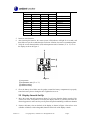
communication is intermittent, try turning off these other devices for troubleshooting purposes. You may need to relocate the transmitters or receivers to avoid intermittent communication. 3. Line of Sight Rating. This device is rated at 300 feet line of sight (no interference, barriers or walls) but typically you will get 100 feet maximum under most real-world installations, which include passing through barriers or walls. 4. Metal Barriers. Radio frequency will not pass through metal barriers such as aluminum siding. If you have metal siding, align the remote and console through a window to get a clear line of sight. The following is a table of reception loss vs. the transmission medium. Each “wall” or obstruction decreases the transmission range by the factor shown below. Medium Glass (untreated) Plastics Wood Brick Concrete Metal RF Signal Strength Reduction 5-15% 10-15% 10-40% 10-40% 40-80% 90-100% 5.6 Adjustment or Calibration Note: The calibrated value can only be adjusted on the console. The remote sensor(s) always displays the un-calibrated or measured value. Note: The measured humidity range is between 10 and 99%. Humidity cannot be accurately measured outside of this range. Thus, the humidity cannot be calibrated below 10% or above 99%. The purpose of calibration is to fine tune or correct for any sensor error associated with the devices margin of error. The measurement can be adjusted from the console to calibrate to a known source. Calibration is only useful if you have a known calibrated source you can compare it against, and is optional. This section discusses practices, procedures and sources for sensor calibration to reduce manufacturing and degradation errors. Do not compare your readings obtained from sources such as the internet, radio, television or newspapers. They are in a different location and typically update once per hour. The purpose of your weather station is to measure conditions of your surroundings, which vary significantly from location to location. 5.6.1 Humidity Calibration Prior to entering the calibration mode, press the CHANNEL/+ button to select the humidity sensor you wish to adjust. To enter the humidity calibration mode, press and hold the ADJUST and MIN/MAX buttons at the same time for 5 seconds and the humidity value will begin flashing. Press the CHANNEL/+ button to increase the humidity and the MIN/MAX/- button to decrease the humidity reading in 1% increments. To rapidly increase (or decrease) the humidity reading, press and hold the CHANNEL/+ or MIN/MAX/- button. To return the humidity to the actual or uncalibrated measurement, press the ADJUST button. Version 1.0 ©Copyright 2013, Ambient LLC. All Rights Reserved. Page 9