1
ENGLISH
Other functions
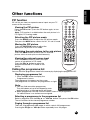
PIP function
PIP will let you view two separate source inputs on your TV
screen at the same time.
Viewing the PIP picture
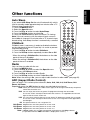
Press the PIP button. (Press the PIP button again, to turn
PIP off.)
Note : PIP function is available when the main picture is in
PC Digital, PC Aanlog, mode.
Selecting the PIP picture mode
Press the MODE button to adjust the PIP picture mode.
Each press the MODE button, selects the 16:1, 9:1 and 3:1 mode.
Moving the PIP picture
Press the POSITION button to adjust the
position of sub picture in PIP mode.
Switching the main picture to the sub picture
Press the SWAP button to switch off PIP and sub
picture switch to main picture simultaneously.
Viewing the external source input
Press the INPUT button to select the input
source of sub picture in PIP mode.
Press the PRxy button to select the
programme desired in TV mode of sub
picture.
Calling the programme list
You can check the programmes stored in the memory by displaying the programme LIST.
Displaying programme list
1. Press the LIST button to display the
Programme list menu.
The programme list appears on the screen.
One programme list contains ten programmes as right.
Programme List
Note :
P00 ----P01 ----P02 ----P03 ----P04 -----
a. You may find some blue programmes.
8W[Q\QWV"ƇƉȖȘ
They have been set up to be skipped by auto
programming or in the programme edit mode.
b. Some programmes with the channel number shown in the programme
list indicate there is no station name assigned.
P05 ----P06 ----P07 ----P08 ----P09 ----+WVNQZU"73
-`Q\"<>)>
Selecting a programme in the programme list
Select a progranne with the PRxy or VOLÏq button.Then press the OK button.
The set switches to the chosen programme number.
Paging through a programme list
There are 10 programme table pages in which contain 100 programmes.
Pressing the PRxy or VOLÏq button repeatedly turns the pages.
21
22