1
Compact High-density Analog Input
Modules
User Manual
(Catalog Numbers
1769-IF16C, 1769-IF16V)
Important User Information
Solid state equipment has operational characteristics differing from those of electromechanical equipment. Safety
Guidelines for the Application, Installation and Maintenance of Solid State Controls (publication SGI-1.1 available
from your local Rockwell Automation sales office or online at http://literature.rockwellautomation.com) describes
some important differences between solid state equipment and hard-wired electromechanical devices. Because of
this difference, and also because of the wide variety of uses for solid state equipment, all persons responsible for
applying this equipment must satisfy themselves that each intended application of this equipment is acceptable.
In no event will Rockwell Automation, Inc. be responsible or liable for indirect or consequential damages resulting
from the use or application of this equipment.
The examples and diagrams in this manual are included solely for illustrative purposes. Because of the many
variables and requirements associated with any particular installation, Rockwell Automation, Inc. cannot assume
responsibility or liability for actual use based on the examples and diagrams.
No patent liability is assumed by Rockwell Automation, Inc. with respect to use of information, circuits, equipment,
or software described in this manual.
Reproduction of the contents of this manual, in whole or in part, without written permission of Rockwell
Automation, Inc., is prohibited.
Throughout this manual, when necessary, we use notes to make you aware of safety considerations.
WARNING
IMPORTANT
ATTENTION
Identifies information about practices or circumstances that can cause an explosion in a
hazardous environment, which may lead to personal injury or death, property damage, or
economic loss.
Identifies information that is critical for successful application and understanding of the product.
Identifies information about practices or circumstances that can lead to personal injury or death,
property damage, or economic loss. Attentions help you identify a hazard, avoid a hazard, and
recognize the consequence
SHOCK HAZARD
Labels may be on or inside the equipment, for example, a drive or motor, to alert people that
dangerous voltage may be present.
BURN HAZARD
Labels may be on or inside the equipment, for example, a drive or motor, to alert people that
surfaces may reach dangerous temperatures.
Rockwell Automation, Allen-Bradley, TechConnect, CompactLogix, Compact I/O, ControlLogix, MicroLogix 1500, RSLogix 5000, RSLogix 500, RSNetWorx, RSNetWorx for DeviceNet, and RSLinx are
trademarks of Rockwell Automation, Inc.
Trademarks not belonging to Rockwell Automation are property of their respective companies.
Table of Contents
Preface
Introduction . . . . . . . . . . . . . . . .
About this Publication . . . . . . . . .
Who Should Use This Publication
Additional Resources. . . . . . . . . .
Conventions . . . . . . . . . . . . . . . .
.
.
.
.
.
.
.
.
.
.
.
.
.
.
.
.
.
.
.
.
.
.
.
.
.
.
.
.
.
.
.
.
.
.
.
.
.
.
.
.
.
.
.
.
.
.
.
.
.
.
.
.
.
.
.
.
.
.
.
.
.
.
.
.
.
.
.
.
.
.
.
.
.
.
.
.
.
.
.
.
.
.
.
.
.
.
.
.
.
.
.
.
.
.
.
.
.
.
.
.
.
.
.
.
.
7
7
7
8
8
.
.
.
.
.
.
.
.
.
.
.
.
.
.
.
.
.
.
.
.
.
.
.
.
.
.
.
.
.
.
.
.
.
.
.
.
.
.
.
.
.
.
.
.
.
.
.
.
.
.
.
.
.
.
.
.
.
.
.
.
.
.
.
.
.
.
.
.
.
.
.
.
.
.
.
.
.
.
.
.
. 9
. 9
11
11
Introduction . . . . . . . . . . . . . . . . . . . . . . . . . . . . . .
General Considerations . . . . . . . . . . . . . . . . . . . . . .
Hazardous Location Considerations . . . . . . . . . .
Prevent Electrostatic Discharge . . . . . . . . . . . . . .
Remove Power . . . . . . . . . . . . . . . . . . . . . . . . .
Reduce Noise . . . . . . . . . . . . . . . . . . . . . . . . . .
Protecting the Circuit Board from Contamination.
Assemble the Compact I/O System . . . . . . . . . . . . .
Mounting the Module . . . . . . . . . . . . . . . . . . . . . . .
Minimum Spacing . . . . . . . . . . . . . . . . . . . . . . .
Mount to a Panel . . . . . . . . . . . . . . . . . . . . . . . .
Mount to a DIN Rail. . . . . . . . . . . . . . . . . . . . . .
Replace a Single Module Within a System . . . . . . . .
Grounding the Module . . . . . . . . . . . . . . . . . . . . . .
System Wiring Guidelines . . . . . . . . . . . . . . . . . . . .
Effect of Transducer/Sensor and Cable Length
Impedance on Voltage Input Accuracy . . . . . . . .
Label the Terminals. . . . . . . . . . . . . . . . . . . . . . . . .
Remove the Finger-safe Terminal Block . . . . . . . . . .
Wire the Finger-safe Terminal Block . . . . . . . . . . . .
Wire Size and Terminal Screw Torque . . . . . . . .
Wire the Modules . . . . . . . . . . . . . . . . . . . . . . . . . .
.
.
.
.
.
.
.
.
.
.
.
.
.
.
.
.
.
.
.
.
.
.
.
.
.
.
.
.
.
.
.
.
.
.
.
.
.
.
.
.
.
.
.
.
.
.
.
.
.
.
.
.
.
.
.
.
.
.
.
.
.
.
.
.
.
.
.
.
.
.
.
.
.
.
.
.
.
.
.
.
.
.
.
.
.
.
.
.
.
.
13
13
14
14
15
15
15
16
17
17
18
19
19
20
21
.
.
.
.
.
.
.
.
.
.
.
.
.
.
.
.
.
.
.
.
.
.
.
.
.
.
.
.
.
.
.
.
.
.
.
.
21
23
23
23
24
25
Chapter 1
Overview
Introduction . . . . . .
Module Description.
System Overview . .
Module Operation. .
.
.
.
.
.
.
.
.
.
.
.
.
.
.
.
.
.
.
.
.
.
.
.
.
.
.
.
.
.
.
.
.
.
.
.
.
.
.
.
.
Chapter 2
Installation and Wiring
Chapter 3
Module Data, Status, and Channel Introduction . . . . . . . . . . . . . . . . . . . . . . . . . . . . . . . . . . . . 29
Module Addressing . . . . . . . . . . . . . . . . . . . . . . . . . . . . . . . 29
Configuration
Input Image. . . . . . . . . . . . . . . . . . . . . . . . . . . . . . . . . . 30
Output Image . . . . . . . . . . . . . . . . . . . . . . . . . . . . . . . . 30
Configuration File . . . . . . . . . . . . . . . . . . . . . . . . . . . . . 30
3Publication 1769-UM018A-EN-P - October 2008
3
Table of Contents
Input Data File . . . . . . . . . . . . . . . . .
Time Stamp Value (Word 16) . . . .
General Status Bits (S0…S15) . . . .
Low Alarm Flag Bits (L0 …L15) . .
High Alarm Flag Bits (H0…H15). .
Over-Range Flag Bits (O0…O15) .
Under-Range Flag Bits (U0…U15).
Output Data File . . . . . . . . . . . . . . . .
Configuration Data File . . . . . . . . . . .
Channel Configuration . . . . . . . . .
Enable/Disable Channel (EC) . . . .
Input Filter Selection . . . . . . . . . .
Input Type/Range Selection . . . . .
Input Data Selection Formats . . . .
Real Time Sampling . . . . . . . . . . .
Time Stamping. . . . . . . . . . . . . . .
Process Alarms . . . . . . . . . . . . . .
Alarm Deadband . . . . . . . . . . . . .
.
.
.
.
.
.
.
.
.
.
.
.
.
.
.
.
.
.
.
.
.
.
.
.
.
.
.
.
.
.
.
.
.
.
.
.
.
.
.
.
.
.
.
.
.
.
.
.
.
.
.
.
.
.
.
.
.
.
.
.
.
.
.
.
.
.
.
.
.
.
.
.
.
.
.
.
.
.
.
.
.
.
.
.
.
.
.
.
.
.
.
.
.
.
.
.
.
.
.
.
.
.
.
.
.
.
.
.
.
.
.
.
.
.
.
.
.
.
.
.
.
.
.
.
.
.
.
.
.
.
.
.
.
.
.
.
.
.
.
.
.
.
.
.
.
.
.
.
.
.
.
.
.
.
.
.
.
.
.
.
.
.
.
.
.
.
.
.
.
.
.
.
.
.
.
.
.
.
.
.
.
.
.
.
.
.
.
.
.
.
.
.
.
.
.
.
.
.
.
.
.
.
.
.
.
.
.
.
.
.
.
.
.
.
.
.
.
.
.
.
.
.
.
.
.
.
.
.
.
.
.
.
.
.
.
.
.
.
.
.
.
.
.
.
.
.
.
.
.
.
.
.
.
.
.
.
.
.
.
.
.
.
.
.
.
.
.
.
.
.
.
.
.
.
.
.
.
.
.
.
.
.
.
.
.
.
.
.
.
.
.
.
.
.
.
.
.
.
.
.
.
.
.
.
.
.
31
32
32
32
32
33
33
33
34
38
39
39
41
41
43
43
44
45
Introduction . . . . . . . . . . . . . . . . . . . . . . . .
Safety Considerations . . . . . . . . . . . . . . . . .
Status Indicators. . . . . . . . . . . . . . . . . . .
Activate Devices When Troubleshooting .
Stand Clear of the Machine. . . . . . . . . . .
Program Alteration. . . . . . . . . . . . . . . . .
Safety Circuits . . . . . . . . . . . . . . . . . . . .
Power Cycle Diagnostics . . . . . . . . . . . . . . .
Channel Diagnostics . . . . . . . . . . . . . . . . . .
Out-of-range Detection . . . . . . . . . . . . .
Process Alarm Detection . . . . . . . . . . . .
Open-circuit Detection . . . . . . . . . . . . . .
Non-critical vs. Critical Module Errors . . . . .
Module Error Definition Table . . . . . . . . . . .
Module Error Field. . . . . . . . . . . . . . . . .
Extended Error Information Field . . . . . .
Error Codes . . . . . . . . . . . . . . . . . . . . . . . .
Invalid Input Range Selected . . . . . . . . .
Invalid Input Filter Selected . . . . . . . . . .
Invalid Input Format Selected. . . . . . . . .
Alarm Not Enabled. . . . . . . . . . . . . . . . .
Invalid Alarm Data. . . . . . . . . . . . . . . . .
Invalid Real Time Sample Value . . . . . . .
Module Inhibit Function . . . . . . . . . . . . . . .
Contacting Rockwell Automation . . . . . . . . .
.
.
.
.
.
.
.
.
.
.
.
.
.
.
.
.
.
.
.
.
.
.
.
.
.
.
.
.
.
.
.
.
.
.
.
.
.
.
.
.
.
.
.
.
.
.
.
.
.
.
.
.
.
.
.
.
.
.
.
.
.
.
.
.
.
.
.
.
.
.
.
.
.
.
.
.
.
.
.
.
.
.
.
.
.
.
.
.
.
.
.
.
.
.
.
.
.
.
.
.
.
.
.
.
.
.
.
.
.
.
.
.
.
.
.
.
.
.
.
.
.
.
.
.
.
.
.
.
.
.
.
.
.
.
.
.
.
.
.
.
.
.
.
.
.
.
.
.
.
.
.
.
.
.
.
.
.
.
.
.
.
.
.
.
.
.
.
.
.
.
.
.
.
.
.
.
.
.
.
.
.
.
.
.
.
.
.
.
.
.
.
.
.
.
.
.
.
.
.
.
.
.
.
.
.
.
.
.
.
.
.
.
.
.
.
.
.
.
.
.
.
.
.
.
.
.
.
.
.
.
.
.
.
.
.
.
.
.
.
.
.
.
.
.
.
.
.
.
.
.
..
..
..
..
..
..
..
..
..
..
..
..
..
..
..
..
..
..
..
..
..
..
..
..
..
47
47
47
47
48
48
48
48
49
49
49
49
50
50
50
51
51
55
55
56
56
56
57
57
57
Chapter 4
Module Diagnostics and
Troubleshooting
4
Publication 1769-UM018A-EN-P - October 2008
Table of Contents
Appendix A
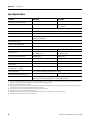
Specifications
Introduction . . . . . . . .
General Specifications .
Input Specifications. . .
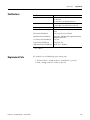
Certifications. . . . . . . .
Replacement Parts. . . .
.
.
.
.
.
.
.
.
.
.
.
.
.
.
.
.
.
.
.
.
.
.
.
.
.
.
.
.
.
.
.
.
.
.
.
.
.
.
.
.
.
.
.
.
.
.
.
.
.
.
.
.
.
.
.
.
.
.
.
.
.
.
.
.
.
.
.
.
.
.
.
.
.
.
.
.
.
.
.
.
.
.
.
.
.
.
.
.
.
.
.
.
.
.
.
.
.
.
.
.
.
.
.
.
.
.
.
.
.
.
.
.
.
.
.
.
.
.
.
.
.
.
.
.
.
.
.
.
.
.
..
..
..
..
..
59
59
60
61
61
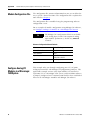
Introduction . . . . . . . . . . . . . . . . . . . . . . . . . . . . . . . . . . . .
Module Input Image . . . . . . . . . . . . . . . . . . . . . . . . . . . . . .
Module Configuration File . . . . . . . . . . . . . . . . . . . . . . . . . .
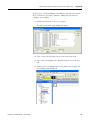
Configure Analog I/O Modules in a MicroLogix 1500 System
63
63
64
64
Appendix B
Module Addressing and
Configuration with MicroLogix
1500 Controller
Appendix C
Configuration Using the RSLogix
5000 Generic Profile for
CompactLogix Controllers
Introduction . . . . . . . . . . . . . . . . . . . . . . . . . . . . . . . . . . . . 69
Add the Module to Your Project . . . . . . . . . . . . . . . . . . . . . 69
Configure Each I/O Module. . . . . . . . . . . . . . . . . . . . . . . . . 72
Appendix D
Two’s Complement Binary
Numbers
Positive Decimal Values . . . . . . . . . . . . . . . . . . . . . . . . . . . 73
Negative Decimal Values . . . . . . . . . . . . . . . . . . . . . . . . . . . 74
Glossary
Index
Publication 1769-UM018A-EN-P - October 2008
5
Table of Contents
6
Publication 1769-UM018A-EN-P - October 2008
Preface
Introduction
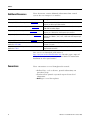
Read this preface to familiarize yourself with the rest of the manual.
Topic
About this Publication
Page
About this Publication
7
Who Should Use This Publication
7
Additional Resources
8
Conventions
8
This manual is a guide for using Compact High Density Analog Input
Modules, catalog numbers 1769-IF16C and 1769-IF16V. It describes the
procedures you use to configure, operate, and troubleshoot your
module.
For detailed information on related topics like programming your
CompactLogix or MicroLogix controller, or DeviceNet adapter, or for
information on CompactLogix components, see the list of Additional
Resources on page 8.
Who Should Use This
Publication
7Publication 1769-UM018A-EN-P - October 2008
Use this manual if you are responsible for designing, installing,
programming, or troubleshooting control systems that use Compact
I/O modules.
7
Preface
Additional Resources
These documents contain additional information about control
systems that use Compact I/O modules.
Resource
Description
MicroLogix 1500 User Manual, publication 1764-UM001
A user manual containing information on how to install, use and
program your MicroLogix 1500 controller.
DeviceNet Adapter User Manual, publication 1769-UM001
A user manual containing information on how to install, and use your
1769-ADN DeviceNet adapter.
CompactLogix User Manual, publication 1769-UM007
A user manual containing information on how to install, use and
program your 1769-L20 and -L30 CompactLogix controllers.
CompactLogix System User Manual, publication 1769-UM011
A user manual containing information on how to install, use and
program your 1769-L31, -L32C, -L32E, -L35CR and -L35E CompactLogix
controllers.
Compact I/O Selection Guide, publication 1769-SG002
An overview of 1769 Compact I/O modules.
MicroLogix Programmable Controllers Selection Guide,
publication 1761-SG001
An overview of the MicroLogix 1500 System, including the 1769
Compact I/O system.
Industrial Automation Wiring and Grounding Guidelines,
publication 1770-4.1
In-depth information on grounding and wiring Allen-Bradley
programmable controllers.
You can view or download publications at
http://literature.rockwellautomation.com. To order paper copies of
technical documentation, contact your local Rockwell Automation
distributor or sales representative.
Conventions
These conventions are used throughout this manual:
• Bulleted lists, such as this one, provide information, not
procedural steps.
• Numbered lists provide sequential steps or hierarchical
information.
• Bold type is used for emphasis.
8
Publication 1769-UM018A-EN-P - October 2008
Chapter
1
Overview
Introduction
Topic
Module Description
Page
Module Description
9
System Overview
11
Module Operation
11
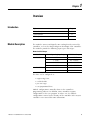
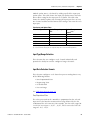
The modules convert and digitally store analog data for retrieval by
controllers, such as the CompactLogix or MicroLogix 1500 controllers.
The modules provide the following input types and ranges.
Normal and Full Ranges
Cat. No.
Normal Operating Input Range
Full Module Range
1769-IF16V
±10V DC
± 10.5V DC
1…5V DC
0.5…5.25V DC
0…5V DC
-0.5…+5.25V DC
0…10V DC
-0.5…+10.5V DC
0…20 mA
0…21 mA
4…20 mA
3.2…21 mA
1769-IF16C
The data can be configured as:
•
•
•
•
engineering Units.
scaled-for-PID.
percent range.
raw/proportional data.
Module configuration is normally done via the controller’s
programming software. In addition, some controllers support
configuration via the user program. In either case, the module
configuration is stored in the memory of the controller. Refer to your
controller’s user manual for more information.
9Publication 1769-UM018A-EN-P - October 2008
9
Chapter 1
Overview
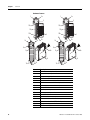
Hardware Features
1
2a
1
2a
3
OK
3
OK
Analog
Analog
DANGER
DANGER
Do Not Remove RTB Under Power
Unless Area is Non-Hazardous
10a
Do Not Remove RTB Under Power
Unless Area is Non-Hazardous
10a
IN0+
IN1+
IN2+
IN0+
IN1+
IN2+
IN3+
IN3+
IN4+
IN4+
IN5+
IN5+
IN6+
IN6+
IN7+
10
IN7+
10
COM
COM
IN8+
COM
COM
IN8+
IN9+
IN9+
IN10+
IN10+
IN11+
IN11+
IN12+
IN12+
IN13+
10b
IN14+
IN15+
Ensure Adjacent
Bus Lever is Unlatched/Latched
Before/After
Removing/Inserting Module
IN13+
10b
4
IN14+
IN15+
Ensure Adjacent
Bus Lever is Unlatched/Latched
Before/After
Removing/Inserting Module
1769-IF16C
8a
8a
7a
7a
2b
7a
7a
OK
2b
OK
Analog
Analog
5a
5a
5b
9
5b
9
6
7b
10
4
1769-IF16V
8b
7b
6
7b
Item
Description
1
Bus lever (with locking function)
2a
Upper-panel mounting tab
2b
Lower-panel mounting tab
8b
3
Module status LEDs
4
Module door with terminal identification label
5a
Movable bus connector with female pins
5b
Stationary bus connector with male pins
7b
6
Nameplate label
7a
Upper tongue-and-groove slots
7b
Lower tongue-and-groove slots
8a
Upper DIN-rail latch
8b
Lower DIN-rail latch
9
Write-on label for user identification tags
10
Removable terminal block (RTB) with finger-safe cover
10a
RTB upper retaining screw
10b
RTB lower retaining screw
Publication 1769-UM018A-EN-P - October 2008
Overview
System Overview
Chapter 1
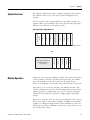
The modules communicate to the controller through the bus interface.
The modules also receive 5 and 24V DC power through the bus
interface.
You can install as many analog modules as your power supply can
support. However, the modules may not be located more than eight
modules away from the system power supply.
1
2
3
End Cap
1
Compact I/O
2
Compact I/O
3
Compact I/O
Compact I/O
System Power Supply
Compact I/O
4
Compact I/O
CompactLogix Controller
or I/O Communication
Adapter
Determine Power Supply Distance
Power Supply Distance
Module Operation
Compact I/O
Compact I/O
Compact I/O
End Cap
MicroLogix 1500 Controller
with Integrated System
Power Supply
Compact I/O
or
1
2
3
4
Power Supply Distance
When you cycle power, the modules perform a check of their internal
circuits, memory, and basic functions. During this time, the module
status OK indicator remains off. If no faults are found during
power-cycle diagnostics, the module status OK indicator is turned on.
After power-cycle checks are complete, the modules wait for valid
channel configuration data. If an invalid configuration is detected, the
modules generate a configuration error. Once a channel is properly
configured and enabled, it begins the analog-to-digital conversion
process.
Each time a channel is read, the converted analog data value is tested
for an over-range or under-range condition. In addition, the modules
support user-configured high and low alarm condition tests for each
channel. If any of these conditions are detected, unique bits are set in
the channel status words.
Publication 1769-UM018A-EN-P - October 2008
11
Chapter 1
Overview
The channel status words are described in the Input Data File on
page 31.
The controller reads the two’s complement binary converted analog
data from the modules. This typically occurs at the end of the program
scan or when commanded by the control program. If the controller
and the modules determine that the bus data transfer was made
without error, the data is used in your control program.
No field calibration is required.
12
Publication 1769-UM018A-EN-P - October 2008
Chapter
2
Installation and Wiring
Introduction
Topic
General Considerations
Page
General Considerations
13
Assemble the Compact I/O System
16
Mounting the Module
17
Replace a Single Module Within a System
19
Grounding the Module
20
System Wiring Guidelines
21
Label the Terminals
23
Remove the Finger-safe Terminal Block
23
Wire the Finger-safe Terminal Block
23
Wire the Modules
25
The Compact I/O system is suitable for use in an industrial
environment when installed in accordance with these instructions.
Specifically, this equipment is intended for use in clean, dry
environments (Pollution degree 2(1)) and to circuits not exceeding
Over Voltage Category II(2) (IEC 60664-1).(3)
(1) Pollution Degree 2 is an environment where, normally, only non-conductive pollution occurs except that
occasionally a temporary conductivity caused by condensation shall be expected.
(2) Over Voltage Category II is the load level section of the electrical distribution system. At this level transient
voltages are controlled and do not exceed the impulse voltage capability of the product’s insulation.
(3) Pollution Degree 2 and Over Voltage Category II are International Electrotechnical Commission (IEC)
designations.
13Publication 1769-UM018A-EN-P - October 2008
13
Chapter 2
Installation and Wiring
Hazardous Location Considerations
This equipment is suitable for use in Class I, Division 2, Groups A, B,
C, D or non-hazardous locations only. The following attention
statement applies to use in hazardous locations.
ATTENTION
EXPLOSION HAZARD
• Substitution of components may impair suitability for Class I,
Division 2.
• Do not replace components or disconnect equipment unless
power has been switched off or the area is known to be
non-hazardous.
• Do not connect or disconnect components unless power has
been switched off or the area is known to be non-hazardous.
• This product must be installed in an enclosure.
• All wiring must comply with N.E.C. article 501-4(b).
Prevent Electrostatic Discharge
ATTENTION
Electrostatic discharge can damage integrated circuits or
semiconductors if you touch analog I/O module bus connector pins
or the terminal block on the input module. Follow these guidelines
when you handle the module:
•
•
•
•
•
•
14
Touch a grounded object to discharge static potential.
Wear an approved wrist-strap grounding device.
Do not touch the bus connector or connector pins.
Do not touch circuit components inside the module.
Use a static-safe work station, if available.
When it is not in use, keep the module in its static-shield box.
Publication 1769-UM018A-EN-P - October 2008
Installation and Wiring
Chapter 2
Remove Power
ATTENTION
Remove power before removing or inserting this module. When
you remove or insert a module with power applied, an electrical
arc may occur. An electrical arc can cause personal injury or
property damage by:
• sending an erroneous signal to your system’s field devices,
causing unintended machine motion.
• causing an explosion in a hazardous environment.
Electrical arcing causes excessive wear to contacts on both the
module and its mating connector and may lead to premature
failure.
Reduce Noise
Most applications require installation in an industrial enclosure to
reduce the effects of electrical interference. Analog inputs are highly
susceptible to electrical noise. Electrical noise coupled to the analog
inputs will reduce the performance (accuracy) of the module.
Group your modules to minimize adverse effects from radiated
electrical noise and heat. Consider the following conditions when
selecting a location for the analog module. Position the module:
• away from sources of electrical noise such as hard-contact
switches, relays, and ac motor drives.
• away from modules which generate significant radiated heat,
such as the 1769-IA16 module. Refer to the module’s heat
dissipation specification.
In addition, route shielded, twisted-pair analog input wiring away
from any high-voltage I/O wiring.
Protecting the Circuit Board from Contamination
The printed circuit boards of the analog modules must be protected
from dirt, oil, moisture, and other airborne contaminants. To protect
these boards, the system must be installed in an enclosure suitable for
the environment. The interior of the enclosure should be kept clean
and the enclosure door should be kept closed whenever possible.
Publication 1769-UM018A-EN-P - October 2008
15
Chapter 2
Installation and Wiring
Assemble the Compact I/O
System
The module can be attached to the controller or an adjacent I/O
module before or after mounting.
For mounting instructions, see Panel Mounting Using the Dimensional
Template on page 18, or Mount to a DIN Rail on page 19. To work
with a system that is already mounted, see Replace a Single Module
Within a System on page 19.
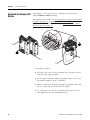
3
4
2
1
6
1
5
1. Disconnect power.
2. Check that the bus lever of the module to be installed is in the
unlocked (fully right) position.
3. Use the upper and lower tongue-and-groove slots (1) to secure
the modules together (or to a controller).
4. Move the module back along the tongue-and-groove slots until
the bus connectors (2) line up with each other.
5. Use your fingers or a small screwdriver to push the bus lever
back slightly to clear the positioning tab (3).
16
Publication 1769-UM018A-EN-P - October 2008
Installation and Wiring
Chapter 2
6. To allow communication between the controller and module,
move the bus lever fully to the left (4) until it clicks.
Make sure it is locked firmly in place.
ATTENTION
When attaching I/O modules, it is very important that
the bus connectors are securely locked together to be
sure of proper electrical connection.
7. Attach an end cap terminator (5) to the last module in the
system by using the tongue-and-groove slots as before.
8. Lock the end cap bus terminator (6).
IMPORTANT
A 1769-ECR or 1769-ECL right or left end cap must be used to
terminate the end of the bus.
Mounting the Module
ATTENTION
During panel or DIN rail mounting of all devices, be sure that all
debris (that is, metal chips or wire strands) is kept from falling
into the module. Debris that falls into the module could cause
damage when you cycle power.
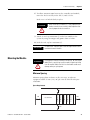
Minimum Spacing
Maintain spacing from enclosure walls, wireways, or adjacent
equipment. Allow 50 mm (2 in.) of space on all sides for adequate
ventilation.
Space Requirements
End Cap
Compact I/O
Compact I/O
Compact I/O
Host Controller
Compact I/O
Side
Compact I/O
Top
Side
Bottom
Publication 1769-UM018A-EN-P - October 2008
17
Chapter 2
Installation and Wiring
Mount to a Panel
Mount the module to a panel using two screws per module. Use M4
or #8 panhead screws. Mounting screws are required on every
module.
Panel Mounting Using the Dimensional Template
Locate holes every 17.5 mm (0.689 in.) to allow for a mix of
single-wide and one-and-a-half-wide modules (for example, the
1769-OA16 module).
Overall hole spacing tolerance:
±0.4 mm (0.016 in.).
Host Controller
Spacing for single-wide modules 35 mm (1.378 in.).
l Mounting
Spacing for one-and-a-half-wide
modules 52.5 mm (2.067 in.).
Refer to host controller documentation for this dimension.
Panel Mounting Using the Modules as a Template
This procedure lets you to use the assembled modules as a template
for drilling holes in the panel. If you have sophisticated
panel-mounting equipment, you can use the dimensional template
provided. Due to module mounting hole tolerance, it is important to
follow these procedures.
1. On a clean work surface, assemble no more than three modules.
2. Using the assembled modules as a template, carefully mark the
center of all module-mounting holes on the panel.
3. Return the assembled modules to the clean work surface,
including any previously mounted modules.
4. Drill and tap the mounting holes for the recommended M4 or #8
screw.
5. Place the modules back on the panel, and check for proper hole
alignment.
18
Publication 1769-UM018A-EN-P - October 2008
Installation and Wiring
Chapter 2
6. Attach the modules to the panel using the mounting screws.
TIP
If mounting more modules, mount only the last one of this group
and put the others aside. This reduces remounting time during
drilling and tapping of the next group.
7. Repeat steps 1…6 for any remaining modules.
Mount to a DIN Rail
The module can be mounted using the following DIN rails:
35 x 7.5 mm (EN 50 022 - 35 x 7.5) or 35 x 15 mm (EN 50 022 - 35 x
15).
Before mounting the module on a DIN rail, close the DIN rail latches.
Press the DIN rail mounting area of the module against the DIN rail.
The latches will momentarily open and lock into place.
Replace a Single Module
Within a System
The module can be replaced while the system is mounted to a panel
(or DIN rail). Follow these steps in order.
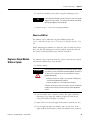
1. Remove power.
ATTENTION
Remove power before removing or inserting this module. When
you remove or insert a module with power applied, an electrical
arc may occur. An electrical arc can cause personal injury or
property damage by:
•sending an erroneous signal to your system’s field devices,
causing unintended machine motion.
•causing an explosion in a hazardous environment.
Electrical arcing causes excessive wear to contacts on both the
module and its mating connector and may lead to premature
failure.
2. On the module to be removed, remove the upper and lower
mounting screws from the module or open the DIN latches
using a flat-blade or Phillips screwdriver.
3. Move the bus lever to the right to disconnect (unlock) the bus.
4. On the right-side adjacent module, move its bus lever to the
right (unlock) to disconnect it from the module to be removed.
Publication 1769-UM018A-EN-P - October 2008
19
Chapter 2
Installation and Wiring
5. Gently slide the disconnected module forward.
If you feel excessive resistance, check that the module has been
disconnected from the bus, and that both mounting screws have
been removed or DIN latches opened.
TIP
It may be necessary to rock the module slightly
from front to back to remove it, or, in a
panel-mounted system, to loosen the screws of
adjacent modules.
6. Before installing the replacement module, be sure that the bus
lever on the module to be installed and on the right-side
adjacent module are in the unlocked (fully right) position.
7. Slide the replacement module into the open slot.
8. Connect the modules together by locking (fully left) the bus
levers on the replacement module and the right-side adjacent
module.
9. Replace the mounting screws or snap the module onto the DIN
rail.
Grounding the Module
20
This product is intended to be mounted to a well-grounded mounting
surface such as a metal panel. Additional grounding connections from
the module’s mounting tabs or DIN rail (if used) are not required
unless the mounting surface cannot be grounded. Refer to Industrial
Automation Wiring and Grounding Guidelines, Allen-Bradley
publication 1770-4.1, for additional information.
Publication 1769-UM018A-EN-P - October 2008
Installation and Wiring
System Wiring Guidelines
Chapter 2
Consider the following when wiring your system:
• All module commons (COM) are connected in the analog
module.
• The analog common (COM) is not connected to earth ground
inside the module.
• Channels are not isolated from each other.
• To ensure optimum accuracy, limit overall cable impedance by
keeping your cable as short as possible. Locate the I/O system
as close to your sensors or actuators as your application will
permit.
• Use Belden 8761, or equivalent, shielded wire.
• Under normal conditions, the drain wire and shield junction
must be connected to earth ground via a panel or DIN rail
mounting screw at the analog I/O module end.(1) Keep shield
connection to ground as short as possible.
• If multiple power supplies are used with analog inputs, the
power supply commons must be connected.
• The modules do not provide loop power for analog inputs. Use
a Class 2 power supply that matches the input transmitter
specifications.
• Voltages on IN+ terminals of the modules must be within
±10V DC of module common (COM).
Effect of Transducer/Sensor and Cable Length Impedance on
Voltage Input Accuracy
For voltage inputs, the length of the cable used between the
transducer/sensor and the module can affect the accuracy of the data
provided by the module.
(1) In environments where high-frequency noise may be present, it may be necessary to directly ground cable
shields to earth at the module end and via a 0.1µF capacitor at the sensor end.
Publication 1769-UM018A-EN-P - October 2008
21
Chapter 2
Installation and Wiring
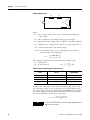
Voltage Input Accuracy
Rs
Rc
+
Vs
V in
Ri
-
Rc
Where:
Rc = DC resistance of the cable (each conductor) depending on
cable length
Rs = Source impedance of analog transducer/sensor input
Ri = Impedance of the voltage input (1 MΩ for 1769-IF16V module)
Vs = Voltage source (voltage at the transducer/sensor input device)
Vin = Measured potential at the module input
%Ai = Percent added inaccuracy in a voltage-based system due
to source and cable impedance.
[ Ri × Vs]
Vin = -------------------------------------------------------[ Rs + ( 2 × Rc ) + Ri ]
For example, for Belden 8761 two conductor, shielded cable:
Rc = 16 Ω/1000 ft
Vin
% Ai = ⎛ 1 – ---------⎞ × 100
Rs = 0 (ideal source)
⎝
Vs ⎠
Table 2.1 Effect of Cable Length on Input Accuracy
Length of Cable,
m (ft)
DC Resistance of the Cable,
Rc (Ω)
Accuracy Impact at the
Input Module
50 (164)
2.625
0.000525%
100 (328)
5.25
0.00105%
200 (656)
10.50
0.0021%
300 (984)
15.75
0.00315%
As input source impedance (Rs) and/or resistance (DC) of the cable
(Rc) get larger, system accuracy decreases. If you determine that the
inaccuracy error is significant, implementing the following equation in
the control program can compensate for the added inaccuracy error
due to the impedance of the source and cable.
[ Rs + ( 2 × Rc ) + Ri ]
Vs = Vin × -------------------------------------------------------Ri
TIP
22
For the 1769-IF16C module, source and cable impedance do not
impact system accuracy.
Publication 1769-UM018A-EN-P - October 2008
Installation and Wiring
Chapter 2
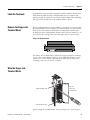
Label the Terminals
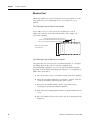
A removable, write-on label is provided with the module. Remove the
label from the door, mark the identification of each terminal with
permanent ink, and slide the label back into the door. Your markings
(ID tag) will be visible when the module door is closed.
Remove the Finger-safe
Terminal Block
When wiring field devices to the module, it is not necessary to remove
the terminal block. If you remove the terminal block, use the write-on
label on the side of the terminal block to identify the module slot
location and type. RTB position (for one-and-a-half size modules) can
be indicated by circling either the R for right side or L for left side.
Finger-safe Terminal Block
R SLOT # ____ L
MODULE TYPE _____ RoHS
To remove the terminal block, loosen the upper and lower retaining
screws. The terminal block will back away from the module as you
remove the screws. When replacing the terminal block, torque the
retaining screws to 0.46 N•m (4.1 in•lb).
Wire the Finger-safe
Terminal Block
Upper Retaining Screw
Wire the
Finger-safe
Terminal Block
Lower Retaining Screw
When wiring the terminal block, keep the finger-safe cover in place.
Publication 1769-UM018A-EN-P - October 2008
23
Chapter 2
Installation and Wiring
1. Loosen the terminal screws to be wired.
2. Begin wiring at the bottom of the terminal block and move up.
3. Route the wire under the terminal pressure plate.
You can use the bare wire or a spade lug. The terminals accept a
6.35 mm (0.25 in.) spade lug.
TIP
The terminal screws are non-captive. Therefore, it is possible to
use a ring lug (maximum 1/4 in. o.d. with a 0.139 in. minimum
i.d. (M3.5)) with the module.
4. Tighten the terminal screw making sure the pressure plate
secures the wire.
Recommended torque when tightening terminal screws is
0.68 N•m (6 in•lb).
TIP
If you need to remove the finger-safe cover, insert a screwdriver
into one of the square, wiring holes and gently pry the cover off.
If you wire the terminal block with the finger-safe cover
removed, you will not be able to put it back on the terminal
block because the wires will be in the way.
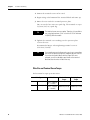
Wire Size and Terminal Screw Torque
Each terminal accepts up to two wires.
Wire Type
Solid
Wire Size
Terminal Screw
Torque
Cu-90 °C (194 °F) 0.325…2.080 mm2 0.68 N•m (6 in•lb)
(22…14 AWG)
Retaining Screw
Torque
0.46 N•m (4.1 in•lb)
Stranded Cu-90 °C (194 °F) 0.325…1.310 mm2 0.68 N•m (6 in•lb) 0.46 N•m (4.1 in•lb)
(22…16 AWG)
24
Publication 1769-UM018A-EN-P - October 2008
Installation and Wiring
Chapter 2
Wire the Modules
ATTENTION
To prevent shock hazard, care should be taken when wiring the
module to analog signal sources. Before wiring any analog
module, disconnect power from the system power supply and
from any other source to the analog module.
After the analog module is properly installed, follow the wiring
procedure below. To ensure proper operation and high immunity to
electrical noise, always use Belden 8761 (shielded, twisted-pair) or
equivalent wire.
ATTENTION
When wiring an analog input, take care to avoid connecting a
voltage source to a channel configured for current input.
Improper module operation or damage to the voltage source
can occur.
Never connect a voltage or current source to an analog output
channel.
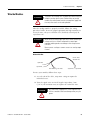
Belden 8761 Wire
Cable
Cut foil shield
and drain wire.
Signal Wire
Signal Wire
Drain Wire
Foil Shield
Signal Wire
Signal Wire
To wire your module, follow these steps.
1. At each end of the cable, strip some casing to expose the
individual wires.
2. Trim the signal wires to 2-inch lengths. Strip about 5 mm
(3/16 in.) of insulation away to expose the end of the wire.
ATTENTION
Publication 1769-UM018A-EN-P - October 2008
Be careful when stripping wires. Wire fragments that
fall into a module could cause damage when you cycle
power.
25
Chapter 2
Installation and Wiring
3. At one end of the cable, twist the drain wire and foil shield
together.
Under normal conditions, this drain wire and shield junction
must be connected to earth ground, via a panel or DIN rail
mounting screw at the analog I/O module end. Keep the length
of the drain wire as short as possible.
In environments where high frequency noise may be present, it
may be necessary to also ground the cable shields to earth via a
0.1 µF capacitor at the sensor end.
4. At the other end of the cable, cut the drain wire and foil shield
back to the cable, unless the sensor end of the cable requires
the shields to be connected to earth ground via the capacitor
described in step 3.
5. Connect the signal wires to the terminal block.
6. Connect the other end of the cable to the analog input or output
device.
7. Repeat steps 1…5 for each channel on the module.
Terminal Layout
IN0+
IN1+
IN2+
IN3+
IN4+
IN5+
IN6+
IN7+
COM
COM
IN8+
IN9+
IN10+
IN11+
IN12+
IN13+
IN14+
IN15+
26
Publication 1769-UM018A-EN-P - October 2008
Installation and Wiring
Chapter 2
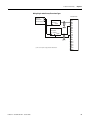
Wiring Single-ended Sensor/Transmitter Types
Terminal Block
Sensor/
+
Transmitter
Power Supply(1)
Current or Voltage
Transmitter
+
Signal
Current or Voltage
Transmitter
+ Ground Signal
IN0+
IN1+
IN2+
IN3+
IN4+
IN5+
IN6+
IN7+
Com
Com
IN8+
IN9+
IN10+
IN11+
IN12+
IN13+
(1) The sensor power supply must be rated Class 2.
Publication 1769-UM018A-EN-P - October 2008
IN14+
IN15+
27
Chapter 2
28
Installation and Wiring
Publication 1769-UM018A-EN-P - October 2008
Chapter
3
Module Data, Status, and Channel
Configuration
Introduction
Topic
Module Addressing
Page
Module Addressing
29
Input Data File
31
Output Data File
33
Configuration Data File
34
This memory map shows the output, input, and configuration tables
for the modules.
Memory Map
Word 0
Slot e
Input Image
File
Input
Image
22 Words
Slot e
Output Image
File
…
…
Channel 0 Data Word
Channel 15 Data Word
Word 15
Time Stamp Value Word
Word 16
General Status Bits
Word 17
High-/Low-alarm and Over-/Under-range Status Bits Channels 0…3
Word 18
High-/Low-alarm and Over-/Under-range Status Bits Channels 4…7
Word 19
High-/Low-alarm and Over-/Under-range Status Bits Channels 8…11
Word 20
High-/Low-alarm and Over-/Under-range Status Bits Channels 12…15
Word 21
Cancel High/Low Process Alarm Latch Bits Channels 0…7
Word 0
Cancel High/Low Process Alarm Latch Bits Channels 8…15
Word 1
Real Time Sample Rate
Word 0
Slot e
Configuration
File
Output
Image
2 Words
Configuration
File
92 Words
Word 1, bit 15
Words 2 …7
…
…
Enable Time Stamp
Channel 0 Configuration Words
Channel 15 Configuration Words
Bit 15
29Publication 1769-UM018A-EN-P - October 2008
Words 92…97
Bit 0
29
Chapter 3
Module Data, Status, and Channel Configuration
Input Image
The input image file represents data words and status bits. Input
words 0…15 hold the input data that represents the value of the
analog inputs for channels 0…15. These data words are valid only
when the channel is enabled and there are no errors. If time stamping
is enabled, Word 16 in the input data file contains the time stamp
value that corresponds to the module's last input data sampling
period. Input words 17…21 hold the general status bits for each
channel as well as the high and low alarm and over-range and
under-range bits. To receive valid status information, the channel must
be enabled.
Output Image
The output image file contains the cancel latched alarm control bits
for the high and low alarms on each input channel. These bits are
used to cancel alarms when alarms are latched.
Configuration File
The configuration file contains information that you use to define the
way a specific channel functions.
The manipulation of bits from this file is normally done with
programming software (for example, RSLogix 5000, RSLogix 500, or
RSNetWorx for DeviceNet software) during initial configuration of the
system. In that case, graphical screens provided by the programming
software simplify configuration.
30
Publication 1769-UM018A-EN-P - October 2008
Module Data, Status, and Channel Configuration
Chapter 3
Some systems, like the 1769-ADN DeviceNet adapter system, also
allow the bits to be altered as part of the control program using
communication rungs. In that case, it is necessary to understand the
bit arrangement.
Not all controllers support program access to the configuration
file. Refer to your controller’s user manual.
TIP
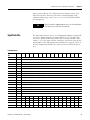
Input Data File
The input data table lets you access analog input module read data for
use in the control program, via word and bit access. The data table
structure is shown in the table below. For each input module, slot x,
words 0…15 in the input data file contain the converted values of the
analog inputs. The most significant bit (MSB) is the sign bit, which is
in two’s complement format. ‘Nu’ indicates not used with the bit set
to 0.
Input Data Array
Word/
Bit
15
14
13
12
Word 0
SGN
Analog Read (Input) Data Value Channel 0
Word 1
SGN
Analog Read (Input) Data Value Channel 1
Word 2
SGN
Analog Read (Input) Data Value Channel 2
Word 3
SGN
Analog Read (Input) Data Value Channel 3
Word 4
SGN
Analog Read (Input) Data Value Channel 4
Word 5
SGN
Analog Read (Input) Data Value Channel 5
Word 6
SGN
Analog Read (Input) Data Value Channel 6
Word 7
SGN
Analog Read (Input) Data Value Channel 7
Word 8
SGN
Analog Read (Input) Data Value Channel 8
Word 9
SGN
Analog Read (Input) Data Value Channel 9
Word 10
SGN
Analog Read (Input) Data Value Channel 10
Word 11
SGN
Analog Read (Input) Data Value Channel 11
Word 12
SGN
Analog Read (Input) Data Value Channel 12
Word 13
SGN
Analog Read (Input) Data Value Channel 13
Word 14
SGN
Analog Read (Input) Data Value Channel 14
Word 15
SGN
Analog Read (Input) Data Value Channel 15
Word 16
Nu
Time Stamp Value
Word 17
S15
S14
S13
S12
S11
S10
Word 18
L3
H3
U3
O3
L2
Word 19
L7
H7
U7
O7
L6
Word 20
L11
H11
U11
O11
Word 21
L15
H15
U15
O15
Publication 1769-UM018A-EN-P - October 2008
11
10
09
08
07
06
05
04
03
02
01
00
S9
S8
S7
S6
S5
S4
S3
S2
S1
S0
H2
U2
O2
L1
H1
U1
O1
L0
H0
U0
O0
H6
U6
O6
L5
H5
U5
O5
L4
H4
U4
O4
L10
H10
U10
O10
L9
H9
U9
O9
L8
H8
U8
O8
L14
H14
U14
O14
L13
H13
U13
O13
L12
H12
U12
O12
31
Chapter 3
Module Data, Status, and Channel Configuration
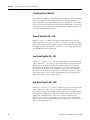
Time Stamp Value (Word 16)
The modules support a 15-bit rolling timestamp that is updated during
each new update of the analog input values. The timestamp has a
1 ms resolution. If the timestamp function is enabled, the timestamp
value is placed in the Input Data file, word 16, following each module
conversion cycle. Enable and/or disable this timestamp in word 1, bit
15 of the Configuration Data file.
General Status Bits (S0…S15)
Word 17, bits 0…15 contain the general operational status bits for
input channels 0…15. If set (1), these bits indicate an alarm or range
error associated with that channel. The over- and under-range bits and
the high- and low-alarm bits for channels 0…15 are logically ORed to
the appropriate general status bit.
Low Alarm Flag Bits (L0 …L15)
Words 18…21, bits 3, 7, 11, and 15 contain the low alarm flag bits for
input channels 0…15. If set (1), these bits indicate the input signal is
outside the user-defined range. The module continues to convert
analog data to minimum full-range values. The bit is automatically
reset (0) when the low alarm condition clears, unless the channel’s
alarm bits are latched. If the channel’s alarm bits are latched, a set (1)
low alarm flag bit clears via the corresponding Cancel Low Process
Alarm Latch bit in your output data file.
High Alarm Flag Bits (H0…H15)
Words 18…21, bits 2, 6, 10, and 14 contain the high alarm flag bits for
input channels 0…15. If set (1), the input signal is outside the
user-defined range. The module continues to convert analog data to
maximum full-range values. The bit is automatically reset (0) when the
high alarm condition clears, unless the channel’s alarm bits are
latched. If the channel’s alarm bits are latched, a set (1) high alarm
flag bit clears via the corresponding Cancel High Process Alarm Latch
bit in your output data file.
32
Publication 1769-UM018A-EN-P - October 2008
Module Data, Status, and Channel Configuration
Chapter 3
Over-Range Flag Bits (O0…O15)
Over-range bits for channels 0…15 are contained in Words 18…21,
bits 0, 4, 8, and 12. When set (1), this bit indicates an input signal is
beyond the normal operating range. For the 1769-IF16V module, it
may also indicate an open circuit condition. However, the module
continues to convert analog data to the maximum full range value.
The bit is automatically reset (0) by the module when the over-range
condition is cleared and the data value is within the normal operating
range.
Under-Range Flag Bits (U0…U15)
Under-range bits for channels 0…15 are contained in Words 18…21,
bits 1, 5, 9, and 13. When set (1), this bit indicates an input signal is
below the normal operating range. For the 1769-IF16C module, it may
also indicate an open circuit condition. However, the module
continues to convert analog data to the minimum full range value. The
bit is automatically reset (0) by the module when the under-range
condition is cleared and the data value is within the normal operating
range.
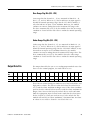
Output Data File
Word/
Bit
15
Word 0 CLL7
The output data table lets you access analog output module write data
for use in the control program, via word and bit access.
14
13
12
11
10
09
08
07
06
05
04
03
02
01
00
CLH7
CLL6
CLH6
CLL5
CLH5
CLL4
CLH4
CLL3
CLH3
CLL2
CLH2
CLL1 CLH1 CLL0 CLH0
Word 1 CLL15 CLH15 CLL14 CLH14 CLL13 CLH13 CLL12 CLH12 CLL11 CLH11 CLL10 CLH10 CLL9 CLH9 CLL8 CLH8
These bits are written during run mode to cancel any latched low- and
high-process alarms. The alarm is unlatched when the unlatch bit is
set (1) and the alarm condition no longer exists. If the alarm condition
persists, then the unlatch bit has no effect until the alarm condition no
longer exists. You need to keep the unlatch bit set until verification
from the appropriate input channel status word that the alarm status
bit has cleared (0). Then you need to reset (0) the unlatch bit. The
module will not latch an alarm condition if a transition from ‘no alarm’
to ‘alarm’ occurs while a channel’s cancel latch bit is set.
Publication 1769-UM018A-EN-P - October 2008
33
Chapter 3
Module Data, Status, and Channel Configuration
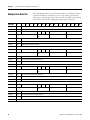
Configuration Data File
Word/Bit
15
14
Word 0
0
Real Time Sample Value
Word 1
ETS
Reserved
Word 2
EC
Reserved
Word 3
Reserved
Word 4
SGN
Process Alarm High Data Value Channel 0
Word 5
SGN
Process Alarm Low Data Value Channel 0
Word 6
SGN
Alarm Dead Band Value Channel 0
Word 7
Reserved
Word 8
EC
Word 9
Reserved
Word 10
SGN
Process Alarm High Data Value Channel 1
Word 11
SGN
Process Alarm Low Data Value Channel 1
Word 12
SGN
Alarm Dead Band Value Channel 1
Word 13
Reserved
Word 14
EC
Word 15
Reserved
Word 16
SGN
Process Alarm High Data Value Channel 2
Word 17
SGN
Process Alarm Low Data Value Channel 2
Word 18
SGN
Alarm Dead Band Value Channel 2
Word 19
Reserved
Word 20
EC
Word 21
Reserved
Word 22
SGN
Process Alarm High Data Value Channel 3
Word 23
SGN
Process Alarm Low Data Value Channel 3
Word 24
SGN
Alarm Dead Band Value Channel 3
Word 25
Reserved
34
13
The configuration file lets you determine how each individual input
channel will operate. Parameters such as the input type and data
format are set up using this file. This data file is writable and readable.
The default value of the configuration data table is all zeros.
12
11
10
09
08
07
EA
AL
EI(1)
Reserved
Input Filter Sel Ch0
Reserved
Input Type/Range Select Ch0
Reserved
Input Filter Sel Ch1
Reserved
Input Type/Range Select Ch1
Reserved
Input Filter Sel Ch2
Reserved
Input Type/Range Select Ch2
Reserved
Input Filter Sel Ch3
Reserved
Input Type/Range Select Ch3
Input Data Format
Ch0
Reserved
EA
AL
EI(1)
Input Data Format
Ch1
Reserved
EA
AL
EI(1)
Input Data Format
Ch2
Reserved
EA
AL
EI(1)
Input Data Format
Ch3
06
05
04
03
02
01
00
Publication 1769-UM018A-EN-P - October 2008
Module Data, Status, and Channel Configuration
Word/Bit
15
14
13
12
11
10
09
Word 26
EC
Reserved
EA
AL
Word 27
Reserved
Word 28
SGN
Process Alarm High Data Value Channel 4
Word 29
SGN
Process Alarm Low Data Value Channel 4
Word 30
SGN
Alarm Dead Band Value Channel 4
Word 31
Reserved
Word 32
EC
Word 33
Reserved
Word 34
SGN
Process Alarm High Data Value Channel 5
Word 35
SGN
Process Alarm Low Data Value Channel 5
Word 36
SGN
Alarm Dead Band Value Channel 5
Word 37
Reserved
Word 38
EC
Word 39
Reserved
Word 40
SGN
Process Alarm High Data Value Channel 6
Word 41
SGN
Process Alarm Low Data Value Channel 6
Word 42
SGN
Alarm Dead Band Value Channel 6
Word 43
Reserved
Word 44
EC
Word 45
Reserved
Word 46
SGN
Process Alarm High Data Value Channel 7
Word 47
SGN
Process Alarm Low Data Value Channel 7
Word 48
SGN
Alarm Dead Band Value Channel 7
Word 49
Reserved
Word 50
EC
Word 51
Reserved
Word 52
SGN
Process Alarm High Data Value Channel 8
Word 53
SGN
Process Alarm Low Data Value Channel 8
Word 54
SGN
Alarm Dead Band Value Channel 8
Word 55
Reserved
08
EI
(1)
Input Data Format
Ch4
Reserved
EA
AL
EI(1)
Input Data Format
Ch5
Reserved
EA
AL
EI(1)
Input Data Format
Ch6
Reserved
EA
AL
EI(1)
Input Data Format
Ch7
Reserved
EA
AL
EI(1)
Input Data Format
Ch8
Publication 1769-UM018A-EN-P - October 2008
07
06
05
04
03
02
01
Chapter 3
00
Reserved
Input Filter Sel Ch4
Reserved
Input Type/Range Select Ch4
Reserved
Input Filter Sel Ch5
Reserved
Input Type/Range Select Ch5
Reserved
Input Filter Sel Ch6
Reserved
Input Type/Range Select Ch6
Reserved
Input Filter Sel Ch7
Reserved
Input Type/Range Select Ch7
Reserved
Input Filter Sel Ch8
Reserved
Input Type/Range Select Ch8
35
Chapter 3
Module Data, Status, and Channel Configuration
Word/Bit
15
14
Word 56
EC
Reserved
Word 57
Reserved
Word 58
SGN
Process Alarm High Data Value Channel 9
Word 59
SGN
Process Alarm Low Data Value Channel 9
Word 60
SGN
Alarm Dead Band Value Channel 9
Word 61
Reserved
Word 62
EC
Word 63
Reserved
Word 64
SGN
Process Alarm High Data Value Channel 10
Word 65
SGN
Process Alarm Low Data Value Channel 10
Word 66
SGN
Alarm Dead Band Value Channel 10
Word 67
Reserved
Word 68
EC
Word 69
Reserved
Word 70
SGN
Process Alarm High Data Value Channel 11
Word 71
SGN
Process Alarm Low Data Value Channel 11
Word 72
SGN
Alarm Dead Band Value Channel 11
Word 73
Reserved
Word 74
EC
Word 75
Reserved
Word 76
SGN
Process Alarm High Data Value Channel 12
Word 77
SGN
Process Alarm Low Data Value Channel 12
Word 78
SGN
Alarm Dead Band Value Channel 12
Word 79
Reserved
Word 80
EC
Word 81
Reserved
Word 82
SGN
Process Alarm High Data Value Channel 13
Word 83
SGN
Process Alarm Low Data Value Channel 13
Word 84
SGN
Alarm Dead Band Value Channel 13
Word 85
Reserved
36
13
12
11
10
09
EA
AL
08
EI
(1)
Input Data Format
Ch9
Reserved
EA
AL
EI(1)
Input Data Format
Ch10
Reserved
EA
AL
EI(1)
Input Data Format
Ch11
Reserved
EA
AL
EI(1)
Input Data Format
Ch12
Reserved
EA
AL
EI(1)
Input Data Format
Ch13
07
06
05
04
03
02
01
00
Reserved
Input Filter Sel Ch9
Reserved
Input Type/Range Select Ch9
Reserved
Input Filter Sel Ch10
Reserved
Input Type/Range Select
Ch10
Reserved
Input Filter Sel Ch11
Reserved
Input Type/Range Select
Ch11
Reserved
Input Filter Sel Ch12
Reserved
Input Type/Range Select
Ch12
Reserved
Input Filter Sel Ch13
Reserved
Input Type/Range Select
Ch13
Publication 1769-UM018A-EN-P - October 2008
Module Data, Status, and Channel Configuration
Word/Bit
15
14
13
12
11
10
09
Word 86
EC
Reserved
EA
AL
Word 87
Reserved
Word 88
SGN
Process Alarm High Data Value Channel 14
Word 89
SGN
Process Alarm Low Data Value Channel 14
Word 90
SGN
Alarm Dead Band Value Channel 14
Word 91
Reserved
Word 92
EC
Word 93
Reserved
Word 94
SGN
Process Alarm High Data Value Channel 15
Word 95
SGN
Process Alarm Low Data Value Channel 15
Word 96
SGN
Alarm Dead Band Value Channel 15
Word 97
Reserved
08
EI
(1)
Input Data Format
Ch14
Reserved
EA
AL
EI(1)
Input Data Format
Ch15
07
06
05
04
03
02
01
Chapter 3
00
Reserved
Input Filter Sel Ch14
Reserved
Input Type/Range Select
Ch14
Reserved
Input Filter Sel Ch15
Reserved
Input Type/Range Select
Ch15
(1) Alarm interrupts are not supported by all bus masters. Check your controller’s user manual to determine if expansion I/O interrupts are supported.
For information on configuring the module using MicroLogix 1500 and
RSLogix 500 software, see Appendix B; for CompactLogix and RSLogix
5000 software, see Appendix C; for 1769-ADN DeviceNet adapter and
RSNetWorx software, see Appendix D.
The configuration file can also be modified through the control
program, if supported by the controller. The structure and bit settings
are shown in Channel Configuration on page 38.
Publication 1769-UM018A-EN-P - October 2008
37
Chapter 3
Module Data, Status, and Channel Configuration
Channel Configuration
Each channel is independently configured via a group of six
consecutive words in the Configuration Data file. The first two words
of the group consist of bit fields, the settings of which determine how
the channel operates. See the tables below and the descriptions that
follow for valid configuration settings and their meanings. The default
bit status of the configuration file is all zeros.
Bit Definitions for Channel Configuration Words
Define
To Choose
Make these bit settings
15
Input Filter Selection
Enable Interrupt
(EI)
(1) (2)
14
13
12
11
10
09
03
02
01
00
60 Hz
0
0
0
0
50 Hz
0
0
0
1
16 Hz
0
0
1
0
315 Hz
0
0
1
1
1365 Hz
0
1
0
0
Enable
Process Alarm Latch
(AL)
06
05
04
0
Enable
1
Disable
0
Enable Process Alarms Enable
(EA)
Disable
Enable Channel (EC)
07
1
Disable
(2)
08
1
0
Enable
1
Disable
0
(1) Alarm interrupts are not supported by all bus masters. Check your controller’s user manual to determine if expansion I/O interrupts are supported.
(2) Do not set this bit to 1 unless the Enable Process Alarms (EA) bit is also set to 1 for the same channel.
1769-IF16C Module: Bit Definitions for Input Range and Input Data Configuration Words
Define
To Choose
Make these bit settings
03
02
01
00
Input Range
Select
4…20 mA
0
0
0
0
0…20 mA
0
0
0
1
15
Input Data
Proportional Counts
Format Select Engineering Units
38
14
13
12
11
10
09
08
0
0
0
0
0
1
Scaled for PID
0
1
0
Percent Range
0
1
1
07
06
05
04
Publication 1769-UM018A-EN-P - October 2008
Module Data, Status, and Channel Configuration
Chapter 3
1769-IF16V Module: Bit Definitions for Input Range and Input Data Configuration Words
Define
To Choose
Make these bit settings
15
Input
Range
Select
Input
Data
Format
Select
14
13
12
11
10
09
08
03
02
01
00
-10…+10V
0
0
0
0
0…5V
0
0
0
1
0…10V
0
0
1
0
1…5V
0
0
1
1
Proportional Counts
0
0
0
Engineering Units
0
0
1
Scaled for PID
0
1
0
Percent Range
0
1
1
07
06
05
04
Enable/Disable Channel (EC)
This configuration selection lets each channel be enabled individually.
TIP
When a channel is not enabled (0), no voltage or
current reading is provided to the controller by the
A/D converter.
Input Filter Selection
The input filter selection field lets you select the filter frequency for
each channel. The filter frequency affects the noise rejection
characteristics, channel step response, and module update time, as
explained below.
Noise Rejection
The modules use a digital filter that provides noise rejection for the
input signals. The filter is programmable, allowing you to select from
five filter frequencies for each channel. A lower frequency (60 Hz
versus 315 Hz) can provide better noise rejection but it increases
channel update time.
Normal Mode Rejection is better than 50 dB at 50 and 60 Hz, with the
50 and 60 Hz filters selected, respectively. Transducer power supply
noise, transducer circuit noise, or process variable irregularities may
also be sources of normal mode noise.
Publication 1769-UM018A-EN-P - October 2008
39
Chapter 3
Module Data, Status, and Channel Configuration
Common Mode Rejection is better than 60 dB at 50 and 60 Hz, with
the 50 and 60 Hz filters selected, respectively. The modules perform
well in the presence of common mode noise as long as the signals
applied to the IN+ and COM input terminals do not exceed the
working voltage rating of the module. Improper earth ground may be
a source of common mode noise.
Channel Step Response
The selected channel filter frequency determines the channel’s step
response. The step response is the time required for the analog input
signal to reach 100% of its expected final value. This means that if an
input signal changes faster than the channel step response, a portion
of that signal will be attenuated by the channel filter.
Filter Selection
Channel Step Response
16 Hz
1550 ms
50 Hz
500 ms
60 Hz
420 ms
315 Hz
90 ms
1365 Hz
35 ms
Module Update Time and Scanning Process
The module update time is defined as the time required for the
module to sample and convert the input signals of all enabled input
channels and provide the resulting data values to the Data Input file.
Module update time can be calculated by adding the sum of all
enabled channel update times. Channel update times include channel
scan time, channel switching time, and converter configuration time.
The module sequentially samples the channels in a continuous loop.
The 1769-IF16C and 1769-IF16V modules use parallel sampling to
update the entire module (all 16 channels, if enabled) in an amount of
time equal to only 8 channel update times. The module performs
parallel channel sampling on pairs of inputs.
The input channels are paired as follows: [0,1], [2,3], [4,5], [6,7], [8,9],
[10,11] [12,13], [14, 15]. The channels in the same pair are sampled at
the same time. Channel update time is thus input pair update time. If
channels in the same input pair have different filter settings, the input
pair update time is determined by the channel with the lowest filter
setting. A channel that is not enabled has a channel update time of 0
ms. If neither channel of an input pair is enabled, the input pair
update time is 0 ms.
40
Publication 1769-UM018A-EN-P - October 2008
Module Data, Status, and Channel Configuration
Chapter 3
Module update time is calculated by adding up all of the input pair
update times. This table shows the input pair update times when the
lowest filter setting for the input pair is as shown. The table also
shows the module update time assuming all input pairs have at least
one channel enabled and the lowest filter setting is the same for each
input pair.
Filter Setting and Update Times
Filter Setting
Update Time per Input
Pair
Update Time per
Module(1) (2)
16 Hz
200 ms
1600 ms
50 Hz
70 ms
560 ms
60 Hz
60 ms
480 ms
315 Hz
15 ms
120 ms
1365 Hz
5 ms
40 ms
(1) Eight input pairs having at least one channel enabled with the lowest filter setting as shown selected for all.
(2) If you use real-time sampling, the user-configured sample rate is used as the module update time.
Input Type/Range Selection
This selection lets you configure each channel individually and
provides the ability to read the configured range selections.
Input Data Selection Formats
This selection configures each channel to present analog data in any
of the following formats.
•
•
•
•
Raw/Proportional Data
Engineering Units
Scaled-for-PID
Percent Range
See Valid Input Data on page 42.
Raw/Proportional Data
The value presented to the controller is proportional to the selected
input and scaled into the maximum data range allowed by the bit
resolution of the A/D converter. For example, the data value range for
a ±10V DC user input is -32,767…32,767, which covers the full-scale
range of -10.5…10.5V.
Publication 1769-UM018A-EN-P - October 2008
41
Chapter 3
Module Data, Status, and Channel Configuration
Engineering Units
The module scales the analog input data to the actual current or
voltage values for the selected input range. The resolution of the
engineering units is 0.001V or 0.001 mA per count.
Scaled-for-PID
The value presented to the controller is a signed integer with zero
representing the lower limit of the normal operating range and 16,383
representing the upper limit of the normal operating range.
Allen-Bradley controllers, such as the MicroLogix 1500 controller, use
this range in their PID equations. The amount over and under the
normal operating range (the full-scale range) is also supported.
Percent Range
The input data is presented as a percentage of the normal operating
range. For example, 0V…10V DC equals 0…100%. The amount over
and under the normal operating range (the full-scale range) is also
supported.
Valid Input Data Word Formats/Ranges
The following table shows the valid formats and min./max. data
ranges provided by the module.
Valid Input Data
Module
1769-IF16V
1769-IF16C
Normal
Operating
Input Range
Full Range(1)
-10…10V DC
-10.5…10.5V
0…5V DC
-0.5…5.25V
Raw/
Engineering
Proportional
Units(2)
Data
Full Range
Percent Range(3)
Normal
Full
Operating
Range
Range
Normal
Operating
Range
Full
Range
-10,500…
10,500
-410…
16,793
-10,000…
10,000
-10,500…
10,500
-500…5250
-1638…
17,202
Full Range
-32,767…
32,767
Scaled-for-PID
0…16383
0…10V DC
-0.5…10.5V
1…5V DC
0.5…5.25V
500…5250
-2048…
17,407
-1250…
10,625
0…20 mA
0…21 mA
0…21,000
0…
17,202
0…
10,500
4…20 mA
3.2…21 mA
-32,767…
32,767
-500… 10,500
3200…
21,000
0…16383
-819…
17,202
-1000…
10,500
-819…
+17,407
0…10,000
0…10,000
-500…
10,500
-500…
10,625
(1) includes amounts over and under normal operating range
(2) 1 count = 0.001V or 0.001 mA
(3) 1 count = 0.01%
42
Publication 1769-UM018A-EN-P - October 2008
Module Data, Status, and Channel Configuration
Chapter 3
Real Time Sampling
This parameter instructs the module how often to initiate a conversion
cycle that will convert each enabled input channel and then place that
data into the Input Data file. A conversion cycle is defined as the
sequential conversion of each input pair that has at least one of its
channels enabled. When the module has performed a conversion on
each of the input pairs, it is ready to begin the next conversion cycle.
This feature is applied on a module-wide basis.
During module configuration, you specify a Real Time Sampling (RTS)
period by entering a value into Word 0 of the Configuration Data file.
This value entered in Word 0 can be in the range of 0…5000 and
indicates the conversion cycle rate the module will use in 1 ms
increments.
If you enter a 0 for the Real Time Sample Rate, the modules initiate
conversion cycles at the fastest rate possible, controlled by the filter
setting selected for each enabled channel within the input pairs. Once
all of the channels’ input data has been converted, the Input Data file
is updated for all enabled channels at the same time.
If you enter a non-zero value for the Real Time Sample Rate, the
module compares the Real Time Sample Rate value with the
calculated module update time, again based on the filter setting
selected for each enabled channel within the input pairs. If the value
entered for the Real Time Sample Rate is smaller than the calculated
module update time, the module indicates a configuration error. The
longest Real Time Sample Rate supported by the modules is 5
seconds, which corresponds to the maximum value for Word 0 of the
Configuration Data file of 5000 decimal. See Module Update Time and
Scanning Process on page 40 for details on calculating the module
update time.
Time Stamping
This parameter instructs the module to insert a time stamp value into
the Input Data file every time the file is updated.
During module configuration, you enable time stamping using Word
1, bit 15 of the Configuration Data file: Enable Time Stamping (ETS).
Setting the ETS bit (1) enables the module’s time stamping function.
Clearing the ETS bit (0) disables the function. The default condition of
the ETS bit is disabled (0).
Publication 1769-UM018A-EN-P - October 2008
43
Chapter 3
Module Data, Status, and Channel Configuration
When time stamping is enabled, the module provides a rolling time
stamp value of 0…32,767 with each count representing 1 ms. When
the time stamp count reaches 32,767, the value is reset to 0 and
continues to increment one count every millisecond.
When enabled, the Input Data file is updated with the latest time
stamp value which corresponds to the end of each module conversion
cycle. Sequentially, each input pair, where at least one of the channels
is enabled, is converted once per conversion cycle. In normal
sampling mode, when Real Time Sampling is not enabled, conversion
cycles are repeatedly initiated at the module update rate. If Real Time
Sampling is used, the conversion cycles are initiated at a rate equal to
the real time sampling rate. The time stamp value is updated at the
end of every conversion cycle.
Process Alarms
Process alarms alert you when the module has exceeded configured
high or low limits for each channel. You can latch process alarms.
Process alarms can generate interrupts(1). A channel’s process alarms
are set at two user configurable alarm trigger points:
• Process Alarm High
• Process Alarm Low
The operation of each input channel’s process alarms are controlled
by bits in the Configuration Data file. Enable alarms for a channel by
setting (1) the EA bit for that channel. Set the AL bit (1) for a channel
to enable the alarm latching. Set the EI bit (1) for a channel to enable
interrupts on that channel’s process alarms(1).
Each channel’s process alarm high data value and process alarm low
data value are set by entering values in the corresponding words of
the Configuration Data file for that channel.
The values entered for a channel’s process alarms must be within the
full-scale data range as set by the input Data Format selected for that
channel. If a process alarm data value is entered that is outside the
full-scale data range set for a channel, the module indicates a
configuration error.
(1) Module interrupts are not supported by all bus masters. Refer to your controller’s user manual to determine
whether it can support module interrupts.
44
Publication 1769-UM018A-EN-P - October 2008
Module Data, Status, and Channel Configuration
Chapter 3
Alarm Deadband
You may configure an alarm deadband to work with the process
alarms. The deadband lets the process alarm status bit remain set,
despite the alarm condition disappearing, as long as the input data
remains within the deadband of the process alarm.
This illustration shows an example of input data that sets each of the
two alarms at some point during module operation. In this example,
latching is disabled; therefore, each alarm turns OFF when the
condition that caused it to set ceases to exist and the input data clears
the alarm deadband regions.
Alarm Deadbands
High alarm turns ON.
High alarm turns OFF.
High
Normal Input Range
Low alarm turns ON.
Alarm Deadbands
Low
Low alarm turns OFF.
The module checks for an alarm deadband value that is less than 0 or
large enough to be equal to or exceed one-half of the difference
between the High alarm and Low alarm values. When one of these
conditions occurs, a module configuration fault results.
Publication 1769-UM018A-EN-P - October 2008
45
Chapter 3
46
Module Data, Status, and Channel Configuration
Publication 1769-UM018A-EN-P - October 2008
Chapter
4
Module Diagnostics and Troubleshooting
Introduction
Topic
Safety Considerations
Page
Safety Considerations
47
Power Cycle Diagnostics
48
Channel Diagnostics
49
Non-critical vs. Critical Module Errors
50
Module Error Definition Table
50
Error Codes
51
Module Inhibit Function
57
Contacting Rockwell Automation
57
Safety considerations are an important element of proper
troubleshooting procedures. Actively thinking about the safety of
yourself and others, as well as the condition of your equipment, is of
primary importance.
The following sections describe several safety concerns you should be
aware of when troubleshooting your control system.
ATTENTION
Never reach into a machine to actuate a switch because
unexpected motion can occur and cause injury.
Remove all electrical power at the main power disconnect
switches before checking electrical connections or
inputs/outputs causing machine motion.
Status Indicators
When the green status indicator on the analog module is illuminated,
it indicates that power is applied to the module.
Activate Devices When Troubleshooting
When troubleshooting, never reach into the machine to actuate a
device. Unexpected machine motion could occur.
47Publication 1769-UM018A-EN-P - October 2008
47
Chapter 4
Module Diagnostics and Troubleshooting
Stand Clear of the Machine
When troubleshooting any system problem, have all personnel remain
clear of the machine. The problem could be intermittent, and sudden
unexpected machine motion could occur. Have someone ready to
operate an emergency stop switch in case it becomes necessary to
shut off power to the machine.
Program Alteration
There are several possible causes of alteration to the user program,
including extreme environmental conditions, Electromagnetic
Interference (EMI), improper grounding, improper wiring
connections, and unauthorized tampering. If you suspect a program
has been altered, check it against a previously saved program on an
EEPROM or UVPROM memory module.
Safety Circuits
Circuits installed on the machine for safety reasons, like over-travel
limit switches, stop push buttons, and interlocks, should always be
hard-wired to the master control relay. These devices must be wired
in series so that when any one device opens, the master control relay
is de-energized, thereby removing power to the machine. Never alter
these circuits to defeat their function. Serious injury or machine
damage could result.
Power Cycle Diagnostics
When you cycle power to the module, a series of internal diagnostic
tests are performed. These diagnostic tests must be successfully
completed or the module status indicator remains off and a module
error results and is reported to the controller.
Diagnostics
48
Module Status
Indicator
Condition
Corrective Action
On
Proper Operation
No action required.
Off
Module Fault
Cycle power. If condition persists, replace the
module. Call your local distributor or Rockwell
Automation for assistance.
Publication 1769-UM018A-EN-P - October 2008
Module Diagnostics and Troubleshooting
Channel Diagnostics
Chapter 4
When an input channel is enabled, the modules perform a diagnostic
check to see that the channel has been properly configured. In
addition, the modules check each channel during every conversion
cycle for over-range and under-range, high and low process alarm
conditions, and open-circuit conditions.
Out-of-range Detection
Whenever data received at an input is out of the defined normal
operating range, an over-range or under-range error is indicated in the
Input Data file.
Process Alarm Detection
Whenever data received at an input meets or exceeds that channel’s
configured process alarm limits, a high alarm or low alarm error is
indicated at the Input Data file.
Open-circuit Detection
The 1769-IF16V module provides open-circuit detection on all
enabled channels. Whenever an open-circuit condition occurs, the
over-range error bit for that channel is set and the channel’s input data
reading will be at the maximum, full-range value in the Input Data
file.
The 1769-IF16C module also provides open-circuit detection on all
enabled channels. Whenever an open-circuit condition occurs, the
under-range error bit for that channel is set and the channel’s input
data reading will be at the minimum, full-range value in the Input
Data file.
Possible causes of an open circuit include:
• the sensing device may be broken.
• a wire may be loose or cut.
• the sensing device may not be installed on the configured
channel.
Publication 1769-UM018A-EN-P - October 2008
49
Chapter 4
Module Diagnostics and Troubleshooting
Non-critical vs. Critical
Module Errors
Non-critical module errors are typically recoverable. Channel errors
(over-range or under-range errors, process alarms, and open circuit
errors) are non-critical. Non-critical errors are indicated in the module
input data table.
Critical module errors are conditions that prevent normal or
recoverable operation of the system. When these types of errors
occur, the system typically leaves the run or program mode of
operation until the error can be dealt with.
Critical module errors are indicated in Error Codes on page 51.
Module Error Definition
Table
Module errors are expressed in two fields as four-digit Hex format
with the most significant digit as don’t care and irrelevant. The two
fields are Module Error and Extended Error Information.
Module Error Table
Don’t Care Bits
Module Error
Extended Error Information
15
14
13
12
11
10
9
8
7
6
5
4
3
2
1
0
0
0
0
0
0
0
0
0
0
0
0
0
0
0
0
0
Hex Digit 4
Hex Digit 3
Hex Digit 2
Hex Digit 1
Module Error Field
The purpose of the module error field is to classify module errors into
three distinct groups, as described in the table below. The type of
error determines what kind of information exists in the extended error
information field. Refer to your controller manual for details.
Module Error Types
Error Type
50
Module Error
Field Value
Bits 11…09
(Bin)
Description
No Errors
000
No error is present. The extended error field holds
no additional information.
Hardware
Errors
001
General and specific hardware error codes are
specified in the extended error information field.
Configuration
Errors
010
Module-specific error codes are indicated in the
extended error field. These error codes correspond
to options that you can change directly. For
example, the input range or input filter selection.
Publication 1769-UM018A-EN-P - October 2008
Module Diagnostics and Troubleshooting
Chapter 4
Extended Error Information Field
Depending upon the value in the module error field, the extended
error information field can contain error codes that are
module-specific or common to all 1769 analog modules.
If no errors are present in the module error field, the
extended error information field will be set to zero.
TIP
Error Codes
Error codes can help troubleshoot your module.
Extended Error Codes for Hardware Errors
Error Type
Hex
Equivalent(1)
Module
Error
Code
Extended Error Error Description
Information
Code
Binary
Binary
No Error
X000
000
0 0000 0000
No Error
General Common
Hardware Error
X200
001
1 0000 0000
General hardware error; no additional information
X201
001
1 0000 0001
Power-up reset state
HardwareSpecific Error
X300
001
1 0000 0000
General hardware error
X301
001
1 0000 0001
Microprocessor hardware error
X302
001
1 0000 0010
A/D converter communication error
(1) X represents the Don’t Care digit. Module hardware error codes are typically presented in their Hex Equivalent by the programming software.
During system configuration, if you set the fields in the configuration
file to invalid or unsupported values, the modules generate a
configuration error and the system controller enters a Fault condition.
The invalid configuration data must be corrected and the program
downloaded again for the system to enter Run mode. You cannot
change module configuration data while the system is in Run mode.
Any changes are ignored by the modules, which continue to operate
with their previous configuration.
Extended Error Codes for Configuration Errors
Module
Error Code
Extended Error
Information Code
Binary
Binary
X400
010
0 0000 0000
General configuration error; no additional information
X401
010
0 0000 0001
Invalid input range selected (channel 0)
X402
010
0 0000 0010
Invalid input range selected (channel 1)
X403
010
0 0000 0011
Invalid input range selected (channel 2)
Hex Equivalent(1)
Publication 1769-UM018A-EN-P - October 2008
Error Description
51
Chapter 4
Module Diagnostics and Troubleshooting
Extended Error Codes for Configuration Errors
Module
Error Code
Extended Error
Information Code
Binary
Binary
X404
010
0 0000 0100
Invalid input range selected (channel 3)
X405
010
0 0000 0101
Invalid input range selected (channel 4)
X406
010
0 0000 0110
Invalid input range selected (channel 5)
X407
010
0 0000 0111
Invalid input range selected (channel 6)
X408
010
0 0000 1000
Invalid input range selected (channel 7)
X409
010
0 0000 1001
Invalid input range selected (channel 8)
X40A
010
0 0000 1010
Invalid input range selected (channel 9)
X40B
010
0 0000 1011
Invalid input range selected (channel 10)
X40C
010
0 0000 1100
Invalid input range selected (channel 11)
X40D
010
0 0000 1101
Invalid input range selected (channel 12)
X40E
010
0 0000 1110
Invalid input range selected (channel 13)
X40F
010
0 0000 1111
Invalid input range selected (channel 14)
X410
010
0 0001 0000
Invalid input range selected (channel 15)
X411
010
0 0001 0001
Invalid input filter selected (channel 0)
X412
010
0 0001 0010
Invalid input filter selected (channel 1)
X413
010
0 0001 0011
Invalid input filter selected (channel 2)
X414
010
0 0001 0100
Invalid input filter selected (channel 3)
X415
010
0 0001 0101
Invalid input filter selected (channel 4)
X416
010
0 0001 0110
Invalid input filter selected (channel 5)
X417
010
0 0001 0111
Invalid input filter selected (channel 6)
X418
010
0 0001 1000
Invalid input filter selected (channel 7)
X419
010
0 0001 1001
Invalid input filter selected (channel 8)
X41A
010
0 0001 1010
Invalid input filter selected (channel 9)
X41B
010
0 0001 1011
Invalid input filter selected (channel 10)
X41C
010
0 0001 1100
Invalid input filter selected (channel 11)
X41D
010
0 0001 1101
Invalid input filter selected (channel 12)
X41E
010
0 0001 1110
Invalid input filter selected (channel 13)
X41F
010
0 0001 1111
Invalid input filter selected (channel 14)
X420
010
0 0010 0000
Invalid input filter selected (channel 15)
X421
010
0 0010 0001
Invalid input format selected (channel 0)
X422
010
0 0010 0010
Invalid input format selected (channel 1)
X423
010
0 0010 0011
Invalid input format selected (channel 2)
X424
010
0 0010 0100
Invalid input format selected (channel 3)
X425
010
0 0010 0101
Invalid input format selected (channel 4)
Hex Equivalent(1)
52
Error Description
Publication 1769-UM018A-EN-P - October 2008
Module Diagnostics and Troubleshooting
Chapter 4
Extended Error Codes for Configuration Errors
Module
Error Code
Extended Error
Information Code
Binary
Binary
X404
010
0 0000 0100
Invalid input range selected (channel 3)
X405
010
0 0000 0101
Invalid input range selected (channel 4)
X406
010
0 0000 0110
Invalid input range selected (channel 5)
X407
010
0 0000 0111
Invalid input range selected (channel 6)
X408
010
0 0000 1000
Invalid input range selected (channel 7)
X409
010
0 0000 1001
Invalid input range selected (channel 8)
X40A
010
0 0000 1010
Invalid input range selected (channel 9)
X40B
010
0 0000 1011
Invalid input range selected (channel 10)
X40C
010
0 0000 1100
Invalid input range selected (channel 11)
X40D
010
0 0000 1101
Invalid input range selected (channel 12)
X40E
010
0 0000 1110
Invalid input range selected (channel 13)
X40F
010
0 0000 1111
Invalid input range selected (channel 14)
X410
010
0 0001 0000
Invalid input range selected (channel 15)
X411
010
0 0001 0001
Invalid input filter selected (channel 0)
X412
010
0 0001 0010
Invalid input filter selected (channel 1)
X413
010
0 0001 0011
Invalid input filter selected (channel 2)
X414
010
0 0001 0100
Invalid input filter selected (channel 3)
X415
010
0 0001 0101
Invalid input filter selected (channel 4)
X416
010
0 0001 0110
Invalid input filter selected (channel 5)
X417
010
0 0001 0111
Invalid input filter selected (channel 6)
X418
010
0 0001 1000
Invalid input filter selected (channel 7)
X419
010
0 0001 1001
Invalid input filter selected (channel 8)
X41A
010
0 0001 1010
Invalid input filter selected (channel 9)
X41B
010
0 0001 1011
Invalid input filter selected (channel 10)
X41C
010
0 0001 1100
Invalid input filter selected (channel 11)
X41D
010
0 0001 1101
Invalid input filter selected (channel 12)
X41E
010
0 0001 1110
Invalid input filter selected (channel 13)
X41F
010
0 0001 1111
Invalid input filter selected (channel 14)
X420
010
0 0010 0000
Invalid input filter selected (channel 15)
X421
010
0 0010 0001
Invalid input format selected (channel 0)
X422
010
0 0010 0010
Invalid input format selected (channel 1)
X423
010
0 0010 0011
Invalid input format selected (channel 2)
X424
010
0 0010 0100
Invalid input format selected (channel 3)
X425
010
0 0010 0101
Invalid input format selected (channel 4)
Hex Equivalent(1)
Publication 1769-UM018A-EN-P - October 2008
Error Description
53
Chapter 4
Module Diagnostics and Troubleshooting
Extended Error Codes for Configuration Errors
Module
Error Code
Extended Error
Information Code
Binary
Binary
X426
010
0 0010 0110
Invalid input format selected (channel 5)
X427
010
0 0010 0111
Invalid input format selected (channel 6)
X428
010
0 0010 1000
Invalid input format selected (channel 7)
X429
010
0 0010 1001
Invalid input format selected (channel 8)
X42A
010
0 0010 1010
Invalid input format selected (channel 9)
X42B
010
0 0010 1011
Invalid input format selected (channel 10)
X42C
010
0 0010 1100
Invalid input format selected (channel 11)
X42D
010
0 0010 1101
Invalid input format selected (channel 12)
X42E
010
0 0010 1110
Invalid input format selected (channel 13)
X42F
010
0 0010 1111
Invalid input format selected (channel 14)
X430
010
0 0011 0000
Invalid input format selected (channel 15)
X431
010
0 0011 0001
Alarm not enabled (channel 0)
X432
010
0 0011 0010
Alarm not enabled (channel 1)
X433
010
0 0011 0011
Alarm not enabled (channel 2)
X434
010
0 0011 0100
Alarm not enabled (channel 3)
X435
010
0 0011 0101
Alarm not enabled (channel 4)
X436
010
0 0011 0110
Alarm not enabled (channel 5)
X437
010
0 0011 0111
Alarm not enabled (channel 6)
X438
010
0 0011 1000
Alarm not enabled (channel 7)
X439
010
0 0011 1001
Alarm not enabled (channel 8)
X43A
010
0 0011 1010
Alarm not enabled (channel 9)
X43B
010
0 0011 1011
Alarm not enabled (channel 10)
X43C
010
0 0011 1100
Alarm not enabled (channel 11)
X43D
010
0 0011 1101
Alarm not enabled (channel 12)
X43E
010
0 0011 1110
Alarm not enabled (channel 13)
X43F
010
0 0011 1111
Alarm not enabled (channel 14)
X440
010
0 0100 0000
Alarm not enabled (channel 15)
X441
010
0 0100 0001
Invalid alarm data (channel 0)
X442
010
0 0100 0010
Invalid alarm data (channel 1)
X443
010
0 0100 0011
Invalid alarm data (channel 2)
X444
010
0 0100 0100
Invalid alarm data (channel 3)
X445
010
0 0100 0101
Invalid alarm data (channel 4)
X446
010
0 0100 0110
Invalid alarm data (channel 5)
X447
010
0 0100 0111
Invalid alarm data (channel 6)
Hex Equivalent(1)
54
Error Description
Publication 1769-UM018A-EN-P - October 2008
Module Diagnostics and Troubleshooting
Chapter 4
Extended Error Codes for Configuration Errors
Module
Error Code
Extended Error
Information Code
Binary
Binary
X448
010
0 0100 1000
Invalid alarm data (channel 7)
X449
010
0 0100 1001
Invalid alarm data (channel 8)
X44A
010
0 0100 1010
Invalid alarm data (channel 9)
X44B
010
0 0100 1011
Invalid alarm data (channel 10)
X44C
010
0 0100 1100
Invalid alarm data (channel 11)
X44D
010
0 0100 1101
Invalid alarm data (channel 12)
X44E
010
0 0100 1110
Invalid alarm data (channel 13)
X44F
010
0 0100 1111
Invalid alarm data (channel 14)
X450
010
0 0101 0000
Invalid alarm data (channel 15)
X451
010
0 0101 0001
Invalid Real Time Sample value
Hex Equivalent(1)
Error Description
(1) X represents the Don’t Care digit. Module configuration error codes are typically presented in their Hex Equivalent by the programming software.
Invalid Input Range Selected
These error codes occur when the 4-bit input range code for the
indicated channel is not one of the assigned input range codes for the
module.
See 1769-IF16C Module: Bit Definitions for Input Range and Input
Data Configuration Words on page 38 or 1769-IF16V Module: Bit
Definitions for Input Range and Input Data Configuration Words on
page 39 for details on the assigned input range codes for each
module.
Invalid Input Filter Selected
These error codes occur when the 4-bit input filter code for the
indicated channel is not one of the assigned input filter codes for the
module.
See Bit Definitions for Channel Configuration Words on page 38 for
details on the assigned input filter codes for the modules.
Publication 1769-UM018A-EN-P - October 2008
55
Chapter 4
Module Diagnostics and Troubleshooting
Invalid Input Format Selected
These error codes occur when the 3-bit input format code for the
indicated channel is not one of the assigned input format codes for
the module.
See 1769-IF16C Module: Bit Definitions for Input Range and Input
Data Configuration Words on page 38 or 1769-IF16V Module: Bit
Definitions for Input Range and Input Data Configuration Words on
page 39 for details on the assigned input format codes for each
module.
Alarm Not Enabled
These error codes occur when a channel is enabled and the Alarm
Latch and/or the Enable Interrupt control bits for that channel are set
but the Enable Alarm bit is not set.
See Bit Definitions for Channel Configuration Words on page 38 for
details on setting the process alarm control bits for the modules.
Invalid Alarm Data
These error codes occur when the data entered for the high or low
process alarms for a channel exceed the full-range limits of the
channel. The full-range limits for a channel are a function of the input
range and the input format selected for the channel.
See Valid Input Data Word Formats/Ranges on page 42 for details on
the full-range limits for each data range and data format.
These error codes may also occur if the deadband value entered for a
channel is less than 0, or is greater than or equal to one-half times the
channel’s high alarm value minus the channel’s low alarm value.
56
Publication 1769-UM018A-EN-P - October 2008
Module Diagnostics and Troubleshooting
Chapter 4
Invalid Real Time Sample Value
This error code occurs when the data entered for the Real Time
Sample value is less than 0, is greater than 5000 (decimal) or, if
non-zero, is less than the calculated module update time.
See Real Time Sampling on page 43 for details on how the calculated
module update time can affect the minimum allowed real time sample
value.
Module Inhibit Function
CompactLogix controllers support the module inhibit function. See
your controller manual for details.
Whenever the input modules are inhibited, the modules continue to
provide information about changes at its inputs to the 1769 Compact
Bus Master (for example, a CompactLogix controller).
Contacting Rockwell
Automation
If you need to contact Rockwell Automation for assistance, please
have the following information available:
• A clear statement of the problem, including a description of
what the system is actually doing. Note the state of the status
indicators; also note input and output image words for the
module.
• List of remedies you have already tried
• Controller type and firmware number (See the label on the
controller.)
• Hardware types in the system, including all I/O modules
• Fault code, if the controller is faulted
See the back cover for contact information.
Publication 1769-UM018A-EN-P - October 2008
57
Chapter 4
58
Module Diagnostics and Troubleshooting
Publication 1769-UM018A-EN-P - October 2008
Appendix
A
Specifications
Introduction
Topic
Page
General Specifications
59
Input Specifications
60
Certifications
61
Replacement Parts
61
General Specifications
Attribute
Value
Dimensions (HxWxD), approx.
118 mm x 87 mm x 35 mm (4.65 in. x 3.43 in. x 1.38 in.)
Height including mounting tabs is 138 mm (5.43 in.)
Shipping weight, approx. (with carton) 281 g (0.62 lb)
Temperature, storage
-40 °C…85 °C (-40 °F…185 °F)
Temperature, operating
0 °C…60 °C (32 °F…140 °F)
Operating humidity
5% …95% non-condensing
Operating altitude
2000 m (6561 ft)
Vibration
Operating: 10…500 Hz, 5 g, 0.030 in. peak-to-peak
Shock
Operating: 30 g, 11 ms panel-mounted (20 g, 11 ms DIN rail-mounted)
Non-operating: 40 g panel-mounted (30 g DIN rail-mounted)
Bus current draw, max
190 mA @ 5V DC
70 mA @ 24V DC
Heat dissipation
1769-IF16C: 4 total Watts
1769-IF16V: 2.4 total Watts
(Watts per point plus the minimum Watts with all points energized.)
Module OK status indicator
On: The module has power, has passed internal diagnostics, and is communicating over the bus.
Off: Any of the above is not true.
System power supply distance rating
The module may not be more than 8 modules away from the system power supply.
Recommended cable
Belden 8761 (shielded)
Vendor I.D. code
1
Product type code
10
Product code
1769-IF16C: 47
1769-IF16V: 46
Input words
22
Output words
2
Configuration words
98
Publication 1769-UM018A-EN-P - October 2008
59
Appendix A
Specifications
Input Specifications
Attribute
1769-IF16C
1769-IF16V
Analog normal operating ranges(1)
0…20 mA, 4…20 mA
±10V DC, 0 …10V DC, 0…5V DC, 1…5V DC
Full scale analog ranges(1)
0…21 mA, 3.2…21 mA
±10.5V DC, -0.5…10.5V DC, -0.5…5.25V DC,
0.5…5.25V DC
Number of inputs
16 single-ended
Converter type
Sigma Delta
Response speed per channel
Input filter and configuration dependent.
Resolution, max(2)
16 bits (unipolar)
15 bits plus sign (bipolar)
Rated working voltage(3)
30V AC/30V DC
Common mode voltage range(4)
±10V DC maximum per channel
Common mode rejection
greater than 60 dB at 50 and 60 Hz with the 16 Hz filter selected, respectively.
Input impedance
249 Ω
Greater than 1 MΩ (typical)
Overall accuracy(5)
0.5% full scale at 25 °C (77 °F) for 16 Hz, 50
Hz, and 60 Hz filters
0.35% full scale at 25 °C (77°F) for 16 Hz, 50
Hz, and 60 Hz filters
Accuracy drift with temperature
±0.0045% per °C
±0.003% per °C
Calibration
None required
None required
Non-linearity (in percent full scale)
±0.03%
±0.03%
Repeatability(6)
±0.03% for 16 Hz filter
±0.06% for 16 Hz filter
Module error over full temperature range
(0…60 °C [32 °F…140 °F])
1.25% for 16 Hz filter
1.0% for 16 Hz, 50 Hz, and 60 Hz filters
Channel diagnostics
Over- or under-range by bit reporting, process alarms
Maximum overload at input terminals(7)
±28 mA continuous, 7.0 V DC
Input group to bus isolation
500V AC or 710V DC for 1 minute (qualification test)
30V AC/30V DC working voltage (IEC Class 2 reinforced insulation)
±30V DC continuous, 0.03 mA
(1) The over- or under-range flag will come on when the normal operating range (over/under) is exceeded. The module will continue to convert the analog input up to the
maximum full scale range. The flag automatically resets when within the normal operating range.
(2) Resolution is dependent upon your filter selection.
(3) Rated working voltage is the maximum continuous voltage that can be applied at the input terminal, including the input signal and the value that floats above ground
potential (for example, 10V DC input signal and 20V DC potential above ground).
(4) For proper operation, the plus input terminals must be within ±10V DC of analog common.
(5) Includes offset, gain, non-linearity and repeatability error terms.
(6) Repeatability is the ability of the input module to register the same reading in successive measurements for the same input signal.
(7) Damage may occur to the input circuit if this value is exceeded.
60
Publication 1769-UM018A-EN-P - October 2008
Specifications
Certifications
Appendix A
Certification
Value
Agency Certification
C-UL certified (under CSA C22.2 No. 142)
UL 508 listed
CE compliant for all applicable directives
Hazardous Environment Class
Class I, Division 2, Hazardous Location, Groups A, B,
C, D (UL 1604, C-UL under CSA C22.2 No. 213)
Radiated and Conducted Emissions
EN50081-2 Class A
Electrical /EMC:
The module has passed testing at the following
levels:
ESD Immunity (IEC1000-4-2)
4 kV contact, 8 kV air, 4 kV indirect
Radiated Immunity (IEC1000-4-3)
10 V/m, 80…1000 MHz, 80% amplitude modulation,
+900 MHz keyed carrier
Fast Transient Burst (IEC1000-4-4)
2 kV, 5 kHz
Surge Immunity (IEC1000-4-5)
1 kV galvanic gun
Conducted Immunity (IEC1000-4-6)
10V DC, 0.15…80 MHz(1)
(1) Conducted Immunity frequency range may be 150 kHz…30 MHz if the Radiated Immunity frequency range is 30
MHz…1000 MHz.
Replacement Parts
The module has the following replacement parts:
• Terminal block, catalog number 1769-RTBN18 (1 per kit)
• Door, catalog number 1769-RD (2 per kit)
Publication 1769-UM018A-EN-P - October 2008
61
Appendix A
62
Specifications
Publication 1769-UM018A-EN-P - October 2008
Appendix
B
Module Addressing and Configuration with
MicroLogix 1500 Controller
Introduction
Topic
Page
Module Input Image
63
Module Configuration File
64
Configure Analog I/O Modules in a MicroLogix 1500 System
64
This appendix examines the modules’ addressing scheme and
describes module configuration using RSLogix 500 software and a
MicroLogix 1500 controller.
Module Input Image
The modules’ input image file represents data words and status bits.
Input words 0…15 hold the input data that represents the value of the
analog inputs for channels 0…15. These data words are valid only
when the channel is enabled and there are no errors. Input words
17…21 hold the status bits. To receive valid status information, the
channel must be enabled.
For example, to obtain the general status of channel 2 of the analog
module located in slot 3, use address I:3.17/2.
Slot
Bit
Word
I:3.17/2
Input File Type
Compact I/O
Compact I/O
Compact I/O
0
1
2
3
End Cap
MicroLogix 1500
Element Delimiter Word Delimiter Bit Delimiter
Slot Number
TIP
Publication 1769-UM018A-EN-P - October 2008
The end cap does not use a slot address.
63
Appendix B
Module Addressing and Configuration with MicroLogix 1500 Controller
Module Configuration File
The configuration file contains information that you use to define the
way a specific channel functions. The configuration file is explained in
more detail in Chapter 3.
The configuration file is modified using the programming software
configuration screen.
For an example of module configuration using RSLogix 500 software,
see Configure Analog I/O Modules in a MicroLogix 1500 System.
TIP
The RSLogix 500 configuration default is to disable
each analog input channel. For improved analog
input module performance, disable any unused
channels.
Software Configuration Channel Defaults
Configure Analog I/O
Modules in a MicroLogix
1500 System
64
Parameter
Default Setting
Enable/Disable Channel
Disabled
Filter Selection
60 Hz
Input Range
1769-IF16C: 4…20 mA
1769-IF16V: ±10V DC
Data Format
Raw/Proportional
This example takes you through configuring your 1769 16-point
analog input modules with RSLogix 500 programming software. This
application example assumes your input modules are installed as
expansion I/O in a MicroLogix 1500 system, and that RSLinx software
is properly configured and a communication link has been established
between the MicroLogix controller and RSLogix 500 software.
Publication 1769-UM018A-EN-P - October 2008
Module Addressing and Configuration with MicroLogix 1500 Controller
Appendix B
If you have a version of RSLogix 500 software that does not include
the 1769-IF16C or 1769-IF16V modules, follow this procedure to
configure your module.
1. Choose File>New to create a new project.
The Select Processor Type dialog box opens.
2. Type a name for the project in the Processor Name field.
3. Select Your MicroLogix 1500 controller from the list and click
OK.
4. Double-click I/O Configuration in the project tree to open the
I/O Configuration dialog box.
Publication 1769-UM018A-EN-P - October 2008
65
Appendix B
Module Addressing and Configuration with MicroLogix 1500 Controller
5. On the I/O Configuration dialog box, select the slot position
where you want to add your module.
6. In the Current Cards Available list, double-click Other – Requires
I/O Card Type to add a generic module to the project in the
indicated slot position.
7. To add a module to the project, complete the fields on the Other
Type I/O Card dialog box as shown.
For a 1769-IF16V module:
For a 1769-IF16C module:
8. Click OK to add the generic module to the project.
66
Publication 1769-UM018A-EN-P - October 2008
Module Addressing and Configuration with MicroLogix 1500 Controller
Appendix B
9. Double-click the newly-added generic module.
10. Click the Generic Extra Data Config tab to access the
Configuration Data File.
11. Change the Radix to Hex/BCD to enter data in hexidecimal
format in the Configuration Data file words.
The Configuration Data File words are shown in order from zero
to one less than the total number of words in the Configuration
Data File.
Publication 1769-UM018A-EN-P - October 2008
67
Appendix B
Module Addressing and Configuration with MicroLogix 1500 Controller
12. To enter data, double-click the configuration word, type the
hexidecimal value, and click Apply.
13. When you are finished entering all the data, click Apply and
then OK.
14. Download the project to the MicroLogix 1500 controller.
68
Publication 1769-UM018A-EN-P - October 2008
Appendix
C
Configuration Using the RSLogix 5000 Generic
Profile for CompactLogix Controllers
Introduction
Topic
Page
Add the Module to Your Project
69
Configure Each I/O Module
72
If the Add-on Profile for the 1769-IF16C or 1769-IF16V module is not
yet available, follow this procedure to configure your module using a
generic profile.
Add the Module to Your
Project
1. Open an existing project in RSLogix 5000 software or start a new
project by choosing File>New.
2. If this is a new project select a CompactLogix controller, type a
name for the controller, and click OK.
Publication 1769-UM018A-EN-P - October 2008
69
Appendix C
Configuration Using the RSLogix 5000 Generic Profile for CompactLogix Controllers
3. In the controller organizer, right-click CompactBus Local, and
choose New Module.
4. Expand the Other group and select the 1769-MODULE Generic
Profile.
5. Click OK.
70
Publication 1769-UM018A-EN-P - October 2008
Configuration Using the RSLogix 5000 Generic Profile for CompactLogix Controllers
Appendix C
6. Type a Name for the module and an optional Description.
7. Select the slot number.
The slot number begins with the first available slot number, 1,
and increments automatically for each subsequent Generic
Profile you configure.
8. Enter the Comm Format, Assembly Instance numbers and their
associated sizes for each analog I/O module type into the
Generic Profile.
9. Click OK.
10. On the Connection tab, you can choose to inhibit the module or
configure the module to fault if the connection fails.
TIP
Refer to the Help screens in RSLogix 5000 software, under
Connection Tab Overview for a complete explanation of these
features.
11. Click OK.
Publication 1769-UM018A-EN-P - October 2008
71
Appendix C
Configuration Using the RSLogix 5000 Generic Profile for CompactLogix Controllers
Configure Each I/O Module
Once you have created Generic Profiles for each analog I/O module
in your system, you must then enter configuration information into the
Tag database that has been automatically created from the Generic
Profile information you entered for each of these modules. This
configuration information is downloaded to each module at program
download, at going to run, and at power cycle.
Tag addresses are automatically created for configured I/O modules.
All local I/O addresses are preceded by the word Local. These
addresses have the following format:
• Input Data: Local:s.I
• Output Data: Local:s.O
• Configuration Data: Local:s.C
where s is the slot number assigned the I/O modules in the
Generic Profiles.
1. Open the Controller Tag database by double-clicking Controller
Tags in the upper portion of the controller organizer.
2. Open the configuration tag for your module by clicking on the
plus sign to the left of its configuration tag in the tag database.
3. To configure the input modules in slot 1, click the plus sign left
of Local:1.C.
4. Click the plus sign to the left of Local:1.C.Data to reveal the 98
data words where the configuration data may be entered for the
module.
72
Publication 1769-UM018A-EN-P - October 2008
Appendix
D
Two’s Complement Binary Numbers
The controller memory stores 16-bit binary numbers. Two’s
complement binary is used when performing mathematical
calculations internal to the controller. Analog input values from the
analog modules are returned to the controller in 16-bit two’s
complement binary format. For positive numbers, the binary notation
and two’s complement binary notation are identical.
As indicated in the figure on the next page, each position in the
number has a decimal value, beginning at the right with 20 and ending
at the left with 215. Each position can be 0 or 1 in the controller
memory. A 0 indicates a value of 0; a 1 indicates the decimal value of
the position. The equivalent decimal value of the binary number is the
sum of the position values.
Positive Decimal Values
The far left position is always 0 for positive values. This limits the
maximum positive decimal value to 32,767 (all positions are 1 except
the far left position).
Positive Decimal Values
1 x 214 = 16384
16384
1 x 213 = 8192
12
1x2
8192
= 4096
4096
1 x 211 = 2048
2048
1 x 210 = 1024
1024
1 x 29
512
= 512
1 x 2 8 = 256
256
1 x 2 7 = 128
128
1 x 2 6 = 64
64
1 x 2 5 = 32
1 x 24
32
= 16
16
1 x 23 = 8
8
1 x 22 = 4
1 x 21
4
=2
2
1 x 20 = 1
0
1
1
1
1
1
1
1
1
1
1
1
1
1
1
1
1
32767
0 x 2 15 = 0 This position is always 0 for positive numbers.
EXAMPLE
0000 1001 0000 1110 = 211+28+23+22+21 =
2048+256+8+4+2 = 2318
0010 0011 0010 1000 = 213+29+28+25+23 =
8192+512+256+32+8 = 9000
Publication 1769-UM018A-EN-P - October 2008
73
Appendix D
Two’s Complement Binary Numbers
Negative Decimal Values
In two’s complement notation, the far left position is always 1 for
negative values. The equivalent decimal value of the binary number is
obtained by subtracting the value of the far left position, 32,768, from
the sum of the values of the other positions. In all positions are 1 and
the value is 32,767 - 32,768 = -1.
Negative Decimal Values
1 x 214 = 16384
13
1x2
16384
= 8192
8192
1 x 212 = 4096
4096
1 x 211 = 2048
1 x 210
2048
= 1024
1024
1 x 2 9 = 512
512
1 x 28
= 256
256
1 x 2 7 = 128
128
1 x 2 6 = 64
1 x 25
64
= 32
32
1 x 2 4 = 16
16
1 x 23 = 8
1 x 22
8
=4
4
1 x 21 = 2
1 x 20
1
1
1
1
1
1
1
1
1
1
1
1
1
1
1
1
2
=1
1
32767
1 x 2 15 = 32768 This position is always 1 for negative numbers.
EXAMPLE
74
1111 1000 0010 0011 = (214+213+212+211+25+21+20) - 215 =
(16384+8192+4096+2048+32+2+1) - 32768 =
30755 - 32768 = -2013
Publication 1769-UM018A-EN-P - October 2008
Glossary
The following terms and abbreviations are used throughout this
manual. For definitions of terms not listed here refer to the
Allen-Bradley Industrial Automation Glossary, publication AG-7.1.
A/D converter– Refers to the analog to digital converter inherent to
the module. The converter produces a digital value whose magnitude
is proportional to the magnitude of an analog input signal.
analog input module – A module that contains circuits that convert
analog voltage or current input signals to digital values that can be
manipulated by the controller.
attenuation – The reduction in the magnitude of a signal as it passes
through a system.
bus connector – A 16-pin male and female connector that provides
electrical interconnection between the modules.
channel – Refers to analog input or output interfaces available on the
module’s terminal block. Each channel is configured for connection to
a variable voltage or current input or output device, and has its own
data and diagnostic status words.
channel update time – The time required for the module to sample
and convert the input signals of one enabled input channel and
update the channel data word.
common mode rejection – For analog inputs, the maximum level to
which a common mode input voltage appears in the numerical value
read by the controller, expressed in dB.
common mode rejection ratio – The ratio of a device’s differential
voltage gain to common mode voltage gain. Expressed in dB, CMRR is
a comparative measure of a device’s ability to reject interference
caused by a voltage common to its input terminals relative to ground.
CMRR=20 Log10 (V1/V2)
common mode voltage – For analog inputs, the voltage difference
between the negative terminal and analog common during normal
differential operation.
common mode voltage range – For analog inputs, the largest
voltage difference allowed between either the positive or negative
terminal and analog common during normal differential operation.
configuration word – Contains the channel configuration
information needed by the module to configure and operate each
channel.
dB – (decibel) A logarithmic measure of the ratio of two signal levels.
Publication 1769-UM018A-EN-P - October 2008
75
Glossary
data word – A 16-bit integer that represents the value of the analog
input channel. The channel data word is valid only when the channel
is enabled and there are no channel errors. When the channel is
disabled the channel data word is cleared (0).
digital filter – A low-pass filter incorporated into the A/D converter.
The digital filter provides very steep roll-off above it’s cut-off
frequency, which provides high frequency noise rejection.
filter – A device that passes a signal or range of signals and eliminates
all others.
filter frequency – (-3 dB frequency) The user-selectable frequency.
full scale – The magnitude of voltage or current over which normal
operation is permitted.
full scale error – (gain error) The difference in slope between the
actual and ideal analog transfer functions.
full scale range – (FSR) The difference between the maximum and
minimum specified analog input values.
input image – The input from the module to the controller. The input
image contains the module data words and status bits.
LSB – (Least Significant Bit) The bit that represents the smallest value
within a string of bits. For analog modules, 16-bit, two’s complement
binary codes are used in the I/O image in the card.
For analog inputs, the LSB is defined as the rightmost bit, bit 0, of the
16-bit field. For analog outputs, the three rightmost bits are not
significant, and the LSB is defined as the third bit from the right, bit 2,
of the 16-bit field.
linearity error – An analog input or output is composed of a series
of voltage or current values corresponding to digital codes. For an
ideal analog input or output, the values lie in a straight line spaced by
a voltage or current corresponding to 1 LSB. Any deviation of the
converted input or actual output from this line is the linearity error of
the input or output. The linearity is expressed in percent of full scale
76
Publication 1769-UM018A-EN-P - October 2008
Glossary
input or output. See the variation from the straight line due to linearity
error (exaggerated) in the example below.
Actual Transfer
Function
Ideal Transfer
number of significant bits – The power of two that represents the
total number of completely different digital codes an analog signal can
be converted into or generated from.
module scan time – same as module update time
module update time – The time required for the module to sample
and convert the input signals of all enabled input channels and make
the resulting data values available to the controller.
multiplexer – A switching system that allows several signals to share
a common A/D converter.
normal mode rejection – (differential mode rejection) A logarithmic
measure, in dB, of a device’s ability to reject noise signals between or
among circuit signal conductors.
normal operating range – Input or output signals are within the
configured range.
overall accuracy – The worst-case deviation of the output voltage or
current from the ideal over the full output range is the overall
accuracy. For inputs, the worst-case deviation of the digital
representation of the input signal from the ideal over the full input
range is the overall accuracy. this is expressed in percent of full scale.
Gain error, offset error, and linearity error all contribute to input and
output channel accuracy.
output accuracy – The difference between the actual analog output
value and what is expected, when a given digital code is applied to
the d/a converter. Expressed as a ± percent of full scale. The error
will include gain, offset and drift elements, and is defined at
25 °C (77 °F), and also over the full operating temperature range,
0…60 °C (0…140 °F).
repeatability – The closeness of agreement among repeated
measurements of the same variable under the same conditions.
Publication 1769-UM018A-EN-P - October 2008
77
Glossary
resolution – The smallest detectable change in a measurement,
typically expressed in engineering units (for example, 1 mV) or as a
number of bits. For example a 12-bit system has 4096 possible output
states. It can therefore measure 1 part in 4096.
status word – Contains status information about the channel’s current
configuration and operational state. You can use this information in
your ladder program to determine whether the channel data word is
valid.
step response time – For inputs, this is the time required for the
channel data word signal to reach a specified percentage of its
expected final value, given a large step change in the input signal.
update time – See module update time.
78
Publication 1769-UM018A-EN-P - October 2008
Index
Numerics
1769-ADN
user manual 8
A
A/D
definition 75
abbreviations 75
alarm
deadband 45
process 44
analog input module
definition 75
attenuation
definition 75
B
bus connector
definition 75
locking 17
bus interface 11
C
channel
definition 75
diagnostics 49
status LED 11
step response 40
channel update time
definition 75
CMRR. See common mode rejection ratio
common mode rejection 40
definition 75
common mode rejection ratio
definition 75
common mode voltage
definition 75
common mode voltage range
definition 75
common mode voltage rating 40
configuration errors 51
configuration word
1769-IF4 38
definition 75
contacting Rockwell Automation 57
cut-off frequency 40
Publication 1769-UM018A-EN-P - October 2008
D
data word
definition 76
dB
definition 75
decibel. See dB.
definition of terms 75
DeviceNet adapter
user manual publication number 8
differential mode rejection. See normal
mode rejection.
digital filter
definition 76
DIN rail mounting 19
E
electrical noise 15
end cap terminator 17
error codes 51
error definitions 50
errors
configuration 51
critical 50
extended error information field 51
hardware 51
module error field 50
non-critical 50
extended error codes 51
extended error information field 51
F
fault condition
at power-up 11
filter 39
definition 76
filter frequency 39
and channel step response 40
definition 76
finger-safe terminal block 23
frequency
cut-off frequency 40
FSR. See full scale range.
full scale
definition 76
full scale error
definition 76
full scale range
definition 76
79
Index
G
gain error. See full scale error.
generic profile
configuration example 69
grounding 20
H
hardware errors 51
heat considerations 15
I
inhibit function 57
input data formats
engineering units 42
percent range 42
raw/proportional data 41
scaled for PID 42
valid formats/ranges 42
input filter selection 39
input image
definition 76
input module
channel configuration 38
enable channel 39
input module status
general status bits 32
over-range flag bits 33
under-range flag bits 33
input type/range selection 41
installation 13-20
grounding 20
heat and noise considerations 15
L
least significant bit. See LSB.
LED. See status indicators.
linearity error
definition 76
LSB
definition 76
M
module error field 50
module inhibit function 57
module scan time
definition 77
module update time 40
definition 77
80
mounting 17-19
multiplexer
definition 77
N
negative decimal values 74
noise rejection 39
normal mode rejection
definition 77
number of significant bits
definition 77
O
open-circuit detection 33, 49
operation
system 11
out-of-range detection 49
over-range flag bits 33
under-range flag bits 33
overall accuracy
definition 77
over-range flag bits 33
P
panel mounting 18-19
positive decimal values 73
power-up diagnostics 48
power-up sequence 11
process alarms
1769-IF8 modules 44
program alteration 48
R
removing terminal block 23
replacing a module 19
resolution
definition 78
RSLogix 500 software
configuration example 63
RSLogix 5000 software
configuration example 69
S
safety circuits 48
scan time 77
spacing 17
status indicators
Publication 1769-UM018A-EN-P - October 2008
Index
status word
definition 78
step response 40
step response time
definition 78
system operation 11
T
terminal block
removing 23
wiring 23
terminal screw torque 24
troubleshooting
safety considerations 47
two’s complement binary numbers 73
Publication 1769-UM018A-EN-P - October 2008
U
under-range flag bits 33
update time. See channel update time or
module update time.
update time. See module update time.
W
wire size 24
wiring 13
module 24
routing considerations 15
terminal block 23
81
Index
82
Publication 1769-UM018A-EN-P - October 2008
Rockwell Automation
Support
Rockwell Automation provides technical information on the Web to assist
you in using its products. At http://support.rockwellautomation.com, you can
find technical manuals, a knowledge base of FAQs, technical and application
notes, sample code and links to software service packs, and a MySupport
feature that you can customize to make the best use of these tools.
For an additional level of technical phone support for installation,
configuration, and troubleshooting, we offer TechConnect support programs.
For more information, contact your local distributor or Rockwell Automation
representative, or visit http://support.rockwellautomation.com.
Installation Assistance
If you experience a problem within the first 24 hours of installation, please
review the information that's contained in this manual. You can also contact a
special Customer Support number for initial help in getting your product up
and running.
United States
1.440.646.3434
Monday – Friday, 8 a.m. – 5 p.m. EST
Outside United
States
Please contact your local Rockwell Automation representative for any
technical support issues.
New Product Satisfaction Return
Rockwell Automation tests all of its products to ensure that they are fully
operational when shipped from the manufacturing facility. However, if your
product is not functioning and needs to be returned, follow these
procedures.
United States
Contact your distributor. You must provide a Customer Support case
number (call the phone number above to obtain one) to your distributor
in order to complete the return process.
Outside United
States
Please contact your local Rockwell Automation representative for the
return procedure.
Publication 1769-UM018A-EN-P - October 2008 84
Copyright © 2008 Rockwell Automation, Inc. All rights reserved. Printed in the U.S.A.