1
11 - Auto off (Power set)
The unit
Press
or
to select desired time of auto power-off: disable, 1
mins, 2 mins, 5 mins, 10 mins. Press MODE to confirm your selection.
(Preset = Disable)
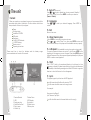
Content
When you unpack your new player, be sure you have removed all the
accessories and product information. The items below should have
been packed in the box with your player:
Player
Docking station
Installation CD-ROM
USB cable
Earphones
5 x AAA / LR03 batteries
1 x CR2025 battery
Remote control
Operating instructions
12 - Language
Press
confirm.
or
to select your desired language. Press MODE to
13 - Exit
Return to last menu.
14 - About memory size
Press MODE for two seconds to enter main menu.
Press
or
to select “About” icon, then press MODE to enter and
check the total memory of the player and the available memory capacity.
Please read how to insert the batteries and the battery usage
recommendations at the end of this manual.
15 - A-B repeat (Only available in music play mode or voice mode)
To repeat a sequence between two points A and B, press MODE at the
beginning of the sequence you want to repeat. Then press MODE again at
the end of sequence. Then the sequence is played repeatedly until you press
MODE to resume normal playback.
16 - Hold
Slide “ HOLD ” switch to the arrowhead direction to lock player. Lock icon
appears on display. This deactivates all buttons’ functions and eliminates
the possibility of accidentally pressing buttons. Slide HOLD switch to opposite
direction to unlock all buttons. Lock icon disappears.
17 - Lyrics
This player supports lyrics function with MP3 playback.
Lyric file format should be files with extension *.LRC.
Lyric file name should be same as the song’s name.
For example:
Song name: Jay-Sky.mp3
Lyric file name : Jay-Sky.lrc
3
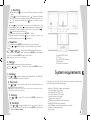
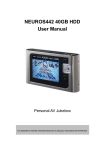
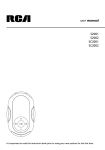
1. Previous/Rewind
2. USB
3. Earphone plug
4. Next/Fast forward
5. Play / pause
6. Volume Up
7. Volume Down
8. LCD display
9. Hold switch
10. Mode button
11. Battery door
Lyric file should be saved in the same folder as in the song’s.
8