1
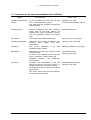
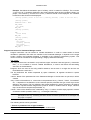
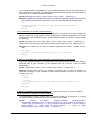
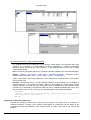
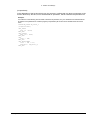
User Manual for
PLC Programming
with
CoDeSys 2.3
Copyright 1994, 1997, 1999, 2001, 2002, 2003, 2004, 2005, 2006, 2007, 2010
by 3S-Smart Software Solutions GmbH
All rights reserved.
We have gone to great lengths to ensure this documentation is correct and complete.
However, since it is not possible to produce an absolutely error-free text, please feel free to
send us your hints and suggestions for improving it.
Trademark
Intel is a registered trademark and 80286, 80386, 80486, Pentium are trademarks of Intel
Corporation.
Microsoft, MS and MS-DOS are registered trademarks, Windows and Intellisense are
trademarks of Microsoft Corporation.
Publisher
3S - Smart Software Solutions GmbH
Memminger Straße 151
D-87439 Kempten
Tel. +49 831 5 40 31 - 0
Fax +49 831 5 40 31 – 50
Last update 28.10.2010
Document Version 6.0, CoDeSys V.2.3.9.24
Table Of Content
Content
1 A Brief Introduction to CoDeSys
1.1
1.2
1.3
What is CoDeSys............................................................................................... 1-1
Overview of CoDeSys Functions... .................................................................... 1-1
Overview on the user documentation for CoDeSys ........................................... 1-3
2 What is What in CoDeSys
2.1
2.2
2.2.1
2.2.2
2.2.3
2.2.4
2.2.5
2.2.6
2.3
2.4
CoDeSys V2.3
4-1
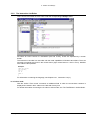
The Main Window... ........................................................................................... 4-1
Project Options... ............................................................................................... 4-3
Managing Projects... .......................................................................................... 4-22
Managing Objects in a Project... ........................................................................ 4-53
General Editing Functions.................................................................................. 4-61
General Online Functions... ............................................................................... 4-67
Window set up... ................................................................................................ 4-83
Help when you need it... .................................................................................... 4-83
5 Editors in CoDeSys
5.1
5.2
5.2.1
5.2.2
5.2.3
5.3
5.3.1
5.3.2
5.3.3
5.4
5.4.1
5.4.2
5.4.3
5.4.4
3-1
Controlling a Traffic Signal Unit... ...................................................................... 3-1
Visualizing a Traffic Signal Unit... ...................................................................... 3-11
4 The Individual Components
4.1
4.2
4.3
4.4
4.5
4.6
4.7
4.8
2-1
Project Components... ....................................................................................... 2-1
Languages... ...................................................................................................... 2-9
Instruction List (IL)... .......................................................................................... 2-9
Structured Text (ST)... ....................................................................................... 2-11
Sequential Function Chart (SFC)....................................................................... 2-16
Function Block Diagram (FBD)... ....................................................................... 2-21
The Continuous Function Chart Editor (CFC).................................................... 2-21
Ladder Diagram (LD)... ...................................................................................... 2-22
Debugging, Online Functions............................................................................. 2-23
The Standard... .................................................................................................. 2-26
3 We Write a Little Program
3.1
3.2
1-1
5-1
This is for all Editors........................................................................................... 5-1
Declaration Editor .............................................................................................. 5-3
Working in the Declaration Editor ...................................................................... 5-3
Declaration Editors in Online Mode ................................................................... 5-10
Pragma instructions in the Declaration Editor.................................................... 5-11
The Text Editors................................................................................................. 5-21
Working in text editors ....................................................................................... 5-21
The Instruction List Editor .................................................................................. 5-25
The Editor for Structured Text............................................................................ 5-26
The Graphic Editors ........................................................................................... 5-26
Working in graphic editors ................................................................................. 5-26
The Function Block Diagram Editor ................................................................... 5-30
The Ladder Editor .............................................................................................. 5-35
The Sequential Function Chart Editor................................................................ 5-41
i
Table Of Content
5.4.5
The Continuous Function Chart Editor (CFC) .................................................... 5-49
6 The Ressources
6.1
6.2
6.2.1
6.2.2
6.2.3
6.3
6.3.1
6.3.2
6.3.3
6.3.4
6.3.5
6.3.6
6.4
6.5
6.6
6.6.1
6.6.2
6.6.3
6.6.4
6.6.5
6.6.6
6.6.7
6.6.8
6.6.9
6.6.10
6.6.11
6.6.12
6.7
6.7.1
6.7.2
6.7.3
6.7.4
6.8
6.8.1
6.8.2
6.8.3
6.9
6.9.1
6.9.2
6.9.3
6.9.4
6.9.5
6.10
6.11
6.11.1
6.11.2
6.11.3
6.11.4
6.11.5
6.11.6
6.11.7
ii
6-1
Overview of the Ressources .............................................................................. 6-1
Global Variables, Variable Configuration, Document Frame ............................. 6-2
Global Variables................................................................................................. 6-2
Variable Configuration........................................................................................ 6-6
Document Frame ............................................................................................... 6-7
Alarm Configuration ........................................................................................... 6-8
Overview ............................................................................................................ 6-8
General information on alarms, Terms............................................................... 6-9
Alarm classes..................................................................................................... 6-10
Alarm groups...................................................................................................... 6-13
Alarm saving ...................................................................................................... 6-15
'Extras' Menu: Settings....................................................................................... 6-16
Library Manager ................................................................................................. 6-16
Log ..................................................................................................................... 6-18
PLC Configuration.............................................................................................. 6-20
Overview ............................................................................................................ 6-20
Working in the PLC Configuration...................................................................... 6-21
General Settings in the PLC Configuration ........................................................ 6-23
Custom specific parameter dialog...................................................................... 6-24
Configuration of an I/O Module .......................................................................... 6-25
Configuration of a Channel ................................................................................ 6-28
Configuration of Profibus Modules ..................................................................... 6-29
Configuration of CANopen modules................................................................... 6-36
Configuration of a CanDevice (CANopen Slave) ............................................... 6-41
Configuration of DeviceNet Modules.................................................................. 6-45
PLC Configuration in Online Mode..................................................................... 6-49
Hardware scan/State/Diagnosis information from the PLC ................................ 6-50
Task Configuration ............................................................................................. 6-51
Overview ............................................................................................................ 6-51
Working in the Task Configuration ..................................................................... 6-52
System Events ................................................................................................... 6-55
Task Configuration in Online Mode.................................................................... 6-55
Watch- and Recipe Manager ............................................................................. 6-57
Overview ............................................................................................................ 6-57
Creating Watch Lists, Recipes ........................................................................... 6-59
Watch- and Recipe Manager in the Online Mode .............................................. 6-63
The Sampling Trace........................................................................................... 6-64
Overview and Configuration............................................................................... 6-64
Generating a Trace Sampling ............................................................................ 6-66
Looking at the Sampling Trace .......................................................................... 6-67
'Extras' 'Save trace values'................................................................................. 6-69
'Extras' 'External Trace Configurations'.............................................................. 6-69
Workspace ......................................................................................................... 6-70
Parameter Manager ........................................................................................... 6-70
Overview, Activating........................................................................................... 6-71
The Parameter Manager Editor, Overview......................................................... 6-72
Parameter List Types and Attributes.................................................................. 6-73
Managing parameter lists................................................................................... 6-75
Editing parameter lists........................................................................................ 6-76
Parameter Manager in Online Mode .................................................................. 6-78
Export / Import of parameter lists ....................................................................... 6-79
CoDeSys V2.3
Table Of Content
6.12
6.13
6.13.1
6.13.2
6.13.3
6.13.4
6.14
6.14.1
6.14.2
6.14.3
Target Settings................................................................................................... 6-79
The PLC-Browser .............................................................................................. 6-80
General remarks concerning PLC-Browser operation ....................................... 6-80
Command entry in the PLC-Browser ................................................................. 6-81
Use of macros during the command entry in PLC-Browser............................... 6-83
Further PLC-Browser options ............................................................................ 6-83
Tools .................................................................................................................. 6-84
Properties of available Tool Shortcuts (Object Properties) ................................ 6-84
Managing Tool Shortcuts ................................................................................... 6-87
Frequently asked questions on Tools ................................................................ 6-88
7 ENI
7-1
7.1.1
7.1.2
7.1.3
7.1.4
What is ENI ........................................................................................................ 7-1
Preconditions for Working with an ENI project data base.................................. 7-1
Working with the ENI project data base in CoDeSys......................................... 7-2
Object categories concerning the project data base.......................................... 7-2
8 DDE Interface
8.1
8.2
DDE interface of the CoDeSys programming system........................................ 8-1
DDE communcation with the GatewayDDE Server... ........................................ 8-2
9 The License Management in CoDeSys
9.1
9.1.1
10.1
10.2
10.3
10.4
10.5
10.6
10.7
10.8
10.9
10.10
Appendix B:
10.11
10.12
10.13
10.14
Appendix C:
10.15
10.16
Appendix D:
9-1
The License Manager ........................................................................................ 9-1
Creating a licensed library in CoDeSys ............................................................. 9-1
10 APPENDIX
Appendix A:
8-1
10-1
IEC Operators and additional norm extending functions
10-1
Arithmetic Operators... ....................................................................................... 10-1
Bitstring Operators... .......................................................................................... 10-4
Bit-Shift Operators... .......................................................................................... 10-6
Selection Operators ........................................................................................... 10-8
Comparison Operators....................................................................................... 10-11
Address Operators............................................................................................. 10-13
Calling Operators... ............................................................................................ 10-14
Type Conversions... ........................................................................................... 10-14
Numeric Operators............................................................................................. 10-20
Initialization Operator ......................................................................................... 10-24
Operands in CoDeSys
10-25
Constants........................................................................................................... 10-25
Variables ............................................................................................................ 10-27
Addresses .......................................................................................................... 10-29
Functions ........................................................................................................... 10-30
Data types in CoDeSys
10-31
Standard data types........................................................................................... 10-31
Defined data types ............................................................................................. 10-33
The CoDeSys Libaries
10-39
10.17
The Standard.lib library...................................................................................... 10-39
10.17.1 String functions... ............................................................................................... 10-39
CoDeSys V2.3
iii
Table Of Content
10.17.2 Bistable Function Blocks... ................................................................................. 10-42
10.17.3 Trigger................................................................................................................ 10-44
10.17.4 Counter... ........................................................................................................... 10-45
10.17.5 Timer... ............................................................................................................... 10-47
10.18
The Util.lib library ............................................................................................... 10-50
10.18.1 BCD Conversion ................................................................................................ 10-50
10.18.2 Bit-/Byte Functions ............................................................................................. 10-50
10.18.3 Mathematic Auxiliary Functions ......................................................................... 10-51
10.18.4 Controllers.......................................................................................................... 10-54
10.18.5 Signal Generators... ........................................................................................... 10-57
10.18.6 Function Manipulators........................................................................................ 10-59
10.18.7 Analog Value Processing... ................................................................................ 10-60
10.19
The AnalyzationNew.lib library........................................................................... 10-61
10.20
CoDeSys System Libraries ................................................................................ 10-62
Appendix E:
10.21
10.22
10.23
Appendix F:
10.24
10.25
Appendix G:
10.26
10.27
10.28
Appendix H:
Operators and Library Modules Overview
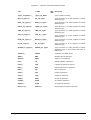
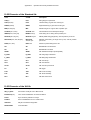
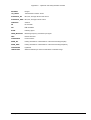
10-63
Operators in CoDeSys ....................................................................................... 10-63
Elements of the Standard.lib: ............................................................................. 10-66
Elements of the Util.lib ....................................................................................... 10-66
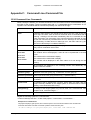
Command Line-/Command File
10-69
Command Line Commands ............................................................................... 10-69
Command File (cmdfile) Commands.................................................................. 10-70
Siemens Import
10-79
Import from a SEQ Symbol File ......................................................................... 10-79
Import from a S5 Project File ............................................................................. 10-80
Converting S5 to IEC 61131-3 ........................................................................... 10-80
Target Settings in Detail
10-85
10.29
Settings in Category Target Platform ................................................................. 10-85
10.29.1 Target system Intel 386 compatible, Category Target Platform......................... 10-85
10.29.2 Target system Motorola 68K, Category Target Platform.................................... 10-86
10.29.3 Target system Infineon C16x, Category Target Platform................................... 10-87
10.29.4 Target systems Intel StrongARM und Power PC, Category Target Platform..... 10-88
10.29.5 Target system MIPS, Category Target Platform ................................................ 10-89
10.29.6 Target system 'Hitachi SH', Category Target Platform....................................... 10-90
10.29.7 Target system '8051 compatible', Category Target Platform ............................. 10-91
10.29.8 Target System 'TriCore’, Categorie Target platform .......................................... 10-91
10.30
Target Settings for Category Memory Layout .................................................... 10-92
10.31
Target Settings in Category General.................................................................. 10-94
10.32
Target Settings in Category Networkfunctionality .............................................. 10-96
10.33
Target Settings in Category Visualization .......................................................... 10-97
Appendix I:
10.34
10.35
Appendix J:
10.36
10.37
10.38
iv
Use of Keyboard
10-99
Use of Keyboard ................................................................................................ 10-99
Key Combinations .............................................................................................. 10-99
Recommendations on the naming of identifiers
10-103
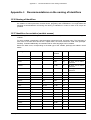
Naming of identifiers .......................................................................................... 10-103
Identifiers for variables (variable names) ........................................................... 10-103
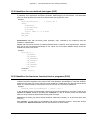
Identifiers for user-defined data types (DUT) ..................................................... 10-105
CoDeSys V2.3
Table Of Content
10.39
10.40
Appendix K:
10.41
10.42
11 Index
CoDeSys V2.3
Identifiers for functions, function blocks, programs (POU)................................. 10-105
Identifiers for Visualizations ............................................................................... 10-106
Compiler Errors and Warnings
10-107
Warnings............................................................................................................ 10-107
Errors ................................................................................................................. 10-113
CLI
v
Table Of Content
vi
CoDeSys V2.3
1 - A Brief Introduction to CoDeSys
1 A Brief Introduction to CoDeSys
1.1 What is CoDeSys
CoDeSys is a complete development environment for your PLC. (CoDeSys stands for Controlled
Development System).
CoDeSys puts a simple approach to the powerful IEC language at the disposal of the PLC
programmer. Use of the editors and debugging functions is based upon the proven development
program environments of advanced programming languages (such as Visual C++).
1.2 Overview of CoDeSys Functions...
How is a project structured?
A project is put into a file named after the project. The first POU (Program Organization Unit) created
in a new project will automatically be named PLC_PRG. The process begins here (in compliance with
the main function in a C program), and other POUs can be accessed from the same point (programs,
function blocks and functions).
Once you have defined a Task Configuration, it is no longer necessary to create a program named
PLC_PRG. You will find more about this in the Task Configuration chapter.
There are different kinds of objects in a project: POUs, data types, display elements (visualizations)
and resources.
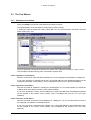
The Object Organizer contains a list of all the objects in your project.
How do I set up my project?
First you should configure your PLC in order to check the accuracy of the addresses used in the
project.
Then you can create the POUs needed to solve your problem.
Now you can program the POUs you need in the desired languages.
Once the programming is complete, you can compile the project and remove errors should there be
any.
How can I test my project?
Once all errors have been removed, activate the simulation, log in to the simulated PLC and "load"
your project in the PLC. Now you are in Online mode.
Now open the window with your PLC Configuration and test your project for correct sequence. To do
this, enter input variables manually and observe whether outputs are as expected. You can also
observe the value sequence of the local variables in the POUs. In the Watch- and Recipe Manager
you can configure data records whose values you wish to examine.
Debugging
In case of a programming error you can set breakpoints. If the process stops at such a breakpoint,
you can examine the values of all project variables at this point in time. By working through
sequentially (single step) you can check the logical correctness of your program.
Additional Online Functions
Further debugging functions:
You can set program variables and inputs and outputs at certain values.
CoDeSys V2.3
1-1
Overview of CoDeSys Functions...
You can use the flow control to check which program lines have been run.
A Log records operations, user actions and internal processes during an online session in a
chronological order.
If activated in the target settings the Sampling Trace allows you to trace and display the actual
course of variables over an extended period of time.
Also a target specific function is the PLC Browser which can serve to request certain information from
the PLC.
Once the project has been set up and tested, it can be loaded down to the hardware and tested as
well. The same online functions as you used with the simulation will be available.
Additional CoDeSys Features
The entire project can be documented or exported to a text file at any time.
For communication purposes CoDeSys has a symbolic interface and a DDE interface. A Gateway
Server plus OPC Server and DDE Server are components of the CoDeSys-standard installation
packet.
Using the appropriate target settings, which can be loaded with the aid of a target file (Target
Support Package) allows to load the same CoDeSys project to various target systems.
Network global variables and a Parameter Manager might be available, if activated by the current
target settings, for data exchange within a network of controllers.
ENI: The 'Engineering Interface' can be used to access any desired source code management
program via the ENI Server, which is running as an independent process. CoDeSys POUs and
compile files can be filed in that data base and are by that accessible also by other clients of the ENI
Server. This allows multi user operation during the work on a CoDeSys project, it provides a common
data pool for different tools besides CoDeSys and it makes possible a version management.
Tools: This functionality also is target dependent and allows to start target-specific executable files in
a CoDeSys project. Besides that files can be defined, which should be loaded to the controller.
Connections to external tools can be pre-defined in the target file or/and inserted in the project
Resource tree.
A CoDeSys visualization can be processed target specifically to be available as Web-Visualization
and/or Target-Visualization. This allows to run and view the visualization via Internet or on a PLCmonitor.
1-2
CoDeSys V2.3
1 - A Brief Introduction to CoDeSys
1.3 Overview on the user documentation for CoDeSys
Module
Docu Contents
Name of File
CoDeSys Programming
System
On hand manual and online help via help
menu in the programming system
First steps with the CoDeSys Programming
system (sample)
CoDeSys_V23_E.pdf
First Steps with CoDeSys V23.pdf
Gateway Server
Concept, installation and User Interface;
Online Help for the User Interface via
Gateway menu (can be opened by a mouseclick on the gateway symbol in the system
tray)
Gateway Manual.pdf
OPC Server
OPC-Server V2.0, Installation and Use
OPC_20_How_to_use_E.pdf
CoDeSys Visualization
Manual for the CoDeSys Visualization incl.
CoDeSys
HMI,
Targetand
WebVisualization
CoDeSys_Visu_V23_E.pdf
SoftMotion
How to use, description
SoftMotion library modules
CoDeSys_SoftMotion_V23_E.pdf
Bibliotheken
Standard.lib and Util.lib are described in the
on hand manual.
For each of the CoDeSys System Libraries
there is a document <library name>.pdf
SoftMotion
libraries:
see
SoftMotiondocumentation.
<SysLib-Name>.pdf
CoDeSys_V23_E.pdf
ENI Server
Installation and configuration of the ENI
Servers concerning the source control of a
CoDeSys project in an external data base.
Configuration of ENI in CoDeSys: see the on
hand manual.
ENI Admin, ENI Control and ENI Explorer:
see the referring online help.
EniServerQuickstart_E.pdf
CoDeSys_V23_E.pdf
CoDeSys V2.3
of
the
main
1-3
Overview on the user documentation for CoDeSys
1-4
CoDeSys V2.3
2 - What is What in CoDeSys
2 What is What in CoDeSys
2.1 Project Components...
Project
A project contains all of the objects in a PLC program. A project is saved in a file named after the
project. The following objects are included in a project:
POUs (Program Organization Units), data types, visualizations, resources, and libraries.
POU (Program Organization Unit)
Functions, function blocks, and programs are POUs which can be supplemented by actions.
Each POU consists of a declaration part and a body. The body is written in one of the IEC
programming languages which include IL, ST, SFC, FBD, LD or CFC.
CoDeSys supports all IEC standard POUs. If you want to use these POUs in your project, you must
include the library standard.lib in your project.
POUs can call up other POUs. However, recursions are not allowed.
Function
A function is a POU, which yields exactly one data element (which can consist of several elements,
such as fields or structures) when it is processed, and whose call in textual languages can occur as
an operator in expressions.
When declaring a function do not forget that the function must receive a type. This means, after the
function name, you must enter a colon followed by a type. Regard Appendix J: Recommendations on
the naming.
A correct function declaration can look like this example:
FUNCTION Fct: INT
In addition, a result must be assigned to the function. That means that function name is used as an
output variable.
A function declaration begins with the keyword FUNCTION.
In IL a function call only can be positioned within actions of a step or within a transition.
In ST a function call can be used as operand in an expression.
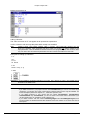
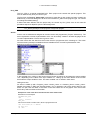
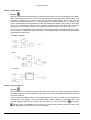
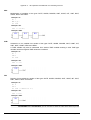
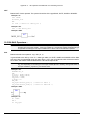
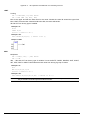
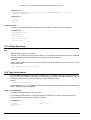
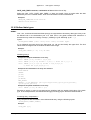
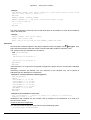
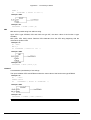
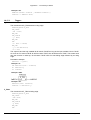
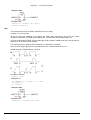
Example in IL of a function that takes three input variables and returns the product of the first two
divided by the third:
CoDeSys V2.3
2-1
Project Components...
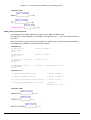
Example of a function in IL
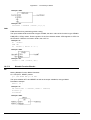
Calling a function:
The call of a function in ST can appear as an operand in expressions.
In SFC a function call can only take place within a step or a transition.
Note:
CoDeSys allows using global variables within a function. This intentionally deviates from the
IEC61131-3 standard, which prescribes that return value of a function only will be modified by the
input parameters. Thus the difference between functions and programs is just, that functions return
only one return value and that their parameters and return values are handled over the stack.
Examples for calling up a function.
in IL:
LD 7
Fct 2,4
ST Result
in ST:
Result := Fct(7, 2, 4);
in FBD:
Attention: If a local variable is declared as RETAIN in a function, this is without any effect ! The variable will not
be written to the Retain area !
Note:
2-2
The following check function names are reserved for the described usage:
- If you define a function in your project with the name CheckBounds, you can use it to check range
overflows in your project! The name of the function is defined and may have only this identifier. For
further description please see chapter 10.1, Arithmetic Operators, DIV.
- If you define functions in your project with the names CheckDivByte, CheckDivWord,
CheckDivDWord resp. CheckDivReal, you can use them to check the value of the divisor if you
use the operator DIV, for example to avoid a division by 0.
- If you define functions with the names CheckRangeSigned and CheckRangeUnsigned, then
range exceeding of variables declared with subrange types (see chapter 10.16, Data types) can be
intercepted.
CoDeSys V2.3
2 - What is What in CoDeSys
Function Block
A function block is a POU which provides one or more values during the procedure. As opposed to a
function, a function block provides no return value.
A function block declaration begins with the keyword FUNCTION_BLOCK. Regard Appendix J:
Appendix J: Recommendations on the naming.
Reproductions or instances (copies) of a function block can be created.
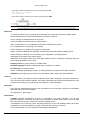
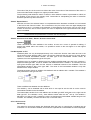
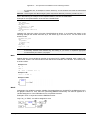
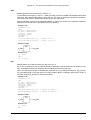
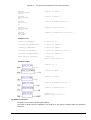
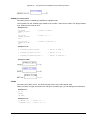
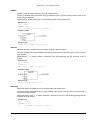
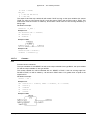
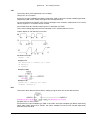
Example of a function block in IL
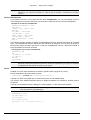
Example in IL of a function block with two input variables and two output variables. One output is the product of the
two inputs, the other a comparison for equality:
Function Block Instances
Reproductions or instances (copies) of a function block can be created.
Each instance possesses its own identifier (the Instance name), and a data structure which contains
its inputs, outputs, and internal variables. Instances are declared locally or globally as variables,
whereas the name of the function block is indicated as the type of an identifier. Regard Appendix J:
Appendix J: Recommendations on the naming.
Example of an instance with the name INSTANCE of the FUB function block:
fubinstance: FUB;
Function blocks are always called through the instances described above.
Only the input and output parameters can be accessed from outside of an function block instance, not
its internal variables.
Example for accessing an input variable
The function block FB has an input variable in1 of the type INT.
PROGRAM prog
VAR
fbinst1:fb;
END_VAR
LD 17
ST fbinst1.iIn1
CAL fbinst1
END_PROGRAM
CoDeSys V2.3
2-3
Project Components...
The declaration parts of function blocks and programs can contain instance declarations. Instance
declarations are not permitted in functions.
Access to a function block instance is limited to the POU in which it was declared unless it was
declared globally.
The instance name of a function block instance can be used as the input for a function or a function
block.
Note:
Note:
All values are retained after processing a function block until the next it is processed. Therefore,
function block calls with the same arguments do not always return the same output values!
If there at least one of the function block variables is a retain variable, the total instance is stored in
the retain area.
Calling a function block
The input and output variables of a function block can be accessed from another POU by setting up
an instance of the function block and specifying the desired variable using the following syntax:
<Instance name>.<Variable name>
Assigning parameters at call:
If you would like to set input and/or output parameters when you call the function block, you can do
this in the text languages IL and ST by assigning values to the parameters after the instance name of
the function block in parentheses (for input parameters this assignment takes place using ":=" just as
with the initialization of variables at the declaration position, for output parameters "=>" is to be used).
If the instance is inserted via input assistant (<F2>) with option With arguments in the
implementation window of a ST or IL POU, it will be displayed automatically according to this syntax
with all of its parameters. But you not necessarily must assign these parameters.
Example:
FBINST is a local variable of type of a function block, which contains the input variable xx and the
output variable yy. When FBINST is inserted in a ST program via input assistant, the call will be
displayed as follows: FBINST1(xx:= , yy=> );
InOutVariables at call:
Please regard, that the InOutVariables (VAR_IN_OUT) of a function block are handed over as
pointers. For this reason in a call of a function block no constants can be assigned to VAR_IN_OUTs
and there is no read or write access from outside to them.
Example
Calling a VAR_IN_OUT variable iInOut1 of function block fubo in a ST module:
VAR
fuboinst:fubo;
iVar1:int;
END_VAR
iVar1:=2;
fuboinst(iInOut1:=iVar1);
not allowed in this case: “fuboinst(iInOut1:=2);” or “fuboinst.iInOut1:=2;”
Examples for calling function block FUB:
Function block FUB, see above, chapter 'Function Block'
The multiplication result is saved in the variable ERG, and the result of the comparison is saved in
QUAD. An instance of FUB with the name INSTANCE is declared.
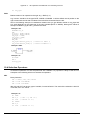
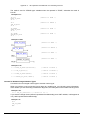
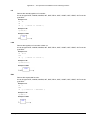
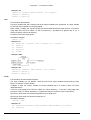
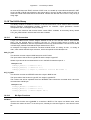
This is how the instance of a function block is called in IL :
2-4
CoDeSys V2.3
2 - What is What in CoDeSys
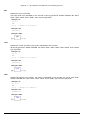
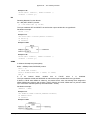
This is how the instance of a function block is called in ST (the declaration part the same as with IL)
This is how the instance of a function block is called in FBD (the declaration part the same as with IL)
In SFC function block calls can only take place in steps.
Program
A program is a POU which returns several values during operation. Programs are recognized globally
throughout the project. All values are retained from the last time the program was run until the next.
Programs can be called. A program call in a function is not allowed. There are also no instances of
programs.
If a POU calls a program, and if thereby values of the program are changed, then these changes are
retained the next time the program is called, even if the program has been called from within another
POU.
This is different from calling a function block. There only the values in the given instance of a function
block are changed.
CoDeSys V2.3
2-5
Project Components...
These changes therefore play a role only when the same instance is called.
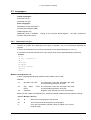
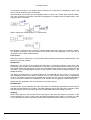
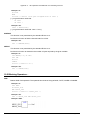
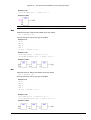
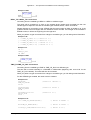
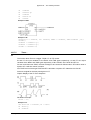
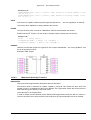
Example of a program
A program declaration begins with the keyword PROGRAM and ends with END_PROGRAM. Regard
Appendix J: Appendix J: Recommendations on the naming.
If you would like to set input and/or output parameters when you call the program, you can do this in
the text languages IL and ST by assigning values to the parameters after the program name in
parentheses (for input parameters this assignment takes place using ":=" just as with the initialization
of variables at the declaration position, for output parameters "=>" is to be used).
If the program is inserted via input assistant (<F2>) with option With arguments in the
implementation window of a ST or IL POU, it will be displayed automatically according to this syntax
with all of its parameters. But you not necessarily must assign these parameters.
Examples for program calls:
In IL:
CAL PRGexample2
LD PRGexample2.out_var
ST
ERG
or with assigning the parameters (input assistant "With arguments", see above):
CAL PRGexample2(in_var:=33, out_var=>erg )
In ST:
PRGexample2;
Erg := PRGexample2.out_var;
or with assigning the parameters (input assistant "With arguments", see above):
PRGexample2(in_var:=33, out_var=>erg );
In FBD:
Example for a possible call sequence for PLC_PRG:
See the program PRGexample shown in the picture at top of this chapter:
LD 0
ST
PRGexample.PAR (*Default setting for PAR is 0*)
CAL IL call (*ERG in IL call results in 1*)
CAL ST call (*ERG in ST call results in 2*)
CAL FBD call (*ERG in FBD call results in 3*)
If the variable PAR from the program PRGexample is initialized by a main program with 0, and then one after
the other programs are called with above named program calls, then the ERG result in the programs will have
the values 1, 2, and 3. If one exchanges the sequence of the calls, then the values of the given result
parameters also change in a corresponding fashion.
2-6
CoDeSys V2.3
2 - What is What in CoDeSys
PLC_PRG
The PLC_PRG is a special predefined POU. Each project must contain this special program. This
POU is called exactly once per control cycle.
The first time the 'Project' 'Object Add' command is used after a new project has been created, the
default entry in the POU dialog box will be a POU named PLC_PRG of the program type. You should
not change this default setting!
If tasks have been defined, then the project may not contain any PLC_PRG, since in this case the
procedure sequence depends upon the task assignment.
Attention: Do not delete or rename the POU PLC_PRG (assuming you are not using a Task Configuration)!
PLC_PRG is generally the main program in a single task program.
Action
Actions can be defined and assigned to function blocks and programmes ('Project' 'Add action'). The
action represents a further implementation which can be entirely created in another language as the
"normal" implementation. Each action is given a name.
An action works with the data from the function block or programme which it belongs to. The action
uses the same input/output variables and local variables as the "normal" implementation uses.
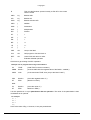
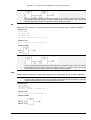
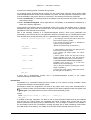
Example for an action of a function block
In the example given, calling up the function block Counter increases or decreases the output variable
"out", depending on the value of the input variable "in". Calling up the action Reset of the function
block sets the output variable to zero. The same variable "out" is written in both cases.
Calling an action:
An action is called up with <Program_name>.<Action_name> or <Instance_name>.<Action_name>.
Regard the notation in FBD (see example below) ! If it is required to call up the action within its own
block, one just uses the name of the action in the text editors and in the graphic form the function
block call up without instance information.
Examples for calls of the above described action from another POU:
Declaration for all examples:
PROGRAM PLC_PRG
VAR
Inst : Counter;
END_VAR
Call of action 'Reset' in another POU, which is programmed in IL:
CAL Inst.Reset(In := FALSE)
LD Inst.out
ST ERG
CoDeSys V2.3
2-7
Project Components...
Call of action 'Reset' in another POU, which is programmed in ST:
Inst.Reset(In := FALSE);
Erg := Inst.out;
Call of action 'Reset' in another POU, which is programmed in FBD:
Note:
Actions play an important role in blocks in sequential function charts, see Sequential Function Chart.
The IEC standard does not recognise actions other than actions of the sequential function chart.
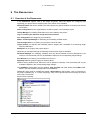
Resources
You need the resources for configuring and organizing your project and for tracing variable values:
Global Variables which can be used throughout the project or network
Library manager for adding libraries to the project
Log for recording the actions during an online session
Alarm Configuration for the configuration of the alarm handling in the project
PLC Configuration for configuring your hardware
Task Configuration for guiding your program through tasks
Watch- and Recipe Manager for displaying variable values and setting default variable values
Target Settings for selection and if necessary final configuration of the target system
Workspace as an image of the project options
Depending on the target system and on the target settings made in CoDeSys the following resources
also might be available in your project:
Sampling Trace for graphic display of variable values
Parameter Manager for data exchange with other controllers in a network
PLC-Browser as controller monitor
Tools – availability depending on target – for calling external tool programs from within CoDeSys
SoftMotion functionality (due to license) with CNC-Editor (CNC program list) and CAM-Editor
Libraries
You can include in your project a series of libraries whose POUs, data types, and global variables you
can use just like user-defined variables. The libraries standard.lib and util.lib are standard parts of the
program and are always at your disposal. See chapter 6.4 'Library Manager'.
Data types
Along with the standard data types the user can define his own data types. Structures, enumeration
types and references can be created.
See Appendix C: 'Data Types'.
Visualization
CoDeSys provides visualizations so that you can display your project variables. You can plot
geometric elements off-line with the help of the visualization. In Online mode, these can then change
their form/color/text output in response to specified variable values.
A visualization can be used as a pure operating interface for a PLC with CoDeSys HMI or as a WebVisualization or Target-Visualization running via Internet resp. directly on the PLC.
See for more details in the user manual for the CoDeSys Visualization.
2-8
CoDeSys V2.3
2 - What is What in CoDeSys
2.2 Languages...
CoDeSys supports all languages described by the standard IEC-61131:
Textual Languages:
Instruction List (IL)
Structured Text (ST)
Grafic Languages:
Sequential Function Chart (SFC)
Function Block Diagram (FBD)
Ladder Diagram (LD)
Additionally there is available - basing on the Function Block Diagram - the grafic Continuous
Function Chart Editor (CFC).
2.2.1
Instruction List (IL)...
An instruction list (IL) consists of a series of instructions. Each instruction begins in a new line and
contains an operator and, depending on the type of operation, one or more operands separated by
commas.
In front of an instruction there can be an identification mark (label) followed by a colon (:).
A comment must be the last element in a line. Empty lines can be inserted between instructions.
Example:
LD 17
ST lint (* Kommentar *)
GE 5
JMPC next
LD idword
EQ istruct.sdword
STN test
next:
Modifiers and operators in IL
In the IL language the following operators and modifiers can be used.
Modifiers:
C
with JMP, CAL, RET:
N
with
JMPC,
RETC:
N
otherwise:
The instruction is only then executed if the result
of the preceding expression is TRUE.
CALC, The instruction is only then executed if the result
of the preceding expression is FALSE.
Negation of the operand (not of the accumulator)
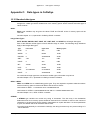
Below you find a table of all operators in IL with their possible modifiers and the relevant meaning:
Operator Modifiers Meaning
LD
N
Make current result equal to the operand
ST
N
Save current result at the position of the operand
S
CoDeSys V2.3
Then put the Boolean operand exactly at TRUE if the current
result is TRUE
2-9
Languages...
R
Then put the Boolean operand exactly at FALSE if the current
result is TRUE
AND
N,(
Bitwise AND
OR
N,(
Bitwise OR
XOR
N,(
Bitwise exclusive OR
ADD
(
Addition
SUB
(
Subtraction
MUL
(
Multiplication
DIV
(
Division
GT
(
>
GE
(
>=
EQ
(
=
NE
(
<>
LE
(
<=
LT
(
<
JMP
CN
Jump to the label
CAL
CN
Call program or function block or
RET
CN
Leave POU and return to caller.
)
Evaluate deferred operation
Click here to get a listing of all IEC operators.
Example of an IL program while using some modifiers:
LD
TRUE
(*load TRUE in the accumulator*)
ANDN
BOOL1
(*execute AND with the negated value of the BOOL1 variable*)
JMPC
mark
(*if the result was TRUE, then jump to the label "mark"*)
LDN
BOOL2
(*save the negated value of *)
ST
ERG
(*BOOL2 in ERG*)
LD
BOOL2
(*save the value of *)
ST
ERG
*BOOL2 in ERG*)
label:
It is also possible in IL to put parentheses after an operation. The value of the parenthesis is then
considered as an operand.
For example:
LD
2
MUL 2
ADD 3
Erg
Here is the value of Erg 7. However, if one puts parentheses:
2-10
CoDeSys V2.3
2 - What is What in CoDeSys
LD 2
MUL (2
ADD 3
)
ST Erg
the resulting value for Erg is 10, the operation MUL is only then evaluated if you come to ")"; as
operand for MUL 5 is then calculated.
2.2.2
Structured Text (ST)...
The Structured Text consists of a series of instructions which, as determined in high level languages,
("IF..THEN..ELSE") or in loops (WHILE..DO) can be executed.
Example:
IF value < 7 THEN
WHILE value < 8 DO
value:=value+1;
END_WHILE;
END_IF;
Expressions
An expression is a construction which returns a value after its evaluation.
Expressions are composed of operators and operands. An operand can be a constant, a variable, a
function call, or another expression.
Valuation of expressions
The evaluation of expression takes place by means of processing the operators according to certain
binding rules. The operator with the strongest binding is processed first, then the operator with the
next strongest binding, etc., until all operators have been processed.
Operators with equal binding strength are processed from left to right.
Below you find a table of the ST operators in the order of their binding strength:
Operation
Symbol
Binding strength
Put in parentheses
(expression)
Strongest binding
Function call
Function name
(parameter list)
Exponentiation
EXPT
Negate
Building of complements
NOT
Multiply
Divide
Modulo
*
/
MOD
Add
Subtract
+
-
Compare
<,>,<=,>=
Equal to
Not equal to
=
<>
Boolean AND
AND
Boolean XOR
XOR
CoDeSys V2.3
2-11
Languages...
Boolean OR
OR
Weakest binding
There are the following instructions in ST, arranged in a table together with example:
Instruction type
Example
Assignment
A:=B; CV := CV + 1; C:=SIN(X);
Calling a function block and CMD_TMR(IN := %IX5, PT := 300);
use of the FB output
A:=CMD_TMR.Q
2-12
RETURN
RETURN;
IF
D:=B*B;
IF D<0.0 THEN
C:=A;
ELSIF D=0.0 THEN
C:=B;
ELSE
C:=D;
END_IF;
CASE
CASE INT1 OF
1: BOOL1 := TRUE;
2: BOOL2 := TRUE;
ELSE
BOOL1 := FALSE;
BOOL2 := FALSE;
END_CASE;
FOR
J:=101;
FOR I:=1 TO 100 BY 2 DO
IF ARR[I] = 70 THEN
J:=I;
EXIT;
END_IF;
END_FOR;
WHILE
J:=1;
WHILE J<= 100 AND ARR[J] <> 70 DO
J:=J+2;
END_WHILE;
REPEAT
J:=-1;
REPEAT
J:=J+2;
UNTIL J= 101 OR ARR[J] = 70
END_REPEAT;
EXIT
EXIT;
Empty instruction
;
CoDeSys V2.3
2 - What is What in CoDeSys
Assignment operator
On the left side of an assignment there is an operand (variable, address) to which is assigned the
value of the expression on the right side with the assignment operator :=
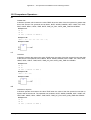
Example:
Var1 := Var2 * 10;
After completion of this line Var1 has the tenfold value of Var2.
Calling function blocks in ST
A function block is called in ST by writing the name of the instance of the function block and then
assigning the values of the parameters in parentheses. In the following example a timer is called with
assignments for the parameters IN and PT. Then the result variable Q is assigned to the variable A.
The result variable, as in IL, is addressed with the name of the function block, a following point, and
the name of the variable:
CMD_TMR(IN := %IX5, PT := 300);
A:=CMD_TMR.Q
RETURN instruction
The RETURN instruction can be used to leave a POU, for example depending on a condition
IF instruction
With the IF instruction you can check a condition and, depending upon this condition, execute
instructions.
Syntax:
IF <Boolean_expression1> THEN
<IF_instructions>
{ELSIF <Boolean_expression2> THEN
<ELSIF_instructions1>
.
.
ELSIF <Boolean_expression n> THEN
<ELSIF_instructions n-1>
ELSE
<ELSE_instructions>}
END_IF;
The part in braces {} is optional.
If the <Boolean_expression1> returns TRUE, then only the <IF_Instructions> are executed and none
of the other instructions.
Otherwise the Boolean expressions, beginning with <Boolean_expression2>, are evaluated one after
the other until one of the expressions returns TRUE. Then only those instructions after this Boolean
expression and before the next ELSE or ELSIF are evaluated.
If none of the Boolean expressions produce TRUE, then only the <ELSE_instructions> are evaluated.
Example:
IF temp<17
THEN heating_on := TRUE;
ELSE heating_on := FALSE;
END_IF;
Here the heating is turned on when the temperature sinks below 17 degrees. Otherwise it remains off.
CoDeSys V2.3
2-13
Languages...
CASE instruction
With the CASE instructions one can combine several conditioned instructions with the same condition
variable in one construct.
Syntax:
CASE <Var1> OF
<Value1>: <Instruction 1>
<Value2>: <Instruction 2>
<Value3, Value4, Value5>: <Instruction 3>
<Value6 .. Value10>: <Instruction 4>
...
<Value n>: <Instruction n>
ELSE <ELSE instruction>
END_CASE;
A CASE instruction is processed according to the following model:
If the variable in <Var1> has the value <Value i>, then the instruction <Instruction i> is executed.
If <Var 1> has none of the indicated values, then the <ELSE Instruction> is executed.
If the same instruction is to be executed for several values of the variables, then one can write these
values one after the other separated by commas, and thus condition the common execution.
If the same instruction is to be executed for a value range of a variable, one can write the initial value
and the end value separated by two dots one after the other. So you can condition the common
condition.
Example:
CASE INT1 OF
1, 5: BOOL1 := TRUE;
BOOL3 := FALSE;
2: BOOL2 := FALSE;
BOOL3 := TRUE;
10..20: BOOL1 := TRUE;
BOOL3:= TRUE;
ELSE
BOOL1 := NOT BOOL1;
BOOL2 := BOOL1 OR BOOL2;
END_CASE;
FOR loop
With the FOR loop one can program repeated processes.
Syntax:
INT_Var :INT;
FOR <INT_Var> := <INIT_VALUE> TO <END_VALUE> {BY <Step size>} DO
<Instructions>
END_FOR;
The part in braces {} is optional.
The <Instructions> are executed as long as the counter <INT_Var> is not greater than the
<END_VALUE>. This is checked before executing the <Instructions> so that the <instructions> are
never executed if <INIT_VALUE> is greater than <END_VALUE>.
When <Instructions> are executed, <INT_Var> is always increased by <Step size>. The step size can
have any integer value. If it is missing, then it is set to 1. The loop must also end since <INT_Var>
only becomes greater.
Example:
FOR Counter:=1 TO 5 BY 1 DO
Var1:=Var1*2;
2-14
CoDeSys V2.3
2 - What is What in CoDeSys
END_FOR;
Erg:=Var1;
Let us assume that the default setting for Var1 is the value 1. Then it will have the value 32 after the FOR loop.
Note: <END_VALUE> must not be equal to the limit value of the counter <INT_VAR>. For example: If the
variable Counter is of type SINT and if <END_VALUE> is 127, you will get an endless loop.
WHILE loop
The WHILE loop can be used like the FOR loop with the difference that the break-off condition can be
any Boolean expression. This means you indicate a condition which, when it is fulfilled, the loop will
be executed.
Syntax:
WHILE <Boolean expression>
<Instructions>
END_WHILE;
The <Instructions> are repeatedly executed as long as the <Boolean_expression> returns TRUE. If
the <Boolean_expression> is already FALSE at the first evaluation, then the <Instructions> are never
executed. If <Boolean_expression> never assumes the value FALSE, then the <Instructions> are
repeated endlessly which causes a relative time delay.
Note: The programmer must make sure that no endless loop is caused. He does this by changing the condition in
the instruction part of the loop, for example, by counting up or down one counter.
Example:
WHILE counter<>0 DO
Var1 := Var1*2;
Counter := Counter-1;
END_WHILE
The WHILE and REPEAT loops are, in a certain sense, more powerful than the FOR loop since one
doesn't need to know the number of cycles before executing the loop. In some cases one will,
therefore, only be able to work with these two loop types. If, however, the number of the loop cycles is
clear, then a FOR loop is preferable since it allows no endless loops.
REPEAT loop
The REPEAT loop is different from the WHILE loop because the break-off condition is checked only
after the loop has been executed. This means that the loop will run through at least once, regardless
of the wording of the break-off condition.
Syntax:
REPEAT
<Instructions>
UNTIL <Boolean expression>
END_REPEAT;
The <Instructions> are carried out until the <Boolean expression> returns TRUE.
If <Boolean expression> is produced already at the first TRUE evaluation, then <Instructions> are
executed only once. If <Boolean_expression> never assumes the value TRUE, then the
<Instructions> are repeated endlessly which causes a relative time delay.
Note: The programmer must make sure that no endless loop is caused. He does this by changing the condition in
the instruction part of the loop, for example by counting up or down one counter.
Example:
REPEAT
Var1 := Var1*2;
Counter := Counter-1;
CoDeSys V2.3
2-15
Languages...
UNTIL
Counter=0
END_REPEAT;
EXIT instruction
If the EXIT instruction appears in a FOR, WHILE, or REPEAT loop, then the innermost loop is ended,
regardless of the break-off condition.
2.2.3
Sequential Function Chart (SFC)...
The Sequential Function Chart (SFC) is a graphically oriented language which makes it possible to
describe the chronological order of different actions within a program. For this the actions are
assigned to step elements and the sequence of processing is controlled by transition elements.
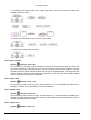
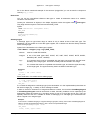
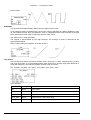
Example for a network in the Sequential Function Chart
For further information on the SFC Editor see Chapter 5.4.4.
Step
A POU written in a Sequential Function Chart consists of a series of steps which are connected with
each other through directed connections (transitions).
There are two types of steps.
The simplified type consists of an action and a flag which shows if the step is active. If the action of a
step is implemented, then a small triangle appears in upper right corner of the step.
An IEC step consists of a flag and one or more assigned actions or boolean variables. The associated
actions appear to the right of the step.
Action
An action can contain a series of instructions in IL or in ST, a lot of networks in FBD or in LD, or again
in Sequential Function Chart (SFC).
2-16
CoDeSys V2.3
2 - What is What in CoDeSys
With the simplified steps an action is always connected to a step. In order to edit an action, click twice
with the mouse on the step to which the action belongs. Or select the step and select the menu
command 'Extras' 'Zoom Action/Transition'. In addition, one input or output action per step is possible.
Actions of IEC steps hang in the Object Organizer directly under their SFC-POU and are loaded with a
double-clickor by pressing <Enter> in their editor. New actions can be created with 'Project' 'Add
Action'. You can assign max. nine actions to one IEC step.
Entry or exit action
Additional to a step action you can add an entry action and an exit action to a step. An entry action is
executed only once, right after the step has become active. An exit action is executed only once
before the step is deactivated.
A step with entry action is indicated by an "E" in the lower left corner, the exit action by an "X" in the
lower right corner.
The entry and exit action can be implemented in any language. In order to edit an entry or exit action,
double-clickin the corresponding corner in the step with the mouse.
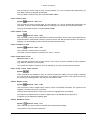
Example of a step with entry and exit action:
Transition / Transition condition
Between the steps there are so-called transitions.
A transition condition must have the value TRUE or FALSE. Thus it can consist of either a boolean
variable, a boolean address or a boolean constant. It can also contain a series of instructions having a
boolean result, either in ST syntax (e.g. (i<= 100) AND b) or in any language desired (see 'Extras'
'Zoom Action/Transition'). But a transition may not contain programs, function blocks or assignments!
In the SFC-Editor a transition condition can be written directly at the transition symbol or an own editor
window can be opened for entering the condition (see chapter 5.4.4, ''Extras' 'Zoom
Action/Transition'). Regard that the instructions entered in the editor window will take precedence!
Note:
Besides transitions, inching mode can also be used to skip to the next step; see SFCtip and
SFCtipmode.
Active step
After calling the SFC POU, the action (surrounded by a double border) belonging to the initial stepis
executed first. A step, whose action is being executed, is called active. In Online mode active steps
are shown in blue.
In a control cycle all actions are executed which belong to active steps. Thereafter the respective
following steps of the active steps become active if the transition conditions of the following steps are
TRUE. The currently active steps will be executed in the next cycle.
Note:
If the active step contains an output action, this will only be executed during the next cycle, provided
that the transition following is TRUE.
IEC step
Along with the simplified steps the standard IEC steps in SFC are available.
In order to be able to use IEC steps, you must link the special SFC library lecsfc.lib into your project.
Not more than nine actions can be assigned to an IEC step. IEC actions are not fixed as input, step or
output actions to a certain step as in the simplified steps, but are stored separately from the steps and
can be reused many times within a POU. For this they must be associated to the single steps with the
command 'Extras' 'Associate action'.
CoDeSys V2.3
2-17
Languages...
Along with actions, Boolean variables can be assigned to steps.
The activation and deactivation of actions and boolean variables can be controlled using so-called
qualifiers. Time delays are possible. Since an action can still be active, if the next step has been
processed, for example through the qualifier S (Set), one can achieve concurrent processes.
An associated boolean variable is set or reset with each call of the SFC block. That means, that at
each call the variable gets re-assigned value TRUE resp. FALSE.
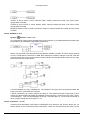
The actions associated with an IEC step are shown at the right of the step in a two-part box. The left
field contains the qualifier, possibly with time constant, and the right field contains the action name
respectively boolean variable name.
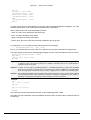
An example for an IEC step with two actions:
In order to make it easier to follow the processes, all active actions in online mode are shown in blue
like the active steps. After each cycle a check is made to see which actions are active.
Pay attention here also to the restrictions on the use of time-qualifiers in actions that are repeatedly
re-used within the same cycle (see 'Qualifier') !
Note: If an action has been inactivated, it will be executed once more. That means, that each action is executed
at least twice (also an action with qualifier P).
In case of a call first the deactivated actions, then the active actions are executed, in alphabetical
order each time.
Whether a newly inserted step is an IEC step depends upon whether the menu command 'Extras'
'Use IEC-Steps' has been chosen.
In the Object Organizer the actions hang directly underneath their respective SFC POUs. New actions
can be created with 'Project' 'Add Action'.
In order to use IEC steps you must include in your project the special SFC library Iecsfc.lib .
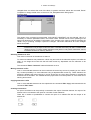
SFC POU with actions in the Object Organizer
Qualifier
In order to associate the actions with IEC steps the following qualifiers are available:
2-18
N
Non-stored
The action is active as long as the step
R
overriding Reset
The action is deactivated
S
Set (Stored)
The action is activated and remains active until a
Reset
L
time Limited
The action is activated for a certain time, maximum
as long as the step is active
D
time Delayed
The action becomes active after a certain time if the
step is still active and then it remains active as long
as the step is active.
CoDeSys V2.3
2 - What is What in CoDeSys
P
Pulse
The action is executed just one time if the step is
active
SD
Stored and
Delayed
DS
Delayed and Stored The action is activated after a certain time as long
as the step is still active and remains active up to a
Reset
SL
Stored
limited
and
time The action is activated after a certain time and
remains active until a Reset
time The action is activated for a certain time
The qualifiers L, D, SD, DS and SL need a time value in the TIME constant format. This value can be
entered directly (e.g. “T#5s”) or by a variable of datatype TIME (e.g. “t_var”).
Note:
When an action has been deactivated it will be executed once more. This means that each action at
least is executed twice (also an action with qualifier P).
Implicit variables in SFC
In SFC implicitly declared variables ( "flags") can be used to scan the status of steps and actions as
well as the time of steps. These flags each are set at the beginning of a cycle. For IEC steps and IEC
actions they are provided by the library iecsfc.lib (structures SFCStepType and SFCActionType),
which is included automatically in a project, for the simplified steps they are implemented in CoDeSys.
Scan of the step or action status via boolean variables:
For IEC steps: <stepname>.x resp. <stepname>._x: <StepName>.x shows the current activation
status. <StepName>._x shows the activation status for the next cycle. If <StepName>.x=TRUE,
the step will be executed in the current cycle. If <StepName>._x=TRUE and
<StepName>.x=FALSE, the step will be executed in the following cycle, i.e. <StepName>._x gets
copied to <StepName>.x at the beginning of a cycle.
For simplified steps: <stepname> resp. _<stepname>: If <StepName>=TRUE, the step will be
executed in the current cycle. If _<StepName>=TRUE, the step will be executed in the following
cycle, i.e. <StepName> gets copied to _<StepName> at the beginning of a cycle.
For IEC-actions: <actionname>.x gets TRUE as soon as the action gets active (<actionname>._x is
only for internal purposes, not for a status scan).
Time of a step via TIME variables:
The following implicit variables give the current time span which has passed since the step
had got active; this is only for steps which have a minimum time configured in the step
attributes.
For IEC steps: <stepname>.t
(<stepname>._t not usable for external purposes)
For simplified steps: _time<stepname>. BUT: If this implicit variable should be used for scan
purposes, it also must be declared explicitly as a TIME variable; e.g. "_timeStep1 : TIME;"
For IEC actions: the implicit time variables are not used.
These status flags can be used in each action and transition of the SFC module. But they can
also be accessed from other programs: Example: boolvar1:=sfc.step1.x; step1.x in this
example is an implicit boolean variable showing the status of IEC step "step1" in POU "sfc1".
SFC Flags
For controlling the operation of SFC POUs flags can be used, which are created implicitely during
running the project. To read this flags you have to define appropriate global or local variables as
inputs or outputs. Example: If in a SFC POU a step is active for a longer time than defined in the step
attributes, then a flag will be set, which is accessible by using a variable "SFCError" (SFCError gets
TRUE in this case).
The following flag variables can be defined:
CoDeSys V2.3
2-19
Languages...
SFCEnableLimit: This variable is of the type BOOL. When it has the value TRUE, the timeouts of the
steps will be registered in SFCError. Other timeouts will be ignored.
SFCInit: When this boolean variable has the value TRUE the sequential function chart is set back to
the Init step. The other SFC flags are reset too (initialization). The Init step remains active, but is not
executed, for as long as the variable has the value TRUE. It is only when SFCInit is again set to
FALSE that the block can be processed normally.
SFCReset: This variable, of type BOOL, behaves similarly to SFCInit. Unlike the latter, however,
further processing takes place after the initialization of the Init step. Thus for example the SFCReset
flag could be re-set to FALSE in the Init step.
Please regard: As from compiler version 2.3.7.0 SFCReset also can be used to reset boolean actions
associated to IEC steps, which was not possible before
SFCQuitError: Provided that the Execution of the SFC diagram is stopped for as long as this boolean
variable has the value TRUE whereby a possible timeout in the variable SFCError is reset. All
previous times in the active steps are reset when the variable again assumes the value FALSE. It is a
pre-condition that the flag SFCError has been defined also, which registers any timeout in the SFC.
SFCPause: Execution of the SFC diagram is stopped for as long as this boolean variable has the
value TRUE.
SFCError: This Boolean variable is TRUE when a timeout has occurred in a SFC diagram. If another
timeout occurs in a program after the first one, it will not be registered unless the variable SFCError is
reset first. It is a pre-condition that SFCError is defined, if you want to use the other time-controlling
flags (SFCErrorStep, SFCErrorPOU, SFCQuitError, SFCErrorAnalyzation).
SFCTrans: This boolean variable takes on the value TRUE when a transition is actuated.
SFCErrorStep: This variable is of the type STRING. If SFCError registers a timeout, in this variable is
stored the name of the step which has caused the timeout. It is a pre-condition that the flag SFCError
has been defined also, which registers any timeout in the SFC.
SFCErrorPOU: This variable of the type STRING contains the name of the block in which a timeout
has occurred. It is a pre-condition that the flag SFCError has been defined also, which registers any
timeout in the SFC.
SFCCurrentStep: This variable is of the type STRING. The name of the step is stored in this variable
which is active, independently of the time monitoring. In the case of simultaneous sequences the step
is stored in the branch on the outer right. No further timeout will be registered if a timeout occurs and
the variable SFCError is not reset again.
SFCErrorAnalyzationTable: This variable of type ARRAY [0..n] OF ExpressionResult provides the
result of an analyzation of a transition expression. For each component of the expression, which is
contributing to a FALSE of the transition and thereby to a timeout of the preceding step, the following
information is written to the structure ExpressionResult: name, address, comment, current value.
This is possible for maximum 16 components (variables), thus the array range is max. 0..15).
The structure ExpressionResult as well as the implicitly used analyzation modules are provided with
the library AnalyzationNew.lib. The analyzation modules also can be used explicitly in other POUs,
which are not programmed in SFC.
It is a pre-condition for the analyzation of a transition expression, that a timeout is registered in the
preceding step. So a time monitoring must be implemented there and also the variable SFCError (see
above) must be defined in the declaration window.
SFCTip, SFCTipMode: This variables of type BOOL allow inching mode of the SFC. When this is
switched on by SFCTipMode=TRUE, it is only possible to skip to the next step if SFCTip is set to
TRUE. As long as SFCTipMode is set to FALSE, it is possible to skip even over transitions.
Note: Regard also the implicit variables usable for scanning the status and time of steps resp. actions.
2-20
CoDeSys V2.3
2 - What is What in CoDeSys
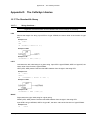
Alternative branch
Two or more branches in SFC can be defined as alternative branches. Each alternative branch must
begin and end with a transition. Alternative branches can contain parallel branches and other
alternative branches. An alternative branch begins at a horizontal line (alternative beginning) and ends
at a horizontal line (alternative end) or with a jump.
If the step which precedes the alternative beginning line is active, then the first transition of each
alternative branch is evaluated from left to right. The first transition from the left whose transition
condition has the value TRUE is opened and the following steps are activated (see active step).
Parallel branch
Two or more branches in SFC can be defined as parallel branches. Each parallel branch must begin
and end with a step. Parallel branches can contain alternative branches or other parallel branches. A
parallel branch begins with a double line (parallel beginning) and ends with a double line (parallel end)
or with a jump. It can be provided with a jump label.
If the parallel beginning line of the previous step is active and the transition condition after this step
has the value TRUE, then the first steps of all parallel branches become active (see active step).
These branches are now processed parallel to one another. The step after the parallel end line
becomes active when all previous steps are active and the transition condition before this step
produces the value TRUE.
Jump
A jump is a connection to the step whose name is indicated under the jump symbol. Jumps are
required because it is not allowed to create connections which lead upward or cross each other.
2.2.4
Function Block Diagram (FBD)...
The Function Block Diagram is a graphically oriented programming language. It works with a list of
networks whereby each network contains a structure which represents either a logical or arithmetic
expression, the call of a function block, a jump, or a return instruction.
Example of a network in the Function Block Diagram
For further information on the FBD editor see Chapter 5.4.2.
2.2.5
The Continuous Function Chart Editor (CFC)...
The continuous function chart editor does not operate like the function block diagram FBD with
networks, but rather with freely placeable elements. This allows feedback, for example.
For further information on the CFC editor see Chapter 5.4.5
Example of a network in the continuous function chart editor
CoDeSys V2.3
2-21
Languages...
2.2.6
Ladder Diagram (LD)...
The Ladder Diagram is also a graphics oriented programming language which approaches the
structure of an electric circuit.
On the one hand, the Ladder Diagram is suitable for constructing logical switches, on the other hand
one can also create networks as in FBD. Therefore the LD is very useful for controlling the call of
other POUs.
The Ladder Diagram consists of a series of networks. A network is limited on the left and right sides
by a left and right vertical current line. In the middle is a circuit diagram made up of contacts, coils,
and connecting lines.
Each network consists on the left side of a series of contacts which pass on from left to right the
condition "ON" or "OFF" which correspond to the Boolean values TRUE and FALSE. To each contact
belongs a Boolean variable. If this variable is TRUE, then the condition is passed from left to right
along the connecting line. Otherwise the right connection receives the value OFF.
Example of a network in a Ladder Diagram made up of contacts and coils
For further information on the LD editor see Chapter 5.4.3.
Contact
Each network in LD consists on the left side of a network of contacts (contacts are represented by two
parallel lines: | |) which from left to right show the condition "On" or "Off".
These conditions correspond to the Boolean values TRUE and FALSE. A Boolean variable belongs to
each contact. If this variable is TRUE, then the condition is passed on by the connecting line from left
to right, otherwise the right connection receives the value "Out".
Contacts can be connected in parallel, then one of the parallel branches must transmit the value "On"
so that the parallel branch transmits the value "On"; or the contacts are connected in series, then
contacts must transmit the condition "On" so that the last contact transmits the "On" condition. This
therefore corresponds to an electric parallel or series circuit.
A contact can also be negated, recognizable by the slash in the contact symbol: |/|. Then the value of
the line is transmitted if the variable is FALSE.
Coil
On the right side of a network in LD there can be any number of so-called coils which are represented
by parentheses:( ). They can only be in parallel. A coil transmits the value of the connections from left
to right and copies it in an appropriate Boolean variable. At the entry line the value ON (corresponds
to the Boolean variable TRUE) or the value OFF (corresponding to FALSE) can be present.
Contacts and coils can also be negated (in the example the contact SWITCH1 and the coil %QX3.0 is
negated). If a coil is negated (recognizable by the slash in the coil symbol: (/)), then it copies the
negated value in the appropriate Boolean variable. If a contact is negated, then it connects through
only if the appropriate Boolean value is FALSE.
2-22
CoDeSys V2.3
2 - What is What in CoDeSys
Function blocks in the Ladder Diagram
Along with contacts and coils you can also enter function blocks and programs In the network they
must have an input and an output with Boolean values and can be used at the same places as
contacts, that is on the left side of the LD network
Set/Reset coils
Coils can also be defined as set or reset coils. One can recognize a set coil by the "S" in the coil
symbol: (S)) It never writes over the value TRUE in the appropriate Boolean variable. That is, if the
variable was once set at TRUE, then it remains so.
One can recognize a reset coil by the "R" in the coil symbol: (R)) It never writes over the value FALSE
in the appropriate Boolean variable: If the variable has been once set on FALSE, then it remains so.
LD as FBD
When working with LD it is very possible that you will want to use the result of the contact switch for
controlling other POUs. On the one hand you can use the coils to put the result in a global variable
which can then be used in another place. You can, however, also insert the possible call directly into
your LD network. For this you introduce a POU with EN input.
Such POUs are completely normal operands, functions, programs, or function blocks which have an
additional input which is labeled with EN. The EN input is always of the BOOL type and its meaning is:
The POU with EN input is evaluated when EN has the value TRUE.
An EN POU is wired parallel to the coils, whereby the EN input is connected to the connecting line
between the contacts and the coils. If the ON information is transmitted through this line, this POU will
be evaluated completely normally.
Starting from such an EN POU, you can create networks similar to FBD.
Example of a LD network with an EN POU
2.3 Debugging, Online Functions...
Sampling Trace
The Sampling Trace allows you to trace the value sequence of variables, depending upon the socalled trigger event. This is the rising edge or falling edge of a previously defined Boolean variable
(trigger variable). CoDeSys permits the tracing of up to 20 variables. 500 values can be traced for
each variable.
Debugging
The debugging functions of CoDeSys make it easier for you to find errors.
In order to debug, run the command 'Project' 'Options' and in the dialog box that pops up under
Build options select activate option Debugging.
CoDeSys V2.3
2-23
Debugging, Online Functions...
Breakpoint
A breakpoint is a place in the program at which the processing is stopped. Thus it is possible to look
at the values of variables at specific places within the program.
Breakpoints can be set in all editors. In the text editors breakpoints are set at line numbers, in FBD
and LD at network numbers, in CFC at POUs and in SFC at steps. No breakpoints can be set in
function block instances.
Attention: Runtime system CoDeSys SP 32 Bit Full will deactivate the watchdog function of the concerned task
as soon as the execution of the program currently is stopped at a breakpoint.
Single step
Single step means:
In IL: Execute the program until the next CAL, LD or JMP command.
In ST: Execute the next instruction.
In FBD, LD: Execute the next network.
In SFC: Continue the action until the next step.
By proceeding step by step you can check the logical correctness of your program.
Single Cycle
If Single cycle has been chosen, then the execution is stopped after each cycle.
Change values online
During operations variables can be set once at a certain value (write value) or also described again
with a certain value after each cycle (force value). In online mode one also can change the variable
value by double click on the value. By that boolean variables change from TRUE to FALSE or the
other way round, for each other types of variables one gets the dialog Write Variable xy, where the
actual value of the variable can be edited.
Monitoring
In Online mode, all displayable variables are read from the controller and displayed in real time. You
will find this display in the declarations and program editor; you can also read out current values of
variables in the Watch- and Recipe Manager and in a visualization. If variables from instances of
function blocks are to be monitored, the corresponding instance must first be opened.
In monitoring VAR_IN_OUT variables, the de-referenced value is output.
In monitoring pointers, both the pointer and the de-referenced value are output in the declaration
portion. In the program portion, only the pointer is output:
+ --pointervar = '<'pointervalue'>'
POINTERs in the de-referenced value are also displayed accordingly. With a simple click on the cross
or a double-click on the line, the display is either expanded or truncated.
2-24
CoDeSys V2.3
2 - What is What in CoDeSys
Example for Monitoring of Pointers
In the implementations, the value of the pointer is displayed. For de-referencing, however, the dereferenced value is displayed.
Monitoring of ARRAY components: In addition to array components indexed by a constant,
components are also displayed which are indexed by a variable:
anarray[1]
anarray[i] = 1
=
5
If the index consists of an expression (e.g. [i+j] or [i+1]), the component can not be displayed.
Please regard: If the maximum number of variables which can be monitored, has been reached, for each further
variable instead of the current value the string "Too many monitoring variables" will be displayed.
Simulation
During the simulation the created PLC program is not processed in the PLC, but rather in the
calculator on which CoDeSys is running. All online functions are available. That allows you to test the
logical correctness of your program without PLC hardware.
Please regard: POUs of external libraries do not run in simulation mode.
Log
The log chronologically records user actions, internal processes, state changes and exceptions during
Online mode processing. It is used for monitoring and for error tracing (see Online Functions).
CoDeSys V2.3
2-25
The Standard...
2.4 The Standard...
The standard IEC 61131-3 is an international standard for programming languages of Programmable
Logic Controllers.
The programming languages offered in CoDeSys conform to the requirements of the standard.
According to this standard, a program consists of the following elements:
Structures (see Data Types)
POUs
Global Variables
The general language elements are described in the sections Identifier, Addresses, Types,
Comments, and Constants.
The processing of a CoDeSys program starts with the special POU PLC_PRG. The POU PLC_PRG
can call other POUs.
2-26
CoDeSys V2.3
3 - We Write a Little Program
3 We Write a Little Program
3.1 Controlling a Traffic Signal Unit...
Let us now start to write a small example program. It is for a simple traffic signal unit which is
supposed to control two traffic signals at an intersection. The red/green phases of both traffic signals
alternate and, in order to avoid accidents, we will insert yellow or yellow/red transitional phases. The
latter will be longer than the former.
In this example you will see how time dependent programs can be shown with the language resources
of the IEC1131-3 standard, how one can edit the different languages of the standard with the help of
CoDeSys, and how one can easily connect them while becoming familiar with the simulation of
CoDeSys.
Create POU
Starting always is easy: Start CoDeSys and choose 'File' 'New'.
In the dialog box which appears, the first POU has already been given the default name PLC_PRG.
Keep this name, and the type of POU should definitely be a program. Each project needs a program
with this name. In this case we choose as the language of this POU the Continuous Function Chart
Editor (CFC)
Now create three more objects with the command 'Project' 'Object Add' with the menu bar or with the
context menu (press right mouse button in the Object Organizer). A program in the language
Sequential Function Chart (SFC) named SEQUENCE, a function block in the language Function Block
Diagram (FBD) named TRAFFICSIGNAL, along with a POU WAIT, also of the type function block,
which we want to program as an Instruction List (IL).
What does TRAFFICSIGNAL do?
In the POU TRAFFICSIGNAL we will assign the individual trafficsignal phases to the lights, i.e. we will
make sure that the red light is lit red in the red phase and in the yellow/red phase, the yellow light in
the yellow and yellow/red phases, etc.
What does WAIT do?
In WAIT we will program a simple timer which as input will receive the length of the phase in
milliseconds, and as output will produce TRUE as soon as the time period is finished.
What does SEQUENCE do?
In SEQUENCE all is combined so that the right light lights up at the right time for the desired time
period.
What does PLC_PRG do?
In PLC_PRG the input start signal is connected to the traffic lights' sequence and the "color
instructions" for each lamp are provided as outputs.
TRAFFICSIGNAL simulation
Now test your program in simulation mode. Compile ('Project' 'Build') and load ('Online' 'Login') it.
Start the program by 'Online' 'Start', then set variable ON to TRUE, e.g. by a double-click on the
entry "ON" in the input box of the CFC editor. This will mark the variable as prepared to be set to
<TRUE>. Then press <Ctrl><F7> or command 'Online' 'Write values', to set the value. Now variable
START in ABLAUF (which we had set to TRUE manually in the first extension level of the program)
gets this value by variable ON, which is used in PLC_PRG. This will make run the traffic light cycles.
PLC_PRG has changed to a monitoring window. Click twice on the plus sign in the declaration editor,
the variable display drops down, and you can see the values of the individual variables.
CoDeSys V2.3
3-1
Controlling a Traffic Signal Unit...
"TRAFFICSIGNAL" declaration
Let us now turn to the POU TRAFFICSIGNAL. In the declaration editor you declare as input variable
(between the keywords VAR_INPUT and END_VAR) a variable named STATUS of the type INT.
STATUS will have four possible conditions, that is one for the TRAFFICSIGNAL phases green, yellow,
yellow/red andred.
Correspondingly our TRAFFICSIGNAL has three outputs, that is RED, YELLOW and GREEN. You
should declare these three variables. Then the declaration part of our function block TRAFFICSIGNAL
will look like this:
Function block TRAFFICSIGNAL, declaration part
"TRAFFICSIGNAL" body
Now we determine the values of the output variables depending on the input STATUS of the POU. To
do this go into the body of the POU. Click on the field to the left beside the first network (the gray field
with the number 0001). You have now selected the first network. Choose the menu item 'Insert' 'Box'.
In the first network a box is inserted with the operator AND and two inputs:
Click on the text AND, so that it appears selected and change the text into EQ. Select then for each of
the two inputs the three question marks and overwrite them with "STATUS" respectively "1".
Click now on a place behind the EQ Box. Now the output of the EQ operation is selected. Choose
'Insert' 'Assign'. Change the three question marks ??? to GREEN. You now have created a network
with the following structure:
STATUS is compared with 1, the result is assigned to GREEN. This network thus switches to GREEN
if the preset state value is 1.
3-2
CoDeSys V2.3
3 - We Write a Little Program
For the other TRAFFICSIGNAL colors we need two more networks. To create the first one execute
command 'Insert' 'Network (after)' and insert an EQ-Box like described above. Then select the
output pin of this box and use again command 'Insert' 'Box'. In the new box replace "AND" by "OR".
Now select the first output pin of the OR-box and use command 'Insert' 'Assign' to assign it to
"GELB". Select the second input of the OR-box by a mouse-click on the horizontal line next to the
three question marks, so that it appears marked by a dotted rectangle. Now use 'Insert' 'Box' to add
a further EQ-box like described above. Finally the network should look like shown in the following:
Function block TRAFFICSIGNAL, instruction part
In order to insert an operator in front of another operator, you must select the place where the input to
which you want to attach the operator feeds into the box.
Then use the command 'Insert' 'Box'. Otherwise you can set up these networks in the same way as
the first network.
Now our first POU has been finished. TRAFFICSIGNAL, according to the input of the value STATUS,
controls whichever light color we wish.
Connecting the standard.lib
For the timer in the POU WAIT we need a POU from the standard library. Therefore, open the library
manager with 'Window' 'Library Manager. Choose 'Insert' 'Additional library'. The dialog box appears
for opening files. From the list of the libraries choose standard.lib.
CoDeSys V2.3
3-3
Controlling a Traffic Signal Unit...
"WAIT" declaration
Now let us turn to the POU WAIT. This POU is supposed to become a timer with which we can
determine the length of the time period of each TRAFFICSIGNAL phase. Our POU receives as input
variable a variable TIME of the type TIME, and as output it produces a Boolean value which we want
to call OK and which should be TRUE when the desired time period is finished. We set this value with
FALSE by inserting at the end of the declaration (before the semicolon, however) " := FALSE ".
For our purposes we need the POU TP, a clock generator. This has two inputs (IN, PT) and two
outputs (Q, ET). TP does the following:
As long as IN is FALSE, ET is 0 and Q is FALSE. As soon as IN provides the value TRUE, the time is
calculated at the output ET in milliseconds. When ET reaches the value PT, then ET is no longer
counted. Meanwhile Q produces TRUE as long as ET is smaller than PT. As soon as the value PT
has been reached, then Q produces FALSE again. See the chapter on the standard library for short
descriptions of all POUs.
In order to use the POU TP in the POU WAIT we must create a local instance from TP. For this we
declare a local variable ZAB (for elapsed time) of the type TP (between the keywords VAR,
END_VAR).
The declaration part of WAIT thus looks like this:
Function Block WAIT, Declaration Part
"WAIT" body
In order to create the desired timer, the body of the POU must be programmed as follows:
Function Block WAIT, Instruction Part
3-4
CoDeSys V2.3
3 - We Write a Little Program
At first it is checked whether Q has already been set at TRUE (as though the counting had already
been executed), in this case we change nothing with the occupation of ZAB, but we call the function
block ZAB without input (in order to check whether the time period is already over).
Otherwise we set the variable IN in ZAB at FALSE, and therefore at the same time ET at 0 and Q at
FALSE. In this way all variables are set at the desired initial condition. Now we assign the necessary
time from the variable TIME into the variable PT, and call ZAB with IN:=TRUE. In the function block
ZAB the variable ET is now calculated until it reaches the value TIME, then Q is set at FALSE.
The negated value of Q is saved in OK after each execution of WAIT. As soon as Q is FALSE, then
OK produces TRUE.
The timer is finished at this point. Now it is time to combine our two function blocks WAIT and
SEQUENCE in the main program PLC_PRG.
"SEQUENCE" first expansion level
First we declare the variables we need. They are: an input variable START of the type BOOL, two
output variables TRAFFICSIGNAL1 and TRAFFICSIGNAL2 of the type INT and one of the type WAIT
(DELAY as delay). The program SEQUENCE now looks like shown here:
Program SEQUENCE, First Expansion Level, Declaration Part
Create a SFC diagram
The beginning diagram of a POU in SFC always consists of an action "Init" of a following transition
"Trans0" and a jump back to Init. We have to expand that.
Before we program the individual action and transitions let us first determine the structure of the
diagrams. We need one step for each TRAFFICSIGNAL phase. Insert it by marking Trans0 and choosing
'Insert' 'Step transition (after)'. Repeat this procedure three more times.
If you click directly on the name of a transition or a step, then this is marked and you can change it.
Name the first transition after Init "START", and all other transitions "DELAY.OK".
The first transition switches through when START is TRUE and all others switch through when DELAY
in OK produces TRUE, i.e. when the set time period is finished.
CoDeSys V2.3
3-5
Controlling a Traffic Signal Unit...
The steps (from top to bottom) receive the names Switch1, Green2, Switch2, Green1, whereby Init of
course keeps its Name. "Switch" should include a yellow phase, at Green1 TRAFFICSIGNAL1 will be
green, at Green2 TRAFFICSIGNAL2 will be green. Finally change the return address of Init after
Switch1. If you have done everything right, then the diagram should look like in the following image:
Program SEQUENCE, First Expansion Level, Instruction Part
Now we have to finish the programming of the individual steps. If you double-clickon the field of a
step, then you get a dialog for opening a new action. In our case we will use IL (Instruction List).
Actions and transition conditions
In the action of the step Init the variables are initialized, the STATUS of TRAFFICSIGNAL1 should be
1 (green). The state of TRAFFICSIGNAL2 should be 3 (red). The action Init then looks like in the
following image:
Action
3-6
Init
CoDeSys V2.3
3 - We Write a Little Program
Switch1 changes the sate of TRAFFICSIGNAL1 to 2 (yellow), and that of TRAFFICSIGNAL2 to 4
(yellow-red). In addition, a time delay of 2000 milliseconds is set. The action is now as follows:
Action Switch1
With Green2 TRAFFICSIGNAL1 is red (STATUS:=3), TRAFFICSIGNAL2 green (STATUS:=1), and
the delay time is 5000 milliseconds.
Action Green2
At Switch2 the STATUS of TRAFFICSIGNAL1 changes to 4 (yellow-red), that of TRAFFICSIGNAL2
to 2 (yellow). A time delay of 2000 milliseconds is now set.
Action Switch2
With Green1 TRAFFICSIGNAL1 is green (STATUS:=1), TRAFFICSIGNAL2 is red (STATUS:=3), and
the time delay is set to5000 milliseconds.
Action Green1
The first expansion phase of our program is completed.
If you want to do a first test of POU ABLAUF in simulation mode, perform the following steps:
1. Open POU PLC_PRG. Each project starts running with PLC_PRG. In order to be able to
provisionally start POU ABLAUF, insert a box and replace "AND" by "ABLAUF". Remain the inputs
and outputs unassigned for the moment.
2. Compile the project via 'Project' 'Build'. In the message window you should get "0 Errors, 0
Warnings". Now check if option 'Online' 'Simulation' is activated and use command 'Online' 'Login' to
get into simulation mode. Start program with 'Online' 'Start'. Open POU ABLAUF by a double-click on
entry "ABLAUF" in the Object Organizer. The program is started now, but to get it run, variable START
must be TRUE. Later this will be set by PLC_PRG but at the moment we have to set it manually within
CoDeSys V2.3
3-7
Controlling a Traffic Signal Unit...
the POU. To do that, perform a double-click on the line in the declaration part, where START is
defined (START=FALSE). This will set the option "<:=TRUE>" behind the variable in turquoise color.
Now select command 'Online' 'Write values' to set this value. Thereupon START will be displayed in
blue color in the sequence diagram and the processing of the steps will be indicated by a blue mark of
the currently active step.
When you have finished this intermediate test use command 'Online' 'Logout' to leave the simulation
mode and to continue programming.
"SEQUENCE" second expansion level
In order to ensure that our diagram has at least one alternative branch, and so that we can turn off our
traffic light unit at night, we now include in our program a counter which, after a certain number of
TRAFFICSIGNAL cycles, turns the unit off.
At first we need a new variable COUNTER of the type INT. Declare this as usual in the declaration
part of SEQUENCE, and initialize it in Init with 0.
Action Init, Second Version
Now select the transition after Switch1 and insert a step and then a transition. Select the resulting
transition and insert an alternative branch to its left. After the left transition insert a step and a
transition. After the resulting new transition insert a jump after Switch1.
Name the new parts as follows: the upper of the two new steps should be called "Count" and the lower
"Off". The transitions are called (from top to bottom and from left to right) EXIT, TRUE and
DELAY.OK. The new part should look like the part marked with the black border in the following
image:
Program SEQUENCE, Second Expansion Level, Instruction Part
3-8
CoDeSys V2.3
3 - We Write a Little Program
Now two new actions and a new transition condition are to be implemented. At the step Count the
variable COUNTER is increased by one:
Action Count
The EXIT transition checks whether the counter is greater than a certain value, for example 7:
Transition EXIT
At Off the state of both lights is set at 5(OFF), (or each other number not equal 1,2,3 or 4) the
COUNTER is reset to 0, and a time delay of 10 seconds is set:
Action Off
The result
In our hypothetical situation, night falls after seven trafficsignal cycles, for ten seconds the trafficsignal
turns itself off, then we have daylight again, the traffic light unit turns itself on again, and the whole
process starts again from the beginning. If you like, do another test of the current version of your
program in simulation mode before we go on to create the POU PLC_PRG.
PLC_PRG
We have defined and correlated the time sequencing of the phases for both sets of traffic lights in the
block SEQUENCE. Since, however, we see the traffic lights system as a module of a bus system, e.g.
CAN bus, we have to make input and output variables available in the block PLC_PRG. We want to
start-up the traffic lights system over an ON switch and we want to send each of the six lamps (each
traffic light red, green, yellow) the corresponding "signal command" for each step of the SEQUENCE.
We are now declaring appropriate Boolean variables for these six outputs and one input, before we
create the programme in the editor, and are allocating them, at the same time, to the corresponding
IEC addresses.
The next step is declare the variables Light1 and Light2 of the type Phases in the declaration editor.
Declaration LIGHT1 and LIGHT2
CoDeSys V2.3
3-9
Controlling a Traffic Signal Unit...
These deliver the Boolean value of each of the six lights to the above mentioned six outputs for each
step of the block SEQUENCE. We are not, however, declaring the output variables which are
foreseen within the PLC_PRG block but under Resources for Global Variables instead. The Boolean
input variable IN, which is used to set the variable START in the block SEQUENCE to TRUE, can be
set in the same way. ON is also allocated to an IEC address.
Select the tab Resources and open the list Global Variables.
Make the declaration as follows:
Declaration of the Input-/Output Variables for a CAN-Configuration
The name of the variable (e.g. IN) is followed, after AT, by a percent sign which begins the IEC
address. I stands for input, Q for output, B (used in this example) stands for byte and the individual
bits of the module are addressed using 0.0 (0.1, 0.2, etc.). We will not do the needed controller
configuration here in this example, because it depends on which target package you have available
on your computer. Please see PLC configuration for further information.
We now want to finish off the block PLC_PRG.
For this we go into the editor window. We have selected the Continuous Function Chart editor and we
consequently obtain, under the menu bar, a CFC symbol bar with all of the available elements (see
The Continuous Function Chart Editor).
Click on the right mouse key in the editor window and select the element Box. Click on the text AND
and write "SEQUENCE" instead. This brings up the block SEQUENCE with all of the already defined
input and output variables. Insert two further block elements which you name PHASES. Phases is a
function block and this causes you to obtain three red question marks over the block which you
replace with the already locally declared variables LIGHT1 and LIGHT2. Now set an element of the
type Input, which award the title ON and six elements of the type Output which you award variable
names to, as described, namely L1_green, L1_yellow, L1_red, L2_green, L2_yellow, L2_red.
All of the elements of the programme are now in place and you can connect the inputs and outputs, by
clicking on the short line at the input/output of an element and dragging this with a constantly
depressed mouse key to the input/output of the desired element.
Your program should finally look like shown in the following:
3-10
CoDeSys V2.3
3 - We Write a Little Program
PLC_PRG, Declaration and presentation with the continuous function chart editor
TRAFFICSIGNAL simulation
Now test your program in simulation mode. Compile ('Project' 'Build') and load ('Online' 'Login') it.
Start the program by 'Online' 'Start', then set variable ON to TRUE, e.g. by a double-click on the
entry "ON" in the input box of the CFC editor. This will mark the variable as prepared to be set to
<TRUE>. Then press <Ctrl><F7> or command 'Online' 'Write values', to set the value. Now variable
START in ABLAUF (which we had set to TRUE manually in the first extension level of the program)
gets this value by variable ON, which is used in PLC_PRG. This will make run the traffic light cycles.
PLC_PRG has changed to a monitoring window. Click twice on the plus sign in the declaration editor,
the variable display drops down, and you can see the values of the individual variables.
3.2 Visualizing a Traffic Signal Unit...
With the visualization of CoDeSys you can quickly and easily bring project variables to life. We will
now plot two traffic signals and an ON-Switch for our traffic light unit which will illustrate the switching
process.
Creating a new visualization
In order to create a visualization you must first select the range of Visualization in the Object
Organizer. First click on the lower edge of the window on the left side with the POU on the register
and the name Visualization. If you now choose the command 'Project'
card with this symbol
'Object Add', then a dialog box opens.
Enter here any name. When you confirm the dialog with OK, then a window opens in which you can
set up your new visualization.
Insert element in Visualization
For our TRAFFICSIGNAL visualization you should proceed as follows:
CoDeSys V2.3
3-11
Visualizing a Traffic Signal Unit...
Give the command 'Insert' 'Ellipse' and try to draw a medium sized circle (?2cm). For this click in
the editor field and draw with pressed left mouse button the circle in its length.
Now double-click the circle. The dialog box for editing visualization elements opens
Choose the category Variables and in the field Change color enter the variable name .L1_red or
"L1_red". That means that the global variable L1_red will cause the color change as soon as it is
set to TRUE. The dot before the variable name indicates that it is a global variable, but it is not
mandatory.
Then choose the category Color and click on the button Inside in the area Color. Choose as
neutral a color as possible, such as black.
Now click on the button within in the area Alarm color and choose the red which comes closest
to that of a red light.
The resulting circle will normally be black, and when the variable RED from TRAFFICSIGNAL1 is
TRUE, then its color will change to red. We have therefore created the first light of the first
TRAFFICSIGNAL!
The other traffic lights
Now enter the commands 'Edit' 'Copy' (<Ctrl>+<C>) and then twice 'Edit' 'Paste' (<Ctrl>+<V>). That
gives you two more circles of the exact same size lying on top of the first one. You can move the
circles by clicking on the circle and dragging it with pressed left mouse button. The desired position
should, in our case, be in a vertical row in the left half of the editor window. Double-click on one of the
other two circles in order to open the configuration dialog box again. Enter in the field Change Color of
the corresponding circle the following variables:
for the middle circle: L1_yellow
for the lowest circle: L1_green
Now choose for the circles in the category Color and in the area Alarm color the corresponding color
(yellow or green).
3-12
CoDeSys V2.3
3 - We Write a Little Program
The TRAFFICSIGNAL case
Now enter the command 'Insert' 'Rectangle', and insert in the same way as the circle a rectangle
which encloses the three circles. Once again choose as neutral a color as possible for the rectangle
and give the command 'Extras' 'Send to back' so that the circles are visible again.
If simulation mode is not yet turned on, you can activate it with the command 'Online' 'Simulation'.
If you now start the simulation with the commands 'Online' 'Login' and 'Online' 'Run', then you can
observe the color change of the first traffic signal.
The second traffic signal
The simplest way to create the second traffic signal is to copy all of the elements of the first traffic
signal. For this you select all elements of the first traffic signal and copy them (as before with the lights
of the first traffic signal) with the commands 'Edit' 'Copy' and 'Edit' 'Paste'. You then only have to
change the text "TRAFFICSIGNAL1" in the respective dialog boxes into "TRAFFICSIGNAL2", and the
visualization of the second traffic signal is completed.
The ON switch
Insert a rectangle and award it, as described above, a colour for a traffic light of your choice and enter
.ON at Variables for the Change color. Enter "ON" in the input field for Content in the category Text.
In order to set the variable ON to TRUE with a mouse click on the switch, activate option 'Toggle
variable' in category 'Input' and enter variable name ".ON" there. Variable keying means that when a
mouse click is made on the visualization element the variable .ON is set to the value TRUE but is
reset to the value FALSE when the mousekey is released again (we have created hereby a simple
switch-on device for our traffic lights program).
CoDeSys V2.3
3-13
Visualizing a Traffic Signal Unit...
Font in the visualization
In order to complete the visualization you should first insert two more rectangles which you place
underneath the traffic signals.
In the visualizations dialog box set white in the category Color for Frame and write in the category
Text in the field Contents "Light1" or "Light2". Now your visualization looks like this:
3-14
CoDeSys V2.3
4 - The Individual Components
4 The Individual Components
4.1 The Main Window...
Main window components
The following elements are found in the main window of CoDeSys (from top to bottom):
The Menu bar
The Tool bar (optional); with buttons for faster selection of menu commands.
The Object Organizer with register cards for POUs, Data types, Visualizations, and Resources
A vertical screen divider between the Object Organizer and the Work space of CoDeSys
The Work space in which the editor windows are located
The Message Window (optional)
The Status bar (optional); with information about the current status of the project
See also:
Context Menu
Menu bar
The menu bar is located at the upper edge of the main window. It contains all menu commands.
Tool bar
By clicking with the mouse on a symbol you can select a menu command more quickly. The choice of
the available symbols automatically adapts itself to the active window.
The command is only carried out when the mouse button is pressed on the symbol and then released.
CoDeSys V2.3
4-1
The Main Window...
If you hold the mouse pointer for a short time on a symbol in the tool bar, then the name of the symbol
is shown in a Tooltip.
In order to see a description of each symbol on the tool bar, select in Help the editor about which you
want information and click on the tool bar symbol in which you are interested.
The display of the tool bar is optional (see 'Project' 'Options' category Desktop).
Object Organizer
The Object Organizer is always located on the left side of CoDeSys. At the bottom there are four
register cards with symbols for the four types of objects
POUs,
Data types,
Visualizations
Resources. In order to change between the respective object types click with the mouse on
and
the corresponding register card or use the left or right arrow key.
You will learn in chapter Managing Objects in a Project how to work with the objects in the Object
Organizer.
Screen divider
The screen divider is the border between two non-overlapping windows. In CoDeSys there are screen
dividers between the Object Organizer and the Work space of the main window, between the interface
(declaration part) and the implementation (instruction part) of POUs and between the Work space and
the message window.
You can move the screen divider with the mouse pointer. You do this by moving the mouse with the
left mouse button pressed.
Make sure the screen divider always remains at its absolute position, even when the window size has
been changed. If it seems that the screen divider is no longer present, then simply enlarge your
window.
Work space
The Work space is located on the right side of the main window in CoDeSys. All editors for objects
and the library manager are opened in this area. The current object name appears in the title bar; in
the case of POUs an abbreviation for the POU type and the programming language currently in use
appears in brackets after it.
You find the description of the editors in the chapter The Editors
Under the menu item 'Window' you find all commands for window management.
Message window
The message window is separated by a screen divider underneath the work space in the main
window.
It contains all messages from the previous compilations, checks or comparisons. Search results and
the cross-reference list can also be output here.
4-2
CoDeSys V2.3
4 - The Individual Components
If you double-click with the mouse in the message window on a message or press <Enter>, the editor
opens with the object. The relevant line of the object is selected. With the commands 'Edit' 'Next error'
and 'Edit' 'Previous error' you can quickly jump between the error messages.
The display of the message window is optional (see 'Window' 'Messages').
Status bar
The status bar at the bottom of the window frame of the main window in CoDeSys gives you
information about the current project and about menu commands.
If an item is relevant, then the concept appears on the right side of the status bar in black script,
otherwise in gray script.
When you are working in online mode, the concept Online appears in black script. If you are working
in the offline mode it appears in gray script.
In Online mode you can see from the status bar whether you are in the simulation (SIM), the program
is being processed (RUNS), a breakpoint is set (BP), or variables are being forced (FORCE).
With text editor the line and column number of the current cursor position is indicated (e.g. Line:5,
Col.:11). In online mode 'OV' is indicated black in the status bar. Pressing the <Ins> key switches
between Overwrite and Insert mode.
If the mouse point is in a visualization, the current X and Y position of the cursor in pixels relative to
the upper left corner of the screen is given. If the mouse pointer is on an Element, or if an element is
being processed, then its number is indicated. If you have an element to insert, then it also appears
(e.g. Rectangle).
If you have chosen a menu command but haven't yet confirmed it, then a short description appears in
the status bar.
The display of the statusbar is optional (see 'Project' 'Options' category Desktop).
Context Menu
Shortcut: <Shift>+<F10>
Instead of using the menu bar for executing a command, you can use the right mouse button. The
menu which then appears contains the most frequently used commands for a selected object or for
the active editor. The choice of the available commands adapts itself automatically to the active
window. The choice of the available commands adapts itself automatically to the active window.
4.2 Project Options...
'Project' 'Options'
With this command the dialog box for setting options is opened. The options are divided into different
categories. Choose the desired category on the left side of the dialog box by means of a mouse click
or using the arrow keys and change the options on the right side.
An image of the options which are set for the current project, will be found in the Resources tab in
component 'Workspace'.
The settings amongst other things serve to configure the view of the main window. They are, unless
determined otherwise, saved in the file "CoDeSys.ini" and restored at the next CoDeSys startup.
CoDeSys V2.3
4-3
Project Options...
The categories:
stored in
CoDeSys
Load & Save
X
User information
X
Editor
X
Desktop
X
Color
X
Directories
Cat. Common
Log
X
stored in
project
Cat. Project
Build
X
Passwords
X
Source download
X
Symbol configuration
X
Project source control
X
Macros
X
Options for Load & Save
If you choose this category in the Options dialog box , then you get the following dialog box:
Option dialog box of the category Load & Save
When activating an option, a check () appears before the option.
Create Backup: CoDeSys creates a backup file at every save with the extension ".bak". Contrary to
the *.asd-file (see below, 'Auto Save') this *.bak-file is kept after closing the project. So you can
restore the version you had before the last project save.
Auto Save: While you are working, your project is saved according to a defined time interval (Auto
Save Interval) to a temporary file with the extension ".asd" in the projects directory. This file is erased
at a normal exit from the program. If for any reason CoDeSys is not shut down "normally" (e.g. due to
a power failure), then the file will not get erased. When you open the file again the following message
appears:
4-4
CoDeSys V2.3
4 - The Individual Components
You can now decide whether you want to open the original file or the auto save file.
If a library *.lib is opened as project, a corresponding auto-save-file "*.asl" will be created.
Auto save before compile: The project will be saved before each compilation. In doing so a file with
the extension ".asd" resp. “.asl” will be created, which behaves like described above for the option
'Auto Save'.
Ask for project info: When saving a new project or saving a project under a new name, the project
info is automatically called. You can visualize the project info with the command 'Project' 'Project info'
and also process it.
Auto Load: At the next start of CoDeSys the last open project is automatically loaded. The loading of
a project at the start of CoDeSys can also take place by entering the project in the command line.
Remind of boot project on exit: If the project has been modified and downloaded without creating a
new boot project since the last download of a boot project, then a dialog will advise the user before
leaving the project: "No boot project created since last download. Exit anyway ?".
Save ENI credentials: User name and Password, as they might be inserted in the Login dialog for
the ENI data base, will be saved. Concerning the access data, entered once by the user at 'Open
project from source code manager' (see chapter 4.2, 'File' 'Open') in this case additionally user name
and password will be saved in the codesys.ini file.
Options for User information
If you choose this category in the Options dialog box, then you get the following dialog box:
Options dialog box of the category User information
To User information belong the Name of the user, his Initials and the Company for which he works.
Each of the entries can be modified. The settings will be applied to any further projects which will be
created with CoDeSys on the local computer.
CoDeSys V2.3
4-5
Project Options...
Options for Editor
If you choose this category in the Options dialog box, then you get the dialog box shown below.
You can make the following settings for the Editors:
Autodeclaration: If this option is activated , then after the input of a not-yet-declared variable a dialog
box will appear in all editors with which this variable can be declared.
Autoformat: If this option is activated, then CoDeSys executes automatic formatting in the IL editor
and in the declaration editor. When you finish with a line, the following formatting is made: 1.Operators
written in small letters are shown in capitals; Tabs are inserted to that the columns are uniformly
divided.
List components: If this option is activated, then the "Intellisense functionality" will be available to
work as an input assistant. This means that if you insert a dot at a position where a identifier should
be inserted, then a selection list will open, offering all global variables which are found in the project. If
you insert the name of a function block instance, then you will get a selection list of all inputs and
outputs of the instanced function block. The "Intellisense function" is available in editors, in the Watchand Recipemanager, in visualizations and in the Sampling Trace.
Options dialog box of the category Editor
Declarations as tables: If this option is activated, then you can edit variables in a table instead of
using the usual declaration editor. This table is sorted like a card box, where you find tabs for input
variables, output variables local variables and in_out variables. For each variable there are edit fields
to insert Name, Address, Type, Initial and Comment.
Tab-Width: In the field Tab-Width in the category Editor of the Options dialog box you can determine
the width of a tab as shown in the editors. The default setting is four characters, whereby the
character width depends upon the font which is chosen.
Font: By clicking on the button Font in the category Editor of the Options dialog box you can choose
the font in all CoDeSys editors. The font size is the basic unit for all drawing operations. The choice of
a larger font size thus enlarges the printout, even with each editor of CoDeSys.
After you have entered the command, the font dialog box opens for choosing the font, style and font
size.
4-6
CoDeSys V2.3
4 - The Individual Components
Dialog box for setting the font
Mark: When choosing Mark in the Editor category in the Options dialog box you can choose whether
the current selection in your graphic editors should be represented by a dotted rectangle (Dotted), a
rectangle with continuous lines (Line) or by a filled-in rectangle (Filled). In the last case the selection is
shown inverted.
Bitvalues: When choosing Bitvalues in the category Editor of the Options dialog box you can choose
whether binary data (type BYTE, WORD, DWORD) during monitoring should be shown Decimal,
Hexadecimal, or Binary.
Suppress monitoring of complex types (Array, Pointer, VAR_IN_OUT): If this option is activated,
complex data types like arrays, pointers, VAR_IN_OUTs will not get displayed in the monitoring
window in online mode.
Show POU symbols: If this option is activated, in the module boxes which are inserted to a graphic
editor, additionally symbols will get displayed, if those are available in the library folder as bitmaps.
The name of the bitmap-file must be composed of the name of the module and the extension ".bmp".
Example: For module TON there is a symbol file TON.bmp available. The box will be displayed as
follows:
Options for the Desktop
If you choose this category in the Options dialog box, then you get the dialog box shown below.
When an option is activated, a check appears in front of it.
Tool bar: The tool bar with the buttons for faster selection of menu commands becomes visible
underneath the menu bar.
Status bar: The status bar at the lower edge of the CoDeSys main window becomes visible.
Online in Security mode: In Online mode with the commands 'Run', 'Stop', 'Reset' 'Toggle
Breakpoint', 'Single cycle', 'Write values', 'Force values' and 'Release force', a dialog box appears with
the confirmation request whether the command should really be executed. If supported by the target
system, an extended dialog might be available when you want to load the actual project from the
programming system to the PLC If there is already a project on the PLC, this dialog will display the
project information of that project as well as the information of the project currently to be loaded. This
project information also will be available in case of creating a boot project when there is already one
on the PLC.
This option is saved with the project.
CoDeSys V2.3
4-7
Project Options...
Options dialog box of the category Desktop
Query communication parameters before login: As soon as the command 'Online' 'Login' is
executed, first the communication parameters dialog will open. To get in online mode you must first
close this dialog with OK.
Do not save communication parameters in project: The settings of the communication parameters
dialog ('Online' 'Communication Parameters') will not be saved with the project.
Show print area margins: In every editor window, the limits of the currently set print range are
marked with red dashed lines. Their size depends on the printer characteristics (paper size,
orientation) and on the size of the "Content" field of the set print layout (menu: 'File" "Documentation
Settings").
F4 ignores warnings: After compilation, when F4 is pressed in a message window, the focus jumps
only to lines with error messages; warning messages are ignored.
MDI representation: Per default this option (Multiple-Document-Interface) is activated and thus
several windows can be opened at the same time. If the option is deactivated (SDI mode) only one
window can be opened and will be displayed in full screen mode. Exception: The action of a program
and the program itself can be displayed side by side even in MDI mode.
Communications timeout [ms]: for standard communication services: Time span in milliseconds,
after which the communication to the target system will be terminated if no more activity is detected.
Possible values: 1-10000000 ms.
Communications timeout for download [ms]: for long lasting communication services (program
download, file up- and download, boot project creation and check): Time span in milliseconds after
which the communication to the target system will be terminated if no more activity is detected
(Download Wait Time). Possible values: 1-10000000 ms.
XML-Encoding: The format for XML-exports can be selected. The default setting is "ISO 8859-1".
This concerns the communication via ENI, Message Interface and COM Automation Interface, as well
as each user-triggered XML-export from CoDeSys. An exception is the XML-export of the Licensing
Manager.
Language: Define here, in which language the menu and dialog texts should be displayed.
Note: Please note, that the language choice is not possible under Windows 98T !
Note: The settings will be stored in CoDeSys.
4-8
CoDeSys V2.3
4 - The Individual Components
Options for Colors
If you choose this category in the Options dialog box , then you get the following dialog box:
Options dialog box of the category Color
You can edit the default color setting of CoDeSys. You can choose whether you want to change the
color settings for Line numbers (default presetting: light gray), for Breakpoint positions (dark gray),
for a Set breakpoint (light blue), for the Current position (red), for the Reached Positions (green)
or for the Monitoring of Boolean values (blue).
If you have chosen one of the indicated buttons, the dialog box for the input of colors opens.
Dialog box for setting colors
CoDeSys V2.3
4-9
Project Options...
Options for Directories
If you choose this category in the Options dialog box, then you get the following dialog box:
Options dialog box of the category Directories
Directories can be entered in the Project and Common areas for CoDeSys to use in searching for
Libraries , controller configuration and Visualization files, as well as for storing Compile and
source-Upload files. (Regard: Compile files for example are map- and list-files, not however e.g.
symbol files ! The latter will be saved in the project directory.) If you activate the button (...) behind a
field, the directory selection dialog opens. For library and configuration files, several paths can be
entered for each, separated by semicolons ";".
Please regard:
- Library paths can be entered based on the project file's path by prefixing a dot ".". For example: If you enter
".\libs", libraries will also be searched in 'C:\programs\projects\libs', if the current project is in
'C:\programs\projects'. For information on library paths see also: 'Chapter 6.4, 'Insert' 'Additional Library'.
- Do not use empty spaces and special characters except for "_" in the directory paths.
Information in the Project area is stored with the project.
Information in the Common area is written to the ini-file of the programming system and thus applies
to all projects.
The Target area just displays the directories for libraries and configuration files set in the target
system, e.g. through entries in the Target file. These fields cannot be edited, but an entry can be
selected and copied (right mouse button context menu).
CoDeSys generally searches first in the directories entered in 'Project', then in those in 'Target'
(defined in the Target file), and finally those listed under 'Common'. If two files with the identical
names are found, the one in the directory that is browsed first will be used.
Options for Log
If you choose this category in the Options dialog box, then you get the dialog box shown below.
In this dialog, you can configure a file that acts as a project log, recording all user actions and internal
processes during Online mode processing (see also: Log).
If an existing project is opened for which no log has yet been generated, a dialog box opens which
calls attention to the fact that a log is now being set up that will receive its first input after the next
login process.
The log is automatically stored as a binary file in the project directory when the project is saved. If you
prefer a different target directory, you can activate the option Directory for project logs: and enter
the appropriate path in the edit field. Use the
this purpose.
4-10
button to access the "Select Directory" dialog for
CoDeSys V2.3
4 - The Individual Components
Option dialogue for the category Log
The log file is automatically assigned the name of the project with the extension .log. The maximum
number of Online sessions to be recorded is determined by Maximum project log size. If this
number is exceeded while recording, the oldest entry is deleted to make room for the newest.
The Log function can be switched on or off in the Option field Activate logging.
You can select in the Filter area which actions are to be recorded: User actions, Internal actions,
Status changes, Exceptions. Only actions belonging to categories checked here will appear in the Log
window and be written to the Log file. (For a description of the categories, please see Log).
The Log window can be opened with the command 'Window' 'Log'.
Options for Build
If you choose this category in the Options dialog box , then you get the dialog box shown below.
Debugging: It depends on the target descriptions whether this option can be activated/deactivated by
the user resp. which is the given setting . If it is activated, additional debugging code is created, that is
the code can become considerably larger. The debugging code is needed in order to make use of the
debugging functions offered by CoDeSys (e.g. breakpoints). When you switch off this option, project
processing becomes faster and the size of the code decreases. The option is stored with the project.
Replace constants: The value of each constant of scalar type (thus not for strings, arrays and
structures) is loaded directly, and in Online mode the constants are displayed in green. Forcing,
writing and monitoring of a constant is then no longer possible. If the option is deactivated, the value is
loaded into a storage location via variable access (this does in fact allow writing the variable value, but
implies longer processing time).
Nested comments: Comments can be placed within other comments. Example:
(*
a:=inst.out; (* to be checked *)
b:=b+1;
*)
Here the comment that begins with the first bracket is not closed by the bracket following "checked,"
but only by the last bracket.
Attention: Currently this option must be used carefully: If the setting in the project does not match the setting
chosen in a library which also has been created in CoDeSys and now is used is the project, compiler
errors will occur, which are hard to interpret by the user and often cannot be cleared!
CoDeSys V2.3
4-11
Project Options...
Options dialog box of the category Build
Create binary file of the application: A binary image of the generated code (boot project) is created
in the project directory during compilation. File name: <project_name>.bin. By comparison, the
command 'Online' 'Create boot project' sets up the boot project on the controller.
Actions hide programs: This option is activated per default, when a new project is created. It means:
If a local action has the same name like a global variable or a program, the following hierarchy is valid:
local variable before local action before global variable before program.
Regard: If an existing project is opened, which has been created with a previous CoDeSys version, the option will
be deactivated per default. Thus the previously valid hierarchy (local variable before global variable
before program before local action) can be kept.
Treat LREAL as REAL: If this option is activated, (availability depends on runtime system; default:
not activated), the compile will handle LREAL values as REAL values. This can be used for creating
platform independent projects.
Number of data segments: Here you define how many memory segments should be allocated in the
PLC for the project data. This space is needed to make possible Online Change even if new variables
have been added. If during compilation you get the message "Out of global data memory...", enter a
higher number. In this regard local program variables will be handled like global variables.
Exclude objects: This button opens the dialog Exclude objects from build: In the tree of project
components select those POUs which should not be regarded during compilation and activate option
Exclude. Hereupon the excluded POUs will be displayed green-colored in the selection tree. Press
button Exclude unused, if you just want to get displayed those POUs which are currently used in the
program. Regard that a single object which is selected in the Object Organizer can also be excluded
from build by using the command 'Exclude from build' from the context menu.
Compiler Version: Here you define the compiler version to be used. CoDeSys versions after V2.3.3
(version, service pack, patch) will include besides the actual compiler version also the previous
compiler versions (back to V2.3.3). If you always want to get the project compiled with the latest
compiler version, activate option Use latest. In this case however it will be checked whether the
currently opened programming system is also of that version. If this is not true, the compiler version
matching the actually used programming system version will be used! If the project should be
compiled with a specific version, define this via the selection list at Fix.
In order to exert control over the compilation process you can set up two macros:
4-12
CoDeSys V2.3
4 - The Individual Components
The macro in the Macro before compile field is executed before the compilation process; the macro
in the Macro after compile field afterwards. The following macro commands can not, however, be
used here: file new, file open, file close, file save as, file quit, online, project compile, project check,
project build, project clean, project rebuild, debug, watch list.
Check automatically:
In order to get the semantic correctness checked at each compilation of the project the following
options can be activated:
Unused variables
Overlapping memory areas
Concurrent access
Multiple write access on output
The results will be displayed in the message window. These checks also can be initiated by the
respective commands of the 'Check' submenu in the 'Project' menu.
If supported by the target system, negative check results will produce compiler errors.
Note: All entries in the Build Options dialog are stored with the project.
Passwords
To protect your files from unauthorized access CoDeSys offers the option of using a password to
protect against your files being opened or changed.
If you choose this category in the Options dialog box, then you get the corresponding dialog box.
Enter the desired password in the field Password. For each typed character an asterisk (*) appears in
the field. You must repeat the same word in the field Confirm Password. Close the dialog box with
OK. If you get the message:
"The password does not agree with the confirmation",
then you made a typing error during one of the two entries. In this case repeat both entries until the
dialog box closes without a message.
If you now save the file and then reopen it, then you get a dialog box in which you are requested to
enter the password. The project can then only be opened if you enter the correct password. Otherwise
CoDeSys reports:
"The password is not correct."
Options dialog box of the category Passwords
CoDeSys V2.3
4-13
Project Options...
Along with the opening of the file, you can also use a password to protect against the file being
changed. For this you must enter a password in the field Write Protection Password and confirm this
entry in the field underneath.
A write-protected project can be opened without a password. For this simply press the button Cancel,
if CoDeSys tells you to enter the write-protection password when opening a file. Now you can compile
the project, load it into the PLC, simulate, etc., but you cannot change it.
Of course it is important that you memorize both passwords. However, if you should ever forget a
password, then contact the manufacturer of your PLC.
The passwords are saved with the project.
In order to create differentiated access rights you can define user groups and "Passwords for user
groups").
Additionally regard the extended possibilities to protect a project by encryption (see Chapter 4.3, ‚File’
‚Save as’), which for example can help to protect a library from getting used without having entered a
key.
Source download
The following dialog will be opened when you select this category:
Option dialog for the category Source download
You can choose to which Timing and what Extent the project is loaded into the controller system.
The option Sourcecode only exclusively involves just the CoDeSys file (file extension .pro). The
option All files also includes files such as the associated library files, visualization bitmaps,
configuration files, etc.
Using the option Implicit at load allows the selected file range to be automatically loaded into the
controller system on the command 'Online' 'Download'.
Using the option Implicit at create boot project allows the selected file range to be automatically
loaded into the controller system on the command 'Online' 'Create boot project'.
Using the option Notice at load offers a dialog, when the command 'Online' 'Download' is given, with
the question "Do you want to write the source code into the controller system?". Pressing Yes will
automatically load the selected range of files into the controller system, or you can alternatively finish
with No.
When using the option On demand the selected range of files must be expressly loaded into the
controller system by giving the command 'Online' 'Sourcecode download'.
4-14
CoDeSys V2.3
4 - The Individual Components
The project which is stored in the controller system can be retrieved by using 'File' 'Open' with Open
project from PLC. The files will be unpacked in the process.
Options for 'Symbol Configuration'
The dialog presented here (not available in simulation mode !) is used for configuring the symbol file
which will be created during each compilation of the project. The symbol file is created as a text file
<project name>.sym respectively as a binary file <project name>.sdb (the format is depending on the
used gateway version) in the project directory. The file is needed for data exchange with the controller
via the symbolic interface and will be used for that purpose e.g. by OPC- or GatewayDDE-Server.
If the option Create symbol entries is activated, then symbol entries for the project variables will be
automatically written to the symbol file. Otherwise only version info about file and project are
contained.
If additionally the option Dump XML symbol table is activated, then also an XML file containing the
symbol information will be created in the project directory. It will be named <project
name>.SYM_XML.
Regard the following when configuring the symbol entries:
If option 'Symbol config from INI-file' is activated in the target settings, then the symbol configuration
will be read from the codesys.ini file or from another ini-file which is defined there. (In this case the
dialog 'Set object attributes' in CoDeSys cannot be edited).
If option 'Symbol config from INI-file' is not activated, the symbol entries will be generated in
accordance with the settings you can make in the 'Set object attributes' dialog. You get there using
the Configure symbol file button:
Dialog 'Set object attributes' (in option category Symbol configuration)
Use the tree-structured selection editor to mark the variables which should be entered in the symbol
file. For this purpose you can select a POUs entry (e.g. Global Variables) which automatically will
mark all variables belonging to this POU, or you can select single variables which you find listed for
each POU in the tree. Then set the desired options in the lower part of the dialog box by clicking the
mouse on the corresponding small boxes. Activated options are checked. The following options can
be set:
Export variables of object: The variables of the selected object are exported in the symbol file.
The following options can take effect only if the Export variables of object option is activated:
Export data entries: Entries for access to the global variables are created for object's structures and
arrays.
Export structure components: An individual entry is created for each variable component of object's
structures.
CoDeSys V2.3
4-15
Project Options...
Export array entries: An individual entry is created for each variable component of object's arrays.
Write Access: Object's variables may be changed by the OPC server.
Once the option settings for the currently selected variables are complete, other POUs can be also be
selected - without closing the dialog before - and given an option configuration. This can be carried
out for any desired number of POU selections, one after the other. When the dialog box is closed by
selecting OK, all configurations carried out since the dialog box was opened are applied.
Note:
Regard the possibility of using pragmas in the declaration of a variable, which might define that the
variable is taken to the symbol file with restricted access or that it is excluded from the symbol file.
Options for 'Project source control'
This dialog is used to define whether the project should be managed in a project data base and to
configure the ENI interface correspondingly.
Use source control (ENI): Activate this option, if you want to access a project data base via the ENI
Server in order to administer all or a selection of POUs of the project in this data base. Preconditions:
ENI Server and data base must be installed and you must be registered as an user in the database.
See also the documentation for the ENI-Server resp. in chapter 'The CoDeSys ENI'.
If the option is activated, then the data base functions (Check in, Get last version etc.) will be available
for handling the project POUs. Then some of the data base functions will run automatically like
defined in the options dialogs, and in the menu 'Project' 'Data Base Link' you will find the commands
for calling the functions explicitly. Besides that a tab 'Data base-connection' will be added in the dialog
Properties, where you can assign a POU to a particular data base category.
Options dialog box of category Project source control
Connect new Objects with the following data base:
Here you set a default: If a new object is inserted in the project ('Project' 'Object' 'Add'), then it will
automatically get assigned to that object category which is defined here. This assignment will be
displayed in the object properties dialog ('Project' 'Object' 'Properties') and can be modified there later.
The possible assignments:
Project: The POU will be stored in that data base folder which is defined in the dialog ENI
configuration/Project objects in the field 'Project name'.
Shared Objects: The POU will be stored in that data base folder which is defined in the dialog ENI
configuration/Shared objects in the field 'Project name'.
Local: The POU will not be managed in a ENI data base, but only will be stored locally in the project.
4-16
CoDeSys V2.3
4 - The Individual Components
Besides 'Project objects' and 'Shared objects' there is a third data base category 'Compile files' for
such objects which are not created until the project has been compiled. Therefore this category is not
relevant for the current settings.
Ask for type of new objects: If this option is activated, then whenever a new object is added to the
project, the dialog 'Object' 'Properties' will open, where you can choose to which of the three object
categories mentioned above the POU should be assigned. By doing so the standard setting can be
overwritten.
configure ENI: This button opens the first of three ENI configuration dialogs:
Each object of a project, which is determined to get managed in the ENI data base, can be assigned
to one of the following data base categories: 'Project objects', 'Shared objects' or 'Compile files'. For
each of these categories a separate dialog is available to define in which data base folder it should be
stored and which presettings should be effective for certain data base functions:
Dialog ENI configuration / Project objects
Dialog ENI configuration / Shared objects
Dialog ENI configuration / Compile files
Note: Each object will be stored also locally (with project) in any case.
The dialog will open one after the other if you are doing a primary configuration. In this case a Wizard
(Button Next) will guide you and the settings entered in the first dialog will be automatically copied to
the other ones, so that you just have to modify them if you need different parameter values.
If you want to modify an existing configuration, then the three dialogs are combined in one window
(three tabs).
If you have not yet logged in successfully to the data base before, then the Login dialog will be
opened automatically.
Options for project objects and shared objects regarding the project data base
These dialogs are part of the configuration of the project data base options ('Project' 'Options' 'Project
source control'). Here you define the access parameters for the data base categories 'Project objects'
und 'Shared objects'. Both dialogs contain the same items. (A third dialog is available for the
configuration of the access to the data base category 'Compile files', see next chapter)
ENI-Connection
CoDeSys V2.3
TCP/IP-Address:
Address of the computer where the ENI-Server is running
Port:
Default: 80; must be the same as set in the configuration parameters of the
ENI Server
Project name:
Name of the data base folderwhere the objects of this category should be
stored. Press button ... to open a folder tree of the already existing data
base projects. If the desired folder already exists, you can select it in this
tree and its name will be entered in the 'Project name' edit field. If you had
not logged in to the ENI Server until you try to open the folder tree by
button ..., then you will first get the Login dialog where you must enter
'User name' and 'Password' as defined in your ENI user account to get
access to the three data base categories.
Read only
If this option is activated, then only read access is possible to the above
defined data base folder.
4-17
Project Options...
Dialog 'Project objects' in options category Project source control
Get latest Version
The data base function 'Get latest Version' (Menu 'Project' 'Data Base Link') copies the latest
version of POUs from the above defined data base folder to the currently opened project,
whereby the local version of objects will be overwritten. This will be done automatically for all
objects, for which the version found in the data base differs from that in the project, as soon as
one of the set timing conditions will meet. Activate the desired time options by setting a check
mark:
At Project Open
As soon as the project is opened in CoDeSys
Immediately after
Changes in ENI
As soon as a newer version of the POU is checked in to the
data base (e.g. by another user); then the POU will be updated
in the current project immediately and an appropriate message
will pop up.
Before any Compile
Before any compile process in CoDeSys
Check out
The data base function 'Check out' means that the POU will be marked as 'in the works' and will
be locked for other users until it will be de-blocked again by a 'Check in' or 'Undo check out'
command.
If the option Immediately at start of editing is activated, then an object will be checked out
automatically as soon as you start to edit it. If the object is currently already checked out by
another user (indicated by a red cross before the object name in the CoDeSys object
organizer), then a message will pop up.
4-18
CoDeSys V2.3
4 - The Individual Components
Check in
The data base function 'Check in' means, that a new version of the object will be created in the
data base. The older versions will be kept anyway.
You can activate one or both of the following options to define the time of automatic Checking
in:
At Project Save
as soon as the project is saved
After successfull compile
as soon as the project has been compiled without errors
For each of the options 'Get last version', 'Check out' and 'Check in' additionally the option with
Query can be activated. In this case, before the corresponding action is carried out, a dialog
opens where you still can decide to cancel the action or otherwise confirm it.
The items of the dialog 'Shared objects' are the same like in the dialog 'Project objects' described
above. The settings apply to all objects which are assigned to the data base category 'Shared
objects'.
If you do a primary configuration, the configuration dialogs will appear one after the other and you will
be guided by a wizard (button Next). So also you will get to the configuration dialog for the Options for
Compile Files, see the following chapter. The settings made in the first dialog will automatically be
inherited to the other ones. So those just have to be edited if modificiations are necessary.
Cancel will close the dialog without saving the done modifications in the currently opened dialog. You
return to the main dialog 'Options' 'Project source control'.
If an already existing configuration has been modified, then the new settings (for all three dialogs) can
be saved by pressing OK. After that the dialog will be closed and you return to the main dialog
'Options' 'Project source control'.
Options for Compile Files regarding the project data base
This dialog is part of the option settings for the project data base ('Project' 'Options' 'Project source
control'). Here you define how the objects of category 'Compile files' will be handled in the data base.
(Besides that two further dialogs are available to define this for objects of category 'Project objects'
and 'Shared objects', see previous chapter.)
Dialog 'Compile files' in category Project source control
CoDeSys V2.3
4-19
Project Options...
For the input fields TCP/IP-Address, Port, Project name see the description of dialog 'Project
objects/Shared objects'.
Create ASCII-symbol
information (.sym)
Create binary symbol
information (.sdb)
If this option is activated, then whenever a symbol file *.sym (text
format) resp. *.sdb (binary format) will be created, this file will be
written to the data base automatically. The entries in the symbol file
are created like defined in the Project options category 'Symbol
configuration'.
Create boot project
If this option is activated, then whenever a boot project will be
created, this file will be written to the data base automatically .
If you are doing a primary configuration, the configuration dialogs will appear one after the other,
guided by a wizard (button Next). The settings made in the first dialog will automatically be inherited to
the other ones. So those just have to be edited if modificiations are necessary.
Cancel will close the dialog without saving the done modifications in the currently opened dialog (the
settings made in the previous dialogs will be kept anyway). You return to the main dialog 'Options'
'Project source control'.
If you have modified an already existing configuration, then the new settings (for all three dialogs) can
be saved by pressing OK. After that the dialog will be closed and you return to the main dialog
'Options' 'Project source control'.
Options for 'Macros'
If you choose this category in the Options dialog, a dialog box opens where you can define macros
using the commands of the CoDeSys batch mechanism. These macros afterwards can be called in
the 'Edit' 'Macros' menu.
Options dialog for the category Macros
Perform the following steps to define a new macro:
In the input field Name, you enter a name for the macro to be created. After the New button is
pressed, this name is transferred into the Macrolist field and marked as selected there. The macro
list is represented in a tree structure. The locally defined macros are positioned one below the
other. If macro libraries (see below) are integrated, then the library names will be listed and by a
mouse-click on the plus- resp. minus-signs in front of those entries you can open or close a list of
the library elements.
The Menu field is used to define the menu entry with which the macro will appear in the 'Edit' 'Macros'
menu. In order to be able to use a single letter as a short-cut, the letter must be preceded by the
symbol '&'. Example: the name "Ma&cro 1" generates the menu entry "Macro 1". Example: the
name "Ma&cro 1" will create a menu item "Macro 1".
4-20
CoDeSys V2.3
4 - The Individual Components
In the editor field Commands you define and/or edit the commands that are to constitute the newly
created or selected macro. All the commands of the CoDeSys batch mechanism and all keywords
which are valid for those are allowed. You can obtain a list by pressing the Help button. A new
command line is started by pressing <Ctrl><Enter>. The context menu with the common text editor
functions is obtained by pressing the right mouse button. Command components that belong
together can be grouped using quotation marks.
If you want to create further macros, perform steps 1-3 again, before you close the dialog by pressing
the OK-button.
If you want to delete a macro, select it in the macro list and press button <Del>.
If you want to rename a macro, select it in the macro list, insert a new name in the edit field 'Name'
and then press button Rename.
To edit an existing macro, select it in the macro list and edit the fields 'Menu' and/or 'Commands'. The
modifications will be saved when pressing the OK-button.
As soon as the dialog is closed by pressing the OK-button the actual description of all macros will be
saved in the project.
The macro menu entries in the 'Edit' 'Macros' menu are now displayed in the order in which they were
defined. The macros are not checked until a menu selection is made.
Macro libraries:
Macros can be saved in external macro libraries. These libraries can be included in other projects.
Creating a macro library containing the macros of the currently opened project:
Press button Create. You get the dialog Merge project, where all available macros are listed.
Select the desired entries and confirm with OK. The selection dialog will close and dialog Save
Macrolibrary will open. Insert here a name and path for the new library and press button Save.
The library will be created named as <library name>.mac and the dialog will be closed.
Including a macro library <library name>.mac in the currently opened project:
Press button Include. The dialog Open Macrolibrary will open, which shows files with extension
*.mac. Select the desired library and press button Open. The dialog will be closed and the library
will be added to the tree of the Macrolist.
Hint: The macros of a project also can be exported ('Project' 'Export').
CoDeSys V2.3
4-21
Managing Projects...
4.3 Managing Projects...
The commands which refer to entire project are found under the menu items 'File' and 'Project'.
'File' 'New'
Symbol:
With this command you create an empty project with the name "Untitled". This name must be changed
when saving.
'File' 'New from template'
Use this command to open any desired CoDeSys project as a "template" project. The dialog for
opening a project file will be available and the selected project will be opened with project name
"Unknown".
'File' 'Open'
Symbol:
With this command you open an already existing project. If a project has already been opened and
changed, then CoDeSys asks whether this project should be saved or not.
The dialog box for opening a file appears, and a project file with the extension "*.pro" or a library file
with the extension "*.lib" must be chosen. This file must already exist. It is not possible to create a
project with the command "Open".
Dialog box for opening a file
Open a project from the PLC
To upload a project file from the PLC, press PLC at Open project from PLC. You will obtain, as next,
the dialog Communication parameters (see menu 'Online' 'Communication parameters') for setting the
transmission parameters when no connection exists yet to the PLC. Once an on-line connection has
been created, the system checks whether the same named project files already exist in the directory
on your computer hard disc. When this is the case you receive the dialogue Load the project from the
controller where you can decide whether the local files should be replaced by those being used by the
4-22
CoDeSys V2.3
4 - The Individual Components
controller. (This sequence is the reverse of the sequence of 'Online' 'Load source code', with which
the project source file is stored in the controller. Do not confuse with 'Create Boot project'!)
Note:
Please note, that you in any case have to give a new name to a project, when you load it from the
PLC to your local directory, otherwise it is unnamed. If supported by the target system, a 'Title'
entered in the Project info will be pre-defined as new project file name. In this case at loading the
project from the PLC the dialog for saving a file will open, where the new file name automatically is
entered and can be confirmed or modified.
If there has not yet been loaded a project to the PLC, you get an error message. See also 'Project'
'Options' category 'Sourcedownload'.
Open a project from Source code manager (ENI data base)
To open a project which is stored in a ENI project data base, activate option Open project from
Source code manager can be used . It is a precondition that you have access to an ENI Server
which serves the data base. Press button ENI..., to get a dialog where you can connect to the server
concerning the data base category 'Project objects'.
Insert the appropriate access data (TCP/IP-Address, Port, User name, Password, Read only) and the
data base folder (Project name) from which the objects should be get and confirm with Next. The
dialog will be closed and another one will open where you have to insert the access data for the data
base category 'Shared objects'. If you press button Finish the dialog will be closed and the objects of
the defined folders will automatically be retrieved and displayed in the CoDeSys Object manager. If
you want to continue to keep the project objects under data base control, then open the Project
options dialogs to set the desired parameters.
The access data are stored in the codesys.ini file, user name and password however only if the
project option 'Save ENI credentials' (see Chapter 4.2, Category Load & Save) is activated.
Most recently opened files
The most recently opened files are listed in the Files menu below the command 'File' 'Exit'. If you
choose one of them, then this project is opened.
If Passwords or User groups have been defined for the project, then a dialog box appears for entering
the password.
'File' 'Close'
With this command you close the currently-open project. If the project has been changed, then
CoDeSys asks if these changes are to be saved or not.
If the project to be saved carries the name "Untitled", then a name must be given to it (see 'File' 'Save
as').
'File' 'Save'
Symbol:
Shortcut: <Ctrl>+<S>
With this command you save any changes in the project. If the project to be saved is called "Untitled",
then you must give it a name (see 'File' 'Save as').
'File' 'Save as'
With this command the current project can be saved in another file or as a library. This does not
change the original project file.
After the command has been chosen the Save dialog box appears. Choose either an existing File
name or enter a new file name and choose the desired file type.
If the project is to be saved under a new name, then choose the file type CoDeSys Project (*.pro).
If you choose the file type Project Version 1.5 (*.pro), 2.0 (*.pro), 2.1 (*.pro) or 2.2 (*.pro), then the
current project is saved as if it were created with the version 1.5, 2.0, 2.1 or 2.2. Specific data of the
version 2.3 can thereby be lost! However, the project can be executed with the version 1.5, 2.0, 2.1 or
2.2.
CoDeSys V2.3
4-23
Managing Projects...
Dialog box for Save as
You can also save the current project as a library in order to use it in other projects. Choose the file
type Internal library (*.lib) if you have programmed your POUs in CoDeSys.
Choose the file type External library (*.lib) if you want to implement and integrate POUs in other
languages (e.g. C). This means that another file is also saved which receives the file name of the
library, but with the extension "*.h". This file is constructed as a C header file with the declarations of
all POUs, data types, and global variables. If external libraries are used, in the simulation mode the
implementation, written for the POUs in CoDeSys, will be executed. Working with he real hardware
the implementation written in C will be executed.
In order to save the project as an encrypted project or library, choose option Encrypted CoDeSys
Projekt (*.pro) resp. Encrypted internal library (*.lib) or Encrypted external library (*.lib). In this
case you get the 'Encryption’ dialog, where you can define and confirm a key. The project later cannot
be opened esp. a library cannot be used without this key :
Dialog for the encryption of a project
The encryption extends the protection of a project, which up to now was only possible via the
assignment of passwords for access and write protection. These possibilities will exist further on, but
regard that they e.g. cannot avoid that a library is included in a project without the need of entering a
library password (key).
A key once defined will be saved with any further savings of the project. To modify that key, you again
have to use the 'Save as' dialog.
If an encrypted project should be opened resp. if an encrypted library should be used in a project, the
dialog asking for the key will appear.
Dialog for entering the key
4-24
CoDeSys V2.3
4 - The Individual Components
Licensing a library:
If you want save the project as a licensed library, you can add the appropriate licensing information in
the dialog 'Edit Licensing Information'. Open the dialog by pressing the button Edit license info....
See for a description in 'License Management in CoDeSys'.
After having done all settings, press OK. The current project will be saved in the indicated file. If the
new file name already exists, then you are asked if you want to overwrite this file.
When saving as a library, the entire project is compiled. If an error occurs thereby, then you are told
that a correct project is necessary in order to create a library. The project is then not saved as a
library.
'File' 'Save/Mail Archive'
This command is used to set up and create a project archive file. All files which are referenced by and
used with a CoDeSys project can be packed in a compressed zip file. The zip file can be stored or
directly can be sent in an email. This is useful if you want to give forward a set of all project relevant
files.
Please regard: The archive function is not practical for restoring a project environment. It is designated for an
easy packing of all files belonging to a project. When unpacking an archive the paths of the particular
files must be adapted to the actual CoDeSys environment !
When the command is executed, the dialog box Save Archive opens:
Dialog box for Setting up an Archive ZIP
Here you can define which file categories should be added to the archive zip file: Select or deselect a
category by activating/deactivating the corresponding checkbox. Do this by a single mouse click in the
CoDeSys V2.3
4-25
Managing Projects...
checkbox or by a double-click on the category name. If a category is marked with
, all files of this
category will be added to the zip file, if it is marked with
, none of the files will be added. To select
single files of a category press the corresponding button Details. The dialog Details will open with a
list of available files.
Dialog box for detailled selection of files for the Archive ZIP
The dialog shows a list of all files which are available for the category: Automatically alle files are
selected, an exception is category 'Target Files' where only the files are selected which are relevant
for the currently set target system. For modifying the selection activate resp. deactivate the desired
files. With the button Select All all files of the list are selected, with Select None none of them. A
single file can be selected/deselected by a mouse click in the checkbox, also by a double-click on the
list entry or by pressing the spacebar when the list entry is marked.
Close the Details dialog with Save to store the new settings.
In the main dialog the checkbox of categories, for which not all files are selected, will appear with a
. The following file categories are available, the right column of the table
grey background color
shows which files can be added to the zip file:
4-26
Kategorie
Dateien
Project File
projectname.pro (the CoDeSys project file)
Referenced
Libraries
*.lib, *.obj, *.hex (libraries and if available the corresponding object and hexfiles)
Compile
Information
*.ci (compile information),
*.ri (download/reference information)
<temp>.* (temporary compile and download files)
also for simulation
INI File
Codesys.ini
Log File
*.log (project log file)
Bitmap Files
*.bmp (bitmaps for project POUs and visualizations)
Registry Entries
Registry.reg (Entries for Automation Alliance, Gateway und SPS; the following
subtrees will be packed:
HKEY_LOCAL_MACHINE\SOFTWARE\3S-Smart Software Solutions
HKEY_LOCAL_MACHINE\SOFTWARE\AutomationAlliance"
Symbol Files
*.sdb, *.sym (symbolic information)
CoDeSys V2.3
4 - The Individual Components
Configuration files
files used for PLC configuration (configuration files, device files, icons etc.): e.g.
*.cfg, *.con, *.eds, *.dib, *.ico ....
Target Files
*.trg (target files in binary format for all installed
*.txt (target files for the installed targets in text format, if available)
Local Gateway
Gateway.exe, GatewayDDE.exe, GClient.dll, GDrvBase.dll, GDrvStd.dll,
GHandle.dll, GSymbol.dll, GUtil.dll, further DLLs in the gateway directory if
available
Language Files
language files used for visualizations (*.vis, *.xml)
Bootproject
Bootproject files <project name>.prg, <project name>.chk resp. the target
specific bootproject files.
targets)
To add any other files to the zip, press the button Other Files. The dialog 'Other files' will open where
you can set up a list of desired files.
Press the button Add to open the standard dialog for opening a file, where you can browse for a file.
Choose one and confirm with Open. The file will be added to the list in the 'Other files' dialog. Repeat
this for each file you want to add. To delete entries from the list, press the button Remove. When the
list of selected files is ok, close the dialog with OK.
Dialog box for adding other files for the Archive ZIP
To add a Readme file to the archive zip, press the button Comment. A text editor will open, where
you can enter any text. If you close the dialog with OK, during creation of the zip file a readme.txt file
will be added. Additionally to the entered comments it will contain information about the build date and
version of CoDeSys.
If all desired selections have been made, in the main dialog press
Save... to create and save the archive zip file: The standard dialog for saving a file will open and you
can enter the path, where the zip should be stored. The zip file per default is named
<projectname>.zip. Confirm with Save to start building it. During creation the current progress
status is displayed and the subsequent steps are listed in the message window. There also a
message will be displayed if any file could not not been found.
Mail… to create a temporary archive zip and to automatically generate an empty email which contains
the zip as an attachment. This feature only works if the MAPI (Messaging Application Programming
Interface) has been installed correctly on the system, otherwise an error message is generated.
During setup of the email the progressing status is displayed and the steps of the action are listed
in the message window. The temporary zip file will be removed automatically after the action has
been finished.
Cancel to cancel the action; no zip file will be generated.
CoDeSys V2.3
4-27
Managing Projects...
'File' 'Print'
Shortcut: <Ctrl>+<P>
With this command the content of the active window is printed.
After the command has been chosen, then the Print dialog box appears. Choose the desired option or
configure the printer and then click OK. The active window is printed. Color output is available from all
editors.
You can determine the number of the copies and print the version to a file.
With the button Properties you open the dialog box to set up the printer.
You can determine the layout of your printout with the command 'File' 'Printer Setup'.
During printing the dialog box shows you the number of pages already printed. When you close this
dialog box, then the printing stops after the next page.
In order to document your entire project, use the command 'Project' 'Document'.
If you want to create a document frame for your project, in which you can store comments regarding
all the variables used in the project, then open a global variables list and use the command 'Extras'
'Make docuframe file'.
Print dialog box
'File' 'Printer setup'
With this command you can determine the layout of the printed pages. The following dialog box is now
opened:
Page Layout Dialog Box
4-28
CoDeSys V2.3
4 - The Individual Components
In the field File you can enter the name of the file with the extension ".dfr" in which the page layout
should be saved. The default destination for the settings is the file DEFAULT.DFR.
If you would like to change an existing layout, then browse through the directory tree to find the
desired file with the button Browse
You can also choose whether to begin a new page for each object and for each subobject. Use the
Printer Setup button to open the printer configuration.
If you click on the Edit button, then the frame for setting up the page layout appears. Here you can
determine the page numbers, date, filename and POU name, and also place graphics on the page
and the text area in which the documentation should be printed.
Window for pasting the placeholders on the page layout
With the menu item 'Insert' 'Placeholder' and subsequent selection among the five placeholders
(Page, POU name, File name, Date, and Content), insert into the layout a so-called placeholder by
dragging a rectangleon the layout while pressing the left mouse button. In the printout they are
replaced as follows:
Command
Placeholder
Effect
Page
{Page}
Here the current page number appears in the printout.
POU name {POU Name} Here the current name of the POU appears.
File name
{File Name}
Here the name of the project appears.
Date
{Date}
Here the current date appears.
Contents
{Contents}
Here the contents of the POU appear.
In addition, with 'Insert' 'Bitmap' you can insert a bitmap graphic (e.g. a company logo) in the page.
After selecting the graphic, a rectangle should also be drawn here on the layout using the mouse.
Other visualization elements can be inserted (see Visualizations).
If the template was changed, then CoDeSys asks when the window is closed if these changes should
be saved or not.
Hint:
CoDeSys V2.3
In order to be aware of the page format which will be valid for printouts, define the layout as
described above and additionally activate option 'Show print area margins' in the project options,
category Desktop.
4-29
Managing Projects...
'File' 'Exit'
Shortcut: <Alt>+<F4>
With this command you exit from CoDeSys.
If a project is opened, then it is closed as described in 'File' 'Save'.
'Project' 'Build'
Shortcut: <F11>
The project is compiled using 'Project' 'Build'. The compilation process is basically incremental, that is
only changed POUs are recompiled. The necessary information about the last compilation is stored in
a *.ci-file when the project is saved. A non-incremental compilation can also be obtained if the
command 'Project' 'Clear all' is first executed.
For target systems that support Online Change, all POUs that will be loaded into the controller on the
next download are marked with a blue arrow in the Object Organizer after compilation.
The compilation process that is carried out with 'Project' 'Build' occurs automatically if the controller is
logged-in via 'Online' 'Log-in'.
See a diagram showing the relations between Project-Build, Project-Download, Online Change and
Login on the target system in Chapter 4.6, ‚Online’ ‚Login’.
During compilation a message window is opened which shows the progress of the compilation
process, any errors and warnings which may occur during compilation as well as information on the
used POU indices and memory space (number and percentage). Errors and warnings are marked
with numbers. Using F1 you get more information about the currently selected error.
See the listing of all available error messages and warnings.
Example for error messages and compile information in the message window of a project
If the option Save before compilation is selected in the options dialog of the Load & Save category,
the project is stored before compilation.
A object selected in the Object Organizer resp. several objects can be excluded from compilation by
command 'Exclude from build' which is available in the context menu, resp. via an appropriate
configuration ('Exclude objects') in the Options for Build (see chapter 4.2, Options for Build).
4-30
CoDeSys V2.3
4 - The Individual Components
Note:
Cross references are created during compilation and are stored with the compilation information. In
order to be able to use the command 'Show Call Tree', resp. to get up to date results with the
commands 'Show Cross Reference','Unused Variables', 'Overlapping memory areas', 'Concurrent
Access', and 'Multiple Write Access on output' ('Project' 'Check' menu), the project must be rebuilt
after any change.
'Project' 'Rebuild all'
With 'Project' 'Rebuild all', unlike the incremental compilation ('Project' 'Build'.Project..Build.>Proc), the
project is completely recompiled. Download information is not discarded, however, as is the case with
the command 'Clear All'. Regard the possibility to exclude objects from compilation (see chapter 4.2,
Options for Build).
See a diagram showing the relations between Project-Build, Project-Download, Online Change and
Login on the target system in Chapter 4.6, ‚Online’ ‚Login’.
'Project' 'Clean all'
With this command, all the information from the last download and from the last compilation is deleted.
After the command is selected a dialog box appears, reporting that Login without new download is no
longer possible. At this point the command can either be cancelled or confirmed.
Note:
After having done a 'Clean all', a login on the PLC project is only possible if the *.ri file with the project
information from the last download was first renamed or saved outside the project directory (see
'Load download information') and can now be reloaded explicitly prior to logging-in.
See a diagram showing the relations between Project-Build, Project-Download, Online Change and
Login on the target system in Chapter 4.6, ‚Online’ ‚Login’.
'Project' 'Load download information'
With this command the download information belonging to the project can get reloaded. After
choosing the command the standard dialogue 'File Open' opens.
The download information is saved automatically at each download and, dependent on the target
system, potentially also at each offline creation of a boot project to a file, which is named <project
name><target identifier>.ri and which is put to the project directory. This file gets reloaded each time
the project is reopened and at login it is used to check the code of which POUs has been changed.
Only these POUs will then be loaded to the PLC during online change procedure. Thus the *.ri-file is a
precondition for an Online Change.
But: If the *.ri-file in the project directory gets deleted by the command 'Project' 'Clean all', you only
can reload the download information if you had stored the *.ri-file in another directory too. See hints in
Chapter 4.6, 'Online' 'Login'.
See also in Chapter 4.6, ‚Online’ ‚Login’ a diagram showing the relations between Project-Build,
Project-Download, Online Change and Login on the target system.
'Project' 'Translate into another language'
This menu item is used for translating the current project file into another language. This is carried out
by reading in a translation file that was generated from the project and externally enhanced in the
desired national language with the help of a text editor. The project can be just displayed or really get
translated into one of the generated language versions.
The following menu sub-items are present:
Create translation file
Translate project
Show project translated
Toggle translation
See also: 'Editing of the translation file'
CoDeSys V2.3
4-31
Managing Projects...
Create translation file
This command in the 'Project' 'Translate into another language' menu leads to the 'Create translation
file' dialog.
In the Translation file field, enter a path that shows where the file is to be stored. The default file
extension is *.tlt; this is a text file. You also can use the extension *.txt, which is recommended, if you
want to work on the file in EXCEL or WORD, because in this case the data are organized in table
format.
If there already exists a translation file which you want to process, give the path of this file or use the
Search button to reach the standard Windows file selection dialog.
The following information from the project can optionally be passed to the translation file that is being
modified or created, so that they will be available for translation: Names (names, e.g. the title 'POUs'
in Object Organizer), Identifiers, Strings, Comments, Visualization texts, Alarm texts. In addition,
Position information for these project elements can be transferred.
Dialog for creating a translation file
If the corresponding options are checked, the information from the current project will be exported as
language symbols into a newly created translation file or added to an already existing one. If the
respective option is not selected, information belonging to the pertinent category, regardless of which
project it came from, will be deleted from the translation file.
Texts in Visualizations:
The option "Visualisation texts" only concerns 'Text' and 'Tooltip-Text' of a visualization element.
Regard the following items when using a translation file for visualization texts:
A *.tlt- or *.txt translation file only can be used with CoDeSys or CoDeSys HMI, not however with
Target-Visualization or Web-Visualization. It might be better to use a special visualization language
file *.vis.
Switching to another language is only possible in online mode. This means that the visualization texts
will not be translated by command' 'Translate into another language'. A language change can only
occur in Online mode if the corresponding language is entered in the 'Extras' 'Settings' dialog.
If a *.tlt- or *.txt-file should be used for visualization texts ('Text' and 'Text for Tooltip'), the texts must
be bracketed by two "#" symbols in the configuration dialog of the visualization element (e.g.
#text#) in order to be transferred to the translation file.
Concerning the language switching in visualizations see the user manual for the CoDeSys
Visualization.
4-32
CoDeSys V2.3
4 - The Individual Components
Position information: This describes with the specifications file path, POU and line the position of the
language symbol made available for translation. Three options are available for selection:
'None':
No position information is generated.
'First appearance': The position on which the element first appears is added to the translation file.
'All':
All positions on which the corresponding element appears are specified.
If a translation file created earlier is to be edited which already contains more position information than
that currently selected, it will be correspondingly truncated or deleted, regardless of which project it
was generated from.
Note:
A maximum of 64 position specifications will be generated per element (language symbol), even if the
user has selected "All" under "Position Information" in the ‚Create Translation File' dialog.
Overwrite existing: Existing position information in the translation file, that is currently being
processed, will be overwritten, regardless of which project generated it.
Target languages: This list contains identifiers for all languages which are contained in the translation
file, as well as those to be added upon completion of the 'Create translation file' dialog.
The Exclude button opens the 'Exclude libraries' dialog. Here, libraries included to the project can be
selected, whose identifier information is not to be transferred to the translation file. To accomplish this,
the corresponding entry in the table Included libraries on the left is selected with the mouse and
placed in the Excluded libraries table to the right using the Add button. Likewise, entries already
placed there can be removed using the Remove button. OK confirms the setting and closes the
dialog.
Dialog for excluding library information for the translation file
The Add button opens the 'Add Target Language' dialog:
Dialog for adding a target language (Project, Translate into Another Language)
A language identifier must be entered into the editor field; it may not have a space or an umlaut
character (ä, ö, ü) at either the beginning or the end.
OK closes the 'Add Target Language' dialog and the new target language appears in the target
language list.
CoDeSys V2.3
4-33
Managing Projects...
The Remove button removes a selected entry from the list.
You may also confirm the "Create translation file" dialog via OK, in order to generate a translation file.
If a translation file of the same name already exists you will get the following confirmation message to
be answered Yes or No:
" The specified translation file already exists. It will now be altered and a
backup copy of the existing file will be created. Do you want to continue?"
No returns you without action to the 'Create translation file' dialog. If Yes is selected, a copy of the
existing translation file with the filename "Backup_of_<translation file>.xlt" will be created in the same
directory and the corresponding translation file will be modified in accordance with the options that
have been entered.
The following takes place when a translation file is generated:
For each new target language, a placeholder ("##TODO") is generated for each language symbol to
be displayed. (See 'Editing of the translation file' for how to work on the translation file.)
If an existing translation file is processed, file entries of languages that appear in the translation file,
but not in the target language list, are deleted, regardless of the project from which they were
generated.
Editing of the translation file
The translation file must be opened and saved as a text file. The signs ## mark keywords. The
##TODO-placeholders in the file can be replaced by the valid translation. For each language symbol a
paragraph is generated which starts and ends with a type identifier. For example ##NAME_ITEM and
##END_NAME_ITEM include a section for the name of an object as used in the object organizer.
(COMMENT_ITEM marks sections for comments, IDENTIFIER_ITEM those for identifiers,
STRING_ITEM those for strings and VISUALTEXT_ITEM those for visualization texts).
See in the following an example of a translation file paragraph which handles the name of one of the
POUs of the project. ST_Visu. The target languages shall be English(USA) and French. In this
example the position information of the project element which should be translated has been added:
- before translation:
##NAME_ITEM
[D:\CoDeSys\projects\Bspdt_22.pro::ST_Visualisierung::0]
ST_Visualisierung
##English :: ##TODO
##French :: ##TODO
##END_NAME_ITEM
- after translation:
The ##TODOs have been replaced by the English resp. French word for 'Visualisierung':
##NAME_ITEM
[D:\CoDeSys\projects\Bspdt_22.pro::ST_Visualisierung::0]
ST_Visualisierung
##English :: ST_Visualization
##French :: ST_Visu
##END_NAME_ITEM
Please check that the translated Identifier and Names remain valid concerning the standard and that
strings and comments are in correct brackets. Example: For a comment (##COMMENT_ITEM) which
is represented with "(* Kommentar 1 )" in the translation file, the "##TODO" behind "##English" must
be replaced by a "(* comment 1 *)". For a string (##STRING_ITEM) represented with "zeichenfolge1"
the "##TODO" must be replaced by "string1".
Hint:
4-34
The following parts of a translation file should not be modified without detailed knowledge: Language
block, Flag block, Position information, Original texts.
CoDeSys V2.3
4 - The Individual Components
Translate Project (into another Language)
This command in the 'Project' 'Translate into Another Language' menu opens the 'Translate Project
into Another Language' dialog.
Dialog for translating the project into another language
The current project can be translated into another language if an appropriate translation file is used.
Note:
If you want to save the version of the project in the language in which it was originally created, save a
copy of the project prior to translation under a different name. The translation process cannot be
undone.
Consider in this context the possibility just to display the project in another language (in this display
version then however not editable).
In the field Translation file, provide the path to the translation file to be used. By pressing Search you
may access the standard Windows file selection dialog.
The field Target language contains a list of the language identifiers entered in the translation file,
from which you can select the desired target language.
OK starts the translation of the current project into the chosen target language with the help of the
specified translation file. During translation, a progress dialog is displayed, as well as error messages,
if any. After translation, the dialog box and all open editor windows of the project are closed.
Cancel closes the dialog box without modification to the current project.
If the translation file contains erroneous entries, an error message is displayed after OK is pressed,
giving the file path and the erroneous line, e.g.: "[C:\Programs\CoDeSys\projects\visu.tlt (78)];
Translation text expected"
Note: Please regard the specialities for texts in visualizations; see above, ‘Create translation file’.
'Show project translated'
If there is a translation file available for the project, you can display one of the language versions
defined there, without overwriting the original language version of the project.
(Regard this possibility in comparison to the "real" translating of a project, which you would do with the
command 'Translate Project', and which would mean to create a new version of the project !)
The command 'Translate this project' in menu 'Project' 'Translate into another language' opens the
dialog 'Translate project into another language'.
Dialog for displaying the project in another language
In field Translation file insert the path of the translation file, you want to use. You can receive
assistance by the standard dialog for opening a file which is opened by button Browse.
CoDeSys V2.3
4-35
Managing Projects...
In field Target language you find a selection list, which besides the entry "<Native language>" also
offers the language identifiers which are defined by the currently set translation file. The original
language is that one, which is currently saved with the project. (It only could be changed by a 'Project'
'Translate'.) Choose one of the available languages and confirm the dialog with OK. Thereupon the
project will be displayed in the chosen language, but cannot be edited in this view !
If you want to change back to viewing the project in its original language, use command 'Switch
translation'.
Note: Please regard the specialities for texts in visualizations; see above, ‘Create translation file’.
'Toggle translation'
If you have got displayed the project (not editable) in another language by command 'Show project
translated', you can now switch between this language version and the (editable) original version by
using the command 'Switch translation' of menu 'Project' 'Translate (into another Language)' .
Note: Please regard the specialities for texts in visualizations; see above, ‘Create translation file’.
'Project' 'Document'
This command lets you print the documentation of your entire project.
Dialog box for project documentation
The elements of a complete documentation are:
The POUs,
the contents of the documentation,
the data types,
the visualizations,
the resources (Global Variables, Variables Configuration, Sampling Trace, PLC Configuration, Task
Configuration, Watch- and Recipe manager)
the call trees of POUs and data types, as well as
4-36
CoDeSys V2.3
4 - The Individual Components
the cross reference list.
For the last two items the project must have been built without errors.Only those areas in the dialog
box are printed which are highlighted in blue.
If you want to select the entire project, then select the name of your project in the first line.
If, on the other hand, you only want to select a single object, then click on the corresponding object or
move the dotted rectangle onto the desired object with the arrow key. Objects which have a plus sign
in front of their symbols are organization objects which contain other objects. With a click on a plus
sign organization object is expanded, and with a click on the resulting minus sign it can be closed up
again. When you select an organization object, then all relevant objects are also selected. By pressing
the <Shift> key you can select a group of objects, and by pressing the <Ctrl> key you can select
several individual objects.
Once you have made your selection, then click on OK. The Print dialog box appears. You can
determine the layout of the pages to be printed with 'File' 'Printer setup'.
'Project' 'Export'
With CoDeSys projects can be exported or imported. That allows you to exchange programs between
different IEC programming systems.
There is a standardized exchange format for POUs in IL, ST, and SFC (the Common Elements format
of IEC 1131-3). For the POUs in LD and FBD and the other objects CoDeSys has its own filing format
since there is no text format for this in IEC 1131 3.
The selected objects are written to an ASCII file.
POUs, data types, visualizations, and the resources can be exported. In addition, entries in the library
manager, that is the linking information to the libraries, can be exported (not the libraries themselves!).
Important: Re-importing an exported FBD or LD POU results in an error if a comment in the graphical editor
contains a single quotation mark ('), as this will be interpreted as the beginning of a string !
Once you have made your selection in the dialog box window (the same way as with 'Project'
'Document' ), you can decide, whether you want to export the selected parts to one file or to export in
separate files, one for each object. Switch on or off the option One file for each object then click on
OK. The dialog box for saving files appears. Enter a file name with the expansion ".exp" respectively a
directory for the object export files, which then will be saved there with the file name
<objectname.exp>.
'Project' 'Import'
In the resulting dialog box for opening files select the desired export file.
The data is imported into the current project. If an object with the same name already exists in the
same project, then a dialog box appears with the question "Do you want to replace it?": If you answer
Yes, then the object in the project is replaced by the object from the import file. If you answer No, then
the name of the new objects receives as a supplement an underline and a digit ("_0", "_1", ..). With
Yes, all or No, all this is carried out for all objects.
If the information is imported to link with a library, the library will be loaded and appended to the end of
the list in the library manager. If the library was already loaded into the project, it will not be reloaded.
If, however, the export file that is being imported, shows a different storage time for the library, the
library name is marked with a "*" in the library manager (e.g. standard.lib*30.3.99 11:30:14), similar to
the loading of a project. If the library can not be found, then an information dialog appears: "Cannot
find library {<path>\}<name> <date> <time>", as when a project is loaded.
In the message window the import is registered.
'Project' 'Siemens Import'
In the submenu "Siemens Import" you find the commands for importing POUs and variables from
Siemens-STEP5 files.
CoDeSys V2.3
4-37
Managing Projects...
The following commands are available:
"Import from SEQ symbol file"
"Import from S5 file"
See Appendix G: for more detailed information about Siemens import.
'Project' 'Compare'
This command is used to compare two projects or to compare the actual version of one project with
that which was saved last.
Overview:
Definitions: actual project:
Project, which you are currently working on.
reference project: Project, which should be compared with the actual project.
compare mode:
in this mode the project will be displayed after the command
'Project' 'Compare' has been executed.
unit:
Smallest unit which can be compared. Can be a line (declaration
editor, ST editor, IL editor), a network (FBD editor, LD editor) or a
element/POU (CFC ediotr, SFC editor).
In compare mode the actual project and the reference project will be presented in a bipartite window.
The names of the POUs, for which differences have been found, are marked by color. For editor
POUs also the content of the POUs is displayed in a vis-a-vis way. The results and the way of
presenting in compare mode depend on: 1. what filters have been activated for the compare run,
affecting the consideration of white spaces and comments during comparison; 2. whether modification
within lines or networks or elements are evaluated as a completely new inserting of a POU or not.
The version of the reference project can be accepted for single differences or for 'all equally marked'
differences. To accept means that the version of the reference project is taken over to the actual
project.
Please note: In compare mode (see status bar: COMPARE) the project cannot get edited !
Execute comparison
After executing the command 'Project' 'Compare' the dialog Project Comparison opens:
Dialog for Project Comparison
Insert the path of the reference project at Project to compare. Press button
if you want to use
the standard dialog for opening a project. If you insert the name of the actual project, the current
version of the project will be compared with the version which was saved last.
If the project is under source control in an ENI data base, then the local version can be compared with
the actual version found in the data base. For this activate option Compare with ENI-Project.
The following options concerning the comparison can be activated:
Ignore whitespaces: There will be detected no differences which consist in a different number of
whitespaces.
4-38
CoDeSys V2.3
4 - The Individual Components
Ignore comments: There will be detected no differences in comments.
Ignore properties: There will be detected no differences in object properties.
Compare differences: If a line, a network or an element within a POU has been modified, in compare
mode it will be displayed in the bipartite window directly opposite to the version of the other project
(marked red, see below). If the option is deactivated, the corresponding line will be displayed in the
reference project as 'deleted' and in the actual project as 'inserted' (blue/green, see below). This
means it will not be displayed directly opposite to the same line in the other project.
Example:
Line 0005 has been modified in actual project (left side).
Example for "Oppose differences"
When the dialog 'Project Comparison' is closed by pressing OK, the comparison will be executed
according to the settings.
Representation of the comparison result
First the structure tree of the project, titled with "Project Comparison", will be opened to display the
results of the comparison. Here you can select particular POUs to see the found differences in detail.
1. Project overview in compare mode:
After the project compare has been executed, a bipartite window opens which shows the project in
compare mode. In the title bar you find the project paths: "Project comparison <path of actual project>
- <path of reference project>". The actual project is represented In the left half of the window, the
reference project in the right one. Each structure tree shows the projects' name at the uppermost
position, apart from that it corresponds to the object organizer structure.
POUs which are different, are marked in the structure tree by a shadow, a specific color and
eventually by an additional text :
Red: Unit has been modified; is displayed with red colored letters in both partitions of the window.
Blue: Unit only available in compare project; a gap will be inserted at the corresponding place in the
structure overview of the actual project.
Green: Unit only available in actual project; a gap will be inserted at the corresponding place in the
structure overview of the actual project.
Black: Unit for which no differences have been detected.
"(Properties changed)": This text is attached to the POU name in the project structure tree, if
differences in the properties of the POU have been detected.
CoDeSys V2.3
4-39
Managing Projects...
"(Access rights changed)": This text is attached to the POU name in the project structure tree, if
differences in the access rights of the POU have been detected.
Example, Project in Compare mode
2. POU contents in compare mode:
By a double click on a line in the structure overview, which is marked red because of a modification,
the POU is opened.
If it is a text or graphic editor POU, it will be opened in a bipartite window. The content of the reference
project (right side) is set opposite to that of the actual project (left side). The smallest unit which will
be regarded during comparison is a line (declaration editor, ST, IL), a network (FBD, LD) or an
element (CFC, SFC). The same coloring will be used as described above for the project overview.
Example, POU in compare mode:
4-40
CoDeSys V2.3
4 - The Individual Components
If it is not a editor POU, but the task configuration, the target settings etc., then the POU version of the
actual and the reference project can be opened in separate windows by a double click on the
respective line in the project structure. For those project POUs no further details of differences will
be displayed.
Working in the compare mode
If in the bipartite window the cursor is placed on a line, which indicates a difference, the menu 'Extras'
resp. The context menu offers a selection of the following commands, depending on whether working
in the project overview or in a POU.
Note:
The acceptance of different project parts (differences) or access right properties is only possible from
the reference project ot the actual project, not vice versa.
'Extras' 'Next difference'
Shortcut: <F7>
This command is available in the compare mode (see above 'Project' 'Compare').
The cursor jumps to the next unit, where a difference is indicated. (line in project overview,
line/network/element in POU)
'Extras' 'Previous difference'
Shortcut: <Shift><F7>
This command is available in the compare mode (see above 'Project' 'Compare').
The cursor jumps to the previous unit, where a difference is indicated. (line in project overview,
line/network/element in POU)
'Extras' 'Accept change'
Shortcut: <Space>
This command is available in the compare mode (see above 'Project' 'Compare').
For all units, which are cohering with that one where the cursor currently is placed, and which have
the same sort of difference marking, (e.g. subsequent lines), the version of the reference project will
be accepted for the actual project (only possible in this direction!). The corresponding units will be
shown (with the corresponding coloring) in the left side of the window.
For accepting changes of particular units please use 'Accept changed item'.
'Extras' 'Accept changed item'
Shortcut: <Ctrl> <Spacebar>
This command is available in the compare mode (see above 'Project' 'Compare').
Only the single unit (line, network, element) where the cursor is currently placed, will be accepted for
the actual version. The corresponding units will be shown (with the corresponding coloring) in the left
side of the window.
If for a POU, which has got marked red-colored in the structure tree because of a change of its
content, this change gets accepted, then the POU will be indicated by yellow coloring in the actual
project. POUs which are only available in the current project because of 'Accept changed item', also
will be indicated by yellow coloring. POUs which have been removed from the current project because
of 'Accept changed item', will be indicated by yellow coloring in the reference project.
'Extras' 'Accept properties'
This command is available in the compare mode (see above 'Project' 'Compare').
The object properties for the POU, where the cursor is currently placed, will be accepted for the actual
project as they are set in the reference version (acceptance only possible in this direction!).
CoDeSys V2.3
4-41
Managing Projects...
'Extras' 'Accept access rights'
This command is available in the compare mode only in project overview: (see above 'Project'
'Compare').
The object access rights for the POU, where the cursor is currently placed, will be accepted for the
actual project as they are set in the reference version .
'Project' 'Merge'
With this command you can merge objects (POUs, data types, visualizations, and resources) as well
as links to libraries from other projects into your project.
When the command has been given, first the standard dialog box for opening files appears. When you
have chosen a file there, a dialog box appears in which you can choose the desired object. The
selection takes place as described with 'Project' 'Document' .
If an object with the same name already exists in the project, then the name of the new object
receives the addition of an underline and a digit ("_1", "_2" ...).
'Project' 'Project info'
Under this menu item the information about your project can be saved. When the command has been
given, then the dialog box ‘Project Info’ opens.
The following project information is displayed:
File name
Directory path
The time of the most recent change (Change date)
This information can not be changed.
Dialog box for entering project information
In addition, you can add the following information:
A Title of the project:
Please regard: If supported by the target system, this title automatically will be proposed as
project file name, when the project gets loaded by command 'File' 'Open project from PLC' (In
this case the dialog for saving a file will open).
4-42
CoDeSys V2.3
4 - The Individual Components
the name of the Author,
the Version number, and
Description of the project.
This information is optional. When you press the button Statistics you receive statistical information
about the project.
It contains information such as the number of the POUs, data types, and the local and global variables
as they were traced at the last compilation.
Example of project statistics
The button License info will be available, if you work on a CoDeSys project, which had been saved
already with licensing information by the command 'File' 'Save as...'. In this case the button opens the
dialog 'Edit Licensing Information', where you can modify or remove the license (see Chapter 9,
'License Management in CoDeSys')
If you choose the option Ask for project info in the category Load & Save in the Options dialog box,
then while saving a new project, or while saving a project under a new name, the project info dialog is
called automatically.
'Project' 'Global Search'
With this command you can search for the location of a text in POUs, data types, or in the objects of
the global variables.
When the command is entered, a dialog box opens in which you can choose the desired object. The
selection is made as in the 'Project' 'Document' description.
If the selection is confirmed with OK, the standard dialog for Search will be opened. This appears
immediately when the command 'Global Search' is invoked via the symbol
in the menu bar; the
search is then automatically carried out in all searchable parts of the project. The most recently
entered search strings can be selected through the combo box of the Search for field. If a text string
is found in an object, the object is loaded into the corresponding editor or in the library manager and
the location where the string was found is displayed. The display of the text that is found, as well as
the search and find next functions behave similarly to the command 'Edit' 'Search'.
If you select the In message window button, all locations where the series of symbols searched for
appears in the selected object will be listed line by line in tabular form in the message window.
Afterward, the number of locations found will be displayed.
If the report window was not opened, it will be displayed. For each location that is found, the following
will be displayed:
Object name
Location of the find in the Declaration (Decl) or in the Implementation (Impl) portion of a POU
CoDeSys V2.3
4-43
Managing Projects...
Line and network number if any
The full line in the text editors
Complete text element in the graphic editors
Message window with search result display
If you double-click the mouse on a line in the message window or press <Enter>, the editor opens with
the object loaded. The line concerned in the object is marked. You can jump rapidly between display
lines using the function keys <F4> and <Shift>+<F4>.
'Project' 'Global Replace'
With this command you can search for the location of a text in POUs, data types, or the objects of the
global variables and replace this text by another. This is executed in the same way as with 'Project'
'Global Search' or 'Edit' 'Replace'. The libraries, however, are not offered for selection and no display
in the message window is possible.
Results are displayed in the message window.
'Project' 'Check'
This command provides commands for checking the semantic correctness of the project. The status
of the most recent compilation will be regarded. In order to get up to date check results, you should
recompile the project after any changes. An appropriate warning will be displayed in the message
window.
A submenu listing the following commands will open:
Unused Variables
Overlapping memory areas
Concurrent Access
Multiple Write Access on Output
The results will be displayed in the message window.
Please regard: In the project options, category 'Build', you can define these semantic checks to be done at each
compilation of the project automatically.
Unused Variables
This function in the 'Project' 'Check' menu (see above) searches for variables that have been declared
but not used in the program. They are outputted by POU name and line, e.g.: PLC_PRG (4) – var1.
Variables in libraries are not examined.
Results are displayed in the message window.
Overlapping memory areas
This function in the 'Project' 'Check' menu (see above) tests whether in allocation of variables via the
"AT" declaration overlaps have arisen at specific memory areas. For example, an overlap occurs
when allocating the variables "var1 AT %QB21: INT" and "var2 AT %QD5: DWORD" because they
both use byte 21. The output then appears as follows:
4-44
CoDeSys V2.3
4 - The Individual Components
%QB21 is referenced by the following variables:
PLC_PRG (3): var1 AT %QB21
PLC_PRG (7): var2 AT %QD5
Results are displayed in the message window.
Multiple Write Access on Output
This function of the 'Project' 'Check' menu (see above) searches for memory areas to which a single
project gains write access at more than one place. The output then appears as follows:
%QB24 is written to at the following locations:
PLC_PRG (3): %QB24
PLC_PRG.POU1 (8): %QB24
Results are displayed in the message window.
Concurrent Access
This function in the 'Project' 'Check' menu (see above) searches for memory areas of IEC addresses
which are referenced in more than one task. No distinction is made here between read and write
access. The output is for example:
%MB28 is referenced in the following tasks :
Task1 – PLC_PRG (6): %MB28 [read-only access]
Task2 – POU1.ACTION (1) %MB28 [write access]
Results are displayed in the message window.
User groups
In CoDeSys up to eight user groups with different access rights to the POUs, data types,
visualizations, and resources can be set up. Access rights for single objects or all of them can be
established. Only a member of a certain user group can open a project. A member of such a user
group must identify himself by means of a password.
The user groups are numbered from 0 to 7, whereby the Group 0 has the administrator rights, i.e. only
members of group 0 may determine passwords and access rights for all groups and/or objects.
When a new project is launched, then all passwords are initially empty. Until a password has been set
for the 0 group, one enters the project automatically as a member of the 0 group.
If a password for the user group 0 is existing while the project is loaded, then a password will be
demanded for all groups when the project is opened. For this the following dialog box appears:
Dialog box for password entry
In the combo box User group on the left side of the dialog box, enter the group to which you belong
and enter on the right side the relevant password. Press OK. If the password does not agree with the
saved password, then the message appears:
"The password is not correct."
Only when you have entered the correct password the project can be opened.
With the command 'Passwords for user group' you can assign the passwords, and with 'Object'
'Access rights' you can define the rights for single objects or for all of them.
CoDeSys V2.3
4-45
Managing Projects...
'Project' 'User group passwords'
With this command you open the dialog box for password assignment for user groups. This command
can only be executed by members of group 0. When the command has been given, then the following
dialog box appears:
Dialog box for password assignment
In the left combo box User group you can select the group. Enter the desired password for the group
in the field Password. For each typed character an asterisk (*) appears in the field. You must repeat
the same password in the field Confirm password. Close the dialog box after each password entry
with OK. If you get the message:
"The password does not agree with the confirmation",
then you made a typing error during one of the two entries. In this case repeat both entries until the
dialog box closes without a message.
Then, if necessary, assign a password for the next group by calling the command again.
Important: If passwords are not assigned to all user groups, a project can be opened by way of a group to which
no password was assigned!
Use the command 'Object' 'Access rights' to assign the rights for single objects or all of them.
Concerning the protection of a project regard also the following:
-
Passwords for access and write protection (Chapter4.2, Options for Passwords)
-
Encryption of a project at project saving (Chapter 4.3, ‚File’ ‚Save as’).
'Project' 'Data Base Link'
This menu item is only available if you have activated the option 'Use source control (ENI)' in the
project options dialog for category 'Project source control'. A submenu is attached where you find the
following commands for handling the object resp. the project in the currently connected ENI data
base:
Login (The user logs in to the ENI Server)
If an object is marked in the Object Organizer and the command Data Base Link is executed (from
the context menu, right mouse button), then the following commands will be available for executing
the corresponding data base actions. If the user had not logged in successfully to the ENI Server
before, then the dialog 'Data base Login' will open automatically and the chosen command will not
been executed until the login was successful:
Define
Get Latest Version
Check Out
Check In
Undo Check Out
Show differences
Show Version History
4-46
CoDeSys V2.3
4 - The Individual Components
If the command 'Data Base Link' in the 'Project' menu is activated, then additional menu items will be
available, which concern all objects of the project:
Multiple Define
Get All Latest Versions
Multiple Check Out
Multiple Check In
Multiple Undo Check Out
Project Version History
Label Version
Add Shared Objects
Refresh Status
See in the following how the status of an object resp. its handling in the data base is displayed in the
Object Organizer :
Grey shaded icon:
Object is stored in the data base
(source control)
Green check in front of the object
name:
Object is checked out in the currently
opened project.
Red cross in front of the object name:
Object is currently checked out by
another user.
<R> behind object name:
The object can only be read, but not
edited.
Please regard: some objects (Task
configuration, Sampling Trace, PLC
Configuration, Target Settings, Watchand Recipe Manager) are per default
assigned with a <R> as long as they
are not checked out. This means that
you will not automatically be asked
whether the object should be checked
out, as soon as you start to edit the
object; it not necessarily means that
you cannot edit the object. If there is
no write access then the command
'Check out' will not be available.
CoDeSys V2.3
4-47
Managing Projects...
Login
This command will open the dialog 'Login' where you can enter the access data for the ENI data base
via the ENI Server. The access data also have to be defined in the ENI Server (ENI Admin, User
Management) and – depending on the currently used data base – also in the user management of the
data base. After the command has been executed, first the Login dialog for category 'Project objects'
will open.
The following items are displayed:
Project objects:
Host: address of the computer where the ENI Server is running (must match with the entry in field
'TCP/IP address' in the project options dialog for 'Project source control').
Project: Name of the data base project (must match with the entry in field 'Project name' in the project
options dialog for 'Project source control'/category 'Project Objects').
Dialog 'Login'
Credentials:
Insert User name and Password.
When option Use as default for this project is activated, then the above entered access data will
automatically be used for any further communication between the actual CoDeSys project and the
data base concerning objects of the actual category.
Press OK to confirm the settings. The dialog will be closed and automatically the Login dialog for
'Shared objects' will open. Enter the access data in the same way as described for the 'Project
objects' and confirm with OK. Do the same in the third Login dialog which will be opened for
category 'Compile files'.
The Login dialog will always open as soon as you try to access the data base before having logged in
successfully like described above.
Note:
If you want to save the access data with the project, activate option 'Save ENI credentials' in the
project options, category 'Load & Save'.
Define
Command: 'Project' 'Data Base Link' 'Define'
Here you can define, whether the object which is currently marked in the Object organizer should be
kept in the data base or just locally in the project. A dialog will open, where you can choose one of the
two data base categories 'Project' or 'Shared objects', or the category 'Local'.
The icons of all objects which are managed in the data base will be displayed grey-shaded in the
Object organizer.
4-48
CoDeSys V2.3
4 - The Individual Components
Get Latest Version
Command: 'Project' Data Base Link'Get Latest Version'
The current version of the object which is marked in the Object organizer will be copied from the data
base and will overwrite the local version. In contrast to the Check Out action the object will not be
locked for other users in the data base.
Check Out
Command: 'Project' 'Data Base Link' 'Check Out'
The object which is marked in the Object organizer will be checked out from the data base and by that
will be locked for other users.
When executing the command the user will get a dialog 'Check out object'. A comment can be added
there which will be stored in the version history of the object in the data base. Line breaks are inserted
by <Ctrl>+<Enter>. If the version of the object differs from that in the local project, an appropriate
message will be displayed and the user can decide whether the object should be checked out
anyway.
After the dialog has been closed with OK the checked-out object will be marked with a green check in
the object organizer of the local project. For other users it will be appear marked with a red cross and
will not be editable by them.
Check In
Command: 'Project' 'Data Base Link' 'Check In'
The object which is marked in the Object organizer will be checked in to the data base. Thereby a new
version of the object will be created in the data base. The old versions will be kept anyway.
When executing the command the user will get a dialog 'Check in object'. There a comment can be
added which will be stored in the version history of the object in the data base. Line breaks are
inserted by <Ctrl>+<Enter>.
After the dialog has been closed with OK the green check in front of the object name in the Object
organizer will be removed.
Undo Check Out
Command: 'Project' 'Data Base Link' 'Undo Check Out'
Use this command to cancel the Checking out of the object which is currently marked in the Object
organizer. Thereby also the modifications of the object which have been made locally, will be
cancelled. No dialog will appear. The unchanged last version of the object will be kept in the data
base and it will be accessible again for other users. The red cross in front of the object name in the
Object organizer will disappear.
Show Differences
Command: 'Project' 'Data Base Link' 'Show Differences'
The object which is currently opened by the user in CoDeSys will be displayed in a window which is
divided up in two parts. There the local version, which is currently edited by the local user, will be
opposed to the last (actual) version which is kept in the data base. The differences of the versions will
be marked like described for the project comparison (see 'Project' 'Compare').
Show Version History
Command: 'Project' 'Data Base Link' Show Version History'
For the currently marked object in the Object organizer a dialog 'Version history of <object name> will
be opened. There all versions of the object are listed which have been checked in to the data base or
which have been labelled there.
The following information is given:
CoDeSys V2.3
4-49
Managing Projects...
Version: Data base specific numbering of the versions of the object which have been checked in one
after the other. Labelled versions get no version number but are marked by a label-icon.
User: Name of the user, who has executed the check-in or labelling action
Date: Date and time stamp of the action
Action: Type of the action which has been executed. Possible types: 'created' (the object has been
checked in to the data base for the first time), 'checked in' (all check-in's of the object excluding the
first one) and 'labeled with <label>' (a label has been assigned to this version of the object )
Dialog showing the History of the version
The buttons:
Close: The dialog will be closed.
Display: The version which is currently marked in the table will be opened in a window in CoDeSys.
The title bar shows: "ENI: <name of the project in the data base>/<object name>
Details: The dialog 'Details of Version History' will open:
File (name of the project and the object in the data base), Version (see above), Date (see above),
User (see above), Comment (Comment which has been inserted when the object has been checked
in resp. has been labelled). Use the buttons Next resp. Previous to jump to the details window of the
next or previous entry in the table in dialog 'Version history of ..'.
Get latest version: The version which is marked in the table will be loaded in CoDeSys and there will
overwrite the local version.
Differences: If in the table only one version of an object is marked, then this command will cause a
comparison of this version with the latest (actual) data base version. If two versions are marked, then
those will be compared. The differences are displayed in a bipartite window like it is done at the
project comparison.
Reset version: The version which is marked in the table will be set as latest version. All versions
which have been checked in later will be deleted! This can be useful to restore an earlier status of an
object.
Labels only: If this option is activated, then only those versions of the object will be displayed in the
table, which are marked by a label.
Selection box below the option 'Labels only': Here you find the names of all users which have
executed any data base actions for objects of the current project. Select 'All' or one of the names if
you want to get the version history concerning all users or just for a certain one.
4-50
CoDeSys V2.3
4 - The Individual Components
Multiple Define
Command 'Project' 'Data Base Link' 'Multiple Define'
Use this command if you want to assign several objects at a single blow to a certain data base
category. The dialog 'Properties' will open like described for command 'Define'. Choose the desired
category and close the dialog with OK. After that the dialog 'ENI-Selection' will open, listing all POUs
of the project which are considered for the chosen category (Example: if you choose category 'shared
objects' then the selection window will only offer the POUs of the Resources tab). The POUs are
presented in a tree structure complying to that of the Object Organizer. Select the desired POUs and
confirm with OK.
Get All Latest Versions
Command 'Project' 'Data Base Link' 'Get All Latest Versions'
The latest version of each object of the currently opened project, which is kept under source control,
will be called from the data base. Consider the following:
If in the meantime additional objects have been stored to the data base project folder, then those will
now be added to the local project in CoDeSys.
If objects have been deleted in the data base in the meantime, those will not be deleted in the local
project, but they will automatically get assigned to category 'Local'.
The latest version of objects of category 'Shared Objects' will only be called, if these objects are
already available in the local project. For further information see command 'Get latest version'.
Multiple Check Out
Command 'Project' 'Data Base Link' 'Multiple Check Out'
You can check out several objects at a single blow. For this the dialog 'ENI-Selection' will open,
listing all POUs of the project. Select those which should be checked out and confirm with OK. For
further information see command 'Check Out'.
Multiple Check In
Command 'Project' 'Data Base Link' 'Multiple Check In'
You can check in several objects at a single blow. For this the dialog 'ENI-Selection' will open, listing
all POUs of the project. Select those which should be checked in and confirm with OK. For further
information see command 'Check In'.
Multiple Undo Check Out
Command 'Project' 'Data Base Link' Undo Multiple Check Out'
You can undo the check out action for several objects at a single blow. For this the dialog 'ENISelection' will open, listing all POUs of the project. Select those for which you want to cancel the
check out and confirm with OK. For further information see command 'Undo Check Out'.
Project Version History
Command 'Project' 'Data Base Link' 'Project Version History
If the chosen data base system supports that functionality, you can use this command to view the
version history for the currently opened project.
The dialog 'History of <data base project name>' will open. It shows the actions (create, check in,
label) which have been performed for the particular objects of the project in a chronological order. The
total number of objects is displayed behind Version history. The dialog can be handled like described
for command 'Show Version History', but regard the following:
The command 'Reset Version' is only available for single objects.
The command 'Get latest version' means that all objects of the version of the currently marked object
will be called to the local project ! That means, that the objects in CoDeSys will be overwritten with
the older version. But: Local objects, which were not yet part of the project in that older version, will
CoDeSys V2.3
4-51
Managing Projects...
not be removed from the local project ! If a labeled version is called, which contains Shared
Objects, then the user will get a dialog where he can decide whether those Shared Objects should
be called also or not.
Label Version
Command 'Project' 'Data Base Link' 'Label Version'
This command is used to put a "label" on the actual version of each object of a project, so that exactly
this project version can be recalled later. A dialog 'Label <data base project name>' will open. Insert a
label name (Label) (e.g. "Release Version") and optionally a Comment. When you confirm with OK,
the dialog will close and the label and the action "labeled with <label name>" will appear in the table of
the version history, as well in the history for a single object as in the history of the project. Shared
Objects which are part of the project will also get that label. A labeled version of the project does not
get a version number, but is just marked with a label icon in the column 'Version'. If the option 'Labels
only' is activated in the Version History dialog, then only labelled versions will be listed.
Dialog 'Label project <data base project name>'
Add Shared Objects
Command 'Project' 'Data Base Link' 'Add Shared Objects'
Use this command if you explicitly want to add new objects of data base category 'Shared Objects' to
the locally opened project in CoDeSys. For objects of category 'Project Objects' this is not necessary,
because the command 'Get (all) latest version(s)' automatically calls all objects which are found in the
data base project folder, even if there are some which not yet available in the local project. But for
objects of category 'Shared Objects' in this case just those objects will be called which are already
available in the local project.
So execute the command 'Add Shared Objects' to open the dialog 'Browse ENI'. A list in the right part
of the window shows all objects which are available in the data base folder which is currently selected
in the list on the left side. Choose the desired object and press OK or do a double-click on the entry to
insert the object to the currently opened CoDeSys project.
Dialog 'Browse ENI'
4-52
CoDeSys V2.3
4 - The Individual Components
Refresh Status
Command 'Project' 'Data Base Link' 'Refresh Status'
Use this command to update the display in the Object Organizer, so that you can see the actual status
of the objects concerning the source control of the project.
4.4 Managing Objects in a Project...
In the following chapters find See book 'Managing information on how to work with objects and what
help is available to keep track of a project (Folders, Call tree, Cross reference list,..).
Object
POUs, data types, visualizations and the resources global variables, the variable configuration, the
Sampling Trace, the PLC Configuration, the Task Configuration, and the Watch- and Recipe Manager
are all defined as "objects". The folders inserted for structuring the project are partially involved. All
objects of a project are in the Object Organizer.
If you hold the mouse pointer for a short time on a POU in the Object Organizer, then the type of the
POU (Program, Function or Function block) is shown in a tooltip. For the global variables the tooltip
shows the keyword (VAR_GLOBAL, VAR_CONFIG).
With drag & drop you can shift objects (and also folders, see 'Folder') within an object type. For this,
select the object and shift it to the desired spot by holding down the left mouse button. If the shift
results in a name collision, the newly introduced element will be uniquely identified by an appended,
serial number (e.g. "Object_1").
Folder
In order to keep track of larger projects you should group your POUs, data types, visualizations, and
global variables systematically in folders.
You can set up as many levels of folders as you want. If a plus sign is in front of a closed folder
symbol
, then this folder contains objects and/or additional folders. With a click on the plus sign
the folder is opened and the subordinated objects appear. With a click on the minus (which has
replaced the plus sign) the folder can be closed again. In the context menu you find the commands
'Expand nodes' and 'Collapse nodes' with the same functions.
With Drag&Drop you can move the objects as well as the folders within their object type. For this
select the object and drag it with pressed left mouse button to the desired position.
You can create more folders with the command 'New folder'.
Note: Folders have no influence on the program, but rather serve only to structure your project clearly.
Example of folders in the Object Organizer
CoDeSys V2.3
4-53
Managing Objects in a Project...
'New Folder'
With this command a new folder is inserted as a structural object. If a folder has been selected, then
the new one is created underneath it. Otherwise it is created on the same level. If an action is
selected, the new folder will be inserted at the level of the POU to which the action belongs.
The context menu of the Object Organizer which contains this command appears when an object or
the object type has been selected and you have pressed the right mouse button or <Shift>+<F10>.
The newly inserted folder initially has the designation 'New Folder'. Observe the following naming
convention for folders:
Folders at the same level in the hierarchy must have distinct names. Folders on different levels can
have the same name.
A folder can not have the same name as an object located on the same level.
If there is already a folder with the name "New Folder" on the same level, each additional one with this
name automatically receives an appended, serial number (e.g. "New Folder 1"). Renaming to a name
that is already in use is not possible.
'Expand nodes' 'Collapse nodes'
With the command expand the objects are visibly unfolded which are located in the selected object.
With Collapse the subordinated objects are no longer shown.
With folders you can open or close them with a double mouse click or by pressing <Enter>.
The context menu of the Object Organizer which contains this command appears when an object or
the object type has been selected and you have pressed the right mouse button or <Shift>+<F10>.
'Project' 'Object Delete'
Shortcut: <Delete>
With this command the currently selected object (a POU, a data type, a visualization, or global
variables), or a folder with the subordinated objects is removed from the Object Organizer and is thus
deleted from the project. Deleting of an object can be reversed by the command 'Edit' 'Undo'.
You can get back the deleted objects by using the command 'Edit' 'Undo'.
If the editor window of the object was open, then it is automatically closed.
If you delete with the command 'Edit' 'Cut', then the object is parked on the clipboard.
'Project' 'Object Add'
Shortcut: <Insert>
With this command you create a new object. The type of the object (POU, data type, visualization, or
global variables) depends upon the selected register card in the Object Organizer. Regard that in
doing so possibly a template will be used for objects of type 'Global Variables', 'Data types', 'Function',
'Function Block' or 'Program' ., see below, chapter 'Save as template'.
Enter the Name of the new POU in the dialog box which appears. Remember that the name of the
object may not have already been used.
Take note of the following restrictions:
The name of a POU can not include any spaces
A POU can not have the same name as another POU, a data type and should not have the same as a
visualization in order to avoid problems with visualization changes.
A data type can not receive the same name as another data type or a POU.
A global variable list can not have the same name as another global variable list.
An action can not have the same name as another action in the same POU.
4-54
CoDeSys V2.3
4 - The Individual Components
A visualization can not have the same name as another visualization and should not have the same
as a POU in order to avoid problems with visualization changes.
In all other cases, identical naming is allowed. Thus for example actions belonging to different POUs
can have the same name, and a visualization may have the same as a POU.
In the case of a POU, the POU type (program, function or function block) and the language in which it
is programmed must also be selected. 'Program' is the default value of Type of the POU, while that of
Language of the POU is that of most recently created POU. If a POU of the function type is created,
the desired data type must be entered in the Return Type text input field. Here all elementary and
defined data types (arrays, structures, enumerations, aliases) are allowed. Input assistance (e.g. via
<F2>) can be used.
Dialog for creating a new POU
After pressing OK, which is only possible if there is no conflict with the naming conventions described
above, the new object is set up in the Object Organizer and the appropriate input window appears.
If the command 'Edit' 'Insert' is used, the object currently in the clipboard is inserted and no dialog
appears. If the name of the inserted object conflicts with the naming conventions (see above), it is
made unique by the addition of a serial number appended with a leading underline character (e.g.
"Rightturnsig_1").
If the project is under source control in an ENI data base, it may be (depends on the settings in the
Project options dialog for 'Project source control') that you will be automatically asked in which data
base category you want to handle the new object. In this case the dialog 'Properties' will open where
you can assign the object to one of the data base object categories.
'Save as template'
Objects of type 'Global Variables', 'Data types', 'Function', 'Function Block' or 'Program' can be saved
as templates. Select the object in the Object Organizer and choose command 'Save as template' in
the context menu (right mouse button). Hereupon each further new object of the same type will
automatically initially get the declaration part of the template. The last created template for an object
type will be used.
'Project' 'Object Rename'
Shortcut: <Spacebar>
With this command you give a new name to the currently-selected object or folder. Remember that the
name of the object may not have already been used.
If the editing window of the object is open, then its title is changed automatically when the name is
changed.
CoDeSys V2.3
4-55
Managing Objects in a Project...
Dialog box for renaming a POU
'Project' 'Object Convert'
This command can only be used with POUs. You can convert POUs from the languages SFC, ST,
FBD, LD, and IL into one of the three languages IL, FBD, and LD.
For this the project must be compiled. Choose the language into which you want to convert and give
the POU a new name. Remember that the name of the POU may not have already been used. Then
press OK, and the new POU is added to your POU list.
The type of processing that occurs during conversion corresponds to that which applies to
compilation.
Attention: Actions cannot be converted.
Dialog box for converting a POU
Regard the following possibility: A POU which has been created in the FBD-Editor, can - using the
command 'Extras' 'View' be displayed and edited in the KOP-Editor as well without any conversion.
'Project' 'Object Copy'
With this command a selected object is copied and saved under a new name. Enter the name of the
new object in the resulting dialog box. Remember that the name of the object may not have already
been used.
If, on the other hand, you used the command 'Edit' 'Copy', then the object is parked on the clipboard,
and no dialog box appears.
Dialog box for copying a POU
'Project' 'Object Open'
Shortcut: <Enter>
With the command you load a selected object within the Object Organizer into the respective editor. If
a window with this object is already open, then it gets a focus, is moved into the foreground and can
now be edited.
There are two other ways of opening an object:
Double-click with the mouse on the desired object
4-56
CoDeSys V2.3
4 - The Individual Components
in the Object Organizer type the first letter of the object name. This will open a dialog box in which all
objects of the available object types which have this initial letter are shown. Actions are listed with
the notation <POU name>.<action name>. Due to the fact that the objects in the object selection
dialog are listed alphabetically, the actions of a POU always get positioned below this POU. Select
the desired object and click on the button Open in order to load the object in its edit window.
Hereupon the object gets also marked in the object organizer and all folders which are
hierarchically placed above the object will get expanded. This option is supported with the object
type Resources only for global variables.
Dialog box for choosing the object to be opened
'Project' 'Object properties'
This command will open the dialog 'Properties' for that object which is currently marked in the Object
organizer.
On the tab Access rights you find the same dialog as you get when executing the command 'Project'
'Object Access Rights'
It depends on the object and the project settings, whether there are additional tabs available where
you can define object properties:
Global variable list:
In the tab 'Global variable list' the parameters concerning the actualization of the list and concerning
the data exchange of network variables are displayed and can be modified here. This dialog also will
be opened if you create a new global variable list by selecting one of the entries in section 'Global
Variables' in the Object Organizer and executing the command 'Add Object'.
Visualization:
In the tab 'Visualization' you can define for the visualization object (see the CoDeSys Visualization
User Manual), how it should be used:
Use as: If in the target settings the option 'Web-Visualization' resp. 'Target-Visualization' is activated,
then you can choose here whether the object should be part of the Web-Visualization resp. TargetVisualization.
Used as: Activate one of these settings referring to the possibility of using "Master layouts":
Visualization: The object is used as a normal visualization.
Visualization without Master layout: : If a master layout is defined in the project, it will not be
applied to this visualization object.
Master layout: The object will be used as master layout. Per default the master layout always will
be in the foreground of a visualization, except the option as background is activated.
CoDeSys V2.3
4-57
Managing Objects in a Project...
Dialog box for properties of a visualization object
Database-connection:
If the project is connected to an ENI data base (see 'Project' 'Options' 'Project source control'), then a
tab 'Database-connection' will be available. Here you can display and modify the current assignment
of the object to one of the data base categories resp. to the category 'Local'. See for further
information: 'What is ENI'.
'Project' 'Object Access rights'
With this command you open the dialog box for assigning access rights to the different user groups.
The following dialog box appears:
Dialog box for assigning access rights
Members of the user group 0 can now assign individual access rights for each user group. There are
three possible settings:
No Access: the object may not be opened by a member of the user group.
Read Access: the object can be opened for reading by a member of the user group but not changed.
Full Access: the object may be opened and changed by a member of the user group.
The settings refer either to the currently-selected object in the Object Organizer or, if the option Apply
to all is chosen, to all POUs, data types, visualizations, and resources of the project.
The assignment to a user group takes place when opening the project through a password request if a
password was assigned to the user group 0.
Please regard also the possibility to assign access rights concerning the operation of visualization
elements (Visualization, Security).
4-58
CoDeSys V2.3
4 - The Individual Components
'Project' 'Add Action'
This command is used to generate an action allocated to a selected block in the Object Organizer.
One selects the name of the action in the dialog which appears and also the language in which the
action should be implemented.
The new action is placed under your block in the Object Organiser. A plus sign appears in front of the
block. A simple mouse click on the plus sign causes the action objects to appear and a minus sign
appears in front of the block. Renewed clicking on the minus sign causes the actions to disappear and
the plus sign appears again. This can also be achieved over the context menu commands 'Expand
Node' and 'Collapse Node'.
'Project' 'View Instance'
With this command it is possible to open and display the instance of the function block which is
selected in the Object Organizer. In the same manner, a double click on the function block in the
Object Organizer gives access to a selection dialog in which the instances of the function block as
well as the implementation are listed. Select here the desired instance or the implementation and
confirm using OK. The desired item is then displayed in a window.
Please regard: If you want to view instances, you first have to log in ! (The project has been compiled with no
errors and downloaded to the PLC with 'Online' 'Login').
Dialog for opening an instance
'Project' 'Show Call Tree'
With this command you open a window which shows the call tree of the object chosen in the Object
Organizer. Before this the project must have been compiled without any error (see 'Rebuild all'). The
call tree contains both calls for POUs and references to data types.
Example of a call tree
'Project' 'Show cross reference'
With this command you open a dialog box which makes possible the output of all application points for
a variable, address, or a POU. For this the project must be compiled (see 'Project' 'Build').
At name enter the name (e.g. "ivar") or path (e.g. "PLC_PRG.fbi.ivar") of the element for which you
want to get listed the cross references (input assistant <F2> can be used). If you specify "*", all
elements will be regarded. Also just a partial string followed by "*", e.g. "INT_*" can be specified in
order to get listed all elements, the names of which start with this string.
CoDeSys V2.3
4-59
Managing Objects in a Project...
If the project has been changed since the last compile, the term "(Not up to date)" will be displayed in
the title bar of the dialog. In this case any cross references which have been created recently will not
be regarded in the list unless you do a re-compile !
By clicking on the button Cross References you get the list of all application points. Along with the
POU and the line or network number, the variable name and the address binding, if any are
specified.
The Domain space shows whether this is a local or a global variable; the Access column shows
whether the variable is to be accessed for ‚reading' or ‚writing' at the current location.
If the element is used within the address range of a structure or an array, this position will also be
listed (Example: A variable wVar of type WORD is assigned to %MW2. A variable arrVar of type
ARRAY [0..2] OF WORD is assigned to %MW0. If you call the cross reference list for wVar, arrVar[2]
will be found). The same is true for structures.
If an element is used within a visualization, the visualization name will be shown in column "POU".
However note the following concerning placeholders within a visualization: The cross reference list
only regards variable name strings, which are already entered in the configuration of a visualization
element, not however any names, which are generated during compilation of the project due to
placeholder replacements !!
When you select a line of the cross reference list and press the button Go To or double-click on the
line, then the POU is shown in its editor at the corresponding point. In this way you can jump to all
application points without a time-consuming search.
In order to make processing easier, you can use the Send to message window button to bring the
current cross reference list into the message window and from there change to the respective POU.
Dialog box and example of a cross reference list
Direct call of a cross reference list out of a POU editor or a watch list:
The cross reference list can be generated directly out of the editor (ST, FUP, KOP, AWL, CFC, AS),
which is used to work on a POU, or out of a watch list. In this case in online as well as in offline mode
4-60
CoDeSys V2.3
4 - The Individual Components
the command Show cross references is available in the context resp. "Extras" menu,when a variable
is selected in the editor resp. the watch list.
4.5 General Editing Functions...
You can use the following commands in all editors and some of them in the Object Organizer. The
commands are located under the menu item 'Edit' and in the context menu that is opened with the
right mouse button.
If the IntelliPoint-Software is installed on the computer, CoDeSys supports all functions of the MS
IntelliMouse. In all editors with zoom functionality: To magnify press the <Ctrl> key while rolling the
wheel of the mouse, to reduce roll backwards while the <Ctrl> key is pressed.
'Edit' 'Undo'
Shortcut: <Ctrl>+<Z>
This command undoes the action which was most recently executed in the currently-open editor
window or in the Object Organizer; repeated use undoes all actions back to the time that the window
was opened. This applies to all actions in the editors for POUs, data types, visualizations and global
variables and in the Object Organizer.
With 'Edit' 'Redo' you can restore an action which you have undone.
Note:
The commands Undo and Redo apply to the current window. Each window carries its own action list.
If you want to undo actions in several windows, then you must activate the corresponding window.
When undoing or redoing in the Object Organizer the focus must lie here.
'Edit' 'Redo'
Shortcut: <Ctrl>+<Y>
With the command in the currently-open editor window or in the Object Organizer you can restore an
action you have undone ('Edit' 'Undo').
As often as you have previously executed the command 'Undo' , you can also carry out the command
'Redo'.
Note:
The commands 'Undo' and 'Redo' apply to the current window. Each window carries its own action
list. If you want to undo actions in several windows, then you must activate the corresponding
window. When undoing or redoing in the Object Manager must lie there.
'Edit' 'Cut'
Symbol:
Shortcut: <Ctrl>+<X> or <Shift>+<Del>
This command transfers the current selection from the editor to the clipboard. The selection is
removed from the editor.
In the Object Organizer this similarly applies to the selected object, whereby not all objects can be
deleted, e.g. the PLC Configuration.
Remember that not all editors support the cut command, and that its use can be limited in some
editors.
The form of the selection depends upon the respective editor:
In the text editors IL, ST, and declarations the selection is a list of characters.
In the FBD and LD editors the choice is a number of networks which are indicated by a dotted
rectangle in the network number field or a box with all preceding lines, boxes, and operands.
In the SFC editor the selection is a part of a series of steps surrounded by a dotted rectangle.
In order to paste the content of the clipboard you use the command 'Edit' 'Paste'. In the SFC editor
you can also use the commands 'Extras' 'Insert parallel branch (right)' or 'Extras' 'Paste after'.
CoDeSys V2.3
4-61
General Editing Functions...
In order to copy a selection onto the clipboard without deleting it, use the command 'Edit' 'Copy'.
In order to remove a selected area without changing the clipboard, use the command 'Edit' 'Delete'.
'Edit' 'Copy'
Symbol:
Shortcut: <Ctrl>+<C>
This command copies the current selection from the editor to the clipboard. This does not change the
contents of the editor window.
With the Object Organizer this similarly applies to the selected object, whereby not all objects can be
copied, e.g. the PLC Configuration.
Remember that not all editors support copying and that it can be limited with some editors.
For the type of selection the same rules apply as with 'Edit' 'Cut'.
The form of the selection depends upon the respective editor:
In the text editors (IL, ST, and declarations) the selection is a list of characters.
In the FBD and LD editors the choice is a number of networks which are indicated by a dotted
rectangle in the network number field or a box with all preceding lines, boxes, and operands.
In the SFC editor the selection is a part of a series of steps surrounded by a dotted rectangle.
In order to paste the content of the clipboard you use the command 'Edit' 'Paste'. In the SFC editor
you can also use the commands 'Extras' 'Insert parallel branch (right)' or 'Extras' 'Paste after'.
In order to delete a selected area and simultaneously put it on the clipboard, use the command 'Edit'
'Cut'.
'Edit' 'Paste'
Symbol:
Shortcut: <Ctrl>+<V>
Pastes the content of the clipboard onto the current position in the editor window. In the graphic
editors the command can only be executed when a correct structure results from the insertion.
With the Object Organizer the object is pasted from the clipboard.
Remember that pasting is not supported by all editors and that its use can be limited in some editors.
The current position can be defined differently according to the type of editor:
With the text editors (IL, ST, Declarations) the current position is that of the blinking cursor (a vertical
line) which you place by clicking with the mouse).
In the FBD and LD editors the current position is the first network with a dotted rectangle in the
network number area. The contents of the clipboard are inserted in front of this network. If a partial
structure has been copied, then it is inserted in front of the selected element.
In the SFC editor the current position is determined the selection which is surrounded by a dotted
rectangle. Depending upon the selection and the contents of the clipboard, these contents are
inserted either in front of the selection or into a new branch (parallel or alternative) to the left of the
selection.
In SFC the commands 'Extras' 'Insert parallel branch (right)' or 'Extras' 'Paste after' can be used in
order to insert the contents of the clipboard.
In order to copy a selection onto the clipboard without deleting it, use the command 'Edit' 'Copy'.
In order to remove a selected area without changing the clipboard, use the command 'Edit' 'Delete'.
'Edit' 'Delete"
Shortcut: <Del>
Deletes the selected area from the editor window. This does not change the contents of the clipboard.
4-62
CoDeSys V2.3
4 - The Individual Components
In the Object Organizer this applies likewise to the selected object, whereby not all objects can be
deleted, e.g. the PLC Configuration.
For the type of selection the same rules apply as with 'Edit' 'Cut'.
The form of the selection depends upon the respective editor:
In the text editors (IL, ST, and declarations) the selection is a list of characters.
In the FBD and LD editors the selection is a number of networks which are highlighted with a dotted
rectangle in the network number field.
In the SFC editor the selection is a part of a series of steps surrounded by a dotted rectangle.
In the library manager the selection is the currently selected library name.
In order to delete a selected area and simultaneously put it on the clipboard, use the command 'Edit'
'Cut'.
'Edit' 'Find'
Symbol:
With this command you search for a certain text passage in the current editor window. The Find dialog
box opens. It remains opens until the button Cancel is pressed.
In the field Find what you can enter the series of characters you are looking for.
In addition, you can decide whether the text you are looking for Match whole word only or not, or
also whether Match case is to be considered, and whether the search should proceed Up or Down
starting from the current cursor position.
The button Find next starts the search which begins at the selected position and continues in the
chosen search direction. If the text passage is found, then it is highlighted. If the passage is not found,
then a message announces this. The search can be repeated several times in succession until the
beginning or the end of the contents of the editor window has been reached. In the CFC editor the
geometrical order of the elements will be regarded, the search will run from the left upper corner of the
window to the right upper corner. Please regard that FBD POUs are processed from the right to the
left !
Find dialog box
'Edit' 'Find next'
Symbol:
Shortcut: <F3>
With this command you execute a search with the same parameters as with the most recent action
'Edit' 'Find'. Please regard that FBD POUs are processed from the right to the left !
'Edit' 'Replace'
With this command you search for a certain passage just as with the command 'Edit' 'Find', and
replace it with another. After you have chosen the command the dialog box for find and replace
appears. This dialog box remains open until the button Cancel or Close is pressed.
CoDeSys V2.3
4-63
General Editing Functions...
Dialog box for find and replace
In the field behind Find automatically that string will be inserted which you have marked before in the
editor. You also can enter the search string manually. Pressing button Replace will replace the
current selection with the string which is given in the field Replace with. Use the button Find Next to
get to the next passage where the string is found. Please regard, that FBD POUs are processed from
the right to the left!
The button Replace all replaces every occurrence of the text in the field Find next after the current
position with the text in the field Replace with. At the end of the procedure a message announces
how many replacements were made.
'Edit' 'Input Assistant'
Shortcut: <F2>
This command provides a dialog box for choosing possible inputs at the current cursor position in the
editor window. In the left column choose the desired input category, select the desired entry in the
right column, and confirm your choice with OK. This inserts your choice at this position.
The categories offered depend upon the current cursor position in the editor window, i.e. upon that
which can be entered at this point (e.g. variables, operators, POUs, conversions, etc.).
If the option With arguments is active, then when the selected element is inserted, the arguments to
be transferred are specified with it, for example: function block fu1 selected, which defines the input
variable var_in: fu1(var_in:=);
Insertion of function func1, which uses var1 and var2 as transfer parameters: func1(var1,var2)
It is basically possible to switch between structured and unstructured display of the available
elements. This occurs through activation/deactivation of the Structured Display option.
Note: For inserting identifiers you also can use the "Intellisense functionality".
Unstructured Display
In the left part of the window always those categories of elements are listed which are relevant for the
current insert position,. e.g. ST Operators, Local Variables, Global Variables, Standard Programs,
Defined Programs, Watch Expressions etc. In the right part of the window the elements of the
selected category are listed simply linearly sorted in alphabetical order.
At various places (e.g. in the Watch List), multi-stage variable names are required. In that event the
Input Assistant displays the available variables with a preceded POU name, resp. in case of
structured variables and function block instances additionally with the FB name resp. data type name.
Examples: PLC_PRG.ivar, PLC_PRG.Structure1.Component1.
For global variables no POU name is added.
The desired element must be selected and then will be inserted at the insert position by OK.
When the non-structured input assistant is used in the Watch- and Recipe Manager, then the range of
offered watch variables (Watch Expressions) can be reduced by a filter. See: Creating Watch Lists,
Recipes.
4-64
CoDeSys V2.3
4 - The Individual Components
Dialog for unstructured input assistance
You can switch to structured display through activation of the Structured Display.
Structured Display
If Structured display is selected, the POUs, variables or data types will be sorted hierarchically. This
is possible for standard programs, standard functions, standard function blocks, defined programs,
defined functions, defined function blocks, global variables, local variables, defined types, watch
variables. The visual and hierarchical display corresponds to that of the Object Organizer; if elements
in a library are referred to, these are inserted in alphabetical order at the very top and the pertinent
hierarchy is displayed as in the Library Manager.
The in- and output variables of function blocks which are declared as local or global variables are
listed in the category 'Local Variables' or 'Global Variables' under the instance name (e.g. Inst_TP ET,
Inst_TP IN,...). To get there, select the instance name (e.g. Inst_TP) and confirm with OK.
If the instance of a function block is selected here, the option With arguments may be selected. In
the text languages ST and IL as well as during task configuration, the instance name and the input
parameters of the function block are then inserted.
For example, if Inst (DeklarationInst: TON;) is selected, the following is inserted:
Inst(IN:= ,PT:=)
If the option is not selected, only the instance name will be inserted. In the graphical languages or in
the Watch window, only the instance name is generally inserted.
CoDeSys V2.3
4-65
General Editing Functions...
Dialog for structured input assistance
Components of structures are displayed in an analogue fashion to function block instances.
For enumerations, the individual enumeration values are listed under the enumeration type. The
order is: enumerations from libraries, enumerations from data types, local enumerations from POUs.
The general rule is that lines containing sub-objects are not selectable (except instances, see above),
but can only have their hierarchy display expanded or contracted by one level, as for multi-stage
variable names.
If Input Assistant is invoked in the Watch- and Recipe Manager or in the selection of trace variables in
the trace configuration dialog, it is possible to make a multiple selection. When the <Shift> key is
pressed, you can select a range of variables; when the <Ctrl> key is pressed you can select many
individual variables. The selected variables are so marked. If, during range selection lines are
selected that do not contain valid variables (e.g. POU names), these lines will not be included in the
selection. When individual selections are made, such lines can not be marked.
In the watch window and in trace configuration it is possible to transfer structures, arrays or
instances from the Input Assistant dialog. As a double click with the mouse button is associated with
the extension or contraction of the element's hierarchy display, selection in these cases can only be
confirmed by OK.
Thereafter, the selected variables are inserted line by line in the watch window, that is each selected
variable is written on a separate line. In the case of trace variables, each variable is inserted in a
separate line of the trace variables list.
If the maximum number of trace variables, 20, is exceeded during insertion of the selected variables,
the error message „A maximum of 20 variables is allowed" appears. Further selected variables are
then not inserted in the list.
You can switch to unstructured display through deactivation of option Structured.
Note: Some entries (e.g. Global Variables) are only updated in the Input Assistant dialog after compilation.
'Edit' 'Autodeclare'
Shortcut: <Shift>+<F2>
This command opens the dialog for the declaration of a variable. This dialog also opens automatically
when the option 'Project' 'Options' 'Editor' 'Autodeclaration' is switched on and when a new undefined
variable is used the declaration editor.
4-66
CoDeSys V2.3
4 - The Individual Components
'Edit' 'Next error'"
Shortcut: <F4>
After the incorrect compilation of a project this command can show the next error. The corresponding
editor window is activated and the incorrect place is selected. At the same time in the message
window the corresponding error message is shown.
'Edit' 'Previous error'"
Shortcut: <Shift>+<F4>
After the incorrect compilation of a project this command shows the previous error. The corresponding
editor window is activated and the incorrect place is selected. At the same time in the message
window the corresponding error message is shown.
'Edit' 'Macros'
This menu item leads to a list of all macros, which are defined for the project. (For info on generating
macros see 'Project' 'Options' 'Macros' ). When an executable macro is selected the dialog 'Process
Macro' will open. The name of the macro and the currently active command line are displayed. The
button Cancel can be used to stop the processing of the macro. In that event the processing of the
current command will be finished anyway. Then an appropriate message is displayed in the message
window and in the log during Online operation: "<Macro>: Execution interrupted by user".
Macros can be executed offline and online, but in each case only those commands are executed
which are available in the respective mode.
4.6 General Online Functions...
The available online commands are assembled under the menu item 'Online'. The execution of some
of the commands depends upon the active editor.
The online commands become available only after logging in. See the following chapters for a
description.
Thanks to 'Online Change' functionality you have the possibility of making changes to programs on
the running controller. See in this connection 'Online' 'Login'.
See below in chapter ‘Relations ….” a diagram showing the relations between Project-Build, ProjectDownload, Online Change and Login.
'Online' 'Login'
Symbol:
Shortcut: <Alt>+<F8>
This command combines the programming system with the PLC (or starts the simulation program)
and changes into the online mode.
If the current project has not been compiled since opening or since the last modification, then it is
compiled now (as with 'Project' 'Build'). If errors occur during compilation, then CoDeSys does not
change into Online mode.
If the current project was changed on the controller since the last download, but not closed, and if the
last download information was not deleted with the command 'Project' 'Clear all', then after the
command 'Login' a dialog opens with the question: „The program has been changed. Load changes?
(Online Change)". By answering Yes you confirm that, on log-in, the modified portions of the project
are to be loaded onto the controller. (Concerning this matter see in the following chapters the hints on
Online Change and a diagram showing the relations between Login, Compilation, Download and
Online Change.) No results in a log-in without the changes made since the last download being
loaded onto the controller. Cancel cancels the command. <Load all> causes the entire project to be
reloaded onto the controller.
CoDeSys V2.3
4-67
General Online Functions...
Extended Login Dialog
If in the project options, category Desktop, the option 'Online in security mode' is activated and if the
target system supports the functionality, in the Login dialog automatically also the Project information
will be displayed. This is the project information of the project which is currently opened in CoDeSys
and which is already available on the controller. Via button Details << you can close this information
part of the dialog.
If the 'Online in security mode' option is not activated, you can explicitly open the project information
display in the dialog via button Details >>.
Please regard that it depends on the target which button is set as default button.
Please regard: Online Change is not possible after modifications in the Task or PLC Configuration, after inserting
a library and after performing 'Project' 'Clean all' (see below). Online Change does not cause a reinitialization of the variables, thus modifications of the initialization values will not be regarded !
Retain variables keep their values when an Online Change is done, they won't do that at a redownload of the project (see below, 'Online' 'Download').
After a successful login all online functions are available (if the corresponding settings in 'Project'
'Options' category 'Build' have been entered). The current values are monitored for all visible variable
declarations.
Use the 'Online' 'Logout' command to change from online back to offline mode.
4-68
CoDeSys V2.3
4 - The Individual Components
Relations between Login – Build – Download – Online Change
See below a diagram which shows the relations between Login, Build (Compilation), Download and
Online Change:
The following terms are used:
Source
current CoDeSys project (*.pro-file, local PC)
Compile
Compile information from the last build process, is needed for incremental compilation
(*.ci-file, local PC)
Download
Information on what was loaded to the PLC at the last download (*.ri-file, local PC)
PLC
Project currently available on the PLC (*.prg-file, target system)
Hints on Online Change
Online Change is not possible after modifications in the Task or PLC Configuration, after
inserting a library and after performing 'Project' 'Clean all' (see below).
If the download Information (file <projectname><targetidentifier>.ri), which had been created at
the last download (might have been an Online Change also) of the project, has been deleted
meanwhile (e.g. via command 'Project' 'Clean all', then no Online Change will be possible
further on, except for: The ri-file has been saved at another location or has been renamed and
CoDeSys V2.3
4-69
General Online Functions...
therefore now is still available and can be loaded explicitly by command 'Project' 'Load
download information'. Concerning this see also below 'Online Change for a project....'.
Online Change does not cause a re-initialization of the variables, thus modifications of the
initialization values will not be regarded !
Retain variables keep their values when an Online Change is done, they won't do that at a redownload of the project (see below, 'Online' 'Download').
Online Change for a project which is running on several PLCs:
If you want to run a project proj.pro on two identical controllers PLC1 and PLC2 (same target system) and want to
make sure that updates of the project on both controllers can be done via online change, do the following:
(1) Loading and starting project on PLC1, saving download information for PLC1:
1. Connect the CoDeSys project proj.pro to controller PLC1 (Online/Communication parameters) and load
proj.pro on PLC1 (Online/Login, Download). At the download the file proj00000001.ri will be created in the
projects directory, containing download information.
2. Rename proj00000001.ri, e.g. to proj00000001_PLC1.ri. This save of the file with another file name is
necessary because at a further download of proj.pro the file proj00000001.ri on another PLC would be
overwritten with new download information and thus the information belonging to the download on PLC1
would be lost.
3. Start the project on PLC1 and then log out ('Online' 'Start', 'Online' 'Logout'.
(2) Loading and starting project on PLC2, saving download information for PLC2:
1. Now connect to controller PLC2 (using same target as PLC1) and download proj.pro on PLC2. Thus again a
file proj00000001.ri will be created in the projects directory, now containing the information on the currently
done download.
2. Rename the new proj00000001.ri e.g. to proj00000001_PLC2.ri in order to store it explicitly.
3. Start the project on PLC2 and log out ('Online' 'Start', 'Online' 'Logout').
(3) Modifying project in CoDeSys:
1. In CoDeSys now do the modifications in proj.pro which you afterwards want to transfer via Online Change to
the program running on the both PLCs.
(4) Online Change on PLC1, Saving of the download information again for PLC1:
2. In order to make possible the Online Change for proj.pro on PLC1, first the download information referring to
the download of proj.pro on PLC1 must be restored. At login CoDeSys is looking for a file proj00000001.ri. But
you
have
stored
the
appropriate
download
information
in
file
proj00000001_PLC1.ri.
Now you have 2 possibilities:
(a) You can rename proj00000001_PLC1.ri again to proj00000001.ri. Thus at a login on PLC1 automatically
the appropriate download information is available and CoDeSys will ask you whether you want to do an
Online Change.
(b) Alternatively you can explicitly load file proj00000001_PLC1.ri via command 'Project' 'Load DownloadInformation', before logging in. Thereby you need not to rename the ri-file and nevertheless make possible an
Online Change.
3. At the Online Change on PLC1an updated version of file proj00000001.ri has been created, containing the
current download information. Store this file again as described in (4), to keep it available for a further online
change on PLC1.
(5) Online Change on PLC2, Saving of the download information again for PLC2:
In order to make possible an Online Change concerning the modifications in proj.pro done in (3) also on PLC2
please perform the corresponding steps for proj00000001_PLC2.ri as described in step (4).
(6) Each further Online Change after a project modification: Perform steps (3) to (5)
4-70
CoDeSys V2.3
4 - The Individual Components
If the system reports
Error:
"The selected controller profile does not match that of the target system..."
Check that the target system entered in the target system settings (Resources) matches the
parameters entered in 'Online' 'Communication parameters'.
Error:
„Communication error. Log-out has occurred"
Check whether the controller is running. Check whether the parameters entered in 'Online'
'Communication parameters' match those of your controller. In particular, you should check whether
the correct port has been entered and whether the baud rates in the controller and the programming
system match. If the gateway server is used, check whether the correct channel is set.
Error:
"The program has been modified! Should the new program be loaded?"
The project which is open in the editor is incompatible with the program currently found in the PLC (or
with the Simulation Mode program being run). Monitoring and debugging is therefore not possible.
You can either choose "No," logout, and open the right project, or use "Yes" to load the current project
in the PLC.
Message:
„The program has been changed. Load changes? (ONLINE CHANGE)".
The project is running on the controller. The target system supports 'Online Change' and the project
has been altered on the controller with respect to the most recent download or the most recent Online
Change. You may now decide whether these changes should be loaded with the controller program
running or whether the command should be cancelled. You can also, however, load the entire
compiled code by selecting the Load all button.
'Online' 'Logout'
Symbol:
Shortcut <Ctrl>+<F8>
The connection to the PLC is broken, or, the Simulation Mode program is ended and is shifted to the
offline mode.
Use the 'Online' 'Login' command to change to the online mode.
'Online' 'Download'
This command loads the compiled project in the PLC.
During compilation the download information gets saved in a file called <projectname>0000000ar.ri ,
which is used during Online Change to compare the current program with the one most recently
loaded onto the controller, so that only changed program components are reloaded. This file is erased
by the command 'Project' 'Clear all'. Concerning Online Change on several PLCs please see chapter
'Online' 'Login'. Regard that the *.ri-file also gets updated during an Online Change.
Depending on the target system settings at each creation of a boot project in offline mode the *.ri-file
might be regenerated.
Only persistent variables (see Chapter 5.2.1, Remanent variables) keep their values even after a
download.
'Online' 'Run'
Symbol:
Shortcut: <F5>
This command starts the program in the PLC or in Simulation Mode.
CoDeSys V2.3
4-71
General Online Functions...
This command can be executed immediately after the 'Online' 'Download' command, or after the user
program in the PLC has been ended with the 'Online' 'Stop' command, or when the user program is at
a break point, or when the 'Online' 'Single Cycle' command has been executed.
'Online' 'Stop'
Symbol:
Shortcut <Shift>+<F8>
Stops the execution of the program in the PLC or in Simulation Mode between two cycles.
Use the 'Online' 'Run' command to continue the program.
'Online' 'Reset'
This command resets – with exception of the retain variables (VAR RETAIN) - all variables to that
specific value, with which they have got initialized (also those variables which have been declared as
VAR PERSISTENT !). If you have initialized the variables with a specific value, then this command will
reset the variables to the initialized value. All other variables are set at a standard initialization (for
example, integers at 0). As a precautionary measure, CoDeSys asks you to confirm your decision
before all of the variables are overwritten. The situation is that which occurs in the event of a power
failure or by turning the controller off, then on (warm restart) while the program is running.
Use the 'Online' 'Run' command to restart the program.
See also 'Online' 'Reset (original)', 'Online' 'Reset (cold)' and - for an overview on reinitialization –
Chapter 5.2.1, Remanent variables.
'Online' 'Reset (cold)'
This command corresponds to the 'Reset' Command (see above) with the exception that also retain
variables(!) are set back to their initialization values. The situation is that which occurs at the start of a
program which has been downloaded just before to the PLC (cold start). Only persistent variables
retain the value that they had before the reset. Refering to this see also 'Online' 'Reset', 'Online' 'Reset
Original' and - for an overview on reinitialization - Chapter 5.2.1, Remanent variables.
'Online' 'Reset (original)'
This command resets all variables including the remanent ones (VAR RETAIN and VAR
PERSISTENT) to their initialization values and erases the user program on the controller. The
controller is returned to its original state. Refering to this see also 'Online' 'Reset', 'Online' 'Cold Reset'
and - for an overview on reinitialization - Chapter 5.2.1, Remanent variables.
'Online' 'Toggle Breakpoint'
Symbol:
Shortcut: <F9>
This command sets a breakpoint in the present position in the active window. If a breakpoint has
already been set in the present position, that breakpoint will be removed.
The position at which a breakpoint can be set depends on the language in which the POU in the
active window is written.
In the Text Editors (IL, ST), the breakpoint is set at the line where the cursor is located, if this line is a
breakpoint position (recognizable by the dark-gray color of the line number field). You can also click
on the line number field to set or remove a breakpoint in the text editors.
In FBD and LD, the breakpoint is set at the currently selected network. In order to set or remove a
breakpoint in the FBD or LD Editor, you can also click on the network number field.
In SFC, the breakpoint is set at the currently selected step. In SFC you can also use <Shift> with a
double-click to set or remove a breakpoint.
If a breakpoint has been set, then the line number field or the network number field or the step will be
displayed with a light-blue background color.
4-72
CoDeSys V2.3
4 - The Individual Components
If a breakpoint is reached while the program is running, the program will stop, and the corresponding
field will be displayed in a red background color. In order to continue the program, use the 'Online'
'Run', 'Online' 'Step in', or 'Online' 'Step Over' commands.
You can also use the Breakpoint dialog box to set or remove breakpoints.
'Online' 'Breakpoint Dialog Box'
This command opens a dialog box to edit breakpoints throughout the entire project. The dialog box
also displays all breakpoints presently set.
In order to set a breakpoint, choose a POU in the POU combo box and the line or the network in the
Location combo box where you would like to set the breakpoint; then press the Add button. The
breakpoint will be added to the list.
In order to delete a breakpoint, highlight the breakpoint to be deleted from the list of the set
breakpoints and press the Delete button.
The Delete All button can be used to delete all the breakpoints.
In order to go to the location in the editor where a certain breakpoint was set, highlight the respective
breakpoint from the list of set breakpoints and press the Go to button.
Breakpoint Editing Dialog Box
To set or delete breakpoints, you can also use the 'Online' 'Toggle Breakpoint' command.
'Online' 'Step over'
Symbol:
Shortcut: <F10>
This command causes a single step to execute. If a POU is called, the program stops after its
execution. In SFC a complete action is executed.
If the present instruction is the call-up of a function or of a function block, then the function or function
block will be executed completely. Use the 'Online' 'Step In' command, in order to move to the first
instruction of a called function or function block.
If the last instruction has been reached, then the program will go on to the next instruction in the POU.
'Online' 'Step in'
Shortcut: <F8>
A single step is executed. The program is stopped before the first instruction of a called POU.
If necessary, there will be a changeover to an open POU.
If the present position is a call-up of a function or of a function block, then the command will proceed
on to the first instruction in the called POU.
In all other situations, the command will function exactly as 'Online' 'Step Over'.
CoDeSys V2.3
4-73
General Online Functions...
'Online' 'Single Cycle'
Shortcut: <Ctrl>+<F5>
This command executes a single PLC Cycle and stops after this cycle.
This command can be repeated continuously in order to proceed in single cycles.
The Single Cycle ends when the 'Online' 'Run' command is executed.
'Online' 'Write values'
Shortcut: <Ctrl>+<F7>
With this command, one or more variables are set – one time only! – to user defined values at the
beginning of a cycle. (see 'Online' 'Force values' for setting permanently)
The values of all single-element variables can be changed, so long as they are also visible in
Monitoring.
Before the command 'Write values' can be executed, a variable value must be ready to be written:
For non-boolean variables a double mouse click in performed on the line in which a variable is
declared, or the variable is marked and the <Enter> key is pressed. The dialog box 'Write variable
<x>' then appears, in which the value to be written to the variable can be entered.
Dialog for writing of variables
For boolean variables, the value is toggled (switched between TRUE and FALSE, with no other value
allowed) by double-clicking on the line in which the variable is declared; no dialog appears.
The value set for Writing is displayed in brackets and in turquoise colour behind the former value of
the variable. e.g. a=0 <:=34>.
Hint:
Exception: In the FBD and LD Editor the value is shown turquoise without brackets next to the
variable name.
Set the values for as many variables as you like.
The values entered to be written to variables can also be corrected or deleted in the same manner.
This is likewise possible in the 'Online' 'Write/Force dialog' (see below).
The values to be written that were previously noticed are saved in a writelist (Watch list), where they
remain until they are actually written, deleted or transferred to a forcelist by the command 'Force
values'.
The command to Write Values can be found at two places::
Command 'Write Values' in the menu 'Online'.
Button 'Write Values' in the dialog 'Editing the writelist and the forcelist'.
When the command 'Write values' is executed, all the values contained in the writelist are written,
once only, to the appropriate variables in the controller at the beginning of the cycle, then deleted from
the writelist. (If the command 'Force values' is executed, the variables in question are also deleted
from the writelist, and transferred to the forcelist!)
Note:
In the sequential function chart language (SFC), the individual values from which a transition
expression is assembled cannot be changed with 'Write values'. This is due to the fact that in
monitoring the 'Total value' of the expression, not the values of the individual variables are displayed
(e.g. "a AND b" is only displayed as TRUE if both variables actually have the value TRUE).
In FBD, on the other hand, only the first variable in an expression, used for example as input to a
function block, is monitored. Thus a 'Write values' command is only possible for this variable.
4-74
CoDeSys V2.3
4 - The Individual Components
'Online' 'Force values'
Shortcut: <F7>
With this command, one or more variables are permanently set (see 'Online' 'Write values' for setting
only once at the beginning of a cycle) to user-defined values. The setting occurs in the run-time
system, both at the beginning and at the end of the cycle.
The time sequence in one cycle: 1.Read inputs, 2. Force values 3. Process code, 4. Force values 5.
Write outputs.
The function remains active until it is explicitly suspended by the user (command 'Online' 'Release
force') or the programming system is logged-out.
For setting the new values, a writelist is first created, just as described under 'Online' 'Write values'.
The variables contained in the writelist are accordingly marked in Monitoring. The writelist is
transferred to a forcelist as soon as the command 'Online' 'Force values' is executed. It is possible
that an active forcelist already exists, in which case it is updated as required. The writelist is then
emptied and the new values displayed in red as 'forced'. Modifications of the forcelist are transferred
to the program with the next 'Force values' command.
Note: The forcelist is created at the first forcing of the variables contained in the writelist, while the
writelist existed prior to the first writing of the variables that it contains.
The command for forcing a variable, which means that it will be entered into the forcelist can be found
at the following places:
Command 'Force Values' in the menu 'Online'.
Button 'Force Values' in the dialog 'Editing the writelist and the forcelist'.
Note:
In the sequential function chart language, the individual values from which a transition expression is
assembled cannot be changed with 'Force values'. This is due to the fact that in monitoring the 'Total
value' of the expression, not the values of the individual variables are displayed (e.g. "a AND b" is
only displayed as TRUE if both variables actually have the value TRUE).
In FBD, on the other hand, only the first variable in an expression, used for example as input to a
function block, is monitored. Thus a 'Force values' command is only possible for this variable.
'Online' 'Release force'
Shortcut: <Shift>+<F7>
This command ends the forcing of variable values in the controller. The variable values change again
in the normal way.
Forced variables can be recognized in Monitoring by the red color in which their values are displayed.
You can delete the whole forcelist, but you can also mark single variables for which the forcing should
be released.
To delete the whole forcelist, which means to release force for all variables, choose one of the
following ways:
Command 'Release Force' in menu 'Online'.
Button 'Release Force' in dialog 'Editing the writelist and the forcelist'
Delete the whole forcelist using the command 'Release Force' in the dialog 'Remove Write-/Forcelist'.
This dialog opens if you choose the command 'Release Force' while also a writelist exists.
To release force only for single variables you have to mark these variable first. Do this in one ways
described in the following. After that the chosen variables are marked with an turquoise extension
<Release Force>:
A double mouse click on a line, in which a non boolean variable is declared, opens the dialog 'Write
variable <x>'. Press button <Release Force for this variable> .
Repeat double mouse clicks on a line in which a boolean variable is declared to toggle to the display
<Release Force> at the end of the line.
CoDeSys V2.3
4-75
General Online Functions...
In the menu 'Online' open the Write/Force-Dialog and delete the value in the edit field of the column
'Forced value'.
When for all desired variables the setting "<Release Force>" is shown in the declaration window,
choose the command 'Force values' to transfer the modifications of the forcelist to the program.
If the current writelist (see 'Online' 'Write Values') is not empty while you execute the command
'Release Force', the dialog 'Remove Write-/Forcelist' will be opened. There the user has to decide
whether he just wants to Release Force or additionally wants to remove the writelist or if he wants
to remove both lists.
Dialog for removing Write-/Forcelists
'Online' 'Write/Force' Dialog'
Shortcut: <Ctrl>+<Shift>+<F7>
This command leads to a dialog which displays in two registers the current writelist (Watch list) and
forcelist (Forcelist). Each variable name and the value to be written to it or forced on it are displayed
in a table.
Dialog for editing the writelist and the forcelist
The variables reach the watch list via the commands 'Online' 'Write Values' and are transferred to the
forcelist by the command 'Online' 'Force Values'. The values can be edited here in the „Prepared
Value" or „Forced Value" columns by clicking the mouse on an entry to open an editor field. If the
entry is not type-consistent, an error message is displayed. If a value is deleted, it means that the
entry is deleted from the writelist or the variable is noticed for suspension of forcing as soon as the
dialog is closed with any other command than Cancel.
4-76
CoDeSys V2.3
4 - The Individual Components
The following commands, corresponding to those in the Online menu, are available via buttons:
Force Values: All entries in the current writelist are transferred to the forcelist, that is the values of the
variables in the controller are forced. All variables marked with 'Release Force' are no longer forced.
The dialog is then closed.
Write Values: All entries in the current writelist are written once only to the corresponding variables in
the controller. The dialog is then closed.
Release Force: All entries in the forcelist will be deleted or, if a writelist is present, the dialog "Delete
write-/forcelist" comes up, in which the user must decide whether he only wants to release forcing or
discard the writelist, or both. The dialog will close at that point, or after the selection dialog is closed
as the case may be.
'Online' 'Show Call Stack'
You can run this command when the Simulation Mode stops at a breakpoint. You will be given a
dialog box with a list of the POU Call Stack.
Example of a Call Stack
The first POU is always PLC_PRG, because this is where the executing begins.
The last POU is always the POU being executed.
After you have selected a POU and have pressed the Go to button, the selected POU is loaded in its
editor, and it will display the line or network being processed.
'Online' 'Display Flow Control'
Depending on the target system settings the user can activate resp. deactivate the Flow Control
function. If it is activated, a check() will appear in front of the menu item. Following this, every line or
every network will be marked which was executed in the last PLC Cycle.
The line number field or the network number field of the lines or networks which just run will be
displayed in green. An additional field is added in the IL-Editor in which the present contents of the
accumulator are displayed. In the graphic editors for the Function Block Diagram and Ladder
Diagram, an additional field will be inserted in all connecting lines not transporting any Boolean
values. When these Out- and Inputs are verified, then the value that is transported over the
connecting line will be shown in this field. Connecting lines that transport only Boolean values will be
shaded blue when they transport TRUE. This enables constant monitoring of the information flow.
Please regard:
1. The runtime of a program will be increased by using flow control. This might cause
timeouts in time-cyclic programs with high load.
2. At active breakpoint positions there is no flow control display.
3. If a watchdog has been defined for the concerned tasks (see Chapter 6.7.2, Insert task), this will
be switched off when the flow control is active.
CoDeSys V2.3
4-77
General Online Functions...
'Online' 'Simulation'
If Simulation Mode is chosen, then a check() will appear in front of the menu item.
In the simulation mode, the user program runs on the same PC under Windows. This mode is used to
test the project. The communication between the PC and Simulation Mode uses the Windows
Message mechanism.
If the program is not in simulation mode, then the program will run on the PLC. The communication
between the PC and the PLC typically runs over the serial interface.
The status of this flag is stored with the project.
Please regard:
- POUs of external libraries will not run in simulation mode.
'Online' 'Communication Parameters'
You are offered a special dialog for setting communication parameters when the communication
between the local PC and the run-time system is running over a gateway server in your system. (If the
OPC or DDE server is used, the same communication parameters must be entered in its
configuration).
See the following items:
Principle of a gateway system
Communication Parameters Dialog for the local PC
Setting up the desired gateway server and channel
Setting up a new channel for the local gateway server
What the communication parameters dialog on the local PC shows
Principle of a gateway system
Principle of a gateway system
Let us examine the principle of the gateway system before explaining the operation of the dialog:
A gateway server can be used to allow your local PC to communicate with one or more run-time
systems. The setting concerning which run-time systems can be addressed, which is specifically
configured for each gateway server, and the connection to the desired gateway server, is made on the
local PC. Here it is possible that both the gateway server and the run-time system(s) can run together
on the local PC. If we are dealing with a gateway server which is running on another PC we must
ensure that it has been started there. If you are selecting a locally installed gateway server, it
automatically starts when you log onto the target run-time system. You can recognise this through the
appearance of a CoDeSys symbol on the bottom right in the task bar. This symbol lights up as long
as you are connected to the run-time system over the gateway. The menu points Info and Finish are
obtained by clicking with the right mouse key on the symbol. Finish is used to switch off the gateway.
See the following scheme for presenting a gateway system:
4-78
CoDeSys V2.3
4 - The Individual Components
PC_local is your local PC, PC_x is another PC, which gateway addresses. PC_gateway is the PC on
which the gateway server is installed, PC_PLC1 through to PC_PLC4 are PCs on which the run-time
systems are running. The diagram shows the modules as separated but it is fully possible for the
Gateway server and / or run-time systems to be installed together on the local PC.
Important: Please note that a connection to gateway is only possible over TCP/IP so make sure that your PC is
configured appropriately!
The connections from gateway to the various run-time computers can, on the other hand, run over
different protocols (TCP/IP, Pipe, etc.).
Setting up the desired gateway server and channel
1. Setting up the desired gateway server and channel in the Communication Parameters dialog:
To define the connection to the desired gateway server we open the dialog 'Communication
Parameters Gateway' by pressing the button Gateway.
Example dialog, definition of the local connection to the gateway
Here you can enter and/or edit the following:
The type of connection from your computer to the computer on which the gateway server that you
want to use is running. If the gateway server is running on the local computer, connection via
shared memory („local“) or via TCP/IP is possible; if connection to a different computer is needed,
only TCP/IP can be used.
The address of the computer, on which the gateway server that you want to use is running: IP
address or the appropriate symbolic name such as e.g. localhost. Regard that leading zeros added
to the address range number however are not allowed (example: not possible: '010.107.084.050',
must be entered as '10.107.84.50'). On initial setup, the standard 'localhost' is offered as the
computer name (address), which means that the locally installed gateway would be accessed. The
name 'localhost' is set to be identical to the local IP address 127.0.0.1 in most cases, but you may
in some cases have to enter this directly into the Address field. If you want to access a gateway
server on another computer, you must replace 'localhost' with its name or IP address.
The password for the selected gateway server, if it is on a remote computer. If it is incorrectly
entered, or not entered at all, an error message appears.
Note in this connection: you can give the locally installed gateway server a password with the
following procedure: click with the right mouse button on the gateway symbol in the lower right
portion of the toolbar and select „Change password“. A dialog comes up for changing or entering a
password. If you access the gateway server locally any password that is entered will not be asked
for.
The computer’s port on which the gateway server that you wish to use is running, as a rule the correct
value for the selected gateway is already given.
If the dialog is closed with OK, the corresponding entry (computer address) appears in the Channels
field at the top of the 'Communication parameters' dialog, and below it the channels available on this
gateway server.
CoDeSys V2.3
4-79
General Online Functions...
2. Setting up the desired channel on the selected gateway server:
Now select one of the channels by clicking on an entry with the mouse. The corresponding
parameters will then be shown in the table. If no connection can be established to the selected
gateway address — possibly because it has not been started or the address is incorrect — the phrase
'not connected' appears in brackets after the address and a message 'No gateway with these settings
could be found' appears. In this connection perform a quick check.
Once the desired channel is set up, close the dialog using OK. The settings are saved with the
project.
Setting up a new channel for the local gateway server
You can set up new channels for the currently connected gateway server, which are then available for
establishing further connection from the server, a connection to a controller for example. The options
that you have in this regard depend on the particular choice of the number of device drivers installed
on your computer.
Press the New button in the Communication Parameters dialog. The dialog Communication
Parameters: New Channel comes up:
Example dialog, installing a new channel
The input field Name automatically contains the name used for the last inputted channel. If no channel
has yet been defined, the current gateway name will be offered, followed by an underline character
, e.g. 'localhost_'. You can edit the channel name at this point. The channel name is purely
informative, it does not have to be a unique name but it is recommended to use one.
The device drivers available on the gateway computer are listed in the table under Device. In the
Name column, select by mouse click one of the available drivers; the corresponding comment, if
any, appears in the Info column.
If you close the '...New Channel' dialog with OK, the newly defined channel appears in
'Communication Parameters' dialog as a new entry in Channels at the lowest position under
minus sign. So far, it is only stored locally in the project (see above). At this point you can edit
Value column (see tips below). Now confirm the entered parameters with OK, thus leaving
'Communication Parameters' dialog.
the
the
the
the
In order for the newly entered gateway channel and its parameters to also be known to the gateway
server xy, and thus also to make it available to other computers that access this gateway xy, you must
log into the run-time system. If you then re-open the 'Online' 'Communication parameters' dialog,
the new channel appears in the „channel tree“, not only in its previous position but also indented
under the address or name of the gateway server xy. This indicates that it is known to the network.
You can now open the Communication Parameter dialog on a computer other than the local one,
select gateway xy and use its new channel.
If a communications error occurs when logging in, it is possible that the interface cannot be opened
(e.g. COM1 for a serial connection) possibly because it is being used by another device. It is also
possible that the controller is not running.
4-80
CoDeSys V2.3
4 - The Individual Components
The parameters for a channel already known by the gateway server can no longer be edited in the
configuration dialog. The parameter fields appear grey. You can, however, delete the connection as
long as it is not active.
Important: Please not that the deletion of a channel is not reversible. It occurs at the moment that you press on
the button Remove !
What the communication parameters dialog on the local PC shows
This dialog is used to select a gateway server for the communication with a PLC. Further on there can
be set up new channels for a gateway server which is installed on the local PC so that these channels
can be used by other computers which are part of the network.
The current settings can be called up at any time using the button Update.
The dialog will appear as follows if the communication parameters have already been configured
according to the example in 'Principle of a gateway system':
The Heading Channels lists two categories of connections:
On the one hand all of the connections are shown which are installed on the currently connected
gateway server called 'localhost'. Here the address or the name of this gateway is located on the
upper position behind the minus sign, which in our example is running on the local computer. The
appropriate address 'localhost' corresponds in the normal case to the IP address 127.0.0.1 of the
local computer (PC_local). Below, indented to the right, are three addresses of run-time computers
which the gateway channels are set-up to (PC_PLC1 to 3). They could have been configured both
from the local PC or from the other PCs (PC_x) which are or were connected to the gateway
server.
The second category of the channels describes includes all connections to the gateway which can be
set up from your local PC, over this configuration dialog for example. They create the "branch"
which leads from the minus sign directly below to PC_PLC1 and PC_PLC4. These channel
addresses do not necessarily have to be known yet at the gateway. For PC_PLC4 in the example
described above, the configuration parameters are stored locally in the project but they will first be
known to the gateway the next time log-in to the run-time system occurs. This has already
occurred for PC_PLC1 since the associated gateway address has appeared as an additional "subbranch" to the "channel tree".
In the central part of the dialog one finds the designation, in each case, of the left selected channel
and the associated parameter under Name, Value and Comment.
CoDeSys V2.3
4-81
General Online Functions...
Tips for editing the parameters in the communication parameters dialogue
You can only edit the text fields in the column Value.
Select a text field with the mouse, and get into the editing mode by double clicking or by pressing the
space bar. The text input is finished by pressing the <Enter> key.
You can use <Tabulator> or <Shift> + <Tabulator> to jump to the next or the previous switching or
editing possibility.
To edit numerical values it is possible with the arrow keys or the Page Up/Down keys to change the
value by one or ten units respectively. A double click with the mouse also changes the value by
increasing by one unit. A typing check is installed for numerical values: <Ctrl> + <Home> or <Ctrl> +
<End> deliver the lowest or the highest value respectively for the possible input values for the type of
parameter in question.
Quick check in the event of unsuccessful connection attempt to the gateway
You should make the following checks if the connection to the selected gateway computer is not
successful. (You get the message „not connected" in the Communication Parameters dialog behind
the gateway server address in the field Channels):
Has the gateway server been started (the three-color symbol appears in the bottom right portion of the
toolbar) ?
Is the IP address that you entered in the 'Gateway: Communication Parameters' dialog really that of
the computer on which the gateway is running? (use „ping" to check)
Is the TCP/IP connection working locally? The error may possibly lie with TCP/IP.
'Online' 'Sourcecode download'
This command loads the source code for the project into the controller system. This is not to be
confused with the Code that is created when the project is compiled! You can enter the options that
apply to Download (time, size) in the 'Project' 'Options' 'Sourcedownload' dialog.
'Online' 'Create boot project'
With this command, the compiled project is set up on the controller in such a way that the controller
can load it automatically when restarted. Storage of the boot project occurs differently depending on
the target system. For example, on 386 systems three files are created: default.prg contains the
project code, default.chk contains the code's checksum, default.sts contains the controller status
after restart (start/stop).
The command 'Online' 'Create boot project' is also available in offline mode if the project has been
built without errors. In this case the following files are created in the projects directory:
<projektname>.prg for the boot project code, and projektname>.chk for the checksum. These files
can be renamed as necessary and then be copied to a PLC.
Depending on the target system settings at the creation of a boot project in offline mode a new *.ri-file
(download information) might be created. Also depending on the target setting a dialog will appear if
this file already exists.
Note:
If the project option Implicit at create boot project (category Source download) is activated, then
the selected sources will be loaded automatically into the controller on the command 'Online' 'Create
boot project'.
'Online' 'Write file to controller'
This command is used for loading any desired file onto the controller. It opens the dialog for 'Write file
to controller' in which you can select the desired file.
After the dialog is closed using the 'Open' button, the file is loaded into the controller and stored there
under the same name. The loading process is accompanied by a progress dialog.
With the command 'Online' 'Load file from controller' you can retrieve a file previously loaded on the
controller.
4-82
CoDeSys V2.3
4 - The Individual Components
'Online' 'Load file from controller'
With this command, you can retrieve a file previously loaded into the controller using 'Online' 'Write file
to controller'. You receive the 'Load file from controller' dialog. Under Filename, provide the name of
the desired file, and in the selection window enter the directory on your computer into which it is to be
loaded as soon as the dialog is closed with the „Save" button.
4.7 Window set up...
Under the 'Window' menu item you will find all commands for managing the windows. There are
commands for the automatic set up of your window as well as for opening the library manager and for
changing between open windows. At the end of the menu you will find a list of all open windows in the
sequence they were opened. You can switch to the desired window by clicking the mouse on the
relevant entry. A check will appear in front of the active window.
'Window' 'Tile Horizontal'
With this command you can arrange all the windows horizontally in the work area so that they do not
overlap and will fill the entire work area.
'Window' 'Tile Vertical'
With this command you can arrange all the windows vertically in the work area so that they do not
overlap and will fill the entire work area.
'Window' 'Cascade'
With this command you can arrange all the windows in the work area in a cascading fashion, one
behind another.
'Window' 'Arrange Symbols'
With this command you can arrange all of the minimized windows in the work area in a row at the
lower end of the work area.
'Window' 'Close All'
With this command you can close all open windows in the work area.
'Window' 'Messages'
Shortcut: <Shift>+<Esc>
With this command you can open or close the message window with the messages from the last
compiling, checking, or comparing procedure.
If the messages window is open, then a check () will appear in front of the command.
4.8 Help when you need it...
'Help' 'Contents and Search'
With the commands Contents resp. Search in the Help menu you can open the help topics window,
which will be displayed via the HTML Help Viewer (Internet Explorer V4.1 and higher).
The Contents tab shows the contents tree. The books can be opened and closed by a double-click or
via the plus and minus signs. That page which is currently selected in the contents tree will be
displayed in the right part of the window. Hyperlinks from the text to other help pages resp. expanding
hotspots are marked by a different color and an underline. A mouse-click on such texts will open the
linked page resp. will show the expanded text or a picture.
CoDeSys V2.3
4-83
Help when you need it...
In the Index tab you can look for help pages on specific items, in the Search tab a full-text search on
all help pages can be done. Follow the instructions in the register cards.
Help Topics Window
Context Sensitive Help
Shortcut: <F1>
You can use the <F1> key in an active window, in a dialog box, or above a menu command in order to
open the online help. When you perform a command from the menu, the help for the command called
up at that time is displayed.
You can also highlight a text (for example, a key word or a standard function) and press <F1> to have
the help displayed for that item.
4-84
CoDeSys V2.3
4 - The Individual Components
CoDeSys V2.3
4-85
5 - Editors in CoDeSys
5 Editors in CoDeSys
5.1 This is for all Editors...
Components of an Editor
All editors for POUs (Program Organization Units) consist of a declaration part and a body. The body
can consist of other a text or a graphic editor; the declaration portion is always a text editor. Body and
declaration part are separated by a screen divider that can be dragged, as required, by clicking it with
the mouse and moving it up or down.
Print margins
The vertical and horizontal margins that apply when the editor contents are printed, are shown by red
dashed lines if the 'Show print range' option in the project options in the dialog 'Workspace' was
selected. The properties of the printer that was entered apply, as well as the size of the print layout
selected in the 'File' 'Printer Setup' menu. If no printer setup or no print layout is entered, a default
configuration is used (Default.DFR and default printer). The horizontal margins are drawn as if the
options 'New page for each object' or 'New page for each sub-object' were selected in 'Documentation
settings'. The lowest margin is not displayed.
Note: An exact display of the print margins is only possible when a zoom factor of 100% is selected.
Comment
User comments must be enclosed in the special symbol sequences „(*" and „*)". Example: (*This is a
comment.*)
Comments are allowed in all text editors, at any location desired, that is in all declarations, in the IL
and ST languages and in self-defined data types. If the Project is printed out using a template, the
comment that was entered during variable declaration appears in text-based program components
after each variable.
In the FBD and LD graphic editors, comments can be entered for each network. To do this, search for
the network on which you wish to comment and activate 'Insert' 'Comment'.
Besides that comments always can be added where variable names are inserted.
Example in FBD for a network comment and for a comment placed behind an input variable:
In KOP a comment also can be added to each contact resp. each coil, if this is configured accordingly
in the display options in menu 'Extras' 'Options'. In the Ladder Editor additionally a comment for each
particular contact and coil can be added, if the corresponding options are activated in the menu
'Extras' 'Options'.
In CFC there are special comment POUs which can be placed at will.
In SFC you can enter comments about a step in the dialog for editing step attributes.
Nested comments are also allowed if the appropriate option in the 'Project' 'Options' 'Build Options'
dialog is activated.
CoDeSys V2.3
5-1
This is for all Editors...
In Online mode, if you rest the mouse cursor for a short time on a variable, the type and if applicable
the address and comment of that variable are displayed in a tooltip.
Zoom to POU
Shortcut: <Alt>+<Enter>
With this command a selected POU is loaded into its editor. The command is available in the context
menu (<F2>) or in the 'Extras' menu, if the cursor is positioned on the name of a POU in a text editor
or if the POU box is selected in a graphic editor.
If you are dealing with a POU from a library, then the library manager is called up, and the
corresponding POU is displayed.
Open instance
This command corresponds to the 'Project' 'Open instance' command.
It is available in the context menu (<F2>) or in the 'Extras' menu, if the cursor is positioned on the
name of a function block in a text editor or if the function block box is selected in a graphic editor.
Enter variables via the "Intellisense Function"
If the option List components is activated in the project options dialog for category 'Editor' , then the
"Intellisense" functionality will be available in all editors, in the Watch- and Recipemanager, in the
Visualization and in the Sampling Trace:
If you insert a dot "." instead of an identifier, a selection box will appear, listing all local and global
variables of the project. You can choose one of these elements and press 'Return' to insert it
behind the dot. You can also insert the element by a double-click on the list entry.
If you enter a function block instance or a structure variable followed by a dot, then a selection box
listing all input and output variables of the corresponding function block resp. listing the structure
components will appear, where you can choose the desired element and enter it by pressing
'Return' or by a double-click.
Example:
Insert "struvar." -> the components of structure struct1 will be offered:
If you enter any string and press <Ctrl> + <Space Bar>, a selection box will appear listing all POUs
and global variables available in the project. The list entry starting with the given string will be
selected and can be entered to the program by pressing the <Enter> key.
Offline tooltip for Identifiers
In offline mode in all editors the following applies: If the cursor is placed on an editable identifier, in a
tooltip the identifier's name, the variable class (e.g. VAR_GLOBAL), the data type, the variable's
attributes (e.g. RETAIN), address and comment will be displayed.
Show cross references
If a variable identifier is selected in an editor, then this command "Show cross references" will be
available in the 'Extras' menu or the context menu. It can be used to get a list of all positions within the
project where the variable is used. For information on this cross reference list see: 'Project' 'Show
cross reference'.
5-2
CoDeSys V2.3
5 - Editors in CoDeSys
Add variables to watch list
If one or several variables or elements are selected in one of the POU editors, these can be inserted
in a new or existing watch list via appropriate commands in the context menu. For details see 6.8.2.
Creating Watchlists, Recipes.
5.2 Declaration Editor
5.2.1
Working in the Declaration Editor
The declaration editor is used to declare variables of POUs and global variables, for data type
declarations, and in the Watch- and Recipe Manager. It gives access to the usual Windows functions,
and even those of the IntelliMouse can be used if the corresponding driver is installed.
In Overwrite mode, 'OV' is shown in black on the status bar; switching between Overwrite and Insert
modes can be accomplished with the <Ins> key.
The declaration of variables is supported by syntax coloring.
The most important commands are found in the context menu (right mouse button or <Ctrl>+<F10>).
Hint:
Regard the possibility of using pragmas to affect the properties of a variable concerning the
compilation resp. precompilation process (see chapter 5.2.3).
Declaration Part
All variables to be used only in this POU are declared in the declaration part of the POU. These can
include: input variables, output variables, input/output variables, local variables, remanent variables
and constants. The declaration syntax is based on the IEC61131-3 standard.
For a recommendation on the use of identifiers please see Appendix J: .
Regard the possibility of using templates for objects of type 'Global Variables', 'Data types', 'Function',
'Function Block' or 'Program' , see Chapter 4.3, 'File' New from template'.
An example of a correct declaration of variables in CoDeSys-Editor:
Input Variable
Between the key words VAR_INPUT and END_VAR, all variables are declared that serve as input
variables for a POU. That means that at the call position, the value of the variables can be given along
with a call.
Example:
CoDeSys V2.3
5-3
Declaration Editor
VAR_INPUT
iIn1:INT (* 1. Inputvariable*)
END_VAR
Output Variable
Between the key words VAR_OUTPUT and END_VAR, all variables are declared that serve as output
variables of a POU. That means that these values are carried back to the POU making the call. There
they can be answered and used further.
Example:
VAR_OUTPUT
iOut1:INT; (* 1. Outputvariable*)
END_VAR
Input and Output Variables
Between the key words VAR_IN_OUT and END_VAR, all variables are declared that serve as input
and output variables for a POU.
Attention: With this variable, the value of the transferred variable is changed ("transferred as a pointer", Call-byReference). That means that the input value for such variables cannot be a constant. For this reason,
even the VAR_IN_OUT variables of a function block can not be read or written directly from outside
via <functionblockinstance><in/outputvariable>.
Example:
VAR_IN_OUT
iInOut1:INT; (* 1. Inputoutputvariable *)
END_VAR
Local Variables
Between the keywords VAR and END_VAR, all of the local variables of a POU are declared. These
have no external connection; in other words, they can not be written from the outside.
Example:
VAR
iLoc1:INT; (* 1. Local Variable*)
END_VAR
Remanent variables
Remanent variables can retain their value throughout the usual program run period. These include
Retain variables and Persistent variables.
Example:
VAR RETAIN
iRem1:INT; (* 1. Retain variable*)
END_VAR
Retain variables are identified by the keyword RETAIN. These variables maintain their value even
after an uncontrolled shutdown of the controller as well as after a normal switch off and on of the
controller (resp. at the command 'Online' 'Reset', see Chapter 4.6). When the program is run again,
the stored values will be processed further. A concrete example would be an piece-counter in a
production line, that recommences counting after a power failure.
All other variables are newly initialized, either with their initialized values or with the standard
initializations.
Contrary to Persistent variables Retain Variables are reinitialized at a new download of the
program.
Persistent variables are identified by the keyword PERSISTENT. Unlike Retain variables, these
variables retain their value only after a re-Download, but not after an 'Online' 'Reset', 'Online'
5-4
CoDeSys V2.3
5 - Editors in CoDeSys
'Reset (original)' or 'Online' 'Reset (cold)' (see Chapter 4.6 each), because they are not saved in
the "retain area". If also persistent variables should maintain their values after a uncontrolled
shutdown of the controller, then they have to be declared additionally as VAR RETAIN variables. A
concrete example of "persistent Retain-Variables" would be a operations timer that recommences
timing after a power failure.
Attention:
- If a local variable in a program is declared as VAR RETAIN, then exactly that variable will be saved
in the retain area (like a global retain variable)
- If a local variable in a function block is declared as VAR RETAIN, then the complete instance of
the function block will be saved in the retain area (all data of the POU), whereby only the declared
retain variable will be handled as a retain.
- If a local variable in a function is declared as VAR RETAIN, then this will be without any effect. The
variable will not be saved in the retain area! If a local variable is declared as PERSISTENT in a
function, then this will be without any effect also!
x = value will be retained
after Online command
- = value gets reinitialized
VAR
VAR RETAIN
VAR PERSISTENT
VAR RETAIN PERSISTENT
VAR PERSISTENT RETAIN
Reset
-
x
-
x
Reset (Kalt)
-
-
-
-
Reset (Ursprung)
-
-
-
-
Download
-
-
x
x
Online Change
x
x
x
x
Constants, Typed Literals
Constants are identified by the key word CONSTANT. They can be declared locally or globally.
Syntax:
VAR CONSTANT
<Identifier>:<Type> := <initialization>;
END_VAR
Example:
VAR CONSTANT
c_iCon1:INT:=12; (* 1. Constant*)
END_VAR
See Appendix B: Operands in CoDeSys, for a listing of possible constants. See there also regarding
the possibility of using typed constants (Typed Literals).
External variables
Global variables which are to be imported into the POU are designated with the keyword EXTERNAL.
They also appear in the Watch window of the declaration part in Online mode.
If the VAR_EXTERNAL declaration does not match the global declaration in every respect, the
following error message appears: "Declaration of '<var>' does not match global declaration!"
If the global variable does not exist, the following error message appears: "Unknown global variable:
'<var>'!"
Example:
VAR EXTERNAL
iVarExt1:INT:=12; (* 1st external variable *)
END_VAR
CoDeSys V2.3
5-5
Declaration Editor
Keywords
Keywords are to be written in uppercase letters in all editors. Keywords may not be used as variables.
Examples for keywords: VAR, VAR_CONSTANT, IF, NOT, INT.
Variables declaration
A variables declaration has the following syntax:
<Identifier> {AT <Address>}:<Type> {:=<initialization>};
The parts in the braces {} are optional.
Regarding the identifier, that is the name of a variable, it should be noted that it may not contain
spaces or umlaut characters, it may not be declared in duplicate and may not be identical to any
keyword. Upper/lowercase writing of variables is ignored, in other words VAR1, Var1 and var1 are not
different variables. Underlines in identifiers are meaningful, e.g. A_BCD and AB_CD are interpreted
as different identifiers. Multiple consecutive underlines at the beginning of an identifier or within a
identifier are not allowed. The length of the identifier, as well as the meaningful part of it, is unlimited.
All declarations of variables and data type elements can include initialization. They are brought about
by the ":=" operator. For variables of elementary types, these initializations are constants. The defaultinitialization is 0 for all declarations.
Example:
iVar1:INT:=12; (* Integer variable with initial value of 12*)
If you wish to link a variable directly to a definite address, then you must declare the variable with the
keyword AT.
For faster input of the declarations, use the shortcut mode.
In function blocks you can also specify variables with incomplete address statements. In order for
such a variable to be used in a local instance, there must be an entry for it in the variable
configuration.
Pay attention to the possibilities of an automatic declaration resp. of using pragmas to affect the
properties of variables concerning the compilation process.
AT Declaration
If you wish to link a variable directly to a definite address, then you must declare the variable with the
keyword AT. The advantage of such a procedure is that you can assign a meaningful name to an
address, and that any necessary changes of an incoming or outgoing signal will only have to be made
in one place (e.g., in the declaration).
Notice that variables requiring an input cannot be accessed by writing.
Examples:
xCounterHeat7 AT %QX0.0: BOOL;
wLightcabinetimpulse AT %IW2: WORD;
xDownload AT %MX2.2: BOOL;
Note:
If boolean variables are assigned to a Byte, Word or DWORD address, they occupy one byte with
TRUE or FALSE, not just the first bit after the offset!
'Insert' 'Declaration keywords'
You can use this command to open a list of all the keywords that can be used in the declaration part
of a POU. After a keyword has been chosen and the choice has been confirmed, the word will be
inserted at the present cursor position.
You also receive the list, when you open the Input Assistant (<F2>) and choose the Declarations
category.
5-6
CoDeSys V2.3
5 - Editors in CoDeSys
'Insert' 'Type'
With this command you will receive a selection of the possible types for a declaration of variables. You
also receive the list when you access the Input Assistant (<F2>).
The types are divided into the following categories:
Standard types BOOL, BYTE, etc.
Defined types Structures, enumeration types, etc.
Standard function blocks for instance declarations
Defined function blocks for instance declarations
CoDeSys supports all standard types of IEC1131-3:
Syntax Coloring
In all editors you receive visual support in the implementation and declaration of variables. Errors are
avoided, or discovered more quickly, because the text is displayed in color.
A comment left unclosed, thus annotating instructions, will be noticed immediately; keywords will not
be accidentally misspelled, etc.
The following color highlighting will be used:
Blue
Keywords
Green
Comments in the text editors
Pink
Special constants (e.g. TRUE/FALSE, T#3s, %IX0.0)
Red
Input error (for example, invalid time constant, keyword, written in lower case,...)
Black
Variables, constants, assignment operators, ...
Shortcut Mode
The declaration editor for CoDeSys allows you to use the shortcut mode. This mode is activated when
you end a line with <Ctrl><Enter>
The following shortcuts are supported:
All identifiers up to the last identifier of a line will become declaration variable identifiers
The type of declaration is determined by the last identifier of the line. In this context, the following will
apply:
B or BOOL
gives the result
BOOL
I or INT
gives the result
INT
R or REAL
gives the result
REAL
S or string
gives the result
STRING
If no type has been established through these rules, then the type is BOOL and the last identifier will
not be used as a type (Example 1.).
Every constant, depending on the type of declaration, will turn into an initialization or a string
(Examples 2. and 3.).
An address (as in %MD12) is extended around the ATATDeclaration>Proc... attribute(Example 4.).
A text after a semicolon (;) becomes a comment (Example 4.).
All other characters in the line are ignored (e.g., the exclamation point in Example 5.).
Examples:
CoDeSys V2.3
5-7
Declaration Editor
Shortcut
Declaration
A
A: BOOL;
ABI2
A, B: INT := 2;
ST S 2; A string
ST:STRING(2); (* A string *)
X %MD12 R 5 Real Number
X AT %MD12: REAL := 5.0;(* Real Number *)
B!
B: BOOL;
Autodeclaration
If the Autodeclaration option has been chosen in the Editor category of the Options dialog box , then a
dialog box will appear in all editors after the input of a variable that has not yet been declared. With
the help of this dialog box, the variable can now be declared.
Dialog Box for Declaration of Variables
With the help of the Class combo box , select whether you are dealing with a local variable (VAR),
input variable (VAR_INPUT), output variable (VAR_OUTPUT), input/output variable (VAR_INOUT), or
a global variable (VAR_GLOBAL).
With the CONSTANT, RETAIN, PERSISTENT options, you can define whether you are dealing with a
constant or a retain variable
The variable name you entered in the editor has been entered in the Name field, BOOL has been
placed in the Type field. The
from all possible data types.
button opens the Input Assistant dialog which allows you to select
Declaration of Arrays:
If ARRAY is chosen as the variable type, the dialog for entering array boundaries appears.
Dialog for determining array boundaries during automatic declaration
.
For each of the three possible dimensions (Dim.), array boundaries can be entered under Start
and End by clicking with the mouse on the corresponding field to open an editing space. The array
data type is entered in the Type field. In doing this, the
assistant dialog.
button can be used to call up an input
Upon leaving the array boundaries dialog via the OK button, variable declarations in IEC format
are set up based on the entries in the Type field in the dialog. Example: ARRAY [1..5, 1..3] OF INT
5-8
CoDeSys V2.3
5 - Editors in CoDeSys
In the field Initial value, you may enter the initial value of the variable being declared. If this is an
array or a valid structure, you can open a special initialization dialog via the
input assistant dialog for other variable types.
button or open the
In the initialization dialog for an array you are presented a list of array elements; a mouse click on
the space following „:="opens an editing field for entering the initial value of an element.
In the initialization dialog for a structure, individual components are displayed in a tree structure.
The type and default initial value appear in brackets after the variable name; each is followed by
„:=". A mouse click on the field following „:=" opens an editing field in which you can enter the
desired initial value. If the component is an array, then the display of individual fields in the array
can be expanded by a mouse click on the plus sign before the array name and the fields can be
edited with initial values.
After leaving the initialization dialog with OK, the initialization of the array or the structure appears
in the field Initial value of the declaration dialog in IEC format.
Example: x:=5,field:=2,3,struct2:=(a:=2,b:=3)
In the Address field, you can bind the variable being declared to an IEC address (AT declaration).
If applicable, enter a Comment. The comment can be formatted with line breaks by using the key
combination <Ctrl> + <Enter>.
By pressing OK, the declaration dialog is closed and the variable is entered in the corresponding
declaration editor in accordance to the IEC syntax.
Note:
The dialog box for variable declaration you also get by the command 'Edit' 'Declare Variable'. If the
cursor is resting on a variable in Online mode, the Autodeclare window can be opened with
<Shift><F2> with the current variable-related settings displayed.
Line Numbers in the Declaration Editor
In offline mode, a simple click on a special line number will mark the entire text line.
In the online mode, a single click on a specific line number will open up or close the variable in this
line, in case a structural variable is involved.
Declarations as tables
If the Declarations as tables option is activated in the Project Options (category ‘Editor’) or – if you
already are working in the declaration editor – in the context menu, the declaration editor will look like
a table. As in a card-index box, you can select the register cards of the respective variable types and
edit the variables.
For each variable you are given the following entry fields.
Name:
Input the identifier of the variable.
Address:
If necessary, input the address of the variable (AT declaration)
Type:
Input the type of the variable. (Input the function block when instantiating a function
block)
Initial:
Enter a possible initialization of the variable (corresponding to the ":= " assignment
operator).
Comment: Enter a comment here.
Both of the display types of the declaration editor can be changed without causing any problems. In
online mode there are no different display types.
Insert new declaration:
In order to edit a new variable, select the 'Insert' 'New Declaration' command (see below).
Sorting the declarations:
CoDeSys V2.3
5-9
Declaration Editor
In order to sort the table entries, set the cursor to the line number bar at the left border of the editor
window and choose one of the following commands in the context menu:
Sort by name: All lines are sorted alphabetically according to the identifier names in column ‘Name’.
Sort by address: All lines are sorted alphabetically according to the address entries in column
‘Address’.
Sort by type: All lines are sorted alphabetically according to the type names in column ’Type’.
Original order: The lines are displayed in the order in which they had been entered originally.
Declaration Editor as a Table
'Insert' 'New Declaration'
With this command you bring a new variable into the declaration table of the declaration editor. If the
present cursor position is located in an field of the table, then the new variable will be pasted in the
preceding line; otherwise, the new variable is pasted at the end of the table. Moreover, you can paste
a new declaration at the end of the table by using the right arrow key or the tab key in the last field of
the table.
You will receive a variable that has "Name" located in the Name field, and "Bool" located in the Type
field, as its default setting. You should change these values to the desired values. Name and type are
all that is necessary for a complete declaration of variables.
5.2.2
Declaration Editors in Online Mode
In online mode, the declaration editor changes into a monitor window. In each line there is a variable
followed by the equal sign (=) and the value of the variable. If the variable at this point is undefined,
three question marks (???) will appear. For function blocks, values are displayed only for open
instances (command: 'Project' 'Open instance').
In front of every multi-element variable there is a plus sign. By pressing <Enter> or after
doubleclicking on such a variable, the variable is opened up. In the example, the traffic signal
structure would be opened up.
When a variable is open, all of its components are listed after it. A minus sign appears in front of the
variable. If you double-click again or press <Enter>, the variable will be closed, and the plus sign will
reappear.
Pressing <Enter> or double-clicking on a single-element variable will open the dialog box to write a
variable. Here it is possible to change the present value of the variable. In the case of Boolean
variables, no dialog box appears; these variables are toggled.
5-10
CoDeSys V2.3
5 - Editors in CoDeSys
The new value is displayed after the variable, in pointed brackets and in turquoise color, and remains
unchanged. If the 'Online' 'Write values' command is given, then all variables are placed in the
selected list and are once again displayed in black.
If the 'Online' 'Force values' command is given, then all variables will be set to the selected values,
until the 'Release force' command is given. In this event, the color of the force value changes to red
5.2.3
Pragma instructions in the Declaration Editor
The pragma instruction is used to affect the properties of a variable concerning the compilation resp.
precompilation process. It can be used in with supplementary text in a program line of the declaration
editor or in its own line.
The pragma instruction is enclosed in curly brackets, upper- and lower-case are ignored: { <Instruction
text> }
If the compiler cannot meaningfully interpret the instruction text, the entire pragma is handled as a
comment and read over. A warning is issued: „Ignore compiler directive ‚<Instruction text>’!"
Depending on the type and contents of pragma, the pragma either operates on the line in which it is
located or on all subsequent lines until it is ended by an appropriate pragma, or the same pragma is
executed with different parameters, or the end of the file is reached. By file we mean here: declaration
part, implementation portion, global variable list, type declaration.
The opening bracket may immediately follow a variable name. Opening and closing brackets must be
located on the same line.
The following pragmas are currently available in CoDeSys:
Pragma {flag …} for Initialization, Monitoring, Creation of symbols
Pragma {bitaccess ...} for the Bitaccess
Pragma {link} for Linking a POU or DUT
Pragmas {parameter ..}, {template...}, {instance...} for creating for Parameter Manager entries
Pragma {library ...} for controlling the display of library declaration parts
Pragma instructions for Initialization, Monitoring, Creation of symbols, Bitaccess, Linking
Pragma {flag [<flags>] [off|on]}
<flags> can be a combination of the following flags:
noinit:
The variable will not be initialized.
nowatch:
The variable can not be monitored
noread:
The variable is exported to the symbol file without read permission
nowrite:
The variable is exported to the symbol file without write permission
noread, nowrite:
The variable will not get exported to the symbol file
With the „on" modifier, the pragma operates on all subsequent variable declarations until it is
ended by the pragma {flag off}, or until overwritten by another {flag <flags> on} pragma.
Without the „on" or „off" modifier, the pragma operates only on the current variable declaration
(that is the declaration that is closed by the next semicolon).
Examples for use of pragma {flag}:
Initialization and monitoring of variables:
The variable a will not be initialized and will not be monitored. The variable b will not be
initialized:
CoDeSys V2.3
5-11
Declaration Editor
VAR
a : INT {flag noinit, nowatch};
b : INT {flag noinit };
END_VAR
VAR
{flag noinit, nowatch on}
a : INT;
{flag noinit on}
b : INT;
{flag off}
END_VAR
Neither variable will be initialized:
{flag noinit on}
VAR
a : INT;
b : INT;
END_VAR
{flag off}
VAR
{flag noinit on}
a : INT;
b : INT;
{flag off}
END_VAR
Getting variables to the symbol file:
The flags „noread" and „nowrite" are used, in a POU that has read and/or write permission, to provide
selected variables with restricted access rights. The default for the variable is the same as the setting for
the POU in which the variable is declared. If a variable has neither read nor write permission, it will not
be exported into the symbol file.
Examples:
If the POU has read and write permission, then with the following pragmas variable a can only be
exported with write permission, while variable b can not be exported at all:
VAR
a : INT {flag noread};
b : INT {flag noread, nowrite};
END_VAR
VAR
{ flag noread on}
a : INT;
{ flag noread, nowrite on}
b : INT;
{flag off}
END_VAR
Neither variable a nor b will be exported to the symbol file:
{ flag noread, nowrite on }
VAR
a : INT;
b : INT;
END_VAR
{flag off}
VAR
{ flag noread, nowrite on}
a : INT;
b : INT;
{flag off}
END_VAR
The pragma operates additively on all subsequent variable declarations.
Example: (all POUs in use will be exported with read and write permission)
a : afb;
5-12
CoDeSys V2.3
5 - Editors in CoDeSys
...
FUNCTION_BLOCK afB
VAR
b : bfb {flag nowrite};
c : INT;
END_VAR
...
FUNCTION_BLOCK bfB
VAR
d : INT {flag noread};
e : INT {flag nowrite};
END_VAR
„a.b.d": Will not be exported
„a.b.e": Will be exported only with read permission
„a.c": Will be exported with read and write permission.
Pragma {bitaccess...} for the Bitaccess
This pragma can be used to get a correct display of a variable, which is doing a bitaccess with
the help of a global constant, in the input assistant, in the "Intellisense function" and at
monitoring in the declaration window. Further on it will effect that, when this variable is
monitored in the declaration window of the particular POU, the used global constants are shown
below the respective structure variable.
Please regard: The project option 'Replace constants' (category Build) must be activated !
The pragma must be inserted in the declaration of the structure in a separate line. The line is
not terminated by a semicolon.
Syntax:
{bitaccess <Global Constant> <Bitnumber> '<comment>'}
<Global Constant>: Name of the global constant, which must be defined in a global variables
list.
<Bitnumber>: Value of the global constant, as defined in the global variables list.
See for an example in Chapter Appendix B: Operands in CoDeSys, Addressing bits in
variables.
Pragma {link} for linking a POU during code generation
Normally a POU (program, function, function block) or a data unit type definition (DUT) which is
not called within the project, will not be linked during code generation. But it might be desired
that a function, e.g. included in the project via a library, should be available after download on
the runtime system even if it is not used by the application program directly (e.g. for any check
operations). For this purpose you can add the {link} pragma at any desired position in the
declaration part of a POU or in a DUT in order to force a linking of the POU anyway.
Pragma for Controlling the Display of Library Declaration Parts
During creation of a library in CoDeSys you can define via pragmas which parts of the declaration
window should be visible resp. not visible in the Library Manager later when the library will be included
in a project. The display of the implementation part of the library will not be affected by that.
Thus comments or any variables declarations can be concealed from the user. The pragmas {library
private} and {library public} each affect the rest of the same line resp. the subsequent lines, as long as
they are not overwritten by the each other one.
Syntax: {library public} The subsequent test will be displayed in the Library Manager.
{library private} :The subsequent test will be not displayed.
CoDeSys V2.3
5-13
Declaration Editor
Example: See below the declaration part of a library, which is created in CoDeSys. The comment
"(* this is for all *)" should be displayed in the Library Manager after having included the library in a
project., the comment "(* but this is not for all ")" however should not be displayed. The variables
local and in2 also should not be displayed:
{library public}(*this is for all*) {library private} (*this is not for all*)
{library public}
FUNCTION afun : BOOL
VAR_INPUT
in: BOOL;
END_VAR
{library private}
VAR
local: BOOL;
END_VAR
{library public}
VAR_INPUT
in2: BOOL;
{library private}
in3: BOOL;
{library public}
END_VAR
Pragma instructions for Parameter Manager entries
Pragma instructions can be inserted in variable declarations in order to create entries for these
variables in parameter lists which are handled in the Parameter Manager. It depends on the target
system, whether the Parameter Manager is available in the CoDeSys programming system. This
means it must be activated in the target settings, category Networkfunctionality.
The syntax:
The pragma instruction is enclosed in curly brackets, upper- and lower-case are ignored: { <Instruction
text> }. If it is included in "normal" variable declarations, it must be set before the terminating
semicolon of the declaration.
Pragmas, which are used in the VAR_CONFIG interface, are set each in a single line and are not
terminated with a semicolon !
The key definitions are written separated by space characters, all together enclosed in square
brackets.
<name>: Name of the parameter list in the Parameter Manager. If the list does not yet exist, it will be
created.
<key>: Name of the attribute, i.e. column title in the parameter list; e.g. "Name", "Value", "Accesslevel"
etc.; It depends on the definition of the customer specific parameter list type, which keys can be
defined in the pragma. The key definitions are written separated by space characters, all together
enclosed in square brackets. Regard the syntax for entries in instance lists for arrays, structure
resp. function block components.(see below, 3.).
<value>: Value of the attribute which is defined by <key>. If <value> contains empty spaces it must be
enclosed in double quotation marks, e.g. ...accessright="read only"...
Please note: The pragma instructions will be effective as soon as the focus is changed, that means as soon as a
precompile is done e.g. via leaving the editor window. Erroneous inputs will not be messaged until
the project is compiled.
The following entries can be generated:
1. Entries in parameter lists of type 'Variables'
(a) from the declaration part of programs and global variables lists:
5-14
CoDeSys V2.3
5 - Editors in CoDeSys
For a variable defined in a PROGRAM- or VAR_GLOBAL declaration an entry in a parameter list of
type 'Variables' can be created, if it is declared like described in the following: (If the parameter list
does not yet exist, it will be created automatically)
Syntax: {parameter list=<name> [ <key>=<value> <key>=<value> ...further keys ] }
Example: Variable bvar is declared in a program. It should be entered in the parameter list parlist1
type 'Variables') with symbolic name bvar1, value 102, index 16#1200 and subindex 16#2l.
VAR
bvar:INT{parameter list=parlist1 [name=bvar1 value=102 index=16#1200
subindex=16#1 ] };
END_VAR
(b) via a declaration in the VAR_CONFIG Interface:
There is the possibility to create an entry for a variable in a parameter list of type 'Variables' by
placing a pragma in a VAR_CONFIG window (independent of variable configurations, which also
are done in the VAR_CONFIG interface): (If the parameter list does not yet exist, it will be created
automatically)
Syntax: {parameter list=<name> path=<path> [ <key>=<value> <key>=<value> ...further keys ] }
<path> Path of the variable, for which the entry should be generated, e.g. "PLC_PRG.act1.var_x"
Example: For variable var_x an entry is created in parameter list "varlist1", symbolic name is
xvar".
VAR_CONFIG
{parameter list=varlist1 path=PLC_PRG.act1.var_x [ name=xvar ] }
END_VAR
2. Entries in parameter lists of type 'Template' via function blocks and structures
Pragmas in variable declarations in function blocks and structures can be used to create entries in
parameter lists of type 'Template'. (If the template does not yet exist, it will be created
automatically.)
Syntax: {template list=<name> [ <key>=<value> <key>=<value> ...further keys ] }
Example: Variable strvar, which is an element of structure "stru1", should be entered in a
parameter list "templ1" of type 'Template'; symbolic name (member) of the entry is "struvar1, the
access level is "low" :
TYPE stru :
STRUCT
ivar:INT;
strvar:STRING{template list=vorl1 [member=struvar1 accesslevel=low] };
END_STRUCT
END_TYPE
3. Entries in parameter lists of type 'Instance' (for arrays, function block- or structure variables)
(a) via declarations in programs or global variable lists
At the declaration of arrays, function block- or structure variables in a program or in a global
variables list directly an parameter list of type 'Instance' can be created:
Syntax:
{instance
list=<name>
template=<template>
baseindex=<index>
basesubindex=<subindex> [ <key>=<value for first element > <key>=<value for first element >
...further keys for first element ] | [ <key>=<value for second element > <key>=<value for
second element >
..further keys for second element
] | [keys for further
elements]}<key>=<value> <key>=<value> ...further keys ] }
CoDeSys V2.3
5-15
Declaration Editor
For arrays the key "template" will automatically be defined with the implicitly available template
"ARRAY", for structures and function blocks an appropriate template must be available in the
Parameter Manager and must be part of the here described declaration.
For each particular array- resp. structure or function block element an individual entry can be predefined in the parameter list: For example per each element an own definition
[name=<elementname>] can be specified.
The key definitions of each particular element (all keys of a particular element are enclosed by the
same square brackets!) re to be arranged in a row, separated by empty spaces. The definition
packages for the elements will automatically refer to the elements according to the ascending order
of the index (Member). If there are not as many key-definitions available as there are elements in
the array resp. the structure or the function block, then the remaining elements will get assigned
the same values as the last individually defined element (Exception for key "name" for arrays, see
below)! (see example 1b).
Automatisms concerning key "name" when entering arrays in parameter lists:
-
If you do not specify a name for an array element in the pragma, that element and all
following elements automatically will get the names <POU name>_<Array variable
name>_<corresponding array index number>.
Example: Array variable ARRVAR [1..8] of INT in POU PLC_PRG is to be entered in a
variable list via a pragma; If key "name" is not defined in the pragma, the particular array
elements in the parameter list automatically will be named "PLC_PRG_arrvar_1" to
"PLC_PRG_arrvar_8".
-
If you define any name "<name>_<first index number of array range>" for the first array
element via the pragma, the following array elements in the parameter list automatically will
be named “<name>_<corresponding index number>”.
Example: Array variable ARRVAR [1..8] of INT in is to be entered in a variable list via a
pragma; The pragma just specifies [name=xyz_1]“ for the first array element and thus in
the parameter list the following elements automatically will get the names "xyz_2" to
"xyz_8".
Attention: Do not define a value for the key "Member"; this column will be filled automatically by using the
array index values.
Examples:
Example1a: An array variable arr_1 is declared as described in the following in order to create a
parameter list arrinst of type 'Instance' (if not yet available), in which the array components get
entered, whereby each element first will get a symbolic name xname_<index number> (could
be edited afterwards in the parameter manager) and the subindex will be counted up by 1 for
each entry, starting with 0 (basesubindex). Accesslevel=low will be applied to all elements.
arr_1: ARRAY [1..8] OF INT{instance list=arrinst template=ARRAY baseindex=16#0
basesubindex=16#0 [name=xname_1 accesslevel=low] }
Example1b: For an array variable arr_1 just for the elements 1 to 4 already names are defined
via the pragma, the elements 5 to 8 therefore automatically will get the name of element 4
extended by a Underline and the appropriate index number, i.e. "xname_5" to " xname_8".
Regard that further key-definitions for a particular element must be entered within the same
square brackets as shown here for the first and for the fourth element regarding the
accesslevel:
arr_1: ARRAY [1..8] OF INT{instance list=arrinst template=ARRAY baseindex=16#0
basesubindex=16#0[name=aname
accesslevel=high]
[name=bname]
[name=cname]
[name=xname accesslevel=medium]};
5-16
CoDeSys V2.3
5 - Editors in CoDeSys
Parameter Manager Editor, Example1a
Parameter Manager Editor, Example1b
Example2:
A structure variable of type "stru1" (contains variables a,b,c) is declared as described in the
following in order to get entries in a parameter list of type 'Instance' which is basing on the
template "strulist_temp"; the list will get entries for the components a,b,c, no symbolic names
are assigned, the access level is set to "high" and each index value defined by the template will
be increased by 2. Make sure that the template defined in the pragma is available in the
Parameter Manager:
struvar:stru1{instance list=strulist template=strulist_templ
basesubindex=16#0 [accesslevel=high] };
CoDeSys V2.3
baseindex=16#2
5-17
Declaration Editor
Example2, Entries for structure variable in Template
(b) via declarations in the VAR_CONFIG interface
For variables which can be instanced, you can directly create entries in an parameter list of type
'Instance' by a pragma in a VAR_CONFIG window (independent of variable configuration
definitions which are also done in this interface). If the template does not yet exist, it will be
created automatically.
Make sure that the Template defined in the pragma is already available in the Parameter Manager.
Syntax: {instance list=<name> path=<path>
template=<template> baseindex=<index>
basesubindex=<subindex>[ <key>=<value> <key>=<value> ...further keys ] }
<path>: The instance path of the variable;e.g. "PLC_PRG.fb1inst", whereby fb1inst is an instance
of function block fb1.
Example: The following entry in a VAR_CONFIG window will create entries for all variables of
function block "fb1" in an instance list "varinst1" basing on the template "fb1_templ" (which must be
already available). For each entry the index offset, which is predefined by the template, will be
increased by 2 (baseindex), the subindex offset will not be modified (basesubindex). Each entry
gets a symbolic name "fb1var", which you can edit afterwards in the Parameter Manager.
VAR_CONFIG
{instance list=varinst1 path=PLC_PRG.fb1
basesubindex=16#0 [ name=fb1var ]}
template=fb1_templ
baseindex=16#2
END_VAR
Pragma for nonpersistent data types
Normally the following is valid: Even if only one local variable in a function block or a structure is
declared persistent, at usage of an instance automatically all components will be stored in the
persistent information (persist.dat) on the runtime system. In order to save space you can use the
pragma
5-18
CoDeSys V2.3
5 - Editors in CoDeSys
{nonpersistent}
in the declaration of the function block resp. the structure. It effects that only those components of the
function block resp. structure, which are declared as "persistent", will be entered to the persistent info.
Example:
If an instance of the following function block is declared as persistent, only the variables local and fblevel3 will
be written to the persistent info. Without pragma {nonpersistent} all function block variables would be stored
there.
FUNCTION_BLOCK FB_Level_2
{nonpersistent}
VAR_INPUT
bvar_in : BOOL;
END_VAR
VAR_OUTPUT
bvar_out : BOOL;
END_VAR
VAR
ivar2 : INT;
END_VAR
VAR PERSISTENT
local : INT := 33;
fblevel3 : FB_Level_3;
END_VAR
CoDeSys V2.3
5-19
Declaration Editor
5-20
CoDeSys V2.3
5 - Editors in CoDeSys
5.3 The Text Editors
5.3.1
Working in text editors
Text editors used for the implementation portion (the Instruction List editor and the Structured Text
editor) of CoDeSys provide the usual Windows text editor functions.
The implementation in the text editors is supported by syntax coloring.
In Overwrite mode the status bar shows a black OV. You can switch between Overwrite mode and
Insert mode by key <Ins>
The most important commands are found in the context menu (right mouse button or <Ctrl>+<F10>).
The text editors use the following menu commands in special ways:
'Insert' 'Operators' in text editors
With this command all of the operators available in the current language are displayed in a dialog box.
If one of the operators is selected and the list is closed with OK, then the highlighted operator will be
inserted at the present cursor position. (This is managed here just as it is in the Input Assistant).
'Insert' 'Operand' in text editors
With this command all variables in a dialog box are displayed. You can select whether you would like
to display a list of the global, the local, or the system variables.
If one of the operands is chosen, and the dialog box is closed with OK, then the highlighted operand
will be inserted at the present cursor position. (This is managed here just as it is in the Input
Assistant).
'Insert' 'Function' in text editors
With this command all functions will be displayed in a dialog box. You can choose whether to have a
list displaying user-defined or standard functions.
If one of the functions is selected and the dialog box is closed with OK, then the highlighted function
will be inserted at the current cursor position. (The management will proceed, as in the input
selection.)
CoDeSys V2.3
5-21
The Text Editors
If the With arguments option was selected in the dialog box, then the necessary input and output
variables will also be inserted.
'Insert' 'Function Block' in text editors
With this command all function blocks are displayed in a dialog box. You can choose whether to have
a list displaying user-defined or standard function blocks.
If one of the function blocks is selected and the dialog box is closed with OK, then the highlighted
function block will be inserted at the current cursor position. (This is managed here just as it is in the
Input Assistant).
If the With arguments option was selected in the dialog box, then the necessary input variables of the
function block will also be inserted. However you are not forced to assign these parameters.
Calling POUs with output parameters in text editors
The output parameters of a called POU can be directly assigned upon being called in the text
languages IL and ST.
Example:
Output parameter out1 of afbinst is assigned variable a.
IL: CAL afbinst(in1:=1, out1=>a)
ST: afbinst(in1:=1, out1=>a);
If the POU is inserted via input assistant (<F2>) with option 'With arguments' in the implementation
window of a ST or IL POU, it will automatically be displayed with all parameters in this syntax.
However you are not forced to assign these parameters.
The text editors in Online mode
The online functions in the editors are set breakpoint and single step processing (steps). Together
with the monitoring, the user thus has the debugging capability of a modern Windows standard
language debugger.
In Online mode, the text editor window is vertically divided in halves. On the left side of the window
you will then find the normal program text; on the right side you will see a display of the variables
whose values were changed in the respective lines. The width of the window halves can be modified
by drawing the divider with the mouse.
The display is the same as in the declaration part. That means that when the PLC is running, the
present values of the respective variables will be displayed.
The following should be noted when monitoring expressions or Bit-addressed variables: in the case of
expressions, the value of the entire expression is always displayed. Example: a AND b is displayed in
blue or with „:=TRUE" if both a and b are TRUE. For Bit-addressed variables, the bit value that is
addressed is always monitored (e.g. a.3 is displayed in blue or with „:=TRUE, if a has the value 4).
If you place the mouse pointer briefly above a variable, then the type, the address and the comment
about the variable will be displayed in a Tooltip.
'Extras' 'Monitoring Options'
With this command you can configure your monitoring window. In the text editors, the window is
divided into two halves during monitoring. The program is located in the left half. In the right half, all
variables that are located in the corresponding program line are monitored.
You can specify the Monitor Window Width and which Distance two variables should have in a line.
An distance declaration of 1 corresponds, in this case, to a line height in the selected font.
Regard that the width of the window halves also can be modified by drawing the divider with the
mouse.
5-22
CoDeSys V2.3
5 - Editors in CoDeSys
Monitoring Options Dialog Box
Breakpoint Positions in Text Editor
Breakpoint positions include all positions in a program at which values of variables can change or
where the program flow branches off. (Exception: function calls. If necessary, a breakpoint in the
function must be set here.) At the positions lying in between, a breakpoint would not even make
sense, since nothing has been able to change in the data since the preceding breakpoint position.
This results in the following breakpoint positions in the IL:
At the start of the POU
At every LD, LDN (or, in case a LD is located at a label, then at the label)
At every JMP, JMPC, JMPCN
At every label
At every CAL, CALC, CALCN
At every RET, RETC, RETCN
At the end of the POU
Structured Text accommodates the following breakpoint positions:
At every assignment
At every RETURN and EXIT instruction
in lines where conditions are being evaluated (WHILE, IF, REPEAT)
At the end of the POU
Breakpoint positions are marked by the display of the line number field in the color which is set in the
project options.
IL Editor with Possible Breakpoint Positions (darker number fields)
How do you set a breakpoint?
In order to set a breakpoint, click the line number field of the line where you want to set a breakpoint.
If the selected field is a breakpoint position, then the color of the line numbers field will change from
dark gray to light blue, and the breakpoint will be activated in the PLC.
CoDeSys V2.3
5-23
The Text Editors
Deleting Breakpoints
Correspondingly, in order to delete a breakpoint, click on the line number field of the line with the
breakpoint to be deleted.
Setting and deleting of breakpoints can also be selected via the menu ('Online' 'Toggle Breakpoint'),
via the function key <F9>, or via the symbol in the tool bar.
What happens at a breakpoint?
If a breakpoint is reached in the PLC, then the screen will display the break with the corresponding
line. The line number field of the line where the PLC is positioned will appear in red. The user program
is stopped in the PLC.
If the program is at a breakpoint, then the processing can be resumed with 'Online' 'Run'.
In addition, with 'Online' 'Step over' or 'Step in' you can cause the program to run to the next
breakpoint position. If the instruction where you are located is a CAL command, or, if there is a
function call in the lines up to the next breakpoint position, then you can use 'Step over' to bypass the
function call. With 'Step in', you will branch to the open POU
Line Number of the Text Editor
The line numbers of the text editor give the number of each text line of an implementation of a POU.
In Off-line
text line.
mode,
a
simple
click
on
a
special
line
number
will
mark
the
entire
In Online mode, the background color of the line number indicates the breakpoint status of every line.
The standard settings for the colors are:
dark grey: This line is a possible position for a breakpoint.
light blue: a breakpoint has been set in this line.
red: The program has reached this point.
In Online mode, simply clicking the mouse will change the breakpoint status of this line.
5-24
CoDeSys V2.3
5 - Editors in CoDeSys
5.3.2
The Instruction List Editor
This is how a POU written in the IL looks under the corresponding CoDeSys editor:
All editors for POUs consist of a declaration part and a body. These are separated by a screen
divider.
The Instruction List editor is a text editor with the usual capabilities of Windows text editors. The most
important commands are found in the context menu (right mouse button or <Ctrl>+<F10>). Multiline
POU calls are also possible:
Example:
CAL CTU_inst(
CU:=%IX10,
PV:=(
LD A
ADD 5
)
)
For information concerning the language, see Chapter 2.2.1, Instruction List (IL).
IL in Online mode
With the 'Online' 'Flow control' command, an additional field in which the accumulator contents is
displayed is inserted in the IL editor on the left side of every line.
For further information concerning the IL editor in Online mode, see 'The Text Editors in Online Mode'.
CoDeSys V2.3
5-25
The Graphic Editors
5.3.3
The Editor for Structured Text
This is how a POU written in ST appears under the corresponding CoDeSys editor:
All editors for POUs consist of a declaration part and a body. These are separated by a screen
divider.
The editor for Structured Text is a text editor with the usual capabilities of Windows text editors. The
most important commands are found in the context menu (right mouse button or <Ctrl>+<F10>).
For information about the language, see Chapter 2.2.2, 'Structured Text (ST).
5.4 The Graphic Editors
5.4.1
Working in graphic editors
The editors of the graphically oriented languages, sequential function chart SFC, ladder diagram LD
and function block diagram FBD and of free graphic function block diagrams have many points in
common. In the following paragraphs these features will be summarized; the specific descriptions of
LD, FBD an CFC, as well as the Sequential Function Chart language SFC follow in separate sections.
The implementation in the graphics editors is supported by syntax coloring.
Zoom
Objects such as POUs, actions, transitions etc. in the languages SFC, LD, FBD, CFC and in
visualizations can be enlarged or reduced in size with a zoom function. All elements of the window
contents of the implementation part are affected; the declaration part remains unchanged.
In standard form, every object is displayed with the zoom level 100%. The zoom level that is set is
saved as an object property in the project.
The printing of project documentation always occurs at the 100% display level!
The zoom level can be set through a selection list in the toolbar. Values between 25% and 400% can
be selected; individual values between 10% and 500% can be entered manually.
5-26
CoDeSys V2.3
5 - Editors in CoDeSys
The selection of a zoom level is only available if the cursor rests on an object created in a graphical
language or a visualization object.
Even with the object zoomed, cursor positions in the editors can be further selected and even reached
with the arrow keys. Text size is governed by the zoom factor and the font size that is set.
The execution of all editor menu features (e.g. inserting a box) as a function of cursor position is
available at all zoom levels, taking the same into account.
In Online mode, each object is displayed according to the zoom level that has been set; Online
functionality is available without restriction.
When the IntelliMouse is used, an object can be enlarged/reduced by pressing the <CTRL> key and
at the same time turning the wheel forward or backwards.
Network
In the LD and FBD editors, the program is arranged in a list of networks. Each network is designated
on the left side by a serial network number and has a structure consisting of either a logical or an
arithmetic expression, a program, function or function block call, and a jump or a return instruction.
Label
Each network has a label that can optionally be left empty. This label is edited by clicking the first line
of the network, directly next to the network number. Now you can enter a label, followed by a colon.
Comments, Networks with Linebreaks, 'Extras' 'Options'
Every network can be supplied with a multi-lined comment. In the dialog 'Function Block and Ladder
Diagram Options', which can be opened by executing the command 'Extras' 'Options', you can do the
settings concerning comments and linebreaks:
Dialog Function Block and Ladder Diagram Options
In the Maximum Comment Size field you can enter the maximum number of lines to be made
available for a network comment (The default value here is 4.) In the field Minimum Comment Size
you can enter the number of lines that generally should be reserved for . If, for example, the number 2
is entered, then, at the start of each network there will be two empty lines after the label line. The
default value here is 0, which has the advantage of allowing more networks to fit in the screen area.
CoDeSys V2.3
5-27
The Graphic Editors
If the minimal comment size is greater than 0, then in order to enter a comment you simply click in the
comment line and then enter the comment. Otherwise you first must select the network to which a
comment is to be entered, and use 'Insert' 'Comment' to insert a comment line. In contrast to the
program text, comments are displayed in grey.
Alternative Look & Feel: The following options allow to define an alternative look of the networks.
Comments per Contact (only for Ladder editor): If this option is activated, you can assign an
individual comment to each contact or coil. In the edit field Lines for Variable Comment enter the
number of lines which should be reserved and displayed for the comment. If this setting is done, a
comment field will be displayed in the editor above each contact and coil where you can insert text.
If 'Comments per Contact' is activated, then in the Ladder editor also the number of lines (Lines for
Variable Text:) can be defined which should be used for the variable name of the contact resp. coil.
This is used to display even long names completely by breaking them into several lines. In the
following example 2 lines are defined for the variable comment and 1 line for the variable text:
Example of a network with display of variable comment and address:
Networks with Linebreaks (only for Ladder editor): If this option is activated, linebreaks will be forced
in the networks as soon as the network length exceeds the given window size and some of the
elements would not be visible.
Example of a network with linebreaks
Replace with Symbol after entering Address: (only for Ladder editor): If this option is activated, you
can enter an address at a box resp. at a contact or coil (e.g. "%QB4") and this address will be
replaced immediately by the name of the variable which is assigned to the address. If there is no
variable assigned to the entered address, the address remains displayed unchangedly.
Set Contact Comment to Symbol Comment: If this option is activated, in the comment field of a
contact resp. a coil that comment will be displayed which has been defined at the declaration of the
variable used for the contact or coil (see above, picture at 'Comments per Contact'). The comment
then can be edited.. For this purpose however the option 'Comments per Contact' also must be
activated. Regard that a comment which has been entered already locally at a contact or coil will be
5-28
CoDeSys V2.3
5 - Editors in CoDeSys
replaced automatically by the variable comment in any case, even if the variable has not got a
comment in its declaration!
Show Address of Symbol: (only for Ladder editor): If this option is activated and a variable assigned
to a contact or coil is assigned to an address, the address will be displayed above the variable name
(see above, picture at 'Comments per Contact').
Show Variable Comments per Rung in Printout: If this option is activated, in each network for each
variable used in that network there will be displayed a line showing the name, address, data type and
comment for this variable, as defined in the variables declaration. This might be of useful for a
documentation (printout) of the project.
Example of a network showing a line of information for each variable
Applying the options:
OK: Press this button to apply the settings on the actual POU and to close the options dialog.
Apply options: Press this button to apply the settings on the whole project. A dialog will open asking
you where you have explicitly to confirm that you want to do that.
'Insert' 'Network (after)' or 'Insert' 'Network (before)'
Shortcut: <Shift>+<T> (Network after)
In order to insert a new network in the FBD or the LD editor, select the 'Insert' 'Network (after)' or
the 'Insert' 'Network (before)' command, depending on whether you want to insert the new network
before or after the present network. The present network can be changed by clicking the network
number. You will recognize it in the dotted rectangle under the number. With the <Shift key> and a
mouse click you can select from the entire area of networks, from the present one to the one clicked.
The network editors in the online mode
In the FBD and the LD editors you can only set breakpoints for networks. The network number field of
a network for which a breakpoint has been set, is displayed in blue. The processing then stops in front
of the network, where the breakpoint is located. In this case, the network number field is displayed in
red. With single step processing (steps), you can jump from network to network.
All values are monitored upon entering and exiting network POUs (Program Organization Units).
The following should be noted when monitoring expressions or Bit-addressed variables: In
expressions, e.g. a AND b, used as transition condition or function block input, the value of the whole
expression is always displayed (a AND b is shown in blue or as :=TRUE, if a and b are TRUE). For
Bit-addressed variables, the bit value that is addressed is always monitored (e.g. a.3 is displayed in
blue or with „:=TRUE, if a has the value 4)
The flow control is run with the 'Online' 'Flow control' command. Using the flow control, you can view
the present values that are being carried in the networks over the connecting lines. If the connecting
lines do not carry Boolean values, then the value will be displayed in a specially inserted field. The
monitor fields for variables that are not used (e.g. in the function SEL) are displayed in a shade of
grey. If the lines carry Boolean values, then they will be shaded blue, in the event that they carry
TRUE. Therefore, you can accompany the flow of information while the PLC is running.
If you place the mouse pointer briefly above a variable, then the type, the address and the comment
about the variable will be displayed in a Tooltip.
CoDeSys V2.3
5-29
The Graphic Editors
5.4.2
The Function Block Diagram Editor
This is how a POU written in the FBD under the corresponding CoDeSys editor looks:
The Function Block Diagram editor is a graphic editor. It works with a list of networks, in which every
network contains a structure that displays, respectively, a logical or an arithmetical expression, the
calling up of a function block, a function, a program, a jump, or a return instruction. The most
important commands are found in the context menu (right mouse button or <Ctrl>+<F10>).
Regard the possibility to switch the display of a FBD-POU between FBD- and KOP editor, in offline
mode as well as in online mode. Furtheron regard the possibilities offered by the 'Function Block and
Ladder Diagram Options' (see Chapter 5.4.1: Comments, Linebreaks, 'Extras' 'Options').
Cursor positions in FBD
Every text is a possible cursor position. The selected text is on a blue background and can now be
changed.
You can also recognize the present cursor position by a dotted rectangle. The following is a list of all
possible cursor positions with an example:
1) Every text field (possible cursor positions framed in black):
2) Every input:
3) Every operator, function, or function block:
5-30
CoDeSys V2.3
5 - Editors in CoDeSys
4) Outputs, if an assignment or a jump comes afterward:
5) The lined cross above an assignment, a jump, or a return instruction:
6) Behind the outermost object on the right of every network ("last cursor position," the same cursor
position that was used to select a network):
7) The lined cross directly in front of an assignment:
How to set the cursor in FBD
The cursor can be set at a certain position by clicking the mouse, or with the help of the keyboard.
Using the arrow keys, you can jump to the nearest cursor position in the selected direction at any
time. All cursor positions, including the text fields, can be accessed this way. If the last cursor position
is selected, then the <up> or <down> arrow keys can be used to select the last cursor position of the
previous or subsequent network.
An empty network contains only three question marks "???". By clicking behind these, the last cursor
position is selected.
'Insert' 'Assign' in FBD
Symbol:
Shortcut: <Ctrl>+<A>
This command inserts an assignment.
Depending on the selected position (see 'Cursor positions in FBD'), insertion takes place directly in
front of the selected input (Cursor Position 2), directly after the selected output (Cursor Position 4) or
at the end of the network (Cursor Position 6).
For an inserted assignment, a selection can be made accompanying the entered text "???", and the
assignment can be replaced by the variable that is to be assigned. For this you can also use the Input
Assistant. For the possibility to enter an address instead of the variable name please regard the
description of the options dialog in Chapter 5.4.1: Comments, Linebreaks, 'Extras' 'Options'.
In order to insert an additional assignment to an existing assignment, use the 'Insert' 'Output'
command.
'Insert' 'Jump' in FBD
Symbol:
Shortcut: <Ctrl>+<L>
This command inserts a jump.
Depending on the selected position (see 'Cursor positions in FBD'), insertion takes place directly in
front of the selected input (Cursor Position 2), directly after the selected output (Cursor Position 4) or
at the end of the network (Cursor Position 6).
CoDeSys V2.3
5-31
The Graphic Editors
For an inserted jump, a selection can be made accompanying the entered text "???", and the jump
can be replaced by the label to which it is to be assigned.
'Insert' 'Return' in FBD
Symbol:
Shortcut: <Ctrl>+<R>
This command inserts a RETURN instruction.
Depending on the selected position (see 'Cursor positions in FBD'), insertion takes place directly in
front of the selected input (Cursor Position 2),directly after the selected output (Cursor Position 4),
directly before the selected line cross (Cursor Position 5), or at the end of the network (Cursor
Position 6)
'Insert' 'Box' in FBD
Symbol:
Shortcut: <Ctrl>+<B>
With this command, operators, functions, function blocks and programs can be inserted. First of all, it
is always inserted an "AND" operator. This can be converted by Selection and Overwrite of the type
text („AND") into every other operator, into every function, into every function block and every
program. You can select the desired POU by using Input Assistant (<F2>). If the new selected block
has another minimum number of inputs, these will be attached. If the new block has a smaller highest
number of inputs, the last inputs will be deleted.
In functions and function blocks, the formal names of the in- and outputs are displayed.
In function blocks there exists an editable instance field above the box. If another function block that is
not known is called by changing the type text, an operator box with two inputs and the given type is
displayed. If the instance field is selected, Input Assistant can be obtained via <F2> with the
categories for variable selection.
The newest POU is inserted at the selected position:
If an input is selected (Cursor Position 2), then the POU is inserted in front of this input. The first input
of this POU is linked to the branch on the left of the selected input. The output of the new POU is
linked to the selected input.
If an output is selected (Cursor Position 4), then the POU is inserted after this output. The first input of
the POU is connected with the selected output. The output of the new POU is linked to the branch
with which the selected output was linked.
If a POU, a function, or a function block is selected (Cursor Position 3), then the old element will be
replaced by the new POU.
As far as possible, the branches will be connected the same way as they were before the
replacement. If the old element had more inputs than the new one, then the unattachable branches
will be deleted. The same holds true for the outputs.
If a jump or a return is selected, then the POU will be inserted before this jump or return. The first
input of the POU is connected with the branch to the left of the selected element. The output of the
POU is linked to the branch to the right of the selected element.
If the last cursor position of a network is selected (Cursor Position 6), then the POU will be inserted
following the last element. The first input of the POU is linked to the branch to the left of the
selected position.
All POU inputs that could not be linked will receive the text "???". This text must be clicked and
changed into the desired constant or variable.
If there is a branch to the right of an inserted POU, then the branch will be assigned to the first POU
output. Otherwise the outputs remain unassigned.
5-32
CoDeSys V2.3
5 - Editors in CoDeSys
'Insert' 'Input'
Symbol:
Shortcut: <Ctrl>+<U>
This command inserts an operator input. With many operators, the number of inputs may vary. (For
example, ADD can have 2 or more inputs.)
In order to extend such an operator by an input, you need to select the input in front of which you wish
to insert an additional input (Cursor Position 1); or you must select the operator itself (Cursor Position
3), if a lowest input is to be inserted (see 'Cursor positions in FBD').
The inserted input is allocated with the text "???". This text must be clicked and changed into the
desired constant or variable. For this you can also use the Input Assistant. For the possibility to enter
an address instead of the variable name please regard the description of the options dialog in Chapter
5.4.1: Comments, Linebreaks, 'Extras' 'Options'.
'Insert' 'Output'
Symbol:
This command inserts an additional assignment into an existing assignment. This capability serves
the placement of so-called assignment combs; i.e., the assignment of the value presently located at
the line to several variables.
If you select the lined cross above an assignment (Cursor Position 5) (see 'Cursor positions in FBD')
or the output directly in front of it (Cursor Position 4), then there will be another assignment inserted
after the ones already there.
If the line cross directly in front of an assignment is selected (Cursor Position 4), then another
assignment will be inserted in front of this one.
The inserted output is allocated with the text "???". This text must be clicked and changed into the
desired variable. For this you can also use the Input Assistant. For the possibility to enter an address
instead of the variable name please regard the description of the options dialog in Chapter 5.4.1:
Comments, Linebreaks, 'Extras' 'Options'.
'Extras' 'Negate
Symbol:
Shortcut: <Ctrl>+<N>
With this command you can negate the inputs, outputs, jumps, or RETURN instructions. The symbol
for the negation is a small circle at a connection.
If an input is selected (Cursor Position 2) (see 'Cursor positions in FBD'), then this input will be
negated.
If an output is selected (Cursor Position 4), then this output will be negated.
If a jump or a return is marked, then the input of this jump or return will be negated.
A negation can be canceled through renewed negation.
'Extras' 'Set/Reset'
Symbol:
With this command you can define outputs as Set or Reset Outputs. A grid with Set Output is
displayed with [S], and a grid with Reset Output is displayed with [R].
CoDeSys V2.3
5-33
The Graphic Editors
Set/Reset Outputs in FBD
An Output Set is set to TRUE, if the grid belonging to it returns TRUE. The output now maintains this
value, even if the grid jumps back to FALSE.
An Output Reset is set to FALSE, if the grid belonging to it returns FALSE. The output maintains its
value, even if the grid jumps back to FALSE.
With multiple executions of the command, the output will alternate between set, reset, and normal
output.
'Extras' 'View'
Using this command for a POU created in the FBD-Editor you can choose, whether it should be
displayed in the LD- (ladder logic) or in the FBD-Editor (Function block diagram). This is possible in
offline as well as in online mode.
Open instance
This command corresponds to the 'Project' 'Open instance' command.
It is available in the context menu (<F2>) or in the 'Extras' menu, if the cursor is positioned on the
name of a function block in a text editor or if the function block box is selected in a graphic editor.
Cutting, Copying, Pasting, and Deleting in FBD
The commands used to 'Cut', 'Copy', 'Paste', and 'Delete' are found under the 'Edit' menu item.
If a line cross is selected(Cursor Position 5) (see 'Cursor positions in FBD'), then the assignments,
jumps, or RETURNS located below the crossed line will be cut, deleted, or copied.
If a POU is selected (Cursor Position 3), then the selected object itself, will be cut, deleted, or copied,
along with all of the branches dependent on the inputs, with the exception of the first (highest position)
branch.
Otherwise, the entire branch located in front of the cursor position will be cut, deleted, or copied.
After copying or cutting, the deleted or copied part is located on the clipboard and can now be pasted,
as desired.
In order to do so, you must first select the pasting point. Valid pasting points include inputs and
outputs.
If a POU has been loaded onto the clipboard (As a reminder: in this case all connected branches
except the first are located together on the clipboard), the first input is connected with the branch
before the pasting point.
Otherwise, the entire branch located in front of the pasting point will be replaced by the contents of the
clipboard.
In each case, the last element pasted is connected to the branch located in front of the pasting point.
Note:
5-34
The following problem is solved by cutting and pasting: A new operator is inserted in the middle of a
network. The branch located on the right of the operator is now connected with the first input, but
should be connected with the second input. You can now select the first input and perform the
command 'Edit' 'Cut'. Following this, you can select the second input and perform the command 'Edit'
'Paste'. This way, the branch is dependent on the second input.
CoDeSys V2.3
5 - Editors in CoDeSys
The Function Block Diagram in the Online Mode
In the Function Block Diagram, breakpoints can only be set to networks. If a breakpoint has been set
to a network, then the network numbers field will be displayed in blue. The processing then stops in
front of the network where the breakpoint is located. In this case, the network numbers field will
become red. Using stepping (single step), you can jump from network to network.
The current value is displayed for each variable. Exception: If the input to a function block is an
expression, only the first variable in the expression is monitored.
Doubleclicking on a variable opens the dialog box for writing a variable. Here it is possible to change
the present value of the variable. In the case of Boolean variables, no dialog box appears; these
variables are toggled.
The new value will turn red and will remain unchanged. If the 'Online' 'Write values' command is given,
then all variables are placed in the selected list and are once again displayed in black.
The flow control is started with the 'Online' 'Flow control' command Using the flow control, you can
view the present values that are being carried in the networks over the connecting lines. If the
connecting lines do not carry Boolean values, then the value will be displayed in a specially inserted
field. If the lines carry Boolean values, then they will be shaded blue in the event that they carry
TRUE. By this means, you can accompany the flow of information while the PLC is running.
If you place the mouse pointer briefly above a variable, then the type, the address and the comment
about the variable will be displayed in a Tooltip.
5.4.3
The Ladder Editor
This is how a POU written in the LD appears in the CoDeSys editor:
All editors for POUs consist of a declaration part and a body. These are separated by a screen
divider.
The LD editor is a graphic editor. The most important commands are found in the context menu (right
mouse button or <Ctrl>+<F10>).
For information about the elements, see Chapter 2.2.6, Ladder Diagram (LD). Regard the possibilities
concerning comments, address input and alternative look&feel given by the options dialog (see
Chapter 5.4.1).
CoDeSys V2.3
5-35
The Graphic Editors
Cursor Positions in the LD Editors
The following locations can be cursor positions, in which the function block and program accessing
can be handled as contacts. POUs with EN inputs and other POUs connected to them are treated the
same way as in the Function Block Diagram. Information about editing this network part can be found
in chapter 5.4.2, FBD Editor.
1. Every text field (possible cursor positions framed in black)
2. Every Contact or Function Block
3. Every Coil
4. The Connecting Line between the Contacts and the Coils.
The Ladder Diagram uses the following menu commands in a special way:
Move elements or names in the LD-Editor
An element (contact, coil, function block) or just the name of an element (variable name, address,
comment) can be moved to a different position within a LD POU by "drag&drop".
In order to do this select the desired element (contact, coil, function block) and drag it - keeping the
mouse key pressed - away from the current position. Thereupon all possible positions within all
networks of the POU, to which the element might be moved, will be indicated by grey-filled rectangles.
Move the element to one of these positions and let off the mouse key: the element will be inserted at
the new position.
If you however move the element to the name (variable name) of another element, the name field will
be shaded green. If you then let off the mouse key, the previous name will be replaced by the
"dragged" one. If additionally address and comment are displayed (options), the copying also will
apply to those.
5-36
CoDeSys V2.3
5 - Editors in CoDeSys
'Insert' 'Network (before)' in LD
Symbol:
This command inserts a network in the Ladder editor. If there are already networks, the new one will
be inserted before the currently focused.
'Insert' 'Network (after)' in LD
Symbol:
This command inserts a network in the Ladder editor. If there are already networks, the new one will
be inserted after the currently focused.
'Insert' 'Contact' in LD
Symbol:
Shortcut: <Ctrl>+<K>
Use this command in the LD editor in order to insert a contact in front of the marked location in the
network.
If the marked position is a coil or the connecting line between the contacts and the coils, then the new
contact will be connected serially to the previous contact connection.
The contact is preset with the text "???". You can click on this text and change it to the desired
variable or the desired constant. For this you can also use the Input Assistant.
Regard the possibility of entering an address instead of the variable name, if this is configured
appropriately in the 'Function Block and Ladder Diagram Options' (see Chapter 5.4.1: Comments,
Linebreaks, 'Extras' 'Options').
Also regard the option Networks with linebreaks, which you also can activate in the Ladder Diagram
Options.
'Insert' 'Contact (negated)' in LD
Symbol:
Shortcut: <Ctrl> + <G>
This command inserts a negated contact. The same is true as for the commands 'Insert' 'Contact' and
'Extras' 'Negate', which in combination also could be used to insert a negated contact.
'Insert' 'Parallel Contact' in LD
Symbol:
Shortcut: <Ctrl>+<R>
Use this command in the LD editor to insert a contact parallel to the marked position in the network.
If the marked position is a coil or the connection between the contacts and the coils, then the new
contact will be connected in parallel to the entire previous contact connection.
The contact is preset with the text "???". You can click on this text and change it to the desired
variable or the desired constant. For this you can also use the Input Assistant.
For the possibility of entering addresses, using linebreaks in variable names and using comments per
contact please see the description of the 'Function Block and Ladder Diagram Options' (see Chapter
5.4.1: Comments, Linebreaks, 'Extras' 'Options').
CoDeSys V2.3
5-37
The Graphic Editors
'Insert' 'Parallel Contact (negated)' in LD
Symbol:
Shortcut: <Ctrl> + <D>
This command inserts a negated parallel contact. The same is true as for the commands 'Insert'
'Parallel Contact' and 'Extras' 'Negate', which in combination also could be used to insert a negated
parallel contact.
'Insert' 'Coil' in LD
Symbol:
Shortcut: <Ctrl>+<L>
You can use this command in the LD editor to insert a coil in parallel to the previous coils.
If the marked position is a connection between the contacts and the coils, then the new coil will be
inserted as the last. If the marked position is a coil, then the new coil will be inserted directly above it.
The coil is given the text "???" as a default setting. You can click on this text and change it to the
desired variable. For this you can also use the Input Assistant.
For the possibility of entering addresses, using linebreaks in variable names and using comments per
contact (coil, function block) please see the description of the 'Function Block and Ladder Diagram
Options' (see Chapter 5.4.1: Comments, Linebreaks, 'Extras' 'Options').
'Insert' ''Set' coil' in LD
Symbol:
Shortcut: <Ctrl> + <I>
This command inserts a set coil. The same is true as for the commands 'Insert' 'Coil' and' Extras'
'Set/Reset', which in combination also could be used to get a set coil.
'Insert' 'Reset' coil' in LD
Symbol:
This command inserts a reset coil. The same is true as for the commands 'Insert' 'Coil' and' Extras'
'Set/Reset', which in combination also could be used to get a reset coil.
'Insert' 'Function Block' in LD
Symbol:
Shortcut: <Ctrl>+<B>
Use this command in order to insert an operator, a function block, a function or a program as a POU.
For this, the connection between the contacts and the coils, or a coil, must be marked. The new POU
at first has the designation AND. If you wish, you can change this designation to another one. For this
you can also use the Input Assistant. Both standard and self-defined POUs are available.
The first input to the POU is placed on the input connection, the first output on the output connection;
thus these variables must definitely be of type BOOL. All other in- and outputs of the POU are filled
with the text „???". These prior entries can be changed into other constants, variables or addresses.
For this you can also use the Input Assistant.
For the possibility of entering addresses, using linebreaks in variable names and using comments per
contact (coil, function block) please see the description of the 'Function Block and Ladder Diagram
Options' (see Chapter 5.4.1: Comments, Linebreaks, 'Extras' 'Options').
POUs with EN Inputs in LD
If you want to use your LD network as a PLC for calling up other POUs , then you must merge a POU
with an EN input. Such a POU is connected in parallel to the coils. Beyond such a POU you can
develop the network further, as in the Function Block Diagram. You can find the commands for
insertion at an EN POU under the menu item 'Insert' 'Insert at Blocks'.
An operator, a function block, a program or a function with EN input performs the same way as the
corresponding POU in the Function Block Diagram, except that its execution is controlled on the EN
5-38
CoDeSys V2.3
5 - Editors in CoDeSys
input. This input is annexed at the connecting line between coils and contacts. If this connection
carries the information "On", then the POU will be evaluated.
If a POU has been created once already with EN input, then this POU can be used to create a
network. This means that data from usual operators, functions, and function blocks can flow in an EN
POU and an EN POU can carry data to such usual POUs.
If, therefore, you want to program a network in the LD editor, as in FBD, you only need first to insert
an EN operator in a new network. Subsequently, from this POU, you can continue to construct from
your network, as in the FBD editor. A network thus formed will perform like the corresponding network
in FBD.
'Insert' 'Box with EN' in LD
Symbol:
Use this command to insert a function block, an operator, a function or a program with EN input into a
LD network.
The marked position must be the connection between the contacts and the coils (Cursor Position 4) or
a coil (Cursor Position 3). The new POU is inserted in parallel to the coils and underneath them; it
contains initially the designation "AND". If you wish, you can change this designation to another one.
For this you can also use the Input Assistant.
'Insert' 'Insert at Blocks’ in LD
With this command you can insert additional elements into a POU that has already been inserted
(also a POU with EN input). The commands below this menu item can be executed at the same
cursor positions as the corresponding commands in the Function Block Diagram.
With Input you can add a new input to the POU.
With Output you can add a new output to the POU.
With POU, you insert a new POU. The procedure is similar to that described under 'Insert' 'POU'.
With Assign you can insert an assignment to a variable. At first, this is shown by three question
marks „???", which you edit and replace with the desired variable. Input assistance is available for this
purpose.
'Insert' 'Rising edge detection' in LD
Symbol:
This commands inserts a R_TRIG function block, which serves to detect a rising edge (FALSE ->
TRUE) at the incoming signal. The same is true as for command 'Insert' 'Function Block' which can be
used to insert any available function block.
'Insert' 'Falling edge detection' in LD
Symbol:
This commands inserts a F_TRIG function block, which serves to detect a rising edge (TRUE ->
FALSE) at the incoming signal. The same is true as for command 'Insert' 'Function Block' which can
be used to insert any available function block.
'Insert' 'Timer (TON)' in LD
Symbol:
This command inserts a timer function block of type TON. This serves to get a turn-on delay (delayed
passing on of the incoming signal). For the inserting the same is true as for command 'Insert' 'Function
Block', which also could be used to insert a TON module.
CoDeSys V2.3
5-39
The Graphic Editors
'Insert' 'Jump' in LD
With this command you can insert a parallel jump in the selected LD editor, in parallel, at the end of
the previous coils. If the incoming line delivers the value "On", then the jump will be executed to the
indicated label.
The marked position must be the connection between the contacts and the coilsor a coil.
The jump is present with the text "???". You can click on this text and make a change in the desired
label.
'Insert' 'Return' in LD
In the LD editor, you can use this command to insert a Return instruction in parallel at the end of the
previous coils. If the incoming line delivers the value "On," then the processing of the POU in this
network is broken off.
The marked position must be the connection between the contacts and the coils or a coil.
'Extras' 'Paste after' in LD
Use this command in the LD editor to paste the contents of the clipboard as serial contact below the
marked position. This command is only possible if the contents of the clipboard and the marked
position are networks comprised of contacts.
'Extras' 'Paste below' in LD
Use this command in the LD editor to insert the contents of the clipboard as parallel contact below the
marked position. This command is only possible if the contents of the clipboard and the marked
position are networks comprised of contacts.
'Extras' 'Paste above' in LD
Use this command in the LD editor to insert the contents of the clipboard as parallel contact above the
marked position. This command is only possible if the contents of the clipboard and the marked
position are networks comprised of contacts.
'Extras' 'Negate' in LD
Symbol:
Shortcut: <Ctrl>+<N>
Use this command to negate a contact, a coil, a jump or return instruction, or an input or output of EN
POUs at the present cursor position.
Between the parentheses of the coil or between the straight lines of the contact, a slash will appear
((/) or |/|). If there are jumps, returns, or inputs or outputs of EN POUs, a small circle will appear at the
connection, just as in the FBD editor.
The coil now writes the negated value of the input connection in the respective Boolean variable.
Right at this moment, a negated contact switches the status of the input to the output, if the respective
Boolean variable carries the value FALSE.
If a jump or a return is marked, then the input of this jump or return will be negated.
A negation can be cancelled through renewed negation.
'Extras' 'Set/Reset' in LD
Symbol:
If you execute this command on a coil, then you will receive a Set Coil. Such a coil never overwrites
the value TRUE in the respective Boolean variable. This means that once you have set the value of
this variable to TRUE, it will always remain at TRUE. A Set Coil is designated with an "S" in the coil
symbol.
If you execute this command once again, then you will be given a Reset coil. Such a coil never
overwrites the value FALSE in the respective Boolean variable. This means that once you have set
5-40
CoDeSys V2.3
5 - Editors in CoDeSys
the value of this variable to FALSE, it will always remain at FALSE. A Reset Coil is designated with an
"R" in the coil symbol.
If you execute this command repeatedly, the coil will alternate between set, reset and normal coil.
The Ladder Diagram in the Online Mode
In Online mode, the contacts and coils in the Ladder Diagram that are in the "On" state are colored
blue. Likewise, all lines over which the "On" is carried are also colored blue. At the inputs and outputs
of function blocks, the values of the corresponding variables are indicated.
Breakpoints can only be set on networks; by using stepping, you can jump from network to network.
If you place the mouse pointer briefly above a variable, then the type, the address and the comment
about the variable will be displayed in a Tooltip.
5.4.4
The Sequential Function Chart Editor
This is how a POU written in the SFC appears in the CoDeSys editor:
All editors for POUs consist of a declaration part and a body. These are separated by a screen
divider.
The Sequential Function Chart editor is a graphic editor. The most important commands are found in
the context menu (right mouse button or <Ctrl><F10>). Tooltips show in Offline as well as in Online
mode and in the zoomed state the full names or expressions of steps, transitions, jumps, jump labels,
qualifiers or associated actions.
For information about the Sequential Function Chart see Chapter 2.2.3, 'Sequential Function Chart'.
The editor for the Sequential Function Chart must agree with the particulars of the SFC. In reference
to these, the following menu items will be of service.
Marking Blocks in the SFC
A marked block is a bunch of SFC elements that are enclosed in a dotted rectangle.
You can select an element (a step, a transition, or a jump) by pointing the mouse on this element and
pressing the left mouse button, or you can use the arrow keys. In order to mark a group of several
elements, press <Shift> for a block already marked, and select the element in the lower left or right
CoDeSys V2.3
5-41
The Graphic Editors
corner of the group. The resulting selection is the smallest cohesive group of elements that includes
both of these elements.
Please regard, that a step can only be deleted together with the preceding or the succeeding
transition!
'Insert' 'Step Transition (before)'
Symbol:
Shortcut: <Ctrl>+<T>
This command inserts a step in the SFC editor followed by a transition in front of the marked block.
You can select and replace the automatically specified step name „Step_<x>“ by another string, also
the transition name.
Note:
When renaming a step regard that no comment may be added. Example: „Step_xy (* counter *)“ is
not allowed!
'Insert' 'Step Transition (after)'
Symbol:
Shortcut: <Ctrl>+<E>
This command inserts a step in the SFC editor followed by a transition after the first transition in the
marked block. Concerning step name and transition name please see above ’Insert’ ’Step-Transition
(before)’.
Delete Step and Transition
A step can only be deleted together with the preceding or the succeeding transition. For this purpose
put a selection frame around step and transition and choose command 'Edit' 'Delete' or press the
<Del> key.
'Insert' 'Alternative Branch (right)'
Symbol:
Shortcut: <Ctrl>+<A>
This command inserts an alternative branch in the SFC editor as a right branch of the marked block.
For this the marked block must both begin and end with a transition. The new branch is then made up
of one transition.
'Insert' 'Alternative Branch (left)'
Symbol:
This command inserts an alternative branch in the SFC editor as the left branch of the marked block.
For this the marked block must both begin and end with a transition. The new branch is then made up
of one transition.
'Insert' 'Parallel Branch (right)'
Symbol:
Shortcut: <Ctrl>+<L>
This command inserts a parallel branch in the SFC editor as the right branch of the marked block. For
this the marked block must both begin and end with a step. The new branch is then made up of one
step. To allow jumps to the parallel branches that have been created, these must be provided with a
jump label.
5-42
CoDeSys V2.3
5 - Editors in CoDeSys
'Insert' 'Parallel Branch (left)'
Symbol:
'This command inserts a parallel branch in the SFC editor as the left branch of the marked block. For
this the marked block must both begin and end with a step. The new branch is then made up of one
step. To allow jumps to the parallel branches that have been created, these must be provided with a
jump label (see 'Extras' 'Add label to parallel branch').
'Insert' 'Jump'
'This command inserts a jump in the SFC editor at the end of the branch, to which the marked block
belongs. For this the branch must be an alternative branch.
The inserted text string 'Step' in the inserted jump can then be selected and replaced by the step
name or the jump label of a parallel branch to be jumped to.
Concerning the step name please see above ’Insert’ ’Step-Transition (before)’.
'Insert' 'Transition-Jump'
Symbol:
This command inserts a transition in the SFC editor, followed by a jump at the end of the selected
branch. For this the branch must be a parallel branch.
The inserted text string 'Step' in the inserted jump can then be selected and replaced by the step
name or the jump label of a parallel branch to be jumped to.
Concerning step name and transition name please see above ’Insert’ ’Step-Transition (before)’.
'Insert' 'Add Entry-Action'
With this command you can add an entry action to a step. An entry-action is only executed once, right
after the step has become active. The entry-action can be implemented in a language of your choice.
A step with an entry-action is designated by an "E" in the bottom left corner.
'Insert' 'Add Exit-Action'
With this command you can add an exit-action to a step. An exit-action is only executed once, before
the step is deactivated. The exit-action can be implemented in a language of your choice.
A step with an exit-action is designated by an "X" in the lower right corner.
'Extras' 'Paste Parallel Branch (right)'
This command pastes the contents of the clipboard as a right parallel branch of the marked block. For
this the marked block must both begin and end with a step. The contents of the clipboard must,
likewise, be an SFC block that both begins and ends with a step.
'Extras' 'Add label to parallel branch'
In order to provide a newly inserted parallel branch with a jump label, the transition occurring before
the parallel branching must be marked and the command 'Add label to parallel branch' must be
executed. At that point, the parallel branch will be given a standard name consisting of „Parallel" and
an appended serial number, which can be edited according to the rules for identifier names. In the
following example, "Parallel" was replaced by "Par_1_2" and the jump to the transition "End" was
steered to this jump label.
CoDeSys V2.3
5-43
The Graphic Editors
Delete a label
A jump label can be deleted by deleting the label name.
'Extras' 'Paste after'
This command pastes the SFC block on the clipboard after the first step or the first transition of the
marked block. (Normal copying pastes it in front of the marked block.) This will now be executed, if the
resulting SFC structure is correct, according to the language norms.
'Extras' 'Zoom Action/Transition'
Shortcut: <Alt>+<Enter>
The action of the first step of the marked block or the transition body of the first transition of the
market block is loaded into the editor in the respective language, in which it has been written. If the
action or the transition body is empty, then the language must be selected, in which it has been
written.
Regard that the transition condition which is written within the editor window will take precedence over
a condition which might be written directly at the transition mark. Example: If here i>100, then the
transition condition will be FALSE, although TRUE has been entered at the mark!
'Extras' 'Clear Action/Transition'
With this command you can delete the actions of the first step of the marked block or of the transitions
body of the first transition.
If, during a step, you implement either only the action, the entry-action, or the exit-action, then the
same will be deleted by the command. Otherwise a dialog box appears, and you can select which
action or actions are to be deleted.
If the cursor is located in the action of an IEC step, then only this association will be deleted. If an IEC
step with an associated action is selected, then this association will be deleted. During an IEC step
with several actions, a selection dialog box will appear.
5-44
CoDeSys V2.3
5 - Editors in CoDeSys
'Extras' 'Step Attributes'
With this command you can open a dialog box in which you can edit the attributes for the marked
step.
Dialog Box for Editing Step Attributes
You can take advantage of three different entries in the step attribute dialog box. Under Minimum
Time, you enter the minimum length of time that the processing of this step should take. Under the
Maximum Time, you enter the maximum length of time that the processing of this step should take.
Note that the entries are of the TIME type, so you use a TIME constant (i.e. T#3s) or a variable of the
TIME type.
Under Comment you can insert a comment to the step. In the 'Sequential function chart options'
dialog which you open under 'Extras' 'Options', you can then define whether comments, the time
setting or nothing is displayed for the steps in the SFC editor. On the right, next to the step, either the
comment or the time setting or none of both will appear.
Those attributes which are not displayed because of the options settings, can – additionally to the step
name - be displayed in a tooltip, which appears when the cursor is placed on the upper resp. lower
right corner of the step box.
If the maximum time is exceeded, SFC flags are set which the user can query.
The example shows a step whose execution should last at least two, and at the most, ten seconds. In
Online mode, there is, in addition to these two times, a display of how long the step has already been
active.
'Extras' 'Time Overview'
With this command you can open a window in which you can edit the time settings of your SFC steps.
In the time boundaries overview, all steps of your SFC POU are displayed. If you have entered a time
boundary for a step, then the time boundary is displayed to the right of the step (first, the lower limit,
then the upper limit). You can also edit the time boundaries. To do so, click on the desired step in the
overview. The name of the step is then shown below in the window. Go to the Minimum Time or
Maximum Time field, and enter the desired time boundary there. If you close the window with OK,
then all of the changes will be stored.
CoDeSys V2.3
5-45
The Graphic Editors
Time Boundaries Overview for a SFC POU
In the example, steps 2 and 6 have a time boundary. Shift1 lasts at least two, and at most, ten
seconds. Shift2 lasts at least seven, and at most, eight seconds.
'Extras' 'Options'
With this command you open a dialog box in which you can set different options for your SFC POU.
Under Step Height, you can enter how many lines high an SFC step can be in your SFC editor. 4 is
the standard setting here. Under Step Width, you can enter how many columns wide a step should
be. 6 is the standard setting here.
You can also preset the Display at Step, i.e. which of the attributes, defined 'Extras' 'Step Attributes'
should be displayed next to the step. Either choose Comment, Time Limits.or Nothing:
If "Nothing" is set, the defined comment and the time limits nevertheless can be shown in a tooltip,
which appears when the cursor is placed on the lower right corner of the step box.
If "Comment" is set, the defined comment and the time limits can be shown in a tooltip, which
appears when the cursor is placed on the upper right corner of the step box.
If "Time Limits" is set, the defined comment and the time limits nevertheless can be shown in a
tooltip, which appears when the cursor is placed on the lower right corner of the step box.
Dialog Box for Sequential Function Chart Options
5-46
CoDeSys V2.3
5 - Editors in CoDeSys
'Extras' 'Associate Action'
With this command actions and Boolean variables can be associated with IEC steps.
To the right of, and next to the IEC step, an additional divided box is attached, for the association of
an action. It is preset in the left field with the qualifier "N" and the name "Action." Both presets can be
changed. For this you can use the Input Assistant.
Maximum nine actions can be assigned to an IEC step.
New actions for IEC steps are created in the Object Organizer for an SFC POU with the 'Project'
'Add Action' command.
'Extras' 'Use IEC-Steps'
Symbol:
If this command is activated (denoted by a check in front of the menu item and a printed symbol in the
Tool bar), then IEC steps will be inserted instead of the simplified steps upon insertion of step
transitions and parallel branches.
If this option is switched on, the Init step is set as an IEC step when you create a new SFC POU.
This settings are saved in the file "CoDeSys.ini" and are restored when CoDeSys gets started again.
Sequential Function Chart in Online Mode
With the Sequential Function Chart editor in Online mode, the currently active steps will be displayed
in blue. If you have set it under 'Extras' 'Options', then the time management is depicted next to the
steps. Under the lower and upper bounds that you have set, a third time indicator will appear from
which you can read how long the step has already been active.
Sequential Function Chart with an Active Step (Shift1) and a Breakpoint (Step10)
CoDeSys V2.3
5-47
The Graphic Editors
In the picture above the step depicted has already been active 8 seconds and 410 milliseconds. The
step must, however, be active for at least 7 minutes before the step will be left.
With 'Online' 'Toggle Breakpoint' a breakpoint can be set on a step, or in an action at the locations
allowed by the language in use. Processing then stops prior to execution of this step or before the
location of the action in the program. Steps or program locations where a breakpoint is set are marked
in light blue.
If several steps are active in a parallel branch, then the active step whose action will be processed
next is displayed in red.
If IEC steps have been used, then all active actions in Online mode will be displayed in blue.
With the command 'Online' 'Step over' it is stepped always to the next step which action is executed.
If the current location is:
a step in the linear processing of a POU or a step in the rightmost parallel branch of a POU, execution
returns from the SFC POU to the caller. If the POU is the main program, the next cycle begins.
a step in a parallel branch other than the rightmost, execution jumps to the active step in the next
parallel branch.
the last breakpoint location within a 3S action, execution jumps to the caller of the SFC.
the last breakpoint location within an IEC action, execution jumps to the caller of the SFC.
the last breakpoint position within an input action or output action, execution jumps to the next active
step.
With 'Online' 'Step in' even actions can be stepped into. If an input, output or IEC action is to be
jumped into, a breakpoint must be set there. Within the actions, all the debugging functionality of the
corresponding editor is available to the user.
If you rest the mouse cursor for a short time on a variable in the declaration editor, the type, the
address and the comment of the variable will be displayed in a tooltip
Please regard: If you rename a step and perform an Online Change while this step is active, the program will be
stopped in undefined status !
Processing order of elements in a sequence:
1. First, all Action Control Block flags in the IEC actions that are used in this sequence are reset (not, however,
the flags of IEC actions that are called within actions).
2. All steps are tested in the order which they assume in the sequence (top to bottom and left to right) to
determine whether the requirement for execution of the output action is provided, and this is executed if that
is the case.
3. All steps are tested in the order which they assume in the sequence to determine whether the requirement
for the input action is provided, and this is executed if that is the case.
4. For all steps , the following is done in the order which they assume in the sequence:
- If applicable, the elapsed time is copied into the corresponding step variable.
- If applicable, any timeout is tested and the SFC error flags are serviced as required.
- For non-IEC steps, the corresponding action is now executed.
5. IEC actions that are used in the sequence are executed in alphabetical order. This is done in two passes
through the list of actions. In the first pass, all the IEC actions that are deactivated in the current cycle are
executed. In the second pass, all the IEC actions that are active in the current cycle are executed.
6. Transitions are evaluated: If the step in the current cycle was active and the following transition returns TRUE
(and if applicable the minimum active time has already elapsed), then the following step is activated.
The following must be noted concerning implementation of actions:
It can come about that an action is carried out several times in one cycle because it is associated with
multiple sequences. (For example, an SFC could have two IEC actions A and B, which are both
implemented in SFC, and which both call IEC action C; then in IEC actions A and B can both be active
in the same cycle and furthermore in both actions IEC action C can be active; then C would be called
twice).
If the same IEC action is used simultaneously in different levels of an SFC, this could lead to
undesired effects due to the processing sequence described above. For this reason, an error
message is issued in this case. It can possibly arise during processing of projects created with older
versions of CoDeSys.
5-48
CoDeSys V2.3
5 - Editors in CoDeSys
Note: In monitoring expressions (e.g. A AND B) in transitions, only the „Total value" of the transition is displayed.
5.4.5
The Continuous Function Chart Editor (CFC)
It looks like a block which has been produced using the continuous function chart editor (CFC):
No snap grid is used for the continuous function chart editor so the elements can be placed anywhere.
Elements of the sequential processing list include boxes, input, output, jump, label, return and
comments. The inputs and outputs of these elements can be connected by dragging a connection with
the mouse. The connecting line will be drawn automatically. The shortest possible connection line is
drawn taking into account existing connections. The connecting lines are automatically adjusted when
the elements are moved. If the case arises where a connecting line cannot be drawn simply because
of lack of space, a red line will be shown between the input and the associated output instead. This
line will be converted into a connecting line just as soon as space is available.
One advantage of the continuous function chart as opposed to the usual function block diagram editor
FBD is the fact that feedback paths can be inserted directly.
The most important commands can be found in the context menu
Cursor positions in the CFC
Each text is a possible cursor position. The selected text is shaded in blue and can be modified.
In all other cases the current cursor position is shown by a rectangle made up of points. The following
is a list of all possible cursor positions with examples:
1. Trunks of the elements box, input, output, jump, label, return and comments.
CoDeSys V2.3
5-49
The Graphic Editors
2. Text fields for the elements box, input, output, jump, label, return and comments as well as text
fields for connection marker
3. Inputs for the elements box, input, output, jump and return
4. Outputs for the elements box and input:
'Insert' 'Box' in the CFC
Symbol:
Shortcut: <Ctrl>+<B>
This command can be used to paste in operators, functions, function blocks and programs First of all,
it is always inserted an "AND" operator. This can be converted by Selection and Overwrite of the text
into every other operator, into every function, into every function block and every program. The input
assistance serves to select the desired block from the list of supported blocks. If the new block has
another minimum number of inputs, these will be attached. If the new block has a smaller highest
number of inputs, the last inputs will be deleted.
'Insert' 'Input' in CFC
Symbol:
Shortcut: <Ctrl> + <E>
This command is used to insert an input. The text offered "???" can be selected and replaced by a
variable or constant. The input assistance can also be used here.
'Insert' 'Output' in CFC
Symbol:
Shortcut: <Ctrl>+<A>
This command is used to insert an output. The text offered "???" can be selected and replaced by a
variable. The input assistance can also be used here. The value which is associated with the input of
the output is allocated to this variable.
'Insert' 'Jump' in CFC
Symbol:
5-50
Shortcut: <Ctrl>+<J>
CoDeSys V2.3
5 - Editors in CoDeSys
This command is used to insert a jump. The text offered "???" can be selected and replaced by the
jump label to which the program should jump.
The jump label is inserted using the command 'Insert 'Label'.
'Insert' 'Label' in CFC
Symbol:
Shortcut: <Ctrl>+<L>
This command is used to insert a label. The text offered "???" can be selected and replaced by the
jump label. In Online mode a RETURN label for marking the end of POU is automatically inserted.
The jump is inserted using the command 'Insert 'Jump'.
'Insert' 'Return' in CFC
Symbol:
Shortcut: <Ctrl> + <R>
This command is used to insert a RETURN command. Note that in Online mode a jump label with the
name RETURN is automatically inserted in the first column and after the last element in the editor; in
stepping, it is automatically jumped to before execution leaves the POU.
'Insert' 'Comment' in CFC
Symbol:
Shortcut: <Ctrl> + <K>
This command is used to insert a comment.
You obtain a new line within the comment with <Ctrl> + <Enter>.
'Insert' 'Input of box' in CFC
Shortcut: <Ctrl> + <U>
This command is used to insert an input at a box. The number of inputs is variable for many operators
(e.g. ADD can have two or more inputs).
To increase the number of inputs for such an operator by one, the box itself must be selected
Insert' 'In-Pin' in CFC, 'Insert' 'Out-Pin'
Symbol:
These commands are available as soon as a macro is opened for editing. They are used for inserting
in- or out-pins as in- and outputs of the macro. They differ from the normal in- and outputs of POUs by
the way they are displayed and in that they have no position index.
'Extras' 'Negate' in CFC
Symbol:
Shortcut: <Ctrl> + <N>
This command is used to negate inputs, outputs, jumps or RETURN commands. The symbol for the
negation is a small cross on the connection.
The input of the element block, output, jump or return is negated when it is selected.
The output of the element block or input is negated when it is selected (Cursor position 4).
A negation can be deleted by negating again.
'Extras' 'Set/Reset' in CFC
Symbol:
Shortcut: <Ctrl> + <T>
This command can only be used for selected inputs of the element output .
The symbol for Set is S and for Reset is R.
CoDeSys V2.3
5-51
The Graphic Editors
VarOut1 is set to TRUE, if VarIn1 delivers TRUE. VarOut1 retains this value, even when VarIn1
springs back to FALSE.
VarOut2 is set to FALSE, if VarIn2 delivers TRUE. VarOut2 retains this value, even when VarIn2
springs back to FALSE.
Multiple activation of this command causes the output to change between Set, Reset and the normal
condition.
'Extras' 'EN/ENO' in CFC
Symbol:
Shortcut: <Ctrl> + <I>
This command is used to give a selected block (Cursor position 3) an additional Boolean enable input
EN (Enable In) and a Boolean output ENO (Enable Out).
ADD is only executed in this example when the Boolean variable "condition" is TRUE. VarOut will also
be set to TRUE after the execution of ADD. But if afterwords condition changes to FALSE, ADD will
not be executed any more and thus VarOut remains TRUE! The example below shows how the value
ENO can be used for further blocks:
x should initialised to 1 and y initialised to 0. The numbers in the right corner of the block indicate the
order in which the commands are executed.
x will be increased by one until it reaches the value 10. This causes the output of the block LT(0) to
deliver the value FALSE and SUB(3) and ADD(5) will be executed. x is set back to the value 1 and y
is increased by 1. LT(0) is executed again as long as x is smaller than 10. y thus count the number of
times x passes though the value range 1 to 10.
'Extras' 'Properties...' in CFC
Constant input parameters (VAR_INPUT CONSTANT) from functions and function blocks are not
shown directly in the continuous function chart editor. These can be shown and their value can be
5-52
CoDeSys V2.3
5 - Editors in CoDeSys
changed when one selects the trunk of the block in question and then selects the command ‚Extras'
‚Properties' or simply double clicks on the trunk. The „Edit parameters" dialog opens:
Properties dialog
The values of the constant input parameter (VAR_INPUT CONSTANT) can be changed. Here it is
necessary to mark the parameter value in the column Value. Another mouse click or pressing on the
space bar allows this to be edited. Confirmation of the change to the value is made by pressing the
<Enter> key or pressing <Escape> rejects the changes. The button OK stores all of the changes
which were made.
Please regard: This functionality and the associated declaration of variables with keyword "VAR_INPUT
CONSTANT" is only of impact for the CFC editor. In the FBD editor always all INPUT variables will be
displayed at a box, no matter whether declared as VAR_INPUT or VAR_INPUT CONSTANT. Also for
text editors this does not make any difference.
Selecting elements in CFC
One clicks on the trunk of the element to select it.
To mark more elements one presses the <Shift> key and clicks in the elements required, one after the
other, or one drags the mouse with the left hand mouse key depressed over the elements to be
marked.
The command 'Extras' 'Select all' marks all elements at once.
Moving elements in CFC
One or more selected elements can be moved with the arrow keys as one is pressing on the <Shift>
key. Another possibility is to move elements using a depressed left mouse key. These elements are
placed by releasing the left mouse key in as far as they do not cover other elements or exceed the
foreseen size of the editor. The marked element jumps back to its initial position in such cases and a
warning tone sounds.
Copying elements in CFC
One or more selected elements can be copied with the command 'Edit' 'Copy' and inserted with the
command 'Edit' 'Paste'.
Creating connections
An input of an element can be precisely connected to the output of another element. An output of an
element can be connected to the inputs of a number of other elements.
There are a number of possibilities to connect the input of an element E2 with the output of an
element E1.
CoDeSys V2.3
5-53
The Graphic Editors
Place the mouse on the output of element E1, click with the left mouse key, hold the left mouse key
down and drag the mouse cursor onto the input of element E2 and let the left mouse key go. A
connection is made from the output of element E1 to the mouse cursor during this dragging operation
with the mouse.
Place the mouse on the input of element E2, click with the left mouse key, hold the left mouse key
down and drag the mouse cursor onto the output of element E1 and let the left mouse key go.
Move one of the elements E1 or E2 and place it in such a way by letting go of the left mouse key that
the output of element E2 and the input of element E1 touch.
Where element E2 is a block with a free input, a connection can also be made by dragging the mouse
from an output from E1 to the trunk of E2. A connection with the free input at the highest position on
E2 will be created when the mouse key is released. In the case where block E2 does not have a free
input but is an operator which can have an input added to it, a new input will be automatically
generated.
The output and input of a block can be connected together (feedback path) by using this method. To
establish a connection between two pins, click with the left mouse button on one pin, hold the button
down and thus drag the connection to the desired pin, where you then release the button. If during the
dragging of the connection extends outside working area of the editor, scrolling occurs automatically.
For simple data types, type testing is carried out during the connection. If the types of the two pins are
not compatible, the cursor changes to „Forbidden". For complex data types, no testing takes place.
Changing connections
A connection between the output of an element E1 and the input of an element E2 can easily be
changed into a connection between the output of element E1 and the input of element E3. The mouse
is clicked on the input of E2, the left mouse key is kept depressed, the mouse cursor is moved to the
input of E3 and then released.
Deleting connections
There are a number of possibilities for removing the connection between the output of an element E1
and the input of an element E2:
Select the output of element E1 and press the <Delete> key or execute the command 'Edit' 'Delete'.
Several connections will be removed at the same if the output of E1 is connected to more than one of
inputs.
Select the input of element E2 and press the <Delete> key or execute the command 'Edit' 'Delete'.
Select the input of E2 with the mouse, hold the left mouse key depressed and drag the connection
from the input to E2 away. The connection is removed when the left mouse key is released in a free
area of the screen.
'Extras' 'Connection marker'
Connections can also be represented by a connector (connection marker) instead of a connecting
line. Here the output and the associated input have a connector added to them which is given a
unique name.
Where a connection already exists between the two elements which should now be represented by
connectors, the output of the connecting line is marked and the menu point ‚Extras' ‚Connection
marker' is selected. The following diagram shows a connection before and after the selection of this
menu point.
A unique name is given as standard by the program which begins with M, but which can be changed
The connector name is stored as an output parameter, but can be edited both at the input and at the
output.
5-54
CoDeSys V2.3
5 - Editors in CoDeSys
It is important to know that the connector name is associated with a property of the output of a
connection and is stored with it.
1. Edit the connector at the output:
If the text in the connector is replaced, the new connector name is adopted by all associated
connectors at the inputs. One cannot, however, select a name which already belongs to another
connection marker since the uniqueness of the connector name would be violated.
2. Edit the connector at the input:
If the text in a connector is replaced, it will also be replaced in the corresponding connection marker
on the other POU. Connections in connector representations can be converted to normal connections
in that one marks the output of the connections (Cursor position 4) and again selects the menu point
'Extras' 'Connection marker'.
Insert inputs/outputs "on the fly"
If exactly one input or output pin of an element is selected, then the corresponding input- or outputelement can be directly inserted and its editor field filled with a string by entering the string at the
keyboard.
Order of execution
The elements block, output, jump, return and label each possess a number indicating the order in
which they are executed. In this sequential order the individual elements are evaluated at run time.
When pasting in an element the number is automatically given according to the topological sequence
(from left to right and from above to below). The new element receives the number of its topological
successor if the sequence has already been changed and all higher numbers are increased by one.
The number of an element remains constant when it is moved.
The sequence influences the result and must be changed in certain cases.
If the sequence is displayed, the corresponding sequential execution number is shown in the upper
right hand corner of the element.
'Extras' 'Order' 'Show Order'
This command switches the display of the order of execution on and off. The default setting is to show
it (recognised by a tick () in front of the menu point).
The relevant order of execution number appears in the upper right hand corner for the elements block,
output, jump, return and label.
'Extras' 'Order' 'Order topologically'
Elements are ordered in a topological sequence when the execution takes place from left to right and
from above to below, that is the number increases from left to right and from above to below for
topologically arranged elements. The connections are not relevant, only the location of the elements is
important.
All selected elements are topologically arranged when the command 'Extras' 'Order' 'Order
topologically' is executed. All elements in the selection are taken out of the sequential processing list
by this process. The elements are then entered into the remaining sequential processing list
individually from bottom right through to upper left. Each marked element is entered into the
sequential processing list before its topological successor, i.e. it is inserted before the element that in
a topological sequencing would be executed after it, when all elements in the editor were sequenced
according to a topological sequencing system. This will be clarified by an example:
CoDeSys V2.3
5-55
The Graphic Editors
The elements with numbers 1, 2 and 3 are selected. If the command 'Order topologically' is selected
the elements are first taken out of the sequential processing list. Var3, the jump and the AND-operator
are then inserted again one after the other. Var3 is placed before the label and receives the number 2.
The jump is then ordered and receives the number 4 at first but this then becomes 5 after the AND is
inserted. The new order of execution which arises is:
When a newly generated block is introduced it will be placed by default in front of its topological
successor in the sequential processing list.
'Extras' 'Order' 'One up'
With this command all selected elements with the exception of the element which is at the beginning
of the sequential processing list are moved one place forwards in the sequential processing list.
'Extras' 'Order' 'One down'
With this command all selected elements with the exception of the element which is at the end of the
sequential processing list are moved one place backwards in the sequential processing list.
'Extras' 'Order' 'Order first'
With this command all selected elements will be moved to the front of the sequential processing list
whereby the order within the group of selected elements is maintained. The order within the group of
unselected elements also remains the same.
'Extras' 'Order' 'Order last'
With this command all selected elements will be moved to the end of the sequential processing list
whereby the order within the group of selected elements is maintained. The order within the group of
unselected elements also remains the same.
'Extras' 'Order' 'Order everything according to data flow''
This command effects all elements. The order of execution is determined by the data flow of the
elements and not by their position.
The diagram below shows elements which have been ordered topographically.
5-56
CoDeSys V2.3
5 - Editors in CoDeSys
Sequence before the ordering according to data flow
The following arrangement exists after selecting the command:
Sequence after the ordering according to data flow
When this command is selected the first thing to happen is that the elements are ordered
topographically. A new sequential processing list is then created. Based on the known values of the
inputs, the computer calculates which of the as yet not numbered elements can be processed next. In
the above "network" the block AND, for example, could be processed immediately since the values at
its inputs (1 and 2) are known. Block SUB can only then be processed since the result from ADD must
be known first, etc.
Feedback paths are inserted last.
The advantage of the data flow sequencing is that an output box which is connected to the output of a
block comes immediately after it in the data flow sequencing system which by topological ordering
would not always be the case. The topological ordering can deliver another result in some cases than
ordering by data flow, a point which one can recognise from the above example.
CoDeSys V2.3
5-57
The Graphic Editors
'Extras' 'Create macro''
Symbol:
With this command, several POUs that are selected at the same time can be assembled into a block,
which can be named as a macro. Macros only can be reproduced by Copy/Paste, whereby each copy
becomes a separate macro whose name can be chosen independently. Macros are thus not
references. All connections that are cut by the creation of a macro generate in- or out-pins on the
macro. Connections to inputs generate an in-pin. The default name appears next to the pin in the form
In<n>. For connections to outputs, Out<n> appears. Affected connections which had connection
markers prior to the creation of the macro, retain the connection marker on the PIN of the macro.
At first, a macro has the default name "MACRO". This can be changed in the Name field of the macro
use. If the macro is edited, the name of the macro will be displayed in the title bar of the editor window
appended to the POU name.
Example: Selection
Macro:
In the editor:
'Extras' 'Jump into Macro'
Symbol:
By this command, or by double clicking on the body of the macro, the macro is opened for editing in
the editor window of the associated POU. The name of the macro is displayed appended to the POU
name in the title bar.
The pin boxes generated for the in- and outputs of the macro during creation can be handled like
normal POU in- and outputs. They can also be moved, deleted, added, etc. They differ only in how
they are displayed and have no position index. For adding you can use the buttons
(input) resp.
(output), which are available in the menu bar. Pin boxes have rounded corners. The text in the
pin-box matches the name of the pin in the macro display.
5-58
CoDeSys V2.3
5 - Editors in CoDeSys
The order of the pins in the macro box follows the order of execution of the elements of the macro. A
lower order index before a higher one, higher pin before lower.
The processing order within the macro is closed, in other words the macro is processed as a block, at
the position of the macro in the primary POU. Commands for manipulating the order of execution
therefore operate only within the macro.
'Extras' 'Expand macro'
With this command, the selected macro is re-expanded and the elements contained in it are inserted
in the POU at the macro's location. The connections to the pins of the macro are again displayed as
connections to the in- or outputs of the elements. If the expansion of the macro can not occur at the
location of the macro box for lack of space, the macro is displaced to the right and down until enough
space is available.
Note:
f the project is saved under project version number 2.1, the macros will likewise all be expanded. All
macros will also be expanded before conversion into other languages.
'Extras' 'One macro level back', 'Extras' 'All macro levels back'
Symbols:
These commands are also available in the toolbar, as soon as a macro is opened for editing. If
macros are nested within one another, it is possible to switch to the next higher or to the highest
display level.
Feedback paths in CFC
Feedback paths can only be displayed directly in the continuous function chart editor and not in the
usual function block diagram editor. Here it should be observed that the output of a block always
carries an internal intermediate variable. The data type of the intermediate variable results, for
operators, from the largest data type of the inputs.
The data type of a constant is obtained from the smallest possible data type, that is the constant '1'
adopts the data type SINT. If now an addition with feedback and the constant '1' is executed, the first
input gives the data type SINT and the second is undefined because of the feedback. Thus the
intermediate variable is also of the type SINT. The value of the intermediate variable is only then
allocated to the output variable.
The diagram below shows an addition with feedback and an addition with a variable. The variables x
and y should be of the type INT here.
There are differences between the two additions:
The variable y can be initialised with a value which is not equal to zero but this is not the case for
intermediate variable for the left addition.
The intermediate variable for the left addition has the data type SINT while that on the right has the
data type INT. The variables x and y have different values after the 129th call up. The variable x,
although it is of the type INT, contains the value 127 because the intermediate variable has gone into
overflow. The variable y contains the value 129, on the other hand.
CFC in Online mode
Monitoring:
The values for inputs and outputs are displayed within the input or output boxes. Constants are not
monitored. For non-boolean variables, the boxes are expanded to accommodate the values displayed.
CoDeSys V2.3
5-59
The Graphic Editors
For boolean connections, the variable name as well as the connection are displayed in blue if the
value is TRUE, otherwise they remain black.
Internal boolean connections are also displayed Online in blue in the TRUE state, otherwise black.
The value of internal non-boolean connections is displayed in a small box with rounded corners on the
output pin of the connection.
PINs in macros are monitored like in- or output boxes.
Non-boolean connections with connection markers display their value within the connection marker.
For boolean connections, the lines as well as the marker names are displayed in blue if the line is
carrying the value TRUE, otherwise black.
Flow control:
When flow control is switched on, the connections that have been traversed are marked with the color
selected in the project options.
Breakpoints:
Breakpoint s can be set on all elements that also have a processing sequence order index. The
processing of the program will be halted prior to execution of the respective element that is for POUs
and outputs before the assignment of inputs, for jump labels before execution of the element with the
next index. The processing sequence index of the element is used as the breakpoint position in the
Breakpoint dialog.
The setting of breakpoints on a selected element is accomplished with the F9 key or via the menu
item 'Breakpoint on/off' in the 'Online' or 'Extras' menu or in the editor's context menu. If a breakpoint
is set on an element, then this will be erased and reversed the next time the command 'Breakpoint
on/off' is executed. In addition, the breakpoint on an element can be toggled by double-clicking on it.
Breakpoints are displayed in the colors entered in the project options.
RETURN label:
In Online mode, a jump label with the name „RETURN" is automatically generated in the first column
and after the last element in the editor. This label marks the end of the POU and is jumped to when
stepping just before execution leaves the POU. No RETURN marks are inserted in macros.
Stepping:
When using 'Step over' the element with the next-higher order index will always be jumped to. If the
current element is a macro or a POU, then its implement branches when 'Step in' is in effect. If a 'Step
over' is executed from there, the element whose order index follows that of the macro is jumped to.
5-60
CoDeSys V2.3
5 - Editors in CoDeSys
Zoom to POU
Shortcut: <Alt>+<Enter>
With this command a selected POU is loaded into its editor. The command is available in the context
menu (<F2>) or in the 'Extras' menu, if the cursor is positioned on the name of a POU in a text editor
or if the POU box is selected in a graphic editor.
If you are dealing with a POU from a library, then the library manager is called up, and the
corresponding POU is displayed.
CoDeSys V2.3
5-61
The Graphic Editors
5-62
CoDeSys V2.3
6 - The Ressources
6 The Ressources
6.1 Overview of the Ressources
In the Resources register card of the Object Organizer, there are objects for configuring and
organizing your project and for keeping track of the values of the variables:
Global Variables that can be utilized in the entire project; the global variables of the project as well as
the libraries.
Alarm configuration for the organization of an alarm system in the CoDeSys project.
Library Manager for handling all libraries which are included to the project.
Log for recording the activities during the online sessions.
PLC Configuration for configuring your hardware.
Watch- and Recipe Manager for indicating and presetting variable values.
Task Configuration for controlling your program control via tasks.
Target settings for selecting the hardware platform (target) and if available for customizing target
specific parameters.
Workspace as an image of the project options.
Depending on the target settings the following resources also might be available:
Parameter Manager for managing variables, which are also accessible for other participants in the
network. This functionality will only be available if defined in the corresponding target settings.
PLC Browser for monitoring of information from the PLC.
Sampling Trace for graphic logging of variable values.
Tools for linking external tools, which then can be started in CoDeSys. This functionality will only be
available if defined in the corresponding target settings.
The SoftMotion functionality (license needed): CNC program list (CNC Editor) and CAMs (CAMEditor) (see the separate documentation on SoftMotion).
Additionally there might be created and loaded a Docuframe file which offers a set of comments for
the project variables (e.g. in a certain language), which will be printed when documenting the project
with 'Project' 'Document'.
Ressources tab in CoDeSys
CoDeSys V2.3
6-1
Global Variables, Variable Configuration, Document Frame
6.2 Global Variables, Variable Configuration, Document Frame
Objects in 'Global Variables'
In the Object Organizer, you will find three objects in the Resources register card in the Global
Variables folder (default names of the objects in parentheses).
Global Variables List (Global Variables)
Variables Configuration (Variable Configuration)
All variables defined in these objects are recognized throughout the project.
If the global variables folder is not opened (plus sign in front of the folder), you can open it with a
double-click<Enter> in the line.
Select the corresponding object. The 'Object Open' command opens a window with the previously
defined global variables. The editor for this works the same way as the declaration editor.
Several Variables Lists
Global variables, global network variables (VAR_GLOBAL), global network variables
(VAR_GLOBAL, target specific) and variable configurations (VAR_CONFIG) must be defined in
separate objects.
If you have declared a large number of global variables, and you would like to structure your global
variables list better, then you can create further variables lists.
In the Object Organizer, select the Global Variables folder or one of the existing
objects with
global variables. Then execute the 'Project' 'Object Add' command. Give the object that appears in
the dialog box a corresponding name. With this name an additional object will be created with the key
word VAR_GLOBAL. If you prefer an object a variable configuration, change the corresponding key
word to VAR_CONFIG.
6.2.1
Global Variables
What are Global Variables
„Normal" variables, constants or remanent variables that are known throughout the project can be
declared as global variables, but also network variables that are also used for data exchange with
other network subscribers.
Please regard: In a project you can define a local variable which has the same name like a global variable. In
this case within a POU the locally defined variable will be used.
It is not allowed to name two global variables identically. For example you will get a compiler error,if
you have defined a variable "var1" in the PLC Configuration as well as in a global variables list.
Network variables
Note:
The use of network variables must be supported by the target system and must be activated in the
target settings (category Network functionality).
By an automatic data exchange (compare this to the non-automatic data exchange via the Parameter
Manager) it is possible to update the value of a network variable on several controller systems within a
CoDeSys compatible controller network. This requires no controller-specific functions but the network
subscribers must use identical declaration lists and matching transfer configurations for network
variables in their projects. In order to make this possible it is recommended that the declaration not be
entered manually in each controller application, but loaded from a separate file when creating the list.
(see 'Create a global variables list').
6-2
CoDeSys V2.3
6 - The Ressources
Create a Global Variable List
To create a Global Variable List, open the register 'Resources' in the Object Organizer and select the
entry 'Global Variables' or select an already existing list. Then choose the command 'Project' 'Object'
'Add' to open the dialog Global variable list.
This dialog can also be opened by the command 'Project' 'Object' 'Properties' which is available if an
existing Global Variable List is marked in the object organizer. It shows the configuration of this list..
Dialog to create a new Global Variable List
Name of the global variable list: Insert a list name.
Link to file:
Filename: If you have an export file (*.exp) or a DCF file, which contains the desired variables, you
can set up a link to this file. To do this, insert the path of the file in the field Filename resp. press the
button Browse to get the standard dialog 'Select text file'. DCF files are converted to ICE syntax when
they are read in.
Activate option Import before compile, if you wish that the variable list will be read from the external
file before each compilation of the project. Activate the option Export before compile, if you want the
variable list to be written to the external file before each compilation of the project.
If you close the 'Global variable list' dialog with OK, the new object is created. Global variables lists
. With the command 'Project' 'Object'
can be recognized in the Object Organizer by the symbol
'Properties' you can re-open the 'Global variable list' configuration dialog for the entry marked in the
Object Organizer.
CoDeSys V2.3
6-3
Global Variables, Variable Configuration, Document Frame
Configuration of network variables:
If the option 'Support network variables' is activated in the target settings, then the button <Add
network> is available. Pressing this button the dialog gets extended and looks like shown in the
picture. If the option is not activated, the button is not available.
Connection <n> (<Network type>): In the lower part of the dialog you can create configuration sets
for up to four network connections, each on a separate tab. A configuration set defines the parameters
of the data exchange for the particular variables list within the network. In order for the exchange in
the network to work as intended, the same variable list must be compatibly configured to match in the
other network subscribers.
If no configuration is yet present, you will get in the case of a UDP network a single tabulator sheet
with the inscription 'Connection 1 (UDP)'. Each time the 'Add network' button is pressed again, you
get up to four more sheets inscribed with serial numbers after „Connection".
Network type: Choose the desired type from the list. The list is defined by the target system entries.
For example, „CAN" as an abbreviation for a CAN network, or „UDP" for a UDP transmission system,
might be selectable.
Settings: This button opens the dialog Settings for <networktype> with the following configuration
parameters:
UDP:
Use standard If this button is pressed, Port 1202 will be defined for the data exchange with the
other network participants. The Broadcast/Multicastaddress will be set to "255 . 255 . 255 . 255"
, which means, that the data exchange will be done with all participants in the network.
Port: Enter here a desired port number to overwrite the standard setting (see above, Use
standard). Make sure that the other nodes in the network define the same port! If you have
more than one UDP connection defined in the project then the port number will be automatically
modified in all configuration sets according to the input you make here.
Broadcast/Multicast address: Enter here an address resp. the address range of a subnetwork, if you want to overwrite the standard setting (e.g. "197 . 200 . 100 . 255", if you want to
communicate with all nodes with IP-addresses 197 . 200 . 100 . x).
Regard for Win32 systems, that the Broadcast addresses must match the subnet mask of the
TCP/IP configuration of the PC !
Dialog 'Settings for UDP
CAN:
Controller Index: Index of the CAN Controller, by which the variables should be transferred.
The following options can be activated or deactivated in configuring the transmission behaviour of the
variables:
Pack variables: The variables are assembled for transfer into packets (telegrams) whose size
depends on the network. If the option is deactivated, a packet is set up for each variable.
List identifier (COB-ID): Identification number of the first packet, in which the variables will be sent.
(default = 1). Further packets will be numbered in ascendant order. Note: A COB-ID must be unique
within all network variables lists used in the project. Using the same ID in multiple list configurations
will cause a compile error with compiler versions >= 2.3.7.0.
6-4
CoDeSys V2.3
6 - The Ressources
It depends on the target system, whether the network variables of the list can be defined to be
'readable' and 'writing'' or exclusively one of both. To set this property activate the respective options
'Read' and 'Write':
Read: The variables in the list will be read; if the option is deactivated, further variables sent over the
net will be ignored. The following option can be activated in addition:
Request at Bootup: If the local node is a "reading" node (Option 'Read' activated), then as
soon as it gets re-booted the actual variable values will be requested from all writing nodes and
will be sent by those, independently of any other transmit conditions (time, event), which
normally trigger the communication. Precondition: In the configuration of the writing nodes the
option 'Answer Bootup requests' must be activated ! (see below).
Write: The variables will be written, the following options can be set additionally:
Include Checksum: A checksum will be added to each packet which is sent. The checksum
will be checked by the receiver to make sure that the variable definitions of sender and receiver
are identical. A packet with a non-matching checksum will not be accepted and – if this is
configured ('Use acknowledge transfer', see below) – will be acknowledged negatively.
Use acknowledged transfer: (no function in case of CAN) Each message will be
acknowledged by the receiver. As soon as the sender does not get at least one
acknowledgement within a cycle, an error message will be produced, which in case of an UDPnetwork will be written to the diagnosis structure provided by NetVarUdp_LIB_V23.lib.
Answer Bootup requests: If the local node is a "writing" node (Option 'Write' activated), then
each request of a reading node which is sent by it at bootup (Option Request on Bootup, see
above), will be answered. That means that the actual variable values will be transmitted even if
none of the other defined transmission triggers (time or event) would force this at this moment.
Transmit each cycle: Variables are written within the intervals specified after Interval. (time
notation e.g. T#70ms).
Transmit on change: Variables are written only when their values change; an entry after
Minimum can, however, set a minimum time lapse between transfers.
Transmit on event: The variables of the list will be written as soon as the variable inserted at
Variable gets TRUE.
Global Network variables lists are marked by the symbol
Note:
in the Object Organizer.
If a network global variable is used on one or more tasks, the following applies to the time
component of the transfer: When each task is called it is tested to determine which parameters apply
to the transfer of the variable value (configuration in the 'Global variables list' dialog). The variable
value will be transferred or not, depending on whether the specified time interval has passed. At each
transfer the time interval counter for this variable is reset to zero.
Sending is always undertaken from the run-time system of the controller affected. Thus no controlspecific functions have to be provided for the data exchange.
Editing Global Variable and Network Variable Lists
The editor for global variables works similar to the declaration editor. But note that you cannot edit in
this editor an list, which is an image of an linked external variable list ! External variable lists only can
be edited externally and they will be read at each opening and compiling of the project.
Syntax:
VAR_GLOBAL
(* Variables declarations *)
END_VAR
Network variables only can be used, if allowed by the target system. They are also defined in this
syntax.
Example of a network variables list which was created by linking of an export file *.exp and which got
the name NETWORKVARIABLES_UDP:
CoDeSys V2.3
6-5
Global Variables, Variable Configuration, Document Frame
Example of a network variables list, which has been created by loading an export file *.exp and which
was named Network_Vars_UDP:
Editing Remanent Global Variables Lists
If they are supported by the runtime system, remanent variables may be processed. There are two
types of remanent global variables (see also Chapter 5.2.1, Remanent Variables !):
Retain variables remain unchanged after an uncontrolled shutdown of the runtime system (off/on) or
an 'Online' 'Reset' in CoDeSys. Persistent variables remain unchanged only after a download.
Persistent variables are not automatically also Retain variables !
Remanent variables are additionally assigned the keyword RETAIN or PERSISTENT or both.
See chapter 5.2.1, Remanent Variables, for further information.
Network variables are also defined in this syntax.
Syntax:
VAR_GLOBAL RETAIN
(* Variables declarations *)
END_VAR
VAR_GLOBAL PERSISTENT
(* Variables declarations *)
END_VAR
For the combination of retain and persistent properties both keywords are used:
VAR_GLOBAL RETAIN PERSISTENT or VAR_GLOBAL PERSISTENT RETAIN
Network variables (target specific) are also defined using this syntax.
Global Constants
Global constants additionally get the keyword CONSTANT.
Syntax:
VAR_GLOBAL CONSTANT
(* Variables declarations *)
END_VAR
6.2.2
Variable Configuration
In function blocks it is possible to specify addresses for inputs and outputs that are not completely
defined, if you put the variable definitions between the key words VAR and END_VAR. Addresses not
completely defined are identified with an asterisk.
Example:
FUNCTION_BLOCK locio
VAR
loci AT %I*: BOOL := TRUE;
6-6
CoDeSys V2.3
6 - The Ressources
loco AT %Q*: BOOL;
END_VAR
Here two local I/O-variables are defined, a local-In (%I*) and a local-Out (%Q*).
If you want to configure local I/Os for variables configuration in the Object Organizer in the Resources
register card, the object Variable_Configuration will generally be available. The object then can be
renamed and other objects can be created for the variables configuration.
The editor for variables configuration works like the declaration editor.
Variables for local I/O-configurations must be located between the key words VAR_CONFIG and
END_VAR.
The name of such a variable consists of a complete instance path through which the individual POUs
and instance names are separated from one another by periods. The declaration must contain an
address whose class (input/output) corresponds to that of the incompletely specified address (%I*,
%Q*) in the function block. Also the data type must agree with the declaration in the function block.
Configuration variables, whose instance path is invalid because the instance does not exist, are also
denoted as errors. On the other hand, an error is also reported if no configuration exists for an
instance variable. In order to receive a list of all necessary configuration variables, the "All Instance
Paths" menu item in the 'Insert' menu can be used.
Example for a Variable Configuration
Assume that the following definition for a function block is given in a program:
PROGRAM PLC_PRG
VAR
Hugo: locio;
Otto: locio;
END_VAR
Then a corrected variable configuration would look this way:
VAR_CONFIG
PLC_PRG.Hugo.loci
PLC_PRG.Hugo.loco
PLC_PRG.Otto.loci
PLC_PRG.Otto.loco
END_VAR
AT
AT
AT
AT
%IX1.0
%QX0.0
%IX1.0
%QX0.3
:
:
:
:
BOOL;
BOOL;
BOOL;
BOOL;
'Insert' 'All Instance Paths'
With this command a VAR_CONFIG - END_VAR-block is generated that contains all of the instance
paths available in the project. Declarations already on hand do not need to be reinserted in order to
contain addresses already in existence. This menu item can be found in the window for configuration
of variables if the project is compiled ('Project' 'Rebuild All').
6.2.3
Document Frame
If a project is to receive multiple documentations, perhaps with German and English comments or if
you want to document several similar projects that use the same variable names, then you can save
yourself a lot of work by creating a docuframe with the 'Extras' 'Make Docuframe File' command.
The created file can be loaded into a desired text editor and can be edited. The file begins with the
DOCUFILE line. Then a listing of the project variables follows in an arrangement that assigns three
lines to each variable: a VAR line that shows when a new variable comes; next, a line with the name
of the variable; and, finally, an empty line. You can now replace this line by using a comment to the
variable. You can simply delete any variables that you are unable to document. If you want, you can
create several document frames for your project.
In order to use a document frame, give the 'Extras' 'Link Docu File' command. Now if you document
the entire project, or print parts of your project, then in the program text, there will be an insertion of
the comment produced in the docuframe into all of the variables. This comment only appears in the
printout!
CoDeSys V2.3
6-7
Alarm Configuration
Windows Editor with Document Frame
'Extras' 'Make Docuframe File'
Use this command to create a document frame. The command is at your disposal, whenever you
select an object from the global variables.
A dialog box will open for saving files under a new name. In the field for the name file, the *.txt
extension has already been entered. Select a desired name. Now a text file has been created in which
all the variables of your project are listed.
'Extras' 'Link Docu File'
With this command you can select a document frame.
The dialog box for opening files is opened. Choose the desired document frame and press OK. Now if
you document the entire project, or print parts of your project, then in the program text there will be an
insertion of the comment produced in the docuframe into all of the variables. This comment only
appears in the printout!
To create a document frame, use the 'Extras' 'Make Docuframe File' command.
6.3 Alarm Configuration
6.3.1
Overview
The alarm system integrated in CoDeSys allows detecting critical process states, recording them and
visualizing them for the user with the aid of a visualization element. he alarm handling can be done in
CoDeSys or alternatively in the PLC. For alarm handling in the PLC please see the target settings
category 'Visualization'.
If supported by the target system, the dialogs for the 'Alarm configuration' are available in the
'Resources' tab.
Here you define Alarm classes and Alarm groups. An alarm class serves for the typing of an alarm,
that means it assigns certain parameters to the alarm. An alarm group serves for the concrete
configuration of one or several alarms (which get assigned a certain class and further parameters) for
the use in the project. Thus a class is useful for structuring the available alarms. The different alarm
groups are defined by the user by inserting appropriate entries below the header 'System' in the
configuration tree.
For the visualization of alarms the element 'Alarm table is available in the CoDeSys visualization.
Using this table the user can watch and acknowledge alarms.
6-8
CoDeSys V2.3
6 - The Ressources
If a History, i.e. recording of Alarm-Events should be written to a log-file, such a file must be defined
and for each alarm group the saving behaviour must be defined.
When you open the 'Alarm configuration' in the Resources tab, the dialog 'Alarm configuration'
opens with a bi-partite window, which concerning the mode of operation is similar to that of the PLC
Configuration or Task configuration. In the left part the configuration tree is displayed, in the right part
the appropriate configuration dialog will be opened.
Example of an Alarm configuration
Open by a mouse-click on the plus sign at the entry 'Alarm configuration' the currently available
configuration tree. If you are going to create a new configuration, this tree only will show the entries
'Alarm classes' and 'System'.
6.3.2
General information on alarms, Terms
The usage of an alarm system in CoDeSys obeys the following universal descriptions and definitions
concerning alarms:
Alarm: Generally an alarm is regarded as a special condition (expression value).
Priority: The priority, also named "severity", of an alarm describes how important (severe) the alarm
condition is. The highest priority is "0", the lowest valid priority value is "255".
Alarm state: An expression/variable configured for the alarm control can have the following states:
NORM (no alarm), INTO (alarm just has come), ACK (alarm has come and has been
acknowledged by the user), OUTOF (alarm state has been terminated, alarm "has gone", but not
yet acknowledged!)
Sub-State: An alarm condition can have limits (Lo, Hi) and "extreme" limits (LoLo, HiHi). Example:
The value of an expression ascends and first will transit the HI-limit, thus causing the coming of an
HI-alarm. If the value continues ascending and exceeds also the HIHI-limit before the alarm gets
acknowledged by the user, then the HI-alarm will get acknowledged automatically and just the
HIHI-alarm remains in the alarm list (which is an internal list used for alarm administration). The HIstate in this case is named sub-state.
Acknowledgement of alarms: The main purpose of alarms is to inform the user on alarm situations.
In doing so it often is necessary to make sure that the user has noticed this information (see
possible actions assigned to an alarm in the alarm class configuration). The user must
acknowledge the alarm in order to get the alarm removed from the alarm list.
Alarm Event: An alarm event must not be mixed up with an alarm condition. While an alarm
condition can be valid for a longer period of time, an alarm event just describes the momentary
CoDeSys V2.3
6-9
Alarm Configuration
occurrence of an change, e.g. a change from the normal state to the alarm state. In the CoDeSys
alarm configuration for the three types of events and the corresponding alarm states the same
names are used (INTO, ACK, OUTOF).
In CoDeSys the following features are supported:
Deactivation of the alarm generation for single alarms as well as for alarm groups
Selection of the alarms which should be displayed by defining alarm groups and priorities
Saving of all alarm events in an alarm table
Visualization element 'Alarm table' in the CoDeSys Visualization
6.3.3
Alarm classes
Alarm classes are used for the general description of certain alarm criteria, such as how to handle
acknowledgements (confirmation of an alarm by the user), which actions should automatically run as
soon as a particular alarm state has been detected and which colors and bitmaps are to be used for a
visualization of an Alarm table. Alarm classes are defined globally in the Alarm configuration and are
then available as a base configuration when configuring alarm groups.
Configuration of alarm classes:
Select entry 'Alarm classes' in the alarm configuration tree. The configuration dialog 'Alarm classes'
gets opened:
Configuration dialog 'Alarm classes'
Press button Add in order to create a new alarm class. Thereupon in the upper window a line will be
inserted, primarily only with an entry "NOACK" (no acknowledgement) in the 'Acknowledgement'
column. Define a name for the alarm class in the corresponding field in the Name column (open an
edit frame by a mouse-click on the field) and if necessary modify the acknowledgement type in column
Acknowledgement.
6-10
CoDeSys V2.3
6 - The Ressources
The following acknowledgements are available:
NO_ACK:
No acknowledgement of the alarm by the user is required
ACK_INTO:
A "come" alarm condition (status "INTO", alarm occurs) must be confirmed by the
user.
ACK_OUTOF: A "gone alarm" (status "OUTOF", alarm terminated) must be confirmed by the user.
ACK_ALL:
Gone and come alarm conditions must be confirmed by the user.
Additionally you can enter a Comment.
Entries for further alarm classes each will be added at the end of the list.
Use button Delete to remove the currently selected entry from the list.
Assigned actions for class <class name>:
Each alarm class defined in the upper window can get assigned a list of actions, which should be
performed as soon as a Alarm Event occurs.
In the list of Possible actions select one and press button ">" to get it into the field Assigned
actions. This field will finally contain the selection of actions assigned to the alarm class. Via button
">>" you can add all actions at a single blow. Via "<" resp.. "<<" you can remove one or all actions
from the done existing selection. If an action is marked in the 'Assigned actions' list, via "..." a
corresponding dialog can be opened to define the desired e-mail settings, the printer settings, the
process variable resp. the executable program and, if applicable, a message text.
The following action types (Possible actions) are supported (for a definition of a message text see
below):
Action
Description
Settings to be done in the corresponding dialog:
Save:
The alarm event will be saved
internally, in order to be given
out e.g.in a log-file. Please
regard: In this case the log-file
must be defined in the
configuration of the alarm group !
The settings are done in the Alarm group
definition in the Alarm saving dialog
Print:
A message text is sent to a
printer.
Printer: Select one of the printers defined on
the local system; Outputtext: Message text
(see below) which should be printed out.
Please regard: This function is not supported for
Target-Visualization!
In the current visualization of the
alarm a message window will be
opened showing the defined text.
Message: Message text to be displayed in the
message window.
E-Mail:
An e-mail containing the defined
message will be sent.
From: e-mail address of sender; To: e-mail
address of recipient; Subject: any subject;
Message: Message text (see below); Server:
Name of the e-mail server.
Variable:
A variable of the CoDeSys
program will get the alarm status
resp. a message text string.
Variable: Variable name: You can select
project variables via the input assistant (<F2>):
A boolean variable will indicate the alarm states
NORM =0 and INTO=1, an integer variable will
indicate the alarm states NORM =0, INTO =1,
ACK =2, OUTOF =4; a string variable will get
Message:
CoDeSys V2.3
Please regard: This function is not supported for
Target-Visualization!
6-11
Alarm Configuration
the message text defined in field; Message
(see below)
Execute:
An executable file will be started
as soon as the alarm event
occurs.
Executable file: name of the file to be
executed (e.g. notepad.exe, you can use the
"..." button to get the standard dialog for
selecting a file; Parameter: appropriate
parameter(s) which should be attached to the
call of the exe-file
Definition of the message text:
For action types 'Message', 'Print', 'Email' or 'Variable' you can define a message text which
should be output in case of an Alarm Event.
Line breaks at the text definitions in 'Message', 'Email' or 'Variable' can be inserted by
<Ctrl>+<Enter>.
The following placeholders can be used when defining the alarm message:
MESSAGE
The message text which is defined for the particular alarm in the
configuration of the alarm group will be used.
DATE
Date, when the alarm status was reached (INTO).
TIME
Time of alarm entry.
EXPRESSION
Expression (defined in alarm group) which has caused the alarm.
PRIORITY
Priority of the alarm (defined for alarm group.)
VALUE
Current value of the expression (see above).
TYPE
Alarm type (defined in alarm group)
CLASS
Alarm class (defined in alarm group)
TARGETVALUE
Target value for alarm types DEV+ and DEV- (defined in alarm group)
DEADBAND
Tolerance of the alarm (defined in alarm group)
ALLDEFAULT
Any information on the alarm will be output, like described for the line
entries in a log file (History).
Example of defining an alarm message:
For a definition of a message box enter the following in the message window:
Further on when defining the alarm in the alarm group enter in column 'Message' the following:
"Temperature critical !". The output of the final alarm message will be like follows:
6-12
CoDeSys V2.3
6 - The Ressources
Note:
The message text will also be affected in case of a change of the project language if it is included
in a *.vis-file or a translation file *.tlt. BUT: In this case - like texts referring to a visualization it has to
be set between two "#"-characters (e.g. in the example shown above : "#Temperature critical !#" and
"TIME /EXPRESSION: MESSAGE #current#: VALUE", in order to get the text entered in the
translation file as ALARMTEXT_ITEMs.)
A log file for action 'Save' is to be defined in the configuration of the alarm group (see Chapter 6.3.4).
Alarm Events for actions:
For each action you define, at which alarm events it should be started.
Activate the desired events:
INTO
The alarm occurs. Status = INTO.
ACK
Acknowledgement by the user has been done. Status = ACK.
OUTOF Alarm state terminated. Status = OUTOF.
Colors/Bitmaps for class <class name>
Each alarm class can get assigned own colors and bitmaps, which will be used for the differentiation
of the alarms in the visualization element alarm table. Select a Foreground color and Background
color for the possible events INTO, ACK and OUTOF (see above). The standard dialog for selecting a
color will open as soon as you perform a mouse-click on the color symbol. For selecting a bitmap a
mouse-click on the grey rectangle will open the standard dialog for selecting a file.
6.3.4
Alarm groups
Alarm groups are used for organizing the available alarms. Each alarm is definitely assigned to right
one alarm group and is managed by this group. All alarms of a group can get assigned a common
deactivation variable and common parameters regarding the alarm saving. Regard that even a single
alarm must be configured within an alarm group.
A hierarchical structure of alarm groups can be defined via folder elements. When a alarm group is
selected in the configuration tree, automatically the dialog Alarm group will be displayed.
In the field Description enter a name for the alarm group.
As Deactivation variable a boolean project variable can be defined. At a rising edge on this variable
the alarm creation for all alarms of the group will be deactivate, at a falling edge it will be re-activated.
Via button Add an alarm can be added to the group. A new line in the table window will be inserted
and there the following parameters are to be set:
Expression: Enter here the project variable or an expression (e.g. "a + b") to which the alarm should
refer. It is recommended to use the input assistant <F2> resp. the "Intellisense function" for an correct
entry.
CoDeSys V2.3
6-13
Alarm Configuration
Configuration dialog Alarm group
Type: The alarm types listed in the following can be used. For each type regard the appropriate
comment resp. the definitions to be done in the area beyond the table !
DIG=0 Digital alarm, active as soon as the expression gets FALSE.
DIG=1 Digital alarm, active as soon as the expression gets TRUE.
LOLO Analog alarm, active as soon as the value of the expression falls below the Value
defined for Alarm type LOLO. You can define a tolerance (Deadband). As long as the
expression value is within the dead band, no alarm will be activated, even if the LOLO-value
has been falling below the limit.
LO corresponding to LOLO.
HI Analog alarm, active as soon as the expression exceeds the Value defined for Alarm type
HIHI. You can define a tolerance (Deadband). As long as the expression value is within the
dead band, no alarm will be activated, even if the HI value has exceeded the limit.
HIHI corresponding to HI.
DEV- Deviation from the target value; Alarm gets active as soon as the value of the expression
falls below the value defined for Alarm type DEV- plus the percentage deviation. Percentage
deviation = target value * (deviation in %) / 100.
DEV+ Deviation from the target value); Alarm gets active as soon as the value of the
expression exceeds the value defined for Alarm type DEV+ plus the percentage deviation.
Percentage deviation = target value * (deviation in %) / 100.
ROC Rate of Change per time unit; Alarm gets active as soon as the expression deviates
strongly from the previous value. The limit value for activating an alarm is defined by the
number of value changes (Rate of changes) per second, minute or hour (units per).
Class: Choose the desired alarm class. The selection list will offer all classes which have been
defined in the alarm class configuration before the last saving of the project.
Priority: Here you can define a priority level 0-152. 0 is the highest priority. The priority will impinge
on the sorting of the alarms within the alarm table.
Message: Define here the text for the message box, which will appear in case of an alarm. This box
must be confirmed by the user with OK, but this OK will not automatically acknowledge the alarm ! For
confirming (acknowledge) the alarm you must access the alarm table. This is possible via the
visualization element alarm table or via the date of the alarm entry in the table. This date can be read
from a log file which can be created optionally.
Deactivation: Here a project variable can be entered, which at a rising edge will deactivate any
creation of the alarm. Regard however, that this setting will be overwritten by the entry which might
be found in the field 'Deactivation variable' ! (see above).
6-14
CoDeSys V2.3
6 - The Ressources
6.3.5
Alarm saving
For each alarm group a file can be defined, in which the alarm events are stored, if (!) a 'Save' action
has been assigned to the class in the alarm class configuration dialog.
Select the alarm group in the configuration tree and open the dialog tab 'Alarm saving':
Configuration dialog 'Alarm saving'
The following definitions are possible:
Filepath: Directories path of the file which is defined in Filename; via button "..." you get the standard
dialog for selecting a directory.
Filename: Name of the file which should save the alarm events (e.g. "alarmlog"). Automatically a file
will be created which gets the name defined here plus an attached digit and which has the extension
".alm". The digit indicates the version of the log-file. The first file gets a "0"; each further file, which will
be created according to the defined File change event, will be numbered with 1, 2 etc. (Examples:
"alarmlog0.alm", "alarmlog1.alm).
File change event: Define here the event which will cause the creation of a new file for alarm-saving.
Possible entries: Never, after one Hour, after one Day, after one Week, after one Month, at a rising
edge of the variable defined in field Triggervariable, when the number of records in the file as defined
in Number of records gets exceeded.
Triggervariable resp. Number of records: see above, File change event.
Delete old files after .. Hours: Number of days since the day of creation, after which all alarm logfiles except from the actual one should be deleted.
The log-file (History) contains the following entries:
(See the column types and exemplary entries for two alarms)
Date/Time in
DWORD
Date
Time
Event
Expression
Alarm type
Limit
Tolerance current
value
class
Priority
Message
1046963332
6.3.03
16:08:52
INTO
PLC_PRG.b
LO
-30
5
Alarm_high
0
Temperature !
1046963333
6.3.03
16:08:53
ACK
PLC_PRG.n
HIHI
35
Warnng
9
Rising Temp. !
-31
Example as it might look in the log-file:
1046963332,6.3.03 16:08:52,INTO,PLC_PRG.ivar5,HIHI,,,,
1046963333,6.3.03 16:08:53,INTO,PLC_PRG.ivar4,ROC,2,,,
9.00,a_class2,0,
6.00,a_class2,2,
1046963333,6.3.03 16:08:53,INTO,PLC_PRG.ivar3,DEV-,,,, -6.00,a_class2,5,
1046963334,6.3.03 16:08:54,INTO,PLC_PRG.ivar2,LOLO,-35,,3,
temperature !
-47.00,warning,10,warning: low
1046963334,6.3.03 16:08:54,INTO,PLC_PRG.ivar1,HI,20,,5, 47.00,a_class1,2,temperature to high !
Acknowldge !
CoDeSys V2.3
6-15
Library Manager
6.3.6
'Extras' Menu: Settings
The dialog Alarm configuration settings opens on the command 'Extras' 'Settings' in the Alarm
Configuration:
Category Date/Time:
Here you set the date and time formatting for the representation of the alarms in the log-file. Define
the format according to the following syntax. Dashes and colons are to be set in inverted commas:
for date: dd'-'MM'-'yyyy -> e.g. "12.Jan-1993"
for time: hh':'mm':'ss (12-hours format) -> e.g. "01:10:34" or HH':'mm':'ss (24-hours format) -> e.g.
"13:10:34"
Language:
The usage of this dialog corresponds to that used for doing the language settings of a visualization
object (see see User Manual for the CoDeSys Visualization: Language switching in visualization).
Choose here a language file (*.vis or *.tlt) which should be used for the alarm configuration texts when
the language in CoDeSys is changed. Make sure that for this purpose the language file i.a. contains
the translations for the text strings of the alarm configuration. See also: Chapter 4.3, Translate project
into another language.
Alternatively you can define dynamic language switching by specifying a special language file in xmlformat, like it is used for visualization elements. Note however that the actual settings only concern
the display of the alarm messages in CoDeSys. If the alarm configuration is visualized by an alarm
table element in a visualization object, there the separate visualization language settings will be valid!
Online:
Deactivate alarm evaluation in online mode: If this online setting is set, there will be no alarm
handling in online mode. This means that no alarm evaluation corresponding to the current alarm
configuration will be done and no alarms will be displayed. This might be desired in certain
environments in order to save computing time.
6.4 Library Manager
The library manager shows all libraries that are connected with the current project. The POUs, data
types, and global variables of the libraries can be used the same way as user-defined POUs, data
types, and global variables.
Library Manager
The library manager is opened with the 'Window' 'Library Manager' command. Information
concerning included libraries is stored with the project and can be viewed in the dialog 'Information
6-16
CoDeSys V2.3
6 - The Ressources
about external library'. To open this dialog select the corresponding library name in the library
manager and execute the command 'Extras' 'Properties'.
Using the Library Manager
The window of the library manager is divided into three or four areas by screen dividers. The libraries
attached to the project are listed in the upper left area.
In the area below that, depending on which register card has been selected, there is a listing of the
POUs , Data types, Visualizations or Global variables of the library selected in the upper area.
Folders are opened and closed by double-clicking the line or pressing <Enter>. There is a plus sign in
front of closed folders, and a minus sign in front of opened folders.
If a POU is selected by clicking the mouse or selecting with the arrow keys then the declaration of the
POU will appear in the upper right area of the library manager; and in the lower right is the graphic
display in the form of a black box with inputs and outputs.
With data types and global variables, the declaration is displayed in the right area of the library
manager.
Standard Library
The library with "standard.lib" is always available. It contains all the functions and function blocks
which are required from the IEC61131-3 as standard POUs for an IEC programming system. The
difference between a standard function and an operator is that the operator is implicitly recognized by
the programming system, while the standard POUs must be tied to the project (standard.lib).
The code for these POUs exists as a C-library and is a component of CoDeSys.
User-defined Libraries
If a project is to be compiled in its entity and without errors, then it can be saved in a library with the
'Save as' command in the 'File' menu. The project itself will remain unchanged. An additional file will
be generated, which has the default extension ".lib". This library afterwards can be used and accessed
like e.g. the standard library.
For the purpose to have available the POUs of a project in other projects, save the project as an
Internal Library *.lib. This library afterwards can be inserted in other projects using the library
manager.
If you have implemented POUs in other programming languages, e.g. C, and want to get them into a
library, then save the project using data type External Library *.lib). You will get the library file but
additionally a file with the extension "*.h". This file is structured like a C header file and contains the
declarations of all POUs, data types and global variables, which are available with the library. If an
external library is used in a project, then in simulation mode that implementation of the POUs will be
executed, which was written with CoDeSys; but on the target the C-written implementation will be
processed.
If you want to add licensing information to a library, then press button Edit license info... and insert
the appropriate settings in the dialog 'Edit Licensing Information'. See the corresponding description at
'File' 'Save as...' resp. at License Management in CoDeSys.
'Insert' 'Additional Library'
With this command you can attach an additional library to your project.
The command opens the dialog for opening a file. If the currently set directory does not contain the
desired library, you can select another directory in field Library directory where all directories will be
offered, which are defined in 'Project' 'Options' 'Directories' 'Libraries' (File type "*.lib"). Choose the
desired library - multiple selection is possible - and confirm with OK. The dialog will close and the
library gets inserted to the Library Manager. Now you can use the objects of the library in the project
like user-defined objects.Library paths
Regard which libraries directories are currently defined in the project options (see Chapter 4.2,
category 'Directories'). If you insert a library from a directory which is not defined there, the library will
be entered with the respective path.
CoDeSys V2.3
6-17
Log
Example: You insert library standard.lib from directory "D:\codesys\libraries\standard".
If this directory is defined in the project options, the entry in the library manager will be: "standard.lib
<date and time of file>".
If in the project options there is just defined a directory "D:\codesys\libraries", then the entry in the
library manager will be: "standard\standard.lib <date and time of file>".
If no matching directory at all is defined in the project options, then the complete path will be entered:
"D:\codesys\libraries\standard\standard.lib <date and time of file>".
When re-opening the project the libraries will be searched according to entries in the library manager.
So for example, if just the library file name is entered there, the library will be searched in the libraries
directories defined in the project options.
If libraries are not found when opening a project, you will be asked whether you want to change the
library directory defined in the project options. If you say No, a dialog will open providing information
on the libraries not found and the respective entries in the Library Manager will be displayed redcolored. In this case you can select a red entry and choose command Search from the context menu.
Thus you will get the dialog for opening a file where you can browse for the missing library and reload
it immediately.
Licensing
As soon as you include a library for which a license is needed and no valid license is found, you may
get a message that the library is only available in demo mode or that the library is not licensed for the
currently set target. You can ignore this message at that time or start appropriate actions concerning
the license. An invalid license will produce an error during compile ('Project' 'Build'). In this case a
double-click on the error message resp. <F4> will open the dialog 'License information' where you can
start the appropriate actions guided by a wizard.
Remove Library
With the 'Edit' 'Delete' command you can remove a library from a project and from the library
manager.
'Extras' 'Properties'
This command will open the dialog 'Information about internal (resp. external) library'. For internal
libraries you will find there all data, which have been inserted in the Project Info (where applicable
including the license information) when the library had been created in CoDeSys. For external libraries
the library name and library path will be displayed.
6.5 Log
The log stores in chronological order actions that occur during an Online session. For this purpose a
binary log file (*.log) is set up. Afterward, the user can store excerpts from the appropriate project log
in an external log.
The log window can be opened in either Offline or Online mode and can thus serve as a direct monitor
online.
'Window' 'Log'
To open, select the menu item 'Window' 'Log' or select entry 'Log' in the Resources tab.
In the log window, the filename of the currently displayed log appears after Log:. If this is the log of
the current project, the word "(Internal)" will be displayed.
Registered entries are displayed in the log window. The newest entry always appears at the bottom.
Only actions belonging to categories that have been activated in the 'Filter' field of the menu 'Project'
'Options' 'Log' will be displayed.
Available information concerning the currently selected entry is displayed below the log window:
6-18
CoDeSys V2.3
6 - The Ressources
Category: The category to which the particular log entry belongs. The following four categories are
possible:
User action:
The user has carried out an Online action (typically from the Online menu).
Internal action:
An internal action has been executed in the Online layer (e.g. Delete Buffers or
Init debugging).
Status change:
The status of the runtime system has changed (e.g. from Running to Break, if a
breakpoint is reached).
Exception:
An exception has occurred, e.g. a communication error.
Log window
Description: The type of action. User actions have the same names as their corresponding menu
commands; all other actions are in English and have the same name as the corresponding
OnlineXXX() function.
Info: This field contains a description of an error that may have occurred during an action. The field is
empty if no error has occurred.
System time: The system time at which the action began, to the nearest second.
Relative time: The time measured from the beginning of the Online session, to the nearest
millisecond.
Duration: Duration of the action in milliseconds.
Menu Log
When the log window has the input focus, the menu option Log appears in the menu bar instead of
the items 'Extras' and 'Options'.
The menu includes the following items:
Load… An external log file *.log can be loaded and displayed using the standard file open dialog.
The log that is present in the project will not be overwritten by the command. If the log window is
closed and later opened again, or a new Online session is started then the version that is loaded will
again be replaced by the project log.
CoDeSys V2.3
6-19
PLC Configuration
Save… This menu item can only be selected if the project log is currently displayed. It allows an
excerpt of the project log to be stored in an external file. For that, the following dialog will be
displayed, in which the Online sessions to be stored can be selected:
After successful selection, the standard dialog for storing a file opens ('Save Log').
Display Project Log This command can only be selected if an external log is currently displayed. It
switches the display back to the project log.
Storing the project log
Regardless of whether or not the log is stored in an external file (see above), the project log is
automatically stored in a binary file entitled <projectname>.log. If a different path is not explicitly given
in the 'Project' 'Options' 'Log' dialog, the file is stored in the same directory as that in which the project
is stored.
The maximum number of Online sessions to be stored can be entered in the 'Project' 'Options' 'Log'
dialog. If this number is exceeded during recording, the oldest session is deleted to make room for the
newest one.
6.6 PLC Configuration
6.6.1
Overview
The
PLC Configuration is found as an object in the register card Resources in the Object
Organizer. With the PLC Configuration editor, you must describe the hardware the opened project is
established for. For the program implementation, the number and position of the inputs and outputs is
especially important. With this description, CoDeSys verifies whether the IEC addresses used in the
program also actually exist in the hardware.
The base of working in the configuration editor is/are the configuration files (*.cfg; see below Note
concerning version compatibility') and the device files (.e.g. *.gsd, *.eds). These are stored in the
directory which is defined in the target file (see Target Settings) and are read when the project is
opened in CoDeSys. You can add files to this directories at any time.
The configuration file *.cfg describes a basic configuration, which is mapped in the configuration
editor, and it defines to which extent the user can customize this configuration in the editor.
Attention: As soon as the underlying configuration file (*.cfg) has been modified, you have to redo the
configuration in CoDeSys!
Note concerning version compatibility: In CoDeSys V2.2 a new format was implemented for the PLC
Configuration. From that version on the basic configuration files have to use the extension *.cfg. In
contrast the configuration editor in former CoDeSys versions needed configuration files with an
extension *.con. But: The target system might define that the "old" configurator should be used
further on, even when an old project is opened in V2.2 or higher (see remarks at the end of this
chapter). This avoids the need of creating new configuration files, the *.con-files can be used further
on. If the target system does not support the old configurator, you can convert the old PLC
6-20
CoDeSys V2.3
6 - The Ressources
Configuration, which is stored in the project, to the new format, if (!) an appropriate new *.cfg-file has
been provided. See more details in Chapter 6.6.3 'Extras' 'Convert'.
The CoDeSys configuration editor allows configuring I/O modules as well as CAN and Profibus
modules.
If supported by the target system, there is the possibility to get information from the PLC: 1. a scan of
the actual hardware structure which can directly be used in the PLC Configuration, 2. diagnosis
messages which will be displayed as messages in CoDeSys, 3. status information which will be
displayed in the PLC Configuration dialog
After the final customization by the user a binary image of the configuration is sent to the PLC:
Example PLC Configuration with a CPU Module and a CAN Module
The PLC Configuration is displayed in the editor in tree structure and can be edited using menu
commands and dialogs. The configuration contains input and/or output elements and also
management elements which themselves also have sub elements (for example, a CAN-bus or a
digital input card with 8 inputs).
For inputs and outputs, symbolic names can be assigned. The IEC-address where this input or output
can be accessed is then located behind the symbolic name.
Possibly the currently used target system defines that the CoDeSys V2.1 PLC Configuration is to be
used. In this case for help on working with the PLC Configuration see the user documentation on
CoDeSys V2.1, but regard the following extensions in the configurator:
CAN configurator:
Option "Create all SDO's" in dialog 'CAN Parameters' of a CAN module (see Chapter 6.6.8). Attention:
The SDO's now are always created according to the mechanism used in the V2.3 configurator; thus
the results may differ from that you got previously.
Edit field "Device-Type" in dialog 'CAN settings' of a CanDevice (see Chapter 6.6.9).
Profibus configurator:
The selection list of the Profibus modules (see Chapter 6.6.7) available for getting inserted now is
sorted alphabetically by module names.
6.6.2
Working in the PLC Configuration
The configuration editor is divided up in two parts. In the left window the configuration tree is
displayed. Structure and components of the tree result primarily (Standardconfiguration) from the
definitions found in the configuration file, but can be modified by the additional adaptation which is
CoDeSys V2.3
6-21
PLC Configuration
done by the user in the CoDeSys PLC Configurator. In the right window the currently available
configuration dialogs are shown on one or several tabs.
The right part of the window is per default visible, but can get faded out via the menu item 'Extras'
'Properties'.
On top of the configuration tree there is the entry of the "root" module with a name, which has been
defined in the configuration file.
Below you find hierarchically indented the other elements of the configuration: Modules of different
types (CAN, Profibus, I/O), channels or bit channels.
The configuration editor is divided up in two parts. In the left window the configuration tree is
displayed. Structure and components of the tree result primarily (Standardconfiguration) from the
definitions found in the configuration file, but can be modified by the additional adaptation which is
done by the user in the CoDeSys PLC Configurator. In the right window the currently available
configuration dialogs are shown on one or several tabs.
The right part of the window is per default visible, but can get faded out via the menu item 'Extras'
'Properties'.
On top of the configuration tree there is the entry of the "root" module with a name, which has been
defined in the configuration file.
Below you find hierarchically indented the other elements of the configuration: Modules of different
types (CAN, Profibus, I/O), channels or bit channels.
Selecting of elements
For selecting elements, click the mouse on the corresponding element, or, using the arrow keys, move
the dotted rectangle onto the desired element.
Elements that begin with a plus sign are organization elements and contain sub elements. To open an
element, select the element and double-click the plus sign or press <Enter>. You can close opened
elements (minus sign in front of the element) the same way.
Insert elements, 'Insert' 'Insert element', 'Insert' 'Append subelement'
Depending on the definitions in the configuration file(s) and on the available device files, which have
been read when the project was opened, a basic composition of elements is automatically positioned
in the configuration tree. If one of those elements is selected, further elements may be added if this is
allowed by the definitions in the configuration file and if the needed device files are available:
'Insert' 'Insert element': An element can be selected and inserted before the element which is currently
marked in the configuration tree.
'Insert' 'Append subelement': An element can be selected and inserted as subelement of the element
which is currently marked in the configuration tree. It will be inserted at the last position.
The most important commands are found in the context menu (right mouse button or <Ctrl>+<F10>).
Please note: If supported by the target system, a scan of the existing hardware can be used for the inserting of
modules in the CoDeSys PLC Configuration.
Replacing/switching Elements, 'Extras' 'Replace element''
Depending on the definition in the configuration file, the currently selected element may be get
replaced by an other one. The same way it may be possible to switch channels, which are set up in a
way that they can be used as input or as output elements. Use the command 'Extras' 'Replace
element'
Symbolic names
Symbolic names for modules and channels can be defined in the configuration file. In this case they
will be shown in the configuration editor before the 'AT' of the IEC address of the respective element.
In the configuration file also is defined whether the symbolic name can be edited or inserted in the
configuration editor. To enter a symbolic name, select the desired module or channel in the
6-22
CoDeSys V2.3
6 - The Ressources
configuration tree and open a text field by a mouse-click on the 'AT' before the IEC address. In the
same manner you can edit an existing symbolic name after a double-click on the name. Please regard
that allocating a symbolic name corresponds with a valid variable declaration !
Export/Import of modules
If a module is defined as being "exportable" in the configuration file (*.cfg), in the context menu you
will find the commands 'Export module' and 'Import module' when the module is selected in the
configuration tree.
With command 'Export module' the dialog for selecting a file will be opened. Here you can define a file
to which the module will be exported in XML format together with all submodules and their
configuration. This file can be imported in another PLC configuration via command 'Import module', if
there an appropriately defined module is selected in the configuration tree.
Thus in an easy way the configuration tree of a particular module can be transferred to another PLC
configuration.
6.6.3
General Settings in the PLC Configuration
Select the entry 'PLC configuration' ('root' module) at top of the configuration tree. Thereupon the
dialog 'Settings' is shown in the right part of the window. The following options can be activated:
Calculate addresses: Each newly inserted module automatically is allocated with an address, which
results from the address of the module inserted before plus the size of this address. If a module is
removed from the configuration, the addresses of the following modules are adjusted automatically.
When the command 'Extras' 'Compute addresses' is executed, all addresses starting at the selected
node (module) will be recalculated.
Check for overlapping addresses: At compilation the project will be checked for overlapping
addresses and a corresponding message will be displayed.
Save configuration files in project: The information which is contained in the configuration file(s)
*.cfg and the device description files, which underlie the current PLC Configuration, will be saved in
the project.
Thus (if it is not defined by the configuration file, that always the standard configuration should be
reloaded !), the configuration as set up by the user will be kept in the project, even if configuration files
are not found when the project is re-opened. Keep in mind that in such a case the complete project
specific configuration will get lost, if the here described option is not activated !
By saving the configuration information with the project these also will be kept at a target change. But
regard in this case, that the new target might bring own configuration files which then will be regarded
additionally.
Dialog for the general Settings of the PLC configuration
The global mode of addressing (flat addresses / addresses depending on Id) in the PLC configuration
is defined in the configuration file.
CoDeSys V2.3
6-23
PLC Configuration
Recalculation of Module addresses, 'Extras' 'Compute addresses'
If the option "Calculate addresses" is activated in the dialog 'Settings' of the PLC configuration editor ,
then the command 'Extras' 'Compute addresses' will start to recalculate the addresses of the modules.
All modules starting with the one, which is currently selected in the configuration tree, will be
regarded.
Add configuration file
Use this command in the 'Extras' menu to add a further file to the configuration files of the project.
These are the files which are found in the directory path(es) specified in the project options, category
'Directories', input field 'Configuration files'.
The dialog Select configuration file will be opened, where you can set a filter for CAN- (*.eds,*. dcf),
Profibus- (gsd*.*), configuration- (*.cfg)-files or all files (*.*). After having selected the desired file a
check will be done, whether the file is already found in one of the defined directories for configuration
files. In this case an appropriate message will appear and the file cannot be added. If a cfg-file is
selected, in each case an dialog will open where you get information on what to do.
If the file can be added, the dialog Select configuration directory, where all configuration directories
currently defined for the project will appear in a selection list. Choose the directory where the file
whereto the file should be copied. After having confirmed this selection by pressing button OK, the
dialog will close and the file immediately will be available in the PLC configuration.
Return to standard configuration, 'Extras' 'Standard configuration'
The command 'Extras' 'Standardconfiguration' can be used to restore the original PLC configuration,
which is defined by the configuration file *.cfg and saved in the project.
Attention: In the configuration file *.cfg it might be defined that the standard configuration should be restored at
each reopening of the project. In this case all adaptations of the configuration done by the user will
get lost !
Converting of old PLC configurations, 'Extras' 'Convert'
This command is available in the menu 'Extras' if you open a project containing a PLC configuration,
which was created with an older CoDeSys version than V2.2. If all needed configuration files are
available, the command 'Convert' will transfer the existing configuration into the format of the actual
PLC configuration. A dialog will open which asks "Convert the configuration to the new format ?
Attention: Undo is not possible !" You can select Yes or No. If you close the dialog with Yes, the
configuration editor will be closed also. Reopen it and you will see the configuration in the new format.
Be aware that after having converted the old format cannot get restored anymore !
6.6.4
Custom specific parameter dialog
The parametrizing possibilities of the configurator can be expanded by the use of an applicationspecific DLL which is an individual dialog. This 'Hook'-DLL must be in that directory which contains the
configuration file and then can be linked by an entry in the configuration file.to a module or channel. If
done so, for the concerned modules the standard dialog 'Module parameters' will be replaced by a
dialog defined in the DLL.
6-24
CoDeSys V2.3
6 - The Ressources
Example of an application-specific parameter dialog (Custom Parameters)
6.6.5
Configuration of an I/O Module
Base parameters of an I/O Module
If an I/O module is selected in the configuration tree, the dialog 'Base parameters' is displayed with
the following entries:
Module id: The Module id is a unique identifier of the module within the entire configuration. It is
defined by the configuration file and it is not editable in the configuration editor.
Node id: The Node ID can be defined by an entry in the configuration file or – if there is no entry – by
the position of the module in the configuration structure.
Input address, Output address, Diagnostic address: Addresses for Input- and Output respectively
for the storage of diagnosis data.
These addresses refer to the module. It depends on the general settings, which addresses are
already predefined, which address mode is valid and whether the addresses can be still edited here.
Comment: Here additional information text on the module can be entered.
Load module description: If this option is deactivated, the module will not be regarded at a
download of the project. Per default the option is activated and it is defined in the configuration file
*.cfg whether it is visible and editable in the configuration dialog.
Do not adapt address automatically: This option is only available if defined by the configuration file.
If it is activated, the module will not be regarded in case of a recalculation of the addresses. (Default:
Option is deactivated.)
CoDeSys V2.3
6-25
PLC Configuration
Base parameters Dialog for an I/O Module
The diagnosis in the PLC configuration:
The field Diagnostic address serves for specifying a marker address to which the diagnosis
information (bus state) will be written automatically.
For normal I/O modules it depends on the special hardware configuration how the diagnosis will be
handled. For bus systems like CAN or Profibus DP the diagnosis works like described in the following:
From the given diagnosis address onwards there will be stored various information concerning the
structure GetBusState which is part of a corresponding library delivered by the manufacturer (e.g.
BusDiag.lib by 3S - Smart Software Solutions). All bus modules get a request to fill the diagnosis
structure in a cyclic sequence each time when an IEC task has written or read process data to/from
the modules.
Diagnosis analysis via function block DiagGetState:
As soon as at least one module in the bus system produces an error, the specific diagnosis
information can be read using the function block DiagGetState which is also part of the above
mentioned library. This function is only available for bus masters, which have been configured within
the CoDeSys PLC configuration!
In order to be able to analyze the diagnosis data given in structure GetBusState, a variable of type
GetBusState must be assigned to the marker address (diagnostic address), e.g.:
BusState AT %MB12 : GetBusState;
See in the following the input and output parameters of the function block DiagGetState. Define an
instance of this function block in your CoDeSys project to read the diagnosis information for a specific
bus module:
Input variables of DiagGetState:
ENABLE: BOOL;
At a rising edge of ENABLE the function block starts working
DRIVERNAME:POINTER TO Name of the driver (address of the name) to which the diagnosis
STRING;
request should be sent. If here is entered a 0, the diagnosis request
will be forwarded to all present drivers.
6-26
DEVICENUMBER:INT;
Identification of the bus which is managed by the driver. E.g.: the
Hilscher driver can handle up to 5 cards (busses). The index is 0based.
BUSMEMBERID:DWORD ;
Unique bus-/driver specific identification of the busmodule (E.g.: for a
CANopen-card this is the NodeID, for a PB-DP card this is the station
address of the participant etc. )
CoDeSys V2.3
6 - The Ressources
Output variables of DiagGetState
READY:BOOL ;
TRUE: the work on the diagnosis request has been
terminated
STATE:INT;
If READY = TRUE then STATE gets one of the following
values which define the actual state of the function block:
-1: invalid input parameter
(NDSTATE_INVALID_INPUTPARAM:INT;)
0: function block does not work
(NDSTATE_NOTENABLED:INT;)
1: function block is just reading the diagnosis info
(NDSTATE_GETDIAG_INFO:INT;)
2: diagnosis info is now available
(NDSTATE_DIAGINFO_AVAILABLE:INT;)
3: no diagnosis info is available
(NDSTATE_DIAGINFO_NOTAVAILABLE:INT;)
EXTENDEDINFO:
ARRAY[0..129] OF BYTE;
Up to 100 Bytes manufacturer specific diagnosis data of the
bus.
Alternative diagnosis analysis via function block DiagGetBusState:
If a diagnostic address is specified in the configuration, the bus state will be updated in the
background. If no diagnostic address is specified or if no configuration has been done in CoDeSys,
then – if supported by the target system – the function block DiagGetBusState can be instantiated and
explicitly called in order to get diagnosis data from the bus. This function block like DiagGetState also
must be available in a manufacturer specific library, e.g. BusDiag.lib by 3S - Smart Software Solutions
GmbH.
The module – except for BusMemberID – uses the same input and output parameters. The
parameters STATE and EXTENDEDINFO however have the following, different meaning:
STATE:INT;
If READY = TRUE then STATE gets one of the following
values which define the actual bus state:
BUSSTATE_BUSOK (Bus is running correctly)
BUSSTATE_BUSFAULT (Bus error)
BUSSTATE_BUSNOTCOMMUNICATING (Communication
error)
BUSSTATE_BUSSTOPPED (Bus is stopped)
EXTENDEDINFO:ARRAY[0..129]
OF BYTE;
Manufacturer specific diagnosis data of the bus member;
only the first three bits of the byte are used:
Bit 0: bus member is configured
Bit 1: bus member is active
Bit 2: bus member reports an error, detailled information can
be get via DiagGetState() *)
CoDeSys V2.3
6-27
PLC Configuration
Module parameters / Custom parameters of an I/O Module
Module parameters Dialog
In this dialog the parameters which are given by the device file are shown. Only the column 'value' is
editable.
Index: The Index is a consecutive digit (i), which numbers through all the way the parameters of the
module.
Name: Name of the parameter
Value : Value of the parameter, editable
Initially the default is displayed. Values can be set directly or by means of symbolic names. If the
entries in the configuration file are not set to 'Read Only', they can be edited. To do that click on the
edit field respectively select on of the entries in a scroll list. If the value is a file name, you can open
the dialog 'Open file' by a double-click and browse for another file there.
Default: Default value of the parameters
Min.: minimum value of the parameter (only if no symbolic names are used)
Max.: maximum value of the parameter (only if no symbolic names are used)
A tooltip may give additional information on the currently marked parameter.
Instead of the Module parameters dialog there might be a customer specific dialog. This is due to the
fact, that such a dialog is linked by an entry (Hook-DLL) at the module definition in the configuration
file.
6.6.6
Configuration of a Channel
Base parameters of a channel
Channel-Id: Globally unique identifier of the channel
Class: Defines whether the channel is used as input (I), output (Q), or as input and output (I&Q), or
whether it is switchable (I|Q). If the channel is switchable, this can be done by the command 'Extras'
'Replace element'.
Size: Size of the channel [Byte]
Default identifier: Symbolic name of the channel
The name of the channel is defined in the configuration file. Only if it is allowed by the definition of the
father module, the name of the channel can be edited in the configuration tree.
Comment: Additional information on the channel
6-28
CoDeSys V2.3
6 - The Ressources
In the edit field a comment can be inserted or modified.
Address: This edit field only will be available if it was activated by an entry in the configuration file.
Insert the desired address for the channel.
Base parameters dialog for a channel
Channel parameters
Corresponding to the Module parameters dialog the Channel parameter dialog is used to display and
modify the parameters of a channel: Index, Name, Value, Default, Min., Max. This dialog also can be
replaced by a customer specific dialog 'Custom Parameters'.
Bitchannels
Bitchannels are automatically inserted, when
CreateBitChannels=TRUE in the configuration file.
a
channel
is
defined
with
an
entry
The Base parameters dialog of bitchannels just contains the field Comment.
6.6.7
Configuration of Profibus Modules
CoDeSys supports a hardware configuration corresponding to the profibus DP standard. In the
profibus system you find master and slave modules. Each slave is provided with a parameter set by
ist master and supplies data on request of the master.
A PROFIBUS DP system consists of one or several masters and their slaves. First the modules must
be configured so that a data exchange over the bus is possible. At the initialization of the bus system
each master parameterizes the slaves which are assigned to it by the configuration. In a running bus
system the master sends and/or requests data to/from the slaves.
The configuration of the master and slave modules in CoDeSys is based on the gsd files attached to
them by the hardware manufacturer. For this purpose all gsd-files which are stored in the
configuration files directory (see Chapter 4.2, Project Options: Directories) will be considered. The
modules described by a gsd file can be inserted in the configuration tree and their parameters can be
edited there.
Below a master there can be inserted on or several slaves.
If a DP master is selected in the configuration tree, the following dialogs will be available in the right
part of the configuration: Base parameters, DP Parameter, Bus parameters, Module parameters.
If a DP slave is selected, which is inserted below a DP master, the following dialogs can be available
(depending on the definitions in the configuration file): Base parameters, DP Parameter, Input/Output,
User parameters, Groups, Module parameters. Depending on the settings in the configuration file the
dialog "DP Parameter" might have another title .
If a DP slave is inserted on the level of a master, the following dialogs are available for configuration:
Base parameters, DP parameters, Input/Output, Module parameters.
CoDeSys V2.3
6-29
PLC Configuration
Base parameters of the DP master
The Base parameters dialog of a DP master matches that of the other modules (see chapter 6.6.5,
'Base parameters of an I/O Module').
Module parameters of the DP master
The Module parameters dialog of a DP master matches that of the other modules: The parameters
assigned to the master in addition to the DP and bus parameters in the configuration file are displayed
here and the values can be edited in the standard case (see Chapter 6.6.5 'Module parameters of an
I/O Module' ).
DP parameters of the DP master
This dialog shows the following parameters extracted from the device file of the DP master (The
dialog might have a different title, which is defined in the configuration file):
Info
Manufacturer, GSD Revision, ID (identification number), HW Release and SW
Release (hard- and software version), GSD-Filename
Addresses
Station address: The allowable range extends from 0 to 126. Each device newly
inserted on a bus line is automatically provided the next higher address. (note:
Address 126 is the default DP slave address). Manual entry is possible; addresses
are tested for duplication.
Highest station address: The highest station address (HSA) assigned on the bus is
displayed. Here, a lower address can also be entered in order to narrow the GAP
range (that is, the address range within which the search for newly-active devices is
carried out).
Mode
Auto Clear Mode: If this option is activated, the outputs of the slaves will be switched
to a save state in error case and the master will change from state "operate" to
"clear".
Automatic Startup: If this option is not activated, the master must be started
manually. However it depends on the driver, whether the setting is evaluated.
The GSD file pertaining to a device can be opened and examined using the GSD File button.
DP parameters dialog for DP master
6-30
CoDeSys V2.3
6 - The Ressources
The Groups button leads to the 'Group properties' dialog. The Group properties pertain to the slaves
assigned to the master. Up to eight groups can be set up. For each group, enter whether it is to
operate in Freeze mode and/or Sync mode. By assigning slaves (see 'Properties of the DP slave'
'Group assignment') to various groups, data exchange from the master can be synchronized via a
global control command. With a Freeze command, a master instructs a slave or a group to „freeze"
inputs in their instantaneous state and to transfer these data in the following data exchange. With a
Sync command, the slaves are instructed to synchronously switch to output at the next Synch
command all data received from the master following the first command.
To switch the Freeze and Sync options for a group on/off, please click with the left mouse button on
the appropriate location in the table to place or remove an „X" next to the desired option, or use the
right mouse button to activate or deactivate the option via a context menu. In addition, you can edit
the group name here.
DP parameters of the DP master / Group Properties dialog
Bus parameters of the DP master
The bus parameters describe the timing of the communication. If the option Use defaults is activated,
then the parameter values will be calculated automatically depending on the Baudrate set by the user
and the settings given by the GSD files.
Attention: : The automatically calculated values are just approximated values !
Bus parameters of the DP master
CoDeSys V2.3
6-31
PLC Configuration
All parameters can also be edited manually.
Baud rate
The entries already present in the GSD file are available for selection, but only a
transmission rate supported by all slaves can be entered.
Use defaults
If the option is activated, the entries made in the 'Bus parameters' dialog will be
optimized with respect to the specifications in the GSD files; it is only possible to
edit the values if the option is deactivated.
Important: The values calculated automatically are only rough approximate values.
Slot Time
Maximum time during which the master waits, after sending a request message,
for the recipe of the first character of the slave's reply message
Min.Station Delay
min. TSDR (in tbit): minimum reaction time after which a station on the bus may
reply (min. 11 tBit)
Max.Station Delay max. TSDR (in tbit): maximum time span within which a slave must reply.
Quiet Time
Target
Time
TQUI (in tbit): idle period which must be taken into account during conversion of
NRZ (Non Return to Zero) signals to other codings (switchover time for repeater)
Rotation TTR (in tbit): token cycle time setting; projected time interval in which a master
should receive the token. Result of the sum of the token stop times of all masters
on the bus.
Gap Update Factor GAP update factor G: number of bus cycles after which the master's GAP
(address range from its own bus address to the address of the next active station)
is searched for an additional, newly inserted active station.
Max. Retry Limit
maximum number of repeated request attempts by the master when it has not
received a valid response from the slave
Min. Slave Interval Time between two bus cycles in which the slave can process a request from the
master (time basis 100s). The value entered here must be checked against the
respective specifications in the slave's GSD file.
Poll Timeout
Maximum time after which the master's reply by a master-master communication
must be retrieved by the requester (Class 2 DP master) (time basis 1 ms).
Data Control Time Time in which the master reports its status to the slaves assigned to it. At the
same time, the master monitors whether at least one data exchange each has
taken place with the slaves within this period, and updates the Data_Transfer_List.
Watchdog Time
Time value for the access monitoring (watchdog). Setting is currently not
supported (fixed-set to 400 ms)
Base parameters of a DP slave
The Base parameters dialog of a DP slave matches that of the other modules (see chapter 6.6.5,
'Base parameters of an I/O Module').
Base parameter dialog for a DP slave
6-32
CoDeSys V2.3
6 - The Ressources
DP parameters of a DP slave
This dialog shows the following parameters extracted from the device file of the DP slave (The dialog
might have a different title, which is defined in the configuration file):
DP parameters dialog for a DP slave
Info
Manufacturer, GSD Revision, HW Release and SW Release (hard- and
software version), GSD-Filename, Slave type
Standard parameter
Identnumber: Unique identnumber assigned by the PNO for this device type.
Allows unambiguous reference between a DP slave and the corresponding
GSD file.
TSDR (Tbit*): Time Station Delay Responder: Reaction time, the earliest time
after which the slave is permitted to respond to the master. (min. 11 TBit)
* TBit: Time unit for transfer of a bit on the PROFIBUS; Reciprocal value of
the transmission rate; e.g. 1 TBit at 12MBaud=1/12.000.000 Bit/sek=83ns
Lock/Unlock: Slave is locked or released to other masters:
0: min.TSDR and slave-specific parameters may be overwritten
1: Slave released to other masters,
2: Slave locked to other masters, all parameters are accepted;
3: Slave released to other masters
Identification
Station address (see 'Properties of the DP masters'), Station name
(matches device name, editable)
Activation
Slave is active/inactive in current configuration. If activation is not selected,
configuration data will still be transferred to the coupler on Download, but not
data exchange occurs over the bus.
Watchdog
If Watchdog Control is set active, the entered Watchdog time applies
(access monitoring, basis 10 ms). If the slave has not been accessed by the
master within this time, it is reset to its initialization state.
CoDeSys V2.3
6-33
PLC Configuration
You can inspect the corresponding GSD file via the GSD-File button.
Input/Output of a DP slave
Dialog for configuring the in-/outputs of a DP slave
The way in which the configuration of a DP slave is done, depends on whether it is a 'modular' or a
'non-modular', 'fix' slave.
The selection of the module for a modular slave is done like described in the following:
In the list on the left part of the dialog select the desired input- or output-module and press button
Select to get it into the window on the right hand. Wrong entries in that window can be corrected via
the button Delete. Inserted modules will be immediately displayed in the configuration tree. If they are
selected there, the appropriate dialog Profibus Modul will be available, showing the input-, outputand diagnosis address of the module. If you select a channel which has been inserted with the
module, the dialog Profibus Channel will open, showing the address of the channel. For each of
these both dialogs there might be defined a different title by a setting in the configuration file.
As the maximum data lengths specified in the GSD-file (Max. length of input data, Max. length of
output data, Max. length of in-/output data) and the maximum number of modules (Max. number
of modules) must be respected, this information is displayed in both module lists. The left block
displays the maximum possible values for the device, the right the values resulting from summing the
values selected in the configuration. If the maximum values are exceeded, an error message is
issued.
The dialog lists in the left window all the in- and output modules available in the slave's GSD-file, while
the right window contains the configuration currently selected for this device as it relates to in- and
outputs.
If this is a modular slave (a device that can be equipped with various I/O modules), the selection
proceeds as follows: In the left-hand list, the desired in- or output module is selected by mouse-click
and copied into the right window using the Select >> button. Incorrect entries can be corrected by
selecting the undesired module in the right window and pressing the Delete button.
This kind of selection is not possible for non-modular slaves. These directly enforce a closed display
of their in- and outputs in the right window. Undesired modules can then by removed by selecting and
using Delete.
The Properties button leads to the 'Module properties' dialog for the in- or output module currently
selected in the left or the right list. It shows the Name, the Config (module description coding
according to PROFIBUS standard) and the in- and output lengths of the module in bytes. If the
module description in the GSD file contains specific parameters in addition to the standard set, these
6-34
CoDeSys V2.3
6 - The Ressources
are listed here with their values and range of values. If the Symbolic names option is activated, the
symbolic names are then used.
User parameters of a DP slave
User parameter dialog for a DP slave
Here, various extended parameters of a DP slave, defined in the GSD-file, are listed. The Parameters
column shows the name of the parameter. The parameter values entered in Value column can be
altered by double-click or via the right mouse button. In addition, the Value range is specified.
If symbolic names are also specified for the parameters in the GSD-file, the Symbolic names option
can be activated, so that the values can be displayed with these names. For information, the Length
of user parameters is also given above the table.
Group assignment of a DP slave
Dialog for group assignment of a DP slave
This dialog is used for assigning the slave to one or more of the eight possible groups. The universally
applicable group properties (Sync. Mode and/or Freeze Mode), on the other hand, are defined during
configuration of the master's properties (see above 'DP parameters of the DP master, Group
properties'). This dialog can also be reached via the Global Group Properties button.
The group(s) to which the slave is assigned are marked with a plus sign. The assignment to or
removal from a group is accomplished by selecting the group name in the Group Membership
CoDeSys V2.3
6-35
PLC Configuration
column and pressing 'Add slave to group' or 'Remove slave from group' with the right mouse button, or
by clicking again with the mouse to the left of the group name.
A slave device can only be assigned to those groups whose properties it supports. The concerned
properties of each slave (Sync. Mode / Freeze Mode) are displayed above the table. The modes
supported by the device are checked.
Module parameters of a DP slave
The module parameters dialog of a DP slave matches that of the other modules (see Chapter 6.6.5).
The parameters assigned to the slave in addition to the DP and user parameters in the configuration
file are displayed here, and the values can be edited in the standard case.
Properties of a DP slave in slave operation of the Profibus
If a Profibus runs in slave mode, the slave device is inserted in the master level of the configuration
tree. The configuration can be done in the following dialogs (for a description see the chapters above):
Base parameters
DP parameters
Module parameters
Input/Output
6.6.8
Configuration of CANopen modules
CoDeSys supports a hardware configuration according to CANopen Draft Standard 301. The
configuration looks like that described for the hardware dependant configuration.
All EDS (Electronic Data Sheet) respectively DCF (Device Configuration File) files which are stored in
the configuration files directory (see Chapter 4.2, Project Options: Directories) when CoDeSys is
started, can be integrated, edited and displayed in the configuration according to the description in the
configuration file *.cfg. In the EDS file the configuration options of a CAN module are described. If you
add a module, which is described in a DCF file, only the IEC addresses can be modified, for the
module has already been configured completely in a CAN configurator.
The CAN modules get a configuration which describes their time- and error-dependant behaviour
during the exchange of messages (dialog 'CAN Parameters of a CAN Module'). Further on for each
module the mapping of the PDOs (Process Data Objects), serving for sending and receiving (dialogs
'Receive…’ resp. ‘Send PDO-Mapping’). The values of the available SDOs (Service Data Objects) can
be adapted (dialog 'Service Data Objects').
Additional parameters of a CAN module resp. CAN Master, specified in the device description file can
be configured in dialog 'Modulparameters'.
If a CoDeSys-programmable PLC should be integrated in a CAN network as a CANopen slave (also
named „CANopen node“ and in the following called „CAN device”), it can be configured in the
CoDeSys PLC configurator and the configuration can be stored in form of a EDS-file. This device
description file then can be used in any desired CANopen Master configuration.
The following chapters describe the dialogs and menu commands of the CANopen configurator.
Further information is provided by the document „CANopen für 3S Laufzeitsysteme V<version>.pdf”.
Base parameters of a CAN Master
The Base parameters dialog of a CAN master matches that of the other modules (see chapter 6.6.5,
'Base parameters of an I/O Module').
CAN parameters of a CAN Master
The properties for transmission on the CAN bus can be set directly after the insertion of the module or
can be called up with the command ’Extras’ ‘Properties’.
Using the selection option, set the required Baud rate which the transmission should take place at.
6-36
CoDeSys V2.3
6 - The Ressources
One differentiates between synchronous and asynchronous transmission modes (see PDO
properties) for PDO’s (Process Data Object). The synchronisation message is sent with a unique
number Sync. COB-ID (Communication Object Identifier) in the interval in microseconds which is
given by the Communication Cycle Period. The synchronous PDO’s are transmitted directly after
the synchronisation message in the time window (Sync. Window Length in microseconds). No
synchronisation message will be sent if the fields Comm. Cycle Period and Sync. Window Length
contain 0.
activate: Only if this option is activated synchronization messages will be transmitted between master
and slaves.
Node-Id: serves to identify the CAN module uniquely and corresponds to the set number on the
module itself which is between 1 and 127. The Id must be entered as a decimal number. ( Do not mix
up with the 'Node number' !)
CAN Parameter Dialog for a CAN-Master
The CAN bus will automatically initialised and started when downloading is occurring and when the
controller system starts up if the option Automatic start is activated. The CAN bus must be started up
in the project if this option is not active.
If the option Support DSP301,V3.01 and DSP306 is activated, then modular CAN Slaves as well as
some additional extensions concerning the standards DSP301 V3.01 and DSP306 will be supported.
In this case e.g. the stroke of the Heartbeat will be adjustable (Heartbeat Master [ms]:). Working with
Heartbeats is an alternative guarding mechanism: In contrast to the Nodeguarding functionality it can
be executed by Master- and Slave-Modules. Usually the master will be configured to send heartbeats
to the slaves.
Module parameters of a CAN-Master
The module parameters dialog of a CAN master is the same as that for the other modules (see
Chapter 6.6.5): The parameters which have been additionally assigned to the master in the
configuration file, are displayed here and as a default the values can be edited.
Base parameters of a CAN module
The Base parameters dialog of a DP master matches that of the other modules (see chapter 6.6.5,
'Base parameters of an I/O Module').
IEC addresses by which the PDO’s (Process Data Object) in the project can be addressed are
entered for output and input addresses, whereby the direction (input or output) is defined from view
of the module.
CoDeSys V2.3
6-37
PLC Configuration
A marker address must be given at the diagnostic address of the CAN module. It works like
described for the CAN master.
CAN parameters of a CAN Module
The CAN parameters of a CAN module, which is not acting as master (global watching of the bus),
are different to those of a CAN master.
CAN parameters dialog for a CAN Module
Section General:
The Node-Id serves to identify the CAN module uniquely and corresponds to the set number on the
module itself which is between 1 and 127. The Id must be entered as a decimal number.
If DCF write is activated, a DCF file will be created after inserting an EDS file in the defined directory
for the compiled files whose name is made up of the name of the EDS file and the Node Id which is
tacked on the end.
If the option Create all SDO's is activated, then for all objects SDO's will be created (not only for
those that have been modified).
If the option Reset node (the availability depends on the content of the device description file), is
activated, then the slave will be reset before downloading the configuration.
If the option Optional device is activated (availability in dialog is target dependent), the master only
once will try to read from this node. Then the node, if not answering, will be ignored, i.e. the master
will return to normal operation mode.
If the option No initialization is activated (availability in dialog is target dependent), the master
immediately will activate the node, without sending configuration SDOs. (The SDO data nevertheless
will be created and saved on the controller.)
6-38
CoDeSys V2.3
6 - The Ressources
If supported by the target, the creation of SDOs can be suppressed in three levels. This might be
desired in case of having limited space for configuration:
Attention: These settings should not be modified without having detailed knowledge of the system!
CreateCommSDOs: Communication parameter SDOs
CreateMappingSDOs: Mapping configuration SDOs
CreateBasicSDOs: Base parameters SDOS (Nodeguarding, Sync etc.)
Only for the activated types the appropriate SDOs will be created. The above described option
'Create all SDO's' only refers to currently here activated SDO types.
Section Node guard: (alternatively to guarding by the Heartbeat mechanism)
If the option Nodeguarding is activated, a message will be sent to the module according to the
interval set by Guard Time in milliseconds. If the module does not then send a message with the
given Guard COB-ID (Communication Object Identifier), it will receive the status "timeout". As soon
as the number of attempts (Life Time Factor) has been reached, the module will receive the status
"not OK". The status of the module will be stored at the diagnosis address. No monitoring of the
module will occur if the variables Guard Time and Life Time Factor are not defined (0).
Section Heartbeat Settings: (alternatively to Nodeguarding)
If the option Activate Heartbeat Producer is activated, the module will send heartbeats according to
the interval defined in Heartbeat Producer Time: given in ms.
If the option Activate Heartbeat Consumer is activated, then the module will listen to heartbeats
which are sent by the master. As soon as no more heartbeats are received, the module will switch off
the I/Os.
Section Emergency Telegram:
A module sends an emergency message, with a unique COB-Id., when there is an internal error.
These messages, which vary from module to module, are stored in the diagnosis address.
The entries "FileInfo" and "DeviceInfo" of the EDS or DCF file from the corresponding module
manufacturer are hidden behind the Info button.
CAN Modules Selection for Modular Slaves
In the left column (Available modules) you find all modules which are available for the slave. Mark
the desired modules and by using the buttons Add and Remove create a selection in the right column
(Selected Modules). The PDO- and SDO selection will be updated automatically.
PDO mapping of a CAN module
The tabs Receive PDO mapping and Send PDO mapping in the configuration dialog for a CAN
module allow the "mapping" of the module, which is described in the EDS file, to be changed.
All of the "mapable" objects in the EDS file are located on the left side and can be added in the right
side to the PDO's (Process Data Object) (">>" button) or removed again (Remove button). The
StandardDataTypes can be inserted to create empty spaces in the PDO.
The button Insert Element can be used to create further PDO's and to add appropriate objects to
them. The allocation of inputs or outputs to the IEC addresses can be achieved over the inserted
PDO's. The settings which have been made in the controller system configuration will become visible
when one leaves the dialog. The individual objects can be afforded symbolic names there.
CoDeSys V2.3
6-39
PLC Configuration
Configuration of a CAN module, PDO-Mapping
The standard set properties of the PDO's can be edited using command Properties.
PDO properties dialog
Each PDO message requires a unique COB-Id (Communication Object Identifier).
The field appears in grey and cannot be edited if an option is not be supported by the module or if the
value cannot be changed.
The Inhibit Time is the minimum time between two messages from this PDO. This is to prevent
PDO's which are sent when the value is changed from being sent too often.
The CMS Priority Group cannot be changed and describes the relative importance of the PDOs
during the CAN transmission. Values from 0 to 7 are displayed, whereby 0 is the highest.
Transmission Type offers you a selection of possible transmission modes for this module:
acyclic - synchronous: the PDO will be transmitted synchronously but not periodically.
cyclic – synchronous: the PDO will be transmitted synchronously, whereby the Number of Sync's
gives the number of synchronisation messages, which lie between two transmissions of this PDO.
synchronous – RTR only: the PDO will be updated after each synchronisation message but not sent.
It is only sent when there is an explicit request to do so (Remote Transmission Request)
asynchronous – RTR only: the PDO will only be updated and transmitted when there is an explicit
request to do so (Remote Transmission Request)
asynchronous – device profile specific and asynchronous - manufacturer specific: the PDO will
only be transmitted when specific events occur.
6-40
CoDeSys V2.3
6 - The Ressources
Number of Syncs: If cyclic transmission has been set, enter here the number of synchronisation
messages (see 'Com. Cycle period' in the CAN parameter dialog) which should be sent between two
transmissions of the PDO.
Event-Time: If an corresponding transmission type is set, enter here in milliseconds (ms) the interval
between two transmissions.
Service Data Objects
Here you find a list of all objects in the EDS or DCF file which are in the area of the Index 0x2000 to
0x9FFF and which are marked as writable.
The properties Index, Name, Value, Type and Default are displayed for every object. The value can
be changed. Mark the value and press the <Space bar>. After making the change confirm the new
value with <Enter> or reject it with the <Escape> key.
The set values are transmitted in the form of SDO's (Service Data Object) to the CAN modules at the
initialisation of the CAN bus.
Resetting a SDO to its default value: If a SDO, after it has been transmitted to the CAN bus with a
value modified by the user (i.e. with a value deviating from the default value), should be reset to its
default value for the next transmission, delete the entry in the 'Value' column. This means, the value
field must be empty for this purpose; if you enter the default value, nothing will be transmitted!
Note:
All incompatible data types between CANopen and IEC-61131 will be replaced in CoDeSys by the
next larger IEC-61131 data type.
Dialog for configuration of the Service Data Objects (SDO)
6.6.9
Configuration of a CanDevice (CANopen Slave)
A PLC which is programmable with CoDeSys can be used as a CANopen Slave (CANopen-Node,
called "CanDevice" in the following) in a CAN network.
For this purpose the PLC can be configured in the CoDeSys PLC Configurator and the configuration
can be saved in an EDS-file. This EDS-file (device file) later can be used in any CANopen Master
configuration.
Preconditions for creating a CanDevice in the CoDeSys PLC Configurator:
1. The libraries
3S_CanDrv.lib
3S_CanOpenManager.lib
3S_CanOpenDevice.lib
must be included in the CoDeSys project. They are needed for running the PLC as an CANopen
device.
2. In the configuration file (*.cfg) on which the configuration is basing, an appropriate entry for a
CanDevice must be inserted. Only then in the PLC Configuration Editor a subelement 'CanDevice' can
CoDeSys V2.3
6-41
PLC Configuration
be appended and parameterized in the three configuration dialogs which will be described in the
following:
Base settings
CAN settings
Default PDO mapping
Base settings of a CanDevice
Bus identifier: currently not used.
Name of updatetask: Name of the task, in which the CanDevice is called. A selection list will provide
all tasks which are available in the project.
EDS file generation: Activate this option if you want to generate a device file (EDS file) from the
current configuration settings in order to be able to use the CanDevice later in any master
configuration. Enter a path and name for the file in the field Name of EDS file. Optionally a manually
created template file can be defined (Template for EDS file), which will be supplemented with the
settings done in the configuration dialogs. For example you could create a text file containing certain
EDS file entries, save it as "EDS_template.txt" and enter the path of this template in the current dialog.
If you then generate an EDS file "device_xy.eds" from the current project, the entries resulting from
the project will be merged with those of the template and will be saved in "device_xy.eds". (Do not use
the extension ".eds" for the template file !) If entries are created by the current project which are
already defined by the template, the template definitions will not be overwritten.
Dialog Base settings
For entering the file paths you can use the standard dialog for browsing for a file which can be opened
by using the button Browse....
CAN settings of a CanDevice
Here you can specify CAN parameters as known from the CANopen standard in order to give them to
the runtime system. It depends on the runtime system how they will be interpreted. In case you are
using the CANopen implementation realized in the 3S runtime systems via the library CanOpen.lib,
please see the corresponding documentation "CanOpen for 3S Runtimesystems".
Node Id: The Node Id (1-127) is the node number which is used by the master for addressing the
device in a CANopen network.
Baud rate: From the selection list choose the desired baud rate for the transmission within the bus.
Device Type: In this field automatically the type of the device is displayed, which is returned when
looking for object 0x1000, i.e. the type of the PLC which is configured in the project. The device type
can be edited.
6-42
CoDeSys V2.3
6 - The Ressources
Automatic startup: If this option is activated, at a download or at starting up the PLC the CAN bus
will be initialized and started automatically: If the option is not activated, the CanDevice will wait for an
appropriate command.
A configuration of Nodeguard- and Emergency Telegram functionality is possible. Please refer to
the corresponding description for the configuration of CAN Modules and Master.
Heartbeat settings:
If option Activate heartbeat generation is activated, the CanDevice will send hearbeats according to
the interval (milliseconds), defined at Heartbeat Producer Time: .
If option Activate heartbeat consumer is activated, the CanDevice will listen to heartbeats, which are
sent by the module defined by Consumer ID. The Heartbeat Consumer Time defines the time (in
milliseconds) after which an error flag will be set in case no heartbeat has been received.
Dialog CAN settings
Default PDO mapping of a CanDevice
In this dialog the entries of the local Parameter Manager can be assigned to PDOs, which will be
sent/received by the CanDevice. The PDOs then will be available for the PDO mapping in any master
configuration where the CanDevice is integrated.
In the Parameter Manager lists the parameter entries are linked to project variables via
index/subindex.
Please regard: Subindex 0 of an index, which implies more than one subindex, will be used implicitly for storing
the number of subindices. For this reason do not use subindex 0 in the Parameter Manager. Also
regard that the parameters of a particular index must be entered in ascending order (subindices
1,2,3...) in the Parameter Manager.
List of mapable objects: Choose from the selection list the variables' parameter list, for whose
entries the CanDevice should generate PDOs. If supported by the target system, parameter lists of
type 'Mapping' can be created in the Parameter Manager, which contain process variables especially
CoDeSys V2.3
6-43
PLC Configuration
intended for the PDO mapping of a CANDevice. In this case only these parameter lists will be offered
here in the mapping dialog. Otherwise all available parameter lists of type 'Variables' and 'Instance'
will be offered.
!Attention: If in the target settings for the Parameter Manager an "Index range for mappings" is defined, then the
CanDevice will only regard that range for the mapping and no other index ranges possible also
defined!
According to the chosen parameter list the Objects will appear in the left window. In the right window
you create the desired PDO configuration (PDO's). Via the buttons Insert receive PDO resp. Insert
send PDO there you can insert 'Receive PDOs' and 'Send PDOs' below the corresponding list
organizing elements. In order to assign an object of the left window to one of these send or receive
PDOs, mark the object in the left window and also the PDO in the right window and then press >>.
Thereupon the object will be inserted below the PDO in the right window. The Properties of the PDO
can be defined in a dialog which is also used for the PDO configuration of other CAN modules.
By using button Delete the PDO currently marked in the right window will be removed from the
configuration.
Dialog Default PDO mapping
Example:
objective: On the first Receive PDO (COB-Id = 512 + NodeId) of the CanDevice the variable PLC_PRG.a
should be received.
Thus in the Parameter Manager in a variable list a index/subIndex must be assigned to variable PLC_PRG.a.
The Parameter Manager can only be opened, if it is activated in the target settings in category 'Network
functionality' and if valid index and subindex ranges are defined there.
Now in the dialog 'Default PDO-Mapping' of the CanDevice the index/subindex entry of the respective
parameter list can be assigned to a Receive PDO.
6-44
CoDeSys V2.3
6 - The Ressources
6.6.10 Configuration of DeviceNet Modules...
CoDeSys supports a hardware configuration for a bus system, which is using the internationally
standardized DeviceNet protocol (EN50325). DeviceNet mainly is used to realize Master-Slave
networks having Plug & Play properties, thus having a bus for direct connection to sensors and
actuators (proximity switches, outlets).
The DeviceNet communication protocol bases on CAN (Controller Area Network). A direct connection
between the communing modules is a precondition for the data exchange.
The CoDeSys DeviceNet configuration editor provides for the definition of a DeviceNet-Master which
will control the data exchange within the network. Various communication types are supported for the
exchange of the in- and output data between the slave modules (DeviceNet-Slave) ,. Usually the
DeviceNet-Master takes the "UCMM"-function (Unconnected Message Manager for multiple
connections) and takes care of requests from other masters to its slaves.
A configuration file *.cfg allowing the insertion of DeviceNet-Master and Slave modules is a
precondition for doing a DeviceNet configuration in the CoDeSys PLC Configuration. The
configuration file automatically is searched in the currently set directory for configuration files (see
Chapter 4.2, Project Options: Directories).
According to the definitions in the configuration file *.cfg the EDS files) (Device description files,
Electronic Data Sheet), which are also found in the currently set configuration files directory, can be
used for the configuration. In the EDS file the configuration options of a DeviceNet module are
described. Regard that CAN device description files also have the extension ".EDS", but are not
usable for a DeviceNet configuration!
Generally regard the possibility of adding configuration files during working on the project (see
Chapter 6.6.2., Add configuration file).
If a DeviceNet-Master is selected in the configuration tree, the following dialogs are available on
appropriately named tabs: Base parameters, DeviceNet Parameters, Module parameters.
If a DeviceNet-Slave is selected which is inserted below a DeviceNet-Master, the following dialogs will
be available: Base parameters, DeviceNet parameters, I/O connection configuration, Parameters,
Module parameters.
Base parameters of a DeviceNet-Master
The , Base parameters dialog of a DeviceNet-Master referring to the items Module id, Node number,
Input address, Output address and Diagnosis address matches that of the other modules (see
'Chapter 6.6.5, Base parameters of an I/O Module).
DeviceNet Parameters of a DeviceNet-Master
DeviceNet Parameters Dialog for a DeviceNet-Master
In field Address insert the DeviceNet-Master identification number, which is set at the module itself.
The meaning of this ID corresponds to that of the "Node-ID" of a CAN module and must not be mixed
up with the Node number, or the Address defined in the Base parameters dialog!. It must be entered
decimal, possible values: 0-63, default setting:0.
CoDeSys V2.3
6-45
PLC Configuration
Also the Baudrate [Baud] for the data exchange within the network is defined here. Choose one of
following settings: 125000 (default), 250000, 500000.
Module Parameters of a DeviceNet-Master
The module parameters dialog of a DeviceNet-Master is the same as that for the other modules (see
Chapter 6.6.5, Module parameters of an I/O Module). The parameters which have been additionally
assigned to the master in the configuration file, are displayed here and usually the values can be
edited.
Base parameters of a DeviceNet-Slave
The base parameters dialog of a DeviceNet-Slave referring to the items Input address and Output
address matches that of the other modules (see Chapter 6.6.5, Base parameters of an I/O Module).
The direction (input or output) is defined from view of the module.
DeviceNet Parameters of a DeviceNet-Slave
Here the common parameters of the module are configured:
Address: Identification of the DeviceNet-Slave, set at the module itself. The meaning of this ID
corresponds to that of the "Node-ID" of a CAN module and must not be mixed up with the 'Node
number, or the "Address" defined in the Base parameters dialog!). It must be entered decimal,
possible values: 0-63, default setting:0.
Device active in configuration: Activate this option in order to make the device an active participant
concerning the data exchange in the network.
Info...: This button opens a window displaying the content of the EDS file. Please regard, that CAN
device description files also have the extension ".EDS", but are not usable for a DeviceNet
configuration!
DeviceNet Parameters Dialog for a DeviceNet-Slave
Expert...: This button opens the dialog Extended settings, where the following settings can be
changed:
UCMM: (Unconnected Message Manager for multiple connections) If this option is activated
(default), the slave is able to handle UCMM messages. The possible classifications: Group1,
Group2 or Group3 (default)
The following checks will be done per default at the Start of the network and may be
deactivated here, if necessary. During the check always the value given by the EDS file will be
compared to that found at the device: Check vendor id, Check device type, Check product
code, Check product version
6-46
CoDeSys V2.3
6 - The Ressources
Dialog Extended settings
I/O connection configuration of a DeviceNet-Slave
Here you configure the inputs and outputs of the slave, via which the data (parameter values) should
be exchanged. A connection type is to be defined and a selection of inputs and outputs is to be
composed according to the possibilities given by the module (EDS file, Inputs, Outputs).
Dialog for I/O connection configuration of a DeviceNet Slave
CoDeSys V2.3
6-47
PLC Configuration
Selected I/O connection: Select one of the following connection types, which should be valid for the
I/O connection defined below:
Poll: The data of the slave will be polled cyclically (Master-Slave-process)
Bit Strobe: The DeviceNet-Master sends a broadcast telegram to all slaves requesting them to
send the current data. The slaves will answer one after the other, starting with node 1.
Change of State: The slave will send its data to the master at each change detected at an
input. No explicit request by the master is needed.
Cyclic: The slave will send its data after a defined cycle time without an explicit request by the
master (Heartbeat" function).
Multicast Poll: currently not supported
I/O complete: Here the sums of Inputbytes and Outputbytes, currently used for all configured inputs
and outputs, will be displayed. The sums are calculated from the lengths defined for the I/Os in the
'Inputs' and 'Output' areas of the dialog.
Extended: This button opens the dialog More settings, which allows to modify the following default
settings for the currently chosen connection type:
Expected Packet Rate: Default: 75, expected rate (in milliseconds) according to which the
slave is expected to send its data over the current connection.
Fragmentation timeout: [ms]: Default 1600 ms; If the data to be sent are exceeding a size of
8 Bytes, they must be fragmented and send in several telegram packages. The fragmentation
timeout defines in milliseconds, how long the master should wait for an answer of the slave on a
fragmented telegram, before triggering the action defined in 'Action on timeout error'.
Dialog 'More settings', Example for connection type 'Cyclic'
Action on timeout error: Define, which of the following actions should be started in case of a
timeout:
Transition to timed out: (Default) This action is defined slave-specifically.
Auto delete: The I/O connection will be deleted.
Auto reset: The connection persists, the master re-configures the slave, the watchdog is
reset.
Further options for connection type 'Change of state':
Lock time for sending: (Default:1) Minimum interval (in milliseconds) between two messages,
even if data have changed before this time span is over. This method helps to avoid
overloading the device with incoming requests. "0" means no lock time, in this case the data will
be exchanged as fast as possible.
Timeout[ms]: (Default: 16) If the heartbeat rate has been exceeded by this time span (in
milliseconds) without data having been sent, a timeout error will be detected.
6-48
CoDeSys V2.3
6 - The Ressources
Heartbeatrate[ms]: (Default: 250) Time span in milliseconds, after which the slave in any case
must send its data, even if they have not changed.
Further options for connection type 'Bit Strobe':
Use output bit: When answering to the master, the slave will use that output bit, which
corresponds to the output bit used by the master in the request telegram.
Further options for connection type Cyclic':
Interval [ms]: Time interval in milliseconds, according to which the slaves automatically has to
send its data (Heartbeat).
Timeout [ms]: If the heartbeat rate has been exceeded by this time span (in milliseconds)
without data having been sent, a timeout error will be detected.
Inputs:
From field Available connections select the desired inputs and transfer them to field Configured
input connections by button >> . By button << you can remove entries from there.
In order to modify the length of a configured input, perform a double-click on this entry. The dialog
Length of connection will open. Enter here the desired Length in Bytes and confirm with OK. The
length thereupon will be displayed in brackets behind the configured input.
Configured inputs will be visible immediately in the configuration tree. Indented below the slave entry
there will be an entry with the name of the connection type. Below that the respective inputs and
outputs will be inserted.
Outputs:
Configure the outputs like described for the inputs.
Parameters of a DeviceNet-Slave
The parameters listed here are given by the EDS file. According to the defined I/O connection
configuration their current values will be exchanged in the network.
Obj.: Identification of the parameter (object), which is used to access the parameter in a parameter list
(object dictionary). This object number is created from the parameter number given by the
corresponding parameter description in the EDS file (section [Params], "Param<number>").
Typ: Data type of the parameter
Acc.: Access rights: rw=read and write, ro=read only
Min., Max.: Value range of the parameter, limited by the minimum and maximum value
Default: Default value of the parameter
Value: As it is defined in the EDS file, the parameter value might be edited here. Either a selection list
of permissible values is available or an edit field can be opened by a mouse-click on the table cell.
Module parameters of a DeviceNet-Slave
The module parameters dialog of a DeviceNet-Slave is the same as that for the other modules (see
Chapter 6.6.5, Module parameters of an I/O Module): The parameters which have been additionally
assigned to the master in the configuration file, are displayed here and as a default the values can be
edited.
6.6.11 PLC Configuration in Online Mode
In online mode the PLC configuration displays the states of the inputs and outputs of the PLC. If a
boolean input or output has the value TRUE, the little box at the beginning of the entry line in the
configuration tree will get blue, non-boolean values will be added at the end of the entry line (e.g.
"=12").
CoDeSys V2.3
6-49
PLC Configuration
The boolean inputs can be toggled by mouse-clicks. At other inputs a mouse-click on the beginning of
the line opens a dialog, where the value can be modified. The modified value will be set in the PLC as
soon as the dialog is closed with OK.
Also regard the target specific possibilities for online diagnosis.
6.6.12 Hardware scan/State/Diagnosis information from the PLC
If supported by the target system and the actual configuration file (*.cfg), information on the structure,
the status and diagnosis results of the currently connected hardware can be get from the PLC and
displayed in the PLC Configuration in CoDeSys:
Scan module configuration
If supported by the target system and the actual configuration file (*.cfg), the command Scan module
configuration will be available in the context menu for the module which is currently selected in the
PLC Configuration tree.
This command is only available in offline mode. If it is activated, the actual hardware configuration of
the particular module on the PLC will be scanned and automatically be offered for inserting in the
configuration tree of the CoDeSys PLC Configuration. Thus the existing module configuration can
easily be mapped in CoDeSys.
Load module state
If supported by the target system and the actual configuration file (*.cfg), the command Load module
state will be available in the context menu for the module which is currently selected in the PLC
Configuration tree.
This command is only available in online mode. If it is activated, the actual status of the module will be
read from the PLC and get displayed by a special color in the configuration tree:
Black: Module existing and parameterized correctly.
Blue: Module existing but parameterized incorrectly.
Red: Module not found.
An update of the status display also automatically will be done at each download.
Show diagnosis messages
If supported by the target system and the actual configuration file (*.cfg), the command Show
diagnosis messages will be available in the context menu for the module which is currently selected
in the PLC Configuration tree. This command is only available in online mode. If it is activated, actual
diagnosis messages for the module coming from the PLC will be displayed in a CoDeSys window.
6-50
CoDeSys V2.3
6 - The Ressources
6.7 Task Configuration
6.7.1
Overview
In addition to declaring the special PLC_PRG program, you can also control the processing of your
project using the task management.
A Task is a time unit in the processing of an IEC program. It is defined by a name, a priority and by a
type determining which condition will trigger the start of the task. This condition can be defined by a
time (cyclic, freewheeling) or by an internal or external event which will trigger the task; e.g. the rising
edge of a global project variable or an interrupt event of the controller.
For each task you can specify a series of programs that will be started by the task. If the task is
executed in the present cycle, then these programs will be processed for the length of one cycle.
The combination of priority and condition will determine in which chronological order the tasks will be
executed.
Note:
Please do not use the same string function (see standard.lib) in several tasks, because this may
cause program faults by overwriting.
Each task can be enabled or disabled explicitly.
For each task you can configure a watch dog (time control) can be configured; the possible settings
depend on the target system.
In the Online Mode the task processing can be monitored in a diagram.
Additionally there is the possibility to link System events (e.g. Start, Stop, Reset) directly with the
execution of a project POU.
The
Task Configuration is found as an object in the Resources tab the Object Organizer. The
Task editor is opened in a bipartite window.
In the left part of the window the tasks are represented in a configuration tree. At the topmost
position you will always find the entry 'Task configuration'. Below there are the entry 'System events'
and the entries for the particular tasks, represented by the task name. Below each task entry the
assigned program calls are inserted. Each line is preceded by an icon.
Example for a Task Configuration
In the right part of the window a dialog will be displayed which belongs to the currently marked entry
in the configuration tree. Here you can configure the tasks (Task properties), program calls (Program
call) resp. define the linking of system events (System events). It depends on the target which options
are available in the configuration dialogs. They are defined by a description file which is referenced in
CoDeSys V2.3
6-51
Task Configuration
the target file. If the standard descriptions are extended by customer specific definitions, then those
will be displayed in an additional tab 'Parameter' in the right part of the window.
6.7.2
Working in the Task Configuration
The most important commands you find in the context menu (right mouse button).
At the heading of the Task Configuration are the words "Task Configuration." If a plus sign is located
before the words, then the sequence list is closed. By double-clicking on the list or pressing
<Enter>, you can open the list. A minus sign now appears. By double-clicking once more, you can
close the list again. For every task, there is a list of program call-ups attached. Likewise, you can
open and close this list the same way.
With the 'Insert' 'Insert Task' command, you can insert a task.
With the 'Insert' 'Append Task' command, you can insert a task at the end of the configuration tree.
With the 'Insert' 'Insert Program Call', a program call will be assigned to the task which is actually
selected in the configuration tree.
Further on for each entry in the configuration tree an appropriate configuration dialog will appear in the
right part of the window. There options can be activated/deactivated resp. inputs to editor fields can
be made. Depending on which entry is selected in the configuration tree, there will be the dialog for
defining the 'Taskattributes' (see 'Insert Task'), the dialog for defining a 'Program Call' (see 'Insert
Program Call') or the table of 'System events. The configuration options depend on the target
system. The settings made in the dialogs will be taken over to the configuration tree as soon as the
focus is set to the tree again.
A task name or program name can also get edited in the configuration tree. For this perform a mouse
click on the name or select the entry and press the <Space> button to open an edit frame.
You can use the arrow keys to select the previous or next entry in the configuration tree.
By clicking on the task or program name, or by pressing the <Space bar>, you can set an edit control
box around the name. Then you can change the designation directly in the task editor.
'Insert' 'Insert Task' or 'Insert' 'Append Task'
With this command you can insert a new task into the Task Configuration. The entries each consist of
a symbol and the task name.
If a task or the entry 'System events' is selected, then the 'Insert Task' command will be at your
disposal. The new task will be inserted after the selected one. If the entry 'Task Configuration' is
selected, then the 'Append Task' is available, and the new task will be appended to the end of the
existing list. The maximum number of tasks is defined by the target system. Please regard that a
certain number of tasks already might be reserved for modules of the PLC Configuration (defined in
the cfg-file).
When inserting a task, the dialog for setting the Task attributes will be opened.
Insert the desired attributes:
Name: a name for the task; with this name the task is represented in the configuration tree; the name
can be edited there after a mouse click on the entry or after pressing the <Space> key when the entry
is selected.
Priority (0-31): (a number between 0 and 31; 0 is the highest priority, 31 is the lowest),
6-52
CoDeSys V2.3
6 - The Ressources
Dialog for Setting the Task attributes
Type:
cyclic (
) : The task will be processed cyclic according to the time definition given in the field
'Interval' (see below).
freewheeling ( ) : The task will be processed as soon as the program is started and at the end of
one run will be automatically restarted in a continuous loop. There is no cycle time defined.
triggered by event ( ): The task will be started as soon as the variable, which is defined in the
Event field gets a rising edge.
triggered by external event ( ): The task will be started as soon as the system event, which is
defined in the Event field, occurs. It depends on the target, which events will be supported and offered
in the selection list. (Not to be mixed up with system events
Properties:
Interval (for Type 'cyclic' resp. 'triggered by external event' if the event requires a time entry): the
period of time, after which the task should be restarted. If you enter a number, then you can choose
the desired unit in the selection box behind the edit field: milliseconds [ms] or microseconds [µs].
Inputs in [ms]-format will be shown in the TIME format (e.g. "t#200ms") as soon as the window gets
repainted; but you also can directly enter the value in TIME format. Inputs in [ms] will always be
displayed as a pure number (e.g. "300").
Event (for Type 'triggered by event' or 'triggered by external event'): a global variable which will
trigger the start of the task as soon as a rising edge is detected. Use button ... or the input assistant
<F2> to get a list of all available global variables. Possibly the target system defines Singleton
Events. These are events, which only allow to start one single task. Whether such an event starts
several tasks will be checked during compilation of the project. The check regards the data address of
the event variable, not on the name. For example: If the target system defines %MX1.1 and %IB4 as
Singleton-Events, using the following variables as event variables will produce two errors (a and b as
well as c and d each have the same address)
VAR_GLOBAL
a AT %MX1.1: BOOL;
b AT %MX1.1: BOOL;
c AT %MB4: BOOL;
d AT %MD1: BOOL;
END_VAR
CoDeSys V2.3
6-53
Task Configuration
If there is no entry in both of the fields 'Interval' and 'Event', then the task interval will depend on which
runtime system is used (see runtime documentation); e.g. in this case for CoDeSys SP NT V2.2 and
higher an interval of 10 ms will be used).
Watchdog
For each task a time control (watchdog) can be configured. If the target system supports an extended
watchdog configuration, possibly there are predefined upper and lower limits and a default for the
watchdog time are defined, as well as a time definition in percent.
Watchdog: When this option is activated ( ) then, regarding the currently set sensitivity (see below),
the task will be terminated in error status as soon as the processing takes longer than defined in the
'Time' field (see below).
Attention: Target system CoDeSys SP 32 Bit Full switches off the watchdog function when the flow control is
active or when the execution currently is stopped at a breakpoint.
Time (e.g.: t#200ms): Watchdog time; after the expiration of this term, regarding the currently set
sensitivity (see below), the watchdog will be activated unless the task has not been terminated
already. Depending on the target system the time has to be entered as percent of the task interval. In
this case the unit selection box is greyed and shows "%".
Sensitivity: Here you can enter in integer numbers at which overrun of the watchdog time an error
should be generated. The default entry is "1", i.e. at the first overrun of the watchdog time an error
occurs. Attention: If "0" is entered, the watchdog will be deactivated!
Manufacturer specific attributes:
Additionally to these standard attributes for the currently selected task manufacturer specific attributes
might be displayed in a second tab "Parameters". This will be the case if it is defined in the targetspecific description file for the task configuration.
'Insert' 'Insert Program Call' or 'Insert' 'Append Program Call'
With these commands you will open the dialog box for entering a program call to a task in the Task
Configuration. Each entry in the task configuration tree consists of a symbol (
name.
) and the program
With 'Insert Program Call', the new program call is inserted before the selected program call, and
with 'Append Program Call' the program call is appended to the end of the existing list or program
calls.
Dialog box for Program Call Entry
In the field 'program call' specify a valid program name out of your project or open the Input Assistant
with the Select button to select a valid program name. The program name later also can be modified
in the configuration tree. For this select the entry and press the <Space> key or just perform a mouse
click to open an editor field. If the selected program requires input variables, then enter these in their
usual form and of the declared type (for example, prg(invar:=17)).
The processing of the program calls later in online mode will be done according to their order (top
down) in the task editor..
Please regard: Do not use the same string function in several tasks (see Standard Library Elements), because in
this case values might be over stroke during processing of the tasks.
6-54
CoDeSys V2.3
6 - The Ressources
6.7.3
System Events
Instead of a "task" also a "system event" can be used to call a POU of your project. The available
system events are target specific (definition in target file). The list of the standard events of the target
may be extended by customer specific events. Possible events are for instance: Stop, Start, Online
Change.
The assignment of system events to POUs is also done in the Task configuration editor. Use the
dialog 'Events', which will be opened as soon as the entry " System-events" is selected in the task
configuration tree:
Table for Assigning POUs to System Events
Each event is represented in a line: Name and Description are displayed as defined in the target file,
in the column called POU you can enter the name of the project POU which should be called and
processed as soon as the event occurs.
For this use the input assistant (<F2>) or enter manually the name of an already existing POU (e.g.
"PLC_PRG" or "PRG.ACT1"), or insert a name for a not yet existing POU. Attention for RISC and
Motorola 68K target systems: The name of a function assigned to a system event (callback function)
must start with „callback“!. In order to get a new POU (function) created in the project, press button
Create POU <name>. Hereupon the POU will be inserted in the Object Organizer. The input and
output parameters which are required by the event will automatically be defined in the declaration part
of the POU. Below the assignment table the currently selected event is displayed in a picture, showing
the required parameters.
If you actually want the POU to be called by the event, activate the entry in the assignment table (
Activating/deactivating is done by a mouse click on the control box.
6.7.4
).
Task Configuration in Online Mode
In online mode the status and number of passed through cycles of each task will be displayed in the
configuration tree. The time flow is monitored in a diagram. Precondition: the libraries SysTaskInfo.lib
and SysLibTime.lib must be included in the project to provide functions for the internal evaluation of
the task times. The libraries will be included automatically as soon as a target is set which supports
the task monitoring.
CoDeSys V2.3
6-55
Task Configuration
Display of task status in the configuration tree:
In online mode the current status of a task will be displayed in brackets at the end of the task entry
line in the configuration tree, also the number of already passed through process cycles. This update
interval is the same as usual for the monitoring of PLC values. The possible states:
Idle
has not been started since last update; especially used for event tasks
Running
has been started at least once since last update
Stop
stopped
Stop on BP
stopped, because breakpoint in task is reached
Stop on Error
Error, e.g. division by zero, page fault etc.
Stop Watchdog cycle time has been exceeded
The task entry will be displayed red coloured in case of status 'Stop on Error' or 'Stop Watchdog' .
Display of the time flow of the tasks:
If the entry 'Taskconfiguration' is selected in the configuration tree, the utilization of the tasks will be
displayed in bar charts in the right part of the window:
Display of the Task Execution in Online Mode
For each task a bar chart is displayed. The length of the bar represents the length of a cycle period.
Below the bar as well as by appropriate marks on the bar the following measurement values are
illustrated:
Min:
minimum measured runtime in µs
Akt:
last measured runtime in µs
Max:
maximum measured runtime in µs
Cycle:
total length of a cycle in µs
Jitter:
maximum measured jitter (time between when the task was started and when the operating
system indicates that it is running) in µs
The button Reset can be used to set back the values of Min., Max. and Jitter to 0.
6-56
CoDeSys V2.3
6 - The Ressources
The scaling of the chart (microseconds per Pixel) can be adjusted by the aid of a selection list at
Scaling [µs/Pixel].
Which task is being processed?
For the execution, the following rules apply:
That task is executed, whose condition has been met; i.e., if its specified time has expired, or after its
condition (event) variable exhibits a rising edge.
If several tasks have a valid requirement, then the task with the highest priority will be executed.
If several tasks have valid conditions and equivalent priorities, then the task that has had the longest
waiting time will be executed first.
The processing of the program calls will be done according to their order (top down) in the task editor.
Depending on the target system PLC_PRG might get processed in any case as a free-wheeling task
without being inserted in the task configuration tree.
Additional online functions in the context menu resp. in the 'Extras' menu:
'Extras' 'Set Debug Task'
With this command a debugging task can be set in Online mode in the Task Configuration. The text
[DEBUG] will appear after the set task.
The debugging capabilities apply, then, only to this task. In other words, the program only stops at a
breakpoint if the program is gone through by the set task.
'Extras' 'Enable / disable task'
With this command the task which is currently marked in the task configuration can be disabled or reenabled. A disabled task will not be regarded during processing of the program. In the configuration
tree it is indicated by a greyed entry.
'Extras' 'Callstack'
This command is available in the Extras menu in the Task Configuration. If the program is stopped at
a breakpoint during debugging, it can be used to show the callstack of the corresponding POU. For
this purpose the debug task must be selected in the task configuration tree of. The window 'Callstack
of task <task name>' will open. There you get the name of the POU and the breakpoint position (e.g.
"prog_x (2)" for line 2 of POU prog_x) . Below the complete call stack is shown in backward order. If
you press button 'Go To', the focus will jump to that position in the POU which is currently marked in
the callstack.
6.8 Watch- and Recipe Manager
6.8.1
Overview
Function
In the
Watch- and Recipe Manager (Resources tab of the Object Organizer) the current values of
specified variables can be viewed in so-.called "watch lists (Monitoring).
Further on the variables listed in a watch list can be preset with constant values and this set of values,
named "Recipe" be transferred to the PLC. Also the current values of the variables of a watch list can
be read from the PLC to the Watch and Recipe Manager as a preset/recipe. In this context regard the
possibility to save recipes in files and to reload them to the Recipe Manager when required. See
further information on the usage of recipes in: Creating Watch Lists, Recipes
In online mode watch lists as well can be used to Write and Force variables.
All these functions for example can be used for logging and setting of control parameters.
CoDeSys V2.3
6-57
Watch- and Recipe Manager
Editor
The Watch- and Recipe Manager depending on the target system is available in one of the
following variants: Tabular Editor Window per each watch list, or 1-Window-Editor for all watch lists.
Tabular Editor:
Each watch list is viewed in a separate tabular editor window and multiple windows can be
opened at the same time. In this case the available watch lists will be shown as entries in the
"Resources" tab indented below the Watch- and Recipe Manager. Each can be opened by a
doubleclick on the entry.
The tabular editor contains columns for name, address, value, prepared value, recipe value and
comment of the watch variable.
Watch list in tabular view
name: Here a variable identifier according to the following syntax must be entered of
an address in standard format:
<POU name>.<variable name>
In case of global variables the POU name is dropped. The variable name can
be multilevel.
Addresses can be entered directly (e.g. "%IB0.0").
Example for a multilevel variable:
PLC_PRG.Instance1.Instance2.Structure.Component
Example for a global variable:
globalvar.component1
address, comment: As specified in the declaration of the variable.
value: In online mode here the current value of the variable is displayed (Monitoring).
recipe value: Here a value can be entered, which will be transferred to the PLC when
command 'Write Recipe' is applied on the whole watch list. The recipe values of all variables of
the list can be replaced by the current values from the PLC by using command 'Read Recipe'.
In case of function block instances and structured variables a plus respectively minus sign appears in
front of the name in the first column. It serves to expand resp. collapse the list of components. For
function block variables the context menu is extended by the items 'Open function block' and 'Open
instance'.
By a double-click on a non-editable position within the editor window, the table gets adapted to the
window width and the column widths get optimized.
1-Window-Editor:
There is only one bipartite editor window, in the left part of which you find all available watch
lists. For the list currently selected the right part of the window shows the associated variables.
6-58
CoDeSys V2.3
6 - The Ressources
This editor view is opened via object
Watch- and Recipe Manager in the Resources tab in
the Object Organizer. The watch variables are entered line by line and a recipe value can be
assigned to each by ":=". On this see also: Creating Watch Lists, Recipes
Watch- and Recipe Manager in 1 Window
Adding variables to watch lists is possible in offline mode by typing, or in online mode directly out of
the POU editors. See Creating Watch Lists, Recipes
A Cross Reference List can be called directly from a watch list, when one of the watch variables is
selected. In this case the command Show cross references in the Extras menu resp. in the context
menu is available. On Cross reference list see: 'Project' 'Show cross references’.
6.8.2
Creating Watch Lists, Recipes
By default in each project an empty watch list "Standard" is automatically created. See in the following
how further lists can be created and filled with watch variables and how recipes can be defined. Partly
this depends on which (target dependant) variant of the Watch- and Recipe Manager is used:
Creating watch lists
Create a new, empty list - in offline or online mode:
If entry 'Watch- and Recipe Manager' is selected in the 'Resources' tab, then in the tabular editor via
command 'Object' 'Add' (menu 'Project' - 'Object', or context menu) a new, primarily empty watch list
can be created. In the 1-Window-Editor for this purpose the command 'New Watch List' (menu 'Insert'
or context menu) is available. Each a dialog for entering an unique watch list name opens. After
confirmation the new list will be immediately added in the Resources tree (tabular editor) resp. in the
left part of the 1-Window-Editor.
Fill new list with watch variables out of the POU editors, resp. add variables to existing lists:
Only possible in online mode. It is not necessary to deactivate Monitoring for this purpose.
Tabular Editor and 1-Window-Editor:
CoDeSys V2.3
If one or multiple variables or elements are selected in one of the POU editors, they can be
directly entered in a new watch list by command 'Into new watch list' (menu 'Extras' or
context menu). The new list will be added automatically as "Watch<n>" in the Resources
tab below the Watch- and Recipe Manager and opened in the editor window. Renaming of
the list is only possible in offline mode.
If one or multiple variables or elements are selected in one of the POU editors, the
variables can be directly added to one of the existing watch lists by command 'Add to watch
list' (menu 'Extras' or context menu).
Instead of a variable identifier an address in standard format can be entered in a watch list.
Command 'Insert address range' (menu 'Extras' or context menu) allows to add all
addresses of a specified address range at one go.
6-59
Watch- and Recipe Manager
Fill a list manually:
Possible in online and offline mode; for the syntax see: Overview, Editor
Tabular editor:
If the watch list is opened, via commands 'Insert watch variable' or 'Insert' 'Attach watch
variable' further variables can be added. Existing entries can be selected and removed
by 'Delete watch variable' resp. <Del>.
1-Window-Editor:
For entering variables in a watch list, the list must be selected in the left part of the
Watch- and Recipe Manager Window. Then variables are added in the right part at the
current cursor position line by line, either with the help of the input assistant <F2> (see
the note below) or by typing. See Overview, Editor for the requested syntax. If the
variables should be entered in online mode, previously the monitoring must be
deactivated. Via command 'Monitoring aktiv' in the 'Extras' or the context menu you can
switch between activated and deactivated.
Note on using the Input Assistant in the Watch- and Recipe Manager:
The non-structured view of the Input Assistant offers additional filter functions for selecting watch
variables: In the Filter input field you can enter a string and additionally specify whether this string
must be found at the beginning of a variable name (Prefix), at the end of a variable name (Suffix), or
at an arbitrary position within the variable name in order to get the watch variables offered for
selection.
Working with Recipes
The variables of a watch list can be preset with constant values. In the tabular editor this is possible
via column recipe value, in the 1-Window-Editor by an assignment via ":=". Then the watch list can be
used as a so-called "recipe".
If the presetting should be done automatically with the current values read from the PLC, then
command 'Read Recipe' can be used.
In the 1-Window-Editor variant of the Watch- and Recipe Manager the recipe values must be assigned
according to the following example:
Example:
PLC_PRG.TIMER:=50
Here variable PLC_PRG.TIMER is preset with 50.
Note the following for variables of type array, structure or function block instance: The
particular elements resp. instance variables must be entered explicitly in order to be able to
preset them with values. Example: Let's assume that a structure STRU is defined with
components a, b,c, and a structure variable struvar is declared in program PLC_PRG. In order
to preset a,b,c with values, the following must be entered in the watch list:
PLC_PRG.struvar.a:=<value>
PLC_PRG.struvar.b:=<value>
PLC_PRG.struvar.c:=<value>
Correspondingly the presetting of elements of an array must be done: Example for an array
variable arr_var of type ARRAY[0...6]
PLC_PRG.arr_var[0]:=<value>
PLC_PRG.arr_var[1]:=<value>
...
If a function block fb contains the variables x,y and an instance variable fb_inst of type fb is
declared in PLC_PRG, then x and y can be preset as follows:
PLC_PRG.fb_inst.x:=<value>
PLC_PRG.fb_inst.y:=<value>
6-60
CoDeSys V2.3
6 - The Ressources
Recipes can be saved externally in a file via command 'Extras' 'Save Watch List' and they can be
loaded back to the editor via 'Extras' 'Load Watch List'. In online mode the recipe values can be
written to the variables on the PLC via 'Extras' 'Write Recipe'.
'Insert' 'New Watch List'
Short keyl: <Alt>+<X>+<N>
This command inserts the variable(s) currently selected in a POU editor to a new watch list. This list
will automatically be created with name "Watch<n>", whereby n is a running number starting with 0
and used in a way that the name will be unique.
Furthermore for this command the same is true like for 'Extras' 'Add to watch list'.
'Insert' 'Insert watch variable'
This command is only available in the tabular editor view of a watch list. It inserts a new line at the
topmost position of the list and opens an edit field in column "name" for entering a new watch variable
via the Input Assistant (see the note in Creating Watch Lists, Recipes) or by typing.
'Insert' 'Attach watch variable'
This command is only available in the tabular editor view of a watch list. It appends a new line at the
end of the list and and opens an edit field in column "name" for entering a new watch variable via the
Input Assistant (see the note in Creating Watch Lists, Recipes) or by typing.
'Delete watch variable'
This command is only available in the tabular editor view of a watch list. It removes the currently
focused line and corresponds to using the <Del> key.
'Extras' 'Add to watch list'
Short key: <Alt>+<X>+<W>
Out of the POU editors in the project you can directly add variables to a watch list.
When one or multiple variables or elements are selected in an editor, they can directly be added to
one of the existing watch lists via command 'Add to watch list' ('Extras' menu or context menu). It is
not necessary to deactivate the Monitoring for this purpose.
For function blocks the command only will be available, if the full instance path of a variable within the
POU is known.
Notes on the element selection in the POU editors:
Basically particular variables can be selected like usual for the respective editor.
Additionally the following is true:
CoDeSys V2.3
In the FBD editor all elements on the left of a selected element will automatically be
selected too. For example also the inputs a and b of an AND box will be selected when
you select the AND box.
In the Ladder editor multiple elements can be selected by keeping the <Shift> key
pressed while clicking on the desired elements.
In the ST and IL editor in the right part of the window a single variable can be selected.
In the left part multiple lines can be selected in order to get all included variables added
to the watch list.
In the SFC editor you can select multiple successive elements in order to get all
included variables added to the watch list.
In the declaration parts of GVLs and POUs only particular variables can be selected.
6-61
Watch- and Recipe Manager
'Extras' 'Into new watch list'
Short key: <Alt>+<X>+<N>
This command inserts the variable(s) currently selected in a POU editor to a new watch list. This list
will automatically be created with name "Watch<n>", whereby n is a running number starting with 0
and used in a way that the name will be unique.
Furthermore for this command the same is true like for 'Extras' 'Add to watch list'.
'Insert address range'
Instead of a variable name an address in standard format can be entered in column "name" of a watch
list.
The command allows to insert all addresses of a defined address range to the watch list at one go.
For this purpose a dialog opens where you can specify the start address and the number of
addresses. If you define for example name="%MW0" and number = "10", then the addresses %MW0
to %MW9 will be inserted in the watch list.
'Extras' 'Rename Watch List'
This command will only be available, if the 1-Window-Editor view of the Watch- and Recipe Manager
is opened (target-dependant!). It opens a dialog for specifying the new watch list name.
Note:
If the tabular view is used, the watch list can be renamed in the Object Organizer via command
'Project''Object' 'Rename'.
'Extras' 'Save Watch List'
With this command you can save a watch list. The dialog box for saving a file is opened. The file
name is preset with the name of the watch list and is given the extension "*.wtc".
The saved watch list can be loaded again with 'Extras' 'Load Watch List'.
For example this allows to manage various "Recipes" for the same set of variables, which can be
loaded to the PLC as currently required.
'Extras' 'Load Watch List'
With this command you can reload a saved watch list, for example in order to reload a certain recipe
to the editor, so that it can be written to the PLC. The dialog box is opened for opening a file. Select
the desired file with the "*.wtc" extension. In the dialog box that appears, you can give the watch list a
new name. The file name is preset without an extension.
With 'Extras' 'Save Watch List', you can save a watch list.
'Extra' 'Monitoring Active'
Short key: <Alt>+<X>+<M>
This command turns off resp. on the display of the values in the Watch- and Recipe Manager. If the
Monitoring is activated, a check (ü) appears in front of the menu
item.'Extras' 'Write Recipe'
With this command in the Online Mode of the Watch- and Recipe Manager you can write the preset
values (recipe values) into the variables.
Note: The command only concerns the values of that watch list, which is currently
selected in the Watch- and Recipe Manager!
6-62
CoDeSys V2.3
6 - The Ressources
6.8.3
Watch- and Recipe Manager in the Online Mode
Watch list "Standard" in online mode, tabular editor view
Watch- and Recipe Manager in online mode, 1-Window-Editor view
The display format (binary, hexadecimal, decimal) of the variables values primarily depends on the
presetting done in the Project options, category Editor, but can be changed for each particular variable
via commands 'Hexadecimal', 'Binary' and 'Decimal' available in the context menu.
Structured values (arrays, structures, or instances of function blocks) are marked by a plus resp.
minus sign in front of the identifier. By clicking the plus sign with the mouse or by pressing <Enter>,
the display of the particular components of the variable will be expanded resp. collapsed.
If a function block variable is marked in the watch list, the associated context menu will additionally
contain the commands 'Zoom' and 'Open instance'.
The monitorin view in the 1-Window-Editor view can be deactivated and re-activated via command
'Extra' 'Monitoring Active' resp. <Alt>+<X>+<M>.
The watch variable can be preset with constant values and then in online mode the watch list be
written to the variables on the PLC as a so-called recipe (command 'Write Recipe'). The presetting
can also be done with the current values from the PLC. For this purpose in onlne mode the command
'Extras' 'Read Recipe' is used. In this case any possibly already existing recipe values will be
overwritten.
New watch variables can also be added in online mode via variaous mechanisms. On this see:
Creating Watch Lists, Recipes.
'Extras' 'Read Recipe'
With the command, in the Online Mode of the Watch- and Recipe Manager, you can replace the
presetting of the variables (see Offline Mode) with the present value of the variables.
CoDeSys V2.3
6-63
The Sampling Trace
Example:
PLC_PRG.Counter [:= <present value>] = <present value>
Note:
The command only concerns the values of that watch list, which is currently selected in the Watchand Recipe Manager!
Force and Write values in the Watch- and Recipe Manager
In online mode in each watch list you can Force values and Write values.
In the tabular editor you can enter a value in column prepared value and thus prepare that value for
forcing or writing on the PLC. For this purpose select the respective cell (mouseclick resp. navigation
within the table via the arrow keys) and by a mouseclick or the <Enter> key open a dialog for entering
the value. If they have the same data type, also the cells of multiple variables can be selected at once
in order to get the same value prepared for all these variables. For multiselection of the cells just keep
the <Shift> button pressed while selecting the particular cells.
In the 1-Window-Editor by a mouseclick on an specified variable value you also can open a
corresponding dialog for entering the value which should be forced or written.
6.9 The Sampling Trace
6.9.1
Overview and Configuration
Sample tracing will be available as an object in the CoDeSys resources, if it is activated in the target
settings (category 'General').It can be used to trace the progression of values for variables is traced
over a certain time. These values are written in a ring buffer (trace buffer). If the memory is full, then
the "oldest" values from the start of the memory will be overwritten. As a maximum, 20 variables can
be traced at the same time. A maximum of 500 values can be traced per variable.
Since the size of the trace buffer in the PLC has a fixed value, in the event of very many or very wide
variables (DWORD), fewer than 500 values can be traced.
Example: if 10 WORD variables are traced and if the memory in the PLC is 5000 bytes long, then, for
every variable, 250 values can be traced.
Sampling Trace in the Resources
In order to be able to perform a trace, open the object for a
register card in the Object Organizer. Create resp. load an appropriate trace configuration and define
the variables to be traced. (See 'Extras' 'Trace Configuration' and 'Selection of the Variables to be
Displayed').
After you have created the configuration and have started the trace in the PLC ('Start Trace'), then the
values of the variables will be traced. With 'Read Trace', the final traced values will be read out and
displayed graphically as curves.
Please regard: If a task configuration is used for controlling the program, the trace functionality refers to the
debug task.
A Trace (variable values and configuration) can be saved and reloaded in project format (*.trc) or in
XML format (*.mon). Just the configuration can be stored and reloaded via a *.tcf-file.
Various traces can be available in a project for getting displayed. They are listed in a selection list
('Trace') in the upper right corner of the trace window. You can select one of those to be the currently
used trace configuration.
'Extras' 'Trace Configuration'
With this command you will be given the dialog box for entering the variables to be traced, as well as
diverse trace parameters for the Sampling Trace. The dialog can also be opened by a double click in
the grey area of the dialog Sampling Trace.
6-64
CoDeSys V2.3
6 - The Ressources
Dialog Box for Trace Configuration
First define a name for the trace configuration (Trace Name). This name will be added to the selection
list 'Trace' in the upper right corner of the Trace window, as soon as you have confirmed and closed
the configuration dialog with OK. Optionally enter a Comment.
The list of the Variables to be traced is initially empty. In order to append a variable the variable must
be entered in the field under the list. Following this, you can use the Insert button or the <Enter> to
append the variable to the list. You can also use the Input Assistant (Help Manager). The use of
enumeration variables is possible.
A variable is deleted from the list when you select the variable and then press the Delete button.
A Boolean or analogue variable (also an enumeration variables) can be entered into the field Trigger
variable. The input assistance can be used here. The trigger variable describes the termination
condition of the trace.
In Trigger Level you enter the level of an analogue trigger variable at which the trigger event occurs.
You also can use an ENUM constant here. When Trigger edge positive is selected the trigger event
occurs after an ascending edge of the Boolean trigger variable or when an analogue variable has
passed through the trigger level from below to above. negative causes triggering after a descending
edge or when an analogue variable went from above to below. both causes triggering for both
descending and ascending edges or by a positive or negative pass, whereas none does not initiate a
triggering event at all.
CoDeSys V2.3
6-65
The Sampling Trace
Trigger Position is used to set the percentage of the measured value which will be recorded before
the trigger event occurs. If, for example, you enter 25 here then 25 % of the measured values are
shown before the triggering event and 75% afterwards and then the trace is terminated.
The field Sample Rate is used set the time period between two recordings in milliseconds resp., if
supported by the target system, in microseconds. The default value "0" means one scanning
procedure per cycle.
Select the mode for recalling the recorded values (Recording): With Single the Number of the
defined samples are displayed one time. With Continuous the reading of the recording of the defined
number of measured values is initiated anew each time. If, for example, you enter the number '35' the
first display contains the first measured values 1 to 35 and the recording of the next 35 measured
values (36-70) will then be automatically read, etc.. Manual selection is used to read the trace
recordings specifically with 'Extras' 'Read trace'.
The recall mode functions independently of whether a trigger variable is set or not. If no trigger
variable is set the trace buffer will be filled with the defined number of measured values and the buffer
contents will be read and displayed on recall.
The button Save is used to store the trace configuration which has been created in a file. The
standard window "File save as" is opened for this purpose.
Stored trace configurations can be retrieved using the button Load. The standard window "File open"
is opened for this purpose.
Note:
Please note that Save and Load in the configuration dialog only relates to the configuration, not to the
values of a trace recording (in contrast to the menu commands 'Extras' 'Save trace values' ‘Save
values' and ..'Load values').
If the field Trigger Variable is empty, the trace recording will run endlessly and can be stopped by by
'Extras' 'Stop Trace'.
Selection of the Variables to be displayed
The combo box es to the right, next to the window for displaying curves trace variables defined in the
trace configuration. If a variable is selected from the list, then after the trace buffer has been read the
variable will be displayed in the corresponding color (Var 0 green, etc.). Variables can also be
selected if curves are already displayed.
A maximum of up to eight variables can be observed simultaneously in the trace window.
6.9.2
Generating a Trace Sampling
'Extra' 'Start Trace'
Symbol:
With this command the trace configuration is transferred to the PLC and the trace sampling is started
in the PLC.
'Extra' 'Read Trace'
Symbol:
With this command the present trace buffer is read from the PLC, and the values of the selected
variables are displayed.
Use the commands of this menu to save or reload traces (configuration + trace values) in files resp.
from files, to load a trace from the controller to the project or to set a certain trace as that which should
be used in the project.
Note: Regard the alternative way of storing and reloading traces by using the commands of menu 'Extras' 'Save
trace values' (Project format, *.trc-Datei, ASCII) !
6-66
CoDeSys V2.3
6 - The Ressources
'Extra' 'Auto Read'
With this command the present trace buffer is read automatically from the PLC, and the values are
continuously displayed.If the trace buffer is automatically read, then a check (ü) is located before the
menu item.
'Extra' 'Stop Trace'
Symbol:
This command stops the Sampling Trace in the PLC.
6.9.3
Looking at the Sampling Trace
Sampling Trace of Different Variables
If a trace buffer is loaded ('Extras' 'Start Trace'), then the values of all variables to be displayed can be
read out ('Extras' 'Read Trace' or 'Extras' 'Auto Read')and will be displayed accordingly. If no scan
frequency has been set, then the X axis will be inscribed with the continuous number of the traced
value. The trace buffer will be deleted as soon as the trace sampling is stopped ('Extras' 'Stop Trace').
The status indicator of the trace window (first line) indicates whether the trace buffer is full and when
the trace is completed.
If a value for the scan frequency was specified, then the x axis will specify the time of the traced value.
The time is assigned to the "oldest" traced value. In the example, e.g., the values for the last 25
seconds are indicated.
The Y axis is inscribed with values in the appropriate data type. The scaling is laid out in a way that
allows the lowest and the highest value to fit in the viewing area. In the example, Var 0 has taken on
the lowest value of 6, and the highest value of 100: hence the setting of the scale at the left edge.
If the trigger requirement is met, then a vertical dotted line is displayed at the interface between the
values before and after the appearance of the trigger requirement.
'Extras' 'Cursor Mode'
The easiest way to set a cursor in the monitoring area is to click there with the left mouse button. A
cursor appears and can be moved by the mouse. At the top of the monitoring window the current xposition of the cursor is displayed. In the fields next to 'Var 0', 'Var 1', ..., 'Var n' the value of the
respective variable is shown.
Another way is the command 'Extras' 'Cursor mode'. With this command two vertical lines will appear
in the Sampling Trace. First they are laying one on the other. One of the lines can be moved to the
CoDeSys V2.3
6-67
The Sampling Trace
right or to the left by the arrow keys. By pressing <Ctrl>+<left> or <Ctrl>+<right> the speed of the
movement can be increased by factor 10.
If additionally the <Shift> key is pressed, the second line can be moved, showing the difference to the
first one.
'Extras' 'Multi Channel'
With this command you can alternate between single-channel and multi-channel display of the
Sampling Trace. In the event of a multi-channel display, there is a check () in front of the menu item.
The multi-channel display has been preset. Here the display window is divided into as many as eight
display curves. For each curve the maximum and the minimum value are displayed at the edge.
In a single-channel display, all curves are displayed with the same scaling factor and are
superimposed. This can be useful when displaying curve abnormalities.
'Extras' 'Show grid'
With this command you can switch on and off the grid in the graphic window. When the grid is
switched on, a check () will appear next to the menu item.
'Extras' 'Y Scaling'
With this command you can change the preset Y scaling of a curve in the trace display. By
doubleclicking on a curve you will also be given the dialog box 'Y-scaling'.
As long as option Automatic is activated, the default scaling will be used, which depends on the type
of the used variable. In case of enumeration variables the enumeration values will be displayed at the
scale. In order to change the scaling, deactivate option 'Automatic' and enter the number of the
respective curve (Channel) and the new maximum (maximum y scale) and the new minimum value
(minimum y scale) on the y axis.
The channel and the former value are preset.
Dialog Box for Setting the Y Scale
'Extras' 'Stretch'
Symbol:
With this command you can stretch (zoom) the values of the Sampling Trace that are shown. The
beginning position is set with the horizontal picture adjustment bar. With repeated stretches that follow
one-after-another, the trace section displayed in the window will increasingly shrink in size.
This command is the counterpart to 'Extras' 'Compress'.
'Extras' 'Compress'
Symbol:
With this command the values shown for the Sampling Trace are compressed; i.e., after this
command you can view the progression of the trace variables within a larger time frame. A multiple
execution of the command is possible.
This command is the counterpart to 'Extras' 'Stretch'.
6-68
CoDeSys V2.3
6 - The Ressources
6.9.4
'Extras' 'Save trace values'
Use the commands of this menu to save traces (configuration + values) to files resp. to reload them
from files to the project. Besides that a trace can be saved in a file in ASCII-format.
Note: Regard the alternative way of storing and reloading traces by using the commands of menu 'Extras'
'External Trace Configurations' (XML format, *.mon-file) !
'Save Values'
With this command you can save a Sampling Trace (values + configuration data). The dialog box for
saving a file is opened. The file name receives the extension "*.trc".
Be aware, that here you save the traced values as well as the trace configuration, whereas Save
trace in the configuration dialog only concerns the configuration data.
The saved Sampling Trace can be loaded again with 'Extras' 'Load Trace'.
'Load Values'
With this command a saved Sampling Trace (traced values + configuration data) can be reloaded.
The dialog box for opening a file is opened. Select the desired file with the "*.trc" extension.
With 'Extras' 'Save Values' you can save a Sampling Trace.
'Trace in ASCII-File'
With this command you can save a Sampling Trace in an ASCII-file. The dialog box for saving a file is
opened. The file name receives the extension "*.txt". The values are deposited in the file according to
the following scheme:
CODESYS Trace
D:\CODESYS\PROJECTS\TRAFFICSIGNAL.PRO
Cycle PLC_PRG.COUNTER PLC_PRG.LIGHT1
021
121
221
.....
If no frequency scan was set in the trace configuration, then the cycle is located in the first column;
that means one value per cycle has been recorded at any given time. In the other respects, the entry
here is for the point in time in ms at which the values of the variables have been saved since the
Sampling Trace has been run.
In the subsequent columns, the corresponding values of the trace variables are saved. At any given
time the values are separated from one another by a blank space.
The appertaining variable names are displayed next to one another in the third line, according to the
sequence (PLC_PRG.COUNTER, PLC_PRG.LIGHT1).
6.9.5
'Extras' 'External Trace Configurations'
'Save to file'
With this command a trace (configuration + values) can be saved in a file in XML format. For this
purpose the standard dialog for saving a file opens. Automatically the file extension *.mon will be
used.
A *.mon-file can be reloaded to a project with command 'Load from file'.
CoDeSys V2.3
6-69
Workspace
'Load from file'
With this command a trace (configuration + values), which is available in a file in XML format (*.mon,
can be loaded into the project. The dialog for opening a file will open and you can browse for files with
extension *.mon. The loaded trace will be displayed and added to the selection list in field 'Trace in the
configuration dialog. If you want to set it as currently used project trace configuration, use command
'Set as project configuration'.
A *.mon-file can be created by using command 'Save to file'.
Note: Regard the alternative way of saving a trace by using the commands of menu 'Extras' 'Save trace values'.
'Save to target'
With this command in online mode a trace configuration, which is available in a file in XML format
(*.mon), can be loaded into the controller (target).
The standard dialog for opening a file will be available, where per default files with extension *.mon
will be displayed. Regard in this concern the possibility to save trace configurations in *.mon-files
(XML format) 'Save to file'.
See also: 'Load from target'
'Load from target’
With this command the trace (configuration + values) which is currently used on the controller (target)
can be loaded to the CoDeSys project. It will be displayed in the trace window and can be set as
active project trace configuration.
'Set as project configuration'
With this command the trace configuration which is currently selected in the list of available traces
(field 'Trace' in the trace window) can be set as active configuration within the project. The selection
list besides the currently used (top position) offers all traces which have been loaded to the project by
command 'Load from file' from *.mon-files (e.g. for the purpose of viewing).
6.10 Workspace
This object in the 'Resources' tab provides an image of the currently set project options (see chapter
4.2, Project Options). If you open it, you get the 'Options' dialog with the know categories.
6.11 Parameter Manager
The Parameter Manager is a a target specific component of the CoDeSys programming system and
must be activated in the target settings. (see chapter 6.11.1).
The Parameter Manager can be used to make variables of a CoDeSys IEC-program, constant
parameters or specific system parameters accessible to all CoDeSys compatible systems in a network
for the purpose of data exchange, typically via field bus. For this purpose in the editor you can create
parameter lists and load down to and up from the runtime system.
Please regard: Parameter lists also can be created resp. filled with entries via pragmas which are included in
variable declarations (see chapter 5.2.3).
What are Parameters ?:
In this context parameters are:
process variables of the CoDeSys IEC project
process independent parameters
specific system parameters, predefined by the target system
6-70
CoDeSys V2.3
6 - The Ressources
function block instances or structure variables, arrays
Each parameter is identified by a certain set of attributes like e.g. 'default value', 'access rights', and
especially by an unique access key ('Index', 'SubIndex', 'Name'), which can be addressed for reading
or writing data from/to the parameter list. This data exchange can be done via communication
services and it is not necessary to know any addresses of variables or to provide any extra functions.
So the use of the Parameter Manager functionality it is an alternative to using Network Variables.
What are Parameter Lists?:
Parameter lists are used for organizing the parameters and can be saved with the project and loaded
to the local target system which is controlled by the corresponding IEC-program. For each type of
parameters there is a corresponding type of parameter list.
Each parameter entry is represented by a line in the parameter list. Each column of the list is
representing one of the parameter attributes. In addition to a certain set of standard attributes also
manufacturer specific attributes might be used for the description of a parameter in the Parameter
Manager.
It depends on the definitions in a target specific description file which attributes (columns) will be
visible and editable in the Parameter Manager and in which way they will be arranged in a parameter
list. If the description file is missing, the complete standard set of attributes will be displayed, each
showing the default value.
Parameter Manager Editor in CoDeSys
Besides lists for project variables and project constants the Parameter Manager also can handle lists
for system parameters. Those are parameters which are given by the target system. Further on you
can create lists for function block instances or structure variables which base on user-defined
templates also created in the Parameter Manager.
Due to the fact that the data are stored independently of the IEC-program, a parameter list for
example can be used for saving 'recipes', which are preserved even if the program is replaced by
another version. Further on a running PLC can be "fed" with different recipes without the need of a redownload the program.
Note:
It is depending on the target system, whether the parameter manager will be regarded at the creation
of a boot project.
6.11.1 Overview, Activating
The Parameter Manager must be activated in the Target Settings, Category Network functionality
(see Chapter 6.12).
Also in the target settings dialog the index and subindex ranges for the entries in parameter lists of
type parameters and variables, and – if supported by the target – mappings (for CAN Device PDOs)
must be defined.
It depends on the target system, whether these options are visible resp. editable for the user.
CoDeSys V2.3
6-71
Parameter Manager
Activating Parameter Manager in the target settings dialog
6.11.2 The Parameter Manager Editor, Overview
In the Resources tab choose the object 'Parameter-Manager'. An editor window will open, where you
can create, edit and store parameter lists and in online mode also can load them to the target system
and monitor the current parameter values.
Note:
In order to have available the Parameter Manager functionality in a CoDeSys project, the option '
Support Parameter Manager' in the Target Settings must be activated and appropriate index ranges
must be defined there !
The editor window is bipartite. The left part is used for navigation, it shows a list of all parameter lists
currently loaded to the Parameter Manager. The right part contains a table editor, the columns titled
with the names of the attributes.
In the navigation window you insert, delete, rearrange or rename parameter lists of different types
(Variables, Constant Parameters, Template, Instance, System Parameters).
In the table editor you fill the lists with parameter entries. Each list type will show a special selection
of attribute columns which can be edited or just are visible. Either this is defined by a target specific
description file or the default settings will be taken.
You can jump between navigation window and table editor by pressing <F6>.
Parameter Manager Editor in CoDeSys
In online mode you can load the lists, you have created before, to the currently connected target
system. You also can use the Parameter Manager functions to access them there for the purpose of
data exchange with other systems (write values, upload). Further on in the Parameter Manager
6-72
CoDeSys V2.3
6 - The Ressources
window you can monitor the current values of the parameters. If currently no online connection is
established, the parameter lists just can be created locally and saved with the project.
6.11.3 Parameter List Types and Attributes
The Parameter Manager can handle the following parameter list types:
Variables: The entries in parameter lists of this type represent process variables of the project.
Parameters: The entries in parameter lists of this type represent parameters whose values are not
attached by the process.
System parameters: The entries in parameter lists of this type represent data which are not
attached by the process and which are determined by the target system. System Parameter lists
cannot be deleted or renamed.
Template: A template does not contain parameter entries which can be directly accessed for the
purpose of data exchange. In fact the entries provide a "basic attribute configuration" for the
components of a function block or a structure. Thus a template can be used in parameters lists of type
'Instance'.
Instance: The entries in parameter lists of this type represent parameter entries for variables which
are of type of a function block or structure, that means which are instances or structure variables. For
an easy entering of the parameters a template is used, which has also been created in the Parameter
Manager before.
Mappings: This list type is only available, if it is supported by the target system. The entries
represent process variables which are intended to be used in the PDO mapping of a CAN-Device. So
mapping lists basically are variables list, but they are working on a separate index/subindex range.
This range must be defined in the target settings, category Network functionality! In this case a CANDevice, which is configured in the PLC Configuration, only will use the entries of list type 'Mapping',
while otherwise all entries of variables or instances lists will be available in the PDO mapping dialog.
Each list type will be displayed in the Parameter Manager Editor according to the attributes defined by
a description file in XML format. If such a file is missing, default settings will be used.
Instances and Templates
An Instance" parameter list ...
... handles parameter entries, which represent a function block, a structure variable or an array.
Instance lists for a function block or a structure are each based on a template which is also to be
defined in the Parameter Manager for the respective function block resp. structure. Instance lists for
arrays cannot use a template made in the Parameter Manager, but directly refer to the array which is
used in the project.
A "Template" parameter list ...
... does not contain parameters which are directly accessed for the purpose of data exchange. In fact
it defines index and subindex offsets and certain attributes for parameter entries which represent the
components of a function block or a structure. The template then can be used in a 'Instance'
parameter list (see above), thus providing an easy way to create parameter entries for project
variables which are instances of a function block or a structure.
Creating a Template parameter list:
In the edit field next to Base POU enter the name of the function block or structure for which a
parameter template should be created. Using the input assistant you can browse the available POUs
of the project. Press Apply to enter the components of the chosen POU in the parameter list editor.
Now edit the attribute fields and close the list to make it available for use in an 'Instance' list.
The command Insert missing entries in the context menu or in the 'Extras' menu will cause an
update of the entries according to the current version of the Base POU. This might be necessary after
having deleted some lines or after having changed the Base-POU.
CoDeSys V2.3
6-73
Parameter Manager
If option Synchronous actions is activated, all read-/write accesses on other POUs defined for any
list entries, will be executed by the target system synchronously with the call of the respective entry.
For creating Instance parameter lists for arrays it is not necessary to create an template in the
Parameter Manager. The template ARRAY will be available implicitly.
Creating an Instance parameter list:
Edit a Template from the selection list below the table. This list offers all templates currently available
for function blocks or structures in the Parameter Manager plus the option ARRAY, which you select,
if you want to refer directly to an array used in your project. Press Apply to insert the predefined
components to the parameter list table.
In the edit field Base variable enter exactly that project variable (must be of type of the function block
or the structure or the array which is described by the chosen template), for the components of which
you want to create parameter entries.
Enter a Base index and Base subindex for the instance. The indices and subindices of the particular
components then will be calculated automatically by adding the index resp. subindex values which are
defined in the template for each component (in case of arrays the base will be 0). They will be filled
automatically to the respective attribute fields. Example: If you enter a base index "3" for a component,
for which an index offset "3000" is defined in the template, the component will be set to index 3003.
For option Synchronous actions please see above: Creating a Template parameter list.
The command Insert missing entries in the context menu or in the 'Extras' menu will cause an
update of the entries according to the current version of the used template. That might be useful after
having deleted entries or after the template has been modified.
Example:
Create a function block fubo with input- or output variables: a,b,c. In PLC_PRG define the following FBinstances: inst1_fubo:fubo; inst2_fubo:fubo. Compile the project.
Now open the Parameter Manager in order to create parameter lists for the variables inst1_fubo.a, inst1_fubo.b,
inst1_fubo.c and inst2_fubo.a, inst2_fubo.b, inst2_fubo. First insert a parameter list which is of type 'Template'
and name it "fubo_template". Define the Base-POU: "fubo". Press Apply and define some attributes for the
components a,b,c: te. Inter alia enter the Index offsets: for a: 16#1, for b: 16#2, for c: 16#3. Also the SubIndex
offsets, e.g. a: 16#2, b: 16#3, c: 16#4.
Now insert a new parameter list which is of type 'Instance'. Choose template "fubo_template". Insert the Base
variable "inst1_fubo". Define a Base index of e.g. 16#2300 and a Base subindex of 30 (you must regard the
ranges defined in the target settings in tab Networkfunctionality !). Now press Apply to get displayed the indices
which are calculated for the components a, b, c by the addition of base offsets and template defined offsets:
Indices: 16#2301, 16#2302, 16#2303; SubIndices:16#23, 16#33, 16#43.
6-74
CoDeSys V2.3
6 - The Ressources
Basing on this automatically created entries now you can continue to edit the parameter list.
6.11.4 Managing parameter lists
Insert list
Shortcut: Ins
To insert a new parameter list in the Parameter Manage use the command 'Insert list...', resp. 'Insert
new list' in the 'Insert' or context menu. The commands are available when the focus is in the empty
navigation window resp. on an already existing entry in the navigation tree. The dialog 'Insert list' will
open.
Insert a Name for the new parameter list (must be unique within the list type) and choose one of the
following list types:
Variables
Entries for process variables
Parameters
Entries for data, whose values remain unattached by the process
Template
Template of attribute setting for the components of a function block or a
structure
Instance
Entries for variables of type of a function block or a structure, basing on
the corresponding template (see above)
Mappings
Entries for process variables, intended for being used in the PDO
mapping of a CAN Device. This type is only available, if supported by the
target system !
System
parameters
CoDeSys V2.3
Entries for parameters whose values are not attached by the process and
which are defined by the target system
6-75
Parameter Manager
Dialog 'Insert list'
After confirming the settings and closing the dialog with OK the new parameter list will appear as an
entry in the navigation window, the list type indicated by the icon. In the table editor the appropriate
attributes will be displayed as column titles. Selection and order of the columns are defined by a target
specific description file, otherwise the default settings are used. Now you can edit the table, by
entering a line for each desired parameter (see Chapter 6.11.4, Editing a parameter list).
Rename List
The parameter list, which is currently marked in the navigation window, can be renamed by using the
command 'Rename list' which is available in the 'Extras' menu or in the context menu. An edit field will
open, which you also get when doing a double-click with the mouse on the list name.
Cut / Copy /Paste list
Shortcut: <Ctrl> + <X>, <Ctrl> + <C>, <Ctrl> + <V>,
The command 'Cut' (Edit menu) resp. 'Cut list' (context menu) moves the currently marked list from
the navigation window to a temporary buffer, so that you can reinsert it by the 'Paste' command at any
other position in the navigation tree. Before re-inserting mark that list, above which you want to insert.
The command 'Copy' resp. 'Copy list' also uses the temporary buffer, but the original navigation tree
entry will be kept, and a copy will be added by 'Paste'.
Delete list
Shortcut: <Del>
The list currently selected in the navigation window will be removed by the command 'Delete' ('Edit'
Menu) resp. 'Delete list' ('Extras' or context menu).
Please regard: In online mode this command will delete the corresponding list in the runtime system.
6.11.5 Editing parameter lists
Which columns (attributes) are displayed:
The currently marked parameter list (navigation window) will be displayed in the table window as
defined by a target specifc description file resp. according to the default settings.
This means that the attributes' values of each particular parameter will be displayed in a separate line
according to the list-type-specific order and selection of columns.
6-76
CoDeSys V2.3
6 - The Ressources
You can fade out and fade in columns by deactivating/activating them in the context menu when the
cursor is pointing to any field of the list column title bar.
For modifying the column move the dividers between the column title fields or use one of the
commands available in the context menu when the cursor is placed on a column title field: Command
Standard column width will set a standard width for all columns which makes them all visible in the
window. Maximize width will change the width of the currently focussed column so that each entry
will be fully displayed.
Commands for editing a parameter list entry
The following commands for editing a parameter list are available in the context menu resp. in the
menus 'Insert' or 'Extras':
Inserting /Deleting lines:
Insert line resp.
New line
A new entry (line) will be inserted before that one where the
cursor is currently placed.
Line after resp.
New line after
Shortcut:<Ctrl><Enter>
A new entry (line) will be inserted after that one where the
cursor is currently placed. .
Delete line
Shortcut: <Shift>+<Del>
The line, where the cursor is currently placed, will be deleted.
Cut, copy, paste line
These commands can be used to move (cut/paste) or to copy
(copy/paste) the selected line.
Editing attribute values:
If a new line for a parameter entry is inserted, the attribute fields will be automatically filled with target
specific default values. See chapter 6.11.3, 'Parameter List Types and Attributes' for the possible
attributes. To enter or edit an attribute value, click on the corresponding field. An edit field will be
opened, if the attribute is editable. The input assistant (<F2>) will be available in fields where a
component of the CoDeSys project should be entered.
Press <Enter> to close the entry.
Use the arrow keys to jump to another field.
Press <Del> to delete the entry of the currently edited field.
In order to toggle the input format between 'decimal' and hexadecimal' use the command 'Format
Dec/Hex' in the 'Extras' menu.
Press <F6> in order to set the focus to the navigation window (and back).
Options:
Below the table in the editor window there can be activated the following options (availability
depending on list type):
Download with program: At a program download the list will be downloaded automatically to the
controller.
Synchronous actions: All read-/write accesses on other POUs defined for any list.
entries, will be executed by the target system synchronously with the call of the
respective entry.
Sorting parameter lists
The sequence of entries within a parameter list can be sorted concerning an attribute (column) in
ascending or descending order of the attribute values. This works in offline and in online mode.
CoDeSys V2.3
6-77
Parameter Manager
Perform a mouse-click on the field which contains the column title of the desired attribute. Thus the
table lines will be re-sorted and in the column title field of the attribute am arrow symbol will be
displayed, showing the current sorting (pointing upwards = ascending sort sequence, pointing
downwards = descending sort sequence).
6.11.6 Parameter Manager in Online Mode
List transfer between Editor and Controlling Unit
If supported by the target, in online mode the parameter lists, which have been created in the editor,
can be downloaded to resp. uploaded from the runtime system. Further on you can write single
parameter values to the runtime system. The maximum size of lists of type 'Variable' and
'Parameters' also is defined by the target system.
Please regard: At login automatically a download of all parameter lists will be done for which the
option 'Load with project' is activated !
The current value of each parameter is monitored in an additional column which is displayed in the
parameter manager in online mode :
It depends on the target, whether Index and Subindex or RefID and Offset are used for monitoring the
values.
The following commands are available in the 'Extras' menu for handling the list transfer between editor
and controller:
Delete list
The list currently marked in the navigation window will be deleted from the PLC
runtime system.
Write list
This command will open the dialog 'Copy objects' where you can select from
the available lists those you want to download to the runtime system. The
download will be done as soon as you confirm with OK. It depends on the
target whether for enumerations only the numeric or additionally the symbolic
values will be transferred.
Read list
All lists of type 'Parameters' will be read from the runtime system and loaded
into the Parameter Manager. The "upload" of lists of type 'Variables' will be
done only if explicitly supported by the target.
Write values
All values defined in column 'Value' will be written to the parameter list in the
runtime system. To write single values, perform a double-click on the
respective field in the column to get the dialog 'Write value', as known from the
function 'Online' 'Write values'.
Write default values The values defined in column 'Default' will be written to the parameter list in the
runtime system.
Take over values
The current values will be read from the runtime system and be uploaded to
column 'Value'.
The command Format Dec/Hex is also available to toggles the input format between 'decimal' and
hexadecimal' .
Parameter lists in boot project
It depends on the target system, whether parameter lists will be regarded when a boot project is
created.
6-78
CoDeSys V2.3
6 - The Ressources
6.11.7 Export / Import of parameter lists
'Extras' 'Export'
The command 'Export' of the 'Extras' menu can be used to export the lists of the Parameter Manager
to a XML-file. This file for example might be imported to another project by using the import function
in the CoDeSys Parameter Manager. The standard dialog for saving a file will be opened, the file
extension *.prm will be preset. All lists available in the Parameter Manager will be written to the export
file.
The content of the Parameter Manager also can be exported using the general project export function
('Project' Export').
'Extras' 'Import'
The command 'Import' of the 'Extras' menu can be used to import a XML-file which describes
parameter lists. This file for example might be created by using the export function in the CoDeSys
Parameter Manager.
If the import file contains a list, the name of which is already used in the Parameter Manager, a dialog
will open asking the user whether the existing list should be overwritten.
6.12 Target Settings
The "Target Settings" is an object of the 'Resources'. Here you define, which target shall be used for
the project and how it will be configured. If a new project is started with 'Project' 'New', a dialog will
open where the target, that means a predefined configuration for a target, has to be set.
The list of available targets depends on which Target Support Packages (TSP) are installed on the
computer. These describe platform specific basic configurations and also define, to which extent the
configuration can be modified by the user in the CoDeSys Target settings dialogs.
Please regard: If no TSP is available, only the setting 'None' will be offered in the target system selection box.
This will switch to simulation mode automatically and no configuration settings will be possible.
Target-Support-Package
A Target Support Package (TSP) must be installed before starting by the aid of the installation
program InstallTarget which might be part of the CoDeSys-Setup.
A Target Support Package (TSP) contains all the files and configuration information necessary to
control a standard platform with a program created in CoDeSys. What has to be configured:
codegenerator, memory layout, PLC functionality, I/O modules. In addition libraries, gateway drivers,
ini-files for error messaging and PLC browser have to be linked. The central component of a TSP is
one or more Target files. A Target file directs to the files which are in addition necessary to configure
the target. It is possible that several target files share these additional files.
The default extension for a Target file is *.trg, the format is binary. Additive definitions are attached to
the entries in the target file which determine whether the user can see and edit the settings in the
CoDeSys dialogs.
During installation of a TSP the target file for each target is put to a separate directory and the path is
registered. The associated files are copied to the computer according to the information of a Info file
*.tnf . The name of the target directory is the same as the targets name. It is recommended to store
the target specific files in a directory which is named with the manufacturers name.
The files which get installed with a TSP are read when CoDeSys is started. The target settings which
are done in the CoDeSys dialogs will be saved with the project.
Please note: If you use a new target file or if you have changed the existing one, CoDeSys has to be restarted to
read the updated version.
CoDeSys V2.3
6-79
The PLC-Browser
Dialog Target Settings
The dialog Target Settings will open automatically, when a new project is created. It also can be
opened by selecting the menu item 'Target Settings' in the register 'Resources' in the Object
Organizer.
Choose one of the target configurations offered at Configuration.
If no Target Support Package has been installed, only 'None' can be selected, which means working
in simulation mode. If you choose one of the installed configurations it depends on the entries in the
target files, which possibilities are left to customize this configuration in the CoDeSys dialogs. If you
choose a target configuration, for which there exists no valid licence on the computer, CoDeSys asks
you to choose another target.
If a configuration is selected, which is provided with the entry "HideSettings" in the corresponding
target file, you only can see the name of the configuration. Otherwise there are five dialogs available
to modify the given configuration:
1. Target Platform
2. Memory Layout
3. General
4. Networkfunctionality
5. Visualization
Attention !: Please be aware, that each modification of the predefined target configuration can cause severe
changes in performance and behaviour of the target !
Press <Default> if you want to reset the target settings to the standard configuration given by the
target file.
6.13 The PLC-Browser
The PLC-Browser is a text-based control monitor (terminal). Commands for the request of specific
information from the controller are entered in an entry line and sent as string to the controller. The
returned response string is displayed in a result window of the browser. This functionality serves
diagnostic- and debugging purposes.
The commands available for the set target-system are made up of the CoDeSys standard set plus a
possible extension set of the controller manufacturer. They are managed in an ini file and
implemented accordingly in the runtime system.
6.13.1 General remarks concerning PLC-Browser operation
Select the entry PLC-Browser in the Resources tab-control. It will be available there if it is activated in
the current target settings (category networkfunctionality).
6-80
CoDeSys V2.3
6 - The Ressources
The CoDeSys PLC Browser window
The browser consists of a command entry line and a result/display window.
In a selection box the input line displays a list of all the commands entered since the start of the
project (input history). They are available for re-selection until the project is closed. Only commands,
which differ from those already existing, are added to the list.
The entered command is sent to the controller with <Enter>. If there is no Online connection, the
command is displayed in the result window in the same way as it is sent to the controller, otherwise
the response from the controller is shown there. If a new command is sent to the controller, the
content of the result window is deleted.
Commands can be entered in the form of command strings , the use of macros is possible as well:
6.13.2 Command entry in the PLC-Browser
Basically the PLC-Browser makes available the 3S standard commands hard-coded in the run-time
system. It is concerned with functions for direct memory manipulation, for the output of project- and
status functions as well as for run-time monitoring. They are described in the browser's ini-file, which
is an integral part of the Target Support Package. These standard commands can be further
supplemented by specialized ones, e.g. self-diagnostic functions or other status messages of the
control application. The expansion of the command list must be carried out both in the customer
interface in the run-time system as well as through additional entries in the Browser ini-file.
When opening the project the command list available in the PLC-Browser is generated based on the
entries in the Browser ini-file. It can be accessed as input help using the ... key in the dialog „Insert
standard command" or using <F2>. Also the command 'Insert' 'Standard commands' can be used to
get the command list. A command can be typed in manually to the command line or it can be selected
from the list by a double-click on the appropriate entry.
The general command syntax is:
<KEYWORD><LEER><KEYWORD-DEPENDEND PARAMETERS>
The keyword is the command. With which parameters it can be expanded is described in the
respective tooltip in the entry help window.
The command, which has been sent, is repeated in the output data window, the controller's response
appears below it.
Example: Request for the project Id from the controller with the command "pid"
Entry in command line:
Pid
CoDeSys V2.3
6-81
The PLC-Browser
Output in result window:
pid
Project-ID: 16#0025CFDA
A help text can be supplied for each standard command with ?<BLANK><KEYWORD>. This is
similarly defined in the ini-file.
The following commands are firmly integrated in the run-time system and contained in the ini-file with
the corresponding entries for entry help, tooltips and help:
6-82
Command
Description
?
The run-time system supplies a list of the available commands. The list is
independent of the status of the description files of the target system.
mem
Hexdump of a memory area
Syntax 1: mem <start address> <end address>
Addresses can be entered decimal, hexadecimal (Prefix 16#) or as a macro.
memc
Hexdump relative to the start address of the code in the controller; like mem, the data
are added to the code area start address.
memd
Hexdump relative to the data base address in the controller; like mem, the data are
added to the data area
reflect
Reflect current command line, for test purposes.
dpt
Read and display data-pointer table.
ppt
Read and display POU table.
pid
Read and display project Id.
pinf
Read and display project info (see 'Project' 'Project Info').
tsk
Show list of IEC-tasks incl. task infos defined in the project.
startprg
Start PLC program ('Online' 'Start').
stopprg
Stop PLC program ('Online' 'Stop').
resetprg
Reset PLC program. Only not-retentive data get initialized. ('Online' 'Reset).
resetprgcold
Reset PLC program cold. Retentive data also get initialized. ('Online' 'Reset (cold)').
resetprgorg
Reset PLC program original. The current application program as well as all data (incl.
retentive and persistent) are deleted. ('Online' 'Reset (origin)').
reload
Reload boot project.
getprgprop
Read and display program properties (Name, title, version author, date).
getprgstat
Read and display program status (e.g. "run", "stop", last error, flags).
filedir
File command "dir". List of files in the PLC directory.
filecopy
Copy file [from] [to]. Example: "filecopy filename.txt filename2.txt".
filerename
Rename files on PLC [old] [new]. Example: filerename oldname.txt newname.txt".
filedelete
Delete file on PLC; Example: "filedelete file.xml".
saveretain
Save retain variables. The name of the save file will be displayed afterwards.
restoreretain
Load retain variables. The name of the save file, from which the variables values
are restored, will be displayed.
CoDeSys V2.3
6 - The Ressources
Command
Description
setpwd
Set password on controller; Syntax: setpwd <password> [level], e.g. "setpwd abcde
0". <level> can be "0" (default) just valid concerning logins from the programming
system, or "1" valid for all applications.
delpwd
Delete password on PLC.
Please regard:
The first word of the command sequence entered is interpreted as keyword (<KEYWORD>).
If the first word of the command entry is not recognized by the controller, the response 'Keyword not
found' will appear in the result window.
If a keyword is preceded by a „?<SPACE>" (e.g. „? mem"), the ini-file will be searched for the
existence of a help section to this keyword. If one is available, nothing is sent to the controller, but
only the help text is displayed in the output data window.
6.13.3 Use of macros during the command entry in PLC-Browser
If a command associated with a macro is entered in the command line, this is expanded before it is
sent to the controller. Then the response in the result window appears in a similarly expanded form.
The entry syntax is: <KEYWORD><macro>
<KEYWORD> is the command.
Macros are:
%P<NAME> If NAME is a POU-name, the expression is expanded to <POU-Index>, otherwise there
is no alteration
%V<NAME> If NAME is a variable name, the expression is expanded to #<INDEX>:<OFFSET>,
otherwise there is no alteration (this notation #<INDEX>:<OFFSET> is interpreted by the
controller as a memory address)
%T<NAME> If NAME is a variable name, the expression is expanded to <VARIABLENTYP>,
otherwise there is no alteration.
%S<NAME> If NAME is a variable name, the expression is expanded to <SIZEOF(VAR)>, otherwise
there is no alteration.
The % character is ignored if the escape symbol \ (Backslash) is placed in front. The escape symbol
as such is only transmitted if written \\.
Example:
Entry in command line: (memory dump of the variable .testit ?)
mem %V.testit
Output in result window:
mem #4:52
03BAAA24 00 00 00 00 CD CD CD CD ....ÍÍÍÍ
6.13.4 Further PLC-Browser options
In the 'Extras' menu or in the PLC-Browser's toolbar there are the following commands for handling
the command entry or history list:
CoDeSys V2.3
6-83
Tools
With History forward
and History backward
you can scroll backwards and forwards
through the query results already carried out. The history recording is continued until you leave the
project.
With Cancel command
you can break off a query which has been initiated.
you can save the query results carried out up until that point in an external
With Save history list
text file. The dialogue 'Save file as' will appear, in which you can enter a file name with the extension
„.bhl" (Browser History List). The command Print last command opens the standard dialogue to print.
The current query plus the output data in the message window can be printed.
6.14 Tools
The object 'Tools' will be available in the 'Resources' tab if the functionality is enabled for the currently
set target system. It shows all available shortcuts (connections) to executable files of external tools,
which can be activated by a double-click in order to call these external programs from within
CoDeSys. It is defined by the target file which and how many shortcuts are allowed. Depending on
this definition the user can add or delete new shortcuts in the 'Tools' folder.
For example the Tools folder in the Object Organizer might look like this:
In this example four tools-shortcuts are installed. One serves for starting another CoDeSys
programming system, one for opening the assembler listing in a text editor and two further shortcuts
are available to open PDF-files. Shortcuts marked with a "<R>" cannot be modified in CoDeSys. The
shortcuts may contain the connection to an editor, e.g. notepad.exe, or to a certain PDF-file, so that a
double-click on the entry would open a notepad window showing the assembler listing respectively
would open the Acrobat Reader showing the PDF-file.
Additionally you can define certain files which should be downloaded to the PLC as soon as the
shortcut is activated.
6.14.1 Properties of available Tool Shortcuts (Object Properties)
By a mouse-click on the plus sign at entry 'Tools' in the Resources tab of the Organizer a list of the
available shortcuts will open. If you are just starting to set up a new project, you will just see those
which are defined in the target file as fix entries. But if the Tools folder already had been modified you
might find another shortcuts, added by a user in CoDeSys.
6-84
CoDeSys V2.3
6 - The Ressources
Dialog 'Tool Properties'
You can view the global tool properties (valid for all shortcuts listed in 'Tools') as well as the properties
of single shortcuts.
1. Tool Properties:
If 'Tools' is marked in the Resources tree, you will find the command 'Object Properties' in the context
menu or in the menu 'Project' 'Object', which will open the dialog 'Tool Properties'.
There you get a table listing all tool shortcuts which might be used for the currently set target. The
following parameters are shown: The Id (unique identification number) of the tool, the Name of the
shortcut which is used to reference the shortcut in the Object Organizer, and the Name of the
executable file of the tool. The button Advanced expands the dialog resp. closes the extension of
the dialog:
The expanded dialog shows the global properties of the shortcut as defined in the target file. Further
on an edit field is available where a (working) Directory can be defined which should be used for
actions of the executable file. The path will be saved without closing the dialog as soon as you press
the Apply button.
Properties of the Tool:
FixedCount
Number of shortcuts of the tool, which are inserted unalterably and automatically in
the Tools folder. Only if "0" is entered here, the user will be able to create as many
shortcuts as desired.
Please regard: For shortcuts which are defined as "fix" ones by the target file, the
number of possible usage in the Tools folder is predetermined and the properties
cannot be modified by the CoDeSys user (cognizable by a "<R>" in the Object
Organizer).
Exe-Name:
File name or full path of the executable file of the tool. Here you also can enter a
registry path pointing to an exe-file: "[registry path].<registry entry in this path pointing
to an exe-file>"If there is no entry, the file extension of the file, which is given in
"Parameter Template", automatically will cause via Windows the start of the exe file
of the according tool.
Examples: "C:\programme\notapad.exe", "345.pdf"
DefaultDisplayName:
Name which is used to represent the tools in the Object Organizer. Possibly the
template $(INSTANCE NUMBER) is used (see below 'Parameter Template').
Parameter Template:
Templates for determining the file which should be opened by the tool. The following
templates can be used, connected by the appropriate special characters:
$(PROJECT_NAME) Name of the currently opened project
(File name without extension *.pro").
$(PROJECT_PATH) Path of the directory where the project file is
CoDeSys V2.3
6-85
Tools
(without indication of the drive).
$(PROJECT_DRIVE) Drive where the currently opened project is.
$(COMPILE_DIR) Compile directory of the project (including indication of the drive)
$(TOOL_EXE_NAME) Name of the exe-file of the tool.
$(DISPLAY_NAME) Name of the current shortcut, as used in the 'Tools' folder.
$(INSTANCE_NUMBER) Number of the shortcut
(Instance number, running number, starting with "1")
$(CODESYS_EXE_DIR) Path of the directory where the Codesys exe-file is
(including indication of the drive).
The conversion of a template you will see in the dialog for the Shortcut Properties
(see below)
Example:
"$(PROJECT_NAME)_$(INSTANCE_NUMBER).cfg"
The cfg-file with the name <name of current CoDeSys project>_<shortcut
number>.cfg will be opened in the tool.
Files, file pathes resp. templates for file which will be copied to the PLC during
download.. If option Editable is activated, the list of these files will be editable in the
properties dialog of the shortcut. If a file name is entered without path, the file will be
searched in the directory where the codesys-exe-file is.
Example:
"a.up;$(PROJECT_NAME).zaw;$(INSTANCE_NUMBER).upp"
the files a.up, <current CoDeSys Projekt>.pro and <shortcut number>.upp will be
copied to the PLC during the next download
DownloadFile
Templates:
2. Shortcut Properties:
Mark a shortcut entry in the 'Tools' tree in the Object Organizer and select the command 'Object
Properties' in the context menu or in the 'Project' 'Object' menu. The dialog 'Shortcut Properties' will
open, containing the following items:
Command
Calling the tool; paths of the exe-file and of the file which is named in 'Parameter' (predefined
by the 'Parameter Template', see above)
e.g.: C:\programs\notepad.exe D:\listings\textfile.txt
Parameter
Path of the file which should be called by the tool. This is defined in the target file and can be
edited here, if the option 'Editable' (see below) has been activated.
Files to be
downloaded
Primarily you find here the Filenames which are defined by the target file and which are also
described in the Tool Properties (DownloadFileTemplate, see above). If option 'Editable' is
activated in the extended dialog (see below) then you can modify the list. For this purpose
press button New to open the dialog 'Filename', where you can enter another file resp. a file
path. If you enter a file without path, then it will be searched in that directory, where the
codesys-exe-file is. Button Delete will remove the currently marked list entry.
Button Standard resets the entries of the dialog to the default values defined by the target file.
Button Apply saves the done settings without closing the properties dialog.
Button Advanced expands the dialog so that it will look as follows:
6-86
CoDeSys V2.3
6 - The Ressources
Dialog 'Advanced Properties' of a shortcut
Shortcut Number:
Running number, starting with 1. New shortcuts of the current tool will each get the
next higher number. If a shortcut will be removed later, the numbers of the remaining
shortcuts will stay unchanged. The shortcut number can be inserted in other definitions
by using the template $(INSTANCE_NUMBER) (e.g. see above, 'Parameter
Template').
Tool ID:
Unique identification number of the tool; defined in the target file.
Default Number of
Shortcuts:
Number of shortcuts (instances) for a tool. Corresponds to the "FixedCount" defined in
the target file. See above, Tool Properties.
Editable:
If this option is activated, it will be possible to edit the field 'Parameter' resp. the list of
files which should be downloaded.
Button OK applies the done settings and closes the Properties dialog.
6.14.2 Managing Tool Shortcuts
Creating new Tool Shortcuts
Select the entry 'Tools' or a shortcut entry in the Resources tree of the Object Organizer and select
command 'Add Object' in the context menu or in the 'Project' 'Object' menu to open the dialog 'Create
Shortcut', see below.
The table lists all tools for which new shortcuts (connections) can be created. According to the
definitions in the target file the following parameters are displayed: ID of the tool, default Name of the
shortcut and the Name of the executable file.
In order to create a(nother) shortcut for one of the offered tools, select this tool by a mouse-click in the
'ID' column. Hereupon you can modify the default name of the shortcut in the edit field Name of the
shortcut and confirm with OK. This will only work if you enter a name which is not yet used.
CoDeSys V2.3
6-87
Tools
Dialog 'Create Shortcut'
OK closes the dialog and the new shortcut will be inserted in the Resources tree, represented by the
shortcut name and a shortcut number which is 1 higher than the highest one used for a instance of
this tool up to now.
In the area below the name field appropriate hints concerning the user inputs will be displayed.
Deleting Tool Shortcuts
Deleting a shortcut can be done via the command Delete in the context menu (right mouse button) or
in the 'Project' 'Object' menu. The command is only available, if there is no fix number of shortcuts
defined for the currently marked shortcut. The shortcut numbers of the remaining shortcuts will not
change if you delete a shortcut.
Executing Tool Shortcuts
A shortcut will be executed on a double-click on the entry in the Resources tree or by the command
'Open Object' in the 'Project' 'Object' menu resp. in the context menu (right mouse button).
If the execution of the file, which is defined in the shortcut properties (Parameter), fails, then an
appropriate error message will appear. If a parameter file will not be found, the exe-file of the tool will
be executed and a dialog will open, asking you whether the file should be created.
If the exe-file of the tool is not found in the defined path or if no path has been defined, then the
standard dialog for selecting a file will be opened and the user will be asked to enter the path of the
exe-file. This path will be saved when the dialog is closed by OK and thus will be available for the tool
also in other CoDeSys projects.
Saving Tool Shortcuts
When the CoDeSys project is saved, the status and settings of the 'Tools' folder in the Resources tree
will also be saved.
Please note: If you save a project by 'Save as' with a new name, then you must consider the following if you use
the template $(PROJECT_NAME) in the definition of the parameter file and of the files which are to
be downloaded:
If you had added shortcuts for a tool (FixedCount=0) in the old project, then in the new project the file
names have to be renamend manually corresponding to the new project name. In contrast for a tool
which is defined with a fix number of shortcuts, the template always will be replaced automatically by
the current project name !
6.14.3 Frequently asked questions on Tools
Why do I get no entry 'Tools' in the 'Resources' ?
Only if it is defined in the target file of the currently set target system, the 'Tools' functionality will be
available.
For which tools already shortcuts are available, which shortcuts can I add in the CoDeSys project ?
6-88
CoDeSys V2.3
6 - The Ressources
Open the folder 'Tools' in the 'Resources' tree of the Object Organizer by a double-click on the plus
sign. You will see which tools already are connected for the current project. If you have just set up a
new project and not yet worked on the Tools list, then just those entries will be displayed, which are
predefined unalterably by the definitions in the target file. Otherwise you might see an already project
specifically modified tools list. In order to check, whether the list is extendable by new entries, select
the command 'Add Object'. You will get a dialog offering all tools for which additional shortcuts can be
created.
Which global properties do the available tools have ?
Mark the entry 'Tools' in the Object Organizer and choose the command 'Object Properties' from the
context menu (right mouse button). Expand the appearing dialog by pressing the 'Advanced' button.
Now you will see a list of the available tools and the corresponding parameters. Select one of the tools
by a mouse click on the ID-Symbol in order to – for example - get displayed the allowed number of
shortcuts for the tool in the field 'FixedCount', or to get displayed which files will be downloaded to the
PLC if the shortcut is activated. The file names or paths might be shown in the form of templates,
which will be interpreted for each single shortcut as described in the following paragraph:
Which individual properties have the available shortcuts ?
Mark one of the entries below 'Tools' in the Object Organizer and select the command 'Object
Properties' in the context menu (right mouse button). Press button 'Advanced' to get the parameters of
the chosen shortcut. Partially they will correspond to the above described global tool properties. If
allowed by the definition in the target file you can edit these parameters here.
How can I create a shortcut for a tool ?
Mark the entry 'Tools' in the Object Organizer and choose the command 'Add Object' from the context
menu (right mouse button). You will see a list of available tools, but only of those for which the
maximum number of shortcuts (FixedCount) is not yet reached. Choose a tool and press OK. The tool
will now be inserted in the Tools folder in the Object Organizer. If you want to insert it once more, then
you must enter a different tool name first, which means to mark the new entry as another instance of
the same tool. For example you could name the instances of the tool Toolxy "Toolxy_1", "Toolxy_2"
etc.
How can I modify the parameters of a tool ?
In order to modify the parameters of a shortcut (instance of a tool connection), mark the shortcut in the
Object Organizer and choose command 'Object Properties' from the context menu. It depends on the
pre-definition of the tool in the target file, whether the parameters can be edited in the properties
dialog. (See in the expanded dialog whether the option 'Editable' is activated. Button 'Standard' resets
all edited values to the defaults.
How can I execute a tool shortcut ?
Perform a double-click on the shortcut entry in the Object Organizer or select the command 'Open
Object' in the context menu resp. in the 'Project' menu when the entry is marked in the Object
Organizer.
CoDeSys V2.3
6-89
Tools
6-90
CoDeSys V2.3
7 - ENI
7 ENI
7.1.1
What is ENI
The ENI ('Engineering Interface') allows to connect the CoDeSys programming system to an external
data base. There the data which are needed during creation of an automation project can be stored.
The usage of an external data base guarantees the consistency of the data, which then can be shared
by several users, projects and programs. Also it extends the CoDeSys functionality by making
possible the following items:
Revision control for CoDeSys projects and associated resources (shared objects): If a object has
been checked out from the data base, modified and checked in again, then in the data base a new
version of the object will be created, but the older versions will be kept also and can be called
again on demand. For each object and for a whole project the version history will be logged. Two
versions can be checked for differences.
Multi-User Operation: The latest version of a sample of objects, e.g. of POUs of a project, can be
made accessible for a group of users. Then the objects which are currently checked out by one of
the users will be marked as "in the works" and not editable by the other users. Thus several users
can work in parallel on the same project without risking to overwrite versions mutually.
Access by external tools: Besides the CoDeSys programming system also other tools, which have
an ENI too, can access the common data base. These might be e.g. external visualizations, ECAD
systems etc., which need the data created in CoDeSys or which also produce data which are
needed by other programs.
The ENI is composed of a client and a server part. So it is possible to hold the data base on a remote
computer, which is required for multi-user operation. The CoDeSys programming system is a client of
the independent ENI Server Process as well as another application, which needs access to the data
base (Please see the separate documentation on the ENI Server).
Currently the ENI supports the data base systems 'Visual SourceSafe 6.0', 'MKS Source Intergrity',
'PVCS Version Manager' V7.5 and higher and a local file system. Objects can be stored there in
different 'folders' (data base categories with different access properties). The objects can be checked
out for editing and thereby will get locked for other users. The latest version of an object can be called
from the data base. Further on in parallel you can store any objects just locally in the project as usual
for projects without source control.
7.1.2
Preconditions for Working with an ENI project data base
Please regard: For a guide concerning installation and usage of the ENI Server provided by 3S – Smart Software
Solutions GmbH please see the separate server documentation resp. online help. There you will also
find a quick start guide.
Also consider the possibility of using the ENI Explorer which allows to perform data base actions
independently from the currently used data base system.
If you want to use the ENI in the CoDeSys programming system in order to manage the project
objects in an external data base, the following preconditions must be fulfilled:
the communication between CoDeSys and the ENI Server requires TCP/IP, because the ENI Server
uses the HTTP-Protocol.
an ENI Server (ENI Server Suite) must be installed and started locally or on a remote computer. A
license is required to run it with one of the standard database drivers which has been installed with
the server. Just the driver for a local file system can be used with a non-licensed ENI Server
version.
in the ENI Server service control tool (ENI Control) the connection to the desired data base must be
configured correctly (Data base). You will automatically be asked to do this during installation, but
you can modify the settings later in ENI Control.
CoDeSys V2.3
7-1
Tools
a project data base for which an ENI-supported driver is available, must be installed. It is reasonable
to do this on the same computer, where the ENI Server is running. Alternatively a local file system
can be used, for which a driver will also be provided by default.
in the data base administration possibly the user (Client) as well as the ENI Server must be
registered as valid users with access rights. Anyway this is required for the 'Visual SourceSafe', if
you use another data base system, please see the corresponding documentation for information
on the user configuration.
for the current CoDeSys project the ENI interface must be activated (to be done in the CoDeSys
dialog 'Project' 'Options' 'Project data base'). (It is possible to switch in a user definition in ENI, e.g.
for the purpose of defining more detailed access rights as it is possible in the data base
administration. But in general it is sufficient if the user who wants to log in to the data base via ENI,
is registered in the data base.
for the current CoDeSys project the connection to the data base must be configured correctly; this is
to be done in the CoDeSys dialogs 'Project' 'Options' 'Project source control.
in the current project the user must log in to the ENI Server with user name and password; this is to
be done in the Login dialog, which can be opened explicitly by the command 'Project' 'Data Base
Link' 'Login' resp. which will be opened automatically in case you try to access the data base
without having logged in before.
7.1.3
Working with the ENI project data base in CoDeSys
The data base commands (Get Latest Version, Check Out, Check In, Version History, Label Version
etc.) which are used for managing the project objects in the ENI project data base, will be available in
the current CoDeSys project as soon as the connection to the data base has been activated and
configured correctly. See for this the Preconditions for Working with an ENI project data base . The
commands then are disposable in the submenu 'Data Base Link' of the context menu or of the 'Project'
menu and refer to the object which is currently marked in the Object Organizer.
The current assignment of an object to a data base category is shown in the Object Properties and
can be modified there.
The properties of the data base categories (communication parameters, access rights, check in/check
out behaviour) can be modified in the option dialogs of the project data base ('Project' 'Options'
'Project Source Control').
7.1.4
Object categories concerning the project data base
There are four categories of objects of a CoDeSys project concerning the project source control:
The ENI distinguishes three categories ("ENI object categories") of objects which are managed in the
project data base: Project objects, Shared objects, Compile files.
The category 'Local', to which an object will be assigned if it should not be stored in the data base.
That means that it will be handled as it is known for projects without any source control.
Thus in the programming system a CoDeSys object can be assigned to one of the categories 'Project
objects', 'Shared objects' or 'Local'; the 'Compile files' do not yet exist as objects within the project.
Assigning an object to one of the categories is done automatically when the object is created,
because this is defined in the project options dialog 'Project source control', or explicitly via command
'Project' 'Data Base Link' 'Define' or 'Multiple Define', but it can be modified anytime in the 'Object
Properties' dialog.
Each ENI object category will be configured separately in the settings for the 'Project source control'
which are part of the project options ('Project' 'Options'). That means that each category gets defined
own parameters for the communication with the data base (directory, port, access right, user access
data etc.) and concerning the behaviour at calling the latest version, checking out and checking in.
These settings then will be valid for all objects belonging to the category. As a result you will have to
log in to each data base category separately; this will be done via the 'Login' dialog.
7-2
CoDeSys V2.3
7 - ENI
It is advisable to create a separate folder for each object category in the data base, but it is also
possible to store all objects in the same folder. (The 'category' is a property of an object, not of a
folder.)
See in the following the three ENI object categories:
Project Objects:
Objects which contain project specific source information, e.g. POUs
which are shared in a multi-user operation. The command 'Get all latest
versions' automatically will call all objects of this category from the data
base to the local project; even those, which have not been there so far.
Shared Objects:
Objects which are not project specific, e.g. POU libraries which normally
are used in several projects.
Attention: The command 'Get all Latest Versions' only will copy those
objects of this category from the project folder to the local project, which
are already part of the project !
Compile files:
Compile information (e.g. symbol files) which is created by CoDeSys for
the current project and which may be needed by other programs too.
Example: An external visualization may need not only the project
variables, but also the assigned addresses. The latter will not be known
until the project is compiled.
Alternatively any objects of the CoDeSys project can be excluded from the project source control and
can be assigned to category 'Local', which means that they are just stored with the project as usual for
projects without any source control.
CoDeSys V2.3
7-3
Tools
7-4
CoDeSys V2.3
8 - DDE Interface
8 DDE Interface
DDE Communication with CoDeSys
CoDeSys has a DDE (dynamic data exchange) interface for reading data. CoDeSys uses this
interface to provide other applications that also use a DDE Interface with the contents of control
variables and IEC addresses
If the GatewayDDEServer is used, which works with symbols, CoDeSys is not needed to read
variables values from the PLC and to transfer them to applications with an DDE interface.
Attention: Direct addresses cannot be read via the DDE Server! For this case in CoDeSys variables with the
appropriate address assignment (AT) have to be declared.
Attention: The DDE interface has been tested with Word 97 and Excel 97 on Windows NT 4.0. If the DDE
communication fails caused by a mismatch of other versions or additionally installed programs on a
computer, 3S – Smart Software Solutions cannot take any responsibility.
8.1 DDE interface of the CoDeSys programming system...
Activating the DDE Interface
The DDE interface becomes active as soon as the PLC (or the simulation) is logged in.
General Approach to Data
A DDE inquiry can be divided into three parts:
1. Name of the program (here: CoDeSys),
2. File name and
3. Variable name to be read.
Name of the program: CoDeSys
File name: complete project path (c:\example\example.pro).
Variable name: The name of a variable as it appears in the Watch- and Recipe Manager .
Which variables can be read?
All addresses and variables are readable. Variables or addresses should be entered in the format
used in the Watch- and Recipe Manager
Examples:
%IX1.4.1
(* Reads the input 1.4.1*)
PLC_PRG.TEST (* Reads the variable TEST from the POU PLC_PRG*)
.GlobVar1
(* Reads the global variable GlobVar1 *)
Linking variables using WORD
In order to get the current value of the variable TEST from the POU PLC_PRG through the DDE
interface in Microsoft WORD, a field (e.g., the date) must be inserted in WORD ('Insert' "Field"). Now
when you click on the field with the right mouse button and select the command "Toggle Field Codes"
you can change the field function for the chosen text. In our example, this would look as follows:
{ DDEAUTO CODESYS "C:\CODESYS\PROJECT\IFMBSP.PRO" "PLC_PRG.TEST" }
Click on the field with the right mouse button again, then click on "Update Field" and the desired
variable content appears in the text.
CoDeSys V2.3
8-1
DDE communcation with the GatewayDDE Server...
Linking variables using EXCEL
The following must be entered in Microsoft EXCEL before you can assign a variable to a cell.
=CODESYS|'C:\CODESYS\PROJECT\IFMBSP.PRO'!PLC_PRG.TEST'
When you click on 'Edit' then "Links", the result for this link will be:
Type: CODESYS
Source file: C:\CODESYS\PROJECT\IFMBSP.PRO
Element: PLC_PRG.TEST
Accessing variables with Intouch
Link with your project a DDE Access Name <AccessName> with the application name CODESYS and
the DDE topic name C:\CODESYS\PROJECT\IFMBSP.PRO.
Now you can associate DDE type variables with the access name <AccessName>. Enter the name of
the variable as the Item Name (e.g., PLC_PRG.TEST).
8.2 DDE communcation with the GatewayDDE Server...
Handling of the GatewayDDE Server
The GatewayDDE Server can use the symbols which are created in CoDeSys for a project to
communicate with other clients or the PLC. (see 'Project' 'Options' 'Symbolconfiguration'). It can serve
the DDE interfaces of applications like e.g. Excel. This allows to transmit the variables values of the
PLC to an applications, e.g. for the purpose of monitoring.
At start of the GatewayDDE Server a window opens, where the configuration of start and
communication parameters can be done. A already existing configuration file can be called or the
parameters can be set newly.
Starting dialog of the GatewayDDE Server
Using the command 'File' 'Open' you can call an already existing file which stores a set of
configuration parameters. The standard dialog for selecting a file will open and available files with the
extension ".cfg" will be offered. If a configuration file is selected, the configuration parameters and the
defined target device are displayed
If the option 'File' 'Autoload' is activated, the GatewayDDE Server automatically opens with that
configuration, which was active before the last terminating of the server.
If the server is started without any predefined configuration and without the setting Autoload, then in
the configuration window 'Gateway:' und 'Device:' are displayed. Then you have to set up a new
configuration.
The command 'File' 'Settings' opens the dialog 'Server settings', in which the following parameters
can be set:
8-2
CoDeSys V2.3
8 - DDE Interface
Dialog for configuring the GatewayDDE Server
Motorola byteorder
Motorola Byteorder used
Check identity
It will be checked, whether the project ID given by the symbol file is the same
as that stored in the PLC.
Updaterate [ms]
Time interval for reading all symbol values from the PLC.
Timeout [ms]
Communication timeout for the used driver.
Tries
Number of retries of the communication driver to transfer a data block (not
supported by all drivers !)
To set up the connection to the Gateway, the dialog 'Communication Parameters' is opened by the
command 'Online' 'Parameters'. It is the same dialog as you get in CoDeSys with the command
'Online' 'Communication parameters'. The settings you do here must be the same as in the
corresponding CoDeSys Project.
The actual configuration of the GatewayDDE Server can be stored in a file by the command 'File'
'Save'. The standard dialog for saving a file will open, default for the extension of the file is *.cfg.
To get the gateway in active mode, log in by the command 'Online' 'Login'. (The gateway symbol in
the status bar will get lightened then.) At login the desired connection will be built up and the available
symbols can be accessed.. These must have been created before in the CoDeSys Project!
To log out use the command 'Online' Logout'.
General Approach to Data
A DDE inquiry can be divided into three parts:
1. Name of the program
2. File name
3. Variable name to be read
Name of the program: GatewayDDEServer
File name: name of the project from which variables shoud be read (e.g. example.pro).
Variable name: The name of a variable as it appears in the Watch- and Recipe Manager .
Which variables can be read?
All variables can be read. The variables should be entered in the format used in the Watch- and
Recipe Manager. Regard that direct addresses cannot be read!
Examples:
PLC_PRG.TEST
(* Reads the variable TEST from the POU PLC_PRG*)
.GlobVar1
(* Reads the global variable GlobVar1 *)
CoDeSys V2.3
8-3
DDE communcation with the GatewayDDE Server...
Linking variables using WORD
Start the GatewayDDEServer before activating the inquiry in WORD.
In order to get the current value of the variable TEST from the POU PLC_PRG through the DDE
interface in Microsoft WORD, a field (e.g., the date) must be inserted in WORD ('Insert' "Field"). Now
when you click on the field with the right mouse button and select the command "Toggle Field Codes"
you can change the field function for the chosen text. In our example, this would look as follows:
{ DDEAUTO GATEWAYDDESERVER "BSP.PRO" "PLC_PRG.TEST" }
Click on the field with the right mouse button again, then click on "Update Field" and the desired
variable content appears in the text.
Linking variables using EXCEL
Start the GatewayDDEServer before activating the inquiry in EXCEL.
The following must be entered in Microsoft EXCEL before you can assign a variable to a cell.
=GATEWAYDDESERVER|<Dateiname>!<Variablenname>
Beispiel:
=GATEWAYDDESERVER|'bsp.pro'!'PLC_PRG.TEST'
When you click on 'Edit' then "Links", the result for this link will be:
Type: CODESYS
Source file: C:\CODESYS\PROJECT\IFMBSP.PRO
Element: PLC_PRG.TEST
{ DDEAUTO GATEWAYDDESERVER "BSP.PRO" "PLC_PRG.TEST" }
Command line options for the GatewayDDEServer
If the GatewayDDE Server is started by a command line, the following options can be attached:
/n
The info dialog does not appear automatically
at starting
/s
Display of the dialog window
/s=h
/s=i
/s=m
/s=n
/c
Configuration file to be load automatically l
/c=<configfile>
/o
Go online with the selected configuration
(autoload or defined by "/c=")
No
minimized (icon)
maximized
normal
Example:
Command line:
GATEWAYDDE /s=i /c="D:\DDE\conf_1.cfg"
The GatewayDDE Server will be started, the dialog window will appear as an icon, the configuration
which is stored in the file conf_1.cfg will be loaded.
8-4
CoDeSys V2.3
9 - The License Management in CoDeSys
9 The License Management in CoDeSys
9.1 The License Manager
The 3S License Manager is available to handle the licenses for 3S modules, as well as licenses for
modules for which an appropriate license information file is provided, on your computer. In CoDeSys
you can create a project and provide it as a licensed library. The Licensing Manager will be installed
automatically with any 3S module, which requires a license.
See also:
Separate documentation provided with the 3S Licensing Manager
Creating a licensed library in CoDeSys, Chapter 9.1.1.
9.1.1
Creating a licensed library in CoDeSys
As is known a CoDeSys project can be saved as a library. If you want to create a licensed library you
have to add the appropriate license information. For this perform the command 'File'Save as...',
choose data type 'Internal Library' or 'External Library' and press button Edit license info....
In the dialog Edit Licensing Information enter the information described below. The license
information will be added to the Project Info. When later on the library will be included in a CoDeSys
project, the license information can be checked up in the object properties dialog of the library in the
library manager.
Dialog: Edit Licensing Information
Common:
Name: Enter a name for the library module which is used to represent it in the 3S Licensing Manager.
This input is mandatory.
CoDeSys V2.3
9-1
The License Manager
Vendor-ID: A manufacturer identifier, depending on the manfacturer specific licensing management
tool.
Demo mode: Activate this option if the module should be usable in demo mode that means without
any license ID. Enter the number of days after which the "demo license" should expire. The number of
days will be automatically rounded up to the next number which is divisible by ten (10, 20, 30 ...). If the
module should be usable without time limitation, enter “unlimited” (available in the selection list).
Targets: Enter here the target ID(s) of the target system(s) for which the license should be valid.
Multiple inputs must be separated by a comma or a semicolon. Multiple IDs can be inserted separated
by semicolons resp. as ranges. Example: "12;15-19;21"
Contact:
Licensing via phone: / Licensing per via mail: Insert here the phone number resp. email address of
the license provider. These inputs are mandatory.
Optional information:
In the right window you can enter a text referring to the item currently marked in the left window:
Description, Manufacturer, Vendor, Pricing information
Please note:
1. It is reasonable to protect a library, which has been provided with licensing information, by a
password. If you are going to save the project without password you will be pointed to that by a
message box.
2. The licensing information of a 3S library is stored internally with the library and will be registered on
the computer automatically as soon as the library is included in a project. But the license information
of modules which are not provided by 3S must be provided in a separate description file in
compatible XML format, which can be read by the 3S Licensing Manager.
For this also see the separate documentation on the 3S Licensing Manager.
9-2
CoDeSys V2.3
10 - APPENDIX
10 APPENDIX
Appendix A: IEC Operators and additional norm extending
functions
CoDeSys supports all IEC operators. In contrast with the standard
Standard library), these operators are recognized implicitly throughout
operators CoDeSys also supports the following operators which
standard: INDEXOF and SIZEOF (see Arithmetic Operators), ADR
Operators).
functions (see appendix D,
the project. Besides the IEC
are not prescribed by the
and BITADR (see Address
Operators are used like functions in POU.
Attention: At operations with floating point variables the result depends on the currently used target system!
Arithmetic operators
Bitstring Operators
Bit-Shift Operators
Selection Operators
Comparison Operators
Address Operators
Calling Operators
Type Conversions
Numeric Operators
10.1 Arithmetic Operators...
ADD
Addition of variables of the types: BYTE, WORD, DWORD, SINT, USINT, INT, UINT, DINT, UDINT,
REAL and LREAL.
Two TIME variables can
(e.g., t#45s + t#50s = t#1m35s)
also
be
added
together
resulting
in
another
time
Example in IL:
LD
7
ADD 2,4,7
ST
Var1
Example in ST:
var1 := 7+2+4+7;
Example in FBD:
CoDeSys V2.3
10-1
Appendix A: - IEC Operators and additional norm extending functions
MUL
Multiplication of variables of the types: BYTE, WORD, DWORD, SINT, USINT, INT, UINT, DINT,
UDINT, REAL and LREAL.
Example in IL:
LD
7
MUL 2,4,7
ST
Var1
Example in ST:
var1 := 7*2*4*7;
Example in FBD:
SUB
Subtraction of one variable from another of the types: BYTE, WORD, DWORD, SINT, USINT, INT,
UINT, DINT, UDINT, REAL and LREAL.
A TIME variable may also be subtracted from another TIME variable resulting in third TIME type
variable. Note that negative TIME values are undefined.
Example in IL:
LD
7
SUB 2
ST
Var1
Example in ST:
var1 := 7-2;
Example in FBD:
DIV
Division of one variable by another of the types: BYTE, WORD, DWORD, SINT, USINT, INT, UINT,
DINT, UDINT, REAL and LREAL.
Example in IL:
LD
8
DIV 2
ST
Var1 (* Result is 4 *)
Example in ST:
var1 := 8/2;
Example in FBD:
Note:
10-2
If you define functions in your project with the names CheckDivByte, CheckDivWord,
CheckDivDWord and CheckDivReal, you can use them to check the value of the divisor if you use
CoDeSys V2.3
Appendix A: - IEC Operators and additional norm extending functions
the operator DIV, for example to avoid a division by 0. The functions must have the above listed
names.
Attention: Please regard, that different target systems may behave differently concerning a division by zero !
See in the following an example for the implementation of function CheckDivReal:
Example for the implementation of the function CheckDivReal:
FUNCTION CheckDivReal : REAL
VAR_INPUT
divisor:REAL;
END_VAR
IF divisor = 0 THEN
CheckDivReal:=1;
ELSE
CheckDivReal:=divisor;
END_IF;
Operator DIV uses the output of function CheckDivReal as divisor. In a program like shown in the
following example this avoids a division by 0, the divisor (d) is set from 0 to 1. So the result of the
division is 799.
PROGRAM PLC_PRG
VAR
erg:REAL;
v1:REAL:=799;
d:REAL;
END_VAR
erg:= v1 / d;
Attention: The CheckDiv-functions provided by the Check.Lib library just are sample solutions! Before using
those library modules check whether they are working in your sense, or implement appropriate
functions directly as a POU in your project.
MOD
Modulo Division of one variable by another of the types: BYTE, WORD, DWORD, SINT, USINT, INT,
UINT, DINT, UDINT. The result of this function will be the remainder of the division. This result will be
a whole number.
Example in IL:
LD
9
MOD 2
ST
Var1 (* Result is 1 *)
Example in ST:
var1 := 9 MOD 2;
Example in FBD:
MOVE
Assignment of a variable to another variable of an appropriate type. As MOVE is available as a box in
the graphic editors LD, CFC, there the (unlocking) EN/EN0 functionality can also be applied on a
variable assignment. In the FBD editor this is not possible however.
Example in CFC in conjunction with the EN/EN0 function:
Only if en_i is TRUE, var1 will be assigned to var2.
CoDeSys V2.3
10-3
Appendix A: - IEC Operators and additional norm extending functions
Example in IL:
LD ivar1
MOVE
ST ivar2 (* Result: ivar2 gets assigned value of ivar1 *)
( ! you get the same result with:
LD ivar1
ST ivar2 )
Example in ST:
ivar2 := MOVE(ivar1);
( ! you get the same result with: ivar2 := ivar1; )
INDEXOF
This function is not prescribed by the standard IEC61131-3.
Perform this function to find the internal index for a POU.
Example in ST:
var1 := INDEXOF(POU2);
SIZEOF
This function is not prescribed by the standard IEC61131-3.
Perform this function to determine the number of bytes required by the given variable.
Example in IL:
arr1:ARRAY[0..4] OF INT;
Var1 INT
LD arr1
SIZEOF
ST Var1 (* Result is 10 *)
Example in ST:
var1 := SIZEOF(arr1);
10.2 Bitstring Operators...
AND
Bitwise AND of bit operands. The operands should be of the type BOOL, BYTE, WORD or DWORD.
Example in IL:
Var1 BYTE
LD 2#1001_0011
AND 2#1000_1010
ST Var1 (* Result is 2#1000_0010 *)
Example in ST:
var1 := 2#1001_0011 AND 2#1000_1010
Example in FBD:
10-4
CoDeSys V2.3
Appendix A: - IEC Operators and additional norm extending functions
Note: If you have a program step in the SFC like the following
and if you use 68xxx generators, please note the following: The allocation of the value of the second
input variable at the AND operator module to variable z will not be executed ! This is due to the
optmized processing in the SFC in case of value FALSE at the input variable.
OR
Bitwise OR of bit operands. The operands should be of the type BOOL, BYTE, WORD or DWORD.
Example in IL:
var1 :BYTE;
LD 2#1001_0011
OR 2#1000_1010
ST
var1 (* Result is 2#1001_1011 *)
Example in ST:
Var1 := 2#1001_0011 OR 2#1000_1010
Example in FBD:
Note: If you have a program step in the SFC like the following
and if you use 68xxx generators, please note the following: The allocation of the value of the second
input variable at the OR operator module to variable z will not be executed ! This is due to the
optmized processing in the SFC in case of value FALSE at the input variable.
XOR
Bitwise XOR of bit operands. The operands should be of the type BOOL, BYTE, WORD or DWORD.
Note: Regard the behaviour of the XOR function in extended form, that means if there are more than 2 inputs.
The inputs will be checked in pairs and the particular results will then be compared again in pairs (this
complies with the standard, but may not be expected by the user).
Example in IL:
Var1 :BYTE;
LD 2#1001_0011
XOR 2#1000_1010
ST Var1 (* Result is 2#0001_1001 *)
Example in ST:
Var1 := 2#1001_0011 XOR 2#1000_1010
Example in FBD:
CoDeSys V2.3
10-5
Appendix A: - IEC Operators and additional norm extending functions
NOT
Bitwise NOT of a bit operand. The operand should be of the type BOOL, BYTE, WORD or DWORD.
Example in IL:
Var1 :BYTE;
LD 2#1001_0011
NOT
ST
Var1 (* Result is 2#0110_1100 *)
Example in ST:
Var1 := NOT 2#1001_0011
Example in FBD:
10.3 Bit-Shift Operators...
Please note, that the amount of bits, which is regarded for the arithmetic operation, is pretended by
the data type of the input variable !. If the input variable is a constant the smallest possible data type
is regarded. The data type of the output variable has no effect at all on the arithmetic operation.
Note:
SHL
Bitwise left-shift of an operand : erg:= SHL (in, n)
in gets shifted to the left by n bits. If n > data type width, for BYTE, WORD and DWORD will be filled
with zeros. But if signed data types are used, like e.g. INT, then an arithmetic shift will be executed in
such cases, that means it will be filled with the value of the topmost bit.
See in the following example in hexadecimal notation that you get different results for erg_byte and
erg_word depending on the data type of the input variable (BYTE or WORD), although the values of
the input variables in_byte and in_word are the same.
Note:
Example in ST:
PROGRAM shl_st
VAR
in_byte : BYTE:=16#45;
in_word : WORD:=16#45;
erg_byte : BYTE;
erg_word : WORD;
n: BYTE :=2;
END_VAR
erg_byte:=SHL(in_byte,n); (* Result is 16#14 *)
erg_word:=SHL(in_word,n); (* Result is 16#01141 *)
Example in FBD:
Example in IL:
LD
16#45
SHL 2
ST
10-6
erg_byte
CoDeSys V2.3
Appendix A: - IEC Operators and additional norm extending functions
SHR
Bitwise right-shift of an operand: erg:= SHR (in, n)
in gets shifted to the right by n bits. If n > data type width, for BYTE, WORD and DWORD will be filled
with zeros. But if signed data types are used, like e.g. INT, then an arithmetic shift will be executed in
such cases, that means it will be filled with the value of the topmost bit.
See the following example in hexadecimal notation to notice the results of the arithmetic operation
depending on the type of the input variable (BYTE or WORD).
Example in ST:
PROGRAM shr_st
VAR
in_byte : BYTE:=16#45;
in_word : WORD:=16#45;
erg_byte : BYTE;
erg_word : WORD;
n: BYTE :=2;
END_VAR
erg_byte:=SHR(in_byte,n); (* Result is 11 *)
erg_word:=SHR(in_word,n); (* Result is 0011 *)
Example in FBD:
Example in IL:
LD
16#45
SHR 2
ST
erg_byte
ROL
Bitwise rotation of an operand to the left: erg:= ROL (in, n)
erg, in and n should be of the type BYTE, WORD or DWORD. in will be shifted one bit position to the
left n times while the bit that is furthest to the left will be reinserted from the right.
See in the following example in hexadecimal notation that you get different results for erg_byte and
erg_word depending on the data type of the input variable (BYTE or WORD), although the values of
the input variables in_byte and in_word are the same.
Example in ST:
PROGRAM rol_st
VAR
in_byte : BYTE:=16#45;
in_word : WORD:=16#45;
erg_byte : BYTE;
erg_word : WORD;
n: BYTE :=2;
END_VAR
erg_byte:=ROL(in_byte,n); (* Result is 16#15 *)
erg_word:=ROL(in_word,n); (* Result is 16#0114 *)
Example in FBD:
Example in IL:
LD
16#45
ROL 2
CoDeSys V2.3
10-7
Appendix A: - IEC Operators and additional norm extending functions
ST
erg_byte
ROR
Bitwise rotation of an operand to the right: erg = ROR (in, n)
erg, in and n should be of the type BYTE, WORD or DWORD. in will be shifted one bit position to the
right n times while the bit that is furthest to the left will be reinserted from the left.
See in the following example in hexadecimal notation that you get different results for erg_byte and
erg_word depending on the data type of the input variable (BYTE or WORD), although the values of
the input variables in_byte and in_word are the same.
Example in ST:
PROGRAM ror_st
VAR
in_byte : BYTE:=16#45;
in_word : WORD:=16#45;
erg_byte : BYTE;
erg_word : WORD;
n: BYTE :=2;
END_VAR
erg_byte:=ROR(in_byte,n); (* Result is 16#51 *)
erg_word:=ROR(in_word,n); (* Result is16#4011 *)
Example in FBD:
Example in IL:
LD 16#45
ROR 2
ST erg_byte
10.4 Selection Operators
All selection operations can also be performed with variables. For purposes of clarity we will limit our
examples to the following which use constants as operators.
SEL
Binary Selection.
OUT := SEL(G, IN0, IN1) means:
OUT := IN0 if G=FALSE;
OUT := IN1 if G=TRUE.
IN0, IN1 and OUT can be any type of variable, G must be BOOL. The result of the selection is IN0 if G
is FALSE, IN1 if G is TRUE.
Example in IL:
LD
TRUE
SEL 3,4
(* IN0 = 3, IN1 =4 *)
ST
Var1
(* Result is 4 *)
LD
FALSE
SEL 3,4
ST
10-8
Var1
(* Result is 3 *)
CoDeSys V2.3
Appendix A: - IEC Operators and additional norm extending functions
Example in ST:
Var1:=SEL(TRUE,3,4); (* Result is 4 *)
Example in FBD:
Note: Note that an expression occurring ahead of IN1 or IN2 will not be processed if IN0 is TRUE.
MAX
Maximum function. Returns the greater of the two values.
OUT := MAX(IN0, IN1)
IN0, IN1 and OUT can be any type of variable.
Example in IL:
LD 90
MAX 30
MAY 40
MAX 77
ST Var1 (* Result is 90 *)
Example in ST:
Var1:=MAX(30,40); (* Result is 40 *)
Var1:=MAX(40,MAX(90,30)); (* Result is 90 *)
Example in FBD:
MIN
Minimum function. Returns the lesser of the two values.
OUT := MIN(IN0, IN1)
IN0, IN1 and OUT can be any type of variable.
Example in IL:
LD 90
MIN 30
MIN 40
MIN 77
ST Var1 (* Result is 30 *)
Example in ST:
Var1:=MIN(90,30); (* Result is 30 *);
Var1:=MIN(MIN(90,30),40); (* Result is 30 *);
Example in FBD:
CoDeSys V2.3
10-9
Appendix A: - IEC Operators and additional norm extending functions
LIMIT
Limiting
OUT := LIMIT(Min, IN, Max) means:
OUT := MIN (MAX (IN, Min), Max)
Max is the upper and Min the lower limit for the result. Should the value IN exceed the upper limit
Max, LIMIT will return Max. Should IN fall below Min, the result will be Min.
IN and OUT can be any type of variable.
Example in IL:
LD 90
LIMIT 30,80
ST Var1 (* Result is 80 *)
Example in ST:
Var1:=LIMIT(30,90,80); (* Result is 80 *);
Beispiel in FBD:
MUX
Multiplexer
OUT := MUX(K, IN0,...,INn) means:
OUT := INK.
IN0, ...,INn and OUT can be any type of variable. K must be BYTE, WORD, DWORD, SINT, USINT,
INT, UINT, DINT or UDINT. MUX selects the Kth value from among a group of values.
Example in IL:
LD 0
MUX 30,40,50,60,70,80
ST Var1 (* Result is 30 *)
Example in ST:
Var1:=MUX(0,30,40,50,60,70,80); (* Result is 30 *);
Please note: An expression occurring ahead of an input other than INK will not be processed to save run time !
Only in simulation mode all expressions will be executed.
10-10
CoDeSys V2.3
Appendix A: - IEC Operators and additional norm extending functions
10.5 Comparison Operators...
GT
Greater than
A Boolean operator which returns the value TRUE when the value of the first operand is greater than
that of the second. The operands can be BOOL, BYTE, WORD, DWORD, SINT, USINT, INT, UINT,
DINT, UDINT, REAL, LREAL, TIME, DATE, TIME_OF_DAY, DATE_AND_TIME and STRING.
Example in IL:
LD 20
GT 30
ST Var1 (* Result is FALSE *)
Example in ST:
VAR1 := 20 > 30 > 40 > 50 > 60 > 70;
Example in FBD:
LT
Less than
A Boolean operator that returns the value TRUE when the value of the first operand is less than that
of the second. The operands can be BOOL, BYTE, WORD, DWORD, SINT, USINT, INT, UINT, DINT,
UDINT, REAL, LREAL, TIME, DATE, TIME_OF_DAY, DATE_AND_TIME and STRING.
Example in IL:
LD 20
LT 30
ST Var1 (* Result is TRUE *)
Example in ST:
VAR1 := 20 < 30;
Example in FBD:
LE
Less than or equal to
A Boolean operator that returns the value TRUE when the value of the first operand is less than or
equal to that of the second. The operands can be BOOL, BYTE, WORD, DWORD, SINT, USINT, INT,
UINT, DINT, UDINT, REAL, LREAL, TIME, DATE, TIME_OF_DAY, DATE_AND_TIME and STRING.
Example in IL:
LD 20
LE 30
ST Var1 (* Result is TRUE *)
CoDeSys V2.3
10-11
Appendix A: - IEC Operators and additional norm extending functions
Example in ST:
VAR1 := 20 <= 30;
Example in FBD:
GE
Greater than or equal to
A Boolean operator that returns the value TRUE when the value of the first operand is greater than or
equal to that of the second. The operands can be BOOL, BYTE, WORD, DWORD, SINT, USINT, INT,
UINT, DINT, UDINT, REAL, LREAL, TIME, DATE, TIME_OF_DAY, DATE_AND_TIME and STRING.
Example in IL:
LD 60
GE 40
ST Var1 (* Result is TRUE *)
Example in ST:
VAR1 := 60 >= 40;
Example in FBD:
EQ
Equal to
A Boolean operator that returns the value TRUE when the operands are equal. The operands can be
BOOL, BYTE, WORD, DWORD, SINT, USINT, INT, UINT, DINT, UDINT, REAL, LREAL, TIME,
DATE, TIME_OF_DAY, DATE_AND_TIME and STRING.
Example in IL:
LD 40
EQ 40
ST Var1 (* Result is TRUE *)
Example in ST:
VAR1 := 40 = 40;
Example in FBD:
NE
Not equal to
A Boolean operator that returns that value TRUE when the operands are not equal. The operands can
be BOOL, BYTE, WORD, DWORD, SINT, USINT, INT, UINT, DINT, UDINT, REAL, LREAL, TIME,
DATE, TIME_OF_DAY, DATE_AND_TIME and STRING.
10-12
CoDeSys V2.3
Appendix A: - IEC Operators and additional norm extending functions
Example in IL:
LD 40
NE 40
ST Var1 (* Result is FALSE *)
Example in ST:
VAR1 := 40 <> 40;
Example in FBD:
10.6 Address Operators...
Attention: After an Online Change there might be changes concerning the data on certain
addresses. Please regard this in case of using pointers on addresses.
ADR
Address Function not prescribed by the standard IEC61131-3.
ADR returns the address of its argument in a DWORD. This address can be sent to manufacturing
functions to be treated as a pointer or it can be assigned to a pointer within the project.
dwVar:=ADR(bVAR);
Example in IL:
LD bVar
ADR
ST dwVar
man_fun1
ADRINST
Adress function, not prescribed by the standard IEC61131-3.
ADRINST within a function block instance returns the address of the instance in a DWORD. This
address then can be sent to functions and be treated there as a pointer or it can be assigned to a
pointer within the project.
Examples in ST (within a function block instance):
dvar:=ADRINST();
(* Write address of the instance on variable dvar *)
fun(a:=ADRINST()); (* Give instance address to input a of function fun *)
Examples in IL:
ADRINST
ST dvar
ADRINST
fun
BITADR
Address function, not prescribed by the standard IEC61131-3.
BITADR returns the bit offset within the segment in a DWORD. Regard that the offset value depends
on whether the option byte addressing in the target settings is activated or not.
VAR
var1 AT %IX2.3:BOOL;
bitoffset: DWORD;
END_VAR
CoDeSys V2.3
10-13
Appendix A: - IEC Operators and additional norm extending functions
Example in ST:
bitoffset:=BITADR(var1); (* Result if byte addressing=TRUE: 19, if byte
addressing=FALSE: 35 *)
Example in IL:
LD Var1
BITADR
ST Var2
Content Operator
A pointer can be dereferenced by adding the content operator "^" after the pointer identifier.
Example in ST:
pt:POINTER TO INT;
var_int1:INT;
var_int2:INT;
pt := ADR(var_int1);
var_int2:=pt^;
10.7 Calling Operators...
CAL
Calling a function block or a program
Use CAL in IL to call up a function block instance. The variables that will serve as the input variables
are placed in parentheses right after the name of the function block instance.
Example:
Calling up the instance Inst from a function block where input variables Par1 and Par2 are 0 and
TRUE respectively.
CAL INST(PAR1 := 0, PAR2 := TRUE)
10.8 Type Conversions...
Its is forbidden to implicitly convert from a "larger" type to a "smaller" type (for example from INT to
BYTE or from DINT to WORD). Special type conversions are required if one wants to do this. One can
basically convert from any elementary type to any other elementary type.
Syntax:
<elem.Typ1>_TO_<elem.Typ2>
Please regard that at ...TO_STRING conversions the string is generated left-justified. If it is defined to
short, it will be cut from the right side.
BOOL_TO Conversions
Conversion from type BOOL to any other type:
For number types the result is 1, when the operand is TRUE, and 0, when the operand is FALSE.
For the STRING type the result is ‚TRUE' or ‚FALSE'.
Examples in IL:
LD TRUE
BOOL_TO_INT
ST i
10-14
(*Result is 1 *)
CoDeSys V2.3
Appendix A: - IEC Operators and additional norm extending functions
LD TRUE
BOOL_TO_STRING
ST str
(*Result is 'TRUE' *)
LD TRUE
BOOL_TO_TIME
ST t
(*Result is T#1ms *)
LD TRUE
BOOL_TO_TOD
ST
(*Result is TOD#00:00:00.001 *)
LD FALSE
BOOL_TO_DATE
ST dat
(*Result is D#1970-01-01 *)
LD TRUE
BOOL_TO_DT
ST dandt
(*Result is DT#1970-01-01-00:00:01 *)
Examples in ST:
i:=BOOL_TO_INT(TRUE);
(* Result is 1 *)
str:=BOOL_TO_STRING(TRUE);
(* Result is "TRUE" *)
t:=BOOL_TO_TIME(TRUE);
(* Result is T#1ms *)
tof:=BOOL_TO_TOD(TRUE);
(* Result is TOD#00:00:00.001 *)
dat:=BOOL_TO_DATE(FALSE);
(* Result is D#1970 *)
dandt:=BOOL_TO_DT(TRUE);
(* Result is
DT#1970-01-01-00:00:01 *)
Examples in FBD:
(*Result is 1 *)
(*Result is 'TRUE' *)
(*Result is T#1ms *)
(*Result is TOD#00:00:00.001 *)
(*Result is D#1970-01-01 *)
(*Result is
DT#1970-01-01-00:00:01 *)
TO_BOOL Conversions
Conversion from another variable type to BOOL:
The result is TRUE when the operand is not equal to 0. The result is FALSE when the operand is
equal to 0.
CoDeSys V2.3
10-15
Appendix A: - IEC Operators and additional norm extending functions
The result is true for STRING type variables when the operand is "TRUE", otherwise the result is
FALSE.
Examples in IL:
LD 213
BYTE_TO_BOOL
ST b
(*Result is TRUE *)
LD 0
INT_TO_BOOL
ST b
(*Result is FALSE *)
LD T#5ms
TIME_TO_BOOL
ST b
(*Result is TRUE *)
LD 'TRUE'
STRING_TO_BOOL
ST b
(*Result is TRUE *)
Examples in FBD:
(*Result is TRUE *)
(*Result is FALSE *)
(*Result is TRUE *)
(*Result is TRUE *)
Examples in St:
b := BYTE_TO_BOOL(2#11010101);
(* Result is TRUE *)
b := INT_TO_BOOL(0);
(* Result is FALSE *)
b := TIME_TO_BOOL(T#5ms);
(* Result is TRUE *)
b := STRING_TO_BOOL('TRUE');
(* Result is TRUE *)
Conversion between Integral Number Types
Conversion from an integral number type to another number type:
When you perform a type conversion from a larger to a smaller type, you risk losing some information.
If the number you are converting exceeds the range limit, the first bytes for the number will be ignored.
Example in ST:
si := INT_TO_SINT(4223); (* Result is 127 *)
If you save the integer 4223 (16#107f represented hexadecimally) as a SINT variable, it will appear as
127 (16#7f represented hexadecimally).
Example in IL:
LD 2
INT_TO_REAL
MUL
10-16
CoDeSys V2.3
Appendix A: - IEC Operators and additional norm extending functions
Example in FBD:
REAL_TO-/ LREAL_TO Conversions
Converting from the variable type REAL or LREAL to a different type:
The value will be rounded up or down to the nearest whole number and converted into the new
variable type. Exceptions to this are the variable types STRING, BOOL, REAL and LREAL.
Please regard at a conversion to type STRING that the total number of digits is limited to 16. If the
(L)REAL-number has more digits, then the sixteenth will be rounded. If the length of the STRING is
defined to short, it will be cut beginning from the right end.
When you perform a type conversion from a larger to a smaller type, you risk losing some information.
Example in ST:
i := REAL_TO_INT(1.5); (* Result is 2 *)
j := REAL_TO_INT(1.4); (* Result is 1 *)
i := REAL_TO_INT(-1.5); (* Result is -2 *)
j := REAL_TO_INT(-1.4); (* Result is -1 *)
Example in IL:
LD 2.7
REAL_TO_INT
GE %MW8
Example in FBD:
TIME_TO/TIME_OF_DAY Conversions
Converting from the variable type TIME or TIME_OF_DAY to a different type:
The time will be stored internally in a DWORD in milliseconds (beginning with 12:00 A.M. for the
TIME_OF_DAY variable). This value will then be converted.
When you perform a type conversion from a larger to a smaller type, you risk losing some information
For the STRING type variable, the result is a time constant.
Examples in IL:
LD T#12ms
TIME_TO_STRING
ST str
(*Result is 'T#12ms' *)
LD T#300000ms
TIME_TO_DWORD
ST dw
(*Result is 300000 *)
LD TOD#00:00:00.012
TOD_TO_SINT
ST si
(*Result is 12 *)
Examples in ST:
str :=TIME_TO_STRING(T#12ms);
(* Result is T#12ms *)
dw:=TIME_TO_DWORD(T#5m);
(* Result is 300000 *)
si:=TOD_TO_SINT(TOD#00:00:00.012);
(* Result is 12 *)
CoDeSys V2.3
10-17
Appendix A: - IEC Operators and additional norm extending functions
Examples in FBD:
DATE_TO/DT_TO Conversions
Converting from the variable type DATE or DATE_AND_TIME to a different type:
The date will be stored internally in a DWORD in seconds since Jan. 1, 1970. This value will then be
converted.
When you perform a type conversion from a larger to a smaller type, you risk losing some information
For STRING type variables, the result is the date constant.
Examples in IL:
LD D#1970-01-01
DATE_TO_BOOL
ST b
(* Result is FALSE *)
LD D#1970-01-15
DATE_TO_INT
ST i
(* Result is 29952 *)
LD DT#1970-01-15-05:05:05
DT_TO_BYTE
ST byt
(* Result is 129 *)
LD DT#1998-02-13-14:20
DT_TO STRING
ST str
(* Result is 'DT#1998-02-13-14:20' *)
Examples in ST:
b :=DATE_TO_BOOL(D#1970-01-01);
(* Result is FALSE *)
i :=DATE_TO_INT(D#1970-01-15);
(* Result is 29952 *)
byt :=DT_TO_BYTE(DT#1970-01-15-05:05:05);
(* Result is 129 *)
str:=DT_TO_STRING(DT#1998-02-13-14:20);
(* Result is
'DT#1998-02-13-14:20' *)
Examples in FBD:
10-18
CoDeSys V2.3
Appendix A: - IEC Operators and additional norm extending functions
STRING_TO Conversions
Converting from the variable type STRING to a different type:
The operand from the STRING type variable must contain a value that is valid in the target variable
type, otherwise the result will be 0.
Examples in IL:
LD 'TRUE'
STRING_TO_BOOL
ST b
(* Result is TRUE *)
LD 'abc34'
STRING_TO_WORD
ST w
(* Result is 0 *)
LD 't#127ms'
STRING_TO_TIME
ST t
(* Result is T#127ms *)
Examples in ST:
b :=STRING_TO_BOOL('TRUE');
(* Result is TRUE *)
w :=STRING_TO_WORD('abc34');
(* Result is 0 *)
t :=STRING_TO_TIME('T#127ms');
(* Result is T#127ms *)
Examples in FBD:
TRUNC
Converting from REAL to INT. The whole number portion of the value will be used.
When you perform a type conversion from a larger to a smaller type, you risk losing some information.
Example in IL:
LD 2.7
TRUNC
GE %MW8
Examples in ST:
i:=TRUNC(1.9); (* Result is 1 *)
i:=TRUNC(-1.4); (* Result is -1 *).
CoDeSys V2.3
10-19
Appendix A: - IEC Operators and additional norm extending functions
10.9 Numeric Operators...
ABS
Returns the absolute value of a number. ABS(-2) equals 2.
The following type combinations for input and output variables are possible:
IN
OUT
INT
INT, REAL, WORD, DWORD, DINT
REAL
REAL
BYTE
INT, REAL, BYTE, WORD, DWORD, DINT
WORD
INT, REAL, WORD, DWORD, DINT
DWORD REAL, DWORD, DINT
SINT
REAL
USINT
REAL
UINT
INT, REAL, WORD, DWORD, DINT, UDINT, UINT
DINT
REAL, DWORD, DINT
UDINT
REAL, DWORD, DINT, UDINT
Example in IL:
LD
-2
ABS
ST
i
(* Result is 2 *)
Example in ST:
i:=ABS(-2);
Example in FBD:
SQRT
Returns the square root of a number.
IN can be type BYTE, WORD, DWORD, INT, DINT, REAL, SINT, USINT, UINT, UDINT, OUT must be
type REAL.
Example in IL:
LD
16
SQRT
ST
q (* Result is 4 *)
Example in ST:
q:=SQRT(16);
Example in FBD:
10-20
CoDeSys V2.3
Appendix A: - IEC Operators and additional norm extending functions
LN
Returns the natural logarithm of a number.
IN can be type BYTE, WORD, DWORD, INT, DINT, REAL, SINT, USINT, UINT, UDINT, OUT must be
type REAL.
Example in IL:
LD
45
LN
ST
q
(* Result is 3.80666 *)
Example in ST:
q:=LN(45);
Example in FBD:
LOG
Returns the logarithm of a number in base 10.
IN can be type BYTE, WORD, DWORD, INT, DINT, REAL, SINT, USINT, UINT, UDINT, OUT must be
type REAL.
Example in IL:
LD
314.5
LOG
ST
q
(* Result is 2.49762 *)
Example in ST:
q:=LOG(314.5);
Example in FBD:
EXP
Returns the exponential function.
IN can be type BYTE, WORD, DWORD, INT, DINT, REAL, SINT, USINT, UINT, UDINT, OUT must be
type REAL.
Example in IL:
LD
2
EXP
ST
q (* Result is 7.389056099 *)
Example in ST:
q:=EXP(2);
Example in FBD:
CoDeSys V2.3
10-21
Appendix A: - IEC Operators and additional norm extending functions
SIN
Returns the sine of a number.
The input value IN is calculated in arch minutes. It can be type BYTE, WORD, DWORD, INT, DINT,
REAL, SINT, USINT, UINT, UDINT. OUT must be type REAL.
Example in IL:
LD
0.5
SIN
ST
q
(* Result is 0.479426 *)
Example in ST:
q:=SIN(0.5);
Example in FBD:
COS
Returns the cosine of number. The result is calculated in arch minutes.
IN can be type BYTE, WORD, DWORD, INT, DINT, REAL, SINT, USINT, UINT, UDINT, OUT must be
type Typ REAL.
Example in IL:
LD
0.5
COS
ST
q
(* Result is 0.877583 *)
Example in ST:
q:=COS(0.5);
Example in FBD:
TAN
Returns the tangent of a number. The value is calculated in arch minutes. IN can be type BYTE,
WORD, DWORD, INT, DINT, REAL, SINT, USINT, UINT, UDINT, OUT must be type REAL.
Example in IL:
LD
0.5
TAN
ST
q
(* Result is 0.546302 *)
Example in ST:
q:=TAN(0.5);
Example in FBD:
10-22
CoDeSys V2.3
Appendix A: - IEC Operators and additional norm extending functions
ASIN
Returns the arc sine (inverse function of sine) of a number. .
IN can be type BYTE, WORD, DWORD, INT, DINT, REAL, SINT, USINT, UINT, UDINT, OUT must be
type REAL.
Example in IL:
LD
0.5
ASIN
ST
q
(* Result is 0.523599 *)
Example in ST:
q:=ASIN(0.5);
Example in FBD:
ACOS
Returns the arc cosine (inverse function of cosine) of a number. The value is calculated in arch
minutes.
IN can be type BYTE, WORD, DWORD, INT, DINT, REAL, SINT, USINT, UINT, UDINT, OUT must be
type REAL.
Example in IL:
LD 0.5
ACOS
ST q
(* Result is 1.0472 *)
Example in ST:
q:=ACOS(0.5);
Example in FBD:
ATAN
Returns the arc tangent (inverse function of tangent) of a number. IN can be type BYTE, WORD,
DWORD, INT, DINT, REAL, SINT, USINT, UINT, UDINT. The result OUT is calculated in arch minutes
and must be type REAL.
Example in IL:
LD 0.5
ATAN
ST q
(* Result is 0.463648 *)
Example in ST:
q:=ATAN(0.5);
Example in FBD:
CoDeSys V2.3
10-23
Appendix A: - IEC Operators and additional norm extending functions
EXPT
Exponentiation of a variable with another variable:
OUT = IN1IN2.
IN1 and IN2 can be type BYTE, WORD, DWORD, INT, DINT, REAL, SINT, USINT, UINT, UDINT,
OUT must be type REAL.
Example in IL:
LD 7
EXPT 2
ST var1 (* Result is 49 *)
Example in ST:
var1 := EXPT(7,2);
Example in FBD:
10.10 Initialization Operator
INI Operator
The INI operator can be used to initialize retain variables which are provided by a function block
instance used in the POU.
The operator must be assigned to a boolean variable.
Syntax: <bool-Variable> := INI(<FB-instance, TRUE|FALSE)
If the second parameter of the operator is set to TRUE, all retain variables defined in the function
block FB will be initialized.
Example in ST: fbinst is the instance of function block fb, in which a retain variable retvar is defined.
Declaration in POU:
fbinst:fb;
b:bool;
Implementation part:
b := INI(fbinst, TRUE);
ivar:=fbinst.retvar
(* => retvar gets initialized *)
Example of operator call in IL:
LD fbinst
INI TRUE
ST b
Example of operator call in FBD:
10-24
CoDeSys V2.3
Appendix B: - Operands in CoDeSys
Appendix B: Operands in CoDeSys
In CoDeSys Constants, variables, addresses and possibly function calls can appear as operands.
10.11 Constants
BOOL Constants
BOOL constants are the logical values TRUE and FALSE.
TIME Constants
TIME constants can be declared in CoDeSys. These are generally used to operate the timer in the
standard library. A TIME constant is always made up of an initial "t" or "T" (or "time" or "TIME" spelled
out) and a number sign "#".
This is followed by the actual time declaration which can include days (identified by "d"), hours
(identified by "h"), minutes (identified by "m"), seconds (identified by "s") and milliseconds (identified
by "ms"). Please note that the time entries must be given in this order according to length (d before h
before m before s before m before ms) but you are not required to include all time increments.
Examples of correct TIME constants in a ST assignment:
TIME1 := T#14ms;
TIME1 := T#100S12ms;
(*The highest component may be allowed to exceed its limit*)
TIME1 := t#12h34m15s;
the following would be incorrect:
TIME1 := t#5m68s;
(*limit exceeded in a lower component*)
TIME1 := 15ms;
(*T# is missing*)
TIME1 := t#4ms13d; (*Incorrect order of entries*)
DATE Constants
These constants can be used to enter dates. A DATE constant is declared beginning with a "d", "D",
"DATE" or "date" followed by "#". You can then enter any date with format Year-Month-Day.
Examples:
DATE#1996-05-06
d#1972-03-29
(see also Chapter 10.15 Data types, Time Data Types)
TIME_OF_DAY Constants
Use this type of constant to store times of the day. A TIME_OF_DAY declaration begins with "tod#",
"TOD#", "TIME_OF_DAY#" or "time_of_day#" followed by a time with the format:
Hour:Minute:Second. You can enter seconds as real numbers or you can enter fractions of a second.
Examples:
TIME_OF_DAY#15:36:30.123
tod#00:00:00
(see also Chapter 10.15 Data types, Time Data Types)
CoDeSys V2.3
10-25
Appendix B: - Operands in CoDeSys
DATE_AND_TIME Constants
Date constants and the time of day can also be combined to form so-called DATE_AND_TIME
constants. DATE_AND_TIME constants begin with "dt#", "DT#", "DATE_AND_TIME#" or
"date_and_time#". Place a hyphen after the date followed by the time.
Examples:
DATE_AND_TIME#1996-05-06-15:36:30
dt#1972-03-29-00:00:00
(see also Chapter 10.15 Data types, Time Data Types)
Number Constants
Number values can appear as binary numbers, octal numbers, decimal numbers and hexadecimal
numbers. If an integer value is not a decimal number, you must write its base followed by the number
sign (#) in front of the integer constant. The values for the numbers 10-15 in hexadecimal numbers will
be represented as always by the letters A-F.
You may include the underscore character within the number.
Examples:
14
(decimal number)
2#1001_0011 (dual number)
8#67
(octal number)
16#A
(hexadecimal number)
These number values can be from the variable types BYTE, WORD, DWORD, SINT, USINT, INT,
UINT, DINT, UDINT, REAL or LREAL.
Implicit conversions from "larger" to "smaller" variable types are not permitted. This means that a
DINT variable cannot simply be used as an INT variable. You must use the type conversion.
REAL/LREAL Constants
REAL and LREAL constants can be given as decimal fractions and represented exponentially. Use
the standard American format with the decimal point to do this.
Example:
7.4 instead of 7,4
1.64e+009 instead of 1,64e+009
STRING Constants
A string is a sequence of characters. STRING constants are preceded and followed by single
quotation marks. You may also enter blank spaces and special characters (umlauts for instance).
They will be treated just like all other characters.
In character sequences, the combination of the dollar sign ($) followed by two hexadecimal numbers
is interpreted as a hexadecimal representation of the eight bit character code. In addition, the
combination of two characters that begin with the dollar sign are interpreted as shown below when
they appear in a character sequence:
10-26
$$
Dollar signs
$'
Single quotation mark
$L or $l
Line feed
$N or $n
New line
$P or $p
Page feed
CoDeSys V2.3
Appendix B: - Operands in CoDeSys
$R or $r
Line break
$T or $t
Tab
Examples:
'w1Wüß?'
' Abby and Craig '
':-)'
Typed Literals
Basically, in using IEC constants, the smallest possible data type will be used. If another data type
must be used, this can be achieved with the help of typed literals without the necessity of explicitly
declaring the constants. For this, the constant will be provided with a prefix which determines the type.
This is written as follows: <Type>#<Literal>
<Type> specifies the desired data type; possible entries are: BOOL, SINT, USINT, BYTE, INT, UINT,
WORD, DINT, UDINT, DWORD, REAL, LREAL. The type must be written in uppercase letters.
<Literal> specifies the constant. The data entered must fit within the data type specified under
<Type>.
Example:
var1:=DINT#34;
If the constant can not be converted to the target type without data loss, an error message is issued:
Typed literals can be used wherever normal constants can be used.
10.12 Variables
Variables can be declared either locally in the declaration part of a POU or in a global variable list.
Please regard: In a project you can define a local variable which has the same name like a global variable. In
this case within a POU the locally defined variable will be used. It is not allowed however to name two
global variables identically. For example you will get a compiler error,if you have defined a variable
"var1" in the PLC Configuration as well as in a global variables list.
The variable identifier may not contain any blank spaces or special characters, may not be declared
more than once and cannot be the same as any of the keywords. Capitalization is not recognized
which means that VAR1, Var1, and var1 are all the same variable. The underscore character is
recognized in identifiers (e.g., "A_BCD" and "AB_CD" are considered two different identifiers). An
identifier may not have more than one underscore character in a row. The length of the identifier, as
well as the meaningful part of it, are unlimited.
Variables can be used anywhere the declared type allows for them.
You can access available variables through the Input Assistant.
System Flags
System flags are implicitly declared variables that are different on each specific PLC. To find out
which system flags are available in your system, use the command 'Insert' 'Operand' An Input
Assistant dialog box pops up, select the category System Variable.
Accessing variables for arrays, structures and POUs.
Two-dimensional array components can be accessed using the following syntax:
<Fieldname>[Index1, Index2]
Structure variables can be accessed using the following syntax:
<Structurename>.<Variablenname>
CoDeSys V2.3
10-27
Appendix B: - Operands in CoDeSys
Function block and program variables can be accessed using the following syntax:
<Functionblockname>.<Variablename>
Addressing bits in variables
In integer variables individual bits can be accessed. For this, the index of the bit to be addressed is
appended to the variable, separated by a dot. The bit-index can be given by any constant. Indexing is
0-based.
Please regard: Bitaccess in Direct variables is not allowed.
Example:
a : INT;
b : BOOL;
...
a.2 := b;
The third bit of the variable a will be set to the value of the variable b.
If the index is greater than the bit width of the variable, the following error message is issued: Index
'<n>' outside the valid range for variable '<var>'!
Bit addressing is possible with the following variable types: SINT, INT, DINT, USINT, UINT, UDINT,
BYTE, WORD, DWORD.
If the variable type does not allow it, the following error message is issued: "Invalid data type '<type>'
for direct indexing"
A bit access must not be assigned to a VAR_IN_OUT variable!
Bitaccess via a global constant:
If you have declared a global constant, which defines the bit-index, you can use this constant for a
bitaccess.
Please regard: The project option 'Replace constants' (category Build) must be activated !
See in the following examples for a bitaccess on a variable resp. a structure variable:
Declaration in global variables list for both examples:
Variable enable defines which bit should be accessed:
VAR_GLOBAL CONSTANT
enable:int:=2;
END_VAR
Example 1, Bitaccess on an integer variable:
Declaration in POU:
VAR
xxx:int;
END_VAR
Bitaccess:
xxx.enable:=true; -> the third second bit in variable xxx will be set TRUE
Example 2, Bitaccess on an integer structure component:
Declaration of structure stru1:
TYPE stru1 :
STRUCT
bvar:BOOL;
rvar:REAL;
wvar:WORD;
10-28
CoDeSys V2.3
Appendix B: - Operands in CoDeSys
{bitaccess enable 42 'Start drive'}
END_STRUCT
END_TYPE
Declaration in POU:
VAR
x:stru1;
END_VAR
Bitaccess:
x.enable:=true;
This will set TRUE the 42. bit in variable x. Since bvar has 8 bits and rvar has 32 bits, the bitaccess
will be done on the second bit of variable wvar, which as a result will get value 4.
Attention: If a variable, which does a bitaccess on a structure variable with the aid of a global constant, should
be displayed correctly in the input assistant, at monitoring in the declaration window and in the
"Intellisense function", please use pragma {bitaccess} as shown in the example. Then in addition
you get displayed the global constant beyond the respective structure variable during monitoring in
the declaration window:
10.13 Addresses
Address
The direct display of individual memory locations is done through the use of special character
sequences. These sequences are a concatenation of the percent sign "%", a range prefix, a prefix for
the size and one or more natural numbers separated by blank spaces.
The following range prefixes are supported:
I
Input
Q
Output
M
Memory location
The following size prefixes are supported:
X
Single bit
None Single bit
B
Byte (8 Bits)
W
Word (16 Bits)
D
Double word (32 Bits)
CoDeSys V2.3
10-29
Appendix B: - Operands in CoDeSys
Examples:
%QX7.5
%Q7.5
and Output bit 7.5
%IW215
Input word 215
%QB7
Output byte 7
%MD48
Double word in memory position 48 in the memory location.
%IW2.5.7.1
depending on the PLC Configuration
The current PLC Configuration for the program determines whether or not an address is valid.
Note: Boolean values will be allocated bytewise, if no explicit single-bit address is specified. Example: A change
in the value of varbool1 AT %QW0 affects the range from QX0.0 to QX0.7.
see also Chapter Appendix A: IEC Operators and additional norm extending functions, address
operators
Memory location
You can use any supported size to access the memory location.
For example, the address %MD48 would address bytes numbers 192, 193, 194, and 195 in the
memory location area (48 * 4 = 192). The number of the first byte is 0.
You can access words, bytes and even bits in the same way: the address %MX5.0 allows you to
access the first bit in the fifth word (Bits are generally saved wordwise).
see also Appendix A: IEC Operators and additional norm extending functions, address operators
10.14 Functions
In ST a function call can also appear as an operand.
Example:
Result := Fct(7) + 3;
TIME()-Function
This function returns the time (based on milliseconds) which has been passed since the system was
started.
The data type is TIME.
Example in IL:
TIME
ST systime
(* Result e.g.: T#35m11s342ms *)
Example in ST:
systime:=TIME();
Example in FBD:
10-30
CoDeSys V2.3
Appendix C: - Data types in CoDeSys
Appendix C: Data types in CoDeSys
10.15 Standard data types
You can use standard data types and user-defined data types when programming. Each identifier is
assigned to a data type which dictates how much memory space will be reserved and what type of
values it stores.
BOOL
BOOL type variables may be given the values TRUE and FALSE. 8 bits of memory space will be
reserved.
see also chapter 10.11, Operands in CoDeSys, BOOL constants
Integer Data Types
BYTE, WORD, DWORD, SINT, USINT, INT, UINT, DINT, and UDINT are all integer data types
Each of the different number types covers a different range of values. The following range limitations
apply to the integer data types:
Type
Lower limit
Upper limit
Memory space
BYTE
0
255
8 Bit
WORD
0
65535
16 Bit
DWORD
0
4294967295
32 Bit
SINT:
-128
127
8 Bit
USINT:
0
255
8 Bit
INT:
-32768
32767
16 Bit
UINT:
0
65535
16 Bit
DINT:
-2147483648
2147483647
32 Bit
UDINT:
0
4294967295
32 Bit
As a result when larger types are converted to smaller types, information may be lost.
see also Chapter 10.11, Operands in CoDeSys, Number constants
REAL / LREAL
REAL and LREAL are so-called floating-point types. They are required to represent rational numbers.
32 bits of memory space is reserved for REAL and 64 bits for LREAL.
Valid values for REAL: 1.175494351e-38 to 3.402823466e+38
Valid values for LREAL: 2.2250738585072014e-308 to 1.7976931348623158e+308
see also Chapter 10.11, REAL-/LREAL constants
STRING
A STRING type variable can contain any string of characters. The size entry in the declaration
determines how much memory space should be reserved for the variable. It refers to the number of
characters in the string and can be placed in parentheses or square brackets. If no size specification
is given, the default size of 80 characters will be used.
The string lenght basically is not limited in CoDeSys, but string functions only can process strings of 1
- 255 characters !
CoDeSys V2.3
10-31
Appendix C: - Data types in CoDeSys
Example of a String Declaration with 35 characters:
str:STRING(35):='This is a String';
see also Chapter 10.11, Operands in CoDeSys, STRING constants
Time Data Types
The data types TIME, TIME_OF_DAY (abb. TOD), DATE and DATE_AND_TIME (abb. DT) are
handled internally like DWORD.
Time is given in milliseconds in TIME and TOD, time in TOD begins at 12:00 A.M.
Time is given in seconds in DATE and DT beginning with January 1, 1970 at 12:00 A.M.
See in the following the time data formats used to assign values for time constants:
TIME constants:
always made up of an initial "t" or "T" (or "time" or "TIME" spelled out) and a number sign "#".
This is followed by the actual time declaration which can include days (identified by "d"), hours
(identified by "h"), minutes (identified by "m"), seconds (identified by "s") and milliseconds (identified
by "ms"). Please note that the time entries must be given in this order according to length (d before h
before m before s before m before ms) but you are not required to include all time increments.
Maximum value: 49d17h2m47s295ms (4194967295 ms)
Examples of correct TIME constants in a ST assignment:
TIME1 := T#14ms;
TIME1 := T#100S12ms;
(*The highest component may be allowed to exceed its limit*)
TIME1 := t#12h34m15s;
the following would be incorrect:
TIME1 := t#5m68s;
(*limit exceeded in a lower component*)
TIME1 := 15ms;
(*T# is missing*)
TIME1 := t#4ms13d;
(*Incorrect order of entries*)
DATE Constants:
beginning with a "d", "D", "DATE" or "date" followed by "#". You can then enter any date with format
Year-Month-Day. Possible values: 1970-00-00 to 2106-02-06.
Examples:
DATE#1996-05-06
d#1972-03-29
TIME_OF_DAY Constants, for storing times of the day:
begin with "tod#", "TOD#", "TIME_OF_DAY#" or "time_of_day#" followed by a time with the format:
Hour:Minute:Second. Seconds can be entered as real numbers or you can enter fractions of a
second. Possible values: 00:00:00 bis 23:59:59.999.
Examples:
TIME_OF_DAY#15:36:30.123
tod#00:00:00
10-32
CoDeSys V2.3
Appendix C: - Data types in CoDeSys
DATE_AND_TIME Constants, combination of date and the time of day:
begin with "dt#", "DT#", "DATE_AND_TIME#" or "date_and_time#". Place a hyphen after the date
followed by the time. Possible values: 1970-00-00-00:00:00 to 2106-02-06-06:28:15.
Examples:
DATE_AND_TIME#1996-05-06-15:36:30
dt#1972-03-29-00:00:00
10.16 Defined data types
ARRAY
One-, two-, and three-dimensional fields (arrays) are supported as elementary data types. Arrays can
be defined both in the declaration part of a POU and in the global variable lists. Maximum 9
dimensions may result from nesting of arrays ( "ARRAY[0..2] OF ARRAY[0..3] OF …" ).
Syntax:
<Field_Name>:ARRAY [<ll1>..<ul1>,<ll2>..<ul2>] OF <elem. Type>.
ll1, ll2, ll3identify the lower limit of the field range; ul1, ul2 and ul3 identify the upper limit. The limit
values must be integers and must follow the DINT value range.
Example:
Card_game: ARRAY [1..13, 1..4] OF INT;
Initializing Arrays:
Example for complete initialization of an array:
arr1 : ARRAY [1..5] OF INT := 1,2,3,4,5;
arr2 : ARRAY [1..2,3..4] OF INT := 1,3(7); (* short for 1,7,7,7 *)
arr3 : ARRAY [1..2,2..3,3..4] OF INT := 2(0),4(4),2,3;
(* short for 0,0,4,4,4,4,2,3 *)
Example of the initialization of an array of a structure:
TYPE STRUCT1
STRUCT
p1:int;
p2:int;
p3:dword;
END_STRUCT
ARRAY[1..3] OF STRUCT1:= (p1:=1,p2:=10,p3:=4723),(p1:=2,p2:=0,p3:=299),
(p1:=14,p2:=5,p3:=112);
Example of the partial initialization of an Array:
arr1 : ARRAY [1..10] OF INT := 1,2;
Elements to which no value is pre-assigned are initialized with the default initial value of the basic
type. In the example above, the elements anarray[6] to anarray[10] are therefore initialized with 0.
Accessing array components: v
Array components are accessed in a two-dimensional array using the following syntax:
<Field_Name>[Index1,Index2]
Example:
Card_game [9,2]
CoDeSys V2.3
10-33
Appendix C: - Data types in CoDeSys
Note:
If you define a function in your project with the name CheckBounds, you can use it to check for range
overflows in your project (see chapter '2.1, What is what in CoDeSys', 'Components of a project',
'Function')
Function Checkbounds
If you define a function in your project with the name CheckBounds, you can automatically check for
out-of-range errors in arrays. The name of the function is fixed and can only have this designation.
Example for the function CheckBounds:
FUNCTION CheckBounds : DINT
VAR_INPUT
index, lower, upper: DINT;
END_VAR
IF index < lower THEN
CheckBounds := lower;
ELSIF index > upper THEN
CheckBounds := upper;
ELSE CheckBounds := index;
END_IF
The following sample program for testing the CheckBounds function exceeds the bounds of a defined
array. The CheckBounds function allows the value TRUE to be assigned, not to location A[10], but to
the still valid range boundary A[7] above it. With the CheckBounds function, references outside of
array boundaries can thus be corrected.
Test Program for the function CheckBounds:
PROGRAM PLC_PRG
VAR
a: ARRAY[0..7] OF BOOL;
b: INT:=10;
END_VAR
a[b]:=TRUE;
Attention: The CheckBounds-function provided by the Check.Lib library is just a sample solution! Before using
that library module check whether the function is working as requested for your project, or implement
an appropriate function directly as a POU in your project.
Pointer
Variable or function block addresses are saved in pointers while a program is running.
Pointer declarations have the following syntax:
<Identifier>: POINTER TO <Datatype/Functionblock>;
A pointer can point to any data type or function block even to user-defined types.
The function of the Address Operator ADR is to assign the address of a variable or function block to
the pointer.
A pointer can be dereferenced by adding the content operator "^" after the pointer identifier.
Please note:
A pointer is counted up byte-wise ! You can get it counted up like it is usual in the C-Compiler by
using the instruction p=p+SIZEOF(p^);.
Example:
pt:POINTER TO INT;
var_int1:INT := 5;
var_int2:INT;
pt := ADR(var_int1);
var_int2:= pt^; (* var_int2 is now 5 *)
10-34
CoDeSys V2.3
Appendix C: - Data types in CoDeSys
Functions for checking pointer accesses during runtime:
For checking pointer accesses during runtime you can create check functions, which will be called
automatically before each access on the address of a pointer. For this purpose the respective function
must be available in the project, directly or via a library. The following functions are supported:
Function CheckPointer or checking whether the address currently stored at the pointer is within the
valid memory range,
Funktion CheckPointerAligned, which implicates the functionality of CheckPointer extended by a
check of the memory alignment.
The functions must exactly have the mentioned names. They return the address which is used for
dereferencing the pointer, thus at best that which has been passed on as the first input parameter
(dwAddress in the example shown below).
See in the following example of a CheckPointerAligned function, which input parameters are
processed by the check functions. (The parameter names are examples too). A CheckPointer function
must look the same except that there may be no parameter for the granularity of the pointer access:
FUNCTION CheckPointerAligned : DWORD
(* The data type of the function (return value) must
be the same as used for pointers
in the currently set target system; i.e. DWORD for
systems using 32-bit pointers,
WORD for systems using 16-bit pointers *)
VAR_INPUT
dwAddress : DWORD;
iSize : DINT;
iGran : DINT;
bWrite: BOOL;
(* Target address of the pointer; the data type must
be the same as used for pointers
in the currently set target system, see above:
return value *)
(* Size of pointer access; the data type must be
integer-compatible and must cover the maximum
potential data size stored at the pointer address *)
(* !not to be used in CheckPointer functions!
granularity of the access, e.g. "2", if INT is the
smallest not-structured datatype
used on the given address; the data type must be
integer-compatible *)
(*Access type: Read or Write; TRUE=read access;
the data type must be BOOL *)
END_VAR
If there are a CheckPointer function and a CheckPointerAligned function in the project,
CheckPointerAligned will be called.
Enumeration
Enumeration is a user-defined data type that is made up of a number of string constants. These
constants are referred to as enumeration values.
Enumeration values are recognized in all areas of the project even if they were declared within a
POU. It is best to create your enumerations as objects in the Object Organizer under the register card
Data types. They begin with the keyword TYPE and end with END_TYPE.
Syntax:
TYPE <Identifier>:(<Enum_0> ,<Enum_1>, ...,<Enum_n>);
END_TYPE
A variable of the type <Identifier> can take on one of the enumeration values and will be initialized
with the first one. These values are compatible with whole numbers which means that you can
perform operations with them just as you would with INT. You can assign a number x to the variable. If
the enumeration values are not initialized, counting will begin with 0. When initializing, make certain
the initial values are increasing. The validity of the number will be reviewed at the time it is run.
CoDeSys V2.3
10-35
Appendix C: - Data types in CoDeSys
Example:
TYPE TRAFFIC_SIGNAL: (Red, Yellow, Green:=10); (*The initial value for each of the
colors is red 0, yellow 1, green 10 *)
END_TYPE
TRAFFIC_SIGNAL1 : TRAFFIC_SIGNAL;
TRAFFIC_SIGNAL1:=0; (* The value of the traffic signal is red*)
FOR i:= Red TO Green DO
i := i + 1;
END_FOR;
The same enumeration value may not be used twice within an enumeration or within all enumerations
used in the same POU.
Example:
TRAFFIC_SIGNAL: (red, yellow, green);
COLOR: (blue, white, red);
Error: red may not be used for both TRAFFIC_SIGNAL and COLOR.
Structures
Data types. They
Structures are created as objects in the Object Organizer under the register card
begin with the keywords TYPE and STRUCT and end with END_STRUCT and END_TYPE.
The syntax for structure declarations is as follows:
TYPE <Structurename>:
STRUCT
<Declaration of Variables 1>
.
.
<Declaration of Variables n>
END_STRUCT
END_TYPE
<Structurename> is a type that is recognized throughout the project and can be used like a standard
data type.
Interlocking structures are allowed. The only restriction is that variables may not be placed at
addresses (the AT declaration is not allowed!).
Example for a structure definition named Polygonline:
TYPE Polygonline:
STRUCT
Start:ARRAY [1..2] OF INT;
Point1:ARRAY [1..2] OF INT;
Point2:ARRAY [1..2] OF INT;
Point3:ARRAY [1..2] OF INT;
Point4:ARRAY [1..2] OF INT;
End:ARRAY [1..2] OF INT;
END_STRUCT
END_TYPE
Example for the initialization of a structure:
Poly_1:polygonline := ( Start:=3,3, Point1 =5,2, Point2:=7,3, Point3:=8,5,
Point4:=5,7, End := 3,5);
Initializations with variables are not possible. See an example of the initialization of an array of a
structure under 'Arrays'.
Access on structure components:
You can gain access to structure components using the following syntax:
<Structure_Name>.<Componentname>
10-36
CoDeSys V2.3
Appendix C: - Data types in CoDeSys
So for the above mentioned example of the structure 'polygonline' you can access the component
'start' by Poly_1.Start.
References
You can use the user-defined reference data type to create an alternative name for a variable,
constant or function block.
Create your references as objects in the Object Organizer under the register card
They begin with the keyword TYPE and end with END_TYPE.
Data types.
Syntax:
TYPE <Identifier>: <Assignment term>;
END_TYPE
Example:
TYPE message:STRING[50];
END_TYPE;
Subrange types
A subrange type is a type whose range of values is only a subset of that of the basic type. The
declaration can be carried out in the data types register, but a variable can also be directly declared
with a subrange type:
Syntax for the declaration in the 'Data types' register:
TYPE <Name> : <Inttype> (<ug>..<og>) END_TYPE;
<Name>
must be a valid IEC identifier,
<Inttype>
is one of the data types SINT, USINT, INT, UINT, DINT, UDINT, BYTE, WORD,
DWORD (LINT, ULINT, LWORD).
<ug>
Is a constant which must be compatible with the basic type and which sets the lower
boundary of the range types. The lower boundary itself is included in this range.
<og>
Is a constant that must be compatible with the basic type, and sets the upper boundary
of the range types. The upper boundary itself is included in this basic type.
Examples:
TYPE
SubInt : INT (-4095..4095);
END_TYPE
Direct declaration of a variable with a subrange type:
VAR
i : INT (-4095..4095);
ui : UINT (0..10000);
END_VAR
If a constant is assigned to a subrange type (in the declaration or in the implementation) that does not
fall into this range (e.g. 1:=5000), an error message is issued.
In order to check for observance of range boundaries at runtime, the functions CheckRangeSigned
or CheckRangeUnsigned must be introduced. In these, boundary violations can be captured by the
appropriate method and means (e.g. the value can be cut out or an error flag can be set.). They are
implicitly called as soon as a variable is written as belonging to a subrange type constructed from
either a signed or an unsigned type.
Example:
In the case of a variable belonging to a signed subrange type (like i, above), the function CheckRangeSigned is
called; it could be programmed as follows to trim a value to the permissible range:
FUNCTION CheckRangeSigned : DINT
VAR_INPUT
value, lower, upper: DINT;
CoDeSys V2.3
10-37
Appendix C: - Data types in CoDeSys
END_VAR
IF (value < lower) THEN
CheckRangeSigned := lower;
ELSIF(value > upper) THEN
CheckRangeSigned := upper;
ELSE
CheckRangeSigned := value;
END_IF
In calling up the function automatically, the function name CheckRangeSigned is obligatory, as is the
interface specification: return value and three parameters of type DINT
When called, the function is parameterized as follows:
- value: the value to be assigned to the range type
- lower: the lower boundary of the range
- upper: the upper boundary of the range
- Return value: this is the value that is actually assigned to the range type
An assignment i:=10*y implicitly produces the following in this example:
i := CheckRangeSigned(10*y, -4095, 4095);
Even if y for example has the value 1000, then i still has only the value 4095 after this assignment.
The same applies to the function CheckRangeUnsigned: function name and interface must be correct.
FUNCTION CheckRangeUnsigned : UDINT
VAR_INPUT
value, lower, upper: UDINT;
END_VAR
Important: If neither of the functions CheckRangeSigned or CheckRangeUnsigned is present, no type checking
of subrange types occurs during runtime! The variable i could then take on any value between –
32768 and 32767 at any time!
Attention: If neither of the functions CheckRangeSigned or CheckRangeUnsigned is present like described
above, there can result an endless loop if a subrange type is used in a FOR loop. This will happen
when the range given for the FOR loop is as big or bigger than the range of the subrange type !
Attention: The CheckRangeSigned-function provided with the Check.Lib library is just a sample solution! Before
using the library module check whether the function is working as requested for your project, or
implement an appropriate CheckRange-function directly as a POU in the project.
Example:
VAR
ui : UINT (0..10000);
END_VAR
FOR ui:=0 TO 10000 DO
...
END_FOR
The FOR loop will never be finished, because ui cannot get bigger than 10000.
Also take care of the definition of the CheckRange functions when you define the incremental value of
a FOR loop !
10-38
CoDeSys V2.3
Appendix D: - The CoDeSys Libaries
Appendix D: The CoDeSys Libaries
10.17 The Standard.lib library
10.17.1
String functions...
Please note: String functions are not "thread safe": When using tasks, string functions may only be used in a
single task. If the same function is used in different tasks, there is a danger of overwriting.
LEN
Returns the length of a string. Input STR is of type STRING, the return value of the function is type
INT.
Example in IL:
LD
'SUSI'
LEN
ST
VarINT1 (* Result is 4 *)
Example in FBD:
Example in ST:
VarSTRING1 := LEN ('SUSI');
LEFT
Left returns the left, initial string for a given string. Input STR is type STRING, SIZE is of type INT, the
return value of the function is type STRING.
LEFT (STR, SIZE) means: Take the first SIZE character from the right in the string STR.
Example in IL:
LD
'SUSI'
LEFT 3
ST
VarSTRING1 (* Result is 'SUS' *)
Example in FBD:
Example in ST:
VarSTRING1 := LEFT ('SUSI',3);
RIGHT
Right returns the right, initial string for a given string.
RIGHT (STR, SIZE) means: Take the first SIZE character from the right in the string STR.
Input STR is of type STRING, SIZE is of type INT, the return value of the function is of type STRING.
Example in IL:
LD
CoDeSys V2.3
'SUSI'
10-39
Appendix D: - The CoDeSys Libaries
RIGHT 3
ST
VarSTRING1 (* Result is 'USI' *)
Example in FBD:
Example in ST:
VarSTRING1 := RIGHT ('SUSI',3);
MID
Mid returns a partial string from within a string.
Input STR is type STRING, LEN and POS are type INT, the return value of the function is type
STRING.
MID (STR, LEN, POS) means: Retrieve LEN characters from the STR string beginning with the
character at position POS.
Example in IL:
LD
'SUSI'
MID 2,2
ST
VarSTRING1 (* Result is 'US' *)
Example in FBD:
Example in ST:
VarSTRING1 := MID ('SUSI',2,2);
CONCAT
Concatenation (combination) of two strings.
The input variables STR1 and STR2 as well as the return value of the function are type STRING.
Example in IL:
LD
'SUSI'
CONCAT 'WILLI'
ST
VarSTRING1 (* Result is 'SUSIWILLI' *)
Example in FBD:
Example in ST:
VarSTRING1 := CONCAT ('SUSI','WILLI');
Please note: The CONCAT function does not work, if nested over more than five levels.
10-40
CoDeSys V2.3
Appendix D: - The CoDeSys Libaries
INSERT
INSERT inserts a string into another string at a defined point.
The input variables STR1 and STR2 are type STRING, POS is type INT and the return value of the
function is type STRING.
INSERT(STR1, STR2, POS) means: insert STR2 into STR1 after position POS.
Example in IL:
LD
'SUSI'
INSERT 'XY',2
ST
VarSTRING1 (* Result is 'SUXYSI' *)
Example in FBD:
Example in ST:
VarSTRING1 := INSERT ('SUSI','XY',2);
DELETE
DELETE removes a partial string from a larger string at a defined position.
The input variable STR is type STRING, LEN and POS are type INT, the return value of the function is
type STRING.
DELETE(STR, L, P) means: Delete L characters from STR beginning with the character in the P
position.
Example in IL:
LD
'SUXYSI'
DELETE 2,3
ST
Var1 (* Result is 'SUSI' *)
Example in FBD:
Example in ST:
Var1 := DELETE ('SUXYSI',2,3);
REPLACE
REPLACE replaces a partial string from a larger string with a third string.
The input variable STR1 and STR2 are type STRING, LEN and POS are type INT, the return value of
the function is type STRING.
REPLACE(STR1, STR2, L, P) means: Replace L characters from STR1 with STR2 beginning with the
character in the P position.
Example in IL:
LD
'SUXYSI'
REPLACE 'K',2,2
ST
CoDeSys V2.3
VarSTRING1 (* Result is 'SKYSI' *)
10-41
Appendix D: - The CoDeSys Libaries
Example in FBD:
Example in ST:
VarSTRING1 := REPLACE ('SUXYSI','K',2,2);
FIND
FIND searches for a partial string within a string.
The input variable STR1 and STR2 are type STRING, the return value of the function is type STRING.
FIND(STR1, STR2) means: Find the position of the first character where STR2 appears in STR1 for
the first time. If STR2 is not found in STR1, then OUT:=0.
Example in IL:
LD
'abcdef'
FIND 'de'
ST
VarINT1 (* Result is '4' *)
Example in FBD:
Example in ST:
VarINT1 := FIND ('abcdef','de');
10.17.2
Bistable Function Blocks...
SR
Making Bistable Function Blocks Dominant:
Q1 = SR (SET1, RESET) means:
Q1 = (NOT RESET AND Q1) OR SET1
The input variables SET1 and RESET as well as the output variable Q1 are type BOOL.
Declaration example:
SRInst : SR ;
Example in IL:
CAL SRInst(SET1 := VarBOOL1, RESET := VarBOOL2)
LD SRInst.Q1
ST VarBOOL3
Example in FBD:
10-42
CoDeSys V2.3
Appendix D: - The CoDeSys Libaries
Example in ST:
SRInst(SET1:= VarBOOL1 , RESET:=VarBOOL2 );
VarBOOL3 := SRInst.Q1 ;
RS
Resetting Bistable Function Blocks
Q1 = RS (SET, RESET1) means:
Q1 = NOT RESET1 AND (Q1 OR SET)
The input variables SET and RESET1 as well as the output variable Q1 are type BOOL.
Declaration example:
RSInst : RS ;
Example in IL:
CAL RSInst(SET:= VarBOOL1,RESET1:=VarBOOL2)
LD RSInst.Q1
ST VarBOOL3
Example in FBD:
Example in ST:
RSInst(SET:= VarBOOL1 , RESET1:=VarBOOL2 );
VarBOOL3 := RSInst.Q1 ;
SEMA
A Software Semaphore (Interruptible)
BUSY = SEMA(CLAIM, RELEASE) means:
BUSY := X;
IF CLAIM THEN X:=TRUE;
ELSE IF RELEASE THEN BUSY := FALSE; X:= FALSE;
END_IF
X
is
an
internal
BOOL
variable
that
is
FALSE
when
it
is
initialized.
The input variables CLAIM and RELEASE as well as the output variable BUSY are type BOOL.
If BUSY is TRUE when SEMA is called up, this means that a value has already been assigned to
SEMA (SEMA was called up with CLAIM = TRUE). If BUSY is FALSE, SEMA has not yet been called
up or it has been released (called up with RELEASE = TRUE).
Declaration example:
SEMAInst : SEMA ;
Example in IL:
CAL SEMAInst(CLAIM:=VarBOOL1,RELEASE:=VarBOOL2)
LD SEMAInst.BUSY
ST VarBOOL3
Example in FBD:
CoDeSys V2.3
10-43
Appendix D: - The CoDeSys Libaries
Example in ST:
SEMAInst(CLAIM:= VarBOOL1 , RELEASE:=VarBOOL2 );
VarBOOL3 := SEMAInst.BUSY;
10.17.3
Trigger...
R_TRIG
The function block R_TRIG detects a rising edge.
FUNCTION_BLOCK R_TRIG
VAR_INPUT
CLK : BOOL;
END_VAR
VAR_OUTPUT
Q : BOOL;
END_VAR
VAR
M : BOOL := FALSE;
END_VAR
Q := CLK AND NOT M;
M := CLK;
The output Q and the help variable M will remain FALSE as long as the input variable CLK is FALSE.
As soon as CLK returns TRUE, Q will first return TRUE, then M will be set to TRUE. This means each
time the function is called up, Q will return FALSE until CLK has falling edge followed by an rising
edge.
Declaration example:
RTRIGInst : R_TRIG ;
Example in IL:
CAL RTRIGInst(CLK := VarBOOL1)
LD
RTRIGInst.Q
ST
VarBOOL2
Example in FBD:
Example in ST:
RTRIGInst(CLK:= VarBOOL1);
VarBOOL2 := RTRIGInst.Q;
F_TRIG
The function block F_TRIG a falling edge.
FUNCTION_BLOCK F_TRIG
VAR_INPUT
CLK: BOOL;
END_VAR
VAR_OUTPUT
Q: BOOL;
END_VAR
VAR
10-44
CoDeSys V2.3
Appendix D: - The CoDeSys Libaries
M: BOOL := FALSE;
END_VAR
Q := NOT CLK AND NOT M;
M := NOT CLK;
The output Q and the help variable M will remain FALSE as long as the input variable CLK returns
TRUE. As soon as CLK returns FALSE, Q will first return TRUE, then M will be set to TRUE. This
means each time the function is called up, Q will return FALSE until CLK has a rising followed by a
falling edge.
Declaration example:
FTRIGInst : F_TRIG ;
Example in IL:
CAL FTRIGInst(CLK := VarBOOL1)
LD
FTRIGInst.Q
ST
VarBOOL2
Example in FBD:
Example in ST:
FTRIGInst(CLK:= VarBOOL1);
VarBOOL2 := FTRIGInst.Q;
10.17.4
Counter...
CTU
Function block Incrementer:
The input variables CU and RESET as well as the output variable Q are type BOOL, the input variable
PV and the output variable CV are type WORD.
The counter variable CV will be initialized with 0 if RESET is TRUE. If CU has a rising edge from
FALSE to TRUE, CV will be raised by 1.Q will return TRUE when CV is greater than or equal to the
upper limit PV.
Declaration example:
CTUInst : CTU ;
Example in IL:
CAL
CTUInst(CU := VarBOOL1, RESET := VarBOOL2, PV := VarINT1)
LD
CTUInst.Q
ST
VarBOOL3
LD
CTUInst.CV
ST
VarINT2
Example in FBD:
CoDeSys V2.3
10-45
Appendix D: - The CoDeSys Libaries
Example in ST:
CTUInst(CU:= VarBOOL1, RESET:=VarBOOL2 , PV:= VarINT1);
VarBOOL3 := CTUInst.Q ;
VarINT2 := CTUInst.CV;
CTD
Function Block Decrementer:
The input variables CD and LOAD as well as the output variable Q are type BOOL, the input variable
PV and the output variable CV are type WORD.
When LOAD_ is TRUE, the counter variable CV will be initialized with the upper limit PV. If CD has a
rising edge from FALSE to TRUE, CV will be lowered by 1 provided CV is greater than 0 (i.e., it
doesn't cause the value to fall below 0).
Q returns TRUE when CVis equal 0.
Declaration example:
CTDInst : CTD ;
Example in IL:
CAL
CTDInst(CD := VarBOOL1, LOAD := VarBOOL2, PV := VarINT1)
LD
CTDInst.Q
ST
VarBOOL3
LD
CTDInst.CV
ST
VarINT2
Example in FBD:
Example in ST:
CTDInst(CD:= VarBOOL1, LOAD:=VarBOOL2 , PV:= VarINT1);
VarBOOL3 := CTDInst.Q ;
VarINT2 := CTDInst.CV;
CTUD
Function Block Incrementer/Decrementer
The input variables CU, CD, RESET, LOAD as well as the output variables QU and QD are type
BOOL, PV and CV are type WORD.
If RESET is valid, the counter variable CV will be initialized with 0. If LOAD is valid, CV will be
initialized with PV.
If CU has a rising edge from FALSE to TRUE, CV will be raised by 1. If CD has a rising edge from
FALSE to TRUE, CV will be lowered by 1 provided this does not cause the value to fall below 0.
QU returns TRUE when CV has become greater than or equal to PV.
QD returns TRUE when CV has become equal to 0.
Declaration example:
CTUDInst : CUTD ;
Example in IL:
10-46
CAL
CTUDInst(CU:=VarBOOL2, RESET:=VarBOOL3, LOAD:=VarBOOL4, PV:=VarINT1)
LD
CTUDInst.Q
CoDeSys V2.3
Appendix D: - The CoDeSys Libaries
ST
VarBOOL5
LD
CTUDInst.QD
ST
VarBOOL5
LD
CTUInst.CV
ST
VarINT2
Example in FBD:
Example in ST:
CTUDInst(CU := VarBOOL1, CU:= VarBOOL2, RESET := VarBOOL3, LOAD:=VarBOOL4 , PV:=
VarINT1);
VarBOOL5 := CTUDInst.QU ;
VarBOOL6 := CTUDInst.QD ;
VarINT2 := CTUDInst.CV;
10.17.5
Timer...
TP
The function block Timer is a trigger. TP(IN, PT, Q, ET) means:
IN and PT are input variables of the BOOL and TIME types respectively. Q and ET are output
variables of the BOOL and TIME types respectively. If IN is FALSE, Q is FALSE and ET is 0.
As soon as IN becomes TRUE, the time will begin to be counted in milliseconds in ET until its value is
equal to PT. It will then remain constant.
Q is TRUE as from IN has got TRUE and ET is less than or equal to PT. Otherwise it is FALSE.
Q returns a signal for the time period given in PT.
Graphic Display of the TP Time Sequence
Declaration example:
TPInst : TP ;
Example in IL:
CAL TPInst(IN := VarBOOL1, PT := T#5s)
LD
TPInst.Q
ST
VarBOOL2
CoDeSys V2.3
10-47
Appendix D: - The CoDeSys Libaries
Example in FBD:
Example in ST:
TPInst(IN := VarBOOL1, PT:= T#5s);
VarBOOL2 :=TPInst.Q;
TON
The function block Timer On Delay implements a turn-on delay..
TON(IN, PT, Q, ET) means:
IN and PT are input variables of the BOOL and TIME types respectively. Q and ET are output
variables of the BOOL and TIME types respectively. If IN is FALSE, Q is FALSE and ET is 0.
As soon as IN becomes TRUE, the time will begin to be counted in milliseconds in ET until its value is
equal to PT. It will then remain constant.
Q is TRUE when IN is TRUE and ET is equal to PT. Otherwise it is FALSE.
Thus, Q has a rising edge when the time indicated in PT in milliseconds has run out.
Graphic display of TON behaviour over time:
Declaration example:
TONInst : TON ;
Example in IL:
CAL TONInst(IN := VarBOOL1, PT := T#5s)
LD
TONInst.Q
ST
VarBOOL2
Example in FBD:
Example in ST:
TONInst(IN := VarBOOL1, PT:= T#5s);
10-48
CoDeSys V2.3
Appendix D: - The CoDeSys Libaries
TOF
The function block TOF implements a turn-off delay..
TOF(IN, PT, Q, ET) means:
IN and PT are input variables type BOOL respectively TIME. Q and E are output variables type BOOL
respectively TIME. If IN is TRUE, the outputs are TRU respectively 0.
As soon as IN becomes FALSE, in ET the time will begin to be counted in milliseconds in ET until its
value is equal to PT. It will then remain constant.
Q is FALSE when IN is FALSE und ET equal PT. Otherwise it is TRUE.
Thus, Q has a falling edge when the time indicated in PT in milliseconds has run out.
Graphic display of TOF behaviour over time:
Declaration example:
TOFInst : TOF ;
Example in IL:
CAL TOFInst(IN := VarBOOL1, PT := T#5s)
LD TOFInst.Q
ST VarBOOL2
Example in FBD:
Example in ST:
TOFInst(IN := VarBOOL1, PT:= T#5s);
VarBOOL2 :=TOFInst.Q;
RTC
The function block Runtime Clock returns, starting at a given time, the current date and time.
RTC(EN, PDT, Q, CDT) means:
EN and PDT are input variables type TIME. Q and CDT are output variables type BOOL respectively
DATE_AND_TIME. When EN is FALSE, the output variables Q und CDT are FALSE respectively
DT#1970-01-01-00:00:00.
CoDeSys V2.3
10-49
Appendix D: - The CoDeSys Libaries
As soon as EN becomes TRUE, the time of PDT is set, is counted up in seconds and returned in CDT
as long as EN is TRUE (see example in the picture above). As soon as EN is reset to FALSE, CDT is
reset to the initial value DT#1970-01-01-00:00:00. Please note that the time in PDT is only set by a
rising edge.
10.18 The Util.lib library
This library contains an additional collection of various blocks which can be used for BCD conversion,
bit/byte functions, mathematical auxiliary functions, as controller, signal generators, function
manipulators and for analogue value processing.
As some of the functions and function blocks contain REAL variables, an accessory library named
UTIL_NO_REAL exists in which these POUs are excluded.
10.18.1
BCD Conversion
A byte in the BCD format contains integers between 0 and 99. Four bits are used for each decimal
place. The ten decimal place is stored in the bits 4-7. Thus the BCD format is similar to the
hexadecimal presentation, with the simple difference that only values between 0 and 99 can be stored
in a BCD byte, whereas a hexadecimal byte reaches from 0 to FF.
An example: The integer 51 should be converted to BCD format. 5 in binary is 0101, 1 in binary is
0001, which makes the BCD byte 01010001, which corresponds to the value $51=81.
BCD_TO_INT
This function converts a byte in BCD format into an INT value:
The input value of the function is type BYTE and the output is type INT.
Where a byte should be converted which is not in the BCD format the output is -1.
Examples in ST:
i:=BCD_TO_INT(73); (* Result is 49 *)
k:=BCD_TO_INT(151); (* Result is 97 *)
l:=BCD_TO_INT(15); (* Output -1, because it is not in BCD format *)
INT_TO_BCD
This function converts an INTEGER value into a byte in BCD format:
The input value of the function is type INT, the output is type BYTE.
The number 255 will be outputted where an INTEGER value should be converted which cannot be
converted into a BCD byte.
Examples in ST:
i:=INT_TO_BCD(49); (* Result is 73 *)
k:=INT_TO_BCD(97); (* Result is 151 *)
l:=INT_TO_BCD(100); (* Error! Output: 255 *)
10.18.2
Bit-/Byte Functions
EXTRACT
Inputs to this function are a DWORD X, as well as a BYTE N. The output is a BOOL value, which
contains the content of the Nth bit of the input X, whereby the function begins to count from the zero
bit.
10-50
CoDeSys V2.3
Appendix D: - The CoDeSys Libaries
Examples in ST:
FLAG:=EXTRACT(X:=81, N:=4); (* Result : TRUE, because 81 is binary 1010001, so the
4th bit is 1 *)
FLAG:=EXTRACT(X:=33, N:=0); (* Result : TRUE, because 33 is binary 100001, so the
bit '0' is 1 *)
PACK
This function is capable of delivering back eight input bits B0, B1, ..., B7 from type BOOL as a BYTE.
The function block UNPACK is closely related to this function.
PUTBIT
The input to this function consists of a DWORD X, a BYTE N and a BOOLean value B.
PUTBIT sets the Nth bit from X on the value B, whereby it starts counting from the zero bit.
Example in ST:
A:=38;
(* binary 100110 *)
B:=PUTBIT(A,4,TRUE); (* Result : 54 = 2#110110 *)
C:=PUTBIT(A,1,FALSE); (* Result : 36 = 2#100100 *)
UNPACK
UNPACK converts the input B from type BYTE into 8 output variables B0,...,B7 of the type BOOL, and
this is the opposite to PACK.
Example in FBD: Output:
10.18.3
Mathematic Auxiliary Functions
DERIVATIVE
This function block approximately determines the local derivation.
The function value is delivered as a REAL variable by using IN. TM contains the time which has
passed in msec in a DWORD and the input of RESET of the type BOOL allows the function block to
start anew through the delivery of the value TRUE.
The output OUT is of the type REAL.
In order to obtain the best possible result, DERIVATIVE approximates using the last four values, in
order to hold errors which are produced by inaccuracies in the input parameters as low as possible.
CoDeSys V2.3
10-51
Appendix D: - The CoDeSys Libaries
Block in FBD:
INTEGRAL
This function block approximately determines the integral of the function.
In an analogue fashion to DERIVATIVE, the function value is delivered as a REAL variable by using
IN. TM contains the time which has passed in msec in a DWORD and the input of RESET of the type
BOOL allows the function block to start anew with the value TRUE.
The output OUT is of the type REAL.
The integral is approximated by two step functions. The average of these is delivered as the
approximated integral.
Block in FBD: Example: Integration of a linear function:
LIN_TRAFO
This function block (util.lib. transforms a REAL-value, which lies in a value range defined by a lower
and upper limit value, to a corresponding REAL-value which lies in another range also defined by a
lower and upper limit. The following equation is basis of the conversion:
(IN - IN_MIN) : (IN_MAX - IN) = (OUT - OUT_MIN) : (OUT_MAX - OUT)
Input variables:
10-52
Variable
Data type
Description
IN
REAL
Input value
IN_MIN
REAL
Lower limit of input value range
IN_MAX
REAL
Upper limit of input value range
OUT_MIN
REAL
Lower limit of output value range
OUT_MAX
REAL
Upper limit of output value range
CoDeSys V2.3
Appendix D: - The CoDeSys Libaries
Output variables:
Variable
Data type
Description
OUT
REAL
Output value
ERROR
BOOL
Error occurred: TRUE, if IN_MIN = IN_MAX, or if IN is outside of the
specified input value range
Application example:
A temperature sensor provides Volt-values (input IN). These are to be converted to temperature
values in degree centigrade (output OUT). The input(Volt) values range is defined by the limits
IN_MIN=0 and IN_MAX=10. The output(degree centigrade) value range is defined by the limits
OUT_MIN=-20 and OUT_MAX=40.
Thus for an input of 5 Volt a temperature of 10 degree centigrade will result.
STATISTICS_INT
This function block calculates some standard statistical values:
The input IN is of the type INT. All values are initialised anew when the BOOLean input RESET is
TRUE.
The output MN contains the minimum, MX of the maximum value from IN. AVG describes the
average, that is the expected value of IN. All three outputs are of the type INT.
Block in FBD:
STATISTICS_REAL
This function block corresponds to STATISTICS_INT, except that the input IN is of the type REAL like
the outputs MN, MX, AVG.
VARIANCE
VARIANCE calculates the variance of the entered values.
The input IN is of the type REAL, RESET is of the type BOOL and the output OUT is again of the type
REAL.
This block calculates the variance of the inputted values. VARIANCE can be reset with
RESET=TRUE.
The standard deviation can easily be calculated as the square root of the VARIANCE.
CoDeSys V2.3
10-53
Appendix D: - The CoDeSys Libaries
10.18.4
Controllers
PD
The library util.lib provides the following PD controller function block:
Inputs of the function block:
Variable
Data type
Description
ACTUAL
REAL
Current value of the controlled variable
SET_POINT
REAL
Desired value, command variable
KP
REAL
Proportionality coefficient, unity gain of the P-part
TV
REAL
Derivative action time, unity gain of the D-part in seconds, e.g.
"0.5" for 500 msec
Y_MANUAL
REAL
Defines output value Y in case of MANUAL = TRUE
Y_OFFSET
REAL
Offset for the manipulated variable Y
Y_MIN,
Y_MAX
REAL
Lower resp. upper limit for the manipulated variable Y. If Y
exceeds these limits, output LIMITS_ACTIVE will be set to
TRUE and Y will be kept within the prescribed range. This
control will only work if Y_MIN<Y_MAX.
MANUAL
BOOL
If TRUE, manual operation will be active, i.e. the manipulated
value will be defined by Y_MANUAL.
RESET
BOOL
TRUE resets the controller; during reinitialization Y =
Y_OFFSET.
Outputs of the function block:
Variable
Data type
Description
Y
REAL
Manipulated value, calculated by the function block (see
below)
LIMITS_ACTIVE
BOOL
TRUE indicates that Y has exceeded the given limits (Y_MIN,
Y_MAX).
Y_OFFSET, Y_MIN und Y_MAX are used for the transformation of the manipulated variable within a
prescribed range.
MANUAL can be used to switch on and off manual operation. RESET serves to reset the controller.
10-54
CoDeSys V2.3
Appendix D: - The CoDeSys Libaries
In normal operation (MANUAL = RESET = LIMITS_ACTIVE = FALSE) the controller calculates the
controller error e as difference SET_POINT – ACTUAL, generates the derivation with respect to time
e/ t and stores these values internally.
The output, i.e. the manipulated variable Y is calculated as follows:
Y = KP ( + TV /t) + Y_OFFSET whereby =SET_POINT-ACTUAL
So besides the P-part also the current change of the controller error (D-part) influences the
manipulated variable.
Additionally Y is limited on a range prescribed by Y_MIN and Y_MAX. If Y exceeds these limits,
LIMITS_ACTIVE will get TRUE. If no limitation of the manipulated variable is desired, Y_MIN and
Y_MAX have to be set to 0.
As long as MANUAL=TRUE, Y_MANUAL will be written to Y.
A P-controller can be easily created by setting TV=0.
PID
The library util.lib provides the following PID controller function block:
Unlike the PD controller, this function block contains a further REAL input TN for the readjusting time
in sec (e.g. "0.5" for 500 msec).
Inputs of the function block:
Variable
Data
type
Description
ACTUAL
REAL
Current value of the controlled variable
SET_POINT
REAL
Desired value, command variable
KP
REAL
Proportionality coefficient, unity gain of the P-part
TN
REAL
Reset time, reciprocal unity gain of the I-part;
given in seconds, e.g. "0.5" for 500 msec
TV
REAL
Derivative action time, unity gain of the D-part in seconds, e.g.
"0.5" for 500 msec
Y_MANUAL
REAL
Defines output value Y in case of MANUAL = TRUE
Y_OFFSET
REAL
Offset for the manipulated variable Y
Y_MIN, Y_MAX
REAL
Lower resp. upper limit for the manipulated variable Y. If Y
exceeds these limits, output LIMITS_ACTIVE will be set to TRUE
and Y will be kept within the prescribed range. This control will
only work if Y_MIN<Y_MAX.
MANUAL
BOOL
If TRUE, manual operation will be active, i.e. the manipulated
CoDeSys V2.3
10-55
Appendix D: - The CoDeSys Libaries
value will be defined by Y_MANUAL.
RESET
BOOL
TRUE resets the controller; during reinitialization Y = Y_OFFSET.
Outputs of the function block:
Variable
Data type
Description
Y
REAL
Manipulated value, calculated by the function block (see below)
LIMITS_ACTIVE
BOOL
TRUE indicates that Y has exceeded the given limits (Y_MIN,
Y_MAX).
OVERFLOW
BOOL
TRUE indicates an overflow (see below)
Y_OFFSET, Y_MIN und Y_MAX serve for transformation of the manipulated variable within a
prescribed range.
MANUAL can be used to switch to manual operation; RESET can be used to re-initialize the
controller..
In normal operation (MANUAL = RESET = LIMITS_ACTIVE = FALSE) the controller calculates the
controller error e as difference from SET_POINT – ACTUAL, generates the derivation with respect to
time e/t and stores these values internally.
The output, i.e. the manipulated variable Y unlike the PD controller contains an additional integral part
and is calculated as follows:
Y = KP ( + 1/TN edt + TV /t) + Y_OFFSET
So besides the P-part also the current change of the controller error (D-part) and the history of the
controller error (I-part) influence the manipulated variable.
The PID controller can be easily converted to a PI-controller by setting TV=0.
Because of the additional integral part, an overflow can come about by incorrect parameterization of
the controller, if the integral of the error becomes to great. Therefore for the sake of safety a
BOOLean output called OVERFLOW is present, which in this case would have the value TRUE. This
only will happen if the control system is instable due to incorrect parameterization. At the same time,
the controller will be suspended and will only be activated again by re-initialization.
PID_FIXCYCLE
The library util.lib provides the following PID_FIXCYCLE controller function block:
This function block functionally corresponds to the PID controller with the exception that the cycle time
is not measured automatically by an internal function but is set by input CYCLE (in seconds).
10-56
CoDeSys V2.3
Appendix D: - The CoDeSys Libaries
10.18.5
Signal Generators...
BLINK
The function block BLINK generates a pulsating signal. The input consists of ENABLE of the type
BOOL, as well as TIMELOW and TIMEHIGH of the type TIME. The output OUT is of the type BOOL.
If ENABLE is set to TRUE, BLINK begins, to set the output for the time period TIMEHIGH to TRUE,
and then afterwards to set it for the time period TIMELOW to FALSE.
When ENABLE is reset to FALSE, output OUT will not be changed, i.e. no further pulse will be
generated. If you explicitly also want to get OUT FALSE when ENABLE is reset to FALSE, you might
use "OUT AND ENABLE" (i.e. adding an AND box with parameter ENABLE) at the output.
Example in CFC:
FREQ_MEASURE
This function block measures the (average) frequency (Hz) of a boolean input signal. You can specify
over how many periods it should be averaged. A period is the time between two rising edges of the
input signal.
Input variables:
Variable
Data type
Description
IN
BOOL
Input signal
PERIODS
INT
Number of periods, i.e. the time intervals between the rising edges,
over which the average frequency of the input signal should be
calculated. Possible values: 1 to 10
RESET
BOOL
Reset of all parameters to 0
Output variables:
Variable
Data type
Description
OUT
REAL
resulting frequency in [Hz]
VALID
BOOL
FALSE until the first measure has been finished, or if the period >
3*OUT (indicating something wrong with the inputs)
GEN
The function generator generates typical periodic functions:
The inputs are a composition consisting of MODE from the pre-defined counting type GEN_MODE,
BASE of the type BOOL, PERIOD of the type TIME, of two INT values CYCLES and AMPLITUDE and
of the BOOLean RESET input.
The MODE describes the function which should be generated, whereby the enumeration values
TRIANGLE and TRIANGLE_POS deliver two triangular functions, SAWTOOTH_RISE an ascending,
CoDeSys V2.3
10-57
Appendix D: - The CoDeSys Libaries
SAWTOOTH_FALL a descending sawtooth, RECTANGLE a rectangular signal and SINE and
COSINE the sine and cosine:
TRIANGLE:
TRIANGLE_POS:
SAWTOOTH_RISE:
SAWTOOTH_FALL:
RECTANGLE:
SINUS:
COSINUS:
BASE defines whether the cycle period is really related to a defined time (BASE=TRUE) or whether it
is related to a particular number of cycles, which means the number of calls of function block
(BASE=FALSE).
PERIOD or CYCLES defines the corresponding cycle period.
AMPLITUDE defines, in a trivial way, the amplitude of the function to be generated.
The function generator is again set to 0 as soon as RESET=TRUE.
Example in FBD:
10-58
CoDeSys V2.3
Appendix D: - The CoDeSys Libaries
10.18.6
Function Manipulators...
CHARCURVE
This function block serves to represent values, piece by piece, on a linear function:
IN of the type INT is fed with the value to be manipulated. The BYTE N designates the number of
points which defines the presentation function. This characteristic line is then generated in an ARRAY
P[0..10] with P of the type POINT which is a structure based on two INT values (X and Y).
The output consists of OUT of the type INT, the manipulated value and BYTE ERR, which will indicate
an error if necessary.
The points P[0]..P[N-1] in the ARRAY must be sorted according to their X values, otherwise ERR
receives the value 1. If the input IN is not between P[0].X and P[N-1].X, ERR=2 and OUT contains the
corresponding limiting value P[0]. Y or P[N-1].Y.
If N lies outside of the allowed values which are between 2 and 11, then ERR=4.
Example in ST:
First of all ARRAY P must be defined in the header:
VAR
...
CHARACTERISTIC_LINE:CHARCURVE;
KL:ARRAY[0..10] OF POINT:=(X:=0,Y:=0),(X:=250,Y:=50),
(X:=500,Y:=150),(X:=750,Y:=400),7((X:=1000,Y:=1000));
COUNTER:INT;
...
END_VAR
Then we supply CHARCURVE with for example a constantly increasing value:
COUNTER:=COUNTER+10;
CHARACTERISTIC_LINE(IN:=COUNTER,N:=5,P:=KL);
The subsequent tracing illustrates the effect:
RAMP_INT
RAMP_INT serves to limit the ascendance or descendance of the function being fed:
The input consists on the one hand out of three INT values: IN, the function input, and ASCEND and
DESCEND, the maximum increase or decrease for a given time interval, which is defined by
TIMEBASE of the type TIME. Setting RESET to TRUE causes RAMP_INT to be initialised anew.
The output OUT of the type INT contains the ascend and descend limited function value.
When TIMEBASE is set to t#0s, ASCEND and DESCEND are not related to the time interval, but
remain the same.
CoDeSys V2.3
10-59
Appendix D: - The CoDeSys Libaries
Example in CFC:
RAMP_REAL
RAMP_REAL functions in the same way as RAMP_INT, with the simple difference that the inputs IN,
ASCEND, DESCEND and the output OUT are of the type REAL.
10.18.7
Analog Value Processing...
HYSTERESIS
The input to this function block consists of three INT values IN, HIGH and LOW. The output OUT is of
the type BOOL.
If IN goes below the limiting value LOW, OUT becomes TRUE. If IN goes over the upper limit HIGH,
FALSE is delivered.
An illustrative example:
10-60
CoDeSys V2.3
Appendix D: - The CoDeSys Libaries
LIMITALARM
This function block specifies whether the input value is within a set range and which limits it has
violated if it has done so.
The input values IN, HIGH and LOW are each of the type INT, while the outputs O, U and IL are of the
type BOOL.
If the upper limit HIGH is exceeded by IN, O becomes TRUE, and when IN is below LOW, U becomes
TRUE. IL is TRUE if IN lies between LOW and HIGH.
Example in FBD: Result:
10.19 The AnalyzationNew.lib library
This library provides modules for the analysis of expressions. If a composed expression is FALSE,
those of its components can be evaluated which are adding to this result. In the SFC-Editor the flag
SFCErrorAnalyzationTable uses this function implicitely for the analysis of expressions in transitions.
Example of an expression:
b OR NOT(y < x) OR NOT (NOT d AND e)
The functions:
The following variables are used by all modules:
InputExpr: BOOL, expression to be analysed
DoAnalyze: BOOL, TRUE starts analysis
ExpResult: BOOL, current value of the expression
Different is the output of the result of the analyzation:
AnalyzeExpression returns in a string the components of the expression, which are adding to the
total value FALSE. Function AppendErrorString is used for this purpose, separating the particular
components in the output string by "|" characters.
OutString: STRING, Result of the analysis, Sequence of the concerned components of the expression
(e.g. y < x | d)
AnalyseExpressionTable writes the components of the expression, which are adding to the total
value FALSE, to an array. For each component the following information is provided by structure
ExpressionResult: name, address, comment, (current)value.
OutTable: ARRAY [0..15] OF ExpressionResult;
e.g.
AnalyseExpressionCombined
AnalyseExpressionTable
CoDeSys V2.3
combines
the
functionalities
of
AnalyzeExpression
plus
10-61
Appendix D: - The CoDeSys Libaries
10.20 CoDeSys System Libraries
Note
It depends on the currently used target system which system libraries are supported and can be used
in the program. For respective information please see the document SysLibs_Overview.pdf.
10-62
CoDeSys V2.3
Appendix E: - Operators and Library Modules Overview
Appendix E: Operators and Library Modules Overview
The table shown below shows an overview on the operators, which are available in CoDeSys resp. in
the libraries Standard.lib and Util.lib. You find there the notation for ST and IL. For IL also the
supported modificators are listed.
Take note that for the 'IL operator' column: Only the line in which the operator is used will be
displayed. A prerequisite is that the (first) required operand have been successfully loaded in the
preceding line (e.g. LD in).
The 'Mod. IL' column shows the possible modifiers in IL:
C
The command is only executed if the result of the preceding expression is TRUE.
N
for JMPC, CALC, RETC: The command is only executed if the result of the preceding
expression is FALSE.
N
otherwise: negation of the operand (not of the accumulator)
(
Operator enclosed in brackets: only after the closing bracket is reached will the operation
preceding the brackets be carried out.
Please obtain a detailed description of usage from the appropriate Appendices concerning IEC
operators integrated into CoDeSys resp. the libraries.
10.21 Operators in CoDeSys
in ST
in AWL
Mod. Description
AWL
'
String delimiters (e.g. 'string1')
..
[]
Size of Array range (e.g. ARRAY[0..3] OF INT)
:
Delimiter between Operand and Type in a
declaration (e.g. var1 : INT;)
;
Termination of instruction (e.g. a:=var1;)
^
Dereferenced Pointer (e.g. pointer1^)
:=
LD var1
N
Load value of var1 in buffer
ST var1
N
Store actual result to var1
S boolvar
Set boolean operand boolvar exactly then to
TRUE, when the actual result is TRUE
R boolvar
Set boolean operand boolvar exactly then to
FALSE, when the actual result is TRUE
JMP label
CN
Jump to label
<Program name>
CAL prog1
CN
Call program prog1
<Instance name>
CAL inst1
CN
Call function block instance inst1
<Fctname>(vx, vy,..)
<Fctname> vx, vy
CN
Call function fctname and transmit variables vx, vy
(
CoDeSys V2.3
The value following the bracket is handled as
operand, the operation before the bracket is not
executed before the expression in the brackets.
10-63
Appendix E: - Operators and Library Modules Overview
in ST
in AWL
Mod. Description
AWL
Now execute the operation which has been set
back
)
10-64
AND
AND
N,(
Bitwise AND
OR
OR
N,(
Bitwise OR
XOR
XOR
N,(
Bitwise exclusive OR
NOT
NOT
+
ADD
(
Addition
-
SUB
(
Subtraction
*
MUL
(
Multiplication
/
DIV
(
Division
>
GT
(
Greater than
>=
GE
(
Greater or equal
=
EQ
(
Equal
<>
NE
(
Not equal
<=
LE
(
Less or equal
<
LT
(
Less than
MOD(in)
MOD
Modulo Division
INDEXOF(in)
INDEXOF
Internal index of POU in1; [INT]
SIZEOF(in)
SIZEOF
Number of bytes required for the given data type
of in
SHL(K,in)
SHL
Bitwise left-shift of operator in by K
SHR(K,in)
SHR
Bitwise right-shift of operator in by K
ROL(K,in)
ROL
Bitwise rotation to the left of operator in by K
ROR(K,in)
ROR
Bitwise rotation to the right of operator in by K
SEL(G,in0,in1)
SEL
Binary selection between 2 operands in0 (G is
FALSE) and in1 (G is TRUE)
MAX(in0,in1)
MAX
Returns the greater of 2 values
MIN(in0,in1)
MIN
Returns the lesser of 2 values in0 and in1
LIMIT(MIN,in,Max)
LIMIT
Limits the value range (in is set back to MIN or
MAX in case of exceeding the range)
MUX(K,in0,...in_n)
MUX
Selects the Kth value out of a group of values (in0
to In_n)
ADR(in)
ADR
Address of the operand in [DWORD]
ADRINST()
ADRINST()
Address of the function block instance from which
you are calling that operator.
BITADR(in)
BITADR
Bit-Offset des Operanden in [DWORD]
BOOL_TO_<type>(in)
BOOL_TO_<type>
Type conversion of the boolean operand
Bitweise NOT
CoDeSys V2.3
Appendix E: - Operators and Library Modules Overview
in ST
in AWL
<type>_TO_BOOL(in)
<type>_TO_BOOL
Type conversion to BOOL
INT_TO_<type>(in)
INT_TO_<type>
Type conversion of an INT Operand to another
elementary type
REAL_TO_<type>(in)
REAL_TO_<type>
Type conversion of an REAL operand to another
elementary type
LREAL_TO_<type>(in)
LREAL_TO_<type>
Type conversion of a LREAL operand to another
elementary type
TIME_TO_<type>(in)
TIME_TO_<type>
Type conversion of a TIME operand to another
elementary type
TOD_TO_<type>(in)
TOD_TO__<type>
Type conversion of a TOD operand to another
elementary type
DATE_TO_<type>(in)
DATE_TO_<type>
Type conversion of a DATE operand to another
elementary type
DT_TO_<type>(in)
DT_TO_<type>
Type conversion of a DT operand to another
elementary type
STRING_TO_<type>(in)
STRING_TO_<type>
Type conversion of a string operand to another
elementary type, in must contain valid value of
desired type
TRUNC(in)
TRUNC
Conversion from REAL to INT
ABS(in)
ABS
Absolute value of operand in
SQRT(in)
SQRT
Square root of operand in
LN(in)
LN
Natural logarithm of operand in
LOG(in)
LOG
Logarithm of operand in, base 10
EXP(in)
EXP
Exponential function of operand in
SIN(in)
SIN
Sine of operand in
COS(in)
COS
Cosine of operand in
TAN(in)
TAN
Tangent of operand in
ASIN(in)
ASIN
Arc sine of operand in
ACOS(in)
ACOS
Arc cosine of operand in
ATAN(in)
ATAN
Arc tangent of operand in
EXPT(in,expt)
EXPT expt
Exponentation of operand in with expt
CoDeSys V2.3
Mod. Description
AWL
10-65
Appendix E: - Operators and Library Modules Overview
10.22 Elements of the Standard.lib:
in ST
in AWL
Description
LEN(in)
LEN
String length of operand in
LEFT(str,size)
LEFT
Left inital string of given size of string str
RIGHT(str,size)
RIGHT
Right initial string of given size of string str
MID(str,size,pos)
MID
Partial string of str of given size at position pos
CONCAT('str1','str2')
CONCAT 'str2'
Concatenation of two subsequent strings
INSERT('str1','str2',pos)
INSERT 'str2',p
Insert string str1 in String str2 at position pos
DELETE('str1',len,pos)
DELETE len,pos
Delete partial string (length len), start at position pos of str1
REPLACE('str1','str2',len,pos)
REPLACE
'str2',len,pos
Replace partial string of lenght len by str2, start at position
pos of str1
FIND('str1','str2')
FIND 'str2'
Search for partial string str2 in str1
SR
SR
Bistable FB is set dominant
RS
RS
Bistable FB is set back
SEMA
SEMA
FB: Software Semaphor (interruptable)
R_TRIG
R_TRIG
FB: rising edge is detected
F_TRIG
F_TRIG
FB: falling edge is detected
CTU
CTU
FB: Counts upv
CTD
CTD
FB: Counts down
CTUD
CTUD
FB: Counts up and down
TP
TP
FB: trigger
TON
TON
FB: Timer On-Delay
TOF
TOF
FB: Timer Off-Delay
RTC
RTC
FB: Real Time Clock
10.23 Elements of the Util.lib
BCD_TO_INT
Conversion of a Byte: BCD to INT format
INT_TO_BCD
Converstion of a Byte: INT to BCD format
EXTRACT(in,n)
The n-th bit of DWORD in is returned in BOOl
PACK
Up to 8 bits are packed into a byte
PUTBIT
A bit of a DWORD is set to a certain value
UNPACK
A Byte is returned as single bits
DERIVATIVE
Local derivation
10-66
CoDeSys V2.3
Appendix E: - Operators and Library Modules Overview
INTEGRAL
Integral
LIN_TRAFO
Transformation of REAL values
STATISTICS_INT
Min.,Max, Average values in INT format
STATISTICS_REAL Min.,Max, Average in REAL format
VARIANCE
Variance
PD
PD controller
PID
PID controller
BLINK
Pulsating signal
FREQ_MEASURE
Measuring frequency of boolean input signal
GEN
Periodic functions
CHARCURVE
Linear functions
RAMP_INT
Limiting ascendance of descendance of the function beeing fed (INT)
RAMP_REAL
Limiting ascendance of descendance of the function beeing fed (REAL)
HYSTERESIS
Hysteresis
LIMITALARM
Watches whether input value exceeds limits of a defined range
CoDeSys V2.3
10-67
Appendix E: - Operators and Library Modules Overview
10-68
CoDeSys V2.3
Appendix F: - Command Line-/Command File
Appendix F: Command Line-/Command File
10.24 Command Line Commands
When CoDeSys is started, you can add commands in the command line which will be asserted during
execution of the program. These commands start with a "/". Capitalization/Use of small letters is not
regarded. The commands will be executed sequentially from the left to the right.
/online
Immediately after start CoDeSys tries to go online with the current project.
/batch
CoDeSys starts without user interface and returns the error code of the first
error resp. the return value of the first command which is termintated with a
warning. CoDeSys will terminate immediately after the command file has
been processed. The processing of the command file will be aborted as soon
as the first command is processed with an error. Warnings do not terminate
the processing. If neither errors nor warnings occur, the return value is S_OK.
The return value always is coded as HRESULT.
/run
After login CoDeSys starts the application program.
Only valid in combination with /online.
/show ...
/show hide
Settings for the CoDeSys frame window can be made.
The window will not be displayed, it also will not be represented in the task
menu.
The window will be minimized in display.
The window will be maximized in display.
The window will be displayed in the same status as it was during the last
closing.
/show icon
/show max
/show normal
/out <outfile>
All messages are displayed in the message window and additionally are
written in the file <outfile>.
/noinfo
No splash screen at start of CoDeSys
/userlevel <group>
Definition of the user group (e.g. "/userlevel 0" for user group 0)
/password <password> Direct input of the user group password (e.g. "/password abc")
/openfromplc
The project which is currently available on the connected target system, will
be loaded.
/visudownload
If CoDeSys HMI is started with a project, which does not match with the
project currently available on the target system, a download will be offered.
(Dialog, to be closed with YES or NO).
/notargetchange
A change of the target system only can be done via a command file. See
chapter 10.25, command "target...".
/cmd <cmdfile>
After starting the commands of the <cmdfile> get executed.
Regard the following syntax for a command line:
"<Path of CoDeSys-exe-file>" "<Path of the project>" /<command1> /<command2> ....
Example for a command line:
The project ampel.pro gets opened, but no window opens. The commands included in the command file
command.cmd will be executed. Put double quotation marks around a path.
"D:\dir1\codesys" "C:\projects\ampel.pro" /show hide /cmd command.cmd
CoDeSys V2.3
10-69
Appendix F: - Command Line-/Command File
10.25 Command File (cmdfile) Commands
See the following table for a list of commands, which can be used in a command file (<cmdfile>). The
command file you then can call by a command line (see above). There is no case sensitivity. The
command line will be displayed as a message in the message window and can be given out in a
message file (see below) except the command is prefixed by a "@".
All signs after a semicolon (;) will be ignored (comment). Parameters containing blanks must be
embraced by quotation marks. Umlauts only may be used if the command file is created in ANSI code.
Keywords can be used in the command parameters. A list of the keywords you find subsequent to the
following tables of command descriptions.
Commands for controlling the subsequent commands:
onerror continue
The subsequent commands will be executed even if an error occurs.
onerror break
The subsequent commands will not be executed any more if an error
has been detected.
Commands of the online menu:
online login
Login with the loaded project ('Online Login')
online logout
Logout ('Online' 'Logout')
online run
Start of the application program ('Online' 'Run')
online stop
Stop application program ('Online' 'Stop')
online bootproject
Creation of a boot project. This command can be applied in offline
and online mode ! (See also chapter 4.6description on command
‚Online’ ‚Create Bootproject’!)
online sourcecodedownload
Download of the source code of the project to the PLC ('Online'
'Sourcecode download')
online sim
Switch on of simulation mode ('Online' 'Simulation')
online sim off
Switch off of simulation mode ('Online' 'Simulation')
Commands of the file menu:
file new
A new project is created ('File' 'New')
file open <projectfile>
possible additions:
The project <projectfile> will be loaded ('File' 'Open')
/readpwd:<readpassword>
The password for read access is given here so that no dialog asking
for the password will appear when the read-protected project is
opened.
/writepwd:<writepassword>
The password for full access is given here, so that no dialog asking
for the password will appear when the project is opened.
file close
The current project will be closed ('File' 'Close')
file save
The current project will be stored ('File' 'Save')
file saveas <projectfile>
The current project will be saved with the file name <projectfile> ('File'
'Save as')
Default: Project will be saved as <projectfile>.pro under the current
CoDeSys version. If you want to save the project as an internal or
external library or as project for an older CoDeSys version, add the
optionally add:
<type><version>
10-70
CoDeSys V2.3
Appendix F: - Command Line-/Command File
respective command:
Possible entries for <type>:
"internallib" Save as internal library:
"externallib" Save as external library:
"pro" Save as project for older version:
valid entries for <Version>: 15, 20, 21, 22 (product versions 1.5, 2.0,
2.1, 2.2)
Example: "file save as lib_xy internallib22" -> The project "project
xy.pro", which is created in the current CoDeSys Version will be
saved as "lib_xy.lib" for V2.2.
file saveas <projectfile>
The current project will be saved with the file name <projectfile> ('File'
'Save as')
file printersetup <filename>.dfr Define a document frame file ('File' Printer setup') and optionally
optionally add:
pageperobject or
pagepersubject
define one of the print options 'New page per object' or 'New page
per subobject' ; these settings affect the printing of the document
(project documentation, see below)
file archive <filename>.zip
The project will be archived in a zip-file with the given filename ('File'
Save/Mail Archive')
file quit
CoDeSys will be closed ('File' 'Exit')
Commands of the project menu:
project build
The project that is loaded will be incrementally compiled ('Project'
'Build')
project rebuild or
project compile
The project that is loaded will be compiled in full ('Project' 'Rebuild')
project clean
Compilation information and Online Change information in the current
project will be deleted ('Project' 'Clean Project')
project check
The project that is loaded will be checked ('Project' 'Check all')
project compile
The current project will be compiled by "Rebuild all" ('Project' 'Rebuild
all')
project check
The current project will be checked ('Project' 'Check')
project build
The current project will be built ('Projekt' 'Build')
project import <file1> ...
<fileN>
The files <file1> ... <fileN> get imported into the current project
('Project' 'Import'). Regard: Wildcards can be used, e.g. "project
import C:\projects\*.exp" will import all files with extension *.exp found
in directory C:\projects.
project export <expfile>
The current project will be exported in the file <expfile> ('Project'
'Export')
project expmul
Each object of the current project will be exported in an own file,
which gets the name of the object.
project documentation
The entire project will be printed on the default printer ('Project'
'Documentation', see also above "file printersetup")
CoDeSys V2.3
10-71
Appendix F: - Command Line-/Command File
Commands for the control of the message file:
out open <msgfile>
The file <msgfile> opens as message file. New messages will be
appended
out close
The currently shown message file will be closed.
out clear
All messages of the currently opened message file will be deleted.
Commands for the control of messages:
echo on
The command lines will be displayed as messages.
echo off
The command lines will not be displayed as messages.
echo <text>
<text> will be displayed in the message window.
Commands for the control of replace of objects respectively for the control of files for import, export,
copy:
replace yesall
Replace all (any 'query on' command will be ignored; no dialogs will
open)
replace noall
Replace none (any 'query on' command will be ignored; no dialogs
will open)
replace query
If a 'query on' command is set, then a dialog will open regarding the
replacing of the objects even if there is a 'replace yesall' or 'replace
noall' command
Commands for the control of the default parameters of CoDeSys dialogs:
query on
Dialogs are displayed and need user input
query off ok
All dialogs respond as if the user had clicked on the 'OK' button
query off no
All dialogs respond as if the user had clicked on the 'No' button
query off cancel
All dialogs respond as if the user had clicked on the 'Cancel' button
Command for calling command files as subprograms:
call <parameter1> ...
<parameter10>
Command files will be called as subprograms. Up to 10 parameters
may be passed. In the file that is called, the parameters can be
accessed with $0 - $9.
call <parameter1> ...
<parameter10>
Command files are called as subroutines. Up to ten parameters can
be consigned. In the subroutine called you can access the
parameters using $0 - $9.
Setting of directories used by CoDeSys (-> project options dialog, category 'Directories', subcategory
'General'): If several directories are defined with one of the following commands, these must be
separated by a semicolon + emptyspace and the whole row of directories must be embraced by
double quotation marks. Example, two pathes:
dir lib "D:\codesys\Libraries\Standard; D:\codesys\Libraries\NetVar"
10-72
dir lib <libdir>
Sets <libdir> as the library directory
dir compile <compiledir>
Sets <compiledir> as the directory for the compilation files
dir config <configdir>
Sets < configdir > as the directory for the configuration files
dir upload <uploaddir>
Sets < uploaddir > as the directory for the upload files
CoDeSys V2.3
Appendix F: - Command Line-/Command File
Delaying processing of the CMDFILE:
delay 5000
Waits 5 seconds
Controlling the Watch- and Recipe Manager:
watch list load <file>
Loads the Watch list saved as <file> and opens the corresponding
window ('Extras' 'Load Watch list')
watch list save <file>
Saves the current Watch list as <file> ('Extras' 'Save Watch list')
watch list set <text>
The watch list is set active (corresponds to the selection of a list in
the left part of the Watch- and Recipe Manager window)
watch list read
Updates the values of the Watch variables ('Extras' 'Read recipe')
watch list write
Fills the Watch variables with the values found in the Watch list
('Extras' 'Write recipe')
Linking libraries:
library add <library file1>
<library file2> .. <library fileN>
Attaches the specified library file to the library list of the currently
open project. If the file path is a relative path, the library directory
entered in the project is used as the root of the path.
library delete [<library1>
<library2> .. <libraryN>]
Deletes the specified libraries from the library list of the currently
open project.
Copying objects:
object copy <source project
file> <source path> <target
path>
Copies objects from the specified path of the source project file to the
target path of the already opened project.
If the source path is the name of an object, this will be copied.
If it is a folder, all objects below this folder will be copied. In this case,
the folder structure below the source folder will be duplicated.
If the target path does not yet exist, it will be created.
Read-only access for particular objects :
object setreadonly
Sets read-only access to a object; Define the object type and in case
<TRUE|FALSE> <object type> | of object types pou, dut, gvl, vis also the name of the object.
<object name>
Possible object types: pou, dut (data type), gvl (global variables list),
vis (visualization), cnc (CNC object), liblist (Libraries), targetsettings,
toolinstanceobject (particular Tools instance), toolmanagerobject (all
instances in the Tools tree), customplconfig (PLC configuration),
projectinfo (Project information), taskconfig (task configuration),
trace, watchentrylist (Watch- and Recipe Manager), alarmconfig
(Alarm configuration)
e.g. "object setreadonly TRUE pou plc_prg" will set the PLC_PRG to
read-only access
Entering communication parameters (gateway, device):
gateway local
Sets the gateway on the local computer as the current gateway.
gateway tcpip <Address>
<Port>
Sets the gateway in the specified remote computer as the current
gateway.
<Address>: TCP/IP address or hostname of the remote computer
<Port>: TCP/IP port of the remote gateway
Important: Only gateways that have no password set can be reached!
CoDeSys V2.3
10-73
Appendix F: - Command Line-/Command File
device guid <guid>
Sets the device with the specified GUID as the current device.
GUID must have the following format:
{01234567-0123-0123-0123-0123456789ABC}
The curly brackets and the hyphens must appear at the specified
positions.
device instance <Instance
name>
Sets the instance name for the current device to the name specified
device parameter <Id> <Value> Assigns the specified value, which will then be interpreted by the
device, to the parameter with the specified ID.
System call:
system <command>
Carries out the specified operating system command.
Select target system:
target <Id>
Sets the target platform for the current project. If CoDeSys is getting
started with command line option "/notargetchange" (see Chapter
10.24), only by this command a target can be set.
Query system state:
state offline
Returns "S_OK", if currently there is no connection between
programming system and target system (offline mode), otherwise
"HRESULT[0x800441f0)" (online mode)..
state online
Returns "S_OK", if currently there is a connection between
programming system and target system (online mode), otherwise
"HRESULT[0x800441f0)" (offline mode).
Password for user group:
With the following settings - when opening a project which is protected by user group passwords you can enter the password for a certain user group. Thus, even if the display of the user input dialogs
is switched off ( "query off...", see above), a password-protected project can be opened via the
command file. The entries for the user group and the password must be placed before the command
"file open..."!
Example:
user level 0
user password aaa
file open "D:\codesys\projects\xxxx.pro"
query off ok
user level
User group, the password for which is defined in the project and is
given by the subsequent command "user password".
user password
Password for user group specified by the preceding command "user
group".
Visualization settings:
10-74
visual settings...
corresponds to the possible settings which can be done for
a visualization in 'Extras' 'Settings', category Language,
resp. in the Target Settings, category Visualization.
... language file on || off
Option 'Language file’ gets activated (on) or deactivated
(off). In case of activation the option 'Dynamic texts' will be
deactivated.
CoDeSys V2.3
Appendix F: - Command Line-/Command File
... set languagefile <Dateipfad
Sprachdatei>
Specification of the language file to be used (.tlt or .vis).
Example: "visual settings set languagefile proj1.tlt.
... dynamictexts on || off
Option 'Dynamic texts' will be deactivated (on) or
deactivated (off). In case of activation the option ‚Language
file’ will be deactivated.
... dynamictextfiles <Dateipfad> |
<Dateipfad> | ...
Specification of a list of language file paths to be used. The
previous list will be deleted.
Example:
"visual
settings
D:\dynfiles\p1.xml
D:\dynfiles\p2.xml"
... dynamictexthideelements on || off
Activation resp. deactivation of option 'Suppress elements if
no text replacement has taken place’."
... language <Sprache>
Specification of the language to be used; Example: "visual
settings language German”""
... tablekeyboardusage_web on || off
Activation resp. deactivation of option 'Keyboard usage for
tables' in the Web-Visualization (Target Settings). "
... tablekeyboardusage_codesys on || off Activation resp. deactivation of option 'Keyboard usage for
tables' in CoDeSys resp. CoDeSys-HMI (Target Settings).
visual webvisuactivation on || off
Activation resp. deactivation of option ‚Web-Visualization’
(Target Settings) ).).).
Commands concerning managing the project in the ENI project data base:
In the following in the description of the commands placeholders are used:
<category>: Replace by "project" or "shared" or "compile" depending on which of the following data
base categories is concerned: Project Objects, Shared Objects, Compile Files
<POUname>: Name of the object, corresponds to the object name which is used in CoDeSys.
<Objecttype>: Replace by the shortcut, which is appended as an extension to the POU name of the
object in the data base, and which reflects the object type (defined by the list of object types, see ENI
Administration, 'Object Types').
Example: Object "GLOBAL_1.GVL" -> the POU name is "GLOBAL_1", the object type is "GVL" (global
variables list)
<comment>: Replace by a comment text (embraced by single quotation marks), which will be stored
in the version history with the particular action.
Commands to configurate the project data base link via the ENI Server:
eni on
eni off
The option 'Use source control (ENI)' will be activated resp. deactivated
(Dialog 'Project' 'Options' 'Project source control')
eni project readonly on
eni project readonly off
The option 'Read only' for the data base category 'Project objects' will be
activated resp. deactivated
(Dialog 'Project' 'Options' 'Project objects')
eni shared readonly on
eni shared readonly off
The option 'Read only' for the data base category 'Shard objects' will be
activated resp. deactivated
(Dialog 'Project' 'Options' 'Shared objects')
eni set local <POUname>
The object will be assigned to category 'Local', i.e. it will not be stored in
the project data base
(Dialog 'Project' 'Object' 'Properties' 'Data base-connection')
eni set shared <POUname> The object will be assigned to category 'Shared objects'
(Dialog 'Project' 'Object' 'Properties' 'Data base-connection')
eni set project <POUname> The object will be assigned to category 'Project objects'
CoDeSys V2.3
10-75
Appendix F: - Command Line-/Command File
(Dialog 'Project' 'Object' 'Properties' 'Data base-connection')
eni <category> server
<TCP/IP_Address> <Port>
<Projectname>
<Username> <Password>
Configures the connection to the ENI Server for the category 'Project
objects'
(Dialog 'Project' 'Options' 'Project data base');
Example:
eni project server localhost 80 batchtest\project EniBatch Batch
(TCP/IP-Address = localhost, Port = 80, Project name =
batchtest\project, User name = EniBatch, Password = Batch)
eni compile sym on
eni compile sym off
The option 'Create ASCII symbol information (.sym)' for the objects of
category 'Compile files' will be activated/deactivated
(Dialog 'Project' 'Options' 'Project source control' 'ENI settings' for
'Compile files')
eni compile sdb on
eni compile sdb off
The option 'Create binary symbol information (.sym)' for the objects of
category 'Compile files' will be activated/deactivated
(Dialog 'Project' 'Options' 'Project source control' 'ENI settings' for
'Compile files')
eni compile prg on
eni compile prg off
The option 'Create boot project' for the objects of category 'Compile files'
will be activated/deactivated
(Dialog 'Project' 'Options' 'Project source control' 'ENI settings' for
'Compile files')
Commands of the menu 'Project' 'Data Base Link' for working with the data base:
10-76
eni set <category>
The object gets assigned to the named data base category ('Define')
'eni set <category>set
<Objecttype>:<POUname>
<Objecttype>:<POUname>
The objects which are listed separated by spaces will be assigned to the
named data base category. ('Multiple Define')
Example:
"eni set project pou:as_fub pou:st_prg"
-> the objects (pou) as_fub and st_prg get assigned to category 'Project
objects'
eni <category> getall
The latest version of all objects of the named category will be called from
the data base ('Get All Latest Versions')
'eni <category>get
<Objecttype>:<POUname>
<Objecttype>:<POUname>
The objects of the named category, which are listed separated by
spaces will be called from the data base. ('Multiple Define'). ('Get latest
version')
Example:
"eni project get pou:as_fub gvl:global_1"
-> the POU as_fub.pou and the global variables list global_1.gvl will be
called from the data base
eni <category> checkoutall
"<comment>"
All objects of the named category will be checked out from the data
base. The defined comment will be stored with the check-out-action in
the version history.
eni <category> checkout
"<comment>"
<Objecttype>:<POUname>
<Objecttype>:<POUname>
All objects (Objecttype:POUname) which are listed separated by spaces
will be checked out from the data base. The defined comment will be
stored with the check-out-action in the version history for each particular
object.
Example:
"eni project checkout "for working on xy" pou:as_fub gvl:global_1"
The POU as_fub and the global variables list global_1 will be
checked out and the comment "for working on xy" will be stored with
this action
CoDeSys V2.3
Appendix F: - Command Line-/Command File
eni <category>checkinall
"<comment>"
All objects of the project, which are under source control in the project
data base, will be checked in. The defined comment will be stored with
the check-in-action.
eni <category> checkin
"<comment>"
<Objecttype>:<POUname>
<Objecttype>:<POUname>
All objects (Objecttype:POUname) which are listed separated by spaces
will be checked in to the data base. The defined comment will be stored
with the check-in-action in the version history for each particular object.
(see above: check out)
The defined comment will be stored with the check-in-action in the
version history for each particular object.
Keywords for the command parameters:
The following keywords, enclosed in "$", can be used in command parameters:
$PROJECT_NAME$
Name of the current CoDeSys project (file name without extension ".pro",
e.g. "project_2.pro")
$PROJECT_PATH$
Path of the directory, where the current CoDeSys project file is (without
indication of the drive and without a backslash at the end, e.g.
"projects\sub1").
$PROJECT_DRIVE$
Drive, where the current CoDeSys project is (without backslash at the end,
e.g. "D:")
$COMPILE_DIR$
Compile directory of the current CoDeSys project (with indiciation of the
drive and without backslash at the end, e.g. "D:\codesys\compile")
$EXE_DIR$
Directory where the codesys.exe file is (with indication of the drive and
without backslash at the end, e.g. D:\codesys)
Example of a command file:
A command file like shown below will open the project file ampel.pro, will then load a watch list, which
was stored as w.wtc, will then start the application program and write – after 1 second delay - the
values of the variables into the watch list watch.wtc (which will be saved) and will finally close the
project.
file open C:\projects\CoDeSys_test\ampel.pro
query off ok
watch list load c:\work\w.wtc
online login
online run
delay 1000
watch list read
watch list save $PROJECT_DRIVE$\$PROJECT_PATH$\w_update.wtc
online logout
file close
This command file will open the project ampel.pro, will load an existing watch list w.wtc, will start the
application program, after 1 second will write the variables values to the watch list w_update.wtc,
which will be saved in the directory "C:\projects\CoDeSys_test" and then will close the project again.
A command file is called in a command line like shown here:
"<path of codesys.exe>" /cmd "<path of cmd file>"
CoDeSys V2.3
10-77
Appendix F: - Command Line-/Command File
10-78
CoDeSys V2.3
Appendix G: - Siemens Import
Appendix G: Siemens Import
In the 'Project' 'Siemens Import' submenu, you will find commands which allow you to import POUs
and variables from Siemens STEP5 files. The command "Import from a SEQ symbol file" allows you to
import global variables from STEP5 symbol files. Run this command before either the command
'Import from a S5 project file' so that readable symbol names can be created when the POUs are
imported. These two commands allow you to import POUs from STEP5 program files. When this
done, the POUs are inserted into the open CoDeSys project. You can select whether the POUs will
remain in the STEP5 IL language or be converted to an IEC language.
We recommend that the CoDeSys project into which you are importing be empty. Of course, you must
be certain that the library standard.lib is linked to your project, otherwise you will be unable to import
the counter and the timer.
10.26 Import from a SEQ Symbol File
SEQ format is a common format for symbol files in a STEP5 project. Symbol assignments can be read
from SEQ symbol files (*.seq). A symbol assignment contains an absolute address for a S5 program
element (input, output, memory location, etc.), a corresponding symbol identifier and may also contain
comments about the symbol. A SEQ file is text file that contains one assignment of this type per line.
Each of the "Fields" in the line are separated by Tabs. Also each line can only hold one comment
which must begin with a semicolon.
The symbol assignments in the SEQ file will be translated into global variable declarations based on
IEC 61131-3. The symbolic name, the address and the comment (if available) will be transferred
during this process. The address will be adapted to IEC 61131-3 (Percent sign, etc.). Since a S5
symbol name can contain characters that are not permitted in an IEC identifier, the names will be
changed if necessary. Invalid characters will be replaced by the underscore character. Should there
be more than one underscore character in a row, every second one would be replaced by a valid
character (e.g., "0"). If a symbol name is changed during the conversion, the original name will be
added in a comment after the change. SEQ comment lines will be transferred as comments. Multiple
blocks of global variables can be created. Each block consists of less than 64K of text.
The SEQ format described is used in Siemens STEP5-PG Software, in most versions of the Siemens
STEP7-300/400 and in ACCON-PG from DELTALOGIC. This format is supported in STEP7-SEQ files
created in version 3.x or better. STEP7 version 2.x can export a different SEQ format that is not
supported. Instead of using separators (Tabs), it is based on a fixed length for the symbolic name and
uses blanks if necessary.
You first select the SEQ file in a standard Windows dialog box. Then perform the import, when this is
done the global variable list will be compiled. Errors may arise during this process when STEP5/7
identifiers are converted into IEC61131-3 compatible identifiers. For example, both STEP5 identifiers
"A!" and "A?" would be converted into the IEC identifier "A_". At this point the following message
would appear, "Multiple declarations with the same identifier A_". Change one of the variables.
Under absolutely no other circumstances should you make any changes to the global variable list. If
you identify addresses that are valid in a Siemens PLC but are invalid in your Controller: Leave them
alone for now, even if you get a thousand error messages while compiling. The addresses are needed
exactly as they are in order to import the POUs.
If the project into which you are importing already contains a declaration for a global variable x with its
address (e.g., "%MX4.0"), you may find that the SEQ import contains a variable defined with the same
address. This is allowed in IEC 61131-3 but is generally not in the best interest of the user. No error
message will appear, but your program may not function as it should since the address will be used in
different POUs with no contextual reference. To avoid this problem, it is best to import into an empty
project or into a project in which no absolute addresses have been used up to this point.
STEP5/7 Program Organization Units can be imported, once the SEQ import has been performed.
You can also add the inputs and outputs that will be used in the PLC Configuration. These are not
required for the STEP5/7 import but the addresses will be checked and may show up as errors when
you rebuild the project.
CoDeSys V2.3
10-79
Appendix G: - Siemens Import
10.27 Import from a S5 Project File
POUs can read from Siemens S5 program files (*.s5d). The code that it uses is MC5 Code that can be
run by S5 SPS. In general, MC5 Code corresponds with the STEP5 Instruction List (without symbol
names) with which the programmer is familiar. The S5D also contains the line comments from the
STEP5 Instruction List. Since an S5D file contains only absolute addresses with no symbol names,
CoDeSys searches for the symbol names among the current CoDeSys project variables. If none are
found, the absolute address is left unchanged. Therefore, if you feel the symbol name is useful, import
the SEQ file before the S5 file.
You first select the S5D file in a standard Windows dialog box. Another box pops up which contains
the list of POUs from which you can select. It is best to select all of them. You can also select to leave
the POUs in the STEP5 IL language or to convert them to IL, LD or FBD.
Symbol names will be used in place of absolute names as much as possible. If CoDeSys finds the
instruction "U M12.0" during the import, it will search for a global variable set at memory location
M12.0. The first declaration that fits this description will be taken and the instruction will be imported
as "U-Name" instead of "U M12.0" (the name of the identifier for the memory location is M12.0).
At times additional variables may be needed during an import or code conversion. These additional
variables will be declared globally. For example, R_TRIG instances are needed to reproduce edgetriggered inputs (e.g., in a S5 counter).
10.28 Converting S5 to IEC 61131-3
If you select an IEC language as your target language for a STEP5 import, you must be aware that
portions of your project cannot be converted into IEC 61131-3. If part of a S5 POU contains code that
cannot be converted into IEC 61131-3, an error message will be generated and the critical portion of
the original STEP5 IL code will be inserted as a comment in the IEC POU. You must then replace or
rewrite this code. System commands that only function in a specific S5 CPU cannot be converted into
IEC. The "STEP5 Core Command List" can be converted into IEC code with a click of a button despite
the fact that STEP5 is enormously different in the way it is conceived.
The core command list that can be converted to IEC 61131-3 contains all commands that can be
converted to LD or FBD in a STEP5 programming system and also all commands that are allowed in a
STEP5-PB (Program Block). In addition, of the STEP5 commands allowed only in IL or in FB's
(function blocks), the commands that can be converted to IEC are primarily those that are available in
every S5 CPU (e.g., absolute and conditional jumps, shift commands, etc.)
The only exception or limitation for conversion is related to resetting timers which can be done in
STEP5 but not normally in IEC 61131-3.
The individual convertible commands:
U, UN, O, ON, S, R, = with the following bit operands: I (inputs), O (outputs), M (memory locations), S (S
memory locations), D (Data in data blocks)
U, UN, O, ON with the following operands: T (Timer), C (Counter)
S, R with the following operands: C
SU, RU, P, PN with the following operands: E, A, M, D
O, O(, U(, )
L, T with the following operand ranges: E, A, M, D, T, C, P (Periphery) and operand sizes: B (byte), W (word), D
(double word), L (left byte), R (right byte)
L with the following constant formats: DH, KB, KF, KH, KM, KT, KZ, KY, KG, KC
SI, SE, SA with the following operands: T
ZV, ZR with the following operands: C
+, -, X, : with the following operands: F (fixed point number), G (floating point number)
10-80
CoDeSys V2.3
Appendix G: - Siemens Import
+, - with the following operands: D (32 bit fixed point number)
!=, ><, >, <, >=, <= with the following operands: F, D, G
ADD with the following operands: BF, KF, DH
SPA, SPB with the following operands: PB, FB (with most parameter types), SB
A, AX with the following operands: DB, DX
BE, BEA, BEB
BLD, NOP, ***
UW, OW, XOW
KEW, KZW, KZD
SLW, SRW, SLD, RRD, RLD
SPA=, SPB=
SPZ=, SPN=, SPP=, SPM=
TAK
D, I
Most of the formal operand commands
Unconvertible Commands
U, UN, O, ON, S, R, = with the following bit operands: Timer and counter bits (T0.0, C0.0)
L, T with the following operand ranges: Q (expanded periphery)
LC with the following operands: T, C
SV, SS, R, FR with the following operands: T
FR with the following operands: C
Formal operand commands for starting, resetting and releasing timers
All commands with operands from the ranges BA, BB, BS, BT (operating system data).
SPA, SPB with the following operands: OB (works only with certain S5's and certain OBs )
BA, BAB with the following operands: FX
E, EX with the following operands: DB, DX
STP, STS, STW
DEF, DED, DUF, DUD
SVW, SVD
SPO=, SPS=, SPR
AS, AF, AFS, AFF, BAS, BAF
ENT
SES, SEF
B with the following operands: DW, MW, BS
LIR, TIR, LDI, TDI, TNW, TXB, TXW
MAS, MAB, MSA, MSB, MBA, MBS
MBR, ABR
LRW, LRD, TRW, TRD
CoDeSys V2.3
10-81
Appendix G: - Siemens Import
TSG
LB, TB, LW, TW with the following operands: GB, GW, GD, CB, CW, CD
ACR, TSC
BI
SIM, LIM
If you examine the commands that cannot be converted you will see that they are generally special
commands that are only available on certain CPUs. The standard commands that cannot be
converted to IEC are: loading BCD coded timer or counter values (LC T, LC C), timer types SV and
SS, and resetting timers.
Data Blocks
STEP5 data blocks are converted into POUs (Program Organization Units) that have a header but no
code. This is convenient if the data blocks are used as normal variable ranges but inconvenient if
attempts have been made to manually implement concepts like instance data blocks in the STEP5
program.
Other Problems when Importing from STEP5
The STEP5 import can be improved manually in the following ways.
1. Time values in word variables
In STEP5 a time value is allowed in every word address be it in the memory location area or in a data
block. This is not allowed in IEC 61131-3, TIME variables or constants are not compatible with WORD
addresses. This can result in the creation of erroneous command sequences when importing from
STEP5. This will not happen if you open a data block and select the time format (KT) for the address
in question. In other words, this error only occurs when the STEP5 program is worth the effort of
improving it. When it does occur, you will see the message "Incompatible Types: Cannot convert
WORD to TIME." or "Incompatible Types: Cannot convert TIME to WORD." You must then modify the
declaration for the WORD variable (if available) and turn it into a TIME variable.
2. Failure to Access Data Blocks
There are no data blocks in IEC 61131-3 and it is impossible completely to recreate them in IEC. In
STEP5 they are used as normal variable ranges (almost like a memory location ranges), and also in
the form of arrays (B DW), pointers (B MW100 A DB 0) or unions (byte, word or double word access in
DBs ). STEP5 conversion can only convert DB access if it is somewhat structured. When attempting
to access DBs you must know which DB is open (A DB). You must be aware of this when the A DB
operation is closer to the beginning in the same POU or when the DB number is included with the
POU as a formal parameter. If A DB is not found in front of the first DB access, the POU cannot be
converted. The warning "No open data block (insert an A DB)" notifies you that this is the case. In the
converted POU, you will see access to an undefined variable named "ErrorDW0" (for example) that
will cause an error message to be generated when the newly converted POU is compiled. You can
then replace the variables with access to the correct DB (e.g., replace "ErrorDW0" with "DB10.DW0").
The other option is to discard the converted POU and insert an A DB at the beginning of the POU in
STEP5.
A STEP5 POU that accesses data words (data bytes, etc.) should always open the data block first. If
necessary, the POU should be improved before being imported by inserting the appropriate A DB
command preferably at the beginning of the POU. Otherwise the converted POU will have to be edited
after the fact.
If there is more than one A BD operation that must be partially skipped, the conversion may have a
errors, i.e., code may be generated that accesses the wrong DB.
3. Higher Concepts Related to Data Block Access
In STEP5 you have the option of creating something similar to instances by having the Code block
open an indexed version of a data block. This could be done with the following sample code
sequence:
L KF +5
10-82
CoDeSys V2.3
Appendix G: - Siemens Import
T MW 44
B MW 44
A DB 0
The DB5 is opened at the end of this sequence (in general, the DB whose number is found in the
memory location word %MW44 will be opened). This type of access is not recognized in the
conversion which means that the following changes have to be made after the conversion:
First, all DBs must be imported that act as instance DBs , e.g., DB5 and DB6. They will be imported
as normal IL, LD or FBD POUs whichever you prefer. The POUs do not have a code, but rather a
header with definitions of local variables. Type instances can now be created from these POUs.
Create a user-defined type (e.g., named DBType) and insert the local variables and converted DBs as
components. Then create global instances of this type by writing to a global variable list:
VAR_GLOBAL
DB5, DB6 : DBType;
END_VAR
You can now delete the converted DBs from your project.
Then you have to create a copy of the indexed version of the DBs by giving the corresponding POU
another VAR_INPUT parameter of the type DBType. Data access within the POU must now be
redirected to this instance. You must then include one of the instance DBs as an actual parameter
when you open it.
4. The so-called integrated S5 function blocks that have a STEP5 access interface have a special
function but their implementation is either not written in STEP5 (or MC5) or is protected by a special
mechanism. POUs of this kind are generally firmware and can only be "imported as and interface".
The implementation portion of this type of POU is empty. These POUs must generally be
reprogramed after being converted.
5. There are also firmware OBs that have no interface but whose code is in 805xx Assembler (as an
example) and not in STEP5. This mainly affects the PID regulator listed as OB251 which obtains its
parameters and local variables through a separate (data) block that you can select. Neither the PID
regulator, the corresponding data block or other POUs that use regulators to access the data block
can be converted to IEC. The IEC code that is created for data blocks and other POUs during the
conversion is meaningless without the PID regulator. The meaning of the individual program parts can
be found in the programming handbook for the CPU.
6. Configuration data blocks (like DB1 [S5-95U], DX0, and DX2) are sometimes used to configure S5
CPUs and other assemblies that were converted into useless IEC POUs. The meaning of much of this
type of data can be found in the programming handbook for the CPU. For the rest you must use a S5
programming system that can evaluate the configuration DBs . The configuration affects settings for
communication, analog value processing, multiprocessing, etc. Therefore, it is useless to even think
about working with these POUs on a non-Siemens SPS.
Once the import is complete, you have to find the errors that are shown and then fix, add to and
rewrite the affected spots. These spots are marked with comments like:
(*Warning! Unconvertible STEP5/7 code shown as comment:*)
This is followed by the unconvertible code which is also shown as a comment.
Finally, you must check the addresses. Original Siemens addresses are created during the import.
These addresses have the following format:
Bits: Byte-Offset.Bit-Nummer
Non-Bits:Byte-Offset
Also word addresses that follow each other in sequence will overlap (simply due to the fact that the
numbers in the addresses are byte offsets). This means that %MW32 and %MW33 have an
overlapping byte which is %MB33 (only on a Siemens SPS). On your SPS, %MW32 and %MW33
would not normally have anything to do with each other.
CoDeSys V2.3
10-83
Appendix G: - Siemens Import
Your PLC may have more hierarchies. For example, non-bits have several interlocking levels
("%MW10.0.0" as WORD). You can either make changes to the addresses to make them compatible
with your PLC or you can try to leave them out entirely. Proceed very cautiously! In the original
Siemens program, it is quite common that word access and bit or byte access is made in the same
memory location. When imported into CoDeSys, accesses of this type will only be correctly compiled
for data blocks. In this case, CoDeSys creates WORD variables for the words in the DBs . Then when
WORD accesses word x in DB y there are no problems. Attempts to access the left or right byte in
word x, a double word or a bit will then be compiled into more complex expressions. This cannot be
done with memory locations, inputs or outputs since this can't be done with a standard access method
(e.g., word access). If you are working with %MX33.3 and with %MB33 or %MW32 or %MD30 you
must go to the effort of converting them manually. The IEC program generated by the CoDeSys
import will definitely not work correctly.
Open a cross reference list containing all inputs, outputs and memory locations to find out which
accesses are important. Remove the mixed accessed manually.
10-84
CoDeSys V2.3
Appendix H: - Target Settings in Detail
Appendix H: Target Settings in Detail
10.29 Settings in Category Target Platform
10.29.1
Target system Intel 386 compatible, Category Target Platform
Dialog Target Settings 'Intel386 compatible', Target Platform
Dialog item
Meaning
Platform
Type of the target-system
Support float processor
if activated: FPU-commands are generated for floating point operations
Debugging in multitasking
environment
if activated: additional code is generated, which permits debugging in multitasking
environments
Optimized jumps
if activated: optimized conditional jumps after compare operations; faster + less
code (especially on 386/486); Lines containing conditions before jumps will be
displayed in grey color in flow control mode
Optimized operations with
constants
Optimized operations with constants (A = A + 1, A < 500 etc.); Faster + less code
(especially on 386/486); Constants will be monitored in grey color in flow control
mode
Optimized Loadoperations No load operations will be executed at multiple access on a variable/constant;
Faster + less code
CoDeSys V2.3
10-85
Appendix H: - Target Settings in Detail
10.29.2
Target system Motorola 68K, Category Target Platform
Dialog Target Settings 'Motorola 68K', Target Platform
10-86
Dialog item
Meaning
Platform
Target type
CPU
Variant of the 68k CPU: basic version 68000 or CPU32 and larger
Support Float Processor
if activated: FPU-commands are generated for floating point operations
Use 16 bit jump offsets
if activated: Jumps for evaluating Boolean expressions work with relative 16 bit
Offsets (more complex expressions are possible, but larger code)
if not activated: 8 bit Offsets are used
allow byte-aligned
structures
if activated: only addressing even addresses
if not activated: addressing of odd addresses also possible
Reserved Register 1
A2,A4,A5,A6: The indicated address register is reserved and not used
If None: it can be used by the code generator
Reserved Register 2
Additional reserved address register. The indicated address register is reserved
and not used If "None" it can be used by the code generator
Base register for library
data
Register for addressing static data within C libraries (before calling up library
functions it is loaded with the address of free memory). If "None" A5 is used as
pre-set value.
Output-Mode
Nothing = no output
Assembler = During compiling a file "code68k.hex" is created in the compiling
directory (Setting under "Project/Options/Directories"). It contains the generated
Assembler Code.
Disassembler = In addition to 1 the file contains the Disassembler Code
CoDeSys V2.3
Appendix H: - Target Settings in Detail
10.29.3
Target system Infineon C16x, Category Target Platform
Dialog Target Settings 'Infineon C16x', Target Platform
Dialog item
Meaning
Platform
Target type
Code / Compiler:
Compiler used during compiling of the target-system and the libraries (on
account of C calling conventions)
Code / Stack size
Maximum call depth (nesting)
Code / Data
Memory model for data
Code / Functions
Memory model for code
Init. functions
if activated: Functions contain initialisation code for local variables
Optimize
if activated: Code optimizations for constant array indices
Output HEX-File
if activated: Output of a Hex-Dump of the code
Output BIN-File
if activated: Output of a binary file of the code
Output MAP
if activated=Output of a map-file of the code
Output LST
if activated=Output of a list-file of the code
Output LST , of addresses
if activated=Output of a list of the addresses
DPPs /
DPP0..DPP2
In Instances
Data Page Pointers are set
DPP for DPP0, DPP1, DPP2
DPP for short addressing of function block Instances
Libraries /
Code
Tables
Data
Data length
POUs
References
Settings for libraries:
Start addresses for code, tables, data, data length, blocks, references
CoDeSys V2.3
10-87
Appendix H: - Target Settings in Detail
10.29.4
Target systems Intel StrongARM und Power PC, Category Target Platform
The dialog items for these two target systems are identic.
Dialog Target Settings 'PowerPC', Target Platform
10-88
Dialog item
Meaning
Platform
Target type
Support float processor
if activated: FPU commands are generated for floating point operations
First parameter Register
(integer)
Register where the first Integer Parameter of C-function calls is transmitted (range
dependent on the operating system)
Last parameter Register
(Integer)
Register where the last Integer Parameter of C-function calls is transmitted (range
dependent on the operating system)
Register for return values
(Integer)
Register where the Integer Parameters of C-function calls are returned (range
dependent on the operating system)
First parameter Register
(Float):
Register where the first Float Parameter of C-function calls is transmitted (range
dependent on the operating system)
Last parameter Register
(Float):
Register where the last Float Parameter of C-function calls is transmitted (range
dependent on the operating system)
Register for return value
(Float):
Register where the Float Parameters of C-function calls are returned (range
dependent on the operating system)
Intel byte order
if activated: Addressing as per Intel address scheme
Max. space on the stack
for arguments (Byte)
Size of the stack for arguments (in Bytes). Default: 40
CoDeSys V2.3
Appendix H: - Target Settings in Detail
10.29.5
Target system MIPS, Category Target Platform
Dialog Target Settings 'MIPS', Target Platform
Dialog item
Meaning
Platform
Target type
First parameter Register
(integer)
Register where the first Integer Parameter of C-function calls is transmitted (range
dependent on the operating system)
Last parameter Register
(Integer)
Register where the last Integer Parameter of C-function calls is transmitted (range
dependent on the operating system)
Register for return values Register where the Integer Parameters of C-function calls are returned (range
(Integer)
dependent on the operating system)
Max. space on the stack
for arguments (Byte):
CoDeSys V2.3
Dependent on Operating System: Maximum size (number of bytes) of arguments,
which can be handed over on the stack
10-89
Appendix H: - Target Settings in Detail
10.29.6
Target system 'Hitachi SH', Category Target Platform
Dialog Target Settings 'Hitachi SH', Target Platform
Dialog item
Meaning
Platform
Target type
First parameter Register
(integer)
Register where the first Integer Parameter of C-function calls is transmitted
(range depends on the operating system)
Last parameter Register
(Integer)
Register where the last Integer Parameter of C-function calls is transmitted
(range depends on the operating system)
Register for return values Register where the Integer Parameters of C-function calls are returned (range
(Integer)
depends on the operating system)
10-90
Max. space on the stack
for arguments (Byte):
Dependent on Operating System: Maximum size (number of bytes) of arguments,
which can be handed over on the stack
Support float processor
FPU commands are generated for floating point operations
First parameter Register
(Float):
Register where the first Float Parameter of C-function calls is transmitted (range
depends on the operating system)
Last parameter Register
(Float):
Register where the last Float Parameter of C-function calls is transmitted (range
depends on the operating system)
Register for return value
(Float):
Register where the Float Parameters of C-function calls are returned (range
depends on the operating system)
Intel byte order
Intel Byte Adress mode is used
CoDeSys V2.3
Appendix H: - Target Settings in Detail
10.29.7
Target system '8051 compatible', Category Target Platform
Dialog Target Settings '8051 compatible', Target Platform
Dialog item
Meaning
Platform
Target type
Maximum Stack-Size:(in Bytes)
Maximum stack size (number of Bytes)
10.29.8
Target System 'TriCore’, Categorie Target platform
The target settings for the TriCore target are hard-coded and not modifiable via the target file. If
however modifications would be necessary, please contact 3S-Smart Software Solutions GmbH.
Note: The TriCore target system supports native REAL- , not however LREAL-operations.
See here the most important settings:
Einstellung
Bedeutung
Platform=Tricore
Typ des Zielsystems
First Parameter Register (Integer) = 4
Register where the first Integer Parameter of C-function calls is
transmitted
(range depends on the operating system)
Last Parameter Register (Integer) = 7
Register where the last Integer Parameter of C-function calls is
transmitted
(range depends on the operating system)
Register for Return values (Integer) = 2 Register where the last Integer Parameter of C-function calls is
transmitted
(range depends on the operating system)
Others:
CoDeSys V2.3
- Function call not used for the implementation of breakpoints
- Motorola ByteOrder not used
- Alignment: 4 Bytes (important for arrays)
10-91
Appendix H: - Target Settings in Detail
10.30 Target Settings for Category Memory Layout
The items described for this tab can be available for each standard target.
Dialog Target Settings 'Intel 386 compatible', Memory Layout
10-92
Dialog item
Meaning
Base (Code)
Automatic activated: Code segment is automatically allocated
Automatic inactivated: Code segment lies on the given absolute address
Base (Global)
Automatic activated: Data segment (global data) are automatically allocated to
the area in question
Automatic inactivated: Data segment (global data) lies on the given absolute
address
Base (Memory)
Automatic activated: Flags are automatically allocated to the area in question
Automatic inactivated: Flag segment lies on the given absolute address
Base (Input)
Automatic activated: Input process image is automatically allocated to the area
in question
Automatic inactivated: Input process image lies on the given absolute address
Base (Output)
Automatic activated: Output process image is automatically allocated to the
area in question
Automatic inactivated: Output process image lies on the given absolute
address
Base (Retain)
Automatic activated: Retentive data are automatically allocated to the area in
question
Automatic inactivated: Output process image lies on the given absolute
address
Area (Code)
Segment number of the Data segment (Code);
Area (Global)
Segment number of the Data segment (global data);
Area (Memory)
Segment number of the Flag segment;
Area (Input)
Segment number of the Input Process Image
Area (Output)
Segment number of the Output Process Image
CoDeSys V2.3
Appendix H: - Target Settings in Detail
Dialog item
Meaning
Area (Retain)
Segment number of the retentive data
Size (Code)
Size of the Code segment
Size pro Segment (Global)
Size of the Data segment
Size (Memory)
Size of the flag segment
Size (Input)
Size of the Input process image
Size (Output)
Size of the Output process image
Size (Retain)
Size of the Segment for retentive data
Total size of data memory
Total memory data size
Own retain segment
if activated: Retentive data are allocated to in separate segment
Total size of data memory
Total size of data memory
Maximum number of global Maximum number of global data segments
data segments
Maximum number of POUs
CoDeSys V2.3
Maximum number of POUs allowed in a project
10-93
Appendix H: - Target Settings in Detail
10.31 Target Settings in Category General
The items described for this tab can be available for each standard target.
Dialog Target Settings, General
10-94
Dialog item
Meaning
Configurable
if activated: Support configurable I/O configurations and load configuration
description into the controller
Support CANopen
configuration
if activated: Support CANopen configuration and load configuration description
into the controller
Support Profibus
configuration
if activated: Support Profibus configuration and load configuration description
into the controller
Support preemptive
multitasking
if activated: Support Task configuration and load task description into the
controller
Download as file
if activated: I/O description is downloaded in file format
No address checking
if activated: At compile the IEC addresses are not checked
Online Change
if activated: Online Change functionality
Update unused I/O’s
If activated: CoDeSys creates a task for updating inputs and outputs which
currently are not used. Thus those I/O’s will be monitored in the PLC
Configuration.
Singletask in multitasking
not yet implemented
Byte-addressing mode
if activated: byte addressing mode (e.g. var1 AT %QD4 is written in address
%QB4)
Initialize zero
if activated: General initialisation with zero
Download Symbol File
if activated: If a symbol file has been created it will be downloaded
Symbol config from INI file
if activated: The parameters for the symbol configuration are not read from the
project options dialog, but from the codesys.ini file, resp. from another file which
is referenced in the codesys.ini
CoDeSys V2.3
Appendix H: - Target Settings in Detail
Dialog item
Meaning
PLC-Browser
if activated: PLC Browser functionality activated
Trace
if activated: Trace functionality activated
VAR_IN_OUT as reference
if activated: At a function call the VAR_IN_OUT variables are called by
reference (pointer); therefore no constants can be assigned and no read/write
access is possible from outside the function block.
Initialize Inputs
if not activated: For optimizing reasons no init code will be generated for the
inputs declared with "AT %IX" (-> undefined values until the 1. bus cycle!)
Automatic boot project load
if activated: A boot project is created automatically after download of a new
program and sent to the PLC.
Softmotion
if activated: The SoftMotion functionality is activated, i.e. available in the
Resources tab (CNC program list, CAMs)
Retain forcing
if activated: The force list will be kept in the runtime system even at a logout. In
this case at logging out the user will get a dialog where he can decide whether
the forcing really should be retained. (currently supported by runtime systems
CoDeSys SP 32bit full, V2.4, Patch 4 and CoDeSys SP 32bit).
Save
if activated: The runtime system keeps forcing even at a restart. This option is
only available if allowed by the target and if option 'Retain forcing' (see above) is
activated.
Cycle independent forcing
if activated: Forcing will not only be done at the begin and end of a cycle, but all
write accesses during the processing of the program will be deactivated
CoDeSys V2.3
10-95
Appendix H: - Target Settings in Detail
10.32 Target Settings in Category Networkfunctionality
The items described for this tab can be available for each standard target.
Dialog Target Settings, Networkfunctionality
10-96
Dialog item
Meaning
Support parameter manager
If activated: the entry 'Parameter-Manager' appears in the Resources tab. Use it
to create an Object Dictionary for variables and parameters, which enable the
targeted, active data exchange with other controllers
Support network variables
If this option is selected network variables can be used, which enable automatic
data exchange in the network
Names of supported
networkinterfaces
List of the supported network systems, e.g.: CAN; UDP; DP
Index ranges for parameters
Index Range for Parameter Lists of type 'Parameters' (see Resources,
'Parameter Manager')
Index-ranges for variables
Index Range for Parameter Lists of type 'Variables'
'Parameter Manager')
Index-ranges for Mappings
Index Range for Parameter Lists of type 'Mappings' (see Resources, 'Parameter
Manager')
Attention: If this range is defined here, the CanDevice will only regard this range
for the mapping; that means that if additionally an index range for parameters is
defined (see above) that one will not be regarded!
Subindex range
Subindex Range within the above mentioned index ranges for parameter and
variable Object Dictionaries (see Resources, 'Parameter Manager')
(see Resources,
CoDeSys V2.3
Appendix H: - Target Settings in Detail
10.33 Target Settings in Category Visualization
The items described for this tab can be available for each standard target.
Dialog Target Settings, Visualization
Dialog item
Meaning
Display width in pixel
Display height in pixel
An area of the given width and height will be displayed in the editor window
when editing a visualization. Thus e.g. the size of the screen on which the
target visualization will run later, can be regarded when positioning the
visualization elements.
Use 8.3 file format
The file names of the bitmaps and language files which are used in the
CoDeSys visualization will be shortened to the 8.3-notation format and loaded
to the PLC in this format.
Alarmhandling in the PLC
The task ALARM_TASK will be inserted automatically in the task
configuration. It will process an implicitely created ST-code evaluating the
status of the particular alarms and if applicable executing the associated
actions.
The ST-code needs auxiliary functions of library SysLibAlarmTrend.lib. This
library will be loaded automatically. (Additionally the implicitely needed
libraries SysLibSockets.lib, SysLibMem.lib, SysLibTime.lib, SysLibFile.lib are
loaded. These libraries must be supported by the target system !)
If the option is deactivated and Target visualization is activated, a compile
error will be dumped.
Hint: The 'Alarm handling in the PLC' can be used even if no Target- or WebVisualization has been activated. Even then the required ST-code will be
generated.
Store trend data in the PLC
The trend handling in the PLC will be activated. The task TREND_TASK will
be inserted automatically in the task configuration It will process an implicitly
created ST-code for recording the trend data in a ring buffer and - if option
History is activated in the trend element - for storing the values in a file
system.
The ST-code needs auxiliary functions of library SysLibAlarmTrend.lib. This
library will be loaded automatically. (Additionally the implicitely needed
libraries SysLibSockets.lib, SysLibMem.lib,SysLibTime.lib, SysLibFile.lib are
loaded. These libraries must be supported by the target system !)
If the option is deactivated and Target visualization is activated, a compile
error will be dumped.
CoDeSys V2.3
10-97
Appendix H: - Target Settings in Detail
Hint: 'Store Trend data....' can be used even if no Target- or WebVisualization has been activated. The required ST-code will be generated.
10-98
Activate system variable
'CurrentVisu'
The system variable CurrentVisu can be used for switching between
visualizations.
Supported fonts in the target
List of fonts which are supported by the target system.
Simplified input handling
If activated: In online mode the input handling is simplified: <Tab> and
<Space> keys are not needed to get from one input field to the next one. The
selection is automatically given forward to the next field after having
terminated an input by the <Return> key. An input field also can be reached
via the arrow or <Tab> keys and then immediately an input can be entered.
If not activated: <Tab> and <Space> keys must be used to get to the next
input field and to select this field for making possible an input.
Web visualization
if activated: All visualization objects of the project are compiled for the usage
as Web visualization objects.
Compression
If activated: The following files for the Web-Visualization, which are to be
transferred from Codesys to the Webserver/PLC, will be transferred in a
packed format (zip-Format); otherwise in original format:
- XML visualization files
- image files (only *.bmp, because with others no compression effect)
- language files (*.xml for dynamic texts, *.tlt, *.vis)
The files additionally to the existing file name get the extension „.zip“. The dot
in the existing name will be replaced by an underscore (example:
„PLC_VISU.xml“ will be renamed to „PLC_VISU_xml.zip“)
No compression is done for the Java-archives (minml.jar, webvisu.jar) and the
main page webvisu.htm.
Prevent download of
visualization files
If activated: When the project is downloaded, all files which are used in the
current visualization will not be downloaded to the target system.
Visualization files are only downloaded for Target- or Web-Visualization and
can be bitmaps, language files and for Web-Visualization also XML
description files.
Keyboard usage for tables
If this option is activated, in online mode the keyboard usage of tables in the
visualization (CoDeSys HMI, Web-Visualization, Target-Visualization) is
possible. Switching off this option will effect that no code is generated for the
key functions, which might be reasonable for performance reasons when
using Target-Visualization.
Target visualization
if activated: All visualization objects of the project are compiled for the usage
as Target visualization objects.
Use VISU_INPUT_TASK
can only be activated if Target-Visualization is activated, see above)
If activated and 'Deactivate task generation' (see below) is deactivated, then
automatically two tasks will be created for controlling the Target Visualization:
VISU_INPUT_TASK controls the processing of the user inputs by means of
the implicitly available POU MAINTARGETVISU_INPUT _CODE
VISU_TASK controls the repainting of the visualization elements by means of
the implicitly available POU MAINTARGETVISU_PAINT _CODE.
If the option is deactivated, only VISU_TASK will be created and only POU
MAINTARGETVISU_PAINT_CODE is used, which in this case will
additionally include the functionality of MAINTARGETVISU_INPUT_ CODE.
Deactivate task generation
(can only be activated if Target-Visualization is activated, see above)
If the option is activated, the tasks VISU_INPUT_TASK und VISU_TASK (see
above at 'Use VISU_INPUT_TASK') will not be generated automatically. Thus
the above mentioned POUs, resp. - if option Use VISU_INPUT_TASK' is not
activated - only POU MAINTARGETVISU_PAINT_CODE can be called in the
application program and, if desired, can be controlled by any task, as defined
by the programmer. Referring this see the description on the Target
visualization (in the user manual for the CoDeSys Visualization).
CoDeSys V2.3
Appendix I: - Use of Keyboard
Appendix I:
Use of Keyboard
10.34 Use of Keyboard
If you would like to run CoDeSys using only the keyboard, you will find it necessary to use a few
commands that are not found in the menu.
The function key <F6> allows you to toggle back and forth within the open POU between the
Declaration and the Instruction parts.
<Alt>+<F6> allows you to move from an open object to the Object Organizer and from there to the
Message window if it is open. If a Search box is open, <Alt>+<F6> allows you to switch from
Object Organizer to the Search box and from the there back to the object.
Press <Ctrl>+<F6> to move to the next open editor window, press <Ctrl>+<Shift>+<F6> to get to the
previous.
Press <Tab> to move through the input fields and buttons in the dialog boxes.
The arrow keys allow you to move through the register cards and objects within the Object Organizer
and Library Manager.
All other actions can be performed using the menu commands or with the shortcuts listed after the
menu commands. <Shift>+<F10> opens the context menu which contains the commands most
frequently used for the selected object or for the active editor.
10.35 Key Combinations
The following is an overview of all key combinations and function keys:
General Functions
Move between the declaration part and the instruction part <F6>
of a POU
Context Menu
<Shift>+<F10>
Shortcut mode for declarations
<Ctrl>+<Enter>
Move from a message in the Message window back to the <Enter>
original position in the editor
Move to the next open editor window
<Ctrl>+<F6>
Move to the previous open editor window
<Ctrl>+<Shift>+<F6>
Open and close multi-layered variables
<Enter>
Open and close folders
<Enter>
Switch register cards in the Object Organizer and the <Arrow keys>
Library Manager
Move to the next field within a dialog box
<Tab>
Context sensitive Help
<F1>
General Commands
'File' 'Save'
CoDeSys V2.3
<Ctrl>+<S>
10-99
Appendix I: - Use of Keyboard
'File' 'Print'
<Ctrl>+<P>
'File' 'Exit'
<Alt>+<F4>
'Project' 'Build'
<F11>
'Project' 'Delete Object'
<Del>
'Project' 'Add Object'
<Ins>
'Project' 'Rename Object'
<Spacebar>
'Project' 'Open Object'
<Enter>
'Edit' 'Undo'
<Ctrl>+<Z>
'Edit' 'Redo'
<Ctrl>+<Y>
'Edit' 'Cut'
<Ctrl>+<X> or
<Shift>+<Del>
'Edit' 'Copy'
<Ctrl>+<C>
'Edit' 'Paste'
<Ctrl>+<V>
'Edit' 'Delete'
<Del>
'Edit' 'Find next'
<F3>
'Edit' 'Input Assistant'
<F2>
'Edit' 'Auto Declare'
<Shift>+<F2>
'Edit' 'Next Error'
<F4>
'Edit' 'Previous Error'
<Shift>+<F4>
'Online' 'Log-in'
<Alt><F8>
'Online' 'Logout'
<Ctrl>+<F8>
'Online' 'Run'
<F5>
'Online' 'Toggle Breakpoint'
<F9>
'Online' 'Step over'
<F10>
'Online' 'Step in'
<F8>
'Online' 'Single Cycle'
<Ctrl>+<F5>
'Online' 'Write Values'
<Ctrl>+<F7>
'Online' 'Force Values'
<F7>
'Online' 'Release Force'
<Shift>+<F7>
'Online' ''Write/Force dialog'
<Ctrl><Shift>+<F7>
'Window' 'Messages'
<Shift>+<Esc>
FBD Editor Commands
10-100
'Insert' 'Network (after)'
<Ctrl>+<T>
'Insert' 'Assignment'
<Ctrl>+<A>
'Insert' 'Jump'
<Ctrl>+<L>
CoDeSys V2.3
Appendix I: - Use of Keyboard
'Insert' 'Return'
<Ctrl>+<R>
'Insert' 'Function Block'
<Ctrl>+<B>
'Insert' 'Input'
<Ctrl>+<U>
'Extras' 'Negate'
<Ctrl>+<N>
'Extras' 'Zoom'
<Alt>+<Enter>
CFC Editor Commands
'Insert' 'POU'
<Ctrl>+<B>
'Insert' 'Input'
<Ctrl>+<E>
'Insert' 'Output'
<Ctrl>+<A>
'Insert' 'Jump'
<Ctrl>+<J>
'Insert' 'Label'
<Ctrl>+<L>
'Insert' 'Return'
<Ctrl>+<R>
'Insert' 'Comment'
<Ctrl>+<K>
'Insert' 'POU input'
<Ctrl>+<U>
'Extras' 'Negate'
<Ctrl>+<N>
'Extras' 'Set/Reset'
<Ctrl>+<T>
'Extras' 'Connection'
<Ctrl>+<M>
'Extras' 'EN/ENO'
<Ctrl>+<I>
'Extras' 'Zoom'
<Alt>+<Enter>
LD Editor Commands
'Insert' 'Network (after)'
<Ctrl>+<T>
'Insert' 'Contact'
<Ctrl>+<K>
'Insert' 'Contact (negated)'
<Ctrl>+<G>
'Insert' 'Parallel Contact'
<Ctrl>+<R>
'Insert' 'Parallel contact (negated)'
<Ctrl>+<D>
'Insert' 'Function Block'
<Ctrl>+<B>
'Insert' 'Coil'
<Ctrl>+<L>
'Insert' '’Set’ coil'
<Ctrl>+<I>
'Insert at blocks' 'Input'
<Ctrl>+<U>
'Insert at blocks' 'Assign'
<Ctrl>+<A>
'Extras' 'Negate'
<Ctrl>+<N>
'Extras' 'Zoom'
<Alt>+<Enter>
CoDeSys V2.3
10-101
Appendix I: - Use of Keyboard
SFC Editor Commands
'Insert' 'Step-Transition (before)'
<Ctrl>+<T>
'Insert' 'Step-Transition (after)'
<Ctrl>+<E>
'Insert' 'Alternative Branch (right)'
<Ctrl>+<A>
'Insert' 'Parallel Branch (right)'
<Ctrl>+<L>
'Insert' 'Jump'
<Ctrl>+<U>
'Extras' 'Zoom Action/Transition'
<Alt>+<Enter>
Move back to the editor from the SFC Overview
<Enter>
Work with the PLC- resp. Task Configuration
Open and close organization elements
<Enter>
Place an edit control box around the name
<Spacebar>
'Extras' 'Edit Entry'
<Enter>
Working in the Parameter Manager Editor
10-102
Toggle between navigation window and list editor
<F6>
Delete a line in the list editor
<Ctrl>+<Del>
<Shift>+<Del>
Delete a field in the list editor
<Del>
CoDeSys V2.3
Appendix J: - Recommendations on the naming of identifiers
Appendix J:
Recommendations on the naming of identifiers
10.36 Naming of identifiers
Identifiers are defined at the declaration of variables (Variable names), user-defined data types and at
the creation of POUs (functions, function blocks, programs) and visualizations. You might follow the
following recommendations concerning the naming of identifiers in order to make it as unique as
possible.
10.37 Identifiers for variables (variable names)
The naming of variables in applications and libraries as far as possible should follow the Hungarian
notation:
For each variable a meaningful, short description should be found, the base name. The first letter of
each word of a base name should be a capital letter, the others should be small ones (Example:
FileSize). If needed additionally an translation file for other languages can be created.
Before the base name, corresponding to the data type of the variable, prefix(es) are added in small
letters.
Data type
lower limit
upper limit
Information
content
Prefix
BOOL
FALSE
TRUE
1 Bit
x*
Comment
b
reserved
BYTE
8 Bit
by
Bit string, not for arithm.
operations
WORD
16 Bit
w
Bit string, not for arithm.
operations
DWORD
32 Bit
dw
Bit string, not for arithm.
operations
LWORD
64 Bit
lw
not for arithm. operations
SINT
-128
127
8 Bit
si
USINT
0
255
8 Bit
usi
INT
-32.768
32.767
16 Bit
i
UINT
0
65.535
16 Bit
ui
DINT
-2.147.483.648
2.147.483.647
32 Bit
di
UDINT
0
4.294.967.295
32 Bit
udi
63
64 Bit
li
64
64 Bit
uli
REAL
32 Bit
r
LREAL
64 Bit
lr
LINT
ULINT
STRING
CoDeSys V2.3
63
-2
0
2 -1
2 -1
s
10-103
Appendix J: - Recommendations on the naming of identifiers
TIME
tim
TIME_OF_DAY
tod
DATETIME
dt
DATE
date
ENUM
16 Bit
e
POINTER
p
ARRAY
a
* pointedly for BOOLean variables x is chosen as prefix, in order to differentiate from BYTE and also in order to
accommodate the perception of an IEC-programmer (see addressing %IX0.0).
Examples:
bySubIndex: BYTE;
sFileName: STRING;
udiCounter: UDINT;
In nested declarations the prefixes are attached to each other in the order of the declarations:
Example:
pabyTelegramData: POINTER TO ARRAY [0..7] OF BYTE;
Function block instances and variables of user-defined data types as a prefix get a shortcut for the
FB- resp. data type name (Example: sdo).
Example:
cansdoReceivedTelegram: CAN_SDOTelegram;
TYPE CAN_SDOTelegram :
(* prefix: sdo *)
STRUCT
wIndex:WORD;
bySubIndex:BYTE;
byLen:BYTE;
aby: ARRAY [0..3] OF BYTE;
END_STRUCT
END_TYPE
Local constants (c) start with prefix c and an attached underscore, followed by the type prefix and
the variable name.
Example:
VAR CONSTANT
c_uiSyncID: UINT := 16#80;
END_VAR
For Global Variables (g) and Global Constants (gc) an additional prefix + underscore is attached to the
library prefix:
Examples:
VAR_GLOBAL
CAN_g_iTest: INT;
END_VAR
VAR_GLOBAL CONSTANT
CAN_gc_dwExample: DWORD;
END_VAR
10-104
CoDeSys V2.3
Appendix J: - Recommendations on the naming of identifiers
10.38 Identifiers for user-defined data types (DUT)
The name of each structure data type consists of a library prefix (Example: CAN), an underscore and
a preferably short expressive description (Example: SDOTelegram) of the structure. The associated
prefix for used variables of this structure should follow directly after the colon.
Example:
TYPE CAN_SDOTelegram :
(* prefix: sdo *)
STRUCT
wIndex:WORD;
bySubIndex:BYTE;
byLen:BYTE;
abyData: ARRAY [0..3] OF BYTE;
END_STRUCT
END_TYPE
Enumerations start with the library prefix (Example: CAL), followed by an underscore and the
identifier in capital letters..
Regard that in previous versions of CoDeSys ENUM values > 16#7FFF have caused errors, because
they did not get converted automatically to INT values. For this reason ENUMs always should be
defined with correct INT values.
Example:
TYPE CAL_Day :(
CAL_MONDAY,
CAL_TUESDAY,
CAL_WEDNESDAY,
CAL_THIRSDAY,
CAL_FRIDAY,
CAL_SATURDAY,
CAL_SUNDAY);
Declaration:
eToday: CAL_Day;
10.39 Identifiers for functions, function blocks, programs (POU)
The names of functions, function blocks and programs consist of the library prefix (Example: CAN), an
underscore and an expressive short name of the POU (Example: SendTelegram). Like with variables
always the first letter of a word of the POU name should be a capital letter, the others should be small
letters. It is recommended to compose the name of the POU of a verb and a substantive.
Example:
FUNCTION_BLOCK CAN_SendTelegram (* prefix: canst *)
In the declaration part a short description of the POU should be provided as a comment. Further on all
inputs and outputs should be provided with comments. In case of function blocks the associated
prefix for set-up instances should follow directly after the name.
Actions get no prefix; just actions which should be called only internally, i.e. by the POU itself, start
with „prv_“.
Each function - for the reason of compatibility with previous CoDeSys versions - must have at least
one parameter. External functions must not use structures as return values.
CoDeSys V2.3
10-105
Appendix J: - Recommendations on the naming of identifiers
10.40 Identifiers for Visualizations
Note: Currently you must avoid that a visualization has the same name like another POU in the
project. This would lead to problems in case of changes between visualizations.
10-106
CoDeSys V2.3
Appendix K: - Compiler Errors and Warnings
Appendix K: Compiler Errors and Warnings
If errors are detected during the compilation of the project, messages will be dumped in the message
window. Also warnings might be displayed there. <F4> always allows to jump to the next message
line in this window, whereby also the concerned POU will be opened. The error and warning
messages are preceded by unique numbers. If a message line is selected in the message window,
<F1> will open the corresponding online help window.
10.41 Warnings
1100
"Unknown function '<name>' in library."
An external library is used. Please check, whether all functions, which are defined in the .hex file, are
also defined in the .lib file.
1101
"Unresolved symbol '<Symbol>'."
The code generator expects a POU with the name <Symbol>. It is not defined in the project. Define a
function/program with this name.
1102
"Invalid interface for symbol '<Symbol>'."
The code generator expects a function with the name <Symbol> and exactly one scalar input, or a
program with the name <Symbol> and no input or output.
1103
"The constant '<name>' at code address '<address>' overwrites a 16K page boundary!"
A string constant exceeds the 16K page boundary. The system cannot handle this. It depends on the
runtime system whether the problem could be avoided by an entry in the target file. Please contact the
PLC manufacturer.
1200
"Task '<name>', call of '<name>' Access variables in the parameter list are not updated"
Variables, which are only used at a function block call in the task configuration, will not be listed in the
cross reference list.
1300
"File not found '<name>'"
The file, to which the global variable object is pointing, does not exist. Please check the path.
1301
"Analyze-Library not found! Code for analyzation will not be generated."
The analyze function is used, but the library analyzation.lib is missing. Add the library in the library
manager.
1302
"New externally referenced functions inserted. Online Change is therefore no longer possible!"
Since the last download you have linked a library containing functions which are not yet referenced in
the runtime system. For this reason you have to download the complete project.
CoDeSys V2.3
10-107
Appendix K: - Compiler Errors and Warnings
1400
"Unknown Pragma '<Name>' is ignored!"
This pragma is not supported by the compiler. See keyword ‘pragma’ for supported directives.
1401
"The struct '<name>' does not contain any elements."
The structure does not contain any elements, but variables of this type allocate 1 Byte of memory.
1410
"'RETAIN' and 'PERSISTENT' do not have any effect in functions"
Remanent variables which are defined locally in functions are handled like normal local variables.
1411
"Variable '<name>' in the variable configuration isn't updated in any task"
The top level instance of the variable is not referenced by a call in any task. Thus it will not be copied
from the process image.
Example:
Variable Configuration:
VAR_CONFIG
plc_prg.aprg.ainst.in AT %IB0 : INT;
END_VAR
plc_prg:
index := INDEXOF(aprg);
The program aprg is referenced but not called. Thus plc_prg.aprg.ainst.in never will get the actual
value of %IB0.
1412
"Unexpected token '<Name>' in pragma {pragma name}"
You are using a pragma which is not written correctly resp. which cannot be used at this location. See
keyword 'pragma' in the CoDeSys Online Help or Users Guide for getting help for a correction.
1413
"'<Name>' is not a valid key for list '<Name>'. The key will be ignored"
In the pragma a nonexistent parameter list is specified. Check the list name resp. have a look in the
Parameter Manager for the currently available lists.
1414
“Too many component definitions in pragma '<Name>'”
The Pragma contains more definitions (in square brackets) than there are elements in the
corresponding array, functionblock or structure.
1415
"’<Name>’ (<Number>): The literal '<Number>' is assigned to more than one enumeration"
In the declaration of enumeration <Name> the same number is assigned to more than one
enumeration components (e.g. TYPE aenum (a:=1, b:=1); END_TYPE).
1500
"Expression contains no assignment. No code was generated."
The result of this expression is not used. For this reason there is no code generated for the whole
expression.
10-108
CoDeSys V2.3
Appendix K: - Compiler Errors and Warnings
1501
"String constant passed as 'VAR_IN_OUT': '<Name>' must not be overwritten!"
The constant may not be written within the POU, because there no size check is possible.
1502
"Variable '<Name>' has the same name as a POU. The POU will not be called!"
A variable is used, which has the same name like a POU.
Example:
PROGRAM a
...
VAR_GLOBAL
a: INT;
END_VAR
...
a; (* Not POU a is called but variable a is loaded. *)
1503
"The POU ‘<name>’ has no outputs. Box result is set to 'TRUE'."
The Output pin of a POU which has no outputs, is connected in FBD or KOP. The assignment
automatically gets the value TRUE.
1504
"’<name>’ (‘<number>’): Statement may not be executed due to the evaluation of the logical
expression"
Eventually not all branches of the logic expression will be executed.
Example:
IF a AND funct(TRUE) THEN ....
If a has is FALSE then funct will not be called.
1505
"Side effect in '<Name>'! Branch is probably not executed !"
The first input of the POU is FALSE, for this reason the side branch, which may come in at the second
input, will not be executed.
1506
"Variable '<name>' has the same name as a local action. The action will not be called!"
Rename the variable or the action.
1507
"Instance '<name>' has the same name as a function. The instance will not be called."
You call in ST an instance which has the same name like a function. The function will be called ! Use
different names.
1509
"'<name>' ('<number>'): Functions to be registered as callbacks have to start with 'Callback'."
You are using a callback function, the name of which does not start with “callback”. This can cause
unexpected effects on RISC resp. Motorola 68K controllers!
CoDeSys V2.3
10-109
Appendix K: - Compiler Errors and Warnings
1510
"Operand to be rotated has no explicit type. Please use a typed literal, like 'DWORD#1'."
For the constant used in the ROL resp. ROR operation there must be a data type definition. For
information on typed constants see HERE.
1511
"Operand to be shifted has no explicit type. Please use a typed literal, like 'DWORD#1'."
For the constant used in the SHL resp. SHR operation there must be a data type definition. For
information on typed constants see HERE.
1550
"Multiple calls of the POU '<Name>' in one network may lead to undesired side effects"
Check, whether the multiple call of this POU is really necessary. By a multiple call unwanted value
overstrikes may occur.
1600
"Open DB unclear (generated code may be erroneous)."
The original Siemens program does not tell, which POU is opened.
1700
"Input not connected."
An input box is used in CFC which has no assignment. For this no code will be generated.
1750
"Step '<Name>': the minimal time is greater than the maximal time!"
Open dialog 'Step attributes' for this step and correct the time definitions.
1800
"<name>(element #<element number>): Invalid watchexpression '<name>'"
The visualization element contains an expression which cannot be monitored. Check variable name
and placeholder replacements.
1801
"'<name> (number): No Input on Expression '<name>' possible"
In the configuration of the visualization object at field input a composed expression is used. Replace
this by a single variable.
1802
"<Visualization object>(Element number): Bitmap '<name>' was not found"
Make sure, that an external bitmap-file is available in that path which is defined in the visualization
configuration dialog.
1803
"'<name>'('<number>'): "The print action would not supported for web- and target
visualization"
A print action is assigned to an alarm configured in the visualization. This will not be regarded in the
Web- or Target-Visualization.
10-110
CoDeSys V2.3
Appendix K: - Compiler Errors and Warnings
1804
"'<name>'('<number>'): The font '<name>' is not supported by the target."
In the visualization you are using a font, which is not supported by the target system. See in the target
settings, category 'Visualization' for the supported fonts.
1807
"<name> (<number>): No message window for alarms for target visualization"
Regard that action "message" is not supported for the Target-Visualization!
1808
"'<name>'('<number>'): A polygon consists of to many points for target visualization. In case
of a meter element, please open the configuration once."
Per default maximum 512 points are allowed, target-specifically another maximum number might be
defined. By opening the configuration dialog the element will be optimized to the allowed number of
points.
1809
"'<name> ('<number>'): Invalid visualization as zoom target"
This visualization could not be found. Please check whether the visualization name is not correct or
the visualization object is not available at all.
1850
"Input variable at %IB<number> is used in task '<name>' but updated in another task"
Please check which tasks are using this variable and whether the current programming is not causing
undesirable effects. The update of the variable value usually is done in the task with the highest
priority.
1851
"Output variable at %IQ<number> is used in task '<name>' but updated in another task"
Please check which tasks are using this variable and whether the current programming is not causing
undesirable effects. The update of the variable value usually is done in the task with the highest
priority.
1852
"CanOpenMaster might not be called cyclically in event task '<name>'! Set modul parameter
UpdateTask!"
Currently the CanOpen Master is called by the named event task. If you want to get it called cyclically,
specify an appropriate task via parameter UpdateTask in the PLC Configuration in dialog 'Module
parameters'.
1853
"A PDO (index: '<number>') might not be updated cyclically in event task '<name>'"
Currently the named PDO is controlled via the named event task. But if you want to get it called
cyclically, you must assign an appropriate task to the PDO by shifting IO-references to this task.
1900
"POU '<name>' (main routine) is not available in the library"
The Start-POU (e.g. PLC_PRG) will not be available, when the project is used as library.
1901
"Access Variables and Variable Configurations are not saved in a library!"
CoDeSys V2.3
10-111
Appendix K: - Compiler Errors and Warnings
Access variables and variable configuration are not stored in the library.
1902
"'<Name>': is no Library for the current machine type!"
The .obj file of the lib was generated for another device.
1903
"<Name>: is no valid Library"
The file does not have the format requested for the actual target.
1904
"The constant '<Name>' hides a constant of the same name in a library"
In your project you have defined a constant which has the same name like one which is defined in a
linked library. The library variable will be overwritten !
1970
"Parameter manager: List '<Name>' , Column '<Name>', Value '<Name>' could not be
imported!"
Check the Import-file *.prm for entries which do not match the current configuration (standard values
resp. XML-description file) of the Parameter Manager.
1980
Global network variables '<Name>' '<Name>': simultaneous reading and writing may result in
loss of data!"
In the configuration of the network variables list (Select list in the Resources tab and open dialog
'Global variables list' via command 'Properties' in the context menu) options 'Read' and 'Write' are
activated. Regard that this might result in data losses during communication.
1990
"No 'VAR_CONFIG' for '<name>'"
For this variable there is no address configuration available in the Variable_Configuration
(VAR_CONFIG). Open window Variable_Configuration in the Resources tab and there insert the
appropriate configuration (Command 'Insert 'All instance paths').
2500
"Task '<task name>': no cycle time specified for cyclic task"
In the Task configuration a cyclic task has been created, for which no cycle time has been defined.
Enter an appropriate time span in dialog 'Taskattributes' at "Interval".
4710
"'<name>' ('<number>'): A required expression has not been configured"
In the configuration of the slider element in category 'Variables' there is not entered a valid value for
each of the fields 'Min.Value', 'Slider' and 'Max. Value'.
4711
"'<name>'('<number>'): The slider element is not supported by your SysLibTargetVisu."
Install and use the current version of the library SysLibTargetVisu.library.
4714
"'<name>'('<number>'): The type of the selection variable has to be a signed type compatible to
INT""
10-112
CoDeSys V2.3
Appendix K: - Compiler Errors and Warnings
Check and appropriately correct the configuration of the table element in category "Selection".
4715
"The current target does not support formatted display of time and date values"
Option "Formatted time display" is activated in the settings of a visualization. However this is not
supported by the currently used target system.
4716
"The current target does not support simplified input handling"
In the target settings, in category 'Visualization' option 'Simplified input handling' is activated. Maybe it
is not supported by the current target system, because an old version of the library
SysLibTargetvisu.lib is used.
10.42 Errors
3100
"Code too large. Maximum size: '<number>' Byte (<number>K)"
The maximum program size is exceeded. Reduce project size.
3101
"Total data too large. Maximum size: '<number>' Byte (<number>K)"
Memory is exceeded. Reduce data usage of the application.
3110
"Error in Library '<Name>'."
The .hex file is not in INTEL Hex format.
3111
"Library '<Name>' is too large. Maximum size: 64K"
The .hex file exceeds the set maximum size.
3112
"Nonrelocatable instruction in library."
The .hex file contains a instruction which is not relocatable. The library code cannot be linked.
3113
"Library code overwrites function tables."
The ranges for code and function tables are overlapping.
3114
"Library uses more than one segment."
The tables and the code in the .hex file use more than one segment.
CoDeSys V2.3
10-113
Appendix K: - Compiler Errors and Warnings
3115
"Unable to assign constant to VAR_IN_OUT. Incompatible data types."
The internal pointer format for string constants cannot get converted to the internal pointer format of
VAR_IN_OUT, because the data are set "near" but the string constants are set " huge" or "far". If
possible change these target settings.
3116
"Function tables overwrite library code or a segment boundary."
Code 166x: The external library cannot be used with the current target settings. These must be
adapted resp. the library must be rebuilt with appropriate settings.
3117
"<Name> (<Zahl>): Expression too complex. No more registers available"
The named expression is to complex to be handled by the available registers. Please try to reduce the
expression by using interim variables.
3120
"Current code-segment exceeds 64K."
The currently generated code is bigger than 64K. Eventually to much initializing code is created.
3121
"POU too large."
A POU may not exceed the size of 64K.
3122
"Initialisation too large. Maximum size: 64K"
The initialization code for a function or a structure POU may not exceed 64K.
3123
"Data segment too large: segment '<Number>%s', size <size> bytes (maximum <number>
bytes)"
Please contact your manufacturer.
3124
"String-Konstante zu groß: <Anzahl> Zeichen (Maximum 253 Zeichen)"
The given constant must be reduced in number of characters.
3130
"User-Stack too small: '<number>' DWORD needed, '<number>' DWORD available."
The nesting depth of the POU calls is to big. Enter a higher stack size in the target settings or compile
build project without option ‚Debug’ (can be set in dialog ‘Project’ ‘Options’ ‘Build’).
3131
"User-Stack too small: '<number>' WORD needed, '<number>' WORD available."
Please contact the PLC manufacturer.
3132
"System-Stack too small: '<number>' WORD needed, '<number>' WORD available."
Please contact the PLC manufacturer.
10-114
CoDeSys V2.3
Appendix K: - Compiler Errors and Warnings
3150
"Parameter <number> of function '<name>': Cannot pass the result of a IEC-function as string
parameter to a C-function."
Use a intermediate variable, to which the result of the IEC function is assigned.
3160
"Can't open library file '<name>'."
A library <name> is included in the library manager for this project, but the library file does not exist at
the given path.
3161
"Library '<name>' contains no codesegment"
An .obj file of a library at least must contain one C function. Insert a dummy function in the .obj file,
which is not defined in the .lib file.
3162
"Could not resolve reference in Library '<name>'(Symbol '<name>', Class '<name>', Type
'<name>')"
The .obj file contains a not resolvable reference to another symbol. Please check-the settings of the
C-Compiler.
3163
"Unknown reference type in Library '<name>' (Symbol '<name>' , Class '<name>' , Type
'<name>')"
The .obj file contains a reference type, which is not resolvable by the code generator. Please checkthe settings of the C-Compiler.
3200
"<name>: Boolean expression to complex"
The temporary memory of the target system is insufficient for the size of the expression. Divide up the
expression into several partial expressions thereby using assignments to intermediate variables.
3201
"<name> (<network>): A network must not result in more than 512 bytes of code"
Internal jumps can not be resolved. Activate option "Use 16 bit jump offsets" in the 68k target settings.
3202
"Stack overrun with nested string/array/structure function calls"
A nested function call CONCAT(x, f(i)) is used. This can lead to data loss. Divide up the call into two
expressions.
3203
"Expression too complex (too many used adress registers)."
Divide up the assignment in several expressions.
3204
"A jump exceeds 32k Bytes"
Jump distances may not be bigger than 32767 bytes.
CoDeSys V2.3
10-115
Appendix K: - Compiler Errors and Warnings
3205
"Internal Error: Too many constant strings"
In a POU there at the most 3000 string constants may be used.
3206
"Function block data exceeds maximal size"
A function block may produce maximum 32767 Bytes of code.
3207
"Array optimization"
The optimization of the array accesses failed because during index calculation a function has been
called.
3208
"Conversion not implemented yet"
A conversion function is used, which is not implemented for the actual code generator.
3209
"Operator not implemented"
A operator is used, which is not implemented for this data type and the actual code generator.
MIN(string1,string2).
3210
"Function '<Name>' not found"
A function is called, which is not available in the project.
3211
"Max string usage exceeded"
A variable of type string can be used in one expression 10 times at the most.
3212
"Wrong library order at POU <POU name>"
The order of libraries for this POU does not match with that in the cslib.hex file. Correct the order
accordingly. (only for 68K targets, if the checking option is activated in the target file.)
3250
"Real not supported for 8 Bit Controller"
The target is currently not supported.
3251
"date of day types are not supported for 8 Bit Controller"
The target is currently not supported.
3252
"size of stack exeeds <number> bytes"
The target is currently not supported.
3253
"Could not find hex file: '<Name>' "
The target is currently not supported.
10-116
CoDeSys V2.3
Appendix K: - Compiler Errors and Warnings
3254
"Call to external library function could not be resolved."
The target is currently not supported.
3255
"Pointers are not supported for 8 bit controllers."
Avoid using pointers in your program to get it running on the 8 bit system.
3260
"Function ‚<name>’ has too many arguments: Increase the size of the argument stack in the
target settings."
If possible, modify the size of the stack in dialog ‚Target Platform’ in the Target Settings (Default: 40),
see chapter 10.29.4. If the setting is not editable in CoDeSys, please contact the PLC manufacturer.
3400
"An error ocurred during import of Access variables"
The .exp file contains an incorrect access variables section.
3401
"An error ocurred during import of variable configuration"
The .exp file contains an incorrect configuration variables section.
3402
"An error occured during import of global variables"
The .exp file contains an incorrect global variables section.
3403
"Could not import <name>"
The section for object <name> in the .exp file is not correct.
3404
"An error occured during import of task configuration"
The section for the task configuration the .exp file is not correct.
3405
"An error occured during import of PLC configuration"
The section for the PLC configuration in the .exp file is not correct.
3406
"Two steps with the name '<name'. Second step not imported."
The section for the SFC POU in the .exp file contains two steps with equal names. Rename one of the
steps in the export file.
3407
"Predecessor step '<name>' not found"
The step <name> is missing in the .exp file.
3408
"Successor step '<name>' not found"
The step <name> is missing in the .exp file.
CoDeSys V2.3
10-117
Appendix K: - Compiler Errors and Warnings
3409
"No successing transition for step '<´name>' "
In the .exp file a transition is missing, which requires step <name> as preceeding step.
3410
"No successing step for transition '<name>'"
In the .exp file a step is missing which requires the transition <name> as preceeding condition.
3411
"Step '<name>' not reachable from initial step"
In the .exp file the connection between step <name> and the initial step is missing.
3412
"Macro '<name>' not imported"
Check the export file.
3413
"Error during import of the CAMs."
You have imported an export file (*.exp) which contains erroneous information on a CAM. Check the
export file.
3414
"Error during import of the CNC program list"
You have imported an export file (*.exp) which contains erroneous information on a CNC program.
Check the export file.
3415
Error during import of the Alarm configuration"
You have imported an export file (*.exp) which contains erroneous information on the Alarm
Configuration. Check the export file.
3450
"PDO'<PDO-name>': Missing COB-Id!"
Click on the button ‚Properties’ in the PLC configuration dialog for the module and enter a COB ID for
the PDO <PDO Name>.
3451
"Error during load: EDS-File '<name>' could not be found, but is referenced in hardware
configuration!"
Eventually the device file needed for the CAN configuration is not in the correct directory. Check the
directory setting for configuration files in ‚Project' 'Options' 'Directories'.
3452
"The module '<name>' couldn't be created!"
The device file for module <name> does not fit to the current configuration. Eventually it has been
modified since the configuration has been set up in CoDeSys or it is corrupted.
3453
"The channel '<name>' couldn't be created!"
The device file for channel <name> does not fit to the current configuration. Eventually it has been
modified since the configuration has been set up in CoDeSys or it is corrupted.
10-118
CoDeSys V2.3
Appendix K: - Compiler Errors and Warnings
3454
"The address '<name>' points to an used memory!"
Option 'Check for overlapping addresses' is activated in the dialog ‚Settings’ of the PLC configuration
and an overlap has been detected. Regard, that the area check is based on the size which results of
the data types of the modules, not on the size which is given by the entry ‚size’ in the configuration
file.
3455
"Error during load: GSD-File '<name>' could not be found, but is referenced in hardware
configuration!"
Eventually the device file required by the Profibus configuration is not in the correct directory. Check
the directory setting for configuration files in ‚Project' 'Options' 'Directories'.
3456
"The profibus device '<name>' couldn't be created!"
The device file for module <name> does not fit to the current configuration. Eventually it has been
modified since the configuration has been set up in CoDeSys or it is corrupted.
3457
"Error in module description!"
Please check the device file of this module.
3458
"The PLC-Configuration couldn't be created! Check the configuration files."
Check if all required configuration and device files are available in the correct path (see defined
compile directory in 'Project' 'Options' /Directories)
3460
3S_CanDrv.lib has the wrong version.
Make sure, that the 3S_CanDrv.lib which is included in the project is up to date.
3461
"3S_CanOpenMaster.lib has the wrong version."
Make sure, that the 3S_CanOpenMaster.lib which is included in the project is up to date.
3462
"3S_CanOpenDevice.lib has the wrong version."
Make sure, that the 3S_CanOpenDevice.lib which is included in the project is up to date.
3463
"3S_CanOpenManager.lib has the wrong version."
Make sure, that the 3S_CanOpenManager.lib which is included in the project is up to date.
3464
"3S_CanNetVar.lib has the wrong version."
Make sure, that the 3S_CanNetVar.lib which is included in the project, is up to date.
3465
"CanDevice: Sub indices have to be numerated sequentially"
In parameter lists used by the CanDevice the subindices must be numbered sequentially and without
interruption. Check the corresponding list in the Parameter Manager.
CoDeSys V2.3
10-119
Appendix K: - Compiler Errors and Warnings
3466
"CAN network variables: No CAN controller found in the PLC configuration"
There are network variables configured for a CAN network (Resources, Global Variables), but in the
PLC Configuration there is no CAN Controller available.
3468
"CanDevice: Update task not available in the task configuration."
The update task (used for calling the CANdevice), which is defined in the Base Settings dialog of the
CANdevice in the PLC Configuration, must be configured in the Task Configuration of the project.
3469
"The CanOpenMaster can not be called. Please assign a task manually."
Assign a task, which should call the Master, via parameter UpdateTask in the Module parameters
dialog in the PLC Configuration.
3470
"Invalid name in parameter UpdateTask"
Open the CanMasters Module parameter dialog in the PLC Configuration. Check parameter
UpdateTask. The specified task must be available in the project. If you cannot set an appropriate task
here, the device file must be checked for the corresponding value definitions for UpdateTask.
3500
"No 'VAR_CONFIG' for '<Name>'"
Insert a declaration for
'Variable_Configuration'.
this
variable
in
the
global
variable
list
which
contains
the
the
global
variable
list
which
contains
the
3501
"No address in 'VAR_CONFIG' for '<name>'."
Assign an address to
'Variable_Configuration'.
this
variable
in
3502
"Wrong data type for '<name>' in 'VAR_CONFIG"
In the global variables list which contains the ‚Variable_Configuration’ the variable is declared with a
different data type than in the POU.
3503
"Wrong data type for '<name>' in 'VAR_CONFIG'"
In the global variables list which contains the ‚Variable_Configuration’ the variable is declared with a
different address than in the POU.
3504
"Initial values are not supported for 'VAR_CONFIG"
A variable of the ‚Variable_Configuration’ is declared with address and initial value. But an initial value
can only be defined for input variables without address assignment.
3505
"’<name>’is no valid instance path"
The Variable_Configuration contains a nonexisting variable.
10-120
CoDeSys V2.3
Appendix K: - Compiler Errors and Warnings
3506
"Access path expected"
In the global variable list for Access Variables the access path for a variable is not correct. Correct:
<Identifier>:'<Access path>':<Type> <Access mode>.
3507
"No address specification for 'VAR_ACCESS'-variables"
The global variable list for Access Variables contains an address assignment for a variable. This is not
allowed.
Valid variable definition: <Identifier>:'<Access path>':<Type> <Access mode>
3550
"Duplicate definition of identifier '<name>'"
There are two tasks are defined with an identic same name. Rename one of them.
3551
"The task '<name>' must contain at least one program call"
Insert a program call or delete task.
3552
"Event variable '<name>' in task '<name>' not defined"
There is an event variable set in the ‘Single’ field of the task properties dialog which is not declared
globally in the project. Use another variable or define the variable globally.
3553
"Event variable '<name>' in task '<name>' must be of type 'BOOL'"
Use a variable of type BOOL as event variable in the ‘Single’ field of the task properties dialog.
3554
"Task entry '<name>' must be a program or global function block instance"
In the field ‚Program call’ a function or a not defined POU is entered. Enter a valid program name.
3555
"The task entry '<name>' contains invalid parameters"
In the field ‚Append program call’ there are parameters used which do not comply with the declaration
of the program POU.
3556
"Tasks are not supported by the currently selected target"
The currently defined task configuration cannot be used for the currently set target system. Change
target or modify the task configuration correspondingly.
3557
"Maximum number of Tasks ('<number>') exceeded"
The currently defined number of tasks exceeds the maximum number allowed for the currently set
target system. Change target or modify the task configuration correspondingly. Attention: Do not edit
the XML description file of the task configuration!
3558
"Priority of task '<name>' is out of valid range between '<lower limit>' and '<upper limit>'"
CoDeSys V2.3
10-121
Appendix K: - Compiler Errors and Warnings
The currently defined priority for the task is not valid for the currently set target system. Change target
or modify the task configuration correspondingly.
3559
"Task '<name>': Interval-Tasks are not supported by the current target"
The current task configuration contains an interval task. This is not allowed by the currently set target
system. Change target or modify the task configuration correspondingly.
3560
"Task '<name>': free wheeling tasks are not supported by the current target"
The current task configuration contains an free wheeling task. This is not allowed by the currently set
target system. Change target or modify the task configuration correspondingly.
3561
"Task '<name>': event tasks are not supported by the current target"
The current task configuration contains event tasks which are not supported by the currently set target
system. Change target or modify the task configuration correspondingly.
3562
"Task '<name>': external event tasks are not supported by the current target"
The current task configuration contains external event tasks which are not supported by the currently
set target system. Change target or modify the task configuration correspondingly.
3563
"The interval of task '<name>' is out of valid range between '<lower limit>' and '<upper limit>'"
Change the interval value in the configuration dialog for the task.
3564
"The external event '<name>' of task '<name>' is not supported by the current target"
The currently set target system does not support the external event which is defined in the task
configuration for this task. Change target or modify the task configuration correspondingly.
3565
"Maximum number of event tasks ('<number>') exceeded"
The currently set target system does not allow as many event tasks as are defined at the moment.
Change target or modify the task configuration correspondingly.
3566
"Maximum number of interval tasks ('<number>') exceeded"
The currently set target system does not allow as many interval tasks as defined at the moment.
Change target or modify the configuration correspondingly.
3567
"Maximum number of free wheeling tasks ('<number>') exceeded"
The currently set target system does not allow as many free wheeling tasks as defined at the moment.
Change target or modify the configuration correspondingly.
3568
"Maximum number of external interval tasks ('<number>') exceeded"
The currently set target system does not allow as many external interval tasks as defined at the
moment. Change target or modify the configuration correspondingly.
10-122
CoDeSys V2.3
Appendix K: - Compiler Errors and Warnings
3569
"POU '<name>' for system event '<name>' not defined"
The POU which should be called by the named system event, as defined in the task configuration, is
not available in the project. Modify the task configuration correspondingly or make sure that the POU
is available in the project.
3570
"The tasks '<name>' and '<name>' share the same priority"
Modify the task configuration so that each task has a different priority.
3571
"The library 'SysLibCallback' is not included in the project! System events can not be
generated."
In order to create event tasks, the SysLibCallback.lib is needed. Link this library to the project in the
library manager or modify the task configuration (task attributes) in that way that there is no task
triggered by an event.
3575
"Task <'name>': the cycle time has to be a multiple of <number> µs."
Correct the cycle time accordingly in the Taskattributes dialog for this task. The target system defines
a base time and prescribes that the cycle time must be equal to or be a multiple of this base time.
3600
"Implicit variables not found!"
Use command ‚Rebuild all’. If nevertheless you get the error message again please contact the PLC
manufacturer.
3601
"<name> is a reserved variable name"
The given variable is declared in the project, although it is reserved for the codegenerator. Rename
the variable.
3610
" '<Name>' not supported"
The given feature is not supported by the current version of the programming system.
3611
"The given compile directory '<name>' is invalid"
There is an invalid directory given in the ‚Project’ ‚Options’ ‚Directories’ for the Compile files.
3612
"Maximum number of POUs (<number>) exceeded! Compile is aborted."
Too many POUs and data types are used in the project. Modify the maximum number of POUs in the
Target Settings / Memory Layout.
3613
"Build canceled"
The compile process was cancelled by the user.
CoDeSys V2.3
10-123
Appendix K: - Compiler Errors and Warnings
3614
"Project must contain a POU named '<name>' (main routine) or a taskconfiguration"
Create an init POU of type Program (e.g. PLC_PRG) or set up a task configuration.
3615
"<Name> (main routine) must be of type program"
A init POU (e.g. PLC_PRG) is used in the project which is not of type Program.
3616
"Programs musn't be implemented in external libraries"
The project which should be saved as an external library contains a program. This will not be
available, when the library will be used.
3617
"Out of memory"
Increase the virtual memory capacity of your computer.
3618
"BitAccess not supported in current code generator!"
The code generator for the currently set target system does not support bit access on variables.
3619
"Object file '<name>' and library '<name>' have different versions!"
Make sure that for the library there are available matching versions of *.lib and *.obj resp. *.hex files.
These files must have the very same time stamp.
3620
"The POU '<name>' must not be present inside a library"
You want to save the project as a library of version 2.1. In this version a library may not contain a
PLC_PRG object. Use a different POU name.
3621
"Cannot write compile file '<name>'"
Probably in the path which is specified for the compile file there is already a file of the same name,
which is "read only". Remove that file resp. change the access rights.
3622
"The symbol file '<name>' could not be created"
Probably in the path which is specified for the symbol file (usually project directory) there is already a
file of the same name, which is "read only". Remove that file resp. change the access rights.
3623
"Cannot write boot project file '<name>'"
Probably in the path which is specified for the symbol file (target specific) there is already a file of the
same name, which is "read only". Remove that file resp. change the access rights.
3624
"Target setting <targetsetting1>=<set value> not compatible with <targetsetting2>=<set
value>"
Check and correct these settings in the Targetsettings dialogs (Resources tab). If the settings are not
visible resp. editable there, please contact the PLC Manufacturer.
10-124
CoDeSys V2.3
Appendix K: - Compiler Errors and Warnings
3700
" POU with name ‘<name>' is already in library '<name>'"
A POU name is used in the project, which is already used for a library POU. Rename the POU.
3701
"Name used in interface is not identical with POU Name"
Use command ‘Project’ ‘Rename object’ to rename the POU in the object organizer, or change the
name of the POU in the declaration window. There the POU name has to be placed next to one of the
keywords PROGRAM, FUNCTION or FUNCTIONBLOCK.
3702
"Overflow of identifier list"
Maximum 100 identifiers can be entered in one variable declaration.
3703
"Duplicate definition of identifier '<Name>'"
Take care that there is only one identifier with the given name in the declaration part of the POU.
3704
"data recursion: "<POU 0> -> <POU 1> -> .. -> <POU 0>""
An instance of a function block is used, which calls itself.
3705
"<Name>: VAR_IN_OUT in Top-Level-POU not allowed, if there is no Task-Configuration"
Create a task configuration or make sure that there are no VAR_IN_OUT variables used in
PLC_PRG.
3720
"Address expected after 'AT'"
Add a valid address after the keyword AT or modify the keyword.
3721
"Only 'VAR' and 'VAR_GLOBAL' can be located to addresses"
Put the declaration to a VAR or VAR_GLOBAL declaration area.
3722
"Only 'BOOL' variables allowed on bit addresses"
Modify the address or modify the type of the variable to which the address is assigned.
3726
"Constants can not be laid on direct addresses"
Modify the address assignment correspondingly.
3727
"No array declaration allowed on this address"
Modify the address assignment correspondingly.
CoDeSys V2.3
10-125
Appendix K: - Compiler Errors and Warnings
3728
"Invalid address: '<address>'"
This address is not supported by the PLC configuration. Check PLC configuration resp. modify
address.
3729
"Invalid type '<name>' at address: '<Name>' "
The type of this variable cannot be placed on the given address. Example: For a target system
working with ‘alignment 2’ the following declaration is not valid: var1 AT %IB1:WORD; This error
message also might indicate that an array is assigned to the address of a direct variable, which is not
allowed.
3740
"Invalid type: '<Name>' "
An invalid data type is used in a variable declaration.
3741
"Expecting type specification"
A keyword or an operator is used instead of a valid type identifier.
3742
"Enumeration value expected"
In the definition of the enumeration type an identifier is missing after the opening bracket or after a
comma between the brackets.
3743
"Integer number expected"
Enumerations can only be initialized with numbers of type INT.
3744
"Enum constant '<name>' already defined"
Check if you have followed the following rules for the definition of enumeration values:
Within one enum definition all values have to be unique.
Within all global enum definitions all values have to be unique.
Within all local enum definitions all values have to be unique.
3745
"Subranges are only allowed on Integers!"
Subrange types can only be defined resting on integer data types.
3746
"Subrange '<name>' is not compatible with Type '<name>'"
One of the limits set for the range of the subrange type is out of the range which is valid for the base
type.
3747
"unknown string length: '<name>'"
There is a not valid constant used for the definition of the string length.
10-126
CoDeSys V2.3
Appendix K: - Compiler Errors and Warnings
3748
"More than three dimensions are not allowed for arrays"
More than the allowed three dimensions are given in the definition of an array. If applicable use an
ARRAY OF ARRAY.
3749
"lower bound '<name>' not defined"
There is a not defined constant used to define the lower limit for a subrange or array type.
3750
"upper bound '<name>' not defined"
There is a not defined constant used to define the upper limit for a subrange or array type.
3751
"Invalid string length '<number of characters>'"
The here defined string length exceeds the maximum value which is defined for the currently set
target system.
3752
“More than 9 dimensions are not allowed for nested arrays"
An array can be 1- 2- or 3-dimensional. The number of dimensions reached by nesting of arrays (e.g
"arr: ARRAY [0..2,0..2,0..2] OF ARRAY [0..2,0..2,0..2] OF ARRAY [0..2,0..2,0..2, 0..2] OF DINT"
maximum may be 9 and is exceeded in the current error case. Reduce appropriately to max. 9
dimensions.
3760
"Error in initial value"
Use an initial value which corresponds to the type definition. To change the declaration you can use
the declaration dialog for variables (Shift/F2 or 'Edit''Autodeclare').
3761
"'VAR_IN_OUT' variables must not have an initial value."
Remove the initialization at the declaration of the VAR_IN_OUT variable.
3780
"'VAR', 'VAR_INPUT', 'VAR_OUTPUT' or 'VAR_IN_OUT' expected"
The first line following the name of a POU must contain one of these keywords.
3781
"'END_VAR' or identifier expected"
Enter a valid identifier of a END_VAR at the beginning of the given line in the declaration window.
3782
"Unexpected end"
In the declaration editor: Add keyword END_VAR at the end of the declaration part.
In the texteditor of the programming part: Add an instruction which terminates the last instruction
sequence (e.g. END_IF).
3783
"END_STRUCT' or identifier expected"
Ensure that the type declaration is terminated correctly.
CoDeSys V2.3
10-127
Appendix K: - Compiler Errors and Warnings
3784
"The current target doesn't support attribute <attribute name>"
The target system does not support this type of variables (e.g. RETAIN, PERSISTENT)
3800
"The global variables need too much memory. Increase the available memory in the project
options."
Increase the number of segments given in the settings in dialog ‚Project’ ‚Options’ ‚Build’.
3801
"The variable '<Name>' is too big. (<size> byte)"
The variable uses a type which is bigger than 1 data segment. The segment size is a target specific
parameter and can be modified in the target settings/memory layout. If you do not find this in the
current target settings, please contact your PLC manufacturer.
3802
"Out of retain memory. Variable '<name>', <number> bytes."
The memory space available for Retain variables is exhausted. The size of the memory area can be
set target-specific in the target settings /memory layout. If you do not find the settings field in the
dialog, please contact your PLC manufacturer. (Please regard: If retain variables are used in an
function block instance, the complete instance POU will be stored in the retain memory area !)
3803
"Out of global data memory. Variable '<name>', ‚<number>’ bytes."
The memory space available for global variables is exhausted. The size of the memory area can be
set target-specific in the target settings /memory layout. If you do not find the settings field in the
dialog, please contact your PLC manfacturer.
3804
"The current size of the perstistent data description is <'number'> bytes and exceeds the
maximum of <'number'> bytes."
Reduce the persistent data to that size which is allowed by the target system.
3820
"'VAR_OUTPUT' and 'VAR_IN_OUT' not allowed in functions"
In a function no output or in_output variables may be defined.
3821
"At least one input required for functions"
Add at least on input parameter for the function.
3840
"Unknown global variable '<name>'!"
In the POU a VAR_EXTERNAL variable is used, for which no global variable declared.
3841
"Declaration of '<name>' do not match global declaration!"
The type given in the declaration of the VAR_EXTERNAL variable is not the same as that in the global
declaration.
10-128
CoDeSys V2.3
Appendix K: - Compiler Errors and Warnings
3850
"Declaration of an unpacked struct '<name>' inside a packed struct '<name>' is not allowed!"
This structure definition leads to misalignment in the memory. Modify the definition appropriately.
3900
"Multiple underlines in indentifier"
Remove multiple underlines in the identifier name.
3901
"At most 4 numerical fields allowed in addresses"
There is a direct assignment to an address which has more than four levels. (e.g. %QB0.1.1.0.1).
3902
"Keywords must be uppercase"
Use capital letters for the keyword or activate option ‚Autoformat’ in ‚Project’ ‚Options’.
3903
"Invalid duration constant"
The notation of the constant does not comply with the IEC61131-3 format.
3904
"Overflow in duration constant"
The value used for the time constant cannot be represented in the internal format. The maximum
value which is presentable is t#49d17h2m47s295ms.
3905
"Invalid date constant"
The notation of the constant dies not comply with the IEC61131-3 format.
3906
"Invalid time of day constant"
The notation of the constant does not comply with the IEC61131-3 format.
3907
"Invalid date and time constant"
The notation of the constant does not comply with the IEC61131-3 format.
3908
"Invalid string constant"
The string constant contains an invalid character.
4000
"Identifier expected"
Enter a valid identifier at this position.
4001
"Variable '<Name>' not declared"
Declare variable local or global.
CoDeSys V2.3
10-129
Appendix K: - Compiler Errors and Warnings
4010
"Type mismatch: Cannot convert '<Name>' to '<Name>'."
Check what data type the operator expects (Browse Online Help for name of operator) and change
the type of the variable which has caused the error, or select another variable.
4011
"Type mismatch in parameter '<Name>' of '<Name>': Cannot convert '<Name>' to '<Name>'."
The data type of the actual parameter cannot be automatically converted to that of the formal
parameter. Use a type conversion or use another variable type.
4012
"Type mismatch in parameter '<Name>' of '<Name>': Cannot convert '<Name>' to '<Name>'."
A value with the invalid type <Typ2> is assigned to the input variable '<Name>'. Replace the variable
or constant to one of type <Typ1> or use a type conversion respectively a constant with type-prefix.
4013
"Type mismatch in output '<Name>' of '<Name>': Cannot convert '<Name>' to '<Name>'."
A value with the invalid type <Typ2> is assigned to the output variable '<Name>'. Replace the variable
or constant to one of type <Typ1> or use a type conversion respectively a constant with type-prefix.
4014
"Typed literal: Cannot convert '<name>' to '<name>'"
The type of the constant is not compatible with the type of the prefix.
Example: SINT#255
4015
"Data type ‘<name>' illegal for direct bit access"
Direct bit addressing is only allowed for Integer- Bitstring datatypes and not at all for direct variables.
You are using a variable var1 of type Typ REAL/LREAL or a constant in bit access <var1>.<bit>, or
you are trying a bit access on a direct variable.
4016
"Bit index '<number>' out of range for variable of type '<name>'"
You are trying to access a bit which is not defined for the data type of the variable.
4017
"'MOD' is not defined for 'REAL'"
The operator MOD can only be used for integer and bitstring data types.
4020
"Variable with write access or direct address required for 'ST', 'STN', 'S', 'R'"
Replace the first operand by a variable with write access.
4021
"No write access to variable '<name>' allowed"
Replace the variable by a variable with write access.
4022
"Operand expected"
Add an operand behind the command.
10-130
CoDeSys V2.3
Appendix K: - Compiler Errors and Warnings
4023
"Number expected after '+' or '-'"
Enter a digit.
4024
"Expecting <Operator 0> or <Operator 1> or ... before '<Name>'"
Enter a valid operand at the named position.
4025
"Expecting ':=' or '=>' before '<Name>'"
Enter one of the both operators at the named position.
4026
"'BITADR' expects a bit address or a variable on a bit address"
Use a valid bit address (e.g. %IX0.1).
4027
"Integer number or symbolic constant expected"
Enter a integer number or the identifier of a valid constant.
4028
"'INI' operator needs function block instance or data unit type instance"
Check the data type of the variable, for which the INI operator is used.
4029
"Nested calls of the same function are not possible."
At not reentrant target systems and in simulation mode a function call may not contain a call of itself
as a parameter.
Example: fun1(a,fun1(b,c,d),e);
Use an intermediate table.
4030
"Expressions and constants are not allowed as operands of 'ADR'"
Replace the constant or the expression by a variable or a direct address.
4031
"'ADR' is not allowed on bits! Use 'BITADR' instead."
Use BITADR. Please note: The BITADR function does not return a physical memory address.
4032
"’<number>’ operands are too few for '<name>'. At least ‘<number>’ are needed"
Check how many operands the named operator requires and add the missing operands.
4033
"’<number>’ operands are too many for '<name>'. At least ‘<number>’ are needed"
Check how many operands the named operator requires and remove the surplus operands.
CoDeSys V2.3
10-131
Appendix K: - Compiler Errors and Warnings
4034
"Division by 0"
You are using a division by 0 in a constant expression. If you want to provocate a runtime error, use –
if applicable - a variable with the value 0.
4035
"ADR must not be applied on 'VAR CONSTANT' if 'replaced constants' is activated"
An address access on constants for which the direct values are used, is not possible. If applicable,
deactivate the option ‚Replace Constants’ in ‚Project’ ‚Options’ ‚Build’.
4040
"Label '<name>' is not defined"
Define a label with the name <LabelName> or change the name <LabelName> to that of a defined
label.
4041
"Duplicate definition of label '<name>'"
The label '<Name>' is multiple defined in the POU. Rename the label or remove one of the definitions.
4042
"No more than <number> labels in sequence are allowed"
The number of jump labels is limited to '<Anzahl>'. Insert a dummy instruction.
4043
"Format of label invalid. A label must be a name optionally followed by a colon.
"The label name is not valid or the colon is missing in the definition.
4050
"POU '<name>' is not defined"
Define a POU with the name '<Name>' using the command ‘Project’ ‘Add Object’ or change
'<Name>' to the name of a defined POU.
4051
"'<name>' is no function"
Use instead of <Name> a function name which is defined in the project or in the libraries.
4052
"'<name>' must be a declared instance of FB '<name>'"
Use an instance of data type '<Name>' which is defined in the project or change the type of <Instance
name> to '<Name>'.
4053
"'<name>' is no valid box or operator"
Replace '<Name>' by the name of a POU or an operator defined in the project.
4054
"POU name expected as parameter of 'INDEXOF'"
The given parameter is not a valid POU name.
10-132
CoDeSys V2.3
Appendix K: - Compiler Errors and Warnings
4060
"'VAR_IN_OUT' parameter '<name>' of '<name>' needs variable with write access as input"
To VAR_IN_OUT parameters variables with write access have to be handed over, because a
VAR_IN_OUT can be modified within the POU.
4061
"'VAR_IN_OUT' parameter '<name>' of '<name>' must be used."
A VAR_IN_OUT parameter must get handed over a variable with write access, because a
VAR_IN_OUT can be modified within the POU.
4062
"No external access to 'VAR_IN_OUT' parameter '<name>' of '<name>'."
VAR_IN_OUT Parameter only may be written or read within the POU, because they are handed over
by reference.
4063
"'VAR_IN_OUT' parameter '<name>' of '<name>' must not be used with bit addresses."
A bit address is not a valid physical address. Hand over a variable or a direct non-bit address.
4064
"'VAR_IN_OUT' must not be overwritten in local action call!"
Delete the parameters set for the VAR_IN_OUT variable in the local action call.
4070
"The POU contains a too complex expression"
Decrease nesting depth by dividing up the expression into several expressions. Use intermediate
variables for this purpose.
4071
"Network too complex"
Divide up the network into several networks.
4072
"Inconsistent use of an action identifier in FB type ('<name>') and instance ('<name>')."
You have defined two actions of a function block fb: e.g. a1 and a2, but in the call of one of the actions
in the FBD you are using a type (string within the box, e.g. fb.a1 different to that used in the instancename (e.g. inst.a2, above box). Correct the name correspondingly into the name of the desired action.
4100
"'^' needs a pointer type"
You are trying to dereference a variable which is not declared as a pointer.
4110
"'[<index>]' needs array variable"
[<index>] is used for a variable which is not declared as an array with ARRAY OF.
4111
"Index expression of an array must be of type 'INT'"
Use an expression of the correct type or a type conversion.
CoDeSys V2.3
10-133
Appendix K: - Compiler Errors and Warnings
4112
"Too many indexes for array"
Check the number of indices (1, 2, or 3), for which the array is declared and remove the surplus.
4113
"Too few indexes for array"
Check the number of indices (1, 2, or 3), for which the array is declared and add the missing ones.
4114
"One of the constant indizes is not within the array range"
Make sure that the used indices are within the bounds of the array.
4120
"'.' needs structure variable""
The identifier on the left hand of the dot must be a variable of type STRUCT or FUNCTION_BLOCK or
the name of a FUNCTION or a PROGRAM.
4121
" '<Name>' is not a component of <object name>"
The component '<Name>' is not included in the definition of the object <object name>.
4122
"'<name>' is not an input variable of the called function block"
Check the input variables of the called function block and change ‘<name>' to one of these.
4200
"'LD' expected"
Insert at least one LD instruction after the jump label in the IL editor.
4201
"IL Operator expected"
Each IL instruction must start with an operator or a jump label.
4202
"Unexpected end of text in brackets"
Insert a closing bracket after the text.
4203
"<Name> in brackets not allowed"
The operator <name> is not valid in a IL bracket expression.
(not valid are: 'JMP', 'RET', 'CAL', 'LDN', 'LD', 'TIME')
4204
"Closing bracket with no corresponding opening bracket"
Insert an opening bracket or remove the closing one.
4205
"No comma allowed after ')'"
Remove comma after closing bracket.
10-134
CoDeSys V2.3
Appendix K: - Compiler Errors and Warnings
4206
"Label in brackets not allowed"
Shift jump label so that it is outside of the brackets.
4207
"'N' modifier requires operand of type 'BOOL','BYTE','WORD' or 'DWORD'"
The N modifier requires a data type, for which a boolean negation can be executed.
4208
"Conditional Operator requires type 'BOOL'"
Make sure that the expression gives out a boolean result or use a type conversion.
4209
"Function name not allowed here"
Replace the function call by a variable or a constant.
4210
"'CAL', 'CALC' and 'CALN' require a function block instance as operand"
Declare an instance of the function block which you want to call.
4211
"Comments are only allowed at the end of line in IL"
Shift the comment to the end of the line or to an extra line.
4212
"Accumulator is invalid before conditional statement"
The accu is not defined. This happens if an instruction is preceeding which does not submit a result
(e.g. 'CAL').
4213
"'S' and 'R' require 'BOOL' operand"
Use a boolean variable at this place.
4250
"Another 'ST' statement or end of POU expected"
The line does not start with a valid ST instruction.
4251
"Too many parameters in function '<name>'"
There are more parameters given than are declared in the definition of the function.
4252
"Too few parameters in function '<name>'"
There are less parameters given than are declared in the definition of the function.
4253
"'IF' or 'ELSIF' require 'BOOL' expression as condition"
Make sure that the condition for IF or ELSIF is a boolean expression.
CoDeSys V2.3
10-135
Appendix K: - Compiler Errors and Warnings
4254
"'WHILE' requires 'BOOL' expression as condition"
Make sure that the condition following the ‘WHILE’ is a boolean expression.
4255
"'UNTIL' requires 'BOOL' expression as condition"
Make sure that the condition following the ‘UNTIL’ is a boolean expression.
4256
"'NOT' requires 'BOOL' operand"
Make sure that the condition following the ‘NOT’ is a boolean expression.
4257
"Variable of 'FOR' statement must be of type 'INT'"
Make sure that the counter variable is of an integer or bitstring data type (e.g. DINT, DWORD).
4258
"Expression in 'FOR' statement is no variable with write access"
Replace the counter variable by a variable with write access.
4259
"Start value in 'FOR' statement is no variable with write access"
The start value in the ‚FOR' instruction must be compatible to the type of the counter variable.
4260
"End value of 'FOR' statement must be of type 'INT'"
The end value in the ‚FOR' instruction must be compatible to the type of the counter variable.
4261
"Increment value of 'FOR' statement must be of type 'INT'"
The incremental value in the ‚FOR' instruction must be compatible to the type of the counter variable.
4262
"'EXIT' outside a loop"
Use 'EXIT' only within 'FOR', 'WHILE' or 'UNTIL' instructions.
4263
"Expecting Number, 'ELSE' or 'END_CASE'"
Within a ‘CASE' expression you only can use a number or a 'ELSE' instruction or the ending
instruction 'END_CASE'.
4264
"'CASE' requires selector of an integer type"
Make sure that the selector is of an integer or bitstring data type (e.g. DINT, DWORD).
4265
"Number expected after ','"
In the enumeration of the CASE selectors there must be inserted a further selector after a comma.
10-136
CoDeSys V2.3
Appendix K: - Compiler Errors and Warnings
4266
"At least one statement is required"
Insert an instruction, at least a semicolon.
4267
"Function block call requires function block instance"
The identifier in the function block call is no instance. Declare an instance of the desired functionblock
or use the name of an already defined instance.
4268
"Expression expected"
Insert an expression.
4269
"'END_CASE' expected after 'ELSE'-branch"
Terminate the 'CASE' instruction after the 'ELSE' part with an 'END_CASE'.
4270
"'CASE' constant '<name>' already used"
A 'CASE' selector may only be used once within a ‘CASE' instruction.
4271
"The lower border of the range is greater than the upper border."
Modify the area bounds for the selectors so that the lower border is not higher than the upper border.
4272
"Expecting parameter '<name>' at place <position> in call of '<name>'!"
You can edit a function call in that way, that also the parameter names are contained, not only the
parameter values. But nevertheless the position (sequence) of the parameters must be the same as in
the function definition.
4273
Parts of the 'CASE'-Range '<range>' already used in Range '<range>'
Make sure that the areas for the selectors which are used in the CASE instruction, don’t overlap.
4274
"Multiple 'ELSE' branch in 'CASE' statement"
A CASE instruction may not contain more than one ‚ELSE' instruction.
4300
"Jump requires 'BOOL' as input type"
Make sure that the input for the jump respectively the RETURN instruction is a boolean expression.
4301
"POU '<name>' need exactly <number> inputs"
The number of inputs does not correspond to the number of VAR_INPUT and VAR_IN_OUT variables
which is given in the POU definition.
CoDeSys V2.3
10-137
Appendix K: - Compiler Errors and Warnings
4302
"POU '<name>' need exactly %d outputs".
The number of outputs does not correspond to the number of VAR_OUTPUT variables which is given
in the POU definition.
4303
"'<name>' is no operator"
Replace '<Name>' by a valid operator.
4320
"Non-boolean expression '<name>' used with contact"
The switch signal for a contact must be a boolean expression.
4321
"Non-boolean expression '<name>' used with coil"
The output variable of a coil must be of type BOOL.
4330
"Expression expected at input 'EN' of the box '<name>' "
Assign an input or an expression to the input EN of POU '<Name>’.
4331
"Expression expected at input '<number>' of the box '<Name>' "
The input <number> of the operator POU is not assigned.
4332
“Expression expected at input '<name>' of the box '<Name>'"
The input of the POU is of type VAR_IN_OUT and is not assigned.
4333
"Identifier in jump expected"
The given jump mark is not a valid identifier.
4334
"Expression expected at the input of jump"
Assign a boolean expression to the input of the jump. If this is TRUE, the jump will be executed.
4335
"Expression expected at the input of the return"
Assign a boolean expression to the input of the RETURN instruction. If this is TRUE, the jump will be
executed.
4336
"Expression expected at the input of the output"
Assign a suitable expression to the output box.
4337
"Identifier for input expected"
Insert a valid expression or identifier in the input box.
10-138
CoDeSys V2.3
Appendix K: - Compiler Errors and Warnings
4338
"Box '<name>' has no inputs"
To none of the inputs of the operator POU '<Name>' a valid expression is assigned.
4339
"Typemismatch at output: Cannot convert '<name>' to '<name>'.
The type of the expression in the output box is not compatible to that of the expression which should
be assigned to it.
4340
"Jump requires 'BOOL' as input type"
Make sure that the input for the jump is a boolean expression.
4341
"Return needs a boolean input"
Make sure that the input for the RETURN instruction is a boolean expression.
4342
"Expression expected at input 'EN' of the box '<name>'"
Assign a valid boolean expression to the EN input of the box.
4343
"Values of Constants: ‘<name>’"
Input '<Name>' of box '<Name>' is declared as VAR_INPUT CONSTANT. But to this POU box an
expression has been assigned in the dialog 'Edit Parameters' which is not type compatible.
4344
"'S' and 'R' require 'BOOL' operand"
Insert a valid boolean expression after the Set resp. Reset instruction.
4345
"Invalid type for parameter '<name>' of '<name>': Cannot convert '<type>' to '<type>'."
An expression is assigned to input '<Name>' of POU box '<Name>' which is not type compatible.
4346
"Not allowed to use a constant as an output"
You can only assign an output to a variable or a direct address with write access.
4347
“'VAR_IN_OUT' parameter needs variable with write access as input"
To VAR_IN_OUT parameters only variables with write access can be handed over, because these
can be modified within the POU.
4348
"Invalid program name '<name>'. A variable with the same name exists already."
You have inserted a program box in the CFC editor, which has the same name as a (global) variable
already existing in your project. You must rename accordingly.
CoDeSys V2.3
10-139
Appendix K: - Compiler Errors and Warnings
4349
“Input or output in POU <name> has been deleted: Check all connections to the box. This
errormessage disappears only after the CFC was edited”
Correct the POU appropriately.
4350
"An SFC-Action can not be accessed from outside!"
SFC actions only can be called within the SFC POU in which they are defined. But this error also will
be dumped, if you call an action from within a SFC POU, which is allowed, but are not using IEC steps
while the iecsfc.lib is still included in your project. In this case please remove the library in the library
manager and rebuild the project.
4351
"Step name is no identifier: '<name>'"
Rename the step or choose a valid identifier as step name.
4352
"Extra characters following valid step name: '<Name>'"
Remove the not valid characters in the step name.
4353
"Step name duplicated: '<Name>'"
Rename one of the steps.
4354
"Jump to undefined Step: '<Name>'"
Choose an existent step name as aim of the jump resp. insert a step with name ‚<name>’.
4355
"A transition must not have any side effects (Assignments, FB-Calls etc.)"
A transition must be a boolean expression.
4356
"Jump without valid Step Name: '<Name>' "
Use a valid identifier as aim (mark) of the jump.
4357
"IEC-Library not found"
Check whether the library iecsfc.lib is inserted in the library manager and whether the library paths
defined in ‘Project’ ‘Options’ ‘Paths’ are correct.
4358
"Action not declared: '<name>'"
Make sure that in the object organizer the action of the IEC step is inserted below the SFC POU and
that in the editor the action name is inserted in the box on the right hand of the qualifier.
4359
"Invalid Qualifier: '<name>'"
In the box on the left hand of the action name enter a qualifier for the IEC action.
10-140
CoDeSys V2.3
Appendix K: - Compiler Errors and Warnings
4360
"Time Constant expected after qualifier '<name>'"
Enter next to the box on the left hand of the action name a time constant behind the qualifier.
4361
"'<name>' is not the name of an action"
Enter next to the box on the right hand of the qualifier the name of an action or the name of a variable
which is defined in the project.
4362
"Nonboolean expression used in action: '<name>'"
Insert a boolean variable or a valid action name.
4363
"IEC-Step name already used for variable: '<Name>'"
Please rename the step or the variable.
4364
"A transition must be a boolean expression"
The result of the transition expression must be of type BOOL.
4365
"Time Constant expected after qualifier '<name>'"
Open dialog ‚step attributes’ for the step '<Name>' and enter a valid time variable or time constant.
4366
"The label of the parallel branch is no valid identifier: '<Name>'"
Enter a valid identifier next to the triangle which marks the jump label.
4367
"The label '<name>' is already used"
There is already a jump label or a step with this name. Please rename correspondingly.
4368
"Action '<name>' is used in multiple step chains, where one is containing the other!"
The action '<Name>' is used in the POU as well as in one or several actions of the POU.
4369
"Exactly one network requried for a transition"
There are used several FBD resp. LD networks for a transition. Please reduce to 1 network.
4370
"Additional lines found after correct IL-transition"
Remove the not needed lines at the end of the transition.
4371
"Invalid characters following valid expression: '<name>"
Remove the not needed characters at the end of the transition.
CoDeSys V2.3
10-141
Appendix K: - Compiler Errors and Warnings
4372
"Step '<name>': Time limit needs type 'TIME'"
Define the time limits of the step in the step attributes by using a variable of type TIME or by a time
definition in correct format (e.g. "t#200ms").
4373
"IEC-actions are only allowed with SFC-POUs"
There is an action assigned to a non-SFC-POU (see in the Object Organizer), which is programmed in
SFC and which contains IEC actions. Replace this action by one which contains no IEC actions.
4374
"Step expected instead of transition '<name>'"
The SFC POU is corrupt, possibly due to any export-import actions.
4375
"Transition expected instead of step '<name>'"
The SFC POU is corrupt, possibly due to any export-import actions.
4376
"Step expected after transition '<name>'"
The SFC POU is corrupt, possibly due to any export-import actions.
4377
"Transition expected after step '<name>'"
The SFC POU is corrupt, possibly due to any export-import actions.
4400
Import / conversion of POU '<name>' contains errors resp. is not complete."
The POU cannot be converted to IEC 61131-3 completely.
4401
"S5 time constant <number> seconds is too big (max. 9990s)."
There is no valid BCD coded time in the accu.
4402
"Direct access only allowed on I/Os."
Make sure that you only access variables which are defined as input or output.
4403
"STEP5/7 instruction invalid or not convertible to IEC 61131-3."
Some STEP5/7 commands are not convertible to IEC 61131-3, e.g. CPU commands like MAS.
4404
"STEP5/7 operand invalid or not convertible to IEC 61131-3."
Some STEP5/7 operands are not convertible to IEC 61131-3 respectively an operand is missing.
4405
"Reset of a STEP5/7 timer cannot be converted into IEC 61131-3."
The corresponding IEC timer have no reset input.
10-142
CoDeSys V2.3
Appendix K: - Compiler Errors and Warnings
4406
"STEP5/7 Counter constant out of range (max. 999)."
There is no valid BCD coded counter constant in the accu.
4407
"STEP5 instruction not convertible to IEC 61131-3."
Some STEP5/7 instructions cannot be converted to IEC 61131-3, e.g. DUF.
4408
"Bit access of timer or counter words not convertible into IEC 61131-3."
Special timer/counter commands are not convertible into IEC 61131-3.
4409
"Contents of ACCU1 or ACCU2 undefined, not convertible into IEC 61131-3."
A command, which connects the both accus, cannot be converted, because the accu values are not
defined.
4410
"Called POU not in project."
Import the called POU.
4411
"Error in global variable list."
Please check the SEQ file.
4412
"Internal error no.11"
Please contact the PLC manufacturer.
4413
"Error in format of line in data block"
In the code which should be imported there is an erroneous date.
4414
"FB/FX name missing."
In the original S5D file the symbolic name of an (extended) POU is missing.
4415
"Instruction after block end not allowed."
A protected POU cannot get imported.
4416
"Invalid command"
The S5/S7 command cannot be disassembled.
4417
"Comment not closed"
Close the comment with "*)".
CoDeSys V2.3
10-143
Appendix K: - Compiler Errors and Warnings
4418
"FB/FX-Name too long (max. 8 characters)"
The symbolic name of an (extended) POU is too long.
4419
"Expected format of line "(* Name: <FB/FX-Name> *)" "
Correct the line correspondingly.
4420
"Name of FB/FX parameter missing"
Check the POUs.
4421
"Type of FB/FX parameter invalid"
Check the POUs.
4422
"Type of FB/FX parameter missing"
Check the POUs.
4423
"Invalid FB/FX call parameter"
Check the interface of the POU.
4424
"Warning: FB/FX for call either missing or parameters invalid or has '0' parameters"
The called POU is not imported yet or is not correct or has no parameters (in the last case you can
ignore the error message).
4425
"Definition of label missing"
The aim (label) of the jump is not defined.
4426
"POU does not have a valid STEP 5 block name, e.g. PB10"
Modify the POU name.
4427
"Timer type not declared"
Add a declaration of the timer in the global variables list.
4428
"Maximum number of open STEP5 brackets exceeded"
You may not use more than seven open brackets.
4429
"Error in name of formal parameter"
The parameter name may not exceed four characters.
10-144
CoDeSys V2.3
Appendix K: - Compiler Errors and Warnings
4430
"Type of formal parameter not IEC-convertible"
In IEC 61131-3 Timer, counter and POUs cannot be converted as formal parameters.
4431
"Too many 'VAR_OUTPUT' parameters for a call in STEP5 STL"
A POU may not contain more than 16 formal parameters as outputs.
4432
"Labels within an expression are not allowed"
In IEC 61131-3 jump labels may not be inserted at any desired position.
4434
"Too many labels"
A POU may not contain more than 100 labels.
4435
"After jump / call, a new expression must start"
After jump or call a Load command LD must follow.
4436
"Bit result undefined, not convertible to IEC 61131-3."
The command which is used by VKE cannot get converted, because the value of the VKE is not
known.
4437
"Type of instruction and operand are not compatible"
A bit command is used for a word operand or the other way round.
4438
"No data block opened (insert instruction C DB before)"
Insert a "A DB".
4500
"Unrecognized variable or address"
The watch variable is not declared within the project. By pressing <F2> you get the input assistant
which lists the declared variables.
4501
"Extra characters following valid watch expression"
Remove the surplus signs.
4520
"Error in Pragma: Flag expected before '<Name>'!"
The pragma is not correct. Check whether ‘<Name>' is a valid flag.
4521
"Error in Pragma: Unexpected element '<Name>'!"
Check whether pragma is composed correctly.
CoDeSys V2.3
10-145
Appendix K: - Compiler Errors and Warnings
4522
"flag off' pragma expected!"
Pragma has not been terminated, insert a 'flag off' instruction.
4523
"Pragma {<Pragmaname>} not allowed in interface of type '<Name>'"
Das Pragma cannot be used at this location. Please see the CoDeSys Online Help resp. Users Guide,
keyword 'pragma' for the correct use of pragmas.
4550
"Index out of defined range : Variable OD "number>, Line <line number>."
Ensure that the index is within the area which is defined in the target settings/networkfunctionality.
4551
"Subindex out of defined range : Variable OD "number>, Line <line number>."
Ensure that the subindex is within the area which is defined in the target settings/networkfunctionality.
4552
"Index out of defined range : Parameter OD "number>, Line <line number>."
Ensure that the index is within the area which is defined in the target settings/networkfunctionality.
4553
"Subindex out of defined range : Parameter OD "number>, Line <line number>."
Ensure that the subindex is within the area which is defined in the target settings/networkfunctionality.
4554
"Variablename invalid: Variable OD <number>, Line <line number>."
Enter a valid project variable in the filed ‚variable’. Use the syntax <POU name>.<variable name>
resp. for global variables .<variable name>
4555
"Empty table-entry, input not optional: Parameter OD <number>, Line <line number>
You must make an entry in this field.
4556
"Empty table-entry, input not optional: Variable OD <number>, Line <number>"
You must make an entry in this field.
4557
"The required parameter memory is too large"
The maximum size of data which can be loaded via parameter lists of type Parameters to the
controller has been exceeded. This size is defined by the target system. Information on the data size
is displayed in the message window at compilation. Reduce the parameter lists size.
4558
"The required variable memory is too large"
The maximum size of data which can be loaded via parameter lists of type Variables to the controller
has been exceeded. This size is defined by the target system. Information on the data size is
displayed in the message window at compilation. Reduce the parameter lists size.
10-146
CoDeSys V2.3
Appendix K: - Compiler Errors and Warnings
4560
"Invalid value: Dictionary '<Name>', column '<Name>', line '<line number>'"
Check this entry. It depends on the currently used column (attribute) definition which entries are valid
for this field. This definition is given by the target-specific XML description file of the Parameter
Manager resp. by the standard settings which will be used if there is no description file.
4561
"Column not defined: '<Name>'"
Entries in a column of the parameter list refer to another column, which is not defined however. The
column definitions are given by the description file (XML) of the Parameter Manager for the current
target. If a description file is not available, standard settings are used.
4562
"Index/subindex used already: Dictionary '<Name>', line '<Line Number>'"
The Index/Subindex-combination must be unique throughout all parameter lists, because it can be
used for the parameter access. Correct the indices correspondingly.
4563
"Identifier '<Name>' used already: Dictionary '<Name>', line '<Line Number>'"
The name must be unique throughout all parameter lists, because it can be used for parameter
access.
4564
"Index '<Name>' is out of range: Dictionary '<Name>', line '<Line Number>' "
Enter an index which is within the range defined in the target settings, category network functionality
in field 'Index range...' for the respective list types (Variables, Parameters, Mappings).
4565
"Subindex '<Name>' is out of range: Dictionary '<Name>', line '<Line Number>' "
Enter an subindex which is within the range defined in the target settings, category network
functionality in field 'SubIndex range'.
4566
"An error occurred during import of the parameter manager"
You have imported an export file which contains erroneous information on the Parameter Manager.
Check the *.exp-file.
4600
"Networkvariables: '<name>' expression is not from type bool!"
Make sure that the variable defined in the properties dialog of the network variables list at option
'Transmit on event', is of type BOOL.
4601
"Network variables '<name>': No cyclic or freewheeling task for network variable exchange
found"
There is no cyclic or free-wheeling task resp. PLC_PRG in the project where the network variables of
type CAN or UDP of the given list are used (only declaration is not sufficient!). You must take care that
the variables are used in an appropriate task or in PLC_PRG. If you want to use them in several
tasks, regard, that at data exchange the task with the highest priority will be regarded.
CoDeSys V2.3
10-147
Appendix K: - Compiler Errors and Warnings
4602
"'<name of network variables list>': The object uses UDP port '<port number>' instead of '<port
number>'"
In the Settings of the named network variables list a port number is used which is not the same as that
which is used in the first network variables list found in the global variables folder. Take care that all
network variables lists are using the same port!
4604
"Network variables '<name>': Base identifier has been used more than once."
The same COB-ID is used in the configuration settings (‘Object’ ‘Properties’) of multiple Network
Variables lists. Assign unique IDs.
4605
"Network variables '<name>': Duplicate CAN COB id."
In the configuration of a Network Variables list (‘Object’ ‘Properties’) a COB-ID is used, which is also
specified in the CAN PLC Configuration. Assign unique IDs.
4620
Unused variables have been found in the project. See See Chapter 4.3 for the description for
command 'Project' 'Check' Unused Variables.
4621
There are overlaps at the assignment of variables to memory areas via the „AT"-declaration. See
Chapter 4.3 for the description of command 'Project' 'Check' 'Overlapping memory areas'.
4622
IEC addresses assigned to the same memory area are referenced in more than one task. See
Chapter 4.3 for the description of command 'Project' 'Check' 'Concurrent Access'.
4623
The project gains write access to the same memory area at more than one place. See Chapter 4.3 for
the description of command 'Project' 'Check' 'Multiple writes to output'.
4650
"AxisGroup '<Name>': Task '<Name>' does not exist."
In the PLC Configuration in the definition of the axis group (dialog 'Module parameters', column
'Value') there is a name defined for the task which is controlling the data transfer of this axis group,
which is not known in the Task Configuration. Correct Task Configuration resp. PLC Configuration
correspondingly.
4651
"AxisGroup '<Name>': Cycletime (dwCycle) not set."
In dialog 'Module parameters' of the axis group enter a value for the cycle time (dwCycle).
4656
"Drive '<name>': Scaling factor must not be 0.
Open the PLC Configuration and check the Scale entries in the configuration dialog of the drive. All
fields must have entries not equal "0".
4670
"CNC program '<Name>': Global variable '<Name>' not found."
10-148
CoDeSys V2.3
Appendix K: - Compiler Errors and Warnings
In the CNC program a global variable is used (e.g. $glob_var$), which is not defined in the project.
Add the appropriate declaration resp. correct the assignment to the variable in the CNC program.
4671
"CNC program '<Name>': Variable '<Name>' has an incompatible type."
There is a variable assigned in a instruction of the CNC program , which is declared of a data type
which is not valid in this place. Use another variable resp. correct the type specification.
4685
"CAM '<Name>': CAM table type unknown."
Check the data type which is specified in the CAM Editor dialog ''Compile options.." for the equidistant
resp. element optimized point table.
4686
"CAM '<Name>': CAM point exceeds datatype range."
In this CAM points are used, which are out of the data range specified for the point table. For the
current range definition see dialog 'Compile options..' in the CAM-Editor.
4700
"'<Number>' ('<Name>'): Watch expression '<Name>' is not a numeric variable."
In the configuration of the visualization a variable is used which is not a number, as required in this
place (e.g. at the configuration of XOffset or Angle values etc.).
4701
"'<Name>' ('<Number>'): Watch expression '<name>' is not of type BOOL."
In the configuration of the visualization a variable is used which is not of type BOOL, as required in
this place.
4702
"'<Name>' ('<Number>'): Watch expression '<name>' is not of type STRING."
The visualization contains a variable which is not of type STRING although this is required in this
place (e.g. at the tooltip configuration).
4703
"'<Name>' ('<Number>' ): Invalid watch expression '<Name>'"
The visualization contains an invalid variable.
4704
"'<Name>'('<Number>'): Invalid initial value in watch list '<Name>'."
In this watch list, used in a visualization (INTERN command in category Input), there is a erroneous
initial value. Check the used list.
4705
"'<Name>' ('<Number>'): No valid alarm group assigned to alarm table."
Enter a valid alarm group In the configuration dialog of the alarm table (category Alarm table).
4706
"'<Name>' ('<Number>'): Use of alarm tables requires the target setting 'Alarmhandling in
controller' to be activated.."
Open the target settings in tab 'Resources' and in dialog 'Visualization' activate option 'Alarmhandling
in the PLC'. Otherwise the alarm table element will not work in the Target-Visualization which is
currently activated also in the target settings.
CoDeSys V2.3
10-149
Appendix K: - Compiler Errors and Warnings
4707
"'<Name>' ('<Number>'): Alarm tables are not supported by the current target. Please remove
these elements from the target visualization.“
The target system does not support the processing of alarms (target setting 'Alarmhandling in the
PLC' cannot be activated). Thus for running a Target-Visualization (currently activated in the target
settings in tab 'Visualization') the alarm table elements must be removed from the visualization.
4708
"'<Name>' ('<Number>'): Use of trends requires the target setting 'Trend recording in the PLC’
to be activated.
Open the target settings in tab 'Resources' and in dialog 'Visualization' activate option 'Store trend
data in the PLC'. Otherwise the trend element will not work in the Target-Visualization which is
currently activated also in the target settings.
4709
"'<Name>' ('<Number>'): Trends are not supported by the current target. Please remove these
elements from the target visualization."
The target system does not support the processing of trend data (target setting 'Store trend data in the
PLC' cannot be activated). Thus for running a Target-Visualization (currently activated in the target
settings in tab 'Visualization') the trend elements must be removed from the visualization.
4712
"'<Name>'('<number>'): The selected target does not support the output of passwords""
The text output in the visualization element is configured to work via dynamic texts or unicode texts.
Additionally the option "Hidden" is activated in the "Input" category. This is not supported by the
Target-Visualization.
4900
"Invalid type for conversion"
You are using a type conversion which is not supported by the currently chosen codegenerator.
4901
"Internal error: Overflow in array access!"
The array bounds are to large for a 32-bit-variable. Reduce the array index range.
10-150
CoDeSys V2.3
11 - Index
11 Index
8
8.3 file format 10-97
8051 10-91
A
Accept access rights 4-42
Accept change 4-41
Accept changed item 4-41
Accept properties 4-41
Access conflict 4-45
Access protection 4-24, 4-46
Access right 4-46
Access right of DeviceNet-Slave parameter 6-49
Access rights 4-58
acknowledgement 6-10
Acknowledgement of alarms 6-9
Action
Associate in SFC 5-47
Action 2-7, 2-16, 4-59
Action in SFC
Add 5-43
Zoom 5-44
Action on timeout error 6-48
Actions hide programs 4-12
Activate heartbeat consumer 6-43
Activate Heartbeat Consumer 6-39
Activate heartbeat generation 6-43
Activate Heartbeat Producer 6-39
Activate system variable CurrentVisu 10-97
Activation 6-33
Active step 2-17
ADD 10-1
Add configuration file 6-24
Add Label to parallel branch 5-43
Add Object 4-54, 4-55
ADD Operator in AWL 2-9
Add Shared Objects 4-52
Add to Watch List 6-61
Additional CoDeSys Features 1-2
Additional Online Functions 1-1
Address
DeviceNet-Master 6-45
DeviceNet-Slave 6-46
Address check for PLC configuration 10-94
Addresses 10-29
ADR 10-13
Adress of an instance 10-13
ADRINST 10-13
Alarm acknowledgement 6-10
Alarm class 6-13
Alarm classes 6-10
Alarm configuration 6-10, 6-13
Alarm configuration settings 6-16
Alarm configuration\Online settings 6-16
Alarm deactivation 6-13
Alarm evaluation deactivation 6-16
Alarm Event 6-9
Alarm group 6-13
Alarm message 6-13
Alarm priority 6-9, 6-13
Alarm saving 6-15
CoDeSys V2.3
Alarm state 6-9
Alarm type 6-13
ALARM_TASK 10-97
Alarmhandling in the PLC 10-97
Alarms 6-9
ALIAS 10-37
Alignment at pointer accesses 10-35
Alternative branch 2-21
Alternative Branch in SFC 2-21, 5-42
Analyzation of expressions 10-61
AnalyzationNew.lib 10-61
AND 10-4
AND Operator in AWL 2-9
Append Program Call 6-54
Append Task 6-51, 6-52
Arc cosine 10-23
Arc sine 10-26 10-23
Arc tangent 10-23
archive 10-72
Archive ZIP 4-25
Argument 2-1, 2-3
Arguments 2-5
Arrange Symbols 4-83
Array
Declaration dialog 5-8
ARRAY 10-33
Array\Access 10-33
Array\Initialization 10-33
Arrays in parameter manager 6-73
AS
tooltip for step attributes 5-45, 5-46
ASCII format for trace 6-69
asd-file 4-4
ASIN 10-23
Ask for project info 4-5
asl.-file \* MERGEFORMAT 4-5
Assignment 2-11, 5-33
Assignment Combs 5-33
Assignment in FBD 5-31
Assignment operator 2-13
AT 5-6
AT Declaration 5-6
ATAN 10-23
Attach watch variable 6-61
Auto Clear Mode 6-30
Auto delete 6-48
Auto Load 4-5
Auto reset 6-48
Auto Save 4-4
Auto save before compile 4-5
Autodeclaration 4-6, 5-8
Autoformat 4-6
Automatic startup 6-43
Automatic Startup 6-30
Available connections
DeviceNet-Slave 6-49
B
Back one macro level 5-59
Backup automatic 4-4
bak-file 4-4
Base parameter
DeviceNet-Master 6-45
CLI
11 - Index
Base parameters
Bitchannel 6-29
CAN Master 6-36
CAN module 6-37
Channel 6-28
DeviceNet-Slave 6-46
DP Master 6-30
DP slave 6-32
I/O Module 6-25
Base settings
CanDevice 6-42
Batch commands 10-69
Baud rate
CAN Master 6-36
Baud rate 6-31
Baudrate
DeviceNet-Master 6-46
Baudrate 6-42
BCD Conversion 10-50
BCD_TO_INT 10-50
binary application file 4-12
binary symbol information 4-20
Binding of ST operators 2-11
Bit addressing 10-28
Bit Strobe 6-48
Bitaccess 5-13, 10-28
Bit-addressed variable 5-29
Bit-addressed variables 5-22
BITADR 10-13
Bitchannel 6-29
Bit-Functions 10-50
Bitvalues 4-7
BLINK 10-57
Block 5-39
BOOL 10-31
BOOL Constants 10-25
BOOL_TO Conversions 10-14
Boot project 4-5, 4-7, 4-12, 4-71, 4-82, 10-76, 10-94
Box 5-32
Box with EN input in LD 5-38
Breakpoint
Delete 5-24
Set 5-23
Breakpoint 1-1, 2-24, 5-22
Breakpoint 5-24
Breakpoint Dialog Box 4-73
Breakpoint position 4-72
Breakpoint Positions in Text Editor 5-23
Broadcast 6-3
Browser ini-file 6-81
Build 4-11, 4-30, 4-69, 10-71
Bus identifier 6-42
Bus parameters
DP master 6-31
BusDiag.lib 6-26
Bus-Diagnosis 6-26
BY 2-14
BYTE 10-31
byte alignment 10-86
BYTE Constants 10-26
Byte-addressing mode 10-94
Byte-Functions 10-50
C
C Modifier in AWL 2-9
CAL 10-14
CLII
CAL Operator in AWL 2-9
CALC 2-9
CALCN 2-9
Calculate addresses 6-23, 6-30
call 10-72
Call of a program 2-5
Call tree 4-59
callback function 6-55
Calling a function 2-1
Calling a function block 2-4, 2-11
Calling function blocks in ST 2-13
Calling POUs in text editors 5-22
callstack 6-57
CAN Master
Base parameters 6-36
CAN Parameters 6-36
Module Parameters 6-37
CAN Modular Slave
Modules selection 6-39
CAN Module
Base parameters 6-37
CAN Parameters 6-38
Modules selection for modular slaves 6-39
PDO Mapping 6-39
CAN Modules 6-36
CAN parameters
CAN Master 6-36
CAN module 6-38
CAN settings
CanDevice 6-42
CAN Settings 6-3
CAN settings for network variables list 6-4
CanDevice
Base settings 6-42
CAN settings 6-42
Configuration 6-41
Default PDO mapping 6-43
CANopen Libraries 6-41
CANopen-Node 6-41
CANopen-Slave 6-41
Cascade 4-83
CASE 2-14
CASE instruction 2-14
CASEFOR loop 2-11
CFC
Back one/all macro level 5-59
Changing connections 5-54
Connection marker 5-54
Copy elements 5-53
Create macro 5-58
Creating connections 5-53
Cursor positions 5-49
Deleting connections 5-54
Display order 5-55
Edit macro 5-58
EN/ENO 5-52
Expand macro 5-59
Feedback paths 5-59
Insert Box 5-50
Insert Comment 5-51
Insert In-Pin 5-51
Insert Input 5-50
Insert Input of box 5-51
Insert inputs/outputs 5-55
Insert Jump 5-50
Insert Label 5-51
Insert Out-Pin 5-51
CoDeSys V2.3
11 - Index
Insert Output 5-50
Insert Return 5-51
Moving elements 5-53
Negation 5-51
Order – One backwards 5-56
Order – One forwards 5-56
Order – To the beginning 5-56
Order – To the end 5-56
Order according data flow 5-56
Order of execution 5-55
Order topologically 5-55
Properties of POUs 5-52
Select elements 5-53
Set/Reset 5-51
CFC 2-21
CFC in Online mode 5-59
cfg-file 6-24
Change of State 6-48
Change values online 2-24
channel 6-28
Channel
Channelparameters 6-29
Custom Parameters 6-29
Channel 6-28
Channel-Id 6-28
Channelparameter 6-29
CHARCURVE 10-59
check 10-71
Check at Login 4-8
Check automatically 4-13
Check for overlapping addresses 6-23
Check in 4-19
Check In 4-49
Check out 4-18
Check Out 4-49
Check product code for DeviceNet-Slave 6-46
Check product version for DeviceNet-Slave 6-46
Check project
Concurrent Access 4-45
Multiple write access on output 4-45
Overlapping memory areas 4-44
Unused Variables 4-44
Check project 4-44
Check vendor id for DeviceNet-Slave 6-46
CheckBounds 10-34
CheckDivReal 10-2
CheckPointer function 10-35
CheckPointerAligned function 10-35
CheckRangeSigned 10-37
CheckRangeUnsigned 10-37
Checks for DeviceNet-Slave 6-46
checksum 4-82
ci-file 4-25
clean 10-71
Clean all 4-31
Close all 4-83
Close file 4-23
CMS Priority Group 6-39
COB-Id 6-36, 6-39
COB-ID 6-4
CoDeSys 1-1
Coil 2-22, 5-38
Colors 4-9
Command entry in the PLC-Browser 6-81
Command file 10-70
Command Line 10-69
comment
CoDeSys V2.3
nested 4-11
Comment
I/O Module 6-25
Comment 5-1, 5-9, 5-27
Comment in CFC 5-51
Communication
DDE 8-1
Symbolic interface 4-15
Communication 4-15
Communication Cycle Period 6-36
Communication Parameters
Check at Login 4-8
Dialog 4-81, 4-82
do not save in project 4-8
Quick check 4-82
Saving with project 4-8
Communication Parameters 4-78
Communications timeout 4-8
Communications timeout for download 4-8
Compare 4-38
Compare Project
Working in Compare Mode 4-41
Compare Project 4-41
Compare projects 4-38, 4-39
Compare with ENI-Project 4-38
Comparing projects 4-38
Comparison result 4-39
Compilation 4-69
compile 10-71
Compile File options 4-19
Compile files directory 4-10
Compiler version 4-12
Compress 6-68
Compression 10-98
CONCAT 10-40
Concatenation 10-40
Concurrent Access 4-45
Configuration file 6-24
Configuration files directory 4-10
Configuration of CAN modules 6-36
Configuration of Profibus Modules 6-29
Configure ENI 4-17
Configure symbol file 4-15
Configured input connections
DeviceNet-Slave 6-49
Connection marker in CFC 5-54
Connections 5-54
Connections in CFC 5-53, 5-54
CONSTANT 5-5
Contact 2-22, 5-37
Content Operator 10-14, 10-34
Context Menu 4-3
Context Sensitive Help 4-84
Continuous function chart editor 2-21
Continuous Function Chart Editor (CFC) 5-49
controlled variable 10-54, 10-55
Controller Index 6-4
controller status 4-82
Conversion of Integral Number Types 10-16
Conversions of types 10-14
Convert object 4-56
Converting of old PLC configurations 6-24
Converting S5 to IEC 1131-3 10-80
Copy 4-62
Copy object 4-56, 10-73
Copying elements in CFC 5-53
Copying in FBD 5-34
CLIII
11 - Index
COS 10-22
Cosine 10-22
Create Backup 4-4
Create binary file of the application \* MERGEFORMAT
4-12
Create binary symbol information 4-20
Create boot project 4-20, 10-76
Create boot project 4-82
Create macro in CFC 5-58
Create translation file 4-32
CreateBasicSDOs 6-39
CreateCommSDOs 6-39
CreateMappingSDOs 6-39
cross reference list 4-60
Cross Reference List 4-59, 6-59
cross references list 5-2
CTD 10-46
CTU 10-45
CTUD 10-46
CurrentVisu 10-97
Cursor positions in FBD 5-30
Cursor positions in the CFC 5-49
Cursor Positions in the LD Editor 5-36
Cursor setting in FBD 5-31
Custom parameters
I/O Module 6-28
Custom Parameters 6-24, 6-29
Cut 4-61
Cutting in FBD 5-34
Cycle independent forcing) 10-94
Cyclic 6-48
cyclic task 6-53
D
Data Base Link
Add Shared Objects 4-52
Check In 4-49
Check Out 4-49
Define 4-48
Get All Latest Versions 4-51
Get Latest Version 4-49
Label Version 4-52
Login 4-48
Multiple Check In 4-51
Multiple Check Out 4-51
Multiple Define 4-51
Multiple Undo Check Out 4-51
Project Version History 4-51
Refresh Status 4-53
Show Differences 4-49
Show Version History 4-49
Undo Check Out 4-49
Data Base Link 4-46
Data type 5-7
data type name 10-105
Data types 2-8, 4-2
database project 4-17
Datat Control Time 6-31
DATE 10-32
DATE Constants 10-25
Date/Time in alarm log-file 6-16
DATE_AND_TIME 10-32
DATE_AND_TIME Constants 10-26
DATE_TO Conversions 10-18
DCF file 6-36
DCF file for creating Global Variables list 6-3
CLIV
DCF write 6-38
DDE 8-1
DDE inquiry
General approach to data 8-1
DDE inquiry 8-1
DDE Interface
Accessing variables with Intouch 8-2
Activate 8-1
Linking variables using EXCEL 8-2
Linking variables using WORD 8-1
Which variables can be read? 8-1
DDE Interface 8-2
Deactivate alarm evaluation in online mode 6-16
Deactivate task generation 10-98
Deactivation variable 6-13
Debug Task 6-57
Debugging 1-1, 2-23, 4-11, 5-22, 5-29
Debugging in multitasking environment 10-85
declaration 10-103
Declaration
AT 5-6
automatic 5-8
New 5-10
Pragma 5-11
Declaration 5-3
Declaration 5-13
Declaration 5-14
Declaration Editor
Line numbers 5-9
Online Mode 5-10
Declaration Editor 5-3
Declaration keyword 5-6
Declaration of a variable 5-6
Declaration Part 2-1, 5-3
Declaration window 5-1
Declarations as tables 4-6, 5-9
Declare Variable 4-66
Decrementer 10-46
Default value of DeviceNet-Slave parameter 6-49
default.chk 4-82
default.prg 4-82
default.sts 4-82
Define 4-48
delay 10-73
DELETE 4-62, 10-41
Delete a label 5-44
Delete Action in SFC 5-44
Delete Object 4-54
Delete Step and Transition in SFC 5-42
Delete Transition 5-44
Delete watch variable 6-61
Deleting in FBD 5-34
Demo mode 9-1
Dereferencing 10-14, 10-34
DERIVATIVE 10-51
Desktop 4-8
Device active in configuration 6-46
device guid 10-74
device instance 10-74
device parameter 10-74
Device Type 6-42
DeviceNet
PLC Configuration 6-45
DeviceNet-Master
Base parameter 6-45
Module Parameters 6-46
DeviceNet-Master 6-45
CoDeSys V2.3
11 - Index
DeviceNet-Slave
Base parameters 6-46
I/O connection configuration 6-47
Module parameters 6-49
Parameters 6-49
DeviceNet-Slave 6-45
DiagGetBusState 6-27
DiagGetState 6-26
Diagnosis 6-26, 6-50
Diagnosis address 6-26
diagnosis messages 6-50
Diagnostic address 6-37
DINT 10-31
DINT Constants 10-26
Directory
Options 4-10
Setting via batch commands 10-72
Disable task 6-57
Display Flow Control 4-77
Display height 10-97
Display order in CFC 5-55
Display width 10-97
DIV 10-2
DIV Operator in AWL 2-9
DO 2-15
Do not save communication parameters in project 4-8
Docu File 6-7, 6-8
docuframe 4-28
Docuframe file 6-7, 6-8
Document 4-28, 4-36
Document Frame 6-7, 6-8
Documentation of the project 4-36
Download 4-14, 4-69, 4-71, 4-82
Download as file 10-94
download information 4-82
Download information 4-31, 4-82
Download information file 4-71
Download of parameter lists 6-78
Download of PLC configuration 10-94
Download Symbol File 10-94
DP Master
Base parameters 6-30
Bus parameters 6-31
DP parameters 6-30
DP Master 6-30
DP Master 6-30
DP parameters
DP master 6-30
DP slave 6-33
DP slave
Base parameters 6-32
Groups 6-35
Input/Output 6-34
Module parameters 6-36
Properties 6-36
DP slave 6-35
DP system 6-29
Drag&Drop 4-53
DSP301 6-36
DSP306 6-36
DT 10-32
DT_TO Conversions 10-18
Dump XML symbol table 4-15
DWORD 10-31
DWORD Constants 10-26
Dynamc texts 10-75
dynamictextfiles on / off 10-75
CoDeSys V2.3
dynamictexthideelements on / off 10-75
dynamictexts on / off 10-75
E
Edit
Autodeclare 4-66
Copy 4-62
Copy/Paste in CFC 5-53
Cut 4-61
Cut in FBD 5-34
Delete 4-62
Find 4-63
Find next 4-63
Input Assistant 4-64
Macros 4-67
Next error 4-67
Paste 4-62
Paste in FBD 5-34
Previous error 4-67
Redo 4-61
Remove library 6-18
Replace 4-63
Undo 4-61
Edit Licensing Information 9-1
Edit macro in CFC 5-58
Editing functions 4-61
Editor
Body 5-1
Comments 5-1
Declaration part 5-1
IL 5-25
Print margins 5-1
Shortcut mode 5-7
Syntax Coloring 5-7
Editor 5-1
Editor for Structured Text 5-26
Editor options 4-6
Editors 5-1
EDS file 6-36, 6-39, 6-41, 6-42, 6-45
EDS file for DeviceNet-Slave 6-46
EDS file generation 6-42
ELSE 2-13, 2-14
ELSIF 2-13
Emergency Telegram 6-39, 6-43
EN Input 2-23, 5-38, 5-39
EN POU 2-23
EN/ENO in CFC 5-52
Enable task 6-57
Encrypted CoDeSys project 4-24
Encrypted external library 4-24
Encrypted internal library 4-24
encryption 4-14
Encryption 4-24
encryption of a project 4-46
END_CASE 2-14
END_FOR 2-14
END_IF 2-13
END_REPEAT 2-15
END_TYPE 10-35, 10-36, 10-37
END_VAR 5-4
END_WHILE 2-15
ENI 4-16, 4-23, 4-46
ENI credentials 4-5
ENI data base 7-1
ENI parameters 10-75
ENI Server 7-1
CLV
11 - Index
ENI Server Suite 7-1
Entry action 2-17, 5-43
Entry or exit action 2-17
Enumeration 10-35
EQ 10-12
EQ Operator in AWL 2-9
error 10-70
Event for tasks 6-53
event task 6-53
Event-Time 6-41
Exclude object from build 4-12
Exclude objects 4-12
Exclude objects from build 4-30
Execute comparison 4-38
Exit 4-30
EXIT 2-11, 2-16
Exit action 2-17
EXIT instruction 2-16
Exit-Action 5-43
EXP 10-21
Expand macro in CFC 5-59
Expected Packet Rate 6-48
Expert settings for DeviceNet-Slave 6-46
Exponential Function 10-21
Exponentiation 10-24
Export 6-79, 10-71
Export array entries 4-16
Export data entries 4-15
Export file for creating Global Variables list 6-3
Export module 6-23
Export project 4-37
Export structure components 4-15
Export variables of object 4-15
Expression 2-11
EXPT 10-24
Extended settings for a DeviceNet-Slave 6-48
Extended settings for DeviceNet-Slave 6-46
EXTERNAL 5-5
external event 6-53
External library 4-23, 6-17
External trace configuration
Load from file 6-66, 6-70
Load from PLC 6-66
Load from target 6-70
Save to file 6-66, 6-69
Save to target 6-70
Set as project configuration 6-70
External variable 5-5
EXTRACT 10-50
Extras
Show cross references 5-2
Extras
Accept access rights 4-42
Accept change 4-41
Accept changed item 4-41
Accept properties 4-41
Next difference 4-41
Open instance 5-2
Previous difference 4-41
Zoom to POU 5-2
Extras
Monitoring Options 5-22
Extras
Options 5-27
Extras
Negate in FBD 5-33
Extras
CLVI
Set/Reset in FBD 5-33
Extras
View in FBD 5-34
Extras
Open instance in FBD 5-34
Extras
Paste after in LD 5-40
Extras
Paste below in LD 5-40
Extras
Paste above in LD 5-40
Extras
Negate in LD 5-40
Extras
Set/Reset in LD 5-40
Extras
Paste Parallel Branch (right) 5-43
Extras
Add label to parallel branch 5-43
Extras
Paste after 5-44
Extras
Zoom Action/Transition 5-44
Extras
Clear Action/Transition 5-44
Extras
Step Attributes 5-45
Extras
Time Overview 5-45
Extras
Options in SFC 5-46
Extras
Associate Action 5-47
Extras
Use IEC Steps 5-47
Extras
Negate in CFC 5-51
Extras
Set/Reset in CFC 5-51
Extras
EN/ENO in CFC 5-52
Extras
Properties in CFC 5-52
Extras
Select All in CFC 5-53
Extras
Connection marker in CFC 5-54
Extras
Display order in CFC 5-55
Extras
Order topologically in CFC 5-55
Extras
Order - One forwards 5-56
Extras
Order - One backwards 5-56
Extras
Order – To the beginning 5-56
Extras
Order – To the end 5-56
Extras
Order everything according to data flow 5-56
Extras
Create macro in CFC 5-58
Extras
Edit macro in CFC 5-58
Extras
Expand macro in CFC 5-59
CoDeSys V2.3
11 - Index
Extras
Back one macro level 5-59
Extras
Zoom to POU in CFC 5-61
Extras
Make Docuframe file 6-8
Extras
Make Docuframe file 6-8
Extras
Link Docu File 6-8
Extras
Settings for alarm configuration 6-16
Extras
Properties of a library 6-18
Extras
Replace element 6-22
Extras
Calculate addresses 6-24
Extras
Add configuration file 6-24
Extras
Standard configuration 6-24
Extras
Convert 6-24
Extras
Set Debug Task 6-57
Extras
Enable / disable task 6-57
Extras
Callstack... 6-57
Extras
Add to Watch List 6-61
Extras
Into new watch list 6-62
Extras
Rename Watch List 6-62
Extras
Save Watch List 6-62
Extras
Load Watch List 6-62
Extras
Monitoring Active 6-62
Extras
Write Recipe 6-62
Extras
Read Recipe 6-63
Extras
Start Trace 6-66
Extras
Read Trace 6-66
Extras
External trace configuration 6-66
Extras
Stop Trace 6-67
Extras
Cursor Mode 6-67
Extras
Multi Channel 6-68
Extras
Show grid 6-68
Extras
Y Scaling 6-68
Extras
Stretch 6-68
Extras
Compress 6-68
Extras
CoDeSys V2.3
Save trace values 6-69
Extras
Save Trace 6-69
Extras menu
Cancel command 6-84
History backward 6-84
History forward 6-84
Print last command 6-84
Save history list 6-84
F
F_TRIG 10-44
F_TRIG in LD 5-39
F4 4-8
F4 ignores warning 4-8
falling edge 10-44
Falling edge detection 5-39
FBD
Assign 5-31
Box 5-32
Copy 5-34
Cursor position 5-30
Cut 5-34
Delete 5-34
Input 5-33
Jump 5-31
Negation 5-33
Output 5-33
Paste 5-34
Return 5-32
set cursor 5-31
FBD 2-21
FBD Editor 5-30
Feedback paths in CFC 5-59
Fields 2-1
File
Close 4-23
Exit 4-30
New 4-22
New form template 4-22
Open 4-22
Open project from Source Code Manager 4-23
Print 4-28
Printer Setup 4-28
Save 4-23
Save as 4-23
Save/Mail Archive 4-25
file close 10-70
file new 4-22, 10-70
file open 4-22, 10-70
file save 10-70
FIND 4-63, 10-42
Find next 4-63
Flag 5-11
float processor 10-85, 10-86, 10-88
Flow control
FBD 5-35
IL 5-25
Flow control 4-77
Folder 4-53, 4-54
Font 4-6
fonts 10-97
FOR 2-14
FOR loop 2-14
Force values 4-75, 6-64
Fragmentation timeout 6-48
CLVII
11 - Index
freewheeling task 6-53
Freeze mode 6-30, 6-35
FREQ_MEASURE 10-57
frequency measurement 10-57
Function
Insert 5-21
Function 2-1
function block 5-18
Function Block
Insert 5-22
instance 2-3
Function Block 2-3
Function Block 2-3
Function block call 2-4
Function Block Diagram
Online Mode 5-35
Function Block Diagram (FBD) 2-21
Function Block Diagram Editor 5-30
Function block in LD 2-23
Function block instance address 10-13
Function Block Instances 2-3
function block name 10-105
Function blocks in the Ladder Diagram 2-23
Function call 2-1
Function declaration 2-1
function name 10-105
FUNCTION_BLOCK 2-3
Functionblock in parameter manager 6-73
G
Gap Update Factor 6-31
Gateway
Channel setup 4-80
Principle of gateway system 4-78
Quick check 4-82
Server setup 4-79
Gateway 4-78
Gateway 10-73
GatewayDDE Server
Handling 8-2
GatewayDDE Server 8-2
GatewayDDEServer
Command line options 8-4
General Approach to Data 8-3
Linking variables using WORD 8-4
Which variables can be read? 8-3
GatewayDDEServer 8-1
GE Operator in AWL 2-9
GEN 10-57
Get All Latest Versions 4-51
Get latest version 4-18
Get Latest Version 4-49
GetBusState 6-25
Global constant 5-5
Global Constants 6-6
Global Replace 4-44
Global Retain Variables 6-6
Global Search 4-43
Global variable list\Object properties 4-57
Global variables
Constants 6-6
Network variables 6-6
Objects 6-2
Persistent Variables 6-6
Remanent Variables 6-6
Global variables 6-2
CLVIII
Global Variables List
Create 6-3
Editing 6-5
Graphic Editor
CFC 5-49
FBD 5-30
LD 5-35
Graphic Editor 5-26
Group assignment of a DP slave 6-35
Groups
DP slave 6-35
Groups 6-30
GT 10-11
GT Operator in AWL 2-9
Guard Time 6-39
H
Hardware scan 6-50
Heartbeat 6-39
Heartbeat Consumer Time 6-43
Heartbeat Master 6-36
Heartbeat Producer Time 6-43
Heartbeat settings 6-43
Heartbeatrate
DeviceNet-Slave 6-49
Help
Context Sensitive 4-84
Hitachi SH 10-90
HYSTERESIS 10-60
I
I/O complete for DeviceNet-Slave 6-48
I/O connection configuration
DeviceNet-Slave 6-47
I/O Module
Custom parameters 6-28
I/O ModuleModule parameters 6-28
identifier
offline tooltip 5-2
Identifier 5-6, 10-103
Identifier for visulization 10-106
Identnumber 6-33
IEC 61131-3 2-26
IEC Step 2-17, 5-47
IEC steps 2-18
Iecsfc.lib 2-17
IF 2-13
IF instruction 2-11, 2-13
IL
Online mode 5-25
IL 2-3, 2-9
IL Editor 5-25
IL operator 2-9
Implicit at load 4-14
Implicit variables in SFC 2-19
import 10-71
Import 4-37, 6-79
Import from a S5 Project File 10-80
Import from a SEQ Symbol File 10-79
Import module 6-23
Import project 4-37
Import Siemens files 4-37
Include Macro library 4-21
Incrementer 10-45
Index ranges 10-96
CoDeSys V2.3
11 - Index
INDEXOF 10-4
Infineon C16x 10-87
Info for DeviceNet-Slave 6-46
Inhibit Time 6-40
INI operator 10-24
Initialization 5-6, 5-11
Initialization of retain variables 10-24
Initialization operator 10-24
Initialization with zero 10-94
Initialize Inputs 10-94
Initialize zero 10-94
In-Pin 5-51
In-Pin' in CFC 5-51
Input address 6-25, 6-37
Input and Output Variable 5-4
Input Assistant 6-60
Input Assistant
structured 4-64
Stuctured Display 4-65
unstructured 4-64
Unstructured Display 4-64
Input Assistant 4-64
Input handling in visualization 10-98
Input in CFC 5-50
Input in FBD 5-33
Input of box in CFC 5-51
Input Variable 5-3
Input/Output of a DP slave 6-34
Inputbytes of DeviceNet-Slave 6-48
Inputs
DeviceNet-Slave 6-49
Inputs/Outputs configuration
DeviceNet-Slave 6-47
Insert
Add Entry-Action 5-43
Add Exit-Action 5-43
Additional Library 6-17
All Instance Paths 6-7
Alternative Branch (left) 5-42
Alternative Branch (right) 5-42
Append Program Call 6-54
Append subelement 6-22
Append Task 6-52
Assign 5-31
Attach watch variable 6-61
Box in CFC 5-50
Box in FBD 5-32
Box with EN 5-39
Box with EN in LD 5-38
Coil 5-38
Comment 5-27, 5-28
Comment in CFC 5-51
Contact 5-37
Declaration Keyword 5-6
Falling edge detection 5-39
Function 5-21
Function Block 5-22, 5-38
In-Pin 5-51
Input in CFC 5-50
Input in FBD 5-33
Input of box in CFC 5-51
Insert at Blocks 5-39
Insert element 6-22
Insert New Watch List 6-61
Insert Program Call 6-54
Insert Task 6-52
Insert watch variable 6-61
CoDeSys V2.3
Jump in CFC 5-50
Jump in FBD 5-31
Jump in LD 5-40
Jump in SFC 5-43
Label in CFC 5-51
Network (after) 5-29
Network (before) 5-29
New Declaration 5-10
New Watch List 6-61
Operand 5-21
Operator 5-21
Out-Pin 5-51
Output in CFC 5-50
Output in FBD 5-33
Parallel Branch (left) 5-43
Parallel Branch (right) 5-42
Parallel Contact 5-37
Return in CFC 5-51
Return in FBD 5-32
Return in LD 5-40
Rising edge detection 5-39
Step Transition (after) 5-42
Step Transition (before) 5-42
Timer in LD 5-39
Transition-Jump 5-43
Type 5-7
INSERT 10-41
Insert address range 6-62
Insert declaration 5-9
Insert Function 5-21
Insert Function Block in text editors 5-22
Insert Function in text editors 5-21
Insert inputs/outputs in CFC 5-55
Insert Operand in text editors 5-21
Insert Program Call 6-51, 6-54
Insert standard commands 6-81
Insert Task 6-51, 6-52
Insert watch variable 6-61
Inserting variables 5-2
Instance
Open 5-2, 5-34
Instance 2-3
Instance 6-73
Instance name 2-3, 2-4
Instance Paths for VAR_CONFIG 6-7
Instruction 2-9, 2-11
Instruction List 2-3
Instruction List (IL) 2-9
Instruction List Editor 5-25
INT 10-31
INT Constants 10-26
INT_TO_BCD 10-50
INTEGRAL 10-52
Intel 386 10-85
Intel byte order 10-88, 10-90
Intel StrongARM 10-88
Intellisense Function 5-2
Intellisense-function 4-6
Internal library 4-23, 6-17
Interval
DeviceNet-Slave 6-49
Interval for tasks 6-53
Into new watch list 6-62
J
JMP Operator in AWL 2-9
CLIX
11 - Index
Jump 2-21, 5-31
Jump in CFC 5-50
Jump in LD 5-40
Jump in SFC 5-43
Jump Label 5-43, 5-44
K
key 4-14, 4-24
Key combinations 10-99
Keyboard usage for tables 10-75
Keyboard usage for tables 10-98
Keyboard Use 10-99
Keyword 5-6
L
Label 5-43
Label for networks 5-27
Label in CFC 5-51
Label Version 4-52
Ladder
Insert Comment 5-28
Ladder Diagram 2-22
Ladder Diagram (LD) 2-22
Ladder Diagram in Online Mode 5-41
Ladder Editor 5-35
language 10-75
Language
'Show project translated' 4-35
'Toggle translation' 4-36
LANGUAGE 6-16
Language file 10-74
language file on / off 10-74
language in visualization 10-75
language switching 4-32
Languages 2-9
LD
Cursor Position 5-36
Insert at Blocks 5-39
Insert Box with EN Input 5-38, 5-39
Insert Coil 5-38
Insert Contact 5-37
Insert Function Block 5-38
Insert Jump 5-40
Insert Parallel Contact 5-37
Insert Return 5-40
Paste above 5-40
Paste after in LD 5-40
Paste below 5-40
LD 2-22
LD as FBD 2-23
LD Editor 5-35
LD Operator in AWL 2-9
LE 10-11
LE Operator in AWL 2-9
lecsfc.lib 2-17
LEFT 10-39
LEN 10-39
Length in Bytes 6-49
Length of connection for DeviceNet-Slave 6-49
Libraries directory 4-10
Library
AnalyzationNew.lib 10-61
Define 6-17
External 4-23, 6-17
Insert 6-17
CLX
Internal 4-23, 6-17
Licensing 4-25
Linking 10-73
Properties 6-18
Remove 6-18
Standard.lib 6-17
User defined 6-17
Library 2-8
Library Declaration Parts 5-13
Library Elements 10-63
Library Manager
Usage 6-17
Library Manager 6-16
Library path 6-17
library private 5-13
library public 5-13
License info 4-43
License information 6-18
License Management
Add license information 9-1
Creating a licensed library in CoDeSys 9-1
License Management 9-1
Licensing information 9-1
Licensing libraries 4-25
Life Time Factor 6-39
LIMIT 10-10
LIMITALARM 10-61
LIN_TRAFO 10-52
Line number field 4-77
Line number field in text editors 5-23
Line Number in text editors 5-24
Line numbers in Declaration Editor 5-9
Link Docu File 6-8
link pragma 5-13
linking POUs 5-13
Linking variables using EXCEL 8-4
List components 4-6
List identifier 6-4
List types 6-73
LN 10-21
Load & Save 4-4
Load Download information 4-31
Load file from controller 4-83
Load module description 6-25
Load module state 6-50
Load values 6-69
Load Watch List 6-62
Local Variable 5-4
Lock time for sending 6-48
Log 6-18
LOG
Storing 6-20
LOG 2-25, 4-10
LOG 10-21
Log file for project 6-18
Log Menu 6-19
Logarithm 10-21
login 10-71
Login 4-69, 10-70
Login to Data Base 4-48
Login to ENI data base 4-17
Logout 4-71, 10-70, 10-71
Loop 2-11
LREAL 10-31
LREAL as REALs 4-12
LREAL Constants 10-26
LREAL_TO Conversions 10-17
CoDeSys V2.3
11 - Index
LT 10-11
LT Operator in AWL 2-9
M
Macro 4-13, 4-20
Macro after compile 4-13
Macro before compile 4-13
Macro in CFC 5-58
Macro library 4-21
Macros 4-67
Macros in PLC-Browser 6-83
Main program 2-7
Make docuframe file 4-28
Make Docuframe file 6-8
Managing Projects 4-22
manipulated variable 10-54, 10-55
Mapping index range 6-44
Mappings 6-73, 10-96
Mark 4-7
Marking blocks in SFC 5-41
Master layout 4-57
MAX 10-9
Max. Retry Limit 6-31
Max.Station Delay 6-31
Maximum Comment Size 5-27
Maximum number of global data segments 10-92
Maximum number of POUs 10-92
MDI representation 4-8
Memory Layout 10-92
Memory location 10-30
Menu Log 6-19
Menu Online 4-67
Merge 4-42
message file 10-71
Message window 4-2, 4-43, 4-83
messages 10-71
Messages 4-83
MID 10-40
MIN 10-9
Min. Slave Interval 6-31
Min./Max. value of DeviceNet-Slave parameter 6-49
Min.Station Delay 6-31
Minimum Comment Size 5-27
MIPS 10-89
MOD 10-3
Modifier 2-9
Modifiers and operators in IL 2-9
Modul id 6-37
module diagnosis 6-50
Module id 6-25
Module parameters
DeviceNet-Slave 6-49
DP master 6-30
DP slave 6-36
I/O Module 6-28
Module Parameters
CAN Master 6-37
DeviceNet-Master 6-46
Module state 6-50
Monitoring
Declaration editor 5-10
Pragma 5-11
Text editor 5-22
Watch- and Recipe Manager 6-63
Monitoring 2-24
Monitoring Active 6-62
CoDeSys V2.3
Monitoring of complex types 4-7
Monitoring Options 5-22
More settings for a DeviceNet-Slave 6-48
Motorola 68K 10-86
MOVE 10-3
Moving elements in CFC 5-53
MUL 10-2
MUL Operator in AWL 2-9
Multi Channel 6-68
Multicast Poll 6-48
Multiple Check In 4-51
Multiple Check Out 4-51
Multiple Define 4-51
Multiple Undo Check Out 4-51
Multiple write access on output 4-45
multitasking environment 10-85
Multi-user operation 7-1
MUX 10-10
N
N Modifier in AWL 2-9
Name of a visualization 10-106
Naming of identifiers 10-103
NE 10-12
NE Operator in AWL 2-9
Negate in CFC 5-51
Negation in FBD 5-33
Negation in LD 5-40
Nested comments 4-11
NetVarUdp_lib_V23.lib 6-5
Network
Comment 5-27
Network 5-27
Network 5-30
Network (after) 5-29
Network (before) 5-29
Network Comments 5-27
Network editor
Online mode 5-29
Network functionality 6-2
Network in FBD 2-21
Network in LD 2-22
Network in SFC 2-16
Network number 5-27
Network number field 4-77
Network type 6-4
Network variables
Editing 6-5
Network variables 6-2, 6-3
Network variables 6-6
Network variables 10-96
Networkfunctionality 10-96
New declaration 5-9
New Declaration 5-10
New from template 4-22
New Watch List 6-61
Next error 4-67
No initialization 6-38
Node id 6-42
Node number 6-25
Nodeguard telegram 6-43
Nodeguarding 6-39
Node-Id 6-38
NodeID 6-36
nonpersistent 5-18
NOT 10-6
CLXI
11 - Index
Notice at load 4-14
Number Constants 10-26
Number of data segments 4-12
O
Object
Access rights 4-58
Add 4-54
Convert 4-56
Copy 4-56
Delete 4-54
DeviceNet-Slave 6-49
Drag&Drop 4-53
Folder 4-53, 4-54
Managing objects in a project 4-53
Open 4-56
Properties 4-57
Rename 4-55
Tooltip 4-53
Object 2-1
Object 4-53
Object 4-53
Object Organizer
Collapse Node 4-54
Expand Node 4-54
New Folder 4-54
Object Organizer 4-2
Object properties 4-57
Object template 4-55
OF 2-14
offline mode 10-74
Online
Breakpoint Dialog Box 4-73
Communication Parameters 4-78
Create boot project 4-82
Display Flow Control 4-77
Download 4-71
Force values 4-75
Load file from controller 4-83
Log in 4-67
Logout 4-71
Release force 4-75
Reset 4-72
Reset (cold) 4-72
Reset (original) 4-72
Run 4-71
Show Call Stack 4-77
Simulation 4-78
Single Cycle 4-74
Sourcecode download 4-82
Step in 4-73
Step over 4-73
Stop 4-72
Toggle Breakpoint 4-72
Write file to controller 4-82
Write values 4-74
Write/Force Dialog 4-76
Online Change
Hints 4-69
ri-file 4-71
Target setting 10-94
Online Change 4-67, 4-69
Online Change on several controllers 4-70
Online functions 1-1
Online functions 4-67
Online in Security mode 4-7
CLXII
Online messages from Controller 4-71
online mode 10-74
Online Mode
CFC 5-59
Declaration Editor 5-10
FBD 5-35
LD 5-41
Network editor 5-29
PLC Configuration 6-49
SFC 5-47
Taskconfiguration 6-55
Text editor 5-22
Online settings for Alarm configuration 6-16
Open a project from PLC 4-22
Open instance 4-59, 5-2
Open instance in FBD 5-34
Open object 4-56
Open POU 4-59
Operand 2-1, 5-21
Operator in text editors 5-21
optimization 10-87
Optimize 6-31
Optimized jumps 10-85
Optimized load operations 10-85
Optimized operations with constants 10-85
Optional device 6-38
Options for Build 4-11
Options for Colors 4-9
Options for Directories 4-10
Options for Editor 4-6
Options for Load & Save 4-4
Options for Log 4-10
Options for 'Macros' 4-20
Options for project 4-3
Options for Project objects 4-16
Options for Project source control 4-16
Options for 'Symbol Configuration' 4-15
Options for the Desktop 4-7
Options for User information 4-5
OR 10-5
OR Operator in AWL 2-9
Order - One backwards in CFC 5-56
Order - One forwards in CFC 5-56
Order – To the beginning 5-56
Order – To the end 5-56
Order everything according to data flow 5-56
Order of execution in CFC 5-55
Order topologically in CFC 5-55
Original order 5-10
Out-Pin in CFC 5-51
Output address 6-25, 6-37
Output in CFC 5-50
Output in FBD 5-33
Output parameters 5-22
Output Reset in FBD 5-33
Output Set 5-33
Output Variable 5-4
Outputbytes of DeviceNet-Slave 6-48
Outputs
DeviceNet-Slave 6-49
Overlapping memory areas 4-44
P
PACK 10-51
Pack variables 6-4
Parallel branch 2-21
CoDeSys V2.3
11 - Index
Parallel Branch in SFC 5-43
Parallel Branch in SFC 2-21, 5-42, 5-43
Parallel Contact 5-37
Parallel Contacts 2-22
Parameter assignment at program call 2-5
Parameter List
Download with project 6-76
Type 6-73
Parameter Manager
Array 6-73
Copy list 6-76
Cut list 6-76
Cut/Copy/Paste line 6-76
Delete line 6-76
Delete list 6-76
Export 6-79
Fade out and fade in lines 6-76
Format Dec/Hex 6-76
Function block 6-73
Import 6-79
Insert line 6-76
Insert list 6-75, 6-76, 6-77
Instance 6-73
Instance list 6-73
Line after 6-76
List types 6-73
Mappings 6-73
Monitoring values 6-78
Online Mode 6-78
Parameters 6-73
Paste list 6-76
Rename List 6-76
Sorting lists 6-77
Structure variable 6-73
System Parameters 6-73
Template 6-73
Upload and Download 6-78
Variables 6-73
Write values 6-78
Parameter Manager 5-14
Parameter Manager Editor 6-72
Parameters
DeviceNet-Slave 6-49
Parameter Manager 6-73
Target Settings 10-96
Parameters for task 6-54
Password 4-13, 10-70
password via command file 10-74
Passwords 4-46
Paste above in LD 5-40
Paste after in LD 5-40
Paste after in SFC 5-44
Paste below in LD 5-40
Paste Parallel Branch 5-43
Pasting 4-62
Pasting in FBD 5-34
P-controller 10-55
PD 10-54
PDO 6-39
PDO mapping 6-43
PDO mapping of a CAN module 6-39
PERSISTENT 5-4
Persistent Global Variables 6-6
Persistent variable 5-4
Persistent Variable 6-6
PI-controller 10-56
PID 10-55
CoDeSys V2.3
PID_FIXCYCLE 10-56
Placeholders for alarm messages 6-10
PLC Configuration
Add configuration file 6-24
Address check on/off 10-94
Bitchannel 6-29
CAN Configuration 6-36
CanDevice \* MERGEFORMAT 6-41
CANopen-Slave 6-41
Channel 6-28
CoDeSys programmable PLC as CANopen-Slave 641
Compatibility 6-20
Convert old configurations 6-24
Custom Parameters Dialog 6-24
DeviceNet 6-45
Diagnosis 6-50
Download as file 10-94
Export module 6-23
General settings 6-23
Hardware scan 6-50
I/O Module 6-25
Import module 6-23
Insert/Append elements 6-22
Online mode 6-49
Profibus Modules 6-29
Replacing/switching Elements 6-22
Selecting 6-22
Service Data Objects 6-41
Standard configuration 6-24
Symbolic names 6-22
Working in 6-21, 6-22
PLC Configuration V2.1 6-21
PLC_PRG 2-7
PLC-Browser
Cancel command 6-84
Commands 6-81
Function 6-80
History 6-84
ini-file 6-81
Macros 6-83
Print last command 6-84
Save history list 6-84
PLC-Browser 6-80
PLC-Browser 10-94
PLC-Browser options 6-83
Pointer
Address check 10-35
Alignement check 10-35
Pointer 10-34
Poll 6-48
Poll Timeout 6-31
POU (Program Organization Unit) 1-1, 2-1, 4-2
POU name 10-105
Power PC 10-88
Pragma
Bitaccess 5-13
Link 5-13
nonpersistent 5-18
symbol 5-12
Pragma 5-11
Pragma 5-13
Pragma 5-14
Pragma instruction 5-11
Pragmas for Library Declaration Parts 5-13
Pragmas for nonpersistent data types 5-18
Pragmas for Parameter Manager 5-14
CLXIII
11 - Index
Preemptive multitasking 10-94
Previous difference 4-41
Previous error 4-67
Print 4-28
Print margins 5-1
Print range 4-8
Printer Setup 4-28
printersetup 10-71
prm-file 6-79
Profibus
Addresses 6-30
Mode 6-30
Profibus Channel 6-34
Profibus Master
Bus parameters 6-31
DP parameters 6-30
Module parameters 6-30
Profibus Slave
Base parameters 6-32
DP parameters 6-33
Group assignment 6-35
Input/Output 6-34
Module parameters 6-36
Properties 6-36
User parameters 6-35
Program 2-5
Program call 2-5
program name 10-105
Project
Add Action 4-59
Add object 4-54
Build 4-30
Check 4-44
Clean all 4-31
Compare 4-38, 4-39
Convert object 4-56
Copy object 4-56
Data Base Link 4-46
Delete Object 4-54
Document 4-36
Export 4-37
Global Replace 4-44
Global Search 4-43
Import 4-37
Load download information 4-31
Merge 4-42
Object access rights 4-58
Open instance 4-59
Open object 4-56
Options 4-3
Project Info 4-42
Properties 4-57
Rebuild all 4-31
Rename object 4-55
Show call tree 4-59
Show Cross Reference 4-59
Siemens Import 4-37
Translate into another language 4-31
User group passwords 4-46
Project 1-1, 2-1
project code 4-82
project data base 7-1
Project data base
categories 7-2
Project data base 7-2
Project data base in CoDeSys
Working with 7-2
CLXIV
Project data base in CoDeSys 7-2
Project directory 4-10
Project Info 4-5, 4-42
Project Objects options 4-17
Project source control 4-16
Project version 1.5 4-23
Project version 2.0 4-23
Project version 2.1 4-23
Project Version History 4-51
Properties in CFC 5-52
Properties of a DP slave in slave operation of the
Profibus 6-36
Properties of a library 6-18
Properties of a task 6-53
Properties of Tools 6-84
Protection of a project 4-24, 4-46
PUTBIT 10-51
Q
Qualifier 2-17, 2-18
query 10-72
Quiet Time 6-31
R
R Operator in AWL 2-9
R_TRIG 10-44
R_TRIG in LD 5-39
RAMP_INT 10-59
RAMP_REAL 10-60
Read Recipe 6-63
Read Trace 6-66
REAL 10-31
REAL Constants 10-26
REAL_TO Conversions 10-17
Rebuild all 4-31
Recalculation of addresses 6-32
Recalculation of Module addresses 6-24, 6-30
recipe 6-60
Recipe Manager 6-57
recipe value 6-58
Redo 4-61
Refresh Status 4-53
Release force 4-75
Remanent variable 5-4
Remind of boot project on exit 4-5
Remove Library 6-18
Rename Object 4-55
Rename Watch List 6-62
REPEAT 2-11, 2-15
REPEAT loop 2-15
Replace 4-44, 4-63, 10-41
Replace constants 4-11
Replace Element in PLC Configuration 6-22
Reset 4-72
Reset (cold) 4-72
Reset (original) 4-72
Reset in FBD 5-33
Reset node 6-38
Reset output in LD 5-40
Resources
Global variables 6-2
Library Manager 6-16
Log 6-18
Network variables 6-2
Variable Configuration 6-2, 6-6
CoDeSys V2.3
11 - Index
Resources 2-8, 4-2, 6-1
RETAIN 2-3, 5-4
Retain forcing 10-94
Retain variable 5-4
Return 2-11, 2-13, 5-32
Return in CFC 5-51
Return in LD 5-40
RETURN instruction 2-13
Return to standard configuration 6-24
Revision control 7-1
ri-file 4-31, 4-71, 4-82
RIGHT 10-39
rising edge 10-44
Rising edge detection 5-39
ROL 10-7
ROR 10-8
Rotation 10-7, 10-8
RS 10-43
RTC 10-49
Run 4-71, 10-70
S
S Operator in AWL 2-9
S5 10-80
Sampling Trace 6-64
Save (forcing) 10-94
Save as 4-23
Save as template 4-55
Save configuration files in project 6-23
Save ENI credentials 4-5
Save file 4-23
Save Mail/Archive 4-25
Save trace values
Values in ASCII file 6-69
Save trace values 6-69
Save Watch List 6-62
Saving alarms 6-15
Saving with project 4-8
Scan module configuration 6-50
Screen divider 4-2
sdb-file 4-20
SDO 6-38, 6-41
SDO creation suppressed 6-39
Security mode 4-7
Select configuration directory 6-24
Select configuration file 6-24
Selected I/O connection 6-48
Selecting elements in CFC 5-53
Selecting of elements in PLC Configuration 6-22
Sensitivity for task watchdog 6-54
Sequential Function Chart 2-16
Sequential Function Chart Editor 5-41
Sequential Function Chart in Online Mode 5-47
Service Data Objects 6-41
Set in FBD 5-33
set languagefile 10-75
Set output in LD 5-40
Set/Reset coils 2-23
Set/Reset in CFC 5-51
setreadonly 10-73
Settings Alarm configuration 6-16
settings for visualization 10-74
Settings in PLC Configuration 6-23
SFC
Add Entry-Action 5-43
Add Exit- Action 5-43
CoDeSys V2.3
Add Label to parallel branch 5-43
Alternative Branch (left) 5-42
Alternative Branch (right) 5-42
Associate Action 5-47
Clear Action/Transition 5-44
Delete jump label 5-44
Delete Step and Transition 5-42
Execution of steps 5-47
IEC Step 5-47
Jump 5-43
Marking blocks 5-41
Online Mode 5-47
Options 5-46
Parallel Branch (left) 5-43
Parallel Branch (right) 5-42
Paste after 5-44
Paste Parallel Branch 5-43
Step Attributes 5-45
Step Transition (after) 5-42
Step Transition (before) 5-42
Time Overview 5-45
Transition-Jump 5-43
Zoom Action 5-44
SFC 2-16
SFC Editor 5-41
SFC Flags 2-19
SFC library 2-17
SFCActionType 2-19
SFCCurrentStep 2-19
SFCEnableLimit 2-19
SFCError 2-19
SFCErrorAnalyzation 2-19
SFCErrorPOU 2-19
SFCErrorStep 2-19
SFCInit 2-19
SFCPause 2-19
SFCQuitError 2-19
SFCReset 2-19
SFCStepType 2-19
SFCTip 2-19
SFCTipMode 2-19
SFCTrans 2-19
Shared objects 4-16
Shared Objects options 4-19
Shift 10-6
SHL 10-6
Shortcut in Tools
Create new 6-87
Shortcut in Tools 6-87
Shortcut Mode 5-7
Shortcuts of Tools 6-84
Show Call Stack 4-77
Show cross references 5-2
Show diagnosis messages 6-50
Show Differences 4-49
Show grid 6-68
Show POU symbols 4-7
Show print area margins 4-8
Show project translated 4-35
Show Version History 4-49
SHR 10-7
Siemens Import 4-37, 10-79
Simplified input handling 10-98
Simulation 2-25, 4-67, 4-78, 10-70
SIN 10-22
Sine 10-22
Single Cycle 2-24, 4-74
CLXV
11 - Index
Single step 2-24, 4-73
Singletask in multitasking 10-94
SINT 10-31
SINT Constants 10-26
SIZEOF 10-4
Slot time 6-31
Softmotion 10-94
Sort by address 5-10
Sort by name 5-10
Sort by type 5-10
Sorting in the Table Editor 5-9
sorucecodedownload 10-70
Source control 4-16
Sourcecode download 4-82
Sourcedownload 4-14
SQRT 10-20
Square Root 10-20
SR 10-42
ST 2-11, 5-26
ST Editor 5-26
ST operand 2-11
ST operator 2-11
ST Operator in AWL 2-9
Standard commands 6-81
Standard configuration 6-24
Standard Function 6-17
Standard Library 6-17
Standard POUs 2-1
Standard.lib 6-17
Start Trace 6-66
State 6-50
Station address 6-30, 6-33
Statistics 4-42
STATISTICS_INT 10-53
STATISTICS_REAL 10-53
Status bar 4-3, 4-7
Status of PLC 6-50
Status scan in SFC 2-19
Step 2-16
Step Attributes 5-45
Step in 4-73
Step Init 2-17
step name 5-42
Step over 4-73
Step Transition (after) 5-42
Step Transition (before) 5-42
Stepping 5-22, 5-29
stop 10-70
Stop 4-72
Stop Trace 6-67
Store trend data in the PLC 10-97
Stretch 6-68
STRING 10-31
STRING Constants 10-26
String functions 10-39
STRING_TO Conversions 10-19
STRUCT 10-36
structure 5-18
Structure 10-36
Structure variables in parameter manager 6-73
Structure\Access 10-36
Structured Text 5-26
Structured Text (ST) 2-11
Structure\Initialization 10-36
Structures 2-1
SUB 10-2
SUB Operator in AWL 2-9
CLXVI
Subrange types 10-37
Supported fonts in the target 10-97
Suppress monitoring of complex types 4-7
Symbol configuration 4-15
Symbol file 4-15, 5-12
Symbol File download 10-94
Symbolic interface 4-15
Symbolic names 6-22
sym-file 4-20
Sync mode 6-30
Sync. Mode 6-35
Sync.COB-Id 6-36
Sync.Window Lenght 6-36
Syncs 6-41
Syntax Coloring 5-3, 5-7
SysLibAlarmTrend.lib 10-97
SysLibTime.lib 6-55
SysTaskInfo.lib 6-55
system call 10-74
System events 6-51
System Events in the Task Configuration 6-55
System Flag 10-27
System Parameters 6-73
system state 10-74
T
Table Editor 5-9
tablekeyboardusage_codesys on / off 10-75
tablekeyboardusage_web on / off 10-75
Tab-Width 4-6
TAN 10-22
Tangent 10-22
Target 6-79
Target File 6-79
target id 10-74
Target Rotation Time 6-31
Target Settings
Dialog 6-80
General 10-94
Networkfunctionality 10-96
Target Platform 10-92
Visualization 10-97
Target Settings 6-79
Target system
8051 10-91
Hitachi SH 10-90
Intel StrongARM 10-88
MIPS 10-89
Target system Infineon C16x 10-87
Target system Intel 386 compatible 10-85
Target system Motorola 68K 10-86
Target system TriCore 10-91
Target systems
Power PC 10-88
Target visualization 10-97
Target-Support-Package 6-79
Task 6-51
Task attributes 6-52
Task Configuration
Append Task 6-52
Callstack 6-57
Execution order 6-57
Insert Program Call 6-54
Insert Task 6-52
Set Debug Task 6-57
System Events 6-55
CoDeSys V2.3
11 - Index
Working in 6-51
Task Configuration 6-51
Task enabling 6-57
task priority 6-52
task properties 6-53
task type 6-53
Taskconfiguration
in Online Mode 6-55
status of a task 6-55
time flow 6-55
Template 4-22, 6-73
Template for EDS file 6-42
Template for objects 4-55
Text editor
Breakpoint 5-23
Text editor 5-23
Text in visualization 4-32
The Continuous Function Chart Editor (CFC) 2-21
The Standard 2-26
THEN 2-13
Tile Horizontal 4-83
Tile Vertical 4-83
TIME 10-32
TIME Constants 10-25
Time for task watchdog 6-54
Time Management in SFC 5-45
Time scan in SFC 2-19
TIME_OF_DAY 10-32
TIME_OF_DAY Constants 10-25
TIME_TO Conversions 10-17
TIME-Function 10-30
timeout 4-8
Timeout
DeviceNet-Slave 6-48, 6-49
Timer 10-47
Timer in LD 5-39
tlt-file 4-32
tnf-File 6-79
TO 2-14
TO_BOOL Conversions 10-15
TOD 10-32
TOD_TO Conversions 10-17
TOF 10-49
Toggle Breakpoint 4-72
Toggle translation 4-36
TON 10-48
TON in LD 5-39
Tool bar 4-7
Tools
Creating new Shortcuts 6-87
Executing Shortcuts 6-88
Frequently asked questions 6-88
Object Properties 6-84
Saving Tool Shortcuts 6-88
Shortcut 6-84
Tools 6-84
Tooltip
SFC 5-47
Tooltip 4-53, 5-22, 5-29, 5-35, 5-41
Tooltip for comment 5-1
tooltip for identifiers 5-2
TP 10-47
Trace
Load from file 6-70
Load from target 6-70
Save to file 6-69
Save to target 6-70
CoDeSys V2.3
Save trace values 6-69
Set as project configuration 6-70
Trace 10-94
Trace Buffer 6-64, 6-67
Trace Configuration
ASCII file 6-69
Compress 6-68
Cursor Mode 6-67
Load values 6-69
Multi Channel 6-68
Read Trace 6-66
Save Values 6-69
Selection of Trace variables 6-66
Show grid 6-68
Start Trace 6-66
Stop Trace 6-67
Stretch 6-68
Trace Buffer 6-67
Values in ASCII file 6-69
Y-Scaling 6-68
Trace Variable 6-66
transformation 10-52
Transition condition 5-44
Transition condition 2-17
Transition in SFC
Zoom 5-44
Transition in SFC 2-17
transition name 5-42
Transition to timed out 6-48
Transition-Jump 5-43
Translate into another language 4-31
Translate Project (into another Language) 4-35
translation file 4-32
Translation file
Creation 4-32
Editing 4-34
Translation file 4-31
Transmission Type 6-40
Treat LREAL as REAL 4-12
Trend data 10-97
TREND_TASK 10-97
TriCore 10-91
Triggervariable 6-15
TRUNC 10-19
TSDR 6-33
TSP 6-79
Turn-off delay 10-49
Turn-on delay 10-48
Typ of DeviceNet-Slave parameter 6-49
Type 5-7
TYPE 10-35, 10-36, 10-37
Type Conversions 10-14
Typed Literal 5-5
U
UCMM 6-46
UDINT 10-31
UDINT Constants 10-26
UDP settings for network variables list 6-4
UINT 10-31
UINT Constants 10-26
Undo 4-61
Undo Check Out 4-49
UNPACK 10-51
UNTIL 2-15
Unused Variables 4-44
CLXVII
11 - Index
update task 6-42
Upload files directory 4-10
Upload of parameter lists 6-78
Use output bit 6-49
Use source control (ENI) 4-16
Use VISU_INPUT_TASK 10-98
User group 4-45
User group passwords 4-46
User information 4-5
user level 10-74
User parameters
DP slave 6-35
user password 10-74
User-defined Libraries 6-17
USINT 10-31
USINT Constants 10-26
V
Value of DeviceNet-Slave parameter 6-49
VAR 5-4
VAR PERSISTENT 5-4, 6-6
VAR RETAIN 5-4, 6-6
VAR_CONFIG 6-2, 6-6
VAR_CONSTANT 5-5, 6-6
VAR_EXTERNAL 5-5
VAR_GLOBAL 6-2
VAR_IN_OUT 5-4, 10-94
VAR_INPUT 5-3
VAR_INPUT CONSTANT 5-52
VAR_OUTPUT 5-4
Variable
Insert in Editor 5-2
Variable 5-2
Variable Configuration
Insert Instance Paths 6-7
Variable Configuration 6-6
Variable declaration
Pragma 5-13
Variable declaration 5-11
Variable declaration 5-14
Variable name 5-6
Variables 6-73, 10-96
Variables declaration 5-6
VARIANCE 10-53
Vendor ID 9-1
View in FBD 5-34
VISU_INPUT_TASK 10-97
VISU_TASK 10-97
visual settings 10-74
visual webvisuactivation on/off 10-75
Visualization 10-97
Visualization name 10-106
Visualization text 4-32
Visualization without master layout 4-57
W
Watch- and Recipe Manager
Add to Watch List 6-61
Attach watch variable 6-61
Create Watch List 6-59
Cross Reference List 6-59
Delete watch variable 6-61
Force and Write Values 6-64
CLXVIII
Insert address range 6-62
Insert New Watch List 6-61
Insert watch variable 6-61
Into new watch list 6-62
Load Watch List 6-62
Online Mode 6-63
Read Recipe 6-63
Rename Watch List 6-62
Save Watch List 6-62
Write Recipe 6-62
Watch- and Recipe Manager 6-57
watch list 4-60, 6-57, 6-59
watch list 10-73
Watch Variable 5-10, 5-35
Watchdog 6-33
Watchdog for tasks 6-54
Watchdog time 6-54
Watchdog Time 6-31
webvisuactivation on/off 10-75
Web-Visualization on/off 10-75
WHILE 2-15
WHILE loop 2-11, 2-15
Window
Arrange symbols 4-83
Cascade 4-83
Close All 4-83
Library Manager 6-16
Log 6-18
Messages 4-83
Tile Horizontal 4-83
Tile Vertical 4-83
Window 4-83
Window set up 4-83
With arguments 2-5
WORD 10-31
WORD Constants 10-26
Work space 4-2
Write access 4-16
Write file to controller 4-82
Write protection 4-24, 4-46
Write protection password 4-13
Write Recipe 6-62
Write values 4-74, 6-64
Write/Force Dialog 4-76
X
XE 1-1
XML-Encoding 4-8
XOR Operator in AWL 2-9
Y
Y Scaling 6-68
Z
zip-files for Web-Visualization 10-98
Zoom Action in SFC 5-44
Zoom in graphic editors 5-26
Zoom to POU 5-2
Zoom to POU 5-2
Zoom to POU in CFC 5-61
Zoom Transition 5-44
CoDeSys V2.3
11 - Index
CoDeSys V2.3
CLXIX