1
Table of Contents
Safety summary ....................................................................................................iii
Antenna safety instructions .................................................................................. iv
About this manual ................................................................................................. v
Chapter 1
Introduction
Welcome ................................................................................................................1
In this chapter ........................................................................................................1
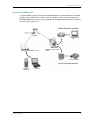
The BGAN system .................................................................................................. 2
The BGAN services ................................................................................................ 4
Features and interfaces of the EXPLORER™ 500 ....................................................5
Your EXPLORER™ 500 terminal ............................................................................. 7
Matrix of services and communication interfaces ..................................................10
What’s next? .........................................................................................................10
Chapter 2
Getting started
In this chapter ...................................................................................................... 11
Unpacking and assembling .................................................................................. 11
Placing the EXPLORER™ 500 ................................................................................15
Connecting cables ................................................................................................15
Powering the EXPLORER™ 500 .............................................................................17
Options for the start-up procedure .......................................................................18
Entering the SIM PIN ........................................................................................... 20
Pointing the antenna ............................................................................................21
Using an external antenna (fixed installation) ..................................................... 26
Using a fixed EXPLORER™ 500 (semi-fixed installation) ...................................... 26
Making the first call ............................................................................................. 27
Making the first data connection (LAN) ................................................................ 29
What’s next? ........................................................................................................ 30
Chapter 3
Using the display and keypad
In this chapter ......................................................................................................31
Menu overview .....................................................................................................31
Display during start-up ........................................................................................ 33
Display symbols ................................................................................................... 34
TT 98-122274-O
vi