1
Contents
Contents
1
2
2.1
3
3.1
3.2
3.3
3.4
4
5
6
7
7.1
7.2
7.3
7.4
Introduction
Getting Started
Quick Start
Overview
Defining EDID
About HDMI
About HDCP
Recommendations for Best Performance
Your VS-161H 16x1 Switcher
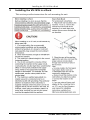
Installing the VS-161H in a Rack
Connecting a VS-161H 16x1 HDMI Switcher
Operating the VS-161H
The PC and DVD Modes
Acquiring the EDID
Controlling via RS-232 (for example, using a PC)
Controlling via ETHERNET
1
1
2
3
3
4
5
5
5
8
9
10
11
12
13
13
7.4.1
7.4.2
7.4.3
Connecting the ETHERNET Port directly to a PC (Crossover Cable)
13
Connecting the ETHERNET Port via a Network Hub (Straight-Through Cable) 15
Control Configuration via the Ethernet Port
15
8
9
Technical Specifications
Kramer Protocol 2000
15
16
Figures
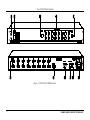
Figure 1: VS-161H 16x1 HDMI Switcher
Figure 2: Connecting a VS-161H 16x1 HDMI Switcher
Figure 3: Connecting a PC without Using a Null-modem Adapter
Figure 4: Local Area Connection Properties Window
Figure 5: Internet Protocol (TCP/IP) Properties Window
6
10
13
14
14
Tables
Table 1: VS-161H 16x1 HDMI Switcher Features
Table 2: DVD Mode and PC Mode Characteristics
Table 3: Technical Specifications of the VS-161H
Table 4: Protocol Definitions
Table 5: Instruction Codes for Protocol 2000
7
12
15
16
17
i