1
PuffinPlot User Manual
Pontus Lurcock
Version 1.03, 23 April 2015
Contents
1 Introduction
3
2 Installation
3
2.1 Requirements . . . . . . . . . . . . . . . . . . . . . . . . . . . . . . . . . . . . . . . . . .
3
2.2 Obtaining and installing PuffinPlot . . . . . . . . . . . . . . . . . . . . . . . . . . . . .
3
2.2.1 All operating systems . . . . . . . . . . . . . . . . . . . . . . . . . . . . . . . . .
3
2.2.2 Mac OS X . . . . . . . . . . . . . . . . . . . . . . . . . . . . . . . . . . . . . . . .
4
3 Basic usage
4
3.1 A note on keyboard shortcuts . . . . . . . . . . . . . . . . . . . . . . . . . . . . . . . . .
4
3.2 Opening a file . . . . . . . . . . . . . . . . . . . . . . . . . . . . . . . . . . . . . . . . . .
4
3.3 A tour of the main window . . . . . . . . . . . . . . . . . . . . . . . . . . . . . . . . . .
4
3.4 Data model . . . . . . . . . . . . . . . . . . . . . . . . . . . . . . . . . . . . . . . . . . . .
6
3.5 Main window features . . . . . . . . . . . . . . . . . . . . . . . . . . . . . . . . . . . . .
7
3.5.1 Plot area . . . . . . . . . . . . . . . . . . . . . . . . . . . . . . . . . . . . . . . . .
7
3.5.2 Sample chooser . . . . . . . . . . . . . . . . . . . . . . . . . . . . . . . . . . . . .
7
3.5.3 Toolbar . . . . . . . . . . . . . . . . . . . . . . . . . . . . . . . . . . . . . . . . . .
8
1
4 Detailed usage
8
4.1 Catalogue of functions . . . . . . . . . . . . . . . . . . . . . . . . . . . . . . . . . . . . .
9
4.1.1 File menu . . . . . . . . . . . . . . . . . . . . . . . . . . . . . . . . . . . . . . . .
9
4.1.2 Edit menu . . . . . . . . . . . . . . . . . . . . . . . . . . . . . . . . . . . . . . . . 12
4.1.3 Calculations menu . . . . . . . . . . . . . . . . . . . . . . . . . . . . . . . . . . . 14
4.1.4 Window menu . . . . . . . . . . . . . . . . . . . . . . . . . . . . . . . . . . . . . 16
4.1.5 Help menu . . . . . . . . . . . . . . . . . . . . . . . . . . . . . . . . . . . . . . . . 16
4.2 Features . . . . . . . . . . . . . . . . . . . . . . . . . . . . . . . . . . . . . . . . . . . . . . 16
4.2.1 Supported file types . . . . . . . . . . . . . . . . . . . . . . . . . . . . . . . . . . 16
4.2.2 Importing data . . . . . . . . . . . . . . . . . . . . . . . . . . . . . . . . . . . . . 17
4.2.3 Selecting points . . . . . . . . . . . . . . . . . . . . . . . . . . . . . . . . . . . . . 18
4.2.4 Working with multiple samples . . . . . . . . . . . . . . . . . . . . . . . . . . . 18
4.3 Plots and other data displays . . . . . . . . . . . . . . . . . . . . . . . . . . . . . . . . . 18
4.3.1 Available plot types . . . . . . . . . . . . . . . . . . . . . . . . . . . . . . . . . . 18
4.3.2 Arranging the plots . . . . . . . . . . . . . . . . . . . . . . . . . . . . . . . . . . 21
4.4 The preferences window . . . . . . . . . . . . . . . . . . . . . . . . . . . . . . . . . . . . 21
4.4.1 The action buttons . . . . . . . . . . . . . . . . . . . . . . . . . . . . . . . . . . . 21
4.4.2 The 2G import tab . . . . . . . . . . . . . . . . . . . . . . . . . . . . . . . . . . . 21
4.4.3 The Plots tab . . . . . . . . . . . . . . . . . . . . . . . . . . . . . . . . . . . . . . 22
4.4.4 The Misc. tab . . . . . . . . . . . . . . . . . . . . . . . . . . . . . . . . . . . . . . 22
4.5 Annotations . . . . . . . . . . . . . . . . . . . . . . . . . . . . . . . . . . . . . . . . . . . 25
4.6 Exporting graphics . . . . . . . . . . . . . . . . . . . . . . . . . . . . . . . . . . . . . . . 25
4.6.1 Introduction . . . . . . . . . . . . . . . . . . . . . . . . . . . . . . . . . . . . . . . 25
4.6.2 Graphics export options . . . . . . . . . . . . . . . . . . . . . . . . . . . . . . . . 25
4.7 Scripting . . . . . . . . . . . . . . . . . . . . . . . . . . . . . . . . . . . . . . . . . . . . . 26
5 Acknowledgements
27
6 Future development and bug reporting
28
A Citing PuffinPlot
29
B Release notes
30
C References
32
2
1
Introduction
This manual gives a practical guide to the usage of the PuffinPlot palaeomagnetic data analysis
program. Note that it does not elucidate the principles of the analysis techniques themselves,
and a working knowledge of palaeomagnetic procedures is assumed. For excellent introductions
to palaeomagnetic analysis, see Tauxe et al. (2010) or Butler (1992).
If you use PuffinPlot in the creation of published work, please cite the PuffinPlot paper (Lurcock and Wilson, 2012). See Appendix A for further details.
PuffinPlot is free software, distributed under the GNU General Public License. Please see the
LICENCE file in the PuffinPlot archive for details. PuffinPlot is copyright 2012–2015 by Pontus
Lurcock.
2
Installation
This section describes the hardware and software requirements for running PuffinPlot, and gives
instructions for installing and running it.
2.1
Requirements
PuffinPlot runs on the Java platform (version 7 or later), which is preinstalled or freely available
for a variety of operating systems, including Windows, Linux, and Mac OS X. Java is generally
easy to install, but detailed instructions for installing it are beyond the scope of this manual;
please consult the documentation for your operating system or visit http://www.java.com/ for
details. (If for any reason you are constrained to use an older version of Java on your system,
you may still be able to run an older version of PuffinPlot: version 1.02 of PuffinPlot works on
Java 6, and version 1.01 works on Java 5.)
2.2
Obtaining and installing PuffinPlot
You may download the latest version of PuffinPlot from https://bitbucket.org/pont/puffinplot/
downloads. PuffinPlot is distributed as a single zip archive file containing the program itself (in
two different variants, as detailed below) and documentation. The documentation consists of
this manual (in both HTML and PDF format) and a JavaDoc folder, containing documentation
for PuffinPlot’s source code. The JavaDoc is only of interest to users wishing to write scripts
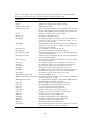
which interface directly with PuffinPlot’s internal data structures (see section 4.7). Table 1 lists
the contents of the PuffinPlot archive. After downloading the archive, move it to the folder where
you would like PuffinPlot installed and extract its contents there.
2.2.1
All operating systems
The file PuffinPlot.jar in the archive is the PuffinPlot program itself, as a cross-platform jar (Java
archive) file. This file is recommended for Linux, Windows, and other non-Mac operating sys-
Table 1: The contents of the PuffinPlot archive file.
File
Description
README
PuffinPlot.jar
PuffinPlot.app
Manual
JavaDoc
Example-files
LICENCE
A text file briefly describing the archive.
The PuffinPlot program (suitable for all operating systems)
The PuffinPlot program (tailored for Mac OS X)
Folder containing this manual in PDF and HTML format
Folder containing internal documentation for PuffinPlot
Folder containing example data files
The licence under which PuffinPlot is distributed
3
tems; it will also run on Mac OS X, but the specific Mac OS X version described below is usually
preferable. The details of starting PuffinPlot vary between operating systems, but double-clicking
on the file PuffinPlot.jar is the most common method. In some cases it may be necessary to rightclick on the file and select Open with Java runtime or some similar text from a menu. PuffinPlot
can also be started from a terminal prompt by setting the current folder to the one containing
PuffinPlot, and typing java -jar PuffinPlot.jar.
Note for Windows users. Under Windows, other programs may occasionally interfere with
the Java platform; if you have the Java platform installed on Windows but are still unable to run
jar files such as PuffinPlot.jar, the situation can usually be fixed by running the jarfix program. At
the time of writing, jarfix may be downloaded from http://johann.loefflmann.net/en/software/
jarfix/.
2.2.2
Mac OS X
The PuffinPlot archive also contains a special variant of the program for Mac OS X. This variant
is packaged as a standard OS X application and conforms more nearly to OS X user interface
standards than the cross-platform version described in the previous section. It is named ‘PuffinPlot.app’, although the extension ‘.app’ is usually hidden by Mac OS X.
In the extracted archive contents, the PuffinPlot application is shown as an icon representing
a puffin (specifically, the Atlantic Puffin Fratercula arctica). This application may be dragged into
the Applications folder, or any other convenient place.
PuffinPlot is started by double-clicking on its application icon. Recent versions of Mac OS X
include a security feature called ‘Gatekeeper’, which may prevent PuffinPlot from running. The
Apple support note at http://support.apple.com/en-gb/HT202491 gives instructions for configuring Gatekeeper to allow the execution of an ‘unidentified’ application such as PuffinPlot.
3
Basic usage
This section gives a brief introduction to the PuffinPlot data model and to the features of its main
window.
3.1
A note on keyboard shortcuts
PuffinPlot provides a large number of keyboard shortcuts for its various capabilities; most of them
involve holding down the Ctrl key while pressing another key. On Mac OS X, these shortcuts use
the command key rather than the Ctrl key, in accordance with Apple user interface guidelines.
Throughout this manual, keyboard shortcuts will be given as (for example) Ctrl-A. Users of Mac
OS X should read these shortcuts as command-A, etc.
3.2
Opening a file
To open a file, select Open. . . from the File menu. This will allow you to choose one or more
files to open from a standard file selection window. You may also select an entire folder; in this
case every file within the folder will be opened and combined into a single suite. Note: if you
open multiple files or a whole folder, they must have the same file type, the same treatment type
(thermal, alternating-field, etc.), and the same sample type (discrete or continuous). Opening,
for example, a mixture of Caltech and IAPD files, or a mixture of discrete and continuous files,
may result in errors during file reading.
3.3
A tour of the main window
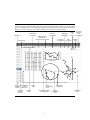
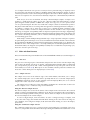
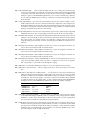
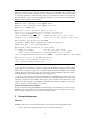
Figure 1 shows an annotated screenshot of PuffinPlot’s main window with a discrete sample
data file open. The bulk of the window is devoted to the data display itself, and shows the four
4
Figure 1 The main window of PuffinPlot with a discrete file loaded, showing the default data plot
layout. Data plots, information displays, and controls are annotated. Note that several other data
plots are available, but are not shown by default, and that the layout may be freely rearranged
by the user. Data points above the 275°C demagnetization step have been hidden.
Orientation
correction
Menu bar
Sample
orientation
Zijderveld plot
projections:
vertical and horizontal
Suite name
Magnetic
declination
Formation
orientation
-
dec.
264.3
249.0
251.4
244.2
225.6
217.4
281.7
295.8
106.3
214.0
197.7
192.9
104.5
118.4
48.9
103.4
123.0
107.2
137.2
110.8
129.0
112.9
199.0
inc.
-52.8
-58.0
-47.8
-48.4
-40.2
-34.1
-44.3
-31.7
-44.2
32.2
30.2
61.2
-29.4
-13.7
-8.2
-5.1
37.2
-21.2
-49.0
-32.5
-34.3
52.1
-9.5
int.
2.77e-05
2.29e-05
2.18e-05
1.32e-05
1.03e-05
1.67e-05
1.59e-05
8.14e-06
8.95e-06
5.98e-06
1.71e-05
2.16e-05
4.66e-05
8.62e-05
5.81e-05
7.85e-05
1.38e-04
1.64e-04
9.74e-05
8.07e-05
1.10e-04
1.74e-04
4.67e-04
m.s.
3.0e-04
3.0e-04
3.3e-04
3.0e-04
3.0e-04
3.0e-04
3.1e-04
3.3e-04
3.1e-04
2.6e-04
2.6e-04
2.9e-04
5.9e-04
8.0e-04
7.6e-04
7.6e-04
8.9e-04
1.3e-03
1.3e-03
1.2e-03
1.2e-03
1.2e-03
6.5e-04
PCA
anchoring
Perform
PCA
vertical
horizontal
Units: A/m ×10 −6
3
3.5
3
2.5
2
1.5
1
0.5
2.5
2
1.5
1
0.5
50
100 150 200 250 300
Temperature (°C)
Mag. sus. (S.I.) ×10−4
temp.
25
50
75
100
125
150
175
200
225
250
275
300
325
351
375
400
425
450
475
500
525
550
575
Magnetization (A/m) ×10−5
Sample: MWD1137.2
De-select
points &
Select
clear
all
points calculations
N,U
25
W
20
E
10
15
S,D
Discrete Dash denotes
sample
hidden
chooser data point
Currently
selected
sample
Sample
name
Lowerhemisphere
point
Data
table
Demagnetization/
intensity plot
5
Equal-area
projection
Upperhemisphere
point
Zijderveld
plot
most popular data display methods for palaeomagnetic data: a table, a Zijderveld plot, an equalarea projection, and a demagnetization-intensity biplot (which also shows an overlaid magnetic
susceptibility plot). The plots are interactive, in that individual data points may be selected by
clicking or by dragging a rectangle with the mouse. The plot layout is configurable: the sizes and
positions of the plots can be changed, and plots can be added to and removed from the display.
To the left of the main plot display area is the sample chooser, which shows a complete list of
the samples within the suite, with the currently selected sample highlighted. Multiple samples
may be selected at once allowing functions such as PCA calculation to be performed en masse. If
a long core data file is loaded, the sample chooser is shown as a vertical slider indicating depth
rather than a list of sample names.
Above the main plot area is the toolbar, which gives convenient access to some of the most
frequently used facilities of the program. From left to right, these are: choosers for the currently
displayed data suite, the orientation correction, and the Zijderveld projection type; displays of
the sample and formation orientations and magnetic declination; and buttons for three of the
most commonly performed actions.
At the top of the window is the menu bar, providing access to all the program’s functions in
a hierarchical manner. On Mac OS, the menu bar is at the top of the screen rather than the top
of the window, and includes an extra menu at the left, entitled PuffinPlot.
3.4
Data model
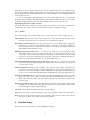
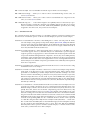
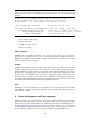
Figure 2 PuffinPlot’s hierarchical data model. Each layer (except the lowest) contains multiple
instances of the following layer.
Suite
The complete set of all the data to be
processed.
Site
All samples from one location, or from
a particular range of depths.
Sample
One physical rock specimen, or one
position on a long core.
Treatment step
The state of a Sample after a particular
series of treatment steps.
Name
Locality
Site
Site
Site
Name
Sample
Magnetic declination
Height
Sample
Name
Step
Volume
Step
Treatment
Sample
Step
Magnetization
Site
Site
Site
Bedding
Sample
Sample
Sample
Step
Step
Sites are not
required. If none
are defined, the
suite contains the
samples directly.
Orientation
Step
Susceptibility
PuffinPlot uses a hierarchical data structure, with higher levels containing multiple instances
of each lower level. The structure is summarized in Figure 2. At the top is the suite, which contains
all the data to be analysed as part of a particular study. For a discrete specimen study, this will
typically correspond to a section in the field; for a long core study, it will correspond to a core.
A suite is initially created by opening one or more data files from a magnetometer; it is saved
as a file in PuffinPlot’s own format. A suite can contain multiple sites. A site corresponds to a
6
set of samples taken from one spot in a section (or from a particular range of depths). A site’s
associated data can include such things as bedding attitude and stratigraphic height, as well as
calculated parameters such as the mean palaeomagnetic direction for all the samples at the site.
Sites are not required: if no sites have been defined, samples are contained directly within the
suite.
Each site (or, if no sites are defined, the suite) contains multiple samples. A sample corresponds to a small physical volume of rock. For a discrete study, this will usually be a typical
palaeomagnetic 25mm cylinder or IODP cube sample. For long cores, it is the portion of the
core at a particular depth. The data associated with a sample consists of information specific to
this physical unit which does not change with the application of demagnetization techniques —
for example, a sample code or name (or, for long cores, a depth), the field orientation of the
sample, and its volume. For discrete samples this data can also include a tensor representing
anisotropy of magnetic susceptibility, which is imported separately from an Agico kappabridge
datafile and collated with the magnetization data by matching the sample names. The sample can
also contain calculated parameters, such as a direction fitted by principal component analysis,
or a best-fitting great circle.
Each sample contains multiple demagnetization steps. A step represents a sample at a particular point during the treatment protocol. Its associated data thus includes details of the treatment:
the type (thermal, AF, IRM, etc.) and parameters (temperature, field strength, etc.). The data also
includes the state of the sample itself — most importantly, the measured magnetization vector.
For thermal studies, the magnetic susceptibility is usually also recorded after every heating cycle,
and is also stored as part of the step.
3.5
Main window features
This section describes the parts and functions of the main PuffinPlot window, as shown in figure 1.
3.5.1
Plot area
The plot area is the largest part of the window, and plots the data for the current sample using
various plots. By default, four plots are shown: a demagnetization-intensity biplot, a Zijderveld
plot, an equal-area projection, and a table of demagnetization steps. The plots can be moved
and resized (see section 4.3.2). Other plots are also available, and the preferences window can
be used to control which plots are displayed (see section 4.4).
3.5.2
Sample chooser
The sample chooser sits at the leftmost edge of the main window, and allows you to change
the current sample (the one for which data is plotted) and the set of selected samples (most
of PuffinPlot’s functions operate on the currently selected samples). Often, the set of selected
samples will consist only of the current sample.
The sample chooser takes two forms, depending on whether the current suite of data is for
discrete samples or for a continuous long core measurement.
Using the discrete sample chooser
The discrete sample chooser shows the names of the samples in the current suite. The selected
sample or samples are highlighted in a different colour. The selected sample is the current sample,
and its data is displayed in the main plot area. If more than one sample is selected, the first of
the selected samples is the current sample.
To select a single sample, click on its name. To select a contiguous range of samples, click
at one end of the range, then hold down Shift while clicking at the other end of the range. To
select multiple, non-contiguous samples, hold down Ctrl while clicking. To select all samples,
press Ctrl-A.
Using the continuous sample chooser
The continuous sample chooser is a vertical grey bar representing the total length of the measured core, striped with horizontal white lines representing the individual measurements at each
7
depth. (If there are too many measurements for all the requisite white lines to be displayed, they
are omitted.) A black triangle and line show the current depth; this is the depth for which the
data is displayed in the main window. If there are selected samples, they are highlighted in red
on the sample chooser.
To select a single depth, click on the appropriate part of the sample chooser. To scroll rapidly
through a range of samples, click and drag the mouse along the sample chooser. To select a range
of samples, hold down Shift, then click, drag, and release the mouse on the chooser.
Keyboard shortcuts for sample selection
Use Ctrl-B and Ctrl-N to change the current sample. Use Ctrl-A to select all the samples in the
current suite. You can also use the up and down arrow keys to change the sample.
3.5.3
Toolbar
The toolbar displays various data and provides several controls. From left to right, these are:
Suite chooser. This shows the name of the current suite of data. If more than one suite of data
has been opened, the suite chooser allows you to switch between them.
Orientation correction chooser. This chooser allows you to choose whether data is displayed
in laboratory co-ordinates (uncorrected), in field co-ordinates, corrected for sample orientation (samp. corr.), or in tectonic co-ordinates, corrected for both sample orientation
and bedding orientation (form. corr.).
Zijderveld vertical projection (‘V vs. . . . ’). This chooser controls the vertical projection used
in the Zijderveld plot. The y axis always corresponds to the vertical direction; the chooser
controls the x axis, which may correspond to North (V vs. N) or East (V vs. E). The third
option, V vs. H, projects each data point separately, in the plane containing itself and the
origin; this is sometimes referred to as a ‘modified Zijderveld’ plot.
Zijderveld horizontal projection (‘N is up’/‘W is up’). This chooser controls the horizontal
projection used in the Zijderveld plot. The upward direction on the plot can correspond
to either north or west.
Sample orientation (Samp). The first number is the azimuth of the sample orientation; the
second is its either its dip angle or its hade, depending on the current setting in the user
preferences (see section 4.4.4). By default, PuffinPlot uses dip angle rather than hade. For
a long core, the azimuth and dip will usually be 0 and 90 respectively throughout the core.
Formation orientation (Form). The first number is either the azimuth of the dip for the bedding, or its strike; the second is the dip angle. By default PuffinPlot uses the dip azimuth rather than the strike, but this can be changed in the preferences window (see
section 4.4.4).
Magnetic declination (Dev). This is the angle between magnetic north and true north at the
sampling site. (It is abbreviated ‘Dev’ (for ‘deviation’) to avoid any possible confusion with
the declinations of sample magnetizations.)
Select all selects all the treatment steps in the current sample.
PCA performs principal component analysis for the selected points of all the selected samples.
Clear de-selects all the points in all the selected samples, and clears the results of any calculations done on them, such as PCA or great-circle analysis.
4
Detailed usage
This section gives a methodical account of PuffinPlot’s features.
8
4.1
Catalogue of functions
This section lists all the items in PuffinPlot’s menus, giving a brief description of the functionality
associated with each one.
4.1.1
File menu
This menu contains functions connected with opening, closing, and saving files.
File > Open. . . reads one or more files of demagnetization data into PuffinPlot as a new suite.
See section 4.2.1 for details of supported filetypes.
File > Open folder. . . reads a whole folder of data files into PuffinPlot. This menu item only
appears on OS X; on other operating systems, the Open. . . menu item also allows
selection of entire folders.
File > Open recent file is a submenu which contains the names of the last eight files which have
been opened in PuffinPlot, allowing them to be opened again with a single click.
File > Save saves the current suite as a PuffinPlot file. If the suite was opened from a PuffinPlot
file or if it has been previously saved as a PuffinPlot file, it will immediately be saved
to that file. If no PuffinPlot file is associated with this suite yet, a standard ‘save file’
dialog box will prompt you for a file name and location.
File > Save as. . . allows you to save the current suite to a different filename or location.
File > Close closes the current suite, removing it from PuffinPlot’s data display.
File > Export data is a submenu allowing the export of various kinds of data to CSV files.
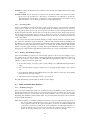
File > Export data > Export sample calculations. . . saves a file containing all the data associ-
ated with individual samples. Table 2 describes the fields which make up the file.
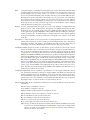
File > Export data > Export site calculations. . . saves a file containing (for suites with discrete
samples) all the data associated with sites. Table 3 describes the fields which make up
this file.
File > Export data > Export suite calculations. . . saves a CSV file containing the Fisherian pa-
rameters for mean directions calculated across the entire suite; see the documentation
for the Calculate > Suite means menu item (section 4.1.3) for details.
File > Export data > Export multi-suite calculations. . . saves a CSV file containing the Fisherian
parameters for mean directions calculated across all the currently open suites; see the
documentation for the Calculate > Multi-suite means menu item (section 4.1.3) for
details.
File > Export data > Export IRM data. . . saves files containing IRM acquisition data. It produces
a folder of files, one for each sample in the suite. Each file is in tab-delimited text format,
and each line within the file contains the IRM field strength and the magnetization
intensity of the sample after application of that field.
File > Export graphics is a submenu with various options for exporting the plots for the current
and selected samples. See section 4.6 for full details.
File > Import data is a submenu with functions to import additional data into the current suite.
File > Import data > Append more palaeomagnetic data. . . reads a palaeomgnetic data file,
like the Open. . . function in the main File menu. The difference is that this function
will append the data to the current suite, rather than creating a new suite for it.
9
Table 2: List of fields in exported sample data file, Note that, in addition to the predefined fields,
any custom user annotations (see section 4.5) will also be exported in this file.
Field name
Description
Suite
Sample
Depth
NRM intensity (A/m)
MS jump temp. (°C)
Suite name
Sample name (only present in discrete files)
Depth in core (only present in long core files)
NRM intensity in A/m
For thermal demagnetization, the temperature step at which
the first jump in magnetic susceptibility occurs. A jump is defined as a susceptibility of at least 2.5 times the previous value.
Number of treatment steps for this sample
Declination of PCA direction (°)
Inclination of PCA direction (°)
The Maximum Angle of Deviation for the planar PCA fit; the
smaller the value, the more coplanar the points. See section 4.3.1 for more details.
The Maximum Angle of Deviation for the linear PCA fit; the
smaller the value, the more collinear the points. See section 4.3.1 for more details.
‘Y’ if the PCA fit was anchored; ‘N’ if not
The Cartesian equation of the PCA best-fit line
Field (in mT) or temperature (in °C) of first demagnetization
step used for PCA analysis
Field (in mT) or temperature (in °C) of last demagnetization
step used for PCA analysis
‘Y’ if all steps between the first and last were selected for PCA;
‘N’ if any were omitted
the declination of the pole to the fitted great circle, if any
the inclination of the pole to the fitted great circle, if any
the strike of the plane of the fitted great circle, if any
the dip of the plane of the fitted great circle, if any
the MAD1 value for the great circle fit, indicating goodness of
fit (smaller is better). See section 4.3.1 for more details.
the number of points used for the great-circle fit
half of the NRM (in A/m)
the demagnetization treatment level at which the NRM was
reduced to half (in °C or mT)
‘Y’ if magnetization intensity reached half the NRM intensity
during demagnetization; ‘N’ otherwise
Mean declination of treatment step directions (°)
Mean inclination of treatment step directions (°)
α95 of mean treatment step direction (°)
k-value of mean treatment step direction
number of directions used to calculate mean
length of sum of directions used to calculate mean
declination of major axis of AMS tensor
inclination of major axis of AMS tensor
declination of intermediate axis of AMS tensor
inclination of intermediate axis of AMS tensor
declination of minor axis of AMS tensor
inclination of minor axis of AMS tensor
Any user-defined annotations are also exported as part of the
sample export file. See section 4.5 for details.
Steps
PCA dec. (°)
PCA inc. (°)
PCA MAD1
PCA MAD3
PCA anchored
PCA equation
PCA start (°C or mT)
PCA end (°C or mT)
PCA contiguous
GC dec (°)
GC inc (°)
GC strike (°)
GC dip (°)
GC MAD1
GC npoints
MDF half-intensity (A/m)
MDF demagnetization (°C or mT)
MDF midpoint reached
Fisher dec.
Fisher inc.
Fisher a95
Fisher k
Fisher nDirs
Fisher R
AMS dec1
AMS inc1
AMS dec2
AMS inc2
AMS dec3
AMS inc3
[annotations]
10
Table 3: List of fields in exported site data file
Field name
Description
Site
Samples
Fisher dec.
Fisher inc.
Fisher a95
Fisher k
Fisher nDirs
Fisher R
GC valid
Name of site
Number of samples at this site
Mean declination of sample directions (°)
Mean inclination of sample directions (°)
α95 of mean sample direction (°)
k-value of mean sample direction
number of directions used to calculate site mean
length of sum of unit direction vectors
‘Y’ if the great-circle fit is valid, ‘N’ otherwise. See section 4.4.4
for details on the validity test and how it may be customized.
Declination of great-circle direction (°)
Inclination of great-circle direction (°)
α95 for great-circle direction (°)
k-value for great-circle direction
Number of great circles used in great-circle fit
Number of PCA directions used in great-circle fit
length of sum of direction vectors in great-circle fit
the smallest number of treatment steps used to define any of
the great circles fitted at this site
See note below
See note below
See note below
See note below
Site latitude
Site longitude
VGP latitude
VGP longitude
dp, the first semi-axis of the VGP confidence ellipse
dm, the second semi-axis of the VGP confidence ellipse
GC dec. (°)
GC inc. (°)
GC a95 (°)
GC k
GC N
GC M
GC R
GC min points
T1min
T1max
T2min
T2max
Lat (°)
Long (°)
VGP lat (°)
VGP long (°)
VGP dp (°)
VGP dm (°)
Note on T1min, T1max, T2min, and T2max: these four parameters give the ranges of demagnetization steps used to fit the circles. T1 denotes the first (lowest) demagnetization step in a
circle path for an individual sample, and T2 the last (highest). T1min is the minimum of the T1
values across all the circles for the site, and T1max the maximum. Similarly, T2 denotes the last
step used in a single circle, and T2min–T2max is the range of its values across all the samples at
a site.
11
File > Import data > Import site locations. . . imports co-ordinates (latitude and longitude) for
sites in the suite. These co-ordinates are used to calculate virtual geomagnetic poles
from site directions. The location file should be in CSV (comma-separated value) format with no header line. Column 1 contains the site name, column 2 the latitude
(degrees north from equator, negative for southern hemisphere), and column 3 the
longitude (degrees east of Greenwich).
File > Import data > Import AMS. . . imports AMS data from a file and adds it to the current
suite. The file must be in the .ASC format produced by the Safyr and SUSAR programs
distributed with AGICO kappabridges. The AMS data is assigned to the appropriate
samples within the suite by matching the sample names specified in the ASC file with
the sample names for the demagnetization data. If the AMS file contains data for samples not in the suite, these samples will be created and added to the suite. AMS data
is not displayed by default; the equal-area plot of AMS data can be activated from the
Preferences window. AMS import has been tested with data from SAFYR versions 1.5
and 2.6 and SUSAR version 4.0.
File > Page Setup. . . opens a window allowing you to change the paper size, orientation, and
margins for printing.
File > Print. . . opens a window allowing you to print the selected samples. Note that only the
selected samples will be printed, so if you wish to print the whole suite use Edit >
Select all first. On most systems this will also allow you to print to a PDF file; Windows
users may need to install a virtual PDF printer, such as CutePDF Writer or Bullzip PDF
Printer, in order to produce PDF files.
File > Print suite EA window. . . prints the contents of a separate window showing an equal-are
plot of sample/site directions through the suite; see section 4.1.4 for more details.
File > Print site EA window. . . prints the contents of a separate window showing an equal-area
plot of directions at the current site; see section 4.1.4 for more details.
File > Run Python script. . . runs a user-specified external script written in the Python program-
ming language. See section 4.7 for details.
File > Preferences. . . opens the preferences window. See section 4.4 for details. On Mac OS X,
this item is found on the PuffinPlot menu to the left of the File menu, rather than on
the File menu.
File > Quit terminates PuffinPlot. On Mac OS X, this item is found on the PuffinPlot menu to the
left of the File menu, rather than on the File menu.
4.1.2
Edit menu
The Edit menu provides various basic functions mainly to do with manipulation of data points.
Edit > Select all steps selects all the treatment steps in all the selected samples, excluding treatment steps which have been hidden (see Hide steps below).
Edit > Clear step selection de-selects all the treatment steps in all the selected samples.
Edit > Edit layout allows you to reposition and resize the plots in the main display area. See
section 4.3.2 for details.
Edit > Reset layout resets the sizes and positions of all the plots to their default values.
Edit > Sample parameters. . . opens a window which allows you to change the sample volume,
sample orientation, formation orientation, and local magnetic declination for all the
selected samples. Each parameter type can be individually changed without affecting
the values of the others. For convenience, sample orientation can be specified using
either dip angle or hade; it is possible but pointless to enter values for both of these
parameters, since one will overwrite the other. Similarly, formation orientation can be
specified using either dip azimuth or strike.
12
Edit > Set treatment type. . . opens a window which allows you to change the treatment type
for the selected samples. Normally, the treatment type will be automatically determined
on opening a data file. If the file does not specify the treatment type, PuffinPlot will
attempt to guess it. Set treatment type allows you to set the treatment type explicitly
in cases where PuffinPlot guesses wrong, or where the wrong treatment type is given
in the data file.
Edit > Copy step selection copies the selected treatment steps for the current sample to an in-
visible ‘clipboard’. The selection can be pasted from the clipboard to other samples (see
Paste point selection), selecting the same demagnetization steps in those samples. This
is useful for selecting the same treatment steps in a large number of samples without
having to manually select them for each sample.
Edit > Paste step selection takes the selected treatment steps from the clipboard (see Copy step
selection) and selects the corresponding treatment steps in all the selected samples.
Edit > Rotate/invert samples is a submenu allowing the demagnetization data from the selected
samples to be rotated 180° around a selected axis. Such functionality is rarely required
but can be useful, for example, when it is found that a sample has been incorrectly
oriented during measurement, or when converting between different orientation conventions.
Edit > Rotate/invert samples > Flip samples around X axis rotates the magnetic moment val-
ues for all selected samples 180° around the X axis.
Edit > Rotate/invert samples > Flip samples around Y axis rotates the magnetic moment val-
ues for all selected samples 180° around the Y axis.
Edit > Rotate/invert samples > Flip samples around Z axis rotates the magnetic moment val-
ues for all selected samples 180° around the Z axis.
Edit > Rotate/invert samples > Invert sample directions Inverts every magnetization vector in
every selected sample. (Each of the x, y, and z co-ordinates of each vector is negated;
this corresponds to a point reflection through the origin.)
Edit > Edit sites is a submenu allowing site names to be set for samples in various ways.
Edit > Edit sites > Set site name. . . allows a single site name to be set for all the selected sam-
ples.
Edit > Edit sites > Set sites from sample names. . . sets site names for the selected samples by
taking specified characters from the sample names. The characters to use are specified
by a list of comma-separated numbers and number ranges; for example, entering 1,3,58 would give each selected sample a site name composed of the first, third, and fifth
to eighth characters of the sample name, so that a sample with the name FFQB0529.1
would get the site name FQ0529. The table below gives some further examples.
Sample name
Character selection
Resulting site name
FFQB0529.1
FFQB0529.1
CiLpA-10-53
CiLpA-10-53
1,3,5-8
4-6
1-2,5,7-8
3-4,9-11
FQ0529
B05
CiA10
Lp-53
Edit > Edit sites > Set sites by depth. . . sets site names in continuous suites using the depths
of the individual samples. PuffinPlot asks for a thickness value, and groups the samples
within the core into sites of that thickness, effectively ‘slicing’ the core into equally thick
sites. Each site is named after the shallowest depth within it.
Edit > Hide steps hides all the selected treatment steps in all the selected samples. This removes
them from all the graphical plots (which will be rescaled to avoid unnecessary blank
space), but not from the data table in the main plot window; on the data table, hidden
treatment steps are marked with a dash symbol (–) to their left. Hidden steps can be
restored using the Show all steps menu item.
13
Edit > Show all steps restores all hidden treatment steps in all the selected samples.
Edit > Edit custom flags. . . allows you to add or remove user-defined flags for the suite; see
section 4.5 for details.
Edit > Edit custom notes. . . allows you to add or remove user-defined note categories for the
suite; see section 4.5 for details.
Edit > Rescale mag. sus.. . . scales all the magnetic susceptibility values for the suite by a spec-
ified factor. This is useful since magnetic susceptibility meters typically do not report
values in standard S.I. units. Note that, unlike many PuffinPlot operations, the scaling
is applied to the entire suite, not just the selected samples.
4.1.3
Calculations menu
The calculations menu provides facilities for calculating magnetic parameters and directions.
Note that most calculations operate on all the selected samples, not just the current sample.
Calculations > Calculate PCA calculates a best-fitting line to all the selected points in all the
selected samples, using principal component analysis (Kirschvink, 1980). The PCA direction is projected onto the Zijderveld plot. If the ‘PCA anchored’ menu item (below)
is ticked, the resulting PCA fit line will be anchored to the origin; if ‘PCA anchored’ is
not ticked, the PCA fit will be unanchored.
Calculations > PCA anchored is a menu item which may be toggled on or off. When it is on,
a tick mark appears next to it, and PCA analyses are constrained to pass through the
origin. In general, it is appropriate to anchor the PCA if the analysed points are known
to represent the final demagnetization component – that is, they are trending directly
towards the origin, and deviations from this path are known to be due to measurement
noise rather than an offset in the true magnetization vectors. Leaving PCA unanchored
allows analysis of a non-final component, provided that it is sufficiently well separated
from other components.
Calculations > Fisher by site calculates a Fisherian mean direction for each selected site using
the PCA directions of its samples.
Calculations > Fisher on sample calculates a direction for each selected sample using the Fish-
erian mean of the directions for the selected treatment steps. PCA is almost always
preferable for establishing a reliable sample direction, but this technique can sometimes be useful for determining a polarity from very noisy data. Note that, at present,
Fisherian sample directions are not saved as part of the PuffinPlot file, although they
can easily be recalculated if the selected demagnetization points are not changed. The
Fisherian mean and associated parameters are, however, included in exported sample
data files (see Table 2).
Calculations > Suite means calculates Fisherian means across all the selected samples. Two sets
of means are actually calculated: one set is calculated from the PCA directions of individual samples, and the other from the site mean directions (if any have been computed). Note that, if there are site means computed by great-circle intersection, only
those considered valid are used; see section 4.4.4 for details of the validity test. If a site
has both a valid great-circle direction and a Fisherian direction calculated from PCAs,
the great-circle direction will be used. Each set of means consists of an overall mean and
individual means for the upper and lower hemisphere, to cater for data sets containing
reversals. Corresponding VGPs are also calculated. All these means can be exported
as a CSV file using the File > Export Data > Export suite calculations. . . menu item.
The overall means and VGPs (but not the individual upper/lower hemisphere means)
are also shown in the Suite table plot if it is active. Note that (like most PuffinPlot
functions) this feature operates on all the selected samples; to calculate means for the
entire suite you must first select all the samples.
14
Calculations > MDF calculates the Median Destructive Field (or, for thermal demagnetization,
the Median Destructive Temperature) of the selected samples. This is the field (or temperature) at which the intensity of the sample’s remanence has been reduced to half of
its initial value. Once calculated, it is displayed on the demagnetization-intensity plot,
and can be saved as part of the exported sample data.
Calculations > Clear sample calculations de-selects all the points in all the selected samples,
and clears the results of any calculations done on them, such as PCA or great-circle
analysis.
Calculations > Clear sample PCAs clears any PCA calculations for the currently selected sam-
ples.
Calculations > Clear sample GC fits clears any great-circle fits on them for the currently selected
samples.
Calculations > Fit great circle calculates and displays a best-fitting great circle for all the se-
lected points in all the selected samples.
Calculations > Great circles calculates a best-fitting direction for all the great circles fitted at the
current site, using the algorithm of McFadden and McElhinny (1988). The great-circle
fit is shown both in the Equal-area (site) plot in the main window (if the plot has been
activated in the preferences), and in a separate window which is opened automatically.
Calculations > Clear site calculations clears the results of any calculations associated with the
selected sites (as opposed to samples); at present, this amounts to clearing the best-fit
great-circle direction for each selected site.
Calculations > Multi-suite means calculates Fisherian means across all the samples in all the
currently opened suites. the results are not plotted, but they are shown in a pop-up
window and can be saved using the File > Export data > Export multi-suite calculations. . . menu item.
AMS calculations
PuffinPlot can show the results of statistical calculations on AMS tensors, giving mean directions
and confidence ellipses for the principal axes by one of three methods; at present, however, these
calculations cannot be performed by PuffinPlot itself. Instead, it makes use of two Python scripts
from the PmagPy suite (Tauxe et al., 2010), bootams.py and s_hext.py. In order to calculate
AMS statistics, these scripts must first be installed on the computer running PuffinPlot, and the
folder containing them must be specified in the Preferences window. The PmagPy programs may
be obtained from http://earthref.org/PMagPy/.
All AMS calculations operate on the currently selected samples. Tauxe et al. (1998) and
chapter 13 of Tauxe et al. (2010) give more details of tensor statistics, particularly with regard
to the application of bootstrap methods.
Calculations > Calculate bootstrap AMS calculates bootstrap statistics using the bootams.py
program, producing Kent error ellipses which are shown on the AMS plot in the main
window.
Calculations > Parametric bootstrap AMS calculates bootstrap statistics using the bootams.py
program, producing Kent error ellipses which are shown on the AMS plot. It differs
from the previous function in employing a parametric bootstrap, which can provide
more realistic confidence intervals for small numbers of samples on the (often reasonable) assumption that measurement uncertainties are normally distributed across the
selected samples.
Calculations > Calculate Hext on AMS calculates Hext (1963) statistics using the s_hext.py pro-
gram and displays the mean directions and error ellipses on the AMS plot.
Calculations > Clear AMS calculations Clears any previously done bootstrap and Hext calcula-
tions.
15
4.1.4
Window menu
This menu allows you to open or close auxiliary windows.
Window > Data table opens (or closes) a window showing all the demagnetization data for the
current sample as a table. This table is far more extensive than the brief table displayed
in the main window, and allows data to be selected and copied to the clipboard so that
it can be pasted into a spreadsheet or text editor.
Window > Site equal-area plot opens (or closes) a window containing an equal-area plot for
the current site; the plot is created by selecting the Calculations > Fisher by site or
Calculations > Great circles menu items, and may be printed using the File > Print
site EA window. . . menu item. Note that the main display area provides a similar plot;
this window can be useful for a quick inspection of site data at a larger scale without
editing the main plot layout.
Window > Suite equal-area plot opens (or closes) a window containing an equal-area plot of
sample or site directions across the whole suite; the plot is created by selecting the
Calculations > Suite means menu item, and may be printed using the File > Print suite
EA window. . . menu item. Note that the main display area provides a similar plot; this
window can be useful for a quick inspection of suite data at a larger scale without
editing the main plot layout.
4.1.5
Help menu
Help > PuffinPlot website opens the PuffinPlot website using the default web browser.
Help > Cite PuffinPlot. . . opens a window containing information on the PuffinPlot paper (Lur-
cock and Wilson, 2012) and how to cite it.
Help > About PuffinPlot displays some brief information about PuffinPlot, including the version.
On Mac OS X, this item is also present on the PuffinPlot menu.
4.2
Features
This section presents PuffinPlot’s features in moderate detail.
4.2.1
Supported file types
PuffinPlot can read a number of commonly used palaeomagnetic data formats:
PuffinPlot (filename suffix ppl): PuffinPlot’s own file format.
2G (filename suffix dat): files produced by the ‘Long Core’ program used with 2G Enterprises
cryomagnetometers.
Caltech (filename suffix sam, with associated data files in same folder): format used at the
Caltech Paleomagnetics Laboratory and supported by the ‘Paleomag’ program of Jones
(2002).
IAPD (filename suffix dat): format used by the IAPD program and its successors, developed by
T. H. Torsvik et al. and used at the Geological Survey of Norway. IAPD files contain an ‘a95’
value for each treatment step which gives an indication of the measurement’s reliability.
PuffinPlot does not import these values, but will show a warning if any of them has a value
of 5 or greater.
Zplot (filename suffix txt): format used by the ‘Zplot’ program developed by Steve Hurst at
Woods Hole.
16
Sample directions (filename suffix txt): a file of sample-level directional data. This lets you
use PuffinPlot to analyse directions even when no demagnetization data is available (or
when the data is not palaeomagnetic in origin). Input files must contain three fields per
line, with no header lines: sample name or depth; declination in degrees; and inclination
in degrees. Fields are separated by commas, tabs, or space characters.
Custom formats This option imports data from a file format freely defined by the user, within
certain limits. Custom formats allow PuffinPlot to read a large variety of textual, tabular
data formats. See section 4.2.2 for details.
Note that there are different ways to read 2G data files: users are encouraged to read section 4.4.2
and ensure that the preferences are correctly set for their needs. (In particular, magnetization
vectors may be read incorrectly from 2G long core files if the wrong import settings are
used, so it is important to check the settings before importing data.)
In general, support for other file formats is straighforward to add, and most tabular textual
file formats can be opened using the File > Import data. . . function.
4.2.2
Importing data
When File > Import data. . . is selected, PuffinPlot shows a window allowing you to describe a
text-based, tabular file format; once you have specified a format, you can choose one or more
files in that format, which PuffinPlot will then open. The file is assumed to contain one magnetic
measurement per line. The file format specification consists of two parts: General settings and
Column definitions.
General settings
This part describes parameters relating to the file as a whole, rather than individual columns.
Number of header lines to skip Data files may include extra data (‘header lines’) at the start
of the file, most often a line containing textual descriptions of the columns. This field lets
you specify how many lines PuffinPlot should ignore at the start of the file, letting it skip
over them.
Measurement type This specifies whether the files contain discrete or long core measurements.
Treatment type This specifies the type of treatment applied to the samples – thermal, AF, IRM,
etc.
Column separator For files which do not use fixed-width columns (for example, CSV files), this
drop-down lets you select the character used to separate the columns. If ‘Use fixed-width
columns’ is selected, the column separator is not used.
Use fixed-width columns Tabular text files usually use one of two conventions for separating
columns: either the columns have widths which differ from line to line, and are separated
with a special character such as a comma or tab; or the columns have the same width in
every line, and are padded out to this width with space characters when the contents are
shorter than the column width. Select this tick box to specify that the file format has fixedwidth columns. In this case, the column separator will be ignored and you must specify
the widths of the columns (see below). If this box is not selected, the column widths are
ignored.
Column widths If your file format uses fixed-width columns, you must specify them here as a
list of numbers separated by commas. For example, if you have six columns, with the first
being ten characters wide and the rest eight characters wide, you would enter 10,8,8,8,8,8
in this box. If your file format does not use fixed-width columns, this box is ignored.
Column definitions
This part gives the column number for each item of measurement data to be read.
17
Column no. This is the number of the column to read; columns are numbered from left to right,
starting at 1.
Column contents This is the data to read from the specified column. Note that not all data
types need to be specified for a file format; at minimum, it is sufficient to specify the
demagnetization step the three components of the magnetization vector (either as X, Y,
and Z moments, or as declination, inclination, and magnetization).
4.2.3
Selecting points
For most of PuffinPlot’s functions, the data points of interest must be selected before anything
can be done to them. You can select data points simply by clicking on them; if you click on a
selected point it will be de-selected. Selected points are drawn in red to distinguish them from
the black unselected points. Note that the notional data point itself is the thing being selected,
not the visual representation that you click on. Thus, if you click on a point in one plot, the
corresponding point in all the visible plots will also turn red, since they are visual representations
of the same datum.
Since data points are relatively small, clicking accurately on them can be inconvenient. PuffinPlot offers two alternative selection methods to alleviate this problem. Firstly, by holding down
the Shift key, you can select a point simply by left-clicking near it; holding Shift and right-clicking
will de-select nearby points instead. Secondly, you can left-click, hold the button, and drag the
pointer across the graph, creating a rectangle. Every point within the rectangle will be selected.
Dragging a rectangle with the right button will instead de-select every point within the rectangle.
4.2.4
Working with multiple samples
Since most PuffinPlot operations are automatically applied to all the selected samples, repetitive analysis work can often be done automatically using the Copy point selection feature. For
example, if you wish to apply a PCA to the 100–250°C demagnetization range of a series of 50
samples, it can be done in four quick steps:
1. For the first sample, select the points corresponding to the 100–250°C demagnetization
range.
2. Select the 50 samples using the sample chooser, keeping the first sample as the current
one.
3. Use Copy point selection on the Edit menu (or press Ctrl-Shift-C to select the corresponding
points in all the selected samples.
4. Select PCA from the Calculations menu, or press Ctrl-R.
This will immediately perform PCA on all 50 selected samples.
4.3
4.3.1
Plots and other data displays
Available plot types
This section lists and briefly describes the available plot types in PuffinPlot. Some of them are not
displayed by default, but these may be activated via the preferences window (see section 4.4).
Note that the term ‘plot’ is used rather loosely in this manual to refer to any movable element
displaying data within the main window. Thus, the ‘plots’ listed below include textual elements
such as legends and tables.
Equal-area (sample) is a Lambert azimuthal equal-area projection showing the directions of
the current sample’s magnetization vectors. Successive points are connected by greatcircle segments. Points in the upper hemisphere are shown as unfilled (white) and
connected by solid lines; points in the lower hemisphere are filled (black) and connected by dashed lines. If a great circle fit has been calculated for the sample, it is
shown on this plot, and the pole to the great circle is shown as a triangle.
18
Zplot
is a Zijderveld plot, overlaying an orthographic projection in the horizontal plane with
an orthographic projection in a chosen vertical plane. The vertical plane can be controlled using the chooser on the toolbar; see section 3.5.3 for details. The horizontal
projection is shown with filled points, and the vertical projection with unfilled points.
If a PCA fit has been calculated for this sample, the two projections of the PCA lines
are overlaid on the plot in blue. (If the V vs. H vertical projection is selected, only the
horizontal projection of the PCA line is shown, since V vs. H effectively uses a different
vertical projection for each point.) The appearance of the PCA lines can be changed
using the Preferences dialog (see section 4.4.4).
Demag. is a plot of demagnetization step (in mT or °C) versus intensity of magnetization (in
A/m), shown as a line of filled points. If magnetic susceptibility measurements have
been taken, they are overlaid on the same plot as unfilled points, with the scale shown
on the right of the graph. If PuffinPlot cannot find any data describing the demagnetization treatment (i.e. AF field strength or temperature), the X axis will be labelled
‘measurement number’, and the X values will correspond to the sequence of the data
in the file.
Data table is a table in which each row represents one demagnetization step for the current
sample. The columns, from left to right, give the demagnetization step, declination,
inclination, intensity, and magnetic susceptibility. Selected points are denoted by an
asterisk (*) to their left; hidden points are denoted by a dash (–) to their left.
Sample parameters shows the results of PCA and/or great-circle fits for data in the current
sample. If neither of these calculations has been done, this plot is invisible. When visible, it shows the inclination and declination of the first principal component, which
corresponds to a least-squares linear fit. It also shows the maximum angular deviation
(MAD) values MAD1 and MAD3, which function as goodness-of-fit parameters (smaller
is better). The MAD1 value gives an indication of how nearly the points lie in a single
plane; the MAD3 value gives an indication of how nearly they lie along a single line.
PCA analysis and MAD values are explained in Kirschvink (1980) and in section 9.7 of
Tauxe et al. (2010). The plot also show the Cartesian equation of the PCA best-fit line.
For the great-circle fit, the plot gives the inclination and declination of one of the great
circle’s poles, and the MAD1 value indicating the goodness of fit of the great circle.
(Note that this may be different from the MAD1 for the PCA fit, since different sets of
points may be used for the two fits.)
Sample parameter table shows a summary of parameters for each sample within the current
site: declination, inclination, and type of analysis (‘PCAa’ and ‘PCAu’ for anchored and
unanchored PCA respectively, and ‘GC’ for great circle). For PCA analysis, the declination and inclination give the first principal component; for great-circle analysis, they
give the pole to the circle. Clicking on a line within this table will show the corresponding sample’s data – in effect it works as an extra sample chooser.
Site parameter table shows a summary of parameters for each site within the current suite. The
columns are:
Site the name or identifier of the site
n the number of samples at the site
PCA the number of PCA analyses for samples at the site
GC the number of great circles fitted for samples at the site
dec. the declination of the site mean direction
inc. the inclination of the site mean direction
a95 the α95 value of the site mean direction
R the total length of the sum of the direction unit vectors
type the type of analysis used: ‘Fshr’ for Fisher (1953) analysis on PCA directions; ‘GC’
for great-circle analysis (McFadden and McElhinny, 1988). ‘GC’ is suffixed with
either ‘v’ for valid or ‘i’ for invalid. See section 4.4.4 for details on the validity test
and how it may be customized.
19
If both a valid great-circle direction and a Fisherian direction exist for a site, only the
great-circle direction will be shown. Clicking on a line within the site parameter table
will jump to the first sample of the corresponding site.
Title
shows the name of the current sample and the current site, for a discrete suite. For a
continuous (long core) suite, it shows the current depth. This plot also shows suitelevel Fisher statistics calculated over samples and over sites, if these are available (see
the Calculate > Suite means function in section 4.1.3).
Site parameters shows the site mean direction as calculated either by Fisher statistics or by the
great-circle technique of McFadden and McElhinny (1988). It gives the mean inclination and declination and the α95 and k parameters. If no site mean direction has been
calculated for the current site, this plot is invisible.
Equal-area (site) shows all the great circles fitted at the current sample’s site, along with a best-
fit direction calculated by the method of McFadden and McElhinny (1988). On this
plot, the calculated site direction is shown as a circle. Any sample PCA directions are
shown as diamonds. Demagnetization steps used for the great-circle fits are shown as
squares. Poles to the great circles are shown as triangles.
Equal-area (suite) shows all the site means for the suite, and a Fisherian mean and 95% con-
fidence interval for them. If two polarities are present in the suite, two means are
calculated and shown. If no sites are defined, individual sample PCA directions and
their means are plotted instead. Note that, for site means calculated by great-circle
analysis, only valid means are shown. See section 4.4.4 for details on how validity is
determined.
VGP table is a table showing virtual geomagnetic pole (VGP) data for each site in the current
suite. The columns are: site name, φ (site latitude), λ (site longitude), VGP φ (VGP
latitude), VGP λ (VGP longitude), dp (first semi-axis of VGP confidence ellipse), and
dm (second semi-axis of VGP confidence ellipse). VGPs can only be calculated for sites
whose location has been set; See Import site locations. . . in Section 4.1.1 for details on
reading site locations from a CSV file.
Suite table is a table showing suite-level mean direction and VGP data. See the entry on Site
parameter table for explanations of the Fisher parameters associated with each mean
direction. The directions shown are: ‘Site dir’, the mean direction calculated from site
mean directions; ‘Sample dir’, the mean direction calculated from sample mean directions; ‘Site VGP’, the mean of the VGPs of sites; and ‘Sample VGP’, the mean of the VGPs
corresponding to individual sample directions. As with most PuffinPlot operations, the
parameters shown are calculated using only the samples and sites selected at the time
the calculation is done.
Zplot key is a legend for the Zijderveld plot, showing the interpretations of the filled and unfilled
points and giving the units in which the axes are calibrated.
NRM Histogram shows a histogram of NRM intensities across the whole suite.
AMS
is a lower-hemisphere equal-area plot of AMS data, if any has been imported. Maximum, intermediate, and minimum anisotropy axes are shown as squares, triangles,
and circles respectively. If AMS statistics have been calculated (see section 4.1.3), the
mean directions and confidence ellipses are also shown.
Ternary demag. is an experimental ternary plot designed to display data from triaxial IRM de-
magnetization experiments conducted according to the method of Lowrie (1990). The
position of a point on the plot reflects the relative strengths of the three axes of magnetization, which in turn correspond to high, medium, and low coercivity components. The
path produced by points at successive demagnetization steps thus shows the relative
effects of thermal unblocking (and possibly thermal alteration) on these components.
20
4.3.2
Arranging the plots
PuffinPlot allows the plots to be freely rearranged and resized within the display area; they
can also be switched on and off as required (see section 4.4). To arrange the plots, select Edit
layout from the Edit menu. This puts PuffinPlot temporarily into a special mode where plots
become moveable. A tick appears next to the menu item, and the plots are overlaid by pale
orange rectangles, allowing you to manipulate them. Each plot is also annotated with its name,
which helps to identify plots that are not currently displaying any data (e.g. the ‘PCA directions’
display if no PCA has been performed). To resize a plot, click and hold on an edge or corner of
its rectangle, then drag it to the desired size. To move a plot, click and hold in its central area
and drag it to the desired location. Plots may be overlapped freely. When you click in an area
where two or more plots overlap, the smallest plot is treated as the ‘topmost’, and this is the one
which will be moved or resized.
Once the plots are arranged to your satisfaction, click Edit layout on the Edit menu again to
untick the menu item and resume normal operation.
The plot layout is saved with your other preferences, and will be retained if PuffinPlot is
closed and restarted. You can restore the original layout using the Reset layout menu item.
Sometimes it can be useful to save and restore different plot layouts. This can be done using
the Export preferences. . . and Import preferences. . . menu items (see section 4.1.1).
4.4
The preferences window
The preferences window is divided into three tabs, with four action buttons at the bottom.
4.4.1
The action buttons
Clear
clears all changed preferences, resetting them to their default values.
Import
sets your preferences from a file saved using Export preferences. See the description
of Export preferences for details.
Export
saves your current preferences to a file. In conjunction with the Import preferences feature, this allows you to transfer your preferences from one computer to another. It also
allows you to keep multiple sets of preferences and switch between them as needed.
Probably the most useful application is to save different plot layouts for different sets
of data.
Close
closes the Preferences window.
4.4.2
The 2G import tab
This tab contains options connected with reading data from .DAT files produced by the 2G ‘Long
Core’ software.
Read magnetization from. This setting controls whether PuffinPlot reads a sample’s magnetic
moment from the fields giving the Cartesian components of the magnetization vector
(X/Y/Z) or whether it reads the polar represantation (the declination, inclination, and
intensity fields). The Cartesian components are stored to higher precision in the file, so
using them is preferable when possible. However, if the Cartesian components are used
when reading a long-core file, they must usually be corrected for the effective sensor
lengths (see below). If the sensor lengths are unknown, reading data from the polar
fields can be a useful fallback. When reading a file using the ‘X/Y/Z’ setting, PuffinPlot
first looks for the ‘X corr’, ‘Y corr’, and ‘Z corr’ fields to determine the magnetization
vector. If these are not present, it falls back to ‘X mean’/‘Y mean’/‘Z mean’, then to ‘X
intensity’/‘Y intensity’/‘Z intensity’.
21
SQUID sensor lengths. As described above, the Cartesian magnetization components in long
core files are not corrected for effective sensor length, which is determined by the
response function of each SQUID and must be determined empirically when setting
up the machine. To produce a magnetization vector for long core files when using
the ‘X/Y/Z’ setting, PuffinPlot corrects the SQUID readings for these configured sensor
lengths when opening the file.
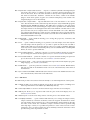
Protocol gives the measurement protocol used in taking the readings. A protocol is a particular
sequence of empty tray measurements and sample measurements in defined orientations, undertaken for each set of measured samples. The tray and sample measurements are combined by PuffinPlot as it reads the file, providing a more accurate, corrected moment measurement for each sample. (Magnetic susceptibility measurements,
if present, are also automatically associated with the preceding magnetic moment measurement or measurements.) Table 4 describes the available protocols.
Warning: incorrectly set sensor lengths can produce erroneous data! The sensor lengths
are not written to the 2G file, so they must be correctly set in PuffinPlot’s preferences before
importing 2G long core data from the X/Y/Z vector components. (When importing discrete data,
or reading from the polar fields in the 2G file, sensor lengths are not required.) If the sensor
lengths are not known, use the ‘Dec/Inc/Intensity’ setting in the 2G import tab. Failing to correct
for sensor length is particularly dangerous because the deviations from the correct vectors are
often small enough not to be immediately obvious. See Section 3 of Roberts (2006) for a fuller
discussion of sensor response functions.
4.4.3
The Plots tab
This tab shows a list of plots which PuffinPlot can display. You can control which plots are shown
by ticking and unticking the boxes next to the plot names. The plot types are detailed in section 4.3.1.
4.4.4
The Misc. tab
Label equal-area plots If this box is ticked, the equal-area plots (sample, site, suite, and AMS)
will be shown with text labels at the bottom right, making them easier to distinguish
from one another.
Label treatment steps If this box is ticked, each point on the demagnetization plots (Zijderveld
and equal-area) will be labelled with the appropriate treatment step (AF intensity or
temperature).
Label samples in site plots If this box is ticked, sample directions (PCA or Fisher) will be labelled
with the sample’s name or depth in the site equal-area plot.
Label points in suite plots If this box is ticked, sample and site directions will be labelled with
the appropriate name or depth in the suite equal-area plot.
Highlight current sample/site If this box is ticked, the current sample and site data will be shown
in red on the site and suite equal-area plots and on the sample and site parameter
tables. This feature makes it easier to pick out the current sample and site in the context
of larger-scale analyses, and is useful for exploring data, particularly in conjunction
with the ability to jump to a sample or site by clicking on its line in a parameter table.
Show site α95s on suite plot If this box is ticked, any site direction shown on the suite equal-
area plot will be plotted along with a projected small circle denoting the α95 interval.
The site α95 circles are plotted in blue, to distinguish them from the suite α95 s (plotted
in black).
Bedding is vs. magnetic north. If this box is ticked, the bedding azimuth for formation orienta-
tion correction is assumed to be relative to magnetic north, and a correction is applied
for local magnetic deviation. (The sample azimuth is always assumed to be relative to
22
Table 4: Measurement protocols for 2G data files
Protocol
Description
NORMAL
No extra tray or sample measurements are made. Each measurement run consists simply of measuring the samples once
in their normal orientation.
Before each sample-measurement run, an empty tray measurement run is made. The input file thus consists alternately
of empty-tray lines and sample-measurement lines. Each tray
measurement is used to correct the subsequent sample measurement.
As TRAY_NORMAL, but the tray measurement is made after
the sample measurement rather than before it.
As TRAY_NORMAL, but adding an extra sample measurement
as a third step. In the extra measurement, the sample is rotated 180° around its y axis, so that the x and z measurements
are inverted. Combining these readings improves not only the
precision but also the accuracy of the magnetic moments measured on the x and z axes, since any systematic bias should be
cancelled out by the inversion. For the y axis, accuracy is not
affected but precision is improved by averaging the two measurements.
This is the simplest tray correction: the tray is measured once
at the start, and all subseuent measurements are sample measurements. PuffinPlot corrects each sample measurement using the initial tray measurement.
This option reads a file measured using the TRAY_NORMAL
protocol, but (like TRAY_FIRST) makes all sample corrections
using the initial tray measurement, and ignores all subsequent
tray measurements. The main intended use for this option
is to allow direct comparison between the TRAY_FIRST and
TRAY_NORMAL protocols, to avoid the extra work of using
the TRAY_NORMAL protocol on sample suites for which it is
unnecessary.
TRAY_NORMAL
NORMAL_TRAY
TRAY_NORMAL_YFLIP
TRAY_FIRST
TRAY_NORMAL_IGNORE
23
magnetic north; if it is relative to geographic north, a magnetic declination of zero can
be specified.)
Demag. y-axis label allows to you customize the text which labels the y axis of the
demagnetization-intensity plot.
PmagPy folder sets the location of the PmagPy programs. If you wish to do calculations of AMS
statistics within PuffinPlot, it is necessary to have the PmagPy programs bootams.py
and s_hext.py installed (see section 4.1.3 for details). This box allows you to specify
to PuffinPlot the folder in which the programs are installed.
Font
allows you to change the font used in the plots: enter a font family name into the box.
PuffinPlot must be restarted for the change to take effect. If the specified font cannot
be found, a default fallback font is used.
Look and feel controls the appearance of PuffinPlot’s windows and menus. (It has no effect on
the functionality of the program.) Native gives an appearance intended to harmonize
with other programs on the operating system on which PuffinPlot is running. Metal
and Nimbus are cross-platform appearances which will look the same on any operating system. Default will use the default appearance for Java programs on the current
operating system; in most cases this will be the same as Native for Mac OS X and Windows, and Metal for Linux. Changes to this option will not take effect until PuffinPlot
is restarted.
GC validity allows you to customize the conditions under which a site mean calculated by great-
circle intersection is considered valid. The validity test is used in several ways:
• When site data is exported to a CSV file, one of the exported columns gives the
result of the validity test.
• Only valid site mean directions are shown on the suite equal-area plot.
• Only valid site mean directions are used when calculating the overall mean direction for a suite.
The validity test takes the form of a logical expression in the syntax of the Python
programming language, involving the following variables:
M the number of stable endpoints (PCA directions) used in the fit
N the number of great circles used in the fit
a95 the α95 value (semiangle of the 95% confidence region)
k the k-value (estimate for κ)
The most useful components for contructing vailidity expressions are the comparison
operators <, <=, >=, >, the logical operators and and or, and parentheses. A typical
expression might be
a95<3 and k>5 and (M>=3 or N>=5)
which means that a great-circle fit will be considered valid if it has an α95 below 3, a k
above five, and either at least three endpoints or at least five circles. The default value
of this setting is True, which causes all great-circle fits to be considered valid.
Zplot PCA display controls the manner in which PCA directions are shown on the Zijderveld plot
(see section 4.3.1). The available settings are:
Full PCA lines will extend right to the edges of the Zijderveld plot.
Long PCA lines will be shortened by 10% from the ‘Full’ length.
Short PCA lines will only extend through the points used to calculate the PCA.
None No PCA lines will be shown.
Sample orientation controls how sample orientation is displayed at the top of the main win-
dow: it can be shown either as azimuth and dip angle, or as azimuth and hade (the
complement of the dip angle).
24
Formation orientation controls how formation orientation is displayed at the top of the main
window: it can be shown either as dip azimuth and dip angle, or as strike and dip
angle.
4.5
Annotations
Annotations are a feature allowing short, categorized notes to be added to each sample in a
suite. The categories can be freely chosen. Annotations come in two varieties, custom flags and
custom notes. Custom flags embody a true/false value and are intended to record whether a
sample fulfils some criterion – for example, ‘messy’, ‘low-temperature alteration’, or ‘multiple
components’. Custom notes are intended for adding short items of information which are not
automatically inferred by PuffinPlot – for example, ‘number of components’ or ‘behaviour type’.
Adding annotation categories
Annotations categories defined by selecting the Edit custom flags. . . or Edit custom notes. . .
item from the Edit menu. This will show a window allowing you to add, rearrange, or remove
the annotation categories. If an annotation category is removed, all annotations made within
that category will be lost.
Using annotations
When custom flags or notes have been defined, an extra panel appears at the right-hand side
of the main window. For each custom note category there is a text box into which text may be
typed. For each custom flag category there is a tick box which may be selected or de-selected.
Annotations are saved with the rest of the data in the PuffinPlot file; they are also exported
in the sample data CSV file produced by the File > Export data > Export sample calculations
menu item.
4.6
4.6.1
Exporting graphics
Introduction
PuffinPlot can export the displayed plots in several ways, for printing, incorporation into documents, and editing by other programs. Two formats are supported:
SVG (Scalable Vector Graphics) is a widely supported format for the display and editing of
vector graphics data. SVG files can be opened and edited by vector graphics programs such
as Inkscape and Adobe Illustrator, and can be incorporated into documents by a variety of
programs. The chief limitation of the SVG files exported by PuffinPlot is that they can only
contain one page, corresponding to the currently displayed data.
PDF (Portable Document Format) is a popular format for on-screen display and printing of all
kinds of documents. PuffinPlot can produce multi-page PDF documents with one page for
each selected sample. Many vector graphics programs can import PDF files, but since PDF
is a format designed primarily for display rather than editing, the results may be inferior
to those produced with SVG.
Both these formats are formally standardized; however, they are also large and complex, and
they are supported to varying extents by a huge number of programs. For these reasons, compatibility problems can sometimes occur. It is difficult to produce a file which will be guaranteed
to work well with any program on any operating system. PuffinPlot attempts to mitigate this
problem by offering a range of different graphics export options, as detailed in the next section.
4.6.2
Graphics export options
All of these export functions may be found in the Export graphics submenu of the File menu,
except for the ‘Print to PDF’ option.
25
Export SVG (Batik) saves the current contents of the main data display as an SVG file using the
Batik software library.
Export SVG (FreeHEP) saves the current contents of the main data display as an SVG file using
the FreeHEP software library.
Export PDF (iText) produces PDF file using the iText software library. The resulting PDF file will
use the current graph layout and will contain one page for each of the selected samples.
Export PDF (FreeHEP) produces a PDF file using the FreeHEP software library. The resulting
PDF file will use the current graph layout and will contain one page for each of the selected
samples.
Print to PDF is another way of producing a PDF file. Select Print. . . from the File menu, and
select PDF as the destination printer. If the PDF option is not available, you will first have
to install a PDF printer driver; please see your operating system documentation for details.
These options are to some extent redundant: SVG files produced using the two menu items
should appear practically identical, as should the three varieties of PDF file. However, the internal
structures of the files are different, which is useful in improving compatibility with other programs. If, for example, you find that another program has trouble reading the SVG file produced
using the Batik option, you may find that if FreeHEP option produces better results.
4.7
Scripting
PuffinPlot’s graphical desktop interface is intended to be the primary way to interact with the
program. However, it is often useful to be able to control a program using a scripting language,
in order to extend its capabilities, integrate it conveniently with other programs, or process large
amounts of data without manual intervention. The Java platform upon which PuffinPlot is built
supports a number of scripting languages which can easily interface with PuffinPlot. Perhaps
most usefully, an implementation of the Python programming language – named Jython (Juneau
et al., 2009) – has been developed for the Java platform. Since Python is widely used in scientific
programming and scripting, and familiar to a large number of scientists, this should provide a
convenient route for anyone wishing to integrate PuffinPlot with other data processing steps.
Using Jython, PuffinPlot can be controlled either from a pre-written script, or interactively from
a command shell which accepts and executes commands one at a time from the user. PuffinPlot
also includes a built-in Jython interpreter, allowing it to run Python scripts with no additional
software.
Scripting allows you to extend the functionality of PuffinPlot without modifying the main
program – for example, to perform extra processing on your data. It also allows you to reuse
parts of PuffinPlot as a convenient library for other programs.
There are three basic ways to control PuffinPlot with scripting:
1. Save a Python script as a file, and use Run Python script. . . from the File menu to run it.
This will give your script access to any data which has already been loaded into PuffinPlot.
2. Save a Python script as a file and run PuffinPlot from the command line, specifying the
name of the script as a parameter using the following syntax: java -jar PuffinPlot.jar -script
MyScriptName.py, where MyScriptName.py is the filename of the script you wish to run.
In this case, the script will be run as soon as PuffinPlot starts.
3. Use a scripting language interpreter separate from PuffinPlot. In this case, you must download and install the language yourself. This approach lets you use any language available
for the Java platform, not just Jython. Additionally, many languages (including Jython)
provide an interactive console, allowing you to control PuffinPlot by typing commands
one at a time, rather than executing a whole pre-written file.
26
Figure 3 A simple Python script to demonstrate the use of PuffinPlot from a scripting environment. This script first opens a data file. It then calculates the mean NRM of all the samples and
displays it. Then it calculates a PCA direction for each sample in the suite, and saves the results
to a CSV file. Explanatory comments in the script are preceded by the character #. If Jython is
installed and this script is saved as example.py, it may be executed with the command jython
-Dpython.path=PuffinPlot.jar example.py
### I m p o r t t h e r e q u i r e d l i b r a r i e s .
from n e t . t a l v i . p u f f i n p l o t . data import S u i t e
from n e t . t a l v i . p u f f i n p l o t . data import C o r r e c t i o n
from j a v a . i o import F i l e
### C r e a t e a S u i t e and r e a d a data
i n p u t _ f i l e = F i l e ( " example . p p l " ) #
s u i t e = S u i t e ( " Example s c r i p t " ) #
suite . readFiles ([ i n p u t _ f i l e ])
#
samples = s u i t e . getSamples ( )
#
f i l e into i t .
S p e c i f y an i n p u t f i l e
c r e a t e a new S u i t e
Read t h e data i n t o a S u i t e o b j e c t
Get a l i s t o f t h e Samples i n t h e S u i t e
### C a l c u l a t e and d i s p l a y t h e mean NRM.
t o t a l _ n r m = sum( [ sample . getNrm ( ) f o r sample in samples ] )
p r i n t t o t a l _ n r m / s u i t e . getNumSamples ( )
### P e r f o r m a PCA c a l c u l a t i o n f o r e a c h sample .
f o r sample in samples :
# do t h i s f o r e a c h sample :
sample . s e l e c t A l l ( )
# s e l e c t a l l p o i n t s i n t h e sample
sample . u s e S e l e c t i o n F o r P c a ( ) # and mark them f o r u s e i n PCA
s u i t e . d o S a m p l e C a l c u l a t i o n s ( C o r r e c t i o n .NONE)
# p e r f o r m PCA f o r e a c h sample
### Save t h e r e s u l t s o f t h e PCA c a l c u l a t i o n .
o u t p u t _ f i l e = F i l e ( " example− r e s u l t s . c s v " )
s u i t e . saveCalcsSample ( o u t p u t _ f i l e )
For the first two techniques – when the script is run by PuffinPlot itself – a variable called
puffin_app is created, which represents the currently running instance of PuffinPlot. This variable
can be used, for example, to gain access to any data already loaded into PuffinPlot. If an external
scripting language interpreter is used, the script must start the PuffinPlot application before
doing anything else; this is demonstrated in the examples below.
Figure 3 shows a simple script demonstrating the use of PuffinPlot from within an external
Jython interpreter (although it can also be run directly from within PuffinPlot). The script opens
a data file, calculates the mean NRM, and produces a file containing a PCA direction for each
sample. Note that virtually all of PuffinPlot’s data and functionality is available to the Python
script, so far more complex examples are possible.
Internal documentation for PuffinPlot
To write scripts interacting with PuffinPlot, some knowledge of its internals is of course necessary.
PuffinPlot comes with complete documentation (JavaDoc) for all its accessible data structures.
If more detail is required, the source code is also freely available.
5
Acknowledgements
Libraries
PuffinPlot makes use of several software libraries generously released under liberal terms:
• Jama, a basic linear algebra package for Java, for matrix calculations.
27
Figure 4 A Python script intended to be run from PuffinPlot’s File > Run Python script. . . menu
item, to act on the currently loaded data. Note that in this case it is not necessary to create a
Puffin application, since the current Puffin application is supplied to the script in the puffin_app
variable.
# T h i s s c r i p t g o e s t h r o u g h a l l t h e data i n t h e c u r r e n t s u i t e .
# For any datum t h a t d o e s n ’ t have a m a g n e t i c s u s c e p t i b i l i t y
# measurement , i t s e t s t h e m a g n e t i c s u s c e p t i b i l i t y t o z e r o .
s u i t e = puffin_app . getSuite ()
# find the current s u i t e
f o r sample in p u f f i n _ a p p . getSamples ( ) :
f o r datum in sample . g e t D a t a ( ) :
i f not datum . hasMagSus ( ) :
datum . setMagSus ( 0 )
#
#
#
#
For e v e r y sample i n t h e s u i t e ,
and f o r e v e r y datum i n t h e sample ,
i f i t d o e s n ’ t have a mag . s u s . v a l u e ,
s e t t h e mag . s u s . t o 0 .
• Apache batik, for SVG export.
• iText, for PDF export.
• FreeHEP, for graphics export.
• Jython, for scripting.
Other software
PuffinPlot was created with the assistance of a cornucopia of free and open source software;
among the more significant tools are the Java language and platform, NetBeans, Ant, Emacs,
LATEX (plus many LATEX packages), TeX4ht, the Gimp, and the Ubuntu operating system. I thank
all who contributed to these projects.
People
PuffinPlot was initially developed at the Otago Palaeomagnetic Research Facility at the University
of Otago, Dunedin, New Zealand. Several colleagues provided valuable testing and feedback
during PuffinPlot’s early development; in particular I thank Christian Ohneiser, Faye Nelson,
Claudio Tapia, and Bethany Fox for their time and effort. Further improvements were made
during revision of the PuffinPlot paper, in response to thoughtful suggestions from Gary Acton
and an anonymous reviewer. Since its initial release, PuffinPlot has benefited from bug reports
and suggestions from Bill Phillips, Jonathan M. Glen, Fabio Florindo, Eric Horsman, Terence Day,
Yoichi Usui, Adrian Muxworthy, Russ Burmester, and Andrei Kosterov.
Icon
PuffinPlot’s icon, and the frontispiece for this manual, are from an illustration by the Finnish
artist Wilhelm von Wright (1810–1887), published in Svenska fåglar, efter naturen och på sten
ritade (2nd ed., 1929).
6
Future development and bug reporting
PuffinPlot continues to be developed, albeit slowly and sporadically now that its main functionality is stable and fairly complete. Bugs in existing functionality are fixed as quickly as possible
when they are reported, and new features are added when time permits. The PuffinPlot project,
including downloadable packages of all released versions and the complete source code, is hosted
at https://bitbucket.org/pont/puffinplot/downloads. Bug reports, feature suggestions, and feedback of all kinds are always very welcome. Please send them to [email protected].
28
A
Citing PuffinPlot
PuffinPlot was introduced and described in a 2012 paper published in Geochemistry, Geophysics,
Geosystems. If you make use of PuffinPlot in published work, please include the following citation:
Lurcock, P. C., and G. S. Wilson (2012), PuffinPlot: A versatile, user-friendly program for paleomagnetic analysis, Geochemistry, Geophysics, Geosystems, 13, Q06Z45,
doi:10.1029/2012GC004098.
For convenience, citation data is provided below in two formats commonly used by bibliography
management software.
BibTeX citation record
@article{lurcock2012puffinplot,
author = {Lurcock, P. C. and Wilson, G. S.},
title = {PuffinPlot: A versatile, user-friendly program for
paleomagnetic analysis},
journal = {Geochemistry, Geophysics, Geosystems},
year = {2012},
month = {Jun},
day = {26},
publisher = {AGU},
volume = {13},
pages = {Q06Z45},
issn = {1525-2027},
doi = {10.1029/2012GC004098},
url = {http://dx.doi.org/10.1029/2012GC004098}
}
RIS citation record
TY
T1
A1
A1
Y1
JO
VL
SP
SN
UR
DO
PB
-
JOUR
PuffinPlot: A versatile, user-friendly program for paleomagnetic analysis
Lurcock, P. C.
Wilson, G. S.
2012/06/26
Geochemistry, Geophysics, Geosystems
13
Q06Z45
1525-2027
http://dx.doi.org/10.1029/2012GC004098
10.1029/2012GC004098
AGU
29
B
Release notes
No release notes are available for PuffinPlot versions prior to 1.03.
PuffinPlot 1.03 release notes
Calculations
• Virtual geomagnetic pole calculation.
• Fisher-by-site calculations can be done on continuous data sets.
• Fisher analysis of demagnetization steps.
• PCA and GC fits can be cleared individually.
• R added to the available Fisher statistical parameters.
Data plotting
• Horizontal projection in Zplot supports west-upward orientation.
• Data points can be labelled with treatment step.
• Equal-area plots can be labelled to avoid confusion.
• Site equal-area plots now distinguish PCAs, demag steps, GC poles, and site means.
• Current site and sample are highlighted in the relevant data tables and plots.
• Sample directions can be annotated with their names in the site equal-area plot.
• a95 added to site parameter table.
• More compact default plot layout.
• Treatment steps can be labelled with the treatment level.
• Added suite parameter table for mean directions and VGPs.
• Site alpha-95s can be shown in the suite equal-area plot.
Data import
• Selectable units for custom data import.
• More variants of the AGICO AMS file can now be imported.
• Direct import of sample directions.
• IAPD file import.
• Caltech file import.
• Better guessing of measurement type in 2G files.
• Site location data import (for use with VGP calculation).
• More palaeomagnetic data can now be appended to an existing suite.
Data export
• n and a95 are listed in sample parameter file.
• Great circle strikes and dips are included in exported data.
Bug fixes
• Exporting FreeHEP SVG graphics no longer disables anti-aliasing.
• PuffinPlot no longer crashes if an incorrect 2G protocol is specified.
• PuffinPlot will not save its own file over the original data file.
• Cleared PCA directions no longer reappear.
• Fixed potential crash during suite parameter export.
• Measurement types now checked for consistency when opening a file.
30
Documentation
• All new features are fully documented in the updated user manual
Miscellaneous new features
• Site calculations automatically update when sample calculations change.
• Site directions cleared automatically when all their sample directions are cleared.
• Warning when closing a file or quitting with unsaved data
• Clearer error messages and warnings when reading corrupted files
• Treatment type can be set manually
• Site definitions can be cleared
• Treatment steps can be deselected by dragging a box.
• PuffinPlot will ask for confirmation before overwriting files.
• Native file open dialog is now used on Mac OS X.
• Added ‘invert sample moment’ feature.
• ‘Open file’ dialogs now remember the last used folder.
• Sample volume can be edited.
Other notes
• PuffinPlot now requires Java 7 or higher.
• PuffinPlot is now hosted on BitBucket, due to the imminent demise of Google Code.
31
C
References
Butler, R. F. (1992). Paleomagnetism: Magnetic Domains to Geologic Terranes. Blackwell Scientific, Oxford.
Fisher, R. (1953). Dispersion on a sphere. Proceedings of the Royal Society of London. Series A, Mathematical
and Physical Sciences, 217:295–305.
Hext, G. R. (1963). The estimation of second-order tensors, with related tests and designs. Biometrika,
50(3-4):353–373. Available from: http://biomet.oxfordjournals.org/content/50/3-4/353.abstract.
Jones, C. H. (2002). User-driven integrated software lives: “Paleomag” paleomagnetics analysis on the
Macintosh. Computers & Geosciences, 28:1145–1151.
Juneau, J., Baker, J., Munoz, L. S., Wierzbicki, F., and Ng, V. (2009). The Definitive Guide to Jython. Apress,
New York.
Kirschvink, J. L. (1980). The least-squares line and plane and the analysis of palaeomagnetic data. Geophysical Journal of the Royal Astronomical Society, 62(3):699–718.
Lowrie, W. (1990). Identification of ferromagnetic minerals in a rock by coercivity and unblocking temperature properties. Geophysical Research Letters, 17(2):159–162. Available from: http://dx.doi.org/10.
1029/GL017i002p00159.
Lurcock, P. C. and Wilson, G. S. (2012). Puffinplot: A versatile, user-friendly program for paleomagnetic
analysis. Geochemistry, Geophysics, Geosystems, 13:Q06Z45. Available from: http://dx.doi.org/10.1029/
2012GC004098.
McFadden, P. L. and McElhinny, M. W. (1988). The combined analysis of remagnetization circles and direct
observations in palaeomagnetism. Earth and Planetary Science Letters, 87:161–172.
Roberts, A. P. (2006). High-resolution magnetic analysis of sediment cores: Strengths, limitations and strategies for maximizing the value of long-core magnetic data. Physics of the Earth and Planetary Interiors,
156(3–4):162 – 178.
Tauxe, L., Butler, R. F., Banerjee, S. K., and Van der Voo, R. (2010). Essentials of paleomagnetism. University
of California Press, Berkeley.
Tauxe, L., Gee, J. S., and Staudigel, H. (1998). Flow directions in dikes from anisotropy of magnetic
susceptibility data: the bootstrap way. Journal of Geophysical Research, 103(B8):17775–17790.
32