1
SOFTWARE USER MANUAL
The Screen-Print Industries Most Accurate, Easy-To-Use, and Highly Productive,
Raster and Tonal Image Color Separation Software.
On-Screen and On-Press: Accurate to a Tee!
W
E
L
Spot Process Separation Studio is the latest version of the
industries FIRST, MOST ACCURATE and EASIEST TO USE
tonal image, color separation software designed for
screen-printers by screen-printers. Making fast and easy
work of high-end, raster/tonal image color separating
revolutionized the industry in 1995 when Freehand
Graphics, Inc. released Spot Process the Photoshop PlugIn. It has been widely accepted and proven as the best
color separation engine and the company has been
C
O
M
E
recognized as delivering the best technical support to its
users. From Freehand’s first software release in 1995
(plug-in) to this NEW version (stand alone application),
user’s have been provided free, fully-functional trials as
well as free technical support. Not every company can do
this or is willing to. You have made the best choice in software and in the company that develops and supports it.
Please enjoy the software and we wish you great
business success.
www.softwareforscreenprinters.com
What’s New!
Besides just about everything...Separation Studio is still
driven by the acclaimed color algorithm that is Spot
Process - resulting in the finest quality separations and
press workflow available today. NOW, it’s surrounded by
powerful tools and turbo charged redraw engine.
Channel Properties Window!
This Window allows the user to change everything from
the channel name and color to press position in one
easy window.
Dock-able and Lock-able Windows!
Separate Files with Transparent Backgrounds!
This allows you to customize your workspace.
Wow, now create only ONE master file and use that to
create all your separations including the black channel.
Independent Background Layer!
Instant Screen Redraw!
Variety of Editing Tools!
Lots of editing tools and selection tools so you can
control every part of your image individually.
Having an independent background layer (not saved as
a spot color) means you will not accidently print this
Channel to film or have to manage it in your graphics
program. No longer imported into the color palette as a
useable spot color value.
New dark interface eases eye strain!
Expand your Separation Studio user interface to full
screen and work with eye calming colored windows
and menus.
Create and control your own textile, background
and ink color sets!
NEW single file workflow!
Photoshop users can greatly reduce their workflow by
creating a single file that will do all the separations for
any print situation. Separation Studio now handles the
background as an independent function within the program giving it control over transparent properties.
Open and work on multiple files!
Ink and film views!
These views help the artist and production team make
exact edits and decisions.
Multiple Window Views!
These views allow you to open the same Channel and
see it 3 different ways - full color, just that Channel in
its color, and just that Channel in black and white film
view. Backgrounds can even be eliminated to view
Channels on transparent backgrounds.
1. Create an RGB TIF ( layered file) with a transparent
background. When saving select "transparency" in the
TIF options window (see pages 31 and 32).
2. Now you can use this one file to create your initial set
of separations used for printing on a black garment and
the same file to generate the black channel used to
print on white and colored garments
.
Easy, fast and a great workflow enhancements!
FREE Videos online for Separation Studio and much more!
http://www.softwareforscreenprinterstech.com/video-cafe
Link to Separation Studio Specific Videos:
http://www.softwareforscreenprinterstech.com/separation-studio
Our Video Café is loaded with instructional and informational videos
about this software and much more. ENJOY!
Spot Process SEPARATION SOFTWARE
Valuable Technical Support Data and Videos
are available on our web site:
www.softwareforscreenprinters.com
Table of Contents
Installation (Trials and Purchasers) . . . . . . . . . . . 4
Resources
...........5
New Version Info
...........6
STEP BY STEP INSTRUCTIONS
WORK FLOW Reference
. . . . . . . . . . 28
File Preparation • Pre-Press
ARTWORK File Preparation (pre-separation) . . . 29
QUICKVIEW (Chart)
Separation Studio Menu
Edit Menu
Channels Menu
Proof Positive Menu
Generate Black Menu
View Menu
Window Menu
SEPARATION STUDIO TOOLS
...........7
...........8
...........9
. . . . . . . . . . 13
. . . . . . . . . . 17
. . . . . . . . . . 17
. . . . . . . . . . 19
. . . . . . . . . . 20
Image Resolution/Quality, File Tip, File Format,
Cropped Images, Non-Cropped Images, Transparency
. . . . . . . . . . 21
Drag, Zoom, Lasso, Polygon Lasso, Select,
Saturate, Desaturate, Eraser
SOFTWARE WINDOWS
. . . . . . . . . . 24
Active Channels, Channels, Densitometer Window, . .
Ground Select, Standard Window, Tools, Tool Settings
VueRite Channels
Proof Positive
Channels
Open and Save Files
Best Advice
. . . . . . . . . . 25
. . . . . . . . . . 25
. . . . . . . . . . 25
. . . . . . . . . . 26
. . . . . . . . . . 27
–3–
Different Printing Scenarios
Transparent Backgrounds NEW
Separation Overview
Color Adjustments & Edits
. . . . . . . . . . 30
. . . . . . . . . . 31
. . . . . . . . . . 34
. . . . . . . . . . 37
FILE OUTPUT Instructions
CorelDRAW X5
Adobe Illustrator
Quark XPress / InDesign
Photoshop
. . . . . . . . . . 40
. . . . . . . . . . 46
. . . . . . . . . . 50
. . . . . . . . . . 50
Halftone Screen Angles
Halftone Spot Shape
Pre-Press: Screens
Pre-Press: Mesh Counts
On-Press: Stock Screen Printing Ink
On-Press: Dropping/Adding Color
On-Press: Print Order / Position
. . . . . . . . . . 51
. . . . . . . . . . 52
. . . . . . . . . . 52
. . . . . . . . . . 53
. . . . . . . . . . 54
. . . . . . . . . . 55
. . . . . . . . . . 55
Contact / Request Tech Support
. . . . . . . . . . 55
Spot Process SEPARATION SOFTWARE
INSTALLATION of Spot Process Separation Studio
TRIAL USERS:
1. Download the Trial Installer from www.softwareforscreenprinters.com
http://www.softwareforscreenprinters.com/download-separation-version
2. Run the Installer and Register the trial as prompted.
PURCHASERS:
1. Attach the hardware USB Key (dongle) to a working USB port on your computer. Avoid attaching to
a USB hub. The light on the USB Key will NOT be a steady green. It will display the green light
when it is called to by the software - this is not a power light. These new style USB dongles do
not require any drivers - similar to a USB memory stick - but the device will NOT mount or
appear on your computer.
2. Run the Separation Studio Installer provided on the CD or downloaded. If asked to replace a
previous installation allow the replacement.
3. Launch Separation Studio (Applications or Programs folder). You will be prompted with a screen
that says it found a USB dongle and the dongle must be activated/registered before use.
4. If you have a previous user account then use that account info and click the“login”button. If that
fails to login or you are a NEW user, create a new account and click the“login”button. A user may
need to get the latest version if there was a previous install. These“updates”are free.
5. A window will appear telling you that your dongle has been ACTIVATED to run the Spot Process
Separation Studio software.
6. Click the“Run Program”button and begin using Separation Studio.
You can do this process on other computers and simply work where the dongle is attached - making
this a portable license. NOTE: Your dongle is the most important part of the software and should be
cared for properly. Lost or damaged dongles can be replaced - contact Freehand for replacement costs.
Terms of Agreement are provided at software installation.
Read the Manual and visit the web site for any additional documentation or videos so
you can get the finest results possible. Expect great results!
INSTALLATION Troubleshooting
Help for common installation questions are at:
http://www.softwareforscreenprinterstech.com
-option to submit a Rapid Response Support Request -or- review our KNOWLEDGEBASE
Email: [email protected]
–4–
Spot Process SEPARATION SOFTWARE
RESOURCES
Great information is available in the User Guide (Manual)...
This User Guide is a great resource for learning about Spot Process Separation Studio. As one of the
industries greatest software solutions with an easy User Interface you should expect GREAT RESULTS!
Part of the process of high-end color separating with Spot Process Separation Studio involves file
preparation and film output. Understanding how to build a quality file will result in better looking
prints. Understanding all the great features of the graphics applications you will output your files from
will make this process easy and predictable. We encourage you to learn all you can about your vector
(Illustration) and raster (Photoshop / Painter) programs.
Your best information resource is FREE...
Visit
www.softwareforscreenprinterstech.com
Knowledgebase and Video Café
Support is FREE. For assistance from a skilled technician submit a request for assistance through the
RAPID RESPONSE SYSTEM also located at www.softwareforscreenprinterstech.com
Requesting support is easy. Response time is fast. Our technicians are ready to assist you during business
hours. We have made a great effort to organize the answers to your questions and resolves to your issues
online so you have 24/7 access. Take advantage of this easy to access support opportunity.
–5–
Spot Process SEPARATION SOFTWARE
Spot Process Separation Studio User Interface.
Users of Spot Process VueRite will immediately see the added value of this NEW version release!
The added advanced editing tools and features included within the Spot Process Separation Studio Software
(stand alone application) gives the user even greater power to get the best image reproduction results
without leaving the application and with greater speed than ever before!
Videos and Tech Support are available at:
www.softwareforscreenprinterstech.com
–6–
Spot Process SEPARATION SOFTWARE / Quick View
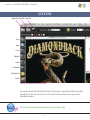
QUICK VIEW
Open File Close File Save File
Drag
Zoom
Lasso
Polygon
Select
Saturation
Desaturation
Eraser
Spot Process Separation Studio User Interface.
Descriptions of each Tool and Software feature of Spot Process Separation Studio are provided
throughout this User Manual as well as in the software by way of convenient, pop up tool
description windows.
http://www.softwareforscreenprinterstech.com/separation-studio
–7–
Spot Process SEPARATION SOFTWARE / Separation Studio Menu / File Menu
Separation Studio Menu:
(A Macintosh ONLY Menu) (Windows users will locate these features under the File and Help Menus)
About Menu
Displays the software version number.
Preferences
Allows you to default the program to view color Channels in INK VIEW (color) or FILM VIEW (black and white).
It also allows you to change the“Undo Limit”which is the amount of undo’s allowable.
Quit
Quits the Separation Studio Application.
Additional items for Macintosh users located under the Separation Studio Menu are “Services” and “Hide/Show All”.
File Menu:
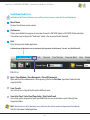
Open / Close Window / Close Documents / Close All Documents
Open and Close files and documents. When opening a file for the first time Separation Studio will color
separate the file.
Save / Save As
Save a File or Save a Copy of the File under a different name.
Save Color Proof / Color Proof Page Setup / Print Color Proofs
Save a high-quality composite of your separated file for use in a presentation or print it directly from
Separation Studio.
Quit (Windows Userrs Only / Macintosh users will locate this feature under the Separation Studio Menu)
Quits the Separation Studio Application.
–8–
Spot Process SEPARATION SOFTWARE / Edit Menu
Edit Menu:
Change Ground Color
Allows you to change the background color on-screen to simulate print results on press or when
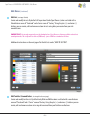
saving/printing color proofs. Custom makes a new temporary color. To Save a color use EDIT
TEXTILE/GROUND COLOR located under the EDIT Menu.
IMPORTANT: For the best on-screen color adjustment control it is advised to use BLACK as a background as often as
possible. Changing background colors is great for printing color proofs and on-screen presentations, but using a black
background gives the best on-screen, color saturation preview, regardless of the color garment to be printed on.
Important Note: Adjustments made on a BLACK background will reproduce properly on all color garments on press. The
lighter and brighter the background becomes on-screen the more it effects the "visual" values of the color data but not
the "actual" values (density) which is why you have a Channel Data Densitometer. Black prevents ambient light from
surrounding the pixels and altering your perception of the color value. A density percentage does not change upon print
out regardless of the background color.
Deselect
To deselect any selected area (i.e. lasso, polygon or area selection).
Inverse Selection
Inverts or Reverses the controlled area. (Command/Shift i) (Control/Shift i).
Delete
Deletes (removes/clears) data within a selected area.
–9–
Spot Process SEPARATION SOFTWARE / Edit Menu
Edit Menu: (continued)
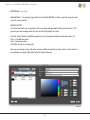
Edit Ink (see image A below)
Create and modify ink sets. By default all Separation Studio (Spot Process) colors are listed with a
Manufacturer name of“Freehand”and a Series name of“Factory”. Using the plus (+) and minus (-)
buttons you can create, edit and remove custom ink sets using data you receive from your ink
manufacturers.
IMPORTANT: It is strongly suggested to use the Standard colors of Spot Process as often as possible in order to best
control print results. This is a proven set of colors (RGB based) - just as CMYK has a standard set of colors.
Additional instructions on the next page after Textile Sets under‚“HOW TO SECTION”.
Image A
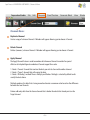
Edit Textiles \ Ground Colors (see image B on the next page)
Create and modify textile sets. By default only Black and White colors are listed with a manufacturer
name of“Freehand”and a“Series”name of Factory. Using the plus (+) and minus (-) buttons you can
create, edit and remove custom sets using data received from your Textile manufacturer.
– 10 –
Spot Process SEPARATION SOFTWARE / Edit Menu
Edit Menu: (continued)
IMPORTANT:: It is strongly suggested to use the Black GROUND as often as possible to get the best
visual on-screen control.
HOW TO SECTION:
Create custom Textile sets using color values measured and supplied by Textile manufacturers. This
prevents you from making colors that are unrealistically bright on screen.
Click the‚“More”button to add filtering options to sort through multiple manufacturer color sets
Click (+) to add new colors.
Click (-) to remove colors.
Click (Edit) to edit an existing color.
Here you can change names, edit color, create or add to manufacturer colors, create a series within a
manufacturer or simply add helpful notes for future reference.
Image B
– 11 –
Spot Process SEPARATION SOFTWARE / Edit Menu
Edit Menu: (continued)
Ink Mapping
Allows you to assign stock or custom inks to the programs default startup ink set. A very advanced
user tool. It is strongly advised to stick to the standard and proven Spot Process ink color set and not to
alter these colors unless you have a very specific need and tested the results that altering these colors
can cause..
Ink mapping can be used to customize Separation Studio to use a different color or set of colors
when Spot Process separates an image. Since Spot Process uses a specific set of RGB value colors to
reproduce images (just like CMYK has a standard set) it is strongly advised that you DO NOT alter
this default.
By default all Spot Process colors are listed with a Manufacturer name of“Freehand”and a Series
name of“Factory”. Using the plus (+) and minus (-) buttons you can create, edit and remove custom
ink sets based on data you receive from your ink manufacturer or mixing system.
HOW TO SECTION:
Select a color from the Manufacturers list to the left of this window then click the "double arrow" to
the left of colors listed to the right of this window under Ink Map. This will apply the new color to that
Channel each time Spot Process separates an image. Click "Default" to lock in your change. All files
opened/separated after this change will then reference these colors.
– 12 –
Spot Process SEPARATION SOFTWARE / Channels Menu
Channels Menu:
Duplicate Channel
Creates a copy of a chosen Channel. A Window will appear allowing you to choose a Channel.
Delete Channel
Deletes (removes) a chosen Channel. A Window will appear allowing you to choose a Channel.
Apply Channel
The Apply Channel feature is used to combine data from one Channel to another for special
effects or to help build greater underbase Channel support for a color.
1. Select a "Source" channel that contains the data you wish to share with another channel.
2. Select a "Target" channel that will receive the data.
3. Select a "Blending" method. There is Multiply and Darken. Multiply is selected by default and is
usually the best choice.
Multiply combines the data that is being moved and creates a common value based on the difference
between the two Channels.
Darken adds only data from the Source channel that is darker than data that already exist on the
Target channel.
– 13 –
Spot Process SEPARATION SOFTWARE / Channels Menu
Channels Menu: (continued)
Move Away From Ground
Move Toward Ground
Move away from and move toward Ground changes the print position of a selected channel. You may
use this to view how a custom print order will effect the print on press. Moves a Channel one print
position at a time.
User Tip: Quickly move a Channel to any print position using the Channel Properties window. Click the
color swatch in the VueRite window or Right Click a Channel in the Channel Window and choose
Channel Properties. Change the "press position" number.
It is strongly advised to use the default print positions. This is a tested and proven configuration. A
great Standard Operating Procedure (SOP) that your production printers will appreciate.
Enhance Red Orange
This feature extends the Red Channel Data to increase the range of Red Channel Data enhancing red/
orange blends and colors.
Generate Brown
This feature creates a specific Brown printing channel. A close duplication to the Red channel users
may wish to adjust this channel using the lighten adjustment sliders. Best advice is to properly adjust
your color image "pre-separation" and allow Spot Process to create fantastic browns as secondary and
tertiary colors and not add an extra Brown Channel to the print run.
Merge (Merge Grey, Merge Purple, Merge Turquoise)
These features individually combine Channels to reduce the amount of screens needed for the final
print. Nothing is better than using the primary color Channels on press for total control, but in times
when press space is limited or budgets do not allow then merging screens is a great way to save space
and money while still achieving great results. Merge all 3 for instant ColorCrunch™ results.
– 14 –
Spot Process SEPARATION SOFTWARE / Channels Menu
Channels Menu: (continued)
Merge Purple splits the Purple Channel data between the Red and Blue Channels resulting in a blue
change.
Merge Turquoise merges data to the Blue channel (closest related hue) resulting in a blue change.
Merge Grey is the best of the merge features, merging data to the Final (top) white Channel. Most
accurate result, its advised to adjust the gray channel (saturate data) before merging as the data will
be more subtle than the original channel intensity. Saturating prior to merging allows the result to be
more accurate to the desired result.
* Further Channel merging can be done using the Apply Channel feature also located under the
Channels Menu.
** ColorCrunch (1999) was the sister program to Spot Process developed for the 6 color press. This is
incorporated into Separation Studio.
Adjust Channels
Adjust Channel is used to adjust the density of data for "multiple or individual" Channels.
The feature allows for the simultaneous adjustment of multiple Channels. All Channels that are
presently selected will be equally adjusted using the High Saturation and Low Saturation sliders.
All colors with a "check mark" will be adjusted simultaneously. Click to check and uncheck as desired.
* User tip: you can right click in the main file window to access this feature.
To quickly control a specific color Channel "right click" on any Channel preview in the Channel
Window, double click the Channel "name" in the VueRite window to display the adjust window
as well.
– 15 –
Spot Process SEPARATION SOFTWARE / Channels Menu
Channels Menu: (continued)
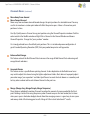
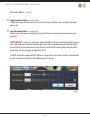
High Saturation Slider: (see image C below)
Sliding to the right saturates data in the Channel increasing ink flow on press resulting in a brighter
color result.
Low Saturation Slider: (see image C below)
Sliding to the left removes existing data starting with the lowest percentage values reducing color
brightness.
IMPORTANT: Use the Low Saturation slider on the White Top Channel to allow for better color on
press. Too much white tends to mute other colors. Files that are not color prepared well tend to have
more white data than needed and a small cut back using the Low Saturation Slider allows for better
overall color. Start by changing the adjustment to 95.
USER TIP: Overprinting more than 20% White has a large effect on any color. For bright saturated color
be sure to monitor and adjust the Final White Channel as desired.
Image C
– 16 –
Spot Process SEPARATION SOFTWARE / Proof Positive Menu / Generate Black Menu
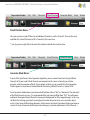
Proof Positive Menu:
Here you can turn on and off the view of individual Channels as well as Show ALL (turn on the view)
and Hide ALL (turn off the view) of ALL Channels at the same time.
* user tip: you can right click in the main file window to handle the same function.
Generate Black Menu:
As part of the Spot Process Color Separation algorithm, you can create three levels of special Black
Channels to fit your needs. Black Channels are important to the success of printing on all color
garments with the exception of black. Preset options make it easy to succeed. Now that Separation
Studio supports transparencies the workflow for Generating a Black Channel is a simple CLICK!
Since Separation Studio allows you to Generate Black from either a“file”or a“document”the end result
of the Black Channel can vary. It is recommended that you Generate Black from“File”. You will browse
and locate the original design file on the transparent background (or fully-cropped image). In this way
the black that is being generated is coming form the color data prior to any user saturation adjustments. If you Generate Black from document (which means the actual Separation Studio separation on
screen) it is best to Generate the Black prior to making any saturation adjustments of the Channels. s
– 17 –
Spot Process SEPARATION SOFTWARE / Generate Black Menu
Generate Black Menu: (continued)
From File (DELIVERS BEST RESULT**):
It is advised to use this feature over the "from document" feature. Select the style that is best for your
need, locate your "file" (the one with a white or transparent background). The Black Channel is created
and placed into the proper print order. Yes, printing halftone blacks early is proper to achieve great
color balance and control. Channel data is better balanced with all Channels, created from the same
starting point.
From Document:
The Black Channel is more saturated than Channels created“from file”when the data is extracted from
the“Adjusted”Channels. Creates a Black Channel for the existing separated (adjusted) file. Black
Channels created this way tend to be slightly darker than channels created from saved files.
a. Skeletal: for a Black Channel that is strong in the shadow areas. Great for dark garments that just
need a little black assistance.
b. Detailed: for medium color garments that require better mid range control.
c. Sharper: for medium to light garments and images that require the highest level of detail through
out the entire image.
* Usually these channels require no added adjustments. Like everything else it is directly related the
quality of the original, but with most files they are great "as is".
– 18 –
Spot Process SEPARATION SOFTWARE / View Menu
View Menu:
Zoom feature choices. Many of these features can be executed using keyboard commands or by
selecting the Zoom Tool and changing the setting in the Tool Settings window. Zoom In and Zoom out
do exactly what you'd expect, view the image larger and smaller on screen.
Zoom Fill Window - Shows the entire document, does not change the Window size.
Fit On Screen - Maximizes the Window size based on screen space then shows the entire image in
the Window.
Actual Pixels - quickly shows the art at full pixel size based on the files resolution. Files with higher
resolutions preview larger on screen. Example, if your computer screen is 72 pixels and the file is 144
pixels it will preview twice as large as it prints. Just a fast way to see the image large and clear on
screen.
Match Zoom - Matches the zoom factor in multiple Windows.
Match Location - Matches the exact location viewed in multiple Channel Windows.
Channels, Show All Channels , Hide All Channels, Show Ground Color and Adjust Channel are all copies
of features found in the Edit and Proof Positive menus.
– 19 –
Spot Process SEPARATION SOFTWARE / Window Menu
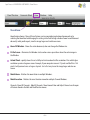
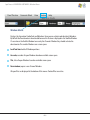
Window Menu:
Displays the Separation Studio Tools and Windows. Here you can activate and deactivate Windows.
By default the Densitometer is deactivated because this feature is displayed in the VueRite Window.
If a user closes the VueRite Window to use only the Channels Window they should activate the
densitometer. The smaller Window saves screen space.
Lock Tool bars holds all Window positions.
Cascade, cascades all open Windows based on available screen space.
Tile, tiles all open Windows based on available screen space.
New window, opens a new Channel Window.
All open files are displayed at the bottom of this menu. Checked files are active.
– 20 –
Spot Process SEPARATION SOFTWARE / Tools Explained
Separation Studio Tools Explained:
Separation Studio Tools:
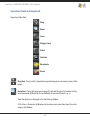
Drag
Zoom
Lasso
Polygon Lasso
Select
Saturate
Desaturate
Eraser
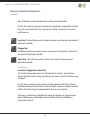
Drag Tool - Drags (scrolls) a zoomed in image allowing you to see various sections of the
image.
Zoom Tool - Click in the image area to magnify, click and drag for a fast zoom or use keyboard commands (different for Mac or Windows) of Command/Control (- or +).
Zoom Tool options are displayed in the Tool Settings Window.
Fit On Screen - Maximizes the Window size based on screen space then shows the entire
image in the Window.
– 21 –
Spot Process SEPARATION SOFTWARE / Tools Explained
Separation Studio Tools Explained:
(continued)
Zoom All Windows matches the zoom factor in all open Channel Windows
User Tip: The smaller the drag area the greater the magnification. Command 0 or Control 0
brings the image back to full screen. Command 1 or Control 1 maximizes size to actual
pixel dimension.
Lasso Tool - Click and Drag to create a freeform selection area. Allows local area control of
adjustments and edits.
Polygon Tool
Click different locations on screen to create a selection area of straight lines. Allows local
area control of adjustments and edits.
Select Tool - Click and Drag to create a selection area. Allows local area control of
adjustments and edits.
Tool Options:
Lasso Tool / Polygon Tool / Select Tool
The "feather" feature allows you to set a soft edge for the selection. Special Feature:
You can change the feather setting even after you have made a selection. Maximum range
is 99 pixels.
User Tip: You can combine (grow) selections by holding down the SHIFT key on the keyboard while drawing a new selection. To remove (reduce) a portion of a previous selection
hold the Alt or Option key on the keyboard while drawing a new selection.
To Deselect a selection area just double click within the selection area, choose Deselect
from the Edit menu or use the keyboard shortcut (different for Mac and Windows)
Command or Control D.
– 22 –
Spot Process SEPARATION SOFTWARE / Tools Explained
Saturate Tool - Saturates (darkens) Channel Data which increases channel/film density
allowing for greater ink flow on press resulting in brighter color areas. Special features
allow for precise control. See Tool Settings Window for tool options.
Desaturate Tool - Desaturates (lightens) Channel Data which decreases Channel/film
density allowing for less ink flow on press resulting in darker print areas. Special features
allow for precise control. See Tool Settings Window for tool options.
Tool Options:
Saturate Tool / Desaturate Tool
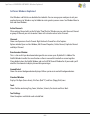
Diameter controls the size of the tool. Diameter is displayed on screen as a circle called the
"target area".
Hardness controls the edge of the brush. Tool edging can be hard or soft. The result always
remains within the tools target area for greater control. 0% is a soft (airbrush) effect while
100% is a hard (solid) effect.
Range allows you to set the style of tones the tool effects. Choose from High, Medium and
Low Saturation for greater control.
Tool Options:
Eraser Tool - Erases (removes) Channel Data. Special features allow for precise control.
See Tool Settings Window for tool options
Diameter controls the size of the tool. Diameter is displayed on screen as a circle called the
"target area".
Hardness controls the edge of the brush. Tool edging can be hard or soft. The result always
remains within the tools target area for greater control. 0% is a soft (airbrush) effect while
100% is a hard (solid) effect.
– 23 –
Spot Process SEPARATION SOFTWARE / Windows Explained
Software Windows Explained
Most Windows and Palettes are dockable then lockable. You can arrange your workspace to suit your
need and screen size. Windows may be hidden to create greater space on screen. See Window Menu to
hide and show Windows.
Active Channels
When making Channel edits on the full color“Proof Positive”Window you can select the exact Channel
or group of Channels you wish to control. Colors with a check mark are active Channels.
Channels
Shows small previews of each Channel. Right click each Channel for a list of options.
Options include: Open in a New Window, Edit Channel Properties, Delete Channel, Duplicate Channel
and Adjust Channel.
Densitometer Window
This is a slim multi-layer densitometer designed to save screen space. By default it is hidden. The
VueRite Window handles the same function so there is no need to have both on screen together.
If you decide to close the VueRite Window and use the NEW Channel Window for all your needs you'll
need the Densitometer to display channel data percentages.
Ground Select
Shows the current background color displayed. Allows you to create and edit background colors.
Standard Window
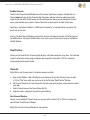
Displays File Open (Green Arrow), File Close (Red "X") and Save (Floppy Disk) icons.
Tools
Shows Tool bar containing Drag, Zoom, Selection, Saturate, Desaturate and Erase Tools.
Tool Settings
Show the options available for each selected Tool.
– 24 –
Spot Process SEPARATION SOFTWARE / Windows Explained
VueRite Channels
Similar to the Channel Control Window from the previous Spot Process program. Double click on a
Channel name to bring up that Channel’s High Saturation and Low Saturation adjustment slider.
Single click on the color swatch to open the Channel Properties where you can change the Channel
name, color and color press position. Channel Densities are displayed in the Color Swatch area.
Spot Process Separation Studio has a“Multilayer Densitometer”, a valuable tool for any printer that
prints wet-on-wet inks.
User Tip: The New Channel Window used with the slimmer Densitometer handles all the functions of
the VueRite Menu. Closing the VueRite Menu saves screen space. Future releases may not include the
VueRite Window.
Proof Positive
Clicking on the Proof Positive Channel quickly displays a full color composite at any time. This Freehand
Graphics software for creating high resolution color composites (released in 1997) has now been
incorporated into Separation Studio.
Channels:
Right Click on any Channel and a list of options become available.
a. Open a New Window - adds a Window to your workspace for just that Channel so you can edit
in“Ink”or“film”view while you see the result in the full color“Proof Positive”Window.
b. Edit Channel Properties lets you change the Channels color, print position, name and even create a
new color.
c. Delete Channel removes the Channel from the file.
d. Duplicate creates a duplicate Channel for special editing.
New Channel Window:
Displays a new individual Channel so you can see your edits in either“ink”or“film”view along side
your full color“Proof Positive”Window.
Right Click in the New Channel Window to show options.
– 25 –
Spot Process SEPARATION SOFTWARE / Windows Explained
Channels Menu: (continued)
a. Switch from Ink view (color) to Film view (grayscale).
b. Turning off the ground color sets the background to transparent.
c. Shows Adjustment Sliders for that individual Channel.
Ground Select:
This shows the present Ground color as well as editing the Ground color.
VueRite Channels Window:
Similar to the Channels Window in previous versions of Spot Process.
a. Click the color swatch and bring up Edit Channel Properties letting you change the Channels
color, print position, name and even create a new color.
b. Double click on the Channel name and display that Channels individual adjustment sliders.
c. Move your mouse over the image and the multi layer densitometer displays the density
percentages for each channel at that x,y co-ordinate. A very valuable tool for getting things right
when you are printing inks wet on wet.
d. Check marks turn channel views on and off.
Open and Save Files
Separation Studio has greatly expanded its list of compatible file formats and color modes. Click the
pop-down menu for a full listing. But, working with RGB TIF (transparent) or RGB PNG (transparent)
files offer the very best workflow.
Separation Studio saves all files in the DCS2.0 format. This advanced format can save an unlimited
amount of Color Channels and retains all spot color values as well as press position!
– 26 –
Spot Process SEPARATION SOFTWARE / Samples
What kind of files can you separate with Spot Process Separation Studio?
Spot Process Separation Studio can separate many art
files as it supports a wide variety of file formats.
Our Best Advice!
When you have a raster image (Photoshop file, Corel
Photo Paint or Painter file, scanned imaged, digital
photograph, or any raster image file (jpeg, TIFF, etc.)
Separation Studio will provide you outstanding
separations quickly and easily - ready for minor color
adjustments using the built in tools and features. You can
even combine these separations with vector elements in
your Illustration program and go crazy designing and
outputting great designs that will easily print on-press.
To make the best use of this software and every other
graphics application you should understand when to use
each of them so you get the very best end result. If a file
was completely built in an Illustration program such as
Adobe Illustrator or Corel Draw and the number of spot
colors does not exceed your press capabilities or the
customer’s budget then you should use the separation
ability built in the same Illustration program. Why? Solids
will remain as solids and gradients/tints will print as
halftones. Typography and other vector elements will be
clean and sharp. Illustration programs exist for exactly
this purpose. When your illustration exceeds your press
capability then Spot Process will develop a controlled set
of colors allowing for a highly colored art file to fit your
press and look great. The art file will print as halftones as
that is the nature of tonal image separations.
Enjoy Spot Process Separation Studio!
– 27 –
Spot Process SEPARATION SOFTWARE / Operating Separation Studio
User Instructions for Separating with Spot Process Separation Studio
File Separation WORK FLOW Quick Reference:
1. Have your RBG file on a TRANSPARENT background layer and saved as a TIF or PNG. These file types
will provide the easiest workflow and serve ALL of your needs for printing on all garment colors.
You can also separate an RGB TIF file flattened to a BLACK background when you will ONLY be
printing on a black garment. A fully-cropped RGB TIF image file is also easy to work with as it has
no specific background requirement.
2. Open the RGB file (requirements noted above) through Separation Studio. The result is a separated
file delivered in individual color CHANNELS.
3. Run the Black Channel Generator to create a Black Channel (3 options).
4. Use the color adjustment tools, merge features and editing tools within
Separation Studio to adjust it to your liking.
5. Save the file (auto saves a DCS2.eps file).
6. Import/Place it into your favorite Illustration program, Photoshop or
Publishing program for output as halftones.
Pre-Press WORK FLOW Quick Reference:
1. Prepare screens using mesh counts that are 5 times the selected halftone frequency (dpi, lpi).
2. Register screens (use the print order provided).
3. Use high-quality, opaque inks and flash only the white base. All other colors will print wet-on-wet.
ENJOY easy printing, long press runs, and accurate, vibrant results!
http://www.softwareforscreenprinterstech.com/separation-studio
– 28 –
Spot Process SEPARATION SOFTWARE / Operating Separation Studio
Artwork File Preparation (pre-separation)
Image Resolution:
When working with raster images (scans, digital photos, Photoshop files, jpegs, TIFFs, etc.) choose
your image resolution between 100 and 150 dpi (when there isn’t text or hard edges). This is proper
image handling and highly recommended. Image quality is retained with lower memory while
processor and print out speed remain fast.
When working with raster files with text and/or hard edges choose your resolution between 200
and 300 dpi while working on the full size image to improve the quality of hard edges. This will
dramatically increase your file size and increase processing and print out time but is necessary to
create as clean a result with raster image files.
Image Quality:
Your image should be of high-quality, high-contrast, good shadow values, sharp, clear, color corrected
and not dull. A dull or washed out image will yield dull results. Spot Process Separation Studio is
designed to reproduce your image as accurately as possible and therefore a poor quality image will
yield an“accurate”poor quality print. Low res images from the web are almost always terrible to work
with so avoid them. Jpeg images can also be poor quality. Learn all you can about image editing so
you can develop the best art file possible. Why? Garbage in - garbage out!
Important:
Visit our web site for support documents and videos. www.softwareforscreenprinters.com
File Tip:
You have a great opportunity to color separate your raster image file in Separation Studio and then
combine it (PLACE, IMPORT into an Illustration program) with vector images (hard edge graphics and
text). Color the vector elements and text with the Separation Studio Spot Colors or add additional
spot colors. Your results will be even sharper and cleaner than separating vector and text as rasters in
Separation Studio. Do this as often as you can. It is very simple and you will love the results! In the
output section of this manual additional information is provided.
– 29 –
Spot Process SEPARATION SOFTWARE / Operating Separation Studio
Artwork File Preparation (pre-separation)
File Format Explanation:
Separation Studio has an even easier workflow than SPVR (the previous software version) - now
supporting transparencies. Supported file formats have expanded but the best workflow remains
using RGB TIF (or RGB PNG) files with transparent backgrounds. RGB is the broader gamut and the
gamut used by Separation Studio plus transparency means you work from just ONE file! SPVR users will
immediately see the benefit of this major enhancement.
Cropped Images and Non-Cropped Images:
Example:
Cropped image (has
a defined border such
as a square).
Example:
Undefined border. Some of
the colors even fade away to
the background (shirt). In this
example the image fades to a
black background.
You can color separate cropped images AND images with an undefined border including color fades to
the background (garment). Separation Studio separations work on ALL garment colors.
A cropped image (eg. movie poster) is ready to separate. Simply OPEN the RGB TIF file through Separation
Studio and you will have a full set of color separated CHANNELS excluding the Black Channel. Then simply
Run the Black Channel Generator on the same file to develop the Black Channel. Separating a file with an
undefined background is equally as easy when the file is built in transparent layers. Simply open the RGB
TIF (RGB PNG) file with transparencies and Run the Black Channel Generator. In both cases Separation
Studio will deliver a full set of Channels ready to color adjust and output from an Illustration or publishing
program. Enjoy production friendly separations (under-base, spectral colors, black and top white).
– 30 –
Spot Process SEPARATION SOFTWARE / Operating Separation Studio
Important Information on Files with Undefined Borders
(most common user jobs)
The most common user file is an image with an“undefined border”
(such as one that fades to a background). When working with undefined
borders the easiest of the files to prep are those already in“layered”form.
Prepare design files with a “transparent background” and
Separation Studio delivers (extracts) ALL the colors needed for
screen-printing for any color garment. If you will ONLY be printing Image with an“Undefined Border”
the file on a black garment and the background is also black then you don’t need to mask or edit the file.
It is ready for Separation Studio.
Working with a“flattened”image? Mask
the image in Photoshop or PhotoPaint or use
an auto-masking plug-in/software such as
Fluid Mask by Vertus or Corel’s KnockOut2.
SUPER NEW FEATURE!
Spot Process Separation Studio NOW works
with Transparent Layers - WOW!. This saves
time and makes it easier for the user.
Image on a“Transparent Background”
Transparent Background Information
Adobe Photoshop:
Photoshop files must have nothing but TRANSPARENT
Channels for the Transparency option to be available in
the Photoshop SAVE RGB TIF Option Window. If even
one Channel is filled 100% then the option will not be
available.
– 31 –
Spot Process SEPARATION SOFTWARE / Operating Separation Studio
Transparent Background Information
Corel PhotoPaint:
Create Corel PhotoPaint files in the RGB mode with No background checked in the Background color option. EXPORT the
finished file as a PNG (RGB Mode) (check Transparency). For
files containing a background eliminate the background
(mask) creating a transparent layer. Make sure ALL layers
have transparent backgrounds. Separating transparent background files in Sep Studio will create separations for use on
all color garments. A transparent background is NOT necessary is when you are printing on a black garment ONLY and
the file is on a black backgroundor the image is a fullycropped image. In this case the file should be saved as an
RGB TIF.
Image shown on a
proper“Transparent
Background”with the
Transparency feature
checked.
If you desire a soft
edge to the image
check Anti-aliased.
For a harder (sharper)
edge uncheck Antialiased.
When saving the Corel file as a PNG you will be
prompted with an ALERT box (see picture at the right).
It will not have an effect on the process. Select OK.
– 32 –
Spot Process SEPARATION SOFTWARE / Operating Separation Studio
NOT ALL BACKGROUNDS ARE CREATED EQUAL...
How to prep file backgrounds for printing on a BLACK garment only...
Let’s say you have an art file that will JUST print on a Black garment. You will just need an RGB image on a
Black background (can be flattened), a transparent background, or afully cropped image.
If the image (other than a cropped image) has any other color background you will need to change the
background to BLACK or transparent so Separation Studio can separate the image properly and
deliver all the proper color Channels (white base, all spectral colors, top white)(no printing Black Channel
is needed).
How to prep file backgrounds for printing on WHITE or ANY COLOR garment
including a black garment...
Let’s say you have an art file that will print on a white, black or color garment. You will need the image on
a transparent background. This is critical so Separation Studio can separate the image properly and deliver
ALL the proper color Channels for screen-printing (white base, black, all spectral colors, top white) as
proper film positives.
Extracting an image off of a flattened background during file preparation requires a procedure called
MASKING. This is pre-separation design work and a skill artists should already have. Learn this valuable
skill or get Auto masking software such as Vertus Tech’s Fluid Mask or Corel’s KnockOut2.
Image on a BLACK Background
Image on a TRANSPARENT Background. The gray and white checkerboard
pattern indicates a transparency.
– 33 –
Spot Process SEPARATION SOFTWARE / Operating Separation Studio
http://www.softwareforscreenprinterstech.com/separation-studio
In addition to the information provided in this PDF manual, watch the videos provided online in our Video Café.
Let’s Color Separate!
– 34 –
Spot Process SEPARATION SOFTWARE / Operating Separation Studio
STEPS:
1. Open a properly prepared RGB TIF or PNG file to be separated (file preparation is explained on pages 30 33). Separation Studio automatically separates the file into color Channels showing you a "raw" preview
(first look) (Channels are in print order).
The Separation Studio
Channels are shown at
in print order.
Separation Studio
always analyzes the
image for all the
spectral color values
and builds the needed
underbase and black.
Depending upon the
image the number of
colors needed will vary
plus the software has
built in Merge features
making this a solution
for users with a 6 color,
8 color or 10 color
press.
– 35 –
Spot Process SEPARATION SOFTWARE / Operating Separation Studio
2. Generate a Black Channel (if needed) using the software’s Black Channel Generator.
3. Evaluate the Channels - deciding what Channels to delete, merge and keep. When a Channel has no
data, very little data, or data you determine is not critical to your on press success it can be deleted or
merged. The Merge Channel features are located under the CHANNELS Menu.
Note: the top white controls most of the details of the image so regardless of the garment color(s) you will
print on we suggest you keep this Channel.
4. Using the editing tools available in Separation Studio select individual color Channels and make
selections of specific areas to adjust the density of the data if needed using the desaturate and saturate
tools and sliders or do universal adjustments to Channels. Details provided starting on page 37.
4. Save the file.
Separation Studio AUTO SAVES all files as DCS2.eps files retaining all spot color Channel data. You can
REOPEN your file in Separation Studio if you later decide to make edits.
5. Import the DCS2.eps file into your favorite graphics program that supports the DCS2.eps format
(eg. Illustrator, Draw, Quark, InDesign).
Using the tools and features of that chosen program manage and print the spot color separations as
ususal. These programs manage file output expertly. If you need additional assistance on the use of your
illustration or publishing program refer to their respective manuals. This manul dose discuss file output
from several popular programs.
Done! Now your’re ready to make screens and go to press. Screen mesh, frequency and ink information is
included in this manual (beginning on page 52)
– 36 –
Spot Process SEPARATION SOFTWARE / Operating Separation Studio
Details on Color Adjustments and Channel Edits
The overview (starting on page 34) provided the steps for separating with Spot Process Separation
Studio. What makes this program the best in the industry and so valuable to users are the built in
Channel editing tools and features.
Look at the full set of separated Channels to:
-
SATURATION
determine which Channels will benefit from SATURATION or
DESATURATION.
determine if data should be ERASED.
DESATURATION
ERASER
Saturate
Saturates (darkens) channel data which increases channel/film density allowing for greater ink flow on
press resulting in brighter color areas. Special features allow for precise control.
Desaturate
Desaturates (lightens) channel data which decreases channel/film density allowing for less ink flow on
press resulting in darker print areas. Special features allow for precise control.
Eraser
Erases (removes) Channel data. Special features allow for precise control.
Tool Options for Saturation/Desaturation/Eraser:
Diameter controls the size of the tool. Diameter is displayed on screen as a circle called the "target
area".
Hardness controls the edge of the brush. Tool edging can be hard or soft. The result always remains
within the tools target area for greater control. 0% is a soft (airbrush) effect while 100% is a hard
(solid) effect.
Range allows you to set the style of tones the tool effects. Choose from High, Medium and Low
Saturation for greater control.
– 37 –
Spot Process SEPARATION SOFTWARE / Operating Separation Studio
Densitometer Reading: Displays percentage value of the density.
“UNIVERSAL” COLOR CHANNEL ADJUSTMENTS
Double-click on a Channel Name (not on the color box to its left) and the
“Adjust by Saturation Range”box will appear. In this example, the RED Channel
name is selected. Use the High Saturation and Low Saturation sliders to make
adjustments to the whole Channel’s color data.
TIP: After clicking OK after the Adjust by Saturation Tool is moved the
change will apply. If you then reopen the slider it will revert back to its
default position BUT the previous adjustment will remain. Yes, you can still
adjust the same Channel again.
“TARGETED” COLOR CHANNEL ADJUSTMENTS
Select the Channel name you wish to color adjust by clicking once on the
Channel Window located on the very bottom of your screen.
Use one of the SELECTION Tools provided such as the LASSO, POLYGON or
SELECT tool to target an area of your Channel.
Lasso
Polygon
Select
Double-click on a Channel Name (not on the color box to its left) and the“Adjust by Saturation Range”
box will appear. When you move either of the sliders the saturation of the color in the targeted area for
that color Channel will change accordingly. You can work inside the SELECTION area (default) or
Inverse the Selection and work on the area outside of the Selection. Once you select OK the settings
will be applied.
– 38 –
Spot Process SEPARATION SOFTWARE / Operating Separation Studio
Targeted Adjustments - Why is this NEW Feature so valuable?
Targeted Adjustments allow you to adjust a particular section of a color Channel. In this example we want
to adjust the front red panel of the soccer ball only and NOT effect any other red data. Using the Lasso Tool
we isolated the section and adjusted the Saturation.
The Selection Features in Spot Process Separation Studio allow local adjustments, giving the user ultimate
control of their images.
Marquis shows the targeted area being effected.
Undo Feature
You have up to 10 undo’s by default to undo adjustments (or any moves you have made) within
Separation Studio. The software Preferences can be adjusted to an“undo”number you prefer.
– 39 –
Spot Process SEPARATION SOFTWARE / Printing Separations / Corel
FILE OUTPUT INSTRUCTIONS
When your separated file has been saved (automatically saves as a dcs2.eps file) it is time to PLACE,
IMPORT, or OPEN (Photoshop only) the file into programs that handle spot color output (printing)
quickly, easily and efficiently such as Adobe Illustrator, InDesign and Photoshop, Corel Draw and
QuarkXPress.
If you are unfamiliar with the import and handling abilities of your graphics program, please become
familiar with them by reviewing their instruction manuals. For your convenience, we have provided a
quick reference for you.
Printing Separation Studio Separations from
CorelDRAW X5
Instructions for earlier versions of Corel DRAW are located at:
http://www.softwareforscreenprinterstech.com/separation-studio
Corel has different work flows for the various DRAW versions. With ALL Corel DRAW versions it is
critical that you IMPORT your Separation Studio EPS into Corel Draw and DO NOT try to OPEN the file.
1. Create a new page in Draw. From the
File Menu choose Import. Do not Open or
drag and drop images into Draw, they
must be IMPORTED. Note: Opening will
result in multiple grayscale layers and not
the importation of a proper single color
image for scaling and layout.
2. Be sure that in the Import Window the
“Files of type”setting is set to“All File
Formats”. Select your file. Click IMPORT.
Choose“Place as encapsulated PostScript”
(not Import as editable). Click OK.
3. Scale the image size, if desired. Add
– 40 –
Spot Process SEPARATION SOFTWARE / Printing Separations / Corel X5
custom registration marks colored with the REGISTRATION COLOR swatch supplied in the Corel
UNIFORM FILL Window, if desired.
4. Go to the PRINT Window. You should be prompted with a series of windows alerting you that Corel
identifies each spot color contained in th EPS file. Warning: early releases of Corel X5 appear to be a
little inconsistent and may not show these alert windows. That does not mean it did not operate
properly. Manage the output of your separations as usual. See the STEPS below.
STEP 1: Choose your printer. Set your page preferences (formerly known as properties).
Next go to the COLOR Tab of the PRINT Window.
– 41 –
Spot Process SEPARATION SOFTWARE / Printing Separations / Corel X3 and X4
STEP 2: Choose PRINT Separations. The Composite Tab will now change to SEPARATIONS!
STEP 3. Click the SEPARATIONS Tab. Choose all of the colors you wish to print. Assign any and all other Print Window
options that you desire then click PRINT.
– 42 –
Spot Process SEPARATION SOFTWARE / Printing Separations / Corel X3 and X4
The Frequency, Angle, and Dot Shape may or may not be applicable with your output - this depends on the
RIP you are using for file output (RIPs may override settings). Regardless of line screen always choose the
same SINGLE ANGLE for all colors - 22.5 degrees is highly recommended to eliminate moiré.
For more information about choosing line screens (frequency, dpi, lpi), angles, print order, colors, etc. see
the Color Separation Output section located in this manual.
WANT TO ADD ELEMENTS to your file before outputting?
You’re going to need a color
palette to match the imported
file colors. The colors in this
palette will help you color
added vector elements, logos,
type. This is so you can get
professional output with clean
vector and halftone raster
images on the same film
separation.
For example, you can add text (copy) and color it with the same“Red”from your Separation Studio color
separation so the vector and the raster“Red”elements will output to the same film.
HOW TO DEVELOP THE COLOR PALETTE:
1. Go to the PRINT Window in Corel DRAW X5. You should be prompted with a series of windows alerting
you that Corel identifies each spot color contained in the EPS file. Warning: early releases of Corel X5
appear to be inconsistent and may not show these
alert windows. That does not mean it did not
operate properly.
– 43 –
Spot Process SEPARATION SOFTWARE / Printing Separations / Corel
2. Close the PRINT Window (yes, close the Window).
3. Go to the TOOLS Menu > Palette Editor. Here you will see all the colors in the EPS file listed in
the DOCUMENT PALETTE. Corel X5 now uses a DOCUMENT PALETTE as a separate way of organizing
imported spot colors. Click OK to close the window.
4. Go to the Window Menu > Color Palettes > More Palettes. Click on Document Palette to create a
Document Color Palette. Now a Document Palette appears with your spot colors. Use these colors with
your vector elements to create clean, professional film separations.
– 44 –
Spot Process SEPARATION SOFTWARE / Printing Separations / Corel
5. When completed go ahead and PRINT your separations from the SEPARATIONS Tab of Corel’s
PRINT Window (exact screen image shown previously).
Custom Color Palette created from spot colors in the EPS file available to color vector elements.
The Frequency, Angle, and Dot Shape may or may not be applicable with your output - this depends
on the RIP you are using for file output. Regardless of line screen always choose the same SINGLE
ANGLE for all colors - 22.5 degrees is highly recommended to eliminate moiré.
For more information about choosing line screens (frequency, dpi, lpi), angles, print order, colors,
etc. see the Color Separation Output section located in this manual.
http://www.softwareforscreenprinterstech.com/separation-studio
– 45 –
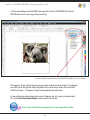
Spot Process SEPARATION SOFTWARE / Printing Separations / Illustrator
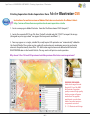
Printing Separation Studio Separations from
Adobe Illustrator CS5
Instructions for earlier versions of Adobe Illustrator are located in the Video Café at:
http://www.softwareforscreenprinterstech.com/separation-studio
1. Create a new page in Adobe Illustrator. From the File Menu choose PLACE (import)*.
2. Locate the separated DCS2.eps file. Have "linked" selected and click "PLACE" to import the image
(disregard any messages about "no support for transparent work flows"...).
3. Your seps appear as a single, scalable file, ready to print. All spot colors are "automatically" added to
the Swatch Palette. These color may be used with vector elements combining your raster and vector
elements for professionally clean films. TIP: Add custom registration marks colored with Illustrator’s
REGISTRATION color in the Swatch Palette. The reg. marks will print on each separation.
Why doesn’t the CS4 and CS5 previews look like previous Illustrator version previews?
CS - CS 3 Preview
PREVIEWS EXPLAINED:
Adobe has changed its work
flow for DCS2.eps files ONLY
for Illustrator. Separation
quality remains of high quality
but the preview will appear
washed out. The graphics
world awaits a resolve from
Adobe. For perfect previews
use previous versions of
CS - CS3 Illustrator or InDesign.
– 46 –
Spot Process SEPARATION SOFTWARE / Printing Separations / Illustrator
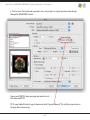
4. Print as usual. These high end separations are as easy to print as simple spot color vector designs
through the SEPARATIONS section.
Choose your PRINTER, setup your page and media size, etc.
Then choose OUTPUT.
TIP: If using Adobe Illustrator’s registration marks select“Ignore Artboards”. This will place your marks on
the page close to your image.
– 47 –
Spot Process SEPARATION SOFTWARE / Printing Separations / Illustrator
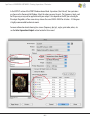
In the OUTPUT section of the PRINT Window choose Mode: Separations (Host-Based). Your spot colors
are shown in the Document Ink Window. Select the colors you want to print. The Frequency, Angle, and
Dot Shape may or may not be applicable with your output - this depends on the RIP you are using for
file output. Regardless of line screen always choose the same SINGLE ANGLE for all colors - 22.5 degrees
is highly recommended to eliminate moiré.
For more information about choosing line screens (frequency, dpi, lpi), angles, print order, colors, etc.
see the Color Separation Output section located in this manual.
– 48 –
Spot Process SEPARATION SOFTWARE / Printing Separations / Illustrator
WANT TO ADD ELEMENTS to your file before outputting?
You can add vector elements, logos and type and share the imported spot colors from the Swatch
Palette. For example, you can add text (copy) and color it with the same“Red”from your Separation
Studio color separation so the vector and the raster“Red”elements will output to the same film.
– 49 –
Spot Process SEPARATION SOFTWARE / Printing Separations / Quark XPress / InDesign / Photoshop
Quark XPress and InDesign:
1. Create picture boxes and Import/Place the DCS2.eps file as you would any other file. The spot colors
associated with the file are automatically added to the swatch and color palettes.
2. Your seps appear as a single scalable file, ready to print. All spot colors are "automatically" added to
the Swatch\Color Palette. These colors may be used with vector elements combining your raster and
vector elements for professionally clean and perfect films.
3. Operate your design application normally; these high-end seps are as easy to print as simple spot
color vector designs.
Photoshop CS3 and CS4:
1. OPEN the Separation Studio saved DCS2.eps file into Photoshop. Select the Channels you wish to
output and all of the viewable Channels will print. You Print the file by going to the PRINT
Window in Photoshop. You can print the whole file or individual Channels.
TIP: Photoshop MUST be set to“NO COLOR MANAGEMENT”. Change the Output option to Color
Management and set Color Handling to“NO COLOR MANAGEMENT”.
IMPORTANT Photoshop CS5 Info: CS5 has a new workflow. For details see our Video online...
http://www.softwareforscreenprinterstech.com/separation-studio
– 50 –
Spot Process SEPARATION SOFTWARE / Printing Separations / Output / Halftones
Color Separation Output (printing film positives):
Once you have completed the adjustments to your separations and have followed the instructions for
bringing your separated file into a graphics program (Adobe Illustrator or InDesign, Corel Draw, Quark
XPress) you are ready to output the file as“film positives”.
Spot Process Separation Studio files will output as spot color“halftones,”therefore your will be screenprinting halftones. We have provided valuable information on pre-press and on-press. This system is a
proven method for over 2 decades and millions of impressions. We strongly suggest you follow these
guidelines so you can enjoy the same success thousands of screen-printers have!
You will be printing from a postscript device (laser printer) or a non-postscript device (inkjet) using a
RIP (AccuRIP Software to an Epson Inkjet, for example). For more information on AccuRIP Software
please visit www.accurip.net where you can download a free trial.
Halftone Screen Angles:
The proper halftone screen angle is critical to your success as a screen-printer. Since we use screens
with stretched mesh and that mesh has a frequency of its own an improper selection can create an unwanted result or interference called a moiré.
To eliminate the moiré, screens need to be stretched with the mesh at the proper 90 degree angle. Your
film output needs to be either 22.5 degrees or 61 degrees (22.5 being the recommended angle of
Freehand Graphics).
User Tip: If you receive a moiré then your screen needs to be restretched properly or try another screen.
All your film positives share the same angle (single-angle printing known as Flemenco) so if you get a
moiré on one screen then it is clearly a problem with the screen stretching because if it was the angle
then the moiré would be a universal problem.
– 51 –
Spot Process SEPARATION SOFTWARE / Printing Separations / Halftones
Halftone Spot Shape:
Freehand suggests for the most accurate reproduction use a“round”spot. Many screen-printers use
elliptical and that works too, but elliptical halftones will introduce a pattern effect into the final print
that will be disturbing - when working with low line screens. Also, the use of elliptical shapes was first
thought to reduce the effects of dot gain but since Flemenco (single angle) printing does not suffer
from the same ill effects of a rosette pattern (moiré) this safeguard is not needed.
Halftone Line Screens:
Separation Studio files can reproduce at any line screen (halftone frequency, lpi, dpi). Choose a line
screen frequency based on your comfort level with exposing and printing halftones and your desired
outcome (visual look of a dot pattern/halftone as it is seen from 4 or more feet away). Screen-printers
most often choose line screens between 45 and 55 lpi. Remember that your mesh count needs to be
approximately 5 times (5X) your frequency for a quality end result. Therefore a line screen of 45 dpi (or
lpi) should be exposed to a 230 mesh (45 x 5 = 225). If you have only 230 mesh available then you
know that the line screen you choose should be approximately 1/5th the mesh (230 divided by 5 =
46). Simple math. Choosing too low or too high of a line screen for a particular mesh will deliver unwanted results on press.
Pre-Press / Press
Screens:
Use tight, properly stretched screens. This is one of the most important aspects to the screen-printing
process. Tight screens produce brighter prints with less ink. Ink will sit on top of the garment rather
than being forced into the fibers producing a duller image. Tight screens use less squeegee pressure
to sheer ink producing a cleaner print! Tight screens also produce a softer“hand”by using less ink.
Screens should be 25 newtons and higher to prevent screen roll. Less screen roll produces more
consistent registration. Use tight screens!!
Learn more about being a quality printer and grow your profits:
http://www.softwareforscreenprinters.com/blog/
– 52 –
Spot Process SEPARATION SOFTWARE / Printing Separations / Halftones
Mesh:
For best results use the SAME MESH COUNT on ALL SCREENS. That’s right, the same mesh count. Many
screen-printers believe they should use a lower mesh count on the base screen. Why? They believe the
white ink needs a lower mesh count because it is so thick. Today’s base white inks are no thicker or
thinner than any of the other inks used and since detail on the base screen is very important to the
overall result of the print, reducing the mesh count will also reduce detail captured during screen
exposure. Think about it.
All your films are produced with the same halftone size and angle so changing the mesh count on a
single screen will certainly reduce that screens detail as compared to the other screens. Also, your separations have been produced mathematically, the mathematics of how one color interacts with another is exactly what producing secondary and tertiary color is all about. Change the math and you
change the result. The base screen sets up all others, so quality is important.
Learn more about being a quality printer and grow your profits:
http://www.softwareforscreenprinters.com/blog/
Mesh Counts:
AUTOMATIC Printing Presses:
Suggested Mesh Counts for Automatic Machines (United States)
230 mesh - or - 355 mesh
Suggested Mesh Counts for Automatic Machines (European Metric)
90T mesh - or - 140T mesh
MANUAL Printing Presses:
Manual printers will want to drop the above suggested mesh counts slightly. Too much and the print
will loose much of its detail and secondary colors. Due to the amount of variables with this method of
printing each shop will have to go on its experience and testing.
Start with 280 mesh (United States)
Start with 110T mesh (European Metric)
–53 –
Spot Process SEPARATION SOFTWARE / Printing Separations / Halftones
Screen-Printing Ink:
A great aspect to printing separations created using Separation Studio is using HIGH-QUALITY inks on
press. From their ease of use to the brightness they deliver, high-quality inks create sharper, cleaner
and more vibrant results than cmyk translucent inks. The end result will also deliver a soft hand feel
and not a bullet proof feel associated with other forms of printing or through other solutions.
The stock colors associated with this software are PMS matches of the RGB light spectrum colors. You
will appreciate having a standard and relatively small set of inks for printing ALL of your Separation
Studio files. These colors are spectral and will also be great choices for all your printing needs. You can
select the matches from the charts provided by the industry plastisol manufacturers such as Wilflex,
Rutland, IC, Union, Lancer and others. You can also use your ink mixing systems.
Print Order
& Color
PMS (Pantone) Match
White Base White (a Flash quality white)
(to warm an under-base for flesh tones and nature use PMS 714 or PMS 470 matches)
Black*
Black (opaque or“process black*”)
Red
PMS 032
Blue
PMS 300
Gold
PMS 123
Brown*
Separation Studio properly builds your BROWNS through the use of secondary and tertiary colors on press. Adding a the optional
Brown Channel is NOT necessary. Regardless some users have requested the ability to generate a separate Brown Channel for their
own purposes and it is an ability of the software. The Brown Channel PMS colors are 470 (dark) and 714 (light).
Purple
Pantone Purple
Green
PMS 354
(or 122 if a bright, more yellow gold is needed for an image)
(in the “name” section of the Pantone Swatches and not in the # section.)
Turquoise PMS 312
Cool Gray
PMS Cool Gray 8
White
White (not a thick white or it will over power the other colors)
–54 –
* Whenever possible you want to use a balanced ink system same type and manufacturer) except in the case of
Spot Process SEPARATION SOFTWARE / Printing Separations / Halftones
Dropping and Adding Color from a Print Run:
WHITE BASE (by default the #1 press position):
When printing on a White garment (or substrate) and even some light colored garments such as
pastels, it is NOT always necessary to use the White Base but Black will be needed - experiment.
FINAL WHITE (by default the #9 press position):
You will ALWAYS need the Final White. Failure to print this screen will result in a poor quality print.
BLACK (by default the #1.5 press position)
When printing on Black garments the Black Channel is not necessary.
Print Order (Press Position):
The order shown of the Color Channels (on screen) indicate the proper and proven order for on-press.
It is important to follow the order since it is a proven method. All custom made spot screens (metallics,
specialty, etc.) should be added to the end of the Separation Studio Colors.
CONGRATULATIONS!
Congratulations, you read the manual!
Separating, outputting and screen-printing high-end, tonal image separations is easy and, better yet,
a very desirable and profitable technique. Even after just a few separations and press runs you will be
very skilled at the process.
Spot Process Separation Studio is head and shoulders better than any other method or software.
Through our FREE trials and global user base it is proven every day! From the very first release back in
1995 to this amazing NEW Version released in 2010, screen-printers have been provided with the
ability to deliver the best! Thank you for choosing Spot Process Separation Studio.
We wish you great business success!
– 55 –
Spot Process SEPARATION SOFTWARE / Contact Info
Freehand Graphics, Inc.
31 Ridgefield Drive
Shoreham, NY 11786 USA
631-744-4330 PH (Sales Department)
631-821-3670 FX
[email protected]
email:
www.softwareforscreenprinters.com
Learn more about being a quality printer and grow your profits:
http://www.softwareforscreenprinters.com/blog/
Credits:
Artwork in this Manual have been provided by Cora Kromer of Awearness Ink, Dane Clement of Great
Dane Graphics, Steve McDonald, Freehand Graphics and others. Thank you.
Al Rights Reserved. © 2009/2010/2011 Freehand Graphics, Inc.
– 56 –