1
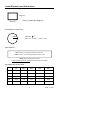
Data Hold (Air Velocity/Air Flow)
1. While taking measurements, press the HOLD button to freeze the air velocity/air flow
reading for later viewing.
2. The HOLD indicator will appear in the bottom of the LCD display.
3. Press HOLD again to return to normal operation.
MAX/MIN/AVG Record (Air Velocity/Air Flow)
This allows the user to record and view the highest (MAX), lowest (MIN) and average
(AVG) readings.
1. Press the button MAX/MIN button. The AVG indicator and RECORD indicator along
with the average reading will appear on the LCD display and the meter will begin
keeping track of the MAX, MIN and Average values.
2. Press the MAX/MIN button again. The MAX indicator will appear on the display and
display the Max reading.
3. Press the MAX/MIN button again to view the minimum reading. The MIN indicator
along with the minimum reading will appear on the LCD display and display the Min
reading.
4. Press the MAX/MIN button again to display current readings. NOTE: the meter will
keep recording MAX/MIN/AVG readings.
5. To clear and stop MAX/MIN/AVG recording and return to normal operation, press the
AREA button once when displaying the current reading.
8
AN200 V2.1 05/07