1
PPX_4010_UM_EN 253632830.book Page 1 Mardi, 28. juillet 2015 2:12 14
Register your product and get support at
www.philips.com/welcome
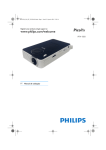
PPX 4010
EN User Manual
PPX_4010_UM_EN 253632830.book Page 2 Mardi, 28. juillet 2015 2:12 14
Table of contents
Dear Customer ....................................................................3
About this User Manual ......................................................3
What's in the Box ................................................................3
Product Highlights ...............................................................3
General Safety Information .....................4
Setting up the Device ..........................................................4
Repairs ....................................................................................4
Overview ...................................................5
Top/rear of the Device .......................................................5
Bottom of the Device .........................................................5
Side View ................................................................................5
Initial Operation .......................................6
Setting up the Device ..........................................................6
Connect Power Supply .......................................................6
Connect to the playback device ..............7
Connecting to Devices with HDMI Output ..................7
Connecting to a Computer (VGA) ..................................7
Connecting to an iPhone/iPad ...........................................8
Service .......................................................9
Cleaning ..................................................................................9
Device Overheated .............................................................9
FW update .............................................................................9
Troubleshooting .................................................................10
Appendix .................................................11
Technical Data ....................................................................11
Accessories ..........................................................................11
2
Philips · PPX 4010
PPX_4010_UM_EN 253632830.book Page 3 Mardi, 28. juillet 2015 2:12 14
Dear Customer
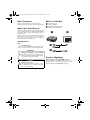
What's in the Box
Thank you for purchasing our Pocket Projector.
We hope you enjoy your device and its many functions!
1 – PicoPix Projector
2 – Quick Start Guide
3 – Dual USB to Micro USB cable
4 – HDMI to mini HDMI cable
About this User Manual
With the installation guide on the following pages, you
can start using your device quickly and easily. Detailed
descriptions can be found in the following sections of
this user manual.
Read the entire user manual carefully. Follow all safety
instructions in order to ensure proper operation of
your device. The manufacturer accepts no liability if
these instructions are not followed.
a
b
Symbols Used
Notice
Troubleshooting
This symbol designates tips that will help you
to use your device more effectively and easily.
CAUTION!
Damage to the Device or Loss of Data!
This symbol gives warning of damage to the
device and possible loss of data. This damage
can result from improper handling.
DANGER!
Danger to Persons!
This symbol gives warning of danger to persons. Physical injury or damage can result
from improper handling.
c
d
Product Highlights
Connecting to devices with HDMI output
With the HDMI to mini HDMI cable you can connect
the projector to a computer or laptop (see also Connecting to Devices with HDMI Output, page 7).
3
PPX_4010_UM_EN 253632830.book Page 4 Mardi, 28. juillet 2015 2:12 14
1 General Safety Information
Do not make any changes or settings that are not
described in this user manual. Physical injury or damage
to the device or loss of data can result from improper
handling. Take note of all warning and safety notes indicated.
Setting up the Device
The unit is for indoor use only. The device should be
placed securely on a stable, flat surface. Position all
cables in such a way that no one will stumble on them,
thus avoiding possible injuries to persons or damage to
the device itself.
Do not plug in the device in moist rooms. Never touch
the mains cable or the mains connection with wet
hands.
The device must have sufficient ventilation and may not
be covered. Do not put your device in closed cabinets
or boxes.
Do not place the machine on soft surfaces such as tablecloths or carpets and do not cover the ventilation slits.
Otherwise the device could overheat or catch fire.
Protect the device against direct sunlight, heat, large
temperature fluctuations and moisture. Do not place
the device in the vicinity of heaters or air conditioners.
Observe the information on temperature and humidity
in the technical data.
When the device is running for a long period of time,
the surface becomes hot and a warning symbol appears
on the projection. The device switches off image and fan
still working when it goes too hot. After the device has
cooled down or you can switch to middle/low brightness to cool down, you can continue playback when
image recover.
Do not allow liquids to enter into the device. Switch off
the device and disconnect it from the mains supply if liquids or foreign substances end up inside the device.
Have the unit inspected by a technical service department.
Always handle the unit with care. Avoid touching the
lens. Never place heavy or sharp objects on the projector or the power cable.
If the projector gets too hot or emits smoke, shut it
down immediately and unplug the power cable. Arrange
for your device to be investigated by a technical service
centre. To prevent the spread of fire, open flames
should be kept away from the device.
Under the following conditions, a layer of moisture can
appear inside the device which can lead to malfunctions:
• if the device is moved from a cold to a warm
area;
• after a cold room is heated;
• when this device is placed in a damp room.
Proceed as follows to avoid any moisture build-up:
1 Seal this device in a plastic bag before moving it to
another room, in order for it to adapt to room conditions.
2 Wait one to two hours before you take the device
out of the plastic bag.
4
The device should not be used in a very dusty environment. Dust particles and other foreign objects may
damage the unit.
Do not expose the device to extreme vibrations. It may
damage the internal components.
Do not allow children to handle the device without
supervision. The packing materials should be kept out of
the hands of children.
DANGER!
High Power LED
This device is equipped with an high power
LED (Light Emitting Diode), which emits very
bright light. Do not look directly into the projector lens. This could cause eye irritation or
damage.
Repairs
Do not repair the device yourself. Improper maintenance can result in injuries or damage to the device.
Your device must be repaired by an authorised service
centre.
Find details of authorised service centres on the warranty card.
Do not remove the type label from your device; this
would void the warranty.
Philips · PPX 4010
PPX_4010_UM_EN 253632830.book Page 5 Mardi, 28. juillet 2015 2:12 14
2 Overview
Top/rear of the Device
Side View
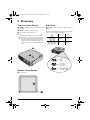
1 – – HDMI port for a playback device (with
adapter cable)
2 – DC IN – USB port for power supply
1 – Brightness button: allows to adjust 3 levels of
brightness.
3 – Focus wheel for image sharpness.
Notice
Note that the distance to the projection surface must be a minimum of 0.5 meter and a
maximum of 5 meters. If the Pocket Projector
is located outside of this range, it may not be
possible to focus the image. Turn the focus
wheel carefully so as to avoid damaging the
lens.
Maximum possible brightness depends on the available
power. See the table below for details.
Low
> 0.8 A
Medium
> 1,5 A
High
>2A
c
=
=
=
Bottom of the Device
1 – Tripod socket
a
Overview
5
PPX_4010_UM_EN 253632830.book Page 6 Mardi, 28. juillet 2015 2:12 14
3 Initial Operation
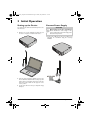
Setting up the Device
You can find on the market a standard tripod for to elevate the device.
1 Connect one or two USB plug depending on your
needs to a computer to switch on the device.
Connect Power Supply
CAUTION!
Mains Voltage at the Site of Installation!
Check whether the mains voltage of the
power supply matches the mains voltage available at the setup location.
1 Connect the USB plug to the power adapter (not
included), we recommend using the accessory
PPA6200.
2 Turn the device towards a suitable projection surface or wall. Note that the distance to the projection
surface must be a minimum of 0.5 meter and a maximum of 5 meters. Make sure the projector is in a
secure position.
3 Use the focus wheel on the top to adjust the image
sharpness.
6
Philips · PPX 4010
PPX_4010_UM_EN 253632830.book Page 7 Mardi, 28. juillet 2015 2:12 14
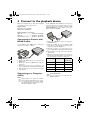
4 Connect to the playback device
Only use the supplied cable or cables that are available
as accessories to connect the projector.
Supplied cables
Dual USB to Micro USB cable
HDMI to Micro HDMI Cable
Use the VGA-Audio cable (available as an accessory) to
connect the projector to a computer, laptop, etc.. The
projector supports the following resolutions: VGA/
SVGA/XGA/WXGA. For best results, set the computer’s resolution to WXGA.
Cables available as accessories
MHL cable .................................... (PPA1240 / 253520048)
VGA cable .................................... (PPA1250 / 253447070)
Mini Display port cable ............. (PPA1270 / 253520069)
Connecting to Devices with
HDMI Output
Use the HDMI to Micro HDMI cable to connect the
projector to a computer or laptop.
1 Connect the VGA-Audio cable to the projector's
mini-HDMI socket.
2 Connect the VGA plug to the computer's VGA
socket. Do not connect audio plug, the function is
not supported with the PPX4010.
3 Switch the projector on by connecting it to the
power supply with the dual USB to Micro USB cable.
4 After the initial screen the connection is automatically activated.
5 Adjust the computer's resolution to the correct setting and switch the VGA signal to an external monitor. The following resolutions are supported:
Resolution
1 Connect the HDMI cable to the projector's miniHDMI socket.
2 Connect the cable to the HDMI socket of the playback device.
3 Switch the projector on by connecting it to the
power supply with the dual USB to Micro USB cable.
4 After the initial screen the connection is automatically activated.
Connecting to a Computer
(VGA)
Notice
Image
refresh rate
VGA
640 x 480
60 Hz
SVGA
800 x 600
60 Hz
XGA
1024 x 768
60 Hz
WXGA
1280 x 768
60 Hz
Notice
Screen Resolution
You can obtain the best results with the
WXGA resolution.
Many laptops do not activate the external
video output automatically when you connect
a second display such as a projector. Check
your laptop's manual to find out how to activate the external video output.
Connect to the playback device
7
PPX_4010_UM_EN 253632830.book Page 8 Mardi, 28. juillet 2015 2:12 14
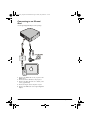
Connecting to an iPhone/
iPad
Use the Apple Digital AV Adapter sold separately.
1 Connect the HDMI cable to the projector's miniHDMI socket.
2 Connect the Micro USB cable to the projector.
3 Connect the Dual USB cable to a suitable power
source (e;g; PPA 6200).
4 Connect the Apple cable to the Iphone or Ipad.
5 Connect the HDMI cable to the Apple Digital AV
Adapter.
8
Philips · PPX 4010
PPX_4010_UM_EN 253632830.book Page 9 Mardi, 28. juillet 2015 2:12 14
5 Service
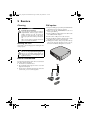
Cleaning
FW update
DANGER!
Instructions for Cleaning!
Use a soft, lint-free cloth. Never use liquid or
easily flammable cleansers (sprays, abrasives,
polishes, alcohol, etc.). Do not allow any
moisture to reach the interior of the device.
Do not spray the device with any cleaning fluids.
Wipe over the surfaces gently. Be careful that
you do not scratch the surfaces.
Cleaning the Lens
1 Prepare a USB key (not provided) and a Dual Female
USB adaptor (not provided, see picture).
2 Before, copy the file «MSTFLASH.bin» to the root
directory of USB key.
3 Connect USB key to Main USB port of USB Y cable
via a USB dual female adaptor.
4 Connect micro USB port of Y cable to device.
5 Connect USB port of thinner cable at Y side, to a 5V/
2A adaptor and connect to the wall outlet.
6 Waiting for 5 minutes, then your product start up
and you can check the right down corner of screen,
the version of FW have changed to new version.
Use a brush or lens cleaning paper for cleaning the lens
of the projector.
DANGER!
Do not use any Liquid Cleaning Agents
Do not use any liquid cleaning agents for
cleaning the lens, to avoid damaging the coating film on the lens.
Device Overheated
A overheat symbol appears if the device is overheated.
The device behaves as follows:
1 The fan turns to maximum level.
2 An overheating symbol appears on the screen and
playback is interrupted.
3 The fan runs at maximum and after the device has
cooled down, you can continue playback.
Service
9
PPX_4010_UM_EN 253632830.book Page 10 Mardi, 28. juillet 2015 2:12 14
Troubleshooting
1 Disconnect the Micro-USB to USB Cable to switch
the device off.
2 Wait at least ten seconds.
3 Connect the Micro-USB to USB Cable to switch the
device on.
4 If the problem repeats, please contact our technical
customer service or your retailer.
Power Cycling
If a problem occurs that cannot be corrected with the
instructions in this user manual (see also the help
below), follow the steps given here.
Problems
Solutions
Only the initial screen appears and not the image from
the external device.
•
Please check that the external device is switched on
•
Please make sure the HDMI cable can work normally.
Check that HDMI cable is correctly connect to computer's HDMI interface.
Best possible results can be achieved by selecting
1280x720 (720p) resolution on your Computer.
Only the initial screen appears and not the image from
the connected computer.
•
•
•
When the device is running for a long period of time,
the surface becomes hot and a warning symbol
appears on the projection. The device switches off
image and fan still working when it goes too hot.
After the device has cooled down or you can switch
to middle/low brightness to cool down, you can continue playback when image recover.
•
Only use the Y cable provided with your device, otherwise expose you to overheating and a fire hazard.
Connect two ports USB on PC side to get more
power.
Change the brightness level from High to Mid or Mid
to low with the brightness switch.
Disconnect and reconnect the USB cable to restart
the projector.
Device turns off.
•
When you can't power on the product or when the product switches off after a few seconds.
•
•
Bad image or color quality when connecting with HDMI.
10
•
Use the supplied HDMI cable (PPA1290). Thirdparty cables may cause signal distortions.
Philips · PPX 4010
PPX_4010_UM_EN 253632830.book Page 11 Mardi, 28. juillet 2015 2:12 14
6 Appendix
Technical Data
Accessories
Dimensions (L¦×¦H¦×¦W)........................ 68 x 22 x 66 ¦mm
Weight ...............................................................................87 g
Recommended Ambient........................................5¦–¦35¦ºC
Relative Humidity ..................15¦–¦85¦% (non-condensing)
Video connection .............................. Micro-HDMI socket
Technology / optical
Display technology ................................. WXGA 0,2" DLP
Light source ........................................................... RGB LED
Resolution .................................................... 854 x 480¦Pixel
Supported Resolutions..........................................................
...................VGA/SVGA/XGA/WXGA/720p/1080p
Brightness (Bright Mode)........................up to 100 lumen
Contrast ratio .............................................................1500:1
Projected image size ..................................... 15,5-155 inch
Screen distance ..........................................0.5 m up to 5 m
Focus ............................................................................ Manual
Following accessories are available for your device:
Cables available as accessories
MHL cable.....................................(PPA1240 / 253520048)
VGA cable.....................................(PPA1250 / 253447070)
Mini Display port cable..............(PPA1270 / 253520069)
Power adaptor ........................ PPA6200EU / 253456003
........................................... PPA6200UK / 253461710
............................................ PPA6200US / 253495638
Appendix
All data are provided for reference purposes only.
Sagemcom Documents SAS reserves the right to
make any changes without prior notice.
11
PPX_4010_UM_EN 253632830.book Page 12 Mardi, 28. juillet 2015 2:12 14
The CE marking certifies that the product meets the
main requirements of the European Parliament and
Council directives 1999/5/CE, 2006/95/CE, 2004/108/
CE and 2009/125/CE on information technology equipment, regarding safety and health of users and regarding
electromagnetic interference.
The declaration of compliance can be consulted on the
site www.picopix.philips.com.
Preservation of the environment as part of a sustainable
development plan is an essential concern of Sagemcom
Documents SAS. The desire of Sagemcom Documents
SAS is to operate systems observing the environment.
The desire of Sagemcom Documents SAS is to operate
systems observing the environment and consequently it
has decided to integrate environmental performances in
the life cycle of this products, from manufacturing to
commissioning use and elimination.
Federal Communications Commission (FCC)
Statement: You are cautioned that changes or
modifications not expressly approved by the party
responsible for compliance could void the user's
authority to operate the equipment.
This equipment has been tested and found to comply
with the limits for a Class B digital device, pursuant to
part 15 of the FCC rules. These limits are designed to
provide reasonable protection against harmful
interference in a residential installation. This equipment
generates, uses and can radiate radio frequency energy
and, if not installed and used in accordance with the
instructions, may cause harmful interference to radio
communications.
However, there is no guarantee that interference will
not occur in a particular installation.If this equipment
does cause harmful interference to radio or television
reception, which can be determined by turning the
equipment off and on, the user is encouraged to try to
correct the interference by one or more of the
following measures:
• Reorient or relocate the receiving antenna.
• Increase the separation between the equipment
and receiver.
• Connect the equipment into an outlet on a circuit different from that to which the receiver is
connected.
• Consult the dealer or an experienced radio/TV
technician for help.
Canada Regulatory Compliance: This device
complies with Industry Canada CAN ICES-3 (B)/NMB3(B)
12
For Mexico only.
PROYECTOR DE BOLSILLO (PicoPix)
Alimentación: 100 – 240V ~ 50/60Hz 1A
Sal: 5 Vcc/2 A
Proyector: 5 Vcc/2 A - 5 V/3 A
Importador:
P&F Mexicana, SA de C.V.
AV. La Palma No 6
Col. San Fernando la Herrudara
Huixquilucan, Edo. de Mexico CP 52787
Tel: 5269 9000
HECHO EN: China
LEA CUIDADOSAMENTE ESTE INSTRUCTIVO ANTES DE USAR SU APARATO.
Packaging: The presence of the logo (green dot)
means that a contribution is paid to an approved
national organisation to improve package recovery and
recycling infrastructures. Please respect the sorting
rules set up locally for this kind of waste.
Batteries: If your product contains batteries, they
must be disposed of at an appropriate collection point.
Product: The crossed-out waste bin stuck on the
product means that the product belongs to the family of
electrical and electronic equipment. In this respect, the
European regulations ask you to dispose of it selectively;
• At sales points in the event of the purchase of
similar equipment.
• At the collection points made available to you
locally(drop-off centre, selective collection, etc.).
In this way you can participate in the re-use and upgrading of Electrical and Electronic Equipment Waste, which
can have an effect on the environment and human
health.
The paper and cardboard packaging used can be disposed of as recyclable paper. Have the plastic wrapping
recycled or dispose of it in the non-recyclable waste,
depending on the requirements in your country.
Trademarks: The mentioned references in this manual are trademarks of the respective companies. The
lack of the trademarks É and Ë does not justify the
assumption that these dedicated terminologies are free
trademarks. Other product names used herein are for
identification purposes only and may be trademarks of
their respective owners. Sagemcom Documents SAS
disclaims any and all rights in those marks.
Philips · PPX 4010
PPX_4010_UM_EN 253632830.book Page 13 Mardi, 28. juillet 2015 2:12 14
Neither Sagemcom Documents SAS nor its affiliates
shall be liable to the purchaser of this product or third
parties for damages, losses, costs, or expenses incurred
by the purchaser or third parties as a result of accident,
misuse, or abuse of this product or unauthorized modifications, repairs, or alterations to this product, or failure to strictly comply with Sagemcom Documents SAS
operating and maintenance instructions.
Sagemcom Documents SAS shall not be liable for any
damages or problems arising from the use of any
options or any consumable materials other than those
designated as original Sagemcom Documents SAS /
PHILIPS products or Sagemcom Documents SAS /
PHILIPS approved products.
Sagemcom Documents SAS shall not be held liable for
any damage resulting from electromagnetic interference
that occurs from the use of any interface cables other
than those designated as Sagemcom Documents SAS /
PHILIPS products.
All rights reserved. No part of this publication may be
reproduced, stored in a retrieval system or transmitted
in any form or by any means, electronic, mechanical,
photocopying, recording, or otherwise, without the
prior written permission of Sagemcom Documents SAS.
The information contained herein is designed only for
use with this product. Sagemcom Documents SAS is not
responsible for any use of this information as applied to
other devices.
This user manual is a document that does not represent
a contract.
Errors, printing errors and changes are reserved.
Copyright È 2015 Sagemcom Documents SAS
13
PPX_4010_UM_EN 253632830.book Page 14 Mardi, 28. juillet 2015 2:12 14
PHILIPS and the PHILIPS’ Shield Emblem are registered trademarks of Koninklijke Philips N.V.
and are used by Sagemcom Documents SAS under license from Koninklijke Philips N.V.
È 2015 Sagemcom Documents SAS
All rights reserved
Sagemcom Documents SAS
Documents Business Unit
Headquarters : 250, route de l’Empereur
92848 Rueil-Malmaison Cedex · FRANCE
Tel: +33 (0)1 57 61 10 00 · Fax: +33 (0)1 57 61 10 01
www.sagemcom.com
Simplified Joint Stock Company · Capital 8.479.978 € · 509 448 841 RCS Nanterre
PPX 4010
EN
253632830-B