1
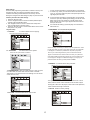
Initial Settings
Once the initial programming is entered it is entered in memory until
changed, the player can always be operated under the same
conditions.The settings will be retained in the memory until the
settings are changed even after setting the player to power off mode.
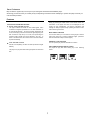
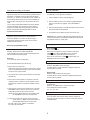
4:3 PS: choosing this setting if your DVD player is connected to
a normal TV (4:3 ratio). You can fill the movie to the entire screen
of you TV. This might mean that parts of the picture (the left and
right edges) won’t be seen.
4:3 LB: Choosing this setting if your DVD player is connected to
a normal TV (4:3 ratio). Selecting this setting you’ll see the entire
frame of the movie, but it will take up a smaller portion of the
screen vertically. The movie might appear with black bars at
the top of the screen.
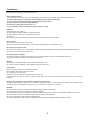
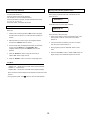
Common procedure for initial settings
1. Press the “SETUP” button.
2. Use the navigation buttons to move and select preferred option,
and then press the “ENTER” button.
3. Use navigation buttons to move to another main setup items
when not selecting any submenu option.
4. Press the “SETUP” button or choose “EXIT SETUP” item to close
setup menu in any mode.
16:9: Choose this setting if your DVD player is connected to a
wide screen TV.
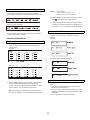
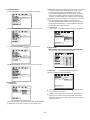
1.5 PASSWORD- It is used to set the password.
1. System setup
1.1 SOURCEIt is used to select source for playing.
There are three options:disc,USB.
When the player is locked,you need to enter the password in order
to play discs that you have a high rating than what you’ve allowed.
If the player is unlocked,no password is requried to play discs.
It is used to select the TV system
1.2 TV SYSTEMThere are two options:PAL and NTSC.
Even if you’ve set rating limits,they won’t be enforced until the
player is locked.Use the number bottons to enter your password
and press ENTER.the parental controls are now unlocked.and you
can change the ratings to the desired settings.If you forgot your
password,enter the factory preset password “0000”.
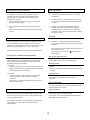
1.6 RATING- it is used to set the rating of the disc.
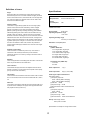
1.3 SCREEN SAVER- When your DVD player is in stop, tray open,
or no disc state, the screen saver will turn on after 3 minutes.
This feature is to protect the screen from damage. You can set the
screen saver on or off.
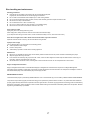
The higher the level is, the fewer the restricted discs are. If set at
level 8, there is almost no disc restriction. If set at R level, maybe
some types of discs can’t be played, unless enter correct password,
unlock and amend the age control level.
1.7 Default- Restore to factory settings.
1.4 TV TYPE- it is used to select the TV output mode.
EXIT SETUP
13