1
CHAPTER 1 ■ INTRODUCING THE RASPBERRY PI
Luckily, supply has securely caught up with demand. There is no waiting period to buy a Pi anymore, and there is
no longer a limit of one per customer. There is a “buy one give one” program in the works, in which the Raspberry Pi
Foundation plans to donate a Pi to an educational organization for every Pi sold. The recent release of the Raspberry
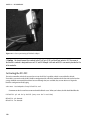
Pi camera board, a small camera-on-a-chip that plugs directly into the Pi and enables the user to take both still
pictures and video, promises to open up even more possibilities for this little computer. And since the founders
actively encourage other companies to copy their paradigm, it’s anybody’s guess what’s coming next.
Exploring the Pi Board
So what exactly is on the board? It’s pretty darn small, so what can possibly fit on there?
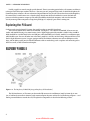
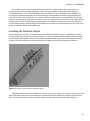
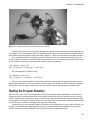
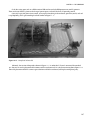
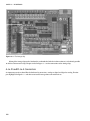
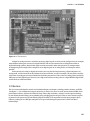
There are two models of Pi: model A and model B. (See Figure 1-2 for a look at the model B.) The two are very
similar, with model B having a few more features (and a slightly higher price) than model A. Model A has 256 MB of
RAM; model B has 512 MB. Model A has one USB port, while model B has two. Finally, model A has no Ethernet port,
while the B has one. You can still order one or the other; model A is $25 US as of this writing, while model B is $35 US.
For the slight difference in price, I suggest getting model B. The difference between one and two USB ports can be
huge, and the ability to plug into a hardwired Ethernet cable can make things such as updates and connecting to the
board in a small, ad-hoc network much simpler.
Figure 1-2. The Raspberry Pi Model B (image ©Raspberry Pi Foundation)
The Pi (from here on, we’ll assume you have model B) measures 85.6 millimeters (mm) by 56 mm by 21 mm
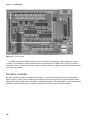
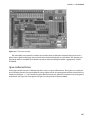
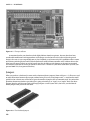
(yes, it’s obviously not made in America), with some overlap for the ports and the SD card. Referring to Figure 1-2 and
moving counterclockwise around the card, I’ll explain the components in detail in the following sections.
4
www.allitebooks.com