1
16
When you want to return to listening to the signal source connected to the External sound
source input (1), release the a button (6). The internal microphone is then disconnected and the
external sound source returns to normal volume again.
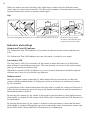
Clip
Place the clip against the battery cover and press firmly so that it locks on.
Remove the clip by using
the small round handles and
pressing out from the sides.
Indicators and settings
Volume and Tone LED Indicator
The Volume and Tone LED Indicator (8) is used as an indicator for the volume and tone controls.
The Volume and Tone LED Indicator goes out after about 3 seconds to save power.
Low battery LED
The Low battery LED (11) is normally off, but comes on when the battery level falls below
about 10 hours’ remaining operating time. This time depends, of course, on the sound volume
and type of listening accessories used.
When the Low battery LED (11) blinks every seven seconds, the batteries should be replaced
with new ones. Only use AA alkaline type batteries.
Volume control
Maxi has a digital volume control bc (9), which means that you can increase or reduce the
volume with the pushbuttons bc (9). Each press results in an increase or reduction in volume
by one increment.
If you hold one of the volume buttons down for more than 1 second, the volume will increase or
reduce by one increment per second as long as the button is held down or until the minimum or
maximum position is reached.
By pressing the c button (9), the volume is increased by one increment at a time until the maximum volume is reached. At full volume all the LEDs of the Volume and Tone LED Indicator (8)
are illuminated.
By pressing the b button (9), the volume is reduced by one increment at a time until the minimum volume is reached, although Maxi never becomes totally silent. At minimum volume only
the left LED of the Volume and Tone LED Indicator (8) is illuminated.