1
inet MOBILE – User Manual
USER MANUAL FOR
FINANCIAL INVESTMENT PLATFORM
MOBILE EDITION
Inet MOBILE
1
inet MOBILE – User Manual
CONTENTS
Chapter #
Title
Page #
1
INVESTNET MOBILE EDITION (ME) OVERVIEW
2
INVESTNET SOLUTION
3
21
INSTALLATION PROCEDURE
3
22
LOGIN P ROCESS
4
23
MARKET WATCH
4
231
Add Symbol
5
232
Remove Scrips
6
24
INDEX
6
25
FAST ORDER
6
26
TRADE MENU
7
27
SELL ORDER
8
271
Order Confirmation
8
272
Exchange Confirmation
8
28
ORDER STATUS
8
Order Details
9
29
OFFLINE ORDER STATUS
9
2 10
TRADE BOOK
10
2 11
INTRADAY CHART
10
2 12
BUYING POWER
10
2 12 1
Buying Power Details
11
2 13
PORTFOLIO
11
2 13 1
Portfolio Details
11
2 14
SNAP Q UOTE
11
2 15
MARKET BY PRICE
11
2 16
PAYOUT
12
2 17
TRADING IDEAS
12
2 18
SETTINGS
12
2 19
CHANGE PASSWORD
13
2 20
MARKET STATUS
13
2 21
ABOUT
13
281
2
inet MOBILE – User Manual
1 INVESTNET MOBILE EDITION (ME) OVERVIEW
INVESTNET is a mobile application featuring portable services. InvestNet now have an inbuilt online
Trading facility, allowing you to Trade via your mobile with complete comfort while on the move, in a
secure environment. It also provides real-time market information such as Market By Price, Snap
Quotes, Index and many more features such as Buying Power, Trading Ideas, Real Time Intraday
Chart, Order Management and Payout Facility.
INVESTNET provides highly flexible solutions to users while maintaining maximum security of
information.
2 INVESTNET SOLUTION
The following are the features of the mobile edition:
• Real Time Market watch
•
•
•
•
•
•
•
•
•
•
•
•
Search/Add/Remove scrips
Index Display
Real-Time Intraday Chart
Product wise Buying Power
Product wise Buying power details
Order Book
Fast Orders
Order Status
Offline Order Status
Trade Book
Portfolio Information
Payout facility
• Snap quote
• Trading Ideas
2.1 Installation Procedure
InvestNet can be now installed in almost all Java supported and Anrdoid mobile handsets having
GPRS enabled faclity.
Requirements:
Required JAVA powered mobile phone with GPRS Facility. GPRS technology allows the user to access
any web page or application from the mobile.
3
inet MOBILE – User Manual
Procedure:
Select the browser in your mobile and enter the InvestNet application download web address. You
will be prompted to download the application. By selecting the download button the application will
get downloaded and installed.
INVESTNET MOBILE APPLICATION DOWNLOAD LINK
http://investnet.dbfsindia.com
When the installation process is over, the INVESTNET icon will get displayed, which indicates the
presence of the application in the mobile. By pressing the icon, application will start. The below steps
and screenshot denotes the general procedure, the exact method will differ according to the handset
model.
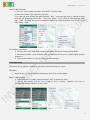
Steps To Be Followed:
1.
2.
3.
4.
5.
6.
Open the mobile web browser.
Click on „Go to web address‟.
Enter the InvestNet application download website address.
Click on „Yes‟ to start the installation process.
Click on „Continue‟ to continue installing the application.
Select the Location to install the application.
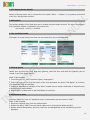
2.2 Login Process
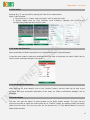
After Installation the DBFS icon will display on the installation folder With your Flip user id and
password you can login to InvestNet. The communication from mobile device to the server
application is through a secured SSL channel.
Steps To Be Followed:
1. Navigate in to the relevant fields to enter your user name/ trade code and password.
2. To move the control from one text box to another use Up and Down arrow keys.
3. Click on the options menu and then select „Login‟ to continue login.
4. The application will prompt for Network Access as shown in the below mentioned screenshot
„Security Warning‟ - click „Yes‟ to allow the application to use the network and send or receive
data. It is compulsory to allow the application to access the network to login successfully.
2.3 Market watch
While logging in to the application you will be directed to the Market watch screen. Market watch
allows you to view the real time streaming data from the exchange. The user can add instruments to
view real time information such as Last Traded Price and % change. Up to 10 scrips can be added in
the market watch.
4
inet MOBILE – User Manual
The menu button from market watch provides various features such as:•Fast order
•Trade
•Watch
•View
•Hide index
•Payout
•More
•Exit InvestNet
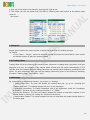
2.3.1 Add Symbol
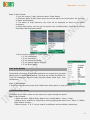
Instruments may be added to the watch as desired using the Add Symbol feature. The user is
required to select the venue and add the symbol appropriately.
Steps to Be Followed:
1. Go to menu>>Watch and select the option “Add symbol”.
2. Select the venue and specify the symbol name or at least the first two letters of the scrip name in
the search window.
3. Click on the add button. The scrip name will get added on market watch. If the first two letters of
the scrip name are entered, then a list of scrips starting with the specified letters will be displayed.
The required scrip can be selected from that list and added to the market watch.
5
inet MOBILE – User Manual
2.3.2 Remove Scrips
This option enables user to remove a particular scrip from the market watch.
Steps To be followed:
1. Select the scrip to be deleted from the market watch.
2. Click on Remove Symbol from “Menu >> Watch” to delete the selected scrip.
2.4 Index
Market Indices like Nifty and Sensex can be viewed on the market watch screen of InvestNet. The
short cut key for enabling indices is “4”.
Steps To Be Followed:
1. From the menu, select the option “Show Index” to display the index at the bottom of the screen.
2. From the menu, select the option “Hide Index” to hide the index at the bottom of the screen.
2.5 Fast Order
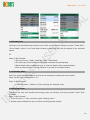
This option enables user to place quick order entry. The orders can be placed, modified or cancelled
as desired. The user is required to specify Order Type, Quantity and Price. The user also has the
provision to configure the fast order. Short cut key for enabling this option is “6”.
6
inet MOBILE – User Manual
Steps To Be Followed:
1. From the menu, select the option “Fast Order” to place order.
2. Specify the Order Type, Quantity and Price.
3. In case the user selects the order type as “ Buy ”, the best sell price in market for that
scrip will get displayed next to the “ Limit Price (Best) ” field; while on selecting the order
type- “ Sell ”, the best buy price in market for that scrip will get displayed next to the “ Limit
Price (Best) ” field.
To configure Fast Order:
1. Click on menu from Fast Order window and Select the option Configure Fast Order.
2. Select the product, price Condition and check/uncheck the option “Always show product
selection”.
3. Click on save button to save the fast order configuration.
2.6 Trade Menu
The orders can be placed, modified or cancelled as desired using this option.
Buy Order
Shortcut key “1” can be used for placing buy order from market watch
Steps To Be Followed:
1. From the menu >>Trade, select the option “Buy” to place buy order.
2. Specify the details such as Time condition, Price Condition, Quantity and Price in
corresponding fields and then click on order.
7
inet MOBILE – User Manual
2.7 Sell Order
Shortcut key “2” can be used for placing Sell order from market watch.
Steps To Be Followed:
1. From the menu >>Trade, select the option “sell” to place sell order.
2. Specify details such as Time condition, Price Condition, Quantity and Price in the
corresponding fields and then click on order.
2.7.1 Order Confirmation
Once the details are filled & submitted, the confirmation window will get displayed.
In case the user needs to make any modifications in the order to be placed, the option “Back” can be
used to make necessary changes in the order.
2.7.2 Exchange Confirmation
After checking the order details, click on the “Confirm” button, and the order will be sent to the
exchange and upon successful submission of the order, an “Order confirmation Message” will be
displayed.
2.8 Order Status
The user can view the status of orders placed on the Order Status window. The user has the
provision to modify or cancel the orders which are in “Confirm” status, by enabling modify and cancel
option from the menu. The user may also use the shortcut key “3” from Market Watch to view the
Order Status window.
8
inet MOBILE – User Manual
Steps To Be Followed:
1. From the menu>>Trade, select the option “Order Status”.
2. Select the Status to filter orders as per the current status, can select option „All‟ if all type
of orders should appear.
3. The status of order placed by the client will be displayed as shown in the above
screenshot.
4. Under Menu option, user can get sub options such as Modify Order, Cancel Order, Placing
Fast Order, MBP and Order Details.
5. Short cut
• “1”
• “2”
• “6”
• “3”
• “5”
keys available in “Order Status”
for modification.
for cancellation.
for placing Fast Order.
for getting “Market By Price”.
for Order details
2.8.1 Order Details
The detailed information of each order placed can be viewed using the Order
Details option in Order Status window. The same will include the details like
Trans ID, Product type, Venue, Symbol, Buy/Sell, Status, Order Type , Price
condition etc.
Steps To Be Followed:
1. Select an order and choose the Order Details from Menu option or press short key „ 5 ‟.
2.9 Offline Order Status
The details of the offline orders can be viewed as a report through this option.
Steps To Be Followed:
1.Select the option “Offline Order Status” from “Market Watch – Menu - Trade”.
2.Orders can be modified or cancelled by selecting appropriate option from “Menu” in “Offline
Order Status” window.
3.Short cut keys “1” & “2” can be used for modification and cancellation respectively.
9
inet MOBILE – User Manual
2.10 Trade Book
Summary of all executed orders placed by the client can be viewed through the option “Trade Book”.
“Show Details” option in the Trade Book window provides the user with the details of the executed
trades.
ET
Steps To Be Followed:
1.From the menu>>Trade, select the option “Trade Book”.
2.The summary of the trades that have been executed will get displayed.
3.Show Details option enables the user to view the details of the executed trades.
4.From the Menu button, user can Refresh or go back to the Market Watch.
2.11 Intraday Chart
Real Time graphical representation of scrip can be analyzed by enabling the chart option.
Short cut key from market watch is “5”.
Steps To Be Followed:
1. From the menu >>Watch>>Chart to display the Intraday Chart.
2.12 Buying Power
Customers can view their product wise buying power by selecting “view buying power” option from
the Menu.
Steps To Be Followed:
1. From the menu >> View, select the option “Buying Power”.
2. Refresh option enables the user to refresh the Buying Power details.
10
inet MOBILE – User Manual
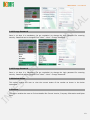
2.12.1 Buying Power Details
Details of Buying Power can be viewed from the option “Menu -> Details” or by pressing a selected
row in the Buying Power window.
2.13 Portfolio
The portfolio details of the client also can be viewed using the below window. The option to navigate
to the portfolio window is available in the main menu.
Go to Menu >>View >> Portfolio
2.13.1 Portfolio Details
The Details of scrips held by the client can be viewed from the portfolio window.
2.14 Snap Quote
Details such as Best Buy Price, Best Buy Quantity, Best Sell Price and Best Sell Quantity can be
viewed in the Snap Quote option.
Steps To Be Followed:
1. From the menu >> View, select the option “Snap Quote”.
2. Enter the scrip name or first few letters of the scrip and select the option “Get Quote”. A minimum
of 2 characters must be specified.
3. Refresh & Back Option available in the “Menu” enable user to refresh the details of selected scrips
or to go back to Market Watch.
4. Search option enables user to get Snap Quote of new scrip.
2.15 Market by Price
Real time Market by Price of a particular scrip in market watch can be viewed in “MBP”.
Steps To Be Followed:
1. Select the required scrip from the market watch.
2. Enable the option “MBP” from the bottom right corner of the Market Watch window.
3. Details such as Bid Quantity, Bid Price, Ask Price and Ask Quantity of the selected scrip will be
displayed.
11
inet MOBILE – User Manual
4. User can move back to the watch by pressing left/ right arrow.
5. Fast Order can also be placed from the MBP by enabling fast order option at the bottom right
corner of
the screen.
2.16 Payout
Payout option enables the client to place a request for funds from the trading account.
For Payout
• From “Menu – Payout”, enter the required amount and select the back button; then enable
the transfer button to place the payout request.
2.17 Trading Ideas
Trading Ideas will be provided by the research team. Whenever a trading idea is provided, it will get
displayed as a pop- up message in the market watch window and will vanish automatically in 2/3
seconds. User can instantly hide the trading idea from the market watch window by enabling the hide
option. For later references: User can view the trading information given by the broker by selecting
the option “Trading Ideas” from “Menu – View”.
2.18 Settings
For customizing the application behavior, go to Menu >> Settings.
• Trading Idea Alert: The user can disable the trading idea pop- up by un- checking the
“Trading idea alert”. The default settings will pop- up the messages.
• Landscape Orientation: To Enable Landscape view of the application check the “Landscape
Orientation”. Shortcut key for enabling the same is “0” (ZERO).
• Movement Direction: The User can enable/ disable the market up and down indicator in the
market watch by ticking/ Un- ticking the “Movement directions”.
• Market watch header: This option enables the user to show/hide the header Market Watch in
the home page.
12
inet MOBILE – User Manual
2.19 Change Password
Once in 14 days it is mandatory (as per regulation) to change the login password for ensuring
security. Password can be changed from “Menu – More – Change Password”.
2.19 Change Password
Once in 14 days it is mandatory (as per regulation) to change the login password for ensuring
security. Password can be changed from “Menu – More – Change Password”.
2.20 Market Status
This option enables the user to view the current status of the market as shown in the below
screenshot.
2.21 About
This option enables the user to find out details like Current Version, Company Information and Bytes
Sent.
13