1
14.10 Viewing the Alarm Counter
The VIEW ALARM COUNT menu allows the user to view the total number of times the 6100 has entered the
alarm state since the alarm counter was last reset.
1.
Enter the user code supplied with the system and press the ↵ key to access the menus.
2.
Using the ◄ and ► keys navigate to the VIEW ALARM COUNT menu press the ↵ key to enter the
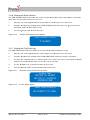
view alarm counter display ( figure 14.10 ).
3.
Press the ↵ key to return to the main menu.
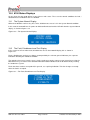
Figure 14.10
Example View Alarm Counter Display
View alarm count
5 alarms
14.11 Viewing the Fire Event Log
The VIEW FIRE EVENT LOG menu allows the user to view data about historic fire events.
1.
Enter the user code supplied with the system and press the ↵ key to access the menus.
2.
Using the ◄ and ► keys navigate to the VIEW FIRE EVENT LOG menu and press the ↵ key.
3.
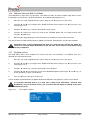
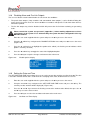
The latest fire is displayed first, as shown in figure 14.11. If there are no fires in the log the 6100 will
show the screen illustrated in figure 14.12, and issue an error tone.
4.
Use the ◄ and ► keys to view the previous or next event.
5.
Press the ↵ key to exit this menu and return to the main menu.
Figure 14.11
Illustration of View Fire Event Log display
Event 001
Device in alarm
DD / MM / YY HH:MM:SS
Address 001
Figure 14.12
No Fire Events display
View fire events
No events to view
N93-571-87 Issue 4 NH
Page 21 of 33
© Protec Fire Detection plc 2015