1
OPERATION (CONTINUED)
USING THE INSTRUMENT FUNCTION
1
2
FM
AM
USB
INST
AUX
O
2
®p
3
n
1
EQ
4
5
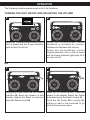
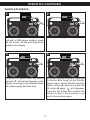
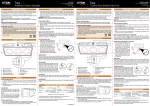
Turn this unit on by rotating the
Volume/Power control until a click is
heard and the Power indicator lights to
turn the unit on.
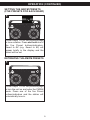
Insert one end of an instrument cable
into the OUTPUT jack on your
instrument and the other end into the
INST (Instrument) jack on the side of
this unit.
3
4
50%
AUX
FM
AM
USB
INST
AUX
INST
EQ
FM
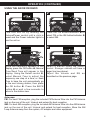
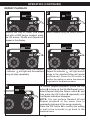
Select a source to play along with (USB
or AUX) by pressing the respective
function button/indicator.
AM
USB
INST
AUX
EQ
Press the INST (Instrument) button/
indicator to select Instrument; the MIX
menu will appear in the display.
NOTE:
Refer to the owner’s manual of the instrument for detailed connection instructions.
CONTINUED ON THE NEXT PAGE
16