1
OPERATION (CONTINUED)
USING AN EXTERNAL UNIT CONNECTED TO THE LINE IN OR RCA JACKS
1
2a
1
FM
AM
USB
INST
AUX
O
2
®p
3
n
EQ
4
5
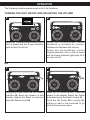
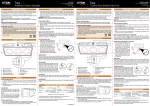
Turn this unit on by rotating the
Volume/Power control until a click is
heard and the Power indicator lights to
turn the unit on.
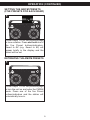
To use the LINE IN Jack: Insert one
end of an audio cable into the
AUX/LINE OUT jack on your external
audio unit and the other end into the
LINE IN jack on the side of this unit.
2b
3
FM
AM
USB
INST
AUX
EQ
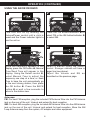
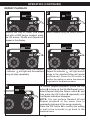
Press the AUX button/indicator once to
select the AUX1 mode (LINE IN jack) or
twice to select the AUX2 mode (RCA IN
jack) and start playback of the external
device.
Adjust the Volume and EQ as
described on page 7.
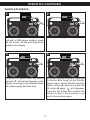
To use the RCA IN Jacks: Connect a
left and right audio cable from the
Left/Right jacks of your external unit to
the RCA IN Left/Right jacks on the side
of this unit.
NOTE:
Refer to the owner’s manual of the external unit for detailed connection instructions.
15