1
Controls and Functions
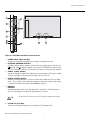
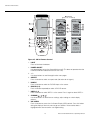
10. VOLUME (+/–)
Use these buttons to adjust the audio volume.
11. MUTE
Press to mute the audio output. Press it again to restore the sound.
12.
/ EXIT
Press this button to exit the OSD controls in the main menu. Press this button during
the display of a submenu to return to the previous menu.
13. DISPLAY
Displays the currently-selected aspect ratio and input on the screen.
PR
EL
IM
IN
A
R
Y
14. OFF TIMER
Press this button to set the sleep timer. Press it repeatedly to scroll through the
available options (30, 60, 90 or 120 minutes; or, select 0 to turn the timer off).
Runco CinemaWall Owner’s Operating Manual
11