1
Using your Mac in USB Class 2 mode
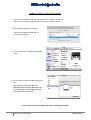
1. Connect your USB DAC to an available USB port on your Mac. Switch your
DAC into Class 2 mode, following the instructions in the user manual.
2. Go to System Preferences > Sound.
Select the Cambridge Audio USB 2.0
product as the output
3. Go to Applications > Utilities > Audio MIDI
Setup.
4. Set the audio output to the desired sample
rate.
rd
Note: there are 3 party apps available (eg.
BitPerfect) that will dynamically adjust this output
for you, depending on the resolution of the audio
file being played at any given time
You’re ready to enjoy your USB DAC in Class 2 mode with your Mac!
Mac
2
USB Class 2.0 operation
October 2013