1
User's Manual
Communication Accessories
5.2.2 Ethernet communication with the Ingecon Sun units
5.2.2.1 Ingecon Sun Lite
In order to install an Ethernet communication card in the Ingecon Sun Lite units, you first need
to disable the RS-485 communication, installed as standard. To do so, proceed as described in
5.2.2.1.1. You can then install the accessory.
5.2.2.1.1 How to disable the factory set RS-485 communication
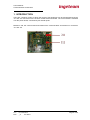
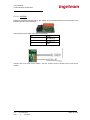
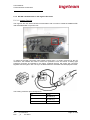
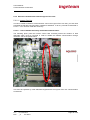
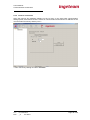
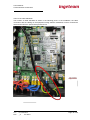
The following photo (with the inverter control card removed) shows the location of lead
AQL0053 which must be removed in order to disable the RS485 communication through
connector J19 on the power board.
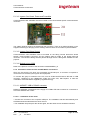
This must be replaced by cable AQL0090 supplied with the Ingecon Sun Lite communication
accessories.
Ref.:
AAX2002IKI01
Rev.:
_A
Jun-2010
Page 25 of 56