1
™
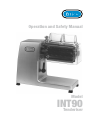
Operation and Safety Manual
Model
INT90
Tenderiser
SAFETY ISSUES
1. Never touch this machine without training and
authorisation from your supervisor.
2. Machine must be on solid, level support.
3. Guards must be in place before plugging in and turning
on machine.
4. Always use the three-pronged plug provided.
5. Never try to insert your fingers in the feeder chute of the
tenderiser.
6. Never touch the blades when they are rotating.
7. Keep hands, arms, hair and loose clothing clear of all moving parts.
8. Should the tenderiser jam, SWITCH off and unplug
before removing the obstruction.
9. SWITCH off and unplug the machine from its power
source before cleaning, sanitizing or servicing.
10. Use only the attachments provided by the manufacturer
and designed for this machine.
YOUR SAFETY IS OUR PRIMARY CONCERN
DECL AR ATI ON OF C ONFO RMITY
Food Processor
Machine Model:
Serial Number:
Dated:
is built in conformity with the provisions of:
9 8/ 37 /C EE
Machinery Directive
E N 2 94
Safety of machinery - Safety distances to
prevent danger zonesbeing reached by the
upper limbs.
EN 60204
Electrical equipment of industrial machines:
Part 1 - General Design
89/109/CEE
Directive for the materials and things destined
to come into contact with food.
89/336/CEE
Directive on Electromagnetic Compatibility
(EMC)
73/23/EEC
Directive on low voltage.
Operation and Safety Manual
Introduction
™
Overview
This Operation and Safety Manual has been prepared to introduce you to the Brice INT90
Tenderiser. It explains the operation, cleaning and maintenance of the machine in simple, clear
terms and with an emphasis on your safety. Please make sure that you read the Manual carefully
BEFORE you start using the machine.
Throughout the Manual procedures are supported by illustrations showing the parts involved and
the recommended safe method of handling those parts.
How this Manual is arranged
This Manual is made up of four sections:
•
Introduction - which explains the Manual, itself, safety issues associated with using a
Tenderiser, gives a brief introduction to the features and components of the Tenderiser and
steps you through the installation of the machine;
• Operation - explains the use of the Tenderiser, including pre-operational checks;
• Cleaning - explains the procedures for keeping the Tenderiser clean; and
• Maintenance - details those procedures that you can perform to ensure the trouble-free
operation of the Tenderiser.
Conventions and Symbols used in this Manual
To reduce confusion, and to highlight important points and safety matters, we have established
some standard terms and symbols:
•
“tenderiser”
Whenever we talk about the tenderiser, we mean the machine that is covered in this Manual.
• “foodstuff”
We use the word “foodstuff” to refer to any kind of meat or other food that is usually
processed on a tenderiser.
• “blade group”
This is the unit made up of the individual blade rolls, the blade scraper comb and the blade
carrier.
• “blade cover”
When we talk about the blade cover, we mean the polycarbonate or aluminium safety cover
and feed intake that covers the blade group.
•
•
•
Model INT90 Tenderiser
The Special Note flag
This is an upside-down triangle with an exclamation mark inside it. It appears in the left
margin of the page, like this, whenever we want to draw your attention to an important point.
The “No Hands” warning flag
This is a circle with the outline of a hand and a black bar through the hand. It appears
wherever we want to warn you that either: you shouldn’t put your hands in or near a
particular component; or that you must wear steel mesh protective gloves to carry out a
particular procedure.
The “Power” warning flags
There are two power warning flags. The first, a lightning bolt inside an upside-down triangle,
is used whenever we want to remind and warn you that the machine is connected to the
mains power supply. The second warning flag is a circle with the outline of a lighting bolt
and a black bar through the bolt. It appears to remind you that a particular procedure must
be carried out with the power to the machine turned off at the powerpoint and the machine’s
power plug disconnected from the powerpoint.
™
SAFETY
WARNINGS
Operation and Safety Manual
This is an electrical device that uses mains (either single phase 240 Volt or 3 phase 380 Volt)
power. It uses high speed rotating blades that is extremely sharp. You must be careful in how you
handle the tenderiser at all times. The following special warnings must be complied with for your
own safety and the safety of others.
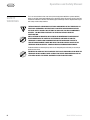
There are NO USER-SERVICEABLE electrical components in this tenderiser. All
electrical components are electrically isolated to Earth and are sealed
for your safety. You must not attempt to touch any electrical components
or wires - you may expose yourself to the risk of serious injury by
electrocution.
Unless otherwise indicated, any cleaning or maintenance procedure must
be performed with the power to the tenderiser switched off and the
tenderiser’s power cord disconnected from the powerpoint. Failure to
turn off and disconnect power may result in serious injury caused by the
tenderiser being accidently turned on during cleaning or maintenance.
Tenderiser blades are extremely sharp and can cut through fingers and hands just as easily as
products to be sliced.
Whenever you carry out any procedure that places your hands on or near the
tenderiser blade you must wear suitable protective hand coverings such as
steel mesh gloves to prevent accidental injury from the blades.
Model INT90 Tenderiser
Operation and Safety Manual
™
The Model INT90 Tenderiser is a high-volume meat tenderiser. It is designed to tenderise meat
products by cutting muscle fibres with hundreds of small blades, making the meat tender and
succulent duirng the cooking process. The Brice Model
INT90
Tenderiser
Besides tenderising, the INT90 can be used to strip-cut a range of food products, including raw
and processed meats, and cheeses. Product slices up to 30mm thick and 160mm wide can be
loaded into the INT90.
The INT90 is simple to operate and maintain. No special cleaning compounds are required and
changing blade groups takes only a moment. A deep-throated polycarbonate or aluminium
(optional) blade cover ensures operator safety.
The INT90 is manufactured in anodised aluminium to resist the corrosive effects of salts and
acids, and features gear-driven blades and separate push-button ON and OFF switches for safety.
Components of the INT90
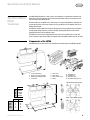
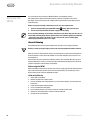
The following pictures illustrate the main components and dimensions of the INT90 tenderiser.
4
2
7
6
5
8
3
10
1
1.
2.
3.
4.
12
11
Control Pushbuttons
Blade Cover clamping handle
Blade Group clamping handle
Feed intake
5.
6.
7.
8.
Blade Cover
Blade Group
Blade Scraper comb
Blades
D
E
F
9
8
9. Right Blade roll
10. Left Blade roll
11. Blade Roll carrier
12. Blade Roll clamping levers
Tenderiser blade group
Dim.(mm)
a
B
C
d
e
450mm
200mm
510mm
30mm
160mm
C
F
f(mm) Blades
INT90
TAG94
TAG96
TAG98
TAG912
4
4
6
8
12
44
44
30
22
15
Model INT90 Tenderiser
B
Strip cutter blade group
A
Operation and Safety Manual
™
Installing the
INT90
Positioning the INT90
No matter where you put the INT90, you must allow at least as much space as the overall
dimensions indicate. Allowing an additional minimum of 20cm either side of the machine will
make access for cleaning and maintenance easier.
This is a heavy piece of machinery. Brice recommends that you obtain assistance when
moving the INT90 to avoid any possibility of injury.
Make sure that the surface that you intend placing the INT90 on is solidly constructed to take the
weight of the machine, flat, level, dry and smooth. Ideally, the surface should be between 80cm
and 90cm high and built for the purpose.
Preparing the INT90 for use
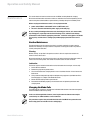
The INT90 is shipped with restraints to prevent movement (and possible damage) for the blade
rolls during transport. These MUST BE removed before the INT90 can be used. After the machine
has been unpacked:
1. Unscrew the blade cover clamping knob in an anti-clockwise direction. Lift and remove the
blade cover.
2. Lower the blade group clamping handle.
3. Lift up and remove the blade group.
4. Place the blade group on a flat surface and remove the “O”-ring restraints which keep the
rolls together.
5. Check that the roll clamping levers correctly clamp each roll in position.
6. Reassembling the machine is the reverse of disassembly.
Ensure that the pins at the ends of the roll drive shafts fit into the notched seats on the
rolls by rotating the rolls until the pins engage.
Electrical connections
The INT90 connects to either a single phase 240 Volts or a 3 phase 380 Volts power supply using
the power cord supplied. Simply connect the plug on the power cord to
the power point.
If you don’t know whether the tenderiser uses single phase or 3 phase
power, check the identification label on the machine - it will indicate
the voltage rating.
Once the INT90 is connected to the power supply, switch the machine
on and check that the blade rolls turn in the direction indicated by the
arrows. If the blade rolls do not turn in the direction indicated, there
is a wiring fault with the power cord. Stop the machine and have the
power cord wired correctly.
DO NOT use the INT90 until this fault is attended to.
Cleaning
Before you use the INT90, we recommend that you wipe down all exposed surfaces with a soft cloth
that has been placed in clean warm water and light detergent and squeezed dry. This will remove any
traces of machine oil, dirt or grit picked up during manufacture or storage.
Model INT90 Tenderiser
Operation and Safety Manual
™
4
Operation
2
5
3
1
Things to keep in mind
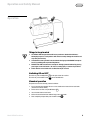
1. The INT90 is NOT designed to handle frozen products or foodstuffs with bones.
Attempting to process such products will almost certainly damage the machine and
may void your warranty.
2. If foodstuff becomes jammed in the feed intake during operation DO NOT attempt to
free it by prodding with any kind of implement.
3.DO NOT under ANY circumstances attempt to dislodge jammed foodstuff by placing
your fingers in the feed intake - the risk of a cutting injury is extreme if you do this.
4. Check that the correct blade rolls are fitted for the job at hand.
Switching ON and OFF
I on the right side of the machine.
To switch-off, press the OFF button O next to the ON button.
To switch-on, press the ON button
Standard operation
To operate the machine normally, proceed as follows:
1. Cut the meat or other foodstuff slices to a size suitable to be inserted in the feed intake
(maximum thickness 30mm).
2. Switch on the machine using the ON button I .
3. Insert the food into the feed intake.
4. Collect the tenderised meat or foodstuff strips from underneath.
5. After completing the operation press the OFF button O .
Model INT90 Tenderiser
Operation and Safety Manual
™
Cleaning the
INT90
This section deals with cleaning your INT90 Tenderiser, including blade cleaning.
We recommend that, before cleaning or maintenance tasks are undertaken, the machine
operator(s) receive some training from authorised Brice representatives, preferably during the
installation phase.
Before carrying out cleaning or maintenance tasks, it is very important that:
1. The unit is switched off by pressing the OFF button O on the right side of the unit.
2. The unit is disconnected from the power supply at the wall plug.
Be very careful performing any cleaning or maintenance task that brings you close to, or in
contact with, the blade group. Always perform these tasks with the appropriate protection
- steel mesh safety gloves. The blades are very sharp and the risk of a cutting injury
without proper protection or due care is high.
General Cleaning
The INT90 Tenderiser must be cleaned regularly and carefully to ensure hygenic operation.
Do not use steam cleaning or high pressure water cleaning equipment with this machine
When the machine is dismantled for cleaning, the individual parts may be cleaned and sterilised
by total immersion in warm water with addition of a non-toxic detergent. A brush assists in the
cleaning process.
After the parts have been cleaned they should be rinsed in clean hot water. When dry, each part
should be fitted to the machine in the reverse order of dismantling. See Maintenance section for
complete instructions on disassembly and assembly.
Before using the INT90
Before the INT90 is switched on for the first time each day, quickly wipe over all exposed surfaces
with a cloth that has been placed in warm water and squeezed dry. This removes any dust or
other matter that may have been deposited over night.
At the end of the day
1. Switch-OFF the tenderiser.
2. Remove the plug from its power socket.
3. Unscrew the blade cover clamping knob in an anti-clockwise direction. Lift and remove the
blade cover.
4. Lower the blade group clamping handle.
5. Lift up and remove the blade group.
6. Place the blade group on a flat surface and lift out the blade scraper comb.
7. Release the roll clamping levers at either end of the blade rolls.
8. Carefully lift out each blade roll.
Model INT90 Tenderiser
Operation and Safety Manual
Maintenance
™
This section deals with routine maintenance for the INT90, including blade roll changing.
We recommend that before maintenance tasks are undertaken the machine operator(s) receive
some training from authorised Brice representatives, preferably during the installation phase.
Before carrying out maintenance tasks, it is very important that:
1. power to the INT90 is switched OFF at the red OFF button; and
2. the unit is disconnected from the power supply at the wall plug.
Be very careful performing maintenance tasks that bring you close to, or in contact with,
any moving parts, especially at the feed and discharge areas, and the blades. Always
perform these tasks with the appropriate protection - steel mesh safety gloves. The blades
are very sharp and the risk of a cutting injury without proper protection or due care is
high.
Routine Maintenance
The robust design of the slicer means that there is very little required in the way of routine
maintenance. Generally, the only maintenance required is cleaning (discussed in the previous
section) and regular lubrication.
Cleaning
Normal cleaning, as specified in the previous section is all that is required to maintain the
external surfaces of the slicer.
We recommend that you clean the machine prior to any other maintenance operation so that all
surfaces are free of and grease. This makes the machine easier and safer to handle.
Lubrication
The bushes at either end of the blade rolls must be lubricated after cleaning or, at least, daily.
1. Switch OFF the tenderiser.
2. Remove the plug from its power socket.
3. Unscrew the blade cover clamping knob in an anti-clockwise direction. Lift and remove the
blade cover.
4. Using a lubricant designed especially for food processing equipment (available from Brice
Australia) apply 2 or 3 drops to the blade roll bushes.
5. Rotate the blade rolls by hand to spread the oil.
6. Reassemble the INT90 by replacing the the blade cover and tightening the blade cover
clamping knob.
Changing the Blade Rolls
The blade rolls only need to be changed when individual blade elements have been damaged or
when the INT90 is used for strip cutting.
In the case of damaged blade elements, actual replacement of elements must only be
carried out by an authorised Brice service technician.
This procedure requires that you handle the blade rolls. You MUST wear protective steel
mesh safety gloves to avoid the risk of a cutting injury.
Model INT90 Tenderiser
Operation and Safety Manual
™
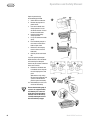
Begin the procedure by
disassembling the INT90:
1. Switch OFF the tenderiser.
2. Remove the plug from its
power socket.
3. Unscrew the blade cover
clamping knob in an anticlockwise direction. Lift and
remove the blade cover.
4. Lower the blade group
clamping handle.
5. Lift up and remove the blade
group.
6. Place the blade group on a
flat surface and lift out the
blade scraper comb.
7. Release the roll clamping
levers at either end of the
blade rolls.
8. Carefully lift out each blade
roll.
If you are replacing damaged
blade elements, return the blade
roll containing the damaged
element to your nearest authorised
Brice service facility.
3
4
5
7
9
9. Position the new blade rolls
in the blade carrier and push
the roll clamping levers into
place.
(Note that the strip cutting
roll sets have a blade roll and
a pressure roll to hold the
product against the blades.)
10. Reassembling the unit is the
reverse of disasembly.
Ensure that the blade group is
secure in its support bracket,
and that the pins at the end
of the drive shafts fit into the
notched seats on the rolls by
carefully rotating the ends of
the rolls until they engage.
Model INT90 Tenderiser
™
Copyright Information
Copyright © 2006 Brice Australia Pty. Ltd.
This document may not be reproduced, in whole or in part, by any means without the prior express written permission of the copyright owner.
Brice and the BRICE logotype are trademarks of Brice Australia Pty. Ltd.
Printed in Australia
26170/int90_man_pdf