1
MS312, MS315, and MS415
User's Guide
March 2014
Machine type(s):
4514
Model(s):
330, 335, 530
www.lexmark.com
Contents
2
Contents
Safety information.......................................................................................7
Learning about the printer...........................................................................9
Using this guide.........................................................................................................................................9
Finding information about the printer......................................................................................................9
Selecting a location for the printer..........................................................................................................10
Printer configurations.............................................................................................................................11
Additional printer setup.............................................................................14
Installing internal options........................................................................................................................14
Available internal options .................................................................................................................................14
Accessing the controller board .........................................................................................................................14
Installing an optional card ................................................................................................................................15
Installing hardware options.....................................................................................................................17
Installing optional trays ....................................................................................................................................17
Attaching cables................................................................................................................................................18
Setting up the printer software...............................................................................................................19
Installing the printer .........................................................................................................................................19
Adding available options in the print driver .....................................................................................................19
Networking..............................................................................................................................................20
Preparing to set up the printer on an Ethernet network..................................................................................20
Preparing to set up the printer on a wireless network.....................................................................................21
MS315 and MS415 Wireless Setup Wizard.......................................................................................................22
MS312 Wi-Fi Protected Setup...........................................................................................................................22
MS315 and MS415 Wi-Fi Protected Setup........................................................................................................23
Connecting the printer to a wireless network using the printer software .......................................................24
Connecting the printer to a wireless network using the Embedded Web Server...................................25
Verifying printer setup............................................................................................................................25
MS312 printing menu settings and network setup pages ................................................................................25
MS315 and MS415 printing menu settings and network setup pages .............................................................26
Using MS312..............................................................................................27
Using the printer control panel...............................................................................................................27
Understanding the colors of the Sleep button and indicator lights........................................................28
Installing the Local Printer Settings Utility..............................................................................................28
Using the Local Printer Settings Utility....................................................................................................29
Contents
3
Using MS315 and MS415............................................................................30
Using the control panel...........................................................................................................................30
Understanding the colors of the Sleep button and indicator lights........................................................31
Accessing the Embedded Web Server.....................................................................................................31
Loading paper and specialty media............................................................32
MS312 paper size and type setup...........................................................................................................32
Setting the paper size and type ........................................................................................................................32
Configuring Universal paper settings................................................................................................................32
MS315 and MS415 paper size and type setup........................................................................................33
Setting the paper size and type ........................................................................................................................33
Configuring Universal paper settings................................................................................................................33
Using the standard bin and paper stop...................................................................................................33
Loading trays...........................................................................................................................................34
Loading the multipurpose feeder............................................................................................................38
Linking and unlinking trays......................................................................................................................41
MS312 tray linking ............................................................................................................................................41
Linking and unlinking trays...........................................................................................................................41
Configuring a custom paper type .................................................................................................................42
Assigning a custom paper type.....................................................................................................................42
MS315 and MS415 tray linking .........................................................................................................................43
Linking and unlinking trays...........................................................................................................................43
Creating a custom name for a paper type....................................................................................................43
Assigning a custom paper type.....................................................................................................................44
Paper and specialty media guide................................................................45
Paper guidelines......................................................................................................................................45
Using specialty media..............................................................................................................................48
Supported paper sizes, types, and weights.............................................................................................51
Printing......................................................................................................54
Printing a document................................................................................................................................54
Printing a document .........................................................................................................................................54
MS312 toner darkness adjustment...................................................................................................................54
Adjusting toner darkness .............................................................................................................................54
MS315 and MS415 toner darkness adjustment ...............................................................................................55
Adjusting toner darkness .............................................................................................................................55
MS315 and MS415 Printing confidential and other held jobs.................................................................56
Storing print jobs in the printer ........................................................................................................................56
Printing information pages......................................................................................................................57
Contents
4
MS312 information pages.................................................................................................................................57
Printing a font sample list.............................................................................................................................57
MS315 and MS415 information pages .............................................................................................................57
Printing a font sample list.............................................................................................................................57
Printing a directory list .................................................................................................................................57
Printing from a mobile device...........................................................................................................................57
Canceling a print job................................................................................................................................58
Canceling a print job from the printer control panel........................................................................................58
Canceling a print job from the computer .........................................................................................................58
Saving money and the environment...........................................................59
Saving paper and toner...........................................................................................................................59
Recycling..................................................................................................................................................60
Managing the printer.................................................................................62
Finding advanced networking and administrator information...............................................................62
Copying printer settings to other printers...............................................................................................62
Configuring supply notifications from the Embedded Web Server.........................................................62
MS312 printer management...................................................................................................................63
Accessing the remote control panel .................................................................................................................63
Viewing reports.................................................................................................................................................64
Restoring factory default settings.....................................................................................................................64
Creating a printer control panel PIN .................................................................................................................64
Saving energy....................................................................................................................................................65
Using Eco‑Mode ...........................................................................................................................................65
Using Hibernate mode .................................................................................................................................65
Adjusting Sleep mode...................................................................................................................................66
Setting Hibernate Timeout ...........................................................................................................................66
Using Schedule Power Modes ......................................................................................................................67
MS315 and MS415 printer management................................................................................................67
Checking the virtual display ..............................................................................................................................67
Modifying confidential print settings................................................................................................................67
Saving energy....................................................................................................................................................68
Using Eco‑mode ...........................................................................................................................................68
Reducing printer noise .................................................................................................................................68
Adjusting Sleep mode...................................................................................................................................69
Using Hibernate mode .................................................................................................................................70
Setting Hibernate Timeout ...........................................................................................................................70
Using Schedule Power Modes ......................................................................................................................71
Adjusting the brightness of the printer display............................................................................................71
Restoring factory default settings.....................................................................................................................71
Contents
5
Securing the printer...................................................................................73
Using the security lock feature................................................................................................................73
Statement of Volatility............................................................................................................................73
Erasing volatile memory..........................................................................................................................74
Erasing non-volatile memory..................................................................................................................74
MS312 non-volatile memory erase...................................................................................................................74
Erasing non‑volatile memory .......................................................................................................................74
MS315 and MS415 non-volatile memory erase ...............................................................................................74
Erasing non‑volatile memory .......................................................................................................................74
Finding printer security information.......................................................................................................75
Understanding the printer menus..............................................................76
MS312 menus list....................................................................................................................................76
MS315 and MS415 menus list.................................................................................................................76
Paper menu.............................................................................................................................................77
Reports menu..........................................................................................................................................89
Network/Ports menu...............................................................................................................................90
Security menu.......................................................................................................................................102
Settings menu........................................................................................................................................104
MS315 and MS415 help menu..............................................................................................................127
Clearing jams............................................................................................128
Avoiding jams........................................................................................................................................128
MS312 jams...........................................................................................................................................129
MS315 and MS415 jams........................................................................................................................138
Maintaining the printer............................................................................148
Cleaning the printer..............................................................................................................................148
Checking the status of parts and supplies.............................................................................................148
Estimated number of remaining pages.................................................................................................149
Ordering parts and supplies..................................................................................................................149
Storing supplies.....................................................................................................................................150
Replacing supplies.................................................................................................................................151
Moving the printer................................................................................................................................154
Troubleshooting.......................................................................................156
Understanding the printer messages....................................................................................................156
Contents
6
Solving printer problems.......................................................................................................................172
Solving print problems..........................................................................................................................178
Embedded Web Server does not open.................................................................................................203
Contacting customer support................................................................................................................204
Notices.....................................................................................................205
Product information..............................................................................................................................205
Edition notice........................................................................................................................................205
Power consumption..............................................................................................................................210
Index........................................................................................................218
Safety information
7
Safety information
Connect the power cord directly to an appropriately rated and properly grounded electrical outlet that is near the
product and easily accessible.
CAUTION—POTENTIAL INJURY: Do not use this product with extension cords, multioutlet power strips,
multioutlet extenders, or other types of surge or UPS devices. The power rating capacity of these types of
accessories can be easily overloaded by a laser printer and may result in poor printer performance, property
damage, or potential fire.
Do not place or use this product near water or wet locations.
CAUTION—POTENTIAL INJURY: This product uses a laser. Use of controls or adjustments or performance of
procedures other than those specified herein may result in hazardous radiation exposure.
This product uses a printing process that heats the print media, and the heat may cause the media to release emissions.
You must understand the section in your operating instructions that discusses the guidelines for selecting print media
to avoid the possibility of harmful emissions.
CAUTION—POTENTIAL INJURY: The lithium battery in this product is not intended to be replaced. There is a
danger of explosion if a lithium battery is incorrectly replaced. Do not recharge, disassemble, or incinerate a
lithium battery. Discard used lithium batteries according to the manufacturer's instructions and local
regulations.
CAUTION—POTENTIAL INJURY: Before moving the printer, follow these guidelines to avoid personal injury or
printer damage:
• Turn the printer off using the power switch, and then unplug the power cord from the electrical outlet.
• Disconnect all cords and cables from the printer before moving it.
• If an optional tray is installed, then remove it from the printer. To remove the optional tray, slide the latch on the
right side of the tray toward the front of the tray until it clicks into place.
• Use the handholds located on both sides of the printer to lift it.
• Make sure your fingers are not under the printer when you set it down.
• Before setting up the printer, make sure there is adequate clearance around it.
Use only the power cord provided with this product or the manufacturer's authorized replacement.
CAUTION—HOT SURFACE: The inside of the printer might be hot. To reduce the risk of injury from a hot
component, allow the surface to cool before touching it.
CAUTION—SHOCK HAZARD: If you are accessing the controller board or installing optional hardware or
memory devices sometime after setting up the printer, then turn the printer off, and unplug the power cord
from the electrical outlet before continuing. If you have any other devices attached to the printer, then turn
them off as well, and unplug any cables going into the printer.
CAUTION—SHOCK HAZARD: Make sure that all external connections (such as Ethernet and telephone system
connections) are properly installed in their marked plug-in ports.
This product is designed, tested, and approved to meet strict global safety standards with the use of specific
manufacturer's components. The safety features of some parts may not always be obvious. The manufacturer is not
responsible for the use of other replacement parts.
Safety information
8
CAUTION—POTENTIAL INJURY: Do not cut, twist, bind, crush, or place heavy objects on the power cord. Do not
subject the power cord to abrasion or stress. Do not pinch the power cord between objects such as furniture
and walls. If any of these things happen, a risk of fire or electrical shock results. Inspect the power cord regularly
for signs of such problems. Remove the power cord from the electrical outlet before inspecting it.
Refer service or repairs, other than those described in the user documentation, to a service representative.
CAUTION—SHOCK HAZARD: To avoid the risk of electrical shock when cleaning the exterior of the printer,
unplug the power cord from the electrical outlet and disconnect all cables from the printer before proceeding.
CAUTION—POTENTIAL INJURY: To reduce the risk of equipment instability, load each tray separately. Keep all
other trays closed until needed.
CAUTION—SHOCK HAZARD: Do not set up this product or make any electrical or cabling connections, such as
the fax feature, power cord, or telephone, during a lightning storm.
SAVE THESE INSTRUCTIONS.
Learning about the printer
9
Learning about the printer
Using this guide
This User’s Guide provides general and specific information on using the printer models that are listed on the cover
page.
The following chapters contain information applicable to all printer models:
•
•
•
•
•
•
•
•
•
•
•
Additional printer setup
Loading paper and specialty media
Paper and specialty media guide
Printing
Saving money and the environment
Managing the printer
Securing the printer
Understanding printer menus
Clearing jams
Maintaining the printer
Troubleshooting
To find instructions for your printer:
• Use the table of contents or index.
• Use the Search function or the Find toolbar of your application to search for page content.
Finding information about the printer
What are you looking for?
Find it here
Initial setup instructions:
Setup documentation—The setup documentation came
with the printer and is also available at
http://support.lexmark.com.
• Connecting the printer
• Installing the printer software
Additional setup and instructions for using the printer:
•
•
•
•
•
•
•
•
Selecting and storing paper and specialty media
Loading paper
Configuring printer settings
Viewing and printing documents and photos
Setting up and using the printer software
Configuring the printer on a network
Caring for and maintaining the printer
Troubleshooting and solving problems
User's Guide and Quick Reference Guide—The guides may
be available on the Software and Documentation CD.
For more information, visit
http://support.lexmark.com.
Learning about the printer
10
What are you looking for?
Find it here
Instructions for:
Networking Guide—Open the Software and
Documentation CD, and then navigate to:
• Connecting the printer to an Ethernet network
• Troubleshooting printer connection problems
Help using the printer software
Documentation > User’s Guide and other publications >
Networking Guide
Windows or Mac Help—Open a printer software program
or application, and then click Help.
Click
?
to view context‑sensitive information.
Notes:
• Help is automatically installed with the printer
software.
• The printer software is located in the printer
program folder or on the desktop, depending on
your operating system.
The latest supplemental information, updates, and customer
support:
•
•
•
•
•
Documentation
Driver downloads
Live chat support
E‑mail support
Voice support
Lexmark support Web site—
http://support.lexmark.com
Note: Select your country or region, and then select
your product to view the appropriate support site.
Support telephone numbers and hours of operation for
your country or region can be found on the support Web
site or on the printed warranty that came with your
printer.
Record the following information (located on the store
receipt and at the back of the printer), and have it ready
when you contact customer support so that they may
serve you faster:
•
•
•
•
Warranty information
Machine Type number
Serial number
Date purchased
Store where purchased
Warranty information varies by country or region:
• In the U.S.—See the Statement of Limited Warranty
included with this printer, or at
http://support.lexmark.com.
• In other countries and regions—See the printed
warranty that came with your printer.
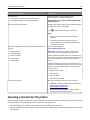
Selecting a location for the printer
When selecting a location for the printer, leave enough room to open trays, covers, and doors. If you plan to install any
hardware options, then leave enough room for them also. It is important to:
• Set up the printer near a properly grounded and easily accessible electrical outlet.
• Make sure airflow in the room meets the latest revision of the ASHRAE 62 standard or the CEN Technical Committee
156 standard.
Learning about the printer
11
• Provide a flat, sturdy, and stable surface.
• Keep the printer:
– Clean, dry, and free of dust.
– Away from stray staples and paper clips.
– Away from the direct airflow of air conditioners, heaters, or ventilators.
– Free from direct sunlight and humidity extremes.
• Observe the recommended temperatures and avoid fluctuations.
Ambient temperature 16 to 32°C (60 to 90°F)
Storage temperature
‑20 to 40°C (‑4 to 104°F)
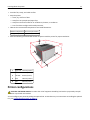
• Allow the following recommended amount of space around the printer for proper ventilation:
1
Right side 110 mm (4.33 in.)
2
Front
305 mm (12 in.)
3
Left side
65 mm (2.56 in.)
4
Rear
100 mm (3.94 in.)
5
Top
305 mm (12 in.)
Printer configurations
CAUTION—POTENTIAL INJURY: To reduce the risk of equipment instability, load each tray separately. Keep all
other trays closed until needed.
You can configure your printer by adding one optional 250‑ or 550‑sheet tray. For instructions on installing the optional
tray, see “Installing optional trays” on page 17.
Learning about the printer
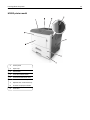
MS312 printer model
1
Control panel
2
Paper stop
3
Standard bin
4
Front door release button
5
Controller board access cover
6
Standard 250‑sheet tray
7
Optional 250‑ or 550‑sheet tray
8
50‑sheet multipurpose feeder
9
Front door
12
Learning about the printer
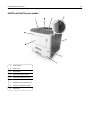
MS315 and MS415 printer models
1
Control panel
2
Paper stop
3
Standard bin
4
Front door release button
5
Controller board access cover
6
Standard 250‑sheet tray
7
Optional 250‑ or 550‑sheet tray
8
50‑sheet multipurpose feeder
9
Front door
13
Additional printer setup
14
Additional printer setup
Installing internal options
CAUTION—SHOCK HAZARD: If you are accessing the controller board or installing optional hardware or
memory devices sometime after setting up the printer, then turn the printer off, and unplug the power cord
from the electrical outlet before continuing. If you have other devices attached to the printer, then turn them
off as well, and unplug any cables going into the printer.
Warning—Potential Damage: Controller board electronic components are easily damaged by static electricity.
Touch a metal surface on the printer before touching any controller board electronic components or connectors.
Available internal options
• Flash memory
– Fonts
Accessing the controller board
CAUTION—SHOCK HAZARD: If you are accessing the controller board or installing optional hardware or
memory devices sometime after setting up the printer, then turn the printer off, and unplug the power cord
from the electrical outlet before continuing. If you have any other devices attached to the printer, then turn
them off as well, and unplug any cables going into the printer.
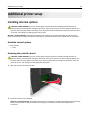
1 Open the controller board access door.
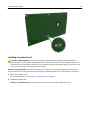
2 Locate the memory card connector.
Warning—Potential Damage: Controller board electronic components are easily damaged by static electricity.
Touch a metal surface on the printer before touching any controller board electronic components or
connectors.
Additional printer setup
Installing an optional card
CAUTION—SHOCK HAZARD: If you are accessing the controller board or installing optional hardware or
memory devices sometime after setting up the printer, then turn the printer off, and unplug the power cord
from the electrical outlet before continuing. If you have other devices attached to the printer, then turn them
off as well, and unplug any cables going into the printer.
Warning—Potential Damage: Controller board electronic components are easily damaged by static electricity.
Touch a metal surface on the printer before touching any controller board electronic components or connectors.
1 Access the controller board.
For more information, see “Accessing the controller board” on page 14.
2 Unpack the optional card.
Warning—Potential Damage: Avoid touching the connection points along the edge of the card.
15
Additional printer setup
16
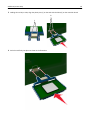
3 Holding the card by its sides, align the plastic pins (1) on the card with the holes (2) on the controller board.
2
1
4 Push the card firmly into place as shown in the illustration.
Additional printer setup
17
Warning—Potential Damage: Improper installation of the card may cause damage to the card and the
controller board.
Note: The entire length of the connector on the card must touch and be flushed against the controller board.
5 Close the controller board access door.
Note: When the printer software and any hardware options are installed, it may be necessary to manually add
the options in the printer driver to make them available for print jobs. For more information, see “Adding
available options in the print driver” on page 19.
Installing hardware options
Installing optional trays
CAUTION—SHOCK HAZARD: If you are accessing the controller board or installing optional hardware or
memory devices sometime after setting up the printer, then turn the printer off, and unplug the power cord
from the electrical outlet before continuing. If you have any other devices attached to the printer, then turn
them off as well, and unplug any cables going into the printer.
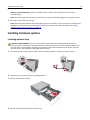
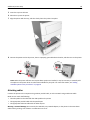
1 Turn off the printer using the power switch, and then unplug the power cord from the electrical outlet.
1
2
2 Unpack the tray, and then remove any packing material.
3 Remove the tray from the base.
2
4 Remove any packing material from inside the tray.
Additional printer setup
18
5 Insert the tray into the base.
6 Place the tray near the printer.
7 Align the printer with the tray, and then slowly lower the printer into place.
8 Connect the power cord to the printer, then to a properly grounded electrical outlet, and then turn on the printer.
2
1
Note: When the printer software and any hardware options are installed, it may be necessary to manually add
the options in the printer driver to make them available for print jobs. For more information, see “Adding
available options in the print driver” on page 19.
Attaching cables
Connect the printer to the computer using a USB or parallel cable, or to the network using an Ethernet cable.
Make sure to match the following:
• The USB symbol on the cable with the USB symbol on the printer
• The appropriate parallel cable with the parallel port
• The appropriate Ethernet cable with the Ethernet port
Warning—Potential Damage: Do not touch the USB cable, any network adapter, or the printer in the area shown
while actively printing. Loss of data or a malfunction can occur.
Additional printer setup
19
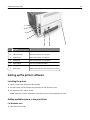
1
2
3
4
5
6
Use the
To
1
USB port
Attach an optional wireless network adapter.
2
USB printer port
Connect the printer to a computer.
3
Ethernet port
Connect the printer to a network.
4
Parallel port
Connect the printer to a computer.
5
Power switch
Turn on or turn off the printer.
6
Printer power cord socket Connect the printer to an electrical outlet.
7
Security slot
7
Attach a lock that will secure the printer in place.
Setting up the printer software
Installing the printer
1 Obtain a copy of the software installer package.
2 Run the installer, and then follow the instructions on the computer screen.
3 For Macintosh users, add the printer.
Note: Obtain the printer IP address from the TCP/IP section in the Network/Ports menu.
Adding available options in the print driver
For Windows users
1 Open the printers folder.
Additional printer setup
20
In Windows 8
From the Search charm, type run, and then navigate to:
Run > type control printers > OK
In Windows 7 or earlier
a Click
, or click Start and then click Run.
b Type control printers.
c Press Enter, or click OK.
2 Select the printer you want to update, and then do either of the following:
• For Windows 7 or later, select Printer properties.
• For earlier versions, select Properties.
3 Navigate to the Configuration tab, and then select Update Now ‑ Ask Printer.
4 Apply the changes.
For Macintosh users
1 From System Preferences in the Apple menu, navigate to your printer, and then select Options & Supplies.
2 Navigate to the list of hardware options, and then add any installed options.
3 Apply the changes.
Networking
Notes:
• Purchase a MarkNetTM N8352 wireless network adapter first before setting up the printer on a wireless network.
For information on the compatible adapter, go to www.lexmark.com.
• A Service Set Identifier (SSID) is a name assigned to a wireless network. Wired Equivalent Privacy (WEP), Wi-Fi
Protected Access (WPA), WPA2, and 802.1X - RADIUS are types of security used on a network.
Preparing to set up the printer on an Ethernet network
To configure your printer to connect to an Ethernet network, organize the following information before you begin:
Note: If your network automatically assigns IP addresses to computers and printers, continue on to installing the
printer.
•
•
•
•
A valid, unique IP address for the printer to use on the network
The network gateway
The network mask
A nickname for the printer (optional)
Note: A printer nickname can make it easier for you to identify your printer on the network. You can choose to
use the default printer nickname, or assign a name that is easier for you to remember.
Additional printer setup
21
You will need an Ethernet cable to connect the printer to the network and an available port where the printer can
physically connect to the network. Use a new network cable when possible to avoid potential problems caused by a
damaged cable.
Preparing to set up the printer on a wireless network
Notes:
• Make sure your wireless network adapter is installed in your printer and working properly. For more
information, see the instruction sheet that came with the wireless network adapter.
• Make sure your access point (wireless router) is turned on and is working properly.
Make sure you have the following information before setting up the printer on a wireless network:
• SSID—The SSID is also referred to as the network name.
• Wireless Mode (or Network Mode)—The mode is either infrastructure or ad hoc.
• Channel (for ad hoc networks)—The channel defaults to automatic for infrastructure networks.
Some ad hoc networks will also require the automatic setting. Check with your system support person if you are
not sure which channel to select.
• Security Method—There are four basic options for Security Method:
– WEP key
If your network uses more than one WEP key, then enter up to four in the provided spaces. Select the key
currently in use on the network by selecting the default WEP transmit key.
– WPA or WPA2 preshared key or passphrase
WPA includes encryption as an additional layer of security. The choices are AES or TKIP. Encryption must be set
for the same type on the router and on the printer, or the printer will not be able to communicate on the
network.
– 802.1X–RADIUS
If you are installing the printer on an 802.1X network, then you may need the following:
•
•
•
•
Authentication type
Inner authentication type
802.1X user name and password
Certificates
– No security
If your wireless network does not use any type of security, then you will not have any security information.
Note: We do not recommend using an unsecured wireless network.
Notes:
– If you do not know the SSID of the network that your computer is connected to, then launch the wireless utility
of the computer network adapter, and then look for the network name. If you cannot find the SSID or the
security information for your network, then see the documentation that came with the access point, or contact
your system support person.
– To find the WPA/WPA2 preshared key or passphrase for the wireless network, see the documentation that
came with the access point, see the Embedded Web Server associated with the access point, or consult your
system support person.
Additional printer setup
22
MS315 and MS415 Wireless Setup Wizard
Connecting the printer using the Wireless Setup Wizard
Before you begin, make sure that:
• A wireless network adapter is installed in the printer and is working properly. For more information, see the
instruction sheet that came with the adapter.
• The Ethernet cable is disconnected from the printer.
• Active NIC is set to Auto. To set this to Auto, from the control panel, navigate to:
> Settings >
> Network/Ports >
> Active NIC >
> Auto >
Note: Turn off the printer, wait for at least five seconds, and then turn on the printer.
1 From the control panel, navigate to:
> Settings >
> Network/Ports >
> Network [x] >
> Network [x] Setup >
> Wireless >
>
Wireless Connection Setup >
2 Select a wireless connection setup.
Use
To
Search for networks
Show available wireless connections.
Note: This menu item shows all broadcast secured or unsecured SSIDs.
Enter a network name Manually type the SSID.
Wi‑Fi Protected Setup Connect the printer to a wireless network using Wi‑Fi Protected Setup.
3 Follow the instructions on the printer display.
MS312 Wi-Fi Protected Setup
Connecting the printer to a wireless network using Wi‑Fi Protected Setup
Before connecting the printer to a wireless network, make sure that:
• The access point (wireless router) is Wi‑Fi Protected Setup (WPS) certified or WPS‑compatible. For more
information, see the documentation that came with your access point.
• A wireless network adapter installed in your printer is attached and working properly. For more information, see
the instruction sheet that came with the wireless network adapter.
Using the Push Button Configuration method
1 From the printer control panel, navigate to:
> Network/Ports >
Setup >
> Network [x] >
> Start Push Button Method >
2 Follow the instructions on the printer display.
> Network [x] Setup >
> Wireless >
> Wi‑Fi Protected
Additional printer setup
23
Using the Personal Identification Number (PIN) method
1 From the printer control panel, navigate to:
> Network/Ports >
Setup >
> Network [x] >
> Network [x] Setup >
> Wireless >
> Wi‑Fi Protected
> Start PIN Method >
2 Copy the eight‑digit WPS PIN.
3 Open a Web browser, and then type the IP address of your access point in the address field.
Notes:
• The IP address appears as four sets of numbers separated by periods, such as 123.123.123.123.
• If you are using a proxy server, then temporarily disable it to load the Web page correctly.
4 Access the WPS settings. For more information, see the documentation that came with your access point.
5 Enter the eight‑digit PIN, and then save the setting.
MS315 and MS415 Wi-Fi Protected Setup
Connecting the printer to a wireless network using Wi‑Fi Protected Setup
Before connecting the printer to a wireless network, make sure that:
• The access point (wireless router) is Wi‑Fi Protected Setup (WPS) certified or WPS‑compatible. For more
information, see the documentation that came with your access point.
• A wireless network adapter is installed on your printer and is working properly. For more information, see the
instruction sheet that came with the adapter.
Using the Push Button Configuration Method
1 From the control panel, navigate to:
> Settings >
> Networks/Ports >
> Wireless Connection Setup >
> Network [x] >
> Wi‑Fi Protected Setup >
> Network [x] Setup >
> Wireless >
> Start Push Button Method >
2 Follow the instructions on the printer display.
Using the Personal Identification Number (PIN) Method
1 From the control panel, navigate to:
> Settings >
> Networks/Ports >
> Wireless Connection Setup >
> Network [x] >
> Network [x] Setup >
> Wi‑Fi Protected Setup >
> Start PIN Method >
> Wireless >
2 Copy the eight‑digit WPS PIN.
3 Open a Web browser, and then type the IP address of your access point in the address field.
Notes:
• The IP address appears as four sets of numbers separated by periods, such as 123.123.123.123.
• If you are accessing a proxy server, then temporarily disable it to load the Web page correctly.
Additional printer setup
24
4 Access the WPS settings. For more information, see the documentation that came with your access point.
5 Enter the eight‑digit PIN, and then save the setting.
Connecting the printer to a wireless network using the printer software
Notes:
• Make sure your printer is turned on.
• Make sure a wireless network adapter installed in your printer is attached and working properly. For
information on installing the wireless network adapter, see the instruction sheet that came with the adapter.
Using the Wireless Setup Utility (Windows only)
1 Check if the printer software is already installed.
2 Use the search command on the Start menu to locate Printer Home.
3 Open Printer Home, and then click Settings > Wireless Setup Utility.
4 Follow the steps on the computer screen.
Using the Wireless Setup Assistant (Macintosh only)
The Wireless Setup Assistant lets you:
•
•
•
•
Configure the printer to join an existing wireless network.
Add a printer to an existing ad hoc network.
Change the wireless settings after installation.
Install the printer on additional network computers.
Installing the Wireless Setup Assistant
1 Go to the Lexmark Web site at http://support.lexmark.com.
2 Download the latest Wireless Setup Assistant application.
3 Double‑click the downloaded software installer package.
4 Follow the instructions on the computer screen.
Launching the Wireless Setup Assistant
Notes:
• Make sure the printer is turned on.
• Make sure a wireless network adapter installed in your printer is attached and working properly.
1 From the Finder, navigate to:
Applications > select your printer folder
2 Double‑click Wireless Setup Assistant, and then follow the instructions on the computer screen.
Note: If you encounter problems while running the application, then click
?
.
Additional printer setup
25
Connecting the printer to a wireless network using the
Embedded Web Server
Before you begin, make sure that:
• Your printer is connected temporarily to an Ethernet network.
• A wireless network adapter is installed in your printer and working properly. For more information, see the
instruction sheet that came with your wireless network adapter.
1 Open a Web browser, and then type the printer IP address in the address field.
Notes:
• View the printer IP address on the printer control panel. The IP address appears as four sets of numbers
separated by periods, such as 123.123.123.123.
• If you are using a proxy server, then temporarily disable it to load the Web page correctly.
2 Click Settings > Network/Ports > Wireless.
3 Modify the settings to match the settings of your access point (wireless router).
Note: Make sure to enter the correct SSID.
4 Click Submit.
5 Turn off the printer, and then disconnect the Ethernet cable. Then wait for at least five seconds, and then turn the
printer back on.
6 To verify if your printer is connected to the network, print a network setup page. Then in the Network Card [x]
section, see if the status is Connected.
Verifying printer setup
MS312 printing menu settings and network setup pages
Printing a menu settings page
Print a menu settings page to review the current menu settings and to verify if the printer options are installed correctly.
Note: If you have not changed any menu settings, then the menu settings page lists all the factory default settings.
When you select and save other settings from the menus, they replace the factory default settings as user default
settings. A user default setting remains in effect until you access the menu again, choose another value, and save it.
From the printer control panel, navigate to:
> Reports >
> Menu Settings Page >
Additional printer setup
26
Printing a network setup page
If the printer is connected to a network, then print a network setup page to verify the network connection. This page
also provides important information that aids network printing configuration.
1 From the printer control panel, navigate to:
> Reports >
> Network Setup Page >
Note: If an optional print server is installed, then Print Network [x] Setup Page appears.
2 Check the first section of the network setup page and confirm that the status is Connected.
If the status is Not Connected, then the LAN drop may not be active, or the network cable may be malfunctioning.
Consult your system support person for a solution, and then print another network setup page.
MS315 and MS415 printing menu settings and network setup pages
Printing a menu settings page
Print a menu settings page to view the current menu settings and to verify if the printer options are installed correctly.
From the printer control panel, navigate to:
> Settings > Reports >
> Menu Settings Page >
Note: If you have not changed any menu settings, then the menu settings page lists all the factory default settings.
Settings saved from the menus replace the factory default settings as user default settings. A user default setting
remains in effect until you access the menu again, select another value, and save it.
Printing a network setup page
If the printer is attached to a network, then print a network setup page to verify the network connection. This page
also provides important information that aids network printing configuration.
1 From the printer control panel, navigate to:
> Settings > Reports >
> Network Setup Page >
Note: If an optional internal print server is installed, then Print Network [x] Setup Page appears.
2 Check the first section of the network setup page, and confirm that the status is Connected.
If the status is Not Connected, then the LAN drop may not be active, or the network cable may be malfunctioning.
Consult your system support person for a solution, and then print another network setup page.
Using MS312
27
Using MS312
Using the printer control panel
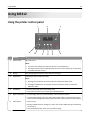
2
1
3
9
8
1
Use the
To
Menus button
Open the menus.
7
6
5
4
Notes:
• The menus are available only when the printer is in the Ready state.
• Pressing the button while navigating within the menus returns the printer control panel
to the top‑level menu screen.
2
Display
View printing options as well as status and error messages.
3
Sleep button
Enable Sleep mode or Hibernate mode.
Notes:
• Pressing any hard button will cause the printer to wake from Sleep mode.
• Pressing the Sleep button or the power switch will cause the printer to wake from
Hibernate mode.
4
Stop button
• Exit the menus and return to the Ready state.
• Stop printer activities, such as printing or downloading fonts.
5
Right arrow button
• Scroll through menus or to move between screens and menu options.
• Scroll through settings or text. For menus with numeric values, press and hold an arrow
button to scroll through the settings. Release the button when the value you want appears.
6
Select button
• Open a menu.
• Display available values or settings for a menu. The current default setting is indicated by
an asterisk (*).
• Save the displayed value as the new user default setting.
Using MS312
Use the
7
Left arrow button
28
To
• Scroll through menus or to move between screens and menu options.
• Scroll through settings or text. For menus with numeric values, press and hold an arrow
button to scroll through the settings. Release the button when the value you want appears.
8
Back button
Return to the previous screen.
9
Indicator light
Determine the status of the printer.
Understanding the colors of the Sleep button and indicator
lights
The colors of the Sleep button and indicator lights on the control panel signify a printer status or condition.
Indicator light
Printer status
Off
The printer is off or in Hibernate mode.
Blinking green
The printer is warming up, processing data, or printing.
Solid green
The printer is on, but idle.
Blinking red
The printer requires user intervention.
Sleep button light
Printer status
Off
The printer is off, idle, or in Ready state.
Solid amber
The printer is in Sleep mode.
Blinking amber
The printer is entering or waking from Hibernate mode.
Blinking amber for 0.1 second, then goes
completely off for 1.9 seconds in a slow,
pulsing pattern
The printer is in Hibernate mode.
Installing the Local Printer Settings Utility
1 Visit http://support.lexmark.com, and then download the software.
2 Double‑click the software installer package.
3 Select an installation type, and then click Install.
4 Click Install to start the installation.
5 Click Agree to accept the license agreement.
6 Click Continue, and then follow the instructions on the computer screen.
Notes:
• Use the Local Printer Settings Utility to change the toner darkness, power saver, and paper size settings for all
print jobs. Use the printer software to change these settings for individual print jobs.
• This utility is supported only in select printer models.
Using MS312
29
Using the Local Printer Settings Utility
1 Access the Local Printer Settings Utility from the list of applications or the Start menu to adjust the printer settings.
2 Save the changes using the Actions menu.
Note: To distribute the settings to other printers, save the settings in a command file.
Using MS315 and MS415
30
Using MS315 and MS415
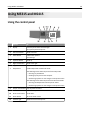
Using the control panel
Use the
To
1
Display
View the printer status and messages.
Set up and operate the printer.
2
Left arrow button
Scroll to the left.
3
Select button
Select menu options.
Save settings.
4
Up arrow button
Scroll up.
5
Right arrow button
Scroll to the right.
6
Keypad
Enter numbers, letters, or symbols.
7
Sleep button
Enable Sleep mode or Hibernate mode.
The following actions wake the printer from Sleep mode:
• Pressing any hard button
• Sending a print job from the computer
• Performing a power‑on reset using the main power switch
The following actions wake the printer from Hibernate mode:
• Pressing the Sleep button until the printer wakes
• Performing a power‑on reset using the main power switch
8
Stop or cancel button Stop all printer activities.
9
Back button
Return to the previous screen.
10
Down arrow button
Scroll down.
11
Home button
Go to the home screen.
12
Indicator light
Check the status of the printer.
Using MS315 and MS415
31
Understanding the colors of the Sleep button and indicator
lights
The colors of the Sleep button and indicator lights on the printer control panel signify a certain printer status or condition.
Indicator light
Printer status
Off
The printer is off or in Hibernate mode.
Blinking green
The printer is warming up, processing data, or printing.
Solid green
The printer is on, but idle.
Blinking red
The printer requires user intervention.
Sleep button light
Printer status
Off
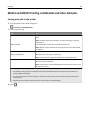
The printer is off, idle or in Ready state.
Solid amber
The printer is in Sleep mode.
Blinking amber
The printer is entering or waking from Hibernate mode.
Blinking amber for 0.1 second, then goes
completely off for 1.9 seconds in a slow,
pulsing pattern
The printer is in Hibernate mode.
Accessing the Embedded Web Server
The Embedded Web Server is the printer Web page that lets you view and remotely configure printer settings even
when you are not physically near the printer.
1 Obtain the printer IP address:
• From the printer control panel home screen
• From the TCP/IP section in the Network/Ports menu
• By printing a network setup page or menu settings page, and then finding the TCP/IP section
Note: An IP address appears as four sets of numbers separated by periods, such as 123.123.123.123.
2 Open a Web browser, and then type the printer IP address in the address field.
3 Press Enter.
Note: If you are using a proxy server, then temporarily disable it to load the Web page correctly.
Loading paper and specialty media
32
Loading paper and specialty media
MS312 paper size and type setup
Setting the paper size and type
1 From the printer control panel, navigate to:
> Paper Menu >
> Paper Size/Type >
2 Select Tray [x] Size or Tray [x] Type, and then press
.
3 Change the paper size or type setting, and then press
.
Notes:
• The paper size setting for the standard 250‑sheet tray (Tray 1), optional 250‑ or 550‑sheet tray (Tray 2), and the
multipurpose feeder must be set manually in the Paper Size menu.
• The factory default paper type for Tray 1 is Plain Paper.
• The factory default paper type for the multipurpose feeder is Custom Type 6.
• The paper type setting must be manually set for all trays.
Configuring Universal paper settings
The Universal paper size is a user‑defined setting that lets you print on paper sizes that are not preset in the printer
menus.
Notes:
• The smallest Universal paper size is 76 x 127 mm (3 x 5 inches), and is supported only from the multipurpose
feeder.
• The largest Universal paper size is 216 x 355.6 mm (8.5 x 14 inches), and is supported from all paper sources.
From the control panel, navigate to:
> Paper Menu >
> Universal Setup >
> Units of Measure >
> select the unit of measure >
Specify the paper height and width
1 From the control panel, navigate to:
> Paper Menu >
> Universal Setup >
> Units of Measure >
> select the unit of measure >
2 Press the arrow buttons until Portrait Height or Portrait Width appears, and then press
.
Loading paper and specialty media
3 Change the settings, and then press
33
.
MS315 and MS415 paper size and type setup
Setting the paper size and type
1 From the printer control panel, navigate to:
> Settings >
> Paper Menu >
> Paper Size/Type >
2 Press the up or down arrow button to select the tray or feeder, and then press
3 Press the up or down arrow button to select the paper size, and then press
.
.
4 Press the up or down arrow button to select the paper type, and then press
to change the settings.
Configuring Universal paper settings
The Universal paper size is a user‑defined setting that lets you print on paper sizes that are not preset in the printer
menus.
Notes:
• The smallest Universal paper size is 76 x 127 mm (3 x 5 inches), and is supported only from the multipurpose
feeder.
• The largest Universal paper size is 216 x 355.6 mm (8.5 x 14 inches), and is supported from all paper sources.
1 From the control panel, navigate to:
> Settings >
> Paper Menu >
> Universal Setup >
> Units of Measure >
> select a unit of
measure >
2 Select Portrait Width or Portrait Height, and then press
.
3 Press the left or right arrow button to change the setting, and then press
.
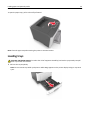
Using the standard bin and paper stop
The standard bin holds up to 150 sheets of 75‑g/m2 (20‑lb) paper. It collects prints facedown. The standard bin includes
a paper stop that keeps paper from sliding out the front of the bin as it stacks.
Loading paper and specialty media
34
To open the paper stop, pull it so that it flips forward.
Note: Close the paper stop when moving the printer to another location.
Loading trays
CAUTION—POTENTIAL INJURY: To reduce the risk of equipment instability, load each tray separately. Keep all
other trays closed until needed.
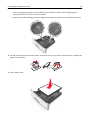
1 Pull out the tray completely.
Note: Do not remove trays while a job prints or while Busy appears on the printer display. Doing so may cause
a jam.
Loading paper and specialty media
35
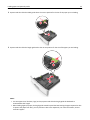
2 Squeeze and then slide the width guide tab to the correct position for the size of the paper you are loading.
LG
A5
A6
2
B5
EX
L
EC
A5
3 Squeeze and then slide the length guide tab to the correct position for the size of the paper you are loading.
1
A5
LG
L
A6
B
5
E
X
E
C
2
A
5
Notes:
• For some paper sizes like letter, legal, and A4, squeeze and slide the length guide tab backward to
accommodate their length.
• When loading legal‑size paper, the length guide extends beyond the base leaving the paper exposed to dust.
To protect the paper from dust, you can purchase a dust cover separately. For more information, contact
customer support.
Loading paper and specialty media
36
• If you are loading A6-size paper in the standard tray, then squeeze and then slide the length guide tab
toward the center of the tray to the A6‑size position.
• Make sure the width and length guides are aligned with the paper size indicators on the bottom of the tray.
LTR/
L
A4
LG
EX
EC
B5
A5
A4
A6
LT
R
E
X
E
C
B5
5
A
4 Flex the sheets back and forth to loosen them, and then fan them. Do not fold or crease the paper. Straighten the
edges on a level surface.
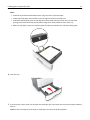
5 Load the paper stack.
Loading paper and specialty media
37
Notes:
• Load with the printable side facedown when using recycled or preprinted paper.
• Load prepunched paper with the holes on the top edge toward the front of the tray.
• Load letterhead facedown, with the top edge of the sheet toward the front of the tray. For two‑sided
printing, load letterhead faceup with the bottom edge of the sheet toward the front of the tray.
• Make sure the paper is below the maximum paper fill indicator located on the side of the width guide.
6 Insert the tray.
1
7 From the printer control panel, set the paper size and paper type in the Paper menu to match the paper loaded in
the tray.
Note: Set the correct paper size and type to avoid paper jams and print quality problems.
Loading paper and specialty media
38
Loading the multipurpose feeder
Use the multipurpose feeder when printing on different paper sizes and types or specialty media, such as card stock,
transparencies, paper labels, and envelopes. You can also use it for single‑page print jobs on letterhead.
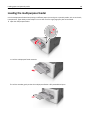
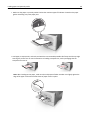
1 Open the multipurpose feeder.
1
2
a Pull the multipurpose feeder extender.
b Pull the extender gently so that the multipurpose feeder is fully extended and open.
Loading paper and specialty media
39
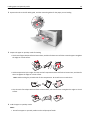
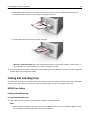
2 Squeeze the tab on the left width guide, and then move the guides for the paper you are loading.
1
2
3 Prepare the paper or specialty media for loading.
• Flex sheets of paper back and forth to loosen them, and then fan them. Do not fold or crease the paper. Straighten
the edges on a level surface.
• Hold transparencies by the edges. Flex the stack of transparencies back and forth to loosen them, and then fan
them. Straighten the edges on a level surface.
Note: Avoid touching the printable side of the transparencies. Be careful not to scratch them.
• Flex the stack of envelopes back and forth to loosen them, and then fan them. Straighten the edges on a level
surface.
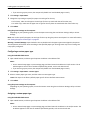
4 Load the paper or specialty media.
Notes:
• Do not force paper or specialty media into the multipurpose feeder.
Loading paper and specialty media
• Make sure the paper or specialty media is below the maximum paper fill indicator located on the paper
guides. Overfilling may cause paper jams.
• Load paper, transparencies, and card stock with the recommended printable side faceup and the top edge
entering the printer first. For more information on loading transparencies, see the packaging that the
transparencies came in.
Note: When loading A6‑size paper, make sure the multipurpose feeder extender rests lightly against the
edge of the paper so that the last few sheets of paper remain in place.
40
Loading paper and specialty media
41
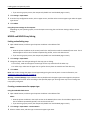
• Load letterhead faceup with the top edge entering the printer first. For two‑sided (duplex) printing, load
letterhead facedown with the bottom edge entering the printer first.
• Load envelopes with the flap on the left side facedown.
Warning—Potential Damage: Never use envelopes with stamps, clasps, snaps, windows, coated linings, or
self‑stick adhesives. These envelopes may severely damage the printer.
5 From the printer control panel, set the paper size and paper type in the Paper menu to match the paper or specialty
media loaded in the multipurpose feeder.
Linking and unlinking trays
The printer links trays when the specified paper size and type are the same. When a linked tray becomes empty, paper
feeds from the next linked tray. To prevent trays from linking, assign a unique custom paper type name.
MS312 tray linking
Linking and unlinking trays
Using the Embedded Web Server
1 Open a Web browser, and then type the printer IP address in the address field.
Notes:
• View the printer IP address in the TCP/IP section in the Network/Ports menu. The IP address appears as four
sets of numbers separated by periods, such as 123.123.123.123.
Loading paper and specialty media
42
• If you are using a proxy server, then temporarily disable it to load the Web page correctly.
2 Click Settings > Paper Menu.
3 Change the tray settings to specify the paper size and type for the tray.
• To link trays, make sure the paper size and type for the tray match with that of the other tray.
• To unlink trays, make sure the paper size or type for the tray does not match with that of the other tray.
4 Click Submit.
Using the printer settings on the computer
Depending on your operating system, access the Paper menu using the Local Printer Settings Utility or Printer
Settings.
Note: You can also specify the paper size and type for the tray using the printer control panel. For more information,
see “Setting the paper size and type” on page 32.
Warning—Potential Damage: Paper loaded in the tray should match the paper type name assigned in the printer.
The temperature of the fuser varies according to the specified paper type. Printing issues may occur if settings are
not properly configured.
Configuring a custom paper type
Using the Embedded Web Server
1 Open a Web browser, and then type the printer IP address in the address field.
Notes:
• Print a network setup page or menu settings page, and then locate the IP address in TCP/IP section. The IP
address appears as four sets of numbers separated by periods, such as 123.123.123.123.
• If you are using a proxy server, then temporarily disable it to load the Web page correctly.
2 Click Settings > Paper Menu > Custom Types.
3 Select a custom paper type name, and then select a custom paper type.
Note: Plain Paper is the factory default paper type for all user‑defined custom names.
4 Click Submit.
Using the printer settings on the computer
Depending on your operating system, access the Custom menu using the Local Printer Settings Utility or Printer
Settings.
Assigning a custom paper type
Using the Embedded Web Server
1 Open a Web browser, and then type the printer IP address in the address field.
Notes:
• Print a network setup page or menu settings page, and then locate the IP address in the TCP/IP section. The
IP address appears as four sets of numbers separated by periods, such as 123.123.123.123.
Loading paper and specialty media
43
• If you are using a proxy server, then temporarily disable it to load the Web page correctly.
2 Click Settings > Paper Menu.
3 From the Tray Configuration section, select a paper source, and then select a custom paper type under the paper
type column.
4 Click Submit.
Using the printer settings on the computer
Depending on your operating system, access the Paper menu using the Local Printer Settings Utility or Printer
Settings.
MS315 and MS415 tray linking
Linking and unlinking trays
1 Open a Web browser, and then type the printer IP address in the address field.
Notes:
• View the printer IP address on the control panel in the TCP/IP section under the Network/Ports menu. The IP
address appears as four sets of numbers separated by periods, such as 123.123.123.123.
• If you are using a proxy server, then temporarily disable it to load the Web page correctly.
2 Click Settings > Paper Menu.
3 Change the paper size and type settings for the trays you are linking.
• To link trays, make sure the paper size and type for the tray match that of the other tray.
• To unlink trays, make sure the paper size or type for the tray does not match that of the other tray.
4 Click Submit.
Note: You can also change the paper size and type settings using the control panel. For more information, see
“Setting the paper size and type” on page 33.
Warning—Potential Damage: Paper loaded in the tray should match the paper type name assigned in the printer.
The temperature of the fuser varies according to the specified paper type. Printing issues may occur if settings are
not properly configured.
Creating a custom name for a paper type
Using the Embedded Web Server
1 Open a Web browser, and then type the printer IP address in the address field.
Notes:
• View the printer IP address in the TCP/IP section in the Network/Ports menu. The IP address appears as four
sets of numbers separated by periods, such as 123.123.123.123.
• If you are using a proxy server, then temporarily disable it to load the Web page correctly.
2 Click Settings > Paper Menu > Custom Names.
3 Select a custom name, and then type a new custom paper type name.
Loading paper and specialty media
44
4 Click Submit.
5 Click Custom Types, and then verify if the new custom paper type name has replaced the custom name.
Using the printer control panel
1 From the printer control panel, navigate to:
> Settings >
> Paper Menu >
> Custom Names
2 Select a custom name, and then type a new custom paper type name.
3 Press
.
4 Press Custom Types, and then verify if the new custom paper type name has replaced the custom name.
Assigning a custom paper type
Using the Embedded Web Server
1 Open a Web browser, and then type the printer IP address in the address field.
Notes:
• View the printer IP address in the TCP/IP section in the Network/Ports menu. The IP address appears as four
sets of numbers separated by periods, such as 123.123.123.123.
• If you are using a proxy server, then temporarily disable it to load the Web page correctly.
2 Click Settings > Paper Menu > Custom Types.
3 Select a custom paper type name, and then select a paper type.
Note: Paper is the factory default paper type for all user‑defined custom names.
4 Click Submit.
Using the printer control panel
1 From the printer control panel, navigate to:
> Settings >
> Paper Menu >
> Custom Types
2 Select a custom paper type name, and then select a paper type.
Note: Paper is the factory default paper type for all user‑defined custom names.
3 Press
.
Paper and specialty media guide
45
Paper and specialty media guide
Paper guidelines
Paper characteristics
The following paper characteristics affect print quality and reliability. Consider these characteristics when evaluating
new paper stock.
Weight
The printer trays can automatically feed paper weights up to 90‑g/m2 (24‑lb) bond grain long paper. The multipurpose
feeder can automatically feed paper weights up to 163‑g/m2 (43‑lb) bond grain long paper. Paper lighter than
60 g/m2 (16 lb) might not be stiff enough to feed properly, causing jams. For best performance, use 75‑g/m2 (20‑lb)
bond grain long paper. For paper smaller than 182 x 257 mm (7.2 x 10.1 inches), we recommended to use 90 g/m2
(24 lb) or heavier paper.
Note: Two‑sided printing is supported only for 60–90‑g/m2 (16–24‑lb) bond paper.
Curl
Curl is the tendency for paper to curl at its edges. Excessive curl can cause paper feeding problems. Curl can occur after
the paper passes through the printer, where it is exposed to high temperatures. Storing paper unwrapped in hot, humid,
cold, or dry conditions, even in the trays, can contribute to paper curling prior to printing and can cause feeding
problems.
Smoothness
Paper smoothness directly affects print quality. If paper is too rough, then toner cannot fuse to it properly. If paper is
too smooth, then it can cause paper feeding or print quality issues. Always use paper between 100 and 300 Sheffield
points; however, smoothness between 150 and 250 Sheffield points produces the best print quality.
Moisture content
The amount of moisture in paper affects both print quality and the ability of the printer to feed the paper correctly.
Leave paper in its original wrapper until it is time to use it. This limits the exposure of paper to moisture changes that
can degrade its performance.
Store paper in its original wrapper in the same environment as the printer for 24 to 48 hours before printing. Extend
the time to several days if the storage or transportation environment is very different from the printer environment.
Thick paper may also require a longer conditioning period.
Grain direction
Grain refers to the alignment of the paper fibers in a sheet of paper. Grain is either grain long, running the length of
the paper, or grain short, running the width of the paper.
For 60–90‑g/m2 (16–24‑lb) bond paper, grain long paper is recommended.
Paper and specialty media guide
46
Fiber content
Most high‑quality xerographic paper is made from 100% chemically treated pulped wood. This content provides the
paper with a high degree of stability resulting in fewer paper feeding problems and better print quality. Paper containing
fibers such as cotton can negatively affect paper handling.
Unacceptable paper
The following paper types are not recommended for use with the printer:
• Chemically treated papers used to make copies without carbon paper, also known as carbonless papers, carbonless
copy paper (CCP), or no carbon required (NCR) paper
• Preprinted papers with chemicals that may contaminate the printer
• Preprinted papers that can be affected by the temperature in the printer fuser
• Preprinted papers that require a registration (the precise print location on the page) less than ±2.5 mm (±0.10 inch),
such as optical character recognition (OCR) forms
In some cases, registration can be adjusted with a software application to successfully print on these forms:
•
•
•
•
•
Coated papers (erasable bond), synthetic papers, thermal papers
Rough‑edged, rough or heavily textured surface papers, or curled papers
Recycled papers that fail EN12281:2002 (European)
Paper weighing less than 60 g/m2 (16 lb)
Multiple‑part forms or documents
Selecting paper
Using the appropriate paper prevents jams and helps ensure trouble‑free printing.
To help avoid paper jams and poor print quality:
• Always use new, undamaged paper.
• Before loading paper, know the recommended printable side of the paper. This information is usually indicated on
the paper package.
• Do not use paper that has been cut or trimmed by hand.
• Do not mix paper sizes, types, or weights in the same tray; mixing results in jams.
• Do not use coated papers unless they are specifically designed for electrophotographic printing.
Selecting preprinted forms and letterhead
Use these guidelines when selecting preprinted forms and letterhead:
• Use grain long for 60 to 90 g/m2 (16 to 24 lb) weight paper.
• Use only forms and letterhead printed using an offset lithographic or engraved printing process.
• Avoid papers with rough or heavily textured surfaces.
Use papers printed with heat‑resistant inks designed for use in xerographic copiers. The ink must be able to withstand
temperatures up to 230°C (446°F) without melting or releasing hazardous emissions. Use inks that are not affected by
the resin in toner. Inks that are oxidation‑set or oil‑based generally meet these requirements; latex inks might not.
When in doubt, contact the paper supplier.
Paper and specialty media guide
47
Preprinted papers such as letterhead must be able to withstand temperatures up to 230°C (446°F) without melting or
releasing hazardous emissions.
Using recycled paper and other office papers
As an environmentally conscientious company, Lexmark supports the use of recycled paper produced specifically for
use in laser (electrophotographic) printers.
While no blanket statement can be made that all recycled paper will feed well, Lexmark consistently tests papers that
represent recycled cut size copier papers available on the global market. This scientific testing is conducted with rigor
and discipline. Many factors are taken into consideration both separately and as a whole, including the following:
•
•
•
•
•
•
•
•
Amount of post-consumer waste (Lexmark tests up to 100% post-consumer waste content.)
Temperature and humidity conditions (Testing chambers simulate climates from all over the world.)
Moisture content (Business papers should have low moisture: 4–5%.)
Bending resistance and proper stiffness means optimum feeding through the printer.
Thickness (impacts how much can be loaded into a tray)
Surface roughness (measured in Sheffield units, impacts print clarity and how well toner fuses to the paper)
Surface friction (determines how easily sheets can be separated)
Grain and formation (impacts curling, which also influences the mechanics of how the paper behaves as it moves
through the printer)
• Brightness and texture (look and feel)
Recycled papers are better than ever; however, the amount of recycled content in a paper affects the degree of control
over foreign matter. And while recycled papers are one good path to printing in an environmentally responsible manner,
they are not perfect. The energy required to de-ink and deal with additives such as colorants and “glue” often generates
more carbon emissions than does normal paper production. However, using recycled papers enables better resource
management overall.
Lexmark concerns itself with the responsible use of paper in general based on life cycle assessments of its products. To
gain a better understanding of the impact of printers on the environment, the company commissioned a number of
life cycle assessments and found that paper was identified as the primary contributor (up to 80%) of carbon emissions
caused throughout the entire life of a device (from design to end-of-life). This is due to the energy-intensive
manufacturing processes required to make paper.
Thus, Lexmark seeks to educate customers and partners on minimizing the impact of paper. Using recycled paper is
one way. Eliminating excessive and unnecessary paper consumption is another. Lexmark is well-equipped to help
customers minimize printing and copying waste. In addition, the company encourages purchasing paper from suppliers
who demonstrate their commitment to sustainable forestry practices.
Lexmark does not endorse specific suppliers, although a converter’s product list for special applications is maintained.
However, the following paper choice guidelines will help alleviate the environmental impact of printing:
1 Minimize paper consumption.
2 Be selective about the origin of wood fiber. Buy from suppliers who carry certifications such as the Forestry
Stewardship Council (FSC) or the Program for the Endorsement of Forest Certification (PEFC). These certifications
guarantee that the paper manufacturer uses wood pulp from forestry operators that employ environmentally and
socially responsible forest management and restoration practices.
3 Choose the most appropriate paper for printing needs: normal 75 or 80 g/m2 certified paper, lower weight paper,
or recycled paper.
Paper and specialty media guide
48
Unacceptable paper examples
Test results indicate that the following paper types are at risk for use with laser printers:
•
•
•
•
Chemically treated papers used to make copies without carbon paper, also known as carbonless papers
•
•
•
•
•
Coated papers (erasable bond), synthetic papers, thermal papers
Preprinted papers with chemicals that may contaminate the printer
Preprinted papers that can be affected by the temperature in the printer fuser
Preprinted papers that require a registration (the precise location on the page) greater than ± 2.3 mm (± 0.9 in.),
such as optical character recognition (OCR) forms. In some cases, registration can be adjusted with a software
application to successfully print on these forms.)
Rough-edged, rough or heavily textured surface papers or curled papers
Recycled papers that fail EN12281:2002 (European testing)
Paper weighing less than 60 g/m2 (16 lb)
Multiple part forms or documents
For more information about Lexmark, visit www.lexmark.com. General sustainability-related information can be found
at the Environmental Sustainability link.
Storing paper
Use these paper storage guidelines to help avoid jams and uneven print quality:
• For best results, store paper where the temperature is 21°C (70°F) and the relative humidity is 40 percent. Most
label manufacturers recommend printing in a temperature range of 18–24°C (65–75°F) with relative humidity
between 40 and 60 percent.
•
•
•
•
Store paper in cartons, on a pallet or shelf, rather than on the floor.
Store individual packages on a flat surface.
Do not store anything on top of individual paper packages.
Take paper out of the carton or wrapper only when you are ready to load it in the printer. The carton and wrapper
help keep the paper clean, dry, and flat.
Using specialty media
Tips on using card stock
Card stock is heavy, single‑ply specialty media. Many of its variable characteristics, such as moisture content, thickness,
and texture, can significantly impact print quality. Print samples on the card stock being considered for use before
buying large quantities.
When printing on card stock:
• Make sure the Paper Type is Card Stock.
• Select the appropriate Paper Texture setting.
• Be aware that preprinting, perforation, and creasing may significantly affect the print quality and cause jams or
other paper handling problems.
• Check with the manufacturer or vendor to ensure that the card stock can withstand temperatures up to 240°C
(464°F) without releasing hazardous emissions.
Paper and specialty media guide
49
• Do not use preprinted card stock manufactured with chemicals that may contaminate the printer. Preprinting
introduces semi‑liquid and volatile components into the printer.
• Use grain short card stock when possible.
Tips on using envelopes
Print samples on the envelopes being considered for use before buying large quantities.
• Use envelopes designed specifically for laser printers. Check with the manufacturer or vendor to ensure that the
envelopes can withstand temperatures up to 230°C (446°F) without sealing, wrinkling, curling excessively, or
releasing hazardous emissions.
• For best performance, use envelopes made from 90‑g/m2 (24‑lb bond) paper or 25% cotton. All‑cotton envelopes
must not exceed 70‑g/m2 (20‑lb bond) weight.
• Use only new envelopes from undamaged packages.
• To optimize performance and minimize jams, do not use envelopes that:
– Have excessive curl or twist
– Are stuck together or damaged in any way
– Have windows, holes, perforations, cutouts, or embossing
– Have metal clasps, string ties, or folding bars
– Have an interlocking design
– Have postage stamps attached
– Have any exposed adhesive when the flap is in the sealed or closed position
– Have bent corners
– Have rough, cockle, or laid finishes
• Adjust the width guides to fit the width of the envelopes.
Note: A combination of high humidity (over 60%) and high printing temperature may wrinkle or seal envelopes.
Tips on using labels
Print samples on the labels being considered for use before buying large quantities.
Note: Use only paper label sheets. Vinyl, pharmacy, and two‑sided labels are not supported.
For more information on label printing, characteristics, and design, see the Card Stock & Label Guide available at
http://support.lexmark.com.
When printing on labels:
• Use labels designed specifically for laser printers. Check with the manufacturer or vendor to verify that:
– The labels can withstand temperatures up to 240°C (464°F) without sealing, excessive curling, wrinkling, or
releasing hazardous emissions.
– Label adhesives, face sheet (printable stock), and topcoats can withstand up to 172‑kPa (25‑psi) pressure without
delaminating, oozing around the edges, or releasing hazardous fumes.
• Do not use labels with slick backing material.
• Use full label sheets. Partial sheets may cause labels to peel off during printing, resulting in a jam. Partial sheets
also contaminate the printer and the cartridge with adhesive, and could void the printer and toner cartridge
warranties.
Paper and specialty media guide
50
• Do not use labels with exposed adhesive.
• Do not print within 1 mm (0.04 inch) of the edge of the label, of the perforations, or between die‑cuts of the label.
• Make sure the adhesive backing does not reach to the edge of the sheet. Zone coating of the adhesive should be
at least 1 mm (0.04 inch) away from edges. Adhesive material contaminates the printer and could void the warranty.
• If zone coating of the adhesive is not possible, then remove a 2‑mm (0.08‑inch) strip on the leading and driver edge,
and then use a non‑oozing adhesive.
• Portrait orientation is recommended, especially when printing bar codes.
Tips on using letterhead
•
•
•
•
Use letterhead designed specifically for laser printers.
Print samples on the letterhead being considered for use before buying large quantities.
Before loading letterhead, flex, fan, and straighten the stack to prevent sheets from sticking together.
Page orientation is important when printing on letterhead. For information on how to load letterhead, see:
– “Loading trays” on page 34
– “Loading the multipurpose feeder” on page 38
Tips on using transparencies
• Print a test page on the transparencies being considered for use before buying large quantities.
• Feed transparencies from the standard tray, or the multipurpose feeder.
• Use transparencies designed specifically for laser printers. Transparencies must be able to withstand temperatures
up to 185°C (365°F) without melting, discoloring, offsetting, or releasing hazardous emissions.
Note: If the transparency weight is set to Heavy and the transparency texture is set to Rough in the Paper menu,
then transparencies can be printed at a temperature up to 195°C (383°F).
• Avoid getting fingerprints on the transparencies to prevent print quality problems.
• Before loading transparencies, flex, fan, and straighten the stack to prevent sheets from sticking together.
Paper and specialty media guide
51
Supported paper sizes, types, and weights
For information on card stock and labels, see the Card Stock & Label Guide on the Lexmark Web site at
http://support.lexmark.com.
Supported paper sizes
Paper size
Standard tray
Optional 250‑ or
550‑sheet tray
Multipurpose feeder
Duplex mode
A4
210 x 297 mm (8.3 x 11.7 in.)
A5
X
148 x 210 mm (5.8 x 8.3 in.)
A6
X
X
105 x 148 mm (4.1 x 5.8 in.)
JIS B5
182 x 257 mm (7.2 x 10.1 in.)
X
Letter
216 x 279 mm (8.5 x 11 in.)
Legal
216 x 356 mm (8.5 x 14 in.)
Executive
X
184 x 267 mm (7.3 x 10.5 in.)
Oficio (Mexico)
216 x 340 mm (8.5 x 13.4 in.)
Folio
216 x 330 mm (8.5 x 13 in.)
Statement
X
140 x 216 mm (5.5 x 8.5 in.)
Universal1, 2
76.2 x 127 mm (3 x 5 in.) up to
216 x 356 mm (8.5 x 14 in.)
7 3/4 Envelope (Monarch)
X
X
X
X
X
X
98 x 191 mm (3.9 x 7.5 in.)
9 Envelope
98 x 225 mm (3.9 x 8.9 in.)
1
This size setting formats the page for 216 x 356 mm (8.5 x 14 in.) unless the size is specified by the software application.
2 Universal is supported in the standard tray only if the paper size is at least 105 x 148 mm (4.1 x 5.8 in.). Universal is supported
in the optional 250- or 550-sheet tray only if the paper size is at least 148 x 210 mm (5.8 x 8.3 in.). Universal is supported
in duplex mode only if the width is at least 210 mm (8.3 in.) and the length is at least 279 mm (11 in.). The smallest supported
Universal size is supported only in the multipurpose feeder.
Paper and specialty media guide
Paper size
52
Standard tray
Optional 250‑ or
550‑sheet tray
Multipurpose feeder
Duplex mode
X
X
X
X
X
X
C5 Envelope
162 x 229 mm (6.4 x 9 in.)
X
X
X
B5 Envelope
X
X
X
X
X
X
10 Envelope
105 x 241 mm (4.1 x 9.5 in.)
DL Envelope
110 x 220 mm (4.3 x 8.7 in.)
176 x 250 mm (6.9 x 9.8 in.)
Other Envelope
229 x 356 mm (9 x 14 in.)
1
This size setting formats the page for 216 x 356 mm (8.5 x 14 in.) unless the size is specified by the software application.
2 Universal is supported in the standard tray only if the paper size is at least 105 x 148 mm (4.1 x 5.8 in.). Universal is supported
in the optional 250- or 550-sheet tray only if the paper size is at least 148 x 210 mm (5.8 x 8.3 in.). Universal is supported
in duplex mode only if the width is at least 210 mm (8.3 in.) and the length is at least 279 mm (11 in.). The smallest supported
Universal size is supported only in the multipurpose feeder.
Supported paper types and weights
The standard tray supports 60–90‑g/m2 (16–24‑lb) paper weights. The optional tray supports 60–120‑g/m2 (16–32‑lb)
paper weights. The multipurpose feeder supports 60–163‑g/m2 (16–43‑lb) paper weights.
Paper type
250‑ or 550‑sheet tray
Multipurpose feeder
Duplex mode
Plain paper
Card stock
X
X
X
Transparencies
Recycled
Glossy paper
X
X
Paper labels1
Vinyl labels
X
X
X
X
X
Bond2
Envelope
X
X
Rough envelope
X
X
Letterhead
Paper and specialty media guide
Paper type
53
250‑ or 550‑sheet tray
Multipurpose feeder
Duplex mode
Preprinted
Colored Paper
Light Paper
Heavy Paper2
Rough/Cotton
X
1 One‑sided paper labels designed for laser printers are supported for occasional use. It is recommended to print 20 or fewer
pages of paper labels per month. Vinyl, pharmacy, and two‑sided labels are not supported.
2
Bond and Heavy Paper are supported in duplex mode up to 90‑g/m2 (24‑lb) paper weight.
Printing
54
Printing
Printing a document
Printing a document
1 From the Paper menu on the printer control panel, set the paper type and size to match the paper loaded.
2 Send the print job:
For Windows users
a With a document open, click File > Print.
b Click Properties, Preferences, Options, or Setup.
c Adjust the settings, if necessary.
d Click OK > Print.
For Macintosh users
a Customize the settings in the Page Setup dialog:
1 With a document open, choose File > Page Setup.
2 Choose a paper size or create a custom size to match the paper loaded.
3 Click OK.
b Customize the settings in the Print dialog:
1 With a document open, choose File > Print.
If necessary, click the disclosure triangle to see more options.
2 From the Print dialog and pop‑up menus, adjust the settings if necessary.
Note: To print on a specific paper type, adjust the paper type setting to match the paper loaded, or
select the appropriate tray or feeder.
3 Click Print.
MS312 toner darkness adjustment
Adjusting toner darkness
Using the Embedded Web Server
1 Open a Web browser, and then type the printer IP address in the address field.
Notes:
• View the printer IP address in the TCP/IP section in the Network/Ports menu. The IP address appears as four
sets of numbers separated by periods, such as 123.123.123.123.
• If you are using a proxy server, then temporarily disable it to load the Web page correctly.
2 Click Settings > Print Settings > Quality Menu > Toner Darkness.
Printing
55
3 Adjust the toner darkness setting.
4 Click Submit.
Using the printer settings on the computer
Depending on your operating system, adjust the toner darkness settings using the Local Printer Settings Utility or
Printer Settings.
Using the printer control panel
1 From the printer control panel, navigate to:
> Settings >
> Print Settings >
> Quality Menu >
> Toner Darkness >
2 Adjust the toner darkness.
3 Press
.
MS315 and MS415 toner darkness adjustment
Adjusting toner darkness
Using the Embedded Web Server
1 Open a Web browser, and then type the IP address of the printer in the address field.
Notes:
• View the printer IP address in the TCP/IP section in the Network/Ports menu. The IP address appears as four
sets of numbers separated by periods, such as 123.123.123.123.
• If you are using a proxy server, then temporarily disable it to load the Web page correctly.
2 Click Settings > Print Settings > Quality Menu > Toner Darkness.
3 Adjust the toner darkness, and then click Submit.
Using the printer control panel
1 From the printer control panel, navigate to:
> Settings >
> Print Settings >
2 Adjust the toner darkness, and then press
> Quality Menu >
.
> Toner Darkness
Printing
56
MS315 and MS415 Printing confidential and other held jobs
Storing print jobs in the printer
1 From the printer control panel, navigate to:
> Security > Confidential Print
2 Select a print job type.
Use
To
Confidential Job Expiration
Hold print jobs in the computer until you enter the PIN from the printer control
panel.
Note: The PIN is set from the computer. It must be four digits, using the
numbers 0–9.
Max Invalid PIN
Limit the number of times an invalid PIN can be entered.
Note: When the limit is reached, the print jobs for that user name and PIN
are deleted.
Repeat Job Expiration
Print and store print jobs in the printer memory.
Reserve Job Expiration
Store print jobs for printing at a later time.
Note: The print jobs are held until deleted from the Held Jobs menu.
Verify Job Expiration
Print one copy of a print job and hold the remaining copies. It lets you examine
if the first copy is satisfactory.
Note: The print job is automatically deleted from the printer memory once
all copies are printed.
Notes:
• Confidential, Verify, Reserve, and Repeat print jobs may be deleted if the printer requires extra memory to
process additional held jobs.
• You can set the printer to store print jobs in the printer memory until you start the print job from the printer
control panel.
• All print jobs that can be initiated by the user at the printer are called held jobs.
3 Press
.
Printing
57
Printing information pages
For more information on printing information pages, see “Printing a menu settings page” on page 25 for MS312 or
“Printing a menu settings page” on page 26 for MS315 and MS415 and “Printing a network setup page” on page 26 for
MS312 or “Printing a network setup page” on page 26 for MS315 and MS415.
MS312 information pages
Printing a font sample list
From the printer control panel, navigate to either of the following:
> Reports >
> Print Fonts >
> PCL Fonts >
> Reports >
> Print Fonts >
> PostScript Fonts >
or
MS315 and MS415 information pages
Printing a font sample list
1 From the printer control panel, navigate to:
> Settings >
> Reports >
> Print Fonts
2 Press the up or down arrow button to select the font setting.
3 Press
.
Note: The PPDS fonts appear only when the PPDS data stream is activated.
Printing a directory list
From the control panel, navigate to:
> Settings > Reports >
> Print Directory >
Note: The Print Directory menu item appears only when an optional flash memory card is installed.
Printing from a mobile device
To download a compatible mobile printing application, visit www.lexmark.com/mobile.
Note: Mobile printing applications may also be available from your mobile device manufacturer.
Printing
58
Canceling a print job
Canceling a print job from the printer control panel
From the printer control panel, press
>
.
Canceling a print job from the computer
For Windows users
1 Open the printers folder.
In Windows 8
From the Search charm, type run, and then navigate to:
Run > type control printers > OK
In Windows 7 or earlier
a Click
, or click Start and then click Run.
b Type control printers.
c Press Enter, or click OK.
2 Double‑click the printer icon.
3 Select the print job you want to cancel.
4 Click Delete.
For Macintosh users
1 From System Preferences in the Apple menu, open the printers folder.
2 Open the print queue, select the print job you want to cancel, and then delete it.
Saving money and the environment
59
Saving money and the environment
Lexmark is committed to environmental sustainability and is continually improving its printers to reduce their impact
on the environment. We design with the environment in mind, engineer our packaging to reduce materials, and provide
collection and recycling programs. For more information, see:
• The Notices chapter
• The Environmental Sustainability section of the Lexmark Web site at www.lexmark.com/environment
• The Lexmark recycling program at www.lexmark.com/recycle
By selecting certain printer settings or tasks, you may be able to reduce your printer's impact even further. This chapter
outlines the settings and tasks that may yield a greater environmental benefit.
Saving paper and toner
Studies show that as much as 80% of the carbon footprint of a printer is related to paper usage. You can significantly
reduce your carbon footprint by using recycled paper and the following printing suggestions, such as printing on both
sides of the paper and printing multiple pages on one side of a single sheet of paper.
For information on how you can quickly save paper and energy using one printer setting, see “Using Eco‑Mode” on
page 65 for MS312 or “Using Eco‑mode” on page 68 for MS315 and MS415.
Using recycled paper
As an environmentally conscious company, Lexmark supports the use of recycled office paper produced specifically for
use in laser printers. For more information on recycled papers that work well with your printer, see “Using recycled
paper and other office papers” on page 47.
Conserving supplies
Use both sides of the paper
If your printer model supports two‑sided printing, then you can control whether print appears on one or two sides of
the paper.
Notes:
• Two-sided printing is the default setting in the print driver.
• For a complete list of supported products and countries, go to http://support.lexmark.com.
Place multiple pages on one sheet of paper
You can print up to 16 consecutive pages of a multiple‑page document onto one side of a single sheet of paper by
setting multiple page printing (N‑Up) for the print job.
Saving money and the environment
60
Check your first draft for accuracy
Before printing or making multiple copies of a document:
• Use the preview feature to see how the document looks like before you print it.
• Print one copy of the document to check its content and format for accuracy.
Avoid paper jams
Correctly set the paper type and size to avoid paper jams. For more information, see “Avoiding jams” on page 128.
Recycling
Lexmark provides collection programs and environmentally progressive approaches to recycling. For more information,
see:
• The Notices chapter
• The Environmental Sustainability section of the Lexmark Web site at www.lexmark.com/environment
• The Lexmark recycling program at www.lexmark.com/recycle
Recycling Lexmark products
To return Lexmark products for recycling:
1 Go to www.lexmark.com/recycle.
2 Find the product type you want to recycle, and then select your country or region from the list.
3 Follow the instructions on the computer screen.
Note: Printer supplies and hardware not listed in the Lexmark collection program may be recycled through your local
recycling center. Contact your local recycling center to determine the items they accept.
Recycling Lexmark packaging
Lexmark continually strives to minimize packaging. Less packaging helps to ensure that Lexmark printers are transported
in the most efficient and environmentally sensitive manner and that there is less packaging to dispose of. These
efficiencies result in fewer greenhouse emissions, energy savings, and natural resource savings.
Lexmark cartons are 100% recyclable where corrugated recycling facilities exist. Facilities may not exist in your area.
The foam used in Lexmark packaging is recyclable where foam recycling facilities exist. Facilities may not exist in your
area.
When you return a cartridge to Lexmark, you can reuse the box that the cartridge came in. Lexmark will recycle the
box.
Returning Lexmark cartridges for reuse or recycling
Lexmark Cartridge Collection Program diverts millions of Lexmark cartridges from landfills annually by making it both
easy and free for Lexmark customers to return used cartridges to Lexmark for reuse or recycling. One hundred percent
of the empty cartridges returned to Lexmark are either reused or demanufactured for recycling. Boxes used to return
the cartridges are also recycled.
Saving money and the environment
61
To return Lexmark cartridges for reuse or recycling, follow the instructions that came with your printer or cartridge and
use the prepaid shipping label. You can also do the following:
1 Go to www.lexmark.com/recycle.
2 From the Toner Cartridges section, select your country or region.
3 Follow the instructions on the computer screen.
Managing the printer
62
Managing the printer
Finding advanced networking and administrator information
This chapter covers basic administrative support tasks using the Embedded Web Server. For more advanced system
support tasks, see the Networking Guide on the Software and Documentation CD or the Embedded Web Server —
Security: Administrator's Guide on the Lexmark support Web site at http://support.lexmark.com.
Copying printer settings to other printers
Note: This feature is available only in network printers.
1 Open a Web browser, and then type the printer IP address in the address field.
Notes:
• View the printer IP address in the TCP/IP section in the Network/Ports menu. The IP address appears as four
sets of numbers separated by periods, such as 123.123.123.123.
• If you are using a proxy server, then temporarily disable it to load the Web page correctly.
2 Click the Copy Printer Settings.
3 To change the language, select a language from the drop-down menu, and then click Click here to submit language.
4 Click Printer Settings.
5 Type the IP addresses of the source and target printers in their appropriate fields.
Note: If you want to add or remove a target printer, then click Add Target IP or Remove Target IP.
6 Click Copy Printer Settings.
Configuring supply notifications from the Embedded Web
Server
You can determine how you would like to be notified when supplies run nearly low, low, very low, or reach their
end‑of‑life by setting the selectable alerts.
Notes:
• Selectable alerts can be set on the toner cartridge and imaging unit.
• All selectable alerts can be set for nearly low, low, and very low supply conditions. Not all selectable alerts can
be set for the end‑of‑life supply condition. E‑mail selectable alert is available for all supply conditions.
• The percentage of estimated remaining supply that prompts the alert can be set on some supplies for some
supply conditions.
1 Open a Web browser, and then type the printer IP address in the address field.
Managing the printer
63
Notes:
• View the printer IP address in the TCP/IP section in the Network/Ports menu. The IP address appears as four
sets of numbers separated by periods, such as 123.123.123.123.
• If you are using a proxy server, then temporarily disable it to load the Web page correctly.
2 Click Settings > Print Settings > Supply Notifications.
3 From the drop‑down menu for each supply, select one of the following notification options:
Notification
Description
Off
The normal printer behavior for all supplies occurs.
SNMP Only
The printer generates a simple network management protocol (SNMP) alert when the supply
condition is reached. The status of the supply will appear on the menus page and status
page.
E‑mail Only
The printer generates an e-mail when the supply condition is reached. The status of the
supply will appear on the menus page and status page.
Warning
The printer displays the warning message and generates an e‑mail about the status of the
supply. The printer does not stop when the supply condition is reached.
Continuable Stop1
The printer stops processing jobs when the supply condition is reached, and the user needs
to press a button to continue printing.
Non Continuable Stop1,2
The printer stops when the supply condition is reached. The supply must be replaced to
continue printing.
1
The printer generates an e-mail about the status of the supply when supply notification is enabled.
2
The printer stops when some supplies become empty to prevent damage.
4 Click Submit.
MS312 printer management
Accessing the remote control panel
The remote control panel on your computer screen lets you interact with the printer control panel, even when you are
not physically near the network printer. From your screen, you can view the printer status and do print-related tasks.
1 Open a Web browser, and then type the printer IP address in the address field.
Notes:
• Print a network setup page or menu settings page, and then locate the IP address in the TCP/IP section. The
IP address appears as four sets of numbers separated by periods, such as 123.123.123.123.
• If you are using a proxy server, then temporarily disable it to load the Web page correctly.
2 Press Enter to open the Web page of your printer.
3 Click Remote Operator Panel > Run Remote Panel.
Note: The remote control panel requires a Java plug‑in to launch.
Managing the printer
64
Viewing reports
You can view some reports from the Embedded Web Server. These reports are useful for assessing the status of the
printer, network, and supplies.
1 Open a Web browser, and then type the printer IP address in the address field.
Notes:
• View the printer IP address in the TCP/IP section in the Network/Ports menu. The IP address appears as four
sets of numbers separated by periods, such as 123.123.123.123.
• If you are using a proxy server, then temporarily disable it to load the Web page correctly.
2 Click Reports, and then click the type of report you want to view.
Restoring factory default settings
If you want to keep a list of the current menu settings for reference, then print a menu settings page before restoring
the factory default settings. For more information, see “Printing a menu settings page” on page 25.
If you want a more comprehensive method of restoring the printer factory default settings, then perform the Wipe All
Settings option. For more information, see “Erasing non‑volatile memory” on page 74.
Warning—Potential Damage: Restoring factory defaults returns most printer settings to the original factory default
settings. Exceptions include the display language, custom sizes and messages, and Network/Port menu settings. All
downloads stored in the RAM are deleted.
From the printer control panel, navigate to:
> Settings >
> General Settings >
> Factory Defaults >
> Restore Now >
Creating a printer control panel PIN
The Panel PIN Protect menu lets you restrict access to the menus from the printer control panel. To restrict access to
the menus, create a Personal Identification Number (PIN), and then assign the PIN to each menu.
1 Open a Web browser, and then type the printer IP address in the address field.
Notes:
• View the printer IP address in the TCP/IP section in the Network/Ports menu. The IP address appears as four
sets of numbers separated by periods, such as 123.123.123.123.
• If you are using a proxy server, then temporarily disable it to load the Web page correctly.
2 Click Settings > Security > Panel PIN Protect.
3 From the Create User PIN or Create Admin PIN sections, enter your PIN.
Note: Your can enter up to 16 digits for your PIN.
4 Click Modify.
5 From any menu in the Administrative Menus, Management, or Function Access sections, select User PIN
Protected or Admin PIN Protected or Admin PIN and User PIN Protected.
Note: Using an Admin PIN, you can still access a menu assigned with a User PIN.
6 Click Submit.
Managing the printer
65
If you try to access a PIN‑protected menu from the printer control panel, the printer will require you to enter the PIN.
Note: After you enter the last digit of the PIN, make sure to press
three seconds.
on the printer control panel for more than
Saving energy
Using Eco‑Mode
Use Eco‑Mode to quickly select one or more ways to reduce your printer's environmental impact.
1 From the printer control panel, navigate to:
> Settings >
> General Settings >
> Eco‑Mode >
> select the setting you want
Use
To
Off
Use the factory default settings for all settings associated with Eco‑Mode. This setting supports the
performance specifications for your printer.
Energy
Reduce energy use, especially when the printer is idle.
• Printer engine motors do not start until a document is ready to print. You may notice a short delay
before the first page is printed.
• The printer enters Sleep mode after one minute of inactivity.
Energy/Paper Use all the settings associated with Energy and Paper modes.
Paper
2 Press
• Enable the automatic two‑sided (duplex) printing feature.
• Turn off print log features.
.
Using Hibernate mode
Hibernate is an ultra‑low‑power saving mode.
Notes:
• Three days is the default amount of time before the printer enters Hibernate mode.
• Make sure to wake the printer from Hibernate mode before sending a print job. A hard reset or a long press of
the Sleep button wakes the printer from Hibernate mode.
• If the printer is in Hibernate mode, then the Embedded Web Server is disabled.
1 From the control panel, navigate to:
> Settings >
> General Settings >
2 Press Press Sleep Button or Press and Hold Sleep Button, and then press
3 Press Hibernate >
.
.
Managing the printer
66
Adjusting Sleep mode
To save energy, decrease the number of minutes before the printer enters Sleep mode.
Available settings range from 1 to 120 minutes. The factory default setting is 30 minutes.
Note: Sleep mode can be scheduled. For more information, see “Using Schedule Power Modes” on page 67.
Using the Embedded Web Server
1 From the Embedded Web Server, click Settings > General Settings > Timeouts.
2 In the Sleep Mode field, enter the number of minutes you want the printer to wait before it enters Sleep mode.
3 Click Submit.
Using the printer control panel
1 From the printer control panel, navigate to:
> Settings >
> General Settings >
> Timeouts >
> Sleep Mode >
2 In the Sleep Mode field, select the number of minutes you want the printer to wait before it enters Sleep mode.
3 Press
.
Setting Hibernate Timeout
Hibernate Timeout lets you set the amount of time the printer waits after a print job is processed before it goes into a
reduced power state.
Using the Embedded Web Server
1 Open a Web browser, and then type the printer IP address in the address field.
Notes:
• Print a network setup page or menu settings page, and then locate the IP address in the TCP/IP section. The
IP address appears as four sets of numbers separated by periods, such as 123.123.123.123.
• If you are using a proxy server, then temporarily disable it to load the Web page correctly.
2 Click Settings > General Settings > Timeouts.
3 From the Hibernate Timeout menu, select the number of hours, days, weeks, or months you want for the printer
to wait before it goes into a reduced power state.
4 Click Submit.
Using the printer settings on the computer
Depending on your operating system, access the Hibernate Timeout menu using the Local Printer Settings Utility
or Print Settings.
Managing the printer
67
Using Schedule Power Modes
Schedule Power Modes lets the user schedule when the printer goes into a reduced power state or into the Ready
state.
Using the Embedded Web Server
1 Open a Web browser, and then type the printer IP address in the address field.
Notes:
• Print a network setup page or menu settings page, and then locate the IP address in the TCP/IP section. The
IP address appears as four sets of numbers separated by periods, such as 123.123.123.123.
• If you are using a proxy server, then temporarily disable it to load the Web page correctly.
2 Click Settings > General Settings > Schedule Power Modes.
3 From the Action menu, select the power mode.
4 From the Time menu, select the time.
5 From the Day(s) menu, select the day or days.
6 Click Add.
Using the printer settings on the computer (Windows only)
• Access the Schedule Power Modes menu using the Local Printer Settings Utility.
MS315 and MS415 printer management
Checking the virtual display
1 Open a Web browser, and then type the printer IP address in the address field.
Notes:
• View the printer IP address in the TCP/IP section in the Network/Ports menu. The IP address appears as four
sets of numbers separated by periods, such as 123.123.123.123.
• If you are using a proxy server, then temporarily disable it to load the Web page correctly.
2 Check the virtual display that appears at the top left corner of the screen.
The virtual display works as an actual display would work on a printer control panel.
Modifying confidential print settings
Note: This feature is available only in network printers or printers connected to print servers.
1 Open a Web browser, and then type the printer IP address in the address field.
Notes:
• View the printer IP address in the TCP/IP section in the Network/Ports menu. The IP address appears as four
sets of numbers separated by periods, such as 123.123.123.123.
Managing the printer
68
• If you are using a proxy server, then temporarily disable it to load the Web page correctly.
2 Click Settings tab > Security > Confidential Print Setup.
3 Modify the settings:
• Set a maximum number of PIN entry attempts. When a user exceeds a specific number of PIN entry attempts,
all of the jobs for that user are deleted.
• Set an expiration time for confidential print jobs. When a user has not printed the jobs within the specified time,
all of the jobs for that user are deleted.
4 Save the modified settings.
Saving energy
Using Eco‑mode
Use Eco‑Mode to quickly select one or more ways to reduce your printer's environmental impact.
1 From the printer control panel, navigate to:
> Settings > Settings >
> General Settings >
> Eco‑Mode >
> select the setting you want
Use
To
Off
Use the factory default settings for all settings associated with Eco‑Mode. This setting supports the
performance specifications for your printer.
Energy
Reduce energy use, especially when the printer is idle.
• Printer engine motors do not start until a job is ready to print. You may notice a short delay before
the first page is printed.
• The printer enters Sleep mode after one minute of inactivity.
Energy/Paper Use all the settings associated with Energy and Paper modes.
Plain Paper
2 Press
• Enable the automatic two‑sided (duplex) feature.
• Turn off print log features.
.
Reducing printer noise
Use Quiet mode to reduce the printer noise.
1 From the printer control panel, navigate to:
> Settings > Settings >
2 Select a setting you want.
> General Settings >
> Quiet Mode >
Managing the printer
69
Use
To
On
Reduce printer noise.
Notes:
• Print jobs will process at a reduced speed.
• Printer engine motors do not start until a document
is ready to print. There is a short delay before the
first page is printed.
Off
Use factory default settings.
Note: This setting supports the performance
specifications of the printer.
3 Press
.
Adjusting Sleep mode
To save energy, decrease the number of minutes before the printer enters Sleep mode. Select from 1 to 120. The factory
default setting is 30 minutes.
Note: The printer still accepts print jobs when in Sleep mode.
Using the Embedded Web Server
1 Open a Web browser, and then type the printer IP address in the address field.
Notes:
• View the printer IP address in the TCP/IP section in the Network/Ports menu. The IP address appears as four
sets of numbers separated by periods, such as 123.123.123.123.
• If you are using a proxy server, then temporarily disable it to load the Web page correctly.
2 Navigate to:
Settings > General Settings > Timeouts
3 In the Sleep Mode field, enter the number of minutes you want the printer to wait before it enters Sleep mode.
4 Click Submit.
Using the control panel
1 From the control panel, navigate to:
> Settings >
> Settings >
> General Settings >
> Timeouts >
> Sleep Mode >
2 In the Sleep Mode field, select the number of minutes you want the printer to wait before it enters Sleep mode.
3 Press
.
Managing the printer
70
Using Hibernate mode
Hibernate is an ultra‑low‑power saving mode.
Notes:
• Three days is the default amount of time before the printer enters Hibernate mode.
• Make sure to wake the printer from Hibernate mode before sending a print job. A hard reset or a long press of
the Sleep button wakes the printer from Hibernate mode.
• If the printer is in Hibernate mode, then the Embedded Web Server is disabled.
1 From the control panel, navigate to:
> Settings >
> Settings >
> General Settings >
2 Select Press Sleep Button or Press and Hold Sleep Button, and then press
3 Press Hibernate >
.
.
Setting Hibernate Timeout
Hibernate Timeout lets you set the amount of time the printer waits after a print job is processed before it goes into a
reduced power state.
Using the Embedded Web Server
1 Open a Web browser, and then type the printer IP address in the address field.
Notes:
• View the printer IP address in the TCP/IP section in the Network/Ports menu. The IP address appears as four
sets of numbers separated by periods, such as 123.123.123.123.
• If you are using a proxy server, then temporarily disable it to load the Web page correctly.
2 Click Settings > General Settings > Timeouts.
3 From the Hibernate Timeout menu, select the number of hours, days, weeks, or months you want for the printer
to wait before it goes into a reduced power state.
4 Click Submit.
Using the control panel
1 From the control panel, navigate to:
> Settings >
> Settings >
> General Settings >
> Timeouts >
> Hibernate Timeout >
2 Select the amount of time the printer waits after a print job is processed before it enters Hibernate mode.
3 Press
.
Managing the printer
71
Using Schedule Power Modes
Schedule Power Modes lets you schedule when the printer goes into a reduced power state or into the Ready state.
Note: This feature is available only in network printers or printers connected to print servers.
Using the Embedded Web Server
1 Open a Web browser, and then type the printer IP address in the address field.
Notes:
• View the printer IP address in the TCP/IP section in the Network/Ports menu. The IP address appears as four
sets of numbers separated by periods, such as 123.123.123.123.
• If you are using a proxy server, then temporarily disable it to load the Web page correctly.
2 Click Settings > General Settings > Schedule Power Modes.
3 From the Action menu, select the power mode.
4 From the Time menu, select the time.
5 From the Day(s) menu, select the day or days.
6 Click Add.
Adjusting the brightness of the printer display
To save energy, or if you have trouble reading the display, adjust its brightness settings.
Using the Embedded Web Server
1 Open a Web browser, and then type the printer IP address in the address field.
Notes:
• View the printer IP address in the TCP/IP section in the Network/Ports menu. The IP address appears as four
sets of numbers separated by periods, such as 123.123.123.123.
• If you are using a proxy server, then temporarily disable it to load the Web page correctly.
2 Click Settings > General Settings.
3 In the Screen Brightness field, enter the brightness percentage you want for the display.
4 Click Submit.
Restoring factory default settings
If you want to keep a list of the current menu settings for reference, then print a menu settings page before restoring
the factory default settings. For more information, see “Printing a menu settings page” on page 26.
If you want a more comprehensive method of restoring the printer factory default settings, then perform the Wipe All
Settings option. For more information, see “Erasing non‑volatile memory” on page 74.
Warning—Potential Damage: Restoring factory defaults returns most printer settings to the original factory default
settings. Exceptions include the display language, custom sizes and messages, and network/port menu settings. All
downloads stored in the RAM are deleted. Downloads stored in the flash memory card are not affected.
From the control panel, navigate to:
Managing the printer
> Settings > Settings >
72
> General Settings >
> Factory Defaults >
> Restore Now >
Securing the printer
73
Securing the printer
Using the security lock feature
The printer is equipped with a security lock feature. Attach a security lock compatible with most laptop computers in
the location shown to secure the printer in place.
Statement of Volatility
Your printer contains various types of memory that can store device and network settings, and user data.
Type of memory
Description
Volatile memory
Your printer uses standard random access memory (RAM) to
temporarily buffer user data during simple print jobs.
Non-volatile memory
Your printer may use two forms of non-volatile memory:
EEPROM and NAND (flash memory). Both types are used to
store operating system, device settings, and network
information.
Erase the content of any installed printer memory in the following circumstances:
•
•
•
•
•
The printer is being decommissioned.
The printer is being moved to a different department or location.
The printer is being serviced by someone from outside your organization.
The printer is being removed from your premises for service.
The printer is being sold to another organization.
Securing the printer
74
Erasing volatile memory
The volatile memory (RAM) installed in your printer requires a power source to retain information. To erase the buffered
data, simply turn off the printer.
Erasing non-volatile memory
MS312 non-volatile memory erase
Erasing non‑volatile memory
1 Turn off the printer.
2 From the printer control panel, hold down
and the right arrow button while turning the printer on. Release
the buttons only when the Configuration menu appears.
3 Press the arrow buttons until Wipe All Settings appears, and then press
.
The printer will restart several times during this process.
Note: Wipe All Settings securely removes device settings, solutions, jobs, and passwords from the printer
memory.
4 Press the arrow buttons until Exit Config Menu appears, and then press
.
The printer will perform a power‑on reset, and then return to normal operating mode.
MS315 and MS415 non-volatile memory erase
Erasing non‑volatile memory
Erase individual settings, device and network settings, security settings, and embedded solutions by following these
steps:
1 Turn off the printer.
2 Hold down 2 and 6 on the keypad while turning the printer on. Release the buttons only when the screen with the
progress bar appears.
The printer performs a power-on sequence, and then the Configuration menu appears. When the printer is fully
turned on, a list of functions appears on the printer display.
3 Press the up or down arrow button until Wipe All Settings appears.
The printer will restart several times during this process.
Note: Wipe All Settings securely removes device settings, solutions, jobs, and passwords from the printer
memory.
4 Navigate to:
Back > Exit Config Menu
The printer will perform a power‑on reset, and then return to normal operating mode.
Securing the printer
75
Finding printer security information
In high-security environments, it may be necessary to take additional steps to make sure that confidential data stored
in the printer cannot be accessed by unauthorized persons. For more information, go to the Lexmark security Web page
or see the Embedded Web Server—Security: Administrator’s Guide at http://support.lexmark.com.
Understanding the printer menus
76
Understanding the printer menus
MS312 menus list
Menus list
Paper Menu
Reports
Network/Ports
Default Source
Menu Settings Page
Active NIC
Paper Size/Type
Device Statistics
Standard Network2
Configure MP
Substitute Size
Network Setup Page1
Standard USB
Paper Texture
Print Fonts
Print Directory
Standard Parallel
SMTP Setup
Paper Weight
Asset Report
Paper Loading
Custom Types
Universal Setup
Security
Settings
Security Audit Log
General Settings
Set Date and Time
Print Settings
1
Depending on the printer setup, this menu item appears as Network Setup Page or Network [x] Setup Page.
2
Depending on the printer setup, this menu item appears as Standard Network or Network [x].
MS315 and MS415 menus list
Menus list
Paper Menu
Reports
Network/Ports
Default Source
Paper Size/Type
Menu Settings Page
Device Statistics
Active NIC
Configure MP
Substitute Size
Network Setup Page1
Print Fonts
Standard USB
Standard Parallel
Paper Texture
Print Directory
SMTP Setup
Paper Weight
Print Demo
Paper Loading
Asset Report
Custom Types
Event Log Summary
Universal Setup
Standard Network2
Understanding the printer menus
77
Security
Settings
Help
Confidential Print
General Settings
Print All Guides
Security Audit Log
Print Settings
Print Quality
Set Date and Time
Printing Guide
Media Guide
Print Defects Guide
Menu Map
Information Guide
Connection Guide
Moving Guide
Supplies Guide
1
Depending on the printer setup, this menu item appears as Network Setup Page or Network [x] Setup Page.
2
Depending on the printer setup, this menu item appears as Standard Network or Network [x].
Paper menu
MS312 paper menu
Default Source menu
Use
To
Default Source
Tray [x]
MP Feeder
Manual Paper
Manual Envelope
Set a default paper source for all print jobs.
Notes:
• Tray 1 (standard tray) is the factory default setting.
• From the Paper menu, set Configure MP to "Cassette" for MP Feeder to
appear as a menu setting.
• If two trays contain paper of the same size and type, and the trays have
the same settings, then the trays are automatically linked. When one tray
is empty, the print job continues using the linked tray.
Understanding the printer menus
78
Paper Size/Type menu
Use
To
Tray [x] Size
A4
A5
A6
JIS‑B5
Letter
Legal
Executive
Oficio (Mexico)
Folio
Statement
Universal
Specify the paper size loaded in each tray.
Tray [x] Type
Plain Paper
Transparency
Recycled
Labels
Bond
Letterhead
Preprinted
Colored Paper
Light Paper
Heavy Paper
Rough/Cotton
Custom Type [x]
Specify the type of paper loaded in each tray.
Notes:
• Letter is the U.S. factory default setting. A4 is the international factory
default setting.
• If two trays contain paper of the same size and type, and the trays have
the same settings, then the trays are automatically linked. When one
tray is empty, the print job continues using the linked tray.
• The A6 paper size is supported only in Tray 1 and the multipurpose
feeder.
Notes:
• Plain Paper is the factory default setting for Tray 1. Custom Type [x] is
the factory default setting for all other trays.
• If available, a user‑defined name will appear instead of Custom Type [x].
• Use this menu to configure automatic tray linking.
Note: Only installed trays and feeders are listed in this menu.
Understanding the printer menus
79
Use
To
MP Feeder Size
A4
A5
A6
JIS B5
Letter
Legal
Executive
Oficio (Mexico)
Folio
Statement
Universal
7 3/4 Envelope
9 Envelope
10 Envelope
DL Envelope
C5 Envelope
B5 Envelope
Other Envelope
Specify the paper size loaded in the multipurpose feeder.
MP Feeder Type
Plain Paper
Card Stock
Transparency
Recycled
Labels
Bond
Envelope
Rough Envelope
Letterhead
Preprinted
Colored Paper
Light Paper
Heavy Paper
Rough/Cotton
Custom Type [x]
Specify the type of paper loaded in the multipurpose feeder.
Notes:
• Letter is the U.S. factory default setting. A4 is the international factory
default setting.
• From the Paper menu, set Configure MP to “Cassette” for MP Feeder
Size to appear as a menu.
• The multipurpose feeder does not automatically detect paper size.
Make sure to set the paper size value.
Notes:
• Custom Type [x] is the factory default setting.
• From the Paper menu, set Configure MP to “Cassette” for MP Feeder
Type to appear as a menu.
Note: Only installed trays and feeders are listed in this menu.
Understanding the printer menus
80
Use
To
Manual Paper Size
A4
A5
A6
JIS B5
Letter
Legal
Executive
Oficio (Mexico)
Folio
Statement
Universal
Specify the paper size being manually loaded.
Manual Paper Type
Plain Paper
Card Stock
Transparency
Recycled
Labels
Bond
Letterhead
Preprinted
Colored Paper
Light Paper
Heavy Paper
Rough/Cotton
Custom Type [x]
Specify the paper type being manually loaded.
Manual Envelope Size
7 3/4 Envelope
9 Envelope
10 Envelope
DL Envelope
C5 Envelope
B5 Envelope
Other Envelope
Specify the envelope size being manually loaded.
Manual Envelope Type
Envelope
Rough Envelope
Custom Type [x]
Specify the envelope type being manually loaded.
Note: Letter is the U.S. factory default setting. A4 is the international factory
default setting.
Notes:
• Plain Paper is the factory default setting.
• From the Paper menu, set Configure MP to “Manual” for Manual Paper
Type to appear as a menu.
Note: 10 Envelope is the U.S. factory default setting. DL Envelope is the
international factory default setting.
Note: Envelope is the factory default setting.
Note: Only installed trays and feeders are listed in this menu.
Understanding the printer menus
81
MS315 and MS415 paper menus
Default Source menu
Use
To
Default Source
Tray [x]
Multipurpose Feeder
Manual Paper
Manual Envelope
Set a default paper source for all print jobs.
Notes:
• Tray 1 (standard tray) is the factory default setting.
• From the Paper menu, set Configure MP to Cassette for Multipurpose
Feeder to appear as a menu setting.
Paper Size/Type menu
Use
To
Tray [x] Size
A4
A5
A6
JIS B5
Letter
Legal
Executive
Oficio (Mexico)
Folio
Statement
Universal
Specify the paper size loaded in each tray.
Tray [x] Type
Plain Paper
Transparency
Recycled
Labels
Bond
Letterhead
Preprinted
Colored Paper
Light Paper
Heavy Paper
Rough/Cotton
Custom Type [x]
Specify the type of paper loaded in each tray.
Notes:
• Letter is the U.S. factory default setting. A4 is the international factory
default setting.
• The A6 paper size is supported only in Tray 1 and the multipurpose
feeder.
Notes:
• Plain Paper is the factory default setting for Tray 1. Custom Type [x] is
the factory default setting for all other trays.
• If available, a user‑defined name will appear instead of Custom Type [x].
• Use this menu to configure automatic tray linking.
Note: Only installed trays and feeders are listed in this menu.
Understanding the printer menus
82
Use
To
Multipurpose Feeder Size
A4
A5
A6
JIS B5
Letter
Legal
Executive
Oficio (Mexico)
Folio
Statement
Universal
7 3/4 Envelope
9 Envelope
10 Envelope
DL Envelope
C5 Envelope
B5 Envelope
Other Envelope
Specify the paper size loaded in the multipurpose feeder.
Multipurpose Feeder Type
Plain Paper
Card Stock
Transparency
Recycled
Labels
Bond
Envelope
Rough Envelope
Letterhead
Preprinted
Colored Paper
Light Paper
Heavy Paper
Rough/Cotton
Custom Type [x]
Specify the type of paper loaded in the multipurpose feeder.
Notes:
• Letter is the U.S. factory default setting. A4 is the international factory
default setting.
• From the Paper menu, set Configure MP to Cassette for Multipurpose
Feeder Size to appear as a menu.
• The multipurpose feeder does not automatically detect paper size.
Make sure to set the paper size value.
Notes:
• Plain Paper is the factory default setting.
• From the Paper menu, set Configure MP to Cassette for Multipurpose
Feeder Type to appear as a menu.
Note: Only installed trays and feeders are listed in this menu.
Understanding the printer menus
83
Use
To
Manual Paper Size
A4
A5
A6
JIS B5
Letter
Legal
Executive
Oficio (Mexico)
Folio
Statement
Universal
Specify the paper size being manually loaded.
Manual Paper Type
Plain Paper
Card Stock
Transparency
Recycled
Labels
Bond
Letterhead
Preprinted
Colored Paper
Light Paper
Heavy Paper
Rough/Cotton
Custom Type [x]
Specify the paper type being manually loaded.
Manual Envelope Size
7 3/4 Envelope
9 Envelope
10 Envelope
DL Envelope
C5 Envelope
B5 Envelope
Other Envelope
Specify the envelope size being manually loaded.
Manual Envelope Type
Envelope
Rough Envelope
Custom Type [x]
Specify the envelope type being manually loaded.
Note: Letter is the U.S. factory default setting. A4 is the international factory
default setting.
Notes:
• Plain Paper is the factory default setting.
• From the Paper menu, set Configure MP to Manual for Manual Paper
Type to appear as a menu.
Note: 10 Envelope is the U.S. factory default setting. DL Envelope is the
international factory default setting.
Note: Envelope is the factory default setting.
Note: Only installed trays and feeders are listed in this menu.
Understanding the printer menus
84
Configure MP menu
Use
To
Configure MP
Cassette
Manual
First
Determine when the printer selects paper from the multipurpose feeder.
Notes:
• Cassette is the factory default setting. Cassette configures the
multipurpose feeder as the default paper source.
• Manual sets the multipurpose feeder only for manual‑feed print jobs.
• First sets the multipurpose feeder as the primary paper source regardless
of settings.
Substitute Size menu
Use
To
Substitute Size
Off
Statement/A5
Letter/A4
All Listed
Substitute a specified paper size if the requested paper size is not available.
Notes:
• All Listed is the factory default setting. All available substitutions are
allowed.
• Off indicates that no size substitutions are allowed.
• Setting a size substitution lets the print job continue without Change
Paper appearing.
Paper Texture menu
Use
To
Plain Texture
Smooth
Normal
Rough
Specify the relative texture of the plain paper loaded.
Card Stock Texture
Smooth
Normal
Rough
Specify the relative texture of the card stock loaded.
Transparency Texture
Smooth
Normal
Rough
Specify the relative texture of the transparencies loaded.
Recycled Texture
Smooth
Normal
Rough
Specify the relative texture of the recycled paper loaded.
Note: Normal is the factory default setting.
Notes:
• Normal is the factory default setting.
• The options appear only if card stock is supported.
Note: Normal is the factory default setting.
Note: Normal is the factory default setting.
Understanding the printer menus
85
Use
To
Labels Texture
Smooth
Normal
Rough
Specify the relative texture of the labels loaded.
Bond Texture
Smooth
Normal
Rough
Specify the relative texture of the bond paper loaded.
Envelope Texture
Smooth
Normal
Rough
Specify the relative texture of the envelopes loaded.
Rough Envelope Texture
Rough
Specify the relative texture of the rough envelopes loaded.
Letterhead Texture
Smooth
Normal
Rough
Specify the relative texture of the letterhead loaded.
Preprinted Texture
Smooth
Normal
Rough
Specify the relative texture of the preprinted paper loaded.
Colored Texture
Smooth
Normal
Rough
Specify the relative texture of the colored paper loaded.
Light Texture
Smooth
Normal
Rough
Specify the relative texture of the paper loaded.
Heavy Texture
Smooth
Normal
Rough
Specify the relative texture of the paper loaded.
Rough/Cotton Texture
Rough
Specify the relative texture of the cotton paper loaded.
Custom [x] Texture
Smooth
Normal
Rough
Specify the relative texture of the custom paper loaded.
Note: Normal is the factory default setting.
Note: Rough is the factory default setting.
Note: Normal is the factory default setting.
Note: Normal is the factory default setting.
Note: Normal is the factory default setting.
Note: Normal is the factory default setting.
Note: Normal is the factory default setting.
Note: Normal is the factory default setting.
Notes:
• Normal is the factory default setting.
• The options appear only if the custom type is supported.
Understanding the printer menus
86
Paper Weight menu
Use
To
Plain Weight
Light
Normal
Heavy
Specify the relative weight of the plain paper loaded.
Card Stock Weight
Light
Normal
Heavy
Specify the relative weight of the card stock loaded.
Transparency Weight
Light
Normal
Heavy
Specify the relative weight of the transparencies loaded.
Recycled Weight
Light
Normal
Heavy
Specify the relative weight of the recycled paper loaded.
Labels Weight
Light
Normal
Heavy
Specify the relative weight of the labels loaded.
Bond Weight
Light
Normal
Heavy
Specify the relative weight of the bond paper loaded.
Envelope Weight
Light
Normal
Heavy
Specify the relative weight of the envelope loaded.
Rough Envelope Weight
Light
Normal
Heavy
Specify the relative weight of the rough envelope loaded.
Letterhead Weight
Light
Normal
Heavy
Specify the relative weight of the letterhead loaded.
Preprinted Weight
Light
Normal
Heavy
Specify the relative weight of the preprinted paper loaded.
Note: Normal is the factory default setting.
Note: Normal is the factory default setting.
Note: Normal is the factory default setting.
Note: Normal is the factory default setting.
Note: Normal is the factory default setting.
Note: Normal is the factory default setting.
Note: Normal is the factory default setting.
Note: Normal is the factory default setting.
Note: Normal is the factory default setting.
Note: Normal is the factory default setting.
Understanding the printer menus
87
Use
To
Colored Weight
Light
Normal
Heavy
Specify the relative weight of the colored paper loaded.
Light Weight
Light
Specify that the weight of the paper loaded is light.
Heavy Weight
Heavy
Specify that the weight of the paper loaded is heavy.
Rough/Cotton Weight
Light
Normal
Heavy
Specify the relative weight of the cotton or rough paper loaded.
Custom [x] Weight
Light
Normal
Heavy
Specify the relative weight of the custom paper loaded.
Note: Normal is the factory default setting.
Note: Heavy is the factory default setting.
Notes:
• Normal is the factory default setting.
• The options appear only when the custom type is supported.
Paper Loading menu
Use
To
Recycled Loading
Duplex
Off
Determine and set two‑sided printing for all print jobs that specify
Recycled as the paper type.
Bond Loading
Duplex
Off
Determine and set two‑sided printing for all print jobs that specify
Bond as the paper type.
Letterhead Loading
Duplex
Off
Determine and set two‑sided printing for all print jobs that specify
Letterhead as the paper type.
Preprinted Loading
Duplex
Off
Determine and set two‑sided printing for all print jobs that specify
Preprinted as the paper type.
Colored Loading
Duplex
Off
Determine and set two‑sided printing for all print jobs that specify
Colored as the paper type.
Notes:
• Duplex sets two‑sided printing as the default for all print jobs unless one‑sided printing is set from Printing
Preferences or Print dialog.
• If Duplex is selected, then all print jobs are sent through the duplex unit, including one‑sided jobs.
• Off is the factory default setting for all the menus.
Understanding the printer menus
88
Use
To
Light Loading
Duplex
Off
Determine and set two‑sided printing for all print jobs that specify
Light as the paper type.
Heavy Loading
Duplex
Off
Determine and set two‑sided printing for all print jobs that specify
Heavy as the paper type.
Custom [x] Loading
Duplex
Off
Determine and set two‑sided printing for all print jobs that specify
Custom [x] as the paper type.
Note: Custom [x] Loading is available only if the custom type is
supported.
Notes:
• Duplex sets two‑sided printing as the default for all print jobs unless one‑sided printing is set from Printing
Preferences or Print dialog.
• If Duplex is selected, then all print jobs are sent through the duplex unit, including one‑sided jobs.
• Off is the factory default setting for all the menus.
Custom Types menu
Use
To
Custom Type [x]
Paper
Card Stock
Transparency
Rough/Cotton
Labels
Envelope
Associate a paper or specialty media type with a Custom Type [x] name.
Recycled
Paper
Card Stock
Transparency
Rough/Cotton
Labels
Envelope
Cotton
Specify a paper type when the Recycled setting is selected in other menus.
Notes:
• Paper is the factory default setting for Custom Type [x].
• The specialty media type must be supported in the selected tray or
feeder in order to print from that source.
Notes:
• Paper is the factory default setting.
• The Recycled paper type must be supported in the selected tray or
feeder in order to print from that source.
Understanding the printer menus
89
Universal Setup menu
Use
To
Units of Measure
Inches
Millimeters
Identify the units of measure.
Portrait Width
3–8.5 inches
76–216 mm
Set the portrait width.
Notes:
• Inches is the US factory default setting.
• Millimeters is the international factory default setting.
Notes:
• If the width exceeds the maximum, then the printer uses the
maximum width allowed.
• 8.5 inches is the US factory default setting. You can increase the
width in 0.01‑inch increments.
• 216 mm is the international factory default setting. You can increase
the width in 1‑mm increments.
Portrait Height
3–14.17 inches
76–360 mm
Set the portrait height.
Notes:
• If the height exceeds the maximum, then the printer uses the
maximum height allowed.
• 14 inches is the US factory default setting. You can increase the
height in 0.01‑inch increments.
• 356 mm is the international factory default setting. You can increase
the height in 1‑mm increments.
Feed Direction
Short Edge
Long Edge
Specify the feed direction if the paper can be loaded in either direction.
Notes:
• Short Edge is the factory default setting.
• Long Edge appears only when the longest edge is shorter than the
maximum width supported in the tray.
Reports menu
Reports menu
Use
To
Menu Settings Page
Print a report containing information about the paper loaded in trays, installed
memory, total page count, alarms, timeouts, control panel language, TCP/IP
address, status of supplies, status of the network connection, and other
information.
Device Statistics
Print a report containing printer statistics, such as supply information and details
about printed pages.
Understanding the printer menus
90
Use
To
Network Setup Page
Print a report containing information about the network printer settings, such as
the TCP/IP address information.
Note: This menu item appears only in network printers or in printers connected
to print servers.
Profiles List
Print a list of profiles stored in the printer.
Note: This menu item appears only when LDSS is enabled.
Print Fonts
PCL Fonts
PostScript Fonts
Print a report of all the fonts available for the printer language currently set in
the printer.
Print Directory
Print a list of all the resources stored in an optional flash memory card.
Note: A separate list is available for PCL and PostScript emulations.
Notes:
• Job Buffer Size must be set to 100%.
• Make sure the optional flash memory card is installed correctly and
working properly.
• This menu item appears only when an optional flash memory card is
installed.
Asset Report
Print a report containing printer asset information, such as serial number and
model name.
Event Log Summary
Print a report containing a summary of all logged events.
Network/Ports menu
The menus in this section only appear in network printers or printers connected to print servers.
Active NIC menu
Use
To
Active NIC
Auto
[list of available network cards]
Notes:
• Auto is the factory default setting.
• This menu item appears only when an optional network card is installed.
MS312 network/ports menu
Standard Network or Network [x] menu
Note: Only active ports appear in this menu. All inactive ports are omitted.
Understanding the printer menus
91
Use
To
PCL SmartSwitch
On
Off
Set the printer to automatically switch to PCL emulation when a print job requires
it, regardless of the default printer language.
Notes:
• On is the factory default setting.
• If PCL SmartSwitch is disabled, then the printer does not examine incoming
data and it uses the default printer language specified in the Setup menu.
PS SmartSwitch
On
Off
Set the printer to automatically switch to PS emulation when a print job requires it,
regardless of the default printer language.
Notes:
• On is the factory default setting.
• If PS SmartSwitch is disabled, then the printer does not examine incoming
data and it uses the default printer language specified in the Setup menu.
NPA Mode
Off
Auto
Set the printer to perform the special processing required for bidirectional
communication following the conventions defined by the NPA protocol.
Notes:
• Auto is the factory default setting.
• Changing this setting from the control panel and then exiting the menus
causes the printer to restart. The menu selection is then updated.
Network Buffer
Disabled
Auto
3KB to [maximum size allowed]
Set the size of the network input buffer.
Notes:
• Auto is the factory default setting.
• The value can be changed in 1‑KB increments.
• The maximum size allowed depends on the amount of memory in the printer,
the size of the other link buffers, and whether Resource Save is set to On or
Off.
• To increase the maximum size range for the Network Buffer, disable or
reduce the size of the parallel, serial, and USB buffers.
• Changing this setting from the control panel and then exiting the menus
causes the printer to restart. The menu selection is then updated.
Mac Binary PS
On
Off
Auto
Set the printer to process Macintosh binary PostScript print jobs.
Notes:
• Auto is the factory default setting.
• Off filters print jobs using the standard protocol.
• On processes raw binary PostScript print jobs.
Understanding the printer menus
92
Use
To
Standard Network Setup OR
Network [x] Setup
Reports
Network Card
TCP/IP
IPv6
Wireless
AppleTalk
Display and set the printer network settings.
Note: The Wireless menu appears only when the printer is connected to a wireless
network.
Reports menu
To access the menu, navigate to either of the following:
• Network/Ports > Standard Network > Standard Network Setup > Reports
• Network/Ports > Network [x] > Network [x] Setup > Reports
Use
To
Print Setup Page Print a report containing information about the network printer settings, such as the TCP/IP address.
Wireless menu
Note: This menu is available only in printers connected to a wireless network or printer models that have a wireless
network adapter.
To access the menu, navigate to any of the following:
• Network/Ports > Network [x] > Network [x] Setup > Wireless
Use
To
Network Mode
Infrastructure
Ad hoc
Specify the network mode.
Notes:
• Ad hoc is the factory default setting. This configures wireless
connection directly between the printer and a computer.
• Infrastructure lets the printer access a network using an access
point.
Compatibility
802.11b/g
802.11b/g/n
Specify the wireless standard for the wireless network.
Choose Network
Select an available network for the printer to use.
View Signal Quality
View the quality of the wireless connection.
View Security Mode
View the encryption method for the wireless network.
Note: The 802.11b/g/n is the factory default setting.
Understanding the printer menus
93
MS315 and MS415 network/ports menus
Standard Network or Network [x] menus
Note: Only active ports appear in this menu.
Use
To
Energy Efficient Ethernet
Enable
Disable
Set the printer Ethernet connection to a energy‑saving mode.
PCL SmartSwitch
On
Off
Note: Enable is the factory default setting.
Set the printer to automatically switch to PCL emulation when a print job requires
it, regardless of the default printer language.
Notes:
• On is the factory default setting.
• When Off is used, the printer does not examine incoming data. The printer
uses PostScript emulation if PS SmartSwitch is set to On. It uses the default
printer language specified in the Setup menu if PS SmartSwitch is set to Off.
PS SmartSwitch
On
Off
Set the printer to automatically switch to PS emulation when a print job requires it,
regardless of the default printer language.
Notes:
• On is the factory default setting.
• When Off is used, the printer does not examine incoming data. The printer
uses PCL emulation if PCL SmartSwitch is set to On. It uses the default printer
language specified in the Setup menu if PCL SmartSwitch is set to Off.
NPA Mode
Off
Auto
Set the printer to perform the special processing required for bidirectional
communication following the conventions defined by the NPA protocol.
Notes:
• Auto is the factory default setting.
• Changing this setting from the control panel, and then exiting the menus
causes the printer to restart. The menu selection is then updated.
Network Buffer
Auto
3KB to [maximum size allowed]
Set the size of the network input buffer.
Notes:
• Auto is the factory default setting.
• The value can be changed in 1‑KB increments.
• The maximum size allowed depends on the amount of memory in the printer,
the size of the other link buffers, and whether Resource Save is set to On or
Off.
• To increase the maximum size range for the Network Buffer, disable or
reduce the size of the parallel, serial, and USB buffers.
• Changing this setting from the control panel and then exiting the menus
causes the printer to restart. The menu selection is then updated.
Understanding the printer menus
94
Use
To
Mac Binary PS
On
Off
Auto
Set the printer to process Macintosh binary PostScript print jobs.
Standard Network Setup OR
Network [x] Setup
Reports
Network Card
TCP/IP
IPv6
Wireless
AppleTalk
Display and set the printer network settings.
Notes:
• Auto is the factory default setting.
• Off filters print jobs using the standard protocol.
• On processes raw binary PostScript print jobs.
Note: The Wireless menu appears only when the printer is connected to a wireless
network.
Reports menu
Use
To
Print Setup Page Print a report containing information about the network printer settings, such as the TCP/IP address.
Wireless menu
Note: This menu is available only in printer models connected to a wireless network.
Use
To
Wi‑Fi Protected Setup (WPS)
Start Push Button Method
Start PIN Method
Establish a wireless network and enable network security.
Notes:
• Start Push Button Method connects the printer to a wireless
network by pressing buttons on both the printer and the access
point (wireless router) within a given period of time.
• Start PIN Method connects the printer to a wireless network by
using a PIN on the printer and entering it into the wireless settings
of the access point.
Enable/Disable WPS Auto‑detection
Enable
Disable
Automatically detect the connection method that an access point with
WPS uses—Start Push Button Method or Start PIN Method.
Network Mode
Infrastructure
Ad hoc
Specify the network mode.
Note: Disable is the factory default setting.
Notes:
• Ad hoc is the factory default setting. This configures wireless
connection directly between the printer and a computer.
• Infrastructure lets the printer access a network using an access
point.
Understanding the printer menus
95
Use
To
Compatibility
802.11b/g
802.11 b/g/n
Specify the wireless standard for the wireless network.
Choose Network
Select an available network for the printer to use.
View Signal Quality
View the quality of the wireless connection.
View Security Mode
View the encryption method for the wireless network.
Note: The 802.11b/g/n is the factory default setting.
Network Card menu
Use
To
View Card Status
Connected
Disconnected
View the connection status of the network card.
View Card Speed
View the speed of an active network card.
Network Address
UAA
LAA
View the network addresses.
Job Timeout
Set the amount of time it takes for a network print job to be canceled.
0–255 seconds
Notes:
• 90 seconds is the factory default setting.
• A setting value of 0 disables the timeout.
• If a value of 1–9 is selected, then the setting is saved as 10.
Banner Page
Off
On
Enable banner pages.
Note: Off is the factory default setting
TCP/IP menu
Note: This menu is available only in network printers or printers connected to print servers.
Use
To
Set Hostname
Set the host name.
Notes:
• This setting can be changed only from the Embedded Web Server.
• The host name can be up to 15 characters and can be a US‑ASCII or
alphanumeric character, or hyphen.
IP Address
View or change the current TCP/IP address.
Note: Manually setting the IP address sets the Enable DHCP and Enable Auto IP
settings to Off. It also sets Enable BOOTP and Enable RARP to Off on systems that
support BOOTP and RARP.
Understanding the printer menus
96
Use
To
Netmask
View or change the current TCP/IP netmask.
Gateway
View or change the current TCP/IP gateway.
Enable DHCP
On
Off
Specify the DHCP address and parameter assignment.
Enable AutoIP
Yes
No
Specify the Zero Configuration Networking setting.
Enable FTP/TFTP
Yes
No
Enable the built-in FTP server, which lets you send files to the printer using File Transfer
Protocol.
Enable HTTP Server
Yes
No
Enable the built-in Web server (Embedded Web Server). When enabled, the printer
can be monitored and managed remotely using a Web browser.
WINS Server Address
View or change the current WINS server address.
Enable DDNS
Yes
No
View or change the current DDNS setting.
Enable mDNS
Yes
No
View or change the current mDNS setting.
DNS Server Address
View or change the current DNS server address.
Backup DNS Server Address
View or change the backup DNS server addresses.
Note: On is the factory default setting.
Note: Yes is the factory default setting.
Note: Yes is the factory default setting.
Note: Yes is the factory default setting.
Note: Yes is the factory default setting.
Note: Yes is the factory default setting.
Backup DNS Server Address 2
Backup DNS Server Address 3
Enable HTTPS
Yes
No
View or change the current HTTPS setting.
Note: Yes is the factory default setting.
IPv6 menu
To access the menu, navigate to any of the following:
• Network/Ports > Standard Network > Standard Network Setup > IPv6
• Network/Ports > Network [x] > Network [x] Setup > IPv6
Note: This menu is available only in network printers or printers connected to print servers.
Understanding the printer menus
97
Use
To
Enable IPv6
On
Off
Enable Internet Protocol Version Six (IPv6) in the printer.
Auto Configuration
On
Off
Specify whether or not the network adapter accepts the automatic IPv6
address configuration entries provided by a router.
Set Hostname*
Set the host name.
IPv6 uses bigger numbers to create IP addresses.
Note: On is the factory default setting.
Note: On is the factory default setting.
Note: The host name is limited to 15 characters, and accepts US‑ASCII,
alphanumeric characters and hyphen only.
View Address*
View the current IPv6 addresses.
View Router Address*
View the current router address.
Enable DHCPv6
On
Off
Enable DHCPv6 in the printer.
*
Note: On is the factory default setting.
These settings can be changed only from the Embedded Web Server.
Standard USB menu
Use
To
PCL SmartSwitch
On
Off
Set the printer to automatically switch to PCL emulation when a print job received
through a USB port requires it, regardless of the default printer language.
Notes:
• On is the factory default setting.
• When set to Off, the printer does not examine incoming data. The printer uses
PostScript emulation if the PS SmartSwitch is set to On. It uses the default
printer language specified in the Setup menu if the PS SmartSwitch is set to
Off.
PS SmartSwitch
On
Off
Set the printer to automatically switch to PS emulation when a print job received
through a USB port requires it, regardless of the default printer language.
Notes:
• On is the factory default setting.
• When set to Off, the printer does not examine incoming data. The printer uses
PCL emulation if the PCL SmartSwitch is set to On. It uses the default printer
language specified in the Setup menu if the PCL SmartSwitch is set to Off.
Understanding the printer menus
98
Use
To
NPA Mode
On
Off
Auto
Set the printer to perform the special processing required for bidirectional
communication following the conventions defined by the NPA protocol.
Notes:
• Auto is the factory default setting. Auto sets the printer to examine data,
determine the format, and then process it appropriately.
• The printer automatically restarts when changing the setting from the printer
control panel. The menu selection is then updated.
USB Buffer
Disabled
Auto
3K to [maximum size allowed]
Set the size of the USB input buffer.
Notes:
•
•
•
•
Auto is the factory default setting.
Disabled turns off job buffering.
The USB buffer size value can be changed in 1-KB increments.
The maximum size allowed depends on the amount of memory in the printer,
the size of the other link buffers, and whether Resource Save is set to On or
Off.
• To increase the maximum size range for USB Buffer, disable or reduce the size
of the parallel, serial, and network buffers.
• The printer automatically restarts when the setting is changed from the printer
control panel. The menu selection is then updated.
Mac Binary PS
On
Off
Auto
Set the printer to process Macintosh binary PostScript print jobs.
ENA Address
yyy.yyy.yyy.yyy
Set the network address information for an external print server.
ENA Netmask
yyy.yyy.yyy.yyy
Set the netmask information for an external print server.
ENA Gateway
yyy.yyy.yyy.yyy
Set the gateway information for an external print server.
Notes:
• Auto is the factory default setting.
• On processes raw binary PostScript print jobs.
• Off filters print jobs using the standard protocol.
Note: This menu is available only when the printer is attached to an external print
server through the USB port.
Note: This menu is available only when the printer is attached to an external print
server through the USB port.
Note: This menu is available only when the printer is attached to an external print
server through the USB port.
Understanding the printer menus
99
Standard Parallel menu
Use
To
PCL SmartSwitch
On
Off
Set the printer to automatically switch to PCL emulation when a print job received
through a serial port requires it, regardless of the default printer language.
Notes:
• On is the factory default setting.
• When set to Off, the printer does not examine incoming data. The printer uses
PostScript emulation if PS SmartSwitch is set to On. It uses the default printer
language specified in the Setup menu if PS SmartSwitch is set to Off.
PS SmartSwitch
On
Off
Set the printer to automatically switch to PS emulation when a print job received
through a serial port requires it, regardless of the default printer language.
Notes:
• On is the factory default setting.
• When set to Off, the printer does not examine incoming data. The printer uses
PCL emulation if PCL SmartSwitch is set to On. It uses the default printer
language specified in the Setup menu if PCL SmartSwitch is set to Off.
NPA Mode
On
Off
Auto
Set the printer to perform the special processing required for bidirectional
communication following the conventions defined by the NPA protocol.
Notes:
• Auto is the factory default setting.
• Changing this setting from the control panel and then exiting the menus
causes the printer to restart. The menu selection is then updated.
Parallel Buffer
Disabled
Auto
3K to [maximum size allowed]
Set the size of the parallel input buffer.
Notes:
• Auto is the factory default setting.
• Disabled turns off job buffering. Any print jobs already buffered on the printer
hard disk are printed before normal processing resumes.
• The parallel buffer size setting can be changed in 1‑KB increments.
• The maximum size allowed depends on the amount of memory in the printer,
the size of the other link buffers, and whether Resource Save is set to On or
Off.
• To increase the maximum size range for the Parallel Buffer, disable or reduce
the size of the USB, serial, and network buffers.
• Changing this setting from the control panel and then exiting the menus
causes the printer to restart. The menu selection is then updated.
Advanced Status
On
Off
Enable bidirectional communication through the parallel port.
Notes:
• On is the factory default setting.
• Off disables parallel port negotiation.
Understanding the printer menus
100
Use
To
Protocol
Standard
Fastbytes
Specify the parallel port protocol.
Notes:
• Fastbytes is the factory default setting. It provides compatibility with most
existing parallel ports and is the recommended setting.
• Standard tries to resolve parallel port communication problems.
Honor Init
On
Off
Determine if the printer honors printer hardware initialization requests from the
computer.
Notes:
• Off is the factory default setting.
• The computer requests initialization by activating the Init signal from the
parallel port. Many personal computers activate the Init signal each time the
computer is turned on.
Parallel Mode 2
On
Off
Determine if the parallel port data is sampled on the leading or trailing edge of a
strobe.
Mac Binary PS
On
Off
Auto
Set the printer to process Macintosh binary PostScript print jobs.
ENA Address
yyy.yyy.yyy.yyy
Set the network address information for an external print server.
ENA Netmask
yyy.yyy.yyy.yyy
Set the netmask information for an external print server.
ENA Gateway
yyy.yyy.yyy.yyy
Set the gateway information for an external print server.
Note: On is the factory default setting.
Notes:
• Auto is the factory default setting.
• Off filters print jobs using the standard protocol.
• On processes raw binary PostScript print jobs.
Note: This menu item is available only if the printer is attached to an external print
server through the USB port.
Note: This menu item is available only if the printer is attached to an external print
server through the USB port.
Note: This menu item is available only if the printer is attached to an external print
server through the USB port.
AppleTalk menu
Note: This menu is available only in printer models connected to a wired network or when an optional network card
is installed.
To access the menu, navigate to any of the following:
• Network/Ports > Standard Network > Standard Network Setup > AppleTalk
• Network/Ports > Network Setup [x] > AppleTalk
Understanding the printer menus
101
Use
To
Activate
Yes
No
Enable or disable AppleTalk support.
View Name
Show the assigned AppleTalk name.
Note: Yes is the factory default setting.
Note: The name can be changed only from the Embedded Web Server.
View Address
Show the assigned AppleTalk address.
Note: The address can be changed only from the Embedded Web Server.
Set Zone
Provide a list of AppleTalk zones available on the network.
[list of zones available on the network] Note: The factory default setting is the default zone for the network. If no
default zone exists, then the zone marked with an asterisk (*) is the default
setting.
SMTP Setup menu
Use
To
Primary SMTP Gateway
Specify SMTP server gateway and port information.
Primary SMTP Gateway Port
Note: 25 is the default SMTP gateway port.
Secondary SMTP Gateway
Secondary SMTP Gateway Port
SMTP Timeout
5–30
Specify the amount of time in seconds before the server stops trying to
send an e‑mail.
Note: 30 seconds is the factory default setting.
Reply Address
Specify a reply address of up to 128 characters in the e-mail sent by the
printer.
Use SSL
Disabled
Negotiate
Required
Set the printer to use SSL for increased security when connecting to the
SMTP server.
Notes:
• Disabled is the factory default setting.
• When the Negotiate setting is used, the SMTP server determines if
SSL will be used.
SMTP Server Authentication
No authentication required
Login/Plain
CRAM‑MD5
Digest‑MD5
NTLM
Kerberos 5
Specify the type of user authentication required for printing privileges.
Note: “No authentication required” is the factory default setting.
Understanding the printer menus
102
Use
To
Device‑Initiated E‑mail
None
Use Device SMTP Credentials
Specify what credentials will be used when communicating to the SMTP
server. Some SMTP servers require credentials to send an e-mail.
Notes:
Device Userid
• None is the factory default setting for Device‑Initiated E‑mail.
• Device Userid and Device Password are used to log in to the SMTP
Device Password
server when Use Device SMTP Credentials is selected.
Security menu
MS315 and MS415 security menu
Confidential Print menu
Use
To
Max Invalid PIN
Off
2–10
Limit the number of times an invalid PIN can be entered.
Note: Once the limit is reached, the print jobs for that user name and PIN are deleted.
Confidential Job Expiration Limit the amount of time a confidential print job stays in the printer before it is deleted.
Off
Notes:
1 hour
• If the Confidential Job Expiration setting is changed while confidential print jobs reside
4 hours
in the printer RAM, then the expiration time for those print jobs does not change to the
24 hours
new default value.
1 week
• If the printer is turned off, then all confidential jobs held in the printer RAM are
deleted.
Repeat Job Expiration
Off
1 hour
4 hours
24 hours
1 week
Set a time limit on how long the printer stores print jobs.
Verify Job Expiration
Off
1 hour
4 hours
24 hours
1 week
Set a time limit on how long the printer stores print jobs needing verification.
Note: Off is the factory default setting.
Understanding the printer menus
103
Use
To
Reserve Job Expiration
Off
1 hour
4 hours
24 hours
1 week
Set a time limit on how long the printer stores print jobs for printing at a later time.
Note: Off is the factory default setting.
Security Audit Log menu
Use
To
Delete Log
Delete now
Do not delete
Specify whether or not audit logs are deleted.
Configure Log
Enable Audit
Yes
No
Enable Remote Syslog
No
Yes
Remote Syslog Facility
0–23
Severity of events to log
0–7
Specify how and whether or not audit logs are created.
Note: Delete now is the factory default setting.
Notes:
• Enable Audit determines if events are recorded in the secure audit log and
remote syslog. No is the factory default setting.
• Enable Remote Syslog determines if logs are sent to a remote server. No is the
factory default setting.
• Remote Syslog Facility determines the value used to send logs to the remote
syslog server. 4 is the factory default setting.
• If the security audit log is activated, then the severity value of each event is
recorded. 4 is the factory default setting.
Set Date and Time menu
Use
To
Current Date and Time
View the current date and time settings for the printer.
Note: The date and time are set in YYYY‑MM‑DD HH:MM format.
Manually Set Date and Time
[input date/time]
Enter the date and time.
Time Zone
[list of time zones]
Select the time zone.
Automatically observe DST
On
Off
Set the printer to use the applicable daylight saving time (DST) start and end times
associated with the printer Time Zone setting.
Note: Setting the date and time using this menu automatically sets Enable NTP to
Off.
Note: GMT is the factory default setting.
Note: On is the factory default setting.
Understanding the printer menus
104
Use
To
Enable NTP
On
Off
Enable Network Time Protocol, which synchronizes the clocks of devices on a
network.
Notes:
• On is the factory default setting.
• Enable NTP is automatically set to Off if you manually set the date and time.
Settings menu
MS312 general settings
General Settings menu
Use
To
Display Language
English
Francais
Deutsch
Italiano
Espanol
Dansk
Norsk
Nederlands
Svenska
Portuguese
Suomi
Russian
Polski
Greek
Magyar
Turkce
Cesky
Simplified Chinese
Traditional Chinese
Korean
Japanese
Set the language of the text appearing on the display.
Show Supply Estimates
Show estimates
Do not show estimates
View the estimates of the supplies on the control panel, Embedded
Web Server, menu settings, and the device statistics reports.
Note: Not all languages are available for all printers, and you may
need to install special hardware for those languages to appear.
Understanding the printer menus
105
Use
To
Eco-Mode
Off
Energy
Energy/Paper
Paper
Minimize the use of energy, paper, or specialty media.
Notes:
• Off is the factory default setting. This resets the printer to its
factory default settings.
• Energy minimizes the power used by the printer.
• Energy/Paper minimizes the use of power and of paper and
specialty media.
• Paper minimizes the amount of paper and specialty media
needed for a print job.
Quiet Mode
Off
On
Minimize the printer noise.
Run Initial setup
Yes
No
Run the setup wizard.
Note: Off is the factory default setting.
Notes:
• Yes is the factory default setting.
• After completing the setup wizard by selecting Done at the
country or region selection screen, the default becomes No.
Paper Sizes
US
Metric
Specify the unit of measurement for paper sizes.
Notes:
• US is the factory default setting.
• The initial setting is determined by your country or region
selection in the initial setup wizard.
Timeouts
Sleep Mode
Disabled
1–120 min
Set the amount of time the printer waits after a job is printed before
it goes into a reduced power state.
Notes:
• 30 min is the factory default setting.
• Disabled appears only when Energy Conserve is set to Off.
• The maximum amount of time is increased to 240 minutes
when Energy Conserve is set to Off.
• Lower settings conserve more energy, but may require
longer warm‑up times.
• Select a high setting if the printer is in constant use. Under
most circumstances, this keeps the printer ready to print
with minimum warm‑up time.
Timeouts
Print with Display Off
Allow printing with display off
Display on when printing
Print a job while the display is off.
Note: Display on when printing is the factory default setting.
Understanding the printer menus
106
Use
To
Timeouts
Hibernate Timeout
Disabled
1 hour
2 hours
3 hours
6 hours
1 day
2 days
3 days
1 week
2 weeks
1 month
Set the amount of time the printer waits before it enters Hibernate
mode.
Timeouts
Hibernate Timeout on Connection
Hibernate
Do Not Hibernate
Set the printer to Hibernate mode even if there is an active Ethernet
connection.
Timeouts
Screen Timeout
15–300 sec
Set the amount of time in seconds the printer waits before the it
returns to a ready state.
Timeouts
Print Timeout
Disabled
1–255 sec
Set the amount of time in seconds the printer waits to receive an
end‑of‑job message before canceling the remainder of the print
job.
Note: 3 days is the factory default setting.
Note: Do Not Hibernate is the factory default setting.
Note: 30 sec is the factory default setting.
Notes:
• 90 sec is the factory default setting.
• When the timer expires, any partially printed page still in the
printer is printed, and then the printer checks to see if any
new print jobs are waiting.
• Print Timeout is available only when using PCL emulation.
This setting has no effect on PostScript emulation print jobs.
Timeouts
Wait Timeout
Disabled
15–65535 sec
Set the amount of time in seconds the printer waits for additional
data before canceling a print job.
Error Recovery
Auto Reboot
Reboot when idle
Reboot always
Reboot never
Max Auto Reboots
1–20
Set the printer to restart when an error is encountered.
Note: 40 sec is the factory default setting.
Notes:
• Reboot always is the factory default setting for Auto Reboot.
• 2 is the factory default setting for Max Auto Reboots.
• If the printer performs the same number of automatic
reboots that is set in the printer within a certain amount of
time, then the printer shows the applicable error instead of
rebooting.
Understanding the printer menus
107
Use
To
Print Recovery
Auto Continue
Disabled
5–255 sec
Let the printer automatically continue printing from certain offline
situations when these are not resolved within the specified time
period.
Print Recovery
Jam Recovery
On
Off
Auto
Specify whether the printer reprints jammed pages.
Print Recovery
Jam Assist
On
Off
Print Recovery
Page Protect
Off
On
Note: Disabled is the factory default setting.
Notes:
• Auto is the factory default setting. The printer reprints
jammed pages unless the memory required to hold the
pages is needed for other printer tasks.
• On sets the printer to always reprint jammed pages.
• Off sets the printer to never reprint jammed pages.
Notes:
• On is the factory default setting. This sets the printer to
automatically dump blank pages or partially printed pages to
the standard bin after a jammed page has been cleared.
• Off requires the user to remove all pages from all possible
jam locations.
Successfully print a page that may not have printed otherwise.
Notes:
• Off is the factory default setting. This prints a partial page
when there is not enough memory to print the whole page.
• On sets the printer to process the whole page so that the
entire page prints.
Press Sleep Button
Do nothing
Sleep
Hibernate
Determine how the printer, while in idle state, reacts to a short
press of the Sleep button.
Press and Hold Sleep Button
Do nothing
Sleep
Hibernate
Determine how the printer, while in idle state, reacts to a long press
of the Sleep button.
Factory Defaults
Do Not Restore
Restore Now
Use the printer factory default settings.
Note: Sleep is the factory default setting.
Note: Do nothing is the factory default setting.
Notes:
• Do Not Restore is the factory default setting. This retains the
user‑defined settings.
• Restore Now sets all printer settings to the factory default
settings except Network/Ports menu settings. All downloads
stored in the RAM are deleted. Downloads stored in the flash
memory are not affected.
Understanding the printer menus
108
Use
To
Custom Home Message
Off
IP Address
Hostname
Contact Name
Location
Zero Configuration Name
Custom Text 1
Select a custom home message that appears as an alternating
display of the printer status.
Note: Off is the factory default setting.
MS315 and MS415 general settings
General Settings menu
Use
To
Display Language
English
Francais
Deutsch
Italiano
Espanol
Dansk
Norsk
Nederlands
Svenska
Portuguese
Suomi
Russian
Polski
Greek
Magyar
Turkce
Cesky
Simplified Chinese
Traditional Chinese
Korean
Japanese
Set the language of the text appearing on the display.
Show Supply Estimates
Show estimates
Do not show estimates
Display the estimates of the supplies on the control panel,
Embedded Web Server, menu settings, and the device statistics
reports.
Note: Not all languages are available for all printers, and you may
need to install special hardware for those languages to appear.
Understanding the printer menus
109
Use
To
Eco-Mode
Off
Energy
Energy/Paper
Paper
Minimize the use of energy, paper, or specialty media.
Notes:
• Off is the factory default setting. This resets the printer to its
factory default settings.
• Energy minimizes the power used by the printer.
• Energy/Paper minimizes the use of power and of paper and
specialty media.
• Paper minimizes the amount of paper and specialty media
needed for a print job.
Quiet Mode
Off
On
Reduce the amount of noise produced by the printer.
Notes:
• Off is the factory default setting. This supports the
performance specifications for your printer.
• On configures the printer to produce as little noise as
possible. This is best suited for printing text and line art.
• Selecting Photo from the printer driver may disable Quiet
Mode and provide better print quality and full speed
printing.
Run Initial setup
Yes
No
Instruct the printer to run the setup wizard.
Notes:
• Yes is the factory default setting.
• After completing the setup wizard by selecting Done at the
Country select screen, the default becomes No.
Paper Sizes
US
Metric
Specify the unit of measurement for paper sizes.
Notes:
• US is the factory default setting.
• The initial setting is determined by your country or region
selection in the initial setup wizard.
Home screen customization
Change Language
Search Held Jobs
Held Jobs
Bookmarks
Jobs by user
Change the icons and buttons that appear on the home screen.
For each icon or button, select from the following options:
Display
Do not display
Notes:
• Display is the factory default setting for Search Held Jobs and
Held Jobs.
• Do not display is the factory default setting for Change
Language, Bookmarks, and Jobs by user.
• Bookmarks appears inside Held Jobs only if Show Bookmarks
is set to Yes and an active network cable is attached.
Understanding the printer menus
110
Use
To
Timeouts
Sleep Mode
Disabled
1–120 min
Set the amount of time the printer waits after a job is printed before
it goes into a reduced power state.
Notes:
• 30 min is the factory default setting.
• Disabled appears only when Energy Conserve is set to Off.
• The maximum amount of time is increased to 240 minutes
when Energy Conserve is set to Off.
• Lower settings conserve more energy, but may require
longer warm‑up times.
• Select a high setting if the printer is in constant use. Under
most circumstances, this keeps the printer ready to print
with minimum warm‑up time.
Timeouts
Print with Display Off
Allow printing with display off
Display on when printing
Print a job with the display turned off.
Timeouts
Hibernate Timeout
Disabled
1 hour
2 hours
3 hours
6 hours
1 day
2 days
3 days
1 week
2 weeks
1 month
Set the amount of time the printer waits before it enters Hibernate
mode.
Timeouts
Hibernate Timeout on Connection
Hibernate
Do Not Hibernate
Set the printer to Hibernate mode even if there is an active Ethernet
connection.
Timeouts
Screen Timeout
15–300 sec
Set the amount of time in seconds the printer waits before
returning the display to the ready state.
Note: Display on when printing is the factory default setting.
Note: 3 days is the factory default setting.
Note: Do Not Hibernate is the factory default setting.
Note: 30 sec is the factory default setting.
Understanding the printer menus
111
Use
To
Timeouts
Print Timeout
Disabled
1–255 sec
Set the amount of time in seconds the printer waits to receive an
end‑of‑job message before canceling the remainder of the print
job.
Notes:
• 90 sec is the factory default setting.
• When the timer expires, any partially printed page still in the
printer is printed.
• Print Timeout is available only when using PCL emulation.
This setting has no effect on PostScript emulation print jobs.
Timeouts
Wait Timeout
Disabled
15–65535 sec
Set the amount of time in seconds the printer waits for additional
data before canceling a print job.
Error Recovery
Auto Reboot
Reboot when idle
Reboot always
Reboot never
Max Auto Reboots
1–20
Set the printer to restart when an error is encountered.
Print Recovery
Auto Continue
Disabled
5–255 sec
Let the printer automatically continue printing from certain offline
situations when these are not resolved within the specified time
period.
Print Recovery
Jam Recovery
On
Off
Auto
Specify whether the printer reprints jammed pages.
Notes:
• 40 sec is the factory default setting.
• This setting has no effect on PCL emulation print jobs.
Notes:
• Reboot always is the factory default setting for Auto Reboot.
• 2 is the factory default setting for Max Auto Reboots.
• If the printer performs the same number of automatic
reboots that is set in the printer within a certain amount of
time, then the printer shows the applicable error instead of
rebooting.
Note: Disabled is the factory default setting.
Notes:
• Auto is the factory default setting. The printer reprints
jammed pages unless the memory required to hold the
pages is needed for other printer tasks.
• On sets the printer to always reprint jammed pages.
• Off sets the printer to never reprint jammed pages.
Print Recovery
Jam Assist
On
Off
Notes:
• On is the factory default setting. This sets the printer to
automatically dump or partially printed pages to the
standard bin after a jammed page has been cleared.
• Off requires the user to remove all pages from all possible
jam locations.
Understanding the printer menus
112
Use
To
Print Recovery
Page Protect
Off
On
Let the printer successfully print a page that may not have printed
otherwise.
Notes:
• Off is the factory default setting. This prints a partial page
when there is not enough memory to print the whole page.
• On sets the printer to process the whole page so that the
entire page prints.
Press Sleep Button
Do nothing
Sleep
Hibernate
Determine how the printer, while in idle state, reacts to a short
press of the Sleep button.
Press and Hold Sleep Button
Do nothing
Sleep
Hibernate
Determine how the printer, while in idle state, reacts to a long press
of the Sleep button.
Factory Defaults
Do Not Restore
Restore Now
Return the printer settings to the factory default settings.
Note: Sleep is the factory default setting.
Note: Do nothing is the factory default setting.
Notes:
• Do Not Restore is the factory default setting. This keeps the
user‑defined settings.
• All downloads stored in the RAM are deleted. Downloads
stored in the flash memory are not affected.
Custom Home Message
Off
IP Address
Hostname
Contact Name
Location
Zero Configuration Name
Custom Text [x]
Select a custom home message that appears as an alternating
display of the printer status.
Note: Off is the factory default setting.
Understanding the printer menus
113
Print Settings
Setup menu
Use
To
Printer Language
PCL Emulation
PS Emulation
Set the default printer language.
Notes:
• PCL Emulation is the factory default setting.
• PostScript emulation uses a PostScript interpreter for
processing print jobs.
• PCL Emulation uses a PCL interpreter for processing print
jobs.
• Setting a printer language default does not prevent a
software program from sending print jobs that use another
printer language.
Print Area
Normal
Whole Page
Set the logical and physical printable area.
Notes:
• Normal is the factory default setting. When attempting to
print data on the non‑printable area defined by the Normal
setting, the printer clips the image at the boundary.
• Whole Page allows the image to be moved into the
non‑printable area defined by the Normal setting. This
setting affects only pages printed using a PCL 5 interpreter
and has no effect on pages printed using the PCL XL or
PostScript interpreter.
Download Target
RAM
Flash
Set the storage location for downloads.
Notes:
• RAM is the factory default setting. Storing downloads in the
RAM is temporary.
• Storing downloads in a flash memory places them in
permanent storage. Downloads remain in the flash memory
even when the printer is turned off.
• This menu item appears only when an optional flash memory
is installed.
Understanding the printer menus
114
Use
To
Resource Save
On
Off
Specify how the printer handles temporary downloads, such as
fonts and macros stored in the RAM, when the printer receives a
print job that requires more than the available memory.
Notes:
• Off is the factory default setting. Off sets the printer to retain
downloads only until memory is needed. Downloads are
deleted in order to process print jobs.
• On sets the printer to retain downloads during language
changes and printer resets. If the printer runs out of
memory, then Memory Full [38] appears on the
printer display, but downloads are not deleted.
Finishing menu
Use
To
Sides (Duplex)
1 sided
2 sided
Specify whether two‑sided (duplex) printing is set as the default for all print jobs.
Notes:
• “1 sided” is the factory default setting.
• You can set two‑sided printing from the software program.
For Windows users:
1 Click File > Print.
2 Click Properties, Preferences, Options, or Setup.
For Macintosh users:
1 Choose File > Print.
2 Adjust the settings from the print dialog and pop‑up menus.
Duplex Binding
Long Edge
Short Edge
Define the way two‑sided pages are bound and printed.
Notes:
• Long Edge is the factory default setting. Long Edge binds pages along their long
edge (left edge for portrait and top edge for landscape).
• Short Edge binds pages along their short edge (top edge for portrait and left
edge for landscape).
Copies
1–999
Specify the default number of copies for each print job.
Blank Pages
Do Not Print
Print
Specify whether to insert blank pages in a print job.
Collate
(1,1,1) (2,2,2)
(1,2,3) (1,2,3)
Stack the pages of a print job in sequence when printing multiple copies.
Note: 1 is the factory default setting.
Note: Do Not Print is the factory default setting.
Note: “(1,2,3) (1,2,3)” is the factory default setting.
Understanding the printer menus
115
Use
To
Separator Sheets
Off
Between Copies
Between Jobs
Between Pages
Specify whether to insert blank separator sheets.
Notes:
• Off is the factory default setting.
• Between Copies inserts a blank sheet between each copy of a print job if
Collate is set to (1,1,1) (2,2,2). If Collate is set to (1,2,3) (1,2,3), then a blank
page is inserted between each set of printed pages, such as after all page 2's
and after all page 3's.
• Between Jobs inserts a blank sheet between print jobs.
• Between Pages inserts a blank sheet between each page of a print job. This
setting is useful when printing transparencies or when inserting blank pages in
a document.
Separator Source
Tray [x]
Multi‑Purpose Feeder
Specify the paper source for separator sheets.
Paper Saver
Off
2‑Up
3‑Up
4‑Up
6‑Up
9‑Up
12‑Up
16‑Up
Print multiple‑page images on one side of a paper.
Paper Saver Ordering
Horizontal
Reverse Horizontal
Reverse Vertical
Vertical
Specify the positioning of multiple‑page images when using Paper Saver.
Paper Saver Orientation
Auto
Landscape
Portrait
Specify the orientation of a multiple‑page document.
Paper Saver Border
None
Solid
Note: Tray 1 (standard tray) is the factory default setting.
Notes:
• Off is the factory default setting.
• The number selected is the number of page images that will print per side.
Notes:
• Horizontal is the factory default setting.
• Positioning depends on the number of page images and whether they are in
portrait or landscape orientation.
Note: Auto is the factory default setting. The printer chooses between portrait and
landscape.
Print a border when using Paper Saver.
Note: None is the factory default setting.
Understanding the printer menus
116
Quality menu
Use
To
Print Resolution
300 dpi
600 dpi
1200 dpi
1200 Image Q
2400 Image Q
Specify the printed output resolution in dots per inch.
Pixel Boost
Off
Fonts
Horizontally
Vertically
Both directions
Enable more pixels to print in clusters for clarity, in order to enhance images horizontally
or vertically, or to enhance fonts.
Toner Darkness
1–10
Lighten or darken the printed output.
Note: 600 dpi is the factory default setting.
Note: Off is the factory default setting.
Notes:
• 8 is the factory default setting.
• Selecting a smaller number can help conserve toner.
Enhance Fine Lines
On
Off
Enable a print mode preferable for files such as architectural drawings, maps, electrical
circuit diagrams, and flow charts.
Notes:
• Off is the factory default setting.
• You can set this option from the printer software. For Windows users, click File >
Print, and then click Properties, Preferences, Options, or Setup. For Macintosh
users, choose File > Print, and then adjust the settings from the Print dialog and
context menus.
• To set this option using the Embedded Web Server, type the network printer IP
address in the Web browser address field.
Gray Correction
Auto
Off
Automatically adjust the contrast enhancement applied to images.
Brightness
‑6 to 6
Adjust the printed output either by lightening or darkening it. You can conserve toner
by lightening the output.
Note: Auto is the factory default setting.
Note: 0 is the factory default setting.
Contrast
0–5
Adjust the contrast of printed objects.
Note: 0 is the factory default setting.
Understanding the printer menus
117
XPS menu
Use
To
Print Error Pages
Off
On
Print a page containing information on errors, including XML markup errors.
Note: Off is the factory default setting.
PostScript menu
Use
To
Print PS Error
On
Off
Print a page containing the PostScript error.
Lock PS Startup Mode
On
Off
Disable the SysStart file.
Font Priority
Resident
Flash
Establish the font search order.
Note: Off is the factory default setting.
Note: Off is the factory default setting.
Notes:
• Resident is the factory default setting.
• This menu item is available only when a formatted flash memory card is
installed and operating properly.
• Make sure the flash memory card is not read/write‑, write‑, or
password‑protected.
• Job Buffer Size must not be set to 100%.
MS312 print settings
Utilities menu
Use
To
Format Flash
Yes
No
Format the flash memory.
Warning—Potential Damage: Do not turn off the printer while the flash memory is
being formatted.
Notes:
• Flash memory refers to the memory added by installing a flash memory card in
the printer.
•
•
•
•
Yes deletes all data stored in the flash memory.
No cancels the format request.
The flash memory option card must not be read/write‑ or write‑protected.
This menu item appears only when a non‑defective flash memory card is
installed.
Understanding the printer menus
118
Use
To
Activate Hex Trace
Isolate the source of a print job problem.
Notes:
• When activated, all data sent to the printer is printed in hexadecimal and
character representation, and control codes are not executed.
• To exit or deactivate Hex Trace, restart the printer.
Coverage Estimator
Off
On
Provide an estimate of the percentage coverage of toner on a page. The estimate is
printed on a separate page at the end of each print job.
Note: Off is the factory default setting.
PCL Emul menu
Use
To
Font Source
Resident
Download
Flash
All
Specify the set of fonts used by the Font Name menu.
Notes:
• Resident is the factory default setting. This shows the factory default set
of fonts downloaded in the RAM.
• Download shows all the fonts downloaded in the RAM.
• Flash shows all fonts resident in that option. The optional flash memory
card must be properly formatted and cannot be read/write‑, write‑, or
password‑protected.
• All shows the fonts available to any option.
Font Name
Courier 10
Identify a specific font and the option where it is stored.
Symbol Set
10U PC‑8
12U PC‑850
Specify the symbol set for each font name.
Note: Courier 10 is the factory default setting. This shows the font name, font
ID, and the storage location in the printer. The font source abbreviation is R
for Resident, F for Flash, and D for Download.
Notes:
• 10U PC‑8 is the U.S. factory default setting. 12U PC‑850 is the
international factory default setting.
• A symbol set is a set of alphabetic and numeric characters, punctuation,
and special symbols. Symbol sets support the different languages or
specific program, such as math symbols for scientific text. Only the
supported symbol sets are shown.
PCL Emulation Settings
Point Size
1.00–1008.00
Change the point size for scalable typographic fonts.
Notes:
• 12 is the factory default setting.
• Point size refers to the height of the characters in the font. One point
equals approximately 0.014 inch.
• Point sizes can be increased or decreased in 0.25‑point increments.
Understanding the printer menus
119
Use
To
PCL Emulation Settings
Pitch
0.08–100
Specify the font pitch for scalable monospaced fonts.
PCL Emulation Settings
Orientation
Portrait
Landscape
Notes:
•
•
•
•
10 is the factory default setting.
Pitch refers to the number of fixed‑space characters per inch (cpi).
Pitch can be increased or decreased in 0.01‑cpi increments.
For nonscalable monospaced fonts, the pitch appears on the display but it
cannot be changed.
Specify the orientation of text and graphics on the page.
Notes:
• Portrait is the factory default setting. Portrait prints text and graphics
parallel to the short edge of the page.
• Landscape prints text and graphics parallel to the long edge of the page.
PCL Emulation Settings
Lines per Page
1–255
Specify the number of lines that print on each page.
Notes:
• 60 is the US factory default setting. 64 is the international default setting.
• The printer sets the amount of space between each line based on the
Lines per Page, Paper Size, and Orientation settings. Select the Paper Size
and Orientation you want before setting Lines per Page.
PCL Emulation Settings
A4 Width
198 mm
203 mm
Set the printer to print on A4‑size paper.
Notes:
• 198 mm is the factory default setting.
• The 203‑mm setting sets the width of the page to allow printing of eighty
10‑pitch characters.
PCL Emulation Settings
Auto CR after LF
On
Off
Specify whether the printer automatically performs a carriage return (CR) after
a line feed (LF) control command.
PCL Emulation Settings
Auto LF after CR
On
Off
Specify whether the printer automatically performs a line feed (LF) after a
carriage return (CR) control command.
Note: Off is the factory default setting.
Note: Off is the factory default setting.
Understanding the printer menus
120
Use
To
Tray Renumber
Assign MP Feeder
Off
None
0–199
Assign Tray [x]
Off
None
0–199
Assign Manual Paper
Off
None
0–199
Assign Manual Envelope
Off
None
0–199
Configure the printer to work with printer software or programs that use
different source assignments for trays and feeders.
Tray Renumber
View Factory Defaults
MPF Default = 8
T1 Default = 1
T1 Default = 4
T1 Default = 5
T1 Default = 20
T1 Default = 21
Env Default = 6
MPaper Default = 2
MEnv Default = 3
Display the factory default setting assigned to each tray or feeder.
Tray Renumber
Restore Defaults
Yes
No
Restore all tray and feeder assignments to their factory default settings.
Notes:
• Off is the factory default setting.
• None cannot be selected. It is only displayed when it is selected by the
PCL 5 interpreter. It also ignores the Select Paper Feed command.
• 0–199 allows a custom setting to be assigned.
MS315 and MS415 print settings
Job Accounting menu
Note: This menu item appears only when an optional flash memory card is installed.
Use
To
Job Accounting Log
Off
On
Determine and set if the printer creates a log of the print jobs it receives.
Job Accounting Utilities
Print and delete log files or export them to a flash drive.
Note: Off is the factory default setting.
Understanding the printer menus
121
Use
To
Accounting Log Frequency
Daily
Weekly
Monthly
Determine and set how often a log file is created.
Log Action at End of Frequency
None
E‑mail Current Log
E‑mail & Delete Current Log
Post Current Log
Post & Delete Current Log
Determine and set how the printer responds when the frequency threshold expires.
Log Near Full Level
Off
1–49 for optional flash memory
cards
Specify the maximum size of the log file before the printer executes the Log Action
at Near Full.
Log Action at Near Full
None
E‑mail Current Log
E‑mail & Delete Current Log
E‑mail & Delete Oldest Log
Post Current Log
Post & Delete Current Log
Post & Delete Oldest Log
Delete Current Log
Delete Oldest Log
Delete All Logs
Delete All But Current
Determine and set how the printer responds when the flash memory is nearly full.
Log Action at Full
None
E‑mail & Delete Current Log
E‑mail & Delete Oldest Log
Post & Delete Current Log
Post & Delete Oldest Log
Delete Current Log
Delete Oldest Log
Delete All Logs
Delete All But Current
Determine and set how the printer responds when flash memory usage reaches the
maximum limit (100MB).
URL to Post Logs
Determine and set where the printer posts job accounting logs.
E‑mail Address to Send Logs
Specify the e‑mail address to which the device sends job accounting logs.
Log File Prefix
Specify the prefix you want for the log file name.
Note: Monthly is the factory default setting.
Note: None is the factory default setting.
Note: 5 is the factory default setting.
Notes:
• None is the factory default setting.
• The value defined in Log Near Full Level determines when this action is
triggered.
Note: None is the factory default setting.
Note: The current host name defined in the TCP/IP menu is used as the default log
file prefix.
Understanding the printer menus
122
Utilities menu
Use
To
Format Flash
Yes
No
Format the flash memory.
Warning—Potential Damage: Do not turn off the printer while the flash memory is
being formatted.
Notes:
• Yes deletes all data stored in flash memory.
• No cancels the format request.
• Flash memory refers to the memory added by installing a flash memory card in
the printer.
• The flash memory option card must not be read/write‑ or write‑protected.
• This menu item appears only when a non‑defective flash memory card is
installed.
Activate Hex Trace
Isolate the source of a print job problem.
Notes:
• When activated, all data sent to the printer is printed in hexadecimal and
character representation, and control codes are not executed.
• To exit or deactivate Hex Trace, restart the printer.
Coverage Estimator
Off
On
Provide an estimate of the percentage coverage of toner on a page. The estimate is
printed on a separate page at the end of each print job.
Note: Off is the factory default setting.
PDF menu
Use
To
Scale to Fit
Yes
No
Scale page content to fit the selected paper size.
Annotations
Do Not Print
Print
Print annotations in a PDF.
Note: No is the factory default setting.
Note: Do Not Print is the factory default setting.
Understanding the printer menus
123
PCL Emul menu
Use
To
Font Source
Resident
Download
Flash
All
Specify the set of fonts used by the Font Name menu.
Notes:
• Resident is the factory default setting. This shows the factory default set
of fonts downloaded in the RAM.
• Download shows all the fonts downloaded in the RAM.
• Flash shows all fonts resident in that option. The optional flash memory
card must be properly formatted and cannot be read/write‑, write‑, or
password‑protected.
• All shows the fonts available to any option.
Font Name
Courier 10
Identify a specific font and the option where it is stored.
Symbol Set
10U PC‑8
12U PC‑850
Specify the symbol set for each font name.
Note: Courier 10 is the factory default setting. Courier 10 shows the font
name, font ID, and the storage location in the printer. The font source
abbreviation is R for Resident, F for Flash, and D for Download.
Notes:
• 10U PC‑8 is the U.S. factory default setting. 12U PC‑850 is the
international factory default setting.
• A symbol set is a set of alphabetic and numeric characters, punctuation,
and special symbols. Symbol sets support the different languages or
specific program, such as math symbols for scientific text. Only the
supported symbol sets are shown.
PCL Emulation Settings
Point Size
1.00–1008.00
Change the point size for scalable typographic fonts.
Notes:
• 12 is the factory default setting.
• Point size refers to the height of the characters in the font. One point
equals approximately 0.014 inch.
• Point sizes can be increased or decreased in 0.25‑point increments.
PCL Emulation Settings
Pitch
0.08–100
PCL Emulation Settings
Orientation
Portrait
Landscape
Specify the font pitch for scalable monospaced fonts.
Notes:
•
•
•
•
10 is the factory default setting.
Pitch refers to the number of fixed‑space characters per inch (cpi).
Pitch can be increased or decreased in 0.01‑cpi increments.
For non‑scalable monospaced fonts, the pitch appears on the display but
it cannot be changed.
Specify the orientation of text and graphics on the page.
Notes:
• Portrait is the factory default setting. Portrait prints text and graphics
parallel to the short edge of the page.
• Landscape prints text and graphics parallel to the long edge of the page.
Understanding the printer menus
124
Use
To
PCL Emulation Settings
Lines per Page
1–255
Specify the number of lines that print on each page.
Notes:
• 60 is the U.S. factory default setting. 64 is the international default
setting.
• The printer sets the amount of space between each line based on the
Lines per Page, Paper Size, and Orientation settings. Select the Paper Size
and Orientation you want before setting Lines per Page.
PCL Emulation Settings
A4 Width
198 mm
203 mm
Set the printer to print on A4‑size paper.
Notes:
• 198 mm is the factory default setting.
• The 203‑mm setting sets the width of the page to allow printing of eighty
10‑pitch characters.
PCL Emulation Settings
Auto CR after LF
On
Off
Specify whether the printer automatically performs a carriage return (CR) after
a line feed (LF) control command.
PCL Emulation Settings
Auto LF after CR
On
Off
Specify whether the printer automatically performs a line feed (LF) after a
carriage return (CR) control command.
Tray Renumber
Assign Multipurpose Feeder
Off
None
0–199
Assign Tray [x]
Off
None
0–199
Assign Manual Paper
Off
None
0–199
Assign Manual Envelope
Off
None
0–199
Configure the printer to work with printer software or programs that use
different source assignments for trays and feeders.
Note: Off is the factory default setting.
Note: Off is the factory default setting.
Notes:
• Off is the factory default setting.
• None cannot be selected. It is only displayed when it is selected by the
PCL 5 interpreter. It also ignores the Select Paper Feed command.
• 0–199 allows a custom setting to be assigned.
Understanding the printer menus
125
Use
To
Tray Renumber
View Factory Defaults
MPF Default = 8
T1 Default = 1
T2 Default = 4
T3 Default = 5
T4 Default = 20
T5 Default = 21
Env Default = 6
MPaper Default = 2
MEnv Default = 3
Display the factory default setting assigned to each tray or feeder.
Tray Renumber
Restore Defaults
Yes
No
Restore all tray and feeder assignments to their factory default settings.
HTML menu
Use
Font Name
Albertus MT
Antique Olive
Apple Chancery
Arial MT
Avant Garde
Bodoni
Bookman
Chicago
Clarendon
Cooper Black
Copperplate
Coronet
Courier
Eurostile
Garamond
Geneva
Gill Sans
Goudy
Helvetica
Hoefler Text
Intl CG Times
Intl Courier
Intl Univers
To
Joanna MT
Letter Gothic
Lubalin Graph
Marigold
MonaLisa Recut
Monaco
New CenturySbk
New York
Optima
Oxford
Palatino
StempelGaramond
Taffy
Times
TimesNewRoman
Univers
Zapf Chancery
NewSansMTCS
NewSansMTCT
New SansMTJA
NewSansMTKO
Set the default font for HTML documents.
Note: The Times font is used in HTML documents that do not
specify a font.
Understanding the printer menus
126
Use
To
Font Size
1–255 pt
Set the default font size for HTML documents.
Notes:
• 12 pt is the factory default setting.
• Font size can be increased in 1‑point increments.
Scale
1–400%
Scale the default font for HTML documents.
Notes:
• 100% is the factory default setting.
• Scaling can be increased in 1% increments.
Orientation
Portrait
Landscape
Set the page orientation for HTML documents.
Margin Size
8–255 mm
Set the page margin for HTML documents.
Note: Portrait is the factory default setting.
Notes:
• 19 mm is the factory default setting.
• Margin size can be increased in 1‑mm increments.
Backgrounds
Do Not Print
Print
Specify whether to print backgrounds on HTML documents.
Note: Print is the factory default setting.
Image menu
Use
To
Auto Fit
On
Off
Select the optimal paper size, scaling, and orientation.
Invert
On
Off
Invert bitonal monochrome images.
Scaling
Anchor Top Left
Best Fit
Anchor Center
Fit Height/Width
Fit Height
Fit Width
Scale the image to fit the selected paper size.
Note: On is the factory default setting. It overrides scaling and orientation settings
for some images.
Notes:
• Off is the factory default setting.
• This setting does not apply to GIF or JPEG images.
Notes:
• Best Fit is the factory default setting.
• When Auto Fit is set to On, Scaling is automatically set to Best Fit.
Understanding the printer menus
127
Use
To
Orientation
Portrait
Landscape
Reverse Portrait
Reverse Landscape
Set the image orientation.
Note: Portrait is the factory default setting.
MS315 and MS415 help menu
Help menu
The Help menu consists of a series of Help pages that are stored in the printer as PDFs. They contain information about
using the printer and performing printing tasks.
English, French, German, and Spanish translations are stored in the printer. Other translations are available at
http://support.lexmark.com.
Use
To
Print All Guides
Print all the guides.
Print Quality
Print information about solving print quality issues.
Printing Guide
Print information about loading paper and other specialty media.
Media Guide
Print a list of the paper sizes supported in trays and feeders.
Print Defects Guide
Print information about resolving print defects.
Menu Map
Print a list of the printer control panel menus and settings.
Information Guide
Print a guide in locating additional information.
Connection Guide
Print information about connecting the printer locally (USB) or to a network.
Moving Guide
Print instructions for safely moving the printer.
Supplies Guide
Print part numbers for ordering supplies.
Clearing jams
128
Clearing jams
Avoiding jams
Load paper properly
• Make sure paper lies flat in the tray.
Correct loading of paper
Incorrect loading of paper
1
1
•
•
•
•
Do not remove a tray while the printer is printing.
Do not load a tray while the printer is printing. Load it before printing, or wait for a prompt to load it.
Do not load too much paper. Make sure the stack height is below the maximum paper fill indicator.
Do not slide the paper into the tray. Load paper as shown in the illustration.
• Make sure the guides in the tray or the multipurpose feeder are properly positioned and are not pressing tightly
against the paper or envelopes.
• Push the tray firmly into the printer after loading paper.
Clearing jams
129
Use recommended paper
• Use only recommended paper or specialty media.
• Do not load wrinkled, creased, damp, bent, or curled paper.
• Flex, fan, and straighten paper before loading it.
•
•
•
•
Do not use paper that has been cut or trimmed by hand.
Do not mix paper sizes, weights, or types in the same tray.
Make sure the paper size and type are set correctly on the computer or printer control panel.
Store paper according to manufacturer recommendations.
MS312 jams
Understanding jam messages and locations
When a jam occurs, a message indicating the jam location and information to clear the jam appears on the printer
display. Open the doors, covers, and trays indicated on the display to remove the jam.
Notes:
• When Jam Assist is set to On, the printer automatically flushes blank pages or pages with partial prints to the
standard bin after a jammed page has been cleared. Check your printed output stack for discarded pages.
• When Jam Recovery is set to On or Auto, the printer reprints jammed pages. However, the Auto setting does not
guarantee that the page will print.
1
2
6
5
3
4
Clearing jams
130
Area
Printer control panel
message
What to do
1
Standard bin
Jam, standard bin [20y.xx]
Remove the jammed paper.
2
Rear door
Jam, rear door [20y.xx]
Open the rear door, and then remove the jammed paper.
3
Tray 1
Jam, pull tray 1. Push down
blue flap. [23y.xx]
Pull tray 1 completely out, then push the front duplex flap
down, and then remove the jammed paper.
Note: You may need to open the rear door to clear some
23y.xx paper jams.
4
Tray [x]
Jam, tray [x] [24y.xx]
5
Multipurpose feeder Jam, MP feeder. [250.xx]
Remove all paper from the multipurpose feeder, and then
remove the jammed paper.
6
Front door
Open the front door, and then remove the toner cartridge,
imaging unit, and jammed paper.
Jam, front door. [20y.xx]
Pull the indicated tray out, and then remove the jammed
paper.
Jam, front door [20y.xx]
CAUTION—HOT SURFACE: The inside of the printer might be hot. To reduce the risk of injury from a hot
component, allow the surface to cool before touching it.
1 Press the button on the right side of the printer, and then open the front door.
Clearing jams
131
2 Pull the toner cartridge out using the handle.
3 Lift the green handle, and then pull the imaging unit out of the printer.
Warning—Potential Damage: Do not touch the photoconductor drum. Doing so may affect the print quality of
future print jobs.
4 Place the imaging unit aside on a flat, smooth surface.
Warning—Potential Damage: Do not expose the imaging unit to direct light for more than 10 minutes.
Extended exposure to light can cause print quality problems.
Clearing jams
5 Lift the green flap in front of the printer.
6 Firmly grasp the jammed paper on each side, and then gently pull it out.
Note: Make sure all paper fragments are removed.
132
Clearing jams
133
7 Insert the imaging unit by aligning the arrows on the side rails of the unit with the arrows on the side rails inside
the printer, and then insert the imaging unit into the printer.
8 Insert the toner cartridge by aligning the side rails of the cartridge with the arrows on the side rails inside the printer,
and then insert the cartridge into the printer.
9 Close the front door.
10 From the printer control panel, press
to clear the message and continue printing.
Jam, rear door [20y.xx]
1 Press the button on the right side of the printer, and then open the front door.
Clearing jams
134
2 Gently pull down the rear door.
CAUTION—HOT SURFACE: The inside of the printer might be hot. To reduce the risk of injury from a hot
component, allow the surface to cool before touching it.
3 Firmly grasp the jammed paper on each side, and then gently pull it out.
Note: Make sure all paper fragments are removed.
4 Close the rear and front doors.
5 From the printer control panel, press
to clear the message and continue printing.
Jam, standard bin [20y.xx]
1 Firmly grasp the jammed paper on each side, and then gently pull it out.
Note: Make sure all paper fragments are removed.
Clearing jams
2 From the printer control panel, press
135
to clear the message and continue printing.
Jam, pull tray 1. Push down blue flap. [23y.xx]
1 Pull out the tray completely.
1
2 Locate the blue lever, and then pull it down to release the jam.
Clearing jams
136
Note: If the jammed paper is not visible in the duplex area, then open the rear door, and then gently remove the
jammed paper. Make sure all paper fragments are removed.
3 Firmly grasp the jammed paper on each side, and then gently pull it out.
Note: Make sure all paper fragments are removed.
4 Insert the tray.
5 From the printer control panel, press
to clear the message and continue printing.
Jam, tray [x] [24y.xx]
1 Pull out the tray completely.
1
2 Firmly grasp the jammed paper on each side, and then gently pull it out.
Note: Make sure all paper fragments are removed.
Clearing jams
137
3 Insert the tray.
4 From the printer control panel, press
to clear the message and continue printing.
Jam, MP feeder [250.xx]
1 From the multipurpose feeder, firmly grasp the jammed paper on each side, and then gently pull it out.
Note: Make sure all paper fragments are removed.
2 Flex the sheets of paper back and forth to loosen them, and then fan them. Do not fold or crease the paper. Straighten
the edges on a level surface.
Clearing jams
138
3 Reload paper into the multipurpose feeder.
Note: Make sure the paper guide lightly rests against the edge of the paper.
4 From the printer control panel, press
to clear the message and continue printing.
MS315 and MS415 jams
Understanding jam messages and locations
When a jam occurs, a message indicating the jam location and information to clear the jam appears on the display.
Open the doors, covers, and trays indicated on the display to remove the jam.
Notes:
• When Jam Assist is set to On, the printer automatically flushes blank pages or pages with partial prints to the
standard bin after a jammed page has been cleared. Check your printed output stack for discarded pages.
• When Jam Recovery is set to On or Auto, the printer reprints jammed pages. However, the Auto setting does not
guarantee that the page will print.
1
2
6
5
3
4
Clearing jams
139
Area
Control panel message
What to do
1
Standard bin
[x]‑page jam, clear standard
bin. [20y.xx]
Remove the jammed paper.
2
Rear door
[x]‑page jam, open rear door.
[20y.xx]
Open the rear door, and then remove the jammed paper.
3
Tray 1
[x]‑page jam, remove tray 1 to Pull Tray 1 completely out, then push the front duplex flap
clear duplex. [23y.xx]
down, and then remove the jammed paper.
Note: You may need to open the rear door to clear some
23y.xx paper jams.
4
Tray [x]
[x]‑page jam, remove tray [x].
[24y.xx]
Pull the indicated tray out, and then remove the jammed
paper.
5
Multipurpose
feeder
[x]‑page jam, clear manual
feeder. [250.xx]
Remove all paper from the multipurpose feeder, and then
remove the jammed paper.
6
Front door
[x]‑page jam, open front door. Open the front door, then remove the toner cartridge,
[20y.xx]
imaging unit, and jammed paper.
[x]‑page jam, open front door. [20y.xx]
CAUTION—HOT SURFACE: The inside of the printer might be hot. To reduce the risk of injury from a hot
component, allow the surface to cool before touching it.
1 Press the button on the right side of the printer, and then open the front door.
Clearing jams
140
2 Pull out the toner cartridge using the handle.
3 Lift the green handle, and then pull out the imaging unit from the printer.
Warning—Potential Damage: Do not touch the shiny blue photoconductor drum under the imaging unit. Doing
so may affect the quality of future print jobs.
4 Place the imaging unit aside on a flat, smooth surface.
Warning—Potential Damage: Do not expose the imaging unit to direct light for more than 10 minutes.
Extended exposure to light may cause print quality problems.
Clearing jams
5 Lift the green flap in front of the printer.
6 Firmly grasp the jammed paper on each side, and then gently pull it out.
Note: Make sure all paper fragments are removed.
141
Clearing jams
142
7 Insert the imaging unit by aligning the arrows on the side rails of the unit with the arrows on the side rails inside
the printer, and then insert the imaging unit into the printer.
8 Insert the toner cartridge by aligning the side rails of the cartridge with the arrows on the side rails inside the printer,
and then insert the cartridge into the printer.
9 Close the front door.
10 From the control panel, select Next >
> Clear the jam, press OK >
[x]‑page jam, open rear door. [20y.xx]
1 Open the front door.
.
Clearing jams
143
2 Gently pull down the rear door.
CAUTION—HOT SURFACE: The inside of the printer might be hot. To reduce the risk of injury from a hot
component, allow the surface to cool before touching it.
3 Firmly grasp the jammed paper on each side, and then gently pull it out.
Note: Make sure all paper fragments are removed.
4 Close the rear door.
5 From the control panel, select Next >
> Clear the jam, press OK >
printing.
[x]‑page jam, clear standard bin. [20y.xx]
1 Firmly grasp the jammed paper on each side, and then gently pull it out.
Note: Make sure all paper fragments are removed.
to clear the message and continue
Clearing jams
2 From the control panel, select Next >
144
> Clear the jam, press OK >
to clear the message and continue
printing.
[x]‑page jam, remove tray 1 to clear duplex. [23y.xx]
CAUTION—HOT SURFACE: The inside of the printer might be hot. To reduce the risk of injury from a hot
component, allow the surface to cool before touching it.
1 Pull the tray completely out of the printer.
1
Clearing jams
145
2 Locate the blue lever, and then pull it down to release the jam.
3 Firmly grasp the jammed paper on each side, and then gently pull it out.
Note: Make sure all paper fragments are removed.
4 Insert the tray.
5 From the control panel, select Next >
> Clear the jam, press OK >
to clear the message and continue
printing.
[x]‑page jam, open tray [x]. [24y.xx]
1 Pull the tray completely out of the printer.
Note: The message on the display indicates the tray where the jammed paper is located.
Clearing jams
146
1
2 Firmly grasp the jammed paper on each side, and then gently pull it out.
Note: Make sure all paper fragments are removed.
3 Insert the tray.
4 From the control panel, select Next >
> Clear the jam, press OK >
to clear the message and continue
printing.
[x]‑page jam, clear manual feeder. [25y.xx]
1 From the multipurpose feeder, firmly grasp the jammed paper on each side, and then gently pull it out.
Note: Make sure all paper fragments are removed.
Clearing jams
147
2 Flex the sheets of paper back and forth to loosen them, and then fan them. Do not fold or crease the paper. Straighten
the edges on a level surface.
3 Reload paper into the multipurpose feeder.
Note: Make sure the paper guide lightly rests against the edge of the paper.
4 From the control panel, select Next >
printing.
> Clear the jam, press OK >
to clear the message and continue
Maintaining the printer
148
Maintaining the printer
Warning—Potential Damage: Failure to maintain optimum printer performance, or to replace parts and supplies,
may cause damage to your printer.
Cleaning the printer
Note: You may need to perform this task after every few months.
Warning—Potential Damage: Damage to the printer caused by improper handling is not covered by the printer
warranty.
1 Make sure that the printer is turned off and unplugged from the electrical outlet.
CAUTION—SHOCK HAZARD: To avoid the risk of electrical shock when cleaning the exterior of the printer,
unplug the power cord from the electrical outlet and disconnect all cables from the printer before
proceeding.
2 Remove paper from the standard bin and multipurpose feeder.
3 Remove any dust, lint, and pieces of paper around the printer using a soft brush or vacuum.
4 Dampen a clean, lint-free cloth with water, and use it to wipe the outside of the printer.
Warning—Potential Damage: Do not use household cleaners or detergents to prevent damage to the exterior
of the printer.
5 Make sure all areas of the printer are dry before sending a new print job.
Checking the status of parts and supplies
Using the Embedded Web Server
1 Open a Web browser, and then type the printer IP address in the address field.
Notes:
• View the printer IP address in the TCP/IP section in the Network/Ports menu. The IP address appears as four
sets of numbers separated by periods, such as 123.123.123.123.
• If you are using a proxy server, then temporarily disable it to load the Web page correctly.
2 Click Device Status.
Using the control panel
Depending on your printer model, navigate to either of the following:
•
> Reports >
> Device Statistics >
Note: You can view the status of parts and supplies in the “Supply Information” section of the pages
printed.
•
> Status/Supplies >
> View Supplies >
Maintaining the printer
149
Estimated number of remaining pages
The estimated number of remaining pages is based on the recent printing history of the printer. Its accuracy may
vary significantly and is dependent on many factors, such as actual document content, print quality settings, and
other printer settings.
The accuracy of the estimated number of remaining pages may decrease when the actual printing consumption is
different from the historical printing consumption. Consider the variable level of accuracy before purchasing or replacing
supplies based on the estimate. Until an adequate print history is obtained on the printer, initial estimates assume
future supplies consumption based on the International Organization for Standardization* test methods and page
content.
* Average continuous black declared cartridge yield in accordance with ISO/IEC 19752.
Ordering parts and supplies
To order supplies in the U.S., contact Lexmark at 1-800-539-6275 for information about Lexmark authorized supplies
dealers in your area. In other countries or regions, go to www.lexmark.com or contact the place where you purchased
the printer.
Note: All life estimates for printer supplies assume printing on letter‑ or A4‑size plain paper.
Using genuine Lexmark parts and supplies
Your Lexmark printer is designed to function best with genuine Lexmark supplies and parts. Use of third-party supplies
or parts may affect the performance, reliability, or life of the printer and its imaging components. Use of third-party
supplies or parts can affect warranty coverage. Damage caused by the use of third-party supplies or parts is not covered
by the warranty. All life indicators are designed to function with Lexmark supplies and parts, and may deliver
unpredictable results if third-party supplies or parts are used. Imaging component usage beyond the intended life may
damage your Lexmark printer or its associated components.
Ordering toner cartridges
Notes:
• The estimated cartridge yield is based on the ISO/IEC 19752 standard.
• Extremely low print coverage for extended periods of time may reduce the actual yield.
Item
Return Program
Regular
Toner Cartridge
501
N/A
High Yield Toner Cartridge
501H
500HA1
Extra High Yield Toner Cartridge
501X2
500XA2
For the United States and Canada
1
The toner cartridge is supported only in MS312 and MS315 printer models.
2
The toner cartridge is supported only in the MS415 printer model.
For more information on countries located in each region, visit www.lexmark.com/regions.
Maintaining the printer
150
Item
Return Program
Regular
For the European Union, European Economic Area , and Switzerland
Toner Cartridge
502
N/A
High Yield Toner Cartridge
502H
510HA1
Extra High Yield Toner Cartridge
502X2
500XA2
For the Asia Pacific Region (includes Australia and New Zealand)
Toner Cartridge
503
N/A
High Yield Toner Cartridge
503H
500HA1
Extra High Yield Toner Cartridge
503X2
500XA2
Toner Cartridge
504
N/A
High Yield Toner Cartridge
504H
500HA1
Extra High Yield Toner Cartridge
504X2
500XA2
For Latin America (includes Puerto Rico and Mexico)
For Africa, Middle East, Central Eastern Europe, and Commonwealth of Independent States
Toner Cartridge
505
N/A
High Yield Toner Cartridge
505H
500HA1
Extra High Yield Toner Cartridge
505X2
500XA2
1
The toner cartridge is supported only in MS312 and MS315 printer models.
2
The toner cartridge is supported only in the MS415 printer model.
For more information on countries located in each region, visit www.lexmark.com/regions.
Ordering an imaging unit
Extremely low print coverage for extended periods of time may cause imaging unit parts to fail prior to exhaustion of
toner from toner cartridge.
For more information on replacing the imaging unit, see the instruction sheet that came with the supply.
Part name
Lexmark Return Program
Regular
Imaging unit
500Z
500ZA
Storing supplies
Choose a cool, clean storage area for the printer supplies. Store supplies right side up in their original packing until you
are ready to use them.
Do not expose supplies to:
• Direct sunlight
• Temperatures above 35°C (95°F)
• High humidity above 80%
Maintaining the printer
• Salty air
• Corrosive gases
• Heavy dust
Replacing supplies
Replacing the toner cartridge
1 Press the button on the right side of the printer, and then open the front door.
2 Pull the toner cartridge out using the handle.
3 Unpack the toner cartridge, and then remove all packing materials.
151
Maintaining the printer
152
4 Shake the new cartridge to redistribute the toner.
5 Insert the toner cartridge into the printer by aligning the side rails of the cartridge with the arrows on the side rails
inside the printer.
Warning—Potential Damage: Do not expose the imaging unit to direct light for more than 10 minutes.
Extended exposure to light may cause print quality problems.
6 Close the front door.
Replacing the imaging unit
1 Press the button on the right side of the printer, and then open the front door.
Maintaining the printer
153
2 Pull the toner cartridge out using the handle.
3 Lift the green handle, and then pull the imaging unit out of the printer.
4 Unpack the new imaging unit, and then shake it.
5 Remove all packing materials from the imaging unit.
Warning—Potential Damage: Do not expose the imaging unit to direct light for more than 10 minutes.
Extended exposure to light may cause print quality problems.
Warning—Potential Damage: Do not touch the photoconductor drum. Doing so may affect the print quality of
future print jobs.
Maintaining the printer
154
6 Insert the imaging unit into the printer by aligning the arrows on the side rails of the imaging unit with the arrows
on the side rails inside the printer.
7 Insert the toner cartridge into the printer by aligning the side rails of the cartridge with the arrows on the side rails
inside the printer.
8 Close the front door.
Moving the printer
Before moving the printer
CAUTION—POTENTIAL INJURY: Before moving the printer, follow these guidelines to avoid personal injury or
printer damage:
• Turn the printer off using the power switch, and then unplug the power cord from the electrical outlet.
• Disconnect all cords and cables from the printer before moving it.
Maintaining the printer
155
• If an optional tray is installed, then remove it from the printer. To remove the optional tray, slide the latch on the
right side of the tray toward the front of the tray until it clicks into place.
• Use the handholds located on both sides of the printer to lift it.
• Make sure your fingers are not under the printer when you set it down.
• Before setting up the printer, make sure there is adequate clearance around it.
Use only the power cord provided with this product or the manufacturer's authorized replacement.
Warning—Potential Damage: Damage to the printer caused by improper moving is not covered by the printer
warranty.
Moving the printer to another location
The printer and its hardware options can be safely moved to another location by following these precautions:
• Any cart used to move the printer must have a surface able to support the full footprint of the printer.
• Any cart used to move the hardware options must have a surface able to support the dimensions of the hardware
options.
• Keep the printer in an upright position.
• Avoid severe jarring movements.
Shipping the printer
When shipping the printer, use the original packaging or call the place of purchase for a relocation kit.
Troubleshooting
156
Troubleshooting
Understanding the printer messages
MS312 printer messages
Bin full. Remove paper.
Remove the paper stack from the standard bin.
Cannot collate large document [37]
Try one or more of the following:
• From the printer control panel, press
to print the portion of the job already stored and begin collating the rest
of the print job.
• Cancel the current print job.
Cannot defrag flash memory [37]
Try one or more of the following:
• From the printer control panel, press
to stop the defragmentation and continue printing.
• Delete fonts, macros, and other data in the printer memory. From the printer control panel, navigate to:
> Settings >
> Print Settings >
> Utilities Menu >
> Format Flash >
> Yes >
• Install additional printer memory.
Change [paper source] to [custom string]. Load [orientation].
Try one or more of the following:
• Load the correct size and type of paper in the tray, and then press
on the control panel.
Note: Make sure the paper size and type settings are specified in the Paper menu on the control panel.
• Select Use current [paper source] on the control panel to clear the message and continue printing using the current
size and type of paper in the tray.
• Cancel the print job.
Troubleshooting
157
Change [paper source] to [custom type name]. Load [orientation].
Try one or more of the following:
• Load the correct size and type of paper in the tray, and then press
on the control panel.
Note: Make sure the paper size and type settings are specified in the Paper menu on the control panel.
• Select Use current [paper source] on the control panel to clear the message and continue printing using the current
size and type of paper in the tray.
• Cancel the print job.
Change [paper source] to [paper size]. Load [orientation].
Try one or more of the following:
• Load the correct size and type of paper in the tray, and then press
on the control panel.
Note: Make sure the paper size and type settings are specified in the Paper menu on the control panel.
• Select Use current [paper source] on the control panel to clear the message and continue printing using the current
size and type of paper in the tray.
• Cancel the print job.
Change [paper source] to [paper type] [paper size]. Load [orientation].
Try one or more of the following:
• Load the correct size and type of paper in the tray, and then press
on the control panel.
Note: Make sure the paper size and type settings are specified in the Paper menu on the control panel.
• Select Use current [paper source] on the control panel to clear the message and continue printing using the current
size and type of paper in the tray.
• Cancel the print job.
Complex page may misprint [39]
Try one or more of the following:
• From the printer control panel, press
to clear the message and continue printing.
• Reduce the number and size of fonts, the number and complexity of images, and the number of pages in the print
job.
• Cancel the print job.
• Install additional printer memory.
Defective flash memory [51]
Try one or more of the following:
• Replace the defective flash memory card.
• From the printer control panel, press
to ignore the message and continue printing.
Troubleshooting
158
• Cancel the current print job.
Flash memory full [52]
Try one or more of the following:
• From the printer control panel, press
to clear the message and continue printing.
• Delete fonts, macros, and other data stored in the flash memory. From the printer control panel, navigate to:
> Settings >
> Print Settings >
> Utilities Menu >
> Format Flash >
> Yes >
• Use a larger‑capacity flash memory card.
Note: Downloaded fonts and macros that are not stored in the flash memory are deleted when the printer is
powered off or restarted.
Flash memory unformatted [53]
Try one or more of the following:
• From the printer control panel, press
• Format the flash memory device.
to stop the defragmentation and continue printing.
Note: If the error message remains, then the flash memory device may be defective and need to be replaced.
Load MP feeder with [custom type name] [orientation]
Try one or more of the following:
• Load the feeder with the correct size and type of paper.
• From the printer control panel, press
to clear the message and continue printing.
Note: If no paper is loaded in the feeder, then the printer manually overrides the request, and then prints from
an automatically selected tray.
• Cancel the current job.
Load MP feeder with [custom string] [orientation]
Try one or more of the following:
• Load the feeder with the correct size and type of paper.
• From the printer control panel, press
to clear the message and continue printing.
Note: If no paper is loaded in the feeder, then the printer manually overrides the request, and then prints from
an automatically selected tray.
• Cancel the current job.
Troubleshooting
159
Load MP feeder with [paper size] [orientation]
Try one or more of the following:
• Load the feeder with the correct size of paper.
• From the printer control panel, press
to clear the message and continue printing.
Note: If no paper is loaded in the feeder, then the printer manually overrides the request, and then prints from
an automatically selected tray.
• Cancel the current job.
Load MP feeder with [paper type] [paper size] [orientation]
Try one or more of the following:
• Load the feeder with the correct size and type of paper.
• From the printer control panel, press
to clear the message and continue printing.
Note: If no paper is loaded in the feeder, then the printer manually overrides the request, and then prints from
an automatically selected tray.
• Cancel the current job.
Memory low, no Resource Save [35]
Try one or more of the following:
• From the printer control panel, press
• Install additional printer memory.
to disable Resource Save, clear the message, and continue printing.
Non‑Lexmark [supply type], see User’s Guide [33.xy]
Note: The supply type can either be a toner cartridge or imaging unit.
The printer has detected a non‑Lexmark supply or part installed in the printer.
Your Lexmark printer is designed to function best with genuine Lexmark supplies and parts. Use of third-party supplies
or parts may affect the performance, reliability, or life of the printer and its imaging components.
All life indicators are designed to function with Lexmark supplies and parts, and may deliver unpredictable results if
third-party supplies or parts are used. Imaging component usage beyond the intended life may damage your Lexmark
printer or associated components.
Warning—Potential Damage: Use of third-party supplies or parts can affect warranty coverage. Damage caused by
the use of third-party supplies or parts are not covered by the warranty.
To accept any and all of these risks and to proceed with the use of non-genuine supplies or parts in your printer,
press
printing.
and
on the printer control panel simultaneously for 15 seconds to clear the message and continue
If you do not wish to accept these risks, then remove the third‑party supply or part from your printer, and then install
a genuine Lexmark supply or part.
Troubleshooting
160
Note: For the list of supported supplies, see the “Ordering supplies” section of the User's Guide or visit
http://support.lexmark.com.
Network error, port [x] [54]
Try one or more of the following:
•
•
•
•
From the printer control panel, press
to clear the message and continue printing.
Unplug the router, wait for 30 seconds, and then plug it back again.
Turn off the printer, wait for about 10 seconds, and then turn the printer back on.
Update the network firmware in the printer or the print server. For more information, visit the Lexmark Web site
at http://support.lexmark.com.
Network error, standard port [54]
Try one or more of the following:
•
•
•
•
From the printer control panel, press
to clear the message and continue printing.
Unplug the router, wait for 30 seconds, and then plug it back again.
Turn off the printer, wait for about 10 seconds, and then turn the printer back on.
Update the network firmware in the printer or the print server. For more information, visit the Lexmark Web site
at http://support.lexmark.com.
Paper too short [34]
Try one or more of the following:
• Load the correct size of paper in the tray.
•
•
•
•
•
From the printer control panel, press
to clear the message and print using a different tray.
Check the tray length and width guides and make sure the paper is loaded properly in the tray.
Make sure the correct paper size and type are specified in Print Properties or in the Print dialog.
Make sure the paper size and type settings are specified in the Paper menu on the printer control panel.
Make sure the paper size is correctly set. For example, if the MP Feeder Size is set to Universal, then make sure the
paper is large enough for the data being printed.
• Cancel the print job.
Parallel port disabled [56]
Try one or more of the following:
• From the printer control panel, press
to clear the message and continue printing.
Note: The printer discards any data received through the parallel port.
• From the printer control panel, set Parallel Buffer to Auto.
Troubleshooting
161
Printer restart. Check last job.
Press
on the printer control panel to clear the message and continue printing.
For more information, visit http://support.lexmark.com or contact customer support.
Rear USB port disabled [56]
Try one or more of the following:
• From the printer control panel, press
to clear the message and continue printing.
Note: The printer discards any data received through the USB port.
• From the printer control panel, set USB Buffer to Auto.
Too many trays. Remove some. [58]
1 Turn off the printer.
2 Unplug the power cord from the electrical outlet.
3 Remove the extra trays.
4 Connect the power cord to the electrical outlet.
5 Turn the printer back on.
MS315 and MS415 printer messages
Change [paper source] to [custom string] load [orientation]
Try one or more of the following:
• Load the correct size and type of paper in the tray, and then press
on the control panel.
Note: Make sure the paper size and type settings are specified in the Paper menu on the control panel.
• Select Use current [paper source] on the control panel to clear the message and continue printing using the current
size and type of paper in the tray.
• Cancel the print job.
Change [paper source] to [custom type name] load [orientation]
Try one or more of the following:
• Load the correct size and type of paper in the tray, and then press
on the control panel.
Note: Make sure the paper size and type settings are specified in the Paper menu on the control panel.
• Select Use current [paper source] on the control panel to clear the message and continue printing using the current
size and type of paper in the tray.
• Cancel the print job.
Troubleshooting
162
Change [paper source] to [paper size] load [orientation]
Try one or more of the following:
• Load the correct size and type of paper in the tray, and then press
on the control panel.
Note: Make sure the paper size and type settings are specified in the Paper menu on the control panel.
• Select Use current [paper source] on the control panel to clear the message and continue printing using the current
size and type of paper in the tray.
• Cancel the print job.
Change [paper source] to [paper type] [paper size] load [orientation]
Try one or more of the following:
• Load the correct size and type of paper in the tray, and then press
on the control panel.
Note: Make sure the paper size and type settings are specified in the Paper menu on the control panel.
• Select Use current [paper source] on the control panel to clear the message and continue printing using the current
size and type of paper in the tray.
• Cancel the print job.
Complex page, some data may not have printed [39]
Try one or more of the following:
• From the printer control panel, press
to clear the message and continue printing.
• Reduce the number and size of fonts, the number and complexity of images, and the number of pages in the print
job.
• Cancel the print job.
• Install additional printer memory.
Configuration change, some held jobs were not restored [57]
From the control panel, press
to clear the message and continue printing.
Defective flash detected [51]
Try one or more of the following:
• Replace the defective flash memory card.
• From the printer control panel, press
• Cancel the current print job.
to ignore the message and continue printing.
Troubleshooting
163
Incorrect paper size, open [paper source] [34]
Note: The paper source can be a tray or a feeder.
Try one or more of the following:
• Load the correct size of paper in the paper source.
•
•
•
•
•
From the control panel, press
to clear the message and print using a different paper source.
Check the length and width guides of the paper source and make sure the paper is loaded properly.
Make sure the correct paper size and type are specified in the Printing Preferences or in the Print dialog.
Make sure the paper size and type are specified in the Paper menu on the control panel.
Make sure that the paper size is correctly set. For example, if Multipurpose Feeder Size is set to Universal, then
make sure the paper is large enough for the data being printed.
• Cancel the print job.
Insufficient memory to support Resource Save feature [35]
Try one or more of the following:
• From the printer control panel, press
• Install additional printer memory.
to disable Resource Save, clear the message, and continue printing.
Insufficient memory to collate job [37]
Try one or more of the following:
• From the printer control panel, press
to print the portion of the job already stored and begin collating the rest
of the print job.
• Cancel the current print job.
Insufficient memory for Flash Memory Defragment operation [37]
Try one or more of the following:
• From the printer control panel, press
to stop the defragmentation and continue printing.
• Delete fonts, macros, and other data in the printer memory. From the printer control panel, navigate to:
> Settings >
> Settings >
>Print Settings >
> Utilities Menu >
• Install additional printer memory.
Insufficient memory, some Held Jobs were deleted [37]
From the printer control panel, press
to clear the message.
> Format Flash >
> Yes >
Troubleshooting
164
Insufficient memory, some held jobs will not be restored [37]
Do either of the following:
• From the printer control panel, press
to clear the message.
• Delete other held jobs to free up additional printer memory.
Load Manual Feeder with [custom type name] [orientation]
Try one or more of the following:
• Load the feeder with the correct size and type of paper.
• From the printer control panel, press
to clear the message and continue printing.
Note: If no paper is loaded in the feeder, then the printer manually overrides the request, and then prints from
an automatically selected tray.
• Cancel the current job.
Load Manual Feeder with [custom string] [orientation]
Try one or more of the following:
• Load the feeder with the correct size and type of paper.
• From the printer control panel, press
to clear the message and continue printing.
Note: If no paper is loaded in the feeder, then the printer manually overrides the request, and then prints from
an automatically selected tray.
• Cancel the current job.
Load Manual Feeder with [paper size] [orientation]
Try one or more of the following:
• Load the feeder with the correct size of paper.
• From the printer control panel, press
to clear the message and continue printing.
Note: If no paper is loaded in the feeder, then the printer manually overrides the request, and then prints from
an automatically selected tray.
• Cancel the current job.
Load Manual Feeder with [paper type] [paper size] [orientation]
Try one or more of the following:
• Load the feeder with the correct size and type of paper.
• From the printer control panel, press
to clear the message and continue printing.
Note: If no paper is loaded in the feeder, then the printer manually overrides the request, and then prints from
an automatically selected tray.
• Cancel the current job.
Troubleshooting
165
Network [x] software error [54]
Try one or more of the following:
• From the control panel, press
to continue printing.
• Turn off the printer, wait for about 10 seconds, and then turn the printer back on.
• Update the network firmware in the printer or print server. For more information, go to
http://support.lexmark.com.
Non‑Lexmark [supply type], see User’s Guide [33.xy]
Note: The supply type can either be a toner cartridge or an imaging unit.
The printer has detected a non‑Lexmark supply or part installed in the printer.
Your Lexmark printer is designed to function best with genuine Lexmark supplies and parts. Use of third-party supplies
or parts may affect the performance, reliability, or life of the printer and its imaging components.
All life indicators are designed to function with Lexmark supplies and parts, and may deliver unpredictable results if
third-party supplies or parts are used. Imaging component usage beyond the intended life may damage your Lexmark
printer or its associated components.
Warning—Potential Damage: Use of third-party supplies or parts can affect warranty coverage. Damage caused by
the use of third-party supplies or parts are not covered by the warranty.
To accept any and all of these risks and to proceed with the use of non-genuine supplies or parts in your printer,
and
press
on the control panel simultaneously for 15 seconds to clear the message and continue printing.
If you do not wish to accept these risks, then remove the third‑party supply or part from your printer, and then install
a genuine Lexmark supply or part.
Note: For the list of supported supplies, see the “Ordering supplies” section of the User's Guide or go to
www.lexmark.com.
Not enough free space in flash memory for resources [52]
Try one or more of the following:
• From the printer control panel, press
to clear the message and continue printing.
• Delete fonts, macros, and other data stored in the flash memory.
From the printer control panel, navigate to:
> Settings >
> Settings >
> Print Settings >
> Utilities Menu >
> Format Flash >
>
Yes >
• Use a larger‑capacity flash memory card.
Note: Downloaded fonts and macros that are not stored in the flash memory are deleted when the printer is turned
off or restarted.
Printer had to restart. Last job may be incomplete.
From the printer control panel, select Continue to clear the message and continue printing.
Troubleshooting
166
For more information, visit http://support.lexmark.com or contact customer support.
Remove paper from standard output bin
Remove the paper stack from the standard bin.
Serial option [x] error [54]
Try one or more of the following:
• Make sure that the serial cable is properly connected and is the correct one for the serial port.
• Make sure that the serial interface parameters (protocol, baud, parity, and data bits) are set correctly on the printer
and computer.
• From the printer control panel, press
to continue printing.
• Turn off the printer, and then turn it back on.
SMTP server not set up. Contact system administrator.
From the printer control panel, press
to clear the message.
Note: If the message appears again, then contact your system support person.
Standard network software error [54]
Try one or more of the following:
•
•
•
•
From the printer control panel, press
to confirm.
Unplug the router, then wait for 30 seconds, and then plug it back again.
Turn off the printer, and then turn it back on.
Update the network firmware in the printer or the print server. For more information, visit the Lexmark Web site
at http://support.lexmark.com.
Standard parallel port disabled [56]
• From the printer control panel, press
to clear the message.
Notes:
• The printer discards any data received through the parallel port.
• Make sure the Parallel Buffer menu is not set to Disabled.
Troubleshooting
167
Standard USB port disabled [56]
Try one or more of the following:
• From the printer control panel, press
to clear the message and continue printing.
Note: The printer discards any data received through the USB port.
• From the printer control panel, set USB Buffer to Auto.
Too many flash options installed [58]
1 Turn off the printer.
2 Unplug the power cord from the electrical outlet.
3 Remove the extra flash memory.
4 Connect the power cord to a properly grounded electrical outlet.
5 Turn the printer back on.
Too many trays attached [58]
1 Turn off the printer.
2 Unplug the power cord from the electrical outlet.
3 Remove the extra trays.
4 Connect the power cord to a properly grounded electrical outlet.
5 Turn the printer back on.
Unformatted flash detected [53]
Try one or more of the following:
• From the printer control panel, press
• Format the flash memory device.
to stop the defragmentation and continue printing.
Note: If the error message remains, then the flash memory device may be defective and need to be replaced.
Unsupported option in slot [x] [55]
1 Turn off the printer.
2 Unplug the power cord from the electrical outlet.
3 Remove the unsupported option card from the printer controller board, and then replace it with a supported card.
4 Connect the power cord to a properly grounded electrical outlet.
5 Turn the printer back on.
Troubleshooting
168
Weblink server not set up. Contact system administrator.
From the printer control panel, press
to clear the message.
Note: If the message appears again, then contact your system support person.
Cartridge, imaging unit mismatch [41.xy]
1 Check if both the toner cartridge and imaging unit are Lexmark-authorized MICR (magnetic ink character
recognition) supplies or non-MICR supplies.
2 Change the toner cartridge or imaging unit so that both are Lexmark-authorized MICR supplies or non‑MICR supplies.
Notes:
• For a list of supported supplies, see the “Ordering supplies” section of the User's Guide or go to
www.lexmark.com.
• For more information on MICR, go to www.lexmark.com.
Cartridge low [88.xy]
You may need to order a toner cartridge. If necessary, press
continue printing.
on the printer control panel to clear the message and
Cartridge nearly low [88.xy]
If necessary, press
on the printer control panel to clear the message and continue printing.
Cartridge very low, [x] estimated pages remain [88.xy]
You may need to replace a toner cartridge very soon. For more information, see the “Replacing supplies” section of
the User’s Guide.
If necessary, press
on the printer control panel to clear the message and continue printing.
Close front door
Close the front door of the printer.
Credentials invalid. Print job canceled.
Enter the correct credentials or contact your system support person.
Troubleshooting
169
Imaging unit low [84.xy]
You may need to order an imaging unit. If necessary, press
continue printing.
on the printer control panel to clear the message and
Imaging unit nearly low [84.xy]
If necessary, press
on the printer control panel to clear the message and continue printing.
Imaging unit very low, [x] estimated pages remain [84.xy]
You may need to replace the imaging unit very soon. For more information, see the “Replacing supplies” section of the
User’s Guide.
If necessary, press
on the printer control panel to clear the message and continue printing.
Insert tray [x]
Insert the indicated tray into the printer.
Load [paper source] with [custom string] [orientation]
Try one or more of the following:
• Load the indicated tray or feeder with the correct size and type of paper.
• From the printer control panel, press
to clear the message and continue printing.
Note: If the printer finds a tray that has the correct paper type and size, then it feeds from that tray. If the
printer cannot find a tray that has the correct size and type of paper, then it prints from the default paper
source.
• Cancel the current job.
Load [paper source] with [custom type name] [orientation]
Try one or more of the following:
• Load the tray or feeder with the correct size and type of paper.
• From the printer control panel, press
to clear the message and continue printing.
Note: If the printer finds a tray that has the correct size and type of paper, then it feeds from that tray. If the
printer cannot find a tray that has the correct size and type of paper, then it prints from the default paper
source.
• Cancel the current job.
Troubleshooting
170
Load [paper source] with [paper size] [orientation]
Try one or more of the following:
• Load the tray or feeder with the correct size of paper.
• From the printer control panel, press
to clear the message and continue printing.
Note: If the printer finds a tray that has the correct paper size, then it feeds from that tray. If the printer cannot
find a tray that has the correct size of paper, then it prints from the default paper source.
• Cancel the current job.
Load [paper source] with [paper type] [paper size] [orientation]
Try one or more of the following:
• Load the tray or feeder with the correct size and type of paper.
• From the printer control panel, press
to clear the message and continue printing.
Note: If the printer finds a tray that has the correct size and type of paper, then it feeds from that tray. If the
printer cannot find a tray that has the correct size and type of paper, then it prints from the default paper
source.
• Cancel the current job.
Memory full [38]
Try one or more of the following:
• From the printer control panel, press
• Decrease the resolution setting.
• Install additional printer memory.
to clear the message.
Print quota exceeded. Print job canceled.
Contact your system support person.
Print quota exceeded. Print job incomplete.
Contact your system support person.
Reinstall missing or unresponsive cartridge [31.xy]
Try one or more of the following:
• Check if the toner cartridge is missing. If missing, install the toner cartridge.
For information on installing the cartridge, see the “Replacing supplies” section of the User’s Guide.
• If the toner cartridge is installed, then remove the unresponsive toner cartridge, and then reinstall it.
Note: If the message appears after reinstalling the supply, then the cartridge is defective. Replace the toner
cartridge.
Troubleshooting
171
Reinstall missing or unresponsive imaging unit [31.xy]
Try one or more of the following:
• Check if the imaging unit is missing. If missing, install the imaging unit.
For information on installing the imaging unit, see the “Replacing supplies” section of the User’s Guide.
• If the imaging unit is installed, then remove the unresponsive imaging unit, and then reinstall it.
Note: If the message appears after reinstalling the supply, then the imaging unit is defective. Replace the
imaging unit.
Replace cartridge, 0 estimated pages remain [88.xy]
Replace the toner cartridge to clear the message and continue printing. For more information, see the instruction sheet
that came with the supply or see the “Replacing supplies” section of the User’s Guide.
Note: If you do not have a replacement cartridge, then see the “Ordering supplies” section of the User’s Guide or
visit www.lexmark.com.
Replace cartridge, printer region mismatch [42.xy]
Install a toner cartridge that matches the region number of the printer. x indicates the value of the printer region. y
indicates the value of the cartridge region. x and y can have the following values:
Printer and toner cartridge regions
Region number
Region
0
Global
1
United States, Canada
2
European Economic Area (EEA), Switzerland
3
Asia Pacific, Australia, New Zealand
4
Latin America
5
Africa, Middle East, rest of Europe
9
Invalid
Notes:
• The x and y values represent .xy in the code that appears on the printer control panel.
• The x and y values must match for printing to continue.
Replace imaging unit, 0 estimated pages remain [84.xy]
Replace the imaging unit to clear the message and continue printing. For more information, see the instruction sheet
that came with the supply or see the “Replacing supplies” section of the User’s Guide.
Note: If you do not have a replacement imaging unit, then see the “Ordering supplies” section of the User’s Guide or
visit www.lexmark.com.
Troubleshooting
172
Replace unsupported cartridge [32.xy]
Remove the toner cartridge, and then install a supported one to clear the message and continue printing. For more
information, see the instruction sheet that came with the supply or see the “Replacing supplies” section of the User’s
Guide.
Note: If you do not have a replacement cartridge, then see the “Ordering supplies” section of the User’s Guide or
visit www.lexmark.com.
Replace unsupported imaging unit [32.xy]
Remove the imaging unit, and then install a supported one to clear the message and continue printing. For more
information, see the instruction sheet that came with the supply or see the “Replacing supplies” section of the User’s
Guide.
Note: If you do not have a replacement imaging unit, then see the “Ordering supplies” section of the User’s Guide or
visit www.lexmark.com.
Solving printer problems
•
•
•
•
“Basic printer problems” on page 172
“Option problems” on page 174
“MS312 paper feed problems” on page 176
“MS315 and MS415 paper feed problems” on page 177
Basic printer problems
The printer is not responding
Action
Yes
No
Step 1
Go to step 2.
Turn on the printer.
Make sure the printer is turned on.
Is the printer turned on?
Step 2
Check if the printer is in Sleep mode or Hibernate mode.
Is the printer in Sleep mode or Hibernate mode?
Step 3
Check if one end of the power cord is plugged into the printer and the
other to a properly grounded electrical outlet.
Is the power cord plugged into the printer and a properly grounded
electrical outlet?
Press the Sleep button Go to step 3.
to wake the printer
from Sleep mode or
Hibernate mode.
Go to step 4.
Plug one end of the
power cord into the
printer and the other to
a properly grounded
electrical outlet.
Troubleshooting
173
Action
Yes
No
Step 4
Unplug the other
electrical equipment,
and then turn on the
printer. If the printer
does not work, then
reconnect the other
electrical equipment.
Go to step 5.
Check other electrical equipment plugged into the electrical outlet.
Does other electrical equipment work?
Step 5
Go to step 6.
Check if the cables connecting the printer and the computer are inserted
in the correct ports.
Make sure to match the
following:
• The USB symbol on
the cable with the
USB symbol on the
printer
Are the cables inserted in the correct ports?
• The appropriate
Ethernet cable with
the Ethernet port
Step 6
Make sure the electrical outlet is not turned off by a switch or breaker.
Turn on the switch or
reset the breaker.
Go to step 7.
Is the electrical outlet turned off by a switch or breaker?
Step 7
Connect the printer
Go to step 8.
power
cord
directly
to
Check if the printer is plugged into any surge protectors, uninterruptible
a properly grounded
power supplies, or extension cords.
electrical outlet.
Is the printer plugged into any surge protectors, uninterruptible power
supplies, or extension cords?
Step 8
Go to step 9.
Connect the printer
cable securely to the
printer and the
computer, print server,
option, or other
network device.
Go to step 10.
Turn off the printer,
remove all packing
materials, then
reinstall the hardware
options, and then turn
on the printer.
Go to step 11.
Use correct printer
driver settings.
Check if one end of the printer cable is plugged into a port on the printer
and the other to the computer, print server, option, or other network
device.
Is the printer cable securely attached to the printer and the computer,
print server, option, or other network device?
Step 9
Make sure to install all hardware options properly and remove any packing
material.
Are all hardware options properly installed and all packing material
removed?
Step 10
Check if you have selected the correct port settings in the printer driver.
Are the port settings correct?
Troubleshooting
174
Action
Yes
No
Step 11
Go to step 12.
Install the correct
printer driver.
Check the installed printer driver.
Is the correct printer driver installed?
Step 12
Turn off the printer, then wait for about 10 seconds, and then turn the
printer back on.
The problem is solved. Contact customer
support.
Is the printer working?
Printer display is blank
Action
Yes
No
Step 1
The problem is solved. Go to step 2.
Press the Sleep button on the printer control panel.
Does Ready appear on the printer display?
Step 2
Turn off the printer, then wait for about 10 seconds, and then turn the
printer back on.
The problem is solved. Turn off the printer,
and then contact
customer support.
Do Please wait and Ready appear on the printer display?
Option problems
Cannot detect internal option
Action
Yes
No
Step 1
The problem is solved. Go to step 2.
Turn off the printer, then wait for about 10 seconds, and then turn on the
printer.
Does the internal option operate correctly?
Go to step 3.
Step 2
Check if the internal option is properly installed in the controller board.
a Turn off the printer using the power switch, and then unplug the power
cord from the electrical outlet.
b Make sure the internal option is installed in the appropriate connector
in the controller board.
c Connect the power cord to the printer, then to a properly grounded
electrical outlet, and then turn on the printer.
Is the internal option properly installed in the controller board?
Connect the internal
option to the controller
board.
Troubleshooting
175
Action
Yes
No
Step 3
Go to step 4.
Reinstall the internal
option.
Print a menu settings page, and then check to see if the internal option is
listed in the Installed Features list.
Is the internal option listed in the menu settings page?
Step 4
a Check if the internal option is selected.
The problem is solved. Contact customer
support.
It may be necessary to manually add the internal option in the printer
driver to make it available for print jobs. For more information, see
“Adding available options in the print driver” on page 19.
b Resend the print job.
Does the internal option operate correctly?
Tray problems
Action
Yes
No
Step 1
a Open the tray and do one or more of the following:
The problem is solved. Go to step 2.
• Check for paper jams or misfeeds.
• Check if the paper size indicators on the paper guides are aligned
with the paper size indicators on the tray.
• If you are printing on custom‑size paper, then make sure that the
paper guides rest against the edges of the paper.
• Make sure the paper is below the maximum paper fill indicator.
• Make sure paper lies flat in the tray.
b Check if the tray closes properly.
Is the tray working?
Step 2
a Turn off the printer, then wait about 10 seconds, and then turn the
printer back on.
b Resend the print job.
The problem is solved. Go to step 3.
Is the tray working?
Step 3
Check if the tray is installed and recognized by the printer.
Print a menu settings page, and then check if the tray is listed in the
Installed Features list.
Is the tray listed in the menu settings page?
Go to step 4.
Reinstall the tray. For
more information, see
the setup
documentation that
came with the tray.
Troubleshooting
176
Action
Yes
No
Step 4
Go to step 5.
Manually add the tray
in the printer driver.
Check if the tray is available in the printer driver.
Note: If necessary, manually add the tray in the printer driver to make it
available for print jobs. For more information, see “Adding available
options in the print driver” on page 19.
Is the tray available in the printer driver?
Step 5
Check if the option is selected.
a From the application you are using, select the option. For Mac OS X
version 9 users, make sure the printer is set up in Chooser.
b Resend the print job.
The problem is solved. Contact customer
support.
Is the tray working?
MS312 paper feed problems
Paper jam message remains after jam is cleared
Action
Yes
No
Open front door and remove all trays.
a Clear any jammed pages.
Contact customer
support.
The problem is solved.
Yes
No
Note: Make sure all paper fragments are removed.
b Press
to clear the message and continue printing.
Does the paper jam message remain?
Jammed pages are not reprinted
Action
The problem is solved. Contact customer
support.
a Turn on jam recovery.
1 From the printer control panel, navigate to:
> Settings >
> General Settings >
> Print
Recovery >
> Jam Recovery >
2 Press the arrow buttons until On or Auto appears, and then press
.
b Resend the pages that did not print.
Were the jammed pages reprinted?
Troubleshooting
177
MS315 and MS415 paper feed problems
Paper frequently jams
Action
Yes
No
Step 1
a Pull out the tray, and then do one or more of the following:
Go to step 2.
The problem is solved.
Go to step 3.
The problem is solved.
• Make sure paper lies flat in the tray.
• Check if the paper size indicators on the paper guides are aligned
with the paper size indicators on the tray.
• Check if the paper guides are aligned against the edges of the
paper.
• Make sure the paper is below the maximum paper fill indicator.
• Check if you are printing on a recommended paper size and type.
b Insert the tray properly.
If jam recovery is enabled, then the print jobs will reprint
automatically.
Do paper jams still occur frequently?
Step 2
a Load paper from a fresh package.
Note: Paper absorbs moisture due to high humidity. Store paper in
its original wrapper until you use it.
b Resend the print job.
Do paper jams still occur frequently?
Contact customer
Step 3
a Review the tips on avoiding jams. For more information, see “Avoiding support.
jams” on page 128.
b Follow the recommendations, and then resend the print job.
The problem is solved.
Do paper jams still occur frequently?
Paper jam message remains after jam is cleared
Action
a From the printer control panel, navigate to:
> Clear the jam, press OK >
Next >
b Follow the instructions on the printer display.
Does the paper jam message remain?
Yes
No
Contact customer
support.
The problem is solved.
Troubleshooting
178
Jammed pages are not reprinted
Action
Yes
No
The problem is solved. Contact customer
support.
a Turn on jam recovery.
1 From the control panel, navigate to:
Settings > General Settings > Print Recovery > Jam Recovery
2 Select On or Auto.
3 Depending on your printer model, press
.
b Resend the pages that did not print.
Were the jammed pages reprinted?
Solving print problems
Printing problems
Print jobs do not print
Action
Yes
No
Step 1
The problem is solved. Go to step 2.
a From the document you are trying to print, open the Print dialog and
check if you have selected the correct printer.
Note: If the printer is not the default printer, then you must select
the printer for each document that you want to print.
b Resend the print job.
Do the jobs print?
The problem is solved. Go to step 3.
Step 2
a Check if the printer is plugged in and turned on, and if Ready appears
on the printer display.
b Resend the print job.
Do the jobs print?
Step 3
If an error message appears on the printer display, then clear the message.
Note: The printer continues to print after clearing the message.
Do the jobs print?
The problem is solved. Go to step 4.
Troubleshooting
179
Action
Yes
No
Step 4
a Check if the ports (USB, serial, or Ethernet) are working and if the
cables are securely connected to the computer and the printer.
The problem is solved. Go to step 5.
Note: For more information, see the setup documentation that
came with the printer.
b Resend the print job.
Do the jobs print?
Step 5
The problem is solved. Go to step 6.
a Turn off the printer, then wait for about 10 seconds, and then turn the
printer back on.
b Resend the print job.
Do the jobs print?
Step 6
a Remove, and then reinstall the printer software. For more
information, see “Installing the printer” on page 19.
The problem is solved. Contact customer
support.
Note: The printer software is available at
http://support.lexmark.com.
b Resend the print job.
Do the jobs print?
Printing slows down
Notes:
• When printing using narrow paper, the printer prints at a reduced speed to prevent damage to the fuser.
• The printer speed may be reduced when printing for long periods of time, or printing at elevated temperatures.
• The printer speed may also be reduced when the printed output resolution is set to 1,200 dpi.
Action
Yes
No
Place letter‑ or A4‑size paper in the tray, and then resend the print job. The problem is solved. Contact customer
support.
Does the print speed increase?
Job prints from the wrong tray or on the wrong paper
Action
Yes
Step 1
a Check if you are printing on paper that is supported by the tray.
The problem is solved. Go to step 2.
b Resend the print job.
Did the job print from the correct tray or on the correct paper?
No
Troubleshooting
Action
180
Yes
No
The problem is solved. Go to step 3.
Step 2
a From the Paper menu on the printer control panel, set the paper size
and type to match the paper loaded in the tray.
b Resend the print job.
Did the job print from the correct tray or on the correct paper?
Step 3
a Depending on your operating system, open Printing Preferences or
the Print dialog, and then specify the paper type.
b Resend the print job.
The problem is solved. Go to step 4.
Did the job print from the correct tray or on the correct paper?
Step 4
a Check if the trays are not linked.
The problem is solved. Contact customer
support.
b Resend the print job.
Did the job print from the correct tray or on the correct paper?
Incorrect characters print
Action
Yes
No
Step 1
Deactivate Hex Trace
mode.
Go to step 2.
Contact customer
support.
The problem is solved.
Make sure the printer is not in Hex Trace mode.
Note: If Ready Hex appears on the printer display, then turn off the
printer, and then turn it back on to deactivate Hex Trace mode.
Is the printer in Hex Trace mode?
Step 2
a From the printer control panel, select Standard Network or
Network [x], and then set SmartSwitch to On.
b Resend the print job.
Do incorrect characters print?
Tray linking does not work
Note: The trays and the multipurpose feeder do not automatically detect the paper size. You must set the size from
the Paper Size/Type menu.
Troubleshooting
Action
181
Yes
No
a From the printer control panel, set the paper size and type in the Paper The problem is solved. Contact customer
support.
menu to match the paper loaded in the trays to be linked.
Note: The paper size and type must match for trays to be linked.
b Resend the print job.
Do the trays link correctly?
Large jobs do not collate
Action
Yes
No
Step 1
a From the Finishing menu on the printer control panel, set Collate to
(1,2,3) (1,2,3).
b Resend the print job.
The problem is solved. Go to step 2.
Did the job print and collate correctly?
Step 2
a From the printer software, set Collate to (1,2,3) (1,2,3).
The problem is solved. Go to step 3.
Note: Setting Collate to (1,1,1) (2,2,2) in the software overrides the
setting in the Finishing menu.
b Resend the print job.
Did the job print and collate correctly?
Step 3
The problem is solved. Contact customer
support.
Reduce the complexity of the print job by eliminating the number and size
of fonts, the number and complexity of images, and the number of pages
in the job.
Did the job print and collate correctly?
Unexpected page breaks occur
Action
Yes
Step 1
Adjust the print timeout settings.
a From the printer control panel, navigate to:
The problem is solved. Go to step 2.
Settings > General Settings > Timeouts > Print Timeout
b Select a higher setting and then, depending on your printer model,
select
or Submit.
c Resend the print job.
Did the file print correctly?
No
Troubleshooting
182
Action
Yes
No
Step 2
a Check the original file for manual page breaks.
The problem is solved. Contact customer
support.
b Resend the print job.
Did the file print correctly?
MS312 printing problems
Print job takes longer than expected
Action
Yes
No
Step 1
Go to step 2.
The problem is solved.
Go to step 3.
The problem is solved.
Install additional
printer memory.
The problem is solved.
Reduce the number and size of fonts, the number and complexity of
images, and the number of pages in the print job, and then resend the
print job.
Does the print job still take long?
Step 2
Disable the Page Protect feature.
From the printer control panel, navigate to:
> Settings >
> Page Protect >
> General Settings >
> Print Recovery >
> Off >
Does the print job still take long?
Step 3
Change the environmental settings.
From the printer control panel, navigate to:
> Settings >
> General Settings >
For more information,
contact customer
> Eco‑Mode > select support.
a setting >
Note: When using the Eco-Mode setting, you may notice a reduction in
performance.
Does the print job still take long?
Troubleshooting
183
MS315 and MS415 printing problems
Multiple‑language PDF files do not print
Action
Yes
No
Step 1
The problem is solved. Go to step 2.
a Check if the print options for the PDF output are set to embed all fonts.
b Generate a new PDF file, and then resend the print job.
Do the files print?
Step 2
a Open the document you want to print in Adobe Acrobat.
The problem is solved. Contact customer
support.
b Click File > Print > Advanced > Print As Image > OK > OK .
Do the files print?
Confidential and other held jobs do not print
Note: Confidential, Verify, Reserve, and Repeat print jobs may be deleted if the printer requires extra memory to
process additional held jobs.
Action
Yes
Step 1
Go to step 2.
Open the held jobs folder on the display, and then verify that your print
job is listed.
Is your print job listed in the held jobs folder?
Step 2
No
Select one of the Print
and Hold options, and
then resend the print
job. For more
information, see
“Storing print jobs in
the printer” on
page 56.
The problem is solved. Go to step 3.
The print job may contain a formatting error or invalid data.
• Delete the print job, and then send it again.
• For PDF files, generate a new PDF, and then print it again.
If you are printing from the Internet, then the printer may be reading
multiple job titles as duplicates and deleting all jobs except the first one.
For Macintosh users
Save each print job, name each job differently, and then send the
individual jobs to the printer.
Does the job print?
Step 3
Free up additional printer memory by deleting some of the held jobs.
Does the job print?
The problem is solved. Add additional printer
memory.
Troubleshooting
184
Print job takes longer than expected
Action
Yes
No
Step 1
The problem is solved. Go to step 2.
Change the environmental settings of the printer.
a From the control panel, navigate to:
Settings > General Settings
b Select Eco‑Mode or Quiet Mode, and then select Off.
Note: Disabling Eco-Mode or Quiet Mode may increase the
consumption of energy or supplies, or both.
Did the job print?
Step 2
The problem is solved. Go to step 3.
Reduce the font size, the number and complexity of images, and the
number of pages in the print job, and then resend the job
Did the job print?
Step 3
a Remove held jobs stored in the printer memory.
The problem is solved. Go to step 4.
b Resend the print job.
Did the job print?
Step 4
a Disable the Page Protect feature.
The problem is solved. Go to step 5.
From the control panel, navigate to:
Settings > General Settings > Print Recovery > Page Protect > Off
b Resend the print job.
Did the job print?
Step 5
Install additional printer memory, and then resend the print job.
Did the job print?
Print quality problems
Clipped pages or images
Leading edge
ABCDE
ABCDE
ABCDE
Trailing edge
The problem is solved. Contact customer
support.
Troubleshooting
185
Action
Yes
Step 1
Go to step 2.
a Move the width and length guides in the tray to the correct positions
for the paper loaded.
b Resend the print job.
No
The problem is solved.
Is the page or image clipped?
Step 2
Go to step 3.
From the printer control panel, set the paper size and type in the Paper
menu to match the paper loaded in the tray.
Do one or more of the
following:
• Specify the paper
size from the tray
settings to match
the paper loaded in
the tray.
Do the paper size and type match the paper loaded in the tray?
• Change the paper
loaded in the tray
to match the paper
size specified in the
tray settings.
Step 3
a Depending on your operating system, specify the paper size from
Printing Preferences or from the Print dialog.
b Resend the print job.
Go to step 4.
The problem is solved.
Contact customer
support.
The problem is solved.
Is the page or image clipped?
Step 4
a Reinstall the imaging unit.
1 Remove the toner cartridge.
2 Remove the imaging unit.
Warning—Potential Damage: Do not expose the imaging unit to
direct light for more than 10 minutes. Extended exposure to
light may cause print quality problems.
3 Install the imaging unit, and then the cartridge.
b Resend the print job.
Is the page or image clipped?
Shadow images appear on prints
Leading edge
A
AB
BC
CD
D
A
AB
BC
CD
D
Trailing edge
Troubleshooting
186
Action
Yes
No
Step 1
Go to step 2.
Load paper with the
correct paper type and
weight in the tray.
Go to step 3.
Change the paper
loaded in the tray to
match the paper type
and weight specified in
the tray settings.
Go to step 4.
The problem is solved.
Contact customer
support.
The problem is solved.
Action
Yes
No
Step 1
a From the Quality Menu on the printer control panel, decrease the
toner darkness.
The problem is solved. Go to step 2.
Load paper with the correct paper type and weight in the tray.
Is paper with the correct paper type and weight loaded in the tray?
Step 2
From the printer control panel, set the paper type and weight in the Paper
menu to match the paper loaded in the tray.
Is the tray set to the type and weight of the paper loaded?
Step 3
a Depending on your operating system, specify the paper type and
weight from Printing Preferences or from the Print dialog.
b Resend the print job.
Do shadow images still appear on prints?
Step 4
Replace the imaging unit, and then resend the print job.
Do shadow images still appear on prints?
Gray background on prints
Leading edge
ABCDE
ABCDE
ABCDE
Trailing edge
Note: 8 is the factory default setting.
b Resend the print job.
Did the gray background disappear from the prints?
Troubleshooting
187
Action
Yes
No
Step 2
The problem is solved. Go to step 3.
Reinstall the imaging unit and the toner cartridge.
a Remove the toner cartridge.
b Remove the imaging unit.
Warning—Potential Damage: Do not expose the imaging unit to
direct light for more than 10 minutes. Extended exposure to light
can cause print quality problems.
c Install the imaging unit, and then the cartridge.
d Resend the print job.
Did the gray background disappear from the prints?
Step 3
Replace the imaging unit, and then resend the print job.
The problem is solved. Contact customer
support.
Did the gray background disappear from the prints?
Incorrect margins on prints
ABCD
ABCD
ABCD
Action
Yes
No
Step 1
The problem is solved. Go to step 2.
a Move the width and length guides in the tray to the correct positions
for the paper size loaded.
b Resend the print job.
Are the margins correct?
Step 2
From the printer control panel, set the paper size in the Paper menu to
match the paper loaded in the tray.
Does the paper size match the paper loaded in the tray?
Go to step 3.
Do one or more of the
following:
• Specify the paper
size from the tray
settings to match
the paper loaded in
the tray.
• Change the paper
loaded in the tray
to match the paper
size specified in the
tray settings.
Troubleshooting
188
Action
Yes
No
Step 3
a Depending on your operating system, specify the paper size from
Printing Preferences or from the Print dialog.
b Resend the print job.
The problem is solved. Contact customer
support.
Are the margins correct?
Paper curl
Action
Yes
No
Step 1
Go to step 2.
Adjust the width and
length guides.
Go to step 3.
Specify the paper type
and weight from the
tray settings to match
the paper loaded in the
tray.
Go to step 4.
The problem is solved.
Go to step 5.
The problem is solved.
Contact customer
support.
The problem is solved.
Move the width and length guides in the tray to the correct positions for
the size of the paper loaded.
Are the width and length guides positioned correctly?
Step 2
From the printer control panel, set the paper type and weight in the Paper
menu to match the paper loaded in the tray.
Do the paper type and weight match the type and weight of the paper in
the tray?
Step 3
a Depending on your operating system, specify the paper type and
weight from Printing Preferences or from the Print dialog.
b Resend the print job.
Is the paper still curled?
Step 4
a Remove the paper from the tray, and then turn it over.
b Resend the print job.
Is the paper still curled?
Step 5
a Load paper from a fresh package.
Note: Paper absorbs moisture due to high humidity. Store paper in
its original wrapper until you use it.
b Resend the print job.
Is the paper still curled?
Troubleshooting
189
Print irregularities
Leading edge
)
)
ABCDE
ABCDE
ABCDE
Trailing edge
Action
Yes
Step 1
Go to step 2.
a Move the width and length guides in the tray to the correct positions
for the size of the paper loaded in the tray.
b Resend the print job.
No
The problem is solved.
Do print irregularities still appear?
Step 2
Go to step 3.
Specify the paper size
and type from the tray
settings to match the
paper loaded in the
tray.
Go to step 4.
The problem is solved.
From the printer control panel, set the paper size and type in the Paper
menu to match the paper loaded in the tray.
Do the printer settings match the type and weight of the paper loaded in
the tray?
Step 3
a Depending on your operating system, specify the paper type and
weight from Printing Preferences or from the Print dialog.
b Resend the print job.
Do print irregularities still appear?
Step 4
Check if the paper loaded in the tray has texture or rough finishes.
Are you printing on textured or rough paper?
Step 5
a Load paper from a fresh package.
From the printer
Go to step 5.
control panel, set the
paper texture in the
Paper menu to match
the paper loaded in the
tray.
Go to step 6.
The problem is solved.
Note: Paper absorbs moisture due to high humidity. Store paper in
its original wrapper until you use it.
b Resend the print job.
Do print irregularities still appear?
Step 6
Replace the imaging unit, and then resend the print job.
Do print irregularities still appear?
Contact customer
The problem is solved.
support at
http://support.lexmar
k.com or your service
representative.
Troubleshooting
190
Repeating defects appear on prints
Action
Yes
Step 1
Go to step 2.
• 97 mm (3.82 in.)
• 47 mm (1.85 in.)
• 38 mm (1.5 in.)
Is the distance between defects equal to one of the listed measurements?
Replace the imaging unit, and then resend the print job.
Do the repeating defects still appear?
1 Check if the
distance between
the defects equal
to 80 mm (3.15 in.)
2 Take note of the
distance, and then
contact customer
support at
http://support.le
xmark.com or
your service
representative.
Measure the distance between the defects.
Check for a distance between the defects that equals:
Step 2
No
The problem is solved.
Contact customer
support at
http://support.lexma
rk.com or your service
representative.
Print is too dark
Action
Yes
Go to step 2.
Step 1
a From the Quality menu on the printer control panel, reduce the toner
darkness.
Note: 8 is the factory default setting.
b Resend the print job.
Is the print still too dark?
No
The problem is solved.
Troubleshooting
Action
191
Yes
Go to step 3.
Step 2
a From the printer control panel, set the paper type, texture and weight
in the Paper menu to match the paper loaded in the tray.
b Resend the print job.
Is the tray set to the type, texture, and weight of the paper loaded?
No
Do one or more of the
following:
• Specify the paper
type, texture, and
weight from the
tray settings to
match the paper
loaded in the tray.
• Change the paper
loaded in the tray
to match the paper
type, texture and
weight specified in
the tray settings.
Go to step 4.
Step 3
a Depending on your operating system, specify the paper type, texture
and weight from Printing Preferences or from the Print dialog.
b Resend the print job.
The problem is solved.
Is the print still too dark?
Step 4
Check if the paper loaded in the tray has texture or rough finishes.
Are you printing on textured or rough paper?
Step 5
a Load paper from a fresh package.
From the printer
Go to step 5.
control panel, change
the texture settings in
the Paper Texture
menu to match the
paper you are printing
on.
Go to step 6.
The problem is solved.
Contact customer
support.
The problem is solved.
Note: Paper absorbs moisture due to high humidity. Store paper in
its original wrapper until you use it.
b Resend the print job.
Is the print still too dark?
Step 6
Replace the imaging unit, and then resend the print job.
Is the print still too dark?
Troubleshooting
192
Print is too light
Action
Yes
Go to step 2.
Step 1
a From the Quality menu on the printer control panel, increase the toner
darkness.
No
The problem is solved.
Note: 8 is the factory default setting.
b Resend the print job.
Is the print still too light?
Go to step 3.
Change the paper type,
texture, and weight to
match the paper
loaded in the tray.
Go to step 4.
Step 3
a Depending on your operating system, specify the paper type, texture,
and weight from Printing Preferences or from the Print dialog.
b Resend the print job.
The problem is solved.
Step 2
From the printer control panel, set the paper type, texture, and weight in
the Paper menu to match the paper loaded in the tray.
Is the tray set to the type, texture, and weight of the paper loaded?
Is the print still too light?
Step 4
Make sure that the paper has no texture or rough finishes.
Are you printing on textured or rough paper?
Step 5
a Load paper from a fresh package.
Note: Paper absorbs moisture due to high humidity. Store paper in
its original wrapper until you use it.
b Resend the print job.
Is the print still too light?
From the printer
Go to step 5.
control panel, change
the texture settings in
the Paper Texture
menu to match the
paper you are printing
on.
Go to step 6.
The problem is solved.
Troubleshooting
193
Action
Yes
No
Step 6
a Redistribute the toner in the imaging unit.
1 Remove the toner cartridge, and then the imaging unit.
Go to step 7.
The problem is solved.
Contact customer
support.
The problem is solved.
Action
Yes
No
Step 1
a Check if there is packing material left on the imaging unit.
1 Remove the toner cartridge, and then the imaging unit.
Go to step 2.
The problem is solved.
2 Firmly shake the imaging unit.
Warning—Potential Damage: Do not expose the imaging unit to
direct light for more than 10 minutes. Extended exposure to
light may cause print quality problems.
3 Install the imaging unit, and then the cartridge.
b Resend the print job.
Is the print still too light?
Step 7
Replace the imaging unit, and then resend the print job.
Is the print still too light?
Printer is printing blank pages
2 Check if the packing material is properly removed from the imaging
unit.
Warning—Potential Damage: Do not expose the imaging unit to
direct light for more than 10 minutes. Extended exposure to
light may cause print quality problems.
3 Reinstall the imaging unit, and then the cartridge.
b Resend the print job.
Is the printer still printing blank pages?
Troubleshooting
194
Action
Yes
No
Step 2
a Redistribute the toner in the imaging unit.
1 Remove the toner cartridge, and then the imaging unit.
Go to step 3.
The problem is solved.
Contact customer
support.
The problem is solved.
Yes
No
2 Firmly shake the imaging unit.
Warning—Potential Damage: Do not expose the imaging unit to
direct light for more than 10 minutes. Extended exposure to
light may cause print quality problems.
3 Reinstall the imaging unit, and then the cartridge.
b Resend the print job.
Is the printer still printing blank pages?
Step 3
Replace the imaging unit, and then resend the print job.
Is the printer still printing blank pages?
Skewed print
)E
) D
ABC
E
ABCD E
ABCD
Action
Go to step 2.
Step 1
a Move the width and length guides in the tray to the correct positions
for the size of the paper loaded.
b Resend the print job.
The problem is solved.
Is the print still skewed?
Step 2
a Check if you are printing on a paper that is supported by the tray.
b Resend the print job.
Is the print still skewed?
Contact customer
support.
The problem is solved.
Troubleshooting
195
Printer is printing solid black pages
Action
Yes
No
Step 1
a Reinstall the imaging unit.
1 Remove the toner cartridge, and then the imaging unit.
Go to step 2.
The problem is solved.
Contact customer
support.
The problem is solved.
Action
Yes
No
Step 1
Go to step 2.
Set the paper type to
Transparency.
Contact customer
support.
The problem is solved.
Warning—Potential Damage: Do not expose the imaging unit to
direct light for more than 10 minutes. Extended exposure to
light may cause print quality problems.
2 Install the imaging unit, and then the cartridge.
b Resend the print job.
Is the printer printing solid black pages?
Step 2
Replace the imaging unit, and then resend the print job.
Is the printer printing solid black pages?
Transparency print quality is poor
From the printer control panel, set the paper type in the Paper menu to
match the paper loaded in the tray.
Is the paper type for the tray set to Transparency?
Step 2
a Check if you are using a recommended type of transparency.
b Resend the print job.
Is the print quality still poor?
Troubleshooting
196
Streaked horizontal lines appear on prints
ABCDE
ABCDE
ABCDE
Action
Yes
Go to step 2.
Step 1
a Depending on your operating system, specify the tray or feeder from
Printing Preferences or the Print dialog.
b Resend the print job.
No
The problem is solved.
Do streaked horizontal lines appear on prints?
Step 2
Go to step 3.
Change the paper type
and weight to match
the paper loaded in the
tray.
Go to step 4.
The problem is solved.
Go to step 5.
The problem is solved.
Contact customer
support.
The problem is solved.
From the printer control panel, set the paper type and weight in the Paper
menu to match the paper loaded in the tray.
Do the paper type and weight match the type and weight of the paper in
the tray?
Step 3
a Load paper from a fresh package.
Note: Paper absorbs moisture due to high humidity. Store paper in
its original wrapper until you use it.
b Resend the print job.
Do streaked horizontal lines appear on prints?
Step 4
a Reinstall the imaging unit.
1 Remove the toner cartridge, and then the imaging unit.
Warning—Potential Damage: Do not expose the imaging unit to
direct light for more than 10 minutes. Extended exposure to
light may cause print quality problems.
2 Install the imaging unit, and then the cartridge.
b Resend the print job.
Do streaked horizontal lines appear on prints?
Step 5
Replace the imaging unit, and then resend the print job.
Do streaked horizontal lines appear on prints?
Troubleshooting
197
Streaked vertical lines appear on prints
Leading edge
ABCDE
ABCDE
ABCDE
Trailing edge
Action
Yes
Step 1
Go to step 2.
a Depending on your operating system, specify the paper type, texture,
and weight from Printing Preferences or from the Print dialog.
b Resend the print job.
No
The problem is solved.
Do streaked vertical lines appear on prints?
Step 2
Go to step 3.
From the printer control panel, set the paper texture, type, and weight in
the Paper menu to match the paper loaded in the tray.
Do one or more of the
following:
• Specify the paper
texture, type, and
weight from the
tray settings to
match the paper
loaded in the tray.
Do the paper texture, type, and weight match the paper in the tray?
• Change the paper
loaded in the tray
to match the paper
texture, type, and
weight specified in
the tray settings.
Step 3
a Load paper from a fresh package.
Go to step 4.
The problem is solved.
Go to step 5.
The problem is solved.
Note: Paper absorbs moisture due to high humidity. Store paper in
its original wrapper until you use it.
b Resend the print job.
Do streaked vertical lines appear on prints?
Step 4
a Reinstall the imaging unit.
1 Remove the toner cartridge, and then the imaging unit.
Warning—Potential Damage: Do not expose the imaging unit to
direct light for more than 10 minutes. Extended exposure to
light may cause print quality problems.
2 Install the imaging unit, and then the cartridge.
b Resend the print job.
Do streaked vertical lines appear on prints?
Troubleshooting
198
Action
Yes
Step 5
The problem is solved.
Contact customer
support at
http://support.lexmar
k.com or your service
representative.
Replace the imaging unit, and then resend the print job.
Do streaked vertical lines appear on prints?
No
Horizontal voids appear on prints
Leading edge
Trailing edge
Action
Yes
No
Step 1
a Make sure your software program is using a correct fill pattern.
Go to step 2.
The problem is solved.
Step 2
Go to step 3.
a Load the specified tray or feeder with a recommended type of paper.
The problem is solved.
b Resend the print job.
Do horizontal voids appear on prints?
b Resend the print job.
Do horizontal voids appear on prints?
Step 3
a Redistribute the toner in the imaging unit.
1 Remove the toner cartridge, and then the imaging unit.
Go to step 4.
The problem is solved.
Contact customer
support.
The problem is solved.
2 Firmly shake the imaging unit.
Warning—Potential Damage: Do not expose the imaging unit to
direct light for more than 10 minutes. Extended exposure to
light may cause print quality problems.
3 Reinstall the imaging unit, and then the cartridge.
b Resend the print job.
Do horizontal voids appear on prints?
Step 4
Replace the imaging unit, and then resend the print job.
Do horizontal voids appear on prints?
Troubleshooting
199
Vertical voids appear on prints
Leading edge
Trailing edge
Action
Yes
No
Step 1
a Make sure your software program is using a correct fill pattern.
Go to step 2.
The problem is solved.
Step 2
Go to step 3.
a From the printer control panel, set the paper type and weight in the
Paper menu to match the paper loaded in the tray.
b Resend the print job.
The problem is solved.
b Resend the print job.
Do vertical voids appear on prints?
Do vertical voids appear on prints?
Step 3
Go to step 4.
Check if you are using a recommended type of paper.
a Load the indicated tray or feeder with a recommended type of paper.
The problem is solved.
b Resend the print job.
Do vertical voids appear on prints?
Step 4
a Redistribute the toner in the imaging unit.
1 Remove the toner cartridge, and then the imaging unit.
2 Firmly shake the imaging unit.
Warning—Potential Damage: Do not expose the imaging unit to
direct light for more than 10 minutes. Extended exposure to
light may cause print quality problems.
3 Reinstall the imaging unit, and then the cartridge.
b Resend the print job.
Do vertical voids appear on prints?
Contact customer
support.
Note: The laser
scanning unit may be
defective.
The problem is solved.
Troubleshooting
200
Toner specks appear on prints
Action
Yes
No
Replace the imaging unit, and then resend the print job.
Contact customer
support.
The problem is solved.
Action
Yes
No
Step 1
Go to step 2.
The problem is solved.
Do toner specks appear on prints?
Toner fog or background shading appears on prints
ABCDE
ABCDE
ABCDE
Reinstall the imaging unit.
a Remove, and then install the imaging unit.
b Resend the print job.
Does fog or shading appear on prints?
Step 2
Replace the imaging unit, and then resend the print job.
Does fog or shading appear on prints?
Toner rubs off
Leading edge
ABC
DEF
Trailing edge
The problem is solved.
Contact customer
support at
http://support.lexmar
k.com or your service
representative.
Troubleshooting
201
Action
Yes
No
Step 1
Go to step 2.
Specify the paper type,
texture, and weight
from the tray settings
to match the paper
loaded in the tray.
Contact customer
support.
The problem is solved.
Action
Yes
No
Replace the imaging unit, and then resend the print job.
Contact customer
support.
The problem is solved.
From the Paper menu on the printer control panel, check the paper type,
texture, and weight.
Do the paper type, texture, and weight match the paper loaded in the
tray?
Step 2
Resend the print job.
Does the toner still rub off?
Uneven print density
Is the print density uneven?
MS312 print quality problem
Characters have jagged or uneven edges
Troubleshooting
202
Action
Yes
Step 1
Go to step 2.
a Print a font sample list to check if the fonts you are using are supported
by the printer.
1 From the printer control panel, navigate to:
No
The problem is solved.
> Reports >
> Print Fonts >
2 Press the arrow buttons until PCL Fonts or PostScript
Fonts appears, and then press
.
b Use a font that is supported by the printer or install the font that you
want to use. For more information, contact your system support
person.
c Resend the print job.
Do prints still contain characters that have jagged or uneven edges?
Contact customer
Step 2
a Use a font that is supported by the printer or install the font that you support.
want to use in your computer. For more information, contact your
system support person.
b Resend the print job.
The problem is solved.
Do prints still contain characters that have jagged or uneven edges?
MS315 and MS415 print quality problem
Characters have jagged or uneven edges
Action
Yes
Go to step 2.
Step 1
a Print a font sample list to check if the fonts you are using are supported
by the printer.
1 From the control panel, navigate to:
Menus > Reports > Print Fonts
2 Select PCL Fonts or PostScript Fonts.
b Resend the print job.
Are you using fonts that are supported by the printer?
No
Select a font that is
supported by the
printer.
Troubleshooting
203
Action
Yes
Step 2
The problem is solved. Contact customer
support.
Check if the fonts installed on the computer are supported by the printer.
No
Are the fonts installed on the computer supported by the printer?
Embedded Web Server does not open
Action
Yes
No
Step 1
a Turn on the printer.
The problem is solved. Go to step 2.
b Open a Web browser, and then type the printer IP address.
c Press Enter.
Does the Embedded Web Server open?
Step 2
Make sure the printer IP address is correct.
a View the printer IP address:
The problem is solved. Go to step 3.
• From the TCP/IP section in the Network/Ports menu
• By printing a network setup page or menu settings page, and then
finding the TCP/IP section
Note: An IP address appears as four sets of numbers separated
by periods, such as 123.123.123.123.
b Open a Web browser, and then type the IP address.
Note: Depending on the network settings, you may need to type
“https://” instead of “http://” before the printer IP address
to access the Embedded Web Server.
c Press Enter.
Does the Embedded Web Server open?
Step 3
Check if the network is working.
a Print a network setup page.
b Check the first section of the network setup page and confirm that the
status is Connected.
Note: If the status is Not Connected, then the connection may be
intermittent, or the network cable may be defective. Contact your
system support person for a solution, and then print another
network setup page.
c Open a Web browser, and then type the printer IP address.
d Press Enter.
Does the Embedded Web Server open?
The problem is solved. Go to step 4.
Troubleshooting
204
Action
Yes
No
Step 4
The problem is solved. Go to step 5.
Check if the cable connections to the printer and print server are secure.
a Connect the cables properly. For more information, see the setup
documentation that came with the printer.
b Open a Web browser, and then type the printer IP address.
c Press Enter.
Does the Embedded Web Server open?
Step 5
Temporarily disable the Web proxy servers.
Proxy servers may block or restrict you from accessing certain Web
sites including the Embedded Web Server.
The problem is solved. Contact your system
support person.
Does the Embedded Web Server open?
Contacting customer support
When you contact customer support, describe the problem you are experiencing, the message on the printer display,
and the troubleshooting steps you have already taken to find a solution.
You need to know your printer model type and serial number. For more information, see the label on the inside top
front cover or at the back of the printer. The serial number is also listed on the menu settings page.
Lexmark has various ways to help you solve your printing problem. Visit the Lexmark Web site at
http://support.lexmark.com, and then select one of the following:
Tech Library You can browse our library of manuals, support documentation, drivers, and other downloads to help you
solve common problems.
E-mail
You can send an e-mail to the Lexmark team, describing your problem. A service representative will respond
and provide you with information to solve your problem.
Live chat
You can chat directly with a service representative. They can work with you to solve your printer problem or
provide assistance through Assisted Service where the service representative can remotely connect to your
computer through the Internet to troubleshoot problems, install updates, or complete other tasks to help
you successfully use your Lexmark product.
Telephone support is also available. In the U.S. or Canada, call 1-800-539-6275. For other countries or regions, visit the
Lexmark Web site at http://support.lexmark.com.
Notices
205
Notices
Product information
Product name:
Lexmark MS312, MS315, MS415
Machine type:
4514
Model(s):
330, 335, 530
Edition notice
March 2014
The following paragraph does not apply to any country where such provisions are inconsistent with local law:
LEXMARK INTERNATIONAL, INC., PROVIDES THIS PUBLICATION “AS IS” WITHOUT WARRANTY OF ANY KIND, EITHER
EXPRESS OR IMPLIED, INCLUDING, BUT NOT LIMITED TO, THE IMPLIED WARRANTIES OF MERCHANTABILITY OR FITNESS
FOR A PARTICULAR PURPOSE. Some states do not allow disclaimer of express or implied warranties in certain
transactions; therefore, this statement may not apply to you.
This publication could include technical inaccuracies or typographical errors. Changes are periodically made to the
information herein; these changes will be incorporated in later editions. Improvements or changes in the products or
the programs described may be made at any time.
References in this publication to products, programs, or services do not imply that the manufacturer intends to make
these available in all countries in which it operates. Any reference to a product, program, or service is not intended to
state or imply that only that product, program, or service may be used. Any functionally equivalent product, program,
or service that does not infringe any existing intellectual property right may be used instead. Evaluation and verification
of operation in conjunction with other products, programs, or services, except those expressly designated by the
manufacturer, are the user’s responsibility.
For Lexmark technical support, visit http://support.lexmark.com.
For information on supplies and downloads, visit www.lexmark.com.
© 2014 Lexmark International, Inc.
All rights reserved.
GOVERNMENT END USERS
The Software Program and any related documentation are "Commercial Items," as that term is defined in 48 C.F.R.
2.101, "Computer Software" and "Commercial Computer Software Documentation," as such terms are used in 48 C.F.R.
12.212 or 48 C.F.R. 227.7202, as applicable. Consistent with 48 C.F.R. 12.212 or 48 C.F.R. 227.7202-1 through 227.7207-4,
as applicable, the Commercial Computer Software and Commercial Software Documentation are licensed to the U.S.
Government end users (a) only as Commercial Items and (b) with only those rights as are granted to all other end users
pursuant to the terms and conditions herein.
Notices
206
Trademarks
Lexmark, Lexmark with diamond design, and MarkVision are trademarks of Lexmark International, Inc., registered in
the United States and/or other countries.
PrintCryption is a trademark of Lexmark International, Inc.
Mac and the Mac logo are trademarks of Apple Inc., registered in the U.S. and other countries.
PCL® is a registered trademark of the Hewlett-Packard Company. PCL is Hewlett-Packard Company’s designation of a
set of printer commands (language) and functions included in its printer products. This printer is intended to be
compatible with the PCL language. This means the printer recognizes PCL commands used in various application
programs, and that the printer emulates the functions corresponding to the commands.
The following terms are trademarks or registered trademarks of these companies:
Albertus
The Monotype Corporation plc
Antique Olive
Monsieur Marcel OLIVE
Apple-Chancery
Apple Computer, Inc.
Arial
The Monotype Corporation plc
CG Times
Based on Times New Roman under license from The Monotype Corporation plc, is a product of
Agfa Corporation
Chicago
Apple Computer, Inc.
Clarendon
Linotype-Hell AG and/or its subsidiaries
Eurostile
Nebiolo
Geneva
Apple Computer, Inc.
GillSans
The Monotype Corporation plc
Helvetica
Linotype-Hell AG and/or its subsidiaries
Hoefler
Jonathan Hoefler Type Foundry
ITC Avant Garde Gothic International Typeface Corporation
ITC Bookman
International Typeface Corporation
ITC Mona Lisa
International Typeface Corporation
ITC Zapf Chancery
International Typeface Corporation
Joanna
The Monotype Corporation plc
Marigold
Arthur Baker
Monaco
Apple Computer, Inc.
New York
Apple Computer, Inc.
Oxford
Arthur Baker
Palatino
Linotype-Hell AG and/or its subsidiaries
Stempel Garamond
Linotype-Hell AG and/or its subsidiaries
Taffy
Agfa Corporation
Times New Roman
The Monotype Corporation plc
Notices
Univers
207
Linotype-Hell AG and/or its subsidiaries
All other trademarks are the property of their respective owners.
AirPrint and the AirPrint logo are trademarks of Apple, Inc.
Federal Communications Commission (FCC) compliance information statement
This product has been tested and found to comply with the limits for a Class B digital device, pursuant to Part 15 of the
FCC Rules. Operation is subject to the following two conditions: (1) this device may not cause harmful interference,
and (2) this device must accept any interference received, including interference that may cause undesired operation.
The FCC Class B limits are designed to provide reasonable protection against harmful interference when the equipment
is operated in a residential installation. This equipment generates, uses, and can radiate radio frequency energy and,
if not installed and used in accordance with the instructions, may cause harmful interference to radio communications.
However, there is no guarantee that interference will not occur in a particular installation. If this equipment does cause
harmful interference to radio or television reception, which can be determined by turning the equipment off and on,
the user is encouraged to try to correct the interference by one or more of the following measures:
•
•
•
•
Reorient or relocate the receiving antenna.
Increase the separation between the equipment and receiver.
Connect the equipment into an outlet on a circuit different from that to which the receiver is connected.
Consult your point of purchase or service representative for additional suggestions.
The manufacturer is not responsible for radio or television interference caused by using other than recommended
cables or by unauthorized changes or modifications to this equipment. Unauthorized changes or modifications could
void the user's authority to operate this equipment.
Note: To assure compliance with FCC regulations on electromagnetic interference for a Class B computing device,
use a properly shielded and grounded cable such as Lexmark part number 1021231 for parallel attach or 1021294 for
USB attach. Use of a substitute cable not properly shielded and grounded may result in a violation of FCC
regulations.
Any questions regarding this compliance information statement should be directed to:
Director of Lexmark Technology & Services
Lexmark International, Inc.
740 West New Circle Road
Lexington, KY 40550
(859) 232–3000
Modular component notice
Wireless‑equipped models contain the following modular component(s):
Lexmark Regulatory Type/Model LEX-M01-005; FCC ID:IYLLEXM01005; IC:2376A-M01005
Licensing notices
All licensing notices associated with this product can be viewed from the root directory of the installation software CD.
Notices
208
Noise emission levels
The following measurements were made in accordance with ISO 7779 and reported in conformance with ISO 9296.
Note: Some modes may not apply to your product.
1-meter average sound pressure, dBA
Printing
MS312: 53 dBA (one-sided), 52 dBA (twosided); MS315: 53 dBA; MS415: 54 dBA
Ready
N/A
Values are subject to change. See www.lexmark.com for current values.
Waste from Electrical and Electronic Equipment (WEEE) directive
The WEEE logo signifies specific recycling programs and procedures for electronic products in countries of the European
Union. We encourage the recycling of our products.
If you have further questions about recycling options, visit the Lexmark Web site at www.lexmark.com for your local
sales office phone number.
India E-Waste notice
This product complies with the India E-Waste (Management and Handling) Rules, 2011, which prohibit use of lead,
mercury, hexavalent chromium, polybrominated biphenyls, or polybrominated diphenyl ethers in concentrations
exceeding 0.1% by weight and 0.01% by weight for cadmium, except for the exemption set in Schedule II of the Rules.
Product disposal
Do not dispose of the printer or supplies in the same manner as normal household waste. Consult your local authorities
for disposal and recycling options.
Notices
209
Static sensitivity notice
This symbol identifies static-sensitive parts. Do not touch in the areas near these symbols without first touching the
metal frame of the printer.
ENERGY STAR
Any Lexmark product bearing the ENERGY STAR emblem on the product or on a start-up screen is certified to comply
with Environmental Protection Agency (EPA) ENERGY STAR requirements as configured when shipped by Lexmark.
Temperature information
Ambient operating temperature
16 to 32°C (60 to 90°F)
Shipping temperature
-40 to 43.3°C (-40 to 110°F)
Storage temperature and relative humidity
2 to 35°C (34 to 95°F)
8 to 80% RH
Laser notice
The printer is certified in the U.S. to conform to the requirements of DHHS 21 CFR, Chapter I, Subchapter J for Class I
(1) laser products, and elsewhere is certified as a Class I laser product conforming to the requirements of IEC 60825-1.
Class I laser products are not considered to be hazardous. The printer contains internally a Class IIIb (3b) laser that is
nominally a 7 milliwatt gallium arsenide laser operating in the wavelength of 655-675 nanometers. The laser system
and printer are designed so there is never any human access to laser radiation above a Class I level during normal
operation, user maintenance, or prescribed service condition.
Laser advisory label
A laser notice label may be affixed to this printer as shown:
Notices
210
DANGER - Invisible laser radiation when cartridges are removed and interlock defeated. Avoid exposure to laser beam.
PERIGO - Radiação a laser invisível será liberada se os cartuchos forem removidos e o lacre rompido. Evite a exposição aos feixes de laser.
Opasnost - Nevidljivo lasersko zračenje kada su kasete uklonjene i poništena sigurnosna veza. Izbjegavati izlaganje zracima.
NEBEZPEČÍ - Když jsou vyjmuty kazety a je odblokována pojistka, ze zařízení je vysíláno neviditelné laserové záření. Nevystavujte se působení laserového paprsku.
FARE - Usynlig laserstråling, når patroner fjernes, og spærreanordningen er slået fra. Undgå at blive udsat for laserstrålen.
GEVAAR - Onzichtbare laserstraling wanneer cartridges worden verwijderd en een vergrendeling wordt genegeerd. Voorkom blootstelling aan de laser.
DANGER - Rayonnements laser invisibles lors du retrait des cartouches et du déverrouillage des loquets. Eviter toute exposition au rayon laser.
VAARA - Näkymätöntä lasersäteilyä on varottava, kun värikasetit on poistettu ja lukitus on auki. Vältä lasersäteelle altistumista.
GEFAHR - Unsichtbare Laserstrahlung beim Herausnehmen von Druckkassetten und offener Sicherheitssperre. Laserstrahl meiden.
ΚΙΝΔΥΝΟΣ - Έκλυση αόρατης ακτινοβολίας laser κατά την αφαίρεση των κασετών και την απασφάλιση της μανδάλωσης. Αποφεύγετε την έκθεση στην ακτινοβολία laser.
VESZÉLY – Nem látható lézersugárzás fordulhat elő a patronok eltávolításakor és a zárószerkezet felbontásakor. Kerülje a lézersugárnak való kitettséget.
PERICOLO - Emissione di radiazioni laser invisibili durante la rimozione delle cartucce e del blocco. Evitare l´esposizione al raggio laser.
FARE – Usynlig laserstråling når kassettene tas ut og sperren er satt ut av spill. Unngå eksponering for laserstrålen.
NIEBEZPIECZEŃSTWO - niewidzialne promieniowanie laserowe podczas usuwania kaset i blokady. Należy unikać naświetlenia promieniem lasera.
ОПАСНО! Невидимое лазерное излучение при извлеченных картриджах и снятии блокировки. Избегайте воздействия лазерных лучей.
Pozor – Nebezpečenstvo neviditeľného laserového žiarenia pri odobratých kazetách a odblokovanej poistke. Nevystavujte sa lúčom.
PELIGRO: Se producen radiaciones láser invisibles al extraer los cartuchos con el interbloqueo desactivado. Evite la exposición al haz de láser.
FARA – Osynlig laserstrålning när patroner tas ur och spärrmekanismen är upphävd. Undvik exponering för laserstrålen.
危险 - 当移除碳粉盒及互锁失效时会产生看不见的激光辐射,请避免暴露在激光光束下。
危險 - 移除碳粉匣與安全連續開關失效時會產生看不見的雷射輻射。請避免曝露在雷射光束下。
危険 - カートリッジが取り外され、内部ロックが無効になると、見えないレーザー光が放射されます。 このレーザー光に当たらないようにしてください。
Power consumption
Product power consumption
The following table documents the power consumption characteristics of the product.
Note: Some modes may not apply to your product.
Mode
Description
Power consumption (Watts)
Printing
The product is generating hard‑copy output from electronic inputs. MS312: 520 W (one-sided), 340 W (twosided); MS315, MS415: 560 W (onesided); 380 W (two-sided)
Copy
The product is generating hard‑copy output from hard‑copy original NA
documents.
Scan
The product is scanning hard‑copy documents.
NA
Ready
The product is waiting for a print job.
7W
Sleep Mode The product is in a high‑level energy‑saving mode.
3W
Hibernate
The product is in a low‑level energy‑saving mode.
0.5 W
Off
The product is plugged into an electrical outlet, but the power switch 0.0 W
is turned off.
The power consumption levels listed in the previous table represent time-averaged measurements. Instantaneous
power draws may be substantially higher than the average.
Values are subject to change. See www.lexmark.com for current values.
Notices
211
Sleep Mode
This product is designed with an energy-saving mode called Sleep Mode. The Sleep Mode saves energy by lowering
power consumption during extended periods of inactivity. The Sleep Mode is automatically engaged after this product
is not used for a specified period of time, called the Sleep Mode Timeout.
Factory default Sleep Mode Timeout for this product (in minutes):
20
By using the configuration menus, the Sleep Mode Timeout can be modified between 1 minute and 120 minutes. Setting
the Sleep Mode Timeout to a low value reduces energy consumption, but may increase the response time of the product.
Setting the Sleep Mode Timeout to a high value maintains a fast response, but uses more energy.
Hibernate Mode
This product is designed with an ultra‑low power operating mode called Hibernate mode. When operating in Hibernate
Mode, all other systems and devices are powered down safely.
The Hibernate mode can be entered in any of the following methods:
• Using the Hibernate Timeout
• Using the Schedule Power modes
• Using the Sleep/Hibernate button
Factory default Hibernate Timeout for this product in all countries or regions
3 days
The amount of time the printer waits after a job is printed before it enters Hibernate mode can be modified between
one hour and one month.
Off mode
If this product has an off mode which still consumes a small amount of power, then to completely stop product power
consumption, disconnect the power supply cord from the electrical outlet.
Total energy usage
It is sometimes helpful to calculate the total product energy usage. Since power consumption claims are provided in
power units of Watts, the power consumption should be multiplied by the time the product spends in each mode in
order to calculate energy usage. The total product energy usage is the sum of each mode's energy usage.
Industry Canada compliance statement
This Class B digital apparatus meets all requirements of the Canadian Interference-Causing Equipment Standard
ICES-003.
Avis de conformité aux normes de l’industrie du Canada
Cet appareil numérique de classe B est conforme aux exigences de la norme canadienne relative aux équipements
pouvant causer des interférences NMB-003.
Notices
212
European Community (EC) directives conformity
This product is in conformity with the protection requirements of EC Council directives 2004/108/EC, 2006/95/EC,
2009/125/EC, and 2011/65/EU on the approximation and harmonization of the laws of the Member States relating to
electromagnetic compatibility, safety of electrical equipment designed for use within certain voltage limits, the
ecodesign of energy-related products, and on the restrictions of use of certain hazardous substances in electrical and
electronic equipment.
The manufacturer of this product is: Lexmark International, Inc., 740 West New Circle Road, Lexington, KY, 40550 USA.
The authorized representative is: Lexmark International Technology Hungária Kft., 8 Lechner Ödön fasor, Millennium
Tower III, 1095 Budapest HUNGARY. A declaration of conformity to the requirements of the Directives is available upon
request from the Authorized Representative.
This product satisfies the Class B limits of EN 55022 and safety requirements of EN 60950‑1.
Regulatory notices for wireless products
This section contains the following regulatory information pertaining to wireless products that contain transmitters,
for example, but not limited to, wireless network cards or proximity card readers.
Exposure to radio frequency radiation
The radiated output power of this device is far below the radio frequency exposure limits of the FCC and other regulatory
agencies. A minimum separation of 20 cm (8 inches) must be maintained between the antenna and any persons for
this device to satisfy the RF exposure requirements of the FCC and other regulatory agencies.
Industry Canada (Canada)
Under Industry Canada regulations, this radio transmitter may only operate using an antenna of a type and maximum
(or lesser) gain approved for the transmitter by Industry Canada. To reduce potential radio interference to other users,
the antenna type and its gain should be so chosen that the equivalent isotropically radiated power (EIRP) is not more
than that necessary for successful communication.
This device complies with Industry Canada license-exempt RSS standards. Operation is subject to the following two
conditions: (1) this device may not cause interference, and (2) this device must accept any interference, including
interference that may cause undesired operation of the device.
To prevent radio interference to the licensed service, this device is intended to be operated indoors and away from
windows to provide maximum shielding.
Industrie Canada (Canada)
Selon la règlementation d'Industrie Canada, l'émetteur radio ne fonctionner qu'avec une antenne dont le type et le
gain maximal (ou inférieur) ont été approuvés par Industrie Canada. Pour réduire les interférences radio potentielles
auprès d'autres utilisateurs, le type d'antenne et son gain doivent être choisis de telle sorte que la puissance isotrope
rayonnée équivalente (PIRE) ne soit pas supérieure à ce qui est nécessaire pour assurer la réussite de la communication.
Cet appareil est conforme aux normes RSS exemptes de licence d'Industrie Canada. Son fonctionnement est soumis
aux deux conditions suivantes : (1) cet appareil ne doit pas causer d'interférences et (2) il doit accepter toutes les
interférences, y compris les interférences pouvant entraîner un fonctionnement indésirable.
Notices
213
Pour éviter toute interférence radio au service sous licence, cet appareil est destiné à être utilisé à l'intérieur et à l'écart
des fenêtres afin d'assurer une protection maximale.
Notice to users in the European Union
This product is in conformity with the protection requirements of EC Council directives 2004/108/EC, 2006/95/EC,
1999/5/EC, 2009/125/EC, and 2011/65/EU on the approximation and harmonization of the laws of the Member States
relating to electromagnetic compatibility, safety of electrical equipment designed for use within certain voltage limits,
radio equipment and telecommunications terminal equipment, the ecodesign of energy-related products, and on the
restrictions of use of certain hazardous substances in electrical and electronic equipment.
Compliance is indicated by the CE marking.
The manufacturer of this product is: Lexmark International, Inc., 740 West New Circle Road, Lexington, KY, 40550 USA.
The authorized representative is: Lexmark International Technology Hungária Kft., 8 Lechner Ödön fasor, Millennium
Tower III, 1095 Budapest HUNGARY. A declaration of conformity to the requirements of the Directives is available upon
request from the Authorized Representative.
This product satisfies the Class B limits of EN 55022 and safety requirements of EN 60950‑1.
Products equipped with 2.4GHz Wireless LAN option are in conformity with the protection requirements of EC Council
directives 2004/108/EC, 2006/95/EC, 1999/5/EC, 2009/125/EC, and 2011/65/EU on the approximation and
harmonization of the laws of the Member States relating to electromagnetic compatibility, safety of electrical
equipment designed for use within certain voltage limits, radio equipment and telecommunications terminal
equipment, the ecodesign of energy-related products, and on the restrictions of use of certain hazardous substances
in electrical and electronic equipment.
Compliance is indicated by the CE marking.
Operation is allowed in all EU and EFTA countries, but is restricted to indoor use only.
The manufacturer of this product is: Lexmark International, Inc., 740 West New Circle Road, Lexington, KY, 40550 USA.
The authorized representative is: Lexmark International Technology Hungária Kft., 8 Lechner Ödön fasor, Millennium
Tower III, 1095 Budapest HUNGARY. A declaration of conformity to the requirements of the Directives is available upon
request from the Authorized Representative.
This product may be used in the countries indicated in the table below.
AT
BE
BG
CH
CY
CZ
DE
DK
EE
EL
ES
FI
FR
HR
HU
IE
IS
IT
LI
LT
LU
LV
MT
NL
NO
PL
PT
RO
SE
SI
SK
TR
UK
Notices
214
Česky
Společnost Lexmark International, Inc. tímto prohlašuje, že výrobek tento výrobek je ve shodě se základními
požadavky a dalšími příslušnými ustanoveními směrnice 1999/5/ES.
Dansk
Lexmark International, Inc. erklærer herved, at dette produkt overholder de væsentlige krav og øvrige relevante
krav i direktiv 1999/5/EF.
Deutsch
Hiermit erklärt Lexmark International, Inc., dass sich das Gerät dieses Gerät in Übereinstimmung mit den
grundlegenden Anforderungen und den übrigen einschlägigen Bestimmungen der Richtlinie 1999/5/EG
befindet.
Ελληνική
ΜΕ ΤΗΝ ΠΑΡΟΥΣΑ Η LEXMARK INTERNATIONAL, INC. ΔΗΛΩΝΕΙ ΟΤΙ ΑΥΤΟ ΤΟ ΠΡΟΪΟΝ
ΣΥΜΜΟΡΦΩΝΕΤΑΙ ΠΡΟΣ ΤΙΣ ΟΥΣΙΩΔΕΙΣ ΑΠΑΙΤΗΣΕΙΣ ΚΑΙ ΤΙΣ ΛΟΙΠΕΣ ΣΧΕΤΙΚΕΣ ΔΙΑΤΑΞΕΙΣ
ΤΗΣ ΟΔΗΓΙΑΣ 1999/5/ΕΚ.
English
Hereby, Lexmark International, Inc., declares that this type of equipment is in compliance with the
essential requirements and other relevant provisions of Directive 1999/5/EC.
Español
Por medio de la presente, Lexmark International, Inc. declara que este producto cumple con los requisitos
esenciales y cualesquiera otras disposiciones aplicables o exigibles de la Directiva 1999/5/CE.
Eesti
Käesolevaga kinnitab Lexmark International, Inc., et seade see toode vastab direktiivi 1999/5/EÜ
põhinõuetele ja nimetatud direktiivist tulenevatele muudele asjakohastele sätetele.
Suomi
Lexmark International, Inc. vakuuttaa täten, että tämä tuote on direktiivin 1999/5/EY oleellisten vaatimusten
ja muiden sitä koskevien direktiivin ehtojen mukainen.
Français
Par la présente, Lexmark International, Inc. déclare que l'appareil ce produit est conforme aux exigences
fondamentales et autres dispositions pertinentes de la directive 1999/5/CE.
Magyar
Alulírott, Lexmark International, Inc. nyilatkozom, hogy a termék megfelel a vonatkozó alapvetõ
követelményeknek és az 1999/5/EC irányelv egyéb elõírásainak.
Íslenska
Hér með lýsir Lexmark International, Inc. yfir því að þessi vara er í samræmi við grunnkröfur og aðrar
kröfur, sem gerðar eru í tilskipun 1999/5/EC.
Italiano
Con la presente Lexmark International, Inc. dichiara che questo questo prodotto è conforme ai requisiti
essenziali ed alle altre disposizioni pertinenti stabilite dalla direttiva 1999/5/CE.
Latviski
Ar šo Lexmark International, Inc. deklarē, ka šis izstrādājums atbilst Direktīvas 1999/5/EK būtiskajām
prasībām un citiem ar to saistītajiem noteikumiem.
Lietuvių
Šiuo Lexmark International, Inc. deklaruoja, kad šis produktas atitinka esminius reikalavimus ir kitas
1999/5/EB direktyvos nuostatas.
Malti
Bil-preżenti, Lexmark International, Inc., jiddikjara li dan il-prodott huwa konformi mal-ħtiġijiet
essenzjali u ma dispożizzjonijiet oħrajn relevanti li jinsabu fid-Direttiva 1999/5/KE.
Nederlands Hierbij verklaart Lexmark International, Inc. dat het toestel dit product in overeenstemming is met de essentiële
eisen en de andere relevante bepalingen van richtlijn 1999/5/EG.
Norsk
Lexmark International, Inc. erklærer herved at dette produktet er i samsvar med de grunnleggende krav og
øvrige relevante krav i direktiv 1999/5/EF.
Polski
Niniejszym Lexmark International, Inc. oświadcza, że niniejszy produkt jest zgodny z zasadniczymi
wymogami oraz pozostałymi stosownymi postanowieniami Dyrektywy 1999/5/EC.
Português
A Lexmark International Inc. declara que este este produto está conforme com os requisitos essenciais e outras
disposições da Diretiva 1999/5/CE.
Slovensky Lexmark International, Inc. týmto vyhlasuje, že tento produkt spĺňa základné požiadavky a všetky
príslušné ustanovenia smernice 1999/5/ES.
Notices
215
Slovensko Lexmark International, Inc. izjavlja, da je ta izdelek v skladu z bistvenimi zahtevami in ostalimi
relevantnimi določili direktive 1999/5/ES.
Svenska
Härmed intygar Lexmark International, Inc. att denna produkt står i överensstämmelse med de väsentliga
egenskapskrav och övriga relevanta bestämmelser som framgår av direktiv 1999/5/EG.
STATEMENT OF LIMITED WARRANTY FOR LEXMARK LASER PRINTERS,
LEXMARK LED PRINTERS, AND LEXMARK MULTIFUNCTION LASER PRINTERS
Lexmark International, Inc., Lexington, KY
This limited warranty applies to the United States and Canada. For customers outside the U.S., refer to the countryspecific warranty information that came with your product.
This limited warranty applies to this product only if it was originally purchased for your use, and not for resale, from
Lexmark or a Lexmark Remarketer, referred to in this statement as “Remarketer.”
Limited warranty
Lexmark warrants that this product:
—Is manufactured from new parts, or new and serviceable used parts, which perform like new parts
—Is, during normal use, free from defects in material and workmanship
If this product does not function as warranted during the warranty period, contact a Remarketer or Lexmark for repair
or replacement (at Lexmark's option).
If this product is a feature or option, this statement applies only when that feature or option is used with the product
for which it was intended. To obtain warranty service, you may be required to present the feature or option with the
product.
If you transfer this product to another user, warranty service under the terms of this statement is available to that user
for the remainder of the warranty period. You should transfer proof of original purchase and this statement to that
user.
Limited warranty service
The warranty period starts on the date of original purchase as shown on the purchase receipt and ends 12 months later
provided that the warranty period for any supplies and for any maintenance items included with the printer shall end
earlier if it, or its original contents, are substantially used up, depleted, or consumed. Fuser Units, Transfer/Transport
Units, Paper Feed items, if any, and any other items for which a Maintenance Kit is available are substantially consumed
when the printer displays a “Life Warning” or “Scheduled Maintenance” message for such item.
To obtain warranty service you may be required to present proof of original purchase. You may be required to deliver
your product to the Remarketer or Lexmark, or ship it prepaid and suitably packaged to a Lexmark designated location.
You are responsible for loss of, or damage to, a product in transit to the Remarketer or the Lexmark designated location.
When warranty service involves the exchange of a product or part, the item replaced becomes the property of the
Remarketer or Lexmark. The replacement may be a new or repaired item.
The replacement item assumes the remaining warranty period of the original product.
Notices
216
Replacement is not available to you if the product you present for exchange is defaced, altered, in need of a repair not
included in warranty service, damaged beyond repair, or if the product is not free of all legal obligations, restrictions,
liens, and encumbrances.
As part of your warranty service and/or replacement, Lexmark may update the firmware in your printer to the latest
version. Firmware updates may modify printer settings and cause counterfeit and/or unauthorized products, supplies,
parts, materials (such as toners and inks), software, or interfaces to stop working. Authorized use of genuine Lexmark
products will not be impacted.
Before you present this product for warranty service, remove all print cartridges, programs, data, and removable storage
media (unless directed otherwise by Lexmark).
For further explanation of your warranty alternatives and the nearest Lexmark authorized servicer in your area contact
Lexmark on the World Wide Web.
Remote technical support is provided for this product throughout its warranty period. For products no longer covered
by a Lexmark warranty, technical support may not be available or only be available for a fee.
Extent of limited warranty
Lexmark does not warrant uninterrupted or error-free operation of any product or the durability or longevity of prints
produced by any product.
Warranty service does not include repair of failures caused by:
—Modification or unauthorized attachments
—Accidents, misuse, abuse or use inconsistent with Lexmark user’s guides, manuals, instructions or guidance
—Unsuitable physical or operating environment
—Maintenance by anyone other than Lexmark or a Lexmark authorized servicer
—Operation of a product beyond the limit of its duty cycle
—Use of printing media outside of Lexmark specifications
—Refurbishment, repair, refilling or remanufacture by a third party of products, supplies or parts
—Products, supplies, parts, materials (such as toners and inks), software, or interfaces not furnished by Lexmark
TO THE EXTENT PERMITTED BY APPLICABLE LAW, NEITHER LEXMARK NOR ITS THIRD PARTY SUPPLIERS OR
REMARKETERS MAKE ANY OTHER WARRANTY OR CONDITION OF ANY KIND, WHETHER EXPRESS OR IMPLIED, WITH
RESPECT TO THIS PRODUCT, AND SPECIFICALLY DISCLAIM THE IMPLIED WARRANTIES OR CONDITIONS OF
MERCHANTABILITY, FITNESS FOR A PARTICULAR PURPOSE, AND SATISFACTORY QUALITY. ANY WARRANTIES THAT
MAY NOT BE DISCLAIMED UNDER APPLICABLE LAW ARE LIMITED IN DURATION TO THE WARRANTY PERIOD. NO
WARRANTIES, EXPRESS OR IMPLIED, WILL APPLY AFTER THIS PERIOD. ALL INFORMATION, SPECIFICATIONS, PRICES,
AND SERVICES ARE SUBJECT TO CHANGE AT ANY TIME WITHOUT NOTICE.
Limitation of liability
Your sole remedy under this limited warranty is set forth in this document. For any claim concerning performance or
nonperformance of Lexmark or a Remarketer for this product under this limited warranty, you may recover actual
damages up to the limit set forth in the following paragraph.
Lexmark's liability for actual damages from any cause whatsoever will be limited to the amount you paid for the product
that caused the damages. This limitation of liability will not apply to claims by you for bodily injury or damage to real
property or tangible personal property for which Lexmark is legally liable. IN NO EVENT WILL LEXMARK BE LIABLE FOR
ANY LOST PROFITS, LOST SAVINGS, INCIDENTAL DAMAGE, OR OTHER ECONOMIC OR CONSEQUENTIAL DAMAGES.
Notices
217
This is true even if you advise Lexmark or a Remarketer of the possibility of such damages. Lexmark is not liable for any
claim by you based on a third party claim.
This limitation of remedies also applies to claims against any Suppliers and Remarketers of Lexmark. Lexmark's and its
Suppliers' and Remarketers' limitations of remedies are not cumulative. Such Suppliers and Remarketers are intended
beneficiaries of this limitation.
Additional rights
Some states do not allow limitations on how long an implied warranty lasts, or do not allow the exclusion or limitation
of incidental or consequential damages, so the limitations or exclusions contained above may not apply to you.
This limited warranty gives you specific legal rights. You may also have other rights that vary from state to state.
Patent acknowledgment
The use of this product or service is subject to the reasonable, non-discriminatory terms in the Intellectual Property
Rights (IPR) Disclosure of Certicom Corp. at the IETF for Elliptic Curve Cryptography (ECC) Cipher Suites for Transport
Layer Security (TLS) implemented in the product or service.
The use of this product or service is subject to the reasonable, non-discriminatory terms in the Intellectual Property
Rights (IPR) Disclosure of Certicom Corp. at the IETF for TLS Elliptic Curve Cipher Suites with SHA-256/382 and AES Galois
Counter Mode (GCM) implemented in the product or service.
The use of this product or service is subject to the reasonable, non-discriminatory terms in the Intellectual Property
Rights (IPR) Disclosure of Certicom Corp. at the IETF for TLS Suite B Profile for Transport Layer Security (TLS) implemented
in the product or service.
The use of this product or service is subject to the reasonable, non-discriminatory terms in the Intellectual Property
Rights (IPR) Disclosure of Certicom Corp. at the IETF for Addition of the Camellia Cipher Suites to Transport Layer Security
(TLS) implemented in the product or service.
The use of certain patents in this product or service is subject to the reasonable, non-discriminatory terms in the
Intellectual Property Rights (IPR) Disclosure of Certicom Corp. at the IETF for AES-CCM ECC Cipher Suites for TLS
implemented in the product or service.
The use of this product or service is subject to the reasonable, non-discriminatory terms in the Intellectual Property
Rights (IPR) Disclosure of Certicom Corp. at the IETF for IKE and IKEv2 Authentication Using the Eliptic Curve Digital
Signature Algorithm (ECDSA) implemented in the product or service.
The use of this product or service is subject to the reasonable, non-discriminatory terms in the Intellectual Property
Rights (IPR) Disclosure of Certicom Corp. at the IETF for Suite B Cryptographic Suites for IPSec implemented in the
product or service.
The use of this product or service is subject to the reasonable, non-discriminatory terms in the Intellectual Property
Rights (IPR) Disclosure of Certicom Corp. at the IETF for Algorithms for Internet Key Exchange version 1 (IKEv1)
implemented in the product or service.
Index
218
Index
Symbols
[x]‑page jam, clear manual feeder.
[25y.xx] 146
[x]‑page jam, clear standard bin.
[20y.xx] 143
[x]‑page jam, open front door.
[20y.xx] 139
[x]‑page jam, open rear door.
[20y.xx] 142
[x]‑page jam, open tray [x].
[24y.xx] 145
[x]‑page jam, remove tray 1 to clear
duplex. [23y.xx] 144
A
accessing the controller board 14
accessing the Embedded Web
Server 31
accessing the remote control panel
Embedded Web Server 63
Active NIC menu 90
adding hardware options
print driver 19
adjusting printer display
brightness 71
adjusting Sleep mode 66, 69
adjusting toner darkness 54, 55
administrator settings
Embedded Web Server 62
AppleTalk menu 100
assigning custom paper types 42
attaching cables 18
available internal options 14
avoiding jams 48
avoiding paper jams 128
B
Bin full. Remove paper. 156
C
cables
Ethernet 18
parallel 18
USB 18
canceling a print job
from a computer 58
from the printer control panel 58
Cannot collate large document
[37] 156
Cannot defrag flash memory
[37] 156
cannot open Embedded Web
Server 203
card stock
loading, multipurpose feeder 38
tips 48
Cartridge low [88.xy] 168
Cartridge nearly low [88.xy] 168
Cartridge very low, [x] estimated
pages remain [88.xy] 168
Cartridge, imaging unit mismatch
[41.xy] 168
Change [paper source] to [custom
string] load [orientation] 161
Change [paper source] to [custom
string]. Load [orientation]. 156
Change [paper source] to [custom
type name] load [orientation] 161
Change [paper source] to [custom
type name]. Load [orientation]. 157
Change [paper source] to [paper
size] load [orientation] 162
Change [paper source] to [paper
size]. Load [orientation]. 157
Change [paper source] to [paper
type] [paper size] load
[orientation] 162
Change [paper source] to [paper
type] [paper size]. Load
[orientation]. 157
checking an unresponsive
printer 172
checking the status of parts and
supplies 148
checking the virtual display
using the Embedded Web
Server 67
cleaning
exterior of the printer 148
cleaning the printer 148
Close front door 168
Complex page may misprint
[39] 157
Complex page, some data may not
have printed [39] 162
confidential data
information on securing 75
confidential jobs
modifying print settings 67
confidential print jobs 56
Confidential Print menu 102
Configuration change, some held
jobs were not restored [57] 162
configuration information
wireless network 21
configurations
printer 11
Configure MP menu 84
configuring
multiple printers 62
supply notifications, imaging
unit 62
supply notifications, toner
cartridge 62
configuring custom paper types 42
configuring supply notifications 62
configuring the Universal paper size
settings 33
connecting to a wireless network
using Personal Identification
Number (PIN) method 22, 23
using Push Button Configuration
(PBC) method 22, 23
using the Embedded Web
Server 25
using wireless setup wizard 22
conservation settings
brightness, adjusting 71
conserving supplies 59
Eco‑Mode 65, 68
Hibernate mode 65, 70
Hibernate Timeout 66, 70
Quiet mode 68
Schedule Power Modes 67, 71
Sleep mode 66, 69
conserving supplies 59
contacting customer support 204
control panel 30
factory defaults, restoring 71
indicator light 28
Sleep button light 28
using 30
Index
control panel, printer
buttons 27
indicator light 27, 31
Sleep button light 31
using 27
controller board
accessing 14
creating the printer control panel
PIN 64
Credentials invalid. Print job
canceled. 168
custom paper type
assigning 42, 44
configuring 42
custom paper type name
creating 43
Custom Type [x]
assigning a paper type 44
Custom Type [x] name
creating 43
Custom Types menu 88
D
Default Source menu 77, 81
Defective flash detected [51] 162
Defective flash memory [51] 157
device and network settings
erasing 74
directory list
printing 57
display troubleshooting
printer display is blank 174
display, printer control panel
adjusting brightness 71
documents, printing
from Macintosh 54
from Windows 54
E
Eco‑Mode setting 65, 68
embedded solutions
erasing 74
Embedded Web Server
accessing 31
accessing the remote control
panel 63
adjusting brightness 71
administrator settings 62
copying settings to other
printers 62
219
modifying confidential print
settings 67
networking settings 62
problem accessing 203
Embedded Web Server — Security:
Administrator's Guide
where to find 62
Embedded Web Server—Security:
Administrator’s Guide
where to find 75
emission
notices 207, 208, 211, 212, 213
envelopes
loading, multipurpose feeder 38
tips on using 49
environmental settings
conserving supplies 59
Eco‑Mode 65, 68
Hibernate mode 65, 70
Hibernate Timeout 66, 70
printer display brightness,
adjusting 71
Quiet mode 68
Schedule Power Modes 67, 71
Sleep mode 66, 69
erasing non‑volatile memory 74
erasing volatile memory 74
Ethernet network
preparing to set up for Ethernet
printing 20
Ethernet port 18
Ethernet setup
preparing for an 20
exterior of the printer
cleaning 148
F
factory defaults, restoring 64, 71
FCC notices 207, 212
finding more information about the
printer 9
Finishing menu 114
firmware card 14
Flash memory full [52] 158
Flash memory unformatted
[53] 158
font sample list
printing 57
font sample list, printing 57
G
General Settings menu 104, 108
green settings
Eco‑Mode 65, 68
Hibernate mode 65, 70
Hibernate Timeout 66, 70
Quiet mode 68
Schedule Power Modes 67, 71
H
hardware options, adding
print driver 19
held jobs 56
Help menu 127
Hibernate mode
using 65, 70
Hibernate Timeout
setting 66, 70
HTML menu 125
I
Image menu 126
imaging unit
ordering 150
replacing 152
Imaging unit low [84.xy] 169
Imaging unit nearly low [84.xy] 169
Imaging unit very low, [x] estimated
pages remain [84.xy] 169
Incorrect paper size, open [paper
source] [34] 163
individual settings
erasing 74
Insert tray [x] 169
installing
optional tray 17
installing an optional card 15
installing optional tray 17
installing printer 19
installing software
Local Printer Settings Utility 28
Insufficient memory for Flash
Memory Defragment operation
[37] 163
Insufficient memory to collate job
[37] 163
Insufficient memory to support
Resource Save feature [35] 163
Insufficient memory, some Held
Jobs were deleted [37] 163
Index
Insufficient memory, some held
jobs will not be restored [37] 164
internal options 14
IPv6 menu 96
J
Jam, front door [20y.xx] 130
Jam, MP feeder [250.xx] 137
Jam, pull tray 1. Push down blue
flap. [23y.xx] 135
Jam, rear door [20y.xx] 133
Jam, standard bin [20y.xx] 134
Jam, tray [x] [24y.xx] 136
jams
accessing 129, 138
avoiding 128
understanding messages 129, 138
jams, clearing
behind front door 130
behind rear door 133
in duplex area 135, 144
in front door 139
in manual feeder 146
in rear door 142
in standard bin 134, 143
in Tray 1 136
in Tray 2 136
in tray [x] 145
Multipurpose feeder 137
Job Accounting menu 120
L
labels, paper
tips on using 49
letterhead
loading, multipurpose feeder 38
tips on using 50
linking trays 41, 43
Load [paper source] with [custom
string] [orientation] 169
Load [paper source] with [custom
type name] [orientation] 169
Load [paper source] with [paper
size] [orientation] 170
Load [paper source] with [paper
type] [paper size] [orientation] 170
Load Manual Feeder with [custom
string] [orientation] 164
Load Manual Feeder with [custom
type name] [orientation] 164
220
Load Manual Feeder with [paper
size] [orientation] 164
Load Manual Feeder with [paper
type] [paper size] [orientation] 164
Load MP feeder with [custom
string] [orientation] 158
Load MP feeder with [custom type
name] [orientation] 158
Load MP feeder with [paper size]
[orientation] 159
Load MP feeder with [paper type]
[paper size] [orientation] 159
loading
multipurpose feeder 38
trays 34
loading the optional tray 34
loading the standard tray 34
Local Printer Settings Utility
installing 28
using 29
lock, security 73
M
memory
types installed on printer 73
memory card 14
Memory full [38] 170
Memory low, no Resource Save
[35] 159
menu settings
loading on multiple printers 62
menu settings page
printing 25, 26
menus
Active NIC 90
AppleTalk 100
Confidential Print 102
Configure MP 84
Custom Types 88
Default Source 77, 81
Finishing 114
General Settings 104, 108
Help 127
HTML 125
Image 126
in Local Printer Settings Utility 29
IPv6 96
Job Accounting 120
list of 76
Network [x] 90, 93
Network Card 95
Network Reports 92
Paper Loading 87
Paper Size/Type 78, 81
Paper Texture 84
Paper Weight 86
PCL Emul 118, 123
PDF 122
PostScript 117
Quality 116
Reports 89, 94
Security Audit Log 103
Set Date and Time 103
Setup 113
SMTP Setup menu 101
Standard Network 90, 93
Standard Parallel 99
Standard USB 97
Substitute Size 84
TCP/IP 95
Universal Setup 89
Utilities 117, 122
Wireless 92
wireless 94
XPS 117
menus list 76
mobile device
printing from 57
moving the printer 10, 154, 155
multipurpose feeder
loading 38
N
Network [x] menu 90, 93
Network [x] software error
[54] 165
Network Card menu 95
Network error, port [x] [54] 160
Network error, standard port
[54] 160
Network Reports menu 92
network settings
Embedded Web Server 62
network setup page
printing 26
Networking Guide
where to find 62
noise emission levels 208
Non‑Lexmark [supply type], see
User’s Guide [33.xy] 159, 165
non‑volatile memory 73
erasing 74
Not enough free space in flash
memory for resources [52] 165
Index
notices 206, 207, 208, 209, 210,
211, 212, 213
number of remaining pages
estimate 149
O
optional card
installing 15
optional tray
installing 17
loading 34
options
firmware cards 14
memory cards 14
ordering
imaging unit 150
ordering supplies
toner cartridges 149
P
paper
characteristics 45
letterhead 46
loading, multipurpose feeder 38
preprinted forms 46
recycled 47
selecting 46
setting size 33
setting type 33
storing 48
unacceptable 46, 47
Universal size setting 32, 33
using recycled 59
paper feed troubleshooting
message remains after jam is
cleared 176, 177
paper jams
avoiding 128
paper jams, clearing
behind front door 130
behind rear door 133
in duplex area 135, 144
in front door 139
in manual feeder 146
in rear door 142
in standard bin 134, 143
in Tray 1 136
in Tray 2 136
in tray [x] 145
Multipurpose feeder 137
221
paper labels
loading, multipurpose feeder 38
Paper Loading menu 87
paper messages
[x]‑page jam, remove tray 1 to
clear duplex. [23y.xx] 144
Jam, pull tray 1. Push down blue
flap. [23y.xx] 135
paper size
setting 32
Paper Size/Type menu 78, 81
paper sizes
supported by the printer 51
paper stop, using 33
Paper Texture menu 84
Paper too short [34] 160
paper type
setting 32
paper types
duplex support 52
supported by printer 52
where to load 52
Paper Weight menu 86
parallel port 18
Parallel port disabled [56] 160
parts
checking status 148
using genuine Lexmark 149
PCL Emul menu 118, 123
PDF menu 122
Personal Identification Number
method
using 22, 23
PostScript menu 117
preparing to set up the printer on
an Ethernet network 20
print driver
hardware options, adding 19
print irregularities 189
print job
canceling from the printer control
panel 58
canceling, from computer 58
print quality troubleshooting
blank pages 193
characters have jagged
edges 201, 202
clipped pages or images 184
gray background on prints 186
horizontal voids appear on
prints 198
print irregularities 189
print is too dark 190
print is too light 192
printer is printing solid black
pages 195
repeating print defects appear on
prints 190
shadow images appear on
prints 185
skewed print 194
streaked horizontal lines appear
on prints 196
streaked vertical lines 197
toner fog or background
shading 200
toner rubs off 200
toner specks appear on prints 200
transparency print quality is
poor 195
uneven print density 201
white streaks 199
Print quota exceeded. Print job
canceled. 170
Print quota exceeded. Print job
incomplete. 170
print troubleshooting
held jobs do not print 183
incorrect characters print 180
incorrect margins on prints 187
jammed pages are not
reprinted 176, 178
job prints from wrong tray 179
job prints on wrong paper 179
jobs do not print 178
Large jobs do not collate 181
multiple‑language PDF files do not
print 183
paper curl 188
paper frequently jams 177
print job takes longer than
expected 182, 184
printing slows down 179
tray linking does not work 180
unexpected page breaks
occur 181
printer 19
basic model 11
minimum clearances 10
moving 10, 154, 155
selecting a location 10
shipping 155
printer configurations 11
Index
printer control panel
adjusting brightness 71
buttons 27
factory defaults, restoring 64
indicator light 27, 31
Sleep button light 31
using 27
printer control panel PIN
creating 64
printer control panel, virtual
display
using the Embedded Web
Server 67
Printer had to restart. Last job may
be incomplete. 165
printer information
where to find 9
printer is printing blank pages 193
printer messages
[x]‑page jam, clear manual feeder.
[25y.xx] 146
[x]‑page jam, clear standard bin.
[20y.xx] 143
[x]‑page jam, open front door.
[20y.xx] 139
[x]‑page jam, open rear door.
[20y.xx] 142
[x]‑page jam, open tray [x].
[24y.xx] 145
Bin full. Remove paper. 156
Cannot collate large document
[37] 156
Cannot defrag flash memory
[37] 156
Cartridge low [88.xy] 168
Cartridge nearly low [88.xy] 168
Cartridge very low, [x] estimated
pages remain [88.xy] 168
Cartridge, imaging unit mismatch
[41.xy] 168
Change [paper source] to [custom
string] load [orientation] 161
Change [paper source] to [custom
string]. Load [orientation]. 156
Change [paper source] to [custom
type name] load
[orientation] 161
Change [paper source] to [custom
type name]. Load
[orientation]. 157
Change [paper source] to [paper
size] load [orientation] 162
222
Change [paper source] to [paper
size]. Load [orientation]. 157
Change [paper source] to [paper
type] [paper size] load
[orientation] 162
Change [paper source] to [paper
type] [paper size]. Load
[orientation]. 157
Close front door 168
Complex page may misprint
[39] 157
Complex page, some data may not
have printed [39] 162
Configuration change, some held
jobs were not restored [57] 162
Credentials invalid. Print job
canceled. 168
Defective flash detected [51] 162
Defective flash memory [51] 157
Flash memory full [52] 158
Flash memory unformatted
[53] 158
Imaging unit low [84.xy] 169
Imaging unit nearly low
[84.xy] 169
Imaging unit very low, [x]
estimated pages remain
[84.xy] 169
Incorrect paper size, open [paper
source] [34] 163
Insert tray [x] 169
Insufficient memory for Flash
Memory Defragment operation
[37] 163
Insufficient memory to collate job
[37] 163
Insufficient memory to support
Resource Save feature [35] 163
Insufficient memory, some Held
Jobs were deleted [37] 163
Insufficient memory, some held
jobs will not be restored
[37] 164
Jam, front door [20y.xx] 130
Jam, MP feeder [250.xx] 137
Jam, rear door [20y.xx] 133
Jam, standard bin [20y.xx] 134
Jam, tray [x] [24y.xx] 136
Load [paper source] with [custom
string] [orientation] 169
Load [paper source] with [custom
type name] [orientation] 169
Load [paper source] with [paper
size] [orientation] 170
Load [paper source] with [paper
type] [paper size]
[orientation] 170
Load Manual Feeder with [custom
string] [orientation] 164
Load Manual Feeder with [custom
type name] [orientation] 164
Load Manual Feeder with [paper
size] [orientation] 164
Load Manual Feeder with [paper
type] [paper size]
[orientation] 164
Load MP feeder with [custom
string] [orientation] 158
Load MP feeder with [custom type
name] [orientation] 158
Load MP feeder with [paper size]
[orientation] 159
Load MP feeder with [paper type]
[paper size] [orientation] 159
Memory full [38] 170
Memory low, no Resource Save
[35] 159
Network [x] software error
[54] 165
Network error, port [x] [54] 160
Network error, standard port
[54] 160
Non‑Lexmark [supply type], see
User’s Guide [33.xy] 159, 165
Not enough free space in flash
memory for resources [52] 165
Paper too short [34] 160
Parallel port disabled [56] 160
Print quota exceeded. Print job
canceled. 170
Print quota exceeded. Print job
incomplete. 170
Printer had to restart. Last job
may be incomplete. 165
Printer restart. Check last job. 161
Rear USB port disabled [56] 161
Reinstall missing or unresponsive
cartridge [31.xy] 170
Reinstall missing or unresponsive
imaging unit [31.xy] 171
Remove paper from standard
output bin 166
Replace cartridge, 0 estimated
pages remain [88.xy] 171
Index
Replace cartridge, printer region
mismatch [42.xy] 171
Replace imaging unit, 0 estimated
pages remain [84.xy] 171
Replace unsupported cartridge
[32.xy] 172
Replace unsupported imaging unit
[32.xy] 172
Serial option [x] error [54] 166
SMTP server not set up. Contact
system administrator. 166, 168
Standard network software error
[54] 166
Standard parallel port disabled
[56] 166
Standard USB port disabled
[56] 167
Too many flash options installed
[58] 167
Too many trays attached [58] 167
Too many trays. Remove some.
[58] 161
Unformatted flash detected
[53] 167
Unsupported option in slot [x]
[55] 167
printer options troubleshooting
internal option is not
detected 174
tray problems 175
printer problems, solving basic 172
Printer restart. Check last job. 161
printer security
information on 75
printing
directory list 57
font sample list 57
from a mobile device 57
from Macintosh 54
from Windows 54
menu settings page 25, 26
network setup page 26
printing a document 54
printing a network setup page 26
printing from a mobile device 57
publications
where to find 9
Push Button Configuration method
using 22, 23
Q
Quality menu 116
223
Quiet mode 68
R
Rear USB port disabled [56] 161
recycled paper
using 47, 59
recycling
Lexmark packaging 60
Lexmark products 60
toner cartridges 60
reducing noise 68
Reinstall missing or unresponsive
cartridge [31.xy] 170
Reinstall missing or unresponsive
imaging unit [31.xy] 171
remote control panel
using Embedded Web Server 63
Remove paper from standard
output bin 166
repeat print jobs 56
repeating print defects appear on
prints 190
Replace cartridge, 0 estimated
pages remain [88.xy] 171
Replace cartridge, printer region
mismatch [42.xy] 171
Replace imaging unit, 0 estimated
pages remain [84.xy] 171
Replace unsupported cartridge
[32.xy] 172
Replace unsupported imaging unit
[32.xy] 172
replacing
imaging unit 152
toner cartridge 151
reports
viewing 64
Reports menu 89, 94
restoring factory default
settings 64
S
safety information 7, 8
Schedule Power Modes
using 67, 71
security
modifying confidential print
settings 67
Security Audit Log menu 103
security lock 73
security settings
erasing 74
security Web page
printer security information 75
selecting a location for the
printer 10
selecting paper 46
Serial option [x] error [54] 166
Set Date and Time menu 103
setting
paper size 32, 33
paper type 32, 33
TCP/IP address 95
Universal paper size 32
setting Hibernate Timeout 66, 70
Setup menu 113
shipping the printer 155
Sleep mode
adjusting 66, 69
SMTP server not set up. Contact
system administrator. 166, 168
SMTP Setup menu 101
standard bin, using 33
Standard Network menu 90, 93
Standard network software error
[54] 166
Standard Parallel menu 99
Standard parallel port disabled
[56] 166
standard tray
loading 34
Standard USB menu 97
Standard USB port disabled
[56] 167
statement of volatility 73
storing
paper 48
supplies 150
storing print jobs 56
streaked horizontal lines appear on
prints 196
streaked vertical lines appear on
prints 197
streaks appear 199
Substitute Size menu 84
supplies
checking status 148
conserving 59
storing 150
using genuine Lexmark 149
using recycled paper 59
Index
supplies, ordering
imaging unit 150
toner cartridges 149
supply notifications
configuring 62
supported paper sizes 51
supported paper types and
weights 52
T
TCP/IP menu 95
tips
card stock 48
letterhead 50
on using envelopes 49
on using labels 49
transparencies 50
tips on using envelopes 49
toner cartridge
replacing 151
toner cartridges
ordering 149
recycling 60
toner darkness
adjusting 54, 55
Too many flash options installed
[58] 167
Too many trays attached [58] 167
Too many trays. Remove some.
[58] 161
transparencies
loading, multipurpose feeder 38
tips 50
trays
linking 41, 43
loading 34
unlinking 41, 43
troubleshooting
cannot open Embedded Web
Server 203
checking an unresponsive
printer 172
contacting customer support 204
solving basic printer
problems 172
troubleshooting, display
printer display is blank 174
troubleshooting, paper feed
message remains after jam is
cleared 176, 177
troubleshooting, print
held jobs do not print 183
224
incorrect characters print 180
incorrect margins on prints 187
jammed pages are not
reprinted 176, 178
job prints from wrong tray 179
job prints on wrong paper 179
jobs do not print 178
Large jobs do not collate 181
multiple‑language PDF files do not
print 183
paper curl 188
paper frequently jams 177
print job takes longer than
expected 182, 184
printing slows down 179
tray linking does not work 180
unexpected page breaks
occur 181
troubleshooting, print quality
blank pages 193
characters have jagged
edges 201, 202
clipped pages or images 184
gray background on prints 186
horizontal voids appear on
prints 198
print irregularities 189
print is too dark 190
print is too light 192
printer is printing solid black
pages 195
repeating print defects appear on
prints 190
shadow images appear on
prints 185
skewed print 194
streaked horizontal lines appear
on prints 196
streaked vertical lines 197
toner fog or background
shading 200
toner rubs off 200
toner specks appear on prints 200
transparency print quality is
poor 195
uneven print density 201
white streaks on a page 199
troubleshooting, printer options
internal option is not
detected 174
tray problems 175
U
unacceptable paper 46
uneven print density 201
Unformatted flash detected
[53] 167
Universal paper size
setting 32
Universal paper size settings
configuring 33
Universal Setup menu 89
unlinking trays 41, 43
Unsupported option in slot [x]
[55] 167
USB port 18
User’s Guide
using 9
using
Wireless Setup Assistant 24
using Hibernate mode 65, 70
using recycled paper 59
using Schedule Power
Modes 67, 71
using the control panel 30
using Wireless Setup Utility 24
Utilities menu 117, 122
V
verify print jobs 56
vertical voids appear 199
viewing
reports 64
virtual display
checking, using Embedded Web
Server 67
voids appear 199
volatile memory 73
erasing 74
volatility
statement of 73
W
Wireless menu 92, 94
wireless network
configuration information 21
wireless network setup
using the Embedded Web
Server 25
Wireless Setup Assistant
using 24
Wireless Setup Utility
using 24
Index
wireless setup wizard
using 22
X
XPS menu 117
225