1
Quick Installation Guide
This guide is designed to help you quickly install Supertrak100 and configure your
RAID array into a Windows NT 4.0 or Windows 2000 host system. Please read
through this guide carefully before attempting to install Supertrak100. The steps
are as follows:
1.
2.
3.
4.
5.
6.
Unpack Supertrak100
Install Hardware
Build Array
Install SuperTrak100 Windows Driver
Install SuperCheck Components
Check TCP/IP Settings
If you have any questions about these steps, consult the main User’s Manual.
NOTE: Users should record their current CMOS (system setup) settings before
making any changes. This preventative measure is aimed at protecting such
information from loss, which may happen unpredictably and/or periodically during
any hardware installation.
Unpack Supertrak100
The Supertrak100 package should contain the following items:
•
•
•
•
•
Supertrak100 controller card
Supertrak100 User’s Manual
(1) 16MB 72-pin EDO SIMM
Supertrak100 OS drivers & utility diskettes (3)
Internal 18” Ultra ATA/100 80-wire/40-pin hard drive cables (6)
If any of the items are missing or appear damaged, please contact your dealer or
distributor immediately.
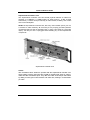
NOTE: The Supertrak100 controller card ships with two removable protective
labels that cover the audible alarm buzzer device and the battery which maintains
the non-volatile RAM memory. These labels must be removed prior to installing the
card.