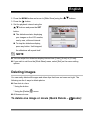
1
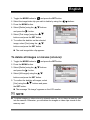
English 1. Toggle the MODE button to , and press the SET button. 2. Select the image/video clip you wish to delete by using the buttons. 3. Press the MENU button. 4. Select [Delete] using the and press the buttons button. 5. Select [This Image] using the buttons and press the SET button. 6. To confirm the deletion on the selected image, select [Yes] using the buttons and press the SET button. The next image/video clip appears. To delete all images or movies (at once): 1. Toggle the MODE button to , and press the SET button. 2. Press the MENU button. 3. Select [Delete] using the and press the buttons button. 4. Select [All Images] using the buttons and press the SET button. 5. To confirm the deletion all images, select [Yes] using the buttons and press the SET button. The message “No image” appears on the LCD monitor. NOTE To delete images or videos stored in internal memory, do not insert a memory card into the camera. Otherwise, you will delete the images or video clips stored on the memory card. -25-